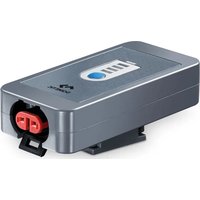
PerfectCharge BI 01 - Battery charger DOMETIC - Free user manual and instructions
Find the device manual for free PerfectCharge BI 01 DOMETIC in PDF.


| Product type | Battery capacity indicator |
| Brand | Dometic |
| Model | PerfectCharge BI 01 |
| Article number | 9600000094 |
| Dimensions (L x W x H) | 75 x 40 x 25 mm |
| Weight | 50 g |
| Battery voltage | 12 V |
| Operating current consumption | 20 mA max |
| Standby current consumption | 0.5 mA max |
| Protection rating | IP65 |
| Operating temperature | -20 °C to +50 °C |
| Storage temperature | -30 °C to +70 °C |
| Capacity display | 4 LEDs (25%, 50%, 75%, 100%) |
| Mounting | Wall mounting or mobile via wall bracket |
| Battery connection | Cable with terminals (red positive, black negative) |
| Compatible PerfectCharge chargers | MCP04, MCP07, MCP15 |
| Maintenance and cleaning | Clean with a damp cloth, without detergent or sharp objects |
| Warranty | Legal warranty, contact dealer or manufacturer |
| Certifications | CE |
Frequently Asked Questions - PerfectCharge BI 01 DOMETIC
User questions about PerfectCharge BI 01 DOMETIC
0 question about this device. Answer the ones you know or ask your own.
Ask a new question about this device
Download the instructions for your Battery charger in PDF format for free! Find your manual PerfectCharge BI 01 - DOMETIC and take your electronic device back in hand. On this page are published all the documents necessary for the use of your device. PerfectCharge BI 01 by DOMETIC.
USER MANUAL PerfectCharge BI 01 DOMETIC
natural_image
Line drawing of a rectangular electronic device with a ventilation grille and circular ports (no text or symbols)BI01
EN
Battery indicator
Installation and Operating Manual.....6
DE
Batterieindikator
Please read this instruction manual carefully before installation and first use, and store it in a safe place. If you pass on the product to another person, hand over this instruction manual along with it.
Table of contents
1 Explanation of symbols....7
2 General safety instructions....7
3 Scope of delivery ..... 11
4 Intended use .... 11
5 Technical description....12
6 Installing the battery indicator ....13
7 Using the battery indicator....14
8 Maintaining and cleaning the battery indicator....14
9 Warranty ....15
10 Disposal....15
11 Technical data....15
1 Explanation of symbols

DANGER!
Safety instruction: Failure to observe this instruction will cause fatal or serious injury.

WARNING!
Safety instruction: Failure to observe this instruction can cause fatal or serious injury.

CAUTION!
Safety instruction: Failure to observe this instruction can lead to injury.

NOTICE!
Failure to observe this instruction can cause material damage and impair the function of the product.

NOTE
Supplementary information for operating the product.
2 General safety instructions
2.1 General safety
The manufacturer accepts no liability for damage in the following cases:
• Faulty assembly or connection
- Damage to the product resulting from mechanical influences and excess voltage
• Alterations to the product without express permission from the manufacturer
• Use for purposes other than those described in the operating manual
Note the following basic safety information when using electrical devices to protect against:
- Electric shock
- Fire hazards
•Injury
2.2 General safety

DANGER!
- In the event of fire, use a fire extinguisher which is suitable for electrical devices.

WARNING!
- Only use the device as intended.
- Ensure that the red and black terminals never come into contact.
- If you disassemble the device:
- Detach all connections.
- Make sure that no voltage is present on any of the inputs and outputs
- The device may not be used if the device itself or the connection cable are visibly damaged.
- If this device's power cable is damaged, it must be replaced by the manufacturer, customer service or a similarly qualified person in order to prevent safety hazards.
- This device may only be repaired by qualified personnel. Inadequate repairs may cause serious hazards.
- The device may not be opened by improper means, as otherwise protection class IP65 can no longer be guaranteed.
- This device can be used by children aged 8 years or over, as well as by persons with diminished physical, sensory or mental capacities or a lack of experience and knowledge, providing they are supervised, or have been taught how to use the device safely and are aware of the resulting risks.
• Electrical devices are not toys.
Always keep and use the device out of the reach of children.
- Children must be supervised to ensure that they do not play with the device.

NOTICE!
- Before start-up, check that the voltage specification on the type plate is the same as that of the power supply.
- Ensure that other objects cannot cause a short circuit on the contacts of the device.
- Store the device in a dry and cool place.
2.3 Safety when installing the device

DANGER!
- Never mount the device anywhere where there is a risk of gas or dust explosion.

NOTICE!
- Do not expose the device to a heat source (such as direct sunlight or heating). Avoid additional heating of the device in this way.
- Set up the device in a dry location where it is protected against splashing water.
2.4 Safety when connecting the device electronically

DANGER! Danger of electrocution
• For connection on boats:
If electrical devices are incorrectly connected on boats, corrosion damage to the boat might occur. Have the device connected by a specialist (marine) electrician.
- If you are working on electrical systems, ensure that there is somebody close at hand who can help you in emergencies.

WARNING!
• Make sure that the lead has a sufficient cross-section.
- Lay the cables so that they cannot be damaged by the doors or the bonnet.
Crushed cables can lead to serious injury.

CAUTION!
- Lay the cables so that they cannot be tripped over or damaged.

NOTICE!
- Use ductwork or cable ducts if it is necessary to lay cables through metal panels or other panels with sharp edges.
- Do not lay the cable so that it is loose or heavily kinked.
- Fasten the cables securely.
- Do not pull on the cables.
2.5 Operating the device safely

WARNING!
- Only use the device in closed, well-ventilated rooms.
- Do not use the device with lead-acid batteries in enclosed spaces. These batteries give off explosive hydrogen gas that can be ignited by sparks on electrical connections.

CAUTION!
- Do not operate the device
– In salty, wet or damp environments
– In the vicinity of corrosive fumes
– In the vicinity of combustible materials
– In areas where there is a danger of explosions.
- Before starting the device, ensure that the power supply line and the plug are dry.
• Always disconnect the power supply when working on the device. - Please observe that parts of the device may still conduct voltage even if the fuse has blown.
- Do not disconnect any cables when the device is still in use.

NOTICE!
- Ensure good ventilation.
2.6 Safety precautions when handling batteries

WARNING!
- Batteries contain aggressive and caustic acids. Avoid battery fluid coming into contact with your body. If your skin does come into contact with battery fluid, wash the part of your body in question thoroughly with water.
If you sustain any injuries from acids, contact a doctor immediately.

CAUTION!
- When working on the batteries, do not wear any metal objects such as watches or rings.
Lead acid batteries can cause short circuits which can cause serious injuries.
• Danger of explosions!
Never attempt to charge a frozen or defective battery.
Place the battery in a frost-free area and wait until the battery has acclimatised to the ambient temperature. Then start the charging process.
- Wear goggles and protective clothing when you work on batteries. Do not touch your eyes when you are working on the battery.
- Do not smoke and ensure that no sparks can arise in the vicinity of the engine or battery.

NOTICE!
- Only use rechargeable batteries.
- Prevent any metal parts from falling on the battery. This can cause sparks or short-circuit the battery and other electrical parts.
- Make sure the polarity is correct when connecting the battery.
- Follow the instructions of the battery manufacturer and those of the manufacturer of the system or vehicle in which the battery is used.
- If you need to remove the battery, first disconnect the earth connection. Disconnect all connections and all consumers from the battery before removing it.
3 S c o p e o f d
No. in
fig. 1,
page 3
Description
1 BI01 battery indicator
2 Connection cable with cable lugs
3 Wall bracket for the battery indicator
— Installation and operating manual
4 Intended use
The BI01 battery indicator (ref no. 9600000094) is used as a capacity display for a lead-acid battery. It can be mounted in one place, or is also suitable for mobile use.
As an option, it can also be used together with the MCP04, MCP07 and MCP15 battery chargers.
5 Technical description
The battery indicator shows the capacity of the battery, and can be connected to the battery permanently. When it indicates the battery is empty, a MCP04, MCP07 or MCP15 PerfectCharge battery charger can be connected to the battery indicator, and the battery can be charged directly.
The battery indicator can be attached to a wall, in a vehicle or to the wall bracket of a battery charger using the wall bracket.
5.1 Operating elements
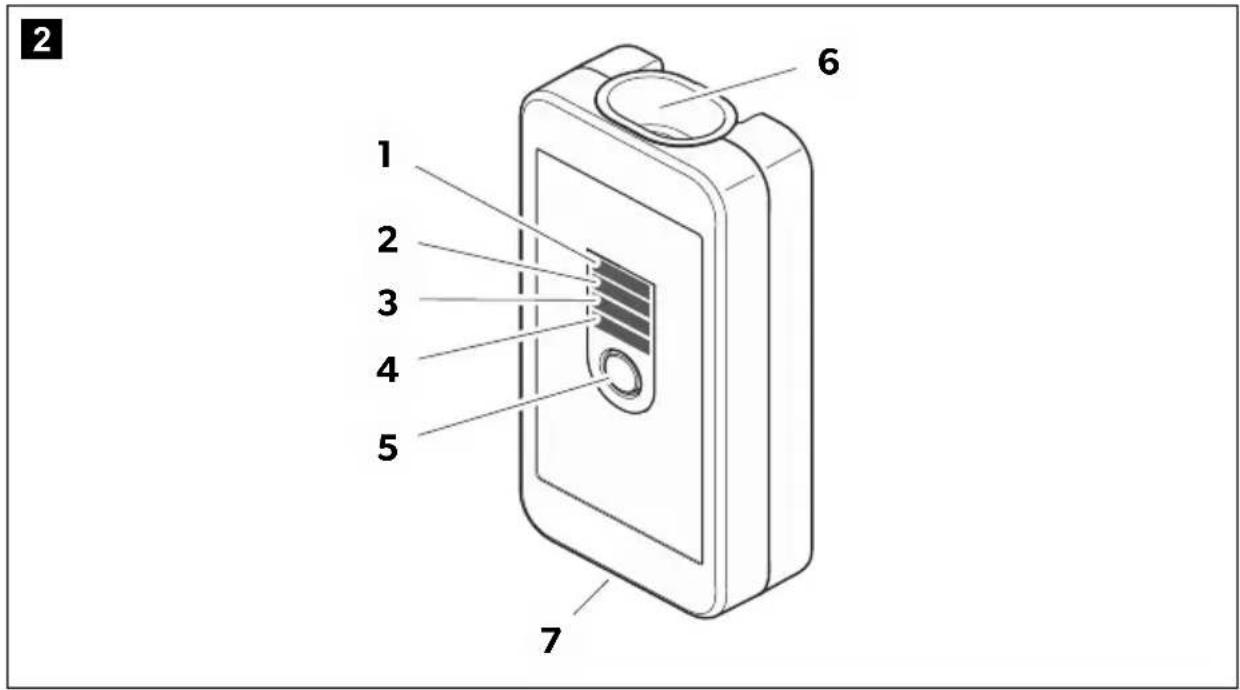
| No. in fig. 2, Description Description page 3 | |
| 1 LED 1 The LEDs indicate the battery voltage using lamps, as follows: | |
| 2 LED 2 | LED 4: Battery voltage < 12.4 V (25 % capacity) |
| 3 LED 3 | LED 3 and 4: Battery voltage > 12.4 V (50 % capacity) |
| 4 LED 4 | LED 2, 3 and 4: Battery voltage > 12.6 V (75 % capacity) |
| LED 1, 2, 3 and 4: Battery voltage > 12.8 V (100 % capacity) | |
| 5 Pushbutton Switches the LED display on and off | |
| 6 Connection socket For connecting the connection cable to the battery | |
| 7 Connection plug Connection to the battery charger | |
6 Installing the battery indicator
When selecting the installation location for the battery indicator, observe the following information:
- The device must be installed in a located protected from moisture.
- The device may not be installed in areas containing flammable materials.
- The device may not be installed in dusty environments.
- The place of installation must be well ventilated. A ventilation system must be available for installations in small, enclosed spaces.
- The device must be installed on a level and sufficiently sturdy surface.
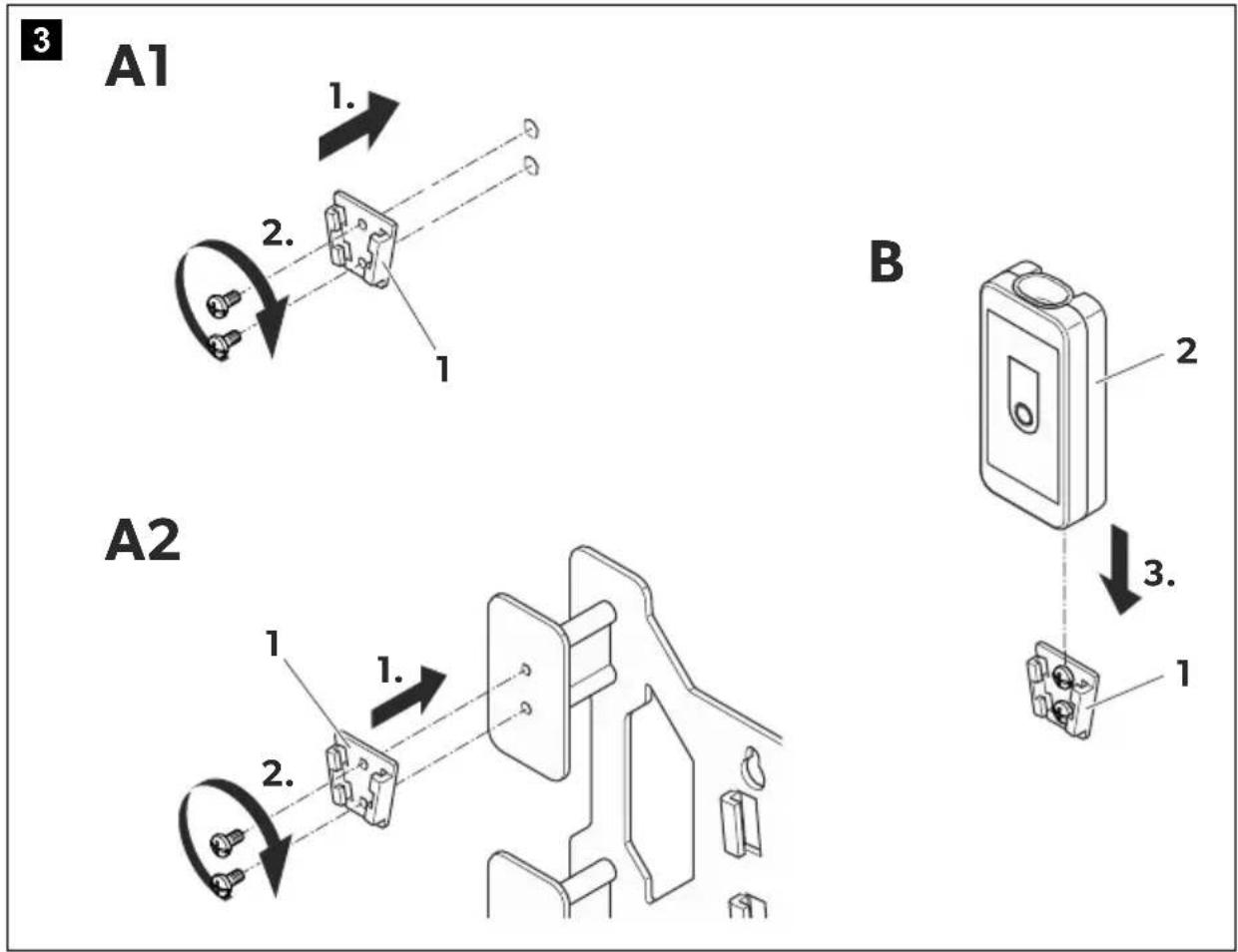
Attach the battery indicator as follows (fig. 3, page 4):
▶Attach the adapter (1):
- t o a w a l l
– at a suitable location in the vehicle (e.g. in the cockpit or the driver's cabin) - or to the wall bracket for a PerfectCharge battery charger
▶ Slide the battery indicator (2) into the adapter (1).
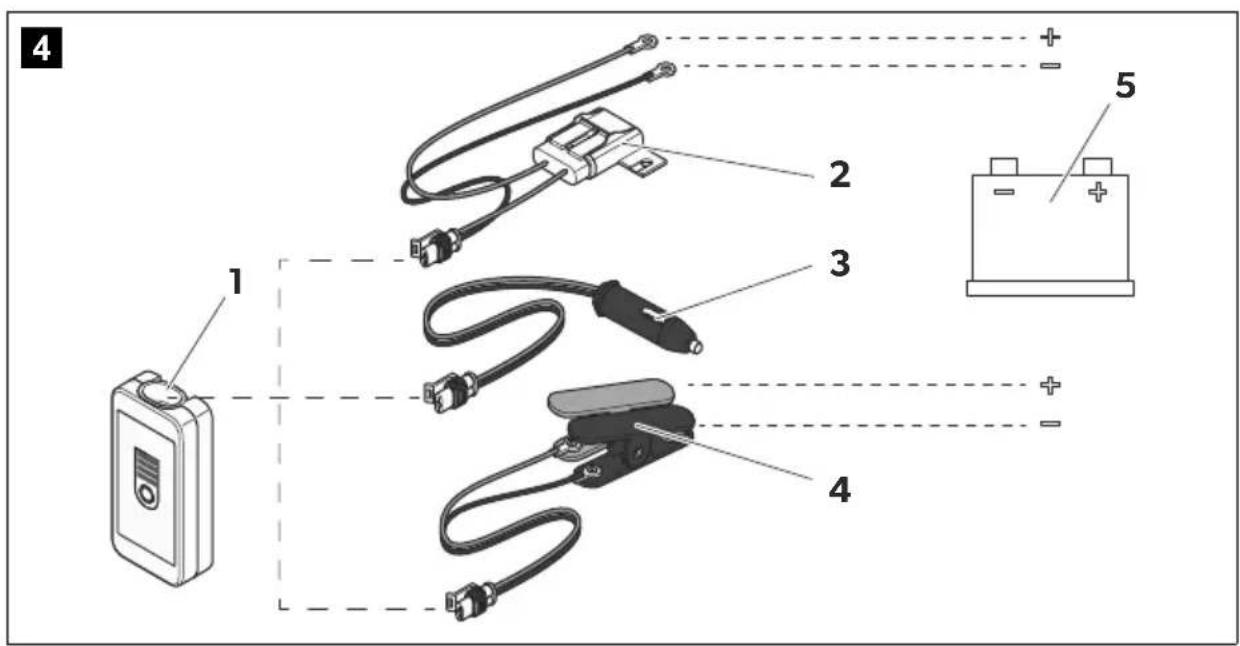
Connect the battery indicator as follows (fig. 4, page 4):

NOTICE!
Make sure you do not reverse the polarity.
- Positive battery terminal: red terminal
- Negative battery terminal: black terminal
Incorrect polarity can damage the battery indicator.
▶ Insert the plug of the preferred connection cable into the socket (1) of the battery indicator:
- Connection cable with the cable lugs (2) (included in the scope of delivery)
- Connection cable with the 12 V plug (3) (included in the scope of delivery of the battery charger)
- Connection cable with the battery terminals (4) (included in the scope of delivery of the battery charger)
▶ Connect the connection cable to the battery (5) or to the battery charging points provided in the vehicle.
√ When the LED display is switched on, the battery indicator displays the battery capacity (see chapter "Operating elements" on page 12).
7 Using the battery indicator
The battery indicator is switched on and off using the button (fig. 2 5, page 3). It displays the battery capacity (see chapter "Operating elements" on page 12).
When it indicates the battery is empty, a MCP04, MCP07 or MCP15 PerfectCharge battery charger can be connected to the battery indicator, and the battery can be charged directly.
▶Check that the battery is in good condition.
▶Check the following:
– The battery housing for damage
– The fluid level in the battery
Fill the battery with the medium specified by the manufacturer, if necessary.
- The pole contacts
Clean off any dirt present.
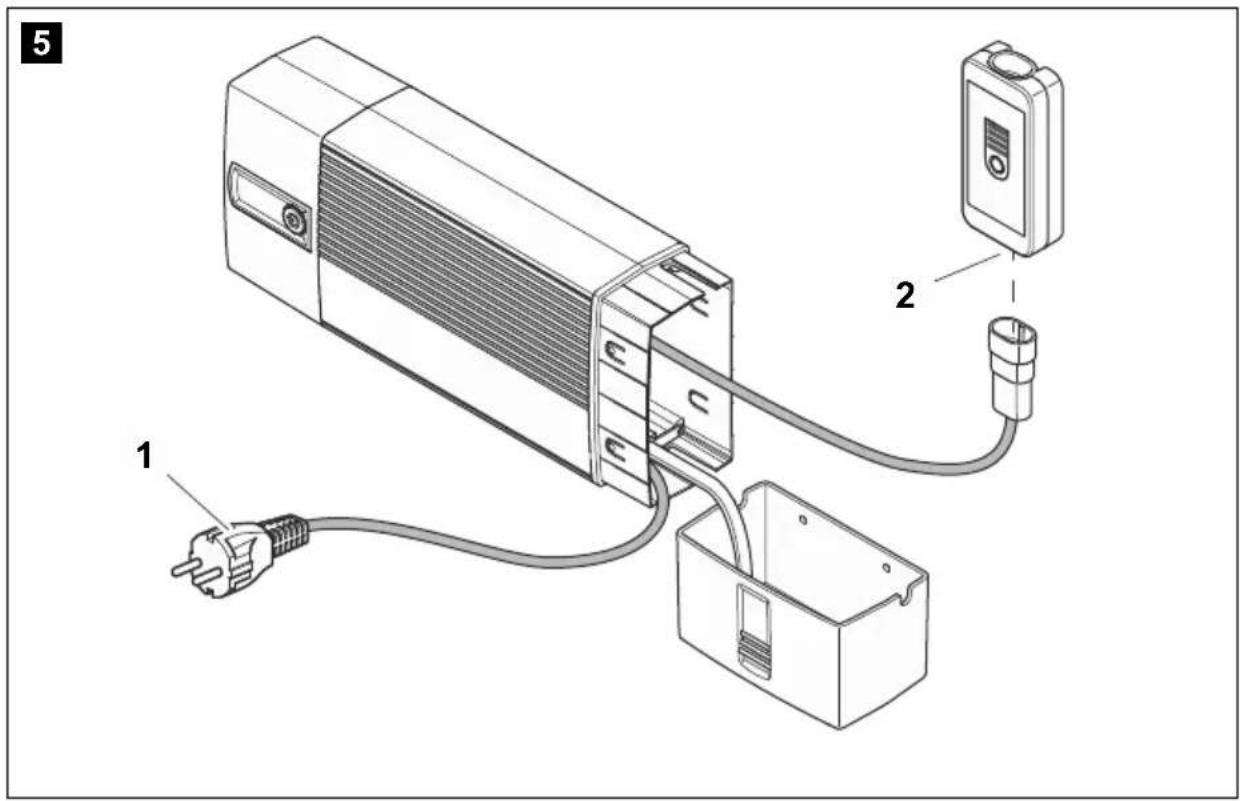
Connecting the battery charger (fig. 5, page 5)

WARNING!
Observe the operating manual for the battery charger.
▶ Connect the power cable (1) for the battery charger to the 230 V AC mains.
▶ Connect the battery charger to the plug (2) for the battery indicator.
▶ Start the battery charger.
8 Maintaining and cleaning the battery indicator

NOTICE!
Do not use sharp or hard objects or cleaning agents for cleaning as these may damage the product.
▶Occasionally clean the product with a damp cloth.
9 W a r r a n t y
The statutory warranty period applies. If the product is defective, please contact the manufacturer's branch in your country (see the back of the instruction manual for the addresses) or your retailer.
For repair and guarantee processing, please send the following items:
- Defect components
• A copy of the receipt with purchasing date - A reason for the claim or description of the fault
10 Disposal
▶ Place the packaging material in the appropriate recycling waste bins wherever possible.

If you wish to finally dispose of the product, ask your local recycling centre or specialist dealer for details about how to do this in accordance with the applicable disposal regulations.
11 Technical data
| PerfectCharge BI01 | |
| Ref. no.: 9600000094 | |
| Battery voltage: 12 V | |
| Current: max. 20 mA | |
| Power consumption in stand-by: max. 0.5 mA | |
| Protection class: | IP65 |
| Ambient temperature for operation: | -20 °C to +50 °C |
| Ambient temperature for storage | -30 °C to +70 °C |
| Dimensions W x D x H: | 75 x 40 x 25 mm |
| Weight: | 50 g |
| Certifications: | CE |
5 Description technique
▶ Fest adapteret (1):
dometic.com/sales-offices
- BI01
- Battery indicator
- Batterieindikator
- Table of contents
- Explanation of symbols
- DANGER!
- WARNING!
- CAUTION!
- NOTICE!
- NOTE
- General safety instructions
- General safety
- General safety
- • Electrical devices are not toys.
- Safety when installing the device
- Safety when connecting the device electronically
- DANGER! Danger of electrocution
- • For connection on boats:
- Operating the device safely
- Safety precautions when handling batteries
- • Danger of explosions!
- S c o p e o f d
- Intended use
- Technical description
- Operating elements
- Installing the battery indicator
- Using the battery indicator
- Connecting the battery charger (fig. 5, page 5)
- Maintaining and cleaning the battery indicator
- W a r r a n t y
- Disposal
- Technical data
- Description technique
Brand : DOMETIC
Model : PerfectCharge BI 01
Category : Battery charger