
CBK-3620XS - Camera SONY - Free user manual and instructions
Find the device manual for free CBK-3620XS SONY in PDF.
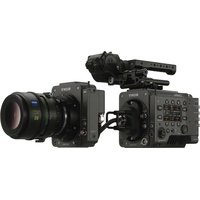


| Product Type | Imager Extension Kit |
| Brand | Sony |
| Model | CBK-3620XS |
| Compatibility | MPC-3628, MPC-3626 (V2.0 or later), MPC-3610 (V6.3 or later) |
| Extension Length | 3 m or 12 m (depending on the imager block adapter used) |
| Supply Voltage | 24 V DC (via Fischer 3-pin connector) |
| Power Consumption | Approximately 3.0 W |
| Weight (imager block adapter 3 m) | 1.9 kg |
| Weight (imager block adapter 12 m) | 3.4 kg |
| Weight (camera body adapter) | 0.4 kg |
| Input Connectors | 24 V IN (Fischer 3-pin), MONITOR IN (BNC) |
| Output Connectors | 24 V OUT (Fischer 3-pin), MONITOR OUT (BNC) |
| Operating Temperature | 0 °C to 40 °C |
| Storage Temperature | -20 °C to +60 °C |
| Supplied Accessories | Imager block fixing screws (x4), protective cap, instruction manual, warranty |
| Main Functions | Imager extension up to 12 m, monitor signal transmission and 24 V power for lens servo |
| Maintenance and Cleaning | Clean with a soft dry cloth; do not use solvents, air blowers, or high-pressure cleaners |
| Safety | Class 1 laser product (IEC 60825-1:2014); do not use optical instruments |
| Spare Parts and Repairability | Contact Sony after-sales service; electrolytic capacitor lifespan: approximately 5 years |
| General Information | Not suitable for use in places where children are present; may cause radio interference in domestic environment |
Frequently Asked Questions - CBK-3620XS SONY
User questions about CBK-3620XS SONY
0 question about this device. Answer the ones you know or ask your own.
Ask a new question about this device
Download the instructions for your Camera in PDF format for free! Find your manual CBK-3620XS - SONY and take your electronic device back in hand. On this page are published all the documents necessary for the use of your device. CBK-3620XS by SONY.
USER MANUAL CBK-3620XS SONY
Operating Instructions EN
© 2022 Sony Corporation
5047828020
For safety
① Camera body adapter
Notice
Before operating the unit, please read this manual thoroughly and retain it for future reference.
FOR CUSTOMERS IN CANADA (INCLUDING IN THE PROVINCE OF QUEBEC) ALL INSTRUCTIONS AND STATEMENTS WHICH ARE NECESSARY FOR CANADIAN CUSTOMERS ARE PROVIDED IN ENGLISH AND FRENCH. OTHER INSTRUCTIONS AND STATEMENTS NOT PROVIDED IN ENGLISH AND FRENCH ARE NOT FOR CANADIAN CUSTOMERS (INCLUDING IN THE PROVINCE OF QUEBEC).
This equipment is not suitable for use in locations where children are likely to be present.
For the customers in the U.S.A.
This equipment has been tested and found to comply with the limits for a Class A digital device, pursuant to part 15 of the FCC Rules. These limits are designed to provide reasonable protection against harmful interference when the equipment is operated in a commercial environment. This equipment generates, uses and can radiate radio frequency energy and, if not installed and used in accordance with the instruction manual, may cause harmful interference to radio communications. Operation of this equipment in a residential area is likely to cause harmful interference in which case the user will be required to correct the interference at his own expense.
You are cautioned that any changes or modifications not expressly approved in this manual could void your authority to operate this equipment.
If you have any questions about this product, you may call: Sony Customer Information Service Center 1-800-222-7669 or http://www.sony.com/
Supplier's Declaration of Conformity
Trade Name : SONY
Model: CBK-3620XS
Responsible party: Sony Electronics Inc.
Address: 16535 Via
Esprillo, San Diego, CA 92127 U.S.A.
Telephone: 858-942-2230
This device complies with part 15 of the FCC Rules. Operation is subject to the following two conditions: (1) This device may not cause harmful interference, and (2) this device must accept any interference received, including interference that may cause undesired operation.
For the customers in Canada
CAN ICES-3 (A)/NMB-3(A)
WARNING
Operation of this equipment in a residential environment could cause radio interference.
ATTENTION
The electromagnetic fields at the specific frequencies may influence the picture and sound of this unit.
For the customers in Europe
This apparatus shall not be used in the residential area.
Caution
Use of controls or adjustments or performance of procedures other than those specified herein may result in hazardous radiation exposure.
Caution
The use of optical instruments with this product will increase eye hazard.
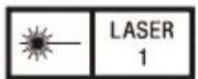
IEC 60825-1:2014
CLASS 1 LASER
PRODUCT
For the customers in the U.S.A.
SONY LIMITED WARRANTY-
Please visit www.sony.com/psa/warranty for important information and complete terms and conditions of Sony's limited warranty applicable to this product.
For the customers in Canada
SONY LIMITED WARRANTY -
Please visit www.sony.com/psa/warranty for important information and complete terms and conditions of Sony's limited warranty applicable to this product.
For the customers in Europe
Sony Europe B.V. - Standard Warranty and Exceptions on Standard Warranty. Please visit https://pro.sony/support-services/primesupport/support-professional-solutions-europe-standard-product-warranty for important information and complete terms and conditions.
For the customers in Korea
SONY LIMITED WARRANTY - Please visit https://pro.sony/ko_KR/support-services for important information and complete terms and conditions of Sony's limited warranty applicable to this product.
Usage Precautions
- The camera must be updated to the following software version or later to use this unit. MPC-3628/MPC-3626: V2.0 or later MPC-3610: V6.3 or later Disconnect the unit and reassemble the camera to its normal state before updating.
- The start up time may take longer when starting for the first time after replacing the imager block. Do not turn the unit off until startup has finished.
- When this unit is connected to an 8K imager block, it takes about 30 seconds each time before the camera starts up.
- If the unit is suddenly taken from a cold to a warm location, or if ambient temperature suddenly rises, moisture may form on the outer surface of the unit and/or inside of the unit. This is known as condensation. If condensation occurs, turn off the unit and wait until the condensation clears before operating the unit. Operating the unit while condensation is present may damage the unit.
- The life expectancy of the electrolytic capacitor is about 5 years under normal operating temperatures and normal usage (8 hours per day; 25 days per month). If usage exceeds the above normal usage frequency, the life expectancy may be reduced correspondingly.
- Using the unit with dirt or dust adhering to the connector between the camera body and sensor block may cause a failure or malfunction. When storing, use the supplied protection cap to prevent dust from adhering to the connector.
To prevent electromagnetic interference from portable communications devices
The use of portable telephones and other communications devices near this unit can result in malfunctions and interference with audio and video signals.
It is recommended that the portable communications devices near this unit be powered off.
Features
The CBK-3620XS is an imager extension kit that can be connected to an MPC-3628/MPC-3626/MPC-3610 (sold separately). The extension can be used in various shooting situations without degrading the performance of the imager.
• Extension up to 12 m (39.4 ft)
The CBK-3620XS attaches between the MPC-3628/MPC-3626/MPC-3610 and the imager block to extend the block by approximately 3 m (9.8 ft) or 12 m (39.4 ft).
• Supports connection to monitor and other external devices
In addition to the imager signal, it relays a monitor signal for connection with an external monitor connected to the imager block, and relays 24 V power which can be used to power a lens servo.
Location and Function of Parts
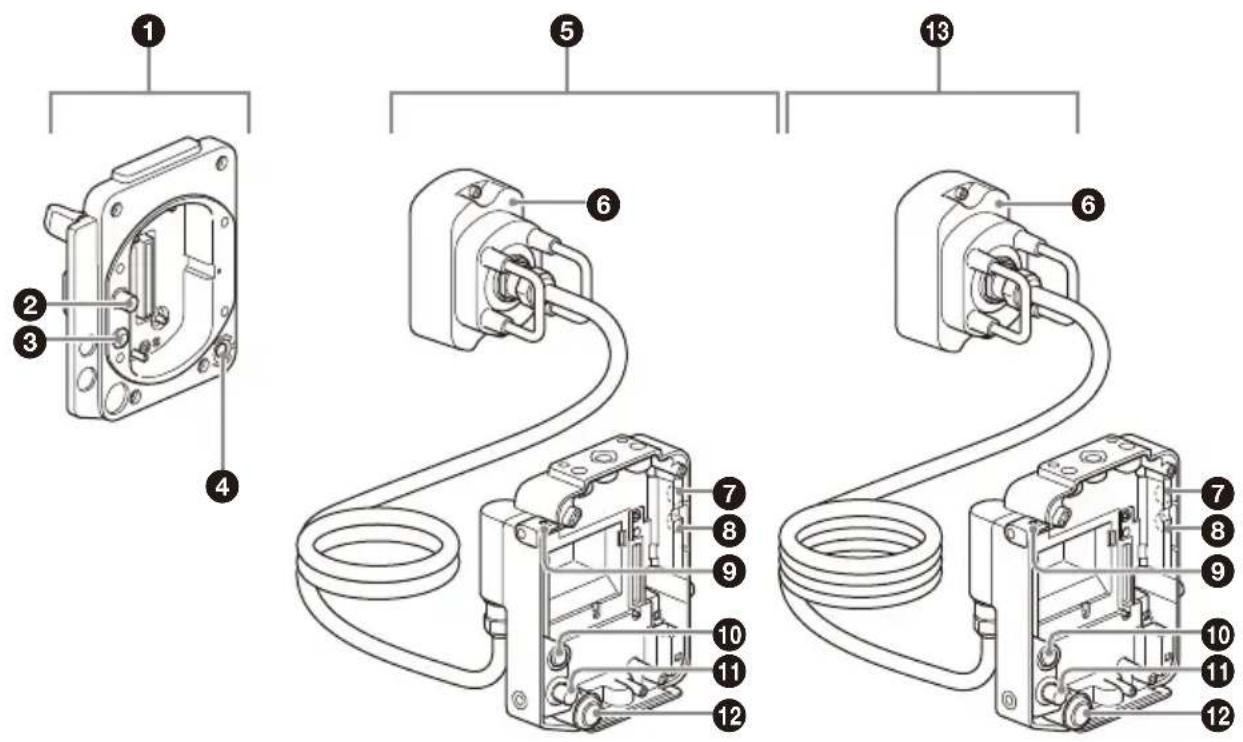
① Camera body adaptor
Adaptor that attaches to the camera body to extend the imager block.
② MONITOR IN connector (BNC type)
Connector that inputs the relayed monitor signal to the imager block adaptor.
③ 24 V IN connector (Fischer 3-pin)
DC power supply input connector that supplies the external power supply to the imager block adaptor.
④ ASSIGN (assignable) button 3
Toggles the assigned function between on/off (enable/disable) or activates the function with each press.
The lamp is lit orange when the assigned function is on (enabled) or activated.
For details about function assignment, refer to the MPC-3628/MPC-3626/MPC-3610 Operating Instructions.
⑤ Imager block adaptor (3 m (9.8 ft))
Adaptor (with extension cable) that attaches to the imager block removed from the camera.
6 Receiver
Receiver adaptor that connects to the camera body adaptor.
⑦ ASSIGN (assignable) button 5
Toggles the assigned function between on/off (enable/disable) or activates the function with each press.
The lamp is lit orange when the assigned function is on (enabled) or activated.
For details about function assignment, refer to the MPC-3628/MPC-3626/MPC-3610 Operating Instructions.
⑧ ASSIGN (assignable) button 6
Toggles the assigned function between on/off (enable/disable) or activates the function with each press.
The lamp is lit orange when the assigned function is on (enabled) or activated. For details about function assignment, refer to the MPC-3628/MPC-3626/MPC-3610 Operating Instructions.
⑨ Tape measure hook attachment hole
Hole for attaching a tape measure hook. You can remove the tape measure hook from the camera and attach it here.
10 24 V OUT connector (Fischer 3-pin)
External power supply output connector. It outputs the power supply connected to the 24 V IN connector of the camera body adaptor.
It can be connected as an external power supply for a monitor or lens servo. It can also be used to input a REC Trigger signal.
Notes
- Depending on the output current and the length of the imager block adaptor, the voltage of the power supply output from this connector will be lower than the voltage of the power supply connected to the 24 V IN connector.
- Imager block adaptor (3 m (9.8 ft)): Approximately 0.25 V drop at 1 A output or 0.50 V drop at 2 A output
- Imager block adaptor (12 m (39.4 ft)): Approximately 1.00 V drop at 1 A output or 2.00 V drop at 2 A output
- For details about Fischer 3-pin connector specifications, refer to the MPC-3628/MPC-3626/MPC-3610 Operating Instructions.
1 MONITOR OUT connector (BNC type)
Monitor signal output connector. Outputs the video signal connected to the MONITOR IN connector of the camera body adaptor.
12 ASSIGN (assignable) button 7
Toggles the assigned function between on/off (enable/disable) or activates the function with each press.
The LEDs at both ends of the imager block adaptor are lit orange when the assigned function is on (enabled) or activated.
For details about function assignment, refer to the MPC-3628/MPC-3626/MPC-3610 Operating Instructions.
13 Imager block adaptor (12 m (39.4 ft))
Adaptor (with extension cable) that attaches to the imager block removed from the camera.
Note
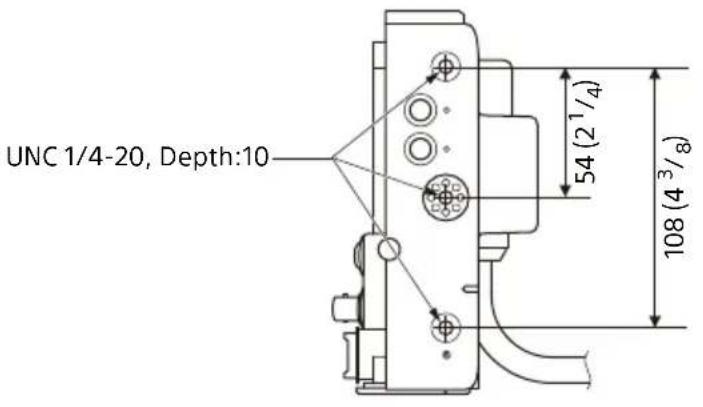
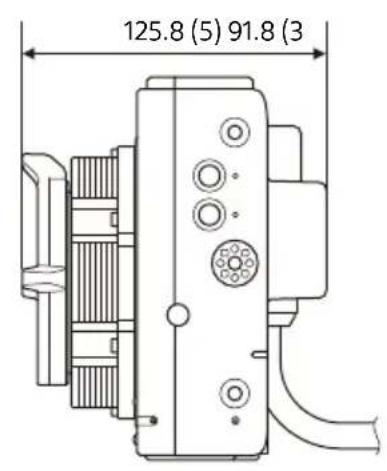
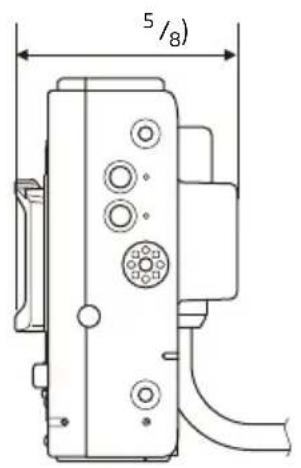
For details about accessory mounting holes, see the external dimensions drawing at the back of this document.
Attaching to the Camera
Notes
- The camera must be updated to the following software version or later to use this unit. MPC-3628/MPC-3626: V2.0 or later MPC-3610: V6.3 or later Disconnect the unit and reassemble the camera to its normal state before updating.
- Turn off the camera and wait 30 minutes or longer to allow it to cool sufficiently before attaching/removing the unit. Perform the operation quickly in a dust-free location to prevent dust and other matter from entering the camera and adaptors. • Take care not to damage the connectors and parts.
- A data transfer error may occur if there is any dust or other matter adhering to the adaptor connectors. If this occurs, clean the connector.
- The CBK-3610XS imager block adaptor and extension cable cannot be attached to the CBK-3620XS camera body adaptor.
- A 6K imager block can also be attached to the CBK-3620XS imager block adaptor.
1 Remove the four hex screws on the bottom and remove the bottom plate (①), then remove the four hex screws on the front and remove the imager block from the camera body (②).
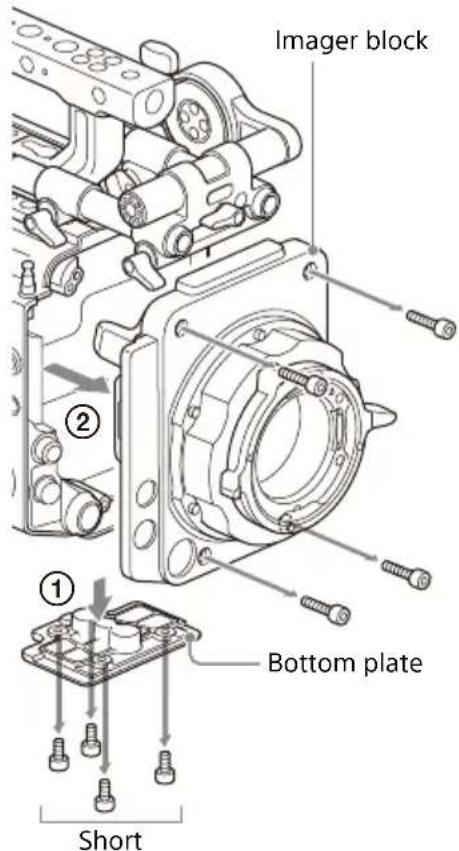
Note
Orient the lens side face down when placing the removed imager block on a flat surface. If the heat sink side is placed face down, the flange back distance (flange focal distance) may change.
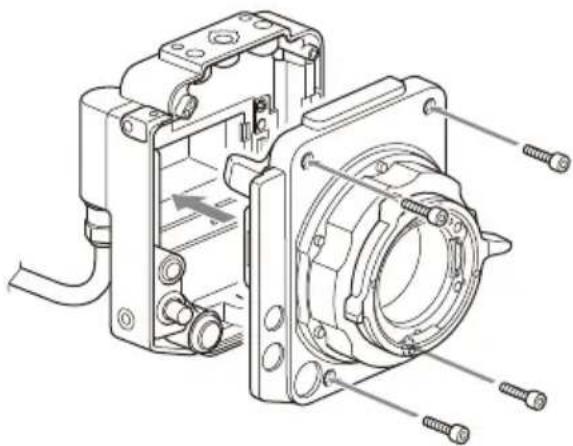
2 Attach the imager block, removed in step 1, to the imager block adaptor.
Align and attach using the four supplied hex screws, and tighten using a hex wrench (tightening torque of 1.4 N·m).
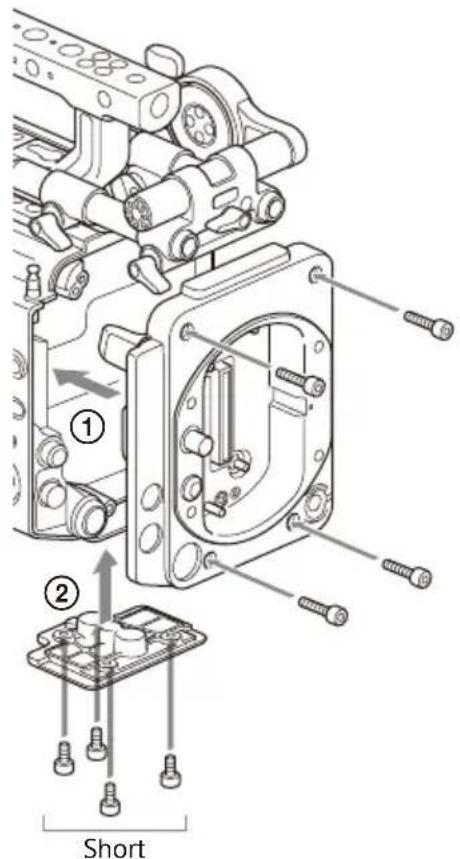
3 Attach the camera body adaptor (①) and then attach the bottom plate (②).
Align and attach using the eight hex screws, removed in step 1, and tighten using a hex wrench (tightening torque of 1.4 N·m).
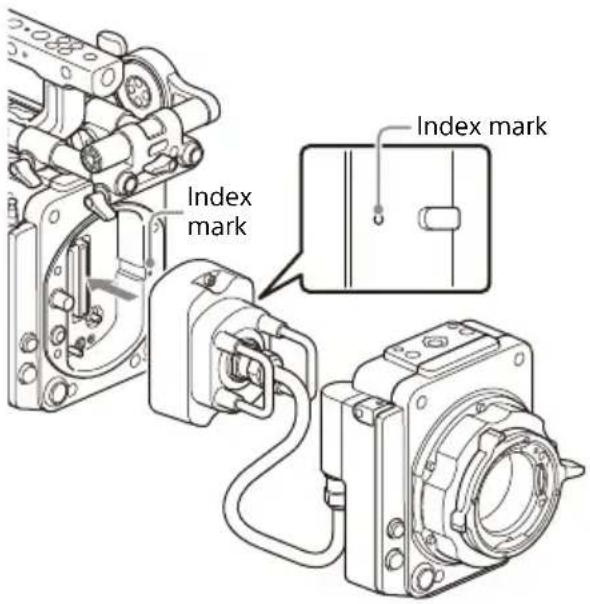
4 Attach the imager block adaptor receiver to the camera body adaptor.
Align with the index marks on the sides of the receiver, and attach using the two hex screws, and tighten using a hex wrench (tightening torque of 1.4 N·m).
Removing from Camera
1. Remove the receiver from the camera body adaptor. 2. Remove the camera body adaptor from the camera body. 3. Remove the imager block from the imager block adaptor.
Note
Orient the lens side face down when placing the removed imager block on a flat surface. If the heat sink side is placed face down, the flange back distance (flange focal distance) may change.
4. Attach the imager block, removed in step 3, to the camera body (tightening torque of 1.4 N·m).
Using the protection cap
The protection cap is used to protect the built-in connector during storage and transport.
1. Attach the protection cap to the imager block adaptor.
Align and attach using the four hex screws, and tighten using a hex wrench (tightening torque of 1.4 N·m).
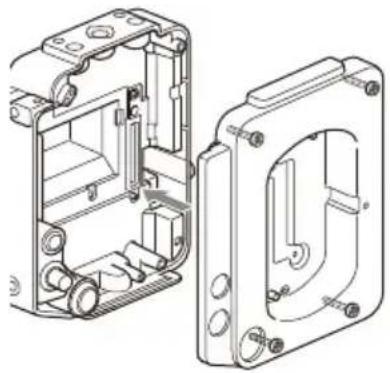
2. Attach the receiver to the protection cap.
Align with the index marks on the sides of the receiver, and attach using the two hex screws, and tighten using a hex wrench (tightening torque of 1.4 N·m).
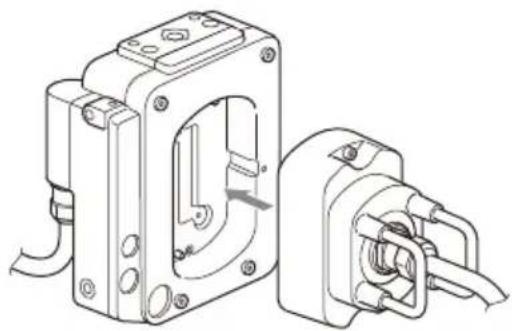
Note
The protection cap is a dedicated accessory for the CBK-3620XS. Do not use the protection cap with the CBK-3610XS. Doing so may damage the unit.
About the startup time
- When an 8K imager block is extended by connecting the CBK-3620XS, the camera startup time is about 20 seconds longer than in the unextended state.
- When the CBK-3620XS is connected to the camera for the first time, the initial camera startup time may be longer.
Inspection and Maintenance
Inspection before shooting
Inspect the unit before shooting to make sure that the system is operating normally.
Cleaning
Wipe off dirt on the exterior and any metallic powder created by attachment/removal using a soft, dry cloth. In extreme cases, use a cloth moistened in a little neutral detergent, then wipe dry.
Do not use organic solvents, such as alcohol or thinners, as these may cause discoloration or other damage to the finish of the unit.
Do not clean the unit with an air blower. Dust and other particles suspended in the air may enter the unit and cause a malfunction. Also, refrain from cleaning with high air pressure equipment, such as an air duster, as these may damage optical components.
- Using the unit with dirt or dust adhering to the connector between the camera body and sensor block may cause a failure or malfunction. When storing, use the supplied protection cap to prevent dust from adhering to the connector.
- The cable may become twisted and tangled if coiled in a single loop. Wind the cable in a figure of eight.
Notes on Device Connections
- A Sony audio wireless receiver cannot be used for connecting the CBK-3620XS.
Notes on Handling Cables
- Do not crush, bend, or damage the cable.
- Be careful when coiling and installing the cable so that the cable is not subject to strong twisting.
- Minimum coil diameter for guaranteed cable operation: 140 mm (5 5/8 inches) or longer
Specifications
General
Power consumption
Approx. 3.0 W
Operating temperature
0 °C to 40 °C (32 °F to 104 °F)
Storage temperature
-20 °C to +60 °C (-4 °F to +140 °F)
External dimensions
Refer to the back of this document.
Mass
Imager block adaptor (3 m (9.8 ft))
1.9 kg (4 lb 3 oz)
Imager block adaptor (12 m (39.4 ft))
3.4 kg (7 lb 7.9 oz)
Camera body adaptor
0.4 kg (14 oz)
Reference mass
Imager block adaptor (excluding cable)
Approx. 0.7 kg (1 lb 8.7 oz)
8K imager block
PL mount: Approx. 1.4 kg (3 lb 1.4 oz)
E mount: Approx. 1.0 kg (2 lb 3.3 oz)
6K imager block
PL mount: Approx. 1.3 kg (2 lb 14 oz)
E mount: Approx. 0.9 kg (2 lb)
Input/output connectors
24 V IN connector (Fischer 3-pin) (1)
24 V OUT connector (Fischer 3-pin) (1)
MONITOR IN connector (BNC type) (1)
MONITOR OUT connector (BNC type) (1)
Supplied accessories
Imager block attachment screws
(7-683-423-04) (4)
Protection cap (1)
Operating Instructions (1)
Warranty (1)
Design and specifications are subject to change without notice.
Notes
- Always verify that the unit is operating properly before use. SONY WILL NOT BE LIABLE FOR DAMAGES OF ANY KIND INCLUDING, BUT NOT LIMITED TO, COMPENSATION OR REIMBURSEMENT ON ACCOUNT OF THE LOSS OF PRESENT OR PROSPECTIVE PROFITS DUE TO FAILURE OF THIS UNIT, EITHER DURING THE WARRANTY PERIOD OR AFTER EXPIRATION OF THE WARRANTY, OR FOR ANY OTHER REASON WHATSOEVER.
- SONY WILL NOT BE LIABLE FOR CLAIMS OF ANY KIND MADE BY USERS OF THIS UNIT OR MADE BY THIRD PARTIES.
- SONY WILL NOT BE LIABLE FOR THE TERMINATION OR DISCONTINUATION OF ANY SERVICES RELATED TO THIS UNIT THAT MAY RESULT DUE TO CIRCUMSTANCES OF ANY KIND.
Français
4 ASSIGN button (assignable) 3
⑦ ASSIGN button (assignable) 5
8 ASSIGN button (assignable) 6
12 ASSIGN button (assignable) 7
Note
3 Bring the
Note
Note
Power consumption Approx. 3.0 W
11 MONITOR OUT connector (BNC type)
Note
① Camera body adapter
Short screw
2 Attach the receiver to the protective cover.
Caution
Note
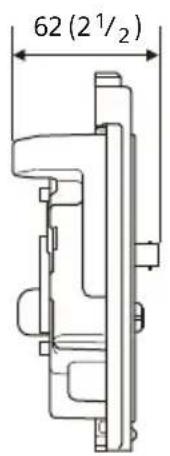
Unit: mm (inches)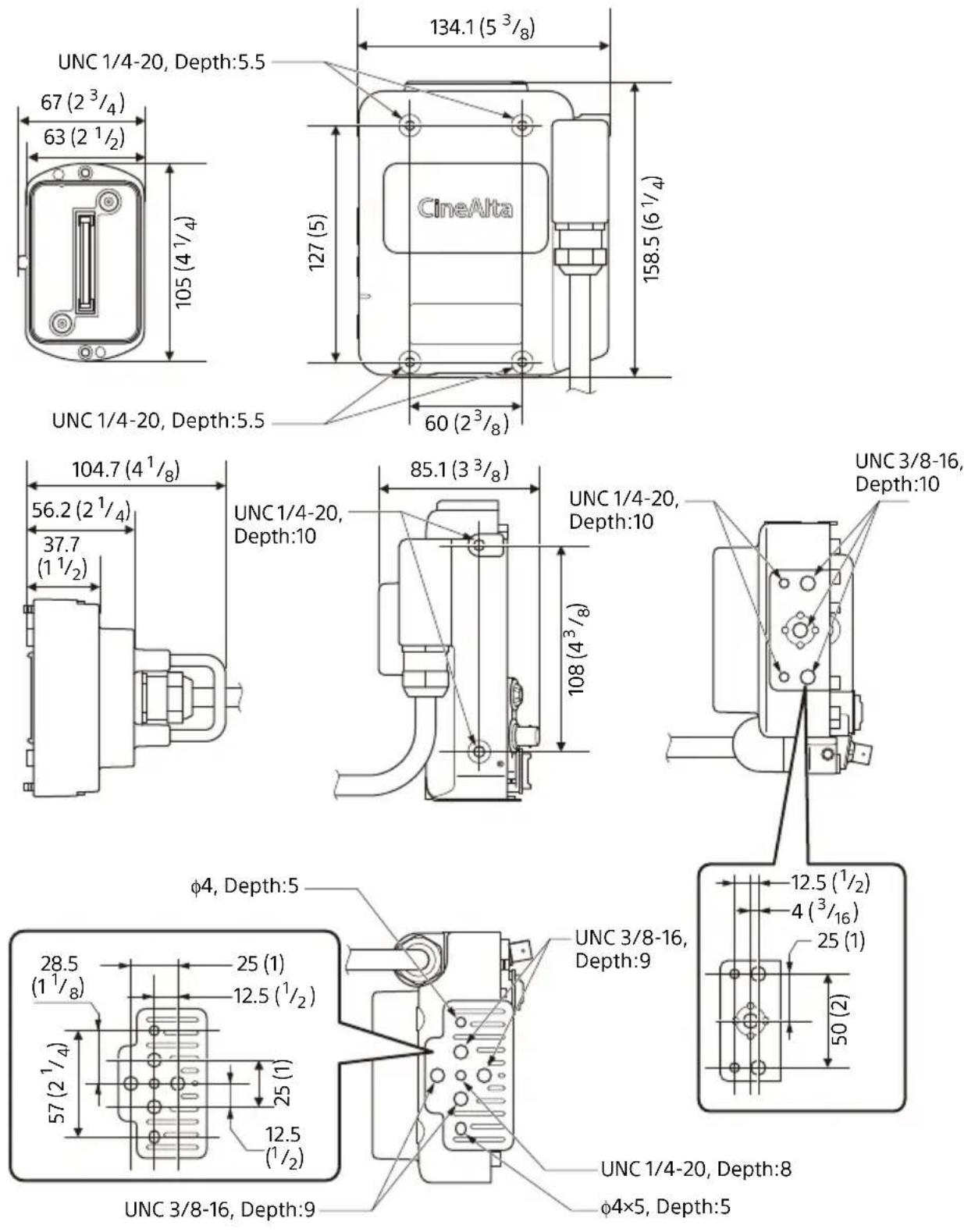
Unit: mm (inches)
Kosovo 0.9 Econom :E mount
Input/Output connectors
(1) IN 24V connector (3-pin Fischer)
(1) 24V-OUT connector (3-pin Fischer)
(1) MONITOR IN connector (BNC type)
(1) MONITOR OUT connector (BNC type)
Note
Short
Camera connection
Notes
• Then or to version


- FOR SAFETY
- NOTICE
- FOR THE CUSTOMERS IN THE U.S.A
- SUPPLIER'S DECLARATION OF CONFORMITY
- FOR THE CUSTOMERS IN CANADA
- WARNING
- ATTENTION
- FOR THE CUSTOMERS IN EUROPE
- CAUTION
- FOR THE CUSTOMERS IN KOREA
- USAGE PRECAUTIONS
- TO PREVENT ELECTROMAGNETIC INTERFERENCE FROM PORTABLE COMMUNICATIONS DEVICES
- FEATURES
- EXTENSION UP TO 12 M (39.4 FT)
- SUPPORTS CONNECTION TO MONITOR AND OTHER EXTERNAL DEVICES
- LOCATION AND FUNCTION OF PARTS
- ① CAMERA BODY ADAPTOR
- ② MONITOR IN CONNECTOR (BNC TYPE)
- ③ 24 V IN CONNECTOR (FISCHER 3-PIN)
- ④ ASSIGN (ASSIGNABLE) BUTTON
- ⑤ IMAGER BLOCK ADAPTOR (3 M (9.8 FT))
- RECEIVER
- ⑦ ASSIGN (ASSIGNABLE) BUTTON
- ⑧ ASSIGN (ASSIGNABLE) BUTTON
- ⑨ TAPE MEASURE HOOK ATTACHMENT HOLE
- V OUT CONNECTOR (FISCHER 3-PIN)
- NOTES
- MONITOR OUT CONNECTOR (BNC TYPE)
- ASSIGN (ASSIGNABLE) BUTTON
- IMAGER BLOCK ADAPTOR (12 M (39.4 FT))
- NOTE
- ATTACHING TO THE CAMERA
- ATTACH THE CAMERA BODY ADAPTOR (①) AND THEN ATTACH THE BOTTOM PLATE (②)
- ATTACH THE IMAGER BLOCK ADAPTOR RECEIVER TO THE CAMERA BODY ADAPTOR
- REMOVING FROM CAMERA
- USING THE PROTECTION CAP
- ATTACH THE PROTECTION CAP TO THE IMAGER BLOCK ADAPTOR
- ATTACH THE RECEIVER TO THE PROTECTION CAP
- ABOUT THE STARTUP TIME
- INSPECTION AND MAINTENANCE
- INSPECTION BEFORE SHOOTING
- CLEANING
- NOTES ON DEVICE CONNECTIONS
- NOTES ON HANDLING CABLES
- SPECIFICATIONS
- GENERAL
- INPUT/OUTPUT CONNECTORS
- SUPPLIED ACCESSORIES
- FRANÇAIS
- ASSIGN BUTTON (ASSIGNABLE)
- BRING THE
- ① CAMERA BODY ADAPTER
- ATTACH THE RECEIVER TO THE PROTECTIVE COVER
- CAMERA CONNECTION
Brand : SONY
Model : CBK-3620XS
Category : Camera