TI290 - Measuring equipment Klein Tools - Free user manual and instructions
Find the device manual for free TI290 Klein Tools in PDF.


| Brand | Klein Tools |
| Model | TI290 |
| Product Type | Rechargeable professional thermal imager |
| Sensor Resolution | 49,152 pixels (256 × 192) |
| Temperature Range | -20 °C to 400 °C (-4 °F to 752 °F) |
| Thermal Accuracy | ±2 °C (±3.6 °F) or 2%, whichever is greater (not calibrated below -10 °C) |
| Emissivity | Adjustable from 0.01 to 0.99 (default 0.95) |
| Display | 3.5-inch (89 mm) TFT LCD screen |
| Color Palettes | Iron, Rainbow, Grayscale |
| Image Storage | Up to 10,000 thermal images in JPG format |
| Image Transfer | USB-C or Wi-Fi via Klein Tools app |
| Power | Rechargeable USB lithium-polymer battery, 3.7 V / 2000 mAh (7.4 Wh) |
| Dimensions | 113.7 × 78.7 × 26.9 mm (4.48 × 3.10 × 1.06 in) |
| Weight | 213 g (7.5 oz) |
| Operating Temperature | 0 °C to 45 °C (32 °F to 113 °F) |
| Storage Temperature | -20 °C to 60 °C (-4 °F to 140 °F) |
| Drop Protection | 2 m (6.6 ft) |
| Standards | Compliant with UL 61010-1, CSA C22.2 No. 61010-1, FCC Part 15 Class B, IC CNR-247 |
| Sensor | VOx microbolometer |
| Field of View | 55.6 ±2.8 degrees |
| Refresh Rate | <9 Hz |
| Thermal Sensitivity | ≤50 mK |
| Temperature Resolution | 0.1 °C (0.1 °F) |
| Auto Power Off | User-selectable 5, 10, or 30 minutes |
| Maintenance and Cleaning | Wipe with a clean, lint-free cloth; do not use abrasive cleaners or solvents |
Frequently Asked Questions - TI290 Klein Tools
User questions about TI290 Klein Tools
0 question about this device. Answer the ones you know or ask your own.
Ask a new question about this device
Download the instructions for your Measuring equipment in PDF format for free! Find your manual TI290 - Klein Tools and take your electronic device back in hand. On this page are published all the documents necessary for the use of your device. TI290 by Klein Tools.
USER MANUAL TI290 Klein Tools
Rechargeable Pro Thermal Imager
• 49,152 (256 × 192)
PIXELS TO
TROUBLESHOOT
HOT AND COLD
SPOTS
• ADJUSTABLE EMISSIVITY FROM 0.01 TO 0.99
• TRANSFER PHOTOS WIRELESSLY USING INTEGRATED WI-FI HOTSPOT
• RECHARGEABLE LITHIUM ION BATTERY
-4° - 752°F -20° - 400°C

SCAN TO DOWNLOAD THE APP

text_image
GET IT ON Google Play Available on the App StoreESPAÑOL pg. 11
FRANÇAIS p. 21
KLEIN TOOLS®

text_image
KLEIN TOOLS KLEIN TOOLS PRO THERMAL IMAGER TI 295 Pro Thermal Imager


Intertek 5001748

Intertek EP 5016393
GENERAL SPECIFICATIONS
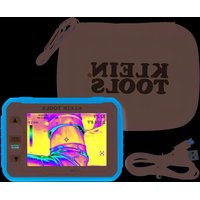
The Klein Tools TI290 is a high resolution, USB rechargeable professional Thermal Imager; power on to view unseen hot and cold spots for instant troubleshooting. The meter provides high and low temperature points, crosshairs to pinpoint specific temperatures, and options for temperature alarms. Wi-Fi setting allows the meter to transfer and share images for reporting.
- Environment: Indoor: DO NOT expose to moisture rain or snow.
- Operating Altitude: 6562 ft. (2000 m)
- Relative Humidity: <85% non-condensing
- Operating Temp: 32^ to 113^ (0° to 45°C)
• Storage Temp: -4^ to 140^ F ( -20^ to 60^ C) - Sensor: VOx Microbolometer
- Sensor Resolution: 49152 pixels (256 × 192)
• Field of View (FOV): 55.6 +/- 2.8 degrees - Frame Rate: <9 Hz
- Sensitivity: ≤ 50 mK
• Temperature Range: -4^ to 752^ F ( -20^ to 400^ C)
• Temperature Resolution: 0.1°F/0.1°C - Temperature Accuracy: ±2°C (±3.6°F) or 2%, whichever is greater
NOTE: Not calibrated below -10°C (14°F)
• Temperature Display: High, Low, and Center point
• Temperature Settings: °F / °C - Emissivity: 0.01 to 0.99 adjustable (0.95 default)
• Display Type: 3.5" (89 mm) TFT LCD
• Color Palettes: Ironbow, Rainbow, Grayscale - Image Format: JPG
• Image Storage: Up to 10000 thermal images
• Image Transfer: USB, or Wi-Fi using the Klein Tools App - Dimensions: 4.48" × 3.10" × 1.06" (113.7 × 78.7 × 26.9 mm)
• Weight: 7.5 oz. (213 g) - Power: Lithium polymer battery (USB rechargeable) 3.7V / 2000mAh (7.4 Wh)
- Required Charger Voltage / Current : 5V DC, 2A
• Charging Current / Time: 1A / 3 hours
• Auto Power Off: User-selectable for 5, 10, or 30 minutes - Pollution degree: 2
- Drop Protection: 6.6' (2 m)
• Standards: Conforms to UL STD. 61010-1

Intertek 5001748
Certified to CSA STD. C22.2 No. 61010-1
Specifications subject to change.
⚠️ WARNINGS
Read, understand, and follow these instructions to ensure safe operation. Failure to observe these warnings can result in risk of fire or electric shock. Keep these instructions for future reference.
- DO NOT use the product if it is damaged or modified. Damaged or modified batteries may exhibit unpredictable behavior resulting in fire, explosion, or injury.
- Risk of fire and burns. DO NOT open, crush, heat above specified maximum temperature or incinerate. Prolonged exposure to direct sunlight can result in elevated temperatures.
- If the battery's internal temperature gets too high, the unit will shut down until the internal temperature is lowered.
- DO NOT expose to moisture, rain, or snow.
- DO NOT subject to impacts or drops greater than 6.6 ft. (2 m). Drops larger than this may not show signs of damage, but internal components may have been compromised. It is advisable to replace the unit if any such severe events occur.
- There are no user-serviceable parts inside. DO NOT open or attempt to repair.
CAUTION
- BURN HAZARD. Reflective materials may have a higher actual temperature than the measured temperature. Set emissivity to match the object being measured (see Emissivity section).
- Do not point the camera at the sun or any other strong energy source. This can affect the accuracy of the camera or cause damage to the sensor.
WARNING SYMBOLS ON TESTER

Warning or caution

Risk of Electrical Shock

Read instructions before using
OTHER SYMBOLS ON TESTER

Conformité Européenne: Conforms with European Economic Area directives

UKCA: UK Conformity Assessment

This product has been independently tested by Intertek and meets applicable published standards.


WEEE: Electronics disposal

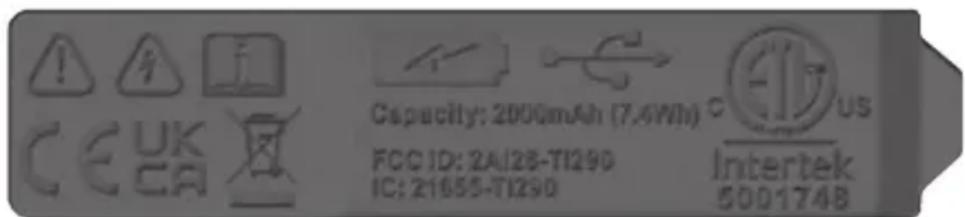
USB rechargeable
text_image
Capacity: 2000mAh (7.4Wh) FCC ID: 2A128-T129D IC: 21655-T129D Intertek 500174BCOMPLIANCE
FCC COMPLIANCE
This device complies with part 15 of the FCC RULES. Operation is subject to the following two conditions: (1) this device may not cause harmful interference, and (2) this device must accept any interference received, including interference that may cause undesired operation.
NOTE: Changes or modifications not expressly approved by the party responsible for compliance could void the user's authority to operate the equipment.
This equipment has been tested and found to comply with the limits for a Class B digital device, pursuant to part 15 of the FCC Rules. These limits are designed to provide reasonable protection against harmful interference in a residential installation. This equipment generates, uses and can radiate radio frequency energy and, if not installed and used in accordance with the instructions, may cause harmful interference to radio communications. However, there is no guarantee that interference will not occur in a particular installation. If this equipment does cause harmful interference to radio or television reception, which can be determined by turning the equipment off and on, the user is encouraged to try to correct the interference by one or more of the following measures:
- Reorient or relocate the receiving antenna.
- Increase the separation between the equipment and receiver.
- Connect the equipment into an outlet on a circuit different from that to which the receiver is connected.
- Consult the dealer or an experienced radio/TV technician for help
FCC RF EXPOSURE STATEMENTS:
This equipment complies with FCC radiation exposure limits set forth for an uncontrolled environment and meets the FCC RF Exposure Guidelines.
This device must not be co-located or operated in conjunction with any other antenna or transmitter.
COMPLIANCE
IC COMPLIANCE
This device contains license-exempt transmitter(s)/receiver(s) that comply with Innovation, Science and Economic Development Canada's license-exempt RSS(s). Operation is subject to the following two conditions: (1) This device may not cause harmful interference, and (2) This device must accept any interference received, including interference that may cause undesired operation of the device.
This device complies with RSS-247 of Industry Canada. Operation is subject to the condition that this device does not cause harmful interference. This Class B digital apparatus complies with Canadian ICES-003.
IC RADIATION EXPOSURE STATEMENT:
The equipment complies with SAR limits set forth for an uncontrolled environment and meets the RSS-102 of the IC RF Exposure Rules. This transmitter must not be co-located or operating in conjunction with any other antenna or transmitter.
EU DECLARATION OF CONFORMITY
Hereby, Klein Tools declares that this product is in compliance with Directive 2014/53/EU and all other applicable EU requirements. The complete declaration of conformity can be found on this product's page at www.kleintools.com.
UKCA DECLARATION OF CONFORMITY
Hereby, Klein Tools declares that this product is in compliance with the relevant statutory requirements. The complete declaration of conformity can be found on this product's page at www.kleintools.com.
FEATURE DETAILS
IMAGER
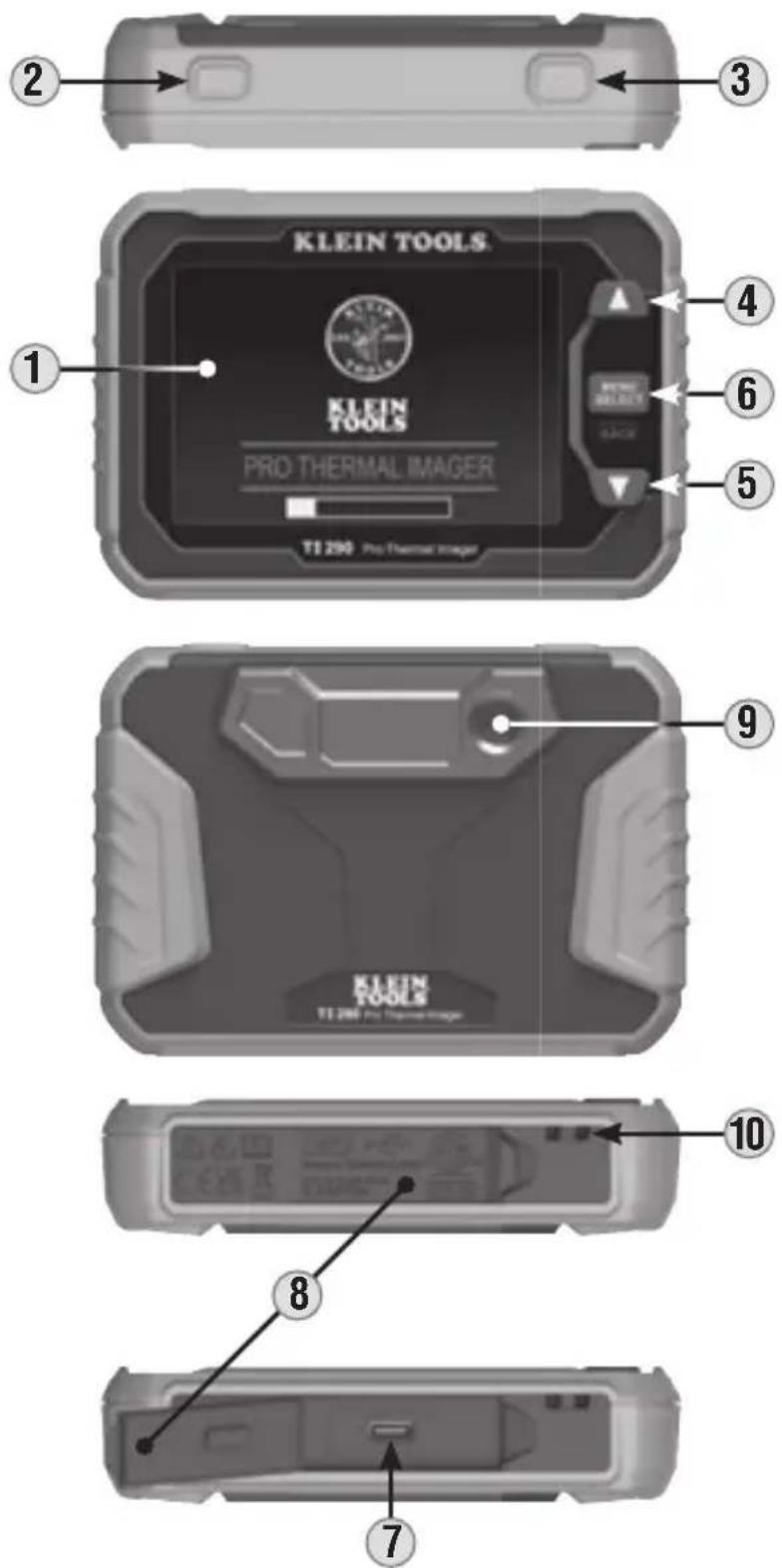
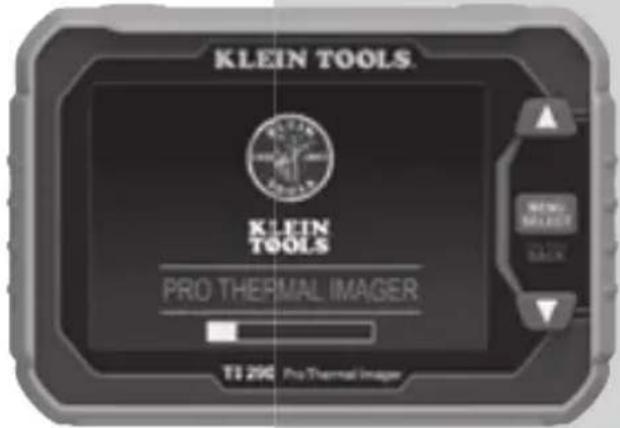
- LCD Screen 6. Menu / Select / Back Button
- Power On / Off Button 7. USB-C Charging / Data Port
- Camera Shutter Button 8. USB-C Port Cover
- Up-Scroll Button 9. Camera
- Down-Scroll Button 10. Lanyard Hole
FEATURE DETAILS
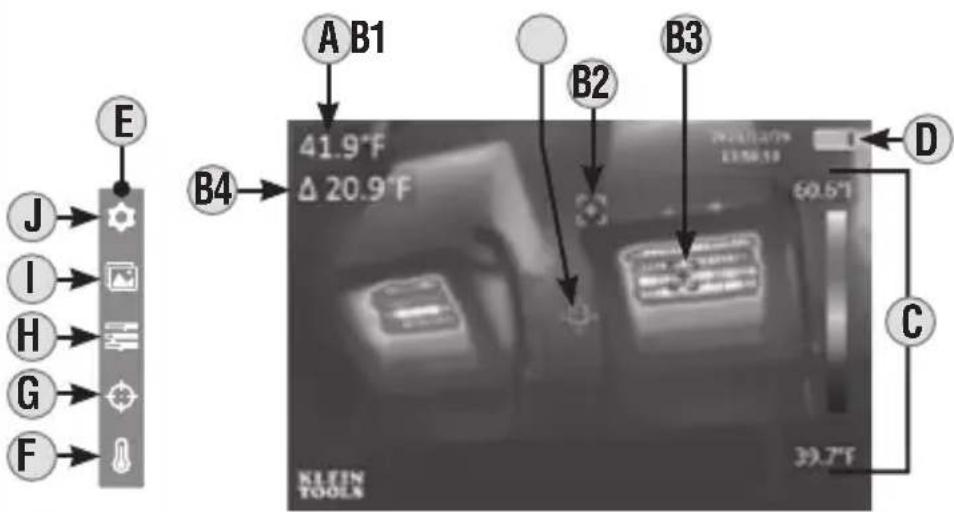
text_image
E J I H G F A B1 41.9°F Δ 20.9°F B2 B3 60.5°F D C 39.7°F KLEIN TOOLSLCD
A. Center Target Temperature
B1. Center Temperature Crosshair
B2. Low Temperature Crosshair
B3. High Temperature Crosshair
B4. High/Low Temperature Differential
C. Live Temperature Scale
D. Battery Level Indicator
E. Menu Functions
F. Temperature Units (°F / °C)
G. Center Target Temperature and High / Low Temperature On / Off
H. Color Palettes (Ironbow, Rainbow, Grayscale)
I. Gallery
J. Settings
OPERATING INSTRUCTIONS
NOTE: Fully charge before first use.
CHARGING
Connect included USB-C cable to USB-C Charging Port 7, and plug the other end into a computer, USB AC adapter, or other USB power supply (not included). While charging, if unit is powered on, the Battery Level Indicator D will show a charging symbol. If powered off, a battery charging animation will be shown for 10 seconds. Normal charging time is about 3 hours.
NOTE: Keep the USB-C Port Cover ⑧ over the charging port when not in use.
FUNCTION BUTTONS
Press Power On / Off Button 2 for 2 seconds to power the unit on or off. When powering on, the start-up screen will display for 10 seconds as the imager runs self-calibration. When complete, the display will show the thermal image with the center target temperature and high / low temperatures.
Press Menu / Select Button 6 to access Menu functions and setup. Use the Up 4 and Down 5 Scroll Buttons to scroll through the menu.
OPERATING INSTRUCTIONS
MENU FUNCTION
Press the Menu / Select Button ⑥ and the Menu and Setup functions (shown below) will appear on the LCD. Use the Up ④ and Down ⑤ Scroll Buttons to scroll through the functions. Press the Menu / Select Button ⑥ to open the function or make a selection. To exit the function or hide the menu, long press the Menu / Select Button ⑥.
F Temperature Units: Selectable between °F and °C.
G Center Target Temperature and High / Low Temperature: Turns these icons on or off.
H Color Palettes: Selectable between Ironbow, Rainbow, and Grayscale.
① Gallery: Scroll through and view captured images.
J Settings:
- WiFi Image Transfer: Connects to KleinTools App to transfer files.
- Temp Bar: Turns feature on or off.
- Time & Date: Sets time and date stamp for images.
- Emissivity: Adjustable from 0.01 to 0.99 (default is 0.95).
• Auto Power Off: Set to 5, 10, or 30 minutes. - Brightness: User-selectable low, medium, or high.
• HI/LO Alert: Sets temperature alarms. - Local Info: Provides information on firmware version, memory capacity, memory available, and battery temperature.
- Default Settings Reset: Restores factory-default settings.
- Erase All Images: Permanently deletes all images from TI290.
IMAGE CAPTURE
Press Camera Shutter Button ③ to take an image.
NOTE: Menu E must be hidden to take an image.
Wi-Fi TRANSFER
On the imager:
Press the power button 2 for 2 seconds to power on the TI290. Next press the Menu/Select button 6 to access the Menu. Use the Up 4 and Down 5 Scroll Buttons to scroll to the Settings menu and press the Menu/Select button 6. Select WiFi Photo Transfer (first item); press the Menu/Select button 6. LCD will read "TURNING ON WIFI", then "WAITING FOR CONNECTION FROM MOBILE DEVICE, Follow instructions in Klein Tools APP".
On your device:
Download the Klein Tools App (available for free from Google Play™ or the App Store®). Launch the Klein Tools App on your device. To properly connect to TI290 and store images on your device, accept all pop-up app permissions. Tap the "Connect" button on the app and select/join the KT-TI290 Wi-Fi network. If your device prompts you to connect to device, tap the "Connect" button. If the KT-TI290 Wi-Fi network is not found, ensure that Wi-Fi is enabled in your device's settings.
Once connected, tap the "Transfer Photos" button. All images will transfer from TI290 to your device. Select the images you want to save and press the "Save To Phone" button. Saved images can now be accessed in the app's gallery and selected and shared using your device's standard options.
SCAN TO
DOWNLOAD
THE APP


OPERATING INSTRUCTIONS
BATTERY INDICATOR D
• Solid Green: Battery has more than 40% charge remaining
- Partial Yellow: Battery has less than 40% charge remaining
- Partial Red: Low battery, needs recharging
- Blinks Red 10 Times: No Power, Immediate Shut Down
EMISSIVITY
Emissivity is a measure of the ability of a surface to emit thermal energy by radiation. Different types of surfaces (metals, masonry, wood, etc.) emit thermal energy through radiation at different efficiencies. Accordingly, these materials have different emissivity coefficients which must be considered in order to make accurate measurements with an infrared thermometer.
Emissivity on the TI290 may be adjusted from 0.01 to 0.99 to enable accurate measurement of the temperature of most types of materials. Generally speaking, shiny bright surfaces such as chrome, white boards, etc. exhibit lower emissivity than flat black materials.
For guidance only, the chart below may be used to estimate emissivity for many different types of materials. However, the emissivity of surfaces is dependent upon many parameters such as surface finish, temperature, shape of the object, etc.
This chart should be used for guidance only.
| Material Emissivity | |
| Asphalt 0.93 | |
| Red brick 0.93 | |
| Gray brick 0.75 | |
| Porcelain ceramic 0.92 | |
| Fired clay 0.91 | |
| Rough concrete 0.94 | |
| Cotton cloth 0.77 | |
| Smooth glass 0.92 - 0.94 | |
| Granite 0.45 | |
| Gravel 0.28 | |
| Smooth ice 0.97 | |
| Smooth white marble 0.56 | |
| Black paint 0.96 | |
| Hard rubber 0.94 | |
| Wood | 0.80 - 0.90 |
| Matte copper | 0.22 |
| Commercial sheet aluminum | 0.09 |
| Cold rolled steel | 0.75 - 0.85 |
Find a comprehensive list of emissivity values in the app's FAQ section or visit www.kleintools.com/emissivity.
CLEANING
Be sure unit is turned off and wipe with a clean, dry lint-free cloth. Do not use abrasive cleaners or solvents.
STORAGE
Do not expose to high temperatures or humidity. After a period of storage in extreme conditions exceeding the limits mentioned in the General Specifications section, allow unit to return to normal operating conditions before using.
WARRANTY
Do not place equipment and its accessories in the trash. Items must be properly disposed of in accordance with local regulations. Please see www.epa.gov/recycle for additional information.
CUSTOMER SERVICE
KLEIN TOOLS, INC.
450 Bond Street
Lincolnshire, IL 60069
1-800-553-4676
customerservice@kleintools.com
www.kleintools.com
text_image
GET IT ON Google Play Available on the App StoreKLEIN TOOLS®

text_image
KLEIN TOOLS KLEIN TOOLS PRO THERMAL IMAGER TI 290 Pro Thermal ImagerCE
UK CA
C ETV US
Intertek 5001748

Intertek EP 5016393
(Menú/Seleccionar/Atrás)
text_image
E J I H G F A B1 B2 B3 D C 39.7°F 41.9°F Δ 20.9°F 60.5°F KLEIN TOOLSLCD
text_image
GET IT ON Google Play Available on the App StoreKLEIN TOOLS®

CE
UK CA

Intertek
5001748

Intertek
EP 5016393