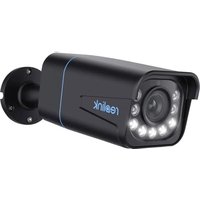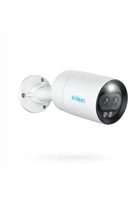
RLC-81MA - Surveillance Camera REOLINK - Free user manual and instructions
Find the device manual for free RLC-81MA REOLINK in PDF.


User questions about RLC-81MA REOLINK
0 question about this device. Answer the ones you know or ask your own.
Ask a new question about this device
Download the instructions for your Surveillance Camera in PDF format for free! Find your manual RLC-81MA - REOLINK and take your electronic device back in hand. On this page are published all the documents necessary for the use of your device. RLC-81MA by REOLINK.
USER MANUAL RLC-81MA REOLINK
If you need any technical help, please visit our official support site and contact our support team before returning the products, https://support.reolink.com.
Hoferstasse 9B, 71636 Ludwigsburg, Germany Email: prodsg@libelleconsulting.com
UK REP APEX CE SPECIALISTS LIMITED
Addr.: 89 Princess Street, Manchester, M14HT, UK Email: info@apex-ce.com
reolink Be Prepared, Be Reolink
Jan 2023 Q5G1_A_EN
RLC-81MA
Quick Start Guide
@ReolinkTech https://reolink.com
EN
Content
What's in the Box 2
Camera Introduction 3
Connection Diagram 4
Set up the Camera 5
Mount the Camera 6
Troubleshooting 9
Specifications 10-
Notification of Compliance 11
English1 English 2
What's in the Box


Surveillance SignQuick Start Guide
Template

Pack of ScrewsCamera
Moun
text_image
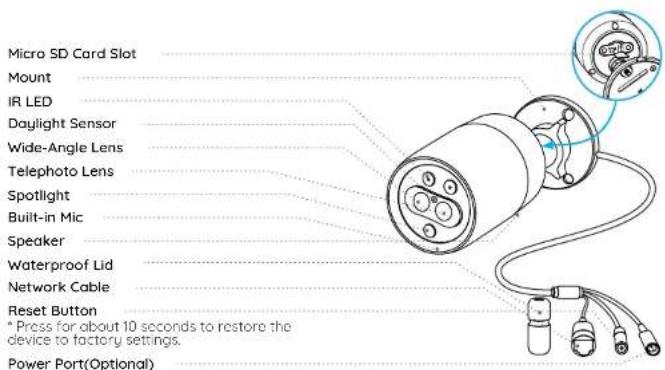
Micro SD Card Slot Mount IR LED Daylight Sensor Wide-Angle Lens Telephoto Lens Spotlight Built-in Mic Speaker Waterproof Lid Network Cable Reset Button * Press for about 10 seconds to restore the device to factory settings. Power Port(Optional)English3 English 4
Connection DiagramCamera Introduction
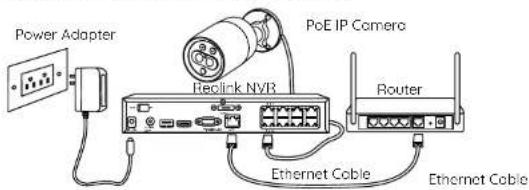
Before using the camera, please connect your camera as instructed below to finish initial setup.
-
Connect the camera to a Reolink NVR (not included) with an Ethernet cable.
-
Connect the NVR to your router, and then power on the NVR
NOTE: The camera should be powered with a 12V DC adapter or a PoE powering device such as PoE injector, PoE switch or Realink NVR (not included in the package).
text_image
Power Adapter Reclick NVR PoE IP Camera Router Ethernet Cable Ethernet Cable* You may also connect the camera to a PoE switch or PoE injector.
Set up the Camera
Download and Launch the Reolink App or Client software, and follow the onscreen instructions to finish initial setup.
- On Smartphone
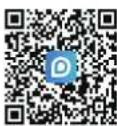
Scan to download the Reolink App.
- On PC
Download path of the Reolink Client: Go to https://reolink.com > Support> App & Client.
NOTE: If you are connecting the camera to a Reolink PoE NVR, please set up the camera via the NVR interface.
English5 English 6
Mount the Camera
Installation Tips
- Do not face the camera towards any light sources.
- Do not point the camera towards a glass window. Or, it may result in poor image quality because of the window glare by infrared LEDs, ambient lights or status lights.
- Do not place the camera in a shaded area and point it towards a well-lit area. Or, it may result in poor image quality. To ensure best image quality, the lighting condition for both the camera and the capture object shall be the same.
• To ensure better image quality, it's recommended to clean the lens with a soft cloth from time to time. - Make sure the power ports are not directly exposed to water or moisture and not blocked by dirt or other elements.
- With IP waterproof ratings, the camera can work properly under conditions like rain and snow. However, it doesn't mean the camera can work underwater.
- Do not install the camera at places where rain and snow can hit the lens directly.
- The camera may work in extreme cold conditions as low as -25°C. Because when it is powered on, the camera will produce heat. You may power on the camera indoors for a few minutes before installing it outdoors.
Install the Camera
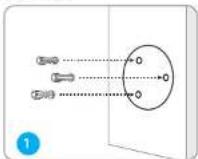
Drill holes in accordance with the mounting hole template.
NOTE: Use the drywall anchors included in the package if needed.
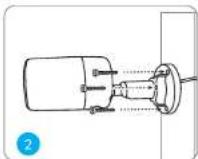
Install the mount base with the mounting screws included in the package.
NOTE: Run the cable through the cable notch on the mount base.
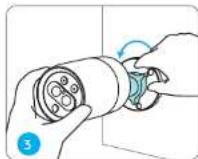
To get the best field of view, loosen the adjustment knob on security mount and turn the camera.
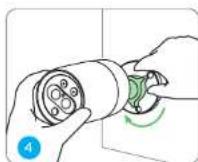
Stiffen the adjustment knob to lock the camera.
English7 English 8
Troubleshooting
Camera is Not Powering On
If your camera is not powering on, please try the following solutions:
- Make sure your camera is powered properly. The PoE camera should be powered by a PoE switch/injector, the Reolink NVR or a 12V power adapter.
- If the camera is connected to a PoE device as listed above, connect the camera to another PoE port and see if the camera will power on.
- Try again with another Ethernet cable.
If these won't work, contact Reolink Support https://support.reolink.com/.
Picture is not Clear
If the picture from the camera is not clear, please try the following solutions:
- Check the camera lens for dirt, dust or spiderwebs, please clean the lens with a soft, clean cloth.
- Point the camera to a well-lit area, the lighting condition will affect the picture quality a lot.
- Upgrade the firmware of your camera to the latest version.
- Restore the camera to factory settings and check out again.
English9 English 10
If these won't work, contact Reolink Support https://support.reolink.com/.
Spotlight is not On
If the spotlight on your camera is not on, please try the following solutions:
- Ensure the spotlight is enabled under Device Settings page via Reolink App/Client.
- Upgrade the firmware of your camera to the latest version.
- Restore the camera to factory settings and check out the spotlight light settings again.
If these won't work, contact Reolink Support https://support.reolink.com/.
Specifications
Hardware Features
Power: By PoE (802.3af)/DC 12V
Spotlight: 1pcs
Day/Night Mode: Auto Switchover
General
Operating Temperature: -10°C to 55°C (14°F to 131°F)
Operating Humidity: 10%-90%
For more specifications, visit https://reolink.com/
Notification of Compliance
FCC Compliance Statement
This device complies with Part 15 of the FCC Rules. Operation is subject to the following two conditions: this device may not cause harmful interference, and this device must accept any interference received, including interference that may cause undesired operation.
NOTE: This equipment has been tested and found to comply with the limits for a Class B digital device, pursuant to part '15 of the FCC Rules. These limits are designed to provide reasonable protection against harmful interference in a residential installation. This equipment generates uses and can radiate radio frequency energy and frequency energy and, if not installed and used in accordance with the instructions, may cause harmful interference to radio communications. However, there is no guarantee that interference will not occur in a particular installation. If this equipment does cause harmful interference to radio or television reception, which can be determined by turning the equipment off and on, the user is encouraged to try to correct the interference by one or more of the following measures:
English11 English 12
- Reorient or relocate the receiving antenna.
- Increase the separation between the equipment and receiver.
- Connect the equipment into an outlet on a circuit different from that to which the receiver is connected.
- Consult the dealer or an experienced radio/TV technician for help.
Changes or modifications not expressly approved by the party responsible for compliance could void the user's authority to operate the equipment.
FCC RF Exposure Warning Statements
This equipment complies with FCC radiation exposure limits set forth for an uncontrolled environment. This equipment shall be installed and operated with minimum distance 20cm between the radiator & body.
Simplified EU Declaration of Conformity
Reolink declares that the WiFi camera is incompliance with the essential requirements and other relevant provisions of Directive2014/53/EU, the PoE camera and NVR is incompliance with Directive 2014/30/EU.
Correct Disposal of This Product
This marking indicates that this product should not be disposed with other household wastes throughout the EU. Toprevent possible harm to the environment or human health from uncontrolled waste disposal,
recycle it responsibly to promote the sustainable reuse of material resources. To return your used device, please use the return and collection systems or contact the retailer where the product was purchased. They can take this product for environment safe recycling
Limited Warranty
This product comes with a 2-year limited warranty that is valid only if purchased from Reolink Official Store or a Reolink authorized reseller. Learn more: https://reolink.com/warranty-and-return/.
NOTE: We hope that you enjoy the new purchase. But if you are not satisfied with the product and plan to return, we strongly suggest that you reset the camera to factory default settings and take out the inserted SD card before returning.
English13 English 14
Terms and Privacy
Use of the product is subject to your agreement to the Terms of Service and Privacy Policy at reolink.com. Keep out of reach of children.
End User License Agreement
Reolink product, you agree to the terms of this End UserLicense Agreement ("EULA") between you and Reolink. Learn more: https://reolink.com/eula/.
ISED Statements
This device contains licence-exempt transmitter(s)/receiver(s) that comply with Innovation, Science and Economic Development Canada's licence-exempt RSS(s). Operation is subject to the following two conditions:
(1) This device may not cause interference. (2) This device must accept any interference, including interference that may cause undesired operation of the device.
Radio Frequency Exposure Statement for IC
The device has been evaluated to meet general RF exposure requirements. The device can be used in mobile exposure conditions. The min separation distance is 20cm.
Technical Support
If you need any technical help, please visit our official support site and contact our support team before returning the products,https://support.reolink.com.
DE
Katalog
Lieferumfang 17
Über die Kamera 18
natural_image
Technical line drawing of a cylindrical device with attached cables and connectors, showing internal components (no text or symbols)Deutsch17 Deutsch 18
Verbindungsdiagramm
Strom: PoE (802.3af)/DC 12V
Spotlight: 1 Stk.
natural_image
Technical line drawing of a cylindrical device connected to a cable with multiple connectors, showing internal components and a close-up inset (no text or symbols)Alimentation: By PoE (802.3af)/DC 12V
Projecteur : 1pcs
natural_image
Technical line drawing of a cylindrical device with attached cables and connectors, showing internal components (no text or symbols)Italiano47 Italiano 48
Per scaricare Client Reolink: Andare su https://reolink.com > Supporto > App & Client.