Echo Box - Speaker Prixton - Free user manual and instructions
Find the device manual for free Echo Box Prixton in PDF.


| Product Type | Waterproof portable speaker with LED light |
| Brand | Prixton |
| Model | Echo Box |
| Dimensions | 85 x 85 x 215 mm |
| Weight | Approximately 0.8 kg |
| Bluetooth Version | MVSILICON V5.2 |
| Bluetooth Range | Up to 10 meters |
| Total Power | 30 W (2 x 5 W + 1 x 20 W) |
| Frequency Response | 60 Hz - 18 kHz |
| Battery Capacity | 7.4 V 2200 mAh |
| Charging Time | 2-3 hours |
| Playback Time | 5-6 hours |
| Waterproof Rating | IPX6 |
| Inputs | Bluetooth, AUX, Micro SD (TF) |
| LED Light | Yes, 30 W (switchable) |
| TWS Function | Yes (pair two speakers) |
| Package Contents | Speaker, Type-C cable, auxiliary cable, manual |
| Care and Cleaning | Clean with a dry, soft cloth. Avoid chemical products. Do not submerge. |
| Safety | Do not use while charging. Avoid high temperatures. Do not let the battery fully discharge. |
| Warranty | Complies with legislation of the country of purchase. Contact via www.prixton.com for assistance. |
Frequently Asked Questions - Echo Box Prixton
User questions about Echo Box Prixton
0 question about this device. Answer the ones you know or ask your own.
Ask a new question about this device
Download the instructions for your Speaker in PDF format for free! Find your manual Echo Box - Prixton and take your electronic device back in hand. On this page are published all the documents necessary for the use of your device. Echo Box by Prixton.
USER MANUAL Echo Box Prixton
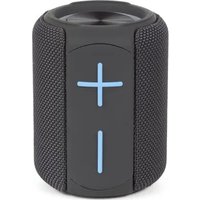
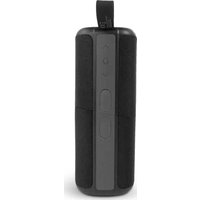
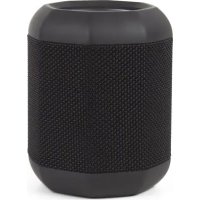
Thank you for purchasing ECHO BOX waterproof 30W LED light portable speaker. Please read this user manual carefully before operating and keep these instructions for future reference. ECHO BOX is a unique designed IPX6 waterproof 30W LED light portable speaker, which support V5.2 bluetooth agreement, it is compatible with Smart cellphone /Laptop/Tablet and other equipments with audio function. ECHO BOX can let you get rid of wire limited and enjoy music freely. Besides, this speaker also support TF card.
Packaging includes:
1.ECHO BOX IPX6 portable speaker
2.Type C charging Cable
3.Aux Cable
4.User Manual
5.Lanyard
SPECIFICATIONS
-
Bluetooth Version: MVSILICON V5.2
-
Working Range: Up to 10 meters
-
Dimension: 85*85*215mm
4.Speaker: 2*50mm+1*66mm
5.Loudspeaker Output: 2*5W+1*20W(total 30W)
6.Speaker frequency: 60HZ-18KHZ
7.Battery Voltage/Capacity: 7.4V 2200mAh
8.Battery Charging current: 5V 2A
9.Battery Charge Time: 2-3hours
10.Playing time: 5-6hours
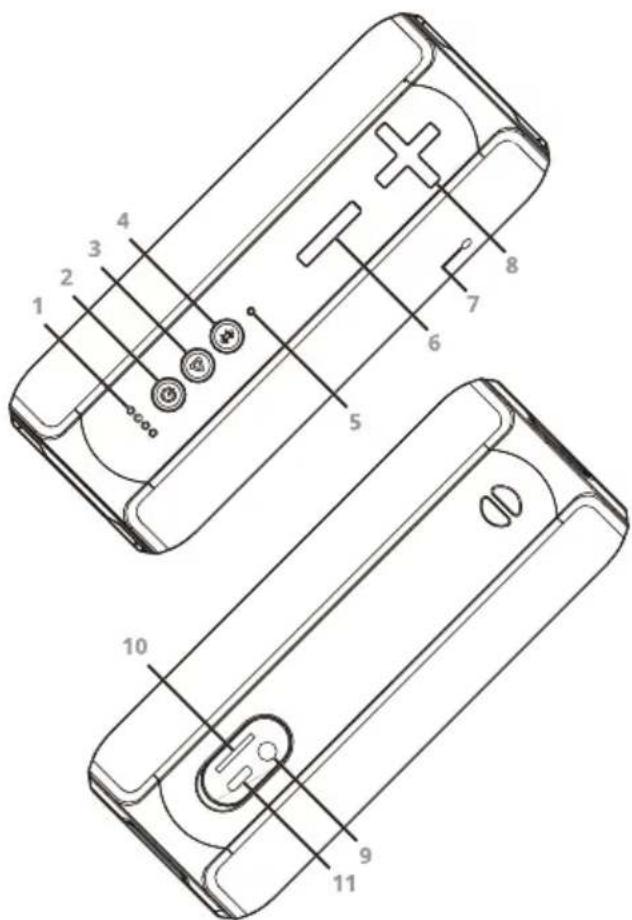
Figure description
- Battery level indicator
- ON/OFF button
- Function Key: Play/Pause, Answer/Hang up, last number redialing
- Function Key: M/Bluetooth disconnecting/connecting
- LED light indicator/bluetooth
- Function Key: Volume decrease/Previous song
- Microphone
- Function Key: Volume increase/Next song
- Aux input
- Micro SD card slot
- Type C charging port
Operation
- Long press ON/OFF button until the LED light indicator starts flashing.
- Active bluetooth connectivity in your device, which you want to connect with the speaker.
- Search for a new device, choose the speaker "ECHO BOX PRIXTON" on the list.
- Connect with the speaker( enter password 0000 if required).
- When sounds with a voice message, the speaker is connected successfully.
Note: Portable speaker will connect to the last paired device automatically.
TWS connection
- Activate two portable speakers.
- Press and hold play/pause button on one of the speaker for 2 seconds until you hear a sound indicator.
- Release the play/pause button. Connection of two speakers may take several seconds.
- Activate bluetooth function in the device, select "ECHO BOX PRIXTON" speaker name from the list and pair the devices.
Press Play/Pause button for 2 seconds to disconnect TWS connection.
Functions
- When playing music, short press ▶ for pause or play. Long press ⚙ 3s to disconnect bluetooth connection.
- Long press +/- for key next song or last song, short press +/- key for volume increase or decrease.
- For incoming call, short press ▶ for answer/end a call, long press ▶ for 2s to reject an incoming call. Press ▶ twice to call last dialed number.
- Short press ⚙️ key for mode change: BT-TF-AUX.
- Press twice ⏻ to open or close LED light when speaker turns on.
Charging
Connect charging cable to portable speaker's Type C port, white illumination flashes indicate charging status, light will be stable white when fully charged.
Tips
Turn the portable speaker off when not in use to save power or for storage. To ensure long-term performance of battery, please avoid using product under high temperature, and do not use portable speaker when charging.
Warranty policy
This product complies with the warranty law in force in the country of purchase. When you have a problem that you can not solve, you must access the web www.prixton.com and click on the contact option to send us your assistance form.
These technical and electrical specifications are those of typical units and may be changed without prior notice in order to provide improved equipment.
Simplified EU Declaration Of Conformity
We, La Trastienda Digital located in Avenida Cervantes 49, módulo 25, Basauri 48970, Bizkaia hereby declare that the following goods, imported and selling at European market:
| BRAND | MODEL NAME DESCRIPTION | CATEGORY |
| Prixton | ECHO BOX | Speaker |
Are in compliance with the EC Council Directive of 2014/53/EU (EM DIRECTIVE) and harmonized standards and with the board of the 16th of April 2014.
The complete text of the UE Declaration of conformity is available anytime at this website address:
www.prixton.com
LA TRASTIENDA DIGITAL