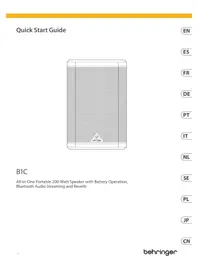
B1C - Speaker BEHRINGER - Free user manual and instructions
Find the device manual for free B1C BEHRINGER in PDF.


| Product type | Portable amplified speaker |
| Brand | Behringer |
| Model | B1C |
| Dimensions (L x H x D) | 362 x 240 x 290 mm |
| Weight | 7.2 kg |
| Amplifier | Class D, 200 W peak |
| Woofer | 1 x 6.5" |
| Tweeter | 1 x 1" dome |
| Frequency response | 60 Hz - 20 kHz (±3 dB) |
| Max SPL | 106 dB at 1 m |
| Power supply | 100-240 V~ 50/60 Hz, consumption 60 W |
| Internal battery | Lithium-ion 14.8 V / 4200 mAh |
| Bluetooth | Version 5.0, max range 30 m |
| Audio inputs | 2 combo XLR/TRS (inputs A/B), 1 AUX 3.5 mm stereo input |
| Line output | 1 balanced TRS 6.35 mm |
| Controls | Volume, Bass, Treble, Reverb, Bluetooth pairing |
| LED indicators | Power (amber), battery (green steady/flashing, red), clip |
| True Wireless Stereo (TWS) mode | Yes, for pairing two speakers in stereo |
| Protection functions | Short-circuit, open circuit, thermal |
| Operating temperature | 5 °C to 35 °C |
| Maintenance and cleaning | Clean with a dry cloth only. Do not use liquid or abrasive products. |
| Spare parts and repairability | No user-serviceable parts. Contact a qualified professional. |
| Warranty | See community.musictribe.com for terms |
Frequently Asked Questions - B1C BEHRINGER
User questions about B1C BEHRINGER
0 question about this device. Answer the ones you know or ask your own.
Ask a new question about this device
Download the instructions for your Speaker in PDF format for free! Find your manual B1C - BEHRINGER and take your electronic device back in hand. On this page are published all the documents necessary for the use of your device. B1C by BEHRINGER.
USER MANUAL B1C BEHRINGER
B1C
All-in-One Portable 200-Watt Speaker with Battery Operation, Bluetooth Audio Streaming and Reverb
2 McQuick Start Guide 3
EN
ES
FR
EN Important Safety Instructions
Terminals marked with this symbol carry electrical current of sufficient magnitude to contribute risk of electric shock. Use only high-quality professional speaker cables with 16" TS or twist-locking plugs pre installed. All other installation or modification should be performed only by qualified personnel.
This symbol, wherever it appears, alerts you to the presence of uninsulated dangerous voltage inside the enclosure - voltage that may be sufficient to constitute a risk of shock.
This symbol, wherever it appears, alerts you to important operating and maintenance instructions in the accompanying literature. Please read the manual.
Caution To reduce the risk of electric shock, do not remove the top cover (or the rear section). No user sentoeable parts inside. Refer servicing to qualified personnel.
Caution To reduce the risk of fire or electric shock, do not expose this appliance to rain and moisture. The apparatus shall not be exposed to dripping or splashing liquids and no objects filled with liquids, such as vases, shall be placed on the apparatus.
Caution These service instructions are for use by qualified service personnel only. To reduce the risk of electric shock do not perform any servicing other than that contained in the operation instructions. Repairs have to be performed by qualified service personnel.
Warning Please refer to the information on the exterior of bottom enclosure for electrical and safety information before installing or operating the desire.
- Please read and follow all instructions and warnings.
-
Keep the apparatus away from water (except for outdoor products).
-
Clean only with dry cloth.
-
Do not block ventilation openings. Do not install in a confined space. Install only according to manufacturer's instructions.
-
Protect the power cord from damage, particularly at plugs and appliance socket.
-
Do not install near any heat sources such as radiators, heat registers, stoves or other apparatus (including amplifiers) that produce heat.
-
Do not defeat the safety purpose of the polarized or grounding-type plug. A polarized plug has two blades with one wider than the other (only for USA and Canada). A grounding-type plug has two blades and a third grounding prong. The wide blade or the third prong are provided for your safety. If the provided plug does not fit into your outlet, consult an electrician for replacement of the obsolete outlet.
-
Protect the power cord from damage, particularly at plugs and appliance socket.
-
Use only attachments and accessories recommended by the manufacturer.

- Use only specified cars, stands, tripods, brackets, or tables. Use caution to present tip over when missing the car/ apparatus combination.
- Unplug during storms, or if not in use for
along period
-
Only use qualified personnel for servicing, especially after damage.
-
The apparatus with protective earthing terminal shall be connected to a MANS socket outlet with a protective earthing connection.
-
Where the MAINS plug or an appliance coupler is used as the disconnect device, the disconnect device shall remain readily operable.
-
Avoid installing in confined spaces like bookcases.
-
Do not place naked flame sources, such as lighted candles, on the apparatus.
-
Operating temperature range 5° to 35°C 141° to 95°/1.
18. Warning
- Replacement of a battery with an incorrect type can defeat a safeguard.
- Disposal of a battery into fire or a hot oven, or mechanically crushing or cutting of a battery can result in an explosion.
- Leaving a battery in an extremely high temperature surrounding environment can result in an explosion or the leakage of flammable liquid or gas.
- A battery subjected to extremely low air pressure may result in an explosion or the leakage of flammable liquid or gas.
- Attention should be drawn to the environmental aspects of battery disposal.
- The battery should be charged regularly. Do not leave it in a discharged state, as this may shorten the battery life.
- Batteries (battery pack or batteries installed) shall not be exposed to excessive heat such as sunshine, fire or the like.
LEGAL DISCLAIMER
Music Tribe accepts no liability for any loss which may be suffered by any person who relies either wholly or in part upon any description, photograph, or statement contained herein. Technical specifications, appearances
and other information are subject to change without notice. All trademarks are the property of their respective owners. Midas, Klark Teknik, Lab Gruppen, Lake, Tannoy, Turbosound, TC Electronic, TC Hickton, Behringer, Eugena, Aston Microphones and Coelaudia are trademarks or registered trademarks of Music Tribe Global Brands Ltd. © Music Tribe Global Brands Ltd. 2024 All rights reserved.
LIMITED WARRANTY
For the applicable warranty terms and conditions and additional information regarding Music Tribe's Limited Warranty, please see complete details online at community.musictribe.com/support.
ES
BESCHRÄNKTE GARANTIE
dun cero-past (p.e. in
EN
Jaw Mekker Sivon (1991) streaming and cover https://
(WE) All markets are more niche for other groups
B1C Controls
-
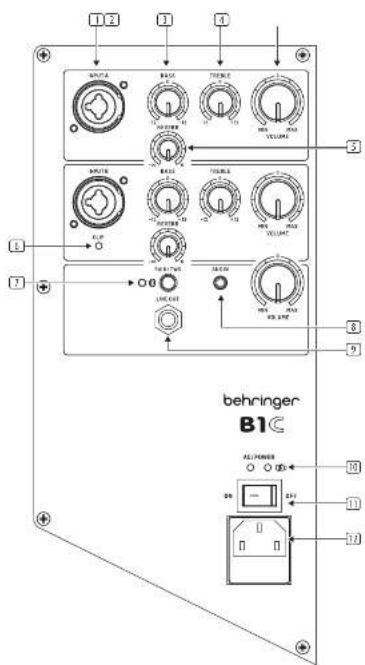
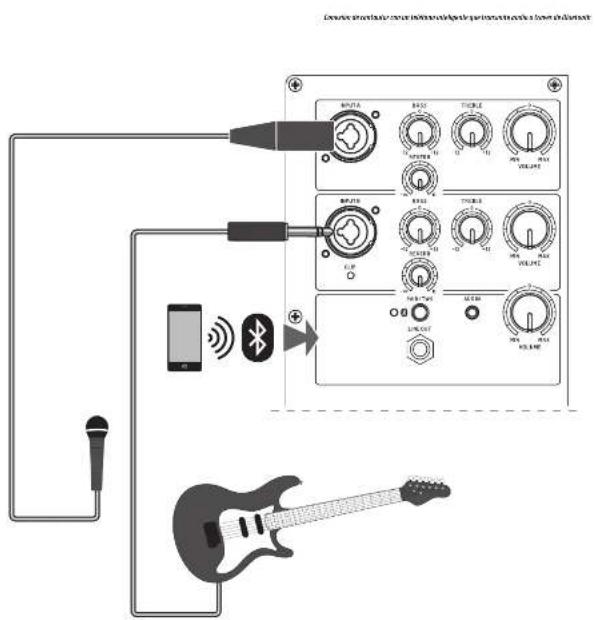
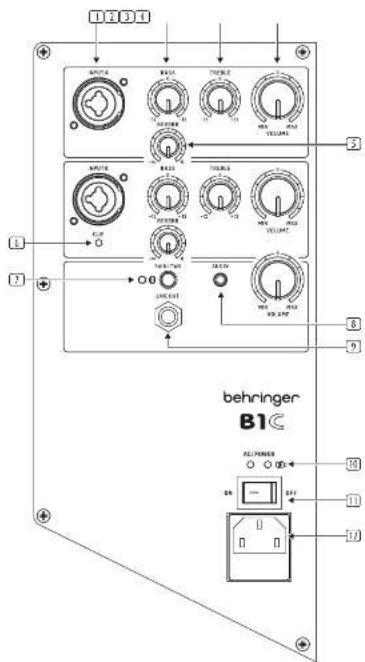
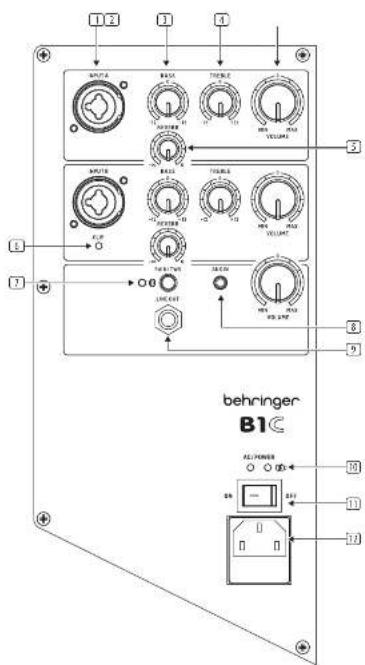
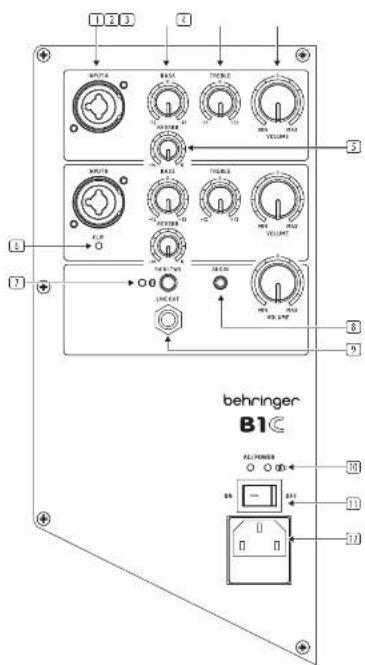
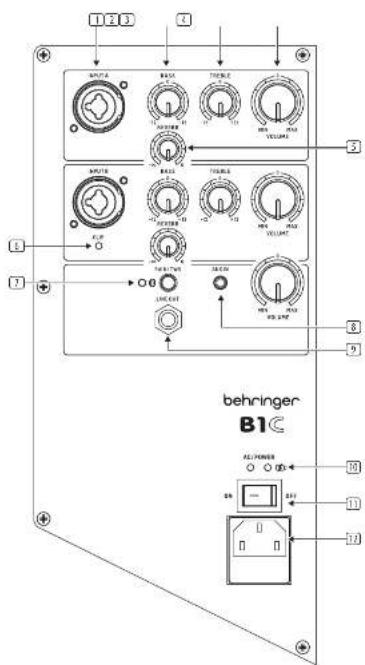
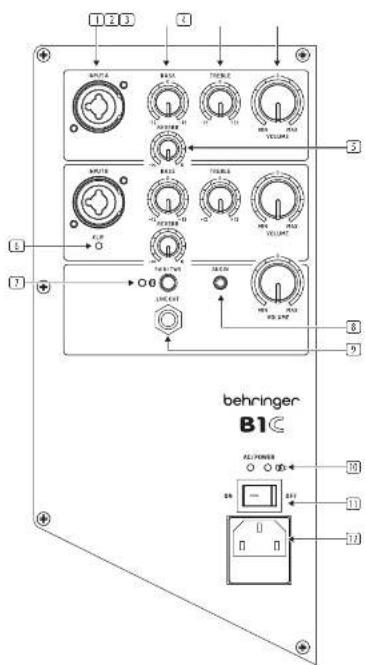
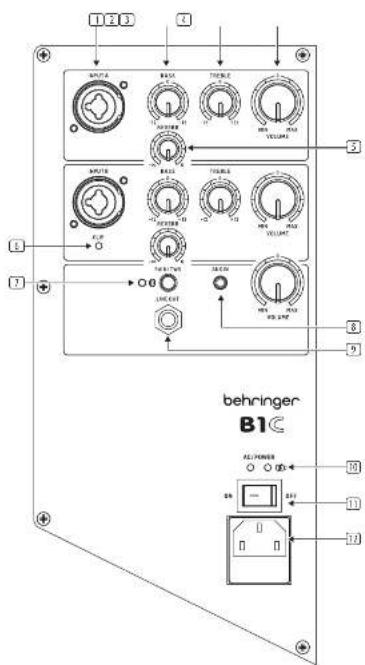
INPUT A/B - combination jacks accept input signals over XLR balanced, 36° TRS balanced, or 36° TS unbalanced connectors.
-
BASS control - cuts and boosts the level of the low frequency range.
-
TREBLE control - cuts and boosts the level of the high frequency range.
-
VOLUME control – adjusts the volume level of the input.
-
REVERB control - adjusts the level of reverberation.
-
CLIP LED - turns on when the level of the audio signals going into any input is too high.
-
PAIR/TWS - use to pair the B1C with a Bluetooth device and to pair with another B1C for True Wireless Stereo operation (TWS). The LED shows the status.
-
AUX INPUT - 3.5 mm stereo input jack.
-
LINE OUTPUT jack sends a combined signal from all inputs, out over a balanced TRS connection.
-
AC/POWER LEDs - show on/off status and battery status.
The left LED indicates power on/off (Amber) The right LED indicates battery status: Green solid: battery is full Green flashing: battery charging Red: battery is low
-
AC/POWER switch - turns the unit ON and OFF. When ON, the BIC will run on AC power if the power cord is connected to a live AC power source, or it will run on internal battery power.
-
POWER SOURCE jack accepts the included IEC cable. Only use the supplied cable.
B1C Getting started
EN Step 3: Getting started
1 Connect the BIC to a power outlet by using the included IEC power cable. This will also charge up the internal battery.
10 Adjust the Bass, Treble, and Reverb settings as needed.
2 Connect all analog microphone and/or instrument cables to their respective Input jacks. Make sure all outboard audio gear is switched off for now.
11 Make final volume adjustments.
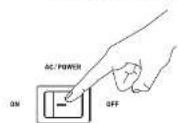
3 Power up the B1C by pressing the AC/POWER switch to the "on" position. If the AC power is not connected, the B1C will run on internal battery power.
4 Reduce the volume by rotating all the VOLUME knobs counter-clockwise.
5 Power up any outboard audio gear connected to the BTC.
6 Raise the volume back up to a low-to medium setting.
7 Speak or sing into each microphone and play your instrument while raising the respective volume level (A or B) until you find a comfortable gain level that does not distort the audio signal. Please avoid dipping the input signal.
8 If you intend to stream Bluetooth audio, go to the Bluetooth Streaming section of this Quick Start Guide and follow the setup instructions.
9 Set Bluetooth levels by adjusting the VOLUME until you find a comfortable level. Do not forget to turn on the volume on the sending BT device.
Bluetooth Connection
To stream audio from a Bluetooth-enabled device, you will need at least one BTC speaker and an iPad®/iPhone/Android®/Windows® device with basic Bluetooth connectivity.
Note: When the AUX input is connected, it takes priority over Bluetooth. Disconnect any AUX input of you want to use Bluetooth.
* iPad and Apple are trademarks of Apple Inc. Android is a trademark of Google Inc. Windows is either a registered trademark or trademark of Microsoft Corporation in the United States and/or other countries.
Bluetooth Streaming
To stream Bluetooth audio with any Bluetooth device (iPad/Phone/Android/Windows, etc.):
Single Speaker Operation
-
Enable Bluetooth on your remote device/smart phone.
-
Switch on your B1C speaker and minimize the volume.
-
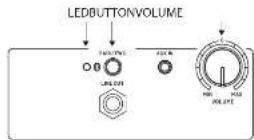
Press the PAIR button on the B1C speaker.
-
Check that your remote device is searching for a connection.
-
Once your device detects the B1C speaker, select it from your remote device's menu (for example "B1C").
-
Bluetooth music can now be streamed to your B1C. The stereo signal will automatically mix down to mono.
-
The B1C speaker LED flashes on an off during pairing. It is solid when connected and playing. It turns off if it fails to pair.
B. To unpair, press the PAIR button again.
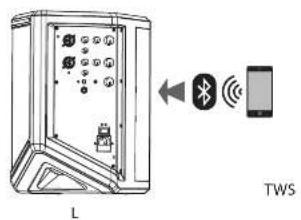
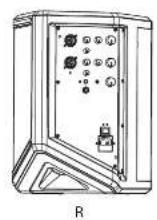
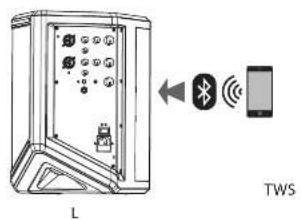
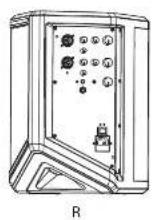
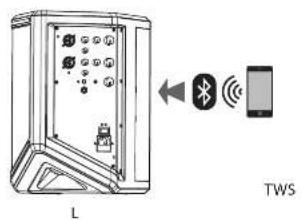
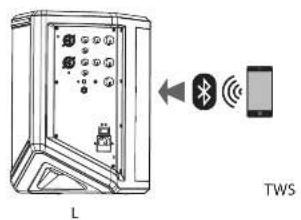
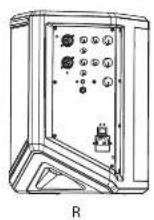
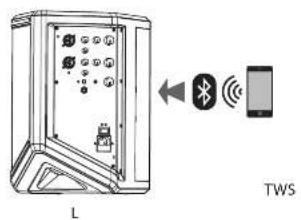
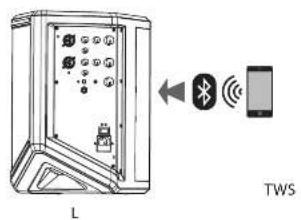
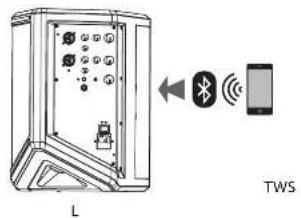
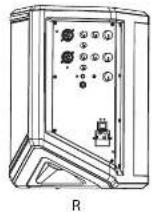
Two Speaker Operation (TWS True Wireless Stereo) Note: in TWS mode, only the Bluetooth signal is transmitted to the second speaker.
-
Turn on both B1C speakers.
-
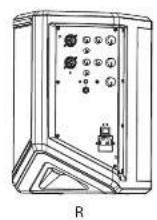
Press the PAIR button for more than 2 seconds on the first speaker (A). This will become the left channel for stereo music.
-
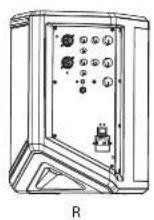
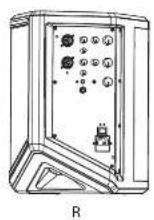
Press the PAIR button for more than 2 seconds on the second speaker (B). This will become the right channel for stereo music.
-
Speaker A's Bluetooth LED will flash quickly when ready for pairing, and speaker B's LED will be solid when TINS pairing is successful.
-
Find the correct B1C name on the remote device and connect.
-
Both speaker's Bluetooth LEDs will light solid after connecting successfully to the remote device.
-
When streaming music to the speakers, the speaker B's (right channel) LED will be solid, and speaker A's (left channel); LED will flash slowly
-
To unpair from TW5, press the PAIR button for more than 2 seconds on speaker A or speaker B, and the two speakers will unpair TW5 from each other.
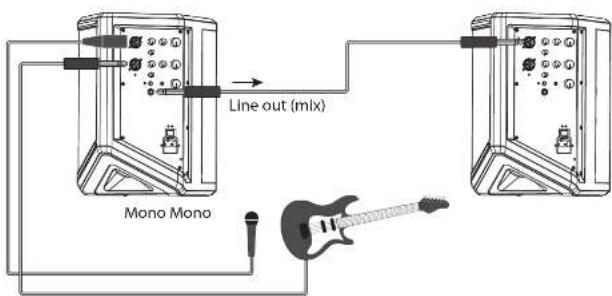
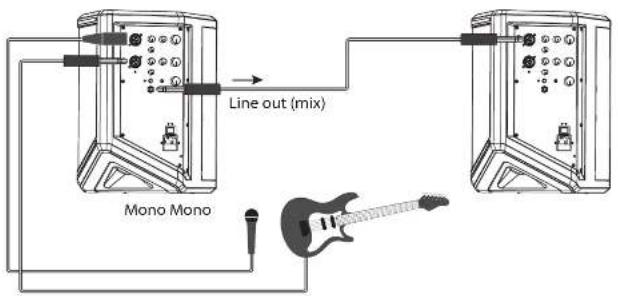
Multiple Speaker (Mono) Operation
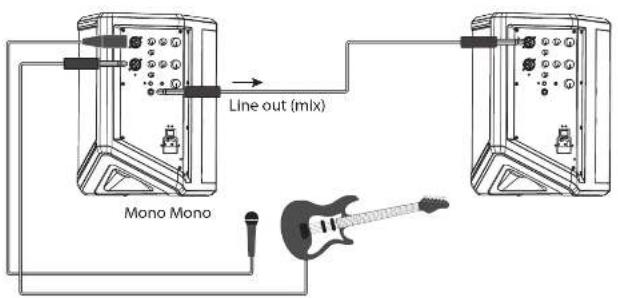
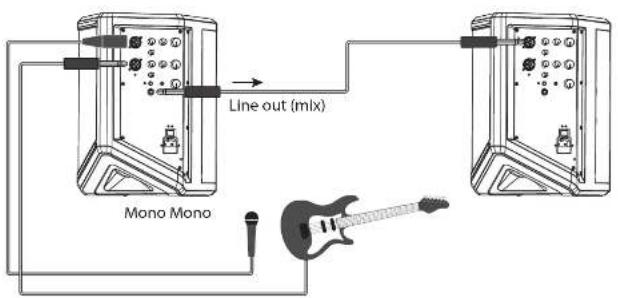
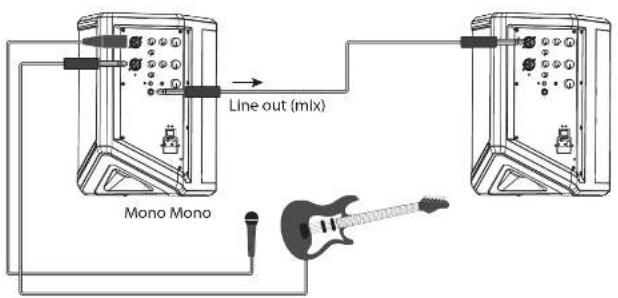
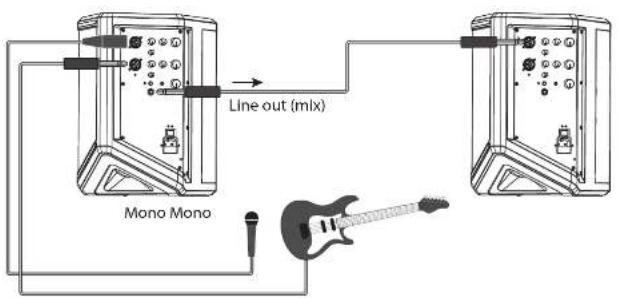
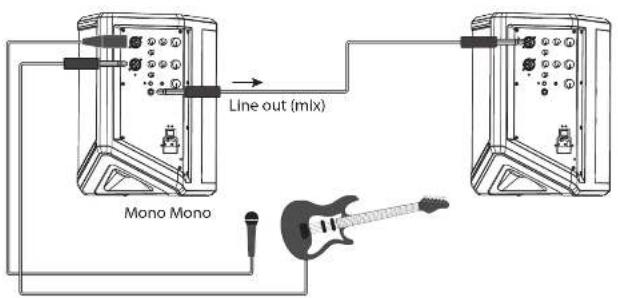
The Line output from each B1C speaker is a mix of all its inputs. It can be connected to an input of the next B1C speaker in line. All speakers will play in mono.

BIC
Quick Star Guide
19
B1C Conexión
ES Paso 1: Conexión
in a 40min, 100 (5%)
ES
JMECH study for experience in the future
B1C Controles
B1C Bedienelemente
DE Schritt2:
Bedienelemente
B1C Controles

(WE) All needs to change the state of interest
B1C Controlli
LOW Oil market price changes under Afdpctex
NL
B1C Bediening
NL Stap 2: Bediening
B1C Sterowanica
CN 第二步: 控制
| Amplifier | |
| Minimum output power 200 N° | |
| Type Class-0 | |
| Protection Short circuit, open circuit, thermal | |
| Leadspeaker / System Beta | |
| Number 1 x 6.5" | |
| Input 1 x 1 cone | |
| Frequency response 60 Hz - 20 kHz (±3 dB) | |
| Maximum SPL, 1 m 106 dB | |
| Crossover 2-way, active | |
| Crossover frequency 2.5 kHz | |
| Limited independent I.F. LT | |
| Audio Connections | |
| Inputs | 2 x 20 X / 3 X" IRS combo jacks, Aux 2.5 mm stones, BT |
| Impedance | TRS 0.80 ML, XL balanced 1 kΩ |
| Sensitivity | 0 dBu input volume set to mid |
| Max. Input level | +18 dBu |
| Aux in | 10 dB, unbalanced |
| Output 1 x IRS unbalanced | |
| Impedance | 220.0 |
| Max. output level | +18 dBu |
| Audio Controls | |
| Volume | Max to min, input A, input B, Max/ST |
| FX | Roeds => to 0 |
| EQ bars | +12 dB at 100 Hz, shivering |
| EQ table | +12 dB @ 10 kHz, shivering |
| EQ crossover | High/low pass, 12 dB/0 cd |
| Bluetooth** | |
| Frequency range | 3402 MHz - 7400 MHz |
| Channel number | 79 |
| Version | Bluetooth 5.3 compliant |
| Maximum Output Power | <5.322 dBm |
| Compatibility | Supports GATT, A2OP 1.2 profiles |
| Maximum communication range | 10 m (without interference) |
| Connectivity | Stereo pairing link (TWS) |
| Optional Accessories | |
| 31 Backpack | |
| Power Supply / Voltage (Fases) | |
| Voltage | 100 240 V-, 50/50 kHz (free 72 kHz/SD VNC internal) |
| Power consumption of max power | 60 W |
| Main connection | Standard IEC repeiple |
| Battery | Lithium, 2000 mAh, 14.8 V |
| Dimension / Weight | |
| Dimensions (H x 14 x 10) | 3x2 x 240 x 290 mm (14.3 x 9.4 x 11.4") |
| Weight | 7.2 kg (15.9 lb) |
' independent of intrus and daxr protection risks.
**The Bluetooth want mark and logos are owned by the Bluetooth SIC, Inc., and any use of such marks by Music Tribe is under license.
Quick Star Guide 79
Dados Técnicos
Other important information

Important information
-
Register online. Please register your new Music Tribe equipment right after you purchase it by visiting musictribe.com. Registering your purchase using our simple online form helps us to process your repair claims more quietly and efficiently. Also, read the terms and conditions of our warranty, if applicable.
-
Malfunction. Should your Music Tribe Authorized Reveller not be located in your vicinity, you may contact the Music Tribe Authorized Further for your country listed under "Support" at musicitibe.com. Should your country not be listed, please check if your problem can be dealt with by our "Online Support" which may also be found under "Support" at musicitibe.com. Alternatively, please submit an online warranty claim at musicitibe.com BEFORE returning the product.
-
Power Connections. Before plugging the unit into a power socket, please make sure you are using the correct mains voltage for your particular model. Equity lines must be replaced with fuses of the same type and rating without exception.

Responsible Party Name: Music Tribe Commercial NV Inc.
Address: 122 E. 42nd St.1,
8th Floor NY, NY 10168, United States
Email Address: legal@musictribe.com
FCC ID: QWHB1C
B1C
This equipment has been tested and found to comply with the limits for a Class B digital device, pursuant to part 15 of the FCC Rules. These limits are designed to provide reasonable protection against harmful interference in a residential installation. This equipment generates, uses and can radiate radio frequency energy and, if not installed and used in accordance with the instructions, may cause harmful interference to radio communications. However, there is no guarantee that interference will not occur in a particular installation. If this equipment does cause harmful interference to radio or television reception, which can be determined by turning the equipment off and on, the user is encouraged to try to correct the interference by one or more all the following measures:
• Resorient or relocate the receiving antenna.
- Increase the separation between the equipment and receiver.
- Connect the equipment into an outlet on a circuit different from that to which the receiver is connected.
- Consult the dealer or an experienced radio/TV technician for help.
This equipment complies with Part 15 of the FCC rules. Operation is subject to the following two conditions:
[1] this device may not cause harmful interference, and
(2) this device must accept any interference received, including interference that may cause undesired operation.
Important information:
Changes or modifications to the equipment not expressly approved by Music Tribe can void the user's authority to use the equipment.
Caution!
The manufacturer is not responsible for any radio or TV interference caused by unauthorized modification to this equipment. Such modifications could void the user authority to operate the equipment.
FCC RF Radiation Exposure Statement:
(1) This Transmitter must not be co-located or operating in conjunction with any other antenna or transmitter.
(2) This equipment complies with FCC RF radiation exposure limits set forth for an uncontrolled environment. This equipment should be installed and operated with minimum distance of 20 centimeters between the radiator and your body.
IC RF Radiation Exposure Statement
This device contains licence-exempt transmitter(s)/receiver(s) that comply with Innovation, Science and Economic Development Canada's licence-exempt RSS(s). Operation is subject to the following two conditions:
(1) This device may not cause interference.
(2) This device must accept any interference, including interference that may cause undesired operation of the device.
This equipment complies with IC radiation exposure limits set forth for an uncontrolled environment. This equipment should be installed and operated with minimum distance 20cm between the radiator & your body.
Hereby, Music Tribe declares that this product is in compliance with Directive 2014/53/EU, Directive 2014/30/EU, Directive 2014/35/EU, Directive 2011/66/EU and Amendment 2015/863/EU, Directive 2012/19/EU, Regulation 519/2012 REACH SVHC and Directive 1907/2006/EU.
Full text of TU DoC is available at https://community.musictribe.com/
EU Representative: Music Tribe Brands OK A/S
Address: Gammel Strand 44, DK 1202 København K, Denmark
UK Representative: Music Tribe Brands UK Ltd. Address: 5th Floor, 20 Famington Street London EC4A 4AB, United Kingdom

Correct disposal of this product: This symbol indicates that this product must not be disposed of with household waste, according to the IEEE Directive (2012/19/EU) and your national law. This product should be taken to a collection center licensed for the recycling of waste electrical and electronic equipment IEEE. The municipal filing of this type of waste
could have a possible negative impact on the environment and human health due to potentially hazardous substances that are generally associated with EEE. At the same time, your cooperation in the correct disposal of this product will contribute in the efficient use of natural resources. For more information about where you can take your waste equipment for recycling, please contact your local city office, or your household waste collection service.
Quick Star Guide
We Hear You