
Eurolive B108D - Loudspeaker BEHRINGER - Free user manual and instructions
Find the device manual for free Eurolive B108D BEHRINGER in PDF.


| Product Type | Active 2-Way PA Speaker System |
| Woofer | 8" (203 mm) |
| Tweeter | Phenolic driver |
| Amplifier | Class D, 300W peak power |
| Frequency Range (-10 dB) | 55 Hz - 20 kHz |
| Crossover Frequency | 2.6 kHz |
| Inputs | XLR/TRS combo, sensitivity -21 to 0 dBu, 30 kΩ balanced / 15 kΩ unbalanced |
| Mix Output | XLR, 100 Ω, max +22 dBu |
| Controls | Power switch, level knob, HIGH/LOW EQ (±15 dB), CLIP LED, PWR LED |
| Wireless Option | USB port for optional Behringer ULM receiver |
| Enclosure | Trapezoidal, plastic composite with perforated steel grille |
| Pole Mount | 35 mm |
| Power Supply | 100-240 V~, 50-60 Hz (switch mode) |
| Power Consumption (1/3 max power) | 50 W |
| Dimensions (H x W x D) | 248 x 220 x 360 mm (9.8 x 8.7 x 18") |
| Weight | 6.2 kg (13.7 lbs) |
| Included Accessories | IEC power cable, Quick Start Guide |
| Safety | Do not expose to rain or moisture, use with grounded outlet |
Frequently Asked Questions - Eurolive B108D BEHRINGER
User questions about Eurolive B108D BEHRINGER
0 question about this device. Answer the ones you know or ask your own.
Ask a new question about this device
Download the instructions for your Loudspeaker in PDF format for free! Find your manual Eurolive B108D - BEHRINGER and take your electronic device back in hand. On this page are published all the documents necessary for the use of your device. Eurolive B108D by BEHRINGER.
USER MANUAL Eurolive B108D BEHRINGER

Quick Start Guide
(Check out behringer.com for Full Manual)

EUROLIVE
B110D/B108D
Active 300-Watt 2-Way 10"/8" PA Speaker System with Wireless Option
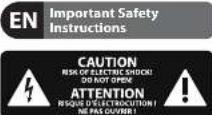
Terminal marked with this symbol carry electrical current of sufficient magnitude to constitute risk of electric shock. the only high quality professional speaker cables with 15" TS or twist lacking plugs are installed. All other installation or modification should be performed only by qualified personnel.
This symbol, wherever it appears, alerts you to the presence of uninsulated dangerous voltage inside the enclosure - voltage that may be sufficient to constitute a risk of shock.
This symbol, wherever it appears, alerts you to important operating and maintenance instructions in the accompanying literature. Please read the manual.
Caution To reduce the risk of electric shock, do not remove the trip over (or the rear section). No user serviceable parts inside. Refer servicing to qualified personnel
Caution To reduce the risk of fire or electric shock, do not expose this appliance to rain and moisture. The apparatus shall not be exposed to dripping or splashing liquids and no objects filled with liquids, such as wares, shall be placed on the apparatus.
Caution These service instructions are for use by qualified service personnel only. To reduce the risk of electric shock do not perform any servicing other than that contained in the operation instructions. Repairs have to be performed by qualified service personnel.
- Read these instructions.
- Keep these instructions.
- Need all warnings.
- Follow all instructions.
- Do not use this apparatus near water.
- Clean-only with dry cloth.
- Do not block any ventilation openings. Install in accordance with the manufacturer's instructions.
-
Do not install near any heart sources such as rotators, heat registers, stoves, or other apparatus (including amplifier) that produce heart.
-
Do not defeat the safety purpose of the polarized or grounding-type plug, a polarized plug has two blades with one wider than the other. A grounding-type plug has two blades and a third grounding prong. The wide blade or the third prong are provided for your safety. If the provided plug does not fit into your outlet, consult an electrician for replacement of the observe outlet.
- Protect the power card from being walked on or pinched particularly at plugs, convenience receplates, and the point where they exist from the apparatus.
- Use only attachment/accessories specified by the manufacturer.

- Use only with the cart, stand, tripod, bracket, or table specified by the manufacturer, or sold with the apparatus. When a cart is used, use caution when moving the cart/apparatus combination to avoid
injury from tip-over
-
Unplug this apparatus during lightning storms or when unused for long periods of time.
-
Refer all servicing to qualified service personnel. Servicing is required when the apparatus has been damaged in any way, such as power supply cord or plug in damaged, liquid has been spilled or objects have fallen into the apparatus, the apparatus has been exposed to rain or moisture, does not operate normally, or has been dropped.
-
The apparatus shall be connected to a MANG socket outlet with a protective earthing connection.
-
Where the MAINS plug or an appliance coupler is used as the disconnect device, the disconnect device shall remain nearly operable.

- Correct disposal of this product: This symbol indicates that this product must not be disposed of with household waste, according to the IEEE Directive (2012/19/LU), and your national law. This product should be taken
In a collection center licensed for the recycling of waste electrical and electronic equipment (EE). The mishandling of this type of waste could have a possible negative impact on the environment and human health due to potentially hazardous substances that are generally associated with EE. At the same time, your cooperation in the correct disposal of this product will contribute to the efficient use of natural resources. For more information about where you can take your waste equipment for recycling, please contact your local city office, or your household waste collection service.
LEGAL DISCLAIMER
MUSIC Group accepts no liability for any loss which may be suffered by any person who relies other wholly or in part upon any description, photograph, or statement contained herein. Technical specifications, appearances and other information are subject to change without notice. All trademarks are the property of their respective owners. MIDAS, KLARK TERRIK, TURBOUND, BEHRINGER, BUGENA and DBA are trademarks or registered trademarks of MUSIC Group IP Ltd. © MUSG Group IP Ltd. 2014 All rights reserved.
LIMITED WARRANTY
For the applicable warranty terms and conditions and additional information regarding MUSIC Group's Limited Warranty, please see complete details online at music group.com/warranty.
BESCHRÄNKTE GARANTIE
10 LUIROLML B110LV2108D
EUROLIVE B110D/B108D Controls

11 Quick Star Guide
Step 2: Controls
POWER switch turns the unit on or off. You should always make sure that the POWER switch is in the "Off" position when initially connecting the unit to the mains.
POWER SOURCE jack accepts the included IEC power cable.
[37] INPUT section uses an XLR input to accept balanced signals from a microphone, balanced mixer output or the MIX OUTPUT signal from another speaker. Use the 14° TRS connection for a 14° mixer output or other line-level signals. The LEVEL control adjusts the input sensitivity simultaneously for both INPUT connections.
MIX OUTPUT sends a copy of the source signal to another speaker using an XLR cable.
[37] LEVEL knob adjusts the input sensitivity (gain) for the XLR and TRS INPUT jacks. The LINE section of the knob range will usually work best for signals going into the TRS jack, while the MVC portion of the knob range will work best for microphone and other balanced signals going into the XLR jack.
CLIP LED lights when the input signal begins to overload.
(7) HIGH EQUALIZER cuts or boosts treble frequencies by ±15 dB.
5 PWR LED lights when the speaker is powered up.
④ LOW EQUALIZER cuts or boosts bass frequencies by ±15 dB.
[10] DIGITAL WIRELESS USB input accepts the optional BEHRINGER ULM wireless microphone receiver. The LEDs indicate wireless microphone signal input.
EUROLIVE B110D/B108D Getting started
Step 3: Getting started

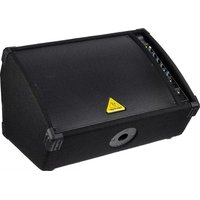
Place the speaker[s] in desired locations, either on stands or as wedge monitors on the floor.

Make all necessary connections. DO NOT turn on the power yet.

Turn on your audio source (mixer, microphone).

Turn on your speaker(s) by pressing the POWER switch. The PWR LED will light up.

Optional wireless microphone set-up

Only insert the optional BEHRINGER ULM DIGITAL WIRELESS microphone receiver into the input.

Activate the microphones by pressing the VOLUME UP button on each microphone.

During the pairing process, the LED on the dongle will flash. Once the connection between the wireless
microphone and the receiver is achieved, the LED will remain on (solid).


Speak into the wireless microphones and adjust the volume using the volume buttons on the individual microphones. Volume down button for two seconds to microphone signal. Press the volume up unmute the microphone.

Play your audio source or speak into your microphone at a normal to loud level.

Adjust the LEVEL knob to the desired volume. If the CLIP LED flashes, turn the LEVEL knob down. If using speakers, the LEVEL knob must be in each speaker.

If necessary, adjust the HIGH and LOW EQUALIZER knobs on each speaker to boost or cut treble and bass to taste.

EUROLIVE B110D/B108D Getting started
FR Etape 3 : Mise en oeuvre

| Resphi or | ||
| Maximum output power 300 mA* | ||
| Conf. qustration (hamping) | ||
| Type Class D | ||
| Ductural Protection | Dual-controlled limiter | |
| Crossover type | Act/sec | |
| Crossover frequency | 2.2 Hz | 2.6 Hz |
| Audio Inputs | |
| Connectors | XAV/165 (service-balanced) |
| Scritivity | -34 dBtu 0 dBs |
| Impedance | 30 kΩ balanced / 15 kΩ unbalanced |
| Wireless System | |
| USB single (not includes) | USB socket accepts signals from 2 Independent EBITINGER UCM risks |
| Sigma indicator LED | 2 q/cm |
| Radio Outputs | |
| Min output | |
| Connector | XLR |
| impedance | 100 Ω, balances |
| Max. output level | -22 dBu |
| Level Control | |
| Input trim | → to +14 dB |
| Max. input level | +12 dBm |
| Loudspeaker System Data | ||
| Type | 10+wafer1+phenolic driver | 8+wafer1+phenolic driver |
| Frequency range (-10 dB) | 45 Hz to 20 kHz | 55 Hz to 20 kHz |
| Equivalence | |
| Enclosure | Trapezoidal, plastic composite |
| Stille | Performance steel |
| Pair-mounting screw | 35 mm |
| Power Supply Voltage (Fuses) | |
| Switch mode power supply | 100-240 V~ 50/50 Hz switches |
| Power consumption @ 1/3 max power | 50 V |
| Maine connection | Standard IC receptacle |
| Dimensions / Weight | ||
| Dimensions (H x 1V x 0) | 299 x 252 x 483 mm (11.6 x 9.9 x 19') | 248 x 220 x 360 mm (9.8 x 8.7 x 18') |
| Weight | 0.1 kg (17.9 lbs) | 6.2 kg (13.7 lbs) |
* sign at the line of the
Other important information

Important information
- Register online. Please register your new MUSIC Group equipment right after you purchase it by visiting behringer.com. Registering your purchase using our simple online form helps us to process your repair claims more quickly and efficiently. Also, read the terms and conditions of our warranty, if applicable.
- Malfunction. Should your MUSIC Group Author and Reseller not be listed in your vicinity, you may contact the MUSIC Group Authorized Full file for your country listed under "Support" at behinger.com. Should your country not be listed, please check if your problem can be dealt with by our "Online Support" which may also be found under "Support" at behinger.com. Alternatively, please submit an online warranty claim at behinger.com BEFORE returning the product.
- Power Connections. Before plugging the unit into a power socket, please make sure you are using the correct makes voltage for your particular model. Equity fuses must be replaced with fuses of the same type and rating without exception.

Responsible Party Name: MUSIC Group Services NV Inc.
Address: 5270 Procyon Street
Las Vegas, NV 89118
USA
Phone Number: +1 702 800 8290
EUROLIVE B110D/B108D
complies with the FCC rules as mentioned in the following paragraph:
This equipment has been tested and found to comply with the limits for a Class B digital device, pursuant to part 15 of the FCC rules. These limits are designed to provide reasonable protection against harmful interference in a residential installation. This equipment generates, uses and can radiate radio frequency energy and, if not installed and used in accordance with the instructions, may cause harmful interference to radio communications. However, there is no guarantee that interference will not occur in a particular installation. If this equipment does cause harmful interference to radio or television reception, which can be determined by turning the equipment off and on, the user is encouraged to try to correct the interference by one or more of the following measures:
• Reorient or relocate the receiving antenna
- Increase the separation between the equipment and receiver
- Connect the equipment into an outlet on a circuit different from that to which the receiver is connected
- Consult the dealer or an experienced radio/TV technician for help
This device complies with Part 15 of the FCC rules. Operation is subject to the following two conditions:
(1) this device may not cause harmful interference, and
(2) this device must accept any interference received, including interference that may cause undesired operation.
Important information:
Changes or modifications to the equipment not expressly approved by MISC Group can void the user's authority to use the equipment.
Quick Start Guide

We Hear You
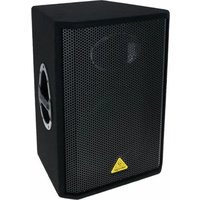
- QUICK START GUIDE
- EUROLIVE
- B110D/B108D
- LEGAL DISCLAIMER
- LIMITED WARRANTY
- BESCHRÄNKTE GARANTIE
- EUROLIVE B110D/B108D CONTROLS
- STEP 2: CONTROLS
- EUROLIVE B110D/B108D GETTING STARTED
- STEP 3: GETTING STARTED
- FR ETAPE 3 : MISE EN OEUVRE
- OTHER IMPORTANT INFORMATION
- IMPORTANT INFORMATION
- EUROLIVE B110D/B108D
Brand : BEHRINGER
Model : Eurolive B108D
Category : Loudspeaker