
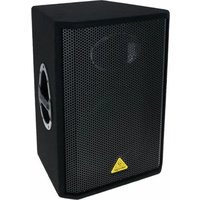
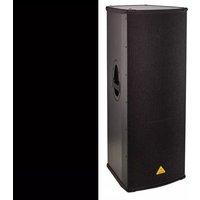
EuroLive B112MP3 - Loudspeaker BEHRINGER - Free user manual and instructions
Find the device manual for free EuroLive B112MP3 BEHRINGER in PDF.


| Product Type | Active 2-way PA speaker system with MP3 player, wireless option, and integrated mixer |
| Brand | Behringer |
| Model | EuroLive B112MP3 |
| Woofer Size | 12 inches |
| Total Power Output | 1000 W (700 W low-frequency + 300 W high-frequency) |
| Frequency Response | 50 Hz – 20 kHz (-10 dB) |
| Crossover Frequency | 2.8 kHz |
| Audio Inputs | 2 x XLR/TRS combo jacks (balanced), 1 x USB Type A (MP3 player), 1 x USB 3.0 (wireless receiver) |
| Audio Outputs | 1 x XLR balanced mix output |
| Equalization | High: +/-15 dB @ 12 kHz; Low: +/-15 dB @ 50 Hz |
| MP3 Player Support | USB flash drive, FAT16/FAT32, MP3 files (32-320 kbps, 32/44.1/48 kHz) |
| Wireless System | Optional Behringer digital wireless microphone receiver (2.4 GHz, range up to 80 m) |
| Limiter | Optical limiter to prevent overload |
| Power Supply | 100-240 V, 50/60 Hz (IEC power cord included) |
| Power Consumption | Max 110 W |
| Dimensions (H x W x D) | 22.4 x 13.1 x 10.6 inches (569 x 333 x 269 mm) |
| Weight | 27.6 lbs (12.5 kg) |
| Operating Temperature | Not specified; typical for indoor use |
| Safety & Maintenance | Do not expose to rain or moisture; clean with dry cloth only; unplug during storms or long idle periods |
| Spare Parts & Repairability | Fuse replaceable; other repairs by qualified personnel only; contact authorized service |
Frequently Asked Questions - EuroLive B112MP3 BEHRINGER
User questions about EuroLive B112MP3 BEHRINGER
0 question about this device. Answer the ones you know or ask your own.
Ask a new question about this device
Download the instructions for your Loudspeaker in PDF format for free! Find your manual EuroLive B112MP3 - BEHRINGER and take your electronic device back in hand. On this page are published all the documents necessary for the use of your device. EuroLive B112MP3 by BEHRINGER.
USER MANUAL EuroLive B112MP3 BEHRINGER
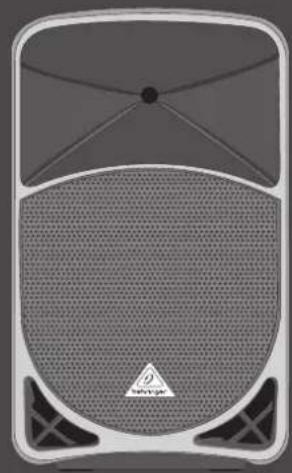
Quick Start Guide
(Check out behringer.com for more information)
EN
ES
FR
DE
PT

EUROLIVE
B115/BP32
MP3
Active 1000-Watt 2-Way 15"/12" PA Speaker System with MP3 Player, Wireless Option and Integrated Mixer

Terminals marked with this symbol carry electrical current of sufficient magnitude to constitute risk of electric shock. Use only high quality professional speaker cables with TS or twist lacking plugs pre installed. All other installation or modification should be performed only by qualified personnel.
This symbol, wherever it appears, alerts you to the presence of uninsulated dangerous voltage inside the enclosure—voltage that may be sufficient to constitute a risk of shock.
The symbol, wherever it appears, alerts you to important operating and maintenance instructions in the accompanying literature. Please read the manual.
Caution To reduce the risk of electric shock, do not remove the top cover (or the rear section). No user serviceable parts inside. Refer servicing to qualified personnel.
Caution To reduce the risk of fire or electric shock, do not expose this appliance to rain and moisture. The apparatus shall not be exposed to dripping or splashing liquids and no objects filled with liquids, such as wares, shall be placed on the apparatus.
Caution These service instructions are for use by qualified service personnel only. To reduce the risk of electric shock do not perform any servicing other than that contained in the operation instructions. Repairs have to be performed by qualified service personnel.
-
Read these instructions.
-
Keep these instructions
-
Head all warnings.
-
Fellowall instructives.
-
Do not use this apparatus near water.
-
Clean only with dry cloth.
-
Do not block any ventilation openings install in
accordance with the manufacturer's instructions.
-
Do not install near any heat sources such as radiators, heat registers, stoves, or other apparatus (including amplifiers) that produce heat.
-
Do not defeat the safety purpose of the polarized or grounding-type plug. A polarized plug has two blades with one wider than the other. A grounding-type plug has two blades and a third grounding prong. The wide blade or the third prong are provided for your safety. If the provided plug does not fit into your outlet, consult an electrician for replacement of the obsores outlet.
- Protect the power cord from being walked on or pinched particularly as plugs, convenience necessitates, and the point where they exit from the apparatus.
- Use only attachments/accessories specified by the manufacturer.

- Use only with the cart, stand, tripod, bracket, or table specified by the manufacturer, or sold with the apparatus. When a cart is used, use caution when moving the cart/apparatus combination to avoid
injury from tip-over.
-
Unplug this apparatus during lightning storms or when unused for long periods of time.
-
Refer all servicing to qualified service personnel. Servicing is required when the apparatus has been damaged in any way, such as power supply cord or plug in damaged, liquid has been spilled or objects have fallen into the apparatus, the apparatus has been exposed to rain or moisture, does not operate normally, or has been dropped.
-
The apparatus shall be connected to a MANS socket outlet with a protective earthing connection.
-
Where the MAPS plug or an appliance coupler is used as the disconnect device, the disconnect device shall remain readily operable.

LEGAL DISCLAIMER
TECHNICAL SPECIFICATIONS AND APPEARANCES ARE SUBJECT TO CHANGE WITHOUT NOTICE AND ACCURACY IS NOT GUARANED. BELHINGER IS PART OF THE MUSIC GROUP (MUSIC-CROUP.COM). ALL TRADEMARS ARE THE PROPERTY OF THEIR RESPECTIVE OWNERS. MUSIC GROUP ACCEPTS NO LIABILITY FOR ANY LOSS WHICH MAY BE SUFFERED BY ANY PERSON WHO RELIES EITHER WHOLLY OR IN PART UPON ANY DESCRIPTION, PHOTOGRAPH OR STATEMENT CONTAINED HEREIN, COLORS AND SPECIFICATIONS MAY VARY FROM ACTUAL PRODUCT. MUSIC GROUP PRODUCTS ARE SOLD THROUGH AUTHORED FULLIERS AND RESILERS ONLY FULLIERS AND RESILERS ARE NOT AGENTS OF MUSIC GROUP AND HAVE ABSOLUTELY NO AUTHORITY TO BIND MUSIC GROUP BY ANY EXPRESS OR IMPLIED UNDERTAKING OR REPRESENTATION. THIS MANUAL IS COPYRIGHTED. NO PART OF THIS MANUAL MAY BE REPRODUCED OR TRANSMITTED IN ANY FORM OR BY ANY MEANS, ELECTRONIC OR MECHANICAL, INCLUDING PHOTOCOPYING AND RECORDING OF ANY KIND. FOR ANY PURPOSE, WITHOUT THE EXPRESS WRITTEN PERMISSION OF MUSIC GROUP IF LTD.
ALL RIGHTS RESERVED. © 2012 MUSIC Group IP Ltd. Trident Chambers, Wickhams Cay, P.O. Box 146, Road Town, Tortola, British Virgin Islands
LIMITED WARRANTY
§ 1 Warranty
(3) This limited warranty is valid only if you purchased the product from a MUSIC Group Authorized Reseller in the country of purchase. A list of authorized resellers can be found on BEHRINGER's website behringer.com under "Where to Buy", or you can contact the MUSIC Group office closest to you.
2 MUSIC Group® warrants the mechanical and electronic components of this product to be free of defects in material and workmanship if used under normal operating conditions for a period of one (1) year from the original date of purchase (see the Limited Warranty terms in § 4 below), unless a longer minimum warranty period is manufactured by applicable local laws. If the product shows any defects within the specified warranty period and that defect is not excluded under § 4, MUSIC Group shall, its dissection, either replace or repair the product using unalool new or reconditioned product or parts. In case MUSIC Group decides to replace the entire product, this limited warranty shall apply to the replacement product for the remaining initial warranty period, i.e., one (1) year or otherwise applicable minimum warranty period from the date of purchase of the original product. 3 Upon validation of the warranty claim, the repaired or replacement product will be returned to the user freight prepared by MUSIC Group.
☐ Warranty claims other than those indicated above are expressly excluded.
PLEASE RETAIN YOUR SALES RECEIPT. IT IS YOUR PROOF OF PURCHASE COVERING YOUR LIMITED WARRANTY. THIS LIMITED WARRANTY IS VOID WITHOUT SUCH PROOF OF PURCHASE.
§ 2 Online registration
Please do remember to register your new BEHNING equipment night after your purchase at behinger.com under "Support" and kindly read the terms and conditions of our limited warranty carefully. Registering your purchase and equipment with us helps us process your repair claims quicker and more efficiently. Thank you for your cooperation!
§ 3 Return materials authorization (1) To obtain warranty service, please contact the retailer from whom the equipment was purchased. Should your MUSIC Group Authorized Reviewer not be located in your vicinity, you may contact the MUSIC Group Authorized Further for your country listed under
"Support" at belringers.com. If your country is not listed, please check if your problem can be dealt with by our "Online Support" which may also be found under "Support" at belringers.com. Alternatively, please submit an online warranty claim at belringers.com BEFORE returning the product. All inquiries must be accompanied by a description of the problem and the serial number of the product. After verifying the product's warranty eligibility with the original sales receipt, MUSIC Group will then issue a Return Materials Authorization (BMA) number.
② Subsequently, the product must be returned in its original shipping carton, together with the return authorization number to the address indicated by MJSK Group.
③ Shipments without freight prepaid will not be accepted.
§ 4 Warranty Exclusions
(1) This limited warranty does not cover consumable parts including, but not limited to, lumes and batteries. Where applicable, MUSIC Group warrants the valves or meters contained in the product to be free from defects in material and workmanship for a period of ninety 1901 days from date of purchase.
C7. This limited warranty does not cover the product if it has been electronically or mechanically modified in any way. If the product needs to be modified or adapted, in order to comply with applicable technical or safety standards on a national or local level, in any country which is not the country for which the product was originally developed and manufactured, this modification adaptation shall not be considered a defect in materials or workmanship. This limited warranty does not cover any such modification adaptation, regardless of whether it was carried out properly or not under the terms of this limited warranty, MUSIC Group shall not be held responsible for any cost resulting from such a modification adaptation.
(3). This limited warranty covers only the product hardware. It does not cover technical assistance for hardware or software usage and it does not cover any software products whether or not contained in the product. Any such software is provided "AS IS" unless expressly provided for in any enclosed software limited warranty.
④ This limited warranty is invalid if the factory-applied serial number has been altered or removed from the product.
☐ Tree Inspections and maintenance repair work are expressly excluded from this limited warranty, in particular, if caused by improper handling of the product by the user. This also applies to defects caused by normal wear and tear, in particular, of faders, crossfaders, potentiometers, keys/buttons, quitar strings, illuminants and similar parts.
6 Damage/defects caused by the following conditions are not covered by this limited warranty:
- improper handling, neglect or failure to operate the unit in compliance with the instructions given in BEHRINGER user or service manuals;
- connection or operation of the unit in any way that does not comply with the technical or safety regulations applicable in the country where the product is used;
• damage/defects caused by acts of God/Nature (accident, fire, flood, etc) or any other condition that is beyond the control of MJSK Group.
(7) Any repair or opening of the unit carried out by unauthorized personnel (user included) will void the limited warranty.
If an inspection of the product by MUSIC Group shows that the defect in question is not covered by the limited warranty, the inspection costs are payable by the customer.
Products which do not meet the terms of this limited warranty will be repaired exclusively at the buyer's expense. MUSIC Group or its authorized service center will inform the buyer of any such circumstance. If the buyer fails to submit a written repair order within 6 weeks after modification, MUSIC Group will return the unit C.O.D. with a separate invoice for freight and packing. Such costs will also be invoked separately when the buyer has sent in a written repair order.
(3) MUSIC Group Authorized Resellers do not sell new products directly in online auctions. Purchases made through an online auction are on a "buyer beware" basis. Online auction confirmations or sales receipts are not accepted for warranty verification and MUSIC Group will not repair or replace any product purchased through an online auction.
§ 5 Warranty transferability
This limited warranty is extended exclusively to the original buyer (customer of authorized resellent and is not transferable to anyone who may subsequently purchase this product. No other person (reseller, etc.) shall be entitled to give any warranty promise on behalf of MUSIC Group.
§ 6 Claim for damage
Subject only to the operation of mandatory applicable local laws, MUSIC Group shall have no liability to the buyer under this warranty for any consequential or indirect loss or damage of any kind. In no event shall the liability of MUSIC Group under this limited warranty exceed the Involved value of the product.
§ 7 Limitation of liability
This limited warranty is the complete and exclusive warranty between you and MUSIC Group. It supersedes all other written or oral communications related to this product. MUSIC Group provides no other warranties for this product.
§ 8 Other warranty rights and
national law
This limited warranty does not exclude or limit the buyer's statutory rights as a consumer in any way.
② The limited warranty regulations mentioned herein are applicable unless they constitute an infringement of applicable mandatory local laws.
① This warranty does not detract from the seller's obligations in regard to any lack of conformity of the product and any hidden defect.
§9 Amendment
Warranty service conditions are subject to change without notice. For the latest warranty terms and conditions and additional information regarding MUSK Group's limited warranty, please see complete details online at behinger.com.
* MUSC Group Macau Commercial Offshore Limited Rocce Poplar No. 2024, Macau Finance Centre, 510 Macau, including all MUSC Group companies
RESERVADOS TODOS LOS DERECHOS. © 2012 MUSIC Group IP Ltd. Irident Chambers, Wickhams Cay, P.O. Box 146. Road Town, Tortola, British Virgin Islands
GARANTÍA
§ 1 Garantía
* M.PSC Group/Macau Commercial Of Share Units of Racce Pequin No. 102 A, Macau France Centre St, Macau, Indusive Institute Regener M.PSC Group

ALLE RECHTE VORSEHALTEN. © 2012 MUSIC Group IP Ltd. Trident Chambers, Wickhams Gay, P.O. Box 146, Road Town, Tortola, British Virgin Islands.
EINGESCHRÄNKTE GARANTIE
§ 1 Garantie
12 LUCOLNL BTEMPSVET2MPS
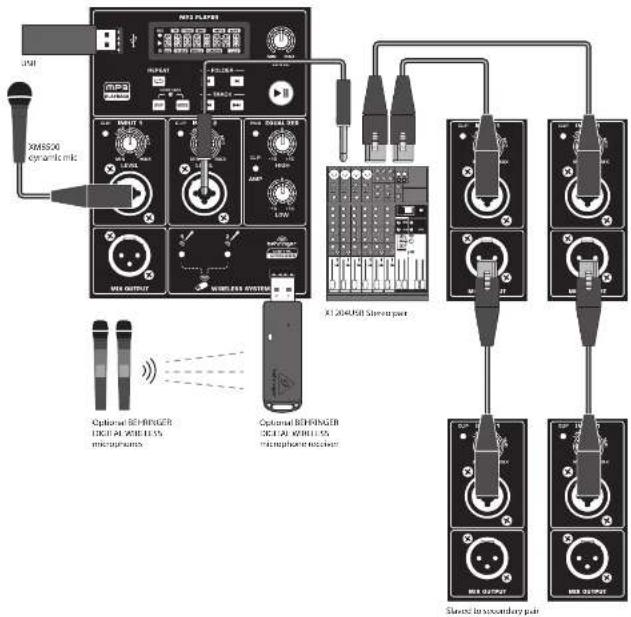
EUROLIVE B115MP3/B112MP3 Hook-up
Step 1: Hook-Up
Paso 1: Conexión
Etape 1 : Connexions
Schritt 1: Verkabelung
PT Passo 1: Conexões
13 Quick Start Guide
EUROLIVE B115MP3/B112MP3 Controls
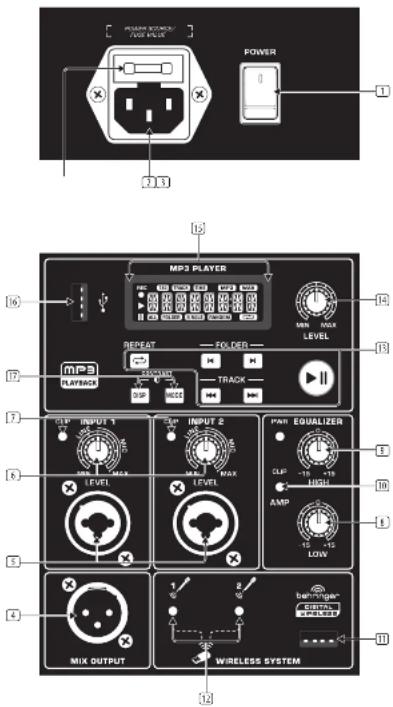
FN Step 2: Controls
The POWER switch turns the speaker on.
Plug the included IEC power cable into this jack.
③ Replace a blown fuse here.
4 MIX OUTPUT sends a copy of the source signal to another speaker using an XLR cable.
Connect a microphone, balanced mixer output, or the MIX OUTPUT from another speaker using a balanced cable with a female XLR plug. Connect a 3/4" mixer output or other line level signal into the center of the XLR/TRS combination jack.
e INPUT 1 and INPUT 2 knobs adjust the input sensitivity (gain) for the XLR/TRS combination jacks.
[7] CLIP LED lights when the input signal begins to overload.
☐ LOW EQUALIZER cuts or boosts bass frequencies by 1/-15 dB.
3 HIGH EQUALIZER cuts or boosts treble frequencies by 4/-15 dB.
☑ CLIP LED lights when the main output signal begins to overload.
[11] Connect optional BEHRINGER wireless microphone receiver here.
☐ LEDs indicate wireless microphone signal input.
☐ MP3 player controls for playback of files from a USB flash drive.
[14] LEVEL knob controls the MP3 player volume.
[15] LCD window display shows the status of the MP3 being played.
16 USB jack accepts standard USB flash drives.
[10] MODE and DISP(LAY) buttons control the play mode of the MP3 player and also serve as contrast controls for the LCD display.
18 LUCOLNL BTEMPS/ET2MFS
EUROLIVE B115MP3/B112MP3 Getting started
Step 3: Getting started
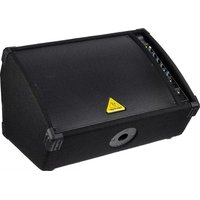
1 Place the speaker(s) in desired locations, either on stands or as wedge monitors on the floor.
2 Make all necessary connections. DO NOT turn on the power yet.
3 Turn on your audio source (mixer, microphone).
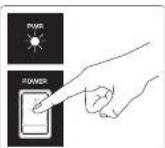
4 Turn on your speaker(s) by pressing the POWER SWITCH. The POWER LED will light up.
5 Play your audio source or speak into your microphone at a normal to loud level.
6 Adjust the LEVEL knob to the desired volume. If the CUP LED flashes, turn the LEVEL knob down. If using multiple speakers, the LEVEL knob must be adjusted on each speaker.
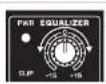
7 If necessary, adjust the HIGH and LOW EQUALIZER knobs on each speaker to boost or cut treble and bass frequencies to taste.
8 Attach a USB flash drive to the USB port. Switch between folders on the drive using the FOLDER buttons. Select the track you wish to play using the TRACK buttons. Press the PLAY/PAUSE button to start or stop playback.
9 Press the REPEAT button and then the MODE button to select between repeating ALL mps3 files on the USB drive. files in the current FOLDER, the currently playing file (SINGLE) or to play all files in RANDOM order.
10 Press the DISP(LAY) button to change what appears on the screen of the MP3 player between the TAG
TRACK (file name up to 64 characters) or TIME (shows track number in current folder and the elapsed time of the currently running track).
11 Press the DISPLAY and MODE buttons at the same time to cycle between screen contrast intensities.
12 Adjust the playback volume using the LEVEL knob.
Optional wireless microphone set-up
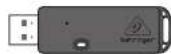
1 Only insert the optional BEHRINGER DIGITAL WIRELESS microphone receiver into the input.
2 Turn the ON/OFF switches on the microphones to the "OH" position.
During the pairing process, the LED on the dongle will flash. Once the connection between the wireless microphone and the receiver is achieved, the LED will remain on (solid).
4 Speak into the wireless microphones and adjust the volume using the volume buttons on the individual microphones. Press the volume down button for two seconds to mute the microphone signal. Press the volume up button to unmute the microphone.
19 Quick Start Guide
EUROLIVE B115MP3/B112MP3 Getting started
FR Etape 3 : Mise en oeuvre

EUROLIVE B115MP3/B112MP3 Getting started
24 LUCOLNL BTEMPS/ETDMPS
Quick Start Guide
25
| Amplifier | ||
| Low frequency range | ||
| Max output power 700 W* | ||
| High-frequency range | ||
| Max output power 300 W* | ||
| Audio Inputs | ||
| XLR (serve-balanced) | ||
| Sensitivity: -36 dB to +0 dBu | ||
| Input impedance 14dB | ||
| N° TRS jack (serve-balanced) | ||
| Sensitivity: -36 dB to +0 dBu | ||
| Input impedance 14dB | ||
| USB port/MP3 player | ||
| Connector USB type A | ||
| File system FXT 1st, FAT 32 | ||
| Format MP3 (CSH & USB) | ||
| Bit rates 32 - 320 stops | ||
| Sample rates 32 kHz, 44.1 kHz, 48 kHz | ||
| Wireless system | ||
| Connector | USB 3.0 | |
| Frequency band: 2.4 GHz | ||
| Frequency response (Wireless Link) | 25 Hz - 20 kHz (1.04-2.5 dB) | |
| Range | Max. 80 m (Line of sight) | |
| Audio Outputs | ||
| Mix | ||
| Connector | XLR balanced | |
| Level Control | ||
| Input form | --> to +36 dB | |
| Max. input level | 18 dB | |
| Leadspeaker System Data | ||
| Frequency response | +/-15 dB @ 12 kHz | |
| Crossover frequency | 2.2 kHz | 2.8 kHz |
| Limiter | Optical | |
| Equalizer | ||
| High | +/-15 dB @ 12 kHz | |
| Low | +/-15 dB @ 50 Hz | |
| Power Supply | ||
| Voltage (Fuses) | ||
| USA / Canada | 120 V, 60 Hz (1.6.3 A H, 250 V) | |
| UK / Australia | 240 V, -50 Hz (1.33 A H, 250 V) | |
| Europe | 240 V, -50 Hz (1.35 A H, 250 V) | |
| Japan | 100 V, -50-60 Hz (1.6.3 A H, 250 V) | |
| Power consumption | max. 110 N | |
| Maina connection | Standard IEC receptacle | |
| Dimensions/Weight | ||
| Dimensions (in x 10 x D) | 28.7 x 16.8 x 12.3" | 22.4 x 13.1 x 10.6" |
| 113 x 42.7 x 39.3 mm | 368 x 34.2 x 270 mm | |
| Weight | 38.5 hbs/127 kg | 72.6 hbs/12.5 kg |
Indeterminate of illness and other prevention cases
B115MP3 B112MP3
Independent is in issue of this role or power on the heat powers
B115MP3 B112MP3
Other important information

Important Information

Informations Importantes

Responsible Party Name: MUSIC Group Services US Inc.
Address: 18912 North Creek Parkway,
Suite 200 Bothell, WA 98011,
USA
Phone/Fax No.: Phone: +1 425 672 0816
Fax:+1 425 673 7647
EUROLIVE B115MP3/B112MP3
complies with the FCC rules as mentioned in the following paragraph:
This equipment has been tested and found to comply with the limits for a Class B digital device, pursuant to part 15 of the PCB rules. These limits are designed to provide reasonable protection against harmful interference in a residential installation. This equipment generates, uses and can radiate radio frequency energy and, if not installed and used in accordance with the instructions, may cause harmful interference to radio communications. However, there is no guarantee that interference will not occur in a particular installation. If this equipment does cause harmful interference in radio or television reception, which can be determined by turning the equipment off and on, the user is encouraged to try to correct the interference by one or more of the following measures:
• Reorient or relocate the receiving antenna
• Increase the separation between the equipment and receiver
- Connect the equipment into an outlet on a circuit different from that to which the receiver is connected
• Consult the dealer or an experienced radio-TV technician for help.
This device complies with Part 15 of the FCC rules. Operation is subject to the following two conditions:
(1) this device may not cause harmful interference, and (2) this device must accept any interference received, including interference that may cause undesired operation.
Important information:
Changes or modifications to the equipment not expressly approved by MUSIC Group can void the user's authority to use the equipment.
We Hear You
- EUROLIVE
- B115/BP32
- MP3
- LEGAL DISCLAIMER
- LIMITED WARRANTY
- § 1 WARRANTY
- § 2 ONLINE REGISTRATION
- § 4 WARRANTY EXCLUSIONS
- § 5 WARRANTY TRANSFERABILITY
- § 6 CLAIM FOR DAMAGE
- § 7 LIMITATION OF LIABILITY
- § 8 OTHER WARRANTY RIGHTS AND
- NATIONAL LAW
- §9 AMENDMENT
- GARANTÍA
- § 1 GARANTÍA
- EINGESCHRÄNKTE GARANTIE
- § 1 GARANTIE
- EUROLIVE B115MP3/B112MP3 HOOK-UP
- EUROLIVE B115MP3/B112MP3 CONTROLS
- FN STEP 2: CONTROLS
- EUROLIVE B115MP3/B112MP3 GETTING STARTED
- STEP 3: GETTING STARTED
- OPTIONAL WIRELESS MICROPHONE SET-UP
- FR ETAPE 3 : MISE EN OEUVRE
- OTHER IMPORTANT INFORMATION
- IMPORTANT INFORMATION
- INFORMATIONS IMPORTANTES
- EUROLIVE B115MP3/B112MP3
Brand : BEHRINGER
Model : EuroLive B112MP3
Category : Loudspeaker