SHX501HEAT2023 - Heating SHX - Free user manual and instructions
Find the device manual for free SHX501HEAT2023 SHX in PDF.


User questions about SHX501HEAT2023 SHX
0 question about this device. Answer the ones you know or ask your own.
Ask a new question about this device
Download the instructions for your Heating in PDF format for free! Find your manual SHX501HEAT2023 - SHX and take your electronic device back in hand. On this page are published all the documents necessary for the use of your device. SHX501HEAT2023 by SHX.
USER MANUAL SHX501HEAT2023 SHX
Montage mural ! Attention !
- Install temperature:
THANK YOU FOR CHOOSING THIS PRODUCT FROM SHX.

This product is only suitable for well-insulated rooms or for occasional use.
TABLE OF CONTENTS
| Important information on safety, location and electrical connection |
| Recycling, disposal, declaration of conformity |
| Scope of delivery |
| Description of the unit |
| Location and connection |
| Wall mounting, stand mounting |
| Commissioning and function |
| Safety devices |
| Cleaning and maintenance |
| Technical information |
| Required information on electric single room heaters |
PLEASE READ THE OPERATING INSTRUCTIONS
CAREFULLY BEFORE STARTING ASSEMBLY,
INSTALLATION, OPERATION OR MAINTENANCE.
PROTECT YOURSELF AND OTHERS BY FOLLOWING
THE SAFETY INSTRUCTIONS. FAILURE TO FOLLOW
INSTRUCTIONS COULD RESULT IN PERSONAL INJURY
AND/OR PROPERTY DAMAGE AND/OR LOSS OF
WARRANTY COVERAGE!
Intended use
This appliance is intended exclusively for heating domestic living spaces and must not be used for any other purpose. This appliance is suitable for wall mounting only. The lowest point of the unit must be 180cm above the floor when mounted.
IMPORTANT SAFETY, STANDARD AND ELECTRICAL CONNECTION INFORMATION


- use this appliance only in accordance with the guidelines in the instruction manual. Any other use not recommended by the manufacturer could result in fire, electric shock or personal injury.
- this appliance is intended for domestic space heating only and must not be used for any other purpose.
- Remove the packaging and make sure that the unit is not damaged. If in doubt, do not use the unit and contact your dealer.
- Before connecting to the mains, you must check that the type of current and mains voltage correspond to the information on the appliance type plate.
- The electrical socket to which you connect the appliance must not be defective or loose and must be suitable for the required current load and, above all, reliably earthed.
-
avoid using an extension cord as it could overheat and cause a fire.
-
If the power supply cable is damaged, it must be replaced by the manufacturer or an authorised service centre to avoid all possible risks. Do not twist or bend the power cable.
-
the appliance must not be placed directly under a wall socket. If in doubt, have your electrical installation checked by a qualified electrician.
-
it is forbidden to adapt or modify the characteristics of this appliance in any way. Use only spare parts and accessories recommended by the manufacturer (failure to do so may invalidate the warranty).
-
do not use this heater if it shows visible signs of damage.
-
always and only contact service centres authorised by the manufacturer for any repairs to the appliance, the mains plug or the cable.
-
This appliance must only be used by adults.
-
Children 3 years and younger than 8 years of age shall not turn the appliance on or off unless they are supervised or have been instructed in the safe use of the appliance and understand the hazards involved, provided that the appliance is placed or installed in its normal position of use. Children aged 3 years and under 8 years shall not plug the appliance into the mains socket, regulate the appliance, clean the appliance and/or carry out user maintenance.
-
Do not leave the appliance unattended. If you leave the room, always switch off the appliance.
-
do not use the appliance in small rooms where there are people who are not able to leave the room on their own, unless they are constantly supervised.
-
Children are not allowed to play with the appliance. Children under 3 years of age must be kept away from the unit unless you are supervised at all times.
-
Keep children away from packaging materials. Danger of choking if swallowed!
-
this appliance is not equipped with a device to control the room temperature.
-
the unit is not suitable for continuous and precision operation.
-
do not use this heater if it has been dropped before.
-
This appliance is intended for dry indoor use only.
-
Do not use the unit near water or high humidity, e.g. in a damp cellar, next to a swimming pool, bathtub or shower. Make sure that no water can enter the unit.
-
Do not use the appliance in the direct vicinity of petrol, gas, oil, alcohol or other explosive and highly flammable liquids or gases.
-
To reduce the risk of fire, keep a distance of at least one metre from the air outlet of the appliance to all easily flammable materials such as e.g:
a. vessels under pressure (e.g. spray containers)
b. Furniture
c. Textiles of any kind
-
use this heater on a horizontal and stable surface or fixed to a wall if necessary.
-
Never cover the appliance during operation or when it is cooling down.
- Make sure that no objects touching the heating surface get between the appliance and the mounting wall.
- Always switch off the appliance before unplugging it from the mains.
- 29 Caution - Some parts of the product may become very hot and cause burns. Special care should be taken when children and vulnerable persons are present. Always allow the appliance to cool down before cleaning or disassembling it.
- Unplug the appliance when not in use, before cleaning or when it needs maintenance. Cleaning and user maintenance must not be carried out by children without supervision.
- do not handle the plug with wet hands to avoid electric shock.
| ATTENTION | RISK OF INJURY The unit becomes hot during operation! Never touch the appliance during operation→this could cause serious BURNS. |
| ATTENTION | FIRE HAZARD The unit must not be covered during operation! |
| ATTENTION | SAFETY DISTANCE Keep a safe distance of at least one metre from easily inflammable objects such as furniture, curtains, paper, etc.!LOCATION Always position the appliance so that the air can flow in and out unhindered. RISK OF BURNS The appliance becomes very hot during use and can cause burns. Special care should be taken when children and vulnerable persons are present. RISK OF OVERHEATING Do not heat rooms with a volume of less than 4m3. |
Symbols on the unit
Symbol:
Meaning:

Attention! Do not cover!
The symbol on the unit indicates that it is not permitted to hang objects (e.g. towels, clothes, etc.) above the unit or directly in front of it. The heater must not be covered to avoid overheating and fire hazard!
Symbol:
Meaning:

Protection class 2
The symbol indicates that the unit is assigned to protection class 2.
Devices of protection class 2 are not connected to the protective conductor. Instead, they have reinforced or double insulation at the level of the rated insulation voltage between active and touchable parts. Electrically conductive surfaces or conductive touchable parts are thus separated from live parts by reinforced or double insulation.
Recycling, disposal, declaration of conformity
| RECYCLING The packaging materials can be recycled. Therefore, it is recommended to dispose of them in sorted waste. | |
| DISPOSAL The symbol "crossed-out dustbin" requires the separate disposal of waste electrical and electronic equipment (WEEE). Electrical and electronic equipment may contain hazardous and environmentally dangerous substances. Therefore, do not dispose of this in unsorted residual waste, but at a designated collection point for waste electrical and electronic equipment. By doing so, you will contribute to the protection of resources | |
| and the environment. For more information, please contact your dealer or the local authorities. Directive 2012/19/EU | |
| BATTERY DISPOSAL In accordance with Legislative Decree 188 of 20 November 2008 transposing Directive 2006/66/EC on batteries, accumulators and related waste, the crossed-out wheeled bin symbol on the battery indicates that it is prohibited to dispose of waste batteries in household waste. Batteries and accumulators contain highly polluting substances. The user is obliged to dispose of used batteries at the collection points in the municipality or in the appropriate containers. The service is free of charge. In this way, the legal requirements are met and the environment is protected. You will find these signs on batteries: Li = battery contains lithium Al = battery contains alkali Mn = battery contains manganese CR 2025 (Li); AA (Al, Mn); AAA (Al, Mn) | |
| CE | DECLARATION OF CONFORMITY We hereby confirm that this article complies with the basic requirements, regulations and directives of the EU. You can view the detailed declaration of conformity at any time under the following link: https://www.schuss-home.at/downloads |
Errors and technical modifications excepted.
Scope of delivery
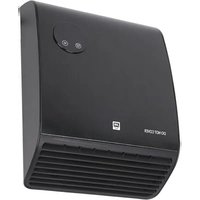
Fan heater
- Wall mounting material
- Operating instructions
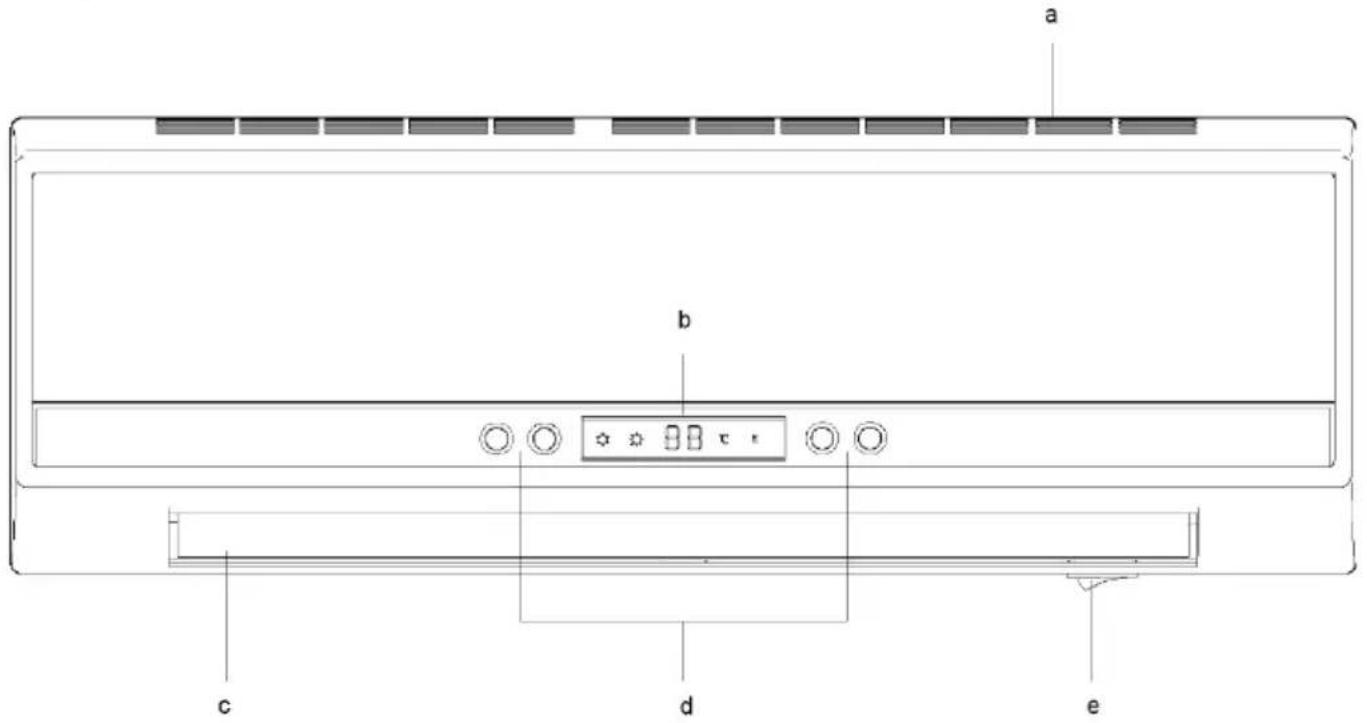
Description of the unit
a) Air inlet
b) LED display
c) Air outlet
d) Control panel
e) On/Off switch
Location and connection
Remove all packaging material and keep it out of the reach of children. After removing the packaging, check whether the unit shows any damage or signs of damage.
If in doubt, do not use the unit, but contact your dealer.
Select a suitable place for the appliance and observe all warnings mentioned in this instruction manual.
IMPORTANT
The bathroom fan heater should preferably - especially when used in damp rooms - be permanently installed on an electrical connection.
This connection may only be made by an authorised electrician and is therefore not described further here.
For safety reasons, these operating instructions assume that the unit is used with a plug. Passages about the connector do not apply in the case of a fixed connection.
Inserting / replacing the batteries in the remote control
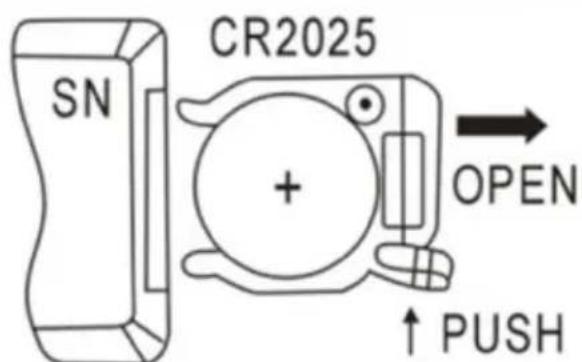
Open the battery cover on the underside of the remote control, press the buckle on the battery cover inwards and pull it out, remove the battery fuse strip. Please pay attention to the correct polarity (+/-) .
To replace the battery, please follow the steps below:
- open the battery cover on the bottom of the remote control, press the buckle on the battery cover inwards and pull it out, remove the old battery.
- please ensure correct polarity (+/-) Use only type CR2025 and dispose of the old batteries in an environmentally friendly manner and in accordance with the regulations in your country.
- Slide the battery cover on the bottom of the remote control back into the remote control.
- Be careful not to bend the contacts. Insert the new battery and close the battery compartment cover.
NOTE
If you do not use the remote control for a longer period of time (4 weeks or longer), remove the batteries from the remote control.
The lowest point of the unit must be 180cm above the floor when mounted!
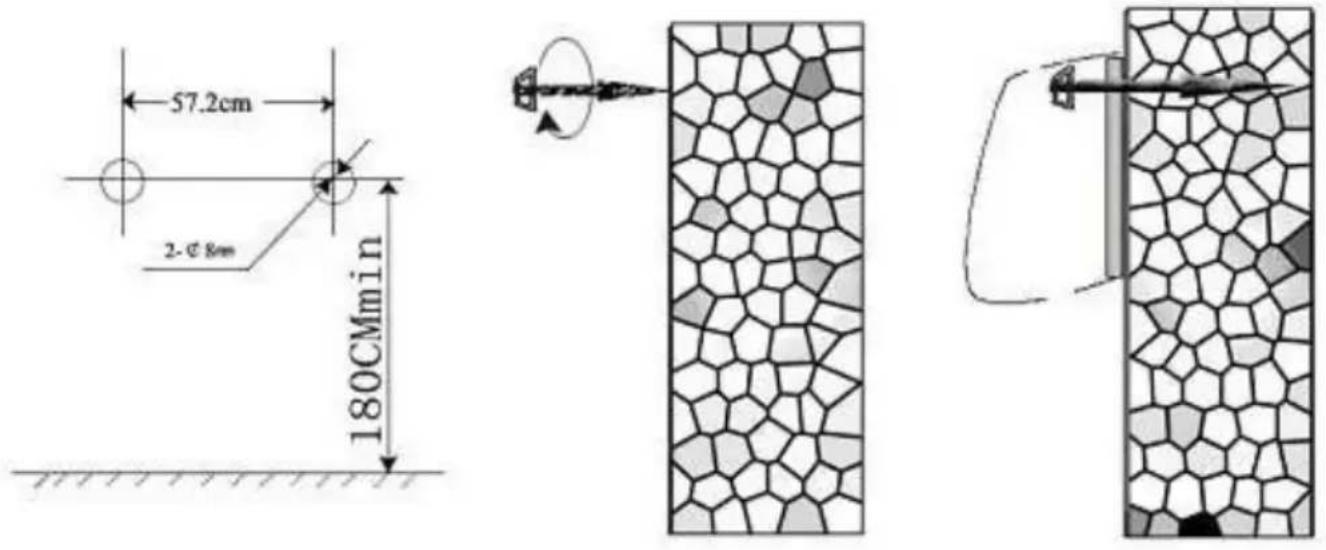
Mount the mounting bracket on top of the fan heater with the short side facing the wall. Mark the drill hole on the wall and remove the bathroom fan heater again.
Drill two holes (8 mm) in the wall at the selected and marked position - horizontally and with a distance of 18.7 cm.
Insert the dowels into the holes and screw in the screws (included). Let the screws protrude approx. 5mm
Hook the fan heater with the fixing brackets onto the screws, push it all the way to the left and pull it down.
Commissioning and function
- The main switch must be off (O).
- Unroll the power cable completely and insert the plug into a suitable 220-240 V~ socket.
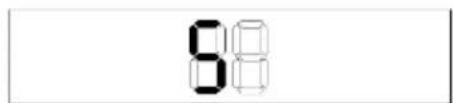
- Press the main switch (I). The display shows 'S' (standby mode).
Operation of the unit with and without remote control:

- Connect the unit and switch it on by pressing the red 0/1 switch. The unit will then go into standby mode and show "S" on the display.
-
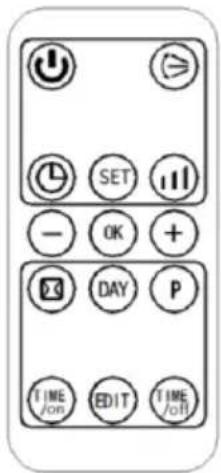
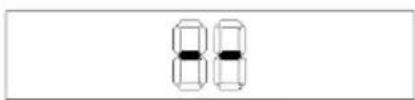
Press the "O" button to switch to fan mode. It is displayed as follows: A. Press again to return to standby mode.
-
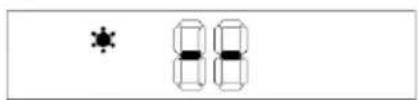
Press the "..." button once to start the product at low heating power and show the display.
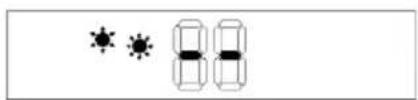
"-" is displayed, as shown below: B. Press a second time to switch to high heat mode and "..." is shown on the display, as seen below: C. Then press a third time to switch to fan mode and " -- " will be shown on the display as seen below: A.
- Press the " " button to activate the panning function. Press again to stop it.
ABC
- Press the button " " to set the timer (00-12 hours). Each time you press the button, the
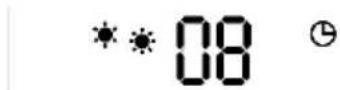
time setting is increased by one hour. After setting the time, the display shows the current setting time for 5 seconds before returning to the previous display. In the meantime, the display " lights up. The following photo shows an example of setting 8 hours:
- Appointment "ON": In standby mode, press the "L" timer button to set the appointment switch-on time in a range of 00-12 hours. When the setting is complete, the display shows the entered switch-on time and the "L" indicator lights up. The display automatically shows a time reduced by one hour when one hour has passed. When the appointment switch-on time is reached, the appliance switches on automatically. The default setting temperature at appointment switch-on time is 23^ . The following photo shows an example of setting the appointment switch-on time to 8 hours:
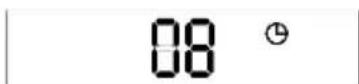
Note: If the temperature and weekly programme are not set, the appliance switches off automatically after 12 hours of continuous operation and goes into standby mode.
Operation of the unit with remote control:
Note: During remote control operation, the remote control transmitter must be aligned with the reception range of the product to ensure effective control. The remote control buttons
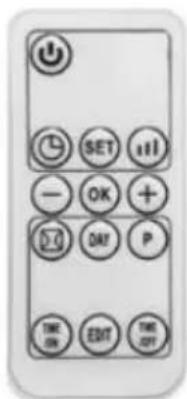
"Standby" "U", "Mode" "O" and "Pan" "≥" have the same function as the corresponding buttons on the unit itself.
Set current TIME / DAY (can be set in standby mode as well as in working mode):
- Press the button "SET" once, the display shows "12" as the default value. Press "+" to set the current hour (24 hours in total). Press "SET" again, the display shows "30" as the default value for the minute. Press "+" to set the current minute (00-59 minutes).
Then press "for the third time, the display shows the day" ". Press / " to ④ - set the current day (Monday to Sunday: d1-d7). Finally, press "to confirm the setting. The display shows the previous settings.
Example: If you want to set under a heating power of 125^ on Wednesday at 9:30 a.m., please refer to the following photos:
A
B
C
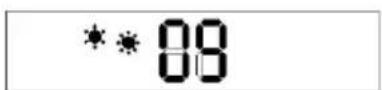
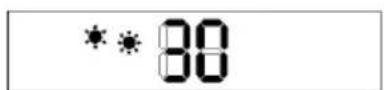
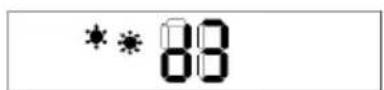
Hint:
If the main switch is turned off, the power is interrupted or the plug is pulled out, the unit must be reset.
Press " SET to check the current time and day of the week in sequence.
- Set temperature:
During operation, press "①", the display shows "23" as the default value. Press "④" to set the desired temperature (temperature range 10-49°C) and press "OK" to confirm the setting.
Example: The current ambient temperature is 15^ . If you want to set the temperature to 25^ , the display will be as follows:
85°c
Hint:
SMART mode is used when setting the temperature:
-
Setting temperature - ambient temperature >2^ , operates at high power;
-
0^ C< setting temperature - ambient temperature = < 2^ C , operates at low power;
-
Setting temperature - ambient temperature = 0^ , the cooling fan operates for 30 seconds to dissipate the remaining heat, then the unit goes into standby mode.
-
After entering standby mode, when the unit cools down and:
-
Setting temperature - ambient temperature > = 2^ the unit wakes up and continues heating.
-
If you want to cancel the setting temperature, press the " " button to select "Heating"
"or "Ventilation"" then the appliance operates without setting temperature. The " ^ C " display is switched off.
Set the weekly programme (ONLY via the remote control).
After completing the setting of CURRENT TIME / DAY, these are the steps for setting the weekly programme:
- Press " , the product changes to working status.
- Press "P", "P" lights up and it is set in the weekly programme: See below: A
- Press "DAY", the display shows d1 ~ d7 and is set to working days (Monday-Sunday: d1 ~ d7). For example, Monday is set: see below: B
- Press "EDIT", the display shows P1 ~ P6 (a maximum of 6 periods can be set for each day). How to set P1: see below: C
-
Press "TIME /on", the display shows "00" as the default. Press "TIME /on" continuously to set the switch-on time. For example, the switch-on time is set to 7:00 am (Note: The setting time is 0-24 for selection): see below: D
-
Press "TIME", the previous switch-on time is displayed by default. Press "TIME" continuously to set the switch-off time. For example, the switch-off time is set at 13:00 (the display shows this), (Note: The switch-off time must be set later than the switch-on time. If the switch-on time coincides with the switch-off time, the unit is in standby mode): see below: E.
A
B
C
D
E
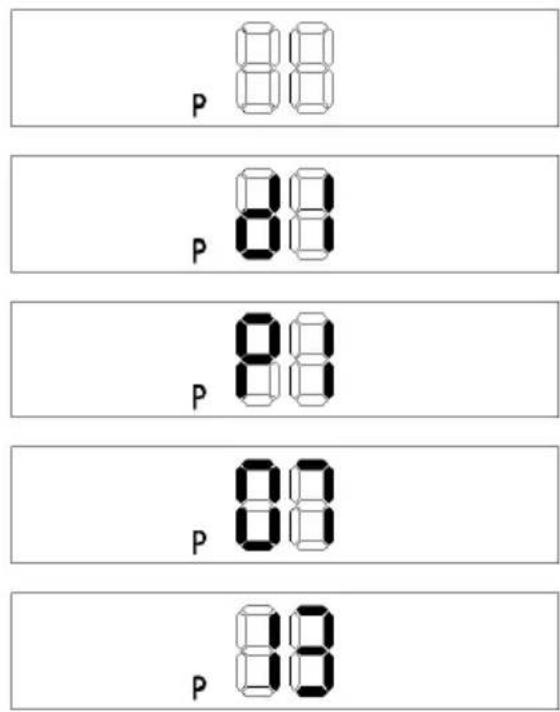
- Press " ④ / - to set the target temperature (temperature range 10-49°C).
- Repeat steps 2-7 above to set the entire weekly programme (each day the work of each section is opened and the switch-off time is set).
- After the above setting, press "DAY" to select the day of the week of switch-on, then press "EN" to select the switch-on time of the day, then press " / to set the desired temperature (temperature range 10-49°C), press "OK" to confirm the setting.
- To deactivate the weekly function, press "P" again, the "P" light goes out. The weekly programme is switched off. The product returns to the previous working status.
Hint:
- After completing the above settings and when the programme is running, press " / DAY"
- Edit TIME to check the setting time for each day and time period.
- The switch-on time periods from 00~24 hours cannot be set to minutes;
- The "TIME/OFF" cannot be smaller than "TIME/ON";
- When "TIME/ON" coincides with "TIME/OFF", the period goes into standby mode;
Hint:
- If the main switch is turned off, the power is off or the plug is unplugged, the unit must be reset.
- You can press " " to check your time / day setting.
Activation of the window opening detection (ONLY via remote control):
- Press "O" to put the appliance into working mode. Heat up for a moment until it is stable.
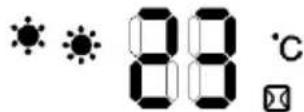
- Press "ON" on the remote control. The "ON / °C" indicator lights up. The temperature display is set to "23" by default. Press "ON" to set the target temperature. In window opening detection mode, if the ambient temperature drops by 5-10°C within 10 minutes, the unit stops working within 30 minutes and goes into standby mode. Then press "OFF" to switch the unit on.
Press " again to switch off the window opening detection. The " light goes out and the unit returns to the previous working mode.
- Below F is an example of setting 23^ during window opening detection.
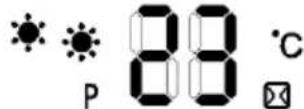
- If both the window opening detection and the weekly programme are on at the same time, the unit does not operate during the OFF period of the weekly programme. During the working status of the weekly programme, the temperature is based on the setting temperature of the window opening detection. Below G is an example:
F
G
Hint:
Before the weekly programme is switched on, the day and period must be set, otherwise the default state of the weekly settings is "00" and the programme will not work.
Safety devices
The overheating protection switches the unit off if it becomes too hot inside. This can happen if the appliance cannot release its heat properly or if it cannot draw in enough fresh air.
Usually the cause is a (partial) cover of the unit, or blocked air inlet and/or outlet grilles.
If the unit has switched off due to the overheating protection, it switches to ventilation to dissipate the heat. The display remains unchanged.
When the inside of the unit has cooled down sufficiently, the unit resumes its set function. However, it is strongly recommended to switch off the unit with the remote control and give it plenty of time to cool down.
Eliminate the cause of the overheating and then operate the unit normally. If you cannot find the cause of the overheating and the problem persists, stop using the appliance and contact your dealer.
Cleaning and maintenance
Keep the appliance clean. Switch it off for cleaning or maintenance, remove the plug from the socket and let the appliance cool down beforehand.
Clean the outside of the unit regularly with a dry or slightly damp cloth. Do not use harsh soaps, sprays, cleaning or scouring agents, wax, polishes or other chemical solutions. The back of the unit can be dusted with a feather duster.
To clean the back thoroughly, unscrew the bathroom fan heater from the wall.
TECHNICAL INFORMATION
| Item number: | SHX501HEAT2023 |
| Input voltage: | 220-240 V~ |
| Frequency: | 50Hz |
| Performance area: | Max. 2000 W |
| Class | II |
| Weight | 3.7 kg |
| Dimensions | 138 x 618 x 208 mm |
| Contact address for further information: | Schuss Home Electronic GmbH Scheringgasse 3, A-1140 Vienna Service line: +43 (1) 97 0 21 www.schuss-home.at / www.shx.at FB-No: 236974 t / FB-Court: Vienna |
Required information on electric single room heaters
| Item number: SHX501HEAT2023 | |||||
| Indication | Symbol | Value | Unit | Indication | |
| Heat output | Only for electric storage room heaters:Type of heat supply control | ||||
| Nominal heat output | Pnom | 2,0 | kW | Manual control of the heat supply with integrated thermostat | No |
| Minimum heat output(guide value) | Pmin | 1,1 | kW | Manual control of the heat supply with feedback of the room and/or outside temperature | No |
| Maximum continuous heat output | Pmax,c | 2,0 | kW | Electronic control of the heat supply with feedback of the room and/or outside temperature | No |
| Auxiliary power consumption | Heat output with fan support | No | |||
| AtNominal heat output | elmax | 0 | kW | Type of heat output/room temperature control | |
| AtMinimum heat output | elmin | 0 | kW | Single-stage heat output, no room temperature control | No |
| AtStandby mode | elsb | 0,001 | kW | Two or more manually adjustable levels, no room temperature control | No |
| Room temperature control with mechanical thermostat | No | ||||
| With electronic room temperature control | No | ||||
| Electronic room temperature control and time-of-day control | No | ||||
| Electronic room temperature control and weekday regulation | Yes | ||||
| Other regulatory options | |||||
| Room temperature control with presence detection | No | ||||
| Room temperature control with open window detection | Yes | ||||
| With remote control option | No | ||||
| With adaptive control of the heating start | No | ||||
| With operating time limit | Yes | ||||
| With black ball sensor | No | ||||
| Contact details: | Schuss Home Electronic GmbHScheringgasse 3 - 1140 Vienna -Austriahttps://www.schuss-home.at/ | ||||
GUARANTEE
With this quality product from SHX, you have made a decision for innovation, durability and reliability.
For this SHX unit we grant a warranty period of 2 years from the date of purchase valid in Austria and Germany! If, contrary to expectations, service work should nevertheless be necessary on your device during this period,
we hereby guarantee to repair the device free of charge (spare parts and labour) or (at the discretion of Schuss) to exchange the product. Should neither repair nor exchange be possible for economic reasons, we reserve the right to issue a current value credit note.
In any case, please contact the customer hotline as a first step (see instruction manual - "Contact addresses for further information and service line").
We would like to point out that repair work which has not been carried out by authorised contract workshops immediately terminates the validity of this guarantee.
This warranty does not cover:
- Damage due to non-observance of the operating instructions
Repair or replacement of parts due to normal wear and tear
Devices that are used - even only partially - for commercial purposes - Mechanically damaged equipment due to external influence (fall, impact, breakage, improper use, etc.) as well as wear and tear of an aesthetic nature.
- Equipment that has been improperly handled
- Units that have not been opened by our authorised service workshop
- Consumer expectations not met
- Damage caused by force majeure, water, lightning strike, overvoltage
Units where the type designation and/or serial number on the unit has been altered, erased, made illegible or removed.
Defects due to extraordinary pollution
Services outside our authorised workshops, the transport costs to an authorised workshop or to us and back, as well as the associated risks.
We expressly point out that within the warranty period, a lump sum of € 60 (indexed basis CPI 2015, June 2020) will be charged in case of operating errors or if no error was detected.
The provision of warranty service (repair or replacement of the appliance) does not extend the absolute< warranty period of 2 years from the date of purchase.
The 2-year warranty is only valid on presentation of the purchase receipt (must contain the name and address of the dealer as well as the complete designation of the unit) and the corresponding warranty certificate, on which the type of unit as well as the serial number (visible on the box and on the back or bottom of the unit) must be noted! Without the guarantee certificate, only the legal guarantee applies!
We expressly point out that the statutory warranty rights are not affected by this guarantee and continue undiminished.
Schuss Home Electronic GmbH and its vicarious agents shall only be liable for damages in the event of gross negligence or intent. Liability for loss of profit, expected but not realised savings, consequential damage and damage from third party claims is excluded in any case.
You can find the contact address of the respective service workshop on our homepage www.schuss-home.at. Congratulations on your choice. We wish you much pleasure with your SHX unit!
ADDRESS
SHX Distribution
Schuss Home Electronic GmbH
A-1140 Vienna, Scheringgasse 3