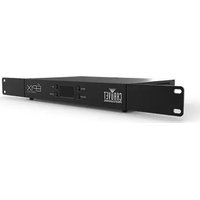
ÉPIX Drive 900 - Lighting Chauvet - Free user manual and instructions
Find the device manual for free ÉPIX Drive 900 Chauvet in PDF.


User questions about ÉPIX Drive 900 Chauvet
0 question about this device. Answer the ones you know or ask your own.
Ask a new question about this device
Download the instructions for your Lighting in PDF format for free! Find your manual ÉPIX Drive 900 - Chauvet and take your electronic device back in hand. On this page are published all the documents necessary for the use of your device. ÉPIX Drive 900 by Chauvet.
USER MANUAL ÉPIX Drive 900 Chauvet
natural_image
Line drawing of a computer rack unit with OLED display and mounting holes (no text or symbols)About This Guide
The ÉPIX Drive 900 Quick Reference Guide (QRG) has basic product information such as connection, mounting, menu options, and DMX values. Download the User Manual from www.chauvetprofessional.com for more details.
Disclaimer
The information and specifications contained in this QRG are subject to change without notice.
LIMITED WARRANTY
FOR WARRANTY REGISTRATION AND COMPLETE TERMS AND CONDITIONS PLEASE VISIT OUR WEBSITE.
For Customers in the United States and Mexico: www.chauvetlighting.com/warranty-registration.
For Customers in the United Kingdom, Republic of Ireland, Belgium, the Netherlands, Luxembourg, France, and Germany: www.chauvetlighting.eu/warranty-registration.
Chauvet warrants that this product shall be free from defects in material and workmanship under normal use, for the period specified in, and subject to the exclusions and limitations set forth in the full limited warranty on our website. This warranty extends only to the original purchaser of the product and is not transferable. To exercise rights under this warranty, you must provide proof of purchase in the form of an original sales receipt from an authorized dealer that shows the product name and date of purchase. THERE ARE NO OTHER EXPRESS OR IMPLIED WARRANTIES. This warranty gives you specific legal rights. You may also have other rights that vary from state to state and country to country. This warranty is valid only in the United States, United Kingdom, Republic of Ireland, Belgium, the Netherlands, Luxembourg, France, Germany and Mexico. For warranty terms in other countries, please consult your local distributor.
Safety Notes
• DO NOT open this product. It contains no user-serviceable parts.
- To eliminate unnecessary wear and improve its lifespan, during periods of non-use completely disconnect the product from power via breaker or by unplugging it.
CAUTION: This product's housing may be hot when lights are operating.
- Do not cover the ventilation slots when operating to avoid internal overheating.
- Mount this product in a location with adequate ventilation, at least 20 in (50 cm) from adjacent surfaces.
- DO NOT leave any flammable material within 50 cm of this product while operating or connected to power.
- CAUTION: When transferring product from extreme temperature environments, (e.g., cold truck to warm humid ballroom) condensation may form on the internal electronics of the product. To avoid causing a failure, allow product to fully acclimate to the surrounding environment before connecting it to power.
• USE a safety cable when mounting this product overhead.
- DO NOT operate this product outdoors or in any location where dust, excessive heat, water, or humidity may affect it. (IP20)
- DO NOT operate this product if the housing, I/O ports, or cables appear damaged. Have the damaged parts replaced by a Chauvet certified technician at once.
• DO NOT connect this product to a dimmer or rheostat.
• ONLY connect this product to a grounded and protected circuit.
• In the event of a serious operating problem, stop using immediately.
- The maximum ambient temperature is 113 °F (45 °C). Do not operate this product at higher temperatures.
Contact
Outside the U.S., United Kingdom, Ireland, Benelux, France, Germany, or Mexico, contact your distributor to request support or return a product. Refer to Contact Us at the end of this QRG for more information.
What Is Included
- ÉPIX Drive 900
- Neutrik powerCON power cord
- Rack ears (2)
- Bag of rack ear screws
- Rubber feet (4)
- Quick Reference Guide

If there are any missing pieces, please contact the local dealer where you purchased the product.
Product Overview
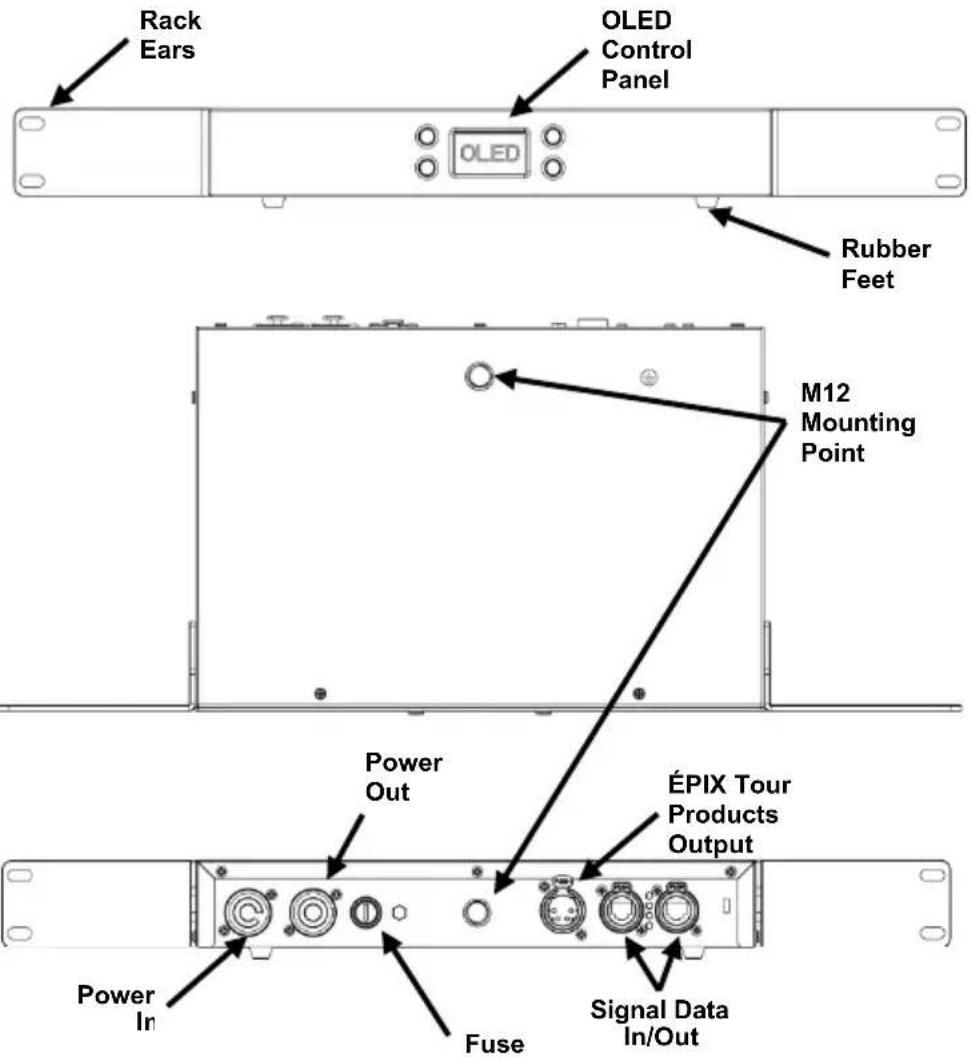
AC Power
This product has an auto-ranging power supply that can work with an input voltage range of 100–240 VAC, 50/60 Hz.
Power Linking
You can link up to 6 ÉPIX Drive 900 products at 120 V, 11 products at 208 V, or 12 products at 230 V. Never exceed this number. Power linking cords can be purchased separately.
AC Plug
| Connection | Wire (U.S.) | Wire (Europe) | Screw Color |
| AC Live | Black | Brown | Yellow/Brass |
| AC Neutral | White | Blue | Silver |
| AC Ground | Green/Yellow | Green/Yellow | Green |

To eliminate unnecessary wear and improve its lifespan, during periods of non-use completely disconnect the product from power via breaker or by unplugging it.
Replacing the Fuse
- Disconnect this product from power.
- Using a flat-head screwdriver, unscrew the fuse holder cap from the housing.
- Remove blown fuse and replace with a good fuse of the same type and rating.
- Screw the fuse holder cap back in place and reconnect power.
Signal Connections
The ÉPIX Drive 900 can link to a controller or controller software using an Ethernet connection. If using other Art-Net™, sACN, or Kling-Net compatible products with the ÉPIX Drive 900, they can be controlled individually on a single network. See the User Manual for information about how to connect and configure the product for these signals.
Control The ÉPIX Drive 900 uses Art-Net™ and sACN for its control personalities:
Personalities
| Personality | Channels | Description |
| Pixel | 3 per LED(150 per ÉPIX Strip Tour)(450 per ÉPIX Bar Tour) | Complete pixel control |
| 7-CH-Drive | 7 | Dimmer, auto programs, and strobe |
| 8-CH-fixture | 8 per ÉPIX product | Dimmer, auto programs, strobe, and dimmer speed |
| 5-Section | 15 per ÉPIX product | Controls LED output in 5 sections of LEDs |
| 10-Section | 30 per ÉPIX product | Controls LED output in 10 sections of LEDs |
| 25-Section | 75 per ÉPIX product | Controls LED output in 25 sections of LEDs |
| 50-Section | 150 per ÉPIX product | Controls LED output in 50 sections of LEDs |

In the LED Section modes, all ÉPIX products scale to the same number of channels. For example: in 10-Section mode, an ÉPIX Bar Tour will be controlled in 10 sections of 15 LEDs, while an ÉPIX Strip IP 50 will be controlled in 10 sections of 5 LEDs.
Art-Net™ Connection
Art-Net™ is an Ethernet protocol that uses TCP/IP that transfers large amount of DMX512 data using an etherCON RJ45 connection over a large network. An Art-Net™ protocol document is available from www.chauvetprofessional.com. Art-Net™ Designed by and Copyright Artistic Licence Holdings Ltd.

This product is not designed to respond to controllers sending in Broadcast mode via Art-Net ^™ . For best results, use Unicast mode. For information about which control protocol your controller uses, please contact the manufacturer of your controller.
sACN Connection
Also known as ANSI E1.31, Streaming-CAN is an Ethernet protocol that uses the layering and formatting of Architecture for Control Networks to transport DMX512 data over IP or any other CAN compatible network.
Kling-Net Connection
Kling-Net is a network protocol that allows auto configuration of display devices using an etherCON RJ45 Ethernet connection. Refer to the ArKaos software manual for detailed instructions on programming this product.

For smooth-running operation, ArKaos Kling-Net requires a gigabit (1000 Mbps) Ethernet card and network router.
Connecting ÉPIX Products
The ÉPIX Drive 900 is the power supply for the ÉPIX Tour and ÉPIX IP series of products. Each product must be daisy chained together in series.
Length of cables between ÉPIX Drive 900 and 1^st product must not exceed 65 ft (20 m) when shielded, or 150 ft (45 m) when unshielded
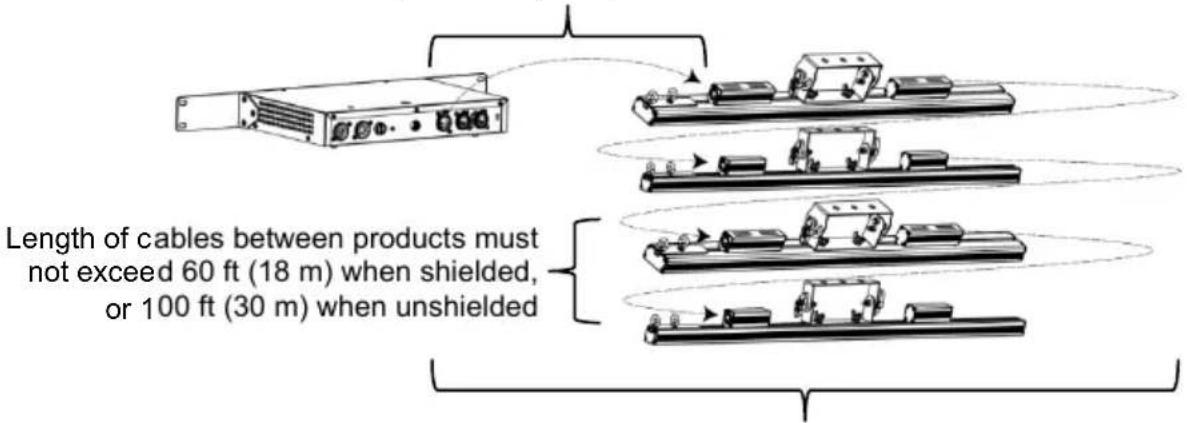
Total length of cables cannot exceed 210 ft (64 m) when shielded, or 300 ft (91 m) when unshielded
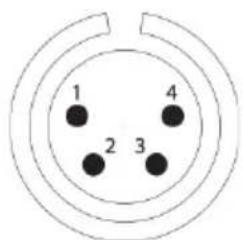
Indoor Cables
1 = Power + (16 AWG or larger)
2 = Data + (18-24 AWG)
3 = Data - (18-24 AWG)
4 = Power - (16 AWG or larger)
- The ÉPIX Drive 900 can support various ÉPIX products daisy chained in various configurations.
Example configurations include:
• 18 ÉPIX Strip Tour products.
• 36 ÉPIX Strip Tour 50 products.
• 6 ÉPIX Bar Tour products or ÉPIX Strip IP products.
• 12 ÉPIX Strip IP 50 products.
• 4 ÉPIX Bar Tour products and 6 ÉPIX Strip Tour products.
• 4 ÉPIX Strip IP products and 6 ÉPIX Strip Tour products.
• 15 ÉPIX Strip Tour products and 1 ÉPIX Bar Tour product.
• Make sure the total length of the connecting shielded 4-pin XLR cables does not exceed 210 ft (64 m). Using unshielded cables will increase the maximum cable lengths to 300 ft (91 m) shown in the diagram above.
Download the User Manual from www.chauvetprofessional.com for more details.


- Standard 4-pin XLR "Scroller Cables" are typically shielded.
• IP rated cables are recommended when using ÉPIX IP products.
Mounting
Before mounting this product, read the Safety Notes. Use at least one mounting point per product. Make sure the mounting clamps are capable of supporting the weight of the product. For our CHAUVET Professional line of mounting clamps, go to http://trusst.com/products/. The rack mount ears are not shipped connected to the product.
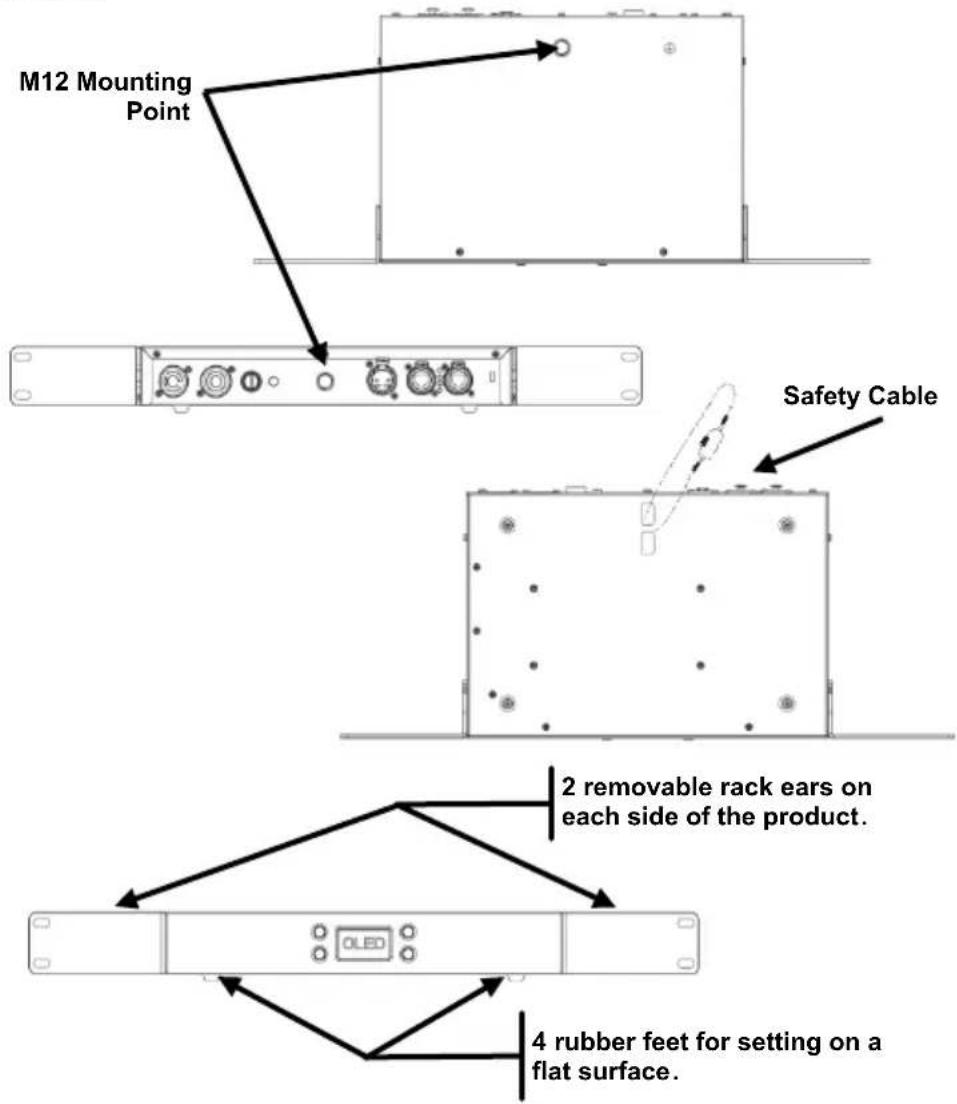
Product Mounting Diagram
Mounting Guidelines
Chauvet recommends using the following guidelines when mounting this product:
- Mount this product away from any flammable material as indicated in the Safety Notes section.
- Never mount in places where rain, high humidity, extreme temperature changes, or restricted ventilation may affect the product.
- Before deciding on a location, always make sure there is easy access to the product for maintenance and programming.
- Make sure that the structure or surface onto which you are mounting the product can support the product's weight (see the User Manual).
- When mounting the product overhead, always use a safety cable. Mount the product securely to a rigging point, such as an elevated platform or a truss.
- When rigging the product onto a truss, you should use a mounting clamp of appropriate weight capacity.
- When mounting the product on the floor, make sure that the product and cables are away from people and vehicles.
| Control Panel Description | Button Function | |
| Exits from the current menu or function and navigates downwards through the Main Level list | ||
| Enables the currently displayed menu or sets the currently selected value into the selected function | ||
| Navigates upwards through the menu list or increases the numeric value when in a function | ||
| Navigates downwards through the menu list or decreases the numeric value when in a function |
Menu Map
| Main Level | Programming Levels Description | |||
| Auto Address | No | Automatically find and address the products | ||
| Yes | ||||
| View Linked Fixture | 1._**-36._** | Shows the connected products in order ** - The display will show ÉPIX Strip tour, ÉPIX Bar Tour, or nothing | ||
| LED Output | Off | Turns off all LED output | ||
| Red | Red LEDs at full | |||
| Green | Green LEDs at full | |||
| Blue | Blue LEDs at full | |||
| White | White LEDs at full | |||
| Fade | Color roll fade at full | |||
| Scroll | Rainbow roll at full | |||
| Protocol | Art-Net | Selects the protocol and determines what other Menu options are available | ||
| Kling-Net | ||||
| sACN | ||||
| Display Inverse | No | Turns display 180 degrees | ||
| Yes | ||||
| Factory Reset | No | Resets product to factory defaults | ||
| Yes | ||||
| Ethernet Setting | Personality | Pixel | Sets the control personality. See Control Personalities. | |
| 7-CH-Drive | ||||
| 8-CH-fixture | ||||
| 5-Section | ||||
| 10-Section | ||||
| 25-Section | ||||
| 50-Section | ||||
| Universe | 000-246 (Art-NetTM)001-247 (sACN) | Sets the lowest of the 6 consecutive Art-NetTM or sACN universes the ÉPIX Drive 900 is assigned to | ||
| IP Address | IP Address #1 | __*.x.x.x*1-126 (Art-NetTM)*1-255 (sACN)x = 0-255 | Sets the IP addresses for the ÉPIX Drive 900Note: The addresses cannot be the same | |
| IP Address #2 | ||||
| IP Address #3 | ||||
| IP Address #4 | ||||
| IP Address #5 | ||||
| IP Address #6 | ||||
| DMX Address | 1-506 | Sets the DMX starting address | ||

Each ÉPIX Drive 900 uses 6 consecutive universes that are assigned from the Universe level under Ethernet Setting.
Control Values
| Pixel Mode(3 Channels per LED) | Channel | Function | Value | Percent/Setting |
| 1 | Red 1 | 000 ⇔ 255 | 0-100% | |
| 2 | Green 1 | 000 ⇔ 255 | 0-100% | |
| 3 | Blue 1 | 000 ⇔ 255 | 0-100% | |
| 4 | Red 2 | 000 ⇔ 255 | 0-100% | |
| 5 | Green 2 | 000 ⇔ 255 | 0-100% | |
| 6 | Blue 2 | 000 ⇔ 255 | 0-100% | |
| 7 | Red 3 | 000 ⇔ 255 | 0-100% | |
| 8 | Green 3 | 000 ⇔ 255 | 0-100% | |
| 9 | Blue 3 | 000 ⇔ 255 | 0-100% | |
| 10 | Red 4 | 000 ⇔ 255 | 0-100% | |
| 11 | Green 4 | 000 ⇔ 255 | 0-100% | |
| 12 | Blue 4 | 000 ⇔ 255 | 0-100% | |
| 13 | Red 5 | 000 ⇔ 255 | 0-100% | |
| 14 | Green 5 | 000 ⇔ 255 | 0-100% | |
| 15 | Blue 5 | 000 ⇔ 255 | 0-100% | |
| 16 | Red 6 | 000 ⇔ 255 | 0-100% | |
| 17 | Green 6 | 000 ⇔ 255 | 0-100% | |
| 18 | Blue 6 | 000 ⇔ 255 | 0-100% | |
| 19 | Red 7 | 000 ⇔ 255 | 0-100% | |
| 20 | Green 7 | 000 ⇔ 255 | 0-100% | |
| 21 | Blue 7 | 000 ⇔ 255 | 0-100% | |
| 22 | Red 8 | 000 ⇔ 255 | 0-100% | |
| 23 | Green 8 | 000 ⇔ 255 | 0-100% | |
| 24 | Blue 8 | 000 ⇔ 255 | 0-100% | |
| 25 | Red 9 | 000 ⇔ 255 | 0-100% | |
| 26 | Green 9 | 000 ⇔ 255 | 0-100% | |
| 27 | Blue 9 | 000 ⇔ 255 | 0-100% | |
| 28 | Red 10 | 000 ⇔ 255 | 0-100% | |
| 29 | Green 10 | 000 ⇔ 255 | 0-100% | |
| 30 | Blue 10 | 000 ⇔ 255 | 0-100% | |
| ... | ... | ... | ... | |
| 433 | Red 145 | 000 ⇔ 255 | 0-100% | |
| 434 | Green 145 | 000 ⇔ 255 | 0-100% | |
| 435 | Blue 145 | 000 ⇔ 255 | 0-100% | |
| 436 | Red 146 | 000 ⇔ 255 | 0-100% | |
| 437 | Green 146 | 000 ⇔ 255 | 0-100% | |
| 438 | Blue 146 | 000 ⇔ 255 | 0-100% | |
| 439 | Red 147 | 000 ⇔ 255 | 0-100% | |
| 440 | Green 147 | 000 ⇔ 255 | 0-100% | |
| 441 | Blue 147 | 000 ⇔ 255 | 0-100% | |
| 442 | Red 148 | 000 ⇔ 255 | 0-100% | |
| 443 | Green 148 | 000 ⇔ 255 | 0-100% | |
| 444 | Blue 148 | 000 ⇔ 255 | 0-100% | |
| 445 | Red 149 | 000 ⇔ 255 | 0-100% | |
| 446 | Green 149 | 000 ⇔ 255 | 0-100% | |
| 447 | Blue 149 | 000 ⇔ 255 | 0-100% | |
| 448 | Red 150 | 000 ⇔ 255 | 0-100% | |
| 449 | Green 150 | 000 ⇔ 255 | 0-100% | |
| 450 | Blue 150 | 000 ⇔ 255 | 0-100% | |
| 7-CH-Drive Mode | Channel | Function | Value | Percent/Setting |
| 1 | Dimmer | 000 ⇔ 255 | 0–100% | |
| 2 | Red | 000 ⇔ 255 | 0–100% | |
| 3 | Green | 000 ⇔ 255 | 0–100% | |
| 4 | Blue | 000 ⇔ 255 | 0–100% | |
| 5 Auto Programs | 000 ⇔ 010 | No function | ||
| 011 ⇔ 024 | Auto program 1 | |||
| 025 ⇔ 038 | Auto program 2 | |||
| 039 ⇔ 051 | Auto program 3 | |||
| 052 ⇔ 065 | Auto program 4 | |||
| 066 ⇔ 078 | Auto program 5 | |||
| 079 ⇔ 092 | Auto program 6 | |||
| 093 ⇔ 105 | Auto program 7 | |||
| 106 ⇔ 119 | Auto program 8 | |||
| 120 ⇔ 133 | Auto program 9 | |||
| 134 ⇔ 146 | Auto program 10 | |||
| 147 ⇔ 160 | Auto program 11 | |||
| 161 ⇔ 173 | Auto program 12 | |||
| 174 ⇔ 187 | Auto program 13 | |||
| 188 ⇔ 200 | Auto program 14 | |||
| 201 ⇔ 214 | Auto program 15 | |||
| 215 ⇔ 227 | Auto program 16 | |||
| 228 ⇔ 241 | Auto program 17 | |||
| 242 ⇔ 255 | All programs (Auto programs 1–17) | |||
| 6 | Speed | 000 ⇔ 255 | 0–100% | |
| 7 Strobe | 000 ⇔ 010 | No function | ||
| 011 ⇔ 255 | Strobe, slow to fast | |||
| 8-CH- fixture Mode | Channel | Function | Value | Percent/Setting |
| 1 | Dimmer | 000 ⇔ 255 | 0–100% | |
| 2 | Red | 000 ⇔ 255 | 0–100% | |
| 3 | Green | 000 ⇔ 255 | 0–100% | |
| 4 | Blue | 000 ⇔ 255 | 0–100% | |
| 5 Auto Programs | 000 ⇔ 010 | No function | ||
| 011 ⇔ 024 | Auto program 1 | |||
| 025 ⇔ 038 | Auto program 2 | |||
| 039 ⇔ 051 | Auto program 3 | |||
| 052 ⇔ 065 | Auto program 4 | |||
| 066 ⇔ 078 | Auto program 5 | |||
| 079 ⇔ 092 | Auto program 6 | |||
| 093 ⇔ 105 | Auto program 7 | |||
| 106 ⇔ 119 | Auto program 8 | |||
| 120 ⇔ 133 | Auto program 9 | |||
| 134 ⇔ 146 | Auto program 10 | |||
| 147 ⇔ 160 | Auto program 11 | |||
| 161 ⇔ 173 | Auto program 12 | |||
| 174 ⇔ 187 | Auto program 13 | |||
| 188 ⇔ 200 | Auto program 14 | |||
| 201 ⇔ 214 | Auto program 15 | |||
| 215 ⇔ 227 | Auto program 16 | |||
| 228 ⇔ 241 | Auto program 17 | |||
| 242 ⇔ 255 | All programs (Auto programs 1–17) | |||
| 6 | Speed | 000 ⇔ 255 | 0–100% | |
| 7 Strobe | 000 ⇔ 010 | No function | ||
| 011 ⇔ 255 | Strobe, slow to fast | |||
| 8 | Dimmer Speed Mode | 000 ⇔ 101 | Linear dimmer | |
| 102 ⇔ 152 | Fast dimmer | |||
| 153 ⇔ 203 | Medium dimmer | |||
| 204 ⇔ 255 | Slow dimmer | |||
| 5-Section Mode (15 Channels per ÉPIX Product) | Channel | Function | Value | Percent/Setting | |
| 1 | Red 1 | 000 ⇔ 255 | 0–100% | Section 1 | |
| 2 | Green 1 | 000 ⇔ 255 | 0–100% | ||
| 3 | Blue 1 | 000 ⇔ 255 | 0–100% | ||
| 4 | Red 2 | 000 ⇔ 255 | 0–100% | Section 2 | |
| 5 | Green 2 | 000 ⇔ 255 | 0–100% | ||
| 6 | Blue 2 | 000 ⇔ 255 | 0–100% | ||
| 7 | Red 3 | 000 ⇔ 255 | 0–100% | Section 3 | |
| 8 | Green 3 | 000 ⇔ 255 | 0–100% | ||
| 9 | Blue 3 | 000 ⇔ 255 | 0–100% | ||
| 10 | Red 4 | 000 ⇔ 255 | 0–100% | Section 4 | |
| 11 | Green 4 | 000 ⇔ 255 | 0–100% | ||
| 12 | Blue 4 | 000 ⇔ 255 | 0–100% | ||
| 13 | Red 5 | 000 ⇔ 255 | 0–100% | Section 5 | |
| 14 | Green 5 | 000 ⇔ 255 | 0–100% | ||
| 15 | Blue 5 | 000 ⇔ 255 | 0–100% | ||
| 10-Section Mode (30 Channels per ÉPIX Product) | Channel | Function | Value | Percent/Setting | |
| 1 | Red 1 | 000 ⇔ 255 | 0–100% | Section 1 | |
| 2 | Green 1 | 000 ⇔ 255 | 0–100% | ||
| 3 | Blue 1 | 000 ⇔ 255 | 0–100% | ||
| 4 | Red 2 | 000 ⇔ 255 | 0–100% | Section 2 | |
| 5 | Green 2 | 000 ⇔ 255 | 0–100% | ||
| 6 | Blue 2 | 000 ⇔ 255 | 0–100% | ||
| 7 | Red 3 | 000 ⇔ 255 | 0–100% | Section 3 | |
| 8 | Green 3 | 000 ⇔ 255 | 0–100% | ||
| 9 | Blue 3 | 000 ⇔ 255 | 0–100% | ||
| 10 | Red 4 | 000 ⇔ 255 | 0–100% | Section 4 | |
| 11 | Green 4 | 000 ⇔ 255 | 0–100% | ||
| 12 | Blue 4 | 000 ⇔ 255 | 0–100% | ||
| 13 | Red 5 | 000 ⇔ 255 | 0–100% | Section 5 | |
| 14 | Green 5 | 000 ⇔ 255 | 0–100% | ||
| 15 | Blue 5 | 000 ⇔ 255 | 0–100% | ||
| 16 | Red 6 | 000 ⇔ 255 | 0–100% | Section 6 | |
| 17 | Green 6 | 000 ⇔ 255 | 0–100% | ||
| 18 | Blue 6 | 000 ⇔ 255 | 0–100% | ||
| 19 | Red 7 | 000 ⇔ 255 | 0–100% | Section 7 | |
| 20 | Green 7 | 000 ⇔ 255 | 0–100% | ||
| 21 | Blue 7 | 000 ⇔ 255 | 0–100% | ||
| 22 | Red 8 | 000 ⇔ 255 | 0–100% | Section 8 | |
| 23 | Green 8 | 000 ⇔ 255 | 0–100% | ||
| 24 | Blue 8 | 000 ⇔ 255 | 0–100% | ||
| 25 | Red 9 | 000 ⇔ 255 | 0–100% | Section 9 | |
| 26 | Green 9 | 000 ⇔ 255 | 0–100% | ||
| 27 | Blue 9 | 000 ⇔ 255 | 0–100% | ||
| 28 | Red 10 | 000 ⇔ 255 | 0–100% | Section 10 | |
| 29 | Green 10 | 000 ⇔ 255 | 0–100% | ||
| 30 | Blue 10 | 000 ⇔ 255 | 0–100% | ||
| 25-Section Mode (75 Channels per ÉPIX Product) | Channel | Function | Value | Percent/Setting | |
| 1 | Red 1 | 000 ⇔ 255 | 0–100% | Section 1 | |
| 2 | Green 1 | 000 ⇔ 255 | 0–100% | ||
| 3 | Blue 1 | 000 ⇔ 255 | 0–100% | ||
| 4 | Red 2 | 000 ⇔ 255 | 0–100% | Section 2 | |
| 5 | Green 2 | 000 ⇔ 255 | 0–100% | ||
| 6 | Blue 2 | 000 ⇔ 255 | 0–100% | ||
| 7 | Red 3 | 000 ⇔ 255 | 0–100% | Section 3 | |
| 8 | Green 3 | 000 ⇔ 255 | 0–100% | ||
| 9 | Blue 3 | 000 ⇔ 255 | 0–100% | ||
| 10 | Red 4 | 000 ⇔ 255 | 0–100% | Section 4 | |
| 11 | Green 4 | 000 ⇔ 255 | 0–100% | ||
| 12 | Blue 4 | 000 ⇔ 255 | 0–100% | ||
| 13 | Red 5 | 000 ⇔ 255 | 0–100% | Section 5 | |
| 14 | Green 5 | 000 ⇔ 255 | 0–100% | ||
| 15 | Blue 5 | 000 ⇔ 255 | 0–100% | ||
| 16 | Red 6 | 000 ⇔ 255 | 0–100% | Section 6 | |
| 17 | Green 6 | 000 ⇔ 255 | 0–100% | ||
| 18 | Blue 6 | 000 ⇔ 255 | 0–100% | ||
| 19 | Red 7 | 000 ⇔ 255 | 0–100% | Section 7 | |
| 20 | Green 7 | 000 ⇔ 255 | 0–100% | ||
| 21 | Blue 7 | 000 ⇔ 255 | 0–100% | ||
| 22 | Red 8 | 000 ⇔ 255 | 0–100% | Section 8 | |
| 23 | Green 8 | 000 ⇔ 255 | 0–100% | ||
| 24 | Blue 8 | 000 ⇔ 255 | 0–100% | ||
| 25 | Red 9 | 000 ⇔ 255 | 0–100% | Section 9 | |
| 26 | Green 9 | 000 ⇔ 255 | 0–100% | ||
| 27 | Blue 9 | 000 ⇔ 255 | 0–100% | ||
| 28 | Red 10 | 000 ⇔ 255 | 0–100% | Section 10 | |
| 29 | Green 10 | 000 ⇔ 255 | 0–100% | ||
| 30 | Blue 10 | 000 ⇔ 255 | 0–100% | ||
| 31 | Red 11 | 000 ⇔ 255 | 0–100% | Section 11 | |
| 32 | Green 11 | 000 ⇔ 255 | 0–100% | ||
| 33 | Blue 11 | 000 ⇔ 255 | 0–100% | ||
| 34 | Red 12 | 000 ⇔ 255 | 0–100% | Section 12 | |
| 35 | Green 12 | 000 ⇔ 255 | 0–100% | ||
| 36 | Blue 12 | 000 ⇔ 255 | 0–100% | ||
| 37 | Red 13 | 000 ⇔ 255 | 0–100% | Section 13 | |
| 38 | Green 13 | 000 ⇔ 255 | 0–100% | ||
| 39 | Blue 13 | 000 ⇔ 255 | 0–100% | ||
| 40 | Red 14 | 000 ⇔ 255 | 0–100% | Section 14 | |
| 41 | Green 14 | 000 ⇔ 255 | 0–100% | ||
| 42 | Blue 14 | 000 ⇔ 255 | 0–100% | ||
| 43 | Red 15 | 000 ⇔ 255 | 0–100% | Section 15 | |
| 44 | Green 15 | 000 ⇔ 255 | 0–100% | ||
| 45 | Blue 15 | 000 ⇔ 255 | 0–100% | ||
| 46 | Red 16 | 000 ⇔ 255 | 0–100% | Section 16 | |
| 47 | Green 16 | 000 ⇔ 255 | 0–100% | ||
| 48 | Blue 16 | 000 ⇔ 255 | 0–100% | ||
| 49 | Red 17 | 000 ⇔ 255 | 0–100% | Section 17 | |
| 50 | Green 17 | 000 ⇔ 255 | 0–100% | ||
| 51 | Blue 17 | 000 ⇔ 255 | 0–100% | ||
| Channel | Function | Value | Percent/Setting | |
| 52 | Red 18 | 000 ⇔ 255 | 0–100% | |
| 53 | Green 18 | 000 ⇔ 255 | 0–100% | Section 18 |
| 54 | Blue 18 | 000 ⇔ 255 | 0–100% | |
| 55 | Red 19 | 000 ⇔ 255 | 0–100% | |
| 56 | Green 19 | 000 ⇔ 255 | 0–100% | Section 19 |
| 57 | Blue 19 | 000 ⇔ 255 | 0–100% | |
| 58 | Red 20 | 000 ⇔ 255 | 0–100% | |
| 59 | Green 20 | 000 ⇔ 255 | 0–100% | Section 20 |
| 60 | Blue 20 | 000 ⇔ 255 | 0–100% | |
| 61 | Red 21 | 000 ⇔ 255 | 0–100% | |
| 62 | Green 21 | 000 ⇔ 255 | 0–100% | Section 21 |
| 63 | Blue 21 | 000 ⇔ 255 | 0–100% | |
| 64 | Red 22 | 000 ⇔ 255 | 0–100% | |
| 65 | Green 22 | 000 ⇔ 255 | 0–100% | Section 22 |
| 66 | Blue 22 | 000 ⇔ 255 | 0–100% | |
| 67 | Red 23 | 000 ⇔ 255 | 0–100% | |
| 68 | Green 23 | 000 ⇔ 255 | 0–100% | Section 23 |
| 69 | Blue 23 | 000 ⇔ 255 | 0–100% | |
| 70 | Red 24 | 000 ⇔ 255 | 0–100% | |
| 71 | Green 24 | 000 ⇔ 255 | 0–100% | Section 24 |
| 72 | Blue 24 | 000 ⇔ 255 | 0–100% | |
| 73 | Red 25 | 000 ⇔ 255 | 0–100% | |
| 74 | Green 25 | 000 ⇔ 255 | 0–100% | Section 25 |
| 75 | Blue 25 | 000 ⇔ 255 | 0–100% |
| 50-Section Mode (150 Channels per ÉPIX Product) | Channel | Function | Value | Percent/Setting | |
| 1 | Red 1 | 000 ⇔ 255 | 0–100% | Section 1 | |
| 2 | Green 1 | 000 ⇔ 255 | 0–100% | ||
| 3 | Blue 1 | 000 ⇔ 255 | 0–100% | ||
| 4 | Red 2 | 000 ⇔ 255 | 0–100% | Section 2 | |
| 5 | Green 2 | 000 ⇔ 255 | 0–100% | ||
| 6 | Blue 2 | 000 ⇔ 255 | 0–100% | ||
| 7 | Red 3 | 000 ⇔ 255 | 0–100% | Section 3 | |
| 8 | Green 3 | 000 ⇔ 255 | 0–100% | ||
| 9 | Blue 3 | 000 ⇔ 255 | 0–100% | ||
| 10 | Red 4 | 000 ⇔ 255 | 0–100% | Section 4 | |
| 11 | Green 4 | 000 ⇔ 255 | 0–100% | ||
| 12 | Blue 4 | 000 ⇔ 255 | 0–100% | ||
| 13 | Red 5 | 000 ⇔ 255 | 0–100% | Section 5 | |
| 14 | Green 5 | 000 ⇔ 255 | 0–100% | ||
| 15 | Blue 5 | 000 ⇔ 255 | 0–100% | ||
| 16 | Red 6 | 000 ⇔ 255 | 0–100% | Section 6 | |
| 17 | Green 6 | 000 ⇔ 255 | 0–100% | ||
| 18 | Blue 6 | 000 ⇔ 255 | 0–100% | ||
| 19 | Red 7 | 000 ⇔ 255 | 0–100% | Section 7 | |
| 20 | Green 7 | 000 ⇔ 255 | 0–100% | ||
| 21 | Blue 7 | 000 ⇔ 255 | 0–100% | ||
| 22 | Red 8 | 000 ⇔ 255 | 0–100% | Section 8 | |
| 23 | Green 8 | 000 ⇔ 255 | 0–100% | ||
| 24 | Blue 8 | 000 ⇔ 255 | 0–100% | ||
| 25 | Red 9 | 000 ⇔ 255 | 0–100% | Section 9 | |
| 26 | Green 9 | 000 ⇔ 255 | 0–100% | ||
| 27 | Blue 9 | 000 ⇔ 255 | 0–100% | ||
| 28 | Red 10 | 000 ⇔ 255 | 0–100% | Section 10 | |
| 29 | Green 10 | 000 ⇔ 255 | 0–100% | ||
| 30 | Blue 10 | 000 ⇔ 255 | 0–100% | ||
| 31 | Red 11 | 000 ⇔ 255 | 0–100% | Section 11 | |
| 32 | Green 11 | 000 ⇔ 255 | 0–100% | ||
| 33 | Blue 11 | 000 ⇔ 255 | 0–100% | ||
| 34 | Red 12 | 000 ⇔ 255 | 0–100% | Section 12 | |
| 35 | Green 12 | 000 ⇔ 255 | 0–100% | ||
| 36 | Blue 12 | 000 ⇔ 255 | 0–100% | ||
| 37 | Red 13 | 000 ⇔ 255 | 0–100% | Section 13 | |
| 38 | Green 13 | 000 ⇔ 255 | 0–100% | ||
| 39 | Blue 13 | 000 ⇔ 255 | 0–100% | ||
| 40 | Red 14 | 000 ⇔ 255 | 0–100% | Section 14 | |
| 41 | Green 14 | 000 ⇔ 255 | 0–100% | ||
| 42 | Blue 14 | 000 ⇔ 255 | 0–100% | ||
| 43 | Red 15 | 000 ⇔ 255 | 0–100% | Section 15 | |
| 44 | Green 15 | 000 ⇔ 255 | 0–100% | ||
| 45 | Blue 15 | 000 ⇔ 255 | 0–100% | ||
| 46 | Red 16 | 000 ⇔ 255 | 0–100% | Section 16 | |
| 47 | Green 16 | 000 ⇔ 255 | 0–100% | ||
| 48 | Blue 16 | 000 ⇔ 255 | 0–100% | ||
| 49 | Red 17 | 000 ⇔ 255 | 0–100% | Section 17 | |
| 50 | Green 17 | 000 ⇔ 255 | 0–100% | ||
| 51 | Blue 17 | 000 ⇔ 255 | 0–100% | ||
| Channel | Function | Value | Percent/Setting | |
| 52 | Red 18 | 000 ⇔ 255 | 0–100% | Section 18 |
| 53 | Green 18 | 000 ⇔ 255 | 0–100% | |
| 54 | Blue 18 | 000 ⇔ 255 | 0–100% | |
| 55 | Red 19 | 000 ⇔ 255 | 0–100% | Section 19 |
| 56 | Green 19 | 000 ⇔ 255 | 0–100% | |
| 57 | Blue 19 | 000 ⇔ 255 | 0–100% | |
| 58 | Red 20 | 000 ⇔ 255 | 0–100% | Section 20 |
| 59 | Green 20 | 000 ⇔ 255 | 0–100% | |
| 60 | Blue 20 | 000 ⇔ 255 | 0–100% | |
| 61 | Red 21 | 000 ⇔ 255 | 0–100% | Section 21 |
| 62 | Green 21 | 000 ⇔ 255 | 0–100% | |
| 63 | Blue 21 | 000 ⇔ 255 | 0–100% | |
| 64 | Red 22 | 000 ⇔ 255 | 0–100% | Section 22 |
| 65 | Green 22 | 000 ⇔ 255 | 0–100% | |
| 66 | Blue 22 | 000 ⇔ 255 | 0–100% | |
| 67 | Red 23 | 000 ⇔ 255 | 0–100% | Section 23 |
| 68 | Green 23 | 000 ⇔ 255 | 0–100% | |
| 69 | Blue 23 | 000 ⇔ 255 | 0–100% | |
| 70 | Red 24 | 000 ⇔ 255 | 0–100% | Section 24 |
| 71 | Green 24 | 000 ⇔ 255 | 0–100% | |
| 72 | Blue 24 | 000 ⇔ 255 | 0–100% | |
| 73 | Red 25 | 000 ⇔ 255 | 0–100% | Section 25 |
| 74 | Green 25 | 000 ⇔ 255 | 0–100% | |
| 75 | Blue 25 | 000 ⇔ 255 | 0–100% | |
| 76 | Red 26 | 000 ⇔ 255 | 0–100% | Section 26 |
| 77 | Green 26 | 000 ⇔ 255 | 0–100% | |
| 78 | Blue 26 | 000 ⇔ 255 | 0–100% | |
| 79 | Red 27 | 000 ⇔ 255 | 0–100% | Section 27 |
| 80 | Green 27 | 000 ⇔ 255 | 0–100% | |
| 81 | Blue 27 | 000 ⇔ 255 | 0–100% | |
| 82 | Red 28 | 000 ⇔ 255 | 0–100% | Section 28 |
| 83 | Green 28 | 000 ⇔ 255 | 0–100% | |
| 84 | Blue 28 | 000 ⇔ 255 | 0–100% | |
| 85 | Red 29 | 000 ⇔ 255 | 0–100% | Section 29 |
| 86 | Green 29 | 000 ⇔ 255 | 0–100% | |
| 87 | Blue 29 | 000 ⇔ 255 | 0–100% | |
| 88 | Red 30 | 000 ⇔ 255 | 0–100% | Section 30 |
| 89 | Green 30 | 000 ⇔ 255 | 0–100% | |
| 90 | Blue 30 | 000 ⇔ 255 | 0–100% | |
| 91 | Red 31 | 000 ⇔ 255 | 0–100% | Section 31 |
| 92 | Green 31 | 000 ⇔ 255 | 0–100% | |
| 93 | Blue 31 | 000 ⇔ 255 | 0–100% | |
| 94 | Red 32 | 000 ⇔ 255 | 0–100% | Section 32 |
| 95 | Green 32 | 000 ⇔ 255 | 0–100% | |
| 96 | Blue 32 | 000 ⇔ 255 | 0–100% | |
| 97 | Red 33 | 000 ⇔ 255 | 0–100% | Section 33 |
| 98 | Green 33 | 000 ⇔ 255 | 0–100% | |
| 99 | Blue 33 | 000 ⇔ 255 | 0–100% | |
| 100 | Red 34 | 000 ⇔ 255 | 0–100% | Section 34 |
| 101 | Green 34 | 000 ⇔ 255 | 0–100% | |
| 102 | Blue 34 | 000 ⇔ 255 | 0–100% | |
| Channel | Red | Value | Percent/Setting | |
| 103 | Red 35 | 000 ⇔ 255 | 0-100% | Section 35 |
| 104 | Green 35 | 000 ⇔ 255 | 0-100% | |
| 105 | Blue 35 | 000 ⇔ 255 | 0-100% | |
| 106 | Red 36 | 000 ⇔ 255 | 0-100% | Section 36 |
| 107 | Green 36 | 000 ⇔ 255 | 0-100% | |
| 108 | Blue 36 | 000 ⇔ 255 | 0-100% | |
| 109 | Red 37 | 000 ⇔ 255 | 0-100% | Section 37 |
| 110 | Green 37 | 000 ⇔ 255 | 0-100% | |
| 111 | Blue 37 | 000 ⇔ 255 | 0-100% | |
| 112 | Red 38 | 000 ⇔ 255 | 0-100% | Section 38 |
| 113 | Green 38 | 000 ⇔ 255 | 0-100% | |
| 114 | Blue 38 | 000 ⇔ 255 | 0-100% | |
| 115 | Red 39 | 000 ⇔ 255 | 0-100% | Section 39 |
| 116 | Green 39 | 000 ⇔ 255 | 0-100% | |
| 117 | Blue 39 | 000 ⇔ 255 | 0-100% | |
| 118 | Red 40 | 000 ⇔ 255 | 0-100% | Section 40 |
| 119 | Green 40 | 000 ⇔ 255 | 0-100% | |
| 120 | Blue 40 | 000 ⇔ 255 | 0-100% | |
| 121 | Red 41 | 000 ⇔ 255 | 0-100% | Section 41 |
| 122 | Green 41 | 000 ⇔ 255 | 0-100% | |
| 123 | Blue 41 | 000 ⇔ 255 | 0-100% | |
| 124 | Red 42 | 000 ⇔ 255 | 0-100% | Section 42 |
| 125 | Green 42 | 000 ⇔ 255 | 0-100% | |
| 126 | Blue 42 | 000 ⇔ 255 | 0-100% | |
| 127 | Red 43 | 000 ⇔ 255 | 0-100% | Section 43 |
| 128 | Green 43 | 000 ⇔ 255 | 0-100% | |
| 129 | Blue 43 | 000 ⇔ 255 | 0-100% | |
| 130 | Red 44 | 000 ⇔ 255 | 0-100% | Section 44 |
| 131 | Green 44 | 000 ⇔ 255 | 0-100% | |
| 132 | Blue 44 | 000 ⇔ 255 | 0-100% | |
| 133 | Red 45 | 000 ⇔ 255 | 0-100% | Section 45 |
| 134 | Green 45 | 000 ⇔ 255 | 0-100% | |
| 135 | Blue 45 | 000 ⇔ 255 | 0-100% | |
| 136 | Red 46 | 000 ⇔ 255 | 0-100% | Section 46 |
| 137 | Green 46 | 000 ⇔ 255 | 0-100% | |
| 138 | Blue 46 | 000 ⇔ 255 | 0-100% | |
| 139 | Red 47 | 000 ⇔ 255 | 0-100% | Section 47 |
| 140 | Green 47 | 000 ⇔ 255 | 0-100% | |
| 141 | Blue 47 | 000 ⇔ 255 | 0-100% | |
| 142 | Red 48 | 000 ⇔ 255 | 0-100% | Section 48 |
| 143 | Green 48 | 000 ⇔ 255 | 0-100% | |
| 144 | Blue 48 | 000 ⇔ 255 | 0-100% | |
| 145 | Red 49 | 000 ⇔ 255 | 0-100% | Section 49 |
| 146 | Green 49 | 000 ⇔ 255 | 0-100% | |
| 147 | Blue 49 | 000 ⇔ 255 | 0-100% | |
| 148 | Red 50 | 000 ⇔ 255 | 0-100% | Section 50 |
| 149 | Green 50 | 000 ⇔ 255 | 0-100% | |
| 150 | Blue 50 | 000 ⇔ 255 | 0-100% | |
Acerca de esta guía
1 = Vermogen + (16 AWG of groter)
2 = Gegevens + (18–24 AWG)
3 = Gegevens - (18–24 AWG)
4 = Vermogen - (16 AWG of groter)
CSA C22.2 No. 250.13
E113093

- About This Guide
- Disclaimer
- LIMITED WARRANTY
- FOR WARRANTY REGISTRATION AND COMPLETE TERMS AND CONDITIONS PLEASE VISIT OUR WEBSITE.
- Safety Notes
- Contact
- What Is Included
- AC Power
- Power Linking
- Replacing the Fuse
- Signal Connections
- Art-Net™ Connection
- sACN Connection
- Kling-Net Connection
- Connecting ÉPIX Products
- Indoor Cables
- Mounting
- Mounting Guidelines
- Acerca de esta guía
Brand : Chauvet
Model : ÉPIX Drive 900
Category : Lighting