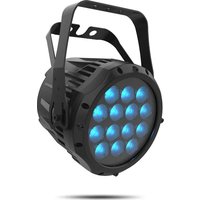
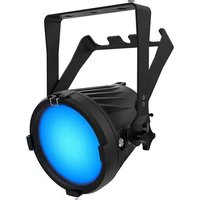
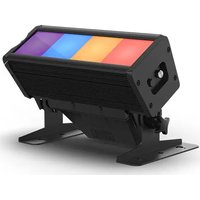
COLORado 1 Quad - Heating Chauvet - Free user manual and instructions
Find the device manual for free COLORado 1 Quad Chauvet in PDF.


| Product Type | LED wash projector |
| Brand | Chauvet |
| Model | COLORado 1 Quad |
| Category | Heating |
| Light sources | 4 LEDs (Red, Green, Blue, White) |
| Power supply | 100–240 V AC, 50/60 Hz (universal) |
| Max power consumption | Not specified |
| DMX connectivity | XLR 3 and 5 pins (input/output) |
| DMX personalities | RGB (4, 5, 6 channels), RGBW (7, 10, 15 channels), etc. |
| Supported protocols | DMX, RDM (Remote Device Management) |
| Operating modes | Static, Automatic, Master/Slave, DMX |
| Special functions | Strobe (0–20 Hz), color macros, 16-bit dimming |
| Protection rating | IP65 (water and dust resistant) |
| Cooling | Passive (no fan) |
| Max ambient temperature | 45 °C |
| Minimum distance from surfaces | 50 cm (20 inches) |
| Included accessories | Powerkon IP65 power cable, gel frame |
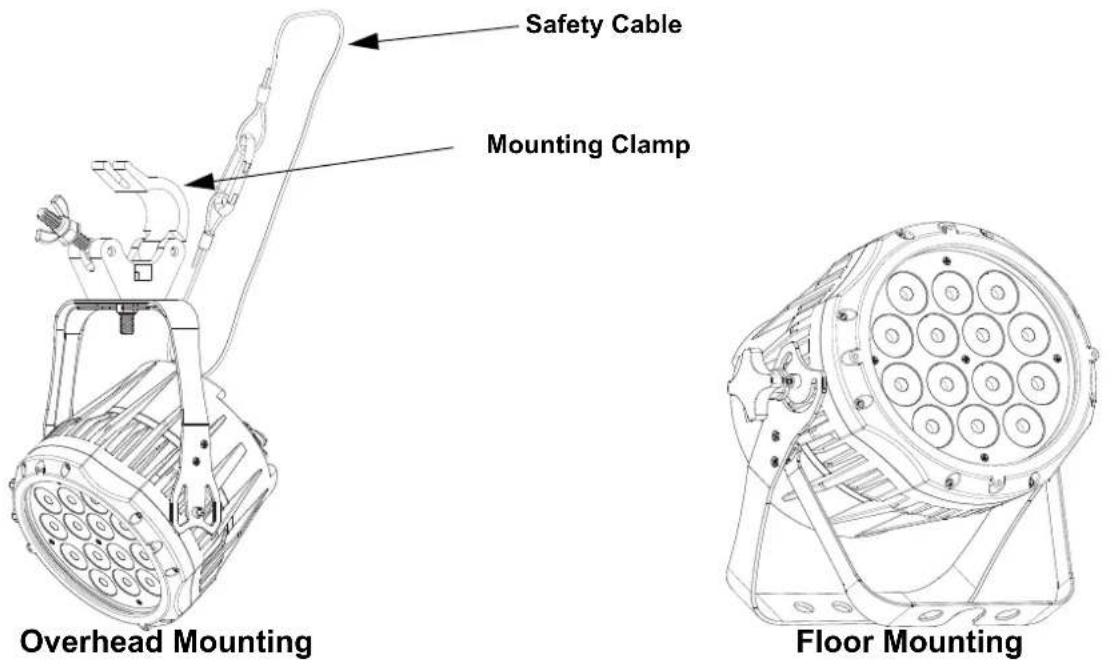
| Mounting | Mounting bracket with safety cable attachment |
| Maintenance | Clean with a soft dry cloth; do not immerse |
| Warranty | Limited (see terms on Chauvet website) |
Frequently Asked Questions - COLORado 1 Quad Chauvet
User questions about COLORado 1 Quad Chauvet
0 question about this device. Answer the ones you know or ask your own.
Ask a new question about this device
Download the instructions for your Heating in PDF format for free! Find your manual COLORado 1 Quad - Chauvet and take your electronic device back in hand. On this page are published all the documents necessary for the use of your device. COLORado 1 Quad by Chauvet.
USER MANUAL COLORado 1 Quad Chauvet
About This Guide
The Colorado 1 Quad Quick Reference Guide (QRG) has basic product information such as connection, mounting, menu options, and DMX values. Download the User Manual from www.chauvetprofessional.com for more details.
Disclaimer
The information and specifications contained in this QRG are subject to change without notice.
LIMITED WARRANTY
FOR WARRANTY REGISTRATION AND COMPLETE TERMS AND CONDITIONS PLEASE VISIT OUR WEBSITE.
For Customers in the United States and Mexico: www.chauvetlighting.com/warranty-registration.
For Customers in the United Kingdom, Republic of Ireland, Belgium, the Netherlands, Luxembourg, France, and Germany: www.chauvetlighting.eu/warranty-registration.
Chauvet warrants that this product shall be free from defects in material and workmanship under normal use, for the period specified in, and subject to the exclusions and limitations set forth in the full limited warranty on our website. This warranty extends only to the original purchaser of the product and is not transferable. To exercise rights under this warranty, you must provide proof of purchase in the form of an original sales receipt from an authorized dealer that shows the product name and date of purchase. THERE ARE NO OTHER EXPRESS OR IMPLIED WARRANTIES. This warranty gives you specific legal rights. You may also have other rights that vary from state to state and country to country. This warranty is valid only in the United States, United Kingdom, Republic of Ireland, Belgium, the Netherlands, Luxembourg, France, Germany and Mexico. For warranty terms in other countries, please consult your local distributor.
Safety Notes
- DO NOT open this product. It contains no user-serviceable parts.
- To eliminate unnecessary wear and improve its lifespan, during periods of non-use completely disconnect the product from power via breaker or by unplugging it.
- DO NOT look at the light source when the product is on.
- CAUTION: This product's housing may be hot when lights are operating. Mount this product in a location with adequate ventilation, at least 20 in (50 cm) from adjacent surfaces.
• DO NOT leave any flammable material within 50 cm of this product while operating or connected to power. - CAUTION: When transferring product from extreme temperature environments, (e.g., cold truck to warm humid ballroom) condensation may form on the internal electronics of the product. To avoid causing a failure, allow product to fully acclimate to the surrounding environment before connecting it to power.
- Not for permanent outdoor installation in locations with extreme environmental conditions. This includes, but is not limited to:
• Exposure to a marine/saline environment (within 3 miles of a saltwater body of water).
- Where the normal high or low temperatures of the location exceed the temperature ranges in this manual.
- Locations that are prone to flooding or being buried in snow.
• Other areas where the product will be subject to extreme radiation or caustic substances.
- USE a safety cable when mounting this product overhead.
• DO NOT submerge this product (IP65). Regular outdoor operation is fine.
• DO NOT operate this product if the housing, lenses, or cables appear damaged.
- DO NOT connect this product to a dimmer or rheostat.
- ONLY connect this product to a grounded and protected circuit.
- ONLY use the hanging/mounting bracket to carry this product.
• In the event of a serious operating problem, stop using immediately.
• The maximum ambient temperature is 113 °F (45 °C). Do not operate this product at higher temperatures.
Contact
Outside the U.S., United Kingdom, Ireland, Benelux, France, Germany, or Mexico, contact your distributor to request support or return a product. Refer to Contact Us at the end of this QRG for contact information.
What is Included
- Colorado 1 Quad
• Gel frame holder (7.5 in/191 mm accessories)
- Seetronic Powerkon IP65 power cord
- Quick Reference Guide
AC Power
This product has an auto-ranging power supply that can work with an input voltage range of 100–240 VAC, 50/60 Hz.
Power Linking
You can link up to 15 Colorado 1 Quad products at 120 VAC, 25 products at 208 V, or 27 at 230 VAC. Never exceed this number. Power linking cords can be purchased separately.
AC Plug
| Connection | Wire (U.S.) | Wire (Europe) | Screw Color |
| AC Live Black Brown Yellow/Brass | |||
| AC Neutral White Blue Silver | |||
| AC Ground Green/Yellow Green/Yellow Green |

- To eliminate unnecessary wear and improve its lifespan, during periods of non-use completely disconnect the product from power via breaker or by unplugging it.
- When using this product in an outdoor IP65 type environment, be sure to use IP65 (or higher) rated power cables and secure unused ports with attached IP65 covers.
DMX Linking
The Colorado 1 Quad will work with a DMX controller using a 5-pin DMX serial connection. A DMX Primer is available from www.chauvetprofessional.com.
DMX Connection
The Colorado 1 Quad uses a 5-pin DMX data connection for its DMX personalities. See the User Manual for information about connecting and configuring the product for DMX operation.

When using this product in an outdoor IP65 type environment, be sure to use IP65 (or higher) rated data cables and secure unused ports with attached IP65 covers.
Master/Slave Connection
The Colorado 1 Quad uses the DMX data connection for its Master/Slave mode. See the User Manual for information about connect and configure the product for master/slave operation.
RDM (Remote Device Management)
Remote Device Management, or RDM, is a standard for allowing DMX-enabled devices to communicate bi-directionally along existing DMX cabling. Check the DMX controller's User Manual or with the manufacturer as not all DMX controllers have this capability. The Colorado 1 Quad supports RDM protocol that allows feedback to make changes to menu map options. Download the User Manual from www.chauvetprofessional.com for more details.
Mounting
Before mounting this product, read the Safety Notes. Use at least one mounting point per product. Make sure the mounting clamps are capable of supporting the weight of the product. For our Chauvet line of mounting clamps, go to http://trusst.com/productcategory/truss-clamps/
Product Mounting Diagram
Control Panel Description
| Button Function | |
| Exits from the current menu or function | |
| Enables the currently displayed menu or sets the currently selected value into the selected function | |
| Navigates upwards through the menu list or increases the numeric value when in a function | |
| Navigates downwards through the menu list or decreases the numeric value when in a function | |
Passcode
After being prompted, enter the following passcode by pressing:
This passcode cannot be changed and must be used whenever prompted.
Menu Map
| Main Level | Programming Levels Description | ||||
| STAT | R. | 000-255 | Combines red, green, blue, and white to make a custom color (0–100%) | ||
| G. | |||||
| B. | |||||
| W. | |||||
| ST. 00-20 Selects the strobe frequency (0–20 Hz) | |||||
| AUTO | AT.01-10 Selects automatic programs | ||||
| PR.01-10 Selects customizable programs | |||||
| RUN | DMX | Receives DMX signals from the DMX controller | |||
| SLAV Receives DMX signals from the master | |||||
| DMX | D.001-512 | Sets the DMX starting address | |||
| PERS | RGB | TOUR | 9-channel: RGB, dimmer, strobe, color macro/white balance, auto/custom, dimmer speed, auto speed | ||
| TR16 | 13-channel: 16-bit RGB and dimmer, strobe, color macro/white balance, auto/custom, dimmer speed, auto speed | ||||
| AR1.D | 4-channel: RGB, dimmer | ||||
| RGBW | 8BIT | 10-channel: RGBW, dimmer, strobe, color macro/white balance, auto/custom, dimmer speed, auto speed | |||
| 16BI | 15-channel: 16-bit RGBW and dimmer, strobe, color macro/white balance, auto/custom, dimmer speed, auto speed | ||||
| SSP | 7-channel: RGBW, dimmer, strobe, dimmer speed | ||||
| ARC.2 | 4-channel: RGBW control | ||||
| AR2.D | 5-channel: RGBW, dimmer | ||||
| AR2.S | 6-channel: RGBW, dimmer, strobe | ||||
| EDIT | PR.01-10 | SC.01-30 | R. | 000-255 | Combines red, green, blue, and white to generate a custom color (0-100%) |
| G. | |||||
| B. | |||||
| W. | |||||
| SB. | 00-20 | Selects the strobe frequency (0-20 Hz) | |||
| T. | 000-255 | Defines the step duration (slow to fast | |||
| F. | Defines the fade duration (slow to fast) | ||||
| Main Level | Programming Levels | Description | ||||
| SET | UPLD | ****(Enter Passcode) | OK | Uploads custom programs to other Colorado 1 Quad products | ||
| REST WAIT OK Defaults product to | factory settings | |||||
| COLO | OFF RGB set to 255 = | max. output | ||||
| RGBW RGB set to 255 | = balanced white | |||||
| UC Universal color balance | ||||||
| DIM | OFF No dimmer | |||||
| DIM1 | Dimmer curves | |||||
| DIM2 | ||||||
| DIM3 | ||||||
| DIM4 | ||||||
| CURV | OFF No dimmer | |||||
| CV1 | Fast (CV1) to slow (CV3) dimmer curves | |||||
| CV2 | ||||||
| CV3 | ||||||
| DERR | SAVE | Continues with last command upon loss of DMX control | ||||
| BLAK Blacks out fixture upon loss of DMX | ||||||
| SLCK | OFF | SET main level access lock | ||||
| ON | ||||||
| STRB | CLAS | Selects strobe personality | ||||
| SPRC | ||||||
| PWM | 600 | |||||
| 1200 | ||||||
| 2000 | ||||||
| 2400 | ||||||
| 4000 | ||||||
| 6000 | ||||||
| 25K | ||||||
| CAL | ****(Enter Passcode) | CAL1 WH.01-11 | R. | 000-255 | Modifies the color macros used in the TOUR, 8BIT, 16BI, and TR16 personalities | |
| G. | ||||||
| B. | ||||||
| W. | ||||||
| CAL2 RGBW | R. | Defines the color temperature used when COLO is set to RGBW | ||||
| G. | ||||||
| B. | ||||||
| CALR | ****(Enter Passcode) | CALR | OK | Defaults CAL to factory settings | ||
| KEY | ON | Turns the passcode on or off | ||||
| OFF | ||||||
| INFO VERS V__ Shows installed software version | ||||||
DMX Value RGBW Mode
16BI
| Channel | Function | Value | Percent/Setting |
| 1 | Dimmer 000 | ⇔ 255 | 0–100% |
| 2 | Fine Dimmer | 000 ⇔ 255 | 0–100% |
| 3 | Red | 000 ⇔ 255 | 0–100% (Step Time if Custom 1-10 active) |
EN
| Channel | Function | Value | Percent/Setting |
| 4 | F i n | e ⇔ 255 R0-100% (Fade time if Custom active) | |
| 5 | G r e | e ⇔ n255 0-100% 000 | |
| 6 Fine Green 000 | ⇔ 255 0-100% | ||
| 7 | B l u | e ⇔ 255 0-100% | |
| 8 | F i n | e ⇔ 255 0-B 00% l u e 000 | |
| 9 | W h i | t ⇔ e255 0-100% 000 | |
| 10 Fine White 000 | ⇔ 255 0-100% | ||
| 11 | Color Macro | 000 ⇔ 010 No function011 ⇔ 030 R: 100% G: 0-100% B: 0%031 ⇔ 050 R: 100-0% G: 100% B: 0%051 ⇔ 070 R: 0% G: 100% B: 0-100%071 ⇔ 090 R: 0% G: 100-0% B: 100%091 ⇔ 110 R: 0-100% G: 0% B: 100%111 ⇔ 130 R: 100% G: 0% B: 100-0%131 ⇔ 150 R: 100% G: 0-100% B: 0-100%151 ⇔ 170 R: 100-0% G: 100-0% B: 100%171 ⇔ 200 RGBW: 100%201 ⇔ 205 White 1206 ⇔ 210 White 2211 ⇔ 215 White 3216 ⇔ 220 White 4221 ⇔ 225 White 5226 ⇔ 230 White 6231 ⇔ 235 White 7236 ⇔ 240 White 8241 ⇔ 245 White 9246 ⇔ 250 White 10251 ⇔ 255 White 11 | |
| 12 | Special Strobe | 000 ⇔ 009 No function010 ⇔ 099 Strobe, slow to fast100 ⇔ 109 No function110 ⇔ 179 Lighting strobe, slow to fast180 ⇔ 189 No function190 ⇔ 255 Random strobe, slow to fast | *Select strobe function in the main menu under SET > STRB > CLAS or SPRC |
| Classic Strobe | 000 ⇔ 009 No function010 ⇔ 019 1 Hz020 ⇔ 029 2 Hz030 ⇔ 039 3 Hz040 ⇔ 049 4 Hz050 ⇔ 059 5 Hz060 ⇔ 069 6 Hz070 ⇔ 079 7 Hz080 ⇔ 089 8 Hz090 ⇔ 099 9 Hz100 ⇔ 109 10 Hz110 ⇔ 119 11 Hz120 ⇔ 129 12 Hz | ||
| Channel Function Value Percent/Setting | |||
| 12 Classic Strobe | 130 ⇔ 139 13 Hz140 ⇔ 149 14 Hz150 ⇔ 159 15 Hz160 ⇔ 169 16 Hz170 ⇔ 179 17 Hz180 ⇔ 189 18 Hz190 ⇔ 199 19 Hz200 ⇔ 255 20 Hz | ||
| 13 Programs | 000 ⇔ 020 No function021 ⇔ 030 Auto 1031 ⇔ 040 Auto 2041 ⇔ 050 Auto 3051 ⇔ 060 Auto 4061 ⇔ 070 Auto 5071 ⇔ 080 Auto 6081 ⇔ 090 Auto 7091 ⇔ 100 Auto 8101 ⇔ 110 Auto 9111 ⇔ 120 Auto 10121 ⇔ 130 Custom 1131 ⇔ 140 Custom 2141 ⇔ 150 Custom 3151 ⇔ 160 Custom 4161 ⇔ 170 Custom 5171 ⇔ 180 Custom 6181 ⇔ 190 Custom 7191 ⇔ 200 Custom 8201 ⇔ 210 Custom 9211 ⇔ 220 Custom 10221 ⇔ 255 No function | ||
| 14 Auto | Speed 000 | ⇔ 255 | 0–100% (Only when usingAuto1-10) |
| 15 Dimmer Speed | 000 ⇔ 009 Preset dimmer speed from display menu010 ⇔ 029 Linear dimmer030 ⇔ 069 Nonlinear dimming curve 1 (fastest)070 ⇔ 129 Nonlinear dimming curve 2130 ⇔ 189 Nonlinear dimming curve 3190 ⇔ 255 Nonlinear dimming curve 4 (slowest) | ||
8BIT
| Channel Function Value Percent/Setting | |||||
| 1 Dimmer 000 | ⇔ 255 0–100% | ||||
| 2 | R | e | d | ⇔ 255 | 000100% (Step Time if Custom 1-10 active) |
| 3 | G | r | e | e ⇔ n255 | 0–100% (Fade Time if Custom 1-10 active) |
| 4 | B | l | u | e ⇔ 255 0–1000% | |
| 5 | W | h | i | t ⇔ e255 0–100% | 000 |
| Channel | Function | Value | Percent/Setting |
| 6 Color | Macro | 000 ⇔ 010 No function011 ⇔ 030 R: 100% G: 0–100% B: 0%031 ⇔ 050 R: 100–0% G: 100% B: 0%051 ⇔ 070 R: 0% G: 100% B: 0–100%071 ⇔ 090 R: 0% G: 100–0% B: 100%091 ⇔ 110 R: 0–100% G: 0% B: 100%111 ⇔ 130 R: 100% G: 0% B: 100–0%131 ⇔ 150 R: 100% G: 0–100% B: 0–100%151 ⇔ 170 R: 100–0% G: 100–0% B: 100%171 ⇔ 200 RGBW: 100%201 ⇔ 205 White 1206 ⇔ 210 White 2211 ⇔ 215 White 3216 ⇔ 220 White 4221 ⇔ 225 White 5226 ⇔ 230 White 6231 ⇔ 235 White 7236 ⇔ 240 White 8241 ⇔ 245 White 9246 ⇔ 250 White 10251 ⇔ 255 White 11 | |
| 7 | Special Strobe | 000 ⇔ 009 No function010 ⇔ 099 Strobe, slow to fast100 ⇔ 109 No function110 ⇔ 179 Lighting strobe, slow to fast180 ⇔ 189 No function190 ⇔ 255 Random strobe, slow to fast | *Select strobe function in the main menu under SET >STRB > CLAS or SPRC |
| Classic Strobe | 000 ⇔ 009 No function010 ⇔ 019 1 Hz020 ⇔ 029 2 Hz030 ⇔ 039 3 Hz040 ⇔ 049 4 Hz050 ⇔ 059 5 Hz060 ⇔ 069 6 Hz070 ⇔ 079 7 Hz080 ⇔ 089 8 Hz090 ⇔ 099 9 Hz100 ⇔ 109 10 Hz110 ⇔ 119 11 Hz120 ⇔ 129 12 Hz130 ⇔ 139 13 Hz140 ⇔ 149 14 Hz150 ⇔ 159 15 Hz160 ⇔ 169 16 Hz170 ⇔ 179 17 Hz |
| Channel Function Value Percent/Setting | |||
| 7 Classic Strobe | 180 ⇔ 189 18 Hz | ||
| 190 ⇔ 199 19 Hz | |||
| 200 ⇔ 255 20 Hz | |||
| 8 Programs | 000 ⇔ 020 No function | ||
| 021 ⇔ 030 Auto 1 | |||
| 031 ⇔ 040 Auto 2 | |||
| 041 ⇔ 050 Auto 3 | |||
| 051 ⇔ 060 Auto 4 | |||
| 061 ⇔ 070 Auto 5 | |||
| 071 ⇔ 080 Auto 6 | |||
| 081 ⇔ 090 Auto 7 | |||
| 091 ⇔ 100 Auto 8 | |||
| 101 ⇔ 110 Auto 9 | |||
| 111 ⇔ 120 Auto 10 | |||
| 121 ⇔ 130 Custom 1 | |||
| 131 ⇔ 140 Custom 2 | |||
| 141 ⇔ 150 Custom 3 | |||
| 151 ⇔ 160 Custom 4 | |||
| 161 ⇔ 170 Custom 5 | |||
| 171 ⇔ 180 Custom 6 | |||
| 181 ⇔ 190 Custom 7 | |||
| 191 ⇔ 200 Custom 8 | |||
| 201 ⇔ 210 Custom 9 | |||
| 211 ⇔ 220 Custom 10 | |||
| 221 ⇔ 255 No function | |||
| 9 Auto Speed 000 | ⇔ 255 | 0–100% (Only when using Auto1-10) | |
| 10 Dimmer Speed | 000 ⇔ 009 Preset dimmer speed from display menu | ||
| 010 ⇔ 029 Linear dimmer | |||
| 030 ⇔ 069 Nonlinear dimming curve 1 (fastest) | |||
| 070 ⇔ 129 Nonlinear dimming curve 2 | |||
| 130 ⇔ 189 Nonlinear dimming curve 3 | |||
| 190 ⇔ 255 Nonlinear dimming curve 4 (slowest) | |||
SSP
| Channel Function Value Percent/Setting | |||||
| 1 Dimmer 000 | ⇔ 255 0–100% | ||||
| 2 | R | e | d | ⇔ 255 0–100% | |
| 3 | G | r | e | e ⇔ n255 0–100% | 000 |
| 4 | B | l | u | e ⇔ 255 0–100% | |
| 5 | W | h | i | t ⇔ e255 0–100% | 000 |
| 6 | Special Strobe | 000 ⇔ 009 No function010 ⇔ 099 Strobe, slow to fast100 ⇔ 109 No function110 ⇔ 179 Lighting strobe, slow to fast180 ⇔ 189 No function190 ⇔ 255 Random strobe, slow to fast | |||
| Classic Strobe | 000 ⇔ 009 No function010 ⇔ 019 1 Hz | ||||
| Channel Function Value Percent/Setting | ||
| 6 Classic Strobe | 020 ⇔ 029 2 Hz | |
| 030 ⇔ 039 3 Hz | ||
| 040 ⇔ 049 4 Hz | ||
| 050 ⇔ 059 5 Hz | ||
| 060 ⇔ 069 6 Hz | ||
| 070 ⇔ 079 7 Hz | ||
| 080 ⇔ 089 8 Hz | ||
| 090 ⇔ 099 9 Hz | ||
| 100 ⇔ 109 10 Hz | ||
| 110 ⇔ 119 11 Hz | ||
| 120 ⇔ 129 12 Hz | ||
| 130 ⇔ 139 13 Hz | ||
| 140 ⇔ 149 14 Hz | ||
| 150 ⇔ 159 15 Hz | ||
| 160 ⇔ 169 16 Hz | ||
| 170 ⇔ 179 17 Hz | ||
| 180 ⇔ 189 18 Hz | ||
| 190 ⇔ 199 19 Hz | ||
| 200 ⇔ 255 20 Hz | ||
| 7 Dimmer Speed | 000 ⇔ 009 Preset dimmer speed from display menu | |
| 010 ⇔ 029 Linear dimmer | ||
| 030 ⇔ 069 Nonlinear dimming curve 1 (fastest) | ||
| 070 ⇔ 129 Nonlinear dimming curve 2 | ||
| 130 ⇔ 189 Nonlinear dimming curve 3 | ||
| 190 ⇔ 255 Nonlinear dimming curve 4 (slowest) | ||
AR2.S
| Channel Function Value Percent/Setting | |||||
| 1 Dimmer 000 | ⇔ 255 0–100% | ||||
| 2 | R | e | d | ⇔ 255 0–100% | |
| 3 | G | r | e | e ⇔ n255 0–100% 000 | |
| 4 | B | l | u | e ⇔ 255 0–100% | |
| 5 | W | h | i | t ⇔ e255 0–100% 000 | |
| 6 Strobe 000 | ⇔ 255 0–20Hz | ||||
AR2.D
| Channel Function Value Percent/Setting | |||||
| 1 Dimmer 000 | ⇔ 255 0–100% | ||||
| 2 | R | e | d | ⇔ 255 0–1000% | |
| 3 | G | r | e | e ⇔ n255 0–100% 000 | |
| 4 | B | l | u | e ⇔ 255 0–1000% | |
| 5 | W | h | i | t ⇔ e255 0–100% 000 | |
ARC.2
| Channel Function Value Percent/Setting | ||||||
| 1 | R | e | d | ⇔ 255 0-100% | ||
| 2 | G | r | e | e | ⇔ n255 0-100% | 000 |
| 3 | B | l | u | e | ⇔ 255 0-100% | |
| 4 | W | h | i | t | ⇔ e255 0-100% | 000 |
DMX Value RGB Mode
TR16
| Channel Function Value Percent/Setting | ||||||
| 1 Dimmer 000 | ⇔ 255 0-100% | |||||
| 2 Fine Dimmer 000 | ⇔ 255 0-100% | |||||
| 3 | R e d | ⇔ 255 000100% (Step Time if Custom 1-10 active) | ||||
| 4 | F i n | e ⇔ 255 R0-100% (Fade Time if Custom 1-10 active) | ||||
| 5 | G r e | e ⇔ n255 0-100% 000 | ||||
| 6 Fine Green 000 | ⇔ 255 0-100% | |||||
| 7 | B l u | e ⇔ 255 0-100% | ||||
| 8 | F i n | e ⇔ 255 0-100% l u e 000 | ||||
| 9 Color Macro | 000 ⇔ 010 No function | |||||
| 011 ⇔ 030 R: 100% G: 0-100% B: 0% | ||||||
| 031 ⇔ 050 R: 100-0% G: 100% B: 0% | ||||||
| 051 ⇔ 070 R: 0% G: 100% B: 0-100% | ||||||
| 071 ⇔ 090 R: 0% G: 100-0% B: 100% | ||||||
| 091 ⇔ 110 R: 0-100% G: 0% B: 100% | ||||||
| 111 ⇔ 130 R: 100% G: 0% B: 100-0% | ||||||
| 131 ⇔ 150 R: 100% G: 0-100% B: 0-100% | ||||||
| 151 ⇔ 170 R: 100-0% G: 100-0% B: 100% | ||||||
| 171 ⇔ 200 RGBW: 100% | ||||||
| 201 ⇔ 205 White 1 | ||||||
| 206 ⇔ 210 White 2 | ||||||
| 211 ⇔ 215 White 3 | ||||||
| 216 ⇔ 220 White 4 | ||||||
| 221 ⇔ 225 White 5 | ||||||
| 226 ⇔ 230 White 6 | ||||||
| 231 ⇔ 235 White 7 | ||||||
| 236 ⇔ 240 White 8 | ||||||
| 241 ⇔ 245 White 9 | ||||||
| 246 ⇔ 250 White 10 | ||||||
| 251 ⇔ 255 White 11 | ||||||
| 10 | Special Strobe | 000 ⇔ 009 No function | ||||
| 010 ⇔ 099 Strobe, slow to fast | ||||||
| 100 ⇔ 109 No function | ||||||
| 110 ⇔ 179 Lighting strobe, slow to fast | ||||||
| 180 ⇔ 189 No function | ||||||
| 190 ⇔ 255 Random strobe, slow to fast | ||||||
| Classic Strobe | 000 ⇔ 009 No function | |||||
| 010 ⇔ 019 1 Hz | ||||||
| 020 ⇔ 029 2 Hz | ||||||
| Channel Function Value Percent/Setting | ||||||
| 10 Classic Strobe | 030 ⇔ 039 3 Hz040 ⇔ 049 4 Hz050 ⇔ 059 5 Hz060 ⇔ 069 6 Hz070 ⇔ 079 7 Hz080 ⇔ 089 8 Hz090 ⇔ 099 9 Hz100 ⇔ 109 10 Hz110 ⇔ 119 11 Hz120 ⇔ 129 12 Hz130 ⇔ 139 13 Hz140 ⇔ 149 14 Hz150 ⇔ 159 15 Hz160 ⇔ 169 16 Hz170 ⇔ 179 17 Hz180 ⇔ 189 18 Hz190 ⇔ 199 19 Hz200 ⇔ 255 20 Hz | |||||
| 11 Programs | 000 ⇔ 020 No function021 ⇔ 030 Auto 1031 ⇔ 040 Auto 2041 ⇔ 050 Auto 3051 ⇔ 060 Auto 4061 ⇔ 070 Auto 5071 ⇔ 080 Auto 6081 ⇔ 090 Auto 7091 ⇔ 100 Auto 8101 ⇔ 110 Auto 9111 ⇔ 120 Auto 10121 ⇔ 130 Custom 1131 ⇔ 140 Custom 2141 ⇔ 150 Custom 3151 ⇔ 160 Custom 4161 ⇔ 170 Custom 5171 ⇔ 180 Custom 6181 ⇔ 190 Custom 7191 ⇔ 200 Custom 8201 ⇔ 210 Custom 9211 ⇔ 220 Custom 10221 ⇔ 255 No function | |||||
| 12 Auto | Speed 000 | ⇔ 255 | 0–100% (Only when usingAuto1-10) | |||
| 13 Dimmer Speed | 000 ⇔ 009 Preset dimmer speed from display menu010 ⇔ 029 Linear dimmer030 ⇔ 069 Nonlinear dimming curve 1 (fastest)070 ⇔ 129 Nonlinear dimming curve 2130 ⇔ 189 Nonlinear dimming curve 3190 ⇔ 255 Nonlinear dimming curve 4 (slowest) | |||||
TOUR
| Channel Function Value Percent/Setting | ||||
| 1 Dimmer 000 | ⇔ 255 0-100% | |||
| 2 | R e d | ⇔ 255 009100% (Step Time if Custom 1-10 active) | ||
| 3 | G r e | e ⇔ n255 0-100% (Rade Time if Custom 1-10 active) | ||
| 4 | B l u | e ⇔ 255 0-100% | ||
| 5 Color Macro | 000 ⇔ 010 No function011 ⇔ 030 R: 100% G: 0-100% B: 0%031 ⇔ 050 R: 100-0% G: 100% B: 0%051 ⇔ 070 R: 0% G: 100% B: 0-100%071 ⇔ 090 R: 0% G: 100-0% B: 100%091 ⇔ 110 R: 0-100% G: 0% B: 100%111 ⇔ 130 R: 100% G: 0% B: 100-0%131 ⇔ 150 R: 100% G: 0-100% B: 0-100%151 ⇔ 170 R: 100-0% G: 100-0% B: 100%171 ⇔ 200 RGBW: 100%201 ⇔ 205 White 1206 ⇔ 210 White 2211 ⇔ 215 White 3216 ⇔ 220 White 4221 ⇔ 225 White 5226 ⇔ 230 White 6231 ⇔ 235 White 7236 ⇔ 240 White 8241 ⇔ 245 White 9246 ⇔ 250 White 10251 ⇔ 255 White 11 | |||
| 6 | Special Strobe | 000 ⇔ 009 No function010 ⇔ 099 Strobe, slow to fast100 ⇔ 109 No function110 ⇔ 179 Lighting strobe, slow to fast180 ⇔ 189 No function190 ⇔ 255 Random strobe, slow to fast | *Select strobe function in the main menu under SET > STRB >CLAS or SPRC | |
| Classic Strobe | 000 ⇔ 009 No function010 ⇔ 019 1 Hz020 ⇔ 029 2 Hz030 ⇔ 039 3 Hz040 ⇔ 049 4 Hz050 ⇔ 059 5 Hz060 ⇔ 069 6 Hz070 ⇔ 079 7 Hz080 ⇔ 089 8 Hz090 ⇔ 099 9 Hz100 ⇔ 109 10 Hz110 ⇔ 119 11 Hz120 ⇔ 129 12 Hz130 ⇔ 139 13 Hz140 ⇔ 149 14 Hz | |||
| Channel Function Value Percent/Setting | |||
| 6 Classic Strobe | 150 ⇔ 159 15 Hz160 ⇔ 169 16 Hz170 ⇔ 179 17 Hz180 ⇔ 189 18 Hz190 ⇔ 199 19 Hz200 ⇔ 255 20 Hz | ||
| 7 | P r o | 000 ⇔ 020 No function021 ⇔ 030 Auto 1031 ⇔ 040 Auto 2041 ⇔ 050 Auto 3051 ⇔ 060 Auto 4061 ⇔ 070 Auto 5071 ⇔ 080 Auto 6081 ⇔ 090 Auto 7091 ⇔ 100 Auto 8101 ⇔ 110 Auto 9111 ⇔ 120 Auto 10g r a m s121 ⇔ 130 Custom 1131 ⇔ 140 Custom 2141 ⇔ 150 Custom 3151 ⇔ 160 Custom 4161 ⇔ 170 Custom 5171 ⇔ 180 Custom 6181 ⇔ 190 Custom 7191 ⇔ 200 Custom 8201 ⇔ 210 Custom 9211 ⇔ 220 Custom 10221 ⇔ 255 No function | |
| 8 Auto Speed 000 | ⇔ 255 | 0–100% (Only when using Auto1-10) | |
| 9 Dimmer Speed | 000 ⇔ 009 Preset dimmer speed from display menu010 ⇔ 029 Linear dimmer030 ⇔ 069 Nonlinear dimming curve 1 (fastest)070 ⇔ 129 Nonlinear dimming curve 2130 ⇔ 189 Nonlinear dimming curve 3190 ⇔ 255 Nonlinear dimming curve 4 (slowest) | ||
AR1.D
| Channel Function Value Percent/Setting | |||||
| 1 Dimmer 000 | ⇔ 255 0–100% | ||||
| 2 | R | e | d | ⇔ 255 | 000-100% (Step Time if Custom 1-10 active) |
| 3 | G | r | e | e ⇔ n255 | 0–100% (000-100% Made Time if Custom 1-10 active) |
| 4 | B | l | u | e ⇔ 255 0–100% | |
Acerca de Esta Guía
RDM (Remote Device Management)
General Information Technical Support
Chauvet World Headquarters
Address: 5200 NW 108th Ave. Voice: (844) 393-7575
Sunrise, FL 33351 Fax: (954) 756-8015
Voice: (954) 577-4455 Email: chauvetcs@chauvetlighting.com
Fax: (954) 929-5560
Toll Free: (800) 762-1084 Website: www.chauvetprofessional.com
Chauvet Europe Ltd.
Address: Unit 1C Email: UKtech@chauvetlighting.eu
Brookhill Road Industrial Estate
Pinxton, Nottingham, UK Website: www.chauvetprofessional.eu
NG16 6NT
Voice: +44 (0) 1773 511115
Fax: +44 (0) 1773 511110
Chauvet Europe BVBA
Address: Stokstraat 18 Email: BNLtech@chauvetlighting.eu
9770 Kruishoutem
Belgium Website: www.chauvetprofessional.eu
Voice: +32 9 388 93 97
Chauvet France
Address: 3, Rue Ampère
91380 Chilly-Mazarin
France Website: www.chauvetprofessional.eu
Voice: +33 1 78 85 33 59
Chauvet Germany
(Entrance by Calle 2)
Zona Industrial Lerma Website: www.chauvetprofessional.mx
Visit the applicable website above to verify our contact information and instructions to request support. Outside the U.S., United Kingdom, Ireland, Mexico, France, Germany, or Benelux, contact the dealer of record.

UL 1573
® CSA C22.2 No. 166
us E113093


RoHS
- ABOUT THIS GUIDE
- DISCLAIMER
- LIMITED WARRANTY
- SAFETY NOTES
- CONTACT
- WHAT IS INCLUDED
- AC POWER
- POWER LINKING
- DMX LINKING
- DMX CONNECTION
- MASTER/SLAVE CONNECTION
- RDM (REMOTE DEVICE MANAGEMENT)
- MOUNTING
- PASSCODE
- ACERCA DE ESTA GUÍA
- GENERAL INFORMATION TECHNICAL SUPPORT
- CHAUVET WORLD HEADQUARTERS
- CHAUVET EUROPE LTD
- CHAUVET EUROPE BVBA
- CHAUVET FRANCE
- CHAUVET GERMANY
Brand : Chauvet
Model : COLORado 1 Quad
Category : Heating