TWS161 - Earphones Prixton - Free user manual and instructions
Find the device manual for free TWS161 Prixton in PDF.


User questions about TWS161 Prixton
0 question about this device. Answer the ones you know or ask your own.
Ask a new question about this device
Download the instructions for your Earphones in PDF format for free! Find your manual TWS161 - Prixton and take your electronic device back in hand. On this page are published all the documents necessary for the use of your device. TWS161 by Prixton.
USER MANUAL TWS161 Prixton
natural_image
Line drawing of a closed mechanical part with two oval cutouts, no text or symbols presentAURICULARES ANC ANC EARBUDS
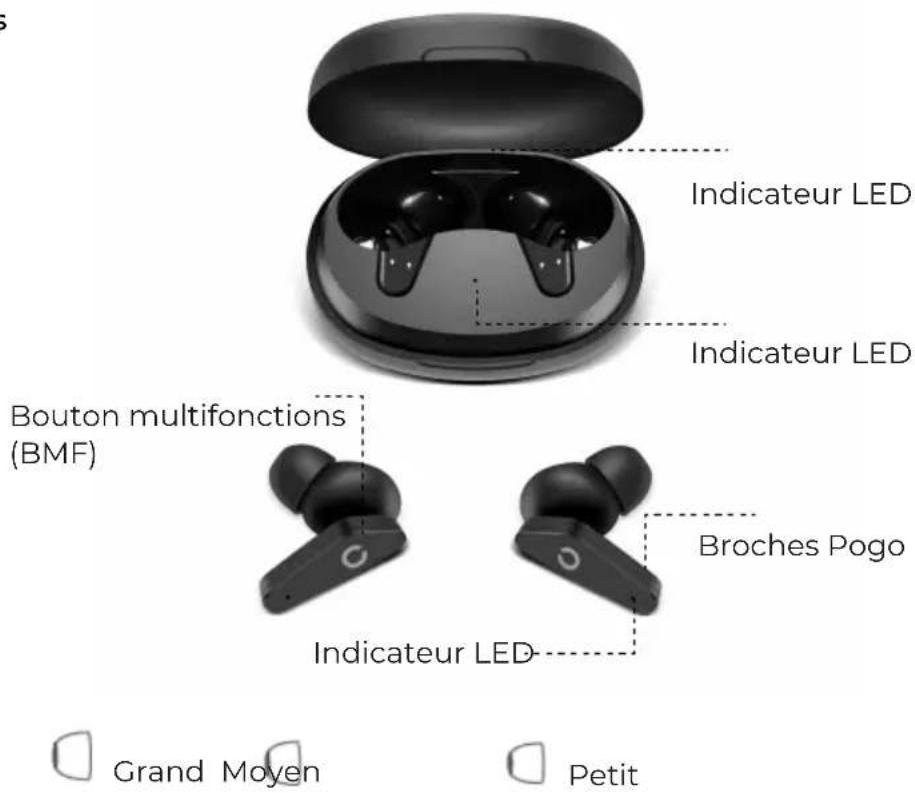
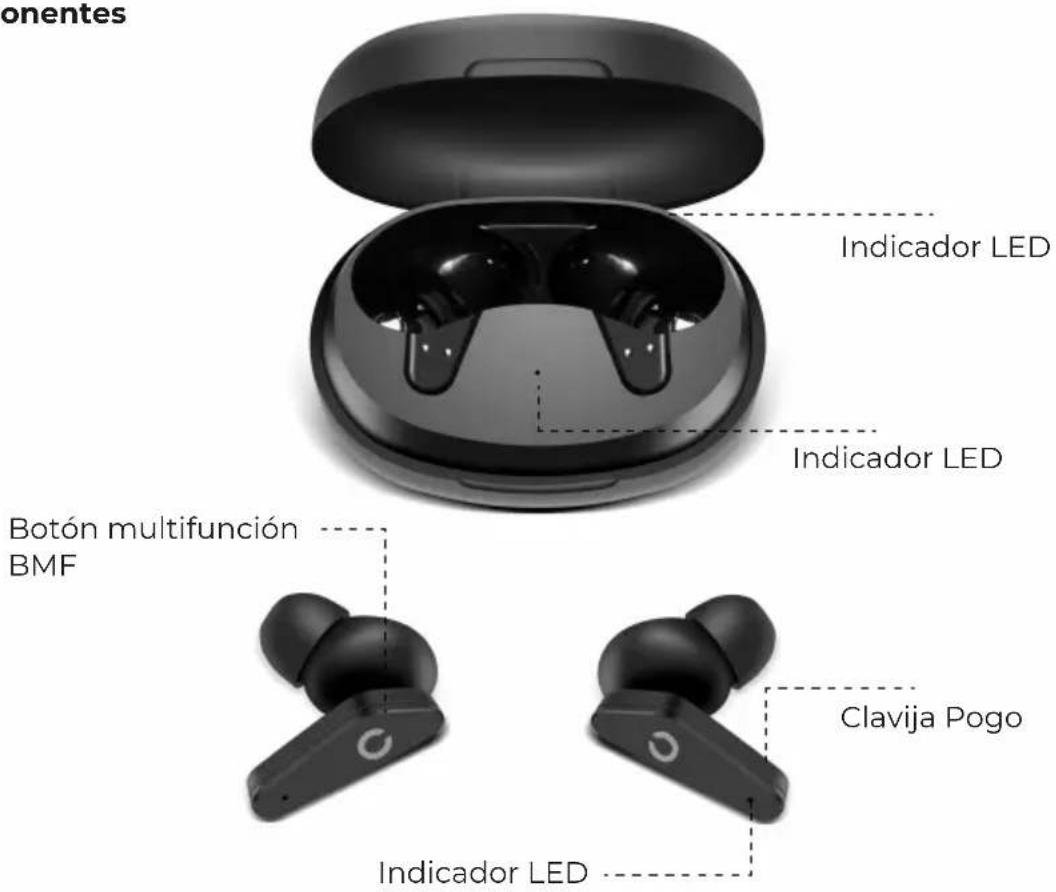
Componentes
Medium ear tips fit most of the people, recommend to try if for the first time.
Start to Using
How to pair
Put the earphones into the charging base to activate the earphones, remove the two earbuds, and the earbuds will automatically power on and pair with each other. earbud enters the pairing state, the phone searches the bluetooth name ("TWS161ANC Prixton") and click it to connect, and the connection between the two earbuds and the phone can be completed.
Charging Ways
Insert the earbuds into the charging case(pogo pins should be well-connected), LED light will be red while charging, once full charged, LED light will turn to be blue for 30s, and then turn off.
Functions
Power on

Method 1: Take out the earbuds from the charging case, it will auto power on.
Method 2 : Touch the multi-function buttons about 2S.
Power off

Method 1: Put the earbuds into the charging case, it will auto power off. Method 2: Top the multi-function buttons about 5s.
Method 3: Under the power on state, if The earbuds do not connect with the device about 5 mins, the earbuds will auto power off.
ANC on/off

Long touch the L/R multi-function button 2S to turn on the ANC function, long touch the L/R multi-function button 2S again to enter into transparent mode, and then touch multi-function 2s to turn off the ANC function.
Note: The Transparent Mode is for hearing all outside-voice more clearly, if don't want to hear it, it could be turned off. (long touch the multi-function for 2 seconds to turn off this function, and then touch the multi-button for 2 seconds again to turn on the ANC function).
Voice Assistant

Under the standby status, touch L/R multi-function button 3 times to activate the voice assistant.(Apple Siri, Android system requires mobile phone support).
Skip to next song

When playing music, touch L multi-function button for 2 times to play the next song.
Skip to previous song

When playing music, touch R multi-function button for 2 times to play the previous song.
Play/Pause the music

When playing music, touch L/R multi-function button for 1 time to pause the music, touch L/R for 1 time to resume playing.
Decline a call

When a call comes in, long touch the L/R multi-function for about 2S.
Hang up the call

When having a call, short touch the L or R multi-function button for one time to hang up.
Answer the call

When a call comes in, short touch one time the L or R multi-function button to answer the call.
Product parameters
Model : TWS161
Bluetooth Distance : About 10 meters (Unobstructed environment)
Bluetooth Version : V5.0
BT on + ANC off: about 4 hours
BT on + ANC on: 3-3.5 hours
Charging Time : About 1.5 hours
Support Agreement : AAC,SBC
Earbuds Battery Capacity : 3.7V 40mAh
Charging Box Battery Capacity : 3.7V-300mAh
Note: All technical information is subject to actual performance
Prompt
1.Please read this manual carefully before using the product and keep it properly.
2. For the first time, please fully charge the product.
3.If the product is not used for a long time (more than 1 month), please charge it.
4.The charger produced by regular manufacturer and certified by CCC must be selected.
5.If the mobile phone can't search the Bluetooth headset, please confirm whether the
Bluetooth headset is in "pairing status". If the Bluetooth headset is not paired or connected for a long time, the Bluetooth headset pairing function will be turned off. Please re open the Bluetooth headset to "pairing status"; if the mobile phone program fails, please restart the mobile.
Warning
- Do not remove or repair the modified headset for any reason, otherwise it may cause fire, electrical breakdown or even complete damage to the product.
- Do not place the device in an environment where the temperature is too low or too high (below 0 °C or above 45 °C).
- Please avoid using the device indicator light near the eyes of children or animals.
- Do not use the device during thunderstorms. Thunderstorms can cause the device to malfunction and increase the risk of electric shock.
- Do not wipe this product with oil and other volatile liquids.
- Do not allow the device to get wet with liquid.
Warranty Policy
This product is guaranteed for 2 years from the date of purchase. When you have a problem that you can not solve, you must access the web www.prixton.com and click on the contact option to send us your assistance form.
These technical and electrical specifications are those of typical units and may be changed without prior notice in order to provide improved equipment.
Simplified EU Declaration of Conformity
We, La Trastienda Digital located in Avenida Cervantes 49, módulo 25, Basauri 48970, Bizkaia hereby declare that the following goods, imported and selling at European market:
| BRAND | MODEL DESCRIPTION | CATEGORY | |
| PRIXTON | TWS161 | ANCEARBUDS | AUDIO |
Are in compliance with the EC Council Directive of 2014/53/EU (EM DIRECTIVE) and harmonized standards and with the board of the 16th of April 2014.
The complete text of the UE Declaration of conformity is available anytime at this website address:
www.prixton.com
LA TRASTIENDA DIGITAL
Composants