FUTGSO 4505 MT GBK - Oven Fulgor Milano - Free user manual and instructions
Find the device manual for free FUTGSO 4505 MT GBK Fulgor Milano in PDF.


User questions about FUTGSO 4505 MT GBK Fulgor Milano
0 question about this device. Answer the ones you know or ask your own.
Ask a new question about this device
Download the instructions for your Oven in PDF format for free! Find your manual FUTGSO 4505 MT GBK - Fulgor Milano and take your electronic device back in hand. On this page are published all the documents necessary for the use of your device. FUTGSO 4505 MT GBK by Fulgor Milano.
USER MANUAL FUTGSO 4505 MT GBK Fulgor Milano
natural_image
Simple geometric diagram with two black rectangles inside a larger rectangle (no text or symbols)FUSO 4505 MT
FUSO 7505 MT
FUTGSO 4505 MT
FQSO 4505 MT
FORNO A VAPORE 45 CON GRILL
STEAM OVEN 45 WITH GRILL
FOUR A VAPEUR 45 AVEC GRILL
DAMPFBACKOFEN 45 MIT GRILL
HORNO DE VAPOR 45 CON GRILL
FORNO A VAPOR 45 COM GRILL
natural_image
Diagram of a device interior with a central screen and directional arrow, no text or symbols presentnatural_image
Three-panel black-and-white photo showing a hand holding a tray inside an oven, with no visible text or symbols.natural_image
Two-panel black-and-white photo showing interior views of an oven with grating and a multi-tiered dish (no text or symbols visible)natural_image
Recycling symbol composed of five gray arrows forming a circular loop (no text or labels)natural_image
Pure electrical circuit lines without any symbolsnatural_image
Close-up of a gloved hand holding a pen inside an oven, with arrows indicating direction of movement (no visible text or symbols)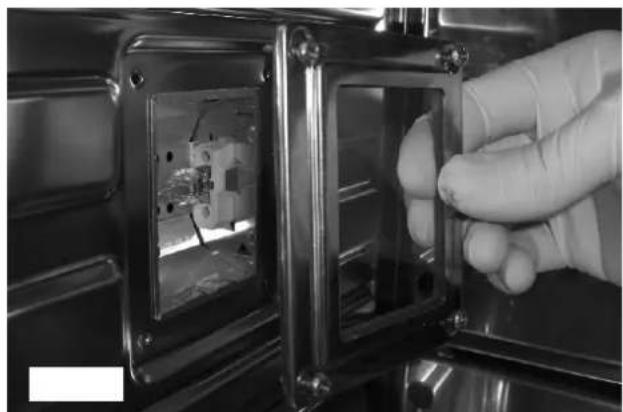
natural_image
Close-up of a gloved hand inserting a transparent plastic component into a metallic enclosure (no visible text or symbols)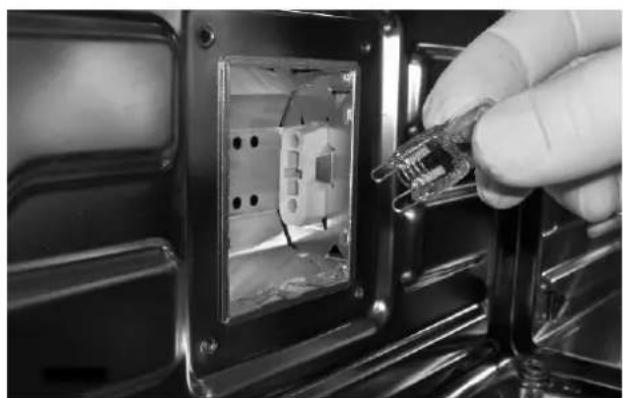
natural_image
Close-up of a hand inserting a plastic cable into an electrical socket (no text or symbols visible)natural_image
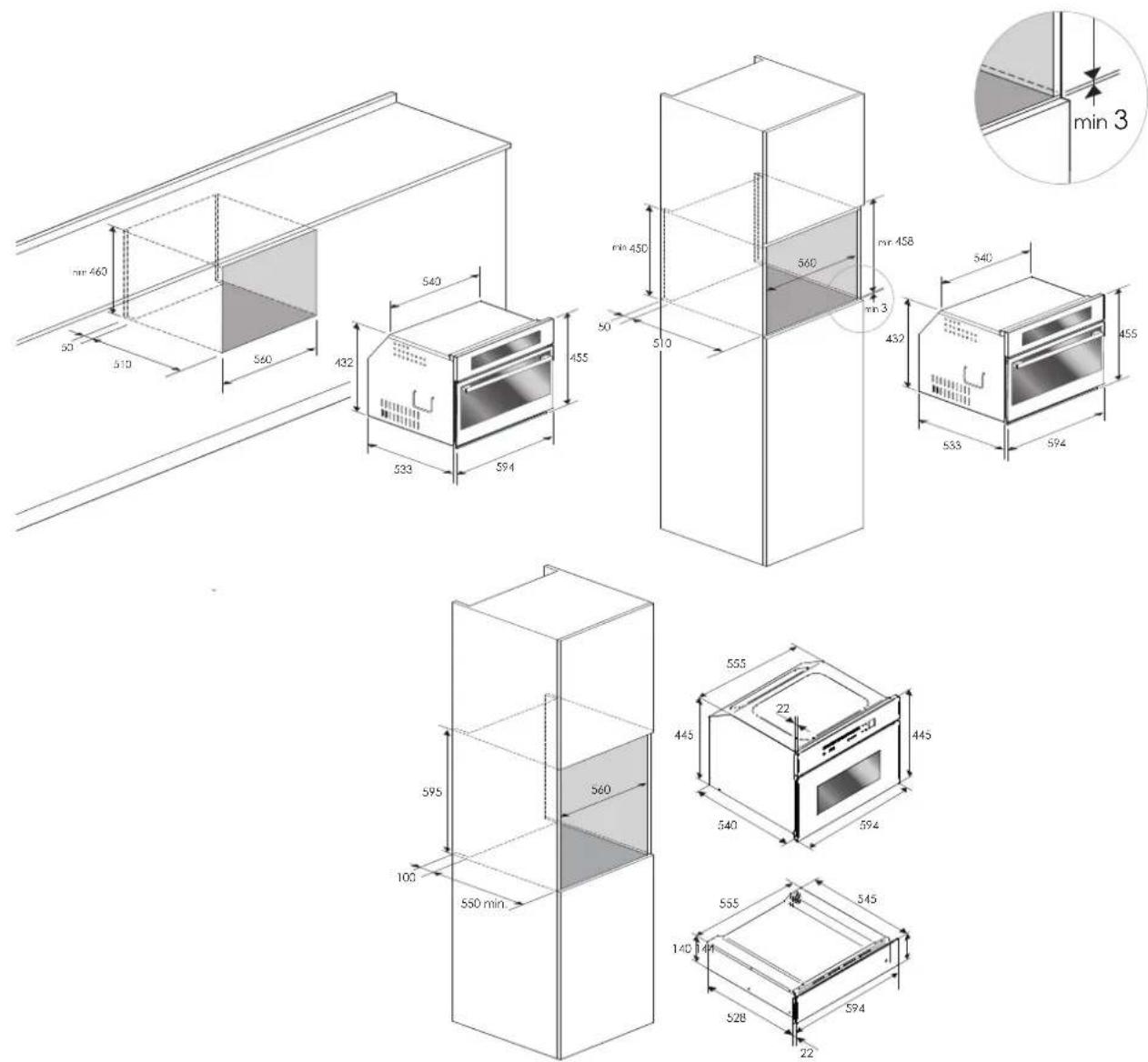
Close-up of a hand holding a tool near a vertical object (no visible text or symbols)VANI DA INCASSO E DIMENSIONI 45 cm

text_image
min 460 50 510 560 432 540 533 594 455 min 450 50 570 560 min 458 min 3 432 533 594 455 min 3 555 445 22 50 445 540 394 555 140 528 545 594 22text_image
Technical diagram of a mechanical assembly with labeled parts L and N, including a magnified inset showing internal components.Using the flat grill 4
Using the perforated tray 4
3 - Respect for the Environment 5
4 - The Control Panel 6
Command overview 6
5 - General Oven Information 7
Installation and hook-up 7
First hook-up 7
Timer touch control 7
Setting the clock 7
Minute counter 7
Cooking time 7
End of cooking time 7
Programming automatic cooking 7
Adjusting beep volume 8
6 - General Oven Tips 9
Steam operation 9
Useful tips 9
7 - Oven Operating Instructions 10
Steam cooking function 10
Grill cooking function 10
Cooking tips 10
8 - Cooking Mode Tables 11
9 - Error Signals and Oven Malfunctions 12
Replacing the oven lamp 13
10 - For the Installer 14
Installing the oven in a cabinet 15
IMPORTANT INSTRUCTIONS AND SAFETY WARNINGS
Read carefully and keep for future use

Dear Customer,
We would like to thank you and congratulate you on your choice.
This new product has been carefully designed and built using top quality materials, and meticulously tested to ensure that it meets all your culinary requirements.
Please read and observe these simple instructions, which will enable you to achieve excellent results from the very first time you use it. This state-of-the-art appliance comes to you with our very best wishes.
THIS PRODUCT IS DESIGNED FOR DOMESTIC USE.
THE MANUFACTURER DECLINES ALL RESPONSIBILITY FOR PERSONAL INJURY OR PROPERTY DAMAGE DERIVING FROM INCORRECT INSTALLATION OR IMPROPER, ERRONEOUS OR UNSUITABLE USE.
THE APPLIANCE MUST NOT BE USED BY PEOPLE (INCLUDING CHILDREN) WITH PHYSICAL, SENSORIAL OR MENTAL IMPAIRMENTS, OR BY PEOPLE WITHOUT THE NECESSARY EXPERIENCE OR KNOWLEDGE, UNLESS THEY ARE SUPERVISED OR INSTRUCTED IN THE USE OF THE APPLIANCE BY A PERSON RESPONSIBLE FOR THEIR SAFETY.
CHILDREN MUST BE SUPERVISED TO ENSURE THAT THEY DO NOT PLAY WITH THE APPLIANCE.
DO NOT PLACE ALUMINIUM FOIL, POTS OR SIMILAR OBJECTS IN CONTACT WITH THE BASE INSIDE THE OVEN FOR COOKING.
THE APPLIANCE GETS VERY HOT DURING USE.
WARNING: DON'T TOUCH THE HEATING ELEMENTS INSIDE THE OVEN.

ATTENTION:
- If the door or the gasket seals of the door are damaged, the oven may not be used until it is repaired by a qualified service technician;
- This appliance and its internal components, especially electrified parts, may only be repaired, modified or customized by the manufacturer, its service department or similarly qualified persons. Incompetent repairs can cause serious accidents, damage to the appliance and its surroundings and malfunctions.
- Remember that even the replacement of the lamp inside the oven must be performed by qualified personnel who will first disconnect the appliance from the mains.
- If the appliance fails to operate or requires repair, contact our service department.
- Use only original replacement part.

IMPORTANT:
- As a safety precaution, before cleaning the oven, always disconnect the plug from the outlet or remove the appliance's power cord.
-
In addition, avoid using acid or alkaline substances (such as lemon, vinegar, salt, tomatoes, etc.). Avoid using products containing chlorine, acids or abrasives, especially for cleaning painted parts.
-
Although the cooking chamber is made of high-quality steel, incorrect maintenance can cause corrosion;
- The oven must be cleaned periodically and all food residues must be removed;
- Do not clean the oven immediately after the dish has been removed because the residual drops of steam are still very hot (danger of burns); check that the display shows a low residual temperature or none.
• Take care when opening the door when the oven is on because the exiting steam can cause burns. - If the electricity is interrupted, when it comes back on, the oven requires you to empty the circuit even though there shouldn't be any water in it.
- Do not use rough abrasives or sharp metal scrapers to clean the glass door of the oven because they could scratch the surface and cause the glass to shatter.
- During cleaning, take care that no water enters the appliance.
• Use only slightly damp rags. - Never spray water inside or outside of the appliance.
- Do not use steam devices for cleaning because water that penetrates could cause damage.
- Do not use the appliance for heating or humidifying the room.
- The appliance must be installed and used in an ambient temperature between 5 C and 35 C.
- If there is a risk of frost, the residual water in the pumps could freeze and damage them.
- Use only the thermal probe recommended for this oven.
- The food probe is an accessory available only in some versions of the product
- The set of 6 Gastronorm trays is an accessory available on request

IMPORTANT
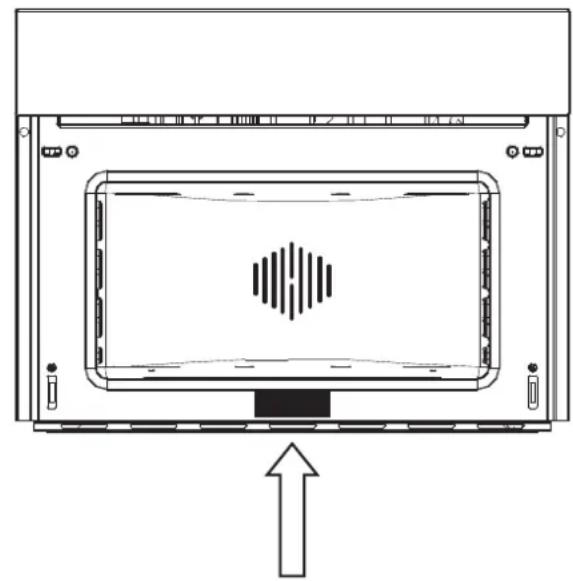
The oven's identification plate is even accessible when the appliance is installed. This identification plate, which is visible when you open the door, shows all the information you will need when requesting replacement parts for the appliance.
SERIAL TAG LOCATION
natural_image
Diagram of a device with a central screen and directional arrow, no text or symbols presentThe oven should be thoroughly cleaned with soap and water and carefully rinsed.
Heat the oven for about 30 minutes at the maximum temperature; this eliminates all the residual manufacturing oils that could cause unpleasant odours during cooking. Use the circular plus fan function without accessories in the oven.
Before using the accessories for the first time, clean them carefully with a very hot alkaline washing solution and a soft cloth.
Using the flat grill
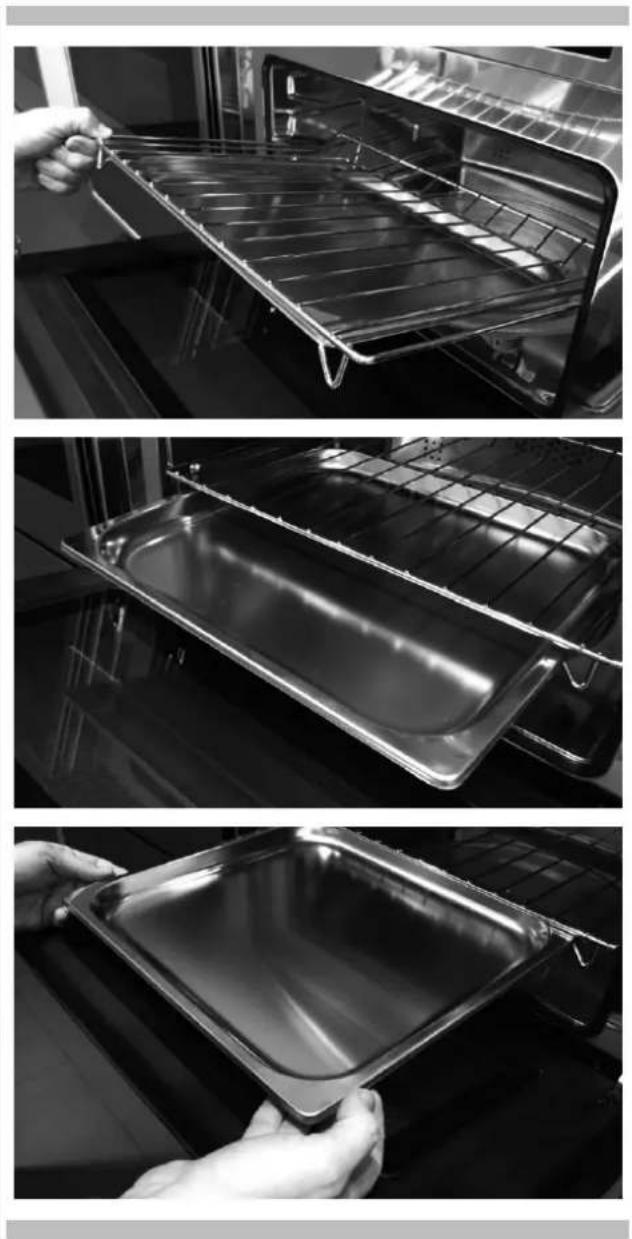
To remove the flat grill, pull the grill towards you until it stops and then lift, by pulling upwards, until it comes completely out.
To insert the flat grill, slide it in at an angle of 45 until it locks and then lower it horizontally and push it all the way in.
natural_image
Three-panel black-and-white photo showing a hand holding a transparent baking tray inside an oven, with no visible text or symbols.If the flat grill has a low drip tray, to remove it lift it slightly and slide it towards you. To reinsert it, slide it back until it is correctly seated.
Using the perforated tray
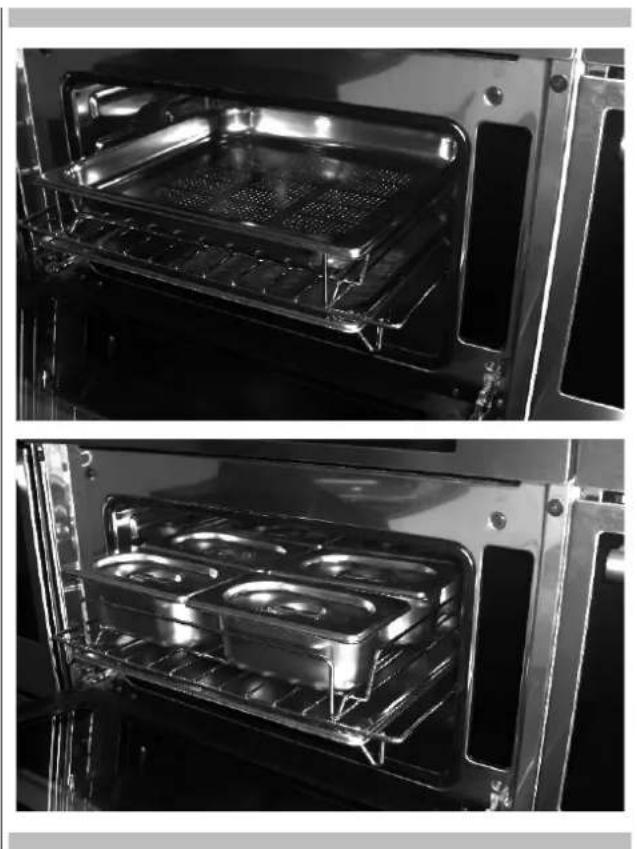
This tray is used for steam cooking and is positioned on the flat grill together with its support.
natural_image
Two-panel black-and-white photo showing interior views of an oven with grilles and a grid-patterned stove (no text or symbols visible)NOTE: the set of 6 Gastronorm trays is an accessory available on request.
We recommend also using it in combination with the drip tray to catch everything the drips from the food during cooking.
The documentation for this appliance is printed on paper bleached without chlorine or recycled paper to contribute to protecting the environment.
The packaging was designed to prevent damage to the environment; they are ecological products that can be recovered or recycled.
Recycling the packing saves raw materials and reduces the volume of industrial and domestic waste.
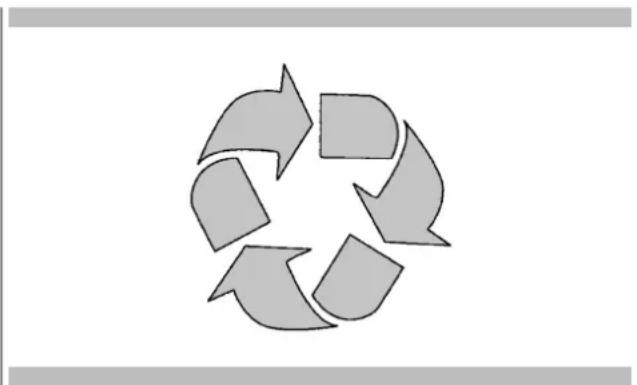
THE PACKING MATERIAL is 100% recyclable and marked with the recycling symbol.
Dispose of in conformity with local law. The packing material (plastic bags, polystyrene parts, etc.) must be kept out of the reach of children because it is potentially dangerous.
natural_image
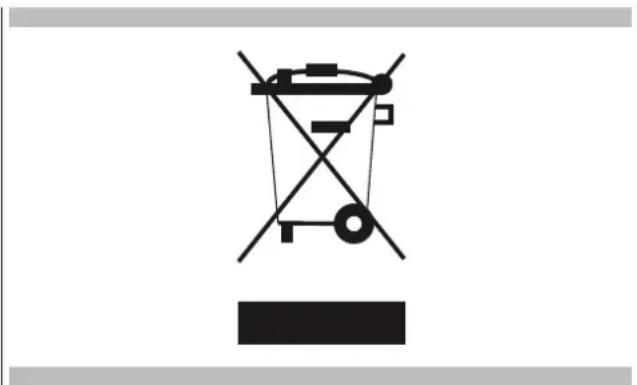
Recycling symbol composed of five arrows forming a circular loop (no text or labels)THIS APPLIANCE is marked in conformity with European Directive 2002/96/EC, Waste Electrical and Electronic Equipment (WEEE). By making sure that this product is disposed of correctly, the user contributes to preventing potential negative consequences for the environment and health.
THE SYMBOL on the product or accompanying documentation indicates that this product must not be treated as domestic waste but must be delivered to a suitable collection point for the recycling of electrical and electronic equipment.
DISPOSAL MUST BE MADE in conformity with local laws on waste disposal.
FOR ADDITIONAL INFORMATION about the treatment, recovery and recycling of this product, contact the local office of competence, the domestic waste collection service or the store where the product was purchased.
natural_image
Pure electrical circuit lines without any symbolsBEFORE SCRAPPING, make it unusable by cutting the electrical cord.
EN 4 - The Control Panel
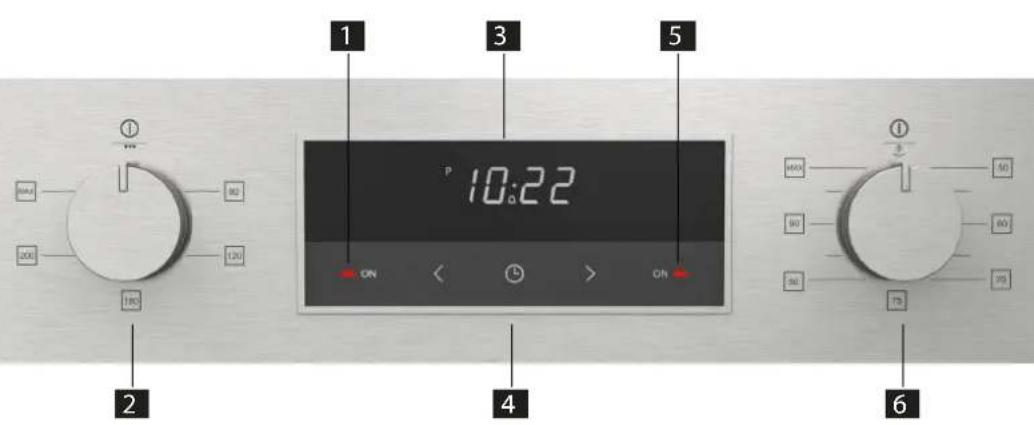
Command overview
1 - Grill cooking function indicator light (red)
2 - Grill cooking temperature control knob
3 - Electronic timer display
4 - Electronic timer control buttons
5 - Steam cooking function indicator light (green)
6 - Steam cooking temperature control knob
text_image
1 3 5 P 10:22 ON ON ON 2 4 6Installation and hook-up
Dear Customer, this oven is a sophisticated electronic appliance, classified as a durable good. Its installation requires qualified professionals for both the hook-up of the power line and its placement in the kitchen counter.
(SEE ASSEMBLY INSTRUCTIONS ON PAGE 15)
First hook-up
The first time the appliance is connected to the electricity grid, or the case of a prolonged power outage, there may be a continuous alarm signal. In this case, turn the right knob to any position and then back to position 0.
Timer touch control
text_image
P 10:22 < ⏚ >Setting the cloc
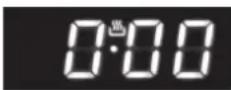
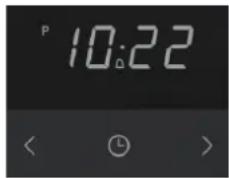
Figure 1
"Auto" and "0:00" will start flashing when the unit is switched on for the first time. To set the clock, press the central button for about 3 seconds. When appears, press "+" or "-" to set the correct time. Wait until a beep tells you that the clock has been set (figure 1). To set the time at a later stage, press "+" and seconds and then adjust the clock as described above.
Minute counter
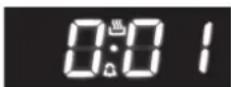
Figure 2
As this minute counter does not control the oven, when it finishes counting the oven will continue to work.
To set, press the central button for 3 seconds until 📷 appears (figure 2). Press "+" and "-" to
set the required time.
To set the minute counter at a later stage, press the central button for 3 seconds and adjust as described above.
The minute counter beeps when it finishes counting. To disable it, press any button.
Cooking time
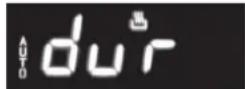
Figura 3
This is a semi-automatic cooking function. It can be used to set cooking times.
Press the central button for 3 seconds. Then press it again until "dur" appears (figure 3). Press "+" and "-" to set the required cooking time.
End of cooking time
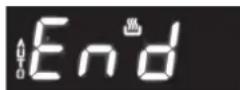
Figure 4
The end of cooking time can also be set.
Press the central button for 3 seconds. Press the central button twice consecutively and wait for "End" to appear (figure 4). Press "+" and "-" to set the required end of cooking time.
The oven will work in the set mode and at the set temperature until the end of cooking time.
Programming automatic cooking
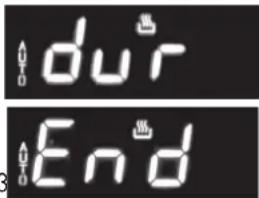
text_image
du'r EndFigure 5
Cooking function with set times.
Press the central button for 3 seconds. Then press it again until "dur" appears. Press "+" and "-" to set the required cooking time. Wait a few seconds for the setting to be memorised.
Press the central button for 3 seconds. Press it another two times and wait for "End" to appear (figure 4). Press "+" and "-" to set the required end of cooking time.
E.g.:
Current time: 12.30 Cooking time: 10 minutes End of cooking time: 14.00
The oven will start cooking at 13.50 (14.00 less 00.10) at the set temperature and in the set mode and will stop at 14.00
The oven will beep when it stops cooking. To disable it, press any button.
Adjusting beep volume
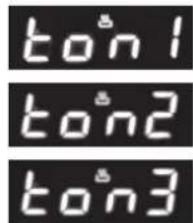
text_image
ton1 ton2 ton3To adjust beep volume, press "+" and "-" together. central button and wait for "ton1" (high volume) to flash. Press "-" to select "ton2" (medium volume) or "ton3" (low volume). Press the central button to set the selected volume.
Then press the

ATTENTION
The oven has been designed so that, during cooking, it maintains the right balance between the heat used for the various types of cooking and the steam produced from the foods themselves.
This balancing means that, at the end of cooking, you may find excess cooking condensate (water and melted fats) in the carafe; so, remember to empty and clean it.
Steam operation
Steam cooking is used most for oriental cuisine but it is certainly very useful for our own.
It is fat and has the advantage of preserving the original flavour of the food.
In this case, the food is not cooked with water but with water vapour. Steam cooking is different than boiling. In fact, the water vapour works on the inside of the cells, which is fundamentally different from the effect of boiling water.
In fact, steam also cooks the food completely but, except for the fat, nothing else comes out of the food.
The cell walls and tendons gradually soften, the protein coagulates without coming out, the starches swell and combine and the sugars and minerals remain unchanged.
The same goes for odours, which are reduced to a minimum, or coloured substances.
Only the fat liquefies do to the heat and, for this reason, it is almost never a good idea to steam cook large cuts of meat or fish. Vitamins are another story because heat generally tends to destroy them; however, depending on the cooking time, some of them are only slightly altered. So, the foods that lend themselves to this cooking method are, generally, those with no fat such as, for example, fish, some types of meat, legumes, potatoes, cereals, eggs, pudding, etc.
It is not good for vegetables with tough fibres or fruits in general.
Useful tips
When using the steam oven, always start with the oven cold. Using steam in a hot oven (immediately after traditional cooking) is not recommended because the benefits of cooling with steam will be cancelled out.
For steam cooking try to use the perforated stainless steel tray together with the lower stainless steel drip tray as much as possible.
The first, resting with its support on the flat grill, allows the steam to fully cook the food while draining everything released by the food during cooking through the holes.
The second, lower tray, slid under the grill on its guides, will collect the drippings and keep the oven chamber cleaner.
When done cooking, the support of the perforated tray can be used as a support to keep the hot tray off of the counter while you remove the food you just cooked.

ATTENTION
You cannot cook with steam and use the grill at the same time. If you press the steam cooking control while cooking with the grill, there will be an error signal (see the table Error Signals and Oven Malfunctions)
The first time that the oven is connected to the mains, or in case of a prolonged power failure, the clock timer must be programmed. Otherwise the oven will not work. To do this, press the button once 🎨
Steam cooking function
This cooking function uses steam for cooking food. During steam cooking, steam flows from the boiler into the oven compartment. The steam heats the oven compartment, cooking the food. This type of cooking is ideal for any kind of vegetables or fish, preserving the colour, taste and goodness of the food.

IMPORTANT
the following procedure MUST be followed whenever you are using the steam cooking function.
- Fill the water container with distilled water or, if not available, with cold drinking water. IMPORTANT: if tap water is used, lime deposits can build up in the steam boiler.
- Fill the water container up to the 1.0-litre notch. DO NOT fill the container to the brim. Otherwise, the water that is pumped back to the container at the end of the cooking cycle could overflow.
- Put the water in the compartment provided.
- Push the water container all the way down, making sure that there is a perfect seal between the tube in the container and the water circuit inside the oven.
- Always make sure the stainless steel cooking drip pan fits under the perforated-bottom drip pan. This collects condensate, juices or foods that drip from the perforated-bottom drip pan.
- Turn the oven's steam-cooking thermostat knob (right knob) until you reach the desired temperature. The temperature can be regulated from 50 C to 100 C in increments of 5 C
- After 7-8 seconds the operation indicator light of the oven turns on to confirm that the oven is heating up. When cooking is finished and the oven's thermostat knob is turned to "0", the operation indicator lamp will turn off.
- In steam mode, the operation indicator lamp is green.
- When cooking is finished, turn the oven's thermostat knob to "0".
- When the oven compartment has cooled down sufficiently, it is a good idea to use a soft cloth to dry the traces of liquid left inside the oven chamber.

IMPORTANT
the water container must be emptied at the end of cooking.
Grill cooking function
This cooking function uses the upper heating element to cook the food. This type of cooking is ideal for grilling medium or large portions of sausages, bacon, steaks etc.
- If you are using the grill function without steam, you can leave the water container inside its compartment. This does not affect the cooking capacity of the oven.
- Turn the grill thermostat knob (left knob) until you reach the required temperature. The temperature can be regulated from 80 C to 250 C in intervals of +40 C (so, 80, 120, 160 up to a max of 200)
- After 7-8 seconds the operation indicator light of the grill (red light) turns on to confirm that the grill is in use. When cooking is finished and the grill's thermostat knob is turned to "0", indicator lamp will turn off.
the operat
Cooking tips
- Refer to the information on the packaging of the food to check temperatures and cooking times.
- Once you are familiar with the performance of the appliance, temperatures and times can be changed according to personal preference.
- Make sure that frozen foods have completely thawed before cooking, unless the instructions on the packaging indicate the possibility of cooking the food while frozen.
- The oven should be preheated. Do not put food in the oven until the preheating time is ended.
- Before cooking, check that there are no unused accessories in the oven.
- Avoid opening the oven door to watch the dishes.
The table below shows the results of the cooking tests conducted in our laboratories by a professional cook. In any case, these are only indicative and the values that we have selected are only a starting point for you to experiment with your own recipes to obtain better results!
| DISHES TO PREPARE WEIGHT(g.) | FUNCTION | Oven temperature°C | Steam temperature°C | LEV. RECOMMENDED ACCESSORIES | Time(minutes) | |
| PRAWNS WITH RAVIOLI | 1700 | Steam 100 C | -1002 | Grill + Perforated Tray+ Drip-pan below | 55 | |
| STRAWBERRY RISOTTO | 1200 | Steam 100 C | - | 1002 | Grill 15 | |
| CASTELMAGNO CHEESE RISOTTO | 1200 | Steam 100 C | -1002 | Grill 15 | ||
| SHRIMP COCKTAIL | 100 | Steam 100 C | -1002 | Grill + Perforated Tray+ Drip-pan below | 15 | |
| VENERE RICE SALAD | 500 | Steam 100 C | -1002 | Grill 35 | ||
| DELICATE GILTHEAD 1300 | Steam 100 C | -1002 | Grill + Perforated Tray+ Drip-pan below | 35 | ||
| ANGLER TAIL IN ORANGE SAUCE | 800 | Steam 100 C | -1002 | Grill + Perforated Tray+ Drip-pan below | 30 | |
| TROUT IN SPICED SAUCEI 600 | Steam 100 C | -1002 | Grill + Perforated Tray+ Drip-pan below | 35 | ||
| MUSSELS AU GRATIN 1000 | Steam 100 C + | - | 1002 | Grill + Perforated Tray+ Drip-pan below | 25 | |
| GRILL | MAX | Grill + Perforated Tray+ Drip-pan below | 8 | |||
| CLAMS IN WHITE WINE 1000 | Steam 100 C | -1002 | Grill + Perforated Tray+ Drip-pan below | 35 | ||
| CODFISH FILLETS IN CITRUS SAUCE | 1000 | Steam 100 C | -1002 | Grill + Perforated Tray+ Drip-pan below | 25 | |
| SALMON FILLET IN ORANGE SAUCE | 700 | Steam 100 C | -1002 | Grill + Perforated Tray+ Drip-pan below | 20 | |
| BOUQUETS OF VEGETABLES | 1000 | Steam 100 C | -1002 | Grill + Perforated Tray+ Drip-pan below | 35 | |
| CAULIFLOWER AU GRATIN 700 | Steam 100 C + | - | 1002 | Grill + Perforated Tray+ Drip-pan below | 25 | |
| GRILL | MAX | Grill + Perforated Tray+ Drip-pan below | 10 | |||
| DANISH POTATO SALAD 800 | Steam 100 C | -1002 | Grill + Perforated Tray+ Drip-pan below | 45 | ||
| STEAMED VEGETABLES WITH TOFU AND TUNA SAUCE | 1000 | Steam 100 C | -1002 | Grill + Perforated Tray+ Drip-pan below | 30 | |
| ERROR | |
| ERROR NO. 1: door open error (attention to steam) | this occurs when you open the door during steam cooking and there is probably steam coming outit is indicated by the lighting of the green indicator light (5), 2 flashes + a pause of 5 seconds + 2flashes + pause, etc. The buzzer will sound in sync with the light for a maximum of 180 seconds. Then, only the signal light will continue.it is reset when the door is closed |
| ERROR NO. 2: boiler temperature error | it occurs when water carafe is not in its seat and/or the pitcher has no water and/or the o-ring is not present on the tube of the carafeit is indicated by the lighting of the green light (5) and 3 consecutive beeps + a pause of 5 seconds + 3 beeps, etc., for a maximum of 180 seconds. Then, only the signal light will continue.when the door is opened, it becomes error 1 |
| ERROR NO. 3: boiler pump error: | it occurs after no. 4 alarms of type 2 error or if the boiler temperature and higher than 220 Cit is indicated by the lighting of the green light (5) with cycles of 1 flash in sync with the indicator light for a maximum of 180 secondswhen the door is opened, it becomes error 1 |
| ERROR NO. 4: probes/potentiometers: | this occurs because of a problem with the probes or potentiometersit is indicated by the lighting of the green light (5) with cycles of 1 flash and a continuous fast beepit cannot be reset until the fault is fixedCONTACT SUPPORT AS SOON AS POSSIBLE. DISCONNECT THE OVEN FROM THE POWER SUPPLY |
| ERROR NO. 5: both grill and steam knobs on | this occurs if both the grill and steam commands are onit is indicated by a beep for 5 seconds + a pause of 10 seconds + plus a beep for 5 seconds, etc., until it is reset.it is reset by turning one of the controls (grill or steam) to 0 |
| ERROR NO. 6: Blackout | this occurs in the case of a power failure during cookingit is indicated by the lighting of the green lights and a continuous beepit is reset to 0 by turning the active command to 0 (turning cooking off) and then turning it on again |
Replacing the oven lamp

IMPORTANT
The oven lamp must have precise characteristics:
• Structure suitable for high temperatures (up to 300 C);
• Power supply: see the V/Hz value on the serial number plate;
• Power 25 W;
- Type G9 connector.

ATTENTION
Make sure the appliance is off before replacing the lamp to avoid the possibility of electric shock.
- To avoid damage, spread a tea towel for pots and pans inside the oven;
- Remove the screws holding the steel frame;
- Remove the old lamp by sliding it out of its seat and taking care not to break it;
- Insert the new bulb taking care not to touch it with your hands (we recommend using a disposable latex glove);
- Replace the stainless steel frame taking care not to pinch the silicone gasket seal;
- Screw in the stainless steel screws you previously removed
- Connect the appliance to the power line.
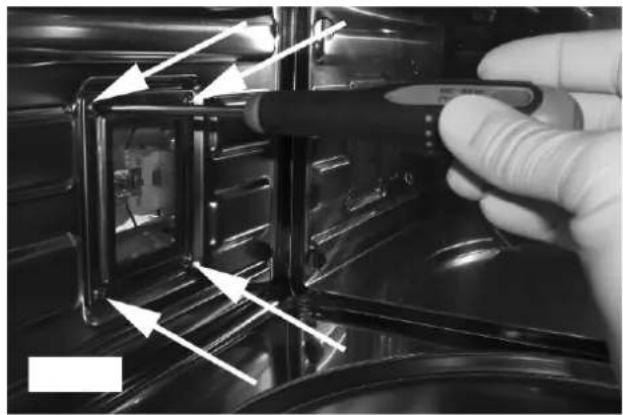
natural_image
Close-up of a gloved hand holding a pen inside an oven, with arrows pointing to internal components (no visible text or symbols)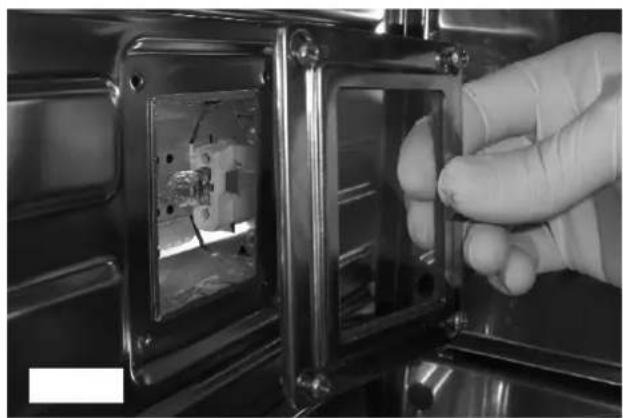
natural_image
Close-up of a gloved hand inserting a small electronic component into a metal enclosure (no visible text or symbols)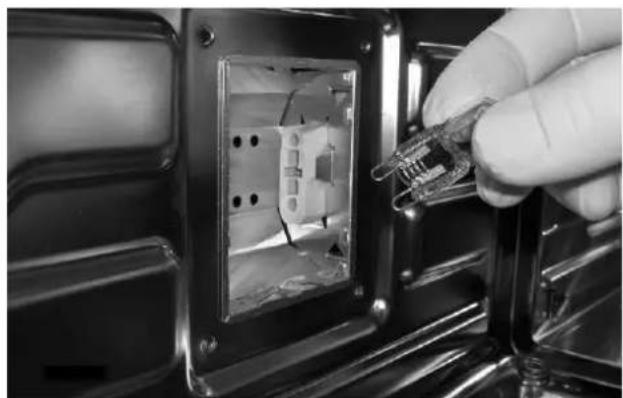
natural_image
Close-up of a hand inserting a plastic clip into an electrical socket (no text or symbols visible)Installing the oven in a cabinet
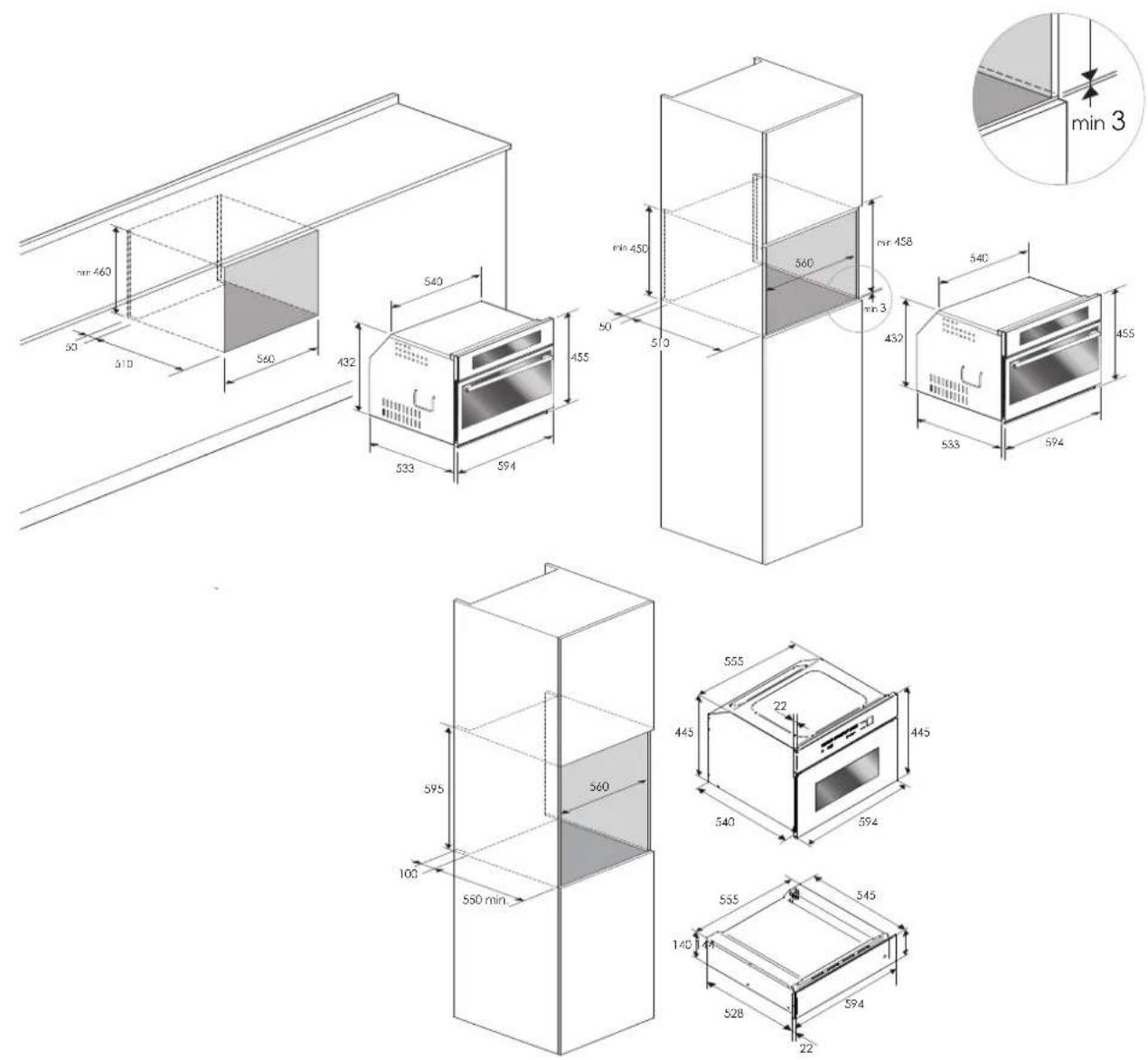
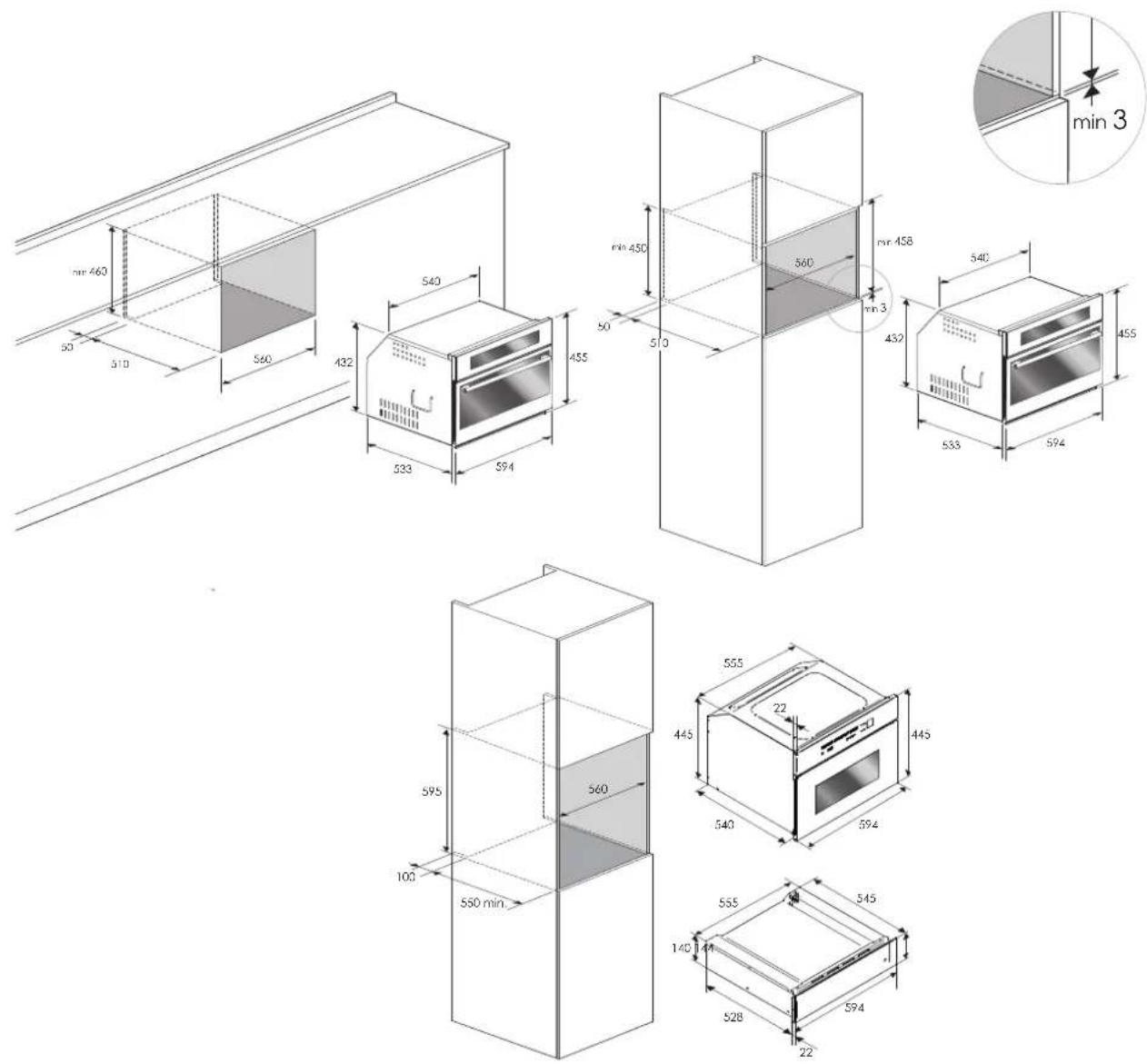
The oven must be installed under a cook top, in a column, or combined with the relative food-warmer drawer. The dimensions of the space must be those shown in the figure.
The cabinet material must be able to withstand the heat.
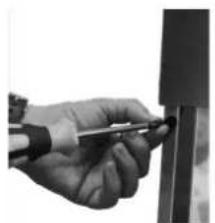
The oven must be centred within the walls of the cabinet and fixed with the screws and bushings that are provided.
natural_image
Close-up of a hand using a tool to apply material or equipment to a vertical component (no visible text or symbols)CUTOUT & DIMENSIONS 45 cm
Dimensions are in millimeters
CUTOUT & DIMENSIONS 74,5 cm
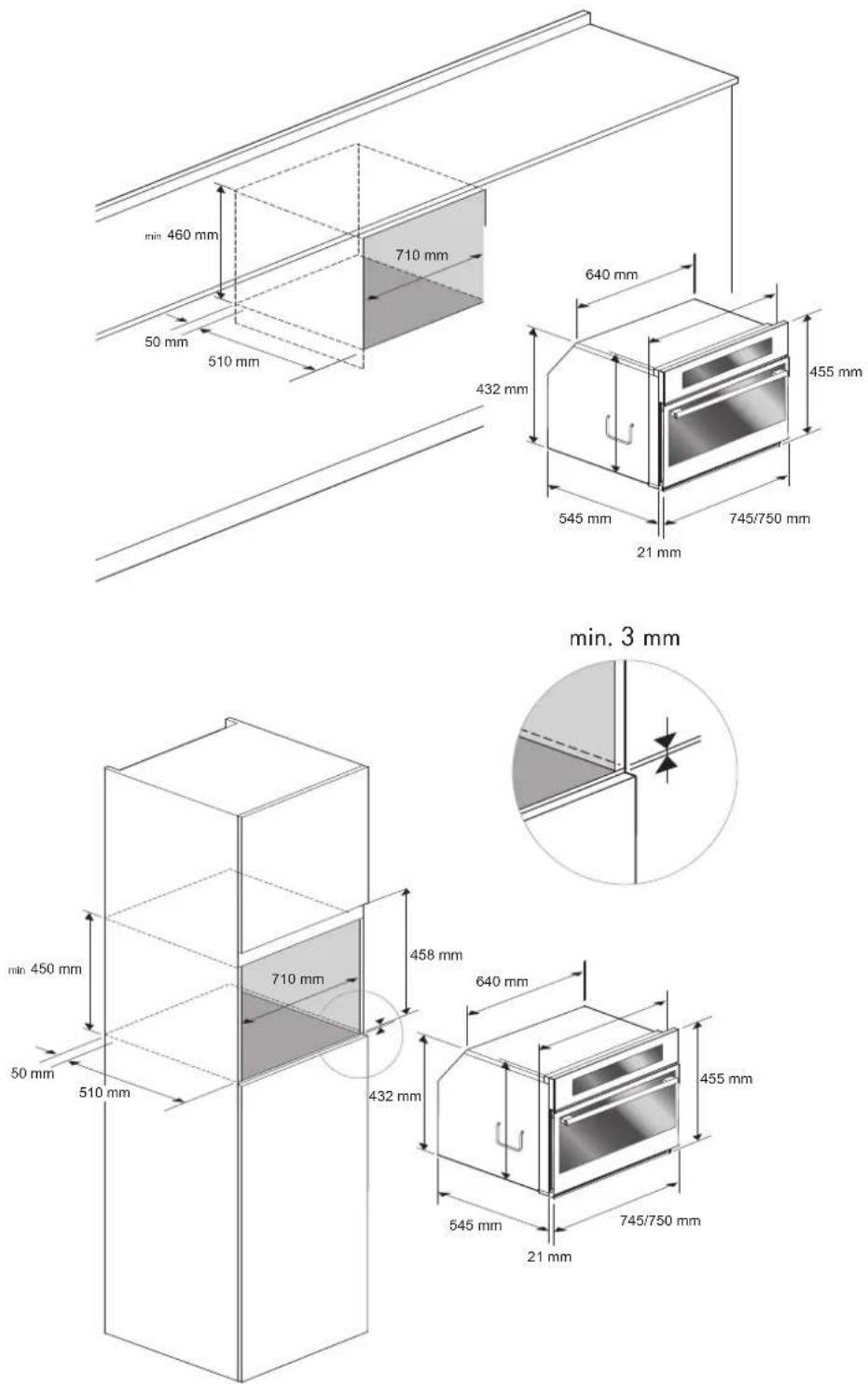
Dimensions are in millimeters
Electrical hook-up
Before connecting to the electricity, make sure that:
- the characteristics of the electrical system satisfy what is shown on the serial number plate applied to the front of the oven;
- the system has an effective earth connection compliant with current standards and laws.
The earth connection is required by law. The cable must not, at any point, reach a temperature greater than 50 C above temperature.
This oven must be connected to the electricity through a power supply cable and plug that is compatible with the outlet of the electrical system that powers this oven.
If a fixed appliance does not have a power cord and plug, or another device that ensures disconnection from the mains, with an opening distance of the contacts that allows complete disconnection under the conditions of excessive voltage category III, such disconnection devices must be provided in the power supply mains conforming to the installation rules.
The omnipolar socket or switch must be easy to reach when the appliance is installed.
Note: The manufacturer declines all liability if the usual accident prevention standards and the above instructions are not followed.
| TYPE AND MINIMUM DIAMETER OF THE CABLES | |
| SASO | |
| H05RR-F 3x1,5 mm H05RR-F | 3x2,5 mm |
| H05VV-F 3x1,5 mm H05VV-F | 3x2,5 mm |
| H05RN-F 3x1,5 mm H05RN-F | 3x2,5 mm |
| H05V2V2-F 3x1,5 mm H05V2V2-F | 3x2,5 mm |
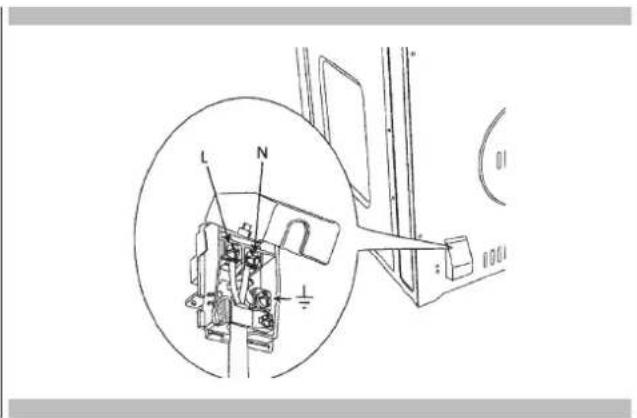
text_image
Technical diagram showing mechanical assembly with labeled parts L, N, and a plus symbol, including a magnified inset view.Before contacting service, please check "Troubleshooting." It may save you the cost of a service call.
If you still need help, follow the instructions below.
When calling, please know the purchase date and the complete model and serial number of your appliance.
This information will help us to better respond to your request.
Service Data Record
For authorized service or parts information see paragraph "WARRANTY for Home Appliances".
For serial tag location see Page 4. Now is a good time to write this information in the space provided below.
Keep your invoice for warranty validation.
Service Data Record
Model Number
Serial Number
Date of Installation or Occupancy ____
Note
TABLE DES MATIERES PAGE
natural_image
Diagram of a device interior with a central screen and directional arrow, no text or symbols presentnatural_image
Recycling symbol composed of five arrows forming a circular loop (no text or labels)natural_image
Pure electrical circuit lines without any symbolsnatural_image
Close-up of a hand holding a pen, measuring a vertical object (no visible text or symbols)text_image
Technical diagram showing mechanical assembly with labeled parts L, N, and a plus symbol, including a magnified inset view.Touch control timer 7
Uhr einstellen 7
Minutenzähler 7
Backzeit 7
Ende der Backzeit 7
natural_image
Technical line drawing of a device front panel with a central screen and directional arrow (no text or symbols)installiert
natural_image
Recycling symbol composed of five gray arrows forming a circular loop (no text or labels)natural_image
Pure electrical circuit lines without any symbolstext_image
P 10:22 < Ⓞ >Uhr einstellen
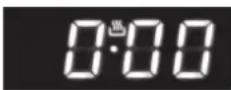
Abbildung 1
natural_image
Close-up of a gloved hand holding a pen inside an oven, with arrows pointing to internal components (no visible text or symbols)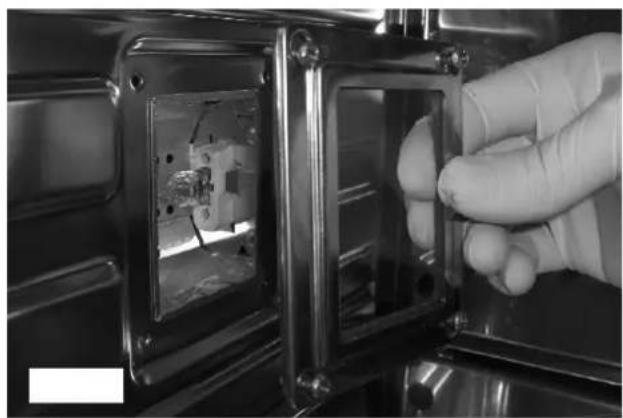
natural_image
Close-up of a gloved hand inserting a small electronic component into a metal enclosure (no visible text or symbols)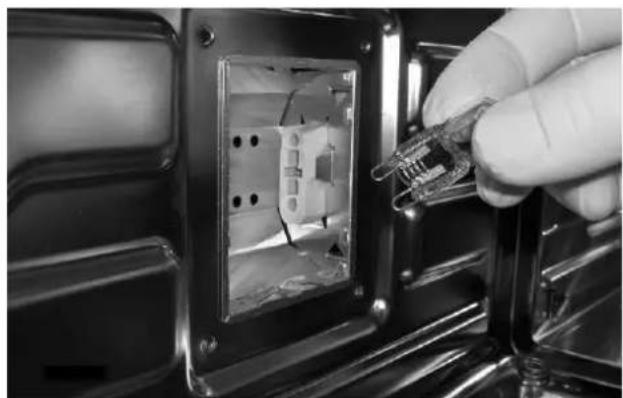
natural_image
Close-up of a hand inserting a plastic clip into an electrical socket (no text or symbols visible)natural_image
Close-up of a hand holding a tool near a vertical object (no visible text or symbols)text_image
Technical diagram of an electrical switch mechanism with labeled components L and N, including a magnified inset view.natural_image
Diagram of a device with a central screen and directional arrow, no text or symbols presentnatural_image
Three-panel black-and-white photo showing a person placing a transparent baking tray into an oven, with no visible text or symbols.natural_image
Two-panel black-and-white photo showing interior views of an oven with illuminated grilles and a coiled stove (no text or symbols visible)natural_image
Recycling symbol composed of five gray arrows forming a circular loop (no text or labels)natural_image
Pure electrical circuit lines without any symbolsnatural_image
Close-up of a gloved hand holding a pen inside an oven, with arrows pointing to internal components (no visible text or symbols)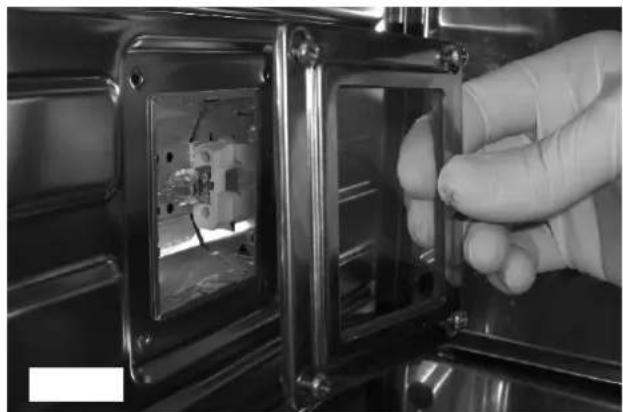
natural_image
Close-up of a gloved hand inserting a transparent plastic enclosure into a metal enclosure (no visible text or symbols)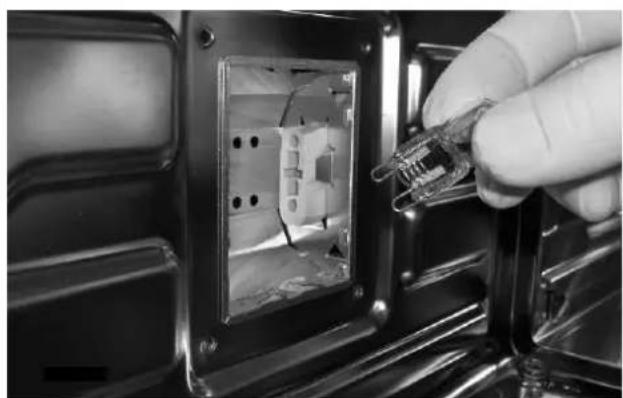
natural_image
Close-up of a hand inserting a plastic clip into an electrical socket (no text or symbols visible)natural_image
Close-up of a hand holding a tool near a vertical object (no visible text or symbols)CORTE Y DIMENSIONES 45 cm
text_image
min 460 50 510 560 432 540 455 523 594 min 450 50 510 560 min 458 min 3 432 533 594 455 min 3 595 100 550 min 560 555 445 22 445 540 594 555 140 528 545 594 22text_image
Technical diagram showing mechanical assembly with labeled parts L, N, and a plus symbol, including a magnified inset view.natural_image
Technical line drawing of a rectangular device with internal components and an upward arrow indicating motion (no text or symbols)natural_image
Three-panel black-and-white photo showing a person placing a transparent baking tray into an oven, with no visible text or symbols.natural_image
Two-panel black-and-white photo showing interior views of an oven with illuminated grilles and a coiled stove (no text or symbols visible)natural_image
Recycling symbol composed of five gray arrows forming a circular loop (no text or labels)natural_image
Pure electrical circuit lines without any symbolsnatural_image
Close-up of a gloved hand holding a pen inside an oven, with arrows pointing to internal components (no visible text or symbols)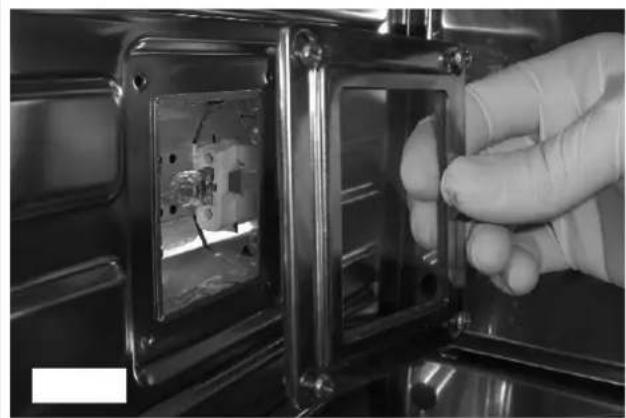
natural_image
Close-up of a gloved hand inserting a small electronic component into a metal enclosure (no visible text or symbols)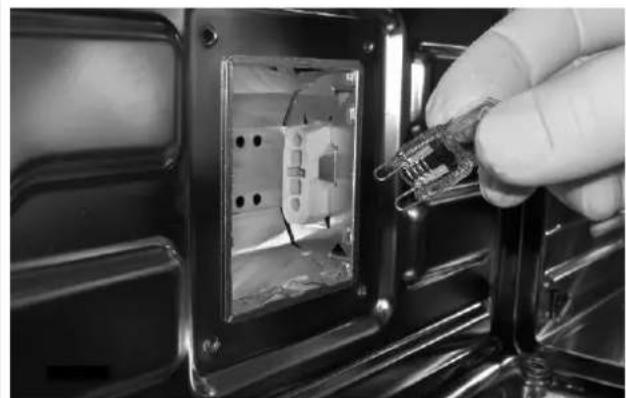
natural_image
Close-up of a hand inserting a plastic clip into an electrical socket (no text or symbols visible)PT 10 - Para o Instalador
Encastre do forno
natural_image
Close-up of a hand holding a tool near a vertical object (no visible text or symbols)ESPAÇO E DIMENSÕES 45 cm