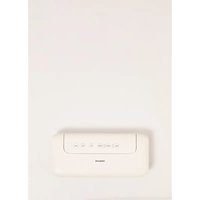
VACUUM SEALER - Vacuum packaging machines Create - Free user manual and instructions
Find the device manual for free VACUUM SEALER Create in PDF.


| Product Type | Vacuum sealer with sealing function |
| Brand / Model | Create / VACUUM SEALER |
| Dimensions (L x W x H) | Approx. 36 x 15 x 10 cm |
| Weight | Approx. 1.5 kg |
| Power supply | 220-240 V ~ 50/60 Hz, 120 W |
| Maximum bag width | 32 cm |
| Main functions | Vacuum sealing, automatic sealing, dry/moist setting, normal/low speed, emergency stop |
| Control buttons | Vac Seal, Seal, Food (dry/moist), Mode (speed), Stop, Container button |
| Compatible food types | Dry and moist foods (preset) |
| Included accessories | 1 connector for vacuum containers |
| Materials | Plastic, silicone seal, metal sealing bar |
| Care and cleaning | Clean with a damp cloth, no abrasive products, do not immerse, not dishwasher safe |
| Safety | Hot sealing bar, do not touch after use; do not use with flammable substances; do not block the lid |
| Spare parts and repairability | Vacuum seal, sealing sponge, inner blade, sealing bar; replacement by a professional if damaged |
| Warranty | 2 years (subject to warranty card) |
| General information | Household use only, on a flat and dry surface, safety distance of 10 cm around, 50 cm in front and above |
Frequently Asked Questions - VACUUM SEALER Create
User questions about VACUUM SEALER Create
0 question about this device. Answer the ones you know or ask your own.
Ask a new question about this device
Download the instructions for your Vacuum packaging machines in PDF format for free! Find your manual VACUUM SEALER - Create and take your electronic device back in hand. On this page are published all the documents necessary for the use of your device. VACUUM SEALER by Create.
USER MANUAL VACUUM SEALER Create
VACUUM SEALER
ENVASADORA AL VACÍO
CREATE CREATE CREATE ATE CREATE CREATE CRE CREATE CREATE CREATE ATE CREATE CREATE CRE CREATE CREATE CREATE ATE CREATE CREATE CRE CREATE CREATE CREATE ATE CREATE CREATE CRE CREATE CREATE CREATE ATE CREATE CREATE CRE CREATE CREATE CREATE ATE CREATE CREATE CRE CREATE CREATE CRE CREATE CREATE CRE CREATE CREATE CRE CREATE CREATE CRE CREATE CREATE CRE CREATE CREATE CRE CREATE CREATE CRE CREATE CREATE CRE CREATE CREATE CRE
CREATE CREATE CREATE ATE CREATE CREATE CRE CREATE CREATE CREATE ATE CREATE CREATE CRE CREATE CREATE CREATE ATE CREATE CREATE CRE CREATE CREATE CREATE ATE CREATE CREATE CRE CREATE CREATE CREATE ATE CREATE CREATE CRE CREATE CREATE CREATE ATE CREATE CREATE CRE CREATE CREATE CREATE ATE CREATE CREATE CRE CREATE CREATE CRE CREATE CREATE CRE CREATE CREATE CRE CREATE CREATE CRE CREATE CREATE CRE CREATE CREATE CRE
INDEX
ENGLISH
Important safeguards 6
Important safeguards 6
Product parts 8
Operation intructions 9
Technical specifications 10
PORTUGUÊS
Thank you for choosing our vacuum sealer. Before using the appliance, and to ensure the best use, carefully read these instructions.
The safety precautions enclosed herein reduce the risk of death, injury and electrical shock when correctly adhered to. Keep the manual in a safe place for future reference, along with the completed warranty card, purchase receipt and package. If applicable, pass these instructions on to the next owner of the appliance. Always follow basic safety precautions and accident prevention measures when using an electrical appliance. We assume no liability for customer failing to comply with these requirements.
IMPORTANT SAFEGUARDS
When using any electrical appliance, basic safety precautions should always be observed.
- Do not disassemble the unit except by an authorized technician.
- Do not touch the socket with wet hands to avoid electric shock.
- Do not immerse the unit into water to avoid electric shock.
- Do not use this unit when feeling sick or drowsy.
- If the supply cord is damaged it must be replaced by the manufacturer, its service agent or similarly qualified persons in order to avoid a hazard.
- This appliance is not intended for use by persons (including children) with reduced physical, sensory or mental capabilities, or lack of experience and knowledge, unless they have been given supervision or instruction concerning use of the appliance by a person responsible for their safety.
• Children should be supervised to ensure that they do not play with the appliance.
IMPORTANT SAFEGUARDS
- Tip: Don't lock the lid onto the base while you don't use the machine or it will deform the gasket.
- Don not operate or store the appliance in humid or wet areas or outdoors. This appliance is not intended for use in boats or moving vehicles. Do not use any accessories, attachments, consumables, or spare parts (e.g. foils, bags, vacuum containers) not recommended by the manufacturer. Do not operate the appliance, when the appliance or any part of it is likely to be damaged. Damaged or unsuited parts could cause injuries and damage due to overheating, implosion, and electric shock.
- Before each operation, ensure that the vacuum chamber is completely empty. Always ensure that the vacuum pump will not sunk in any liquids. Immediately cancel the running process by pressing the Stop button, if liquids are sucked in.
- Operate the appliance on a well accessible, stable, level, dry and sui-
table large table or counter. During operation keep the appliance in an appropriate distance of at least 10cm on each side. Keep at least 50cm of free space in front and above the appliance for free access.
- Do not place any clothes or tissue or other objects under or on the appliance during operation, to avoid risk of fire, electric shock and overheating. Do not place the appliance or any part of it on or near hot surfaces(e.g. burner, heater or oven).
- Keep in mind that the heating bar and sealing bar will get hot during operation. Do not touch the heating bar and sealing bar with your hands or any delicate objects shortly after operation.
- The vacuum sealer is intended for vacuuming and sealing the designated bags, and vacuum containers only. Insufficient or damaged vacuum containers may burst (implode) when vacuumed, leading to a high risk of injuries and damage according to splinters and splashes flying around. Before vacuuming, always check the containers for any type of damage (e.g. cracks, distortions, or dents). Unsulted foils and bags could cause overheating and fire, or stick down to the sealing or heating bar. Do not overfill the bags or containers to avoid damage and overheating. Do not place any foreign object into the appliance. Always handle any vacuumed containers with special care to avoid injuries and damage due to implosion, hurling splinters and splashes all around. Do not expose vacuumed containers to heat or mechanical or thermal shock or direct sunlight.
- Risk of explosion and fire! Do not seal or vacuum containers or bags filled with any inflammable substances(e.g. alcoholic drinks or food, organic solvents).
- Don not use abrasive cleaners or cleaning pads for cleaning the appliance or any part of it. Do not clean the appliance with any corrosive chemicals (e.g. bleach). Do not use any hard or sharp-edged objects for operation or cleaning. Always handle the heating bar, sealing bar and vacuum gaskets with special care. Do not place the appliance or any part of it in an automatic dishwasher.
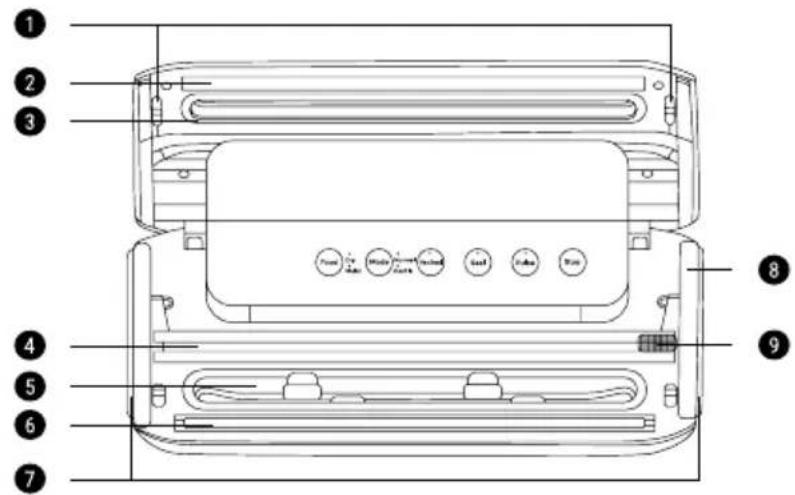
PRODUCT PARTS
- Locks
- Vacuum gasket opposed to heating bar
- Sealing sponge on lid
- Inner cutter
- Vacuum chamber
- Heating bar
- Release button
- Vacuum outlet
- Sealing silicone surrounding vacuum chamber
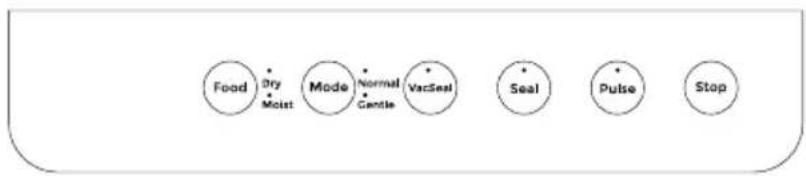
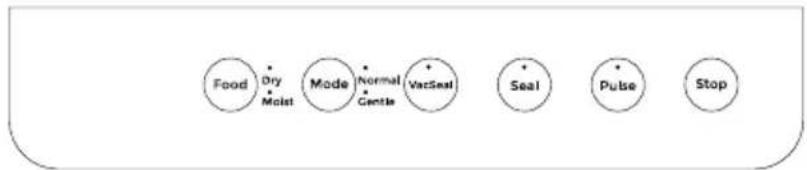
Control panel
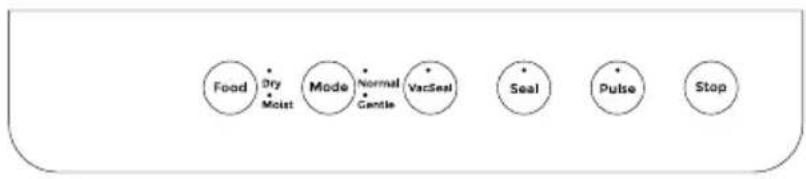
flowchart
graph LR
    A["Food"] --> B["Dry Moist"]
    B --> C["Mode"]
    C --> D["Normal Candle"]
    D --> E["VacSeal"]
    E --> F["Seal"]
    F --> G["Pulse"]
    G --> H["Stop"]
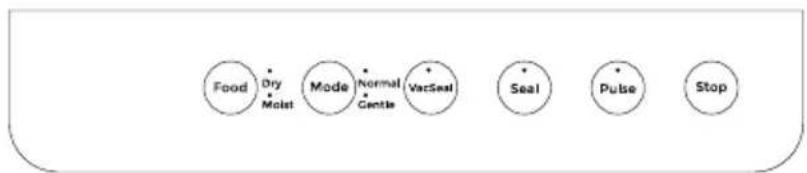
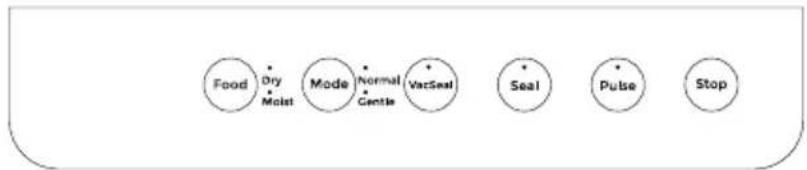
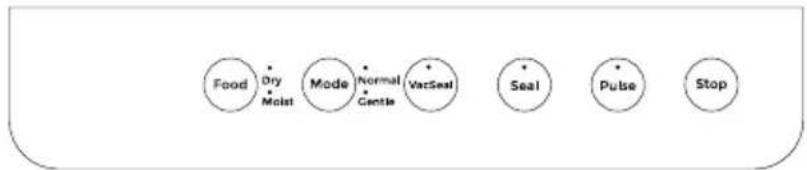
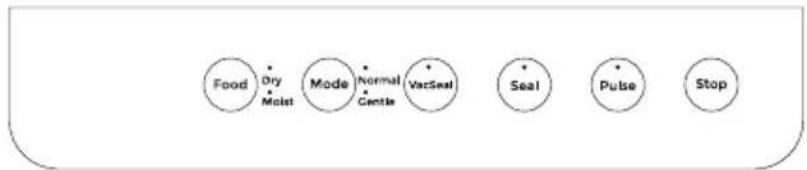
- Seal button: Press here to start the sealing process.
- Tips: To get an airtight seal, the vacuum sealer bags or vacuum sealer rolls must be clean, dry and without wrinkles in the area of the seal. The foil material must be sealed evenly and tightly but not melted at the rim of the sealing.
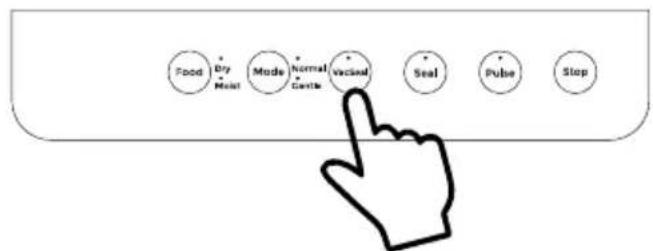
• Vac Seal button: Press here to start vacuum + sealing. - Food button: For selecting the type of food and items: dry or moist
- Tips: The Dry/Moist setting is crucial operation, when using the Vac Seal function. Select the type of food, before pressing the Vac Seal button.
• Mode: To select the vacuum speed: normal or gentle. - Stop button: To finish with any vacuum or sealing process.
- Canister: Continuous vacuum for outlet Vacuum Jar.
• PULSE: For special Vacuum Jar or bags.
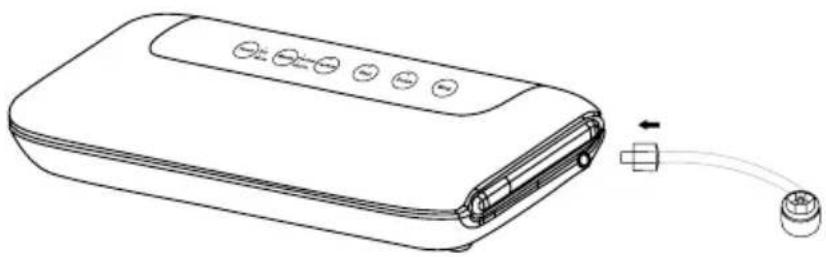
Accesory
- 1 connector
natural_image
Line drawing of a portable electronic device with ports and cable (no text or symbols)- Tips for vacuum sealer bags or rolls:
• Max width: 32 cm - It can only use specified vacuum sealer bags or vacuum sealer rolls.
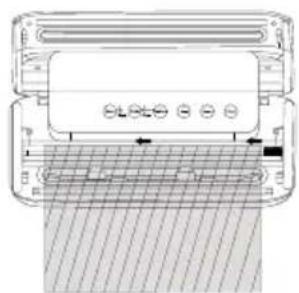
Prepare bags
- Use the ready-made vacuum sealer bag (only one side opening).
- Roll bags: Depend on your food or items. Cut the required size of bag by inner cutter and sealing one side of the bag by vacuum sealer.
natural_image
Technical diagram of a device with a grid pattern and control buttons, no visible text or symbols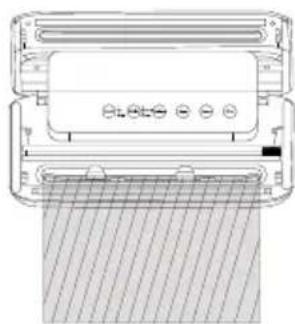
natural_image
Technical line drawing of a mechanical device with no visible text or symbols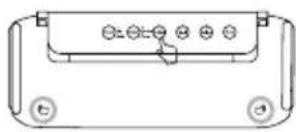
Vacuuming & Sealing
-
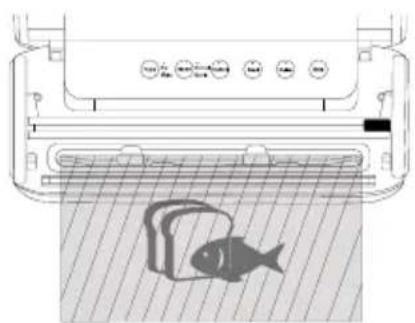
Open the lid and put the opening of the bag within the vacuum chamber with the plastic piece on top, pressing it, after you have put the food into the bag.
-
Close the lid and press to lock it until you hear a click sound.
natural_image
Diagram of a washing machine with a fish inside, showing control panel and floor (no text or symbols)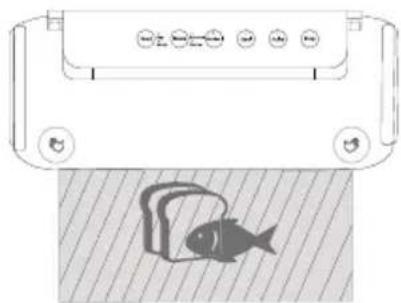
natural_image
Diagram showing a device with control buttons and a fish on a textured surface (no text or symbols)- Please select Vac Seal button to start the machine. It will vacuum the bag, then it will seal the bag automatically. Meantime, the indication light will show the working status. Finally, it stops by itself.
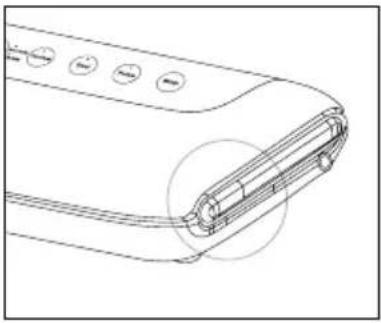
- Press the release button to open the lid.
natural_image
Technical line drawing of a device handle with buttons and a circular annotation (no text or symbols)Other vacuuming
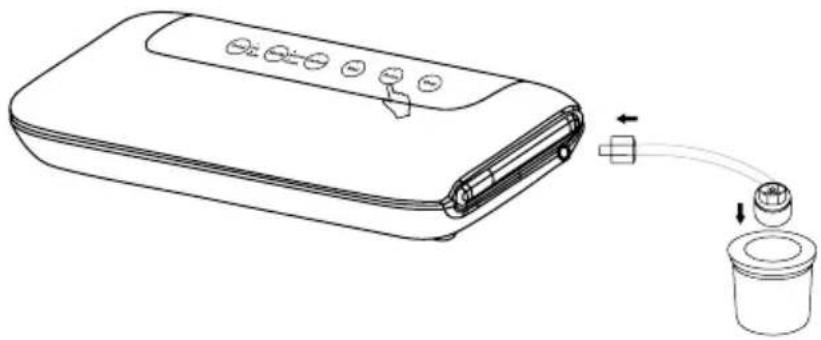
- Connect the connector accessory on the vacuum outlet and outer storage (storage bags or containers).
- Keep pressing the vacuum outlet power button until you feel the vacuum status is ok. Then remove your finger from the button.
- When the vacuum process is finished, remove the connector on the machine and outer storage.
natural_image
Line drawing of a portable electronic device with ports and a cup, showing connection to a sink (no text or symbols)TECHNICAL SPECIFICATIONS
| EN Characteristics | |
| Power 130 W | |
| Voltage 220 - 240V (50/60 Hz) | |
| Functions 2 | |
| Speed 9L/min | |
| Weight 1,54 Kg | |
| Suction -55 A -60kPa | |
| Dimensions 381X171X43 mm | |
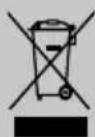
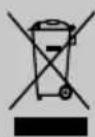
In compliance with Directives: 2012/19/EU and 2015/863/EU on the restriction of the use of dangerous substances in electric and electronic equipment as well as their waste disposal. The symbol with the crossed dustbin shown on the package indicates that the product at the end of its service life shall be collected as separate waste. Therefore, any products that have reached the end of their useful life must be given to waste disposal centres specialising in separate collection of waste electrical and electronic equipment, or given back to the retailer at the time of purchasing new similar equipment, on a one for one basis. The adequate separate collection for the subsequent start-up of the equipment sent to be recycled, treated and disposed of in an environmentally compatible way contributes to preventing possible negative effects on the environment and health and optimises the recycling and reuse of components making up the apparatus. Abusive disposal of the product by the user involves application of the administrative sanctions according to the laws.
Panel de control
flowchart
graph LR
    A["Food"] --> B["Dry Moist"]
    B --> C["Mode"]
    C --> D["Normal"]
    D --> E["VacSeal"]
    E --> F["Seal"]
    F --> G["Pulse"]
    G --> H["Stop"]
natural_image
Line drawing of a portable electronic device with ports and cable (no text or symbols)natural_image
Diagram of a device with ventilation grilles and control buttons, no visible text or symbols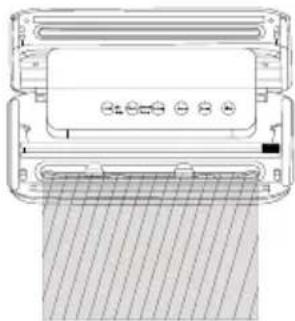
natural_image
Technical line drawing of a printer or scanner device with no visible text or symbols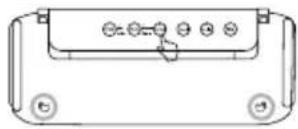
Vaciar y sellar
natural_image
Diagram of a kitchen appliance with a fish inside, showing control panel and floor (no text or symbols)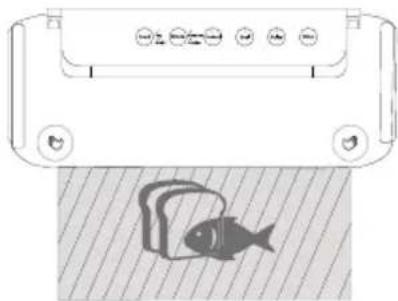
natural_image
Illustration of a fish inside a container with control buttons (no text or symbols)natural_image
Technical line drawing of a device handle with circular buttons and a highlighted internal component (no text or symbols)Otros sellados
natural_image
Line drawing of a portable electronic device with ports and control buttons, connected to a cup via tubing (no text or symbols)Painel de controlo
flowchart
graph LR
    A["Food"] --> B["Dry Moist"]
    B --> C["Mode"]
    C --> D["Normal"]
    D --> E["VacSeal"]
    E --> F["Seal"]
    F --> G["Pulse"]
    G --> H["Stop"]
natural_image
Line drawing of a portable electronic device with ports and cable (no text or symbols)natural_image
Diagram of a device with control panel and grid overlay (no text or symbols)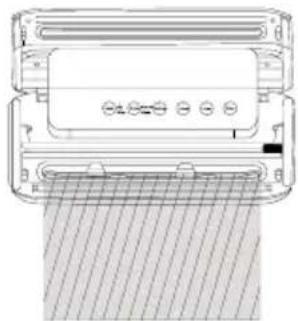
natural_image
Technical line drawing of a device with a grid-patterned base and control panel (no text or symbols)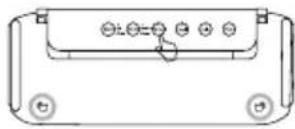
Esvaziar e selar
natural_image
Diagram of a washing machine with a fish inside, showing control buttons and a mesh floor (no text or symbols)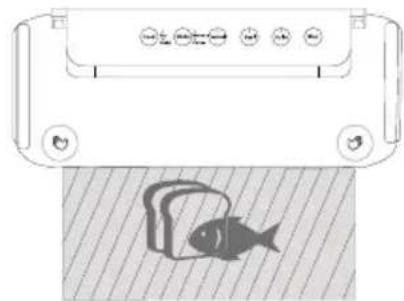
natural_image
Diagram of a fish inside a container with control buttons and a fish silhouette below (no text or symbols)natural_image
Technical line drawing of a device handle with buttons and a circular annotation (no text or symbols)Outras selagens
natural_image
Line drawing of a portable electronic device with ports and a cup, showing connection to a connector (no text or symbols)ESPECIFICAÇÕES TÉCNICAS
Panneau de commande
flowchart
graph LR
    A["Food"] --> B["Dry Moist"]
    B --> C["Mode"]
    C --> D["Normal"]
    D --> E["VecSeal"]
    E --> F["Seal"]
    F --> G["Pulse"]
    G --> H["Stop"]
natural_image
Line drawing of a portable electronic device with ports and cable (no text or symbols)natural_image
Diagram of a device with a grid pattern and control buttons, no visible text or symbols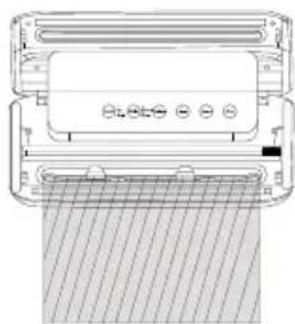
natural_image
Technical line drawing of a printer or scanner device with a grid-patterned base (no text or symbols)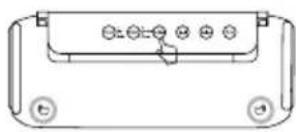
natural_image
Diagram of a washing machine with a fish inside, showing no text or symbols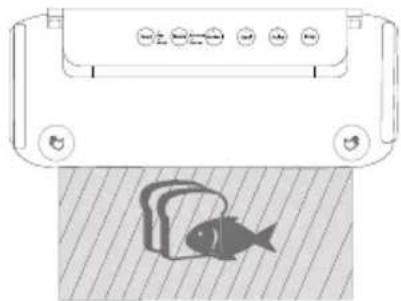
natural_image
Diagram of a fish inside a container with control buttons and a fish silhouette on the surface (no text or symbols)natural_image
Technical line drawing of a device handle with buttons and a circular annotation (no text or symbols)natural_image
Line drawing of a portable electronic device with ports and a cylindrical container connected by a piping bag (no text or symbols)CARACTÉRISTIQUES TECHNIQUES
| FR Characteristics | |
| Puissance 130 W | |
| Tension 220 - 240V (50/60 Hz) | |
| Fonctions 2 | |
| Vitesses 9L/min | |
| Poids 1,54 Kg | |
| Aspiration -55 A -60kPa | |
| Dimension 381X171X43 mm | |
natural_image
Line drawing of a portable electronic device with ports and cable (no text or symbols)natural_image
Technical diagram of a device with a grid pattern and control buttons, no visible text or symbols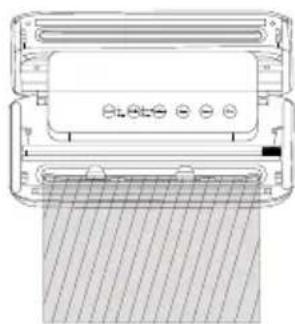
natural_image
Technical line drawing of a mechanical device with no visible text or symbols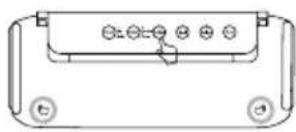
natural_image
Diagram of a washing machine with a fish inside, showing control buttons and a mesh floor (no text or symbols)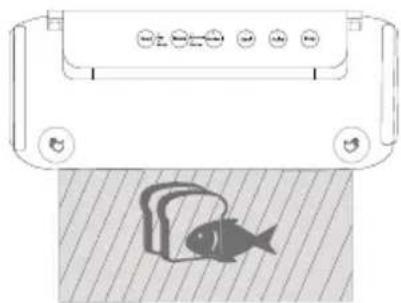
natural_image
Diagram showing a device with control buttons and a fish on a textured surface (no text or symbols)natural_image
Technical line drawing of a remote control panel with buttons and a highlighted connector (no text or symbols)natural_image
Line drawing of a portable electronic device with ports and a cylindrical container connected by a piping bag (no text or symbols)SPECIFICHE TECNICHE
IT Characteristics
Potenza 130 W
Tensione 220 - 240V (50/60 Hz)
Funzioni 2
Velocità 9L/min
Temperatura 1,54 Kg
Bedienfeld
flowchart
graph LR
    A["Food"] --> B["Dry Moist"]
    B --> C["Mode"]
    C --> D["Normal Gentle"]
    D --> E["VacSeal"]
    E --> F["Seal"]
    F --> G["Pulse"]
    G --> H["Stop"]
natural_image
Line drawing of a portable electronic device with ports and cable, no text or symbols presentnatural_image
Technical diagram of a device with control buttons and a meshed surface (no text or symbols)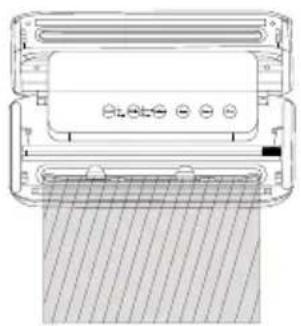
natural_image
Technical line drawing of a mechanical device with hatched pattern and control buttons (no text or symbols)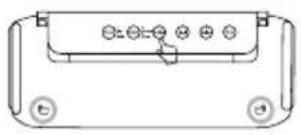
natural_image
Pure electrical circuit lines without any symbolsnatural_image
Diagram of a fish inside a water dispenser with control buttons and a fish silhouette (no text or symbols)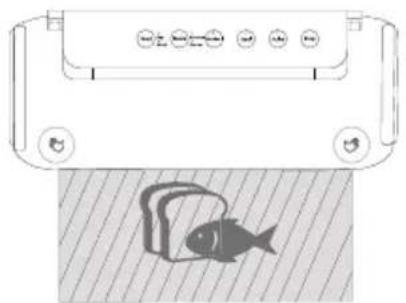
natural_image
Diagram showing a device with control buttons and a fish on a textured surface (no text or symbols)natural_image
Technical line drawing of a mechanical component with no visible text or symbolsnatural_image
Line drawing of a portable electronic device with ports and connectors, connected to a cup (no text or symbols)TECHNISCHE DATEN
Configuratiescherm
flowchart
graph LR
    A["Food"] --> B["Dry Moist"]
    B --> C["Mode Gentle"]
    C --> D["Normal"]
    D --> E["VacSeal"]
    E --> F["Seal"]
    F --> G["Pulse"]
    G --> H["Stop"]
natural_image
Line drawing of a portable electronic device with ports and cable (no text or symbols)natural_image
Technical diagram of a device with control panel and grid overlay (no text or symbols)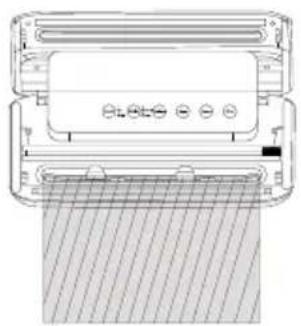
natural_image
Technical line drawing of a mechanical component with hatched fill and control buttons (no text or symbols)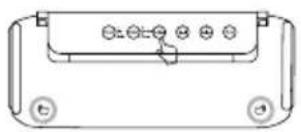
natural_image
Pure electrical circuit lines without any symbolsnatural_image
Diagram of a washing machine with a fish inside, showing control panel and buttons (no text or symbols)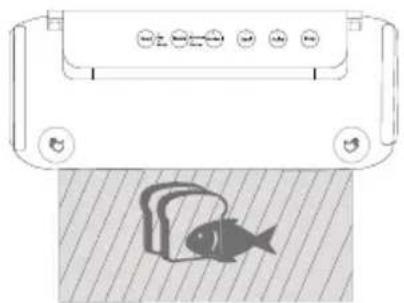
natural_image
Diagram showing a fish inside a container with control buttons and a fish on its surface (no text or symbols)natural_image
Technical line drawing of a device handle with buttons and a circular annotation (no text or symbols)Andere verzegeld
natural_image
Line drawing of a portable electronic device with ports and control buttons, connected to a cup (no text or symbols)TECHNISCHE SPECIFICATIES
Panel sterowania
flowchart
graph LR
    A["Food"] --> B["Dry Moist"]
    B --> C["Mode"]
    C --> D["Normal Gentle"]
    D --> E["VacSeal"]
    E --> F["Seal"]
    F --> G["Pulse"]
    G --> H["Stop"]
natural_image
Line drawing of a portable electronic device with ports and cable (no text or symbols)natural_image
Diagram of a computer monitor with ventilation slots and a mesh screen (no text or symbols)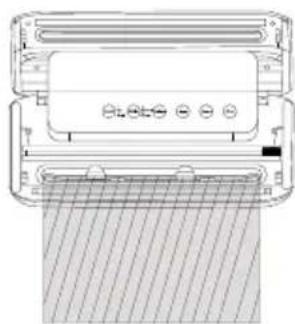
natural_image
Technical line drawing of a mechanical device with a grid-patterned base and control buttons (no text or symbols)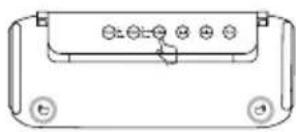
natural_image
Diagram of a printer with a fish inside, showing no text or symbols on the printer itself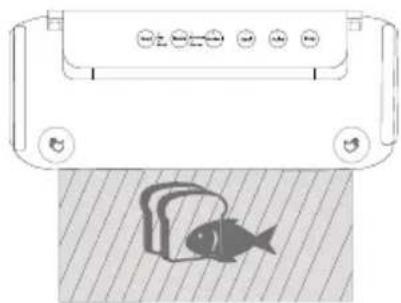
natural_image
Illustration of a fish inside a container with control buttons and a striped background (no text or symbols)natural_image
Technical line drawing of a device handle with buttons and a circular annotation (no text or symbols)Inne zapiecz towane
natural_image
Line drawing of a portable electronic device with control buttons and a cylindrical container (no text or symbols)SPECYFIKACJE TECHNICZNE