Phonix - Digital audio interface Nowsonic - Free user manual and instructions
Find the device manual for free Phonix Nowsonic in PDF.


| Product Type | Digital Audio Interface |
| Brand | Nowsonic |
| Model | Phonix |
| Dimensions | 113 x 73 x 40 mm |
| Weight | Approx. 300 g |
| Power Supply | 9 V, 150 mA mains adapter (supplied) or USB bus |
| A/D-D/A Converter | 16-bit, 44.1 or 48 kHz (software selectable) |
| Frequency Response | 10 Hz – 20 kHz, ±0.5 dB |
| Signal-to-Noise Ratio | > 89 dB below clipping limit |
| Max. Input Level | 40 mVrms (Phono) @ 1 kHz, +19 dBu (Line) |
| Harmonic Distortion | 0.01% typ. @ 1 kHz |
| Analog Inputs | 2 x RCA (Phono/Line) |
| Analog Outputs | 2 x RCA (Line), 1 x 3.5 mm stereo mini-jack (Headphones) |
| Computer Interface | USB 2.0 |
| Main Functions | RIAA phono preamp, gain control, Signal/Clip LED indicators, playback mixing (Preamp/CPU) |
| Software | Compatible with any recording/playback software (not supplied) |
| Operating Systems | Windows 98 SE and later, Mac OS 9.1 and later |
| Box Contents | Phonix, mains adapter, instruction manual |
| Maintenance | Contact the dealer for any technical problems or repairs |
| Safety | Use only the supplied adapter or USB power |
Frequently Asked Questions - Phonix Nowsonic
User questions about Phonix Nowsonic
0 question about this device. Answer the ones you know or ask your own.
Ask a new question about this device
Download the instructions for your Digital audio interface in PDF format for free! Find your manual Phonix - Nowsonic and take your electronic device back in hand. On this page are published all the documents necessary for the use of your device. Phonix by Nowsonic.
USER MANUAL Phonix Nowsonic
Digital Recording Interface
User manual
Bedienungsanleitung
Mode d'emploi
Manual del usuario
■ Contents
■ Introduction
■ Features
■ Application
Operation
■ Choosing Phonix as the audio device for your computer
■ Information on the recording software
■ Specifications
■ Scope of supply
Servicing
Introduction
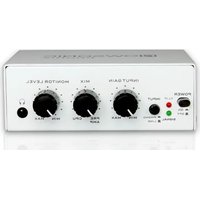
Thank you very much for purchasing the Nowsonic Phonix! Nowsonic Phonix is a two-channel preamplifier for connecting and converting analogue sources like turntables and line equipment (e.g. tape recorder, DVD player or musical instruments) in high audio quality to the digital domain. Phonix is connected to the USB port of a computer (PC or Mac) and allows analog audio to be recorded and played back in perfect quality using an appropriate software. With Phonix you can digitize your analog records or tapes and burn them to CD later.
Thanks to the Phonix driver technology, AD/DA conversion is performed at 44.1 or 48 KHz with low latency. Phonix is directly
supported by the USB device driver of the operating system and therefore no separate driver installation is required.
Please take your time to read these instructions carefully in order to operate Phonix properly.
Please check the unit after unpacking for any damages. In case the housing is visibly damaged, please do not operate the unit, but contact your local dealer from whom you have purchased it.
GB
Phonix
User manual
www.nowsonic.com
Features
Phonix has the following features:
■ Connect all kinds of turntables with moving magnet (MM) cartridge or line level audio devices (tape recorders etc.)
■ Small-sized external interface: No need for installation inside the computer
■ Enclosure shielded against interferences
■ Playback of analog audio via the line outputs and the variable headphone socket
■ Connection and communication with the computer via USB
■ High quality components and circuits
■ Built-in low-noise phono preamplifier, conforming to the RIAA standard
■ Separate signal and peak LED
■ No need for additional driver installation to operate Phonix with your computer
■ Power supply via the included DC adapter (9 V, 150 mA) or USB bus powered
Application
Phonix is recommended for the following applications:
■ Conversion of analog sound recording media to the digital format via USB
■DJ-ing and recording of music tracks
■Audio interface for your home studio
■High quality audio playback from the computer
■Feeding the audio signal from your computer to an analog mixing desk or controller for monitoring
■Audio archiving

Phonix
User manual
www.nowsonic.com
Operation
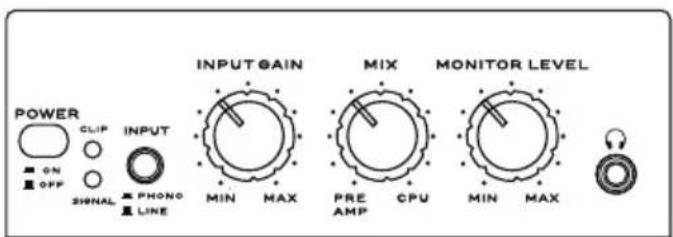
You can feed the high quality converters of your Nowsonic Phonix either with the internal RIAA phono preamplifier or with an external line source via the inputs on the rear panel. The INPUT button on the front of Phonix toggles between the two sources.
NOTE: In the PHONO setting, the analog inputs are filtered with an RIAA EQ especially for turntables. Please note that this equalizer curve is however not recommended for use with standard line sources.
The INPUT GAIN control on the front panel is used to set the gain to the recording software. The two SIGNAL and CLIP LEDs are used for metering: while the SIGNAL LED should light solid green when a signal is present, the CLIP LED should only flash briefly at peak levels. Please make sure to check the gain with the on screen meters of the recording channel in your host software. To avoid any clipping of the recording, lower the input level using the INPUT GAIN control. Insert your headphones to the 1/8" TRS jack on the front panel: the headphone level is adjusted via the MONITOR LEVEL control.
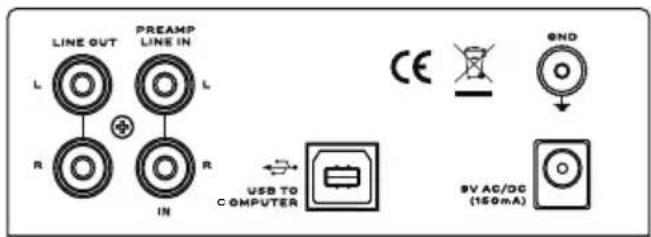
For analog playback, the rear panel LINE OUT RCA sockets are connected to a subsequent stereo amplifier, recorder oder powered monitors. The signal is output with a fixed level and is not adjusted via the MONITOR LEVEL control on the front.
The MIX control on the front is used to balance the playback signal seamlessly between the PRE AMP (the analog inputs on the rear panel) and the CPU (output signal of the host software in the computer). Connect the USB TO COMPUTER port of Phonix with an unused USB 2.0 port on your computer using an USB 2.0 cable (type A-B, no included). If required, USB bus power can be supplied via this port. In this case, there is no need for an additional power supply via the supplied DC adapter.
Choosing Phonix as the audio device for your computer
Phonix is directly supported by the USB audio drivers in Windows (Windows 98 and higher) and Mac OS (Mac OS 9.1 and higher). To record external audio via Phonix in your software or to play back the output of the software, you must set Phonix as the input and output device in the system settings. Proceed as follows:
Windows 98
1) Choose "Settings > Control Panel > Multimedia".
2) Select "USB audio device" as the preferred device for audio input and output.
Windows XP and higher
1) Choose „Settings > Control Panel > Sounds, Speech and Audio devices“.
2) Select "USB audio device" as the input and output device in the Audio tab.
or
1) Choose "All Programs > Accessories > Entertainment > Volume control > Options".
2) Select "USB audio codec" as the Mixer device.
Phonix
User manual
www.nowsonic.com
Mac OS X and higher
Information on the recording software
With Phonix and any suitable software (not included) you can convert your audio tapes and records to the digital domain. However, your Nowsonic Phonix can be used with any up-to-date computer software to record and play back digital audio data and therefore is recommended for music production or as a playback device for a DJ software. Please search the internet for a qualified software. The operating system of your computer includes some software applications for recording and playback of digital audio.
Windows: In Windows, you will find the "Sound recorder" application in the "All Programs > Accessories" folder. With this simple recording software, you can make digital audio recordings and save them as WMA files.
Macintosh: Mac OS X integrates various applications for audio recording like „Garage Band“, „QuickTime“ and/or „iMovie“. In these applications you can set the format of the recording data (WAV, AIFF, MP3, AAC, Mov, SDII etc.) as required.
GB
Phonix
User manual
www.nowsonic.com
Specifications
Frequency response: 10 Hz – 20 kHz, +/- 0.5 dB
SN ratio: > 89 dB below clipping
Max. input level: 40 mVrms @ 1 kHz (Phono), + 19 dBu (Line)
(selectable via the host software)
Analog outputs: RCA (preamp line out); 1/8" stereo mini jack
(USB monitor, headphone output)
THD: 0,01 % typ. @ 1 kHz
Computer interface: USB 2.0, Windows and Mac OS 9.1 or higher
Power requirements: external 9V DC power supply or USB bus powered
Dimensions: 113 x 73 x 40 mm
Scope of supply
■Phonix: 1 pc
■Power supply (9DC, 150 mA): 1 pc
■User manual: 1 pc
Servicing
If you have any question or encounter technical issues, please first contact your local dealer from whom you have purchased the device. In case servicing is required, please contact your local dealer. Otherwise you may contact us directly. Please find our contact data on our website under www.nowsonic.com.
Legal information
Copyright for this user manual © 2013: Nowsonic
Product features, specifications and availability are subject to change without prior notice.
Edition v1.0, 07/2013
Stereo-Miniklinke (USB Monitor,
Kopfhörer-Ausgang
Distributed by Sound Service GmbH
This device complies with Part 15 of the FCC Rules. Operation is subject to the following two conditions: (1) This device may not cause harmful interference, and (2) This device must accept any interference received, including interference that may cause undesired operation.