CL120KIT - Measuring equipment Klein Tools - Free user manual and instructions
Find the device manual for free CL120KIT Klein Tools in PDF.


| Product Type | Digital Clamp Multimeter with Accessories |
| Brand | Klein Tools |
| Model | CL120KIT |
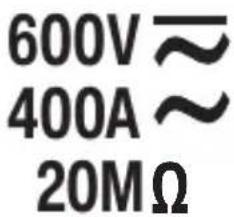
| Measurement Functions | AC Current (up to 400 A), AC/DC Voltage (up to 600 V), Resistance (up to 20 MΩ), Continuity Test, Non-Contact Voltage (NCV) Test |
| Display | 3½-digit LCD, 2000 counts, backlight |
| Range | Automatic and Manual (RANGE button) |
| Hold | HOLD (data hold) and MAX (maximum value) |
| Safety | CAT III 600 V, double insulation, pollution degree 2 |
| Power Supply | 3 AAA batteries (1.5 V) |
| Battery Life | Auto-off after 10 minutes of inactivity (disablable) |
| Dimensions | 215 x 90 x 38 mm |
| Weight | 313 g (with batteries) |
| Operating Temperature | 0 °C to 50 °C |
| Storage Temperature | -10 °C to 50 °C |
| Humidity | <95 % non-condensing |
| Maximum Altitude | 2000 m |
| Drop Protection | 2 m |
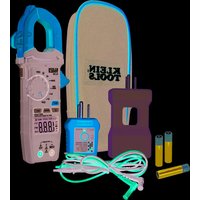
| Included Accessories | 10x Line Splitter (69409), GFCI Outlet Tester (RT210), test leads, batteries, manual |
| Maintenance and Cleaning | Wipe with a dry, lint-free cloth; do not use solvent |
| Warranty | See Klein Tools website (www.kleintools.com/warranty) |
Frequently Asked Questions - CL120KIT Klein Tools
User questions about CL120KIT Klein Tools
0 question about this device. Answer the ones you know or ask your own.
Ask a new question about this device
Download the instructions for your Measuring equipment in PDF format for free! Find your manual CL120KIT - Klein Tools and take your electronic device back in hand. On this page are published all the documents necessary for the use of your device. CL120KIT by Klein Tools.
USER MANUAL CL120KIT Klein Tools
- NON-CONTACT VOLTAGE TESTING
- AUTO-RANGING
- DATA HOLD
- RANGE HOLD
- AUDIBLE CONTINUITY
text_image
600V ≈ 400A ≈ 20MΩ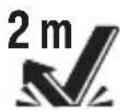






text_image
BIG BLADEM TALAWA OFF 18.88V 18.88V COM YTD

CAT III
600V
69409 Line Splitter 10X
■ MEASURES CURRENT WITHOUT SPLITTING POWER CORD
FOR USE WITH ALL
KLEIN CLAMP METERS
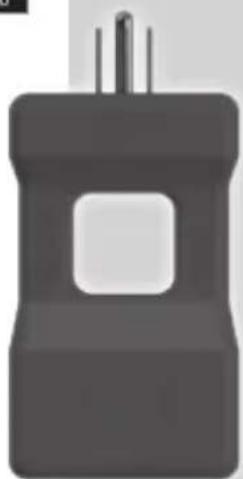
RT210 GFCI Receptacle Tester
- DETECT COMMON WIRING PROBLEMS IN STANDARD AND GFCI RECEPTACLES
ESPAÑOL pg. 17
FRANÇAIS pg. 33
KLEIN TOOLS®

natural_image
Simple 3D illustration of a black plastic bottle with a square opening and two vertical rods (no text or symbols)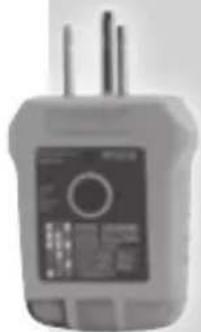
natural_image
Close-up of a handheld electronic device with two leads and a display screen (no visible text or symbols)
CAT II
300V
CL120
GENERAL SPECIFICATIONS
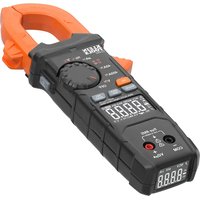
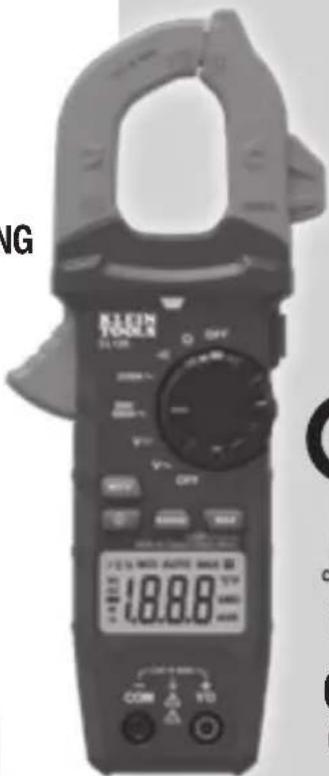
Klein Tools CL120 is an automatically ranging digital clamp meter that measures AC current via the clamp, and AC/DC voltage, resistance and continuity via test leads.
- Environment: Indoor. DO NOT expose to moisture, rain, or snow.
- Operating Altitude: 6562 ft. (2000 m)
- Relative Humidity: <95% non-condensing
- Operating Temp: 32° to 122°F (0° to 50°C)
- Storage Temp: 14° to 122°F (-10° to 50°C)
- Accuracy: Values stated at 65° to 83°F (18° to 28°C)
- Temp Coefficient: 0.1 x (Quoted Accuracy) per°C above 28°C or below 18°C, corrections are required when ambient working temp is outside of Accuracy Temp range
- Dimensions: 8.46" x 3.54" x 1.50" (215 x 90 x 38 mm)
- Weight: 11.04 oz. (313 g) including batteries
- Calibration: Accurate for one year
- Auto Power-Off (APO): After approx. 10 minutes of inactivity
- Standards: IEC EN 61010-1, 61010-2-032.
IEC EN 61326-1, 61326-2-2.
Conforms to UL STD.61010-1, 61010-2-032;
Certified to CSA STD.C22.2 NO. 61010-1, 61010-2-032. - Pollution degree: 2
- Accuracy: ± (% of reading + # of least significant digits)
- Drop Protection: 6.6 ft. (2m)
- Safety Rating: CAT III 600V, Class 2, Double insulation
CAT III: Measurement category III is applicable to test and measuring circuits connected to the distribution part of the building's low-voltage MAINS installation. - Electromagnetic Environment: IEC EN 61326-1. This equipment meets requirements for use in basic and controlled electromagnetic environments like residential properties, business premises, and light-industrial locations.
Specifications subject to change.
ELECTRICAL SPECIFICATIONS
| Function Range Resolution Accuracy | |||
| AC Voltage (V AC) | 200.0mV 0.1mV | ±(2.5% + 10 digits) | |
| 2.000V 1mV | ±(2.0% + 5 digits) | ||
| 20.00V 10mV | |||
| 200.0V 100mV | |||
| 600V 1V | |||
| DC Voltage (V DC) | 200.0mV 0.1mV | ±(1.0% + 8 digits) | |
| 2.000V 1mV | ±(1.0% + 3 digits) | ||
| 20.00V 10mV | |||
| 200.0V 100mV | |||
| 600V 1V | |||
Input Impedance:10MΩ
Frequency Range:45 to 400Hz
Maximum Input: 600V AC RMS or 600V DC
| AC Current (A AC) | 2.000A 1mA ±(2.5% + 30 digits) | ||
| 20.00A 10mA | ±(2.0% + 10 digits)200.0A | ||
| 400A | 1A | ||
Frequency Range:50 to 60Hz
| Resistance | 200.0Ω | 0.1Ω | ±(1.2% + 5 digits) |
| 2.000kΩ 1Ω | ±(1.2% + 3 digits) | ||
| 20.00kΩ 10Ω | |||
| 200.0kΩ 100Ω | |||
| 2.000MΩ | 1kΩ | ||
| 20.00MΩ 10kΩ | ±(2.0% + 5 digits) |
Maximum Input: 600V AC RMS or 600V DC
OTHER MEASUREMENT APPLICATIONS
Maximum Input: 600V DC or 600V AC RMS
- Continuity Check: Audible signal <10Ω, max current 1.5mA
- Sampling Frequency: Approx. 3 samples per second
- Overload: "OL" indicated on display
- Polarity: "-" on display indicates negative polarity
- Display: 3 ½ digit, 2000 Count LCD
⚠️ WARNINGS - GENERAL
To ensure safe operation and service of the meter, follow these instructions. Failure to observe these warnings can result in severe injury or death.
- Before each use verify meter operation by measuring a known voltage or current.
- Never use the meter on a circuit with voltages that exceed the category based rating of this meter.
- Do not use the meter during electrical storms or in wet weather.
- Do not use the meter or test leads if they appear to be damaged.
- Probe assemblies to be used for MAINS measurements shall meet IEC/EN 61010-031 with a voltage RATING of CAT IV 600V or better.
- Ensure meter leads are fully seated, and keep fingers away from the metal probe contacts when making measurements.
- Do not open the meter to replace batteries while the probes are connected.
- Use caution when working with voltages above 25V AC RMS or 60V DC. Such voltages pose a shock hazard.
- To avoid false readings that can lead to electrical shock, replace batteries when a low battery indicator appears.
- Do not attempt to measure resistance or continuity on a live circuit.
- Always adhere to local and national safety codes. Use personal protective equipment to prevent shock and arc blast injury where hazardous live conductors are exposed.
⚠️ WARNINGS - NCV FUNCTION
- When NCV Function is initiated, a blinking or steady red glow and an audible beep indicate voltage present. If no indication, voltage could still be present.
- Before and after each use of the NCVT, verify operation by testing a known working circuit that is within the rating of this unit.
- Never assume neutral or ground wires are de-energized. Neutrals in multi-wire branch circuits may be energized when disconnected and must be retested before handling.
-
The NCV tester WILL NOT detect voltage if:
-
The wire is shielded.
- The operator is not grounded or is otherwise isolated from an effective earth ground.
- The voltage is DC.
- The NCV tester MAY NOT detect voltage if:
- The user is not holding the tester.
- The user is insulated from the tester with a glove or other materials.
- The wire is partially buried or in a grounded metal conduit.
- The tester is at a distance from the voltage source.
- The field created by the voltage source is blocked, dampened, or otherwise interfered with.
- The frequency of the voltage is not a perfect sine wave between 50 and 500Hz.
- The tester is outside of operation conditions (listed in Specifications section).
- Operation may be affected by differences in socket design and insulation thickness and type; tester may not be compatible with some types of standard or tamper resistant (TR) electrical outlets.
- Do not apply to uninsulated hazardous live conductors.
-
Detection above 50V is specified under "normal" conditions as specified below. The tester may detect at a different threshold at different conditions, or may not detect at all unless:
-
The tip of the tester is within 0.25" of an AC voltage source radiating unimpeded.
• The user is holding the body of the tester with his or her bare hand. - The user is standing on or connected to earth ground.
- The air humidity is nominal (50% relative humidity).
- The tester is held still.
SYMBOLS ON METER
\~ AC (Alternating Current) DC (Direct Current)
Ω Resistance (in Ohms) Audible Continuity
Double Insulated Class II Ground
Warning or Caution Risk of Electrical Shock
4 Suitable for uninsulated hazardous live conductors
V Voltage (Volts) A Amperage (Amps)
COM Common NCV Non-Contact Voltage Tester
Backlight SEL Select
+ Positive
- Negative
SYMBOLS ON LCD
AC AC (Alternating Current) DC DC (Direct Current)
- Negative Reading
H Data Hold
AUTO Auto Ranging
MAX Maximum Value Hold
Low Battery
Audible Continuity
M Mega (value x 10 ^6 )
k kilo (value x 10 ^3 )
m milli (value x 10^-3 )
V Volts
A Amps
Ω Ohms
NCV Non-Contact Voltage Tester
Auto Power-Off
Hazardous Voltage Indicator

text_image
3 11 14 KLEIN TOO CL120 CL120 2/20A~ 200/400A~ V/m OFF 9 HOLD 2 10 12 6 1 NCV RANGE MAX 2000 Currums AC DC Digital Clamping Motor 1.8.8.8 °C/P 1.8.8.8 mA COM VΩ 4 5NOTE: There are no user-serviceable parts inside meter.
1 2000 count LCD display 8 "MAX" (Maximum) button
2 Function selector switch 9 Data Hold button
3 Clamp 10 Clamp trigger
4 "COM" jack 11 Arrow markings
5 "VΩ" jack 12 NCV button
6 Backlight button 13 NCV Light
7 "RANGE" button 14 NCV Sensing Antenna
FUNCTION BUTTONS
ON/OFF
To power ON the meter, rotate the Function Selector switch (2) from the OFF setting to any measurement setting. To power OFF the meter, rotate the Function Selector switch (2) to the OFF setting. The Auto-Power Off icon will be visible in the display. By default, the meter will automatically power OFF after 10 minutes of inactivity. If the meter automatically powers-OFF while in a measurement setting, press any button to power the meter ON, or rotate Function Selector (2) switch to OFF, then power ON the meter. To deactivate Auto-Power OFF functionality press and hold the "NCV" button (12) before powering ON from the OFF setting. When Auto-Power OFF is deactivated, the Auto-Power Off icon will not be visible in the display.
BACKLIGHT
Press Backlight button symbol (6) to turn ON or OFF the backlight. The backlight does not automatically power OFF.
RANGE
The meter defaults to auto-ranging mode AUTus mode automatically determines the most appropriate measurement range for the testing that is being conducted. To manually force the meter to measure in a different range, use the "RANGE" button (7).
- Press the "RANGE" button (7) to manually select measurement range (AUTO is deactivated on the LCD). Repeatedly press the "RANGE" button (7) to cycle through the available ranges, stopping once the desired range is reached.
- To return to auto-ranging mode, press and hold the "RANGE" button (7) for more than two seconds (AISTeactivated).
MAX
When the "MAX" button (8) is pressed, the meter keeps track of the maximum value as the meter continues to take samples.
- When measuring, press "MAX" button (8) to display the maximum value. If a new maximum occurs, the display updates with that new value.
- Press "MAX" button (8) again to return to normal measuring mode.
DATA HOLD
Press the Data Hold button (9) to hold the current measurement on the display. Press again to return to live measuring mode.
NCV
Press and hold the "NCV" button (12) to enter Non-contact Voltage Testing (NCV) mode to test for presence of AC voltage. The NCV icon and "EF" will be present on the display. Approach the conductor under test leading with the sensing antenna (14). In the presence of AC voltage, the red NCV light (13) will illuminate and audible signals (beeps) will sound. As the NCV sensing antenna (13) approaches the voltage source, the frequency of the audible sound will increase. Release the "NCV" button to exit NCV testing mode.
NOTE: Only voltages of 40V AC or greater will be detected.
OPERATING INSTRUCTIONS
CONNECTING TEST LEADS
Do not test if leads are improperly seated. Results could cause intermittent display readings. To ensure proper connection, firmly press leads into the input jack completely.
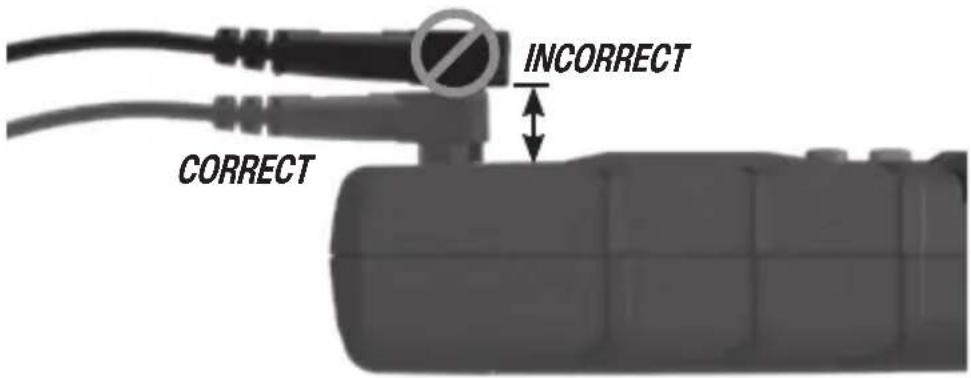
text_image
INCORRECT CORRECTTESTING IN CAT III MEASUREMENT LOCATIONS
Ensure the test lead shield is pressed firmly in place. Failure to use the CAT III / CAT IV shield increases arc-flash risk.
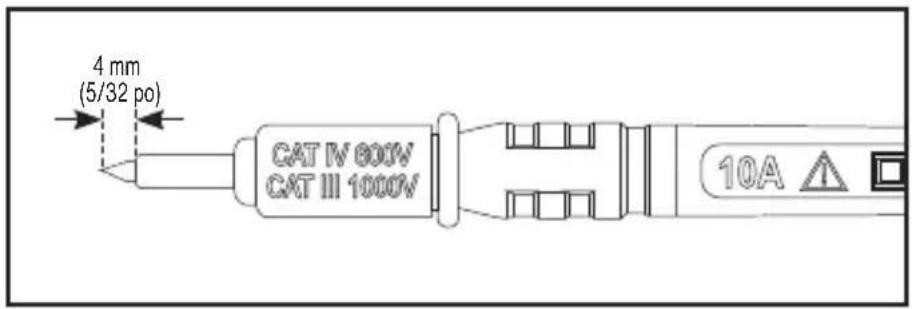
text_image
4 mm (5/32 po) CAT IV 800V CAT III 1000V 10ATESTING IN CAT II MEASUREMENT LOCATIONS
CAT III / CAT IV shields may be removed for CAT II locations. This will allow testing on recessed conductors such as standard wall outlets. Take care not to lose the shields.
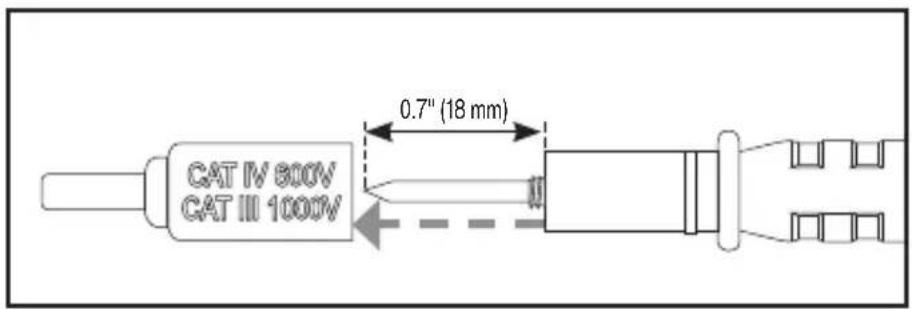
text_image
CAT IV 800V CAT III 1000V 0.7" (18 mm)OPERATING INSTRUCTIONS
AC CURRENT (LESS THAN 400A)
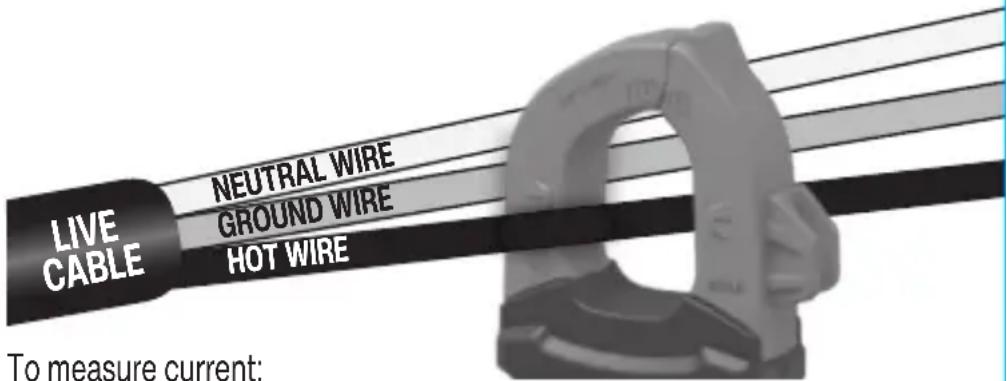
AC Current is measured by pressing the clamp trigger (10) to open the clamp and placing it around a current-carrying wire. When measuring, care should be taken to ensure that the clamp is completely closed with trigger (10) fully released, and that the wire passes perpendicularly through the center of the clamp in line with the arrow markings (11).
text_image
LIVE CABLE NEUTRAL WIRE GROUND WIRE HOT WIRE To measure current:To measure current:
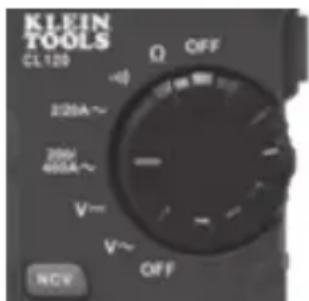
- Rotate the Function Selector switch (2) to the 200/400A setting.
text_image
KLEIN TOOLS CL120 OFF 220A~ 200V 400A~ V~ V~ OFF NCV- Place clamp around wire. The current measurement will be shown in the display.
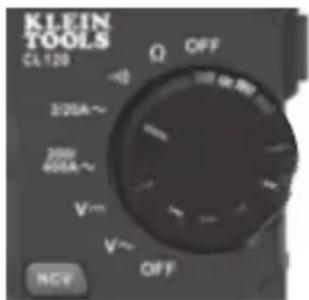
NOTE: If the measurement is less than 20A, rotate the Function Selector switch (2) to the 2/20A setting for improved resolution.
text_image
KLEIN TOOLS CL120 Q OFF 3/20A~ 200A 400A~ V~ V~ OFF NCP⚠️ Disconnect test leads when measuring with the clamp.
OPERATING INSTRUCTIONS
AC/DC VOLTAGE (LESS THAN 600V)
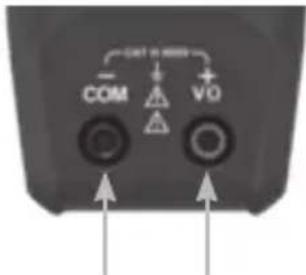
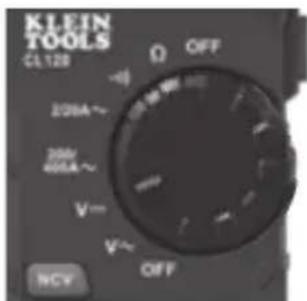
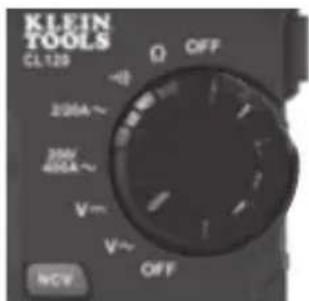
- Insert RED test lead into VΩ jack (5), and BLACK test lead into COM jack (4), and rotate function selector switch (2) to the DC Voltage V or AC Voltage setting. Note "DC" or "AC" on the display.
text_image
COM VQRed leadBlack lead
text_image
KLEIN TOOLS CL128 Ω OFF 200A~ 200V 400A~ V~ V~ OFF NCVOR
text_image
KLEIN TOOLS CL129 Ω OFF -0 200A~ 300V 400A~ V~ V~ OFF NCV- Apply test leads to the circuit to be tested to measure voltage. The meter will auto-range to display the measurement in the most appropriate range.
NOTE: If "-" appears on the LCD, the test leads are being applied to the circuit in reverse. Swap the position of the leads to correct this.
NOTE: When in a voltage setting and the test leads are open, readings of order mV may appear on the display. This is noise and is normal. By touching the test leads together to close the circuit the meter will measure zero volts.
NOTE: To access mV range for V AC v the "RANGE" button (7) must be used.
Manual Mode Sequence
| First Press | Second Press | Third Press | Fourth Press | Fifth Press | |
| AC Range | 0-600V 0-200V 0-20V 0-2V 0-200mV | ||||
| DC Range | 0-20V 0-2V 0-200mV 0-600V 0-200V | ||||
NOTE: When voltages in excess of 25V AC or 60V DC are measured, the Hazardous Voltage Indicator will appear on the display.
OPERATING INSTRUCTIONS
RESISTANCE MEASUREMENTS
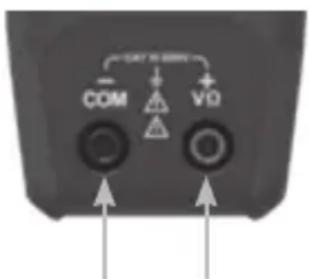
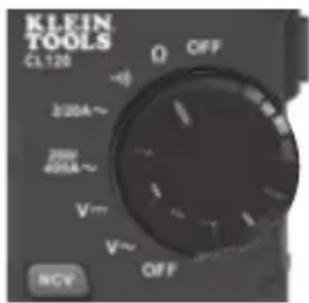
- Insert RED test lead into VΩ jack (5), and BLACK test lead into COM jack (4), and rotate function selector switch (2) to the Resistance Ω setting. The resistance symbol Ω will appear on the display.
- Remove power from circuit.
- Measure resistance by connecting test leads to circuit. The meter will auto-range to display the measurement in the most appropriate range.
text_image
COM V0Red leadBlack lead
text_image
KLEIN TOOLS CL120 Q OFF 3/20A~ 200V 401A~ V~ V~ OFF NCVNOTE: When in a Resistance setting and the test leads are open (not connected across a resistor), or when a failed resistor is under test, the display will indicate "OLThis is normal.

DO NOT attempt to measure resistance on a live circuit.
CONTINUITY
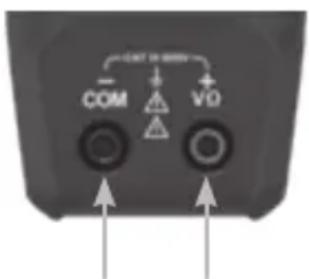
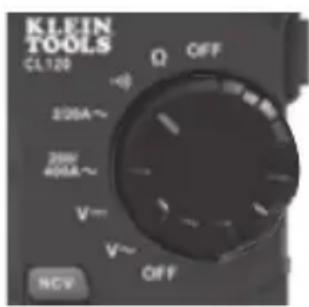
- Insert RED test lead into VΩ jack (5) and BLACK test lead into COM jack (4), and rotate function selector switch (2) to the Audible Continuity setting.
- Remove power from circuit.
- Test for continuity by connecting conductor or circuit with test leads. If resistance is measured less than 10 , an audible signal will sound and display will show a resistance value indicating continuity. If circuit is open, display will show 'OL.
text_image
COM VQRed leadBlack lead
text_image
KLEIN TOOLS CL120 Ω OFF 230A~ 280V 405A~ V~ V~ OFF NCV
DO NOT attempt to measure continuity on a live circuit.
MAINTENANCE
BATTERY REPLACEMENT
When indicator is displayed on LCD, batteries must be replaced.
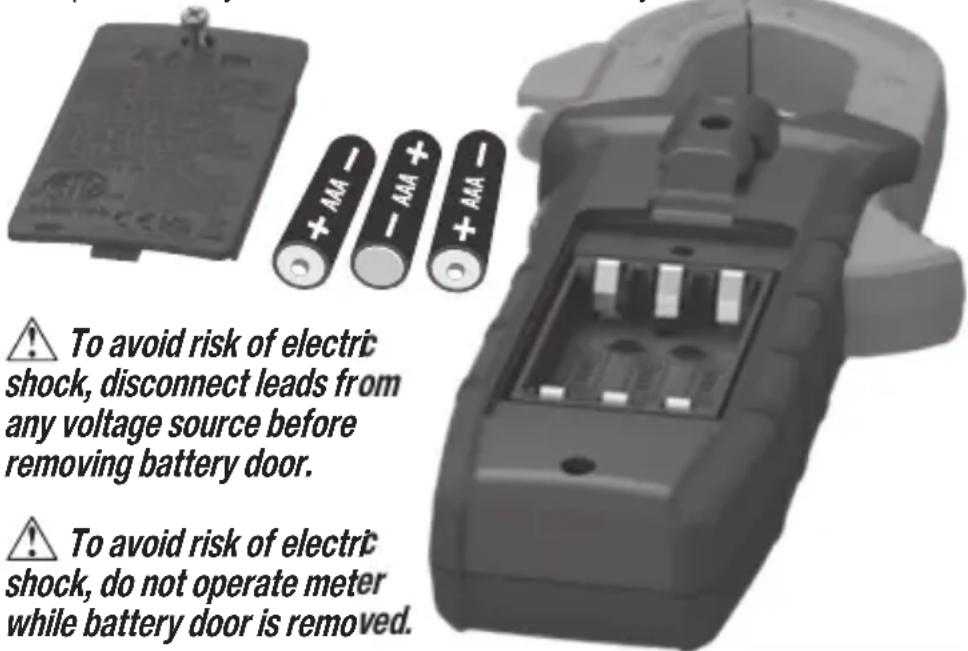
- Loosen captive screw and remove battery cover.
- Replace 3 × AAA batteries (note proper polarity).
- Replace battery cover and fasten screw securely.
text_image
To avoid risk of electric shock, disconnect leads from any voltage source before removing battery door. To avoid risk of electric shock, do not operate meter while battery door is removed.CLEANING
Be sure meter is turned off and wipe with a clean, dry lint-free cloth. Do not use abrasive cleaners or solvents.
STORAGE
Remove the batteries when meter is not in use for a prolonged period of time. Do not expose to high temperatures or humidity. After a period of storage in extreme conditions exceeding the limits mentioned in the General Specifications section, allow the meter to return to normal operating conditions before using.
FCC & IC COMPLIANCE
See this product's page at www.kleintools.com
for FCC compliance information.
Canada ICES-003 (B) / NMB-003 (B)
WARRANTY
Do not place equipment and its accessories in the trash. Items must be properly disposed of in accordance with local regulations.
Please see www.epa.gov/recycle for additional information.
CUSTOMER SERVICE
KLEIN TOOLS, INC.
450 Bond Street Lincolnshire, IL 60069 1-800-553-4676
customerservice@kleintools.com www.kleintools.com
69409
DESCRIPTION
The Line Splitter 10x assists in measuring the current draw of a connected load such as an electrical device or appliance up to 15A without splitting the device or appliances power cord. It has been designed for use with Klein Tools clamp meters, but will also function with many other manufacturers' clamp meters.
GENERAL SPECIFICATIONS
Relative Humidity: < 85% non-condensing
Operating Temperature:32° to 122°F (0°C to 50°C)
Storage Temperature: -4° to 140°F (-20°C to 60°C)
Dimensions: 4.67" x 2.28" x 1.22" (119 x 58 x 31 mm)
Nominal Voltage: 110/125V AC at 50/60Hz in 3-wire outlet
Weight: 3.2 oz. (90.7 g)
Drop Protection: 3.3 ft. (1 m)
Maximum Load Current:15A
Measurement Correction: Clamp Meter will display 10x actual current, eg. Actual current of 1.5A will be displayed as 15A on clamp meter when using Line Splitter 10x.
⚠️ WARNINGS
- Read, understand, and follow all warnings and instructions before operating this device. Failure to follow instructions could result in death or serious injury.
- Do NOT use with current loads greater than 15A (which would be displayed as greater than 150A on a clamp meter using the Line Splitter 10x).
- Risk of electric shock and burn. Contact with live circuits could result in death or serious injury.
- Do not use if Line Splitter 10x appears damaged in any way, if in doubt, replace Line Splitter 10x.
- Always wear approved eye protection.
- Do NOT use Line Splitter 10x if wet.
- Intended for indoor use only.
- Always consult a qualified electrician to resolve wiring problems.
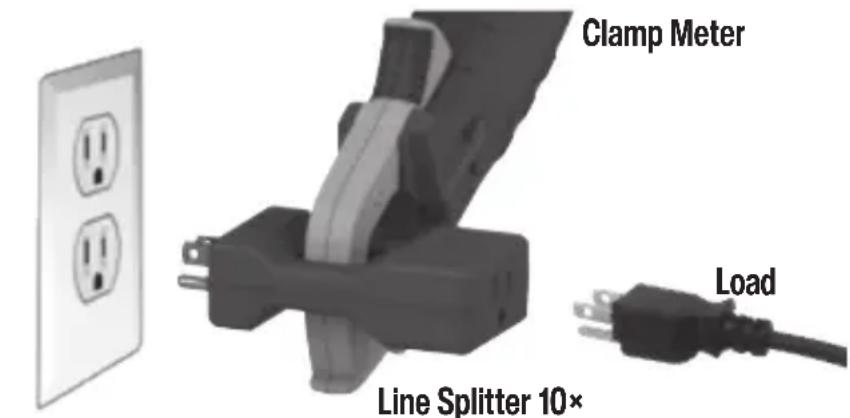
FIG. 2
text_image
Clamp Meter Line Splitter 10× LoadReceptacle
USING THE LINE SPLITTER (FIG. 2)
- Plug Line Splitter 10x into receptacle.
- Plug the load (appliance or device) into the line splitter.
- Measure current by clamping the clamp meter around the Line Splitter 10x.
- The current measured by the clamp meter is 10x the actual current present in the circuit.
CLEANING
Wipe with a clean, dry lint-free cloth. Do not use abrasive cleaners or solvents.
DISPOSAL / RECYCLE
Do not place equipment and its accessories in the trash. Items must be properly disposed of in accordance with local regulations. Please see www.epa.gov/recyclefor additional information.
CUSTOMER SERVICE
KLEIN TOOLS, INC.
450 Bond Street
Lincolnshire, IL 60069
1-800-553-4676
customerservice@kleintools.com
www.kleintools.com
RT210
GENERAL SPECIFICATIONS
Environment: Indoor. DO NOT expose to moisture, rain, or snow.
Relative Humidity: < 85% non-condensing
Operating Temperature: 32^ to 140^ F ( 0^ to 40^ C)
Storage Temperature: 14^ to 122^ F (- 10^ C to 50^ C)
Weight: 1.3 oz. (37 g)
Nominal Power: 0.3W
Nominal Voltage: 110/125V AC at 50/60Hz in 3-wire outlet
Standards: Conforms To UL Std 1436
Certified To CSA Std C22.2 #160

Intertek
Drop Protection:
6.6 ft. (2 m)
Safety Rating:
CAT II 300V
CAT II: Measurement Category II is applicable to test and measuring circuits connected directly to utilization points (socket outlets and similar points) of the low-voltage MAINS installation.

WARNINGS
Read, understand, and follow all warnings and instructions before operating testers. Failure to follow instructions could result in death or serious injury.
- Before each use, verify tester operation by testing on a known live and correctly wired receptacle.
- Do not use if the tester appears damaged in any way.
- The tester is intended for indoor use only.
- Other equipment or devices attached to the circuit being tested could interfere with the tester; clear the circuit before testing.
- This tester only detects common wiring problems. Always consult a qualified electrician to resolve wiring problems.
FIG. 1


Indicator
Illuminated

Indicator
Not Illuminated
INDICATOR FAULT EXPLANATION
| Open Ground Ground contact is not connected | |||
| Open Neutral Neutral contact is not connected | |||
| Open Hot Hot contact is not connected | |||
| Hot/Ground Reversed Hot and ground connections are reversed | |||
| Hot/Neutral Reversed Hot and neutral connections are reversed | |||
| Correct Receptacle is wired correctly |
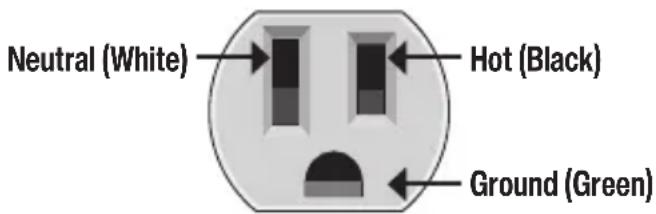
text_image
Neutral (White) Hot (Black) Ground (Green)WIRING CONFIGURATION TESTING
Conditions indicated: wiring correct, open ground, reverse polarity, open hot, open neutral and hot/ground reversed.
Conditions NOT indicated: quality of ground, multiple hot wires, combinations of defects, reversal of grounded and grounding conductors. All appliances or equipment on the circuit being tested should be unplugged to help reduce the possibility of erroneous readings.
STANDARD RECEPTACLES
- Verify tester operation by testing on a known live and correctly wired receptacle.
- Plug tester into receptacle.
- Compare the illuminated lights on the tester to the key code printed on the tester.
- If the tester indicates that the receptacle is not wired correctly, consult a qualified electrician.
GFCI RECEPTACLES
- Check the GFCI receptacle user manual for information on how the specific receptacle operates prior to using this tester.
- Insert the tester into the receptacle under test to check for correct wiring (See FIG. 1). Lights on the tester should illuminate.
- Press the "TEST" button on the GFCI receptacle. Did the GFCI trip and the lights on the tester go dark?
YES: Reset the GFCI by pressing the reset button. Proceed to step 4.
NO: The GFCI is not operating properly or the receptacle is miswired. Consult a qualified electrician.
- Press and hold the test button on the tester for 7 seconds. Did the GFCI trip and the lights on the tester go dark?
YES: Reset the GFCI by pressing the reset button. The GFCI appears to be operating properly.
NO: The GFCI is not operating properly or the receptacle is miswired. Consult a qualified electrician.
CLEANING
Wipe with a clean, dry lint-free cloth. Do not use abrasive cleaners or solvents.
FCC & IC COMPLIANCE
See this product's page at www.kleintools.com
for FCC compliance information.
Canada ICES-003 (B) / NMB-003 (B)
DISPOSAL / RECYCLE
Do not place equipment and its accessories in the trash. Items must be properly disposed of in accordance with local regulations. Please see www.epa.gov/recyclefor additional information.
text_image
NES CA 0 BLE BLEM TOOL 12.2A METER AMOUNT MEAT 20 18.8.8 CDM VSD

CAT III 600V
natural_image
Simple grayscale illustration of a cylindrical device with a square opening and two vertical pins (no text or symbols)RT210 Probador de
tomacorrientes con interruptor GFCI
- DETECTE LOS PROBLEMAS DE CABLEADO COMUNES EN RECEPTÁCULOS ESTÁNDAR Y GFCI
natural_image
Close-up of a handheld electronic device with two leads and a display screen (no visible text or symbols)
CAT II
300V
CL120
natural_image
Simple line drawing of a face with double eyes and a mouth, no text or symbols presentVivo (negro)Neutro (blanco)
Tierra (verde)
natural_image
Simple grayscale illustration of a cylindrical device with a square opening and two protruding pins (no text or symbols)natural_image
Close-up of a handheld electrical probe with two leads and a display screen (no visible text or symbols)
CAT II
300V
CL120
CARACTÉRISTIQUES GÉNÉRALES
HOLD (MAINTIEN DES DONNÉES)
natural_image
Close-up of a mechanical clamp or bracket component with no visible text or symbolsFederal Communications Commission (FCC).
Canada ICES-003 (B) / NMB-003 (B)
GARANTIE
natural_image
Simple diagram of a face with arrows pointing to vertical and curved shapes (no text or symbols)Federal Communications Commission (FCC).
Canada ICES-003 (B) / NMB-003 (B)
DISPOSAL / RECYCLE