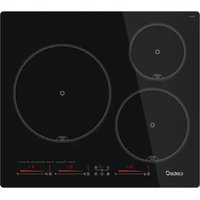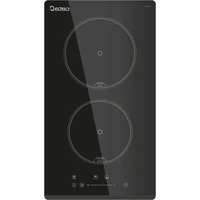
IB 302 BK A - Hob CATA - Free user manual and instructions
Find the device manual for free IB 302 BK A CATA in PDF.


| Brand | CATA |
| Model | IB 302 BK A |
| Product type | Induction hob |
| Number of cooking zones | 2 |
| Control type | Touch controls (capacitive sensors) |
| Power supply | 230 V ~ 50/60 Hz |
| Maximum power per zone | 9 power levels |
| Timer | Yes, adjustable from 1 to 120 minutes |
| Child lock | Yes (press E key for 3 seconds) |
| Residual heat indicator | Yes (displays "H") |
| Automatic safety shutdown | Yes (20 seconds of inactivity) |
| Inadvertent activation protection | Yes (extended beep and error code ER O3 after 10 s continuous press) |
| Surface material | Ceramic glass |
| Color | Black (BK) |
| Installation type | Built-in into worktop |
| Recommended cleaning | Scraper for residues, specific cleaner and absorbent paper |
| Avoid | Metal sponges, harsh detergents, steam cleaners |
| Weight | Approximately 4 kg (estimate) |
| Dimensions (W x D) | Approximately 290 x 520 mm (estimate) |
| Warranty | 2 years (manufacturer standard) |
| After-sales service | CATA approved technical support |
Frequently Asked Questions - IB 302 BK A CATA
User questions about IB 302 BK A CATA
0 question about this device. Answer the ones you know or ask your own.
Ask a new question about this device
Download the instructions for your Hob in PDF format for free! Find your manual IB 302 BK A - CATA and take your electronic device back in hand. On this page are published all the documents necessary for the use of your device. IB 302 BK A by CATA.
USER MANUAL IB 302 BK A CATA
THIS APPLIANCE IS DESIGNED FOR DOMESTIC USE ONLY. THE MANUFACTURER SHALL NOT IN ANY WAY BE HELD RESPONSIBLE FOR WHATEVER INJURIES OR DAMAGES ARE CAUSED BY INCORRECT INSTALLATION OR BY UNSUITABLE, WRONG OR ABSURD USE.
The manufacturer declares that this product meets all the essential requirements for low voltage electrical material set out in European directive 2014/35/EU and for electromagnetic compatibility as required by European directive 2014/30/EU.
PRECAUTIONS
- When one makes use of heating elements, we advise receptacles with flat bottom having same diameter or lightly higher than that of the hot area.
- Avoid overflows of liquid, therefore when boiling has happened, or in any case when liquid is heated, reduce the heat supply.
- Don't leave the heating elements on without receptacles on the top or with void pots and pans.
- Do not use any aluminium foil or place any foodstuffs wrapped in aluminium foil directly on the hob - do not place any metal objects such as knives, forks, spoons and lids on the hob surface as they will heat up.
- When cooking in a non-stick pan without seasoning, do not exceed 1-2 min
utes' pre-heating time.
- When cooking food that may easily stick, start at a low power output level and then slowly increase while regularly stirring.
- If the surface of the hob is damaged, immediately disconnect the appliance from the mains to prevent the possibility of electric shock.
- Never use a steam cleaner to clean the hob.
- The appliance and accessible parts may be hot during operation.
- Take care to avoid touching the heating elements.
- Children less than 8 years of age should be kept at a safe distance unless continuously supervised.
- This appliance may be used by children aged 8 or over and by persons with reduced physical, sensory or mental capabilities or lack of experience and knowledge, if they are supervised and have received suitable instructions on safe use of the appliance and understand the dangers involved. Children must not play with the appliance. User maintenance and cleaning should not be carried out by children except under constant supervision.
- Cooking with grease or oil may be dangerous and cause a fire if left unattended. NEVER try to extinguish a fire with water. Rather, disconnect the appliance and then cover the flames with a cover or sheet, for example.
- Fire hazard: do not store elements on
cooking surfaces.
- Only counter top protectors designed for use with the cooking appliance and listed in the manufacturer's instructions should be used as suitable protection for the counter top incorporated in the appliance. Use of unsuitable protectors may cause accidents.
- WARNING: Accessible parts will become hot when in use. To avoid burns and scalds children should be kept away.
Insert in the fixed wiring a mean for disconnection from the supply mains having a contact separation in all poles that provide full disconnection under overvoltage category III conditions, in accordance with the wiring rules. The plug or omnipolar switch must be easily reached on the installed equipment.
This appliance is not intended to be used via an external timer or a remote control system.
The manufacturers decline any responsibility in the event of non-compliance with what is described above and the accident prevention norms not being respected and followed.
To avoid all risk, if the power cable becomes damaged, it must only be replaced by the manufacturer, by an authorised service centre, or by a qualified electrician.
User's Instructions Installation
All operations relative to installation (electric connection) should be carried out by skilled personnel in conformity with the rules in force.
As for the specific instructions see part pertaining to installer.
Operation
Touch sensitive keys.
All operations can be performed using touch sensitive keys (capacitive sensors) located on the front of the ceramic glass (control panel). Each key has a corresponding display. All actions are confirmed by an audible beep.
Preparation before use
When the power is switched on, the buzzer will sound once and all the indicators will switch on for one second and then switch off. Place the pan in the centre of the cooking zone.
Operating instructions

Caution
When the ON/OFF key (D) is pressed, the ceramic hob returns to off mode if no other operation is carried out within 20 seconds.
| A | Cooking zone |
| B | Minus - |
| C | Plus + |
| D | ON / OFF |
| E | Lock key |
| F | Timer |
| G | Double ring |
Heating zone operation
When the ON/OFF key "0" is pressed, all the indicators show "-."
- Select the cooking zone you wish to use by pressing the "F" or "Key (A).The .symbol selected will displayed "or "
- Select the power level by pressing the +^ key(C) + or - key (B)
- The power level will start at 0. Pressing the "+" will count
up the power levels from 0 to 9 (max power) in numerical order. Pressing the “-” key will take the power straight from 0 to 9. Pressing the “-” key again will reduce the power level.
- To adjust the power level at a later stage select the desired cooking
- Select the cooking zone, press " - " to reduce the power level to 0 , the cooking zone will be turned off.
Safety mode (Child lock)
You can lock the controls to prevent unintended use (for example children accidentally turning the cooking zones on).
When the controls are locked, all the controls except the OFF control are disabled.
To lock the controls
Touch the key (E) « 3 seconds. The timer indicator will show «Loc»
To unlock the controls
- Make sure the hob is turned on.
- Touch the key (E) « 0- » for 3 seconds.
- You can now start using your hob.
When the hob is in the lock mode, all the controls are disable except OFF, you can always turn the hob off with the OFF control in an emergency, but you shall unlock the hob first in the next operation.
Using the timer
You can set the timer to turn one cooking zone off after the set time is up.
You can set the timer for up to 120 minutes.
- Select the relevant cooking zone which is working by touching the zone select key (A).
- Press the Timer key (F) timing indicator flashes, and you can set the timer at this point.
- Press the + and - keys, you can set the timer from 1 to 120 minutes.
- When the time is set, it will begin to count down immediately. The display will show the remaining time and the timer indicator flash for 5 seconds.
- When cooking timer expires, the corresponding cooking zone will be Switch off automatically and buzzer 3 times.
- If 2 burners are at work, when one burner has the timing, it will always display the burner working level and time, if 2 burners both have timing, but just only display burner working level and time for the last action.
Using the Double Rings
It is possible to control double rings. When a dual cooking zone is activated, the two circuits are switched on at the same time. Activation of the external circuit is indicated by a pilot light upon the key (G). If only the internal circuit is to be switched on, the external circuit can be switched off using the dual circuit key (G). Press the dual circuit key (G) in to reactivate the external circuit and the corresponding pilot light will switch on.
Automatic off
Once switched on, the touch control automatically switches off after 20 seconds of inactivity. After selecting a cooking zone, the automatic off time is divided into 10 seconds, after which the zone is deselected and, after another 10 seconds, the touch control switches off.
Switching all cooking zones off
Press the ON/OFF (D) button to immediately switch off all zones at any time. In standby mode, an "H" is displayed in all cooking zones that are "hot". The remaining displays will be switched off.
Setting level
The cooking zone can be set to 9 levels that are indicated by the numbers "1" to "9" on the seven-segment LED displays.
Residual heat indicator
This informs the user that the glass is at a dangerous temperature in the event of touching the area located around the cooking zone. The temperature is determined by a mathematical model and any residual heat is indicated by a "H" on the corresponding 7-segment display.
Heating and cooling are calculated based on:
The selected setting level (between "0" and "9")
The ON/OFF time.
After switching off the cooking zone, the corresponding display will indicate "H" until the temperature in the zone has dropped below the critical level (≤ 60^)
Automatic off function (operating time limitation)
In terms of the setting level, if no operation occurs each cooking zone switches off after an established maximum time. Each operation in the cooking zone condition (using the PLUS (C) and MINUS (B) or dual zone) restarts the maximum operating time of the zone by resetting it to its initial value.
Protection against unintended switching on
- If the electronic control detects a button being held down for approx. 10 sec. it will switch off automatically. The control sends out an audible error signal to warn the user that the sensors have detected the presence of an object. The displays indicate error code "ER03". If the cooking zone is in "hot" mode, "H" will be indicated alternately on the display with the error signal.
- If no cooking zone is activated within 20 seconds after switching on the touch control, it will return to standby mode.
- When the control is switched on, the ON/OFF button has priority over all other button and, therefore, the control can be switched off at any time, even when several buttons are pressed at the same time or a button is kept held down.
- In standby mode, no effect will be caused by buttons being kept held down. However, before the electronic control can be switched back on, it has to detect that no button is pressed down.
Sound signal (buzzer)
The following activities are indicated by a buzzer during use:
Normal button pressing by a short sound.
- Buttons kept pressed down for more than 10 sec. by a long, intermittent sound.
Maintenance (Fig. 4)
By means of a scraper immediately remove any aluminium foil bits, food spills, grease splashes, sugar marks and other high sugarcontent food from the surface in order to avoid damaging the hob.
Subsequently clean the surface with some towel and appropriate product, rinse with water and dry by means of a clean cloth. Under no circumstance should sponges or abrasive cloths be used; also avoid using aggressive chemical detergents such as oven sprays and spot removers.
Installer's Instructions
Installation
These Instructions are for the qualified technician, as a guide to installation, adjustment and maintenance, according to the laws and standards in force. These operations must always be carried out when the appliance has been disconnected from the electric system.
Positioning (Fig. 5)
1 Front view
2 Front side
The appliance can be fitted into a working area as illustrated on the figure. Apply the seal supplied over the whole perimeter of the working area.
Electrical connection
Prior to carrying out the electrical connection, please ensure that: the plant characteristics are such as to follow what is indicated on the matrix plate placed at the bottom of the working area;
- that the plant is fitted with an efficient earth connection, following the standards and law provisions in force.
- The earth connection is compulsory in terms of the law. Should there be no cable and/or plug on the equipment, use suitable absorption material for the working temperature as well, as indicated on the matrix plate. Under no circumstance must the cable reach a temperature above 50^ of the ambient temperature.
ESTE PRODUTO FOI CONCEBIDO PARA UMA UTILIZACAO DOMESTICA. O FABRICANTE REJEITA QUALQUER RESPONSABILIDADE EM CASO DE EVENTUAIS DANOS A COISAS OU PESSOs AS RESULTANTES DE UMA INSTALLACAO INCORRECTA OU DE UTILIZATION INDEVIDA, ERRONEA OU INSENSATA.
Para bloquear as teclas
Para desbloquear as teclas
This page will not be printed
版本号:20220715+V1.0