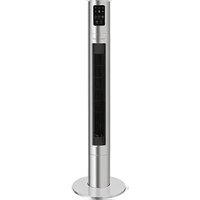
PC-TVL 3090 - Fan ProfiCare - Free user manual and instructions
Find the device manual for free PC-TVL 3090 ProfiCare in PDF.


| Product type | Pedestal fan |
| Brand | ProfiCare |
| Model | PC-TVL 3090 |
| Power supply | 220-240 V ~, 50-60 Hz |
| Power consumption | 45 W |
| Standby power consumption (with network connection) | 0.7 W |
| Protection class | II |
| Net weight | approx. 5.2 kg |
| Number of speeds | 6 levels |
| Oscillation | 75° |
| Special modes | Nature, Sleep |
| Timer | Delayed shutdown 1 to 9 hours, delayed start 1 to 15 hours |
| Remote control | Yes (2 AAA 1.5 V batteries not included) |
| Wi-Fi connectivity | 802.11 b/g/n, 2.4 GHz |
| Mobile app | Smart Life - Smart Living (iOS 10.0+, Android 4.4+) |
| Control type | Touch, remote control, app |
| Safety | Protective grill, do not leave unattended |
| Cleaning | Dry cloth, do not immerse |
| Package contents | Fan, remote control, base plate, fixing nut |
Frequently Asked Questions - PC-TVL 3090 ProfiCare
User questions about PC-TVL 3090 ProfiCare
0 question about this device. Answer the ones you know or ask your own.
Ask a new question about this device
Download the instructions for your Fan in PDF format for free! Find your manual PC-TVL 3090 - ProfiCare and take your electronic device back in hand. On this page are published all the documents necessary for the use of your device. PC-TVL 3090 by ProfiCare.
USER MANUAL PC-TVL 3090 ProfiCare
natural_image
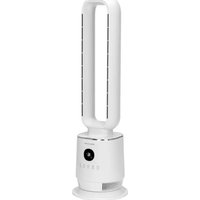
Modern vertical stainless steel electric vacuum tower with digital display and control buttons (no visible text or symbols)Tower-Ventilator PC-TVL 3090
Torenventilator • Ventilateur tour • Ventilador de torre
(Piles non fournies)
- Appuyez 1 × = Nature
- Premere 1 × = Nature
Thank you for choosing our product. We hope you will enjoy using the appliance.
Symbols in this Instruction Manual
Important information for your safety is specially marked. It is essential to comply with these instructions in order to avoid accidents and prevent damage to the appliance:

WARNING:
This warns you of dangers to your health and indicates possible injury risks.

CAUTION:
This refers to possible hazards to the appliance or other objects.

NOTE:
This highlights tips and information.
Contents
Overview of the Components....3
General Notes......39
Special Safety Precautions for this Appliance....39
Handling of Batteries....40
Scope of Delivery....41
Overview of the Components....41
Unpacking the Appliance....41
Assembly Instructions 41
Remote Control....41
Fitting Batteries into the Remote Control....41
Putting into Service 41
Electrical Connection 41
Information on the App "Smart Life - Smart Living" ....42
Information on How to Use the App....42
System Requirement for Use of the App ....42
Commissioning via the App 42
Disconnecting the Wi-Fi 42
Reset Wi-Fi Connection....42
Operation 42
Button and Symbol Explanation....42
Switching the Appliance On/Off 43
Speed 43
Oscillation....43
Wind Change Functions....43
Electronic Timer 43
Cleaning 43
Storage....43
Troubleshooting....44
Technical Data 44
Notice of Directive Conformity....44
Disposal 44
Battery Disposal 44
Meaning of the "Dustbin" Symbol 44
General Notes
Read the operating instructions carefully before putting the appliance into operation and keep the instructions including the warranty, the receipt and, if possible, the box with the internal packing. If you give this appliance to other people, please also pass on the operating instructions.
- The appliance is designed exclusively for private use and for the envisaged purpose. This appliance is not fit for commercial use.
- Do not use it outdoors. Keep it away from sources of heat, direct sunlight, humidity (never dip it into any liquid) and sharp edges. Do not use the appliance with wet hands. If the appliance is humid or wet, unplug it immediately.
- When cleaning or putting it away, switch off the appliance and always pull out the plug from the socket (pull the plug itself, not the lead) if the appliance is not being used and remove the attached accessories.
- The appliance and the mains lead have to be checked regularly for signs of damage. If damage is found the appliance must not be used.
- Use only original spare parts.
- In order to ensure your children's safety, please keep all packaging (plastic bags, boxes, polystyrene etc.) out of their reach.

WARNING:
Do not allow small children to play with the plastic foil. There is a danger of suffocation!
Special Safety Precautions for this Appliance
- Do not leave the appliance unattended for hours at a time. Do not leave your home whilst the appliance is in operation.
- Never stick fingers or other objects through the protection grid.
-
Watch out for long hair: It can be caught in the fan owing to the air turbulence!
-
The appliance must be assembled completely before use!
- Select a stable base to avoid the tipping of the fan during use!
- Do not use the fan in premises where gasoline, paints or inflammable liquids are used or stored.
- The fan must be used only in the envisaged position (standing).
- Do not place the appliance immediately next to stoves or other sources of heat.
- Do not repair the appliance by yourself. Always contact an authorized technician. If the supply cord is damaged, it must be replaced by the manufacturer, its service agent or similarly qualified persons in order to avoid a hazard.
- This appliance can be used by children aged from 8 years and above and persons with reduced physical, sensory or mental capabilities or lack of experience and knowledge if they have been given supervision or instruction concerning use of the appliance in a safe way and understand the hazards involved.
• Children shall not play with the appliance. - Cleaning and user maintenance shall not be made by children without supervision.

CAUTION:
Do not immerse the appliance into water for cleaning. Please follow the instructions as stipulated in the chapter "Cleaning".
Handling of Batteries
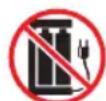
Do not charge! Keep away from children!

Do not disassemble!
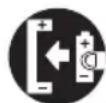
Insert correctly! Do not short circuit!

Danger of explosion!
Do not expose batteries to intense heat, such as sunlight, fire or similar.


- Different battery types or new and used batteries must not be used together.
- Batteries can leak and lose battery acid. If the remote control is not used for a long period of time, remove the batteries.
- In case of battery leakage, make sure not to rub the liquid into your eyes or mucous membranes. In case of contact, wash your hands and rinse your eyes with clear water. Seek medical attention if any discomfort persists.
- Batteries are not to be disposed of together with domestic wastes. Dispose of the used batteries at the relevant collection bin or at your dealer's.
Scope of Delivery
1× Remote control
1 × Tower
1 × Base plate
1 × Securing nut for base plate (pre-assembled)
Overview of the Components
1 Indicator lamp (Sleep)
2 Indicator lamp ∪ (Oscillation switched on)
3 Indicator lamp (Wi-Fi)
4 Segment display
5 Indicator lamp H (Hours)
6 SWING button (Oscillation)
7 MODE button (Wind change functions)
8 ON / OFF button (Switching the appliance on / off)
9 TIMER button (Electronic timer)
10 SPEED button (Speed)
11 Indicator lamp (Nature)
12 Remote control
13 Base plate
14 Securing nut
15 Tower
16 Storage compartment for remote control
Unpacking the Appliance
- Remove the appliance from the package.
- Remove all packaging material such as films, filler, cable holders and cardboard.
- Check the delivery contents for completeness.
- Should the package contents be incomplete or damages be found, do not take the appliance into operation. Take it immediately back to the dealer.
i NOTE:
Dust or production residues can be located on the appliance. We recommend to clean the appliance as described under "Cleaning".
Assembly Instructions
- Position the housing with the open side facing upwards.

NOTE:
It is best to place a blanket underneath so that the housing is not damaged.
- Pass the connection cable through the hole of the base plate so that the mains plug is located on the underside of the base plate.
- Remove the securing nut from the bottom of the housing.
- Place the base plate on the housing. The base plate can only be mounted in one position. Pay attention to the recesses and locking pins.
- Thread the cable into the recess provided on the base plate.
- Screw the base plate in tightly using the securing nut.
- Now turn the fan over and place it on a suitable solid surface.
Remote Control
- Remove the remote control from the compartment on the back of the appliance.
- The range of the remote control is limited. When using the remote control, please ensure that there are no obstacles placed between it and the sensor on the appliance.
Fitting Batteries into the Remote Control
(Batteries not supplied)
If the range of the remote control is reduced during use, please proceed as follows:
- Open the lid of the battery compartment on the rear of the remote control.
- Insert 2 MICRO batteries of type R03 "AAA" 1.5 V. Please ensure the correct polarity. Details can be found in the battery compartment.
- Close the battery compartment.
Putting into Service
Electrical Connection
- Before inserting the plug into the socket. Make sure that the mains voltage to be used matches that of the appliance. You can find this information on the nameplate.
- Connect the appliance to a duly installed protective contact socket. You will hear a signal and all of the symbols in the display will light up for a moment. The indicator light will flash quickly.
Information on the App "Smart Life - Smart Living"
The Smart Life - Smart Living app is available for android and iOS. Scan the corresponding QR code to get directly to the download.

NOTE:
Depending on the provider, there may be costs involved in downloading the app.
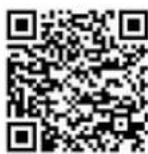
Google Play App Store
Information on How to Use the App
This appliance allows you to operate the appliance via your home network. A prerequisite is a permanent Wi-Fi connection to your router and the free app "Smart Life - Smart Living".
You can easily access all functions of the appliance via the app. Since the app constantly improved, we cannot provide a more detailed description here.
We recommend disconnecting the appliance from the power supply when you are away from home to prevent unintentional switching on while you are on the road!
System Requirement for Use of the App
- iOS 10.0 or higher
- Android 4.4 or higher
Commissioning via the App
-
Install the "Smart Life - Smart Living" app. Create a user account.
-
Activate the Wi-Fi function in the settings of your appliance.
-
Place the appliance within 5 meters of your router.
-
The indicator light will flash quickly.

NOTE:
If the 📞 indicator light does not flash, hold the ✕ SPEED button down for about 2 seconds. This can only be done using the button on the appliance, not using the remote control.
- Launch the app and select "+".
- Select the "Fan" menu and follow the instructions on the display.
- Once the appliance has been successfully connected, the 📋 indicator light will light up and remain continuously lit. Now you can operate the appliance using the app.

NOTE:
The appliance can only be operated with 2.4 GHz routers. 5 GHz routers are not supported.
Disconnecting the Wi-Fi
If you want to disconnect the existing Wi-Fi connection (control lamp 🔺 is lit), proceed as follows:
Press and hold the button ✕ SPEED for about 2 seconds. The 📞 indicator light will go out.

NOTE:
If you want to re-establish the WLAN connection, proceed as described in the paragraph "Commissioning via the App".
Reset Wi-Fi Connection
If you would like to reset the existing Wi-Fi connection (controllamp 🔺 is lit), proceed as follows:
- Press and hold down the Ⓞ ON/OFF button for approx. 2 seconds. The indicator light 📋 will flash quickly.
- The Wi-Fi connection will be disconnected and the appliance is removed from the app at the same time.

NOTE:
If you want to re-establish the WLAN connection, proceed as described in the paragraph "Commissioning via the App".
Operation
Button and Symbol Explanation
The buttons on the appliance are touch keys. Gently touch the buttons with a finger to execute the function. Whenever a button is pressed, it will be confirmed by a beep sound.
| Control Panel | Remote Control | Function |
| ON / OFF | Switching the appliance on / off | |
| SPEED | SPEED Speed | |
| SWING | OSC Oscillation | |
| MODE | MODE Wind change functions | |
| TIMER | TIMER | Electronic timer |
Switching the Appliance On/Off
Press the ⏻ ON/OFF button to switch the appliance on or off. The appliance will commence operating at speed level 3
Speed
Press the ✅ SPEED button in order to select one of six speed levels:
1 Lowest speed
6 Highest speed
Oscillation
Press the ⬇ SWING button to turn on the oscillation. The
○ indicator light will light up in the display. The appliance rotates automatically in the range of about 75 degrees.
Wind Change Functions
The appliance has the two special functions:
Nature 🏠 and Sleep 🕒 The speed of the fan buries between the functions.
Press the MODE button to switch these functions on.
- Press 1 × = Nature
This mode simulates natural wind movement. Pressing the ✕ SPEED button you can change the speed level.
- Press 2 × = Sleep
Relax in this mode with rich wind variants. Pressing the ✕ SPEED button you can change the speed level.
- Press 3 × = Normal Mode
Choose the speed level by pressing the ✕ SPEED button.
Electronic Timer
You can set a time-controlled switch-on and switch-off for the appliance.
Time-delayed Switch On
i NOTE:
This is only possible when the appliance is switched off.
- Use the ⏻ TIMER button to select a time setting between land 9 hours.
- Upon expiry of the timer the appliance will switch on automatically.
Time-delayed Switch-off
i NOTE:
This is only possible when the appliance is switched on.
- Use the ⏻ TIMER button to select a time setting between 1 and 9 hours.
- Upon expiry of the timer, the appliance will switch off automatically.
Cleaning

WARNING:
• Always remove the mains plug before cleaning the appliance.
- Under no circumstances should you immerse the appliance in water for cleaning purposes. Otherwise this might result in an electric shock or fire.
CAUTION:
- Do not use a wire brush or any abrasive items.
-
Do not use any acidic or abrasive detergents.
-
Clean the outside of the appliance with a dry cloth without any additives.
- If the appliance is very dirty wet a cloth with water and then wipe the appliance dry once you have finished.
Storage
- Clean the appliance as described and allow it to dry.
- We recommend that you keep the appliance in the original packaging if it will not be used for long periods.
- Always store the appliance out of the reach of children in a dry, well ventilated place.
Troubleshooting
| Problem Possible Cause Remedy | ||
| Appliance does not work. | The appliance has no power supply. Check the socket with another appliance. | |
| The appliance is faulty. Contact our service centre or a specialist. | ||
| WiFi does not function. | The indicator light does not flash or light up. The WiFi function has been switched off. | Proceed as described under “Information on the App “Smart Life - Smart Living” ⇒ at “Commissioning via the App”. |
| The indicator light will flash quickly. The appliance is not connected to the smartphone. | Proceed as described under “Information on the App “Smart Life - Smart Living” ⇒ at “Commissioning via the App”. | |
| The distance to the router is too great. Place the appliance closer to the router. | ||
| No connection may be established with the network. | The appliance can only be operated with 2.4 GHz routers. 5 GHz routers are not supported. | |
| The appliance does not respond to the remote control. | The distance to the appliance is too far. Move closer to the appliance. | |
| You are not holding the remote control towards the sensor. | Hold the remote control so it points to the sensor. Make sure there are no obstacles between the remote control and the sensor. | |
| The batteries of the remote control are empty. | Replace the batteries. | |
| The remote control is defective. Contact our service centre or a specialist. | ||
Technical Data
Model: PC-TVL 3090
Power supply: 220-240 V\~, 50-60 Hz
Power consumption: 45 W
Protection class: II
Networked standby power consumption: 0.7W
Net weight: .... approx. 5.2 kg
WLAN
Supported network: 802.11 b/g/n
Maximum radio-frequency power transmitted: ....100 mW
Frequency range: 2.4 GHz
Channels: 1 - 13
Supported Wi-Fi keys:......WPA/WPA2
The right to make technical and design modifications in the course of continuous product development remains reserved.
Notice of Directive Conformity
Hereby, Clatronic International GmbH declares that the radio equipment type PC-TVL 3090 is in compliance with Directive 2014 / 53 / EU.
Furthermore, the appliance is in compliance with the requirements of the RoHS directive 2011 / 65 / EC & (EU) 2015 / 863.
The full text of the EU declaration of conformity is available at the following internet address: www.sli24.de
In the "Download" area, please enter the model name PC-TVL 3090.
Tested for operation in Great Britain.
Disposal
Battery Disposal
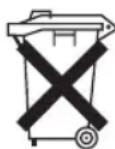
As a consumer you are obliged by law to return old batteries / accumulators.
Remove the batteries from the remote control before disposing of the appliance.
Return the batteries to a collection facility for the collection of old batteries or hazardous waste. Contact your local authority for more information.
Meaning of the "Dustbin" Symbol
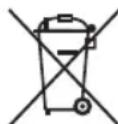
Protect our environment: do not dispose of electrical equipment in the domestic waste.
Please return any electrical equipment that you will no longer use to the collection points provided for their disposal.
This helps avoid the potential effects of incorrect disposal on the environment and human health.
This will contribute to the recycling and other forms of re-utilisation of electrical and electronic equipment.
Information concerning where the equipment can be disposed of can be obtained from your local authority.
Instrukcja obsługi
CTC Clatronic Sp. z o.o
Ul. Brzeska 1
45-960 Opole
Usuwanie
Usuwanie baterii
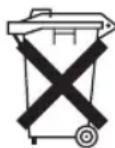
- bodies Shanghai, over the trip by
68 Wi-Fi جار قطع اتصال
- Tower-Ventilator PC-TVL 3090
- Symbols in this Instruction Manual
- WARNING:
- CAUTION:
- NOTE:
- Contents
- General Notes
- Special Safety Precautions for this Appliance
- Handling of Batteries
- Scope of Delivery
- Overview of the Components
- Unpacking the Appliance
- i NOTE:
- Assembly Instructions
- Remote Control
- Fitting Batteries into the Remote Control
- Putting into Service
- Electrical Connection
- Information on the App "Smart Life - Smart Living"
- Information on How to Use the App
- System Requirement for Use of the App
- Commissioning via the App
- Disconnecting the Wi-Fi
- Reset Wi-Fi Connection
- Operation
- Button and Symbol Explanation
- Switching the Appliance On/Off
- Speed
- Oscillation
- Wind Change Functions
- Electronic Timer
- Cleaning
- Storage
- Technical Data
- WLAN
- Notice of Directive Conformity
- Disposal
- Battery Disposal
- Meaning of the "Dustbin" Symbol
- Instrukcja obsługi
- Usuwanie
- Usuwanie baterii
Brand : ProfiCare
Model : PC-TVL 3090
Category : Fan