PC-VL 3062 M - Fan ProfiCare - Free user manual and instructions
Find the device manual for free PC-VL 3062 M ProfiCare in PDF.


| Product type | Fan |
| Brand | ProfiCare |
| Model | PC-VL 3062 M |
| Power supply | 220-240 V ~ 50 Hz |
| Power consumption | 30 W |
| Protection class | I |
| Net weight | Approximately 2.7 kg |
| Number of speeds | 3 (low, medium, high) |
| Oscillation | Yes, 70° angle |
| Adjustable tilt | Yes |
| Housing material | Metal |
| Protection grille | Front and rear |
| Control type | Rotary switch |
| Intended use | Indoor, domestic use |
| Assembly required | Yes, before first use |
| Cleaning | With a slightly damp dry cloth |
| Safety | Do not immerse, do not use without grille, keep out of reach of children under 8 years |
| Included accessories | Fan blade, protection grilles, screws, bolts, stand |
Frequently Asked Questions - PC-VL 3062 M ProfiCare
User questions about PC-VL 3062 M ProfiCare
0 question about this device. Answer the ones you know or ask your own.
Ask a new question about this device
Download the instructions for your Fan in PDF format for free! Find your manual PC-VL 3062 M - ProfiCare and take your electronic device back in hand. On this page are published all the documents necessary for the use of your device. PC-VL 3062 M by ProfiCare.
USER MANUAL PC-VL 3062 M ProfiCare
natural_image
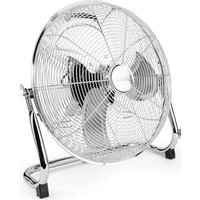
Black-and-white photo of a modern office fan with visible blades and a 'PROFIT CARE' branding on the side (no other text or symbols)Metall-Ventilator PC-VL 3062 M
Overview of the Components......Page 3
Instruction Manual......Page 25
Technical Data......Page 27
Disposal Page 28
Język polski
Spis treści
Overview of the Components
Thank you for choosing our product. We hope you enjoy using the appliance.
Symbols in these Instructions for Use
Important information for your safety is specially marked. It is essential to comply with these instructions in order to avoid accidents and prevent damage to the machine:

WARNING:
This warns you of dangers to your health and indicates possible injury risks.

CAUTION:
This refers to possible hazards to the machine or other objects.

NOTE:
This highlights tips and information.
General Notes
Read the operating instructions carefully before putting the appliance into operation and keep the instructions including the warranty, the receipt and, if possible, the box with the internal packing. If you give this device to other people, please also pass on the operating instructions.
English
- The appliance is designed exclusively for private use and for the envisaged purpose. This appliance is not fit for commercial use.
- Do not use it outdoors. Keep it away from sources of heat, direct sunlight, humidity (never dip it into any liquid) and sharp edges. Do not use the appliance with wet hands. If the appliance is humid or wet, unplug it immediately.
- When cleaning or putting it away, switch off the appliance and always pull out the plug from the socket (pull the plug itself, not the lead) if the appliance is not being used and remove the attached accessories.
- Do not operate the machine without supervision. If you leave the room you should always turn the device off. Remove the plug from the socket.
- The device and the mains lead have to be checked regularly for signs of damage. If damage is found the device must not be used.
- Use only original spare parts.
- In order to ensure your children's safety, please keep all packaging (plastic bags, boxes, polystyrene etc.) out of their reach.

WARNING!
Caution! Do not allow small children to play with the foil as there is a danger of suffocation!
Special Safety Instructions for this Appliance
- Never stick fingers or other objects through the protection grid.
- Watch out for long hair! It can be caught in the fan owing to the air turbulence!
- Use the appliance only with the protection grids on!
- If you need to remove the fan guard, first switch off the appliance and disconnect the mains plug.
- Select a stable base to avoid the tipping of the fan during use!
- Do not place the device immediately next to stoves or other sources of heat.
- Do not repair the appliance by yourself. Please contact authorized personnel. If the supply cord is damaged, it must be replaced by the manufacturer, its service agent or similarly qualified persons in order to avoid a hazard.
26 English
- This appliance can be used by children aged from 8 years and above and persons with reduced physical, sensory or mental capabilities or lack of experience and knowledge if they have been given supervision or instruction concerning use of the appliance in a safe way and understand the hazards involved.
• Children shall not play with the appliance. - Cleaning and user maintenance shall not be made by children without supervision.
Scope of delivery and parts description
1 Rotary switch for speed
2 Control knob for oscillation
3 Motor
4 Flattened area on the motor shaft
5 Rear protective grid
6 Locking screw for propeller
7 Hook
8 Fastening screw for protective grid
9 Front protective grid
10 Propeller
11 Fastening nut
12 Stand
13 Small knurled screw
14 Power cord
Without illustration:
4 screws for rear protective grid
Unpacking the Device
- Remove the device from its packaging.
- Remove all of the packaging material such as foils, filling material, cable holders and cardboard packaging.
- Check the scope of delivery.
- Check the appliance for any transport damage to prevent a hazard.
There may still be dust or production residues on the surface of the device. We recommend that you quickly wipe off the housing with a damp cloth.
i NOTE:
Assembly instructions
The device must be completely assembled before initial operation!
Warning: Risk of injury!
The edges of the propeller are sharp. Use caution during assembly.
i NOTE:
- You will need a Phillips screwdriver of medium size for the assembly.
- All screws are preassembled on the individual parts.
-
Also observe the "Overview of the Components" on page 3.
-
Unscrew the 4 preassembled outer screws from the front of the motor.
-
Hold the rear protective grid so that the 4 boreholes on the protective grid are exactly above the 4 boreholes on the motor.
i NOTE:
Ensure that the carrying handle on the protective grid is pointing upwards.
-
Mount the rear protective grid with the 4 screws.
-
Attach the propeller and fasten it with the locking screw.
CAUTION:
The screw must sit on the flattened side of the motor shaft!
- Attach the front protective grid by hanging the hook with the nut into the rear protective grid.
i NOTE:
Ensure that the holes on the grid edge for the fastening screw in the front and rear protective grid are positioned above each other.
- Close the fasteners on the circumference of the protective grid.
- Secure the protective grid with the fastening screw and the nut.
Position
The ideal position is a non-slip, flat surface.
Putting into Service
Electrical Connection
- Before inserting the plug into the socket. Make sure that the mains voltage to be used matches that of the device. You can find this information on the nameplate.
- Connect the device to a duly installed protective contact socket.
Use
Basic Settings
Set the blower inclination angle before starting the device.
- Unscrew the small knurled screw.
- Tilt the protective grid into the desired position.
- Re-tighten the knurled screw.
Operation
To select the speed, use the rotary switch on the rear:
• 0 off
- I slow
- II medium
- III fast
To shut off the device, select the position 0.
Fan setting
You have two options:
Stationary
- Shut off the device.
- Pull the control knob upwards.
- Use the carrying handle to place the device into the desired position.
Oscillating
- Shut off the device.
- Press the control knob.
i NOTE:
The device rotates automatically in the range of about 70 degrees.
- To turn off the function, shut off the device and pull the control knob upwards.
Cleaning
WARNING:
- Always remove the mains plug before cleaning the device.
- If you need to remove the safety guard: Always switch the device off and remove the mains plug.
- Under no circumstances should you immerse the device in water for cleaning purposes. Otherwise this might result in an electric shock or fire.
CAUTION
- Do not use a wire brush or any abrasive items.
-
Do not use any acidic or abrasive detergents.
-
Clean the outside of the device with a dry cloth without any additives.
- If the device is very dirty wet a cloth with water and then wipe the device dry once you have finished.
Maintenance and storage
- Clean the appliance as described.
• We recommend that the appliance is kept in its original packaging if you do not intend to use it for long periods. - Always store the appliance out of the reach of children, in a well-ventilated and dry place.
Technical Data
Model: PC-VL 3062 M
Power supply: 220-240 V, 50 Hz
Power consumption: 30 W
Protection class:....
Net weight: approx. 2.7 kg
The right to make technical and design modifications in the course of continuous product development remains reserved.
This device has been tested according to all relevant current CE guidelines, such as electromagnetic compatibility and low voltage directives, and has been constructed in accordance with the latest safety regulations.
28 English
Disposal
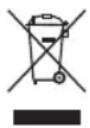
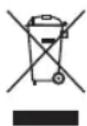
Meaning of the "Dustbin" Symbol
Protect our environment: do not dispose of electrical equipment in the domestic waste.
Please return any electrical equipment that you will no longer use to the collection points provided for their disposal.
This helps avoid the potential effects of incorrect disposal on the environment and human health.
This will contribute to the recycling and other forms of reutilisation of electrical and electronic equipment.
Information concerning where the equipment can be disposed of can be obtained from your local authority.
Instrukcja obsługi
CTC Clatronic Sp. z o.o
Ul. Brzeska 1
45-960 Opole
Usuwanie
9 Shanghai league league
10 مروحة الدفع
11 صمولة الربط
12 حامل
13 برغي مسن صغير
14 كبل الطاقة