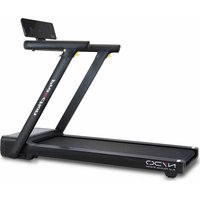
G6540 - Fitness Equipment BH FITNESS - Free user manual and instructions
Find the device manual for free G6540 BH FITNESS in PDF.


| Product type | Treadmill |
| Brand | BH Fitness |
| Model | G6540 |
| Speed | 1.0 - 18 km/h |
| Incline | 0 - 12 levels |
| Training programs | 40 programs: P01-P36, U01-U03, Body Fat |
| Connectivity | Bluetooth FTMS (compatible with iOS and Android) |
| Display | Time, Speed, Distance, Incline, Heart Rate, Calories |
| Heart rate measurement | Hand grip heart rate sensors |
| Body Fat function | Body fat percentage calculation with reference chart |
| Safety | Safety key and STOP button |
| Lubrication | Lubrication alert after 300 km (OIL display) |
| Power supply | Grounded electrical outlet |
| Displayable units | km/h or miles |
| Time programming | 5 - 99 minutes |
| Distance programming | 1 - 99 km |
| Calories programming | 20 - 990 kcal |
| Compatible applications | Zwift, Kinomap (via FTMS protocol) |
Frequently Asked Questions - G6540 BH FITNESS
User questions about G6540 BH FITNESS
0 question about this device. Answer the ones you know or ask your own.
Ask a new question about this device
Download the instructions for your Fitness Equipment in PDF format for free! Find your manual G6540 - BH FITNESS and take your electronic device back in hand. On this page are published all the documents necessary for the use of your device. G6540 by BH FITNESS.
USER MANUAL G6540 BH FITNESS

UNIDAD ELECTRÓNICA ELECTRONIC MONITOR UNITÉ ÉLECTRONIQUE ELEKTRONIKEINHEIT UNIDADE ELECTRÓNICA IMPIANTO ELETTRONICO ELEKTRONISCHER MONITOR
Fig.1
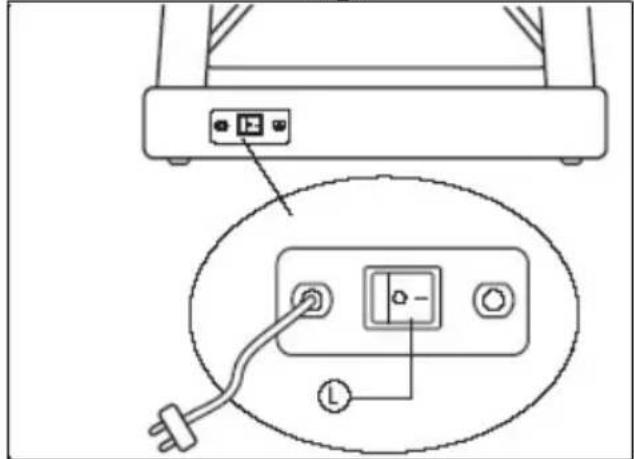
Fig.2
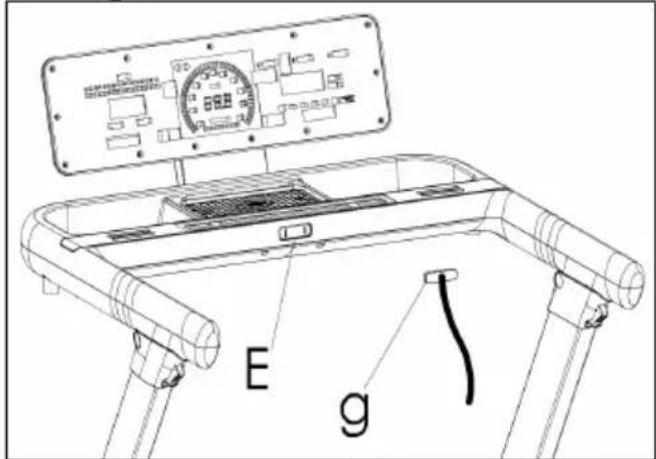
Fig.3
Español
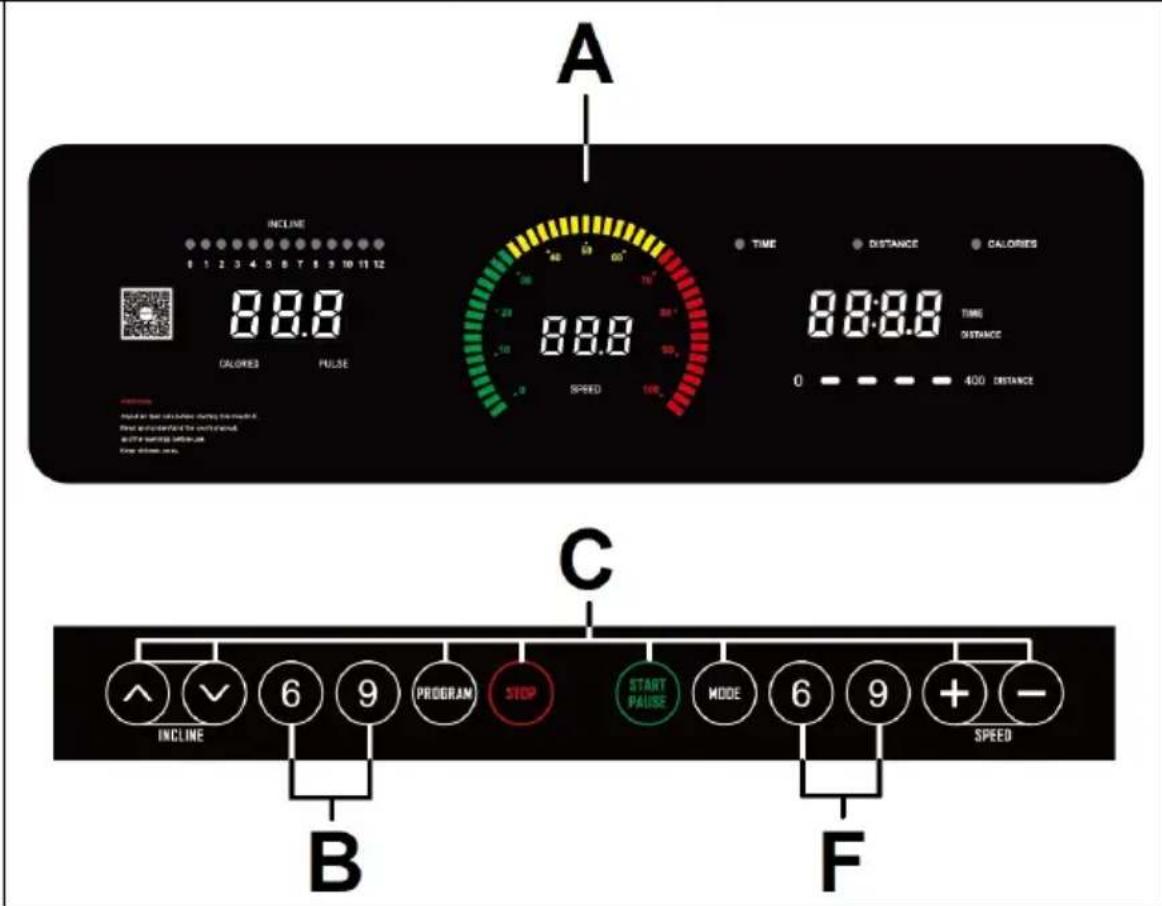
A: This display gives a simultaneous readout of Time; Programs; Speed; Distance; Incline; Pulse rate and Calories.
B: Incline function quick access keys or buttons (6 - 9).
C: The electronic monitor has 8 push buttons or keys; PROGRAM; MODE; INCLINE ( ); START; STOP; SPEED Km/h ( ).
F: Speed function quick access keys or buttons (6 - 9Km/h).
START/STOPING.-
Plug the unit into a wall socket with an EARTH terminal and set switch (L) to position (1), Fig.1.
The safety key (g) must be inserted into its spot (E) Fig.2, otherwise the machine will not operate.
CHANGING FROM KILOMETRES TO MILES.-
This machine has the option to display speed in km/h or mph.
The factory setting for the machine is km/h.
To change from km/h to mph or from mph to km/h follow these steps:
Remove the safety key (g).
Press and hold the PROGRAM and MODE keys at the same time for 5 seconds approximately.
The units will change ("M" Miles or "KM" kilometres).
OPERATING INSTRUCTIONS.-MANUAL MODE
This monitor has program (MANUAL).
For programs MANUAL you can specify the duration of the exercise between (5 to 99) minutes, distance between (1 to 99) and calories between (20 to 990).
Press MODE to set time/distance/calories.
Pressing the START/PAUSE, the machine will start within 5 seconds, shown by a countdown on the TIME display, at a speed of 1.0km/h.
You can increase or decrease the speed setting in MANUAL mode by pressing the SPEED ( ) keys, between 1.0–18 km/h and the inclination settings (0-12) by pressing the INCLINE ( ) keys.
The machine will stop if you press the STOP key or if you remove the SAFETY KEY.
PROGRAM MODE.-
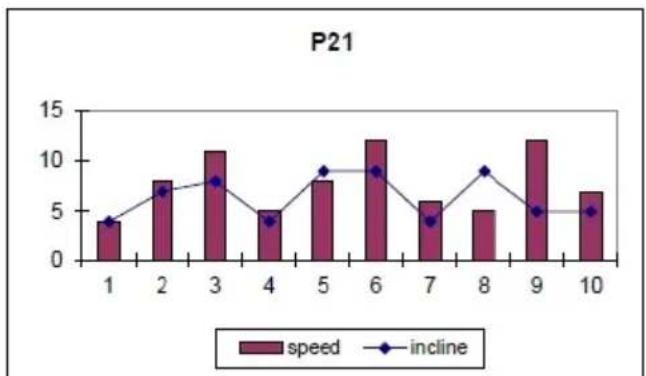
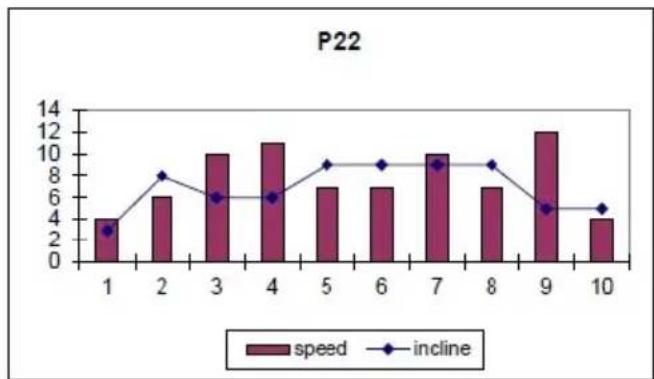
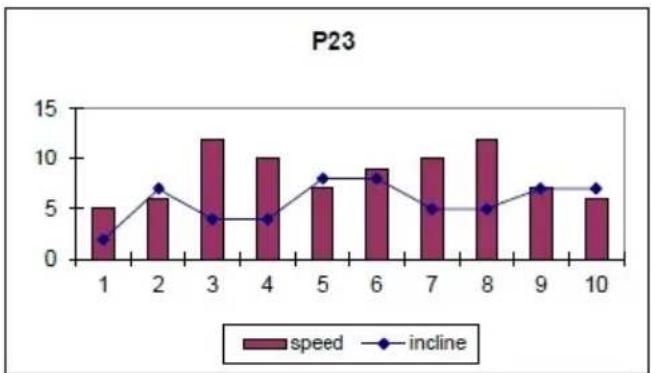
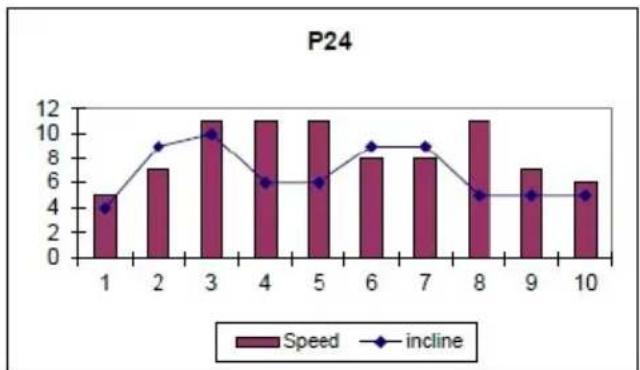
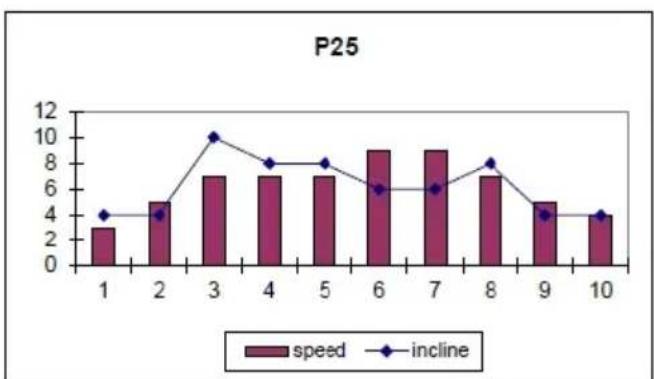
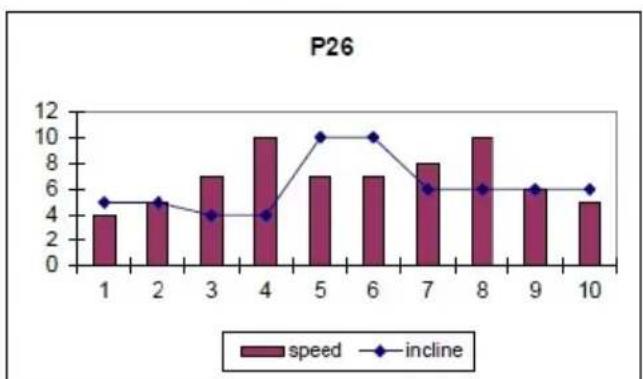
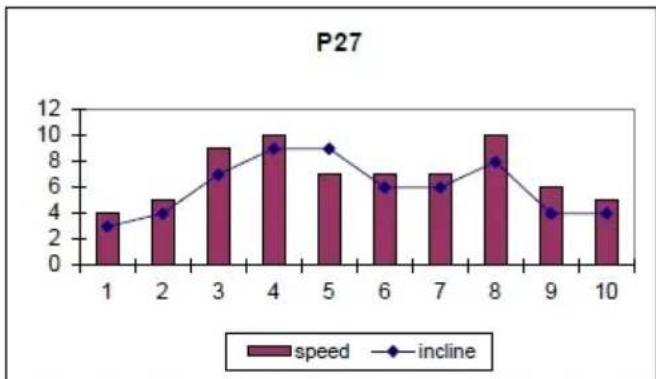
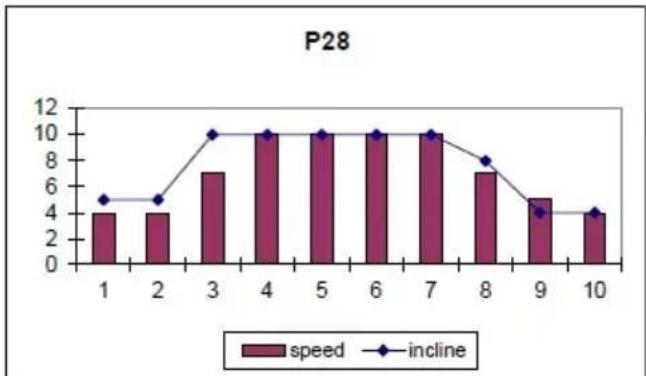
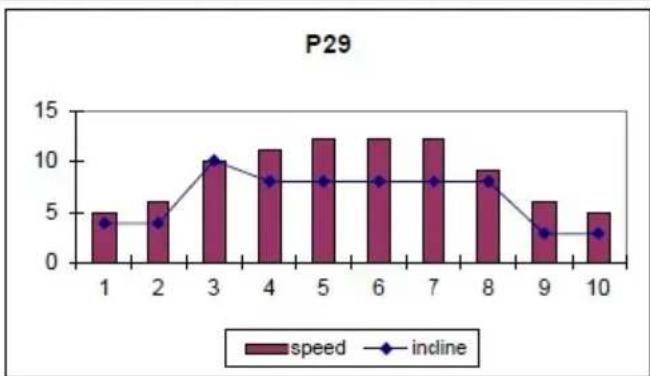
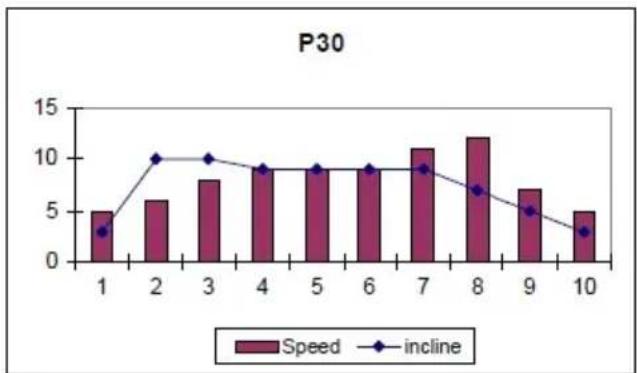
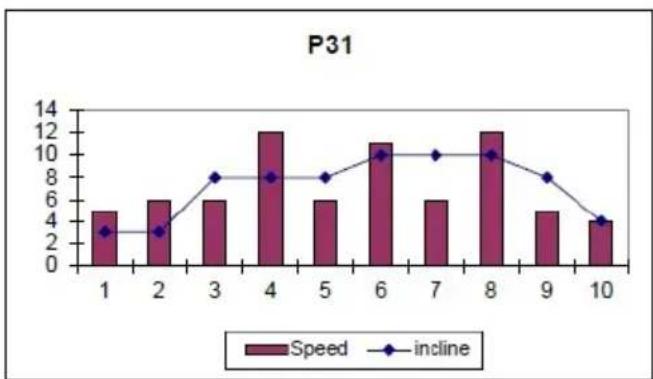
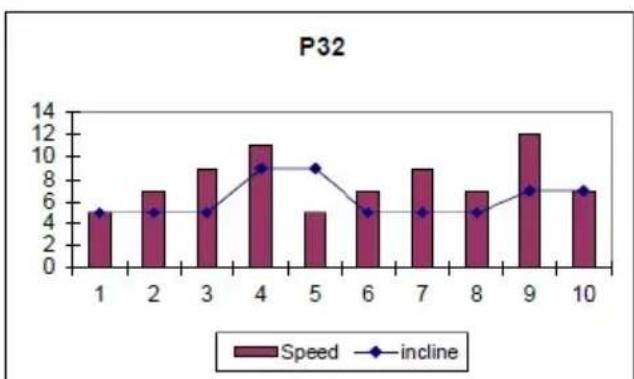
This monitor has 40 programs (P01-P36; U01; U02; U03; BODY-FAT).
For programs P01 to P36 you can specify the duration of the exercise between (5 to 99) minutes.
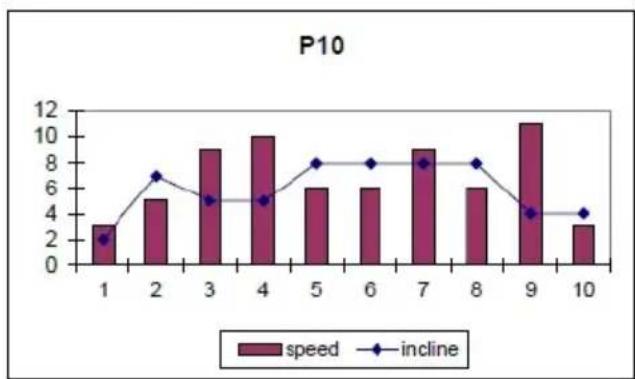
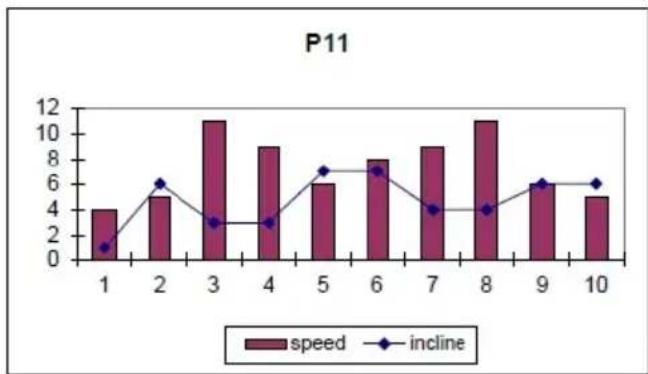
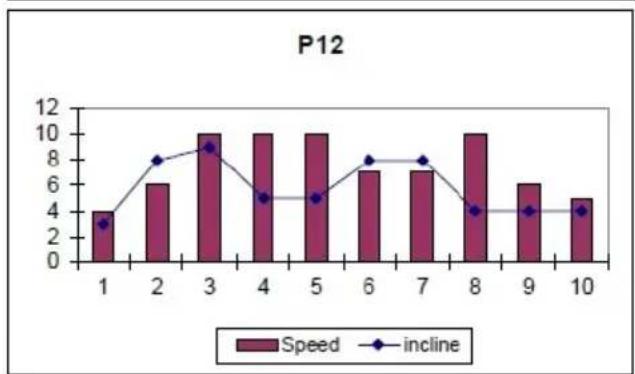
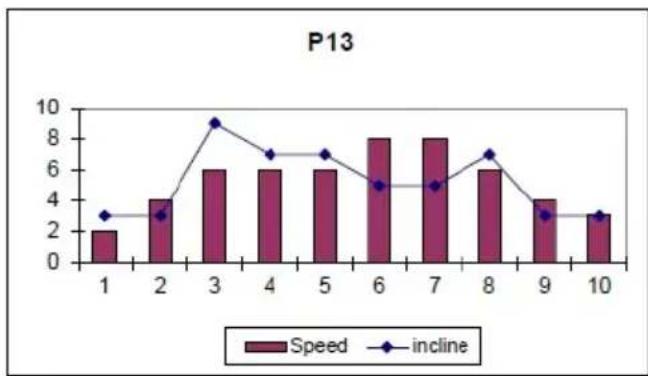
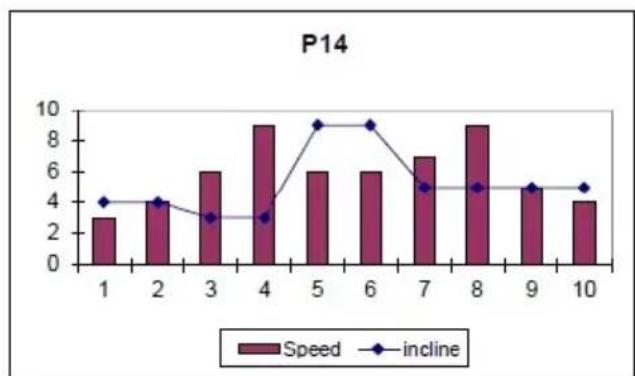
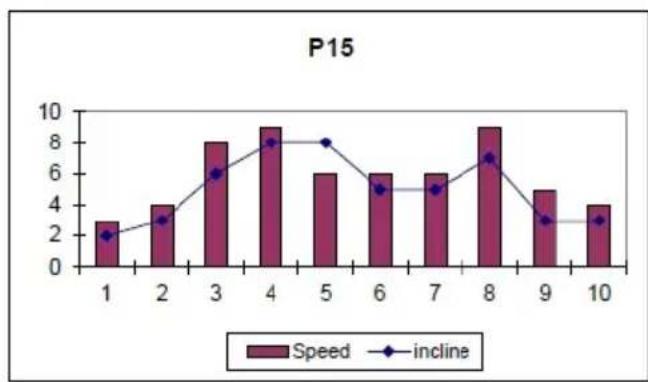
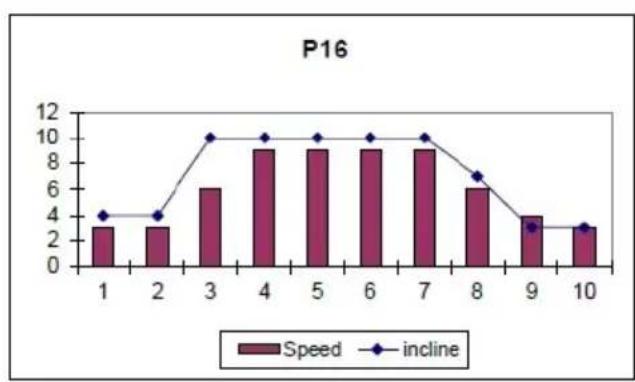
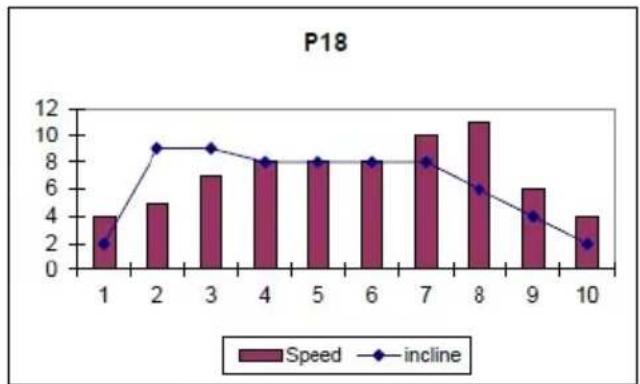
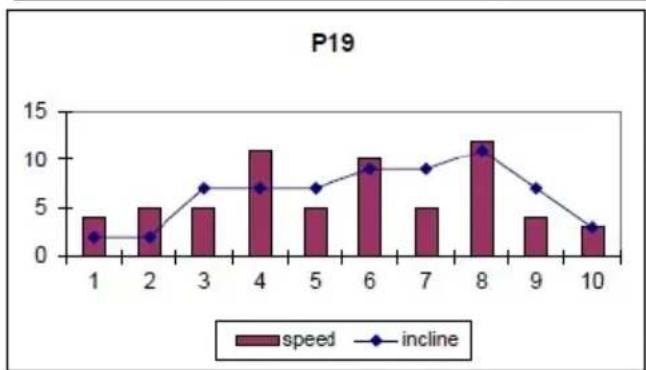
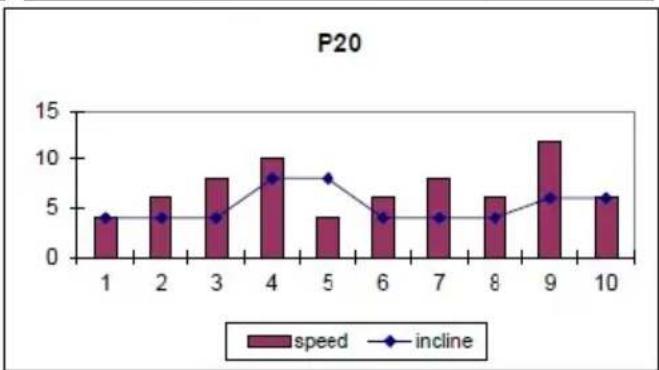
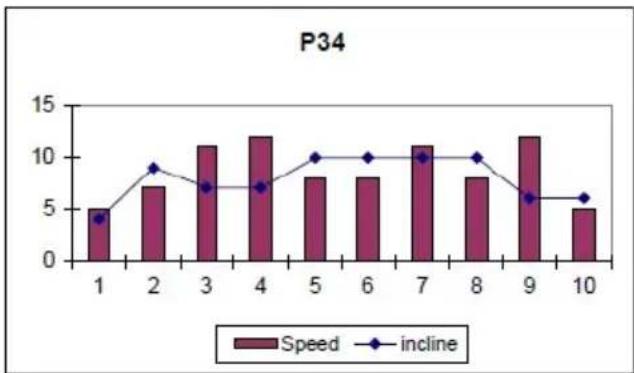
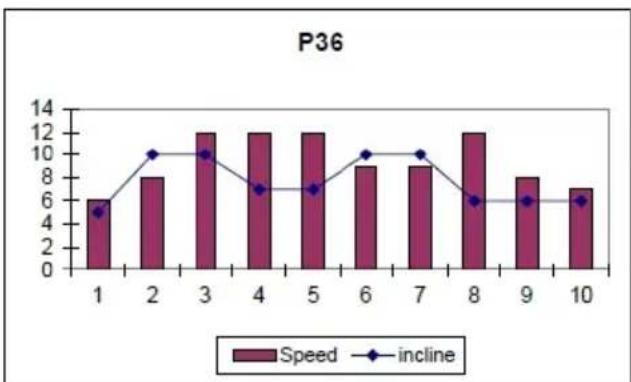
Program graphics for P1 to P36.
See end pages.-
With the machine ready, by pressing the PROGRAM key you can access the programs (P1-P36; U1-U3, BODY-FAT), once you have chosen a program TIME will flash.
Use the SPEED ( ) keys to specify the duration of the program (5 – 99 minutes). The monitor has a default program setting of 30 minutes.
Press the START/PAUSE key and the machine will start to operate after 5 seconds, shown by the countdown on the central display, based on the values it has been given.
You can change the speed settings at any time during the exercise by pressing the SPEED ( ) keys, and the inclination settings by pressing the INCLINE ( ) keys.
USER PROGRAM MODE.-
The user programs allow you to design the speed and inclination graphs with reference to your fitness level.
With the machine ready, press the PROGRAM key until U01, U02; U03 appear on the display. Press SPEED ( ) keys to select time. Press MODE and then press the SPEED ( ) keys to select the speed that you want for the first segment, press INCLINE ( ) keys to select the inclination you want for the first segment. Press the MODE key and this will take you to the second segment. Carry out the same procedure as in first segment varying the speed and inclination settings for this stage, and so on up to segment 10 to complete the User Program Graph.
Press START/PAUSE and the machine will start after a 5 second countdown, shown on the TIME display.
BODY FAT PROGRAM.-
The ("F" BODY-FAT) program is designed to calculate the user's body fat percentage.
Press the PROGRAM key until F1 appears on the display, then press the SPEED ( ) keys to select SEX (Male 01– Female 02), press the MODE key to confirm, use the SPEED ( ) keys select your AGE (1 – 99) press the MODE key to confirm, use the SPEED ( ) keys to select your HEIGHT (100 -
220cm).
Press the MODE key to confirm, use the SPEED ( ) keys to select WEIGHT (20 – 150Kg), press the MODE key to confirm.
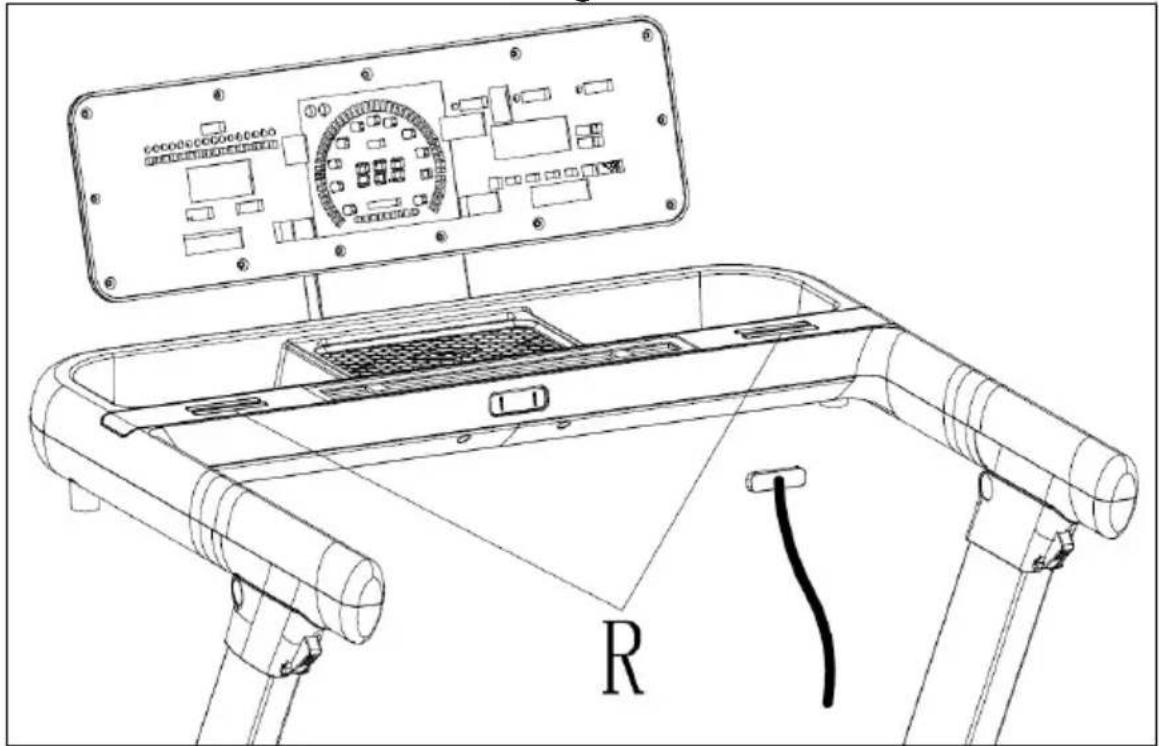
Place your hands on the handgrip sensors (R), as shown in Fig.3, and after a few seconds the screen will display the result.
FAT. (Body fat).—
The body fat function helps you to calculate your body fat percentage.
REF. TABLE: BODY TYPE
| Description | Women | Men |
| Essential fat | 10-13% 2-5% | |
| Athletes 14-20% 6-13% | ||
| Fitness 21-24% 14-17% | ||
| Average 25-31% 18-25% | ||
| Obese 32+% 25+% |
The main screen will display the type of profile for your body type.
iOS OPERATION (compatible iPhone, iPad and iPod Touch).-
This monitor has an integrated Bluetooth module.
Turn Bluetooth to "ON" in settings on the iOS device.
Download an App that supports the FTMS protocol from the App Store (ZWIFT, KINOMAP,...).
Open the App to run it. When prompted by the App, select the appropriate BH Module from the list displayed on the device to pair.
ANDROID OPERATION (compatible Android devices).-
This monitor has an integrated Bluetooth module.
Turn Bluetooth to "ON" in settings on the Android device.
Download an App that supports the FTMS protocol from Google Play (ZWIFT, KINOMAP,...).
Open the App to run it. When prompted by the App, select the appropriate BH Module from the list displayed on the Android device to pair.
See compatible apps on the web: www.bhfitness.com
Get your free BH by Kinomap activation code at:
http://colectivos.bhonlinestore.com/bh-by-kinomap/
EMERGENCY STOP.-
For the user's maximum safety, this unit is equipped with a safety key (g) and a STOP button. The safety key (g) must be slotted into its housing (E), Fig.2, otherwise the machine will not start.
When you are using the machine always clip the cord on the safety key to your clothing. Tugging on the cord will pull the safety key out of its slot and the machine will stop immediately. To restart the machine simply put the key back into the key slot.
Remove the safety key (g) whenever the machine is not being used and keep it out of children's reach. Pressing the red button marked STOP will also stop the unit immediately. To restart it, press the button marked START/PAUSE again.
ELEVATION.-
The inclination function operates independently of all other functions.
If inclination is not at zero when the START/PAUSE key is used to begin exercising, the machine will zero itself while it is starting.
You can adjust the elevation level by pressing the INCLINE(+) or INCLINE(-) keys to specify a value of 0 to 12, depending on how you would like to do the exercise.
Important: Do not change the inclination level of your treadmill by propping it up on objects.
IMPORTANT: THE INCLINATION LEVEL MUST BE AT ITS LOWEST SETTING BEFORE ATTEMPTING TO PUT THE TREADMILL INTO THE FOLDED POSITION.
PULSE MEASUREMENT.-
Your pulse rate is measured by placing both hands on pulse sensors (R) with which the electronic unit is equipped. The pulse rate readout will appear after a few seconds.
IMPORTANT: This is not a medical appliance and therefore the heart rate
shown is merely for guideline purposes.
This machine has a built-in lubrication warning. After running a distance of 300 km, the monitor will display OIL. This means that your machine needs lubrication. Lubricate the belt as indicated in the LUBRICATION section and then press any key for 6 seconds. This will clear the warning and reset the distance until the next lubrication.
Do not hesitate to get touch with the Technical Assistance Service if you have any queries by phoning customer services (see last page in manual).
THE MANUFACTURER RESERVES THE RIGHT TO MODIFY THE SPECIFICATIONS OF ITS PRODUCTS WITHOUT PRIOR NOTICE.
FAULT FINDING CHART
| PROBLEM CHECKS SOLUTIONS | ||
| 1.The monitor does not switch on. | 1) Make sure that the machine is plugged in, the ON/OFF switch in position 1 and that the safety key is inserted. | 1) Plug the machine into the mains supply. Set the switch to position 1 and insert the safety key. |
| 2.The monitor switches on but the motor fails to start. | 2) Check that the current limiter is pressed in. | 2) Switch the machine off and press the circuit breaker in. Lubricate the treadmill band. |
| 3.Walking motion is jerky on the treadmill. | 3.a) Check that the belt is lubricated.3.b) Check the tension on the sliding belt.3.c) Check the tension on the drive belt. | 3.a) Lubricate the sliding belt.3.b) Adjust the belt tension.3.c) Adjust the drive belt tension. |
| 4.The machine stops (the breaker trips). | 4) Check that the band is lubricated. | 4) Reset the overload button with the On /Off switch at „0“ and lubricate the treadmill band. |
| 5.Electrical shocks through the handrail. | 5) Check that the machine is plugged into an earthed mains socket. | 5) Plug the machine into an earthed mains socket. |
| 6.The treadmill belt skews off centre. | 6.a) Check that the machine is level on the floor.6.b) Check that the machine does not wobble. | |
ERROR CODES
| E1 Communication failure. | Connect the wire well between top controller and bottom controller |
| E2 Incorrect voltage. | Check the voltage. Check whether the controller has an abnormal smell. Check whether the motor cable is properly connected and reconnect the motor cable. |
| E3 No speed sensor signal. | Reconnect the cable or replace the speed sensor. |
| E5 Possible motor overload. | Lubricate the belt. Check the controller and the motor. |
| E7 Safety key. Insert the safety key. |
Do not hesitate to get touch with the Technical Assistance Service if you have any queries by phoning customer services (see last page in manual).
Français
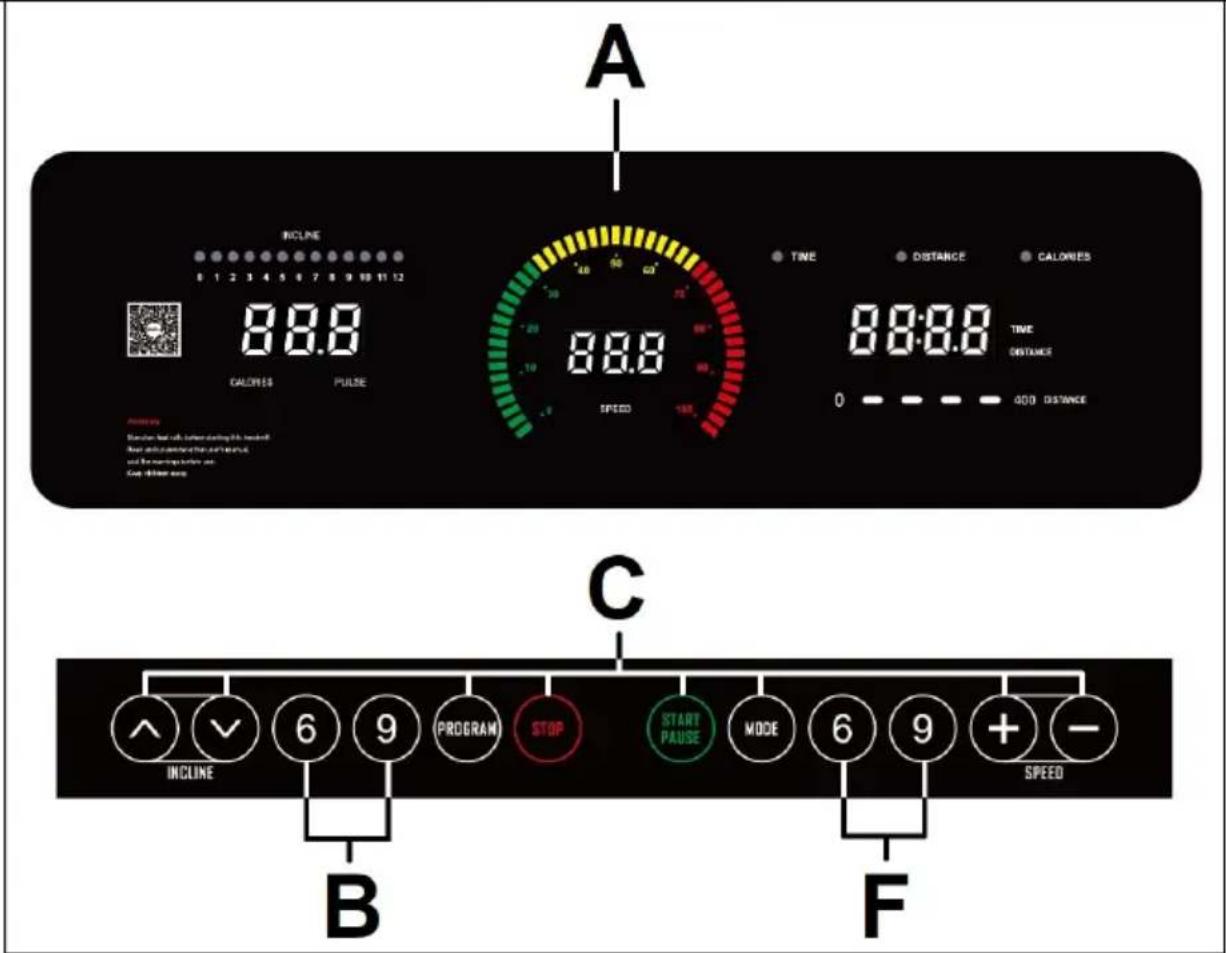
MONITEUR.-
FONCTIONNEMENT.-MODE MANUEL
BH by Kinomap gratuit sur:
http://colectivos.bhonlinestore.com
/bh-by-kinomap/
ARRÊT D'URGENCE.-



BH FITNESS SPAIN
EXERCYCLE,S.L.
(Manufacturer)
P.O.BOX 195
01080 VITORIA (SPAIN)
Tel.: +34 945 29 02 58
Fax: +34 945 29 00 49
e-mail: sac@bhfitness.com
www.bhfitness.com
POST-VENTA
Tel: +34 945 292 012
e-mail:
e-mail: info@bhfitness.pt
BH SERVICE PORTUGAL
Tel.: +351 234 729 510
e-mail: info@bhfitness.pt
BH GERMANY GmbH
Grasstrasse 13
45356 ESSEN
GERMANY
Tel: +49 2015 997018
e-mail: kundendienst@
bhgermany.com
BH FITNESS UK
Tel: 02037347554
e-mail: sales.uk@bhfitness.com
AFTER SALES – UK
Tel.: 02074425525
e-mail:
service.uk@bhfitness.com
BH FITNESS FRANCE
SAV FRANCE
Tel : +33 559 423 419
savfrance@bhfitness.com
BH FITNESS ASIA
BH Asia Ltd.
No.80, Jhongshan Rd.,
Daya Dist.,
Taichung City 42841,
Taiwan. R.O.C.
Tel.: +886 4 25609200
Fax: +886 4 25609280
E-mail:
info@bhasia.com.tw
BH FITNESS MEXICO
BH Exercycle de México
S.A. de CV
Eje 132 / 136
Zona Industrial, 2A Secc.
78395 San Luis Potosí
S:L:P: MÉXICO
Tel.: +52 (444) 824 00 29
Fax: +52 (444) 824 00 31
www.bhlatam.com.mx
ESESSTNI
BH SE RESERVA EL DERECHO A MODIFICAR LAS ESPECIFICACIONES DE SUS PRODUCTOS SIN PREVIO AVISO.
SPECIFICATIONS MAY BE CHANGED WITHOUT PRIOR NOTICE DUE TO OUR PROGRAMME OF CONTINUOUS PRODUCT DEVELOPMENT.
BH SE RÉSERVE LE DROIT DE MODIFIER LES SPECIFICATIONS DE SES PRODUITS SANS PRÉAVIS.


- ESPAÑOL
- START/STOPING
- CHANGING FROM KILOMETRES TO MILES
- OPERATING INSTRUCTIONS.-MANUAL MODE
- PROGRAM MODE
- USER PROGRAM MODE
- BODY FAT PROGRAM
- FAT. (BODY FAT)
- IOS OPERATION (COMPATIBLE IPHONE, IPAD AND IPOD TOUCH)
- ANDROID OPERATION (COMPATIBLE ANDROID DEVICES)
- EMERGENCY STOP
- ELEVATION
- PULSE MEASUREMENT
- FRANÇAIS
- MONITEUR
- FONCTIONNEMENT.-MODE MANUEL
- ARRÊT D'URGENCE
- BH FITNESS SPAIN
- BH GERMANY GMBH
- BH FITNESS UK
- BH FITNESS FRANCE
- BH FITNESS ASIA
- BH FITNESS MEXICO
Brand : BH FITNESS
Model : G6540
Category : Fitness Equipment