
i-SENSYS MF525x - Printer CANON - Free user manual and instructions
Find the device manual for free i-SENSYS MF525x CANON in PDF.

 FR
FR
 BG
BG
 CA
CA
 CS
CS
 DA
DA
 DE
DE
 EL
EL
 EN
ES
EN
ES
 ET
EU
ET
EU
 FI
FI
 HE
HE
 HU
HU
 IT
IT
 LT
LT
 LV
LV
 NL
NL
 NO
NO
 PL
PL
 PT
PT
 RO
RO
 RU
RU
 SK
SK
 SL
SL
 SV
SV
 TR
TR
 UK
UK
| Product type | Laser multifunction printer |
| Brand | Canon |
| Model | i-SENSYS MF525x |
| Main functions | Print, copy, scan, fax |
| Network connectivity | Wireless LAN (2.4 GHz band), wired LAN, USB 2.0, access point mode |
| Power supply | 220-240 V, 50/60 Hz |
| Consumables | Canon toner cartridge 041 / 041 H |
| Paper capacity | Paper cassette and multi-purpose tray |
| Scanning | Scan to email, shared folder, FTP server, USB memory |
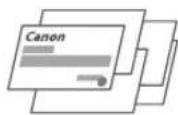
| Copying | Duplex, N-in-1, enlarge/reduce, ID card copy |
| Fax | Sequential broadcast, memory reception, PC fax |
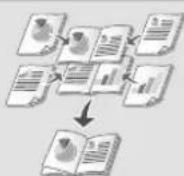
| Printing | Duplex, N-in-1, booklet |
| Laser safety | Class 1 laser product (IEC 60825-1:2014) |
| Maintenance | Regular cleaning with a damp cloth, do not use flammable substances |
| Spare parts | Toner cartridges available for at least 7 years after end of production |
| General information | Full manual available at canon.com/oip-manual |
Frequently Asked Questions - i-SENSYS MF525x CANON
User questions about i-SENSYS MF525x CANON
0 question about this device. Answer the ones you know or ask your own.
Ask a new question about this device
Download the instructions for your Printer in PDF format for free! Find your manual i-SENSYS MF525x - CANON and take your electronic device back in hand. On this page are published all the documents necessary for the use of your device. i-SENSYS MF525x by CANON.
USER MANUAL i-SENSYS MF525x CANON
Please read "Important Safety Instructions" before operating this product. After you finish reading this guide, store it in a safe place for future reference.
The information in this document is subject to change without notice.
Quick Setup
Getting Started
Please read "Important Safety Instructions" before operating this product. P.140
After you finish reading this guide, store it in a safe place for future reference. The information in this document is subject to change without notice.
Getting Started
canon.com/oip-manual to read the User's Guide that describes all functions of this machine.
Items Included with the Machine
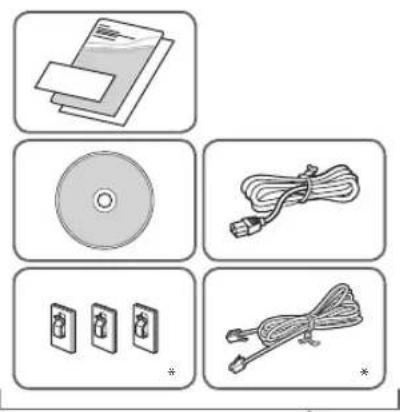
- This item may not be included depending on the model of the machine.
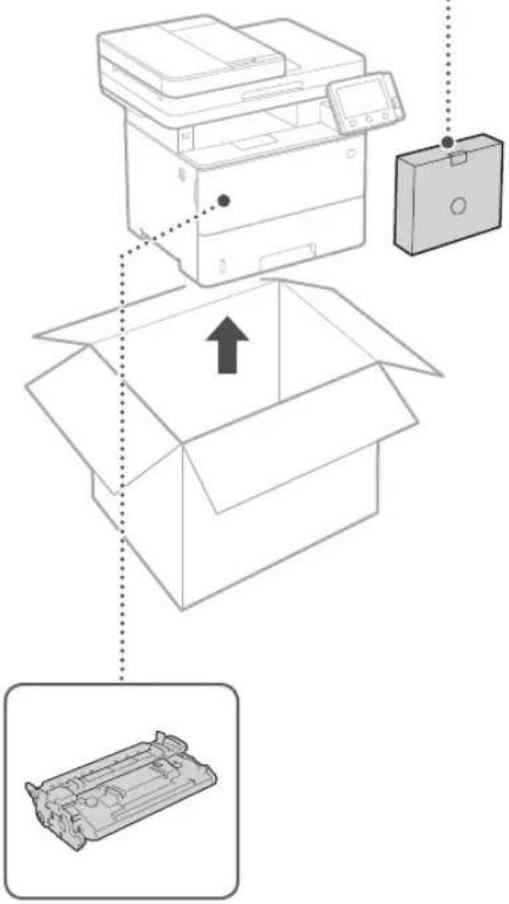
Toner cartridge (included with the machine)
Installing the Machine
Before starting the installation
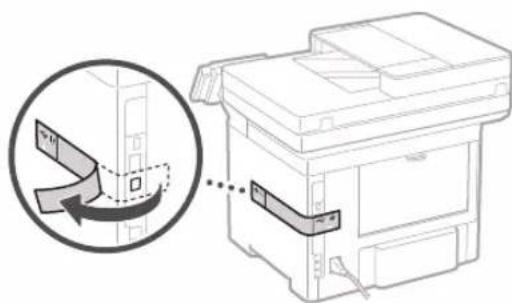
- Remove all of the tape.

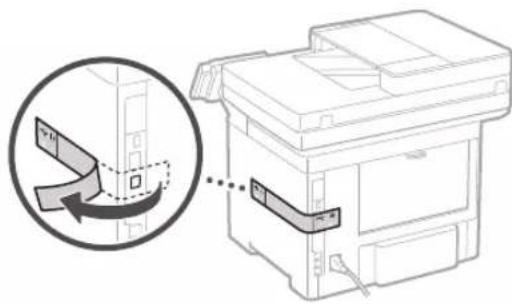
- Do not remove the sticker that covers the USB port.
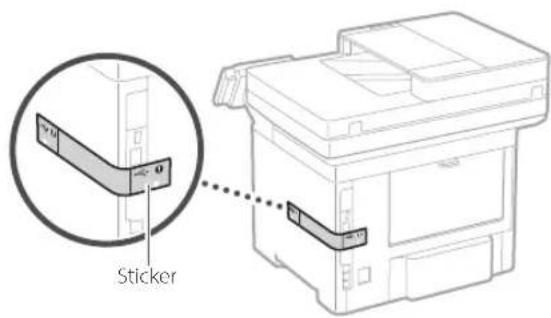
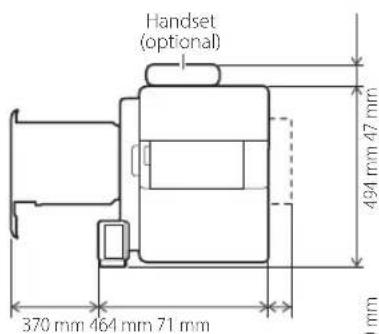
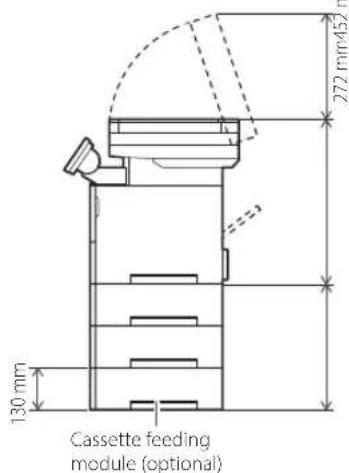
Installation Requirements
Provide a space of 100 mm or more around the machine.
1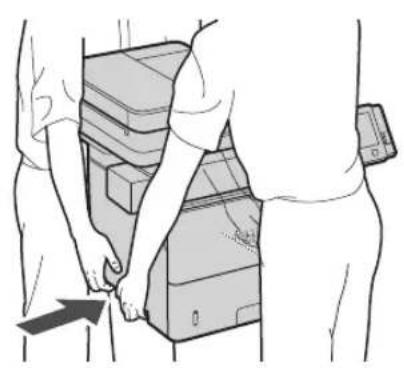
4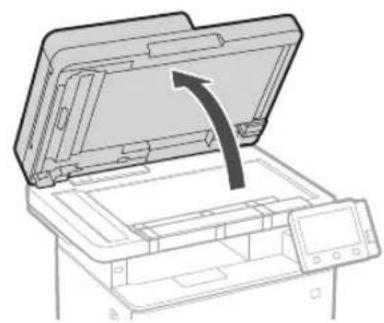
2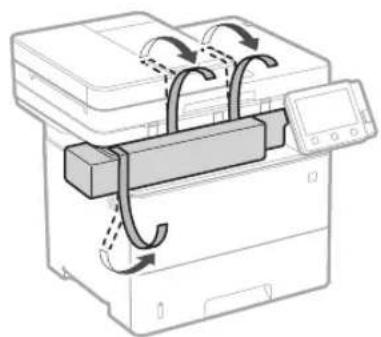
5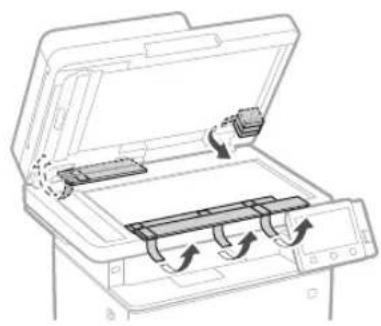
3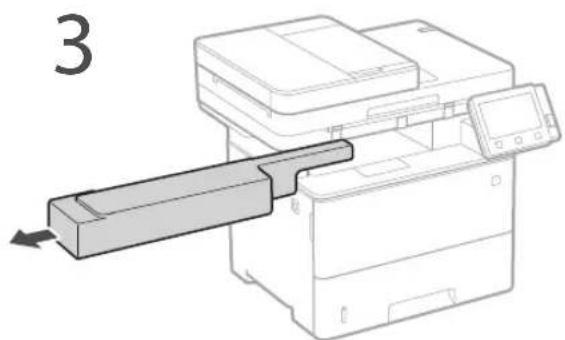
6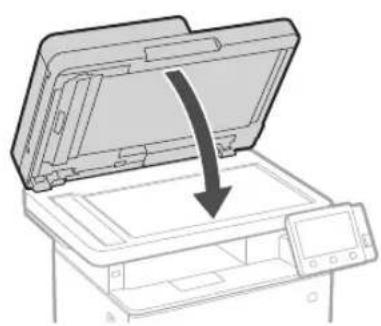
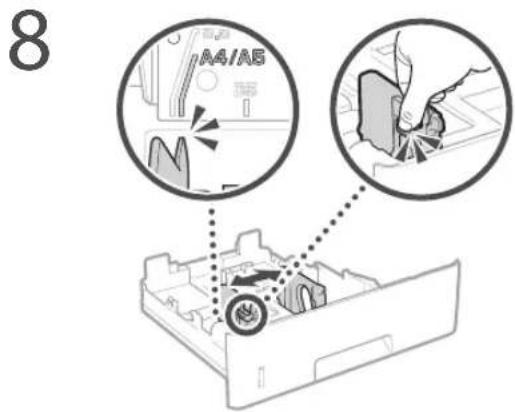
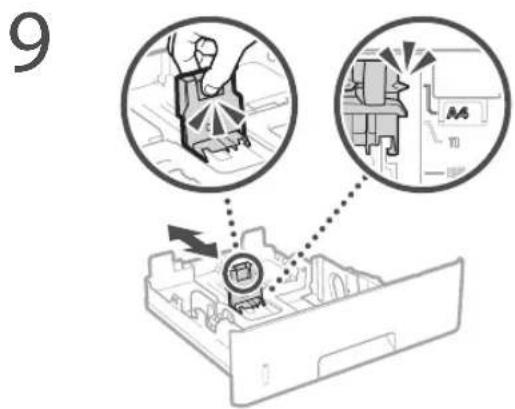
13 Attach the handset (optional).
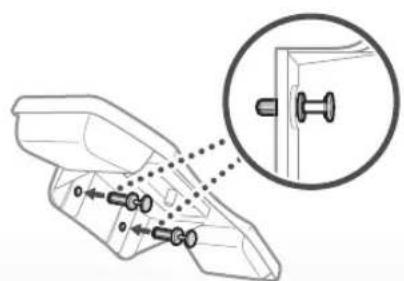
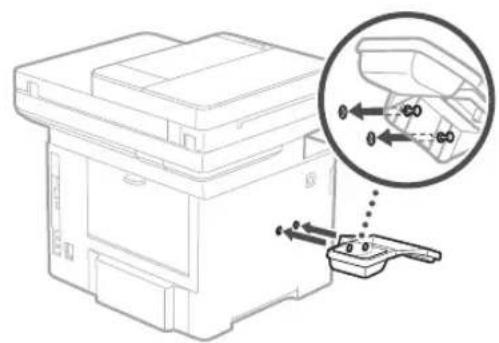
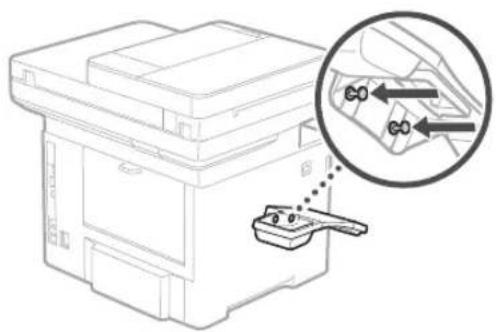
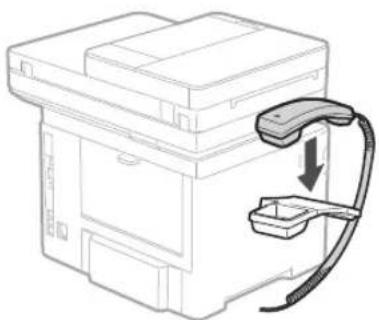
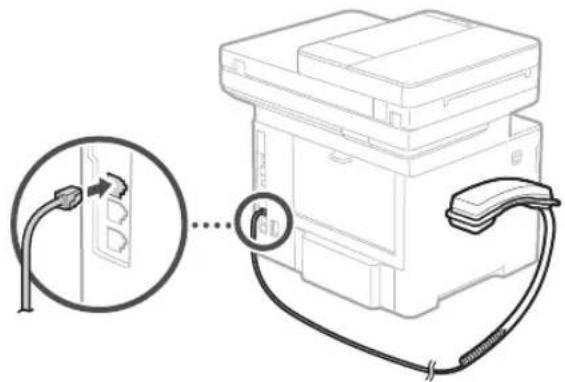
* This item may not be included depending on the model of the machine.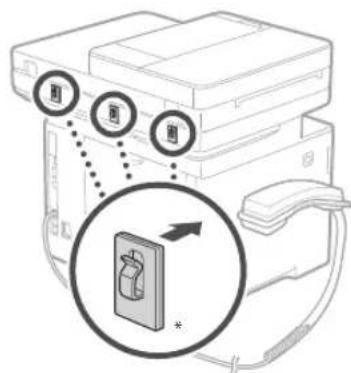
14 Install the paper feeder (optional).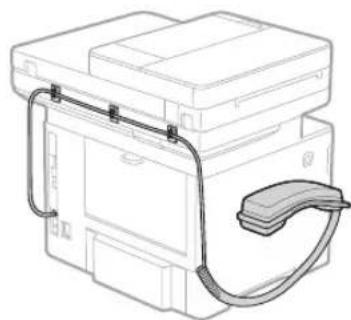
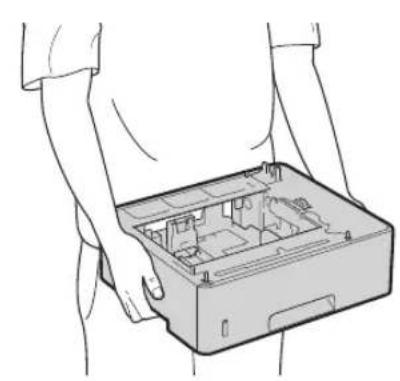
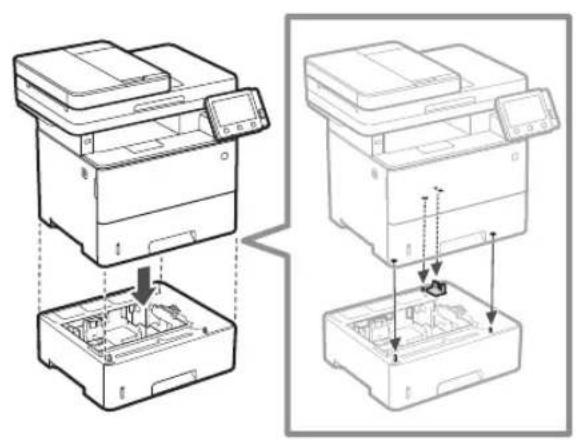
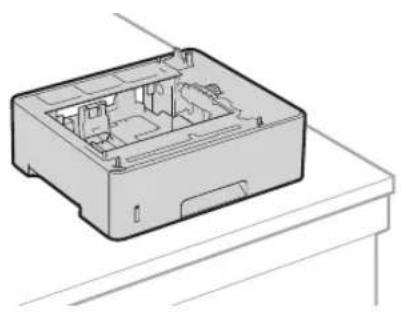

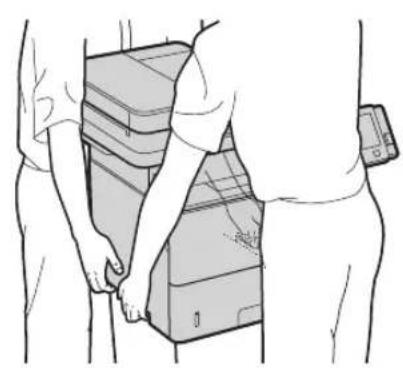
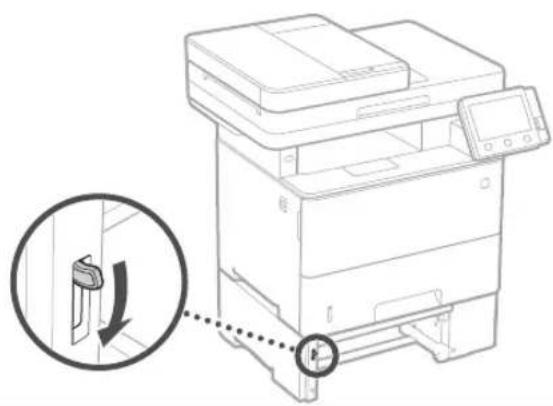
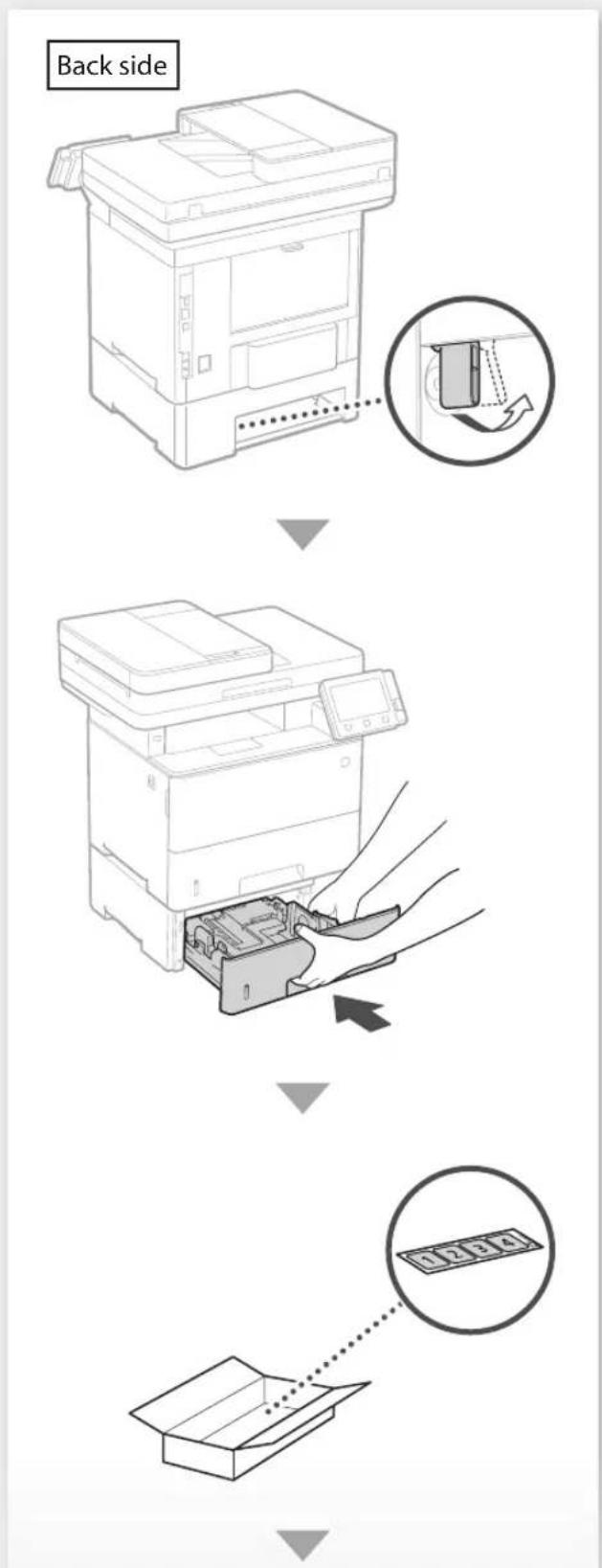
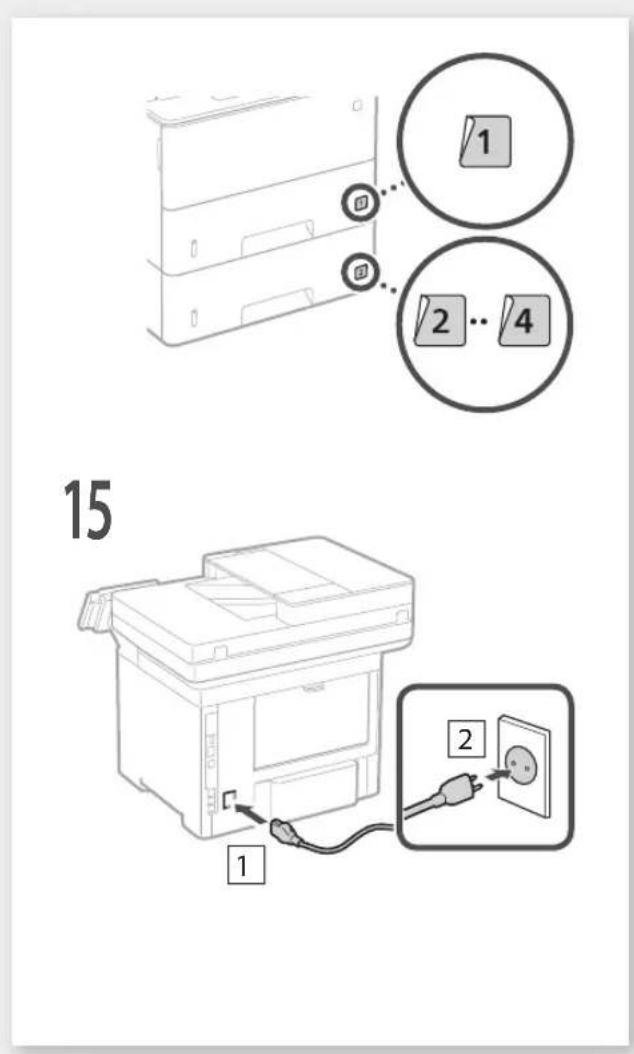
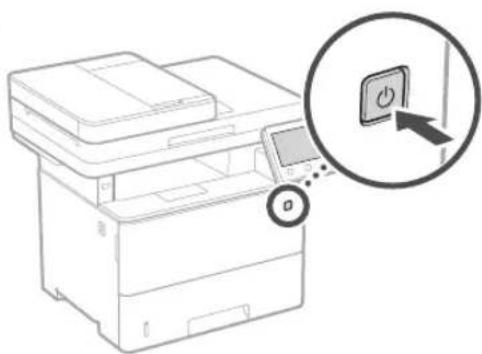
Configuring the Initial Settings of the Machine
About Application Library*
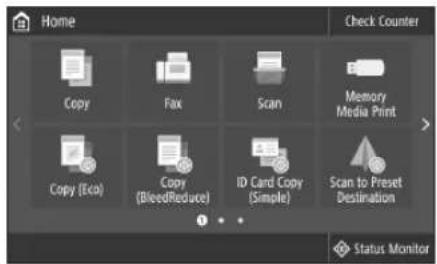
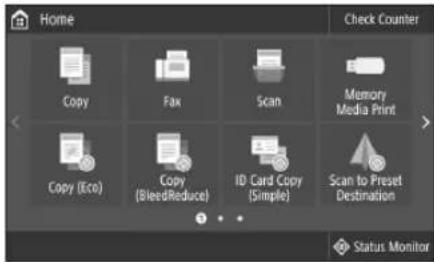
Application Library is an application that allows you to use useful functions for routine jobs or other convenient functions in a one-touch operation without necessity of making functional settings every time. You can access each registered function by simply pressing the appropriate button displayed in the Home screen. For the respective function, see the description displayed in the Setup Guide.
- This function may not be available, depending on the model of the machine.
1.
- Configure the initial settings, according to the screen.
- Set the language and country/region.
- Set the time zone and current date/time.
- Configure the settings to prevent unauthorized access.
- For the purpose of confirmation, enter the same PIN twice.
Configuring the Method of Connecting to a Computer
Before starting the configuration
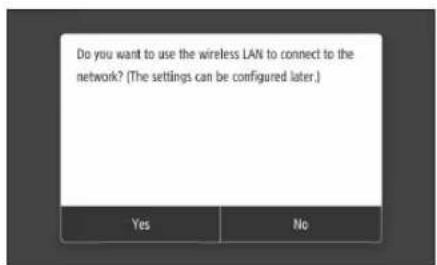
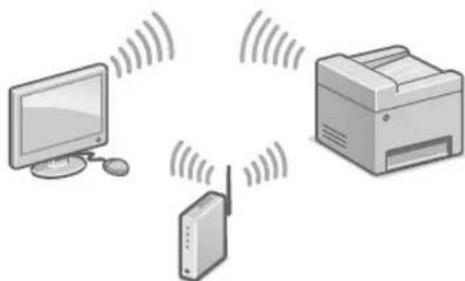
The machine cannot be connected to both wired and wireless LANs at the same time. If the machine is connected to an unsecured network, your personal information might be leaked to a third party. Please be aware and careful of this. The machine does not come with a router. Please have one ready, if necessary. - Even in an environment without wireless LAN router, you can use Access Point Mode to make a wireless connection to the machine directly from your mobile device (Direct Connection). See User's Guide.
Specifying the connection method
To connect via wireless LAN: To connect via wired LAN or USB:
To connect via wireless LAN
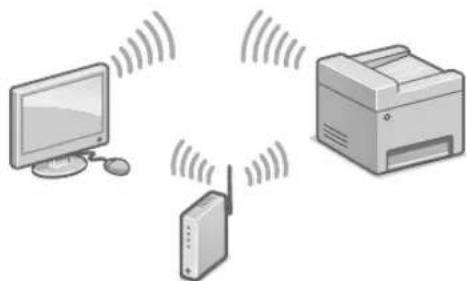
- Make sure that the computer is connected to a router properly.
- Check the network settings on the computer.
- Take note of the SSID and network key.
- Check the label on the router. See User's Guide.
- The setting operation is easier if the router is provided with a WPS mark. See User's Guide.
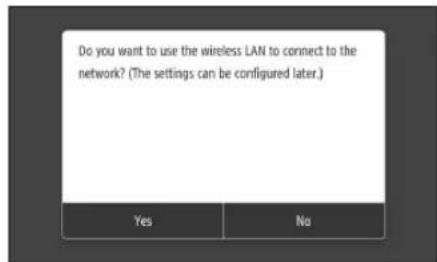
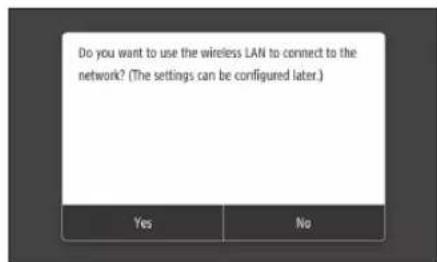
- Set the access point and network key according to the screen below.
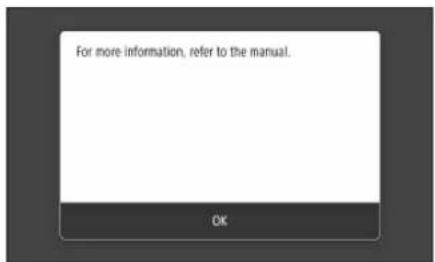
- Press OK>
- Press .
- Press .
- Select the access point (SSID), and press .
- Enter a WEP key (network key), and press .
- Press .
- Wait until message is displayed.
- Press The IP address will be automatically configured in a few minutes.
- Install the driver and software.
P.12 "Installing the software"
Now you are finished with the configuration of the initial settings.
If your machine is provided with the fax function, proceed to configuring the fax settings. P.13
To connect via wired LAN
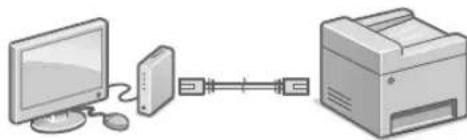
The machine does not come with a LAN cable. Please have one ready, if necessary.
- Make sure that the computer is connected to a router properly.
- Check the network settings on the computer.
- Connect the LAN cable.
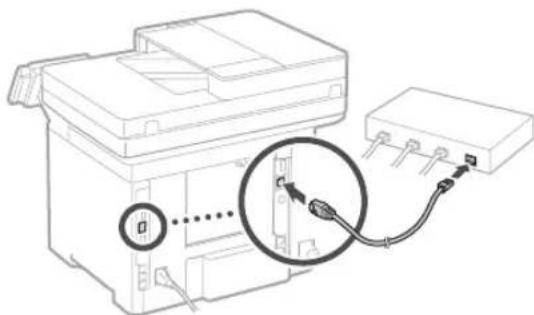
After connecting the cable, wait a few minutes (until the IP address is set automatically). If a static IP address has been set on the computer, set the machine's IP address manually.
- Install the driver and software. P.12 "Installing the software"
Now you are finished with the configuration of the initial settings.
If your machine is provided with the fax function, proceed to configuring the fax settings. P.13
To connect via USB
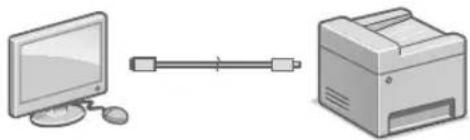
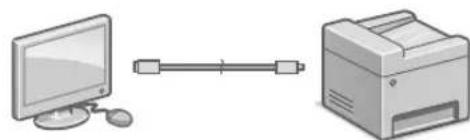
The machine does not come with a USB cable. Please have one ready, if necessary. Make sure that the USB cable you use has the following mark. - Do not connect the USB cable before installing the driver. If you did, disconnect the USB cable from the computer, close the dialog box, and then perform the following procedure from step 1.
- Install the driver and software.
P.12 "Installing the software"
- When a screen with instructions for connecting the USB cable to the machine is displayed, remove the sticker that covers the USB port.
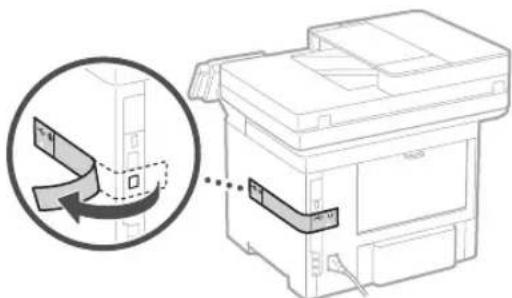
Now you are finished with the configuration of the initial settings.
If your machine is provided with the fax function, proceed to configuring the fax settings. P.13
Installing the software
The procedure described here is only applicable when your computer runs on the Windows OS. For more details on the software installation procedure, see the driver's manual. - For the installation when your computer runs on the macOS, see the driver's manual. - Your machine may not come with the driver for the macOS, depending on the time of purchase. New drivers are uploaded to the Canon website, and you can download and use the latest one.
1.
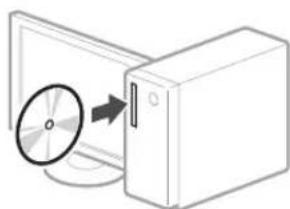
2.
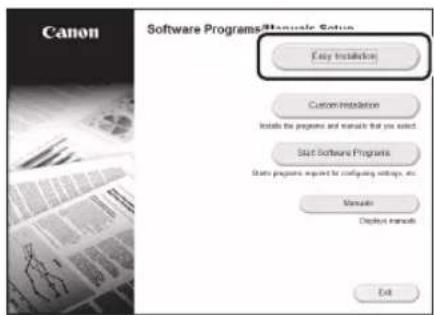
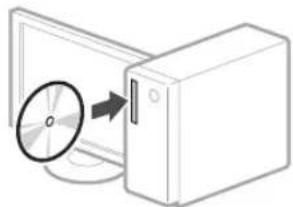
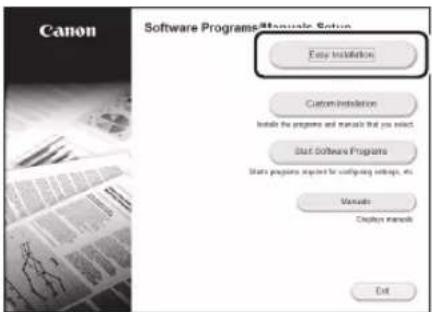
If the screen is not displayed properly, reinsert the CD-ROM/DVD-ROM or search for "D:\MInst.exe" on the Windows platform (This description assumes that "D:" is the CD-ROM/DVD-ROM drive name).
Using the scanner conveniently Configuring the network settings with "Send Function Setting Tool" allows you to directly send scanned originals with e-mail or I-Fax or store them in a shared folder or on the FTP server. In the screen displayed in step 2, select [Start Software Programs] [Send Function Setting Tool] to start the Send Function Setting Tool.
Configuring Fax Settings
Before starting the configuration
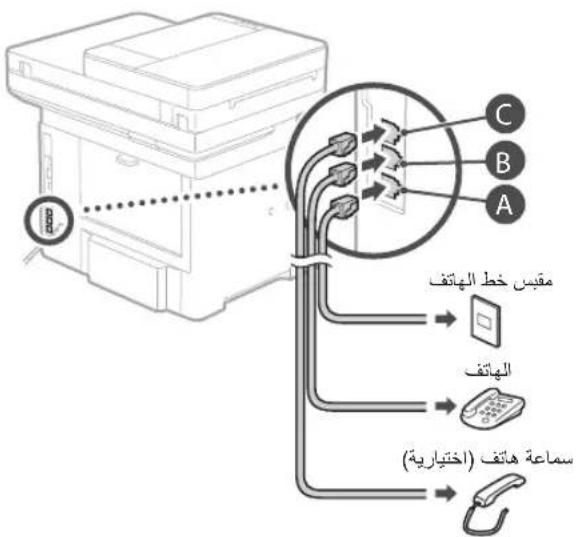
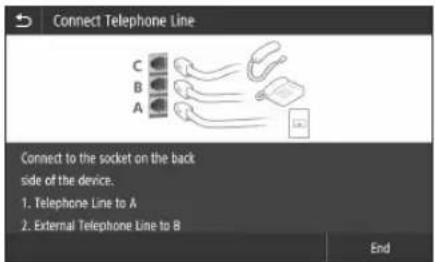
If your machine does not come with a telephone cable, have one ready, as necessary.
Configure the fax settings, according to the screen below.
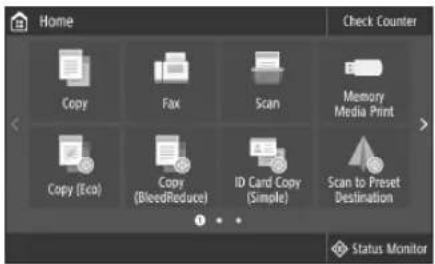
- Press <Fax> .
- Press .
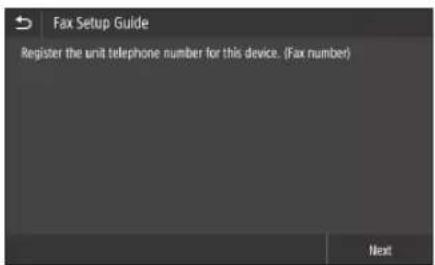
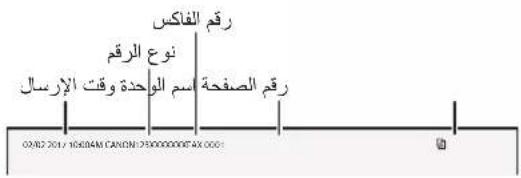
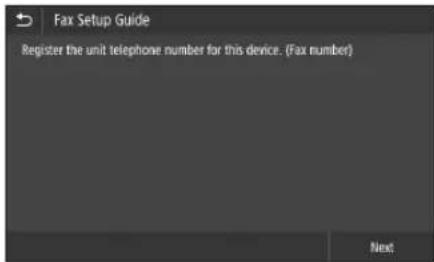
- Register the machine's telephone number (fax number) and abbreviated user name.
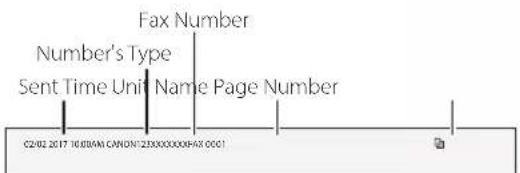
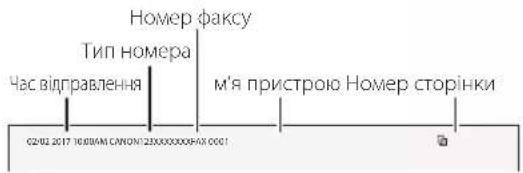
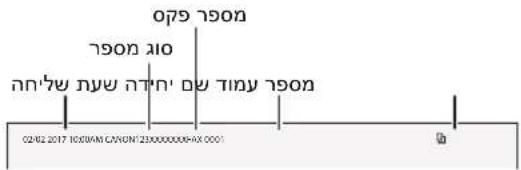
The information below will be printed at the top part of the paper output from the destination machine as sender information.
- Set the reception mode. Make the setting by answering the questions on your purposes of using the fax function.
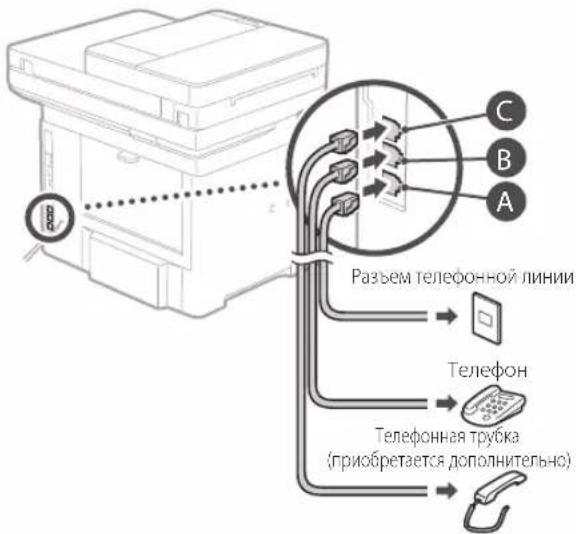
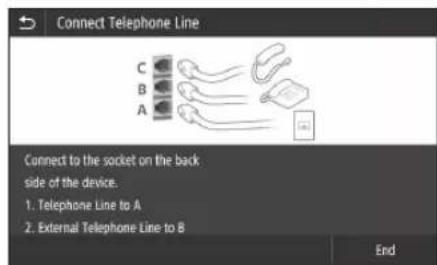
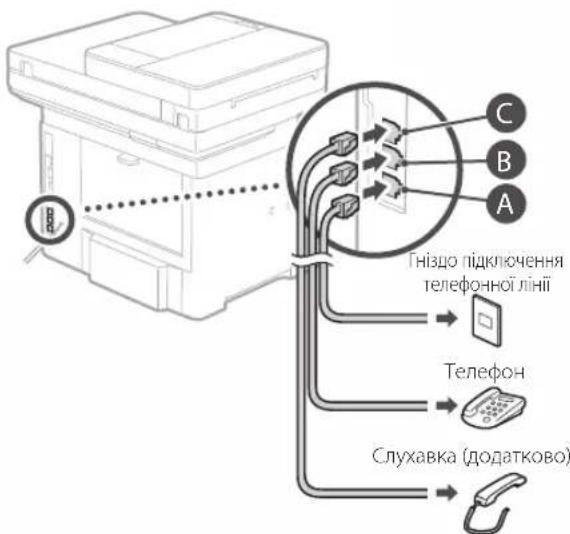
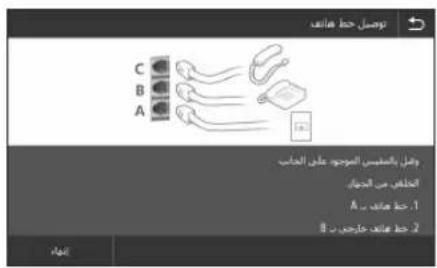
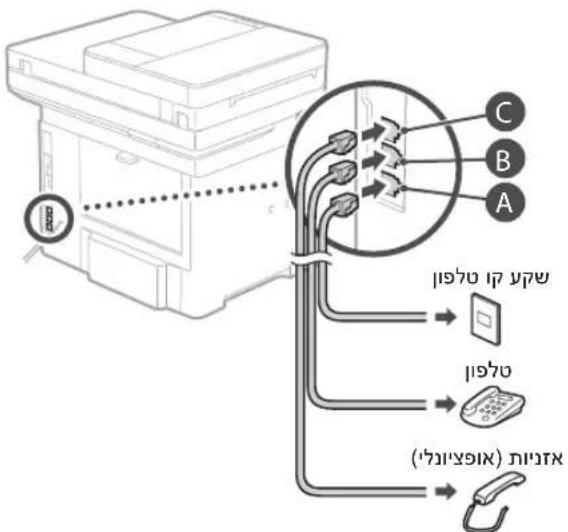
- Connect to a telephone line.
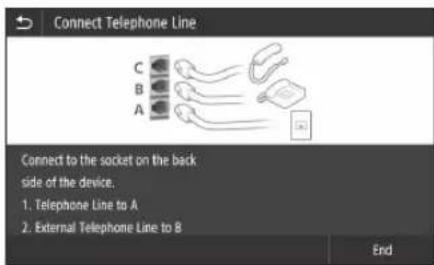
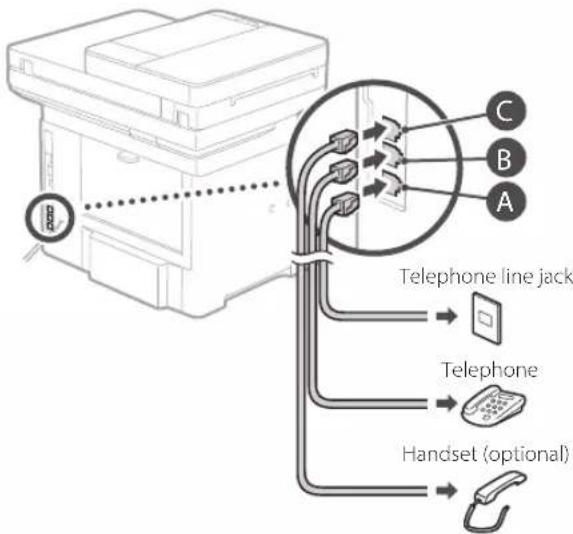
- Press .
- Press .
Now you are finished with the configuration.
CAUTION!
When you load paper of a size other than A4, change the paper settings. Steps 5 and 6 in "Loading in the Paper Printer" on P.138
The network configuration with the "Send Function Setting Tool" allows you to send scanned originals directly by e-mail or I-Fax, or store them in a shared folder or on an FTP server. On the screen that appears in step 2, select [Start Software] [Send Function Setting Tool] to start the Send Function Setting Tool.
5.48 "Installation of softwares"
5.48 "Installation of software"
5.48 "Installation of softwares"
Installation of softwares
Connection via wired LAN
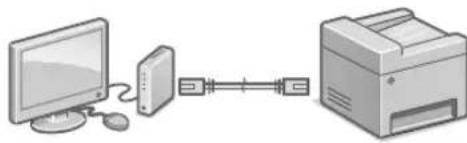
IP address and network settings
- Simultaneous connection of the device to wired and wireless networks is not possible.
- If the device is connected to an unsecured network, your personal information may be accessed by third parties. Remember this and be cautious. The router is not included in the device's package. If necessary, prepare it in advance. Even in an environment without a wireless router, you can use the access point mode for wireless connection to the device via a mobile hotspot (direct connection).
User Manual
Connection method indication
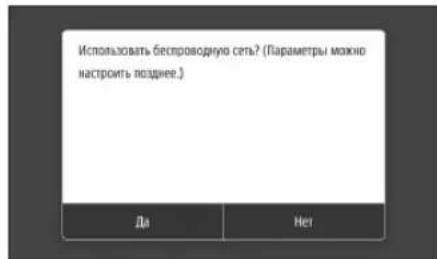
For wireless LAN connection:
For wired LAN or USB connection:
Wireless connection
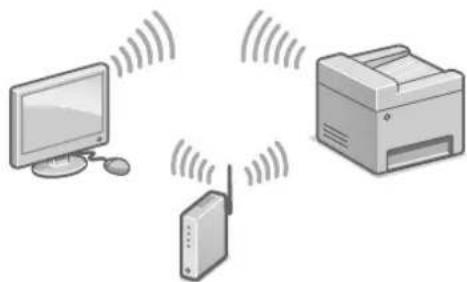
1. Make sure the computer is properly connected to the router. 2. Configure the network settings on the computer.
- Enter the SSID and network key.
Check the label on the router. The user manual and setup work are simplified if the router has a WPS button. User Manual
4. Enter the access point key in accordance with the instructions below.
- Press OK>
- Press
- Press .
- Select the access point (SSID) and press . 5. Enter the WEP key (network key) and press .
- Press <OK> - wait for the message <Connected> to appear.
- Press <Close>.
- The IP address is configured automatically within a few minutes.
5. Install the driver and software.
See page 68 "Software Installation"
Now the initial configuration is complete.
If the device has an additional function, proceed to configure the access point.
Page 69
Wired connection
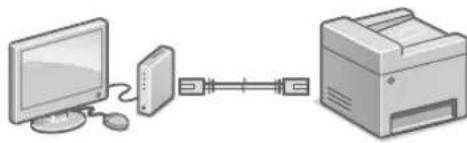
The LAN cable is not included with the device. If necessary, prepare it in advance.
1. Make sure the computer is properly connected to the router. 2. Check the network settings on the computer. 3. Connect the LAN cable.
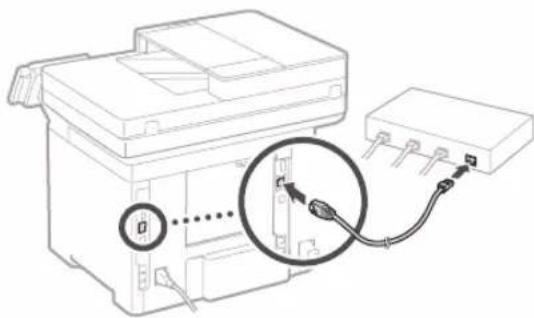
- Connect the cable and wait a few minutes (until the IP address is assigned automatically). - If a static IP address is set on the computer, set the device's IP address manually.
- Install the driver and software.
Page 68: Software installation
Now the initial settings task is complete.
If the device has a fax function, proceed to the fax settings task.
Page 69
USB connection
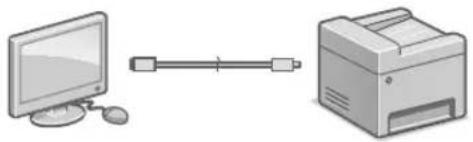
The USB cable is not included with the device. If necessary, prepare it in advance.
- Make sure the USB cable you use has the following marking.

Do not connect the USB cable before installing the driver. If you have already done so, disconnect the USB cable from the computer, close the dialog box, and perform the procedure shown below starting from step 1.
- Install the driver software.
Page 68: Software installation
- If a message is displayed prompting you to connect the USB cable to the device, remove the cap covering the USB port.
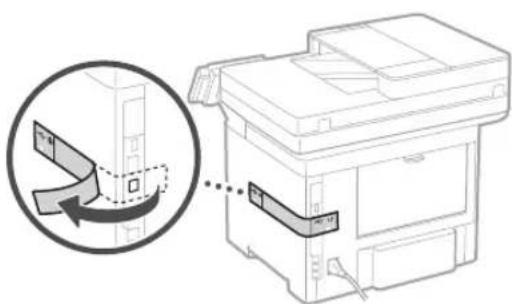
Now the initial settings task is complete.
If the device has a fax function, proceed to the fax settings task.
Page 69
Software installation
The driver is provided here for computers running Windows OS. For installation instructions, see the driver manual. For installation on computers running macOS, see the driver manual. Depending on when the device was purchased, it may be supplied without a driver for macOS. The latest drivers are posted on the Canon website, so you can download and use the latest driver.
1.
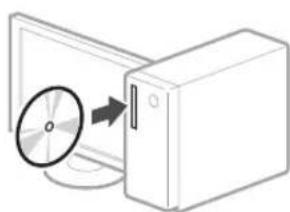
2.
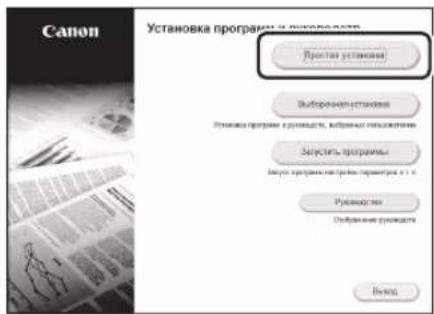
If the screen is not displayed correctly, reinstall the CD-ROM/DVD-ROM or search for the file "D:\MInst.exe" on the Windows platform (in this description, it is assumed that "D:" is the drive letter of the CD-ROM/DVD-ROM).
Convenient use of the scanner
Setting up the network using the "Send Function Settings Tool" allows you to send scanned originals via email or fax, or save them to a shared folder or FTP server. On the screen shown in Figure 2, select [Start Program] [Send Function Settings Tool] to start the Send Function Settings Tool.
Setting the fax settings
Before making settings
If the telephone cable is not included with the device, prepare it as necessary.
Set the fax settings according to the screen shown below.
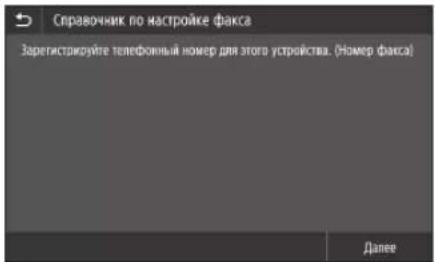
- Press 2. Press
- Register the fax number of the device and the abbreviated user name.
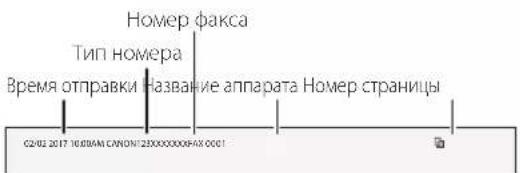
The information shown below will be printed at the top of the paper output on the receiving device, as the transmission header.
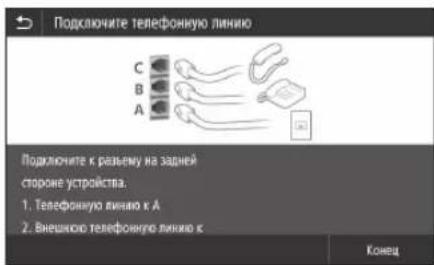
4. Set the reception mode. The settings are responsible for answering questions about using the fax function. 5. Connect to the telephone line.
- Press .
Setup complete.
ATTENTION!
If you reload paper whose format differs, change the paper settings.
See "Loading paper into the cassette" on p.278
Device setup
Setting basic device parameters
About the Application Library program
Application Library is a program that allows you to use useful functions or perform standard operations or other convenient functions with a single key press without having to set functional parameters each time. You can access any registered function by simply pressing the required key displayed on the screen of the main menu. A description of the corresponding function is displayed in Russian.
The function may be unavailable depending on the device model.
1.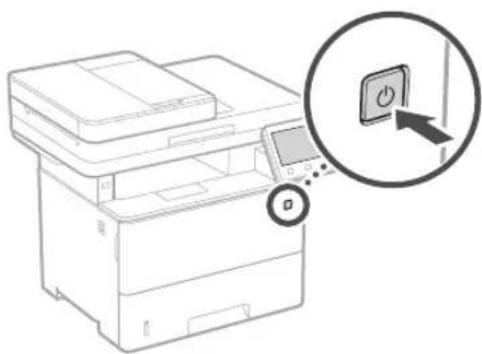
Set the basic parameters according to the instructions on the screen.
2. Set the language and region. 3. Set the date and time. 4. Set the parameters for access to the network. - To confirm, press the same key again.
Setting up the computer connection method
Before starting setup
Connect the device to a power outlet and to a wireless local network. If the device is connected to an unsecured network, your personal information may be accessible to third parties. Be careful and protect it. The device comes without a router. Install it if necessary. - If there is no router in the house without a wireless local network, you can use the access point mode to connect the device directly from a mobile device (direct connection).
User Manual
Connection Instructions
Before starting setup
If the device comes without a telephone cable, install it if necessary.
Set the parameters according to the instructions on the screen.
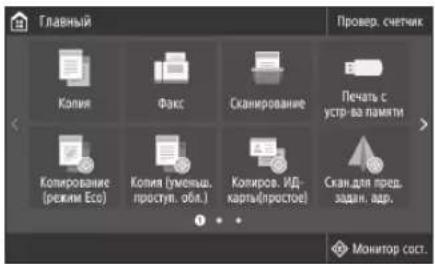
- Press (Fax).
- Press (Start Setup Now).
- Register the telephone number (number of the device) and the short name of the user.
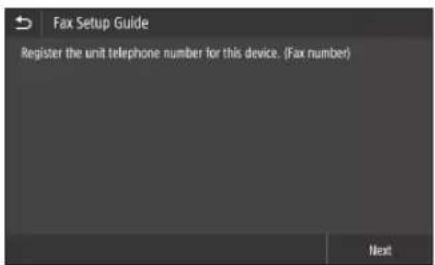
The information provided will be displayed as information about the sender in the upper part of the document, and will be used when using the device as intended.
4. Set the fax mode. - Set the parameters according to the questions for the purpose of using the fax function. 5. Connect the device to the telephone line
- Press the (Finish) button.
- Press the (Yes) button.
Setup completed.
ATTENTION
Before loading paper, adjust the paper format to A4, change the parameters
Steps for loading paper into the paper tray on page 288
Device settings configuration
Via Application Library (Application Library)*
Application Library (Application Library) is an application that allows you to use useful functions for daily work or other convenient functions with one touch, without the need to adjust function settings each time. Each registered function can be accessed by simply pressing the corresponding button visible on the home screen. Descriptions of the corresponding functions are provided in the "Setup Wizard".
- Depending on the device model, this function may not be available.
1.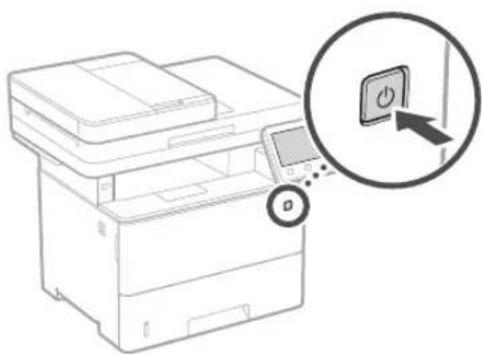
Configure the initial settings according to the instructions on the screen.
- Set the language and country/region.
- Set the time zone and current date/time.
- Configure settings necessary to protect against unauthorized access. To confirm the entered data, enter the same PIN code twice.
S.92 Software installation
S.92 Software installation
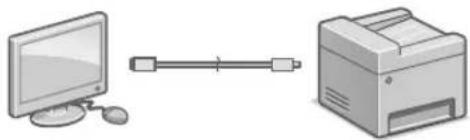
Connection via USB interface
S.92 Software installation
Configuration of the initial settings of the machine
Application Library (Application Library)*
Application Library (Application Library) is an application that allows you to use certain functions for routine tasks and other convenient functions with end documentation without the need to perform functional settings every time. You can get access to each registered function by simply pressing the corresponding button shown on our screen. See the description shown in the guide for setting up the corresponding function.
This function may not be available depending on the machine model.
1.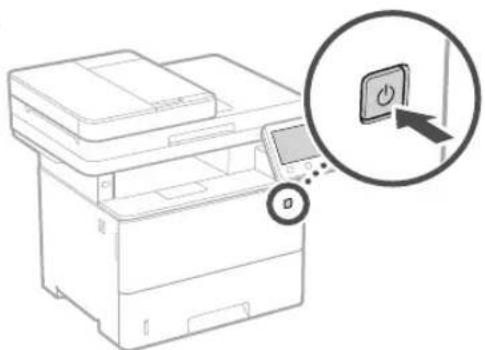
Configure the initial settings according to the screen.
- Set the language, country/region.
- Set the time zone, date/time.
- Copy the settings to prevent unauthorized access. For security, enter a password for each user.
Configuration of the connection method to the computer
Before starting the configuration
The machine cannot be connected simultaneously via cable and wireless LAN. If the machine is connected to an unsecured network, your personal information may be leaked to a third party. Please be careful about this. The machine is not supplied with a router, so prepare one if necessary. - For wireless LAN connection, you can use the access point mode to establish a wireless connection with the machine directly from your mobile device (direct connection). User's Guide
Selecting the connection method
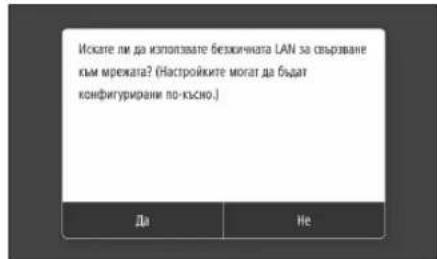
- To connect via wireless LAN: - To connect via wired LAN or USB:
To connect via wireless LAN
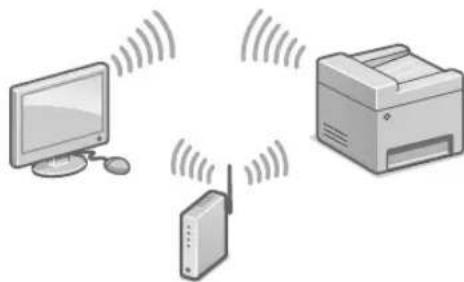
- Make sure the computer is properly connected to the router. 2. Check the network settings of the computer.
- Check the SSID and network key.
Check the router's network. The user manual for setting up is easier if the router is equipped with a WPS button. The user manual
4. Enter the network key in the appropriate field on the screen.
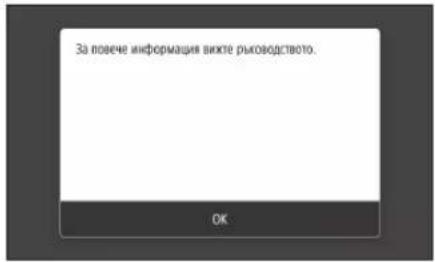
- Click OK.
- Click
- Click 4. Select the SSID and click. 5. Enter the WEP key (network key) and click
- Click
Wait until the message appears. 7. Click <Close>. The IP address will be automatically configured within a few minutes.
5. Install the driver and software.
WPS
Therefore, angle OK = 90 degrees (k = 1000:)
Triangle AOB is congruent to triangle AOB, and also to triangle AOB.
<1>
e baii, (a) WEP
<
Therefore, we have: a1^x = alpha/(2*beta) if the quantity = alpha/2. b1^x = alpha/(2*beta).
(y - y1) * y = k1 * y' + k2 * x
1
Windows 15: Run "D:MInst.exe" from "D:" (DVD)
Send Function: 1 I-Fax, 2 FTP [Send Function Setting Tool]
USB

Therefore, y = -(x - 2)^2 + 9 = -x^2 + 4x + 5
.3S
1
(a) Application Library
Application Library


CD-ROM/DVD-ROM
"Send Function Setting Tool"
Access Point Mode-1
(n)
Tnn nn nnnn nn nn
.(w)n)
wnwnn7nn
nannnn noy
(p) : winh LAN nwnnnn
(x7) : USB in 117 LAN nnnn
inx LAN nynnnn
nnnnnnnnnnnnnnnnnnnnnnnnnnnnnnnnnnnnnnnnnnnnnnnnnnnnnnnnnnnnnnnnnnnnnnnnnnnnnnnnnnnnnnnnnnnnnnnnnnnnnnnnn
.2
n nn nn nn nn nn nn nn nn nn nn nn nn nn nn nn nn nn nn nn nn nn nn nn nn nn nn nn nn nn nn nn nn nn nn nn nn nn nn nn nn nn nn nn nn nn nn nn nn nn nn nn nn nn nn nn nn nn nn nn nn nn nn nn nn nn nn nn nn nn nn nn nn nn nn nn nn nn nn nn nn nn nn nn nn nn nn nn nn nn nn
Application Library nix * (nivnn no)
Jnntn nnnn nn nnnn nnnn nnnn nnnn nnnn nnnn nnnn nnnn nnnn nnnn nnnn nnnn nnnn nnnn nnnn nnnn nnnn nnnn nnnn nnnn nnnn nnnn nnnn nnnn nnnn nnnn nnnn nnnn nnnn nnnn nnnn nnnn nnnn nnnn nn
7n nnnn 75 USB-n nn nnnn nn nnnn nn nnnn nn nnnn nn nnnn nn nnnn nn nnnn nn nnnn nn nnnn nn nnnn nn nnnn nn nnnn nn nnnn nn nnnn nn nnnn nn nnnn nn nnnn nn nnnn nn nnnn nn nnnn nn nnnn nn nnnn nn nnnn nn nnnn nn nnn
nnnnnnnnnnnnnnnnn 1 nnnnnnnnn" 132 tiny C
y 1970
y
ynn.2
1903 1903 1903 1903 1903 1903 1903 1903 1903 1903 1903 1903 1903 1903 1903
yyn 10n yyn
Memo
Quick
Operation

Quick Operation En
Brief operating instructions
Uk
Other languages Lv
Short operating instructions Lt
Quick operations Et
Place the Original Properly
Remember before You Start Operation
Place your original on the platen glass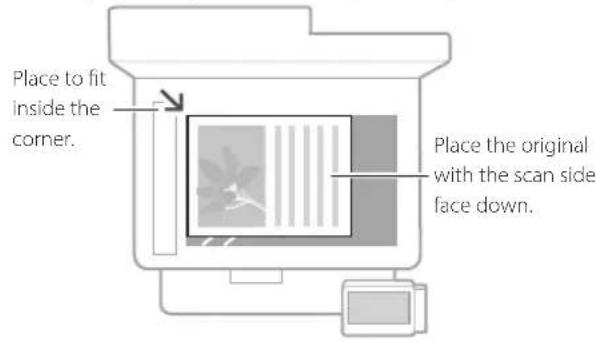


Suitable for scanning book pages, magazine pages and newspaper clips.
Place your originals into the feeder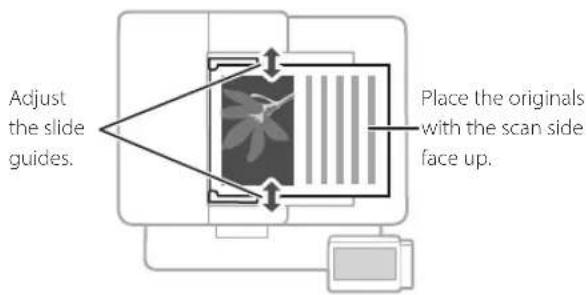
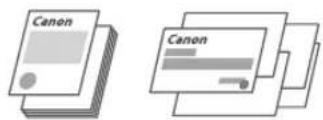
Suitable for continuously scanning many pages of literature, quotation, etc.
Start the Operation from the Operation Panel

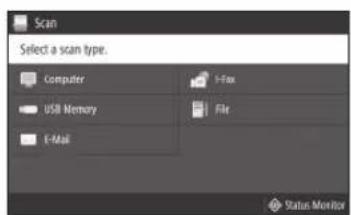
Scanning
- Place the original.
- Press , and select .
- Select the type of scan, and enter the necessary information.
- Select , or .
Types of scan
Store in USB memory device Send e-mail Send to file server
To scan from a computer
MF Scan Utility
For details
"Scanning" in the User's Guide

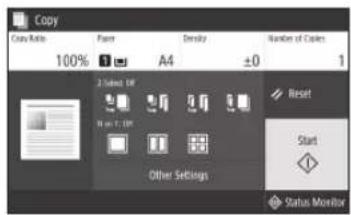
Copying
- Place the original.
- Press , and then select < Copy>
- Specify the copy settings, as necessary.
- Enter the desired number of copies.
- Select .
Useful copy settings
Non 1 2-Sided or 1-Sided Enlarging or reducing - Copying ID cards

For details
"Copying" in the User's Guide

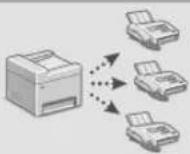
Faxing*
- This function may not be available, depending on the model of the machine.
- Place the original.
- Press , and select < Fax>.
- Enter the destination information.
- Specify the fax settings, as necessary.
- Select .
Useful fax functions
Sequential Broadcast Memory Reception PC Fax

For details
☉ "Faxing" in the User's Guide

Printing
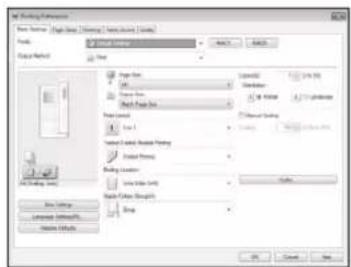
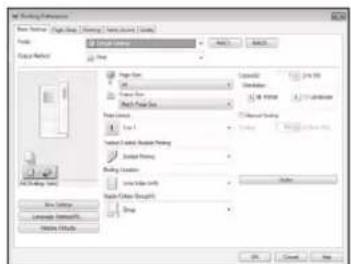
- Open the document to print, and select the print function of the application.
- Select the printer driver for the machine, and select [Preferences] or [Properties].
- Specify the paper size.
- Specify the paper source and paper type.
- Specify the print settings, as necessary.
- Select [OK].
- Select [Print] or [OK].
Useful print settings
2-sided Non 1 ■ Booklet Printing
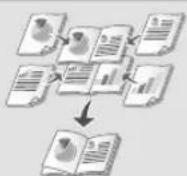
For details
"Printing" in the User's Guide
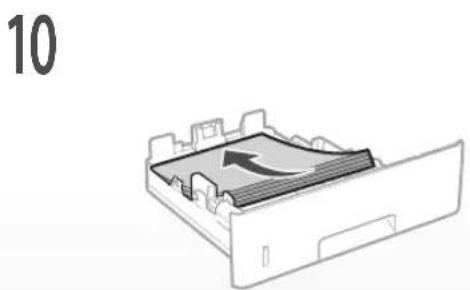
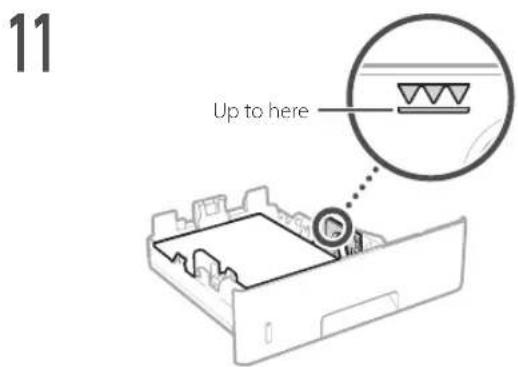
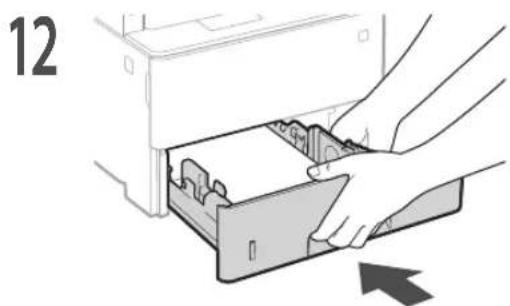
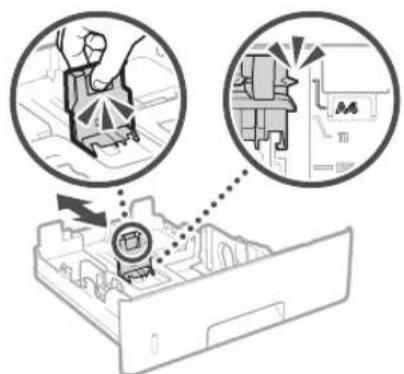
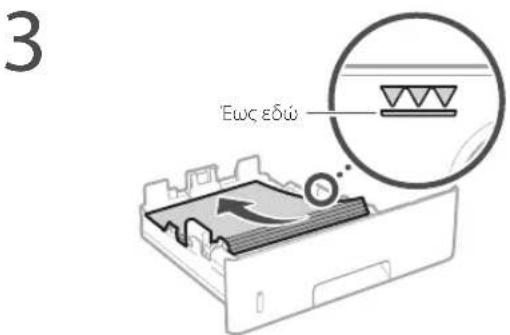
Loading in the Paper Printer
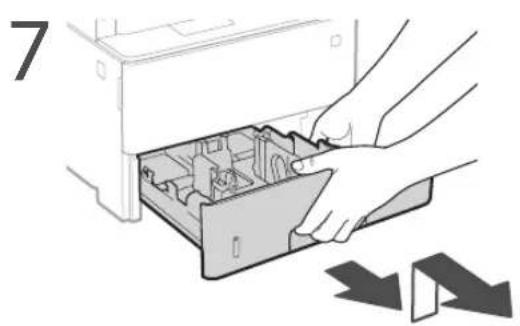
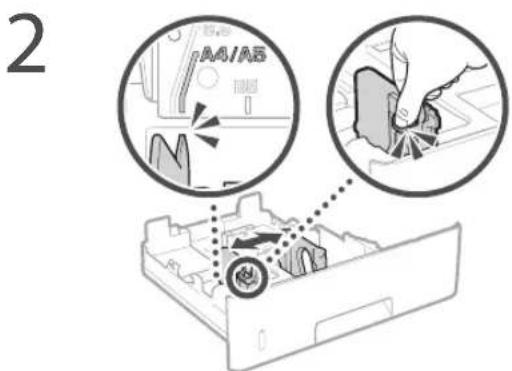
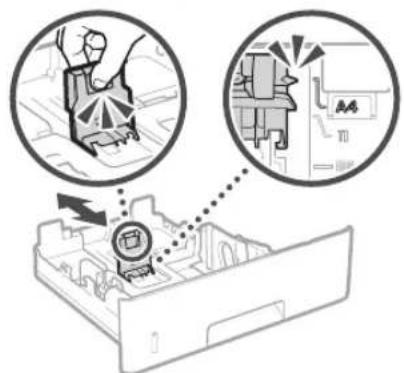
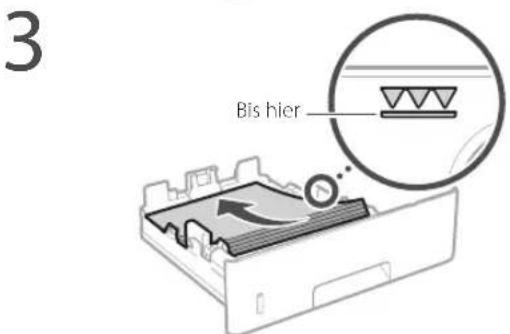
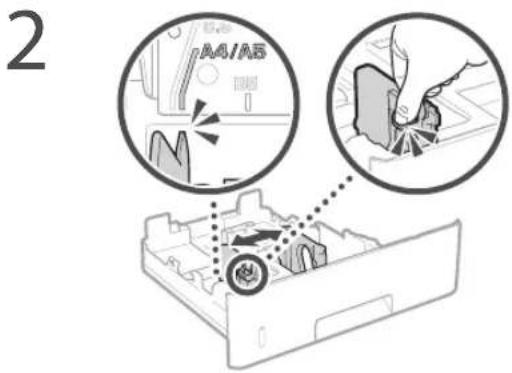
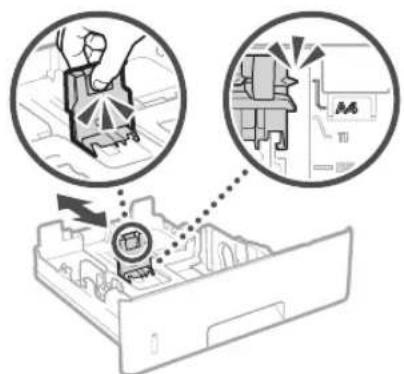
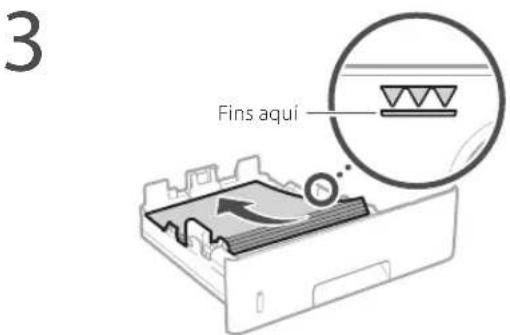
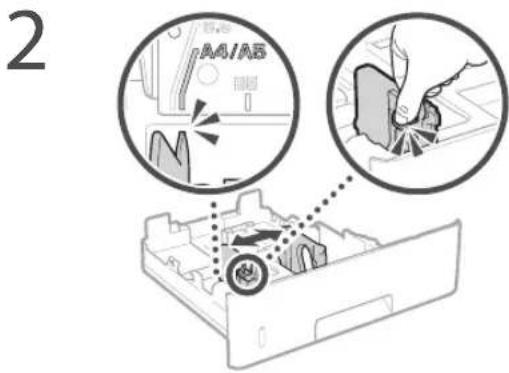
Pull out the paper drawer.
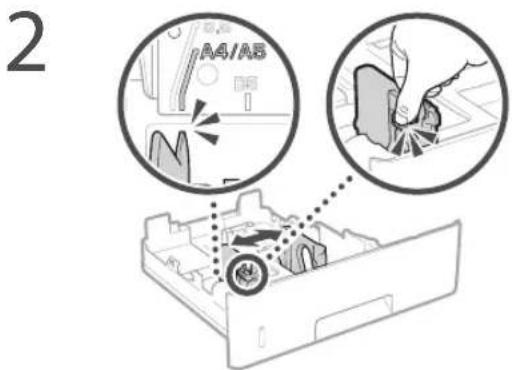
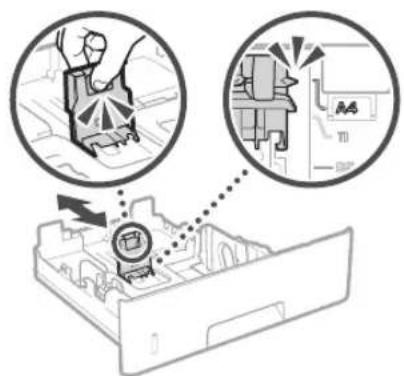
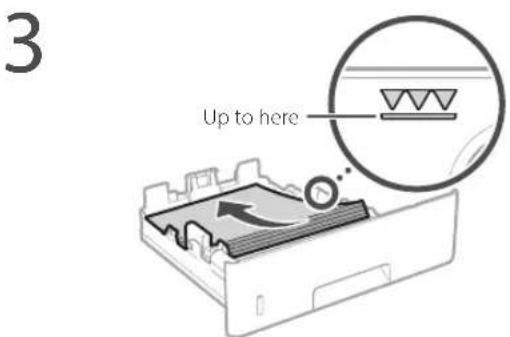
4 Insert the paper drawer into the machine.
If you load a different size or type of paper from the one before, make sure to change the settings.
Press and select . 6 Specify the size and type of paper, according to the screen.
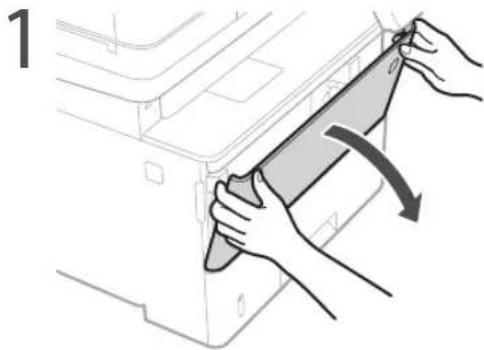
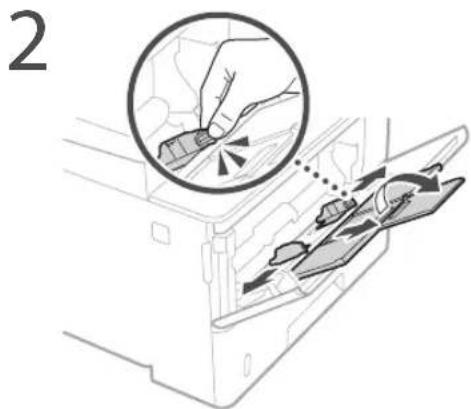
Loading in the Multi-Purpose Tray
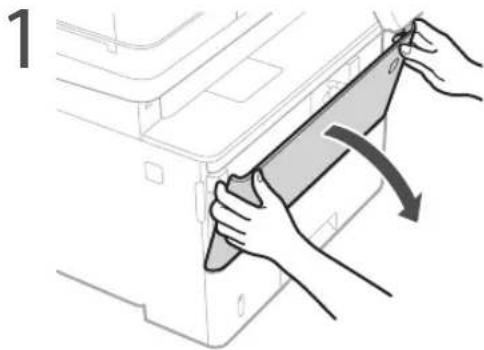
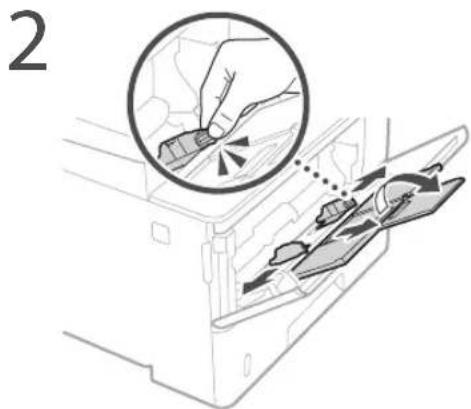
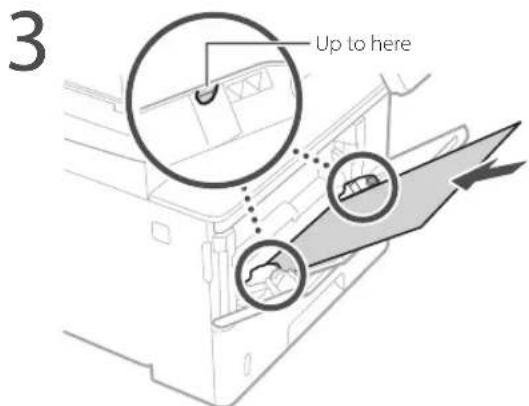
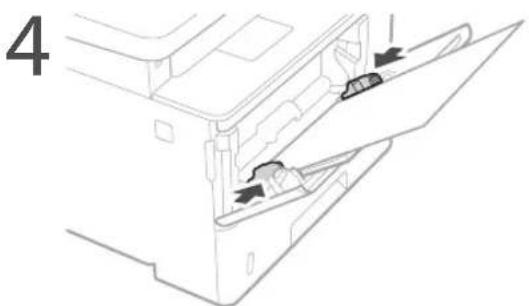
5 Specify the size and type of paper, according to the screen.
The Machine Does Not Seem to Work
Check the following.
Is the power turned ON? Is the machine out of sleep mode?
If both the display and are not lit, press the power switch.
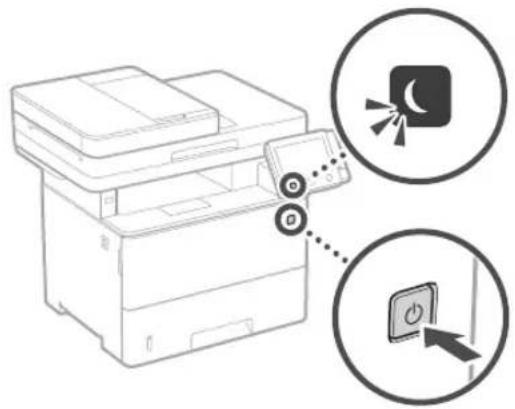
- Is the power cord connected correctly?
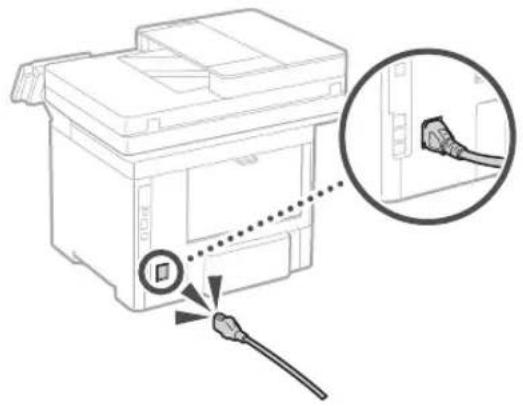
If the problem persists, see the User's Guide.
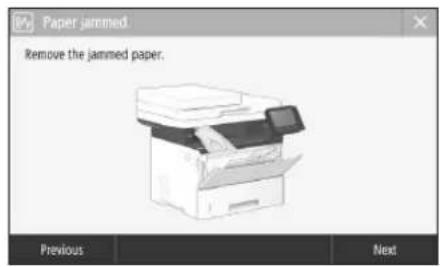
Paper Jams Have Occurred
Clear the paper jams, according to the on-screen instructions.
Replacing the Toner Cartridge
Replace the toner cartridge, according to the on-screen instructions.
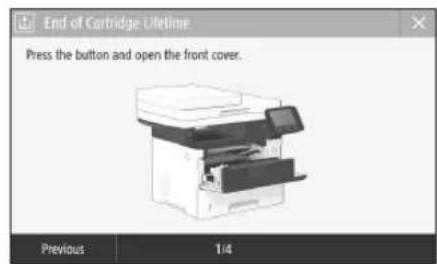
Model number of replacement toner cartridge
- Canon Cartridge 041 - Canon Cartridge 041 H
Important Safety Instructions
This chapter describes important safety instructions for the prevention of injury to users of this machine and others, and damage to property. Read this chapter before using the machine, and follow the instructions to use the machine properly. Do not perform any operations not described in this manual. Canon will not be responsible for any damages resulting from operations not described in this manual, improper use, or repair or changes not performed by Canon or a third party authorized by Canon. Improper operation or use of this machine could result in personal injury and/or damage requiring extensive repair that may not be covered under your Limited Warranty.
WARNING
Indicates a warning concerning operations that may lead to death or injury to persons if not performed correctly. To use the machine safely, always pay attention to these warnings.
CAUTION
Indicates a caution concerning operations that may lead to injury to persons if not performed correctly. To use the machine safely, always pay attention to these cautions.
IMPORTANT
Indicates operational requirements and restrictions. Be sure to read these items carefully to operate the machine correctly and avoid damage to the machine or property.
Installation
To use this machine safely and comfortably, carefully read the following precautions and install the machine in an appropriate location.
WARNING
Do not install in a location that may result in a fire or electrical shock
- A location where the ventilation slots are blocked (too close to walls, beds, sofas, rugs, or similar objects) A damp or dusty location
- A location exposed to direct sunlight or outdoors A location subject to high temperatures A location exposed to open flames Near alcohol, paint thinners or other flammable substances
Other warnings
- Do not connect unapproved cables to this machine. Doing so may result in a fire or electrical shock.
- Do not place necklaces and other metal objects or containers filled with liquid on the machine. If foreign substances come in contact with electrical parts inside the machine, it may result in a fire or electrical shock.
- When installing and removing the optional accessories, be sure to turn OFF the power, unplug the power plug, and then disconnect all the interface cables and power cord from the machine. Otherwise, the power cord or interface cables may be damaged, resulting in a fire or electrical shock. If any foreign substance falls into this machine, unplug the power plug from the AC power outlet and contact your local authorized Canon dealer.
CAUTION
Do not install in the following locations
The machine may drop or fall, resulting in injury.
An unstable location A location exposed to vibrations
Other cautions
- When carrying this machine, follow the instructions in this manual. If carried improperly, it may fall, resulting in injury
- When installing this machine, be careful not to get your hands caught between the machine and the floor or walls. Doing so may result in injury.
Leveling feet (only for products with leveling feet)
Do not remove the machine's leveling feet after the machine has been installed, as this may cause the machine to fall or tip over, resulting in personal injury.
IMPORTANT
Do not install in the following locations. Doing so may result in damage to the machine.
- A location subject to temperature and humidity extremes, whether low or high.
- A location subject to dramatic changes in temperature or humidity.
- A location near equipment that generates magnetic or electromagnetic waves. A laboratory or location where chemical reactions occur. A location exposed to corrosive or toxic gases.
- A location that may warp from the weight of the machine or where the machine is liable to sink (e.g., a carpet).
Avoid poorly ventilated locations.
This machine generates a slight amount of ozone and other emissions during normal use. These emissions are not harmful to health. However, they may be noticeable during extended use or long production runs in poorly ventilated rooms. To maintain a comfortable working environment, it is recommended that the room where the machine operates be appropriately ventilated. Also avoid locations where people would be exposed to emissions from the machine.
Do not install in a location where condensation occurs.
Water droplets (condensation) may form inside the machine when the room where the machine is installed is heated rapidly, and when the machine is moved from a cool or dry location to a hot or humid location. Using the machine
under these conditions may result in paper jams, poor print quality, or damage to the machine. Let the machine adjust to the ambient temperature and humidity for at least 2 hours before use.
In altitudes of above sea level 3,000 m or higher.
Machines with a hard disk may not operate properly when used at high altitudes of about 3,000 meters above sea level, or higher.
Connecting the Telephone Line (Only for Products with a Fax Function)
This machine conforms to an analog telephone line standard. The machine can be connected to the public switched telephone network (PSTN) only. If you connect the machine to a digital telephone line or a dedicated telephone line, it might impede proper operation of the machine and could be the cause of damage. Make sure to confirm the type of telephone line before connecting the machine. Contact your optical fiber line or IP telephone line service providers if you want to connect the machine to those telephone lines.
When using wireless LAN (only for products with a wireless LAN function)
Install the machine at a distance of 50 meters or less from the wireless LAN router. As far as possible, install in a location where communication is not blocked by intervening objects. The signal may be degraded when passing through walls or floors. Keep the machine as far as possible from digital cordless phones, microwave ovens, or other equipment that emits radio waves. Do not use near medical equipment. Radio waves emitted from this machine may interfere with medical equipment, which may result in malfunctions and accidents.
Power Supply
WARNING
- Use only a power supply that meets the specified voltage requirements. Failure to do so may result in a fire or electrical shock.
- Do not use power cords other than the one provided, as this may result in a fire or electrical shock. The provided power cord is intended for use with this machine. Do not connect the power cord to other devices.
- Do not modify, pull, forcibly bend, or perform any other act that may damage the power cord. Do not place heavy objects on the power cord. Damaging the power cord may result in a fire or electrical shock.
- Do not plug in or unplug the power plug with wet hands, as this may result in an electrical shock.
- Do not use extension cords or multi-plug power strips with the machine. Doing so may result in a fire or electrical shock.
- Do not wrap the power cord or tie it in a knot, as this may result in a fire or electrical shock.
- Insert the power plug completely into the AC power outlet. Failure to do so may result in a fire or electrical shock.
- Remove the power plug completely from the AC power outlet during a thunderstorm. Failure to do so may result in a fire, electrical shock, or damage to the machine. Make sure that the power supply for the machine is safe, and has a steady voltage.
- Keep the power cord away from a heat source; failure to do this may cause the power cord coating to melt, resulting in a fire or electrical shock.
Avoid the following situations:
If excessive stress is applied to the connection part of the power cord, it may damage the power cord or the wires inside the machine may disconnect. This could result in a fire.
Connecting and disconnecting the power cord frequently. Tripping over the power cord. The power cord is bent near the connection part, and continuous stress is being applied to the power outlet or the connection part. Applying excessive force on the power plug.
CAUTION
- Install this machine near the power outlet and leave sufficient space around the power plug so that it can be unplugged easily in an emergency.
IMPORTANT
When connecting power
Do not connect the power cord to an uninterrupted power source. Doing so may result in malfunction of or damage to the machine at power failure. If you plug this machine into an AC power outlet with multiple sockets, do not use the remaining sockets to connect other devices.
- Do not connect the power cord to the auxiliary AC power outlet on a computer.
Other precautions
Electrical noise may cause this machine to malfunction or lose data.
Handling
WARNING
- Immediately unplug the power plug from the AC power outlet and contact an authorized Canon dealer if the machine makes an unusual noise, emits an unusual smell, or emits smoke or excessive heat. Continued use may result in a fire or electrical shock.
- Do not disassemble or modify this machine. There are high-voltage and high-temperature components inside the machine. Disassembly or modification may result in a fire or electrical shock.
- Place the machine where children will not come in contact with the power cord and other cables or gears and electrical parts inside the machine. Failure to do so may result in unexpected accidents. Do not use flammable sprays near this machine. If flammable substances come into contact with electrical parts inside this machine, it may result in a fire or electrical shock.
- When moving this machine, be sure to turn OFF the power of this machine, and then unplug the power plug and interface cables. Failure to do so may damage the power cord or interface cables, resulting in a fire or electrical shock.
- When plugging or unplugging a USB cable when the power plug is plugged into an AC power outlet, do not touch the metal part of the connector, as this may result in an electrical shock.
If you are using a cardiac pacemaker
This machine generates a low level magnetic flux and ultrasonic waves. If you use a cardiac pacemaker and feel abnormalities, please move away from this machine and consult your physician immediately.
CAUTION
- Do not place heavy objects on this machine as they may fall, resulting in injury.
- For your safety, please unplug the power cord if the machine will not be used for a long period of time.
- Use caution when opening and closing covers to avoid injury to your hands.
- Keep hands and clothing away from the rollers in the output area. If the rollers catch your hands or clothing, this may result in personal injury. The inside of the machine and the output slot are very hot during and immediately after use. Avoid contact with these areas to prevent burns. Also, printed paper may be hot immediately after being output, so use caution when handling it. Failure to do so may result in burns.
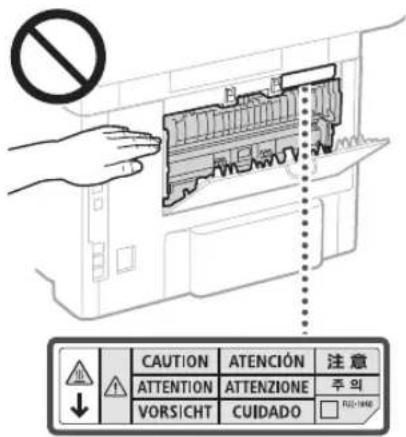
- Be careful not to drop a heavy object, such as a dictionary, on the platen glass. Doing so may damage the platen glass and result in injury.
- Do not carry the machine with any of the paper drawer or optional paper feeder installed. Otherwise, they may fall, resulting in injury.

Feeder (only for products with a feeder)
- Do not press down hard on the feeder when using the platen glass to make copies of thick books. Doing so may damage the platen glass and result in personal injury.
- Close the feeder gently to avoid catching your hands, as this may result in personal injury. Be careful not to put your hands or fingers into the feeder. Otherwise, you may be injured.
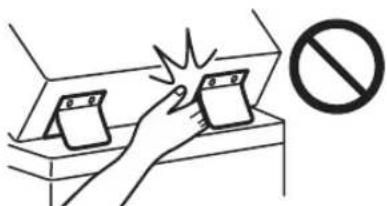
Finisher (only for products with a finisher)
- Do not place your hands in the part of the tray where stapling is performed (near the rollers), especially pay careful attention to the sharp staples, as this may result in personal injury.
Paper drawer (only for products with a paper drawer)
- Do not insert your hand into the machine while the paper drawer is removed, as this may result in personal injury.
Energy Saver key (only for products with an Energy Saver key)
Press (Energy Saver) for safety when the machine will not be used for a long period of time, such as overnight. Also, turn OFF the main power switch, and disconnect the power cord for safety when the machine will not be used for an extended period of time, such as during consecutive holidays.
Laser Safety
This product is confirmed as a Class 1 laser product in IEC60825-1:2014 and EN60825-1:2014.
CLASS 1 LASER PRODUCT LASER KLASSE 1
APPAREL A LASER DE CLASSE 1 APPARECCHIO LASER DI CLASSE 1 PRODUCTO LASER DE CLASE 1 APARELHO A LASER DE CLASSE 1
LUOKAN1 LASER-TJOTE LASERPRODUKT KCLASS 1
The laser beam can be harmful to human bodies. Since radiation emitted inside the product is completely confined within protective housings and external covers, the laser beam cannot escape from the machine during any phase of user operation. Read the following remarks and instructions for safety.
- Never open covers other than those instructed in the manuals for this machine. If the laser beam should escape and enter your eyes, exposure may cause damage to your eyes.
- Use of controls, adjustments, or performance of procedures other than those specified in this manual may result in hazardous radiation exposure.
Laser Safety Label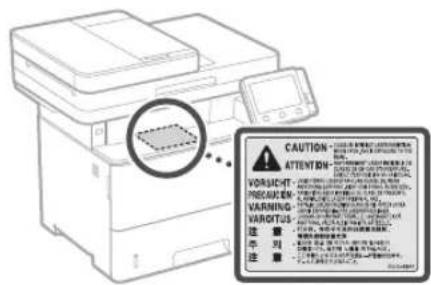
IMPORTANT
- Follow the instructions on the caution label attached to this machine.
- Do not subject the machine to strong shocks or vibration.
- Do not forcibly open and close doors, covers, and other parts. Doing so may result in damage to the machine.
- Do not turn the main power switch OFF or open the covers while the machine is in operation. This may result in paper jams.
- Use a modular cable that is shorter than 3 meters.
- Use a USB cable that is shorter than 3 meters.
Appendix
- Do not touch the contacts (a) inside the machine. Doing so may result in damage to the machine.
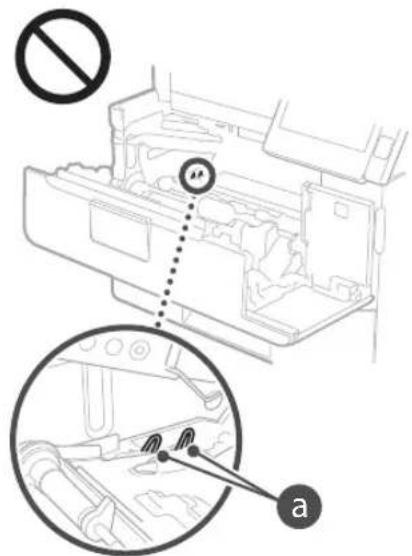
When transporting the machine
To prevent damage to the machine during transport, perform the following.
- Remove the toner cartridge.
- Securely pack the machine in the original box with packing materials.
Safety-Related Symbols
Power switch: "ON" position
Power switch: "OFF" position
Power switch: "STAND-BY" position
Push-push switch "ON" "OFF"
Protective earthing terminal
Dangerous voltage inside. Do not open covers other than instructed.
CAUTION: Hot surface. Do not touch.
Class II equipment
Moving parts: Keep body parts away from moving parts
Some of the symbols shown above may not be affixed depending on the product.
Maintenance and Inspections
Clean this machine periodically. If dust accumulates, the machine may not operate properly. When cleaning, be sure to observe the following. If a problem occurs during operation, see "Troubleshooting" in the User's Guide. If the problem cannot be resolved or you feel the machine requires an inspection, see "When a Problem Cannot Be Solved."
WARNING
Before cleaning, turn OFF the power and unplug the power plug from the AC power outlet. Failure to do so may result in a fire or electrical shock. - Unplug the power plug periodically and clean with a dry cloth to remove dust and grime. Accumulated dust may absorb humidity in the air and may result in a fire if it comes into contact with electricity.
- Use a damp, well wrung-out cloth to clean the machine. Dampen cleaning cloths with water only. Do not use alcohol, benzenes, paint thinners, or other flammable substances. Do not use tissue paper or paper towels. If these substances come into contact with electrical parts inside the machine, they may generate static electricity or result in a fire or electrical shock.
- Check the power cord and plug periodically for damage. Check the machine for rust, dents, scratches, cracks, or excessive heat generation. Use of poorly-maintained equipment may result in a fire or electrical shock.
CAUTION
The inside of the machine has high-temperature and high-voltage components. Touching these components may result in burns. Do not touch any part of the machine that is not indicated in the manual. - When loading paper or removing jammed paper, be careful not to cut your hands with the edges of the paper.
Consumables
WARNING
- Do not dispose of used toner cartridges or the like in open flames. Also, do not store toner cartridges or paper in a location exposed to open flames. This may cause the toner to ignite, and result in burns or fire.
- If you accidentally spill or scatter toner, carefully gather the toner particles together or wipe them up with a soft, damp cloth in a way that prevents inhalation. Never use a vacuum cleaner that does not have safeguards against dust explosions to clean up spilled toner. Doing so may cause a malfunction in the vacuum cleaner, or result in a dust explosion due to static discharge.
If you are using a cardiac pacemaker
- The toner cartridge generates a low level magnetic flux. If you are using a cardiac pacemaker and feel abnormalities, please move away from the toner cartridge and consult your physician immediately.
CAUTION
- Use caution not to inhale any toner. If you should inhale toner, consult a physician immediately.
- Use caution so that toner does not get into your eyes or mouth. If toner should get into your eyes or mouth, immediately wash with cold water and consult a physician.
- Use caution so that toner does not come into contact with your skin. If it should, wash with soap and cold water. If there is any irritation on your skin, consult a physician immediately.
- Keep the toner cartridges and other consumables out of the reach of small children. If toner is ingested, consult a physician or poison control center immediately.
- Do not disassemble or modify the toner cartridge or the like. Doing so may cause the toner to scatter.
- When removing the sealing tape from the toner cartridge, pull it out completely but without using excessive force. Doing otherwise may cause the toner to scatter.
IMPORTANT
Handling the toner cartridge
- Be sure to hold the toner cartridge using the handle.
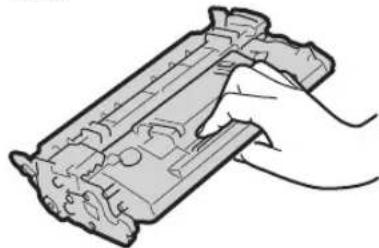
Do not touch the toner cartridge memory (a) or the electrical contacts (b). To avoid scratching the surface of the drum inside the machine or exposing it to light, do not open the drum protective shutter (c).
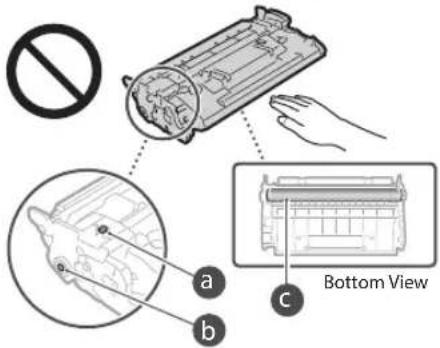
Except when necessary, do not take out the toner cartridge from the packing material or from this machine. - The toner cartridge is a magnetic product. Do not move it close to products susceptible to magnetism including floppy disks and disk drives. Doing so may result in data corruption.
Storing the toner cartridge
- Store in the following environment to ensure safe and satisfactory use. Storage temperature range: 0 to 35°C - Storage humidity range: 35 to 85% RH (relative humidity/no condensation)*
- Store without opening until the toner cartridge is to be used.
- When removing the toner cartridge from this machine for storage, place the removed toner cartridge in the original packing material or wrap it with a thick cloth.
- When storing the toner cartridge, do not store it upright or upside down. The toner will solidify and may not return to its original condition even if it is shaken.
- Even within the storable humidity range, water droplets (condensation) may develop inside the toner cartridge if there is a difference of temperature inside and outside the toner cartridge. Condensation will adversely affect the print quality of toner cartridges.
Do not store the toner cartridge in the following locations
- Locations exposed to open flames
- Locations exposed to direct sunlight or bright light for five minutes or more
- Locations exposed to excessive salty air
- Locations where there are corrosive gases (i.e. aerosol sprays and ammonia)
- Locations subject to high temperature and high humidity
- Locations subject to dramatic changes in temperature and humidity where condensation may easily occur
- Locations with a large amount of dust
- Locations within the reach of children
Be careful of counterfeit toner cartridges
- Please be aware that there are counterfeit Canon toner cartridges in the marketplace. Use of counterfeit toner cartridge may result in poor print quality or machine performance. Canon is not responsible for any malfunction, accident or damage caused by the use of counterfeit toner cartridge. For more information, see canon.com/counterfeit.
Availability period of repairing parts and toner cartridges and the like
The repairing parts and toner cartridges and the like for the machine will be available for at least seven (7) years after production of this machine model has been discontinued.
Toner cartridge packing materials
- Save the packing materials for the toner cartridge. They are required when transporting this machine.
- The packing materials may be changed in form or placement, or may be added or removed without notice. After you pull out the sealing tape from the toner cartridge, dispose of it in accordance with the applicable local regulations.
When disposing of a used toner cartridge or the like
- When discarding a toner cartridge or the like, place it in the original packing material to prevent toner from scattering from inside, and dispose of it in accordance with the applicable local regulations.
Notice
Product Name
Safety regulations require the product's name to be registered.
In some regions where this product is sold, the following name(s) in parentheses () may be registered instead.
MF525x(F173802)
MF522x(F173800)
EMC requirements of EC Directive
This equipment conforms with the essential EMC requirements of EC Directive. We declare that this product conforms with the EMC requirements of EC Directive at nominal mains input 230V 50Hz although the rated input of the product is 220 to 240V 50/60Hz. Use of shielded cable is necessary to comply with the technical EMC requirements of EC Directive.
EU WEEE and Battery Directives
You can see the WEEE and Battery Directives Information in the latest User's Guide (HTML manual) from the Canon website (canon.com/oip-manual).
Wireless LAN Regulatory Information
Regulatory information for users in Jordan MF525x/MF522x includes approved Wireless LAN Module (Model name: Type1KA). Contains Wireless LAN Module approved by TRC/LPD/2017/19
Regulatory information for users in UAE MF525x/MF522x includes approved Wireless LAN Module (Model name: Type1KA).
TRA
REGISTERED No: ER51217/17
DEALER No: DA0073692/11
RE Directive
(Only for European radio equipment)
RE Declaration of Conformity
English (EN) Hereby, Canon Inc. declares that this equipment is in compliance with Directive 2014/53/EU. The full text of the EU declaration of conformity is available at the following internet address: http://www.canon-europe.com/ce-documentation Wireless LAN Specifications Frequency band(s): 2412-2472 MHz Maximum radio-frequency power: 15.9 dBm
Czech (CS) Hereby, Canon Inc. declares that this equipment is in compliance with Directive 2014/53/EU. The full text of the EU declaration of conformity is available at the following internet address: http://www.canon-europe.com/ce-documentation Wireless LAN Specifications Frequency band(s): 2412-2472 MHz Maximum radio-frequency power: 15.9 dBm
Danish (DA) Hereby, Canon Inc. declares that this equipment is in compliance with Directive 2014/53/EU. The full text of the EU declaration of conformity is available at the following internet address: http://www.canon-europe.com/ce-documentation Wireless LAN Specifications Frequency band(s): 2412-2472 MHz Maximum radio-frequency power: 15.9 dBm
Legal Limitations on the Usage of Your Product and the Use of Images
Using your product to scan, print or otherwise reproduce certain documents, and the use of such images as scanned, printed or otherwise reproduced by your product, may be prohibited by law and may result in criminal and/or civil liability. A non-exhaustive list of these documents is set forth below. This list is intended to be a guide only. If you are uncertain about the legality of using your product to scan, print or otherwise reproduce any particular document, and/or of the use of the images scanned, printed or otherwise reproduced, you should consult in advance with your legal advisor for guidance.
Paper Money Travelers Check Money Orders Food Stamps Certificates of Deposit Passports Postage Stamps (canceled or uncanceled) - Immigration Papers - Identifying Badges or Insignias - Internal Revenue Stamps (canceled or uncanceled) - Selective Service or Draft Papers Bonds or Other Certificates of Indebtedness - Checks or Drafts Issued by Governmental Agencies Stock Certificates - Motor Vehicle Licenses and Certificates of Title - Copyrighted Works/Works of Art without Permission of Copyright Owner
Disclaimers
The information in this document is subject to change without notice. CANON INC. MAKES NO WARRANTY OF ANY KIND WITH REGARD TO THIS MATERIAL, EITHER EXPRESS OR IMPLIED, EXCEPT AS PROVIDED HEREIN, INCLUDING WITHOUT LIMITATION, THEREOF, WARRANTY AS TO MARKETABILITY, MERCHANTABILITY, FITNESS FOR A PARTICULAR PURPOSE OF USE, OR NON-INFRINGEMENT. CANON INC. SHALL NOT BE LIABLE FOR ANY DIRECT, INCIDENTAL, OR CONSEQUENTIAL DAMAGES OF ANY NATURE, OR LOSSES OR EXPENSES RESULTING FROM THE USE OF THIS MATERIAL.
About This Manual
Keys and Buttons Used in This Manual The following symbols and key names are a few examples of how keys to be pressed are expressed in this manual.
- Operation panel keys: [Key icon] Example:
- Display:
- Buttons and items on the computer display: [Preferences]
Illustrations and Displays Used in This Manual Illustrations and displays used in this manual are of the MF525x unless otherwise specified.
Trademarks
Mac is a trademark of Apple Inc. Microsoft, Windows, Windows Vista, Windows Server, Internet Explorer, Excel, and PowerPoint are either registered trademarks or trademarks of Microsoft Corporation in the United States and/or other countries. Other product and company names herein may be the trademarks of their respective owners.
Third Party Software
This Canon product (the "PRODUCT") includes third-party software modules. Use and distribution of these software modules, including any updates of such software modules (collectively, the "SOFTWARE") are subject to license conditions (1) through (9) below.
(1) You agree that you will comply with any applicable export control laws, restrictions or regulations of the countries involved in the event that this PRODUCT including the SOFTWARE is shipped, transferred or exported into any country. (2) Rights holders of the SOFTWARE retain in all respects the title, ownership and intellectual property rights in and to the SOFTWARE. Except as expressly provided herein, no license or right, expressed or implied, is hereby conveyed or granted by rights holders of the SOFTWARE to you for any intellectual property of rights holders of the SOFTWARE. (3) You may use the SOFTWARE solely for use with the PRODUCT. (4) You may not assign, sublicense, market, distribute, or transfer the SOFTWARE to any third party without prior written consent of rights holders of the SOFTWARE. (5) Notwithstanding the foregoing, you may transfer the SOFTWARE only when (a) you assign all of your rights to the PRODUCT and all rights and obligations under the license conditions to transferee and (b) such transferee agrees to be bound by all these conditions. (6) You may not decompile, reverse engineer, disassemble or otherwise reduce the code of the SOFTWARE to human readable form. (7) You may not modify, adapt, translate, rent, lease or loan the SOFTWARE or create derivative works based on the SOFTWARE. (8) You are not entitled to remove or make separate copies of the SOFTWARE from the PRODUCT. (9) The human-readable portion (the source code) of the SOFTWARE is not licensed to you.
Notwithstanding (1) through (9) above, the PRODUCT includes third-party software modules accompanying the other license conditions, and these software modules are subject to the other license conditions. Please refer to the other license conditions of third-party software modules described in Appendix of Manual for the corresponding PRODUCT. This Manual is available at http://canon.com/oip-manual.
By using the PRODUCT, you shall be deemed to have agreed to all applicable license conditions. If you do not agree to these license conditions, please contact your service representative.
V_170601
CLASS 1 LASER PRODUCT LASER KLASSE 1
APPAREIL A LASER DE CLASSE 1
CLASS 1 LASER DEVICE
CLASS 1 LASER PRODUCT
CLASS 1 LASER APPARATUS
CLASS 1 LASER PRODUCT
CLASS 1 LASER PRODUCT
Regulatory information for users in Jordan MF525x / MF522x includes approved Wireless LAN Module (Model name: Type1KA) Contains Wireless LAN Module approved by TRC/ LPD/2017/19
Regulatory information for users in UAE MF525x/MF522x includes approved Wireless LAN Module (Model name: Type1KA).
TRA
REGISTERED No: ER51217/17
DEALER No:DA0073692/11
RE Directive
(Only for European radio equipment)
RE Declaration of Conformity
English (EN) Hereby, Canon Inc. declares that this equipment is in compliance with Directive 2014/53/EU. The full text of the EU declaration of conformity is available at the following internet address: http://www.canon-europe.com/cedocumentation Wireless LAN Specifications Frequency band(s):2412-2472MHz Maximum radio-frequency power: 15.9 dBm
Czech (CS) Timto spelecnost Canon Inc. prohlasej, ze toto zaifenje v souladu se smemici 2014/53/FU. Uplne zneni EU prohlaseni o shode je k dispozici na tefo internetove adrese: http://www.canon-europe.com/cedocumentation Technické udaje bezdratov LAN Pasmolafrekvence:2412-2472 MHz Maximaliy kon radioe frekvence:15.9 dBm
Danish (DA) Canon Inc. hereby declares that this equipment is in compliance with Directive 2014/53/EU. The full text of the EU declaration of conformity is available at the following internet address: http://www.canon-europe.com/cedocumentation Wireless LAN specifications Frequency band: 2412-2472 MHz Max. radio frequency power: 15.9 dBm
Pull out the paper drawer.
CLASS 1 LASER PRODUCT
LASER KLASSE 1
APPAREL A LASER DE CLASSE 1
APPARECCHIO LASER DI CLASSE 1
PRODUCTO LASER DE CLASE 1
APARELHO A LASER DE CLASSE 1
LUOKAN 1 LASER-TUOTE
LASERPRODUKT KCLASS 1
Regulatory information for users in Jo
MFS25x/MF522x includes approved Wireless LAN Module (Model name: Type1KA). Contains Wireless LAN Module approved by TRC/ LPD/2017/19
Regulatory information for users in UAE
MF525x/MF522x includes approved Wireless LAN Module (Model name:Type1KA).
REGISTERED No: ER51217/17
DEALER No: DA0073692/11
RE Directive
(Only for European radio equipment)
RE Declaration of Conformity
English (EN) Hereby, Canon Inc. declares that this equipment is in compliance with Directive 2014/53/EU. The full text of the EU declaration of conformity is available at the following internet address: http://www.canon-europe.com/ce-documentation Wireless LAN Specifications Frequency band(s): 2412-2472 MHz Maximum radio-frequency power: 15.9 dBm
Czech (CS) Timto společnost Canon Inc. prohlašuje, že toto zařízení je v souladu se směrnicí 2014/53/EU. Úplné znění EU prohlášení o shodě je k dispozici na této internetové adrese: http://www.canon-europe.com/ce-documentation Technické údaje bezdrátové LAN Pásmo(a) frekvence: 2412-2472 MHz Maximální výkon radiofrekvence: 15.9 dBm
Danish (DA) Hermed erklærer Canon Inc., at dette udstyr er i overensstemmelse med direktiv 2014/53/EU. EU-overensstemmelseserklæringens fulde tekst kan findes på følgende internetadresse: http://www.canon-europe.com/ce-documentation Trådløs LAN specifikationer Frekvensbånd: 2412-2472 MHz Maks. radio-frekvenseffekt: 15.9 dBm
CLASS 1 LASER PRODUCT
LASER KLASSE 1
APPAREIL À LASER DE CLASSE 1
APPARECCHIO LASER DI CLASSE 1
PRODUCTO LÁSER DE CLASE 1
APARELHO A LASER DE CLASSE 1
CLASS 1 LASER PRODUCT
LASER PRODUCT CLASS 1
Regulatory information for users in Jordan
MF525x/MF522x includes approved Wireless LAN Module (Model name: Type1KA). Contains Wireless LAN Module approved by TRC/LPD/2017/19
Regulatory information for users in UAE MF525x/MF522x includes approved Wireless LAN Module (Model name: Type1KA).
TRA
REGISTERED No: ER51217/17
DEALER No: DA0073692/11
RE Directive
(Only for European radio equipment)
RE Declaration of Conformity
English (EN) Hereby, Canon Inc. declares that this equipment is in compliance with Directive 2014/53/EU. The full text of the EU declaration of conformity is available at the following internet address: http://www.canon-europe.com/ce-documentation Wireless LAN Specifications Frequency band(s): 2412-2472 MHz Maximum radio-frequency power: 15.9 dBm
Czech (CS) Hereby, Canon Inc. declares that this equipment is in compliance with Directive 2014/53/EU. The full text of the EU declaration of conformity is available at the following internet address: http://www.canon-europe.com/ce-documentation Wireless LAN Specifications Frequency band(s): 2412-2472 MHz Maximum radio-frequency power: 15.9 dBm
Danish (DA) Hereby, Canon Inc. declares that this equipment is in compliance with Directive 2014/53/EU. The full text of the EU declaration of conformity is available at the following internet address: http://www.canon-europe.com/ce-documentation Wireless LAN Specifications Frequency band(s): 2412-2472 MHz Maximum radio-frequency power: 15.9 dBm
CLASS 1 LASER PRODUCT
LASER CLASS 1
CLASS 1 LASER APPARATUS
CLASS 1 LASER APPARATUS
CLASS 1 LASER PRODUCT
CLASS 1 LASER APPARATUS
CLASS 1 LASER PRODUCT
CLASS 1 LASER PRODUCT
Regulatory information for users in Jordan
MF525x/MF522x includes approved Wireless LAN Module (Model name: Type1KA). Contains Wireless LAN Module approved by TRC/ LPD/2017/19
Regulatory information for users in UAE MF525x/MF522x includes approved Wireless LAN Module (Model name: Type1KA).
TRA
REGISTERED No: ER51217/17
DEALER No: DA0073692/11
RE Directive
(Only for European radio equipment)
RE Declaration of Conformity
English (EN) Hereby, Canon Inc. declares that this equipment is in compliance with Directive 2014/53/EU. The full text of the EU declaration of conformity is available at the following internet address: http://www.canon-europe.com/ce-documentation Wireless LAN Specifications Frequency band(s): 2412-2472 MHz Maximum radio-frequency power: 15.9 dBm
Czech (CS) Hereby, Canon Inc. declares that this equipment is in compliance with Directive 2014/53/EU. The full text of the EU declaration of conformity is available at the following internet address: http://www.canon-europe.com/ce-documentation Wireless LAN Specifications Frequency band(s): 2412-2472 MHz Maximum radio-frequency power: 15.9 dBm
Danish (DA) Hereby, Canon Inc. declares that this equipment is in compliance with Directive 2014/53/EU. The full text of the EU declaration of conformity is available at the following internet address: http://www.canon-europe.com/ce-documentation Wireless LAN Specifications Frequency band: 2412-2472 MHz Maximum radio-frequency power: 15.9 dBm
Options utilities impressions
Double-sided printing in booklets
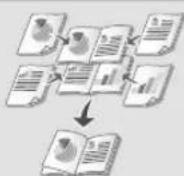
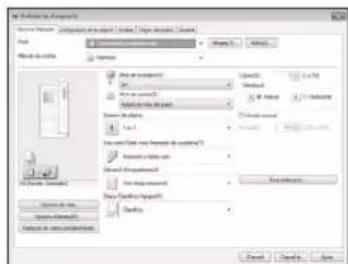
For details, see "Printing" in the User's Guide
1. Remove the paper cassette.
CLASS 1 LASER PRODUCT
LASER KLASSE 1
APPAREIL A LASER DE CLASSE 1
APPARECCHIO LASER DI CLASSE 1
PRODUCTO LASER DE CLASE 1
APARELHO A LASER DE CLASSE 1
LUOKAN 1 LASER-TUOTE
LASER PRODUCT CLASS 1
Regulatory information for users in Jordan
MF525x/MF522x includes approved Wireless LAN Module (Model name: Type1KA). Contains Wireless LAN Module approved by TRC/ LPD/2017/19
Regulatory information for users in UAE
MF525x/MF522x includes approved Wireless LAN Module (Model name: Type1KA).
TRA
REGISTERED No: ER51217/17
DEALER No: DA0073692/11
RE Directive
(Only for European radio equipment)
RE Declaration of Conformity
English (EN) Hereby, Canon Inc. declares that this equipment is in compliance with Directive 2014/53/EU.
The full text of the EU declaration of conformity is available at the following internet address: http://www.canon-europe.com/ce-documentation Wireless LAN Specifications Frequency band(s):2412-2472MHz Maximum radio-frequency power: 15.9 dBm
Czech (CS) Timto společnost Canon Inc. prohlašuje, že toto zařízení je v souladu se směrnicí 2014/53/EU.
Úplné znění EU prohlášení o shodě je k dispozici na této internetové adrese:
http://www.canon-europe.com/ce-documentation Wireless LAN Technical Specifications
Frequency band(s): 2412-2472 MHz Maximum radio-frequency power: 15.9 dBm
CLASS 1 LASER PRODUCT LASER KLASSE 1
APPARELÀ LASER DE CLASSE 1 APPARECCHIO LASER DI CLASSE 1 PRODUCTO LASER DE CLASE 1 APARELHO A LASER DE CLASSE 1 LUOKAN 1 LASER-TUOTE LASERPRODUKT Klass 1
Regulatory information for users in Jordan MF525x / MF522x includes approved Wireless LAN Module (Model name: Type1KA). Contains Wireless LAN Module approved by TRC/ LPD/2017/19
Regulatory information for users in UAE MFS25x/MFS22x includes approved Wireless LAN Module (Model name: Type1KA).
TRA
REGISTERED No: ER51217/17
DEALER No: DA0073692/11
RE Directive
(Only for European radio equipment)
RE Declaration of Conformity
English (EN) Hereby, Canon Inc. declares that this equipment is in compliance with Directive 2014/53/EU. The full text of the EU declaration of conformity is available at the following internet address: http://www.canon-europe.com/ce-documentation/Wireless LAN Specifications Frequency band(s):2412-2472MHz Maximum radio-frequency power: 15.9 dBm
Czech (CS) Hereby, Canon Inc. declares that this equipment is in compliance with Directive 2014/53/EU. The full text of the EU declaration of conformity is available at the following internet address: http://www.canon-europe.com/ce-documentation Wireless LAN Technical Specifications Frequency band(s): 2412-2472 MHz Maximum radio-frequency power: 15.9 dBm
Danish (DA) Hereby, Canon Inc. declares that this equipment is in compliance with Directive 2014/53/EU. The full text of the EU declaration of conformity is available at the following internet address: http://www.canon-europe.com/ce-documentation Wireless LAN Specifications Frequency band: 2412-2472 MHz Maximum radio-frequency power: 15.9 dBm
CLASS 1 LASER PRODUCT
LASER KLASSE 1
APPAREL ALASER DE CLASSE 1
APPARECCHIO LASER DI CLASSE 1
PRODUCTO LASER DE CLASE
APARELHO A LASER DE CLASSE 1
LUOKAN1 LASER-TUOTE
LASERPRODUKT KCLASS 1
Regulatory information for users in Jordan MF525x / MF522x includes approved Wireless LAN Module (Model name: Type1KA) Contains Wireless LAN Module approved by TRC/ LPD/2017/19
Regulatory information for users in UAE MF525x/MF522x includes approved Wireless LAN Module (Model name:Type1KA).
TRA
REGISTERED No: ER51217/17 DEALER No: DA0073692/11
RE Directive
(Only for European radio equipment)
RE Declaration of Conformity
English (EN) Hereby, Canon Inc. declares that this equipment is in compliance with Directive 2014/53/EU. The full text of the EU declaration of conformity is available at the following internet address: http://www.canon-europe.com/ce-documentation Wireless LAN Specifications Frequency band(s): 2412-2472 MHz Maximum radio-frequency power: 15.9 dBm
Czech (CS) Hereby, Canon Inc. declares that this device is in compliance with Directive 2014/53/EU. The full text of the EU declaration of conformity is available at the following internet address: http://www.canon-europe.com/ce-documentation Wireless LAN technical data Frequency band(s): 2412-2472 MHz Maximum radio-frequency power: 15.9 dBm
Danish (DA) Hereby, Canon Inc. declares that this equipment is in compliance with Directive 2014/53/EU. The full text of the EU declaration of conformity is available at the following internet address: http://www.canon-europe.com/ce-documentation Wireless LAN specifications Frequency band: 2412-2472 MHz Maximum radio-frequency power: 15.9 dBm

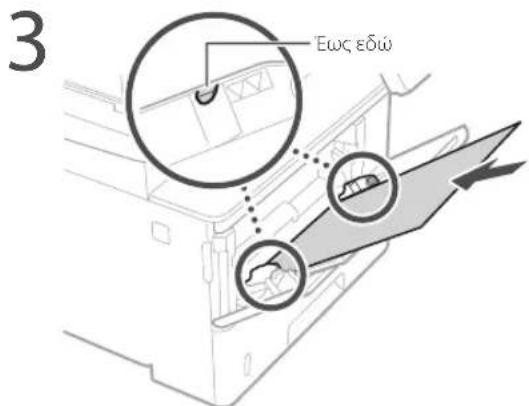
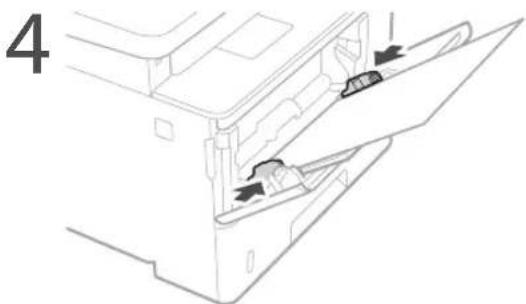
Set the tool and the paper according to the instructions on the screen.
Troubleshooting

«Troubleshooting» in the user's guide
The machine does not turn on
Check the following.
Is the power cord plugged in? Make sure the machine is in standby mode.
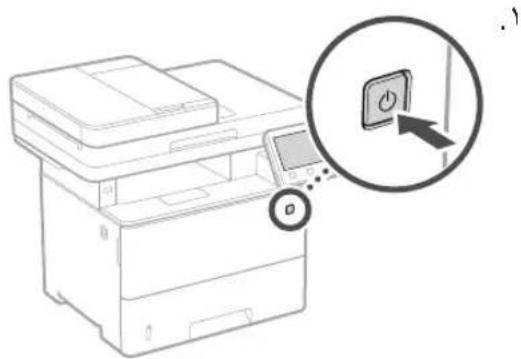
If the power and the cord are connected, press the power switch.
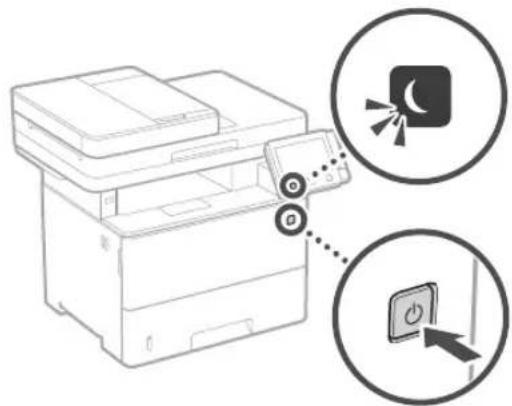
Is the power cord connected to the outlet?
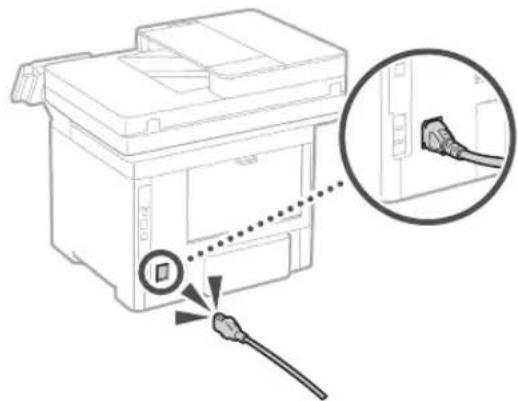
If the problem persists, refer to the user's guide.
Paper jams
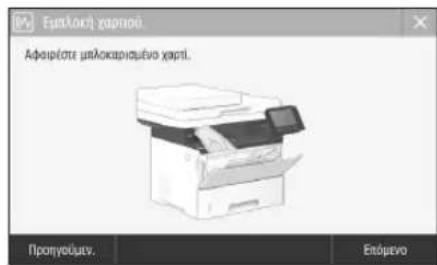
Remove the jammed paper following the instructions shown on the screen.
Replacing the ink cartridge
Replace the ink cartridge following the instructions shown on the screen.
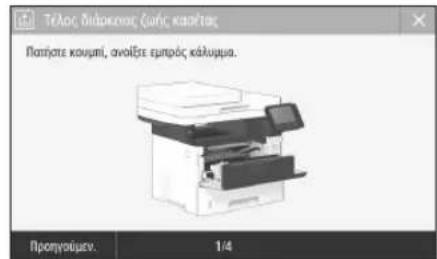
Removing the ink cartridge
- Canon Cartridge 041 - Canon Cartridge 041 H
Appendix
Accessories (only for products with accessories)
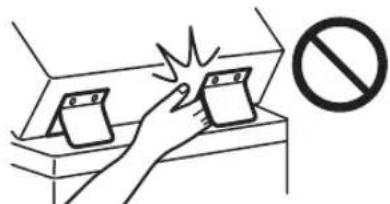
Do not use the power of the product when installing the interface cable or making connections. If you do this, it may cause damage to the interface and possibly injury. Turn off the product before connecting or disconnecting cables. Be careful not to place your hands or fingers inside the product, as this may cause injury.
Duplex Unit (only for products with duplex unit)
Do not place your hands in the area of the unit where paper is ejected (near the rollers) and be especially careful of sharp edges of the fixing unit, as you may get injured.
Paper tray (only for products with paper tray)
Do not insert your hand into the tray when removing jammed paper, as you may get injured.
CLASS 1 LASER PRODUCT
LASER KLASSE 1
APPAREIL A LASER DE CLASSE 1 APPARECCHIO LASER DI CLASSE 1 PRODUCTO LASER DE CLASE 1
APARELHO LASER DE CLASSE 1 LUOKAN 1 LASER-TUOTE LASERPRODUKT KLASSE 1
The laser beam can be harmful to the eyes. Since the radiation emitted inside the product is contained within protective housings and external covers, the radiation level does not exceed the limit during normal operation. For your safety, do not remove the covers. Follow the instructions and warnings.
Do not open any covers other than those specified in the manual for this product. If the laser beam leaks and enters your eyes, this exposure may cause damage to your eyes. The use of controls, adjustments, or performance of procedures other than those specified in the manual may result in hazardous radiation exposure.
Regulatory information for users in Jordan MF525x / MF522x includes approved Wireless LAN Module (Model name: Type1KA). Contains Wireless LAN Module approved by TRC/ LPD/2017/19
Regulatory information for users in UAE MF525x/MF522x includes approved Wireless LAN Module (Model name: Type1KA).
TRA
REGISTERED No: ER51217/17
DEALER No: DA0073692/11
RE Directive
(Only for European radio equipment)
RE Declaration of Conformity
English (EN) Hereby, Canon Inc. declares that this equipment is in compliance with Directive 2014/53/EU. The full text of the EU declaration of conformity is available at the following internet address: http://www.canon-europe.com/ce-documentation Wireless LAN Specifications Frequency band(s): 2412-2472 MHz Maximum radio-frequency power: 15.9 dBm
Czech (CS) Canon Inc. hereby declares that this equipment is in compliance with Directive 2014/53/EU. The full text of the EU declaration of conformity is available at the following internet address: http://www.canon-europe.com/ce-documentation Wireless LAN technical data Frequency band(s): 2412-2472 MHz Maximum radio-frequency power: 15.9 dBm
Danish (DA) Canon Inc. hereby declares that this equipment is in compliance with Directive 2014/53/EU. The full text of the EU declaration of conformity is available at the following internet address: http://www.canon-europe.com/ce-documentation Wireless LAN specifications Frequency band: 2412-2472 MHz Maximum radio-frequency power: 15.9 dBm
Trademarks and copyrights used in this manual
Trademarks and copyrights used in this manual are the property of their respective owners.
Local notices
The name Mac is a trademark of Apple Inc. The names Microsoft, Windows, Windows Vista, Windows Server, Internet Explorer, Excel, and PowerPoint are trademarks or registered trademarks of Microsoft Corporation in the United States and/or other countries. Other product and company names in this manual may be trademarks or registered trademarks of their respective owners.
Software manufacturers
This Canon product (the Product) contains logical components for construction. The use and disposal of these logical components, including consumables (hereinafter referred to as the Logical Components), is subject to the following terms of use (1) through (9) below.
(1) You must comply with all applicable laws and regulations of the countries where the Product is used, imported, exported, or inspected, and you must comply with the Logical Components. (2) The owners of the rights to the Logical Components retain all rights, titles, and interests in the Logical Components. Unless expressly provided otherwise, no rights are granted or transferred to you by the Logical Components to any intellectual property rights of the Logical Components. (3) The use of the Logical Components is permitted exclusively with the Product. (4) You may not copy, modify, sell, distribute, or transfer the Logical Components to any third party without the prior written consent of the rights holders of the Logical Components. (5) Notwithstanding the above, transfer of the Logical Components is permitted only if (a) you transfer all your rights to the Product and all rights and obligations under the terms to the transferee, and (b) the transferee agrees to be bound by all these terms. (6) Reverse engineering, decompilation, or disassembly of the source code of the object code or any other form of the Logical Components is prohibited. (7) It is prohibited to modify, adapt, translate, distribute, or dispose of the Logical Components or create derivative works based on the Logical Components. (8) You have the right to make one (1) backup copy of the Logical Components from the Product. (9) You are not granted any license to use any part of the Logical Components that is required by humans (the source code).
The terms (1) through (9) above, the Product contains logical components for construction that are subject to the above terms of use, including consumables, logical components are subject to the above terms of use.
Refer to the above terms of use for logical components for construction that are included in the Product. This manual is available at http://canon.com/oip-manual.
By using the Product, you agree to be bound by all the above terms of use. If you do not agree with these terms of use, contact your service representative.
CLASS 1 LASER PRODUCT
LASER KLASSE 1
APPAREIL A LASER DE CLASSE 1
APPARECCHIO LASER DI CLASSE 1
PRODUCTO LASER DE CLASE 1
APARELHO A LASER DE CLASSE 1
LUOKAN 1 LASER-TUOTE
LASERPRODUKT KLASSE 1
When transporting the machine
Do the following to avoid damaging the machine during transport.
Regulatory information for users in Jordan
MF525x/MF522x includes approved Wireless LAN Module (Model name: Type1KA). Contains Wireless LAN Module approved by TRC/ LPD/2017/19
Regulatory information for users in UAE
MF525x/MF522x includes approved Wireless LAN Module (Model name: Type1KA).
TRA
REGISTERED No: ER51217/17
DEALER No: DA0073692/11
RE Directive
(Only for European radio equipment)
RE Declaration of Conformity
English (EN) Hereby, Canon Inc. declares that this equipment is in compliance with Directive 2014/53/EU.
The full text of the EU declaration of conformity is available at the following internet address: http://www.canon-europe.com/ce-documentation Wireless LAN Specifications Frequency band(s): 2412-2472 MHz Maximum radio-frequency power: 15.9 dBm
Czech (CS) Timto společnost Canon Inc. prohlašuje, že toto zařízení je v souladu se směrnicí 2014/53/EU.
The full text of the EU declaration of conformity is available at the following internet address:
http://www.canon-europe.com/ce-documentation Wireless LAN specifications
Frequency band(s): 2412-2472 MHz Maximum radio frequency power: 15.9 dBm
From a computer scanner
MF Scan Utility
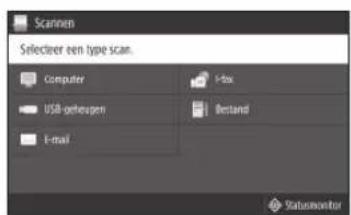
For more information
"Scanning" in the
CLASS 1 LASER PRODUCT
LASER KLASSE 1
APPAREIL A LASER DE CLASSE 1
APPARECCHIO LASER DI CLASSE 1
PRODUCTO LASER DE CLASE
APARELHO A LASER DE CLASSE 1
LUOKAN1LASER-TUOTE
LASERPRODUKT KCLASS 1
Regulatory information for users in Jordan MF525x / MF522x includes approved Wireless LAN Module (Model name: Type1KA) Contains Wireless LAN Module approved by TRC/ LPD/2017/19
Regulatory information for users in UAE MF525x/MF522x includes approved Wireless LAN Module (Model name:Type1KA).
TRA
REGISTERED No: ER51217/17
DEALER No: DA0073692/11
RE Directive
(Only for European radio equipment)
RE Declaration of Conformity
English (EN) Hereby, Canon Inc. declares that this equipment is in compliance with Directive 2014/53/EU. The full text of the EU declaration of conformity is available at the following internet address: http://www.canon-europe.com/ce-documentation Wireless LAN Specifications Frequency band(s):2412-2472MHz Maximum radio-frequency power: 15.9 dBm
Czech (CS) Canon Inc. hereby declares that this equipment is in compliance with Directive 2014/53/EU. The full text of the EU declaration of conformity is available at the following internet address: http://www.canon-europe.com/ce-documentation Wireless LAN Specifications Frequency band(s): 2412-2472 MHz Maximum radio-frequency power: 15.9 dBm
Danish (DA) Canon Inc. hereby declares that this equipment is in compliance with Directive 2014/53/EU. The full text of the EU declaration of conformity is available at the following internet address: http://www.canon-europe.com/ce-documentation Wireless LAN Specifications Frequency band(s): 2412-2472 MHz Maximum radio-frequency power: 15.9 dBm
CLASS 1 LASER PRODUCT
LASER KLASSE 1
APPAREIL A LASER DE CLASSE 1
APPARECCHIO LASER DI CLASSE 1
CLASS 1 LASER PRODUCT
CLASS 1 LASER PRODUCT
CLASS 1 LASER PRODUCT
CLASS 1 LASER PRODUCT
Laser radiation can be harmful to humans. Since radiation emitted inside the product is contained within a protective cabinet and external covers, the laser beam cannot escape from the machine while the user is operating it. Read the following safety notes and instructions.
WARNING
Regulatory information for users in Jordan MF525x / MF522x includes approved Wireless LAN Module (Model name: Type1KA). Contains Wireless LAN Module approved by TRC/ LPD/2017/19
Regulatory information for users in UAE
MF525x/MF522x includes approved Wireless LAN Module (Model name: Type1KA).
TRA
REGISTERED No: ER51217/17
DEALER No: DA0073692/11
RE Directive
(Only for European radio equipment)
RE Declaration of Conformity
English (EN) Hereby, Canon Inc. declares that this equipment is in compliance with Directive 2014/53/EU. The full text of the EU declaration of conformity is available at the following internet address: http://www.canon-europe.com/ce-documentation Wireless LAN Specifications Frequency band(s): 2412-2472 MHz Maximum radio-frequency power: 15.9 dBm
Czech (CS) Hereby, Canon Inc. declares that this equipment is in compliance with Directive 2014/53/EU. The full text of the EU declaration of conformity is available at the following internet address: http://www.canon-europe.com/ce-documentation Wireless LAN Specifications Frequency band(s): 2412-2472 MHz Maximum radio-frequency power: 15.9 dBm
Danish (DA) Hereby, Canon Inc. declares that this equipment is in compliance with Directive 2014/53/EU. The full text of the EU declaration of conformity is available at the following internet address: http://www.canon-europe.com/ce-documentation Wireless LAN Specifications Frequency band: 2412-2472 MHz Maximum radio-frequency power: 15.9 dBm
CLASS 1 LASER PRODUCT
LASER KLASSE 1
APPEARL A LASER DE CLASSE 1 APARECCHIO LASER DI CLASSE 1 PRODUCTO LASER DE CLASE 1
APARELHO A LASER DE CLASSE 1
LUOKAN 1 LASER-TUOTE LASERPRODUKT KCLASS 1
Regulatory information for users in Jordan MF525x / MF522x includes approved Wireless LAN Module (Model name: Type1KA). Contains Wireless LAN Module approved by TRC/ LPD/2017/19
Regulatory information for users in UAE MF525x/MF522x includes approved Wireless LAN Module (Model name: Type1KA).
TRA
REGISTERED No: ER51217/17
DEALER No: DA0073692/11
RE Directive
(Only for European radio equipment)
RE Declaration of Conformity
English (EN) Hereby, Canon Inc. declares that this equipment is in compliance with Directive 2014/53/EU. The full text of the EU declaration of conformity is available at the following internet address: http://www.canon-europe.com/ce-documentation Wireless LAN Specifications Frequency band(s): 2412-2472 MHz Maximum radio-frequency power: 15.9 dBm
Czech (CS) Hereby, Canon Inc. declares that this equipment is in compliance with Directive 2014/53/EU. The full text of the EU declaration of conformity is available at the following internet address: http://www.canon-europe.com/ce-documentation Wireless LAN Specifications Frequency band(s): 2412-2472 MHz Maximum radio-frequency power: 15.9 dBm
Danish (DA) Hereby, Canon Inc. declares that this equipment is in compliance with Directive 2014/53/EU. The full text of the EU declaration of conformity is available at the following internet address: http://www.canon-europe.com/ce-documentation Wireless LAN Specifications Frequency band(s): 2412-2472 MHz Maximum radio-frequency power: 15.9 dBm
CLASS 1 LASER PRODUCT LASER KLASSE 1
APPEARL LASER DE CLASSE 1 APARECCHIO LASER DI CLASSE 1 PRODUCTO LASER DE CLASE 1
APARELHO A LASER DE CLASSE 1
LUOKAN 1 LASER-TUOTE LASERPRODUKT KCLASS 1
Regulatory information for users in Jordan MF525x / MF522x includes approved Wireless LAN Module (Model name: Type1KA). Contains Wireless LAN Module approved by TRC/ LPD/2017/19
Regulatory information for users in UAE MF525x/MF522x includes approved Wireless LAN Module (Model name: Type1KA).
TRA
REGISTERED No: ER51217/17
DEALER No: DA0073692/11
RE Directive
(Only for European radio equipment)
RE Declaration of Conformity
English (EN) Hereby, Canon Inc. declares that this equipment is in compliance with Directive 2014/53/EU. The full text of the EU declaration of conformity is available at the following internet address: http://www.canoneurope.com/ce-documentation Wireless LAN Specifications Frequency band(s): 2412-2472 MHz Maximum radio-frequency power: 15.9 dBm
Czech (CS) Timto společnost Canon Inc. prohlašuje, že toto zařízení je v souladu se směrnicí 2014/53/EU. Úplné znění EU prohlášení o shodě je k dispozici na této internetové adrese: http://www.canon-europe.com/ce-documentation Technické údaje bezdrátové LAN Pásmo(a) frekvence: 2412-2472 MHz Maximální radiofrekvenční výkon: 15.9 dBm
Danish (DA) Hermed erklærer Canon Inc., at dette udstyr er i overensstemmelse med direktiv 2014/53/EU. EU-overensstemmelseserklæringens fulde tekst kan findes på følgende internetadresse: http://www.canon-europe.com/ce-documentation Trådløs LAN specifikationer Frekvensbånd: 2412-2472 MHz Maks. radiofrekvenseffekt: 15.9 dBm

Scanning from a computer
MF Scan Utility
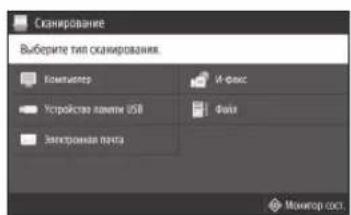
More details
"Scanning" in
User's Guide

Copying
1. Place the original. 2. Press and then select . 3. Specify the required copy settings. 4. Enter the required number of copies. 5. Select
Useful copy settings
2-sided or 1-sided, enlarge or reduce, copy ID card

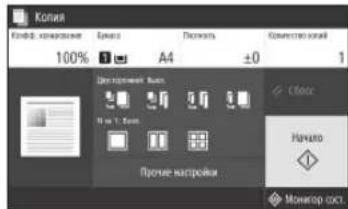
For more details, see "Copying" in the User's Guide

Fax*
1. Place the original. 2. Press and select . 3. Enter the recipient information. 4. Specify the required fax settings. 5. Select
Useful fax functions
Sequential broadcast, memory, PC fax
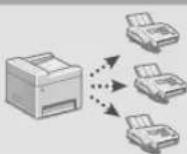
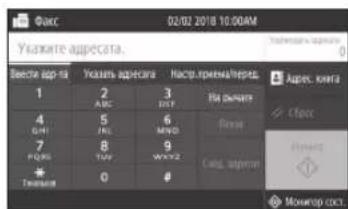
More details
User's Guide
User's Guide

- Open the document for printing and select the print function in the application.
- Select the printer driver for the device, then select [Preferences] or [Properties]. 3. Specify the paper size. 4. Specify the paper source or paper type. 5. Specify the required print settings.
- Select [OK].
- Select [Print] or [OK].
Useful Settings
2-Sided Printing Booklet
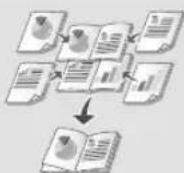
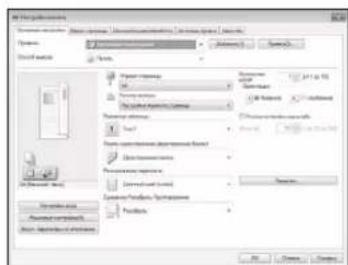
More
If the problem is not resolved, see the User's Guide.
Part Number of Toner Cartridge
- Canon Cartridge 041
- Canon Cartridge 041 H
Appendices
Safety Instructions
This section provides important safety instructions that will help prevent injury to the user of this device and other people, as well as damage to property. Read this section before using the device and follow the instructions given here. Do not perform any actions not described in this manual. Canon is not responsible for any damage arising from actions not described in this manual, improper use of the device, or repair work performed by non-authorized personnel or organizations not approved by Canon. Failure to follow the instructions for using this device may result in injury or damage requiring expensive repair, and the warranty may not cover such damage.
WARNING
Indicates a risk of injury or death if the instructions are not followed correctly. To use the device safely, be sure to pay attention to these precautions.
CAUTION
Indicates a risk of injury or damage if the instructions are not followed correctly. To use the device safely, be sure to pay attention to these precautions.
IMPORTANT
Indicates operational requirements and restrictions. Be sure to read these instructions carefully to operate the device correctly and prevent damage to the device or property.
INSTALLATION
To use the device safely, be sure to read the precautions for installation and install the device in the correct location.
WARNING
Do not install the device in a location with a high risk of fire or electric shock.
A location where the ventilation slots are blocked (close to walls, ceilings, floors, or similar objects). A humid or dusty room. A location exposed to direct sunlight or outdoors. A location exposed to high temperatures. A location near open flames, solvents, or flammable substances.
Precautions for use
Do not connect non-standard cables to this device. Failure to follow this requirement may result in fire or electric shock. Do not place or drop metal objects or containers with water on the device. Contact of foreign substances with the electrical components inside the device may cause fire or electric shock. When installing or removing optional accessories, be sure to turn off the power, unplug the power cord from the outlet, and then disconnect all interface cables from the device. Otherwise, the power cord or interface cables may be damaged, which may result in fire or electric shock. If the device gets wet, unplug the power cord from the electrical outlet and contact your local authorized Canon dealer.
Do not install the device in the places indicated below.
The device may fall, causing injury. Unstable surface. - A place that has been subjected to vibration.
Other precautions
- When moving this device, follow the instructions given in this manual. If the device is moved incorrectly, it may fall, causing injury.
- When installing the device, leave a gap between the device and the walls. This may cause injury.
Leveling feet (only for products that are equipped with them)
The leveling feet must be adjusted to the device after it is installed; otherwise, the device may fall and not be secured, which could cause injury to the user.
CAUTION
Do not install the device in the places indicated below.
This may cause damage to the device.
- Places with high or low temperature or humidity. Places where the temperature changes drastically or where there is condensation.
- Places near equipment that generates magnetic or electromagnetic waves. Places where chemical reactions occur. Places where corrosive gases are present. Places where the device may be exposed to a mass of objects (for example, on a carpet, etc.).
Avoid places with poor ventilation.
During use, this device may emit radio waves that could affect other devices. They are not harmful to health. However, they may become noticeable during prolonged use in poorly ventilated rooms. To ensure optimal operating conditions, it is recommended to provide ventilation in the room where the device is installed. Also, be careful of places where the device's emissions may have an effect on surfaces.
Install the device in a place with high humidity
In a room where the device is installed, if the device is moved from a cold place to a room with high temperature and humidity, condensation may form inside the device. Before using the device, allow it to adapt to the room temperature and humidity for at least two hours.
At altitudes of 3000 meters or more above sea level
Devices with disks may operate continuously at altitudes up to about 3000 meters above sea level.
Connection to a telephone line (only for products equipped with a fax function)
This device complies with the standard for analog telephone lines. This device can only be connected to a public switched telephone network (PSTN). Connecting the device to a digital or dedicated telephone line may impair its operation or cause damage. Before connecting the device to a telephone line, check the line type. If you want to connect the device to an optical fiber line or IP telephone, contact the providers of the corresponding services.
When using wireless LAN (only for products equipped with a wireless LAN connection)
- Install the device at a distance of more than 50 meters from a wireless LAN access point.
Install the device in a place where the cables will be laid out of the way (if possible). The signal may be significantly attenuated when passing through walls or obstacles. The device may interfere with other wireless devices such as cordless telephones, microwave ovens, and other equipment that uses radio waves. Radio waves emitted by the device may cause interference with other equipment, which could lead to damage or an accident.
Power source
Reliable
Do not use the power cord near flammable objects or in potentially explosive atmospheres. Failure to comply with this requirement may lead to fire or electric shock. Do not use extension cords or adapters other than the plug included with the printer, as this may cause fire or electric shock. The plug included with the printer should only be connected to compatible devices. Do not connect this device to other equipment. Do not modify, bend, twist, or deform the power cord in any way. Do not place heavy objects on the power cord. Damage to the power cord may lead to electric shock. Do not handle the plug or the device with wet hands—this may lead to electric shock. Do not use the device with damaged cords or plugs. Failure to comply with these requirements may lead to fire or electric shock. Do not pull on the power cord, do not bend it, as this may lead to fire or electric shock. Insert the plug into a properly grounded outlet. Failure to comply with this requirement may lead to fire or electric shock. Ensure that the device is properly grounded. Do not expose the power cord to heat. Failure to comply with this requirement may cause the cord's insulation to melt, which may lead to fire or electric shock.
Avoid the following situations:
If you use an extension cord or adapter with the power cord, this may lead to damage to the device or the cord. This may cause a fire.
Do not connect the power cord to a power strip or use an adapter. Connect the power cord directly to a wall outlet. Do not use the cord with any other electrical device. The plug of the power cord that connects to the outlet should be used only with this device.
CAUTION
Place the device near a wall outlet, leaving enough space around the power cord so that it can be easily unplugged in case of an emergency.
IMPORTANT
When connecting to the power supply
Do not connect the power cord to an uninterruptible power supply. This may lead to damage to the device or disruption of the electrical supply.
If the device is connected to a wall outlet with multiple sockets, do not use other sockets for other devices. Do not connect the power cord to a power strip or an extension cord.
Other safety precautions
Electrical interference may cause malfunctions or data loss.
Handling the device
CAUTION
If the device emits an unusual smell, smoke, or heats up excessively, immediately disconnect it from the power outlet and stop using it. Continuing to operate under such conditions may lead to fire or electric shock. Do not attempt to repair the device yourself if it is damaged. There are hot components inside. Opening the device or attempting to repair it may cause fire or electric shock. Ensure that the device is used in such a way that the power cord and internal electrical components are not accessible to children. Failure to observe this condition may lead to accidents. Do not spray the device with flammable substances. Contact of flammable substances with electrical components inside the device may cause fire or electric shock. - When moving the device, be sure to unplug the power cord, then disconnect the USB cable and other connection cables. Otherwise, the connection cables may be damaged, which could lead to fire or electric shock. When connecting or disconnecting the USB cable, if the power cord plug is inserted into an AC outlet, do not touch the metal part of the plug, as this may cause electric shock.
When using a cardiac pacemaker, this device generates a weak magnetic field and ultrasonic waves. If you use a cardiac pacemaker and notice any irregularities in its operation, move away from the device and consult a doctor immediately.
WARNING
Do not place heavy objects on the device, as they may fall and cause injury. When not using the device for a long time, unplug the power cord from the electrical outlet. Be careful not to touch the power plug with wet hands. Avoid touching the power cord with wet hands near the outlet. Inserting hands or objects between the plug and the outlet may cause electric shock. During or after operation, the internal components and the area around the outlet of the device may be hot, so do not touch these areas to avoid burns. Additionally, the paper ejected immediately after printing may be hot, so handle it carefully. In the event of a malfunction, you may get burned.
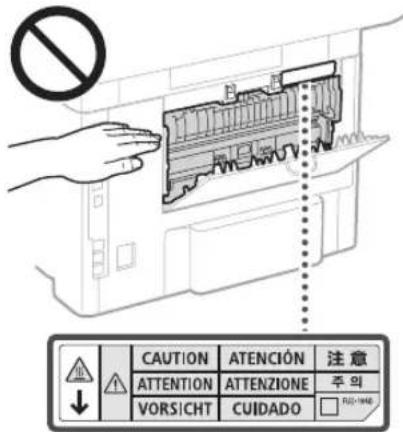
Do not place heavy objects on the scanner glass, such as dictionaries. This may damage the scanner glass and cause injury. Do not carry the device with the cassette or optional unit installed, as it may fall and cause injury.
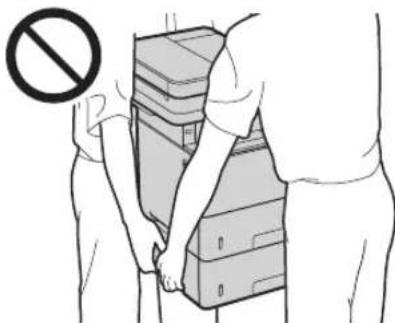
Device for feeding (only for products equipped with a feeding device)
When copying thick books from the scanner glass, do not press the feeding device too hard. This may damage the scanner glass and cause injury. When closing the feeding device, be careful not to get your hands or fingers caught, as this may cause injury.
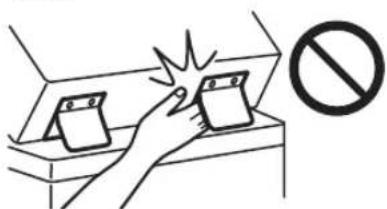
Finisher (only for products equipped with a finisher)
Do not place the device near water, it may cause a short circuit (short with contacts). Be especially careful with sharp objects, as they can cause injury.
Paper cassette (only for devices equipped with a paper cassette)
Do not put your hands in the device when the paper cassette is removed. This may cause injury.
CLASS 1 LASER PRODUCT
LASER KLASSE 1
APPAREL A LASER DE CLASSE 1
APPARECCHIO LASER DI CLASSE 1
PRODUCTO LASER DE CLASE 1
APARELHO A LASER DE CLASSE 1
LUOKAN 1 LASER-TUOTE
LASERPRODUKT KCLASS 1
The laser beam can be dangerous to the human eye. Since the radiation emitted inside the device is completely enclosed by protective housings and outer covers, the laser beam cannot escape from the device at any stage of its operation by the user. Follow the safety instructions below.
Never open any covers of the device, except as indicated in this manual. Exposure to the laser beam, even indirectly, can cause eye damage. Use of controls or adjustments or performance of procedures other than those specified herein may result in hazardous radiation exposure.
Laser safety precautions
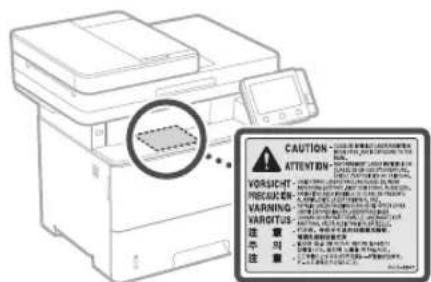
The device is marked with a warning label attached to the device. Do not subject the device to strong mechanical loads or vibrations. Do not open or close the cover, lid, or other components while the device is in use. This may lead to device damage. Do not disconnect the power or open the cover while the device is operating. This may lead to malfunction. Use a power cable longer than 3 meters. - Use a USB cable shorter than 3 meters.
Appendix
Do not touch the connectors (7) inside the device. This may lead to device damage.
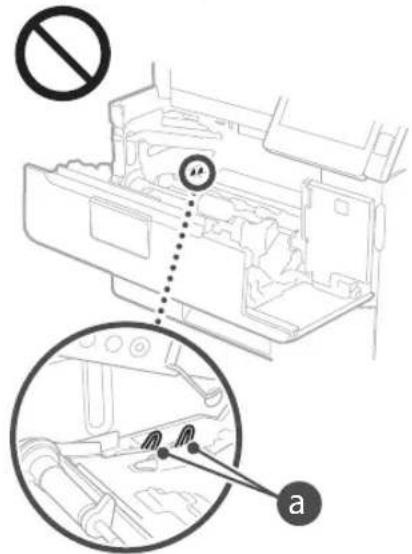
Transporting the device
To prevent damage to the device during transport, perform the following.
Avoid using non-genuine toner cartridges
When using non-genuine toner cartridges, which are not Canon genuine cartridges, use of non-genuine cartridges may lead to deterioration of print quality or device malfunction. Canon assumes no responsibility for any failures, accidents, or damages resulting from the use of non-genuine toner cartridges. For additional information, see the Canon website at canon.com/counterfeit.
Periodic replacement of consumable parts and toner cartridges
Consumable parts and toner cartridges for the device will be available for at least seven (7) years after the production of this device model has been discontinued.
Packaging materials for the toner cartridge
Keep the packaging materials for the toner cartridge; they will be needed when transporting the device. The quantity, form, and placement of the packaging materials may change without prior notice. When disposing of the toner cartridge, dispose of it in accordance with applicable local regulations.
Disposing of used toner cartridges and similar components
When disposing of toner cartridges and similar components, place them in the original packaging to prevent toner spillage, and dispose of them in accordance with applicable local regulations.
Appendix
Product name
The device must be registered.
In some countries, the distribution of this device may be restricted. It must be registered under a different name, as indicated in the relevant regulations.
MF525x (F173802)
MF522x (F173800)
Requirements of the EMC Directive
This device complies with the essential requirements of the EMC Directive. We declare that this device conforms to the EMC requirements specified in the EMC Directive, at a nominal input voltage of 230 V and a frequency of 50 Hz. The operating characteristics of this device range from 220 to 240 V, 50/60 Hz. To ensure compliance with the EMC requirements of the EMC Directive, it is necessary to use a shielded cable.
Regulatory information for use in the local network
Regulatory information for users in Jordan MF525x / MF522x includes approved Wireless LAN Module (Model name: Type1KA). Contains Wireless LAN Module approved by TRC/ LPD/2017/19
Regulatory information for users in UAE MF525x/MF522x includes approved Wireless LAN Module (Model name: Type1KA).
TRA
REGISTERED No: ER51217/17
DEALER No: DA0073692/11
RE Directive
(Only for European radio equipment)
RE Declaration of Conformity
Hereby, Canon Inc. declares that this equipment is in compliance with Directive 2014/53/EU. The full text of the EU declaration of conformity is available at the following internet address: http://www.canon-europe.com/ce-documentation Wireless LAN Specifications Frequency band(s): 2412-2472 MHz Maximum radio-frequency power: 15.9 dBm
Hereby, Canon Inc. declares that this equipment is in compliance with Directive 2014/53/EU. The full text of the EU declaration of conformity is available at the following internet address: http://www.canon-europe.com/ce-documentation Wireless LAN Specifications Frequency band(s): 2412-2472 MHz Maximum radio-frequency power: 15.9 dBm
Hereby, Canon Inc. declares that this equipment is in compliance with Directive 2014/53/EU. The full text of the EU declaration of conformity is available at the following internet address: http://www.canon-europe.com/ce-documentation Wireless LAN Specifications Frequency band(s): 2412-2472 MHz Maximum radio-frequency power: 15.9 dBm



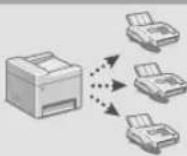
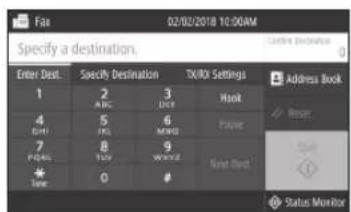

- Select the printer driver for the device, and then select the [Settings] or [Properties] item.
- Specify the paper format.
- Specify the paper source. 5. If necessary, specify the print parameters.
- Press the [OK] button.
- Press the [Print] or [OK] button.
Useful print parameters
■ Duplex printing of multiple pages on one sheet of paper
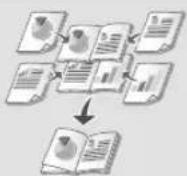
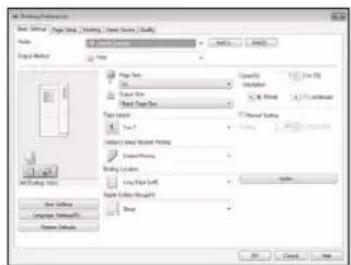
Initial information about the driver
1 Insert the paper stack.
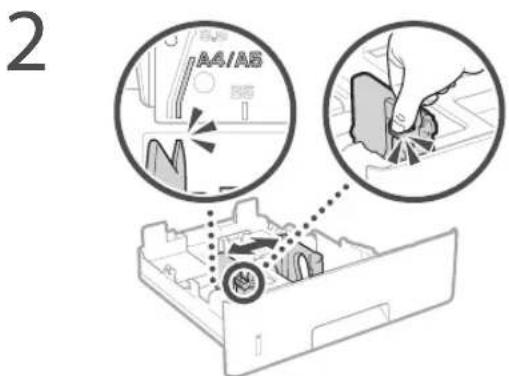
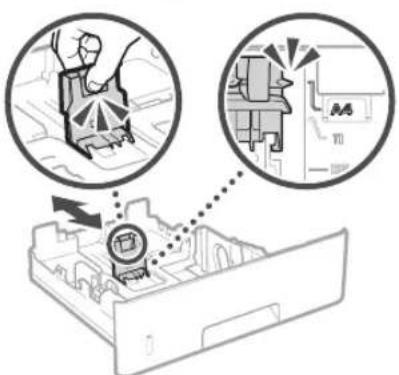
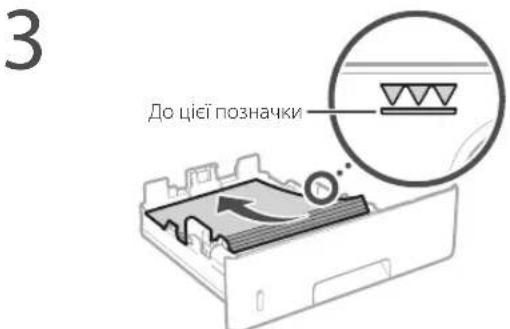
4 Insert the paper stack into the device.
If they are different in size or type, their parameters must be changed accordingly.
5 Press the key to select the item (paper parameters).
6 Specify the paper size and type according to the instructions on the screen.
Loading paper into the multi-purpose tray
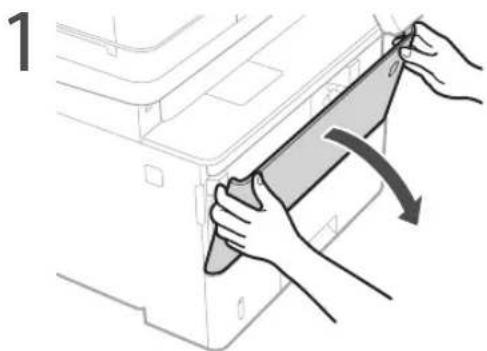
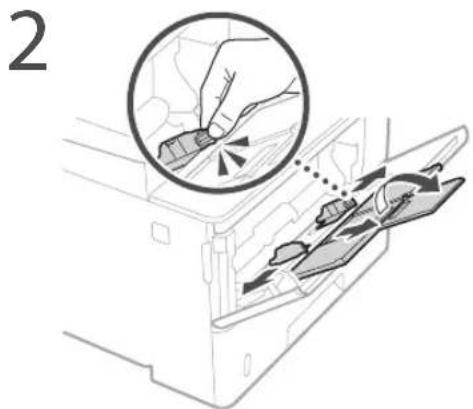

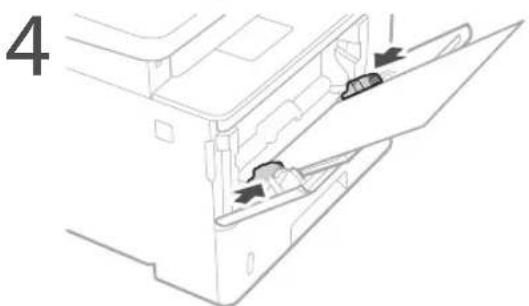
Specify the paper size and type according to the instructions on the screen.
To solve the problem
Follow the instructions on the screen
The device does not start
The device does not respond when the button is pressed
Check the following.
- Is the power on?
- Have you turned on the device from the power switch?
If the power and indicator are not lit, press the power button.
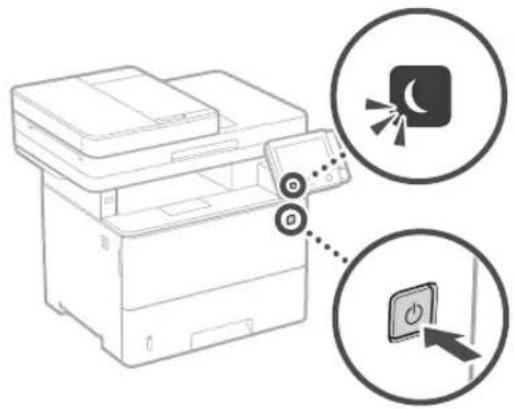
Turn on the power switch according to the instructions on the screen.
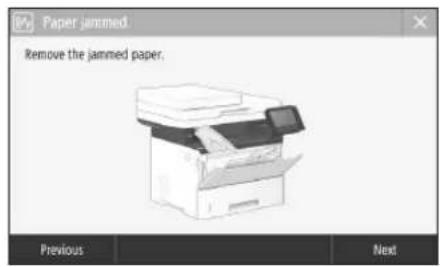
- Is the power cord properly connected?
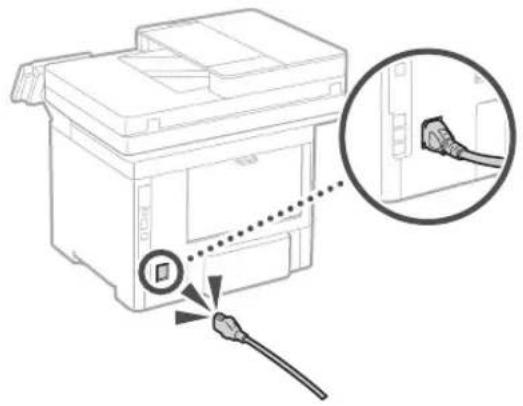
Replacing the toner cartridge
Replace the toner cartridge according to the instructions on the screen.
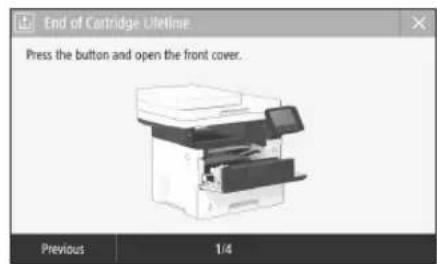
If the problem persists, see the user's manual.
Model number of the toner cartridge to replace
-Canon Cartridge 041 -Canon Cartridge 041 H
Important safety instructions
This section contains important safety instructions that will help prevent injury to users of this device or damage to it, as well as damage to property. Before using the device, read this section carefully and follow the instructions to use the device properly. Do not perform any operations not described in this manual. Canon Inc. is not responsible for any damage or injury caused by operations not described in this manual, improper use, repair, or modifications made by non-Canon service personnel or unauthorized third parties. Improper use of this device may lead to injury and/or damage that requires extensive repair, which may not be covered by the warranty.
WARNING
Indicates a potentially hazardous situation which, if not avoided, could result in injury. For safe use of the device, be sure to observe these warnings.
CAUTION
Indicates a potentially hazardous situation which, if not avoided, may result in injury. For safe use of the device, be sure to observe these cautions.
IMPORTANT
Indicates important operational information. Read these sections carefully to ensure correct operation of the device and to prevent malfunction or damage.
INSTALLATION
To use the device safely, be sure to read the precautions before installing the device.
WARNING
Do not install the device in a location where its operation may cause fire or electric shock. Specifically:
In places where flammable solvents are used (such as alcohol, thinners, gasoline, kerosene, etc.) or in humid or dusty places; in places where corrosive gases are present; in places with high temperatures; near open flames;
- Near alcohol, thinners, or other volatile chemicals.
Improper use of the device may cause damage or injury from electric shock. Do not place the device on a damp surface or near metal objects or liquids. Contact with internal parts of the device may cause damage or injury from electric shock. Install and connect the device according to the instructions. Before connecting the cable and powering the device, check the cable and the device. If the cable is damaged, it may cause damage or injury from electric shock. Use a standard power outlet and a three-prong plug. Do not use an extension cord or adapter.
Do not install the device in the places specified below.
The device may fall or tip over, causing injury.
On uneven surfaces; in places with strong vibrations.
When moving the device, follow the instructions in the user manual. If the device is not moved properly, it may fall and cause injury. When reinstalling the device, make sure it is not placed near heat sources or walls. This may cause injury.
Adjustable feet (only for models with adjustable feet)
Do not remove the adjustable feet after installing the device, as it may fall or tip over, causing injury.
CAUTION
Do not install the device in the places specified below.
(This may cause damage to the device):
Places with very high or very low humidity; places where humidity may fluctuate rapidly; places with strong magnetic or electromagnetic fields; in rooms with chemical reactions; places where corrosive or toxic substances may be present on the surface, which could damage the device; places where the device may be exposed to water (e.g., near a sink).
Do not install the device in poorly ventilated rooms.
Do not install the device in places where it may be exposed to water or moisture. The device should be installed in a dry, well-ventilated area. If the device is installed in a place where it may be exposed to water or moisture, it may cause a short circuit or fire. It is recommended to use a surge protector to protect the device from power surges. Also, do not install the device in places where it may be exposed to direct sunlight.
Do not install the device in places where condensation may form.
Do not install the device in places where the temperature may be high, as high temperatures may cause the device to overheat. Do not install the device in places where the temperature may be low, as low temperatures may cause the device to malfunction. The device may be damaged by extreme temperatures. Before using the device, make sure that the temperature and humidity of the environment are within the recommended range.
Do not install the device at high altitudes (3000 meters above sea level or higher).
At high altitudes (3000 meters above sea level or higher), the device may not operate correctly.
Telephone line connection (only for models with telephone function)
This device is designed for analog telephone lines. This device can only be connected to a standard analog telephone line (PSTN). Do not connect the device to a digital telephone line, as this may cause malfunction or damage. Before connecting the telephone line, make sure that the line is analog. If you have any questions about the telephone line, contact your telephone service provider.
Using a wireless local area network (only for models with wireless LAN function)
Install the device at least 50 cm away from wireless LAN devices. The device may interfere with other wireless devices, such as cordless telephones, microwave ovens, and other wireless devices. Do not use the device near microwave ovens, as they may interfere with the device and cause it to malfunction.
Power source
Damage
The power cord supplied with the device complies with the required standards. If it is damaged, it can cause electric shock or injury. Do not use the power cord with the extension cord from the kit, as this may lead to electric shock. The power cord is intended for use with this device only. Do not use the power cord with other devices. Do not pull, stretch, or bend the power cord, and do not place any objects on it. Do not place objects on the power cord. Damaged or entangled power cords increase the risk of electric shock. Do not touch the plug with wet hands. Do not use the device with a damaged or entangled power cord. This may cause electric shock or injury. Do not connect the power cord to multiple sockets. This may cause electric shock or injury. Do not immerse the power cord in water or any liquid, as this may cause electric shock. Always fully insert the plug into the socket before use. If the plug is damaged, it may cause electric shock or injury. When unplugging, always pull the plug, not the cord, to avoid damage. If the cord is damaged, it may cause electric shock or injury. The device is designed to be used with the specified voltage. Keep the power cord away from heat sources, as this may damage the insulation and cause electric shock.
Avoid overloading.
Do not use the power cord with the grounded part of the device under excessive force, as this may cause damage to the power cord or the internal wiring of the device.
may become disconnected. This may cause fire. - Before cleaning and maintenance, unplug the power cord. - Before cleaning, unplug the power cord. - Remove the power cord from the socket by pulling the plug, not the cord. - Do not use excessive force when inserting the plug into the socket or when removing it. - Do not use the device with a damaged or entangled power cord.
WARNING
Install the device near the electrical outlet, leaving enough space for easy access to the plug, so that the plug can be easily removed from the outlet if needed.
IMPORTANT
Do not interrupt the power supply to the device continuously. This can lead to incorrect operation and damage to the device in various modes of operation. In case of a power outage, unplug the device from the socket and use the sockets with grounding contacts.
Do not connect the power supply to an additional socket of a surge protector or to a computer.
Other protective measures
Electrical safety should be ensured by the device's internal insulation.
Placement
WARNING
Do not disassemble the device and do not remove the cover. Do not insert fingers or objects into the socket. Do not use the device near water or in damp conditions. Improper use may cause electric shock. Do not disassemble or modify the device. The device contains parts that are under high voltage or high temperature. Disassembling or modifying the device may cause fire or electric shock. Place the device in a place where it cannot be reached by children or unauthorized persons. Do not use the device near flammable materials. If you need to repair the device, do not attempt to repair it yourself; contact a qualified service technician. Before cleaning or maintenance, unplug the device from the power outlet. Failure to do so may result in electric shock or fire. Do not touch the plug with wet hands. If the power cord is damaged, do not use the device and contact a qualified service technician. Do not touch the metal parts of the plug with wet hands, as this may cause electric shock.
If a cardiac pacemaker is used
The device contains a strong magnet. If you use a cardiac pacemaker and are undergoing a medical procedure, consult a doctor before using the device.
WARNING
Do not use the device if you are pregnant, as it may cause injury. Do not use the device for more than the recommended time. Follow the safety instructions for use of the device. Always open and close the lid carefully to avoid pinching your hands. Keep your hands away from the moving parts. Improper use may cause injury. The internal parts of the device are very hot during and immediately after use. To avoid the risk of burns, do not touch the internal parts. Also, immediately after use, the device may be hot, so be careful when handling it. Improper use may cause injury.
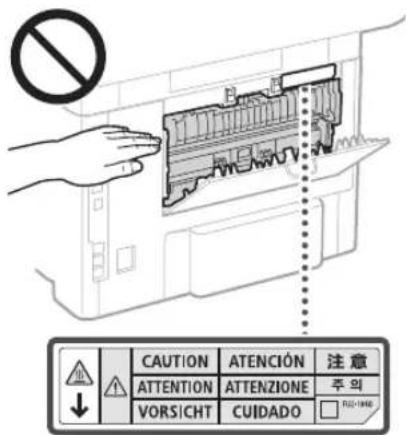
- Be careful not to insert foreign objects into the device, such as coins. This may damage the device and cause injury. Do not carry the device with the water tank or other containers filled with water. They may fall and cause injury.
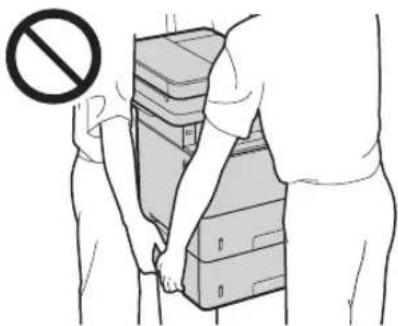
Blade replacement (only for models with a blade)
Do not put your hands near the blade, even when the device is turned off. Be careful with sharp blades, as they may cause injury.
Water tank (only for models with a water tank)
Do not put your hands in the device when it is using the water tank, as this may cause injury.
Battery replacement (only for models with a battery)
Unplug the device from the power outlet and unplug the power cord from the outlet if the device will not be used for a long period of time (e.g., during holidays). Also, unplug the device from the power outlet and unplug the power cord from the outlet if the device will not be used for a long period of time (e.g., during holidays).
Laser device safety
Complies with IEC60825-1:2014 and EN60825-1:2014. This product is a Class 1 laser product.
CLASS 1 LASER PRODUCT
LASER KLASSE 1
APPAREIL À LASER DE CLASSE 1 APPARECCHIO LASER DI CLASSE 1 PRODUCTO LASER DE CLASE 1 APARELHO LASER DE CLASSE 1 LUOKAN 1 LASER-TUOTE LASERPRODUKT KLASSE 1
The laser beam can damage the eyes. Since the laser beam inside the product is enclosed by a protective housing and external cover, the laser beam cannot penetrate outside under any circumstances. Follow the safety instructions provided in this manual.
Never remove the panels unless specified in the instructions for this device. The laser beam is dangerous if exposed. Using controls, adjustments, or performing procedures other than those specified in this manual may result in hazardous laser radiation exposure.
Safety labels and laser safety

WARNING
- Follow the instructions specified on the labels and in this manual for your device. Do not expose the device to direct sunlight or rain. Do not attempt to open or close the doors, covers, or other parts by force. This may cause damage to the device. Do not turn on the power switch or open the cover while the device is operating. This may cause a change in the laser output. Use a USB cable that is less than 3 meters long. Use a USB cable that is less than 3 meters long.
Appendix
Do not touch the contacts inside the device. This may cause damage to it.
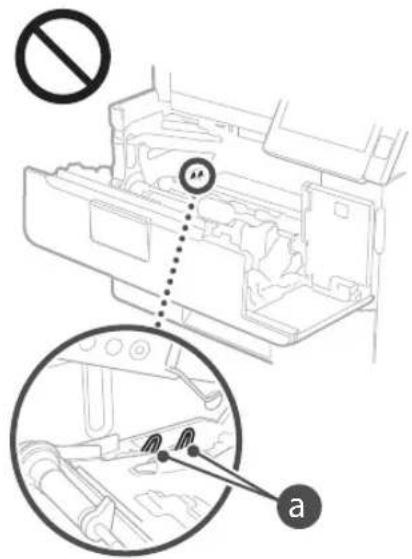
Device transportation
To avoid damage to the device during transportation, follow the instructions below.
Check the cartridge with toner.
Available spare parts in the kit for the material cartridge. Box with complete set of accessories.
Symbols related to safety equipment
Warning: Read the instructions before use
Warning: Read the instructions for use
Warning: Read the instructions for use (maintenance)
Warning: Read the instructions for use
Protective earth connection
Dangerous voltage. Do not touch if there are no instructions.
CAUTION! Hot surface. Do not touch.
Explanation of symbols
Keep the manual with the device for future reference.
The symbols listed above may not be present on the device.
Maintenance and care
Periodic maintenance. If the device does not work properly, or if it has been used in a way not described in the instructions, refer to the troubleshooting section in the user manual. If you cannot solve the problem yourself, the device requires professional service; see the troubleshooting section.
According to the safety instructions, the device must be grounded to prevent electric shock. If it is not grounded, it may cause fire or electric shock. Always unplug the device before cleaning or maintenance. Use a dry cloth to clean the device. If you come into contact with electricity, it may cause fire or electric shock.
Clean the device with a well-wrung cloth. Wipe it for 10 minutes. Do not use alcohol, benzene, paint thinner, or other solvents. Do not use cosmetic wipes or paper towels. If the device gets wet on electrical parts inside, it may cause static electricity, which can lead to fire or electric shock. Regularly check the power cord for damage. Check the device at maximum heating for 60 minutes. If you notice any defects, cracks, or other damage, it may lead to fire or electric shock.
WARNING
Inside the device there are parts that are under high voltage or operate at high temperatures. If you touch these parts, they may cause burns. Do not touch parts of the device that are not mentioned in this manual. Be careful when using the device to avoid injury.
Consumables
WARNING
Do not use cartridges with toner that is exposed to open flame. Also, do not store cartridges with toner in places where they may be exposed to open flame. This can cause toner to ignite and lead to fire or burns. If toner spills or leaks, carefully collect the spilled toner with a damp cloth, including inhalation. Never clean up toner spills with a vacuum cleaner that is not equipped with appropriate filters. This can cause damage to the vacuum or fire due to static discharge.
If you use a toner cartridge
Toner cartridges contain fine magnetic powder. If you use a toner cartridge and inhale the powder during the process of working with the cartridge, follow the instructions and consult a doctor immediately.
WARNING
Be careful not to inhale toner dust. If this happens, consult a doctor immediately. Be careful that toner does not get into your eyes or mouth. If this happens, rinse with cold water and consult a doctor. Be careful that toner does not get on your skin. If this happens, wash it off with cold water and soap. If you experience symptoms of skin irritation, consult a doctor. Store toner cartridges and consumables in a place inaccessible to children. In case of toner leakage, consult a doctor or toxicology center. Do not disassemble or modify toner cartridges or any part of the device. This can cause toner to spill. When removing the protective seal from the toner cartridge, pull it out completely, but do not shake it. Otherwise, toner may spill.
CAUTION
Do not remove cartridges with toner from their packaging or the device unnecessarily. Toner cartridges contain magnetic substances. Do not place them near floppy disks, magnetic tapes, or other magnetic media, as this may cause data loss.
Storing toner cartridges
Storage and handling of the toner cartridge. Storage temperature range: from 0 to 35°C. Storage humidity range: from 35 to 85% relative humidity (without condensation). Do not remove the cartridge from its package until you are ready to use it. Store the cartridge in its package horizontally. Do not store it vertically or upside down. Toner may harden, and after that, normal use may become impossible or cause print quality issues.
*Under recommended storage conditions, the toner cartridge may form clumps (condensation) due to temperature fluctuations inside and outside the cartridge. Condensation can affect the print quality of the toner cartridge.
Do not store toner cartridges in the following places:
- Places exposed to open flames; places where direct sunlight or bright light may shine (for example, near a window or for more than a few hours); places where the air is excessively dry; places where the air is exposed to corrosive gases (such as aerosols); places with high temperature and high humidity; places where temperature and humidity fluctuate rapidly, causing condensation.
Very dusty places; places accessible to small children.
Be careful with counterfeit toner cartridges
Please note that there are counterfeit Canon toner cartridges on the market. Using a counterfeit toner cartridge may lead to poor print quality or damage to the device. Canon is not responsible for any malfunctions, damage, or accidents caused by the use of counterfeit toner cartridges. For more information, visit canon.com/counterfeit.
Availability of spare parts, toner cartridges, and other consumables
Spare parts and toner cartridges for this device will be available for at least seven (7) years after the production of this model has ceased.
Packaging materials for the toner cartridge
Keep the packaging of the toner cartridge. It will be needed when transporting the device. Packaging materials may have different shapes and may be dangerous. Keep them out of the reach of children. Dispose of the packaging in accordance with local regulations.
Disposal of used toner cartridges and other consumables
When disposing of used toner cartridges, please follow the applicable laws and regulations.
Appendix
Product name
Information on technical safety of products is registered in detail. In some regions, products may also be registered for sale.
MF525x(F173802)
MF522x(F173800)
Compliance with the Electromagnetic Compatibility Directive
This device complies with the essential requirements of the EMC Directive. We hereby declare that this product complies with the essential requirements of the EMC Directive, as stated in the Directive, with a rated mains voltage of 230 V and a frequency of 50 Hz. The product is designed to operate with a mains input voltage of 220-240 V, 50/60 Hz. The use of shielded cables is a prerequisite for compliance with the EMC Directive.
Regulatory information for wireless LAN
Regulatory information for users in Jordan MF525x / MF522x includes approved Wireless LAN Module (Model name: Type1KA). Contains Wireless LAN Module approved by TRC/ LPD/2017/19
Regulatory information for users in UAE MF525x/MF522x includes approved Wireless LAN Module (Model name:Type1KA).
TRA
REGISTERED No: ER51217/17
DEALER No:DA0073692/11
RE Directive
(Only for European radio equipment)
RE Declaration of Conformity
English (EN) Hereby, Canon Inc. declares that this equipment is in compliance with Directive 2014/53/EU. The full text of the EU declaration of conformity is available at the following internet address: http://www.canon-europe.com/ce-documentation Wireless LAN Specifications Frequency band(s):2412-2472MHz Maximum radio-frequency power: 15.9 dBm
Czech (CS) Canon Inc. hereby declares that this device is in compliance with Directive 2014/53/EU. The full text of the EU declaration of conformity is available at the following internet address: http://www.canon-europe.com/ce-documentation Wireless LAN technical specifications Frequency band(s): 2412-2472 MHz Maximum radio-frequency power: 15.9 dBm
Danish (DA) Hereby, Canon Inc. declares that this equipment is in compliance with Directive 2014/53/EU. The full text of the EU declaration of conformity is available at the following internet address: http://www.canon-europe.com/ce-documentation Wireless LAN specifications Frequency band: 2412-2472 MHz Max. radio-frequency power: 15.9 dBm
Illustrations used in this manual
The illustrations and screen captures used in this manual correspond to the MF525x model, unless otherwise specified.
Trademarks
Apple Inc. is a trademark of Apple Inc. Microsoft, Windows, Windows Vista, Windows Server, Internet Explorer, Excel, and PowerPoint are registered trademarks or trademarks of Microsoft Corporation in the United States and/or other countries. Other product and company names mentioned in this document may be trademarks of their respective owners.
Third-party software
This product includes third-party software modules. The use and distribution of these software modules, including any updates to such software modules (together with the software), are subject to the terms and conditions set forth in sections (1) through (9) below.
(1) This software is protected by copyright laws and international copyright treaties, as well as other intellectual property laws and treaties. The software is licensed, not sold. (2) The copyright holder retains all intellectual property rights to the software. The copyright holder does not grant any express or implied rights to any intellectual property, except as explicitly stated in this document. (3) The software may only be used as permitted by the license. (4) The software must not be copied, reproduced, modified, distributed, sold, leased, or transferred to third parties without the prior written consent of the copyright holder. (5) Notwithstanding the above, the software may be transferred, but only if (a) all rights and obligations of the licensee are transferred, and (b) the licensee agrees to such transfer. (6) It is prohibited to decompile, reverse engineer, disassemble, or otherwise attempt to derive the source code of the software. (7) It is prohibited to rent, lease, lend, or provide the software to third parties, or to create derivative works based on the software. (8) It is prohibited to copy or make copies of the software except as permitted by the license. (9) The license does not extend to third-party software modules included with the software, which are subject to their own license terms.
Notwithstanding paragraphs (1)-(9) above, any third-party software modules included with the software are subject to their own license terms, and the use of such modules is governed by those terms. The license terms for third-party software modules are described in the documentation provided by the manufacturer. This documentation is available at http://canon.com/oip-manual.
By using this product, you agree to all applicable license terms. If you do not agree to these license terms, contact your technical support representative.
V_170601
UK
Pareizi novietojiet originalo dokumentu
Indicates a warning concerning operations that may lead to death or injury to persons if not performed correctly. To use the machine safely, always pay attention to these warnings.
UZMANIBUI!
Norada bridinajumu par daribbam, kuru neparela izpilde var Izraisit traumas. Lai ekartas lietosana butu drosa, vienmer pleversiet uzmanibu smi bridinajumiem.
SVARIGI!
Norada aierices daribubu salistatas prasibas un ierobezejumus. Laik eartas dariba butu parela un lai nerastos iekartas va ipasuma bojajumi, uzmanigi izlasiet sos punktus.
Uzstadisana
Lai so ieriei lietotu drosi un erti, rupigi izlasiert talak noradito informacju par piesardzibas pasakumiem un uzstadiet ieriei piemerotavieta.
ABRIDINAJUMS
CLASS 1 LASER PRODUCT
LASER CLASS 1
APPAREL LASER DE CLASSE 1
APPARECCHIO LASER DI CLASSE 1
PRODUCTO LASER DE CLASE 1
APARELHO A LASER DE CLASSE 1
LUOKAN 1 LASER-TUOTE
LASERPRODUKT KCLASS 1
The laser beam can be harmful to the human body. Since the radiation emitted during operation is completely contained within the protective housing and external covers, the laser beam cannot escape the device at any stage of use. For safety purposes, please read the following notes and instructions.
Never open covers that are not specified in this user manual. If the laser beam does enter the eyes, they can be damaged. Use of controls, adjustments, or performance of procedures other than those specified in this manual may result in hazardous radiation exposure.
Regulatory information for users in Jordan MF525x / MF522x includes approved Wireless LAN Module (Model name: Type1KA). Contains Wireless LAN Module approved by TRC/ LPD/2017/19
Regulatory information for users in UAE MF525x/MF522x includes approved Wireless LAN Module (Model name:Type1KA).
TRA
REGISTERED No: ER51217/17
DEALER No: DA0073692/11
RE Directive
(Only for European radio equipment)
RE Declaration of Conformity
English (EN) Hereby, Canon Inc. declares that this equipment is in compliance with Directive 2014/53/EU.
The full text of the EU declaration of conformity is available at the following internet address: http://www.canoneurope.com/ce-documentation Wireless LAN Specifications Frequency band(s): 2412-2472 MHz Maximum radio-frequency power: 15.9 dBm
Czech (CS) Timto společnost Canon Inc. prohlašuje, že toto zařízení je v souladu se směrnicí 2014/53/EU. Úplné znění EU prohlášení o shodě je k dispozici na této internetové adrese: http://www.canon-europe.com/ce-documentation Technické údaje bezdrátové LAN Pásmo(a) frekvencí: 2412-2472 MHz Maximální výkon rádiové frekvence: 15.9 dBm
Danish (DA) Hermed erklærer Canon Inc., at dette udstyr er i overensstemmelse med direktiv 2014/53/EU. EU-overensstemmelseserklæringens fulde tekst kan findes på følgende internetadresse: http://www.canon-europe.com/ce-documentation Trådløs LAN specifikationer Frekvensbånd: 2412-2472 MHz Maks. radio-frekvenseffekt: 15.9 dBm
When connecting the power supply
- Do not connect the power cord to an uninterruptible power supply. If you do, a power failure could disrupt the device's operation or damage it.
- If you connect this device to a multi-outlet AC power source, do not use the remaining outlets for other devices.
- Do not connect the power cord to the AC outlet on a computer.
Other precautions
Due to electrical noise, this device may malfunction or data may be lost.
Usage
WARNING
- If the machine emits unusual noise, an unusual smell, or smoke, or if you feel heat, immediately unplug the power cord from the AC power outlet and contact your authorized Canon dealer. If you continue to use it, fire or electric shock may occur. Do not disassemble or modify the machine. The machine contains high-voltage and high-temperature components. Disassembling or modifying the machine may cause fire or electric shock. Place the machine so that children cannot reach the power cord, other cables, or the internal electrical parts. Failure to do so may result in accidents. Do not use flammable sprays near the machine. Flammable substances coming into contact with the electrical parts inside the machine may cause fire or electric shock.
- When moving the machine, be sure to turn off the power, then unplug the power cord and disconnect the interface cables. If you do not do so, you may damage the power cord or interface cables, which may cause fire or electric shock. When connecting or disconnecting the USB cable, if the power cord plug is inserted into the AC power outlet, do not touch the metal part of the connector, as this may cause electric shock.
If you use a pacemaker
CLASS 1 LASER PRODUCT
LASER KLASSE 1
APPAREIL A LASER DE CLASSE 1 APPARECCHIO LASER DI CLASSE 1
PRODUCTO LASER DE CLASE 1
APARELHO A LASER DE CLASSE 1
LUOKAN 1 LASER-TUOTE LASERPRODUKT KLASSE 1
The laser beam may be harmful to the human body. The radiation emitted inside the product is completely confined by protective housings and external covers, so the laser beam cannot escape from the device during any stage of normal use. For safety, please read the following notes and instructions.
Regulatory information for users in Jordan
MF525x/MF522x includes approved Wireless LAN Module (Model name: Type1KA). Contains Wireless LAN Module approved by TRC/LPD/2017/19
Regulatory information for users in UAE
MF525x/MF522x includes approved Wireless LAN Module (Model name: Type1KA).
REGISTERED No: ER51217/17
DEALER No: DA0073692/11
RE Directive
(Only for European radio equipment)
RE Declaration of Conformity
English (EN) Hereby, Canon Inc. declares that this equipment is in compliance with Directive 2014/53/EU.
The full text of the EU declaration of conformity is available at the following internet address: http://www.canon-europe.com/ce-documentation Wireless LAN Specifications Frequency band(s):2412-2472MHz Maximum radio-frequency power: 15.9 dBm
Czech (CS) Timto spelecnost Canon Inc. prohlasej, ze toto zafrzeni je v souladu se smemici 2014/53/FU.
Uplnezneni FU prohlasei o shode je k dispozici na teto internetové adrese:
http://www.canon-europe.com/ce-documentation Technicke udaje bezdratov LAN
Pásmo(a) frevence: 2412-2472 MHz Maximálni vykon radióve frevence: 15.9 dBm
CLASS 1 LASER PRODUCT
LASER KLASSE 1
APPAREL A LASER DE CLASSE 1
CLASS 1 LASER DEVICE
CLASS 1 LASER PRODUCT
CLASS 1 LASER APPARATUS
CLASS 1 LASER PRODUCT
CLASS 1 LASER PRODUCT
Regulatory information for users in Jordan MF525x / MF522x includes approved Wireless LAN Module (Model name: Type1KA). Contains Wireless LAN Module approved by TRC/ LPD/2017/19
Regulatory information for users in UAE MF525x/MF522x includes approved Wireless LAN Module (Model name:Type1KA).
TRA
REGISTERED No: ER51217/17
DEALER No: DA0073692/11
RE Directive
(Only for European radio equipment)
RE Declaration of Conformity
English (EN) Hereby, Canon Inc. declares that this equipment is in compliance with Directive 2014/53/EU. The full text of the EU declaration of conformity is available at the following internet address: http://www.canon-europe.com/ce-documentation Wireless LAN Specifications Frequency band(s):2412-2472MHz Maximum radio-frequency power: 15.9 dBm
Czech (CS) Hereby, Canon Inc. declares that this equipment is in compliance with Directive 2014/53/EU. The full text of the EU declaration of conformity is available at the following internet address: http://www.canon-europe.com/ce-documentation Wireless LAN Specifications Frequency band(s):2412-2472 MHz Maximum radio-frequency power: 15.9 dBm
Danish (DA) Hereby, Canon Inc. declares that this equipment is in compliance with Directive 2014/53/EU. The full text of the EU declaration of conformity is available at the following internet address: http://www.canon-europe.com/ce-documentation Wireless LAN specifications Frequency band: 2412-2472 MHz Max. radio-frequency power: 15.9 dBm
CLASS 1 LASER PRODUCT
LASER KLASSE 1
APPAREL A LASER DE CLASSE 1
APPARECCHIO LASER DI CLASSE 1
PRODUCTO LASER DE CLASE 1
APARELHO A LASER DE CLASSE 1
LUOKAN1 LASER-TUOTE
LASERPRODUKT KCLASS T
Regulatory information for users in Jordan MF525x / MF522x includes approved Wireless LAN Module (Model name: Type1KA). Contains Wireless LAN Module approved by TRC/ LPD/2017/19
Regulatory information for users in UAE MF525x/MF522x includes approved Wireless LAN Module (Model name: Type1KA).
TRA
REGISTERED No: ER51217/17
DEALER No: DA0073692/11
RE Directive
(Only for European radio equipment)
RE Declaration of Conformity
English (EN) Hereby, Canon Inc. declares that this equipment is in compliance with Directive 2014/53/EU. The full text of the EU declaration of conformity is available at the following internet address: http://www.canon-europe.com/ce-documentation Wireless LAN Specifications Frequency band(s): 2412-2472 MHz Maximum radio-frequency power: 15.9 dBm
Czech (CS) Canon Inc. hereby declares that this equipment is in compliance with Directive 2014/53/EU. The full text of the EU declaration of conformity is available at the following internet address: http://www.canon-europe.com/ce-documentation Wireless LAN technical data Frequency band(s): 2412-2472 MHz Maximum radio-frequency power: 15.9 dBm
Danish (DA) Canon Inc. hereby declares that this equipment is in compliance with Directive 2014/53/EU. The full text of the EU declaration of conformity is available at the following internet address: http://www.canon-europe.com/ce-documentation Wireless LAN specifications Frequency band: 2412-2472 MHz Maximum radio-frequency power: 15.9 dBm
CLASS 1 LASER PRODUCT
LASER KLASSE 1
APPAREL A LASER DE CLASSE 1
APPARECCHIO LASER DI CLASSE 1
PRODUCTO LASER DE CLASE 1
APARELHO A LASER DE CLASSE 1
LUOKAN 1 LASER-TUOTE
LASERPRODUKT KCLASS 1
The laser beam can be harmful to the human body. Since the radiation emitted inside the product is completely confined within the protective housing and external covers, the laser beam cannot escape from the device during any phase of normal user operation. To be able to operate the machine safely, please read the following notes and instructions.
Never open any covers other than those specified in the instructions for this device. If the laser beam were to strike your eyes, it could cause damage to your vision. Use of controls, adjustments, or performance of procedures other than those specified in this manual may result in exposure to hazardous radiation.
Regulatory information for users in Jordan
MF525x/MF522x includes approved Wireless LAN Module (Model name: Type1KA). Contains Wireless LAN Module approved by TRC/ LPD/2017/19
Regulatory information for users in UAE MF525x/ MF522x includes approved Wireless LAN Module (Model name: Type1KA).
TRA
REGISTERED No: ER51217/17
DEALER No: DA0073692/11
RE Directive
(Only for European radio equipment)
RE Declaration of Conformity
English (EN) Hereby, Canon Inc. declares that this equipment is in compliance with Directive 2014/53/EU. The full text of the EU declaration of conformity is available at the following internet address: http://www.canon-europe.com/ce-documentation Wireless LAN Specifications Frequency band(s): 2412-2472 MHz Maximum radio-frequency power: 15.9 dBm
Czech (CS) Hereby, Canon Inc. declares that this equipment is in compliance with Directive 2014/53/EU. The full text of the EU declaration of conformity is available at the following internet address: http://www.canon-europe.com/ce-documentation Wireless LAN Specifications Frequency band(s): 2412-2472 MHz Maximum radio-frequency power: 15.9 dBm
Danish (DA) Hereby, Canon Inc. declares that this equipment is in compliance with Directive 2014/53/EU. The full text of the EU declaration of conformity is available at the following internet address: http://www.canon-europe.com/ce-documentation Wireless LAN Specifications Frequency band(s): 2412-2472 MHz Maximum radio-frequency power: 15.9 dBm
Control panel (Keys [Home])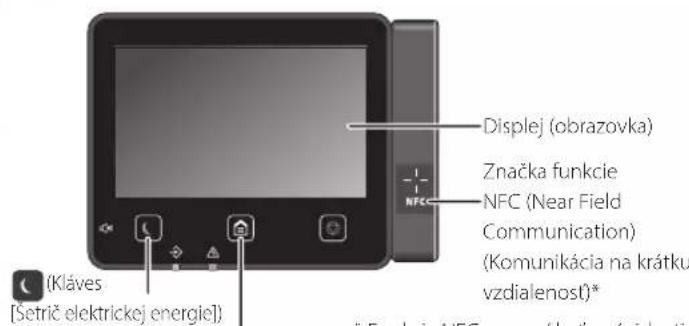
- The NFC function may not be available depending on the device model.

Scanning
CLASS 1 LASER PRODUCT
LASER KLASSE 1
APPAREL A LASER DE CLASSE 1
APPARECCHIO LASER DI CLASSE 1
PRODUCTO LASER DE CLASE 1
APARELHO A LASER DE CLASSE 1
LUOKAN 1 LASER-TUOTE
LASERPRODUKT KCLASS 1
The laser beam may be harmful to the human body. Since the radiation generated inside the product is completely isolated by the protective casing
and the outer covers, the laser beam cannot escape from the device at any stage of its use by the user. For safety reasons, please read the following notes and instructions.
Never open any covers other than those specified in the manuals for this device. - If the laser beam were to leak and hit your eyes, it could cause damage to your eyesight. Use of other controls, adjustments, or performance of procedures other than those specified in this manual may result in hazardous radiation exposure.
Regulatory information for users in Jordan
MF525x/MF522x includes approved Wireless LAN Module (Model name: Type1KA). Contains Wireless LAN Module approved by TRC/ LPD/2017/19
Regulatory information for users in UAE
MFS25x/MFS22x includes approved Wireless LAN Module (Model name:Type1KA).
REGISTERED No: ER51217/17
DEALER No: DA0073692/11
RE Directive
(Only for European radio equipment)
RE Declaration of Conformity
English (EN) Hereby, Canon Inc. declares that this equipment is in compliance with Directive 2014/53/EU. The full text of the EU declaration of conformity is available at the following internet address: http://www.canon-europe.com/ce-documentation Wireless LAN Specifications Frequency band(s): 2412-2472 MHz Maximum radio-frequency power: 15.9 dBm
Czech (CS) Hereby, Canon Inc. declares that this equipment is in compliance with Directive 2014/53/EU. The full text of the EU declaration of conformity is available at the following internet address: http://www.canon-europe.com/ce-documentation Wireless LAN Specifications Frequency band(s): 2412-2472 MHz Maximum radio-frequency power: 15.9 dBm
Danish (DA) Hereby, Canon Inc. declares that this equipment is in compliance with Directive 2014/53/EU. The full text of the EU declaration of conformity is available at the following internet address: http://www.canon-europe.com/ce-documentation Wireless LAN Specifications Frequency band(s): 2412-2472 MHz Maximum radio-frequency power: 15.9 dBm
CLASS 1 LASER PRODUCT
LASER KLASSE 1
APPAREIL À LASER DE CLASSE 1 APPARECCHIO LASER DI CLASSE 1 PRODUCTO LASER DE CLASE 1
APARELHO A LASER DE CLASSE
LUOKAN 1 LASER-TUOTE LASERPRODUKT KLASS 1
Regulatory information for users in Jordan
MF525x/MF522x includes approved Wireless LAN Module (Model name: Type1KA). Contains Wireless LAN Module approved by TRC/LPD/2017/19.
Regulatory information for users in UAE
MF525x/MF522x includes approved Wireless LAN Module (Model name: Type1KA).
TRA
REGISTERED No: ER51217/17
DEALER No: DA0073692/11
RE Directive
(Only for European radio equipment)
RE Declaration of Conformity
English (EN) Hereby, Canon Inc. declares that this equipment is in compliance with Directive 2014/53/EU.
The full text of the EU declaration of conformity is available at the following internet address: http://www.canon-europe.com/ce-documentation. Wireless LAN Specifications: Frequency band(s): 2412-2472 MHz. Maximum radio-frequency power: 15.9 dBm.
CLASS 1 LASER PRODUCT LASER KLASSE 1
APPAREIL À LASER DE CLASSE 1 APPARECCHIO LASER DI CLASSE 1 PRODUCTO LASER DE CLASE 1
APARELHO A LASER DE CLASSE 1
LUOKAN 1 LASER-TUOTE LASERPRODUKT KLASS 1
The laser beam can be harmful to the human body. Since the radiation emitted inside the device is completely enclosed by protective housings and external covers, the laser beam cannot escape from the device during any phase of printer use. Read the following notes and instructions regarding safety.
Never open covers that are not specified in the manual for this device. Exposure to the laser beam can cause eye injury. Using controls, making adjustments, or performing procedures other than those specified in this manual may result in hazardous radiation exposure.
Laser safety label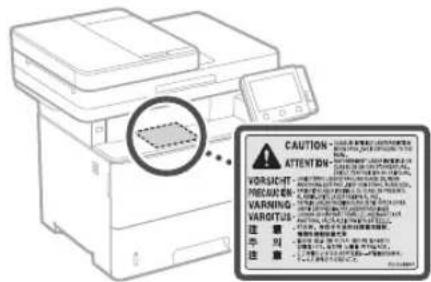
IMPORTANT
- Follow the instructions on the warning label attached to this device. Do not subject the device to strong impacts or vibrations. Do not forcibly open or close the doors, covers, or other parts. This may cause damage to the device. Do not turn off the main power switch or unplug the power cord while the device is active. This may cause paper jams.
- Use a modular cable up to 3 m long. Use a USB cable up to 3 m long.
Appendix
- Do not touch the toner cartridge contacts (as you could damage the device).
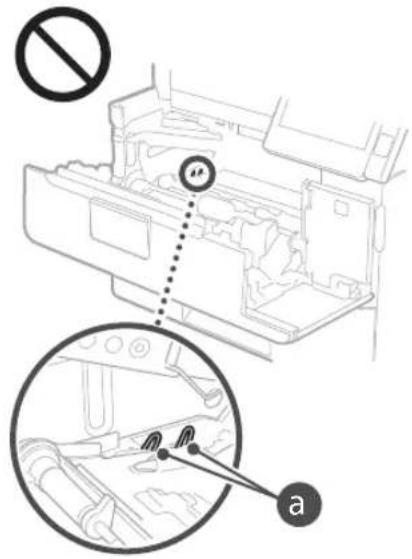
Moving the device
To prevent damage to the device during transport, do the following.
- Remove the toner cartridge. Pack the device securely in the original box with the packing materials.
Safety symbols
Power switch: On position, Power switch: Off position, Power switch: Standby position, Button: On/Off, Ground terminal, Hazardous voltage inside the housing. Do not open covers that are not required to be opened. CAUTION: Hot surface. Do not touch. Class II equipment. Rotating parts: keep away from rotating parts. Depending on the product, some of the above symbols may not be displayed on it.
Regulatory information for users in Jordan MF525x / MF522x includes approved Wireless LAN Module (Model name: Type1KA). Contains Wireless LAN Module approved by TRC/ LPD/2017/19
Regulatory information for users in UAE MF525x/MF522x includes approved Wireless LAN Module (Model name: Type1KA).
REGISTERED No: ER51217/17
DEALER No: DA0073692/11
RE Directive
(Only for European radio equipment)
RE Declaration of Conformity
English (EN) Hereby, Canon Inc. declares that this equipment is in compliance with Directive 2014/53/EU.
The full text of the EU declaration of conformity is available at the following internet address: http://www.canon-europe.com/ce-documentation Wireless LAN Specifications Frequency band(s):2412-2472MHz Maximum radio-frequency power: 15.9 dBm
Czech (CS) Timto spelecnost Canon Inc. prohlasej, ze toto zafrzeni je v souladu se smemici 2014/53/FU.
Uplne zneni EU prohlasei o shode je k dispozici na teo internetové adrese:
http://www.canon-europe.com/ce-documentation Technicke udaje bezdratov LAN
Pásmo(a) frevence: 2412-2472 MHz Maximálni vykon radióve frevence: 15.9 dBm
CLASS 1 LASER PRODUCT
LASER KLASSE 1
APPAREL A LASER DE CLASSE 1
CLASS 1 LASER DEVICE
CLASS 1 LASER PRODUCT
CLASS 1 LASER APPARATUS
CLASS 1 LASER PRODUCT
CLASS 1 LASER PRODUCT
Regulatory information for users in Jordan
MF525x/MF522x includes approved Wireless LAN Module (Model name: Type1KA). Contains Wireless LAN Module approved by TRC/LPD/2017/19
Regulatory information for users in UAE. MF525x/MF522x includes approved Wireless LAN Module (Model name: Type1KA).
TRA
REGISTERED No: ER51217/17
DEALER No: DA0073692/11
RE Directive
(Only for European radio equipment)
RE Declaration of Conformity
English (EN) Hereby, Canon Inc. declares that this equipment is in compliance with Directive 2014/53/EU.
The full text of the EU declaration of conformity is available at the following internet address: http://www.canon-europe.com/ce-documentation Wireless LAN Specifications Frequency band(s): 2412-2472 MHz Maximum radio-frequency power: 15.9 dBm
CLASS 1 LASER PRODUCT
LASER KLASSE 1
APPAREIL A LASER DE CLASSE 1
APPARECCHIO LASER DI CLASSE 1
PRODUCTO LASER DE CLASE
APARELHO A LASER DE CLASSE 1
LUOKAN 1 LASER-TUOTE
LASERPRODUKT KLASSE 1
MFS25x/MF522x includes approved Wireless LAN Module (Model name: Type1KA). Contains Wireless LAN Module approved by TRC/ LPD/2017/19
Regulatory information for users in UAE
MF525x/MF522x includes approved Wireless LAN Module (Model name: Type1KA).
TRA
REGISTERED No: ER51217/17
RE Directive
(Only for European radio equipment)
RE Declaration of Conformity
English (EN) Hereby, Canon Inc. declares that this equipment is in compliance with Directive 2014/53/EU.
The full text of the EU declaration of conformity is available at the following internet address: http://www.canon-europe.com/ce-documentation Wireless LAN Specifications Frequency band(s):2412-2472MHz Maximum radio-frequency power: 15.9 dBm
Instructions for scanning multiple pages with literature, notes, and other.
Starting operation
Machine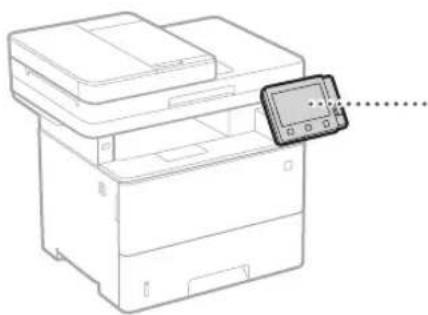
Operation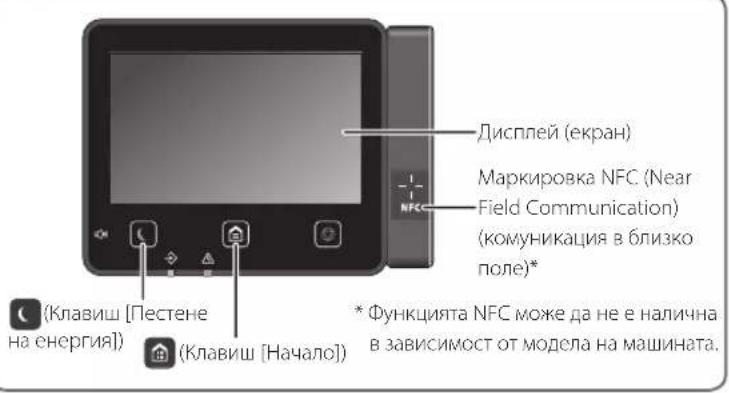

Cleaning
- Place the original document.
- Press and select Scan. 3. Select the scan type and enter the required information.
- Select Start, <4&5 Start> or .
Scanning
Connect the USB cable to the device and the computer.
To scan from
the computer
MF Scan Utility
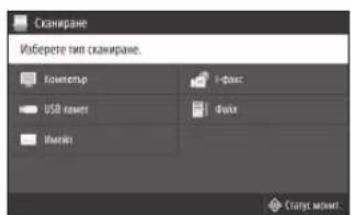
For details
"Scanning" in the User's Guide

Copying
- Place the original document.
- Press and select
- Set the necessary copy settings. 4. Enter the number of copies.
- Select .
Useful copy settings
5. 2-sided or 1-sided, enlargement/reduction, or copy on card

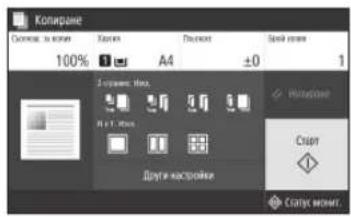
For details
Copying in the User's Guide

Work with fax*
*To send a fax, you must first connect the machine.
- Place the original document. 2. Press <Fax>
- Enter the information for the destination.
- Set the necessary fax settings.
- Select .
Fax functions
Sequential broadcasting of a document to multiple recipients via fax
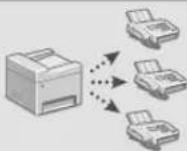
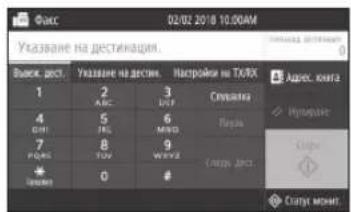
For details on working with fax
see the User's Guide

Printing
- Open the document to be printed and select the print function. 2. Select the printer driver for the machine, then select [Preferences] and [Properties].
- Set the paper size.
- Set the paper source.
- Set the necessary print settings.
- Press [OK]. 7. Select [Print] [OK].
Paper settings for printing
2-sided printing for brochures
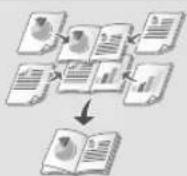
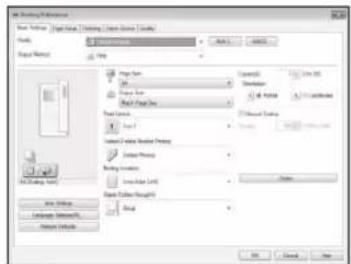
For details
Printing in
the operator's manual
Loading paper
Loading paper in the paper tray
1 Open the paper tray.
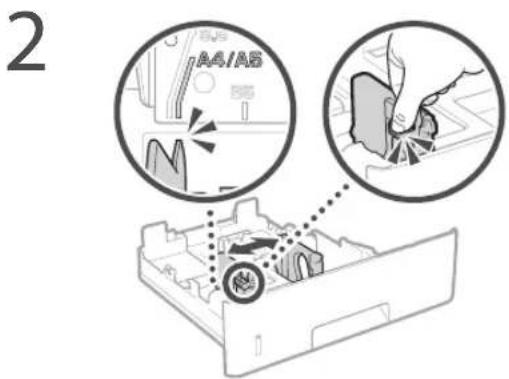
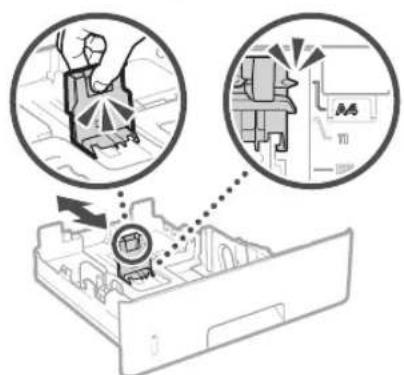
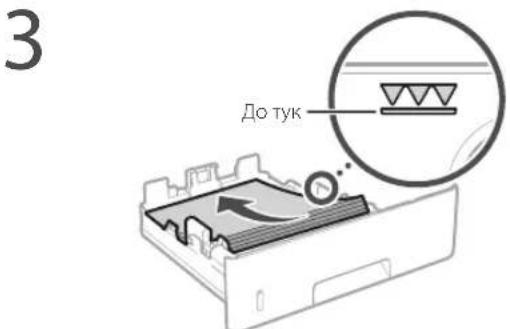
4 Insert the paper tray into the machine.
If you load a different paper size than the specified one, you must change the settings.
5 Press and select .
6 Select the paper size and type according to the loaded paper.
Loading in
the multi-purpose feeder
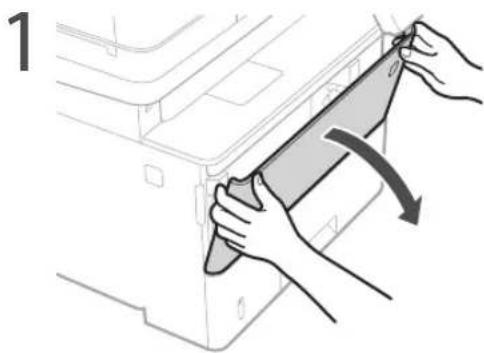
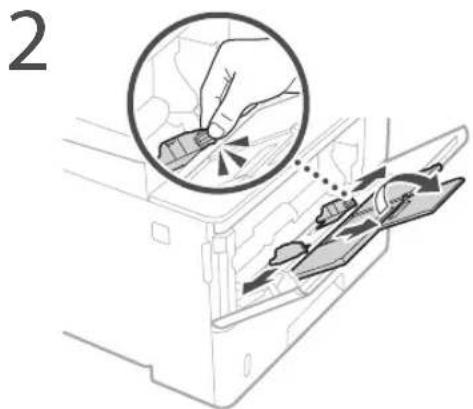
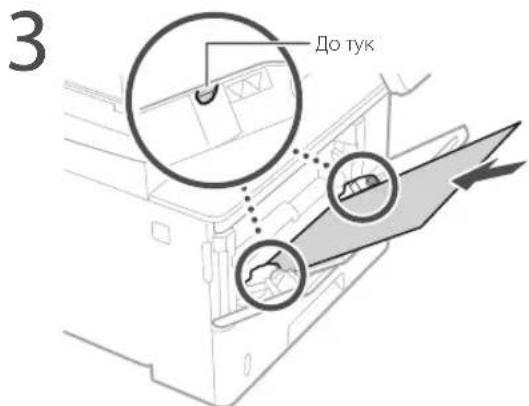
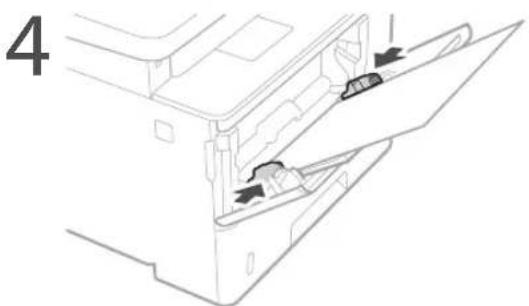
5. Check the size and type of the card according to the instructions.
If problems occur
For details

Troubleshooting
Check that the machine is not working.
Check the fuse.
Is the power switch on? Is the machine plugged in and the power cord connected?
If the indicator light does not come on, check the power connection.
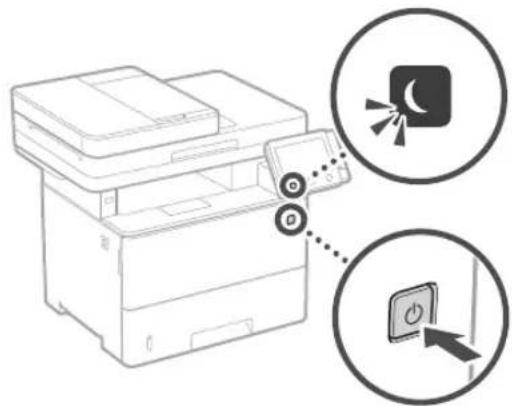
Is the power cord connected properly?
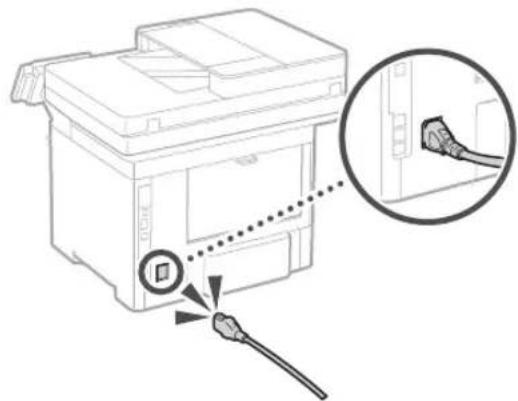
If the problem persists, check the power cord of the appliance.
The card is jammed
Remove the jammed card according to the instructions on the screen.
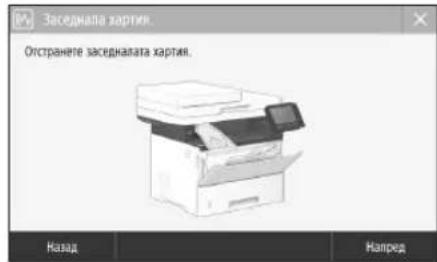
Replace the toner cartridge
Replace the toner cartridge according to the instructions on the screen.
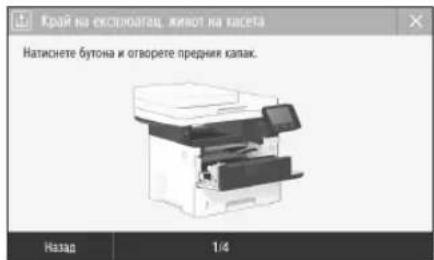
Toner cartridge model number for replacement
- Canon Cartridge 041 -Canon Cartridge 041 H
Appendices
Important Safety Instructions
These safety instructions have been prepared to prevent injury to the user of this device or to other persons, as well as damage to property. Read these instructions before using the device and follow the instructions for proper use. Actions not described in this manual are not recommended. Canon is not responsible for damage caused by operations not described in this manual, or by incorrect use, repair, or replacement not performed by Canon or a third party authorized by Canon. Incorrect installation or use of this machine may cause injury and/or damage, and may result in repairs not covered by the limited warranty.
WARNING
Warnings are provided for operations that may cause injury or damage if not performed correctly. To use the machine safely, be sure to follow these warnings.
CAUTION!
Cautions are provided for operations that may cause damage if not performed correctly. To use the machine safely, be sure to follow these cautions.
IMPORTANT!
Notes and limitations for operation. Read these sections carefully to operate the machine correctly and to ensure reliability of its essential parts.
Installation
To use this device safely and properly, read the following safety instructions carefully and install the device in an appropriate location.
WARNING
Do not install the device in a location where it may cause a fire or electric shock.
Locations where the ventilation slots are blocked (such as close to walls, curtains, or other similar objects), humid or dusty places, places exposed to direct sunlight or open flames, places with high temperatures, places near flammable substances, or places with poor ventilation. Keep away from these locations.
Heed the warnings before using this device. This can lead to fire or electric shock. Do not place the device near flammable objects or liquids. If the device comes into contact with conductive materials, it may cause fire or electric shock. Repairs and maintenance should only be performed by qualified personnel, with the device disconnected from the power supply. Before cleaning, disconnect all cables and power cords from the machine. In case of damage to the power cord or cables, they may cause fire or electric shock. If the device is damaged, disconnect it from the power supply and contact your local dealer.
WARNING!
Do not install on metal surfaces
The device may fall and cause injury.
Do not install on unstable surfaces, subject to vibration
Other safety precautions
- When moving the machine, follow the instructions in this manual. If the machine is moved incorrectly, it may fall and cause injury.
- When installing the machine, be careful not to pinch your hands between the machine and the floor or wall. This may cause injury.
Ink handling (only for products with ink handling)
Do not touch the ink cartridges on the device, especially when the device has been installed, as this may cause damage or malfunction to the device, which could lead to personal injury.
CAUTION!
Do not install on metal surfaces
This may cause damage to the device.
Place the device in a location where the ambient temperature and humidity are within the specified ranges, away from direct sunlight and strong electromagnetic fields, and in a well-ventilated area.
MCTO, H3IOXeHO HA KOP03NBH INI TOKCNHH Ra3OBE NobpHXoCT,KOTo MOxE Da Ce OrHe NOJ TExeCTTA HaYcTPOIcBTOO,IMKbTeIO TO MOxE DA NtBHe (KIMM Jp.)
1368raBte Mecta Cnoa BENTnau
IpoBpeHnHOpMaHATAcPbOta yCTPOINCTBOTENHePAPaMnKoNJIeCtBa03OH nDp.TesmEIMCNHeCaBPEDH2a3IpaBeto.Tc OBaeMOKeJa cTaHaT3abEnExMMnPnP npDnIKnTeHnA yNotPe6aNNDbBnF PiONBAODCTBEH NkBnHaMeCTaC No7a BeHTNnA.3a DaocNpyrTeIO6paPabOTHa cpena,epenopbTuTeHnO CTaTbA,BKOToPabOTu ycPToINTO,daCe pNoBETPAbO6pe.CbIo TakaN36BaBaeMeCtKa,KBeTeOxOpata6xaBnn NIOKeHNHaEMiCNOTyCTPOINCTBOTo. HeHCTaIpaTe Ha MeCTa, B KOITOn IMA KOHN3 BbBbTpeUHOCHTa HA yCTPONCTBO MOXeJa Ce NoRBT BOHN KAKKn (KOHN3), KORA tCtARa, B KoTOE i HcTaNAPaHO, ce 3aONIIb6p3O IN KORATO yCTPOINCTBO Tc IpemEtBa O XnAHO Nn Cyxo Ha TOnIO Nn BlAKnHO MACTo INNON3BaHETo HA yCTPOINCTBO Pn TaKINBA YcIOBNMOXeJa IOBENJIO ZACdAHa HxApTNrA, IOIO NOKaeCTBO Ha NeuAT Nn NobPeA Ha yCTPOINCTBO. Octabete yCTPOINCTBO Da e aadTIpy KaM TemNepaPata Nn BlAKnHOCTa Ha OKONHATA CpeA Ha ManKO 2 caca npEn yNtpe6a.
PnBnCOUHaOTNoBeHeOT3000MeTpHa
MOPCKOTO paBHnue
Bb3MOKHO ycTPOINCTBaTAC TbbpDnCKJa He paoTnPpABINHO, Ako CE nNOnBtHa BcOuHnNoBeue ot 3000 MeTpHa Hd MOpckTo pabNHue.
Cbbp3BaHe Ha TenefoHHaTINHnA (cAmO 3a npOyKtn C yHKuN3a paKc)
Toba yctpoiCTBO OTOBapra HA cTaHdapta 3a aHANOROBA TeneoPHHa NINHA. YcPOICTBO MOKe Da Ce CbP3Ba CaMo KbM NyBmHnHa KOMyTNPyema TeneoFOHa MPexa (PSTN).Ako CBpKeTe YE cTPOCTBO TcBO KbM dNITnHa TeneoHOHa NINn CneuHa TeneoHOHa LNNMa TOBa MOne Da NOppeu Ha NpaBmHnTa paBoTa HA ycPoIcTBTO N Moke Da NpUHN NOBpeA. IpOBePaBtte TINHa H TeLEoHnTA LNNMa, nPeDn Da CbP3BATE Ye cTPOCTBO. CbPKeTe Ce C BaUNHe JOcTaBuHn Ha YcLytn npEz DnboPTnHn Nn IP TeteoOHn NINHM aKO XcKaTe DA CbPKeTe YE cTPOCTBO TcBO KMB TaKbBA TeneoHnN INHHN
Ako n3non3BaTe 6e3xuHa LAN mpeXa (cAmo 3a npOdykTN c fynKmua 3a 6e3xuHa LAN mpeXa)
HCTANpAte yctpoAeBTOHa pa3oTHHe 50 MeTpa nn no-MaKo ot 6e3xHnLAN MaupyTnAtop. -OKOKKOTcE B3MOXHO,HNCTaHpaTHe HA MIOI, KBJETO KOMYHKALHTHe E6IKpHaOT OBeKTN.CINHbT MoKE daBbe BNOwePnnpemHbHaBe Npe3 CTEN Hn eraxn. IocTapaTce cyeCTpoiCTBOTO da e KOKOTO CE MoKe IIO-JaJIeue Oe 6E3XnHn UΦPOBOI TepeOHO, MKNPOBbIHOBbOpyPnN pPyTO 06OpyyBaHe, KOTo EINbua paDIOOBbHn. HeH3nON3BaHTeB6nMBOCTDoMeHNHCKO OBOPyDBAHNE.PaMOBbHINTE,NtBbHAHNOTTOBA YCTPOCTBO,MOXe DaIpNHHATCMUHEHNA MEINHCKOTOOBOPyDBAHNE,KOETOHO DAIOBDEE DO HEPPAHnPAOoTAHIEACTHN CNYAH.
3axpaHbaHe
APDEUYIPKJEHNE
Do not connect the device to a power source that is not grounded. Failure to do so may result in electric shock. Do not use extension cords, adapters, or multiple sockets. The power cord is not intended for use with this device. Do not connect the power cord to other devices. Do not bend, pull, or twist the cord, or place heavy objects on it. Do not connect or disconnect the device with wet hands, as this may cause electric shock. Do not plug the device into a multi-socket outlet. This may cause a fire or electric shock. Ensure that the power cord is properly connected. Do not use the device if the cord is damaged. Do not touch the device with wet hands. Do not pull the cord to disconnect it. During a thunderstorm, disconnect the device from the outlet. Failure to do so may result in fire, electric shock, or damage to the device. Ensure that the electrical connection to the device is safe and that there is no constant voltage. The device should be placed on a stable surface to prevent fire or electric shock.
Emergency situations:
If the power cord is damaged, it may cause a fire or electric shock. Do not use the device if the cord is damaged.
- Disconnect the power cord from the outlet. Do not pull the cord. Keep the cord away from heat sources. Do not place heavy objects on the cord. Do not use the device if the cord is damaged. Do not attempt to repair the cord yourself.
WARNING!
Do not place the device near electrical outlets that are easily accessible. Ensure there is enough space to disconnect the device if necessary.
CAUTION!
Connecting to the power source
Do not connect the power cord to an ungrounded outlet. This may cause malfunction or damage to the device. If you plug the device into a multi-socket outlet, do not connect other devices to the same outlet.
Do not connect the power cord to a power strip or an extension cord.
Electrical safety
Electrical shock may cause injury or damage to the device. Do not use the device if it is damaged.
Device maintenance
WARNING
Keep the device away from contact with water and moisture. Do not use the device near water, such as a bathtub, washbasin, kitchen sink, laundry tub, in a wet basement, or near a swimming pool. Do not disassemble or modify this device. It contains high-voltage components with high temperature. Disassembling or modifying the device may lead to fire or electric shock. Keep the power cord and cables away from heat sources and sharp objects. Do not place heavy objects on the power cord or cables. Do not insert foreign objects into the device. If foreign objects come into contact with electrical parts, it may cause fire or electric shock. Unplug the device and disconnect the power cord and cables before cleaning. Do not pull the power cord or cables to disconnect them; this may damage the cord or cables and cause fire or electric shock. When connecting or disconnecting the USB cable, ensure the device is turned off and the electrical contacts are not touched. Do not touch the metal part of the connector, as it may cause electric shock.
If you use a pacemaker
This device generates a magnetic field and emits low-frequency noise. If you use a pacemaker and feel unusual symptoms, stop using the device and consult your doctor immediately.
CAUTION
Do not place objects on top of the device or block the ventilation slots. During printing, the device may generate heat, and the displayed output may be hot. Do not touch the hot parts. Be careful when handling the paper output tray. The output tray may be hot immediately after printing. Do not touch the fuser unit, as it is hot. The fuser unit may be hot and could cause burns. Be careful when removing jammed paper. If the paper jam is not cleared properly, it may cause damage. The device's output tray may be hot during or after printing. Do not touch the tray until it has cooled down. The tray may be hot and could cause burns. In extreme cases, it may cause fire.
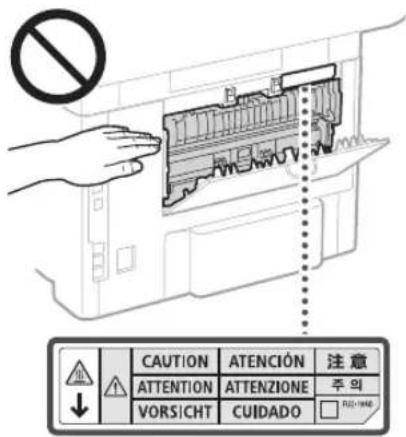
Be careful not to drop small objects such as paper clips onto the glass platen. This could damage the glass and cause injury. Do not move the machine with the document cover or the automatic document feeder (ADF) open. They may fall and cause injury.
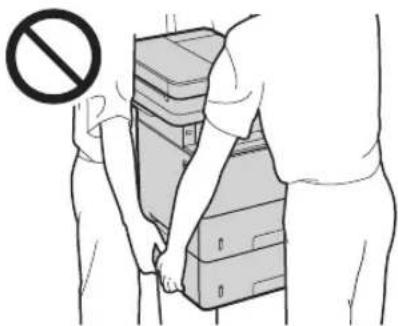
ADF (Automatic Document Feeder)
Do not press hard on the ADF when using the document glass for copying from a book. This may damage the document glass or cause personal injury. Close the ADF carefully to avoid pinching your fingers, as this could cause personal injury. Be careful not to place your fingers near the hinges when closing the ADF. Otherwise, you may be injured.
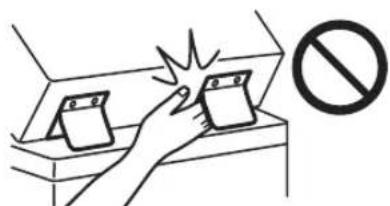
Finisher (optional)
Do not place your fingers near the stapler unit when it is stapling (near the exit). Be careful of the sharp stapler, as it may cause personal injury.
Paper cassette (see products with paper cassette)
Do not pull the CN roller out of the device until the paper cassette is removed, as this may lead to personal injury.
Button "Energy saving" (see products with "Energy saving" button)
Press the (energy saving) button for safety if the device is to be stored for a longer period of time, e.g., during a field. Also, disconnect the power plug and the electrical cable to guarantee safety if the machine is to be stored for a longer period of time, e.g., during holidays.
Laser safety
This device is classified as a laser product Class 1 according to IEC60825-1:2014 and EN60825-1:2014.
CLASS 1 LASER PRODUCT
LASER KLASSE 1
APPAREIL A LASER DE CLASSE 1
APPARECCHIO LASER DI CLASSE 1
PRODUCTO LASER DE CLASE 1
APARELHO A LASER DE CLASSE 1
LUOKAN 1 LASER-TUOTE
LASERPRODUKT KLASSE 1
The laser radiation may be harmful to the human eye. Since the radiation used within the product is confined entirely within the protective housing, the laser radiation cannot escape from the device during normal operation. Please follow the maintenance and safety instructions carefully.
Read the operating instructions before using this device. If the instructions are not followed, it may cause damage. Use of controls, adjustments, or procedures other than those specified in this manual may result in hazardous radiation exposure.
Safety label for laser equipment
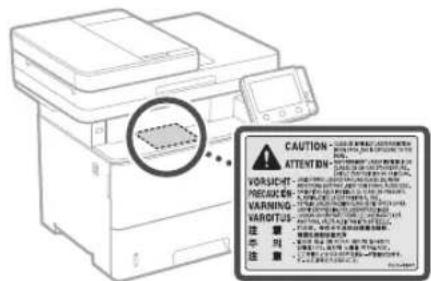
IMPORTANT!
Follow the instructions and warnings on the label on the top of the device. - Do not subject the device to strong shocks or vibrations. Do not open or close the lid with force, or press on the cover or other parts. This may cause damage to the device. Do not insert the key for the main switch and do not open the cover while the device is operating. This may cause paper jams. - Use only the power cable that is no more than 3 meters long. - Use only the USB cable that is no more than 3 meters long.
Application
Do not touch the contacts (inside the machine). This may cause damage to the machine.
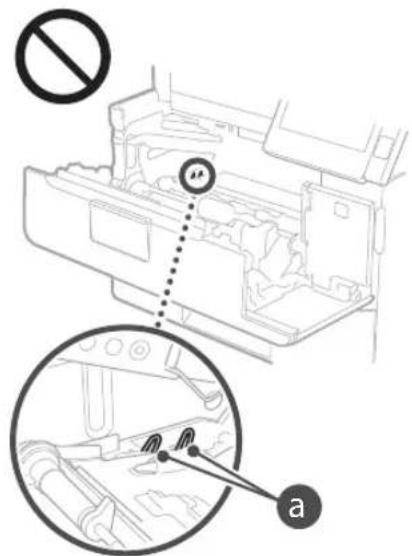
Transporting the machine
To prevent damage to the machine during transport, follow the instructions below.
- Remove the toner cartridge. Pack the machine securely in the original packaging or suitable protective material.
Safety symbols
Power switch: Position "I". Power switch: Position "O". Power switch: Position "Standby". Press "Start" button. Hazardous voltage inside. Disconnect the power cord before opening the cover. CAUTION! Hot surface. Do not touch. Equipment class I: Connect the power cord to a grounded outlet. The grounding conductor must be connected to the protective earth terminal.
Periodic maintenance
Clean the device periodically. If it is dusty, the device may not operate correctly. When cleaning, be sure to follow the instructions. If problems occur during operation, see "Troubleshooting" in the user manual. If the problem cannot be resolved, contact your service representative. If the problem cannot be resolved, see "Troubleshooting".
WARNING
- Before cleaning, turn off the power switch and disconnect the power cord from the outlet. Failure to do so may result in fire or electric shock.
- Before handling the device, wipe off any dust from the contacts with a dry cloth to remove it. Dust has the ability to absorb moisture from the air, which can cause a fire when in contact with electricity.
Clean the device with a damp, well-wrung cloth. Wipe the cloth only with water. Do not use alcohol, benzene, solvents, or other flammable substances. Do not use sprays or household chemicals. If any substances or materials come into contact with the electrical parts of the device, they may generate static electricity or cause a fire or electric shock. Check the power cord and plug regularly. Check the mains plug, socket, and cord for damage, kinks, or improper routing. Using damaged or unsuitable equipment can lead to fire or electric shock.
WARNING!
The device contains components with high temperature and high voltage. Touching these components can cause burns. Do not touch any part of the device that is not indicated in the manual. When loading paper or clearing a paper jam, be careful not to injure yourself on the sharp edges.
Consumables
PRECAUTION
Do not attempt to use a toner cartridge or similar open container. Also, do not store toner cartridges or paper in an open area. This can cause toner to spill and lead to fire or burns. If toner is accidentally spilled or scattered, carefully collect the toner particles and wipe them with a damp cloth to prevent inhalation. Never use a vacuum cleaner that is not equipped with a dust explosion-proof mechanism to clean up toner. Otherwise, the vacuum cleaner may be damaged or a dust explosion may occur.
If you use a pacemaker
The toner cartridge generates a weak magnetic field. If you use a pacemaker and experience unusual symptoms, move away from the toner cartridge and consult your doctor.
WARNING!
Be careful not to ingest toner. If you accidentally ingest toner, consult a doctor immediately. Be careful not to get toner in your eyes or mouth. If toner gets into your eyes or mouth, rinse immediately with clean water and consult a doctor. Be careful not to get toner on your skin. If contact occurs, wash with soap and running water. If skin irritation occurs, consult a doctor. Keep toner cartridges out of reach of small children. If toner is swallowed, consult a doctor or poison control center immediately. Do not incinerate toner cartridges or other components. This may cause the toner to scatter. When removing the cap from the toner cartridge, do it slowly, but without applying excessive force. Otherwise, the toner may spill.
CAUTION!
Working with the toner cartridge
- Shake the toner cartridge before use.
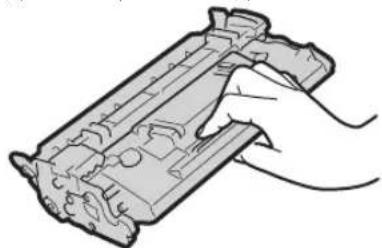
Do not touch the toner cartridge contacts (electrical contacts) to prevent damage to the surface of the drum in the machine or its exposure to light. Do not remove the protective cover for the drum.
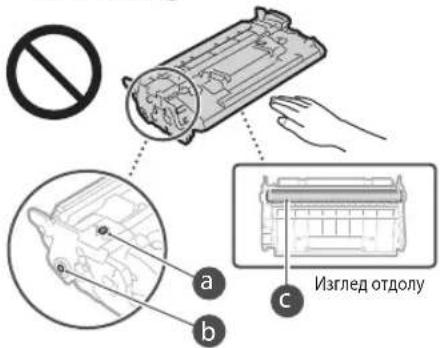
Do not touch the toner cartridge with one-time repair parts or the machine, unless it is necessary. The toner cartridge is a maintenance product. Do not refill it with products, such as toner bottles or disk devices. This may lead to damage.
Storing the Toner Cartridge
Store the toner cartridge in a special storage area to ensure safe and reliable use. Temperature range for storage: 0 to 35°C. Humidity range for storage: 35 to 85% relative humidity (without condensation). Store the toner cartridge in its original packaging. When removing the toner cartridge from the machine for storage, place the removed toner cartridge in its original packaging and seal it with the protective cover. When storing the toner cartridge, do not store it in direct sunlight or in a tilted position. The toner may not return to its original state, but it will be usable. Within the permissible humidity range for storage, condensation may form inside the toner cartridge if there is a temperature difference between the outside and the inside of the toner cartridge. Condensation may have a negative effect on the quality of the toner cartridges.
Do not store the toner cartridge in the following places
- Places exposed to direct sunlight or bright light, places near a heater or air conditioner, places with high humidity, places with corrosive gases (e.g., aerosol sprays or ammonia)
- Places with high temperature and high humidity, places with large temperature changes, places where condensation may occur
Places with a lot of dust, places with poor ventilation
Be careful with non-original toner cartridges
Please note that only original toner cartridges are recommended for use. The use of non-original toner cartridges may lead to poor print quality or damage to the machine. The manufacturer does not accept any responsibility for any defects, malfunctions, or damage caused by the use of non-original toner cartridges. For more information, visit the manufacturer's website.
Genuine parts and toner cartridges
Genuine parts and toner cartridges are consumables for the machine and are available for purchase (7) from the manufacturer or its authorized dealers.
Packaging materials for the toner cartridge
Keep the packaging materials for the toner cartridge. They are necessary for transporting and storing the machine. The packaging materials may be deformed or damaged, or they may be lost or damaged without notice. When you remove the toner cartridge from the machine, place the cartridge in its original packaging and seal it with the protective cover.
When removing the toner cartridge, do not use a toner cartridge that has been used or any consumable.
This device complies with the requirements of the Directive 2014/30/EU and bears the CE marking accordingly.
BeneKka
Product names
Properly dispose of this product for safety and environmental reasons. In the country where the product is sold, use the separate collection system for electrical and electronic equipment. The symbol ( ) indicates that the product must not be disposed of as normal household waste.
MF525x(F173802)
MF522x(F173800)
Electromagnetic compatibility (EMC) requirements
This device complies with the essential requirements of the EU EMC Directive. This product complies with the EMC requirements of the EU Directive when used with shielded interface cables, as specified for 230 V, 50 Hz, and also for 220 V to 240 V, 50/60 Hz. To meet the technical EMC requirements of the EU Directive, it is necessary to use shielded cables.
For information about the EU Declaration of Conformity for this product and the battery, refer to the latest User's Guide (HTML guide) on the Canon website (canon.com/oip-manual).
Regulatory information for wireless LAN products
Regulatory information for users in Jordan MF525x / MF522x includes approved Wireless LAN Module (Model name: Type1KA). Contains Wireless LAN Module approved by TRC/LPD/2017/19
Regulatory information for users in UAE MF525x/MF522x includes approved Wireless LAN Module (Model name: Type1KA).
TRA
REGISTERED No: ER51217/17
DEALER No: DA0073692/11
RE Directive
(Only for European radio equipment)
RE Declaration of Conformity
English (EN) Hereby, Canon Inc. declares that this equipment is in compliance with Directive 2014/53/EU.
The full text of the EU declaration of conformity is available at the following internet address: http://www.canon-europe.com/ce-documentation Wireless LAN Specifications Frequency band(s): 2412-2472 MHz Maximum radio-frequency power: 15.9 dBm
This product includes third-party software modules. The use and distribution of these software modules, including any modification of such software modules (collectively, "Software"), are subject to the following conditions (1) to (9).
(1) You agree to comply with applicable export control laws and regulations, and you will not export or re-export the Software to any country in violation of such laws. (2) The Software is protected by copyright and other intellectual property laws. Except as expressly provided herein, no license or right is granted to you under any intellectual property rights of the Software. (3) You may use the Software solely in connection with the Product. (4) You may copy, license, sell, distribute, and transfer the Software to third parties without prior written consent from the rights holders of the Software. (5) Except as provided herein, you may transfer the Software only if (a) you transfer all your rights to the Product and all rights and obligations under the terms of the recipient, and (b) the recipient agrees to be bound by all the terms. (6) You may not decompile, reverse engineer, disassemble, or otherwise attempt to derive the source code of the Software, except to the extent permitted by law. (7) You may modify, adapt, translate, rent, lease, or lend the Software, or create derivative works based on the Software. (8) You may remove the Software from the Product and use it separately. (9) You have a license for the part of the Software that is necessary for the operation of the Product.
Without prejudice to the foregoing conditions (1) to (9), the Products including the third-party software modules are subject to other license terms, and those software modules are subject to other license terms. Refer to the other license terms of the third-party software modules described in the appendix of this manual for the applicable Product. This manual is available at http://canon.com/oip-manual.
By using the Product, you are deemed to agree to all the license terms. If you do not agree to these license terms, contact your authorized representative.
V_170601
CLASS 1 LASER PRODUCT
LASER KLASSE 1
APPAREIL À LASER DE CLASSE 1
APPARECCHIO LASER DI CLASSE 1
CLASS 1 LASER PRODUCT
CLASS 1 LASER APPARATUS
CLASS 1 LASER PRODUCT
CLASS 1 LASER PRODUCT
CAUTION: Hot surface. Do not touch.
- Class 1 equipment
Regulatory information for users in Jordan
MF525x/MF522x includes approved Wireless LAN Module (Model name: Type1KA).
Contains Wireless LAN Module approved by TRC/LPD/2017/19
Regulatory information for users in UAE
MF525x/MF522x includes approved Wireless LAN Module (Model name: Type1KA).
TRA
REGISTERED No: ER51217/17
DEALER No: DA0073692/11
RE Directive
(Only for European radio equipment)
RE Declaration of Conformity
English (EN) Hereby, Canon Inc. declares that this equipment is in compliance with Directive 2014/53/EU.
The full text of the EU declaration of conformity is available at the following internet address: http://www.canon-europe.com/ce-documentation Wireless LAN Specifications Frequency band(s):2412-2472MHz Maximum radio-frequency power: 15.9 dBm


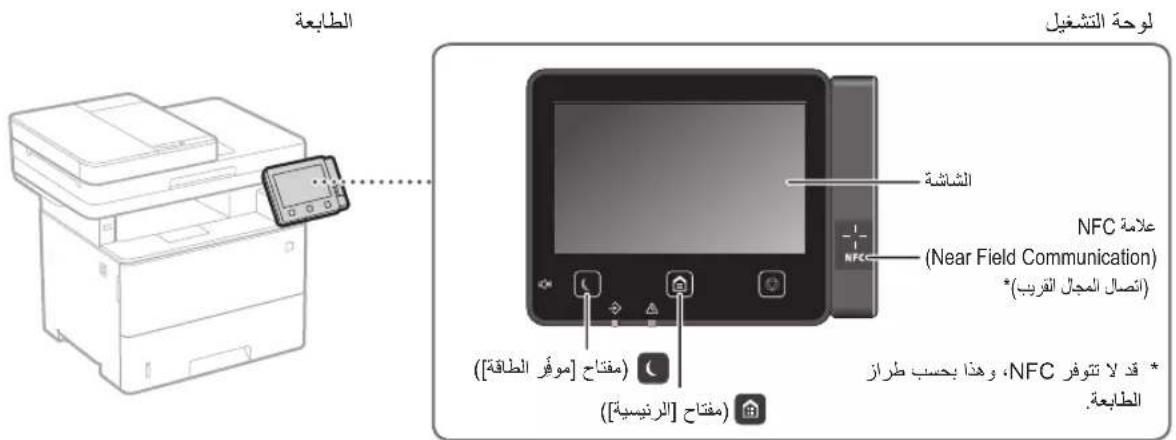
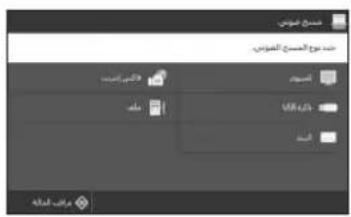

MF Scan Utility
USB
Cilpa 1
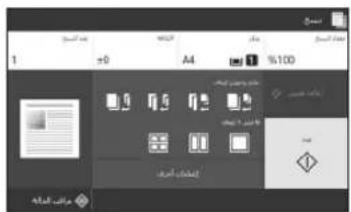

1
Therefore, if the equation is: a1^x = alpha/(2*beta) and a2^x = alpha/(2*beta)
Aeall 1
02j jill jll 1
Therefore, {1,2,3}

ouadell ouill oula!
1 1N
yaaai jai
aai jia aai iagai gai oja jgai 2
Therefore, the area of triangle OBC equals the area of triangle COD plus the area of triangle BOC.

1
( 1/2) ,90 ÷ 22
∴ ( 1/2j) ( 4 - k) = 0
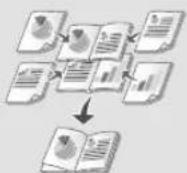
a. = +
- Al - N
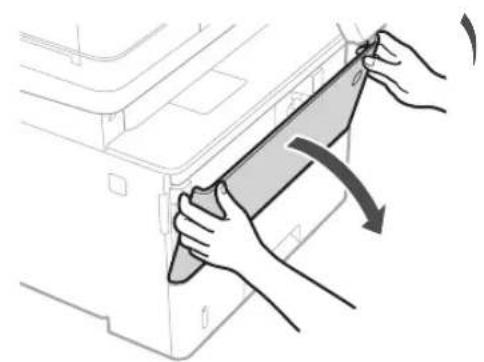
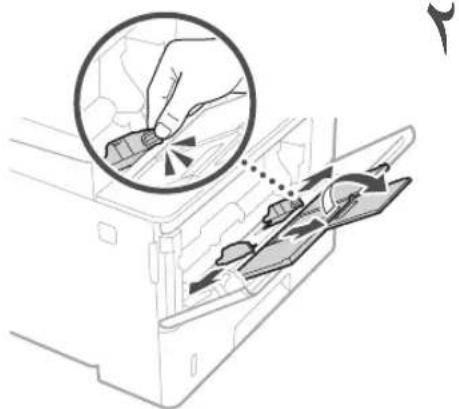
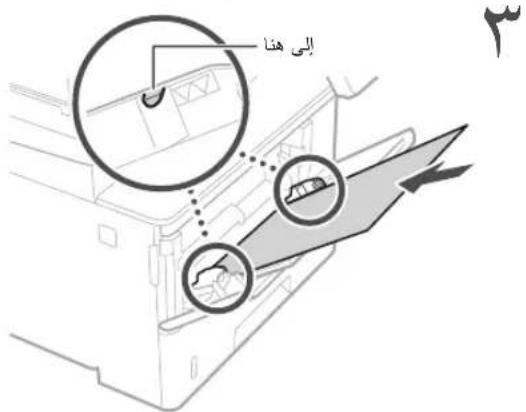
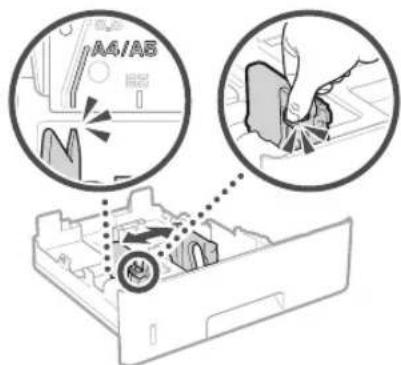

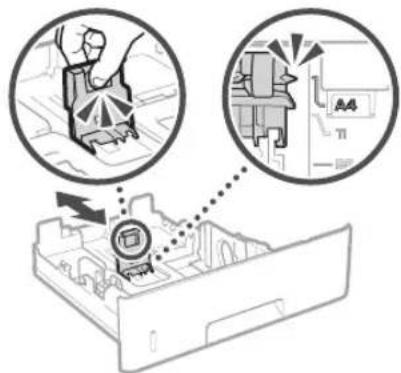
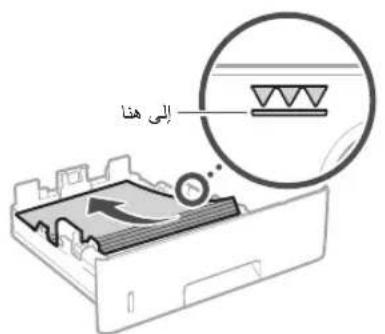

< 5( 2,1) ( 1,0) > 3

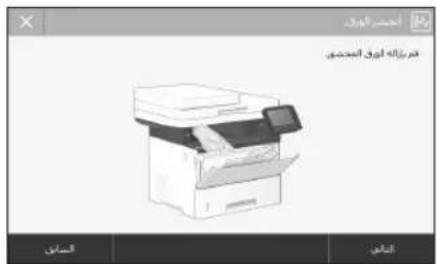
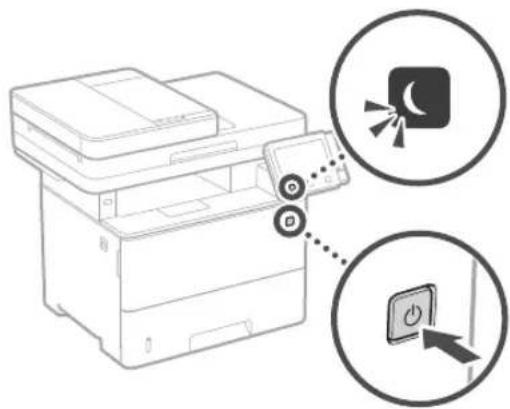
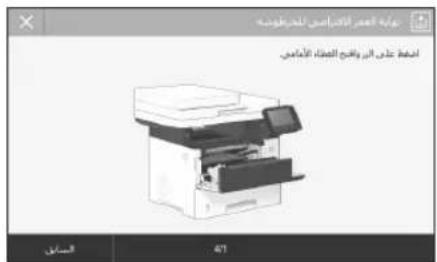
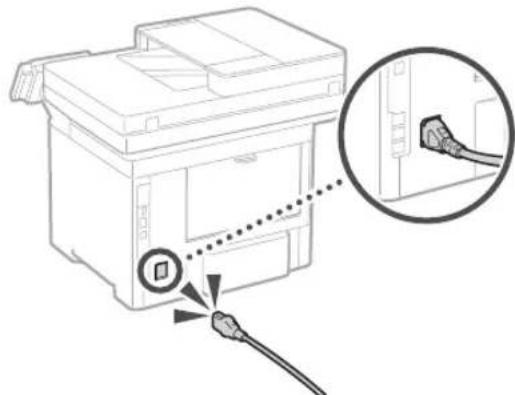
Canon Cartridge 041
Canon Cartridge 041 H
y
a 1
zai zai jie jie
1 1
15
Jaaill his yie bnaa aalns
g j 1 1 1 1 1 1 1 1 1
Jss
jai jia jia jia jia jia jia jia jia jia jia jia jia jia jia jia jia jia jia jia jia jia jia jia jia jia jia jia jia jia jia jia jia jia jia jia jia jia jia jia jia jia jia jia jia jia jia jia jia jia jia j
y
y j. gall
a 1
p 1
∴ S ΔBCD = S ΔCOD + S ΔBDO - S ΔBOC
1 1
1
aalal
y
y
Therefore, the area of triangle OBC equals the area of triangle COD plus the area of triangle BOC minus the area of triangle BOC.
1
aegal axlul ciae
aai aai ai aai iai jai 111111111111111111111111111111111
Jg Jg Jg Jg Jg Jg Jg Jg Jg Jg Jg Jg Jg Jg Jg Jg Jg Jg Jg Jg Jg Jg Jg Jg Jg Jg Jg Jg Jg Jg Jg Jg Jg Jg Jg Jg Jg Jg Jg Jg Jg Jg Jg Jg Jg Jg Jg Jg Jg Jg Jg
j 1
i 1 1 1 1 1 1 1 1 1 1 1 1 1 1 1 1 1 1 1 1 1 1 1 1 1 1 1 1 1 1 1 1
y j 100000000000000000000000000000000000000000000000000000000000
001 20
jellpalll jlll jllal yaiy cglal ai
Cslal, j jll
(Only for European radio equipment)
RE Declaration of Conformity
English (EN) Hereby, Canon Inc. declares that this equipment is in compliance with Directive 2014/53/EU.
The full text of the EU declaration of conformity is available at the following internet address:
http://www.canon-europe.com/ce-documentation Wireless LAN Specifications
Frequency band(s): 2412-2472 MHz Maximum radio-frequency power: 15.9 dBm
Czech (CS) Canon Inc. hereby declares that this device is in compliance with Directive 2014/53/EU.
The full text of the EU declaration of conformity is available at the following internet address:
http://www.canon-europe.com/ce-documentation
Technical specifications for Wireless LAN Frequency band(s): 2412-2472 MHz Maximum radio-frequency power: 15.9 dBm
Regulatory information for users in Jordan
MF525x / MF522x includes approved Wireless LAN Module (Model name: Type1KA).
Contains Wireless LAN Module approved by TRC/LPD/2017/19
Regulatory information for users in UAE MF525x / MF522x includes approved Wireless LAN Module (Model name: Type1KA).
TRA
REGISTERED No: ER51217/17
DEALER No: DA0073692/11
C
The minimum value of the denominator is k.
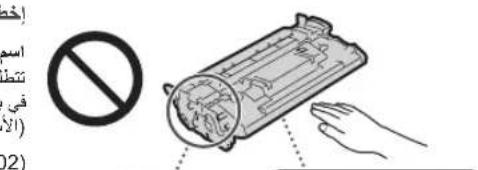
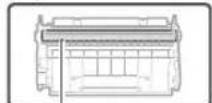
Bulgarian (BG) Canon Inc. hereby declares that this equipment is in compliance with Directive 2014/53/EU. The full text of the EU declaration of conformity is available at the following internet address: http://www.canon-europe.com/ce-documentation Wireless LAN specifications Frequency band(s): 2412-2472 MHz Maximum radio frequency power: 15.9 dBm
Croatian (HR) Canon Inc. hereby declares that this equipment is in compliance with Directive 2014/53/EU. The full text of the EU declaration of conformity is available at the following internet address: http://www.canon-europe.com/ce-documentation Wireless LAN specifications Frequency band(s): 2412-2472 MHz Maximum radio frequency power: 15.9 dBm
Irish (GA) Canon Inc. hereby declares that this equipment is in compliance with Directive 2014/53/EU. The full text of the EU declaration of conformity is available at the following internet address: http://www.canon-europe.com/ce-documentation Wireless LAN specifications Frequency band(s): 2412-2472 MHz Maximum radio frequency power: 15.9 dBm
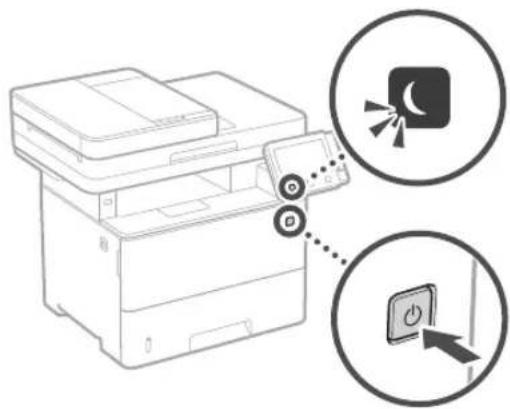
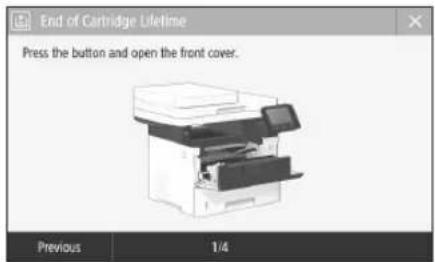
Canon Cartridge 041 • Canon Cartridge 041 H •
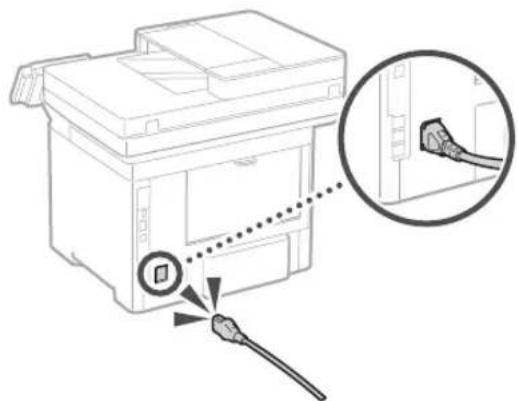
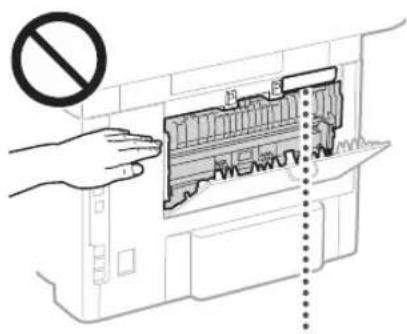
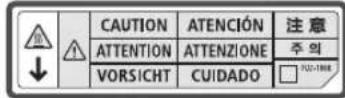
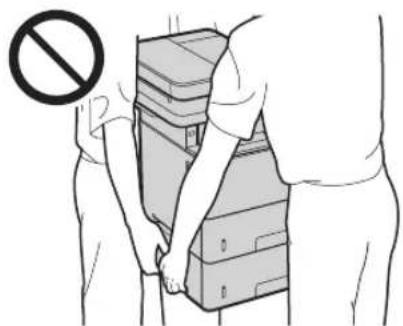
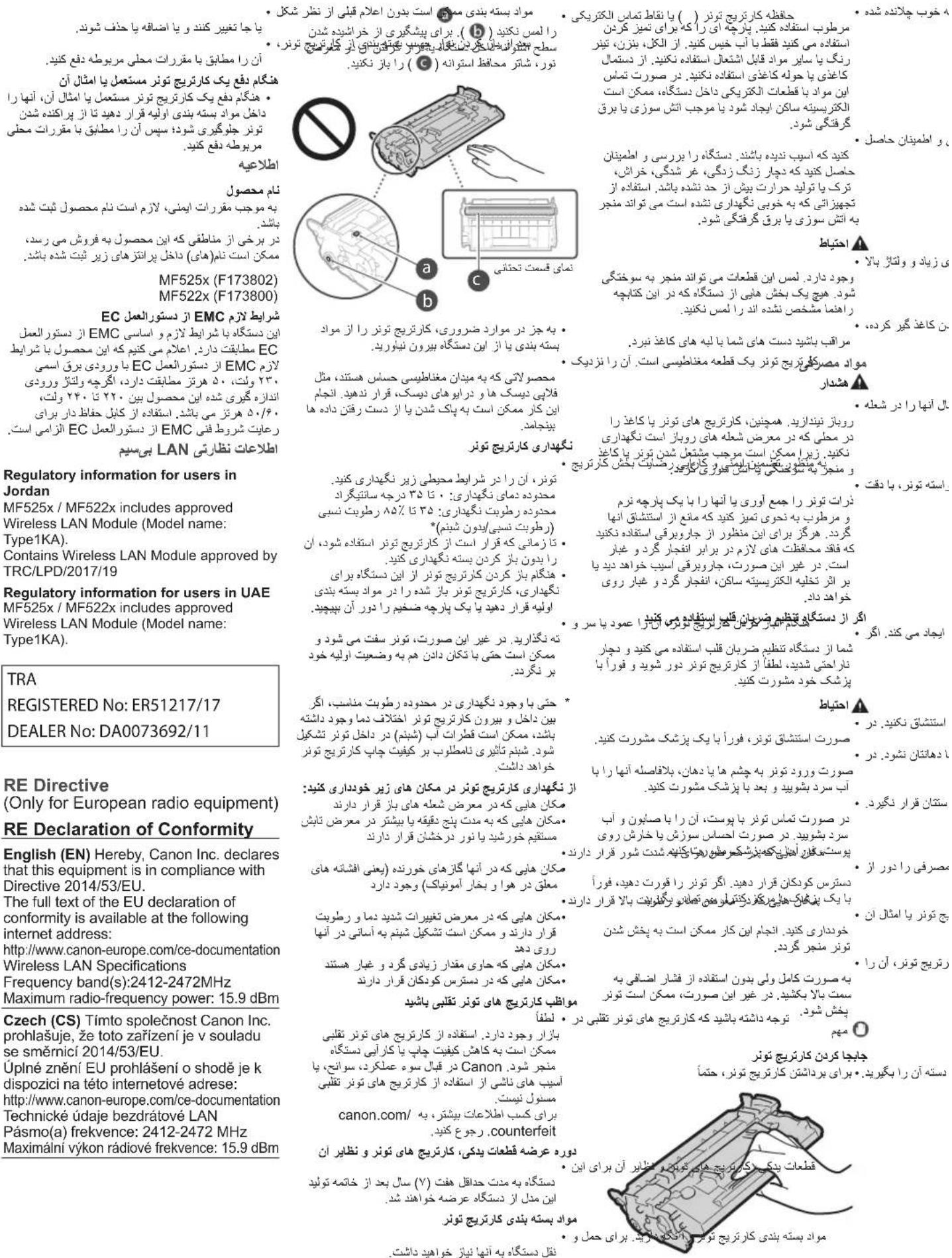
V_170601
Irish (GA) Canon Inc. hereby declares that this equipment complies with Directive 2014/53/EU. The full text of the EU declaration of conformity is available at the following internet address: http://www.canon-europe.com/ce-documentation Wireless LAN Specifications Frequency band(s): 2412-2472 MHz Maximum radio-frequency power: 15.9 dBm
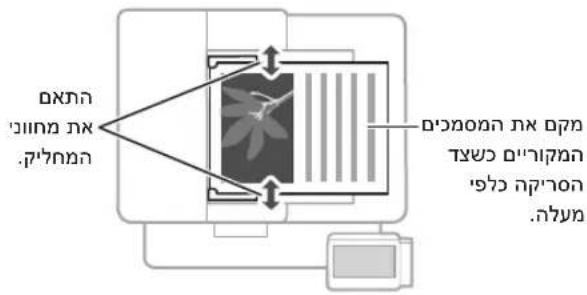
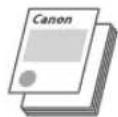
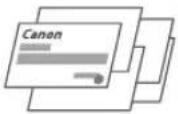


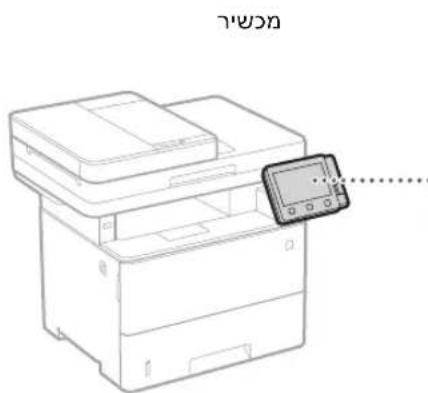
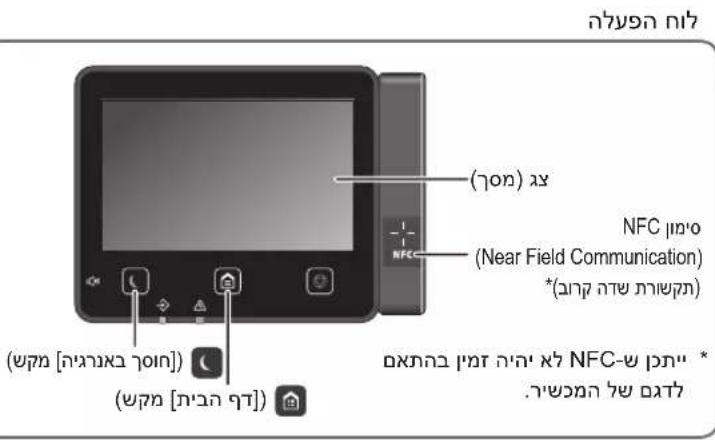

IX (17 nnu nn) ,(nnn) nn.4
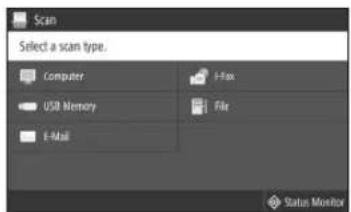
wnnnn nno7
MF Scan Utility
n7'no 10
USB nTwnonx
7"XITN7V
□
D

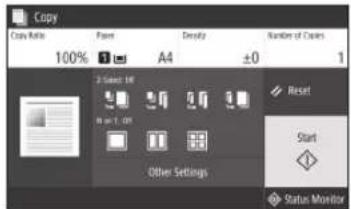
.1
n#nynx, yyn.2
.3
.1n nn nn nnn 4
n2.5
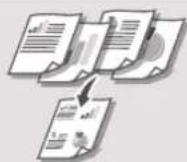
nniin ninn
1-2N
TTY-TN IN 'TYY-IT
mynn n nn
nntnnn
nwn nn nnnnnnnnnnnnnnnnnnnnnnnnnnnnnnnnnnnnnnnnnnnnnnnnnnnnnnnnnnnnnnnnnnnnnnnnnnnnnnnnnnnnnnnnnnnnnnnnnnnnnnnnnnn
*D07y nnnn

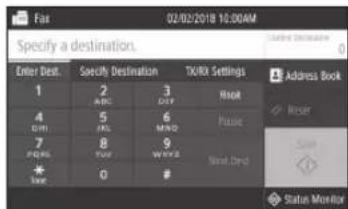
.1
∴ (079) < Fax > nni,yyn.2
.3
.07n nn nnn 4
.(nnn) n5
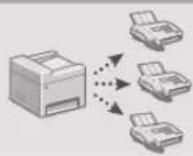
nuiin 079 n1y719
1
wnn075
no9Tn

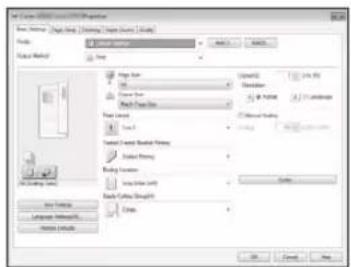
1
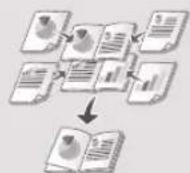
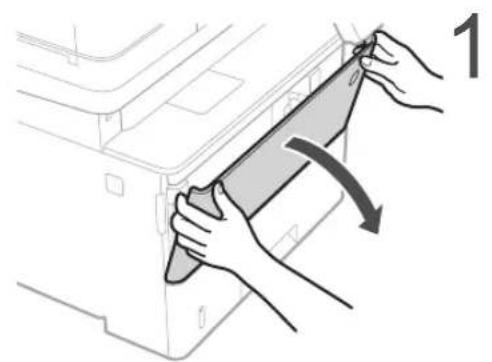
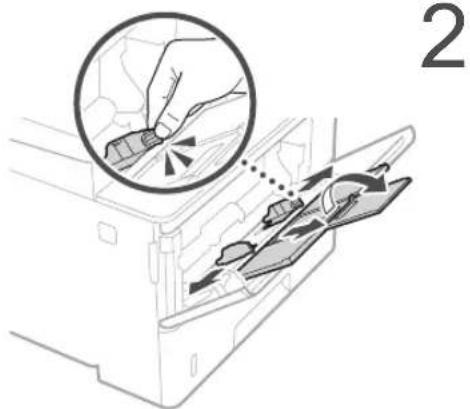
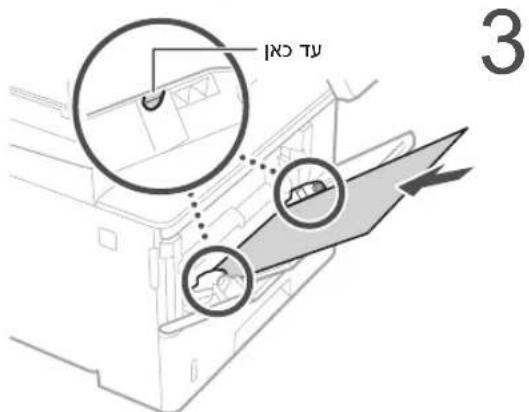
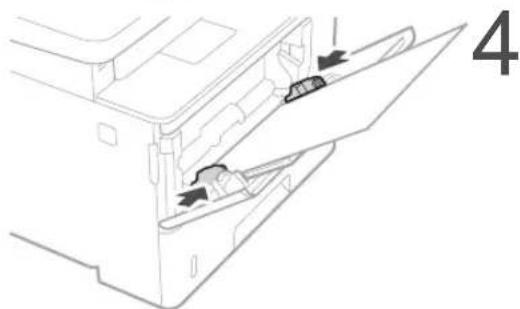
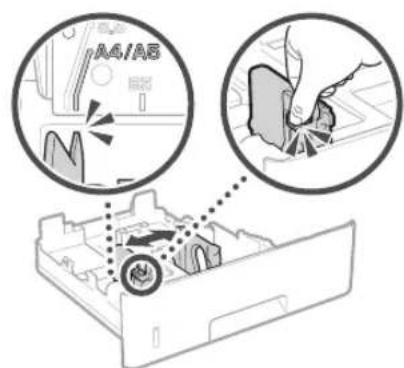
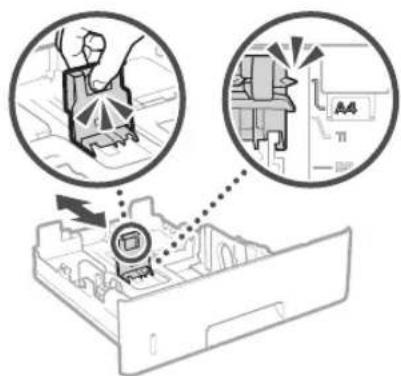
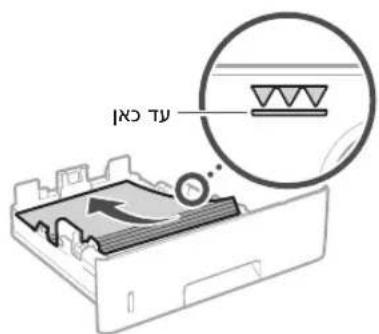
4
5
.
6
y
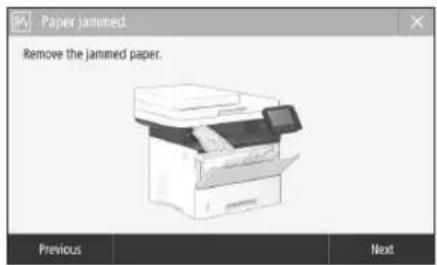
0
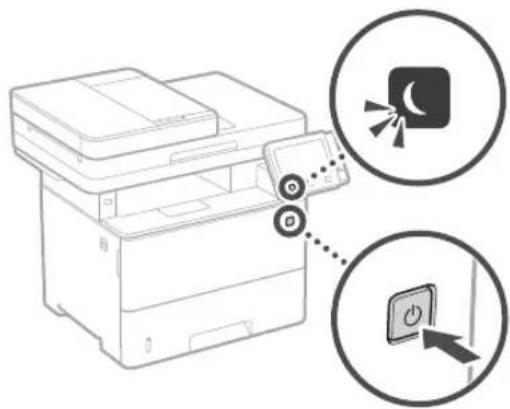
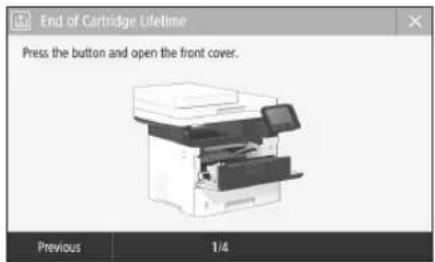
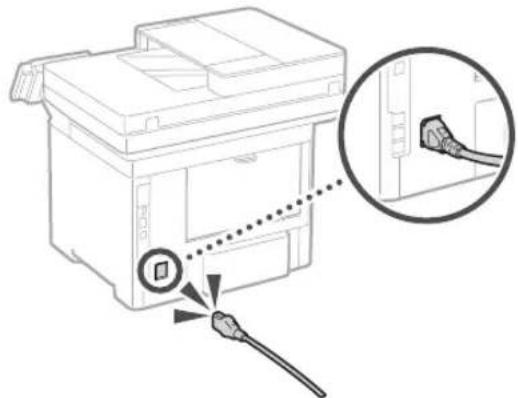
Canon Cartridge 041
Canon Cartridge 041 H
y
3000 29
3000 2
x 1000
.
1
T 1
n790
maxA
.
manA
n 1nn
nwnnn
Tn7)Dion nn nnnn nn Dn n
(D'NT
P
yinnn nnnn nn nnnn
nniin nnnn nn nnnn
ninnnnnnnnnnnnnnnn
D7T DnIN IN YN 77n,1157N n
NIDOH NNTN
n .n nnnn nn nnnn
DNN DNN DNN NNN DNN
X.
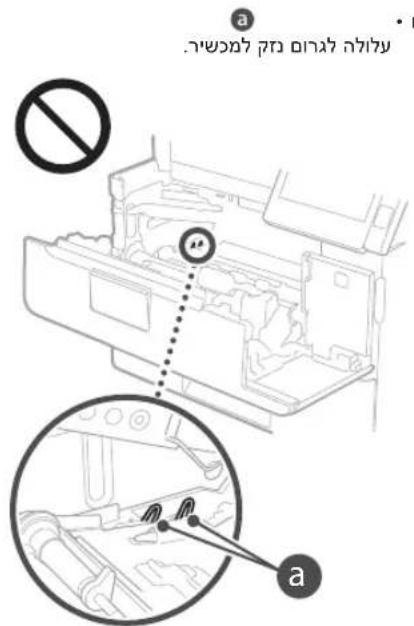
(wnnynnn) wn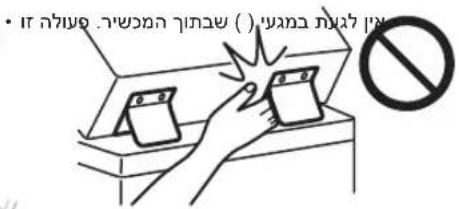
Tn7 1000
()
100, 100, 100, 100, 100, 100, 100, 100, 100, 100, 100, 100, 100, 100, 100, 100, 100, 100, 100, 100, 100,
ninn nnn ny
y 1
.
ninnnnno
"yin"yn:ynnnn
"12" 77777777
"nnnnn"
"1"
Class II Tiy
y 1

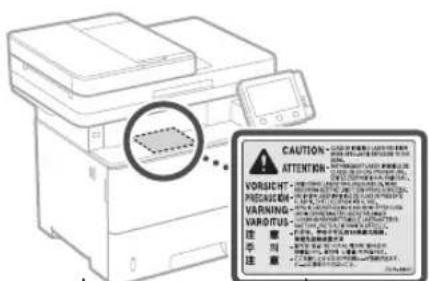
USB
17 1
y
nnnnn
·y1n
y
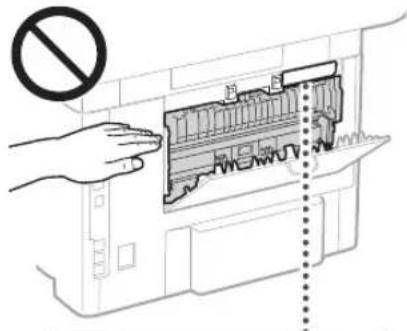
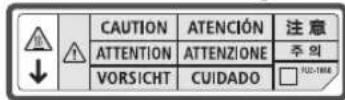
1111111111111111111 11111111111111111
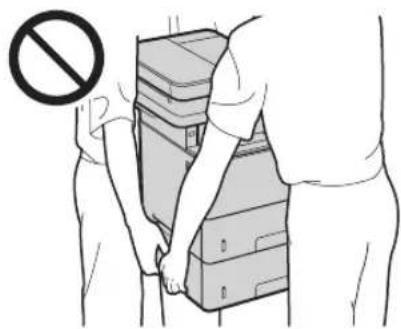
()
- 177n 177n 177n 177n
1n7 nnnn nn nnnn
He
Wireless LAN
Regulatory information for users in Jordan MF525x / MF522x includes approved Wireless LAN Module (Model name: Type1KA).
Contains Wireless LAN Module approved by TRC/LPD/2017/19
Regulatory information for users in UAE MF525x / MF522x includes approved Wireless LAN Module (Model name: Type1KA).
TRA
REGISTERED No: ER51217/17
DEALER No: DA0073692/11
RE Directive
(Only for European radio equipment)
RE Declaration of Conformity
English (EN) Hereby, Canon Inc. declares that this equipment is in compliance with Directive 2014/53/EU.
The full text of the EU declaration of conformity is available at the following internet address:
http://www.canon-europe.com/ce-documentation Wireless LAN Specifications
Frequency band(s): 2412-2472 MHz Maximum radio-frequency power: 15.9 dBm
Czech (CS) Timto společnost Canon Inc. prohlašuje, že toto zařízení je v souladu se směrnicí 2014/53/EU.
Úplné znění EU prohlášení o shodě je k dispozici na této internetové adrese: http://www.canon-europe.com/ce-documentation
Technické údaje bezdrátové LAN Pásmo(a) frekvence: 2412-2472 MHz Maximální výkon radio frekvence: 15.9 dBm
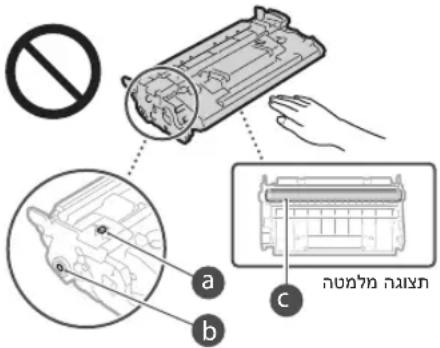
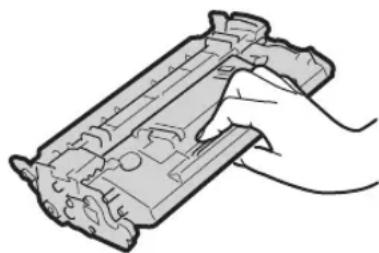
Canon
canon.com/
Counterfeit
7
nnnnnnn
.
yinnnnn nn nnnn nn nn
10
D
IN p97, nNn not nyn, nnn nn (6)
191
.07x
,7n7,7n7,7nn7,7nn7,7n7,7n7(7)
nniin nnnn nn nnnn
.0000
xix xinnnnn nn nnnn nn (8)
yinnnnn nn nni
nnn n nn nnnn (9)
1000
http://canon.com/oip-manual
1
Irish (GA) Canon Inc. declares,
that this equipment is in
Norwegian (NO) Canon hereby declares
30-2, Shimomaruku 3-chome, Ohta-ku, Tokyo 146-8501, Japan
One Canon Park, Melville, NY 11747, U.S.A.
CANON EUROPA N.V.
Bovenkerkerweg 59, 1185 XB Amstelveen, The Netherlands
2F Jinbao Building No.89, Jinbao Street, Dongcheng District, Beijing 100005, PRC
CANON SINGAPORE PTE LTD
1 Fusionopolis Place, #15-10, Galaxis, Singapore 138522
CANON AUSTRALIA PTY LTD
Building A, The Park Estate, 5 Talavera Road, Macquarie Park, NSW 2113, Australia
CANON GLOBAL WORLDWIDE SITES
http://www.canon.com/
- QUICK SETUP
- GETTING STARTED
- ITEMS INCLUDED WITH THE MACHINE
- INSTALLING THE MACHINE
- BEFORE STARTING THE INSTALLATION
- INSTALLATION REQUIREMENTS
- CONFIGURING THE INITIAL SETTINGS OF THE MACHINE
- ABOUT APPLICATION LIBRARY
- CONFIGURING THE METHOD OF CONNECTING TO A COMPUTER
- BEFORE STARTING THE CONFIGURATION
- SPECIFYING THE CONNECTION METHOD
- TO CONNECT VIA WIRELESS LAN
- TO CONNECT VIA WIRED LAN
- TO CONNECT VIA USB
- INSTALLING THE SOFTWARE
- CONFIGURING FAX SETTINGS
- NOW YOU ARE FINISHED WITH THE CONFIGURATION
- CAUTION
- INSTALLATION OF SOFTWARES
- CONNECTION VIA WIRED LAN
- IP ADDRESS AND NETWORK SETTINGS
- CONNECTION METHOD INDICATION
- WIRELESS CONNECTION
- NOW THE INITIAL CONFIGURATION IS COMPLETE
- WIRED CONNECTION
- NOW THE INITIAL SETTINGS TASK IS COMPLETE
- USB CONNECTION
- SOFTWARE INSTALLATION
- CONVENIENT USE OF THE SCANNER
- SETTING THE FAX SETTINGS
- BEFORE MAKING SETTINGS
- SETUP COMPLETE
- ATTENTION
- DEVICE SETUP
- SETTING BASIC DEVICE PARAMETERS
- ABOUT THE APPLICATION LIBRARY PROGRAM
- SETTING UP THE COMPUTER CONNECTION METHOD
- BEFORE STARTING SETUP
- CONNECTION INSTRUCTIONS
- SETUP COMPLETED
- DEVICE SETTINGS CONFIGURATION
- VIA APPLICATION LIBRARY (APPLICATION LIBRARY)
- CONNECTION VIA USB INTERFACE
- CONFIGURATION OF THE INITIAL SETTINGS OF THE MACHINE
- APPLICATION LIBRARY (APPLICATION LIBRARY)
- CONFIGURATION OF THE CONNECTION METHOD TO THE COMPUTER
- SELECTING THE CONNECTION METHOD
- USB
- APPLICATION LIBRARY
- NANNNN NOY
- INX LAN NYNNNN
- N NN NN NN NN NN NN NN NN NN NN NN NN NN NN NN NN NN NN NN NN NN NN NN NN NN NN NN NN NN NN NN NN NN NN NN NN NN NN NN NN NN NN NN NN NN NN NN NN NN NN NN NN NN NN NN NN NN NN NN NN NN NN NN NN NN NN NN NN NN NN NN NN NN NN NN NN NN NN NN NN NN NN NN NN NN NN NN NN NN NN
- APPLICATION LIBRARY NIX * (NIVNN NO)
- MEMO
- QUICK
- OPERATION
- PLACE THE ORIGINAL PROPERLY
- REMEMBER BEFORE YOU START OPERATION
- START THE OPERATION FROM THE OPERATION PANEL
- SCANNING
- TYPES OF SCAN
- TO SCAN FROM A COMPUTER
- COPYING
- USEFUL COPY SETTINGS
- FAXING
- USEFUL FAX FUNCTIONS
- PRINTING
- USEFUL PRINT SETTINGS
- LOADING IN THE PAPER PRINTER
- LOADING IN THE MULTI-PURPOSE TRAY
- THE MACHINE DOES NOT SEEM TO WORK
- PAPER JAMS HAVE OCCURRED
- REPLACING THE TONER CARTRIDGE
- MODEL NUMBER OF REPLACEMENT TONER CARTRIDGE
- IMPORTANT SAFETY INSTRUCTIONS
- WARNING
- IMPORTANT
- INSTALLATION
- DO NOT INSTALL IN A LOCATION THAT MAY RESULT IN A FIRE OR ELECTRICAL SHOCK
- OTHER WARNINGS
- DO NOT INSTALL IN THE FOLLOWING LOCATIONS
- OTHER CAUTIONS
- LEVELING FEET (ONLY FOR PRODUCTS WITH LEVELING FEET)
- DO NOT INSTALL IN THE FOLLOWING LOCATIONS. DOING SO MAY RESULT IN DAMAGE TO THE MACHINE
- AVOID POORLY VENTILATED LOCATIONS
- DO NOT INSTALL IN A LOCATION WHERE CONDENSATION OCCURS
- IN ALTITUDES OF ABOVE SEA LEVEL 3,000 M OR HIGHER
- CONNECTING THE TELEPHONE LINE (ONLY FOR PRODUCTS WITH A FAX FUNCTION)
- WHEN USING WIRELESS LAN (ONLY FOR PRODUCTS WITH A WIRELESS LAN FUNCTION)
- POWER SUPPLY
- AVOID THE FOLLOWING SITUATIONS
- WHEN CONNECTING POWER
- OTHER PRECAUTIONS
- HANDLING
- IF YOU ARE USING A CARDIAC PACEMAKER
- FEEDER (ONLY FOR PRODUCTS WITH A FEEDER)
- FINISHER (ONLY FOR PRODUCTS WITH A FINISHER)
- PAPER DRAWER (ONLY FOR PRODUCTS WITH A PAPER DRAWER)
- ENERGY SAVER KEY (ONLY FOR PRODUCTS WITH AN ENERGY SAVER KEY)
- LASER SAFETY
- APPENDIX
- WHEN TRANSPORTING THE MACHINE
- SAFETY-RELATED SYMBOLS
- MAINTENANCE AND INSPECTIONS
- CONSUMABLES
- HANDLING THE TONER CARTRIDGE
- STORING THE TONER CARTRIDGE
- DO NOT STORE THE TONER CARTRIDGE IN THE FOLLOWING LOCATIONS
- BE CAREFUL OF COUNTERFEIT TONER CARTRIDGES
- AVAILABILITY PERIOD OF REPAIRING PARTS AND TONER CARTRIDGES AND THE LIKE
- TONER CARTRIDGE PACKING MATERIALS
- WHEN DISPOSING OF A USED TONER CARTRIDGE OR THE LIKE
- NOTICE
- PRODUCT NAME
- EMC REQUIREMENTS OF EC DIRECTIVE
- EU WEEE AND BATTERY DIRECTIVES
- WIRELESS LAN REGULATORY INFORMATION
- TRA
- REGISTERED NO: ER
- DEALER NO: DA
- RE DIRECTIVE
- RE DECLARATION OF CONFORMITY
- LEGAL LIMITATIONS ON THE USAGE OF YOUR PRODUCT AND THE USE OF IMAGES
- DISCLAIMERS
- ABOUT THIS MANUAL
- TRADEMARKS
- THIRD PARTY SOFTWARE
- REGULATORY INFORMATION FOR USERS IN UAE MF525X/MF522X INCLUDES APPROVED WIRELESS LAN MODULE (MODEL NAME: TYPE1KA)
- DEALER NO:DA
- CLASS 1 LASER PRODUCT
- APPAREL A LASER DE CLASSE
- APPARECCHIO LASER DI CLASSE
- PRODUCTO LASER DE CLASE
- APARELHO A LASER DE CLASSE
- LUOKAN 1 LASER-TUOTE
- LASERPRODUKT KCLASS
- REGULATORY INFORMATION FOR USERS IN JO
- REGULATORY INFORMATION FOR USERS IN UAE
- (ONLY FOR EUROPEAN RADIO EQUIPMENT)
- REGULATORY INFORMATION FOR USERS IN JORDAN
- OPTIONS UTILITIES IMPRESSIONS
- THE MACHINE DOES NOT TURN ON
- PAPER JAMS
- REPLACING THE INK CARTRIDGE
- ACCESSORIES (ONLY FOR PRODUCTS WITH ACCESSORIES)
- DUPLEX UNIT (ONLY FOR PRODUCTS WITH DUPLEX UNIT)
- PAPER TRAY (ONLY FOR PRODUCTS WITH PAPER TRAY)
- LASER KLASSE
- TRADEMARKS AND COPYRIGHTS USED IN THIS MANUAL
- LOCAL NOTICES
- SOFTWARE MANUFACTURERS
- FROM A COMPUTER SCANNER
- APPAREIL A LASER DE CLASSE
- LUOKAN1LASER-TUOTE
- SCANNING FROM A COMPUTER
- FAX
- USEFUL SETTINGS
- PART NUMBER OF TONER CARTRIDGE
- APPENDICES
- SAFETY INSTRUCTIONS
- DO NOT INSTALL THE DEVICE IN A LOCATION WITH A HIGH RISK OF FIRE OR ELECTRIC SHOCK
- PRECAUTIONS FOR USE
- LEVELING FEET (ONLY FOR PRODUCTS THAT ARE EQUIPPED WITH THEM)
- DO NOT INSTALL THE DEVICE IN THE PLACES INDICATED BELOW
- THIS MAY CAUSE DAMAGE TO THE DEVICE
- AVOID PLACES WITH POOR VENTILATION
- INSTALL THE DEVICE IN A PLACE WITH HIGH HUMIDITY
- AT ALTITUDES OF 3000 METERS OR MORE ABOVE SEA LEVEL
- CONNECTION TO A TELEPHONE LINE (ONLY FOR PRODUCTS EQUIPPED WITH A FAX FUNCTION)
- WHEN USING WIRELESS LAN (ONLY FOR PRODUCTS EQUIPPED WITH A WIRELESS LAN CONNECTION)
- POWER SOURCE
- RELIABLE
- WHEN CONNECTING TO THE POWER SUPPLY
- OTHER SAFETY PRECAUTIONS
- HANDLING THE DEVICE
- DEVICE FOR FEEDING (ONLY FOR PRODUCTS EQUIPPED WITH A FEEDING DEVICE)
- FINISHER (ONLY FOR PRODUCTS EQUIPPED WITH A FINISHER)
- PAPER CASSETTE (ONLY FOR DEVICES EQUIPPED WITH A PAPER CASSETTE)
- LASER SAFETY PRECAUTIONS
- TRANSPORTING THE DEVICE
- AVOID USING NON-GENUINE TONER CARTRIDGES
- PERIODIC REPLACEMENT OF CONSUMABLE PARTS AND TONER CARTRIDGES
- PACKAGING MATERIALS FOR THE TONER CARTRIDGE
- DISPOSING OF USED TONER CARTRIDGES AND SIMILAR COMPONENTS
- REQUIREMENTS OF THE EMC DIRECTIVE
- REGULATORY INFORMATION FOR USE IN THE LOCAL NETWORK
- USEFUL PRINT PARAMETERS
- LOADING PAPER INTO THE MULTI-PURPOSE TRAY
- TO SOLVE THE PROBLEM
- THE DEVICE DOES NOT RESPOND WHEN THE BUTTON IS PRESSED
- DO NOT INSTALL THE DEVICE IN A LOCATION WHERE ITS OPERATION MAY CAUSE FIRE OR ELECTRIC SHOCK. SPECIFICALLY
- ADJUSTABLE FEET (ONLY FOR MODELS WITH ADJUSTABLE FEET)
- DO NOT INSTALL THE DEVICE IN THE PLACES SPECIFIED BELOW
- (THIS MAY CAUSE DAMAGE TO THE DEVICE)
- DO NOT INSTALL THE DEVICE IN POORLY VENTILATED ROOMS
- DO NOT INSTALL THE DEVICE IN PLACES WHERE CONDENSATION MAY FORM
- DO NOT INSTALL THE DEVICE AT HIGH ALTITUDES (3000 METERS ABOVE SEA LEVEL OR HIGHER)
- TELEPHONE LINE CONNECTION (ONLY FOR MODELS WITH TELEPHONE FUNCTION)
- USING A WIRELESS LOCAL AREA NETWORK (ONLY FOR MODELS WITH WIRELESS LAN FUNCTION)
- DAMAGE
- AVOID OVERLOADING
- OTHER PROTECTIVE MEASURES
- PLACEMENT
- IF A CARDIAC PACEMAKER IS USED
- BLADE REPLACEMENT (ONLY FOR MODELS WITH A BLADE)
- WATER TANK (ONLY FOR MODELS WITH A WATER TANK)
- BATTERY REPLACEMENT (ONLY FOR MODELS WITH A BATTERY)
- LASER DEVICE SAFETY
- SAFETY LABELS AND LASER SAFETY
- DEVICE TRANSPORTATION
- SYMBOLS RELATED TO SAFETY EQUIPMENT
- MAINTENANCE AND CARE
- IF YOU USE A TONER CARTRIDGE
- STORING TONER CARTRIDGES
- DO NOT STORE TONER CARTRIDGES IN THE FOLLOWING PLACES
- BE CAREFUL WITH COUNTERFEIT TONER CARTRIDGES
- AVAILABILITY OF SPARE PARTS, TONER CARTRIDGES, AND OTHER CONSUMABLES
- DISPOSAL OF USED TONER CARTRIDGES AND OTHER CONSUMABLES
- COMPLIANCE WITH THE ELECTROMAGNETIC COMPATIBILITY DIRECTIVE
- REGULATORY INFORMATION FOR WIRELESS LAN
- ILLUSTRATIONS USED IN THIS MANUAL
- THIRD-PARTY SOFTWARE
- PAREIZI NOVIETOJIET ORIGINALO DOKUMENTU
- UZMANIBUI
- SVARIGI
- UZSTADISANA
- ABRIDINAJUMS
- WHEN CONNECTING THE POWER SUPPLY
- USAGE
- IF YOU USE A PACEMAKER
- MOVING THE DEVICE
- SAFETY SYMBOLS
- STARTING OPERATION
- CLEANING
- TO SCAN FROM
- THE COMPUTER
- WORK WITH FAX
- FAX FUNCTIONS
- PAPER SETTINGS FOR PRINTING
- LOADING PAPER
- LOADING PAPER IN THE PAPER TRAY
- LOADING IN
- THE MULTI-PURPOSE FEEDER
- IF PROBLEMS OCCUR
- CHECK THAT THE MACHINE IS NOT WORKING
- THE CARD IS JAMMED
- REPLACE THE TONER CARTRIDGE
- TONER CARTRIDGE MODEL NUMBER FOR REPLACEMENT
- INK HANDLING (ONLY FOR PRODUCTS WITH INK HANDLING)
- DO NOT INSTALL ON METAL SURFACES
- RABTE MECTA CNOA BENTNAU
- PNBNCOUHAOTNOBEHEOT3000METPHA
- MOPCKOTO PABHNUE
- CBBP3BAHE HA TENEFOHHATINHNA (CAMO 3A NPOYKTN C YHKUN3A PAKC)
- AKO N3NON3BATE 6E3XUHA LAN MPEXA (CAMO 3A NPODYKTN C FYNKMUA 3A 6E3XUHA LAN MPEXA)
- AXPAHBAHE
- APDEUYIPKJEHNE
- EMERGENCY SITUATIONS
- CONNECTING TO THE POWER SOURCE
- ELECTRICAL SAFETY
- DEVICE MAINTENANCE
- ADF (AUTOMATIC DOCUMENT FEEDER)
- FINISHER (OPTIONAL)
- PAPER CASSETTE (SEE PRODUCTS WITH PAPER CASSETTE)
- BUTTON "ENERGY SAVING" (SEE PRODUCTS WITH "ENERGY SAVING" BUTTON)
- LASERPRODUKT KLASSE
- SAFETY LABEL FOR LASER EQUIPMENT
- APPLICATION
- TRANSPORTING THE MACHINE
- PERIODIC MAINTENANCE
- PRECAUTION
- WORKING WITH THE TONER CARTRIDGE
- DO NOT STORE THE TONER CARTRIDGE IN THE FOLLOWING PLACES
- BE CAREFUL WITH NON-ORIGINAL TONER CARTRIDGES
- GENUINE PARTS AND TONER CARTRIDGES
- WHEN REMOVING THE TONER CARTRIDGE, DO NOT USE A TONER CARTRIDGE THAT HAS BEEN USED OR ANY CONSUMABLE
- BENEKKA
- PRODUCT NAMES
- ELECTROMAGNETIC COMPATIBILITY (EMC) REQUIREMENTS
- REGULATORY INFORMATION FOR WIRELESS LAN PRODUCTS
- THEREFORE, THE AREA OF TRIANGLE OBC EQUALS THE AREA OF TRIANGLE COD PLUS THE AREA OF TRIANGLE BOC
- AEGAL AXLUL CIAE
- D
- D07Y NNNN
- NO9TN
- NINN NNN NY
- NINNNNNO
- REGULATORY INFORMATION FOR USERS IN JORDAN MF525X / MF522X INCLUDES APPROVED WIRELESS LAN MODULE (MODEL NAME: TYPE1KA)
- NNNNNNN
Brand : CANON
Model : i-SENSYS MF525x
Category : Printer