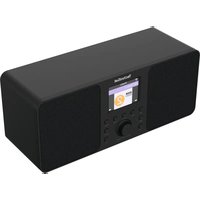
Classic 300 IR - Radio TECHNISAT - Free user manual and instructions
Find the device manual for free Classic 300 IR TECHNISAT in PDF.


| Product type | FM stereo radio with internet radio, podcast, Bluetooth, USB, AUX IN |
| Brand | TechniSat |
| Model | Classic 300 IR V2 |
| Dimensions (L x H x D) | 31 x 13 x 11 cm |
| Weight | 1.55 kg |
| Power supply | DC 12V / 2.5A power adapter (included), max consumption 30W, standby <1W |
| Display | 2.8" TFT color screen (320 x 240 pixels) |
| Audio power | 2 x 5 W RMS (stereo) |
| FM reception | 87.5 - 108 MHz, built-in telescopic antenna |
| Internet radio | Yes, via Wi-Fi (802.11b/g/n) |
| Bluetooth | Version 5.0, range 8 m, A2DP profile |
| USB | MP3 playback, FAT32, up to 1 TB (no charging) |
| AUX input | 3.5 mm stereo jack |
| Headphone | 3.5 mm stereo jack output |
| Podcasts | Yes, built-in |
| Presets | 30 stations (FM and Internet) |
| Alarm / Snooze | 2 alarms, adjustable snooze (5 to 120 min) |
| Equalizer | EQ presets |
| Sleep function | Auto-off timer (15-180 min) |
| Weather display | Yes, in standby (requires Wi-Fi connection) |
| Cleaning | Soft dry cloth; do not use harsh products |
| Safety | Do not open the device; use only the supplied adapter; avoid water |
| Box contents | Radio, power adapter, remote control, user manual |
| Warranty | 2 years (statutory) |
Frequently Asked Questions - Classic 300 IR TECHNISAT
User questions about Classic 300 IR TECHNISAT
0 question about this device. Answer the ones you know or ask your own.
Ask a new question about this device
Download the instructions for your Radio in PDF format for free! Find your manual Classic 300 IR - TECHNISAT and take your electronic device back in hand. On this page are published all the documents necessary for the use of your device. Classic 300 IR by TECHNISAT.
USER MANUAL Classic 300 IR TECHNISAT
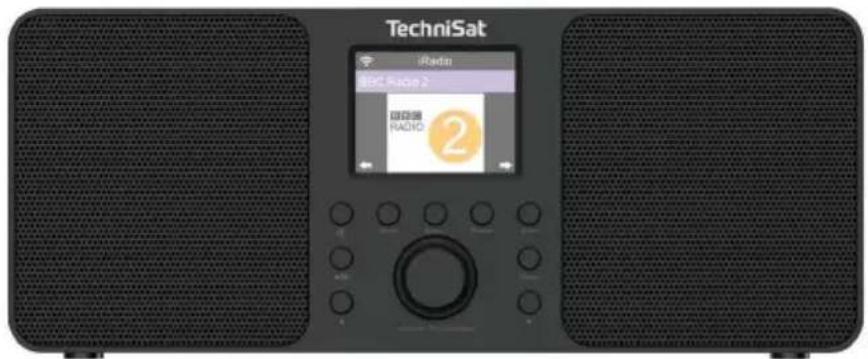
Stereo FM radio with Internet Radio, Podcast, Bluetooth, USB, AUX IN.
EN
TechniSat
1 View of the device
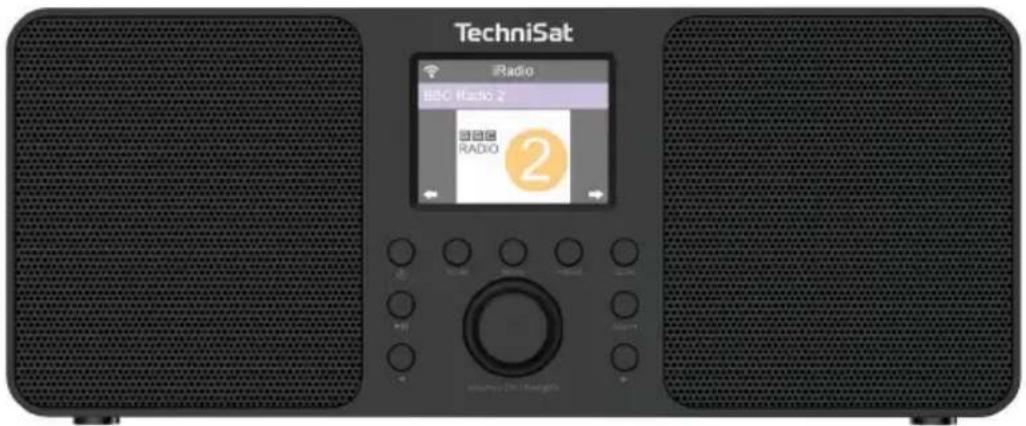
1.1 Front view
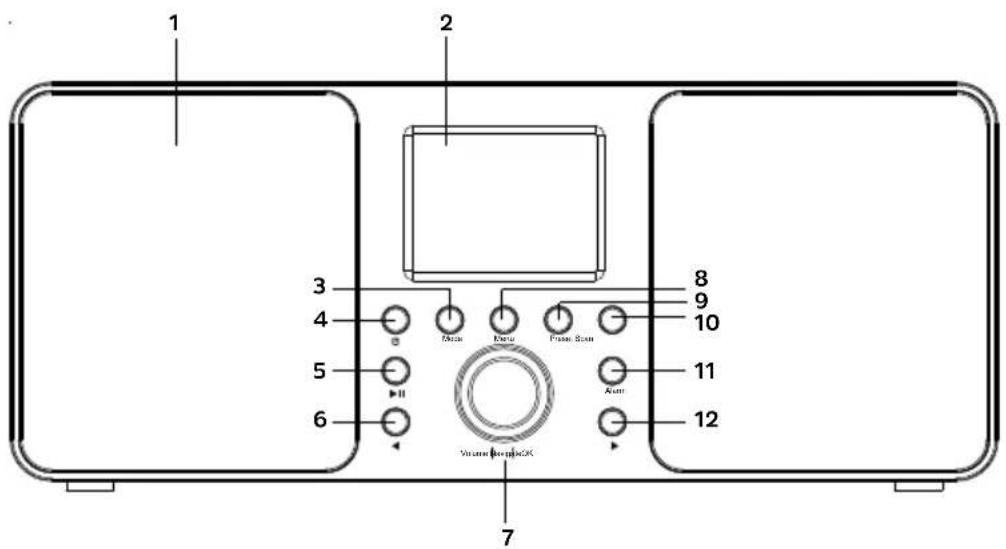
- Speakers 7. Volume +/- , OK, Navigate
- Display 8. MENU
- MODE 9. PRESET
- On/Standby 10. SCAN
- Play/Pause 11. ALARM
- LEFT 12. RIGHT
1.2 Rear view
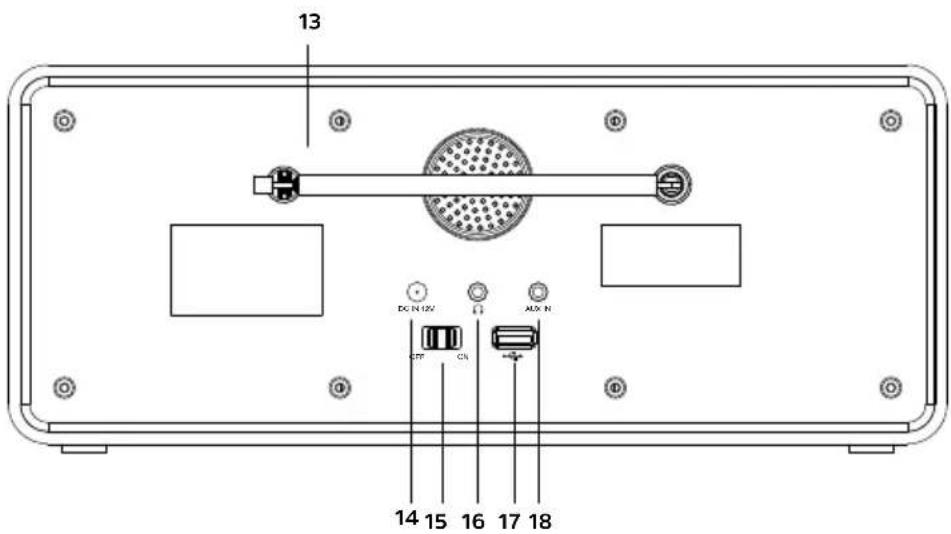
- Antenna 16. Headphone input (3.5 mm stereo)
- Power input (DC12V/2.5A) 17. USB
- Power ON/OFF switch 18. AUX IN
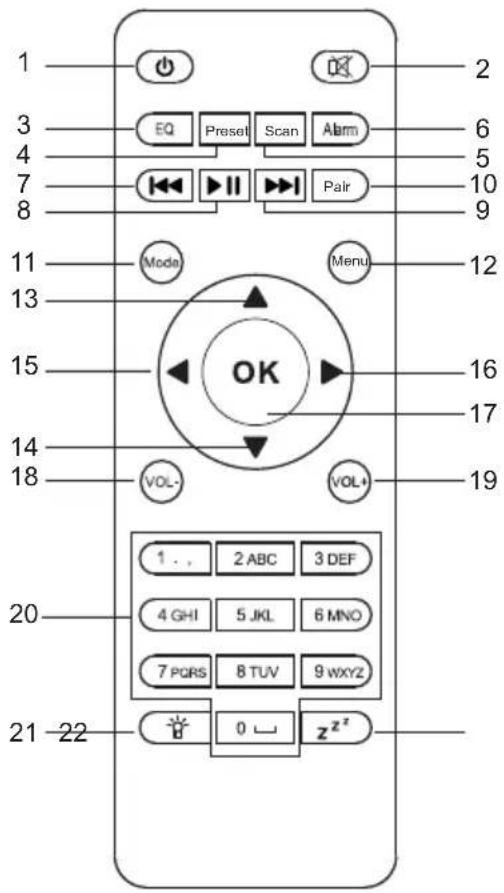
1.3 Remote controller
EN
- On/Standby 13. Up
- Mute 14. Down
- EQ - Equalizer 15. Left
- Preset 16 Right
- Scan 17. OK - Confirm
- Alarm 18. VOL - , Volume down
- Previous song 19. VOL + , Increase volume
- Play/Pause 20. Number buttons
- Next track 21. Backlight
- Play/Pause 22. Snooze
- Mode
- MENU (main menu)
2 Safety instructions
2.1 Foreword
Dear customers,
Thank you for choosing a TechniSat radio.
These operating instructions are intended to help you familiarise yourself with the functions of your new device and use them optimally. It will help you to use the radio safely and for its intended purpose. It is intended for anyone who installs, operates, cleans or disposes of the unit.
Keep the operating instructions in a safe place for future reference.
TechniSat team
2.2 Symbols and symbols used
In this manual:

Indicates a safety instruction, failure to follow which may cause serious injury or death. Observe the following signal words:
DANGER - Serious injury resulting in death.
WARNING - Severe personal injury that could lead to death.
NOTE - Injuries.

It indicates the caution to be observed to avoid device malfunctions, data loss/misuse or unintended operation. It also describes further functions of the device.

Warning against electrical voltage. Observe all safety instructions to avoid electric shock. Never open the appliance.
Na urządzeniu:

Indoor use - appliances marked with this symbol are suitable for indoor use only.

Your device is CE marked and meets all required EU standards.

This appliance has been designed and manufactured with high-quality materials and components that are suitable for reuse. The symbol of the crossed-out wheeled bin indicates that this product is subject to separate collection in accordance with Directive 2012/19/EU of the European Parliament and of the Council and in accordance with Directive 2006/66/EC of the European Parliament and of the Council, and informs you that electrical and electronic equipment and batteries and accumulators have reached the end of their useful life, must not be disposed of with other household waste. The user is obliged to hand it over to a waste electrical and electronic equipment and batteries and accumulators collection system
operator including to an appropriate shop, local collection point or municipal unit. Waste equipment can have harmful effects on the environment and human health due to its potential content of hazardous substances, mixtures and components. The household plays an important role in contributing to the reuse and recovery, including recycling, of waste equipment. At this stage, attitudes are formed that influence the preservation of the common good, which is a clean environment. Households are also one of the biggest users of small equipment and rational management of this equipment influences the recovery of secondary raw materials. In the event of improper disposal of this product, penalties may be imposed in accordance with national legislation. At the end of the product's life cycle, it should not be disposed of with normal household waste but at a collection point for used electrical and electronic equipment. This is indicated by the symbol on the product, user manual or packaging. Materials are recyclable according to the label. By reusing, recycling or otherwise recycling your old equipment, you are making an important contribution to environmental protection.

unit's power supply meets the requirements of energy efficiency class VI.
- This symbol indicates the polarity of the DC voltage on the DC plug of the power supply unit.
2.3 Purpose
The TechniSat CLASSIC 300 IR V2 is capable of receiving FM radio broadcasts, internet radio, playing music (mp3) from USB, receiving Bluetooth streams. The device is intended for private use and is not suitable for commercial purposes.
2.4 Safe handling
Observe the following instructions to minimise safety risks, avoid damage to the equipment and contribute to environmental protection.
Read all safety instructions carefully and keep them for future reference. Always observe all warnings and instructions in this manual and on the back of the appliance.

DANGER!
Never open the appliance!
Touching live components is life-threatening!

WARNING!
Danger of suffocation! Do not leave packaging and its parts in the care of children. Danger of suffocation from foil and other packaging materials!

To ensure the correct use of the appliance and to avoid damage to the appliance and personal injury, all the following instructions must be followed.
- Do not repair the appliance yourself. Repairs should only be carried out by trained specialists. Contact our customer service centres.
-
The device must only be operated under the environmental conditions specified for it.
-
Do not expose the appliance to dripping or splashing water. If water enters the appliance, switch it off and notify the service department.
- Do not expose the unit to heat sources that heat up the unit in addition to normal use.
- In the event of a noticeable defect in the appliance, odour or smoke, significant faults or damage to the housing, contact the service centre immediately.
- The device may only be operated at the specified mains voltage.
- Never attempt to operate the unit at any other voltage.
- If the unit is damaged, it must not be operated.
- Do not use the unit near bathtubs, showers, swimming pools or flowing/splashing water. There is a risk of electric shock and/or damage to the equipment.
- Foreign objects, e.g. needles, coins, etc. must not fall into the device. Do not touch the connection contacts with metal objects or fingers. This may cause a short circuit.
- The appliance is not intended for use by persons (including children) with reduced physical, sensory or mental capabilities, or lack of experience and/or knowledge, unless they have received supervision or instruction on the use of the appliance from a person responsible for their safety.
- It is forbidden to make changes to the device.
2.4.1 Legal notice

TechniSat hereby declares that the radio device type CLASSIC 300 IR BT complies with Directive 2014/53/EU and RoHS. The full text of the EU Declaration of Conformity is available at the following web address:
TechniSat is not responsible for damage to the product caused by external influences, wear and tear or improper handling, unauthorised repairs, modifications or accidents.

Subject to changes and printing errors. Reproduction and duplication only with permission of the publisher. The latest version of the manual is available in PDF format in the download area on the TechniSat homepage at www.technisat.pl.
2.4.2 Service information

This product is quality tested and comes with a statutory warranty period of 24 months from the date of purchase. Please keep your invoice receipt as proof of purchase. In the event of a warranty claim, the cost of postage directly to the manufacturer will be paid by the customer..

For questions and information or if you have a problem with this device, our technical hotline is available: Monday. - to Friday, from 8:00 a.m. to 4:00 p.m. on telephone number: +71 310 41 48.

In order to make use of the guarantee, the purchaser must report the defective product to the point of sale where the product was purchased and deliver the defective product there. The product must be delivered complete.

guarantor, within the scope of the granted guarantee, undertakes to remove at its own expense any defects in the product. The removal of defects will be carried out by replacing the defective product with a new, defect-free one or by repairing it.

warranty does not cover product defects caused by the purchaser or resulting from:
- use or install the product in a manner inconsistent with the instructions for use,
- improper storage or maintenance of the appliance,
- repairs or modifications to the product carried out by unauthorised persons,
- ingress of liquids or foreign bodies,
- lightning strikes and power line surges

provisions of the guarantee do not exclude, limit or suspend the rights of purchasers (consumers) under generally applicable law (warranty).

obtain detailed information on a Product, including the rules and procedures for the guarantee procedure, the assignment of an RMA number, it is possible to by telephone 71 310 41 48 or email serwis@technisat.com, on working days, from 8 am to 4 pm.
ONLINE application: www.serwis.technisat.com
3 Description of the device
3.1 Contents set
Please check that the following are included:
1x TechniSat CLASSIC 300 IR V2
1x Operating instructions 1x Power supply
1x Remote control
3.2 Special features
The radio has the following special features:
- FM radio and Internet radio reception.
- UKW reception range 87.5-108 MHz (analogue).
- Colour display.
- 2 x 5 W Stereo.
- Programme memory 30 for FM stations and Internet Radio.
- MP3 player via USB connection.
- Bluetooth function.
3.3 Preparing of the device for operation
3.3.1 Telescopic antenna set-up
The number and quality of stations received depends on the reception conditions at the installation site. Excellent reception can be achieved with a telescopic antenna.
Position the telescopic antenna and extend it lengthways.

Accurate positioning of the telescopic antenna is often important, especially in peripheral FM reception areas.

Start your first search at the window towards the transmitter mast. In bad weather reception may be limited.

Do not touch the telescopic antenna during station playback. This may lead to reception interference and sound fading.
3.3.2 Connection to the power supply

WARNING!
Do not touch the power supply with wet hands, risk of electric shock!

NOTE!
Arrange the mains cable of the power supply so that no one trips over it.
Connect the mains plug of the power supply unit of the CLASSIC 300 IR V2 to a mains socket (100-240V \~ 50/60 Hz).
Before connecting the appliance to a wall socket, ensure that the operating voltage of the appliance corresponds to the local mains voltage.

Unplug the appliance before a storm. If the appliance will not be used for an extended period of time, e.g. before embarking on a long journey, unplug it from the mains. The heat generated during operation must be dissipated by adequate air circulation. Therefore, do not cover the appliance or place it in a closed cabinet. Ensure a free space of at least 10 cm around the appliance.
3.3.3 Using headphones
Hearing damage!
Do not listen to the radio at high volume through headphones. This may cause permanent damage to your hearing. Before using headphones, set the volume of the device to the minimum.

Only use headphones with a 3.5-millimetre plug.
Insert the headphone plug into the headphone socket of the device. The sound is now only played through the headphones, the speaker is muted.
If you want to listen through the speakers again, remove the headphone plug from the device's headphone socket
i the sound from the headphone output is stereo. .
When headphones are connected, the speaker is disconnected.
To ensure good FM reception, please fully extend the telescopic antenna, which is located on the back of the unit.
Please connect the power supply to the power input marked DC-12V.
Press the On/Standby button
the device should only be used with the included power supply.
If the device is not going to be used for a long time, please unplug the power supply from the mains socket.
3.4.2 Switching off the device
To switch off the device, please press the On/Standby button.
The device will switch to the time display.
3.4.3 Volume control
Adjust the volume by turning the volume knob (VOLUME +/-) on the unit.
- Turn clockwise - louder
- Turn left, counterclockwise - quieter.
4 Menu operation
The menu is navigated using the MENU, ◀, ▶ and navigation knob buttons. The menu is divided into submenus and contains various menu items or functions that can be activated depending on the mode. To open the menu, simply press the MENU key briefly. To access a submenu, first press the ◀ or ▶ keys to display the submenu and then press the scroll wheel to enter the submenu.
Close the menu: Press the MENU button several times to access the main menu, then select a source.
Settings are only saved when the scroll wheel is pressed. If the MENU key is pressed instead, the settings are not accepted and saved (the MENU key takes over the function of the „backwards“).
Some text displays (e.g. menu items, station information) may be too long for the display. They are then displayed as scrolling text after a short time
5 Initial settings
When the CLASSIC 300 IR V2 is switched on for the first time, the initial configuration wizard starts.
All settings can also be changed at any time at a later date.
Select the operating language with the dial and confirm by pressing the dial.
Observe the data protection information in the next step and press the navigation knob to proceed to the next step.
You can then run the WLAN wizard and set up the internet connection.
List of wireless networks within range will be displayed. Use the wheel to select the wireless network and press the scroll wheel to confirm.
Entering a password
To enter the password, proceed as follows: The first digit is highlighted. Now turn the scroll wheel until the first digit or letter of your password appears.
Press the ▶ button to accept the digit or letter and move on to the next item. Now proceed as described above until the full password has been entered. Press the dial to make connection.
Press the ◀, key to delete the incorrect digit/letter.
6 Internet radio
The CLASSIC 300 IR is equipped with an internet radio receiver. To receive internet radio stations/stations, an internet connection via a WLAN router to the wireless network is required.
Press the MENU button and use the rotary knob to select [Internet radio]. Press the dial button.
A list of functions appears: Favourites - Contains your favourite stations.
Radio station - Contains all internet radio stations sorted by genre.
Sleep radio - Special stations for falling asleep.
Recently listened to station - Contains the stations you have listened to recently.
Select the desired function with the dial and press the dial to perform the function.
6.1 Playing an Internet radio station
Use the rotary knob to select [Radio Station] and press the rotary knob.
the Radio Stations tab displays all internet radio stations divided into different categories.
Select a station by category/country/genre using the rotary knob and press the knob to play the station.
6.2 Recently listened to
Select [Recently listened to] with the rotary knob to display a list of recently played stations.
Use the dial to select a station, then press the dial to play it.
6.3 Adding Internet stations to favourites
To save a station to a memory location, press and hold the PRESET button while playing the desired station until the folder symbol appears at the top of the display (1st station).
To save additional stations, repeat this procedure. If at least 1 station has already been saved, the Favourites list will now appear. You can now decide whether you want to overwrite a previously saved station or add a new station to the end of the list. Use the rotary knob to select memory location and press the dial to save the position.
Alternatively
Press and hold for 2-3 seconds the Preset button on the remote control and use the arrow buttons to select a place in the favourites list.
6.4 Recall a favourite station
To recall a station previously stored in the favourites memory, briefly press PRESET and use the scroll wheel to select a station from the list. Press the scroll wheel to play back the selected station.
Alternatively
Press the Fav button on the remote control and use the arrow buttons to select the desired programme. Confirm your selection with the OK button.
7 DAB (WiFi)
The DAB(IR) function lists all internet radio stations that are also available as DAB stations. You do not need an aerial to receive stations as internet streams. The DAB (WiFi) function is disabled by default and needs to be enabled in the settings.
To enable DAB (WiFi), press Menu and use the rotary knob to select [Settings] and then go to [Local Radio Settings]->[Location Settings]. Then select your location.
7.1 DAB (WiFi) - Station selection
Press the MENU button and use the dial to select [DAB(WiFi)]. Press the dial.
Select a station with the rotary knob and press the rotary knob to play the station.
If you wish to add a station to the Favourites list, follow the procedure described in sections 7.3 and 7.4
8 Radio FM
The CLASSIC 300 IR is equipped with an FM radio receiver.
To ensure good FM reception, please fully extend the telescopic antenna, which is located on the back of the unit.
Press the MENU button and use the dial to select [FM].
8.1 Automatic staation search
To start the automatic search for radio programmes, please press the SCAN
Instrukcja obsługi
CLASSIC 300 IR V2
Radio FM stereo cu Internet Radio, Podcast, Blue tooth, USB, AUX IN.
TechniSat
- MP3 player prin conexiune USB.
- Functia Bluetooth.
- View of the device
- Front view
- Rear view
- Remote controller
- Safety instructions
- Foreword
- Dear customers,
- Symbols and symbols used
- In this manual:
- Na urządzeniu:
- Purpose
- Safe handling
- DANGER!
- WARNING!
- Legal notice
- Service information
- Description of the device
- Contents set
- Special features
- Preparing of the device for operation
- Telescopic antenna set-up
- Connection to the power supply
- NOTE!
- Using headphones
- Hearing damage!
- Switching off the device
- Volume control
- Menu operation
- Initial settings
- Internet radio
- Playing an Internet radio station
- Recently listened to
- Adding Internet stations to favourites
- Alternatively
- Recall a favourite station
- DAB (WiFi)
- DAB (WiFi) - Station selection
- Radio FM
- Automatic staation search
- Instrukcja obsługi
- CLASSIC 300 IR V2
Brand : TECHNISAT
Model : Classic 300 IR
Category : Radio