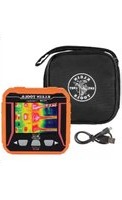
TI250 - Thermometer Klein Tools - Free user manual and instructions
Find the device manual for free TI250 Klein Tools in PDF.


| Product Type | Rechargeable Thermal Imager |
| Brand | Klein Tools |
| Model | TI250 |
| Dimensions | 80.8 × 79 × 25.7 mm |
| Weight | 156 g |
| Power Supply | Lithium polymer battery 3.7 V, 1350 mAh, rechargeable via USB |
| Charging Time | Approximately 3 hours |
| Sensor Resolution | 10,800 pixels (VOx microbolometer) |
| Temperature Range | -20 °C to 400 °C (-4 °F to 752 °F) |
| Thermal Accuracy | ±3°C or ±3% (whichever is greater) |
| Adjustable Emissivity | 0.1 to 0.99 (default 0.95) |
| Display | 2.4-inch TFT LCD screen |
| Color Palettes | Iron, Rainbow, Grayscale |
| Image Storage | microSD card (not included) |
| Main Functions | Max, min, average points, high/low alarms, adjustable auto-off |
| Auto-off | 5, 10, or 30 minutes (adjustable) |
| Drop Protection | 2 m |
| Compliance | UL 61010-1, CSA C22.2 No. 61010-1 |
| Operating Temperature | 0 °C to 45 °C |
| Storage Temperature | -20 °C to 60 °C |
| Warranty | See Klein Tools website |
| Maintenance | Clean with a lint-free cloth; do not use solvents |
| Safety | Do not open; no user-serviceable parts; eye protection recommended |
| Included Accessories | Micro USB cable |
Frequently Asked Questions - TI250 Klein Tools
User questions about TI250 Klein Tools
0 question about this device. Answer the ones you know or ask your own.
Ask a new question about this device
Download the instructions for your Thermometer in PDF format for free! Find your manual TI250 - Klein Tools and take your electronic device back in hand. On this page are published all the documents necessary for the use of your device. TI250 by Klein Tools.
USER MANUAL TI250 Klein Tools
Rechargeable Thermal Imager
• OVER 10,000
PIXELS TO
TROUBLESHOOT
HOT AND COLD
SPOTS
• ADJUSTABLE EMISSIVITY FROM 0.1 TO 0.99
- STORE AND SHARE IMAGES WITH OPTIONAL microSD® CARD
• RECHARGEABLE LITHIUM ION BATTERY
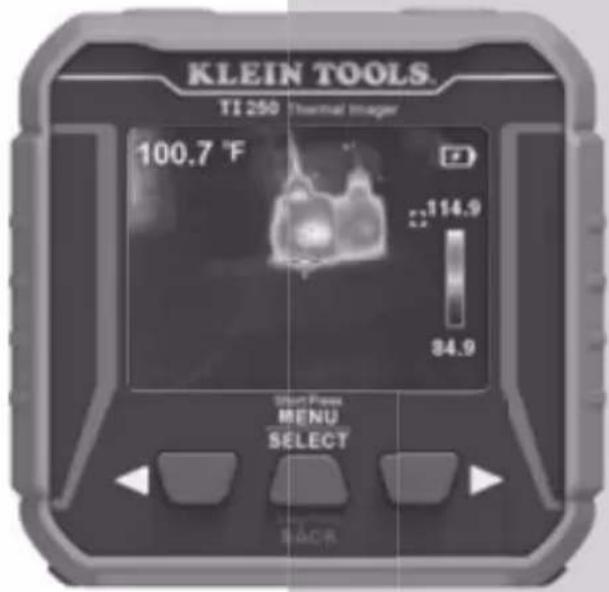
text_image
KLEIN TOOLS. TI 250 Thermal Image 100.7 °F 114.9 34.9 Smart Press MENU SELECT BACR
-4^ - 752^ F -20^ - 400^ C

2m


Intertek 5001748
ESPAÑOL pg. 9
FRANÇAIS pg. 17


ENERGY PERFORMANCE VERIFIED RENDEMENT ÉNERGÉTIQUE VÉRIFIÉ
KLEIN TOOLS®

Intertek EP 5016393
GENERAL SPECIFICATIONS
The Klein Tools TI250 is an easy-to-use, USB rechargeable Thermal Imager; power on to view unseen hot and cold spots for instant troubleshooting. The meter provides high and low temperature points, crosshairs to pinpoint specific temperatures, and options for temperature alarms. The addition of a microSD® card (optional) allows the meter to capture and store images for reporting.
• Environment: Indoor or outdoor
- Operating Altitude: 6562 ft. (2000 m)
- Relative Humidity: <90% non-condensing
• Operating Temp: 32° to 113°F (0° to 45°C)
• Storage Temp: -4° to 140°F (-20° to 60°C)
- Sensor: VOX Micro bolometer
- Sensor Resolution: 10800 pixels
• Field of View (FOV): 50 degrees
- Frame Rate: 9 Hz
- Sensitivity: <60 mk
• Temperature Range: -4° to 752° F (-20° to 400° C)
• Temperature Resolution: 0.1°F/0.1°C
- Temperature Accuracy: +/-3^ or 3 % (whichever greater) NOTE: Not calibrated below 14^ (-10°C)
• Temperature Display: High, Low, and Center point
• Temperature Settings: °F / C°
- Emissivity: 0.1 to 0.99 adjustable (0.95 default)
- Display Type: 2.4" TFT LCD
• Color Pallets: Ironbow; Rainbow, Gray
- Image Format: BMP
- Image storage: microSD® Card (not included)
- Dimensions: 3.18" × 3.11" × 1.02" (80.8 × 79 × 25.7 mm)
• Weight: 5.5 oz. (156 grams)
• Power: Lithium polymer battery 3.7V / 1350mAh (USB rechargeable)
- Required Charger Current / Voltage: 800mA / 5V DC
• Charging Current / Time: 450mA / 3 hours
• Auto Power Off: User-selectable for 5, 10, or 30 minutes
- Pollution degree: 2
- Drop Protection: 6.6 ft. (2m)
• Standards: Conforms to UL STD. 61010-1

Intertek 5001748
Certified to CSA STD. C22.2 No. 61010-1
Specifications subject to change.
⚠️ WARNINGS
To ensure safe operation and service of the tester, follow these instructions.
- Read the instructions to ensure safe operation.
• Always wear approved eye protection. - Do not use if the charging port or housing is damaged in any way.
- Keep the rubber cover over the charging port when not in use.
- Do not expose to direct sunlight, open flame, heat sources, equipment that produces heat, or extremes of environmental temperature. If battery's internal temperature gets too high, the unit will shut down until the internal temperature is lowered.
- There are no user-serviceable parts inside. DO NOT open or attempt to repair.
NOTE: Do not point the camera at the sun or any other strong energy source. This can affect the accuracy of the camera or cause damage to the sensor.
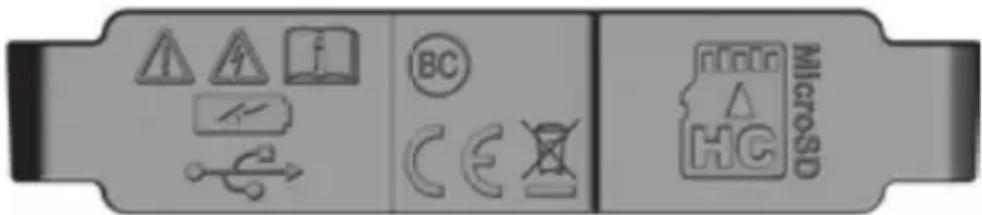
WARNING SYMBOLS ON TESTER

Warning or caution

Risk of Electrical Shock

Read instructions before using
OTHER SYMBOLS ON TESTER
USB Charging Port

Conforms with BCS regulations of California Energy Commission
Conformité Européenne: Conforms with European Economic Area directives

This product has been independently tested by Intertek and meets applicable published standards.

WEEE – Battery disposal
microSD ^® Card Port
text_image
Diagram showing microSD icons and symbols on a device panel, including warning, function, and calibration symbols.Rotating Port Cover (bottom of unit)
FEATURE DETAILS
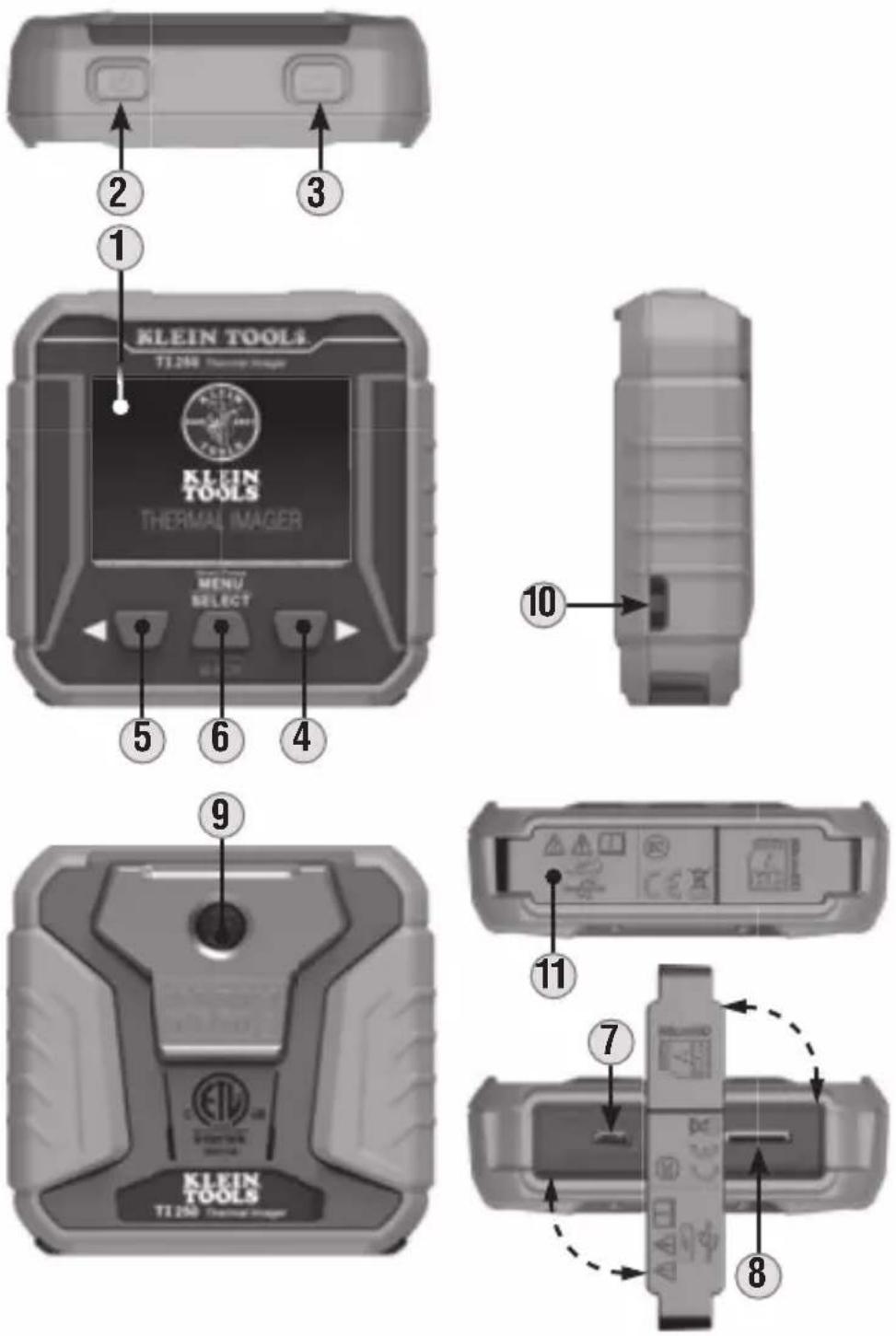
IMAGER
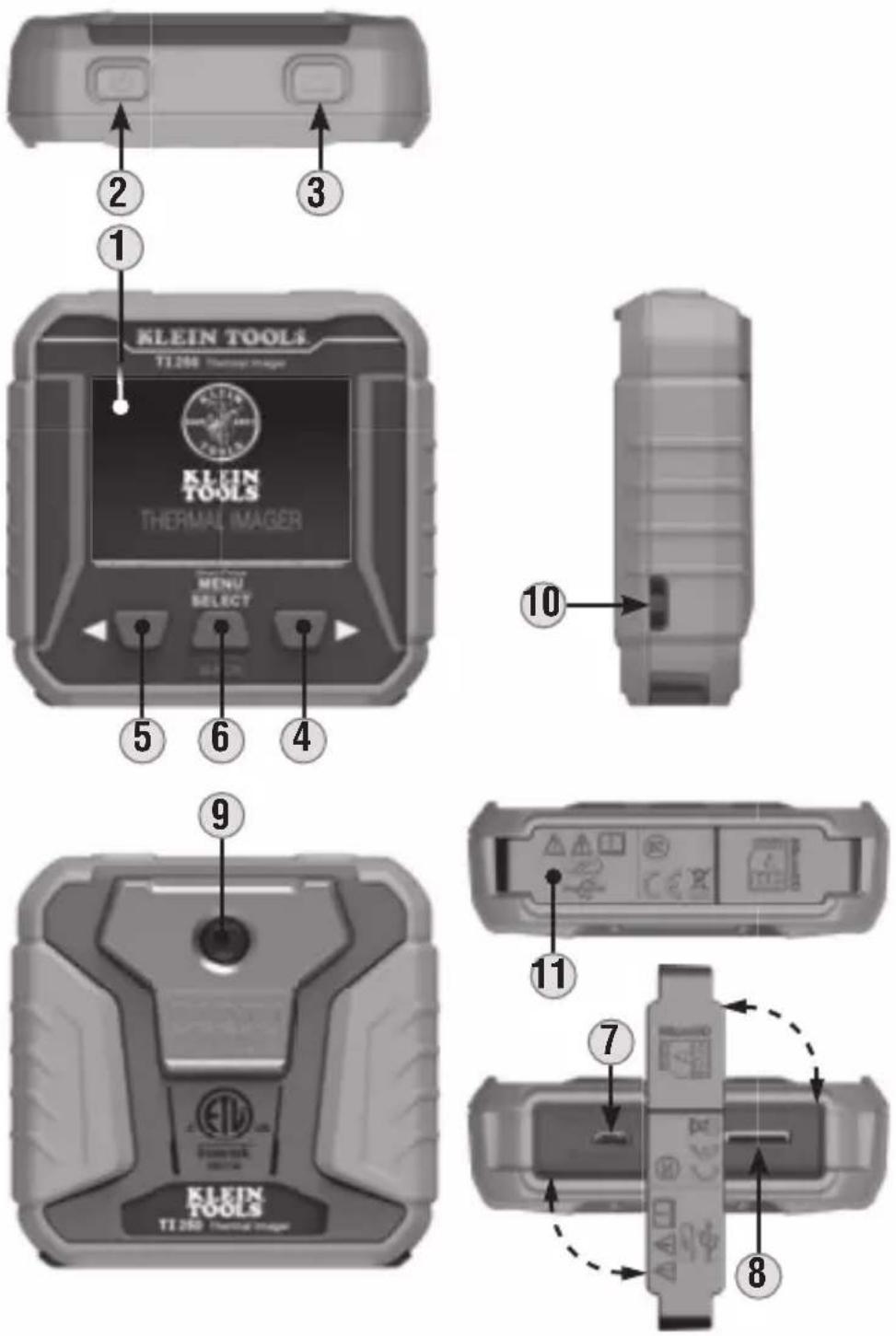
- Thermal LCD Screen
- Power On / Off Button
- Camera Shutter Button
- Right-Scroll Button
- Left-Scroll Button
-
Menu / Select / Back Button
-
Micro-USB Charging Port
- microSD® Card Slot
- Camera
- Lanyard Hole
- Rotating Port Cover
FEATURE DETAILS
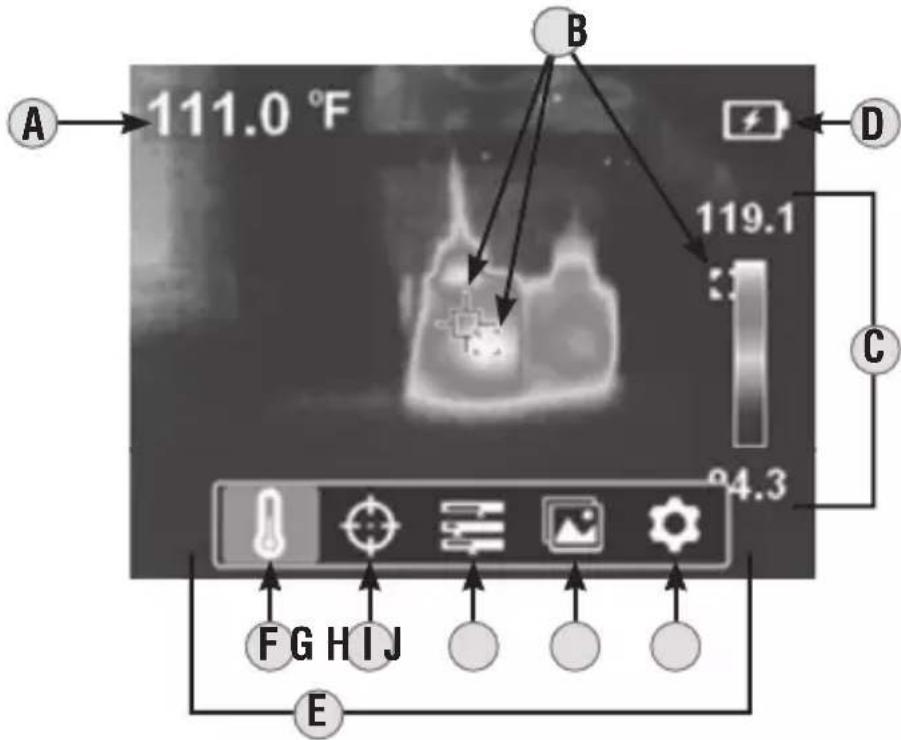
text_image
A 111.0 °F B 119.1 D C 24.3 F G H I J ELCD
A. Center Target Temperature
B. Live Center, High and Low Points
C. Live Temperature Scale
D. Battery Level Indicator
E. Menu Functions
F. Temperature Units (°F / °C)
G. Center Target Temperature and High / Low Temperature On / Off
H. Color Pallets (Ironbow, Rainbow, Gray)
I. Gallery (requires microSD ^® card, not included)
J. Settings
OPERATING INSTRUCTIONS
NOTE: Fully charge before first use.
CHARGING
Connect included Micro-USB cable to Micro-USB Charging Port ⑦, and plug the other end into a computer, USB AC adapter, or other USB power supply (not included). When charging, the battery indicator will flash for 10 seconds. Normal charging time is about 3 hours.
FUNCTION BUTTONS
Press Power On / Off Button ② for 2 seconds to power the unit on or off. When powering on, the start-up screen will display for 10 seconds as the imager runs self-calibration. When complete, the display will show the thermal image with the center target temperature and high / low temperatures.
Press Menu / Select Button ⑥ to access Menu functions and setup. Use the Right ④ and Left ⑤ Scroll Buttons to make selections.
MENU FUNCTION
Press the Menu / Select Button ⑥ and the Menu and Setup functions (shown below) will appear on the LCD. Use the Right ④ and Left ⑤ Scroll Buttons to scroll through the functions. Press the Menu / Select Button ⑥ to open the function or make a selection. To exit the function, long press the Menu / Select Button ⑥.
F Temperature Units: Selectable between °F and °C.
G Center Target Temperature and High / Low Temperature: Turns these icons on or off.
H Color Pallets: Selectable between Ironbow, Rainbow, and Gray.
① Gallery (requires microSD ^® card, not included): Scroll through and view captured photos.
J Settings:
- Temp Bar: Turns feature on or off.
- Time & Date: Sets time and date stamp for images.
- Emissivity: Adjustable from 0.1 to 0.99 (default is 0.95).
• Auto Power Off: Set to 5, 10, or 30 minutes. - Brightness: User-selectable low, medium, or high.
• HI/LO Alert: Sets temperature alarms. - Local Info: Provides information on firmware version, capacity, availability, code, and battery temperature.
- Default Settings Reset: Restores factory-default settings.
- Format SD: Formats microSD ^ card for use with TI250.
OPERATING INSTRUCTIONS
PHOTO CAPTURE
NOTE: microSD ^® card must be installed before powering on to use Photo Capture capabilities.
Press Camera Shutter Button ③ to take a photo.
Press the Right Scroll Button ④ to save the photo, or the Left Scroll Button ⑤ to discard photo.
PHOTO GALLERY
To view photos, press the Menu / Select Button 6, then select Gallery 1. Use the Right 4 and Left 5 Scroll Buttons to scroll between photos.
When within the Photo Gallery, a second press of the Menu / Select Button ⑥ will open additional options:
- Use the Left Scroll Button 5 to highlight the information icon 1 then press the Menu / Select Button 6 to display information about the photo (date, time, temperatures, emissivity, etc.) Long press the Menu / Select Button 6 to exit.
- To delete a photo, select the Trash Can icon 📋 then press the Right Scroll Button ④ to delete. Long press the Menu / Select Button ⑥ to exit.
BATTERY INDICATOR D
- Solid Green: Battery has more than 40% charge remaining
- Partial Yellow: Battery has less than 40% charge remaining
- Partial Red: Low battery, needs recharging
- Blinks Red 10 Times: No Power, Immediate Shut Down
NOTE: For information on a replacement battery for this product, contact Klein Tools Customer Service.
CLEANING
Be sure unit is turned off and wipe with a clean, dry lint-free cloth. Do not use abrasive cleaners or solvents.
STORAGE
Do not expose to high temperatures or humidity. After a period of storage in extreme conditions exceeding the limits mentioned in the General Specifications section, allow unit to return to normal operating conditions before using.
WARRANTY
Do not place equipment and its accessories in the trash. Items must be properly disposed of in accordance with local regulations. Please see www.epa.gov or www.erecycle.org for additional information.
CUSTOMER SERVICE
KLEIN TOOLS, INC.
450 Bond Street
Lincolnshire, IL 60069
1-877-775-5346
customerservice@kleintools.com
www.kleintools.com
text_image
Diagram showing battery model components with warning symbols, battery icons, and microSD indicatorsDETALLES DE LAS CARACTERÍSTICAS