IR5 - Thermometer Klein Tools - Free user manual and instructions
Find the device manual for free IR5 Klein Tools in PDF.


| Type de produit | Product Type |
| Marque | Brand |
| Modèle | Model |
| Plage de mesure | Measurement Range |
| -30°C à 400°C (-22°F à 752°F) | -30°C to 400°C (-22°F to 752°F) |
| Rapport distance-cible | Distance-to-Spot Ratio |
| 12:1 | 12:1 |
| Émissivité ajustable | Adjustable Emissivity |
| 0,10 à 1,00 | 0.10 to 1.00 |
| Lasers d'acquisition de cible | Target Acquisition Lasers |
| Double laser, Classe II (FDA et IEC) | Dual Lasers, Class II (FDA and IEC) |
| Affichage | Display |
| ACL rétroéclairé blanc | White Backlit LCD |
| Résolution d'affichage | Display Resolution |
| 0,1°C / 0,1°F | 0.1°C / 0.1°F |
| Unités de mesure | Measurement Units |
| °C / °F réglables | °C / °F selectable |
| Fonctions de mesure | Measurement Functions |
| MAX, MIN, MOY (AVG), DIFF, maintien des données, balayage automatique | MAX, MIN, AVG, DIFF, Data Hold, Auto Scan |
| Alarmes de température | Temperature Alarms |
| Haute et basse avec désactivation sonore | High and Low with audible disable |
| Arrêt automatique | Auto Power Off |
| Oui | Yes |
| Alimentation | Power |
| 1 pile 9V | 1 9V battery |
| Autonomie de la pile | Battery Life |
| Environ 10 heures avec laser et rétroéclairage | Approximately 10 hours with laser and backlight |
| Dimensions | Dimensions |
| 173 x 115 x 47 mm (6,83 x 4,53 x 1,85 po) | 173 x 115 x 47 mm (6.83 x 4.53 x 1.85 in) |
| Poids | Weight |
| 279 g (9,84 oz) avec piles | 279 g (9.84 oz) with batteries |
| Protection contre les chutes | Drop Protection |
| 2 m (6,6 pi) | 2 m (6.6 ft) |
| Température de fonctionnement | Operating Temperature |
| 0°C à 50°C (32°F à 122°F) | 0°C to 50°C (32°F to 122°F) |
| Température d'entreposage | Storage Temperature |
| -20°C à 60°C (-4°F à 140°F) | -20°C to 60°C (-4°F to 140°F) |
| Humidité de fonctionnement | Operating Humidity |
| < 85 % (sans condensation) | < 85% (non-condensing) |
| Altitude maximale | Maximum Altitude |
| 2000 m (6562 pi) | 2000 m (6562 ft) |
| Réponse spectrale | Spectral Response |
| 8000 à 14000 nm | 8000 to 14000 nm |
| Délai de réponse | Response Time |
| < 250 ms | < 250 ms |
| Entretien | Maintenance |
| Nettoyer avec chiffon non pelucheux, lentille avec air comprimé ou alcool à friction | Clean with non-abrasive cloth, lens with compressed air or rubbing alcohol |
| Garantie | Warranty |
| Consultez le site web : www.kleintools.com/warranty | Visit website: www.kleintools.com/warranty |
Frequently Asked Questions - IR5 Klein Tools
User questions about IR5 Klein Tools
0 question about this device. Answer the ones you know or ask your own.
Ask a new question about this device
Download the instructions for your Thermometer in PDF format for free! Find your manual IR5 - Klein Tools and take your electronic device back in hand. On this page are published all the documents necessary for the use of your device. IR5 by Klein Tools.
USER MANUAL IR5 Klein Tools
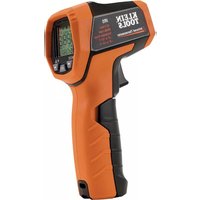
Klein Tools IR5 is a professional dual-laser targeting infrared thermometer. It offers a wide measurement range, a tight distance-to-spot ratio, dual targeting lasers, and several calculation modes to facilitate different temperature measurement applications.
- Operating Altitude: 6562 ft. (2000 m)
- Relative Humidity: <85% non-condensing
- Operating Temp: 32° to 122°F (0° to 50°C)
• Storage Temp: -4^ to 140^ F ( -20^ to 60^ C)
• Measurement Range: -22° to 752°F (-30° to 400°C) - Units: Settable to °F or °C
- Emissivity: 0.10-1.00 adjustable
• Optical Resolution (Distance-to-spot): 12:1 - Dimensions: 6.83" x 4.53" x 1.85" (173 x 115 x 47 mm)
• Weight: 9.84 oz. (279 g) including battery - Battery Type: 1 x 9V battery
- Battery Life: (Estimates assume 9V Zinc-Carbon Battery)
10 hours continuous use w/laser and backlight on.
• Display: Backlit LCD with white backlight
• Display Resolution: 0.1°F (0.1°C)
• Calibration: Accurate for one year
• Lasers: FDA and IEC Class II
• Standards: Certified to IEC EN 61326-1:2006, EN608251:1994+A2:2001+A1:2002 - Pollution degree: 2
- Drop Protection: 6.6 ft. (2m)
- Electromagnetic Environment: IEC EN 61326-1. This equipment meets requirements for use in basic and controlled electromagnetic environments like residential properties, business premises, and light-industrial locations.
Specifications subject to change.
MEASUREMENT SPECIFICATIONS
- Response Time: <250ms
- Data hold: Yes
• MAX/MIN/Average/Differential: Yes
• Spectral Response: 8000-14000nm
| ≥32°F (≥0°C) | ±4°F (±2°C) or ±2% (whichever is greater) |
| <32°F (<0°C) | ±(4°F + 0.2°F per degree below 32°F)±(2.2°C + 0.2°C per degree below 0°C) |
- Repeatability: ±0.8% of reading or ±2°F(±1°C) (whichever is greater).
- Temperature Correction Coefficient: ±0.2°F per °F (±0.1°C per °C), or ±0.2% of reading (whichever is greater) when ambient temperature is above or below 70 – 77°F (21 – 25°C).
Specifications subject to change.
⚠️ WARNINGS
To ensure safe operation and service of the meter, follow these instructions. Failure to observe these warnings can result in severe injury or death.
- Do not direct laser beam into eyes, as this can cause permanent eye damage.
- Do not use the meter if the case is damaged in any way.
- Replace the battery as soon as low battery indicator appears.
• Service the meter immediately if it is acting abnormally. - Be cautious of readings of reflective materials as the meter may indicate that these surfaces are cooler than their actual temperature (see Emissivity section).
- Avoid using the meter around strong electromagnetic fields.
SAFE PRACTICES
This meter is designed for professionals who understand the hazards associated with their trade. While this meter causes no foreseeable dangers beyond its targeting lasers; the objects being measured, as well as the environment in which they reside, can be hazardous. Common safety practices to follow when operating near temperature critical environments are:
- Follow the manufacturer's maintenance procedures when servicing equipment.
- Before using this meter to determine if an area is safe, verify correct operation by measuring a known temperature value of a comparable object.
- Properly maintain this meter and calibrate it regularly.
FEATURE DETAILS
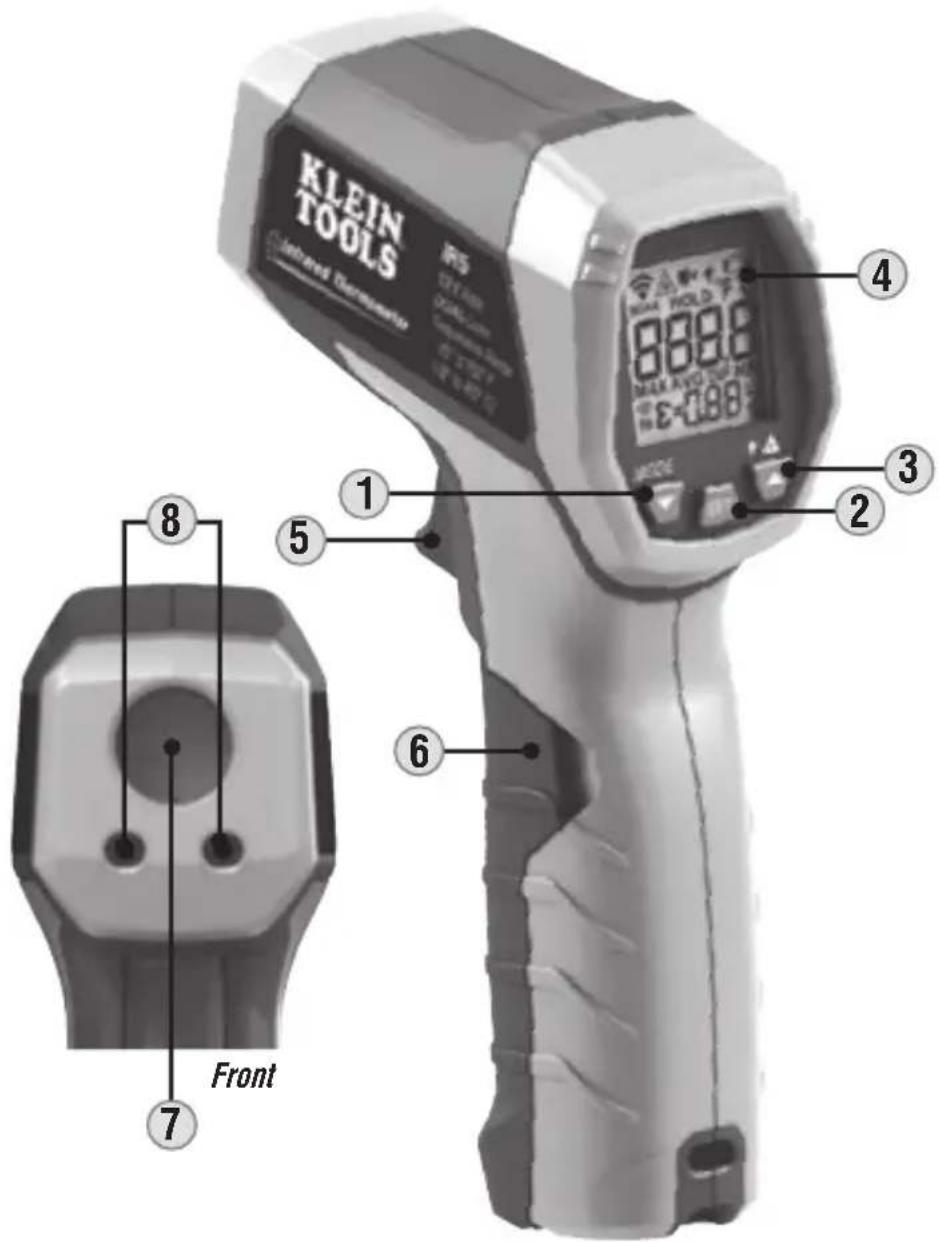
NOTE: There are no user-serviceable parts inside meter.
- Control button – Selects mode and moves down through menus
- SET button – Sets selection
- Control button – Turns targeting lasers on/off, turns backlight on/off, moves up through menus
- LCD Display
- Trigger
- Battery compartment door
- IR temperature sensor
- Targeting lasers
SYMBOLS ON LCD


HOLD

°F °C
MAX AVG DIF MIN
ε=0.88


Indicates active measurement
Targeting lasers active
Backlight active
Data Hold
Low battery indicator
Indicates active temperature scale
Indicates measurement mode
Emissivity
High / Low temperature limit indicators
Enable / disable audible temperature limit alarms
OPERATING INSTRUCTIONS
TEMPERATURE MEASUREMENT
To measure temperature with the IR5, aim the meter at the object to be measured, pull the trigger ⑤ and hold it depressed for at least 2 seconds. Releasing the trigger initiates Data Hold, "HOLD" will show on the display, and the measurement will be held on the display. If the display shows "OL" or "-OL" following a measurement, this indicates that the surface temperature of the object being measured is either above or below the measurement range of the meter.
TARGETING
The IR5 features dual lasers ⑧ to assist in targeting the measurement area. The distance between the two laser spots on the surface of the object being measured approximates the diameter of the circular measurement area from which the infrared sensor is collecting data. Measurement areas located far away from the meter will be larger than those close to the meter.
The meter is configured with 12:1 optical resolution (distance-to-spot ratio). The distance-to-spot ratio defines the size of the measurement area relative to the distance between the measurement location and the IR sensor ⑦. Typical diameters of the measurement area as a function of the distance between the meter and the target area are depicted below for 12:1 optical systems (Fig. 1).
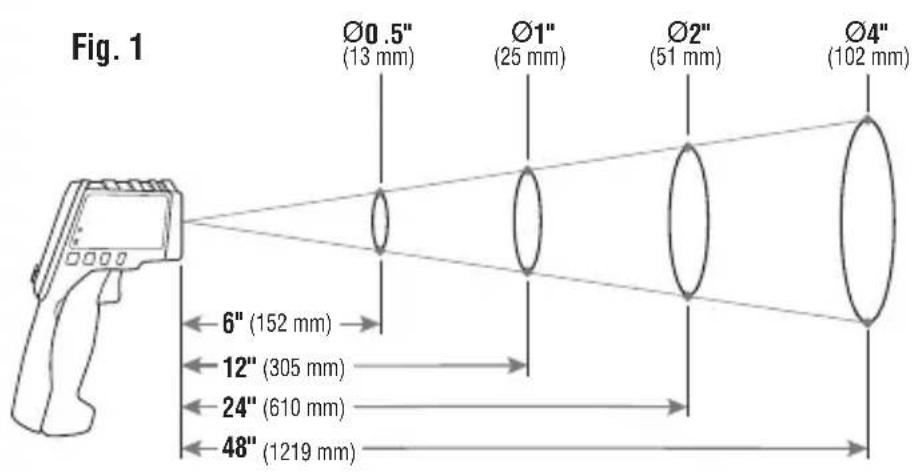
Distance-to-Spot
TARGETING LASERS
The targeting lasers ⑧ may be turned on/off by long presses of control button ③. When on, the laser icon "will be visible on the display.
OPERATING INSTRUCTIONS
BACKLIGHT
The backlight may be toggled on/off by short presses of control button ③. When on, the backlight icon will be visible on the display.
MODE SELECTIONS
When measuring temperature the meter continuously samples the object being measured. Following a measurement, repeatedly press the mode control button ① to cycle through:
- the maximum temperature value measured ("MAX").
- the average value measured ("AVG").
- the difference between maximum and minimum values measured ("DIFF").
- the minimum value measured ("MIN").
- press once more to exit the MODE menu.
SETTINGS
User adjustable settings may be defined using the SET control button ②. Press SET ② to enter the settings menu, subsequent presses of SET cycle through the following list of options:
- emissivity: set the numerical value of the emissivity to match the surface being measured (see EMISSIVITY section below). When in this setting the emissivity icon will flash on the display.
- units: Switch between °F (Fahrenheit) and °C (Celsius). When in this setting the "°F" or "°C" icon will flash on the display, indicating the temperature scale that is currently active.
- mute temperature limit alarms: (turn audible limit alarms on/off). When in this setting the audible icon "■" will flash on the display. When on, the high "Hi"/low "Lo" icons will be visible and when off they will not be visible.
- high temperature limit setting: assign a numerical value to the high temperature limit. When in this setting, the high icon "Hi" will flash on the display.
- low temperature limit setting: assign a numerical value to the low temperature limit. When in this setting, the low icon "Lo" will flash on the display.
When in any setting, control buttons ① and ③ function as up/down to adjust settings and they may be used to select units, turn alarms on or off, or adjust the numerical values of the respective parameters up or down.
OPERATING INSTRUCTIONS
EMISSIVITY
Emissivity is a measure of the ability of a surface to emit thermal energy by radiation. Different types of surfaces (metals, masonry, wood, etc.) emit thermal energy through radiation at different efficiencies. Accordingly, these materials have different emissivity coefficients which must be considered in order to make accurate measurements with an infrared thermometer.
Emissivity on the IR5 may be adjusted from 0.10 to 1.00 to enable accurate measurement of the temperature of most types of materials. Generally speaking, shiny bright surfaces such as chrome, white boards, etc. exhibit lower emissivity than flat black materials.
For guidance only, the chart below may be used to estimate emissivity for many different types of materials. However, the emissivity of surfaces is dependent upon many parameters such as surface finish, temperature, shape of the object, etc.
This chart should be used for guidance only.
| Material Emissivity | |
| Asphalt 0.93 | |
| Red brick 0.93 | |
| Gray brick 0.75 | |
| Porcelain ceramic 0.92 | |
| Fired clay 0.91 | |
| Rough concrete 0.94 | |
| Cotton cloth 0.77 | |
| Smooth glass 0.92 - 0.94 | |
| Granite 0.45 | |
| Gravel 0.28 | |
| Smooth ice 0.97 | |
| Smooth white marble 0.56 | |
| Black paint 0.96 | |
| Hard rubber 0.94 | |
| Wood | 0.80 - 0.90 |
| Matte copper | 0.22 |
| Commercial sheet aluminum | 0.09 |
| Cold rolled steel | 0.75 - 0.85 |
Find a comprehensive list of emissivity values at https://www.kleintools.com/emissivity.
MAINTENANCE
BATTERY REPLACEMENT
When indicator is displayed on LCD, battery must be replaced.
- Open the battery compartment ⑥ by pulling the battery compartment cover at the indentations away from the trigger.
- Remove exhausted 9V battery and dispose of appropriately.
- Replace 9V battery and return battery compartment cover, ensuring that it locks into place.
CLEANING
Be sure meter is turned off and wipe with a clean, dry lint-free cloth. Do not use abrasive cleaners or solvents. Take care to keep the sensor lens clean at all times. If required, loose debris may be removed from lens using clean compressed air. Lens may also be cleaned using a soft cloth or cotton swab with water or rubbing alcohol only. Lens must be allowed to completely dry prior to use.
STORAGE
Remove the battery when meter is not in use for a prolonged period of time. Do not expose to high temperatures or humidity. After a period of storage in extreme conditions exceeding the limits mentioned in the General Specifications section, allow the meter to return to normal operating conditions before using.
WARRANTY
Do not place equipment and its accessories in the trash. Items must be properly disposed of in accordance with local regulations. Please see www.epa.gov or www.erecycle.org for additional information.
CUSTOMER SERVICE
KLEIN TOOLS, INC.
450 Bond Street
Lincolnshire, IL 60069
1-877-775-5346
customerservice@kleintools.com
www.kleintools.com