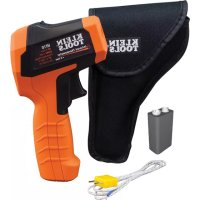
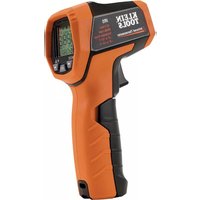
IR10 - Thermometer Klein Tools - Free user manual and instructions
Find the device manual for free IR10 Klein Tools in PDF.



| Product Type | Dual Laser Infrared Thermometer |
| Brand | Klein Tools |
| Model | IR10 |
| Measurement Range (Infrared) | -40 °C to 650 °C (-40 °F to 1200 °F) |
| Measurement Range (Type K Probe) | -40 °C to 650 °C (-40 °F to 1200 °F) (supplied probe limited to 180 °C) |
| Accuracy (Infrared) | ≥ 0 °C: ±1.5 °C or ±1.5%; < 0 °C: ±2 °C + 0.2 °C/°C |
| Accuracy (Type K Probe) | ≥ 0 °C: ±1 °C or ±1%; < 0 °C: ±1.5 °C or ±1% |
| Display Resolution | 0.1 °C (0.1 °F) |
| Distance-to-Spot Ratio | 20:1 |
| Emissivity | 0.10 to 1.00 (adjustable) |
| Lasers | Dual laser, Class II, < 1 mW, 630-670 nm |
| Display | LCD with backlight |
| Power Supply | 1 9 V battery (battery life ~8 h with laser and backlight) |
| Dimensions | 178 mm × 114 mm × 52 mm |
| Weight | 256 g (with battery) |
| Ingress Protection | IP54 |
| Drop Resistance | 3 m |
| Main Functions | Infrared measurement and Type K probe, dual laser, MAX/MIN/AVG/DIFF, high/low alarms, backlight, auto shut-off, data hold |
| Operating Temperature | 0 °C to 50 °C (32 °F to 122 °F) |
| Storage Temperature | -20 °C to 60 °C (-4 °F to 140 °F) |
| Maintenance and Cleaning | Wipe with a lint-free cloth; clean lenses with water or rubbing alcohol |
| Safety | Class II laser: do not look directly into the beam; do not use if housing is damaged |
| Spare Parts and Repairability | No user-serviceable parts; replace battery (9 V) only |
| Warranty | www.kleintools.com/warranty |
Frequently Asked Questions - IR10 Klein Tools
User questions about IR10 Klein Tools
0 question about this device. Answer the ones you know or ask your own.
Ask a new question about this device
Download the instructions for your Thermometer in PDF format for free! Find your manual IR10 - Klein Tools and take your electronic device back in hand. On this page are published all the documents necessary for the use of your device. IR10 by Klein Tools.
USER MANUAL IR10 Klein Tools
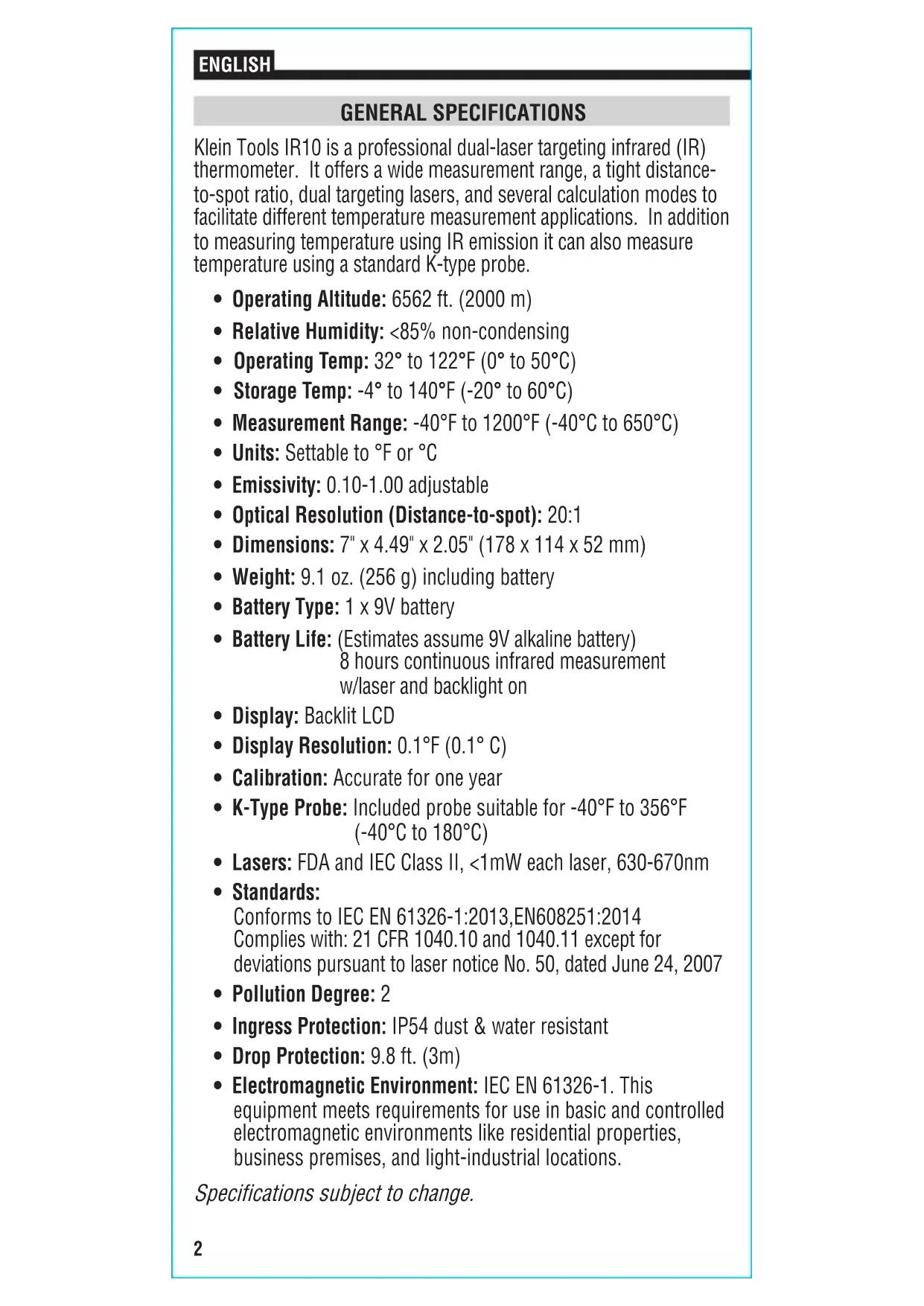
Klein Tools IR10 is a professional dual-laser targeting infrared (IR) thermometer. It offers a wide measurement range, a tight distance-to-spot ratio, dual targeting lasers, and several calculation modes to facilitate different temperature measurement applications. In addition to measuring temperature using IR emission it can also measure temperature using a standard K-type probe.
- Operating Altitude: 6562 ft. (2000 m)
- Relative Humidity: <85% non-condensing
- Operating Temp: 32° to 122°F ( 0° to 50°C )
Storage Temp: -4° to 140°F (-20° to 60°C) - Measurement Range: -40°F to 1200°F (-40°C to 650°C)
- Units: Settable to ° F or ° C
- Emissivity: 0.10-1.00 adjustable
- Optical Resolution (Distance-to-spot): 20:1
- Dimensions: 7'' × 4.49'' × 2.05'' (178 × 114 × 52 mm)
Weight: 9.1 oz. (256 g) including battery - Battery Type: 1 × 9 V battery
- Battery Life: (Estimates assume 9V alkaline battery)
8 hours continuous infrared measurement w/laser and backlight on - Display: Backlit LCD
- Display Resolution: 0.1 ° F( 0.1 ° C)
- Calibration: Accurate for one year
- K-Type Probe: Included probe suitable for -40°F to 356°F (-40°C to 180°C)
Lasers: FDA and IEC Class II, < 1mW each laser, 630-670nm - Standards: Conforms to IEC EN 61326-1:2013,EN608251:2014 Complies with: 21 CFR 1040.10 and 1040.11 except for deviations pursuant to laser notice No. 50, dated June 24, 2007
- Pollution Degree: 2
- Ingress Protection: IP54 dust & water resistant
- Drop Protection: 9.8 ft. (3m)
- Electromagnetic Environment: IEC EN 61326-1. This equipment meets requirements for use in basic and controlled electromagnetic environments like residential properties, business premises, and light-industrial locations.
Specifications subject to change.
MEASUREMENT SPECIFICATIONS
| Specification IR Measurement K-Type Measurement | ||
| Range | -40°F to 1200°F (-40°C to 650°C) | -40°F to 1200°F (-40°C to 650°C) |
| Accuracy | ≥32°F (0°C): ±3°F (±1.5°C) or ±1.5% whichever is greater <32°F (0°C): ±(3.6°F + 0.2°F per degree) (±(2°C + 0.2°C per degree)) | ≥32°F (0°C): ±2°F (±1°C) or ±1%, whichever is greater <32°F (0°C): ±3°F (±1.5°C) or ±1%, whichever is greater |
| Repeatability | ±0.8% or ±2F(±1C), whichever is greater | ±0.5% or ±1F (±0.5C), whichever is greater |
| Spectral Response | 8-14μm N/A | |
| Response Time | <150ms <150ms | |
| Data Hold Yes | Yes | |
| MAX/MIN/Average/Differential | Yes Yes | |
| Measurement out of range | ‘----’ on display ‘----’ on | display |
| Temperature Correction Coefficient | Temperature Correction Coefficient: ±0.2°F per °F (±0.1°C per °C), or ±0.2% of reading (whichever is greater) when ambient temperature is above or below 70 – 77°F (21 – 25°C). | |
Specifications subject to change.
NOTE: The included K-type probe is suitable ONLY for temperatures of -40°F to 356°F (-40°C to 180°C) . For temperatures above 356°F (180°C) , a high-temp K-Type probe is required.
FEATURE DETAILS
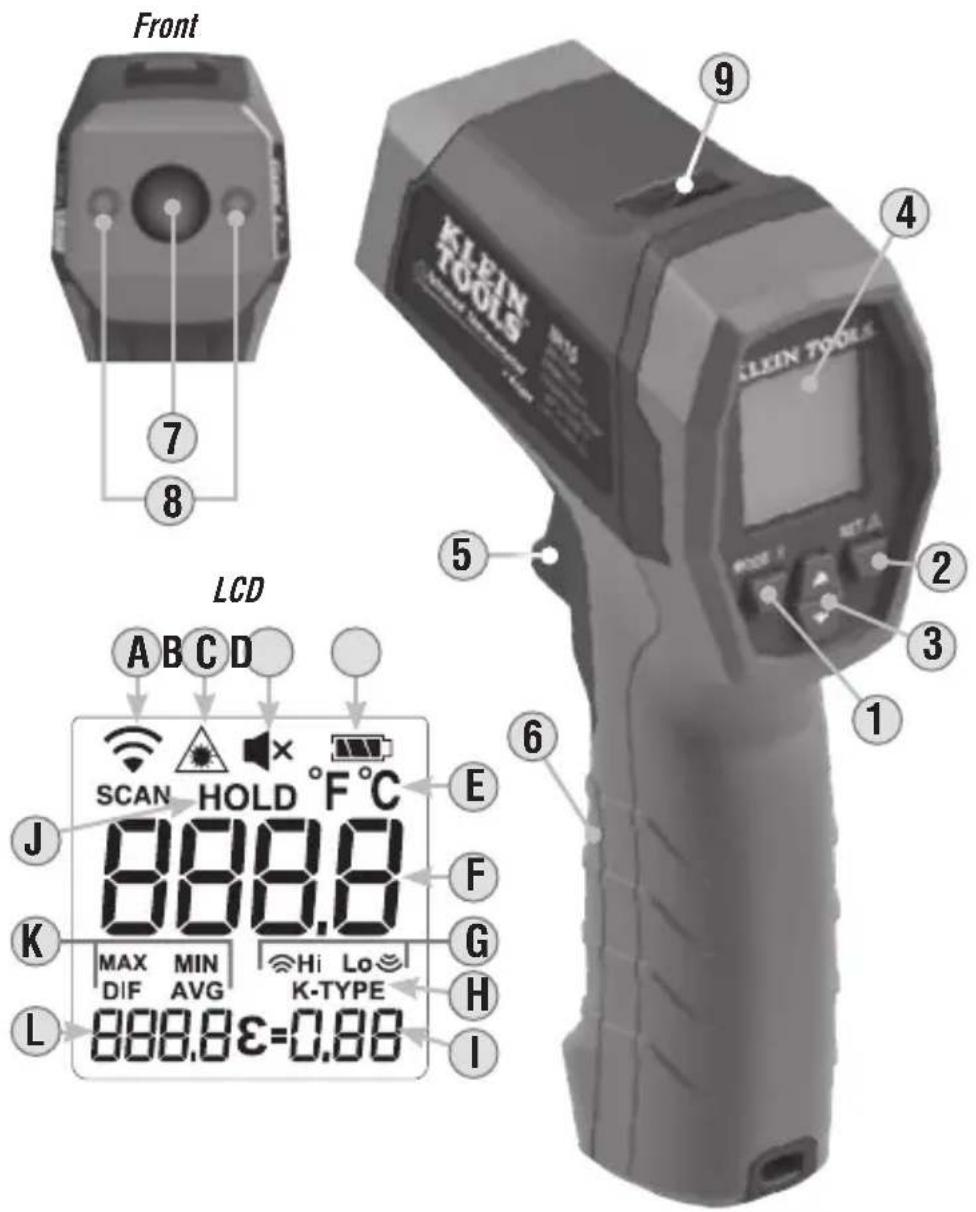
- MODE button
- SET button
3.Up/Down buttons
4LCD Display - Trigger
- Battery compartment door
- IR temperature sensor
8.Targeting lasers
9.K-type probe jack
A. Active measurement in process
B. Targeting lasers active
C. Audible alarms muted
D. Battery strength indicator
E. Active temperature scale
F. Active measurement value
G. High/low temperature limits
H. K-type probe active
I. Emissivity
J. Data hold
K. Current measurement statistic
L. Current measurement statistic value
NOTE: There are no user-serviceable parts inside meter.
WARNINGS
To ensure safe operation and service of the tester, follow these instructions. Failure to observe these warnings can result in severe injury or death. Retain these instructions for future reference.
WARNING: LASER RADIATION. DO NOT STARE INTO BEAM. Class II Laser
- Exposing eyes to laser radiation can result in severe and permanent eye injuries. NEVER look directly into the laser beam emitted by this instrument.
- Do not use the instrument if the case is damaged in any way.
- Do not modify the instrument in any way, as to do so could result in emission of hazardous laser radiation than could result in severe and permanent eye injuries
- Do not use optical equipment such as lenses, prisms, optical scopes, etc. to transmit, retransmit, or view the laser beam as this could result in severe and permanent eye injuries.
- This product should not be used in any location that could result in somebody looking at or having their eyes inadvertently irradiated by the laser beam as this could result in severe and permanent eye injuries.
- This product should not be used by untrained operators or operators who have not read and fully understood the instructions.
- Do not remove warning labels from this instrument as this could result in serious personal injury and increases the risk of exposure to hazardous laser irradiation
- Discontinue using the instrument immediately if it is acting abnormally.
- Be cautious of infrared temperature measurements of reflective materials as the instrument may indicate that these surfaces are cooler than their actual temperature (see Emissivity section).
- Do not apply voltage to the K-type thermocouple probe.
- This instrument is IP54 dust & water resistant. Following any contact with water, thoroughly dry the instrument with a dry, lint-free cloth
- There are no user serviceable parts in this instrument.
SAFE PRACTICES
This meter is designed for professionals who understand the hazards associated with their trade. While this meter causes no foreseeable dangers beyond its targeting lasers; the objects being measured, as well as the environment in which they reside, can be hazardous. Common safety practices to follow when operating near temperature critical environments are:
- Follow the manufacturer's maintenance procedures when servicing equipment
- Before using this meter to determine if an area is safe, verify correct operation by measuring a known temperature value of a comparable object
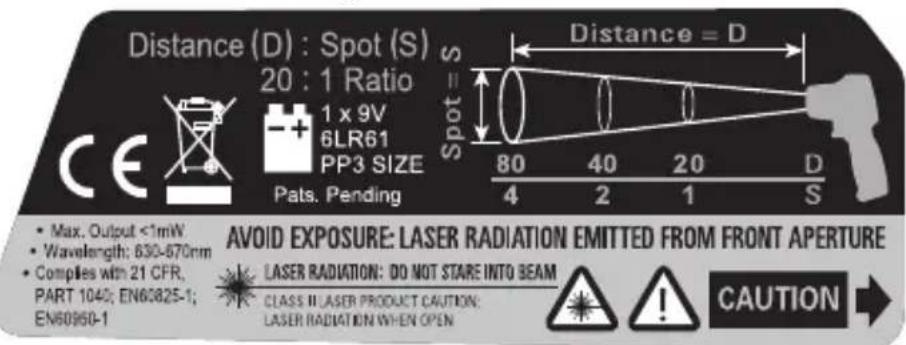
Warning label on side of meter
OPERATING INSTRUCTIONS
TARGETING LASERS
The IR10 features dual lasers 8 to assist in targeting the measurement area. The distance between the two laser spots on the surface of the object being measured approximates the diameter of the circular measurement area from which the infrared sensor is collecting data. Measurement areas located far away from the meter will be larger than those close to the meter. Press and hold the SET button 2 to activate/deactivate the targeting lasers 8. When on, the laser icon B will appear on the display 4. NOTE: Lasers are automatically disabled when measuring using the K-type probe 9.
The meter is configured with 20:1 optical resolution (distance-to-spot ratio). The distance-to-spot ratio defines the size of the measurement area relative to the distance between the measurement location and the IR sensor 7 . Typical diameters of the measurement area as a function of the distance between the meter and the target area are depicted below for 20:1 optical systems (Fig. 1).
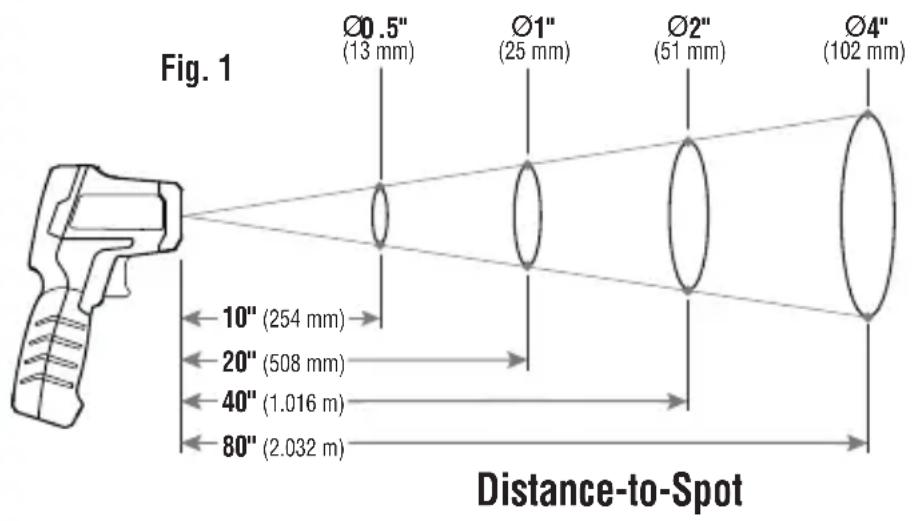
IR TEMPERATURE MEASUREMENTS
By default, IR10 measures temperature by sensing IR emission 7 from surfaces. Pull the trigger 5 and aim the targeting lasers 8 at the object to be measured to initiate a measurement event. The meter will continue to sample while the trigger is held depressed. Releasing the trigger ends the measurement event. The results are held on the display for 15 seconds and in the absence of other activity, the meter automatically powers off (APO).
K-TYPE PROBE MEASUREMENTS
K-type probe measurements are active whenever the probe is inserted into the K-Type Probe Jack 9. K-Type will be illuminated on the display 4, and the IR measurement functions will be disabled. Pull and release the trigger to initiate a measurement event. A subsequent pull of the trigger ends the measurement event. If a measurement event is not ended via a trigger pull, it times out and ends automatically after 10mins. At the end of the measurement event, the results are held on the display 4 for 15 seconds and in the absence of other activity, the meter automatically powers off (APO).
OPERATING INSTRUCTIONS
DATA HOLD
Data is held on the display for 15 seconds following the end of any measurement event. HOLD appears on the display.
AUTO POWER-OFF (APO)
At the end of any measurement event, the meter automatically powers off after 15 seconds of inactivity.
BACKLIGHT
Press and hold the MODE button 1 to activate/deactivate the backlight.
STATISTICS
MIN / MAX / AVG /DIFF statistical parameters are specific to the current or most recent measurement event. Following the end of measurement event, before auto power-off occurs, subsequent presses of the MODE button 1 may be used to toggle through the parameters.
SETTINGS
Settings are accessed by pushing the SET button 2 when the meter is in HOLD status. Subsequent pushes of the SET button toggle through the various settings options. The settings menu may be exited at any time by pulling the trigger 5 or by toggling through all available options.
- EMISSIVITY: Emissivity may be set by using the UP/DOWN buttons 3. This setting is not available if the K-type probe is inserted into the meter
- ° F / ° C : Press the MODE button ① to switch between Fahrenheit and Celcius temperature scales. The meter will remain in the scale selected following power on/off cycles
- HI: High temperature alarm. Press MODE 1 to turn on/off the high temperature alarm. Use the UP/DOWN buttons 3 to set the temperature threshold above which the user will be alerted
- LO: Low temperature alarm. Press MODE 1 to turn on/off the low temperature alarm. Use the UP/DOWN buttons 3 to set the temperature threshold below which the user will be alerted
- AUDIBLE ALARMS: Press MODE 1 to turn on/off audible alerts for Hi/Lo temperature alarms. Note the on/off indicator on the bottom left of the display. When audible alarms are off the mute icon C will be visible in the display. Visual alerts are always on and are indicated by flashing Hi/Lo icons on the display when the measurement is above/below the temperature thresholds.
- TRIG: Press MODE ① to turn on/off the trig function. When trig is turned on the meter will automatically APO if the trigger is held depressed for more than 10mins when measuring using IR. This setting is not available if the K-type probe is inserted into the meter.
OPERATING INSTRUCTIONS
UNDERSTANDING EMISSIVITY
Emissivity is a measure of the ability of a surface to emit thermal energy by radiation. Different types of surfaces (metals, masonry, wood, etc.) emit thermal energy through radiation at different efficiencies. Accordingly, these materials have different emissivity coefficients which must be considered in order to make accurate measurements with an infrared thermometer.
Emissivity on the IR10 may be adjusted from 0.10 to 1.00 to enable accurate measurement of the temperature of most types of materials. Generally speaking, shiny bright surfaces such as chrome, white boards, etc. exhibit lower emissivity than flat black materials.
For guidance only, the chart below may be used to estimate emissivity for many different types of materials. However, the emissivity of surfaces is dependent upon many parameters such as surface finish, temperature, shape of the object, etc.
This chart should be used for guidance only.
| Material Emissivity | |
| Asphalt 0.93 | |
| Red brick 0.93 | |
| Gray brick 0.75 | |
| Porcelain ceramic 0.92 | |
| Fired clay 0.91 | |
| Rough concrete 0.94 | |
| Cotton cloth 0.77 | |
| Smooth glass 0.92 - 0.94 | |
| Granite 0.45 | |
| Gravel 0.28 | |
| Smooth ice 0.97 | |
| Smooth white marble 0.56 | |
| Black paint 0.96 | |
| Hard rubber 0.94 | |
| Wood | 0.80 - 0.90 |
| Matte copper | 0.22 |
| Commercial sheet aluminum | 0.09 |
| Cold rolled steel | 0.75 - 0.85 |
Find a comprehensive list of emissivity values at www.kleintools.com/sites/all/product_assets/documents/instructions/ Klein/EmissivityChart.pdf.
MAINTENANCE
BATTERY REPLACEMENT
When the battery indicator shows only one bar, the battery must be replaced.
- Open the battery compartment 6 by unscrewing the battery door locking screw.
- Remove exhausted 9V battery and dispose of appropriately.
- Replace 9V battery, reinstall the battery door, and refasten the door locking screw.
CLEANING
Be sure meter is turned off and wipe with a clean, dry lint-free cloth. Do not use abrasive cleaners or solvents. Take care to keep the sensor lens clean at all times. If required, loose debris may be removed from lens using clean compressed air. Lens may also be cleaned using a soft cloth or cotton swab with water or rubbing alcohol only. Lens must be allowed to completely dry prior to use.
STORAGE
Remove the battery when meter will not be used for a prolonged period of time. Do not expose to high temperatures or humidity. After a period of storage in extreme conditions exceeding the limits mentioned in the General Specifications section, allow the meter to return to normal operating conditions before using.
WARRANTY
Do not place equipment and its accessories in the trash.
Items must be properly disposed of in accordance with local regulations. Please see www.epa.gov or www.erecycle.org for additional information.
CUSTOMER SERVICE
KLEIN TOOLS, INC.
450 Bond Street
Lincolnshire, IL 60069
1-877-775-5346
customerservice@kleintools.com
www.kleintools.com
NOTES
ESPÁÑOL
IR10
MAINTIEN DES DONNÉES
- MEASUREMENT SPECIFICATIONS
- FEATURE DETAILS
- WARNINGS
- SAFE PRACTICES
- OPERATING INSTRUCTIONS
- TARGETING LASERS
- IR TEMPERATURE MEASUREMENTS
- K-TYPE PROBE MEASUREMENTS
- DATA HOLD
- AUTO POWER-OFF (APO)
- BACKLIGHT
- STATISTICS
- SETTINGS
- UNDERSTANDING EMISSIVITY
- MAINTENANCE
- BATTERY REPLACEMENT
- CLEANING
- STORAGE
- WARRANTY
- CUSTOMER SERVICE
- NOTES
- ESPÁÑOL
- MAINTIEN DES DONNÉES
Brand : Klein Tools
Model : IR10
Category : Thermometer