
HDW1618CNPW - Refrigerator HAIER - Free user manual and instructions
Find the device manual for free HDW1618CNPW HAIER in PDF.
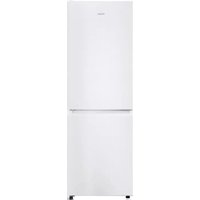



| Brand | Haier |
| Model | HDW1618CNPW |
| Product type | Refrigerator with freezer compartment |
| Minimum required width | 920 mm |
| Minimum required depth | 1137 mm |
| Power supply | 220-240 V, 50 Hz |
| Main functions | Super cooling, Super freezing, Eco mode, Holiday mode, Built-in Wi-Fi |
| Door reversibility | Yes, reversible |
| Defrost | Automatic (no intervention) |
| HCS filter | Automatic humidity regulation |
| Mobile app | Compatible with hOn (iOS/Android) |
| Refrigerator temperature | 2 °C to 8 °C (adjustable by 1 °C) |
| Freezer temperature | Default -18 °C, up to -25 °C in Super freezing |
| Fine temperature adjustment | 3 sub-levels per main level |
| Display | Touch LED panel |
| Interior lighting | LED |
| Included accessories | Adjustable shelves, vegetable bin, freezer drawers, door bins |
| Maintenance and cleaning | Cleaning of the drainage tube if necessary |
| Energy consumption | Energy class not specified, optimized in Eco mode |
Frequently Asked Questions - HDW1618CNPW HAIER
User questions about HDW1618CNPW HAIER
0 question about this device. Answer the ones you know or ask your own.
Ask a new question about this device
Download the instructions for your Refrigerator in PDF format for free! Find your manual HDW1618CNPW - HAIER and take your electronic device back in hand. On this page are published all the documents necessary for the use of your device. HDW1618CNPW by HAIER.
USER MANUAL HDW1618CNPW HAIER
Discover extra contents and create your inventory list


EN 1 BG 9 CS 18 DA 26 DE 34 EL 42 ES 51 FI 59 FR 67 HR 75 HU 83 IT 91 NL 99 NO 107 PL 115 PT 123 RO 131 RU 139 SK 148 SL 156 SR 164 SV 172 UK 180 AR 188 ET 197 LT 207 LV 217
Summary
PRODUCT DESCRIPTION 2 Space requirements 2 USE 3 Use 3 Customized temperature 3 Fine Tuning 4 Super Cool function 4 Super Freeze function 4 Eco mode 5 Holiday function 5 Defrosting 5 Demo mode 5 Error codes 5 APP CONNECTION 6 IN APP PAIRING PROCEDURE 6 Step 1 6 Step 2 6 Step 3 6 WiFi Use 7 DOOR REVERSIBILITY 8 TROUBLESHOOTING
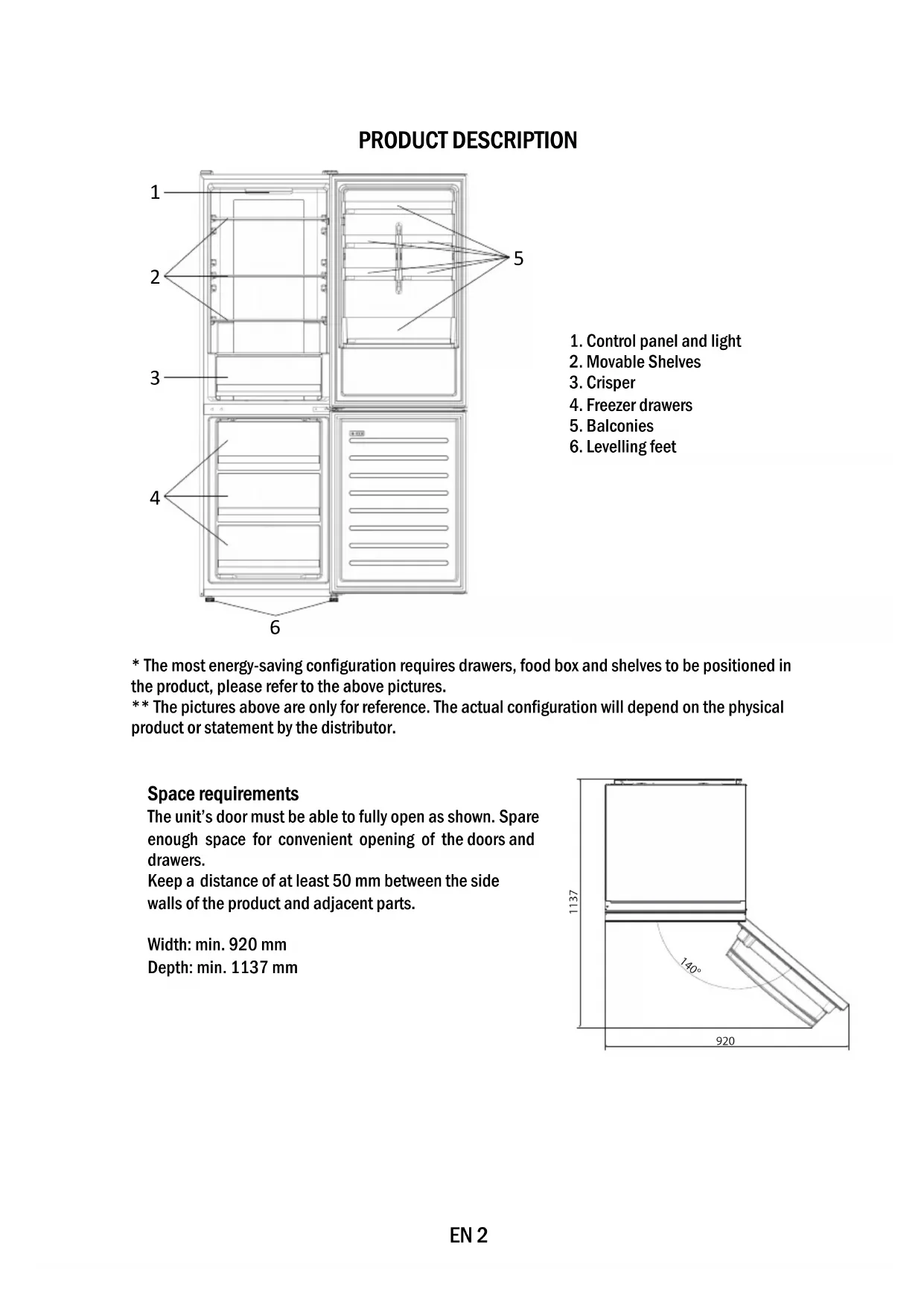
PRODUCT DESCRIPTION
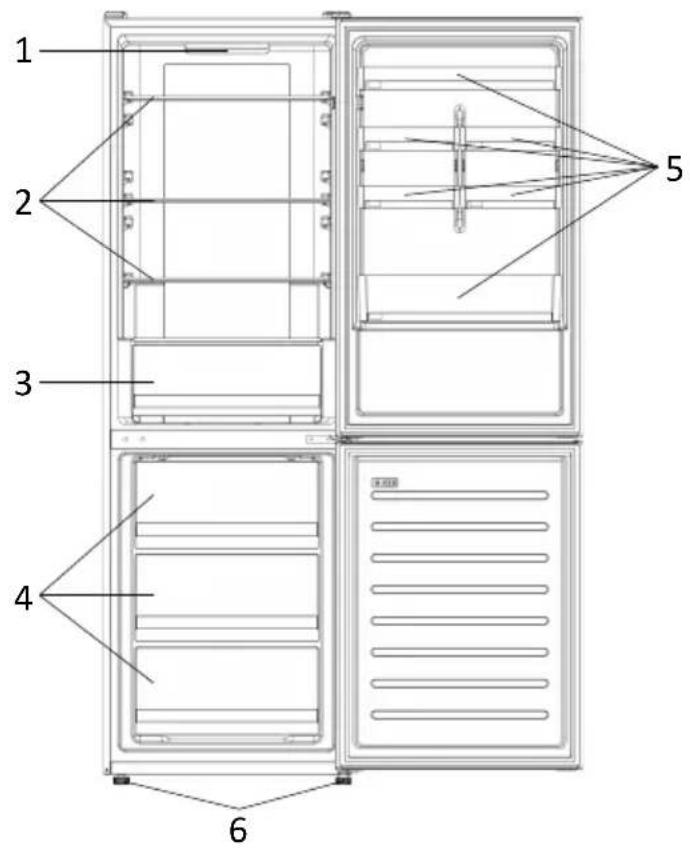
- Control panel and light
- Movable Shelves
- Crisper
- Freezer drawers
- Balconies
- Levelling feet
- The most energy-saving configuration requires drawers, food box and shelves to be positioned in the product, please refer to the above pictures. ** The pictures above are only for reference. The actual configuration will depend on the physical product or statement by the distributor.
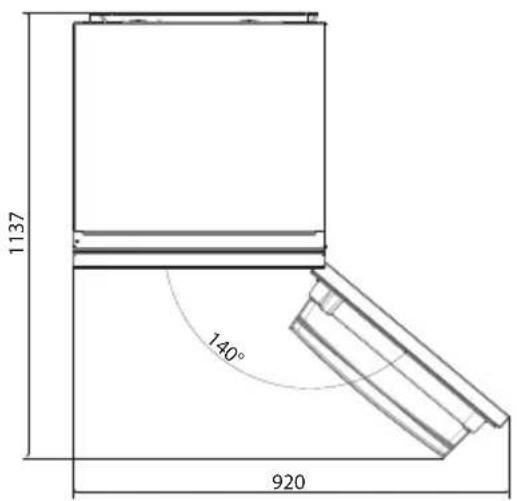
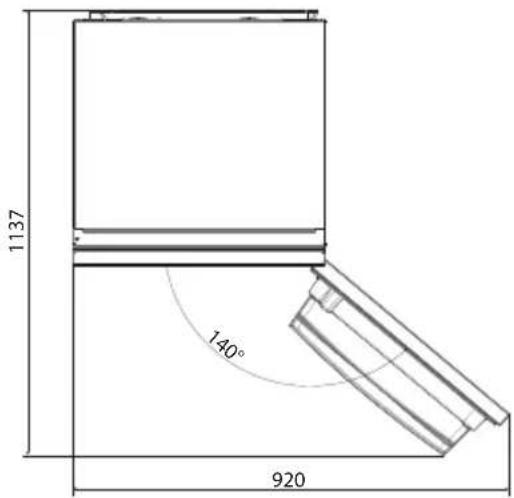
Space requirements
The unit's door must be able to fully open as shown. Spare enough space for convenient opening of the doors and drawers.
Keep a distance of at least 50 mm between the side walls of the product and adjacent parts.
Width: min. 920 mm
Depth: min. 1137 mm
USE

① ON/OFF key, used to switch on/off the appliance. ② Mode key, used to select the fridge temperature or the special functions. ③ WiFi Icon, shows if the appliance is connected to the app. ④ Super Cool Icon, shows if the function is activated. ⑤ Temperature levels, show which is the selected temperature.
Use
- Plug in the appliance. The appliance will turn on automatically.
- The temperature will automatically set at 4°C in the fridge and -18°C in the freezer.
- To change the temperature, with the fridge door open, press the mode key. When the setting increases, the corresponding LED light will turn on. An acoustic signal is made every time the mode key is pressed and the temperature is changed.
- In case of power loss, the last cooling level set will be restored.
- To restore the default setting, with the screen lit, keep pressed the TEMP button, and then press ON/OFF button 5 times in 5 seconds.
- Under normal operating conditions (in spring and autumn), it is recommended to set the temperature at 4°C. In summer when the ambient temperature is high, it is recommended to set temperature at 6~8°C, so as to guarantee the fridge and freezer temperatures and reduce the refrigerator continuous running time; and in winter when the ambient temperature is low, it is recommended to set temperature at 2~4°C to avoid frequent start/stop of the refrigerator.
Customized temperature
From the app, it is possible to customize the temperature of the fridge compartment. The temperature can be set with 1°C sensitivity and it is possible to select a temperature from 2°C to 8°C in the fridge. An acoustic signal is made every time the temperature is changed. When the temperature is selected by the app, there is no indication on the control panel, all the temperature LED lights are turned off, while only the WiFi icon is turned on.
Fine Tuning
The fine tuning selection mode gives the possibility to set the temperatures by sublevels; each temperature level has three sublevels.
How to use the fine tuning function:
- Press the mode key for 8 seconds to enter fine tuning selection mode. When the appliance enters the mode, an acoustic signal is made and the LED of the currently selected cooling level blinks.
- By short pressing the mode key within 5 seconds, the fine tuning setting increases and, at each pressing, an acoustic signal is made.
- During fine tuning, the LED of the selected cooling level is fixed, while the LED of the selected sublevel blinks.
- If no key is pressed for 5 seconds, the system automatically exits from fine tuning selection mode. The fine tuning setting is saved and the LED of the selected fridge temperature is fixed. If the fine tuning is activated again, the setting will start from the previously stored level.
Super Cool function
It is suggested to switch on the Super Cool function if a large quantity of food should be stored (for example after the purchase). The Super-Cool function accelerates the cooling of fresh food and protects the goods already stored from undesirable warming. When the function is activated, the temperature of the fridge is automatically set at 2°C.
How to use the Super Cool function:
- The function can be activated by pressing many times the mode key until the Super Cool LED is turned ON or by selecting it from the app. If the function is activated, the corresponding icon on the control panel will be turned on.
- To exit the Super Cool function, press the mode key again.
- The Super Cool function automatically ends after 30 hours running.
- When the Super Cool ends, the corresponding icon of the control panel turns off and the previously set cooling level is restored.
Super Freeze function
The super freezing function accelerates the freezing of fresh food and protects the goods already stored from undesirable warming. If a large amount of food has to be frozen, it is recommended to set the Super Freeze function on 24 hours before the usage. When the function is activated, the temperature is automatically set at -25 °C.
How to use the Super Freeze function:
- The function can be launched only by selecting it from the app. If the function is activated, it will be shown by the app; there is no indication on the control panel.
- To exit the Super Freeze function, turn it off from the app.
- The Super Freeze function automatically ends when the function has lasted for more than 50 hours.
Eco mode
The Eco mode can be activated to optimize the performance of the appliance, while obtaining the best food storage. When the function is activated, the temperature is automatically set at 5°C in the fridge, and at -18°C in the freezer.
How to use the Eco mode:
The function can be activated only by selecting it from the app. If the function is activated, it will be shown by the app; there is no indication on the control panel. - To exit the Eco mode, turn it off from the app; the previously selected temperature will be restored. - The Eco mode automatically ends when another function is chosen from the control panel.
Holiday function
The Holiday function can be used to reduce the energy consumption of the appliance, when it is not used regularly. The function will turn off the LED lights (even if the door is open) and the fridge will work on low power consumption mode, whereas the freezer will keep working normally.
How to use the Holiday function:
The function can be activated only by selecting it from the app. If the function is activated, it will be shown by the app; there is no indication on the control panel. - To exit the Holiday function, turn it off from the app; the previously selected temperature will be restored. - The Holiday function automatically ends when another function is chosen from the control panel.
Defrosting
The defrosting of the refrigerator and freezer compartments is done automatically: no manual operation is needed.
HCS
When a certain moisture level is reached, the HCS filter fibers open, causing moisture to decrease, and then close again.
Demo mode
Keep the refrigerated door open, press and hold the on/off key, and click the set key five times. The refrigerator will enter Demo mode. To exit the mode, keep the door switch pressed and press the SET key again for 5 seconds.
Error codes
If the -6°C LED light is flashing, it means there has been a fan error. Please contact technical assistance to help solve the problem.
APP CONNECTION AND PAIRING PROCEDURE
Step 1
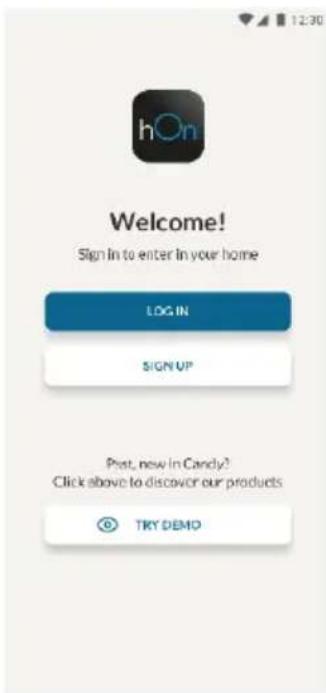
- Download the hOn app from the app stores.


Step 2
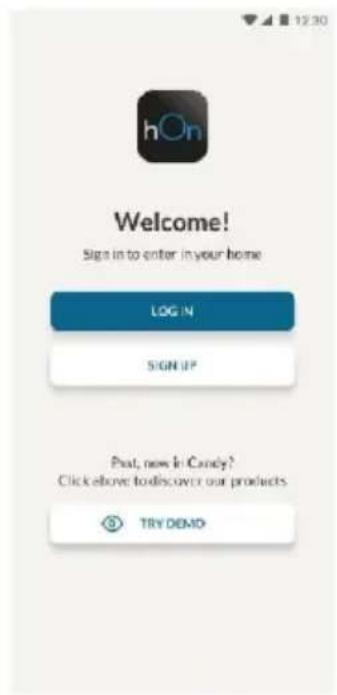
- Create your account on the hOn App or log in if you already have an account.
Step 3
- Follow the pairing instructions in the hOn App.
WiFi Use
To activate the Wi-Fi, long press the mode key for 2 seconds. The Wi-Fi icon will turn on and an acoustic signal will be made.
If the Wi-Fi has not been configured yet, when the refrigerator turns on, it will automatically enter the configuration mode and keep this status for 30 minutes. To use the configuration mode:
- Press the mode key for 2s but less than 8s, the refrigerator enters the Wi-Fi configuration mode and an acoustic signal is made. The Wi-Fi icon starts blinking.
- Follow in app instructions to configure the Wi-Fi (see above).
- Once the Wi-Fi is configured and the connection established, the Wi-Fi icon is on and fixed.
- After 30 minutes without performing any operation, the Wi-Fi will automatically exit the configuration mode.
- If the Wi-Fi has already been configured, it will automatically reconnect according to the configuration information.
Radio-module - Technical data
| Frequency rate (OFR) | 2400 MHz-2843.5 MHz |
| Channel frequencies | 2412...2472 MHz(step size 5 MHz) |
| Maximum power(EIRP) | 100 mW |
Radio equipment type is in compliance with Directive 2014/53/EU.
DOOR REVERSIBILITY
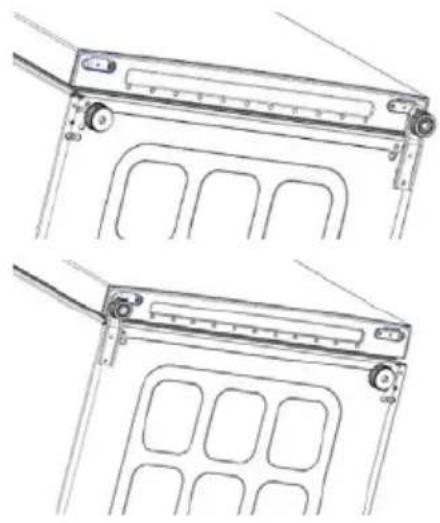
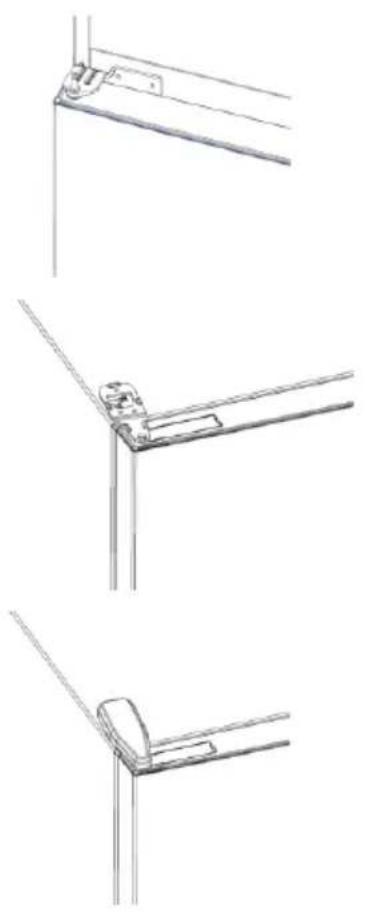
Tools needed: Electric screwdriver
- Remove the top hinge cover
- Unscrew the top hinge
- Remove the top hinge cover (left)
- Remove middle hinge
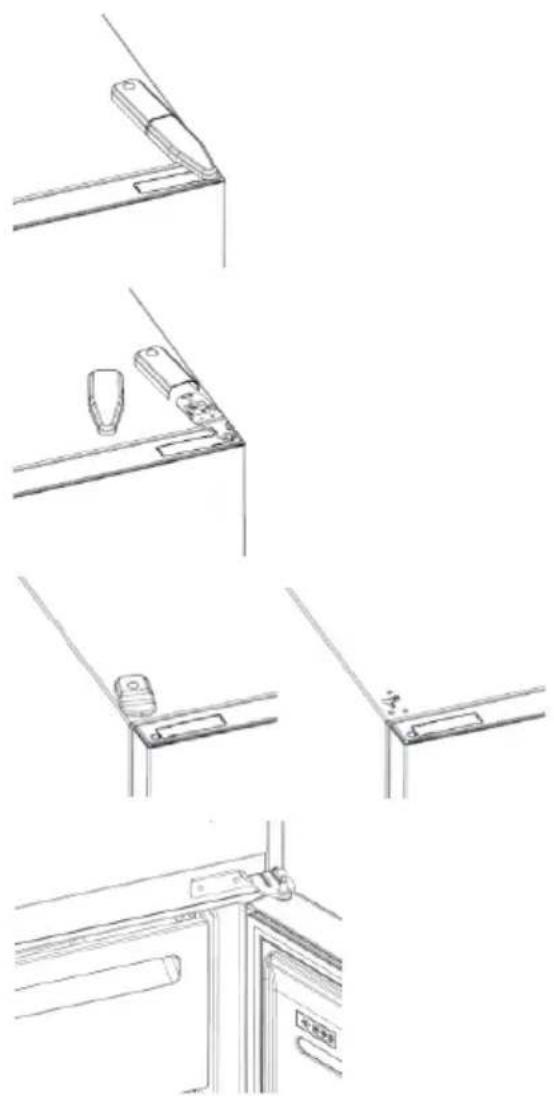
- Remove lower hinge
- Mount hinge foot
- Mount middle hinge
- Mount the upper hinge plate
- Mount the upper hinge cover
TROUBLESHOOTING
| The inside light bulb does not turn on. | ·No electricity. | ·The power cable is not properly plugged in. ·Check if the appliance is switched off (see Temperature Adjustment). ·Check the power socket is working correctly (e.g. with another electric device). |
| ·Holiday Mode is activated. | ·Deactivate Holiday mode. | |
| The internal temperature of the refrigerator and/or freezer is not cold enough. | ·The doors are not closed. | ·Check that the door and gaskets close properly. |
| ·The doors are frequently opened. | ·Avoid opening the doors unnecessarily for some time. | |
| ·Incorrect temperature setting. | ·Check the temperature setting and, if possible, set a lower temperature (see Temperature Adjustment). | |
| ·The refrigerator and/or freezer are too full. | ·Wait for the temperature of the refrigerator/ freezer to stabilise. ·Avoid filling the refrigerator and freezer excessively. | |
| ·The surrounding temperature is too low. | ·Move the unit to a warmer place or heat the current room. | |
| ·Warm items have been stored. | ·Always allow items to cool before storing them. | |
| The food in the refrigerator freezes. | ·Incorrect temperature setting. | ·Check the temperature setting and, if possible, increase the temperature. |
| ·Food in contact with the back wall. | ·Keep the food away from the refrigerator's back wall. | |
| The bottom of the refrigerator compartment is wet or water droplets are present. | ·The drain hose could be clogged. | ·Clean the drain hose with a stick or similar item to allow the water to drain. |
| Presence of drops of water or frost on the rear wall of the refrigerator. | ·Depending on the function, drops of water or frost form on the rear wall of the refrigerator during operation. | ·It is not a defect. |
| ·Warm items have been stored. | ·Always allow items to cool before storing them. | |
| ·There are open food containers or liquids. | ·Always cover food and liquids. | |
| ·The doors are not closed. | ·Check that the door and gaskets close properly. | |
| ·The doors are frequently opened. | ·Avoid opening the doors unnecessarily for some time. | |
| Presence of water in the vegetable drawer. | ·Lack of air circulation. | ·Verify that your appliance is not too full. |
| ·Vegetables and fruit with too much moisture. | ·Wrap the fruit and vegetables in plastic materials, e.g. cling film, bags or containers. | |
| The motor runs continuously. | ·The doors are not closed. | ·Make sure the doors are closed and check the seals close properly. |
| ·The doors are opened frequently. | ·Avoid opening the doors unnecessarily for some time. | |
| ·Ambient temperature is very high. | ·Verify that the ambient temperature is in the range set out in the specifications on the appliance tag. ·Set the display screen/thermostat to a warmer temperature. | |
| ·The appliance has been off (no power) for some time. | ·It normally takes the appliance 8-12h to cool completely. | |
| The frozen food is thawing. | ·Surrounding temperature is too low. | ·Move the unit to a warmer place or heat the current room. |
| ·The freezer door is not closed. | ·Make sure the door is closed and that the gasket is sealing properly. | |
| Fridge door alarm. | ·Fridge door alarm (acoustic beep) activates whenever the door is left open for more than 3 minutes. | ·Avoid leaving the door open when not needed. The beep ceases when the door is closed. |
| The appliance makes noises such as gurgling, buzzing, clicking, creaking. | ·No breakdowns. An engine is running, e.g. refrigeration unit, fan. The refrigerant flows into the pipes. Motor, switches and solenoid valves are switched on or off. | ·No action needed. |
| ·The appliance is not located on level ground. | ·Adjust the feel to level the appliance. | |
| ·The appliance touches an object around it. | ·Remove objects around the appliance. | |
| The appliance does not cool, the temperature and lighting indicators are on. | ·Demo mode is activated. | ·Deactivate DEMO mode. |
| Strong ice and frost in the freezer compartment. | ·The items were not adequately packaged. | ·Always pack the items well. |
| ·A door/drawer of the appliance is not tightly closed. | ·Close the door/drawer. | |
| ·The door/drawer has been opened too frequently or for too long. | ·Do not open the door/drawer too frequently. | |
| ·The door/drawer gasket is dirty, worn, cracked or mismatched. | ·Clean the door/drawer gasket or replace it with a new one. | |
| ·Something on the inside prevents the door/drawer from closing properly. | ·Reposition the shelves, door racks or internal containers to allow the door/drawer to close. | |
| The sides of the appliance are warm. | ·This is normal. |
Contents
Product description 10 Space requirements 10 Use 11 Use 11 Personalized temperature. 11 Fine tuning. 12 "Super Cool" function 12 "Super Freeze" function 12 "Eco" mode 13 "Holiday" function 13 Defrosting. 13 Demonstration mode. 13 Door reversal 14 Connecting the appliance 15 PROCEDURE FOR INSTALLING THE APPLIANCE......15 Shelf 1 15 Shelf 2 15 Shelf 3. 15 Using Wi-Fi 16 CARE AND CLEANING. 17 TROUBLESHOOTING
Product description
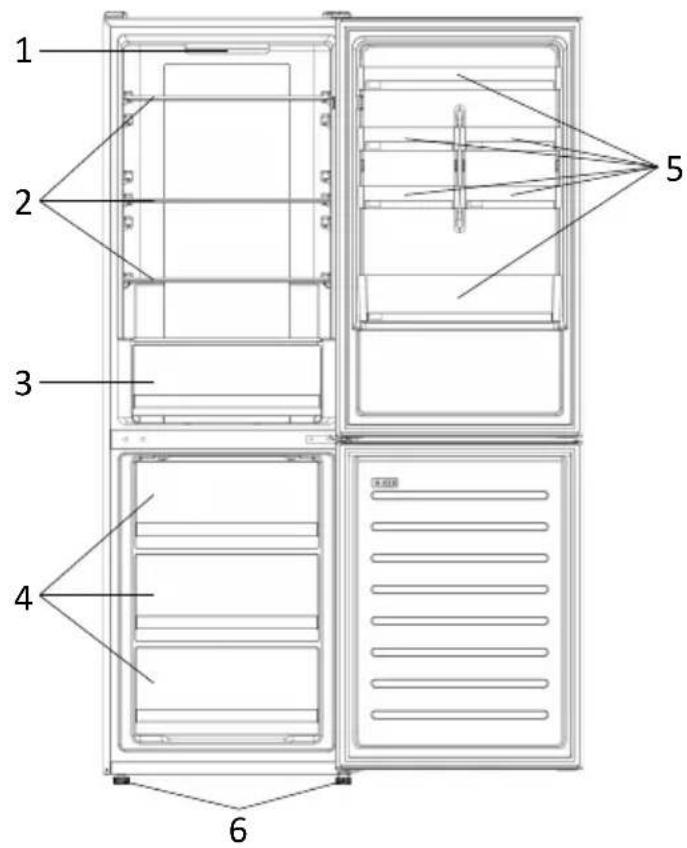
- Control panel and light 2. Shelves
- Humidity control for fresh food
- Freezer compartment humidity control
- Shelves
- Leveling feet
- The most energy-efficient configuration requires that the shelves, drawers and bins be positioned as shown in the product, please see the upper images. ** The images are for reference only. The actual configuration depends on the physical product or the distributor's declaration.
Space requirements
The appliance doors must be able to open fully, as shown. Leave sufficient space for easy opening of the doors and drawers. Maintain a distance of at least 50 mm between the side walls of the product and adjacent parts.
Width: min. 920 mm
Depth: min. 1137 mm
USE

① The "ON/OFF" button is used to turn the appliance on/off. ② The "Mode" button is used to select the refrigerator temperature or special functions. ③ The Wi-Fi icon indicates that the device is connected to the app. ④ The "Super Cool" icon indicates that the function is activated. ⑤ The temperature display shows the selected temperature.
Use
Plug the appliance into the outlet. The appliance will turn on automatically. The refrigerator temperature is automatically set to 4°C. To change the temperature while the door is open, press the "Mode" button. When the setting increases, the corresponding LED light turns on. With each press of the "Mode" button, a sound signal is emitted and the temperature changes. In case of power loss, the last setting of the cooling level will be restored. To restore the setting after a power failure, with the display on, press and hold the "TEMP" button and then press the "ON/OFF" button 5 times within 5 seconds. - Under normal operating conditions (in spring and autumn) it is recommended to set the temperature to 4°C. In summer, when the ambient temperature is high, it is recommended to set the temperature to 6~8°C to ensure proper temperatures in the refrigerator and freezer and to extend the operating time of the refrigerator. In winter, when the ambient temperature is low, it is recommended to set the temperature to 2~4°C to avoid frequent switching on/off of the refrigerator.
Personalized temperature
From the app, it is possible to personalize the temperature of the refrigerator compartment. The temperature can be adjusted with a sensitivity of 1°C and can be set from 2°C to 8°C in the refrigerator. Each time the temperature is changed, a sound signal is emitted. When the temperature is selected from the app, there is an indication on the control panel: all LED temperature lights are off and only the Wi-Fi icon is on.
Fine adjustment
The fine adjustment mode allows setting temperatures via levels; each temperature level has three sub-levels. How to use the fine adjustment function:
Press the "Mode" button for 8 seconds to enter the fine adjustment mode. When you enter the mode, a sound signal will be emitted and the LED of the currently selected cooling level will flash. With a short press of the "Mode" button within 5 seconds, the fine adjustment increases, and with each press a sound signal is emitted. - During the fine adjustment, the LED of the selected cooling level is fixed, and the LED of the selected level flashes. - If none of the buttons are pressed within 3 seconds, the system automatically exits the fine adjustment mode. The fine adjustment is saved and the LED of the selected refrigerator temperature is fixed. - If the fine adjustment is activated again, the adjustment starts from the previously saved level.
Function "Super Cool"
It is recommended to enable the "Super Cool" function if you need to store a large quantity of food (for example after shopping). The "Super Cool" function accelerates cooling of fresh food and pre-cools already stored products for weekly storage. When the function is activated, the refrigerator temperature is set automatically to 2 °C. How to use the "Super Cool" function:
- The function can be activated by pressing the "Mode" button repeatedly until the Super Cool LED turns on, or by selecting it from the application. If the function is activated, the corresponding icon on the control panel will be turned on.
- To exit the "Super Cool" function, press the "Mode" button again.
- The "Super Cool" function automatically ends after 30 hours of operation. When "Super Cool" ends, the corresponding icon on the control panel turns off and the previously set cooling level is restored.
HCS
SCH
.5
#
a 1
5 SET
i ball
Aikai Jg scllal jell oclally
J 1
1
hON 1

20g>11
JhON
3gbs
hOn
WiFi
Wifj Jr j 1 1 1 1 1 1 1 1 1 1 1 1 1 1 1 1
30 30
ii 1
PRODUCT DESCRIPTION 218
Required location. 218
USE 219
Use 219
Adjusted temperature. 219
Precise adjustment 220
Super Cool function. 220
Super Freeze function 220
Eco Mode 221
Holiday Function 221
Reset 221
Demonstration Mode 221
Error Codes 221
APP CONNECTION 222
PROCEDURE FOR CONNECTING THE PAIR APP 222
- SUMMARY
- PRODUCT DESCRIPTION
- SPACE REQUIREMENTS
- USE
- CUSTOMIZED TEMPERATURE
- FINE TUNING
- SUPER COOL FUNCTION
- SUPER FREEZE FUNCTION
- ECO MODE
- HOLIDAY FUNCTION
- DEFROSTING
- HCS
- DEMO MODE
- ERROR CODES
- APP CONNECTION AND PAIRING PROCEDURE
- STEP
- WIFI USE
- DOOR REVERSIBILITY
- CONTENTS
- PERSONALIZED TEMPERATURE
- FINE ADJUSTMENT
- FUNCTION "SUPER COOL
- I BALL
- PROCEDURE FOR CONNECTING THE PAIR APP
Brand : HAIER
Model : HDW1618CNPW
Category : Refrigerator