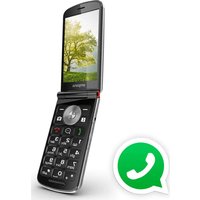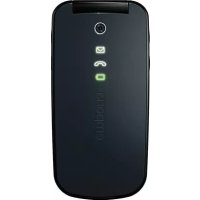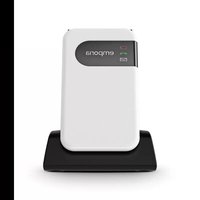
SIMPLICITY glam - Smartphone EMPORIA - Free user manual and instructions
Find the device manual for free SIMPLICITY glam EMPORIA in PDF.


| Product Type | Smartphone |
| Brand | Emporia |
| Model | SIMPLICITY glam (V227-4G) |
| Dimensions | 101.5 × 55 × 18.2 mm |
| Weight | 106 g |
| Battery | Li-ion 3.7 V, 1300 mAh (replaceable) |
| Standby time | Up to 360 h |
| Talk time | Up to 360 min |
| Network | 4G LTE (Bands I, III, VII, VIII, XX), WCDMA Band I/VIII, GSM 900/1800 |
| Bluetooth | V5.0 |
| FM Radio | Yes (87.6 - 107.9 MHz) |
| Display | Color display + external display |
| Emergency call function | Yes (button on the back, up to 5 contacts) |
| Messaging | SMS |
| Other functions | Alarm, calendar, calculator, phonebook, silent mode |
| Charging | Via USB cable or included charging dock |
| SAR head | 0.44 W/kg |
| SAR body | 1.5 W/kg |
| Spare parts | Battery model AK-V227, power adapter, USB cable |
| Care and cleaning | Protect from moisture and shocks; do not open the casing |
| Safety | Deactivate on airplanes, in hospitals; min. distance 20 cm from pacemakers |
| Package contents | Phone, battery, USB cable, power adapter, charging dock, additional battery cover |
Frequently Asked Questions - SIMPLICITY glam EMPORIA
User questions about SIMPLICITY glam EMPORIA
0 question about this device. Answer the ones you know or ask your own.
Ask a new question about this device
Download the instructions for your Smartphone in PDF format for free! Find your manual SIMPLICITY glam - EMPORIA and take your electronic device back in hand. On this page are published all the documents necessary for the use of your device. SIMPLICITY glam by EMPORIA.
USER MANUAL SIMPLICITY glam EMPORIA
Thank you for purchasing an emporia product!
Please read this user guide before attempting to use your phone.
(Mobile data tariff required)
Français (page 46)
natural_image
Two line drawings of a mobile phone device, one showing an open lid with a car icon and the other showing a card slot inserted into a tray (no text or symbols)text_image
Diagram illustrating the step-by-step disassembly of a flip-flop device, showing object insertion and detachment.text_image
Pelle Pugate eline PupeterEveline Pupeter CEO, emporia Telecom 15.11.2021, Linz/Austria
text_image
QR code image containing encoded data, no visible human-readable texthttps://www.emporia.eu/doc
DEUTSCH-23
> YOUR MOBILE PHONE AT A GLANCE
1 Speaker
2 Display (screen)
3 Green key
- Start or accept a call
• In the menu: Confirm selection - On standby: Access Call history
4 Arrow keys
- Use these to flick through your Contacts and the Menu.
- When the phone is on standby, press to access Menu.
- When the phone is on standby, press 📋 to access Contacts.
5 Red key
- When in a call: End
- When in the menu: One step back
- When entering digits or letters: Delete
6 Speed-dial keys
7 key (voicemail)
8 On/Off key
9 Port for USB charging cable
10 ♥ Emergency button (optional)
11 Speaker
12 Handset volume controls & -
13 Battery cover
14 Opening for removing the battery cover
ENGLISH-24


> Symbols on the screen
4 G Network signal strength
Roaming(abroad)
Batteryindicator
(!Missedcall
Callforwarding
New text (SMS) message
Profile:Silent/Sleep mode
MAX Maximum/Bus mode
Meeting/theatre mode
Alarm on
Bluetoothactivated Bluetoothconnected
> Symbols on the external display
Message LED

• Flashes when a new message is received
- Stops flashing as soon as the received message has been read
Call LED

• Flashes when there is a missed call
- Stops flashing as soon as your Call history has been viewed
Battery LED

- Slow flashing: Battery is charging
- On constantly: Battery is fully charged
- Rapid flashing: Battery is out of charge
ENGLISH-25
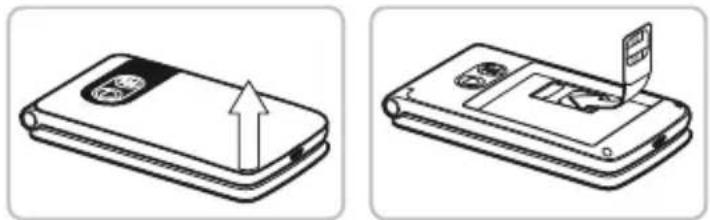
1.1 Inserting a SIM card
natural_image
Two technical line drawings of a mobile phone device, one showing an upward arrow and the other showing a card slot (no text or symbols present)-
Remove the battery cover (opening in the bottom left-hand corner).
-
Insert the SIM card into the SIM card holder with the gold contacts facing down.
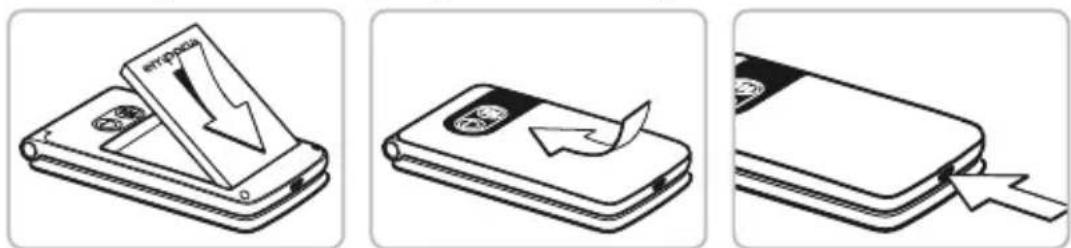
1.2 Inserting and charging the battery
text_image
Diagram illustrating three-step mobile phone shipment process: card opening, recycling with arrow, and packaging with drop.-
Insert the battery, making sure that the battery contacts touch the phone's gold contacts.
-
Place the battery cover over the battery and click it into place.
-
Insert the charging cable into the USB port of the phone and the power plug into a mains outlet.
Charge the battery for at least 4 hours before the first time you use it. Only use batteries and chargers that are permitted for use with this specific model.
ENGLISH-26
1.3 Turning on the phone
- Press and hold the key for at least two seconds until the emporia logo appears. It will take a few seconds for the home screen to be displayed.
1.4 Entering a PIN code
Enter the four-digit PIN code for your SIM card when asked to do so and confirm the entry.
You have a maximum of three attempts to enter the correct number. If you enter the wrong number three times in a row, you will only be able to unblock the SIM card with the PUK code. You will find your original PIN code and PUK code in the documents supplied with your SIM card by your network operator.
1.5 Setting the language, time and date
- Use ☐ to select a Language and then confirm your selection by pressing OK ☐.
- Set the Time and Date and then save these settings.
1.6 Saving battery power
After a few seconds of inactivity, the display will turn off to save battery power. In the event of an incoming call or you pressing any key, the screen will light up again.
ENGLISH-27
2. USING THE PHONE
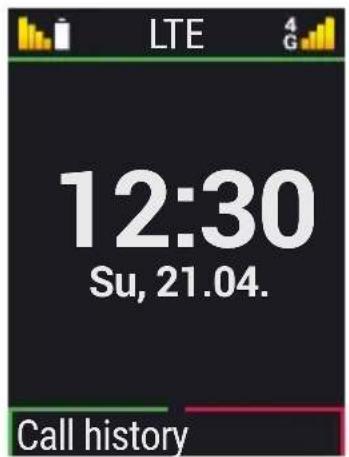
2.1 Home screen
If your phone is on but not using a function, it will display the home screen. You can return to the home screen any time by pressing the red key ⬇ several times.
text_image
LTE 12:30 Su, 21.04. Call history2.2 Menu
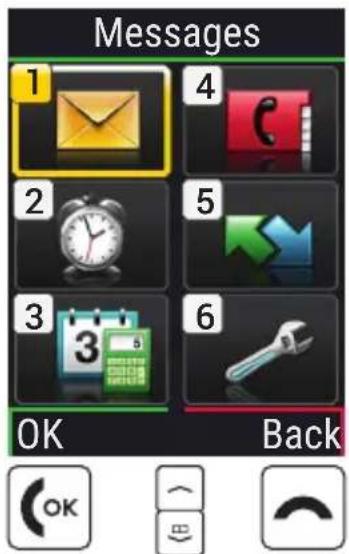
The key will display the menu. The menu is a list that enables you to manage the phone's various functions and adapt the phone to your needs.
- Use the arrow keys to scroll through the menu.
- The items available in the menu are Messages, Alarm Clock, Tools, Contacts, Call history and Settings.
- Use the green key 🔍 and red key ➕ beneath the screen to confirm your selection or to return to the home screen.
text_image
Messages 1 2 3 OK BackENGLISH-28
2.3 Dual-function keys
Some keys have additional functions if they are pressed and held down for a few seconds:

text_image
1.0 key: Listen to your voicemail 2.0 key: Turn on Silent/Sleep mode2.4 Writing text
You enter text using the keypad.
• To input text, press a number key multiple times
(e.g. 2 × 4_y+1 , 1 × 3_x , 3 × 5_x and 3 × 5_x for Hallo)
- Special characters and symbols have been assigned to the various keys, but can differ in some languages:
- , -?! 1'@:; () * abc 2a â æ ç ä å ä á á c
3 def 3 é è è ë € dē q 4 g hi 4 î î î î ǔ
5 jkl5£ mno6öñôœóò
7m p q r s 7 B \$ § tu v8 ü ù û ú
9wxyz9wýySpace0
*+ .?!""()@V:_;+-*=%&<>£\$¥§€[I]{}\~#
- Use the _mn key to switch between the abc, ABC, Abc and 123 input methods.
ENGLISH-29
3. CALLS
3.1 Accepting, rejecting or ending a call
- To answer: Open the phone and press the green 🔊 key to Answer the call.
- To reject or end a call: Press the red button ↗ or close the phone.
- To mute the ringtone temporarily, press the - volume control button.
The open-to-answer-calls function is preset to be off, but can be enabled in Menu → Settings → Open to answer calls → On.
3.2 Calling someone
> Dialling a number
- Enter the phone number you want to dial (incl. the area code) using the keypad.
- Start the call by pressing the green key OK.
> Using the redial function
- When on the home screen, press the green key 📊. Your Call history will be displayed.
- Use the arrow keys and + to select a number.
- Start the call by pressing the green key OK.
To go hands-free during a call, open Options and turn on the speaker.
ENGLISH-30

4. MESSAGES (SMS)
Menu items available: Write message, History and Message settings
4.1 Writing and sending a message
- Open Menu ↘ Messages.
- Select Write message.
- Enter the text using the keypad.
- To specify a recipient for the SMS, open Options and select Send.
- You can now select a Contact from the phone book or type in a Phone number using the keypad.
4.2 Reading a message
- When you receive a new message, a symbol ☑ will appear on the home screen.
- Press the green key (OK) for View to read the message immediately.
- You can find the text message again later on in Menu ↙ → Messages → History.
- To read a message, tap on it.
ENGLISH-31
5. ALARM CLOCK
- Open Set time.
- Enter your desired Alarm time and then Save it.
- The alarm is now activated and will go off at the time you have set every day.
- When the alarm is ringing, you can press the red key 📤 to turn it off or the green key ⏻ to activate the snooze function.
- Select Off to deactivate the alarm permanently.
If the phone is turned off, the alarm is turned off as well. The alarm will therefore not go off when the phone is off.
ENGLISH-32


6. TOOLS
Menu items: Alarm Clock, Birthday reminder, Calendar, Calculator, Bluetooth and FM Radio
6.1 FM Radio
- Searching for a station
You can set the station with the □ or □ key.
- Adjusting the volume
You can adjust the volume of the radio with + and - on the side of the phone.
You cannot change the volume if you are in an Options menu item. In this case, close the Options menu first.
- Station list
This list shows all station lists already saved.
- Manual input
If you know the frequency of the station you want, you can enter it here directly.
Press the _m key for the decimal point.
- Auto search
This function searches for all detectable stations and saves them in the station list together with their frequencies.
ENGLISH-33
7. CONTACTS
Menu items: Search for name, Add contact, Edit contact, Delete, Send contact via SMS, Copy contacts, My number, Speed-dial keys, Emergency contacts, Contact settings, SMS's in contacts and Blocked numbers
7.1 Searching for a contact
- When on the home screen, press the phone book key or open Menu ↘ → Contacts → Search for name.
- Use the arrow keys ↘ and to scroll through the entries or use the keypad to type the first letter of the contact you are looking for.
- Start the call by pressing the green key OK.
7.2 Adding a contact
- Open Menu ↗ → Contacts → Add contact.
- Enter the phone number and the person's name and then Save them.
Always save names and numbers with the international dialling code, e.g. +41 for Switzerland, +43 for Austria and +49 for Germany.
ENGLISH-34
7.3 Speed-dial keys
> Saving a speed-dial key
You can assign speed-dial keys to numbers you call often.
- Press one of the speed dial keys △Ⅰ △Ⅱ △Ⅲ
- Enter a Name and Number or Search for a contact in the phone book.
> Changing or deleting a speed-dial key
- Open Menu ↗ → Contacts → Speed-dial keys.
- Select a speed-dial key from the list.
- Change or delete its link to a particular contact.
ENGLISH-35
8. SETTINGS
Menu items: Mobile network, Silent/Sleep mode, Sounds and alerts, Handset volume, Hands-free volume, Display and lights, Time and date, Language, Call waiting, Call forwarding, Open to answer calls, Supress number, Voicemail number, Emergency contacts, Emergency button, Security settings, Contact settings, 000 to enter settings, System updates and Master reset
8.1 Mobile network
- Mobile data: on/off (preset to be on)
• Data roaming: on/off (preset to be off)
8.2 Silent/Sleep mode
In this mode, incoming calls will only be indicated by a visual alert. The phone's ringtone and vibration are turned off.
ENGLISH-36

8.3 Sounds and alerts
You can personalise the settings for tones, alerts and vibration or select a set of predefined settings (profile).
Menu items: Ringtone, Alarm melody, Ringer volume, Silent/Sleep mode, Meeting/theatre mode, Maximum/Bus mode, Vibra for calls, Vibra for alarm clock, Key tones, Message tone, Vibra for messages, Handset volume, Hands-free volume, Confirmation tone and Emergency tone
8.4 Voicemail number
Enter the number for your voicemail. You will find this number in the documents supplied by your network provider.
8.5 Security settings
• PIN: PIN request on/off, change PIN
- Phone code: on/off, change (factory preset code: 1234)
8.6 0000 to enter settings
Activate this safety mode to prevent changes being made to settings unintentionally.
ENGLISH-37
8.7 System updates
You can download the latest software for the phone yourself and therefore update the system and improve applications yourself. However, only perform updates if your tariff includes mobile data!
- Check that the battery is at least 30% charged. If it isn't, the download cannot start.
- Open Menu ☐ → Tools → System updates.
- Tap on Check.
- A message will appear telling you whether or not there is any new software available. If there is, select Download to start the update process.
- Once the download has been completed, select Update now. You will be informed that you cannot use the phone during the update process.
Do not press the on/off key during the update process and do not start using your phone again until this message has appeared: The installation was successful.
8.8 Master reset
You can restore all the factory settings on your phone (factory preset code: 1234).
ENGLISH-38
9. EMPORIA EMERGENCY CALL FUNCTION
If you use the battery cover with the integrated emergency button, you can enable the phone's emergency call function.
Read the instructions carefully and set the emergency function according to your needs. You can save up to five emergency contacts (family members, friends and official institutions).
- In an emergency, press and hold the emergency button on the back of the phone. (This works even when the phone is closed.)
- The five preset numbers will be dialled automatically in the order in which you have saved them.
If it is not possible to get through to anyone on the first number, the second number will automatically be dialled.
If it is not possible to get through to anyone on the second number, the third number will automatically be dialled, and so on. (The phone will go through a list of five numbers a maximum of three times.)
- At the same time as each emergency call, a text message (SMS)
will be sent to the contact, saying: "You are about to receive an emergency call that will be ended after 1 minute.
Return the call immediately. Your call will automatically be answered.«
The emergency call will automatically be ended after 1 minute.
This prevents the emergency call from going through to a contact's voicemail or answerphone. and it is for this reason that
ENGLISH-39
the recipient of the emergency call has to call back the person who made the emergency call. The person's emporia phone will then automatically answer this call in hands-free mode.
- From the moment you make an emergency call, your emporia phone will automatically answer any incoming calls for one hour. To disable this function, press and hold the ↗ button for approx. three seconds or turn your device off completely using the ⏻ button and then turn it on again.
- To cancel the emergency call, press and hold ↗.
- During the emergency call, a warning tone will sound continuously to alert anyone nearby and the person being called.
- If you do not have any emergency contacts saved, have no credit on your prepaid phone card or are connected to another network without permission (e.g. roaming is not activated), 112 will be dialled when you press the emergency button.
If you want to add the number of an official institution such as the police or fire brigade as an emergency contact, you must check that this is okay with the respective institution beforehand. We do not assume liability for any costs incurred through you calling such an institution by mistake.
ENGLISH-40
Adding/editing emergency contacts
In the Settings menu → Emergency contacts
→ Add emergency contact
→ Select an entry (e.g. Emergency contact 1)
by pressing
→ Select OK by pressing OK
→ Select Private or Help organisation
→ Select a contact
Enabling the emergency button
In the Settings menu
→ Emergency button
→ On/Off
Pre-alarm
The pre-alarm is a warning tone that sounds for 10 seconds and alerts anyone nearby to the emergency call.
After this, the emergency call sequence starts.
In the Settings menu
→ Emergency contacts
→ Pre-alarm → On/Off
ENGLISH-41
> GUARANTEE AND SERVICE
Manufacturer: emporia telecom GmbH + CoKG
Industriezeile 36, 4020 Linz, Austria
Importer: Emporia UK and Ireland Limited
1 ^st Floor, Building 2 Croxley Business Park, Watford, England
Contact: www.emporiatelecom.co.uk or www.emporiatelecom.ie
Brand name:emporia
Model: emporiaSiMPLiCiTYglam.4G (V227-4G)
> Scope of delivery
- Mobile phone: emporiaSiMPLiCiTYglam.4G (V227-4G)
- Extra battery cover without an emergency button
- Battery: AK-V227
- USB cable
• AC adapter: RL-600mA-UK
• Table charging unit: TL-V227
> Support
• Emporia Service Centre
Mon.-Thu. 9:00-4:00 · Fri. 9:00-1:00 service@emporiatelecom.co.uk
- UK-Hotline: +44 · 1923 · 947778
www.emporiatelecom.co.uk/service
• IE-Hotline: +353·1 5926339
www.emporiatelecom.ie/service
> Guarantee
This guarantee is only valid if original batteries supplied by emporia have been used.
• Mobile phone: 12 months
- Battery: 6 months
> Technical details
• Dimensions: 101.5×55×18.2 mm
- Weight: 106 g
- Battery: Li-ion 3.7 V, 1300 mAh, 4.81 Wh (replaceable)
- AC adapter:
input: 100 - 240 V AC, 50/60 Hz, 0.15 A;
output: DC 5.0 V, 0.6 A, 3 W
- Table charging unit: input = output
- Standby time: 360 h*
- Talk time: 360 min*
(*The battery life can be reduced depending on network coverage and active applications.)
- Internal antenna:
SAR body: 1.5 W/kg
SAR head: 0.44 W/kg
SAR-limbs: 2.0 W/kg
- Operating temperature range: -10^ - +40^
• Hearing Aid Compatible M4/T4
- Bluetooth V5.0
ENGLISH-42
> Frequencies
• BT: 2402 MHz - 2480 MHz
Transmitter power: < 0.002 W
• BT LE: 2402 - 2480 MHz
Transmitter power: < 0.0012 W
• FM: 87.6 MHz - 107.9 MHz
• E-GSM 900/GPRS 900/EGPRS 900:
TX: 880 - 915MHz; RX: 925 - 960MHz
Transmitter power: < 2.1727 W
• E-GSM 1800/GPRS 1800/EGPRS 1800:
TX: 1710 - 1785 MHz; RX: 1805 - 1880 MHz
Transmitter power: < 1.0069 W
• WCDMA Band I:
TX:1920 - 1980 MHz; RX: 2110 - 2170 MHz
Transmitter power: < 0.1959 W
• WCDMA Band VIII:
TX: 880 - 915 MHz; RX: 925 - 960 MHz
Transmitter power: < 0.2023 W
• LTE Band I:
TX:1920 - 1980 MHz, RX:2110 - 2170 MHz
Transmitter power: < 0.2118 W
• LTE Band III:
TX:1710 - 1785 MHz, RX:1805 - 1880 MHz
Transmitter power: < 0.2228 W
• LTE Band VII:
TX:2500 - 2570 MHz; RX: 2620 - 2690 MHz
Transmitter power: < 0.2410 W
• LTE Band VIII:
TX: 880 - 915 MHz; RX: 925 - 960 MHz
Transmitter power: < 0.25 W
• LTE Band XX:
TX: 832 - 862 MHz; RX: 791 - 821 MHz
Transmitter power: < 0.2296 W
> Safety information
- Turn off your phone in hospitals and whenever you are near medical equipment. There should always be a distance of at least 20 cm between a pacemaker and the phone when it is on.
- Never try to control a vehicle while holding the phone in your hand.
Always comply with relevant national laws and traffic regulations. - Turn off the phone whenever you are travelling in an aeroplane.
- The phone must be switched off whenever it is near a petrol station or other places with explosive substances.
- Never shine the LED torch in the eyes of people or animals! (Protection class 3)
• To prevent hearing
impairments, do not use the phone on a high speaker volume for extended periods of time. Do not hold the phone to your ear when hands-free mode is activated or the emergency button has been pressed. - Using a headset on a high volume can cause hearing impairments. Check the volume of the headset you are using.
• The phone and the accessories may contain small parts. Keep the phone out of the reach of young children. - As a precaution, we recommend disconnecting the phone from the charger during thunderstorms.
ENGLISH-43
- The mains adapter serves as a separator between the product and your mains supply. The mains supply must be close to the device and easily accessible.
- This device has been tested for typical applications where the device is carried on the body. To meet the RF exposure requirements, the minimum distance between the body, in particular the user's head, and the handset including the antenna must be 0 cm. Belt clips, holsters and similar accessories from third parties used with this device must not contain metallic components. Accessories carried on the body that do not meet these requirements may not meet the RF exposure requirements and should be avoided. Only use the device's built-in antenna or an approved antenna.
- This device complies with the essential requirements and other relevant provisions of UK Radio Equipment Regulations (S.I. 2017 No. 1206).
All the important radio test cases have been written.
- Caution: Risk of explosion if the battery is replaced by the wrong type. Dispose of the used batteries according to the instructions.
- The device complies with RF specifications when the device is 5mm from the body.
ENGLISH-44
> Intended use
- This phone is robust and designed for mobile use. However, it still needs to be protected from moisture (rain, bathroom water, etc.) and heavy impacts.
- It is only designed for European network standards (AT, BE, CZ, DE, DK, ES, FI, FR, GB, HR, HU, IE, IT, NL, NO, PL, PT, SE, SI, SK, SZ and TR).
- Do not leave it where it will be directly exposed to the sun.
- Using it for any purpose other than that described above will result in damage to the product. Doing this also entails hazards such as fire, electric shocks, etc. This product must not be changed or modified, and the casing must not be opened.
- The adapter is only suitable for use in conjunction with a standard household mains socket that is connected to your electrical grid and uses 100-240 volts, 50/60Hz (10/16A), of alternating voltage.
> Disposal
- Disposing of the packaging
The packaging and packaging aids are recyclable and should be recycled.

- Disposing of the battery
Batteries should never be disposed of as domestic refuse! As a consumer you are legally required to return used batteries. They can be handed in at one of your community's local collection points or at specialist stores.
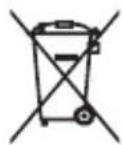
- Disposing of the device
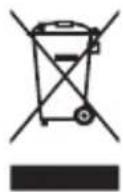
- If this product ever wears out, please don't dispose of it as domestic refuse. To ensure you don't cause damage to the environment, take it to a collection or recycling centre where used devices are processed for recycling in an environmentally friendly manner.
Declaration of conformity (DOC)
emporia telecom GmbH + CoKG (Industriezeile 36, 4020 Linz, Austria), hereby declares that the emporiaSiMPLiCiTYglam.4G (V227-4G)
telecommunication or radio device complies with Directive 2014/53/EU and UK Radio Equipment Regulations (S.I. 2017 No. 1206).
The full text of the declarations of conformity can be viewed on this web page:
https://www.emporia.eu/doc

text_image
CE UK CA Belle Puguley eline PuneterEveline Pupeter CEO, emporia Telecom 15/11/2021, Linz/Austria
text_image
QR code image containing encoded data, no visible human-readable texthttps://www.emporia.eu/doc
ENGLISH-45
> APERÇU DE VOTRE TÉLÉPHONE PORTABLE
natural_image
Two technical line drawings of a mobile phone device, one showing an upward arrow and the other showing a slide with a car (no text or symbols present)text_image
Diagram illustrating three-step mobile phone shipment process: card transfer, recycling, and disassembly steps.text_image
QR code image containing encoded data, no visible human-readable texthttps://www.emporia.eu/doc
FRANÇAIS-67
> PANORAMICA DEL CELLULARE
1 Altoparlante
2 Display (schermo)
3 Tasto verde
natural_image
Two technical line drawings of a mobile phone device, one showing an upward arrow and the other showing a slide with a car (no text or symbols present)text_image
Diagram illustrating three-step mobile phone shipment process: card transfer, recycling, and disassembly steps.text_image
Pelle Pugate eline PupeterEveline Pupeter CEO, emporia Telecom 15/11/2021, Linz/Austria
text_image
QR code image containing encoded data, no visible human-readable texthttps://www.emporia.eu/doc
ITALIANO-89
> OVERZICHT VAN UW MOBIELE TELEFOON
natural_image
Two line drawings of a mobile phone device, one showing an open lid with an upward arrow and the other showing a closed lid with a car (no text or symbols)text_image
Pelle Pugate eline PupeterEveline Pupeter CEO, emporia Telecom 15-11-2021, Linz/Oostenrijk
text_image
QR code image containing encoded data, no visible human-readable texthttps://www.emporia.eu/doc
NEDERLANDS-111
EN Misprints, errors and technical changes excepted.
text_image
QR code image containing encoded data, no visible human-readable textRéf.: V227-4G_BDA-V1_55916-001 | 202111