EasyManual
AIO 3 - Speaker TRIANGLE - Free user manual and instructions
Find the device manual for free AIO 3 TRIANGLE in PDF.



Questions des utilisateurs sur AIO 3 TRIANGLE
0 question sur cet appareil. Repondez a celles que vous connaissez ou posez la votre.
Poser une nouvelle question sur cet appareil
Download the instructions for your Speaker in PDF format for free! Find your manual AIO 3 - TRIANGLE and take your electronic device back in hand. On this page are published all the documents necessary for the use of your device. AIO 3 by TRIANGLE.
USER MANUAL AIO 3 TRIANGLE
WARNING : Read carefully all the safety instructions before using the device.
Î Keep these safety instructions for future references. Î Do not use this apparatus near water or liquid. Î Only clean with a dry and soft cloth. Î Do not block any aperture (vents) of the device. Î Do not install near any heat sources such as radiators, stoves, or any other apparatus (including ampliers) that produce heat. Î Only use accessories specied by the manufacturer. Î Be sure that the stand/table/furniture is strong enough to support the apparatus. Î Protect the power cord from being walked on or pinched particulary at the plugs and also protect the connector where it exit from the apparatus. Î Unplug the apparatus during lightning storms or when it’s unused for long periods of time. Î The plug of the apparatus must t with the outlet. Never modify the plug in any way. Apparatus should be connected to a mains socket outlet with protective earthing connection. Î Refer to your authorized TRIANGLE dealer or qualied service personnel if the apparatus is damaged in any way, such as power supply cord or plug is damaged, liquid has been spilled or objects have fallen on the apparatus, the apparatus has been exposed to rain or moisture, does not operate normally, or has been dropped.安全说明 警告:在使用该设备之前仔细阅读所有的安全说明。 ÎÎ 保存这些安全指示以备将来参考。Î ÎÎ 不要在水或液体附近使用此设备。Î ÎÎ 只用干布和软布清洁擦拭。Î ÎÎ 不要阻塞设备的任何孔(通风口)。Î ÎÎ 不要安装在任何热源附近,例如散热器、炉子或任何其他产生热量的设备(包括放大器)。Î ÎÎ 只使用制造商指定的附件。Î ÎÎ 确保支架/桌子/家具足够坚固以支撑设备。Î ÎÎ 保护电源线不被踩踏到,当没有连接设备时也要保护好连接头。Î ÎÎ 在雷暴期间或未长时间使用时拔掉设备。Î ÎÎ 设备的插头必须与插座相配合,永远不要修改插头。设备应连接到与有地线保护的电源插座。Î ÎÎ 如果设备有任何方式损坏,如电源线或插头损坏、液体溢出或物品落到设备上、设备已暴露于雨水 或湿气中、不正常操作,或者已经被掉在地上,请向授权的TRIANGLE经销商或合格服务人员咨询。www.trianglehi.com resellers.trianglehi.com support.trianglehi.com
44 rue Barreyre - CS 40099 33300 Bordeaux Cedex FRANCE GARANTIE / WARRANTY Thanks for buying a TRIANGLE product. We want you to enjoy your purchase to the fullest. The rst step is an easy registration of your products. By doing this, you will benet from helpful tips, products support, special offers and 2 years warranty.
1- Online registration
Register your product easily online at the following address : http://register.trianglehi.com/
You can also register your product and validate your warranty by lling the warranty card and sending it to :
UNPACKING Open the box and take out the speaker. If you notice any defects in one of the elements as you unpack, please get in touch with your reseller. Your speaker is fragile and it is recommended to handle it carefully. Before disposing of the packaging, make sure there is nothing left inside. EACH BOX CONTAINS: Î An AIO 3 speaker Î Remote control + battery Î User manual Î Power cord INSTALLATION PRECAUTIONS Before the installation Before connecting your AIO 3, check the stability of the surface you want to install it on and reduce the distance between the speaker and your router as much as possible. Moving the device Always remove the power cord and disconnect the cables between all audio components when moving the device. This will prevent a short-circuit or the damage to the plugs or connection cables. Locations to avoid Avoid humid locations or direct sunlight. It is preferable to install your speaker in a temperate place. Recycling Protection of the environment: your products contain valuable materials which can be recovered or recycled. Take them to the appropriate collection points. RESETINPUTTREBL E BASS
2. Action on the remote control LED
3. Standby/Start LED
4. Selected source LED:
10. Resetting the conguration
14. USB (to read ash drive or charge)
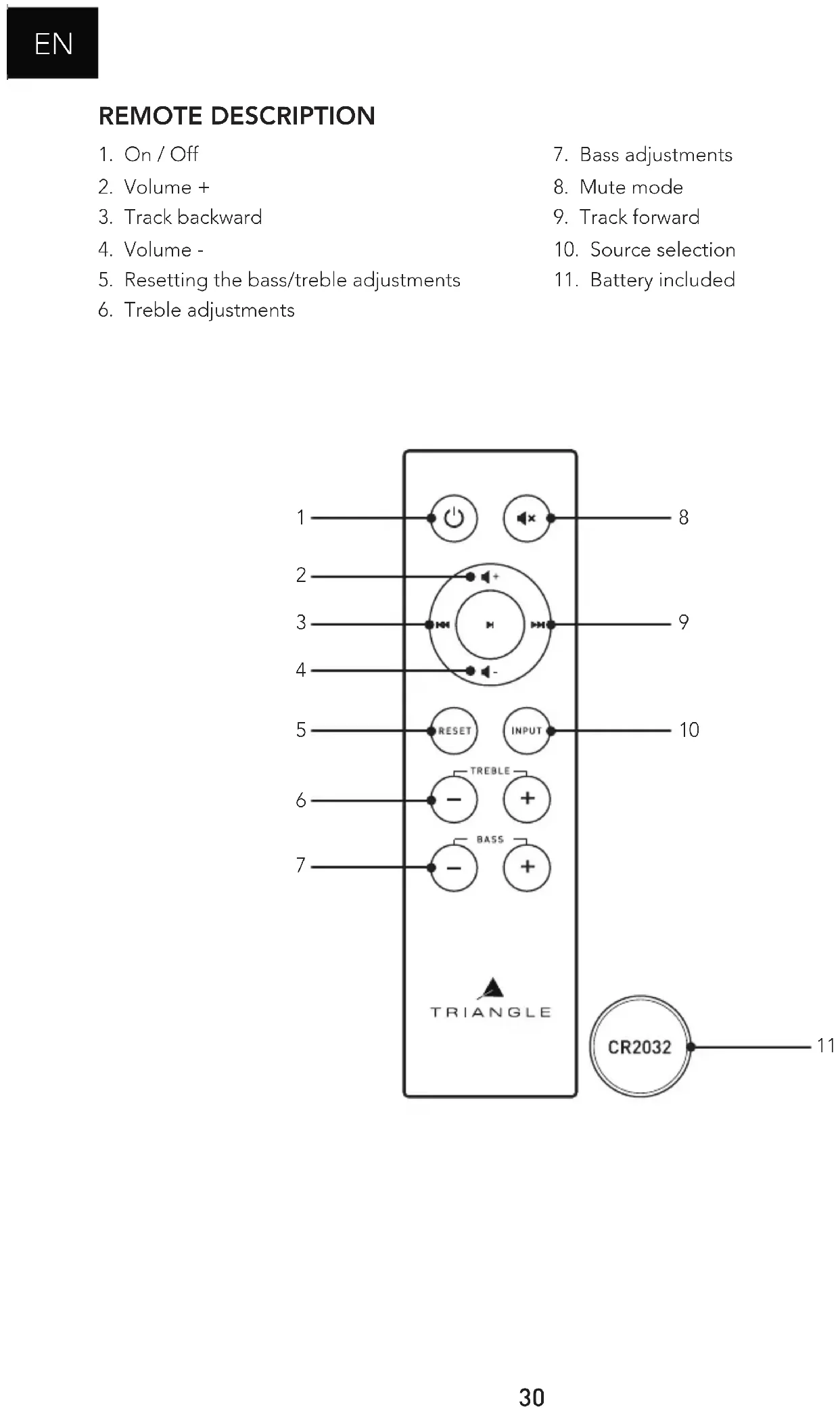
5. Resetting the bass/treble adjustments
6. Treble adjustments
10. Source selection
11. Battery included
Network: You must have a router connected to broadband Internet to make the most of the streaming services. Remember to check the reception quality of your WiFi network when setting up your product. A poor reception can affect the smoothness and the quality of your sound (see p.36 “Details of the device”). Your mobile device must be connected to the same WiFi network as your AIO system. INTERNET WIFI Appareil iOS Appareil Android
NAS eaming Streaming servicesROUTERiOs deviceAndroid device Note : the Ethernet cable is not provided.32
INSTALLATION Î Plug your AIO’s power cord into a power outlet. Î If necessary, connect the Ethernet cable. Your AIO 3 will be then automatically recognized on your network without requiring a setup. Î Press the Power button. Î Press the Connect button on your AIO. During the setup of your AIO 3 (approximately 20 seconds) the standby LED is blinking amber. Once your speaker is set-up, the white LED indicating the selected source glows and you can hear 3 music notes. Do not do anything before that happens. Download the app Go to your store (App Store or Google Play) and download the app TRIANGLE AIO.
connected to the WiFi of your AIO 3, go back to the app. Select your WiFi network and enter the password. Launch the app and follow the instructions.
4. Your AIO 3 is ready
Sources Playback Screen AIO devices The navigation is in 3 panels. Just swipe the screen from left to right to make them appear. APP OVERVIEW34
Go back to the previous screen Audio source Device on which the music is played Album cover Repeat all Repeat one Shufe play Previous track Next track Play / Pause Track progress bar Playlist by title Caution: If you change the volume using the buttons on your mobile device, there may be some latency and large increments. For ne adjustments, use the screen of the app. Volume button35
2. List of connected AIO
Add an AIO device to the network (p.31) Grouping AIO devices The “Party Mode” allows to connect up to 5 devices using one WiFi connection and up to 10 devices using an Ethernet connection. It is possible to designate the speaker as a Left speaker (L) or a Right speaker (R). The default setting is in mixed mode (left and right - LR). The default setting is in stereo (LR). It is possible to assign a speaker only to the right channel or to the left one by pressing this function. Album cover of the track being played Each speaker can play a different song. Speaker volume Settings36
Renaming the speaker
Setting the Auto Power-Down (the sound stops but the device remains connected) Setting the alarm In order to ensure that the alarm works, leave your device turned on. Details of the AIO Favorites AIO3 has the “hot spot” function, it can manage your own WIFI network and extend your current WIFI network. You just need to activate this function in the APP and dene a password. Quality of the WiFi signal37
Deezer - Qobuz - Tidal You need a subscription to access these services. TuneIn gives you access to all the digital radios. My music : The AIO speaker lets you play music you downloaded on your phone and access the music stored on a NAS drive on your network or on your connected USB drive. You must allow the app to read the musical content on your mobile device (see Settings of the TRIANGLE AIO app in the general menu on your mobile device depending on your iOS or Android system). To be able to access your songs, they must be saved directly on your phone. Some tunes might be protected by DRM technology which will prevent you from playing them. Adding or removing services from the menu Source selection Favorites : To quickly access your favorite track on your mobile device. Search : to quickly access the music saved on your mobile device. Spotify : see next page. My playlists : Create a playlist from the songs saved on your mobile device.38
Spotify: Listen out loud with Spotify connect
1. Connect your TRIANGLE AIO device to your WI-Fi network
2. Open up the Spotify app on your phone, tablet or laptop using the same Wi-Fi network
3. Play a song and select Devices Available
4. Select your TRIANGLE AIO device and start listening
The Spotify software’s subject to third party licence four here: www.spotify.com/connect/third-party-licences
Listening yo music in high denition: To listen to music in high denition, you must have a subscription with a provider and set up the dedicated app. Example on the Qobuz app >> Choosing your speaker39
5. Connection to other sources
- 1/8-INCH (3.5MM) JACK: Connect a 1/8-inch (3.5mm) jack cable or an RCA cable to your external source, then select the source.
- OPTICAL : Connect an optical cable to your external source, then select the source.
- BLUETOOTH Î Select the Bluetooth source - either via the TRIANGLE AIO app (see p.37) - or by pressing the button on your AIO speaker (see p.29, n°6) or on the remote control. Î Once the Bluetooth source is selected, the LED turns blue. The pairing will automatically start (the LED will start blinking and you will hear a beep when the connection is made). Î Make sure you disconnect your device in case another user wants to take over.
Î For an automatic NFC pairing, bring your smartphone close to your speaker.
Î Go to the Bluetooth settings on your mobile device. Î Select the source: TRIANGLE AIO3. Once the connection is established, the LED will turn solid blue and you will hear 3 music notes.40
TROUBLESHOOTING If the device does not work correctly, check the points listed below. If the problem persists, the device may not operate normally. Unplug the power cord immediately and get in touch with your reseller. OBSERVATION SOLUTION My AIO does not connect to the network. Check that your mobile device is connected to the network on which you are trying to connect your AIO. Place your AIO closer to the router. Connect an Ethernet cable between your router and the AIO. Check that your app is up to date, or reinstall it. Restart your mobile phone and your network. The music is cutting out or jerky. Check the Internet connection. Make sure your network or another device is not using a large part of your bandwidth. Check the power of the WiFi signal (see p.36) Check that your app is up to date, or reinstall it. Restart your mobile phone and your network.41
How many speakers can I group? AIO can group up to 5 speakers in WiFi, 10 via Ethernet, if the quality of the connection is good enough. What happens when I get a call on my mobile phone while I use the app? The music continues to play on your speaker without interruption. Can the AIO play songs in high resolution (High Res)? The AIO can play songs up to 24 bit/192 kHz, but be careful, you must have a good Internet connection and your streaming app must be set-up correctly. CAUTION To avoid the risk of electric shock, do not open the speaker.43