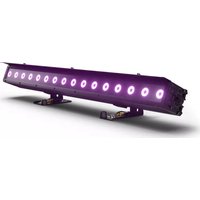
PIXBAR 400 IP G2 - Lighting Cameo - Free user manual and instructions
Find the device manual for free PIXBAR 400 IP G2 Cameo in PDF.



| Product type | Static LED lighting for professional events |
| Brand | Cameo |
| Model | PIXBAR 400 IP G2 (CLPB400IPG2) |
| Light source | 16 × RGBW 4-in-1 LED |
| Luminous flux | 6500 lm @ 6300 K (full white) |
| Beam angle / field angle | 25° / 42° |
| Color temperature (CCT) | 2200 K – 8000 K (adjustable in 100 K steps) |
| DMX control modes | 1CH, 3CH, 4CH, 7CH, 8CH, 10CH, 11CH, 16CH, 36CH, 48CH, 64CH, 68CH, D2CH, D4CH, D7CH |
| Protocols | DMX, RDM, W-DMX (wireless), standalone, master/slave, EZ Remote |
| Protection rating | IP65 (dust-tight and protected against water jets) |
| Electrical supply | 100–240 V AC, 50/60 Hz |
| Maximum power consumption | 180 W |
| Current consumption | 0.77 A (230 V) / 1.62 A (110 V) |
| Daisy chain connection | Up to 9 fixtures on 230 V, up to 5 on 110 V |
| Dimensions (L × H × D) | 1018 × 206 × 178 mm |
| Weight | 11.8 kg |
| Cooling | Passive convection cooling (fanless) |
| Operating temperature | -20 °C to +45 °C |
| Humidity | Up to 100% (non-condensing) |
| Minimum distance to lit surface | 0.3 m |
| Minimum distance to flammable materials | 0.017 m |
| Connectors | Power In/Out TRUE1 IP65, DMX In/Out XLR 5-pin IP65 |
| Standalone features | Direct LED, Color Preset (49 + 8 user), CCT, HSI, Play Loop (8 programmable loops), timer |
| Maintenance | Clean the housing with a damp cloth, dust off air intakes; maintenance by qualified personnel only |
| Safety | Do not look into the light beam; avoid direct contact with hot surfaces; use a safety cable for overhead mounting |
| Optional accessories | Frost filters (55°, 70°, 25°×55°), vertical linking kit, Omega bracket, M20 adapter kit |
Frequently Asked Questions - PIXBAR 400 IP G2 Cameo
User questions about PIXBAR 400 IP G2 Cameo
0 question about this device. Answer the ones you know or ask your own.
Ask a new question about this device
Download the instructions for your Lighting in PDF format for free! Find your manual PIXBAR 400 IP G2 - Cameo and take your electronic device back in hand. On this page are published all the documents necessary for the use of your device. PIXBAR 400 IP G2 by Cameo.
USER MANUAL PIXBAR 400 IP G2 Cameo
natural_image
Purple laser beam with circular white light fixtures mounted on a black base (no text or symbols visible)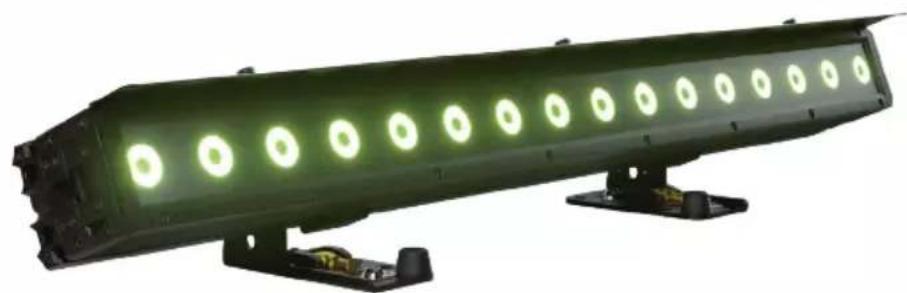
natural_image
Green laser beam with circular light fixtures mounted on a base (no text or symbols visible)PIXBAR® G2
IP65 LED BAR
CLPB400IPG2 (RGBW) / CLPB600IPG2 (RGBWAUV)
CONTENTS / INHALTSVERZEICHNIS / CONTENU / CONTENIDO / TREŚĆ / CONTENUTO
ENGLISH
INFORMATION ON THIS USER MANUAL 6
INTENDED USE 6
DEFINITIONS AND SYMBOLS 6
SAFETY INSTRUCTIONS 7
NOTES ON PORTABLE OUTDOOR DEVICES 11
PACKAGING CONTENT 11
INTRODUCTION 11
CONNECTIONS, OPERATING AND DISPLAY ELEMENTS 13
OPERATION 14
INSTALLATION 26
FROST FILTER 31
GLARE SHIELD 31
CARE, MAINTENANCE AND REPAIR 32
OPTIONAL ACCESSORIES 33
DIMENSIONS 34
TECHNICAL DATA 35
EXPLANATIONS ON IP RATING 37
MINIMUM DISTANCE TO ILLUMINATED SURFACE 38
MINIMUM DISTANCE TO NORMALLY FLAMMABLE MATERIALS 38
DISPOSAL 38
MANUFACTURER'S DECLARATIONS 38
DEUTSCH
You have made the right choice!
This device has been developed and manufactured to the highest quality standards to ensure many years of problem-free operation. Please read this user manual carefully to be able to use your new Cameo product quickly and optimally. Further information about Cameo Light is available on our website CAMEOLIGHT.COM.
INFORMATION ON THIS USER MANUAL
- Carefully read the safety instructions and the entire manual before operating the device.
- Observe the warnings on the device and in the user manual.
• Always keep the user manual within reach. - If you sell or pass on the device, it is important that you also include this user manual, as it is an integral part of the product.
INTENDED USE
The product is a device for event technology!
This product has been developed for professional use in the field of event technology and is not suitable for use as domestic lighting!
Furthermore, this product is only intended for qualified users with specialist knowledge of event technology!
Use of the product outside the specified technical data and operating conditions is considered improper use!
Liability for damage and third-party damage to persons and property due to inappropriate use is excluded!
The product is not suitable for:
- Use by persons (including children) with limited physical, sensory or mental abilities or lack of experience and knowledge.
- Children (children must be instructed not to play with the device).
DEFINITIONS AND SYMBOLS
- DANGER: The word DANGER, possibly in combination with a symbol, indicates immediately dangerous situations or conditions for life and limb.
- WARNING: The word WARNING, possibly in combination with a symbol, indicates potentially dangerous situations or conditions for life and limb.
- CAUTION: The word CAUTION, possibly in combination with a symbol, is used to indicate situations or conditions that may lead to injury.
- ATTENTION: The word ATTENTION, possibly in combination with a symbol, refers to situations or states that can lead to damage to property and/or the environment.

This symbol identifies hazards that can cause electric shock.

This symbol identifies hazardous areas or hazardous situations.

This symbol indicates hazards caused by hot surfaces.

This symbol indicates hazards caused by intense light sources.

This symbol indicates a device in which there are no user-replaceable parts.

This symbol indicates additional information on the operation of the product.
SAFETY INSTRUCTIONS
DANGER:
- Do not open or modify the unit.
- If your device no longer functions properly, if liquids or objects get inside it or if it has been damaged in any other way, switch it off immediately and disconnect it from the mains. The device may be repaired only by authorised repair technicians.
- For devices of protection class 1, the protective conductor must be connected correctly. Never disconnect the protective conductor. Devices of protection class 2 do not have a protective conductor.
- Ensure that live cables are not kinked or otherwise mechanically damaged.
- Never bypass the unit fuse.
WARNING:
- The device may not be operated if it shows obvious signs of damage.
- The device may only be installed in a voltage-free state.
- If the power cable of the device is damaged, do not operate the device.
- Permanently connected power cables may only be replaced by a qualified person.

ATTENTION:
- Do not operate the unit if it has been exposed to large temperature fluctuations (for example, after transport). Moisture and condensation can damage the device. Switch on the device only when it has reached room temperature.
- Make sure that the voltage and frequency of the mains supply correspond to the values indicated on the unit. If the device has a voltage selector switch, do not connect the device until it has been set correctly. Use only suitable power cables.
- To disconnect the unit from the mains at all poles, it is not sufficient to press the on/off switch on the unit.
- Make sure that the fuse used corresponds to the type printed on the unit.
- Make sure that appropriate measures have been taken against overvoltage (e.g. lightning strike).
- Observe the specified maximum output current on units with Power Out connection. Ensure that the total current consumption of all connected devices does not exceed the specified value.
- Replace pluggable mains cables only with original cables.

DANGER:
- Danger of suffocation! Plastic bags and small parts must be kept out of reach of persons (including children) with reduced physical, sensory or mental capabilities.
- Danger from falling down! Make sure that the device is securely installed and will not fall down. Only use suitable stands or mounts (particularly for fixed installations). Ensure that accessories are properly installed and secured. Ensure that applicable safety regulations are observed.

WARNING:
- Use the device only in the manner intended.
- Operate the device only with the accessories recommended and intended by the manufacturer.
- During installation, observe the safety regulations applicable in your country.
- After connecting the unit, check all cable routes to avoid damage or accidents, e.g. due to tripping hazards.
- Always observe the specified minimum distance to normally flammable materials! Unless explicitly stated, the minimum distance is 0.3 m.
- Always observe the minimum distance to the illuminated surface that can be read on the device!

CAUTION:
- In the case of moving components such as mounting brackets or other moving components, there is a possibility of jamming.
- In the case of units with motor-driven components, there is a risk of injury from the movement of the unit. Sudden movement of the device can cause shock reactions.
- The housing surface of the device can become very hot during regular operation. Ensure that accidental touching of the housing is not possible. Always allow the lamp to cool sufficiently before removal, maintenance work and charging etc.
ATTENTION:
- Do not install or operate the device near any radiators, heat registers, stoves or other heat sources. Ensure that the device is always installed in such a way that it is sufficiently cooled and cannot overheat.
- Do not place ignition sources such as burning candles near the device.
- Ventilation openings must not be covered and fans must not be blocked.
- Use the original packaging or packaging provided by the manufacturer for transport.
- Avoid shock or impact to the unit.
- Observe the IP rating as well as the ambient conditions such as temperature and humidity according to the specification.
- Devices can be constantly further developed. In the event of deviating information on operating conditions, performance or other device properties between the user manual and the device labelling, the information on the device always takes priority.
- The unit is not suitable for tropical climates and for operation above 2000 m above sea level.
- Unless explicitly stated, the unit is not suitable for operation in marine conditions.

PLEASE NOTE:
For conversion or retrofit sets or accessories provided by the manufacturer, it is essential to observe the instructions included.

CAUTION! IMPORTANT INFORMATION REGARDING LIGHTING PRODUCTS!
- Never look directly into the beam of light, not even for a short period of time.
- Never look into the beam of light using optical devices such as a magnifying glass.
- Stroboscopic effects may cause epileptic seizures in susceptible individuals!
- Permanently installed lamps are built into these lighting units. These may not be replaced by the user. In the event of a fault, please contact your distribution partner.



SIGNAL TRANSMISSION AND CONTROL BY RADIO
(e.g. W-DMX or audio radio systems, Bluetooth):
The quality and performance of wireless signal transmissions generally depends on the ambient conditions.
The following factors can impact range and signal stability, for example:
Shielding (e.g. masonry, metal structures, water)
High volumes of radio traffic (e.g. powerful wireless LAN networks)
Interference
Electromagnetic radiation (e.g. LED video screens, dimmers)
All range specifications refer to free-field application with visual contact and without interference!
The operation of transmission systems is subject to official regulations. These may vary from region to region and must be checked by the operator before use (e.g. radio frequency and transmission power).
WARNING: Devices with wireless signal transmission are not suitable for use in sensitive areas in which radio operation can lead to potential detrimental effects. These include e.g.:
• Hospitals, health centres or other healthcare facilities that provide patient treatment with skilled personnel and equipment.
• Hazardous areas Class I, II and III
- Restricted areas
• Military facilities
- Aircraft or vehicles
- Areas where the use of mobile phones is prohibited
TRANSMISSION VIA W-DMX
WARNING: In general, wireless DMX transmission must not be used for applications with safety-related factors that could result in personal injury or property damage in the event of failure.
This applies in particular to moving scene or traverse structures, DMX-controlled motors/lifts or lifting devices for operating DMX-operated platform lifts, hydraulic systems or comparable moving components.
Furthermore, wireless DMX transmission must not be used to trigger flame or pyrotechnic devices, explosion-driven effects, or to control gas or liquid effects. These include e.g. CO2 cannons, confetti shooters, water effects or similar.

NOTES ON PORTABLE OUTDOOR DEVICES
- Temporary operation! Event equipment is generally only designed for temporary operation.
- Continuous operation or permanent structural installation – particularly outdoors – can impair the function, surfaces and seals and accelerate material fatigue.
- Damage to the surface coating can impair the device's corrosion protection. Damaged surface coating (e.g. scratches) must be promptly repaired by suitable measures.
PACKAGING CONTENT
Remove the product from the packaging and remove all packaging material.
Please check the completeness and integrity of the delivery and notify your distribution partner immediately after purchase if the delivery is not complete or if it is damaged.
Included with the CLPB400IPG2 product are:
1 x PIXBARD IP65 G2 RGBW spotlights
▶ 2 sliding mounting feet with folding SPIMounting spigot (pre-assembled)
▶ 1 x standard frost filter
▶ 1 x glare shield
▶ 1 x power cable
▶ User manual
Included with the CLPB600IPG2 product are:
1 x PIX®AB0 IP65 G2 RGBWAUv spotlights
▶ 2 sliding mounting feet with folding SPIN mounting spigot (pre-assembled)
▶ 1 x standard frost filter
▶ 1 x glare shield
▶ 1 x power cable
▶ User manual
INTRODUCTION
PIXBAR® 400 IP G2 Outdoor Spotlights
CLPB400IPG2 with 16 4in1 RGBW LEDs
PIXBAR® 600 IP G2 Outdoor Spotlights
CLPB600IPG2 with 16 6in1 RGBWAUV LEDs
CONTROL FUNCTIONS:
CLPB400IPG2
1-channel, 3-channel Preset, 4-channel Direct, 7-channel Direct Control, 8-channel 16-bit, 10-channel Direct CCT, 11-channel Effect Pattern, 16-channel Wash, 36-channel Pattern, 48-channel Pixel RGB, 64-channel Pixel, 68-channel Pixel Dim, D2-channel, D4-channel Preset and D7-channel Direct DMX Control
CLPB600IPG2
1-channel, 3-channel Preset, 6-channel Direct, 9-channel Direct Control, 12-channel 16-bit, 12-channel Direct CCT, 13-channel Effect Pattern, 20-channel Wash, 44-channel Pattern, 48-channel Pixel RGB, 96-channel Pixel, 100-channel Pixel Dim, D2-channel, D4-channel Preset and D9-channel Direct DMX Control
RDM
W-DMX ^TM
Master/Slave modes
Stand-alone functions
FEATURES:
- IP65 Rating
- Convection cooling
- Operating voltage: 100 - 240 VAC
The spotlights feature the RDM standard (remote device management). This remote device management enables the status query and configuration of RDM end devices via an RDM-capable controller, such as the optionally available Cameo UNICON (item number CLIREMOTE). The Cameo UNICON also allows access to the entire spotlight menu.
CONNECTIONS, OPERATING AND DISPLAY ELEMENTS

- The CLPB400IPG2 and CLPB600IPG2 models feature identical connections, operating and display elements -
1 POWER IN
IP65 mains input socket with rubber sealing cap (TRUE1 compatible). Operating voltage 100 - 240 VAC / 50 - 60 Hz. Connection via supplied power cable (when not in use, always close with rubber sealing cap).
2 POWER OUT
IP65 mains output socket with rubber sealing cap (TRUE1 compatible). Facilitates power supply to other CAMEO spotlights. Ensure that the total current consumption of all connected devices does not exceed the value specified on the device in amperes (A) (when not in use, always close with the rubber sealing cap).
3 DMX IN
Male IP65 5-pin XLR socket for connecting a DMX control device (e.g. DMX console, when not in use always close with the rubber sealing cap).
4 DMX OUT
Female IP65 5-pin XLR socket for sending DMX control signal (when not in use, always close with the rubber sealing cap).
5 OLED DISPLAY
The OLED display shows the currently activated operating mode or the current DMX address (main display), the menu items in the menu and the numerical value or operating mode in certain menu items.
6 TOUCH-SENSITIVE CONTROLS
MENU- Press MENU to access the main menu. Press again or repeatedly to return to the main display.
UP and DOWN – Select the menu items in the main menu (DMX address, operating mode, etc.)
and in the sub-menus using UP and DOWN. Change value or status in a menu item, e.g. DMX address. To quickly change a value, such as the DMX start address, press and hold UP or DOWN.
ENTER – Press ENTER to access the menu level to make value or status changes, and to access one of the sub-menus. Confirm value or status changes by pressing ENTER.

PLEASE NOTE:
- Before navigating the unit menu, make sure that the control panel is dry and clean so that its functionality is not impaired.
- Water on the control unit can lead to incorrect operation of the spotlight, e.g. in outdoor operation. Therefore, after configuring the spotlight, activate the lock function to prevent incorrect operation by water (Settings -> Display -> Autolock).
7 PRESSURE EQUALISATION ELEMENT
Pressure equalisation element to prevent condensation inside the housing. In order to ensure its proper function, the element must be protected from contamination.
8 W-DMX™ ANTENNA
Antenna for control via W-DMX ^TM .

ATTENTION: To ensure IP65 splash resistance for the DMX and network sockets, the special input and output sockets must be correctly sealed with the IP65 special plugs or the rubber sealing caps must be used for sealing. When connected correctly, or when sealed correctly with the rubber sealing caps, the POWER IN and POWER OUT sockets are protected from spraying water, as in accordance with IP65.
OPERATION
NOTE
- As soon as the spotlight is correctly connected to the power supply, the following are displayed in succession: “Update wait ...” (for service purposes only), “Welcome to Cameo”, the model name and the software version. After this process, the spotlight is ready for operation and the previously activated operating mode is launched.
- If there is no input for approx. 30 seconds, the display automatically returns to the main display.
- Note on the main display in the operating modes with external control: As soon as the control signal is interrupted, the characters in the display start flashing; if the control signal is present again, the flashing stops.
- Briefly pressing UP when in the main display rotates the display by 180^ .
SETTING DMX START ADDRESS (DMX address)
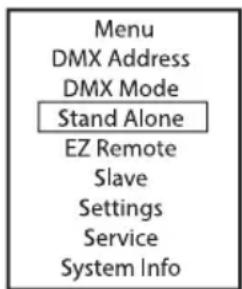
Starting from the main display, press MENU to enter the main menu. Now use UP and DOWN to select the menu item DMX Address and confirm with ENTER. Using the UP and DOWN buttons, configure the desired DMX start address and press ENTER to confirm (highest value dependent upon activated DMX mode).


CONFIGURING DMX MODE (DMX Mode)
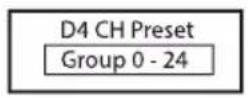
Starting from the main display, press MENU to enter the main menu. Now use UP and DOWN to select the menu item DMX Mode and confirm with ENTER. Now select the desired DMX mode using UP and DOWN and confirm the selection with ENTER. DMX operating modes with DMX delay channel and group selection (Group 0 - 24) are marked with "D". Tables with the channel assignments can be found in these instructions under DMX CONTROL.

DMX modes with DMX delay channel
The DMX Delay function is a simple way to create a running light effect with a large number of spotlights that are all the same model and that are all running the same software version. This is otherwise only achievable with a suitable DMX controller and time-consuming programming. All the spotlights used (same models, same software version) are set to the same DMX operating mode with DMX delay channel and controlled via the same DMX start address.
Setting the DMX delay: Select one of the DMX operating modes with DMX delay channel and confirm the selection (in the example D4 CH Preset). Assign the spotlights to one of up to 24 groups (plus Group 0) according to preference, whereby several spotlights can be assigned to one
group. The group number is also the factor by which the set delay time set in the DMX controller is multiplied. Confirm each entry by pressing ENTER.


The delay time (delay time of the DMX signal) is set by means of a DMX controller in the separate DMX delay channel of the corresponding DMX mode (0.0s to 2.0s in 0.1s increments).
Setup example:

flowchart
graph LR
    A["DMX Controller\nDMX Delay 0.5s"] --> B["D4 CH Preset Group 0"]
    B --> C["D4 CH Preset Group 1"]
    C --> D["D4 CH Preset Group 2"]
    D --> E["D4 CH Preset Group 3"]
    E --> F["D4 CH Preset Group 4"]
    E --> G["D4 CH Preset Group 3"]
    G --> H["D4 CH Preset Group 3"]
    H --> I["Delay Group 0\n0s Delay"]
    C --> J["Delay Group 1\n0.5s Delay"]
    D --> K["Delay Group 2\n1s Delay"]
    E --> L["Delay Group 3\n1.5s Delay"]
    F --> M["Delay Group 4\n2s Delay"]
In the stand-alone modes Direct LED, Color Preset, CCT, HSI, Auto Program and Play Loop, the control signal of the corresponding mode can be output to slave units via XLR (DMX OUT) and W-DMX:
Stand Alone -> Master/Alone -> Master
If the output of the control signal is not desired, the output can be deactivated:
Stand Alone -> Master/Alone -> Alone
A delay for slave units can be set for the time-delayed output of the control signal of the stand-alone modes Auto Program and Play Loop.
Starting from the main display, press MENU to enter the main menu. Now select the Stand Alone menu item, confirm, select Master/Alone and confirm again.

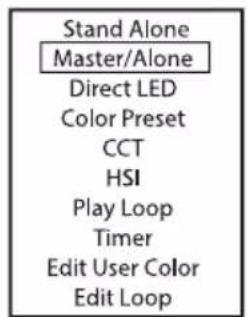
This will take you to the submenu for configuring the submenu items (see table).
| Master | Send to XLR | Control signal is forwarded via DMX OUT | |
| Send to W-DMX | On | Activate DMX control signal forwarding via W-DMX | |
| Off | Deactivate sending of the DMX control signal via W-DMX | ||
| Force to pair | Pairing with ready-to-pair W-DMX devices | ||
| Unlink All | Disconnect all W-DMX connections | ||
| DMX Delay | Set DMX delay for slave units: Off, 0.1s - 2.0s | ||
| Alone | Do not forward control signal | ||
STAND-ALONE DIRECT LED MODE
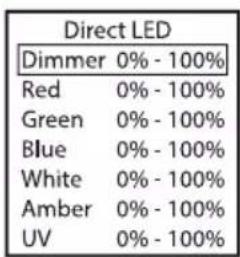
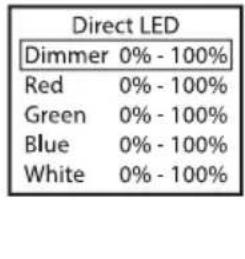
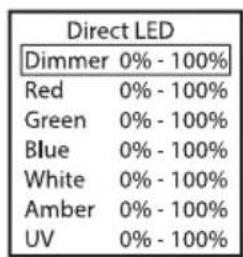
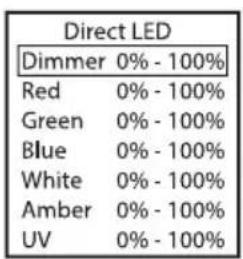
The stand-alone Direct LED mode allows dimmer, strobe, R, G, B and W (CLPB400IPG2) or R, G, B, W, A and UV (CLPB600IPG2) to be set directly on the unit, similar to a DMX controller. In this way, an individual scene can be created without an additional DMX controller.
Starting from the main display, press MENU to enter the main menu. Use UP and DOWN to select Stand Alone, confirm with ENTER, then select Direct LED and confirm again with ENTER. Now select the menu item you want to edit, confirm the selection, set the desired value and confirm the entry.
CLPB400IPG2 CLPB600IPG2


| Direct LED | |
| Dimmer 0% - 100% | |
| Red | 0% - 100% |
| Green | 0% - 100% |
| Blue | 0% - 100% |
| White | 0% - 100% |
| Amber | 0% - 100% |
| UV | 0% - 100% |
COLOUR PRESET STAND-ALONE MODE
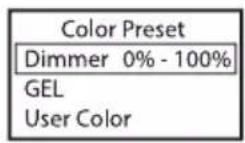
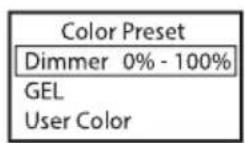
49 different colour presets plus eight individually adjustable user presets (see Edit User Color) are available. The brightness can be set at a higher level. Starting from the main display, press MENU to enter the main menu. Use UP and DOWN to select the menu item Stand Alone, confirm the selection, then select Color Preset and confirm again with ENTER. Now select GEL or User Color and confirm the selection. The desired preset can now be selected, confirm the selection. Now select Dimmer (brightness), confirm the selection and make the settings as desired. Confirm the entry.


CCT STAND-ALONE MODE (Correlated Colour Temperature)
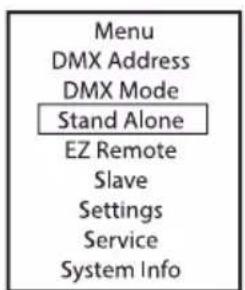
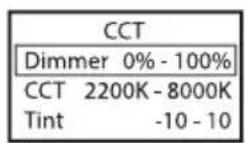
In stand-alone CCT mode, the colour temperature can be adjusted in 100K steps from 2200K to 8000K, plus the hue (tint) and brightness (dimmer). Starting from the main display, press MENU to enter the main menu. Use UP and DOWN to select the Stand Alone menu item, confirm the selection, then select CCT and confirm again with ENTER. Now select the menu item you want to edit, confirm the selection and make the settings as desired. Confirm the entry.


STAND-ALONE MODE HSI (Hue - Saturation - Intensity)
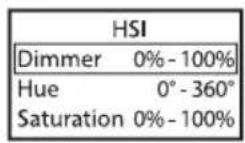
In the stand-alone HSI mode, the hue, saturation and brightness can be adjusted separately as desired. Starting from the main display, press MENU to enter the main menu. Use UP and DOWN to select the Stand Alone menu item, confirm the selection, then select HSI and confirm again with ENTER. Now select the menu item you want to edit, confirm the selection and make the settings as desired. Confirm each entry.


STAND-ALONE OPERATION MODE PLAY LOOP (8-step colour sequences 1 - 8)
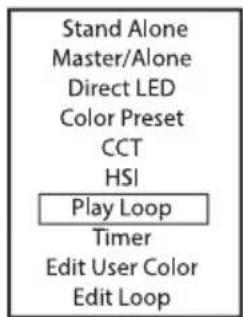
The 8 available loops are pre-programmed at the factory, but can be customised in the Edit Loop menu item. The brightness can be set at a higher level. Starting from the main display, press MENU to enter the main menu. Using UP and DOWN, select the menu item Stand Alone, confirm
with ENTER, then select the submenu item Auto and confirm again with ENTER. Now select the menu item you want to edit, confirm the selection and make the settings as desired. Confirm each entry.


TIMER FUNCTION
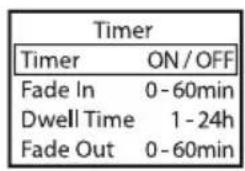
The timer function allows timed control of the Direct LED, Colour Preset, CCT and HSI stand-alone modes in such a way that the fade-in time (Fade In) can be set from 0 to 60 minutes, the dwell time from 1 to 24 hours and the fade-out time from 0 to 60 minutes. After activation of the timer function, the timer control will be implemented upon the next system start. Starting from the main display, press MENU to enter the main menu. Select Stand Alone, confirm the selection, then select Timer and confirm again. Select the setting On under Timer and confirm. For the individual timer control settings, select Fade In, Dwell Time or Fade Out and confirm. You can now set the respective value as desired. Confirm all entries. To deactivate the timer function, select the setting Off under Timer and confirm the entry.
Note: The timer function is suitable for use in master/slave operation via cable and W-DMX ^™ .

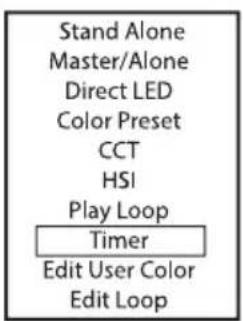

EDITING USER-PRESETS (Edit User Color)
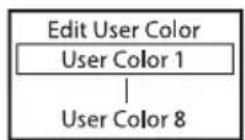
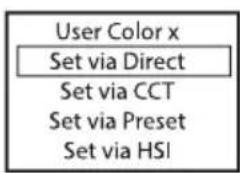
The eight user presets available in the stand-alone mode Colour Preset can be edited individually. Starting from the main display, press MENU to enter the main menu. Using UP and DOWN you now select the menu item Stand Alone, confirm with ENTER, then select Edit User Color and confirm once again. Select the desired preset (User Color 1 - 8) and confirm the selection. Now decide which way you want to create the colour for the preset and select one of the four methods Direct, CCT, Preset and HSI and confirm the selection. Now set the desired colour as described in the instructions for the respective stand-alone mode.
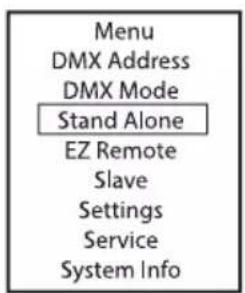

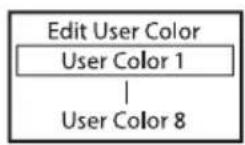
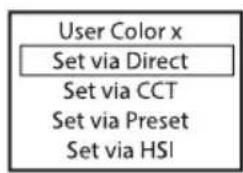
EDIT LOOP (Edit Loop)
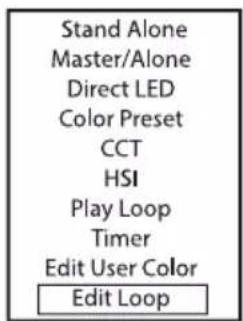
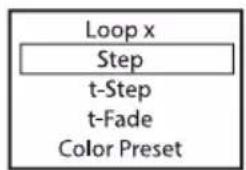
Brightness, step duration and fade time can be set separately for all eight loops. Starting from the main display, press MENU to enter the main menu. Using UP and DOWN you now select the menu item Stand Alone, confirm with ENTER, then select Edit Loop and confirm once again. Now select the desired loop for editing and confirm the selection.



flowchart
graph TD
    A["Loop x"] --> B["Step"]
    B --> C["t-Step"]
    C --> D["t-Fade"]
    D --> E["Color Preset"]
This will take you to the submenu for configuring the submenu items (see table). The settings for each loop are made separately and are retained even after restarting the device.
| Step | 1 - 8 | Step selection |
| T-Step | T-Step0s - 10s = 0,1s steps10s - 1min = 1s steps1min - 20min = 1min steps | Setting the step duration for the selected step |
| T-Fade | T-Fade0s - 10s = 0,1s steps10s - 1min = 1s steps1min - 20min = 1min steps | Setting the fade time for the selected step |
| Color Preset | Step 1 + 2: Dark Magenta - Rose Pink, User Color 1 - 8, Blackout | Selecting the colour preset or blackout for the selected step |
| Step 3 - 8: Dark Magenta - Rose Pink, User Color 1 - 8, Blackout, Skip Step | Select the colour preset or blackout or skip the selected step |
EZ REMOTE CONTROL VIA CAMEO UNICON (optionally available)
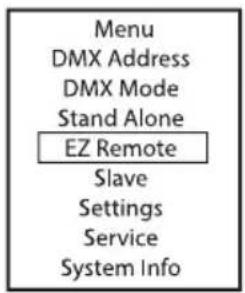
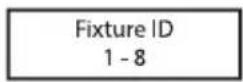
Starting from the main display, press MENU to enter the main menu. Using UP and DOWN you now select the EZ Remote menu item and confirm by pressing ENTER. Now set the desired fixture ID (Fixture ID 1 - 8) and confirm the entry. Connect the spotlight and UNICON using a DMX
cable, select DMX Control in the UNICON menu, then EZ Remote, and enter the same unit ID. Now control the spotlight using RGB, GEL, CCT or HSI. By assigning different unit IDs, up to eight spotlights (or spotlight groups) can be controlled separately via UNICON.
SLAVE MODE
Standard slave operation: Starting from the main display, press MENU to enter the main menu. Using the UP and DOWN buttons, you now select the menu item Slave confirm with ENTER, select the Slave Group 0 and confirm again with ENTER. Connect the slave and master units (same model, same software version) using a DMX cable or W-DMX™ and activate one of the stand-alone modes (Direct LED, Color Preset, CCT, HSI, Auto Program, Play Loop) in the master unit. The slave unit will now follow the master unit.
Extended slave operation: If you want to control the slave units by one of the stand-alone modes Auto Program or Play Loop in master / slave operation, the control signal can be played back with a time delay of up to 24 steps, the delay is set in the Stand Alone menu Master/Alone in the master unit, the delay factor in the slave menu of the corresponding fixture (Group). This is a simple way to create a running light effect with a large number of spotlights that are all the same model and have the same software version. This is otherwise only possible using a suitable DMX controller and time-consuming programming. Connect the slave and master units (same model, same software version) using a DMX cable or via W-DMX™


| Group | 0 - 24 | Set slave group for signal delay | |
| Receive Mode | XLR (permanent aktiv) | ||
| Wire-less | On | Activate W-DMX module | |
| Off | Deactivate W-DMX module | ||
| Unlink | Disconnect all connections and place in pairing standby mode | ||
Assign the spotlights to one of up to 24 groups (plus Group 0) according to preference, whereby several spotlights can be assigned to one group. The group number is also the factor by which the delay time set in the master unit is multiplied.
Setup example:

flowchart
graph LR
    A["Master-Unit Delay 0.5s"] --> B["Stand Alone Loop"]
    B --> C["Slave Group 0 0s Delay"]
    C --> D["Slave Group 1 0.5s Delay"]
    D --> E["Slave Group 2 1s Delay"]
    E --> F["Slave Group 3 1.5s Delay"]
    F --> G["Slave Group 03"]
SYSTEM SETTINGS (Settings)
Starting from the main display, press MENU to enter the main menu. Using the UP und DOWN buttons you now select the menu item Settings and confirm with ENTER.

This will take you to the submenu for setting the submenu items (see table, select with UP and DOWN, confirm with ENTER, change value or status with UP and DOWN, confirm with ENTER).
| Wireless | = | Wireless settings | W-DMX State | On | Activate W-DMX |
| Off | W-DMX deactivated | ||||
| Operating Mode | Receive | W-DMX mode: Receiver | |||
| Transmit | G3 (G3 transmission standard) | ||||
| G4s (transmission standard G4s ) | |||||
| Linking | Unlink | Uncouple all units and make them ready for coupling | |||
| Link/Force to pair | Pair with W-DMX devices. W-DMX must be enabled on all devices, and the pairing with a transmitter be retained (Receive Reset). | ||||
| Signal Routing | Send to XLR | Send incoming signal to XLR connector | |||
| Backup by Using XLR | ing the incoming signal from the XLR connector when the W-DMX signal is lost. | ||||
| Receive only | No connection between W-DMX signal and XLR connectors | ||||
| Display | = | Display settings | Reverse | On | Display is rotated by 180° (e.g. for over-head installation) |
| Off | No display rotation | ||||
| Off Timer | Always On | Display lighting permanently on | |||
| Off after 20s | Deactivation of the display lighting after approx. 20 seconds of inactivity | ||||
| Display | = | Display settings | Autolock | Off | Function disabled |
| On after 60s | The controls and display are locked after approx. 60 seconds without any operation. Unlock: Press UP and DOWN simultaneously for approx. 5 seconds | ||||
| Dimmer | = | Dimming behaviour and PWM frequency | Curve | Linear | Dimmer curve: The light intensity increases linearly with the DMX value |
| Exponential | Dimmer curve: The light intensity can be adjusted finely in the lower DMX value range and coarsely in the upper DMX value range | ||||
| Logarithmic | Dimmer curve: The light intensity can be adjusted coarsely in the lower DMX value range and finely in the upper DMX value range | ||||
| Curve | S-Curve | Light intensity can be finely adjusted at lower and higher DMX values and broadly adjusted at medium DMX values | |||
| Dimmer | = | Dimming behaviour and PWM frequency | PWM Frequency | 650 Hz, 1530 Hz, 3600 Hz, 12 kHz, 18.9 kHz, 25 kHz | Select LED PWM frequency |
| Response | LED | Light responds abruptly to changes in DMX value | |||
| Halogen | Light behaves like a halogen spotlight with slight brightness changes | ||||
| Redshift | Dim to Warm | accurately mimics the colour drift of dimming a halogen spotlight. When dimming the spotlight, the colour temperature changes automatically to increasingly warm white tones and amber (and vice versa). | |||
| Off | Function disabled | ||||
| Color Calibration | = | Colour calibration | RAW | R, G, B, and W (CLPB400IPG2) or R, G, B, W, A and Uv (CLPB600IPG2) with maximum value 255 | |
| User | CLPB400I-PG2: RGBW CLPB600I-PG2: RGB-WAUv | Individual colour calibration. Cross-mode brightness setting with values from 0-255 | |||
| Factory | Factory calibration (cross-mode) | ||||
| Smart | Merging factory and RAW calibration | ||||
| Signal Fail | = | Operating mode on control signal interruption | Hold | Last command is retained | |
| Last Stand Alone | Last activated stand-alone mode is started | ||||
| Fade to Black (10s) | 10s fade to blackout | ||||
| Blackout | Instant blackout | ||||
| User Color 1 | User Colour 1 is activated | ||||
| Full | Full On | ||||
| Pixel Mirror | = | Mirror pixel | Off | Function disabled | |
| On | Pixels are mirrored | ||||
| Store Default | = | Store all system settings in 3 individual presets | User A | Store with ENTER | |
| User B | Store with ENTER | ||||
| User C | Store with ENTER | ||||
SERVICE MENU (Service)
Starting from the main display, press MENU to enter the main menu. Select Service using UP and DOWN and confirm with ENTER.
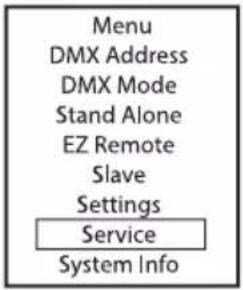
Information on the submenu items in the service menu and the corresponding options can be found in the table below (select with UP and DOWN, confirm with ENTER, change value or status with UP and DOWN, confirm with ENTER).
| Load Default | Factory | Reset to factory setting |
| User A | Reset to User A values(Save user values: Settings -> Store Default) | |
| User B | Reset to User B values(Save user values: Settings -> Store Default) | |
| User C | Reset to User C values(Save user values: Settings -> Store Default) | |
| Reset Service Timer | No | Cancel operation |
| Reset now | Reset service operation time | |
| Password | For service purposes only | |
SYSTEM INFORMATION (System Info)
Starting from the main display, press MENU to enter the main menu. Select System Info using UP and DOWN and confirm with ENTER.

Information on the submenu items in the system info menu and the corresponding options can be found in the table below (select with UP and DOWN, confirm with ENTER, change value or status with UP and DOWN, confirm with ENTER).
| Firmware | DISP | Vx.x.x | Display of the firmware version of the corresponding component |
| DRV | Vx.x.x | ||
| Temperature | LED | xxx °C / °F | Display of the temperature of the corresponding component |
| Temperature Unit | °C | Setting the temperature unit | |
| °F | |||
| Runtime | Total | xxxx h : xx m Total operating time | |
| Operation | xxxx h : xx m Usable time | ||
| LED | xxxx h : xx m Lamp operating time | ||
| Service | xxxx h : xx m | Operating time after resetting the service operating time | |
| RDM-UID | RDM Unique Identifier | ||
INSTALLATION

DANGER: Overhead mounting requires extensive experience, including the calculation of the load limit values of the installation material and regular safety inspection of all installation materials and spotlights. If you do not have these qualifications, do not attempt to perform an installation yourself. Refer instead to a qualified professional. There is a risk that devices that are incorrectly mounted and secured may come loose and fall down. This can cause serious injury or death.
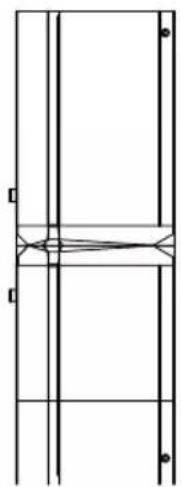
The unique coupling mechanism means that when several PIXBAR ^® G2 are docked, there is also a uniform pixel spacing at the transitions from one to the next PIXBAR ^® G2.

natural_image
Technical line drawing of a mechanical assembly with rollers and mounting brackets (no text or symbols)Thanks to the adjustable stand or mounting feet, the PIXBAR® G2 can be set up in a suitable position on a flat floor (e.g. as an uplift).
MOUNTING A PIXBAR® ON A TRUSS
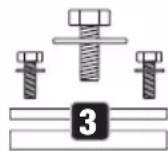
Mounting on a truss is done using optionally available truss clamps, which are either attached directly to the mounting feet (1), or to optionally available Omega mounting brackets (part number CLOMEGABRACKET1). The mounting feet can be moved on the housing of the PIXBAR® G2. To do this, loosen the middle of the five hexagon socket screws (2), move the foot to the desired position and tighten the screw again. The direction of radiation can be adjusted using the tommy screws (3) on the mounting feet. Ensure that the connections are tight and that the PIXBAR® G2 cannot come loose. When mounting the PIXBAR® G2 overhead, secure it with a suitable safety rope to one of the safety lugs provided (4). When mounting several docked PIXBAR® G2 horizontally overhead, each individual PIXBAR® G2 must be attached separately to the truss with the mounting feet and secured with a suitable safety rope.

USE SPIN16 TV SPIGOT FOR MOUNTING
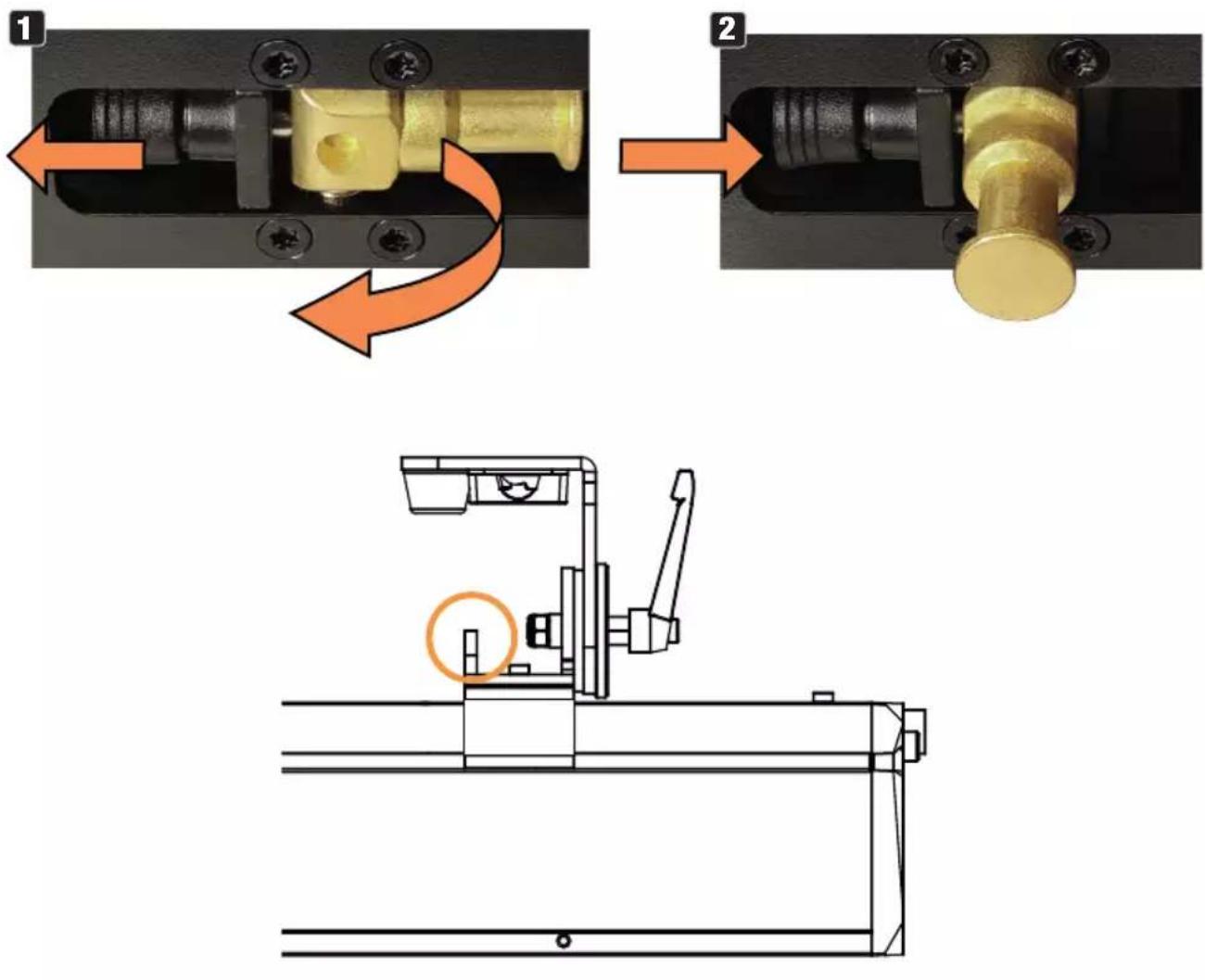
The mounting feet of the PIXBAR® G2 have 16 mm TV spigots that can be extended and retracted without tools. To unfold a TV spigot, pull the spring-loaded locking bolt out of the locking hole in the direction of the arrow (1), fold the TV spigot forwards and let the locking bolt engage in the locking hole offset by 90^ (2). Use suitable truss clamps for mounting. Ensure that the connections are tight and that the headlamp cannot come loose. When mounting the headlamp overhead, secure it with a suitable safety rope to one of the safety lugs provided (see marking).
VERTICAL HANGING MOUNTING ON A TRUSS
For vertical hanging mounting, up to three PIXBAR® G2 may be connected to each other. The following optionally available products must be used for this:
1 A suitable truss clamp with sufficient load-bearing capacity for the total load (e.g. half coupler).
2 One Omega Bracket (item number CLOMEGABRACKET1).
3 One stop set (item number CLPBG2VERTIMOUNT).
4 One or two connecting elements are needed to connect two or three PIXBAR® G2 and to secure the connection (item number CLPBG2STACKKIT).
The safety eyelet of the top foot of the top bar serves as a safety point. Make sure that the safety rope used to secure the bars is suitable for the total weight of the bars.
For optical reasons, the mounting feet can be folded to the side of the housing. A rubber buffer prevents the surface from being damaged.


natural_image
Pure structural diagram showing vertical and horizontal lines with no text, numbers, or symbols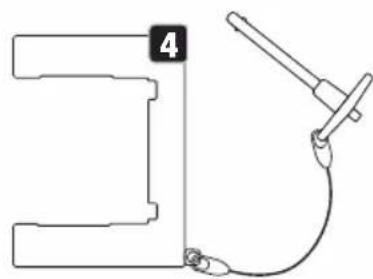
natural_image
Pure technical line drawing of a mechanical component with no text or symbolsVERTICAL FLOOR MOUNTING
For vertical floor mounting, a maximum of two PIXBAR ^® G2 may be connected to each other. The following optionally available products must be used for this:
1 One connector (item number CLPBG2STACKKIT).
2 One stop set (item number CLPBG2VERTIMOUNT).
3 One M20 connection set (item number CLPBG2M20ADA).
4 A heavy steel stand with M20 thread and sufficient stability for the total load.
The stability in combination with the stand used must be assessed by the user. No additional loads may be introduced.
For optical reasons, the mounting feet can be folded to the side of the housing. A rubber buffer prevents the surface from being damaged.

VERTICALLY SUSPENDED TRUSS VERTICAL FLOOR MOUNTING

natural_image
Technical line drawing of a mechanical assembly with no visible text or symbols
natural_image
Technical line drawing of a mechanical assembly with multiple vertical supports and mounting brackets (no text or symbols)FROST FILTER
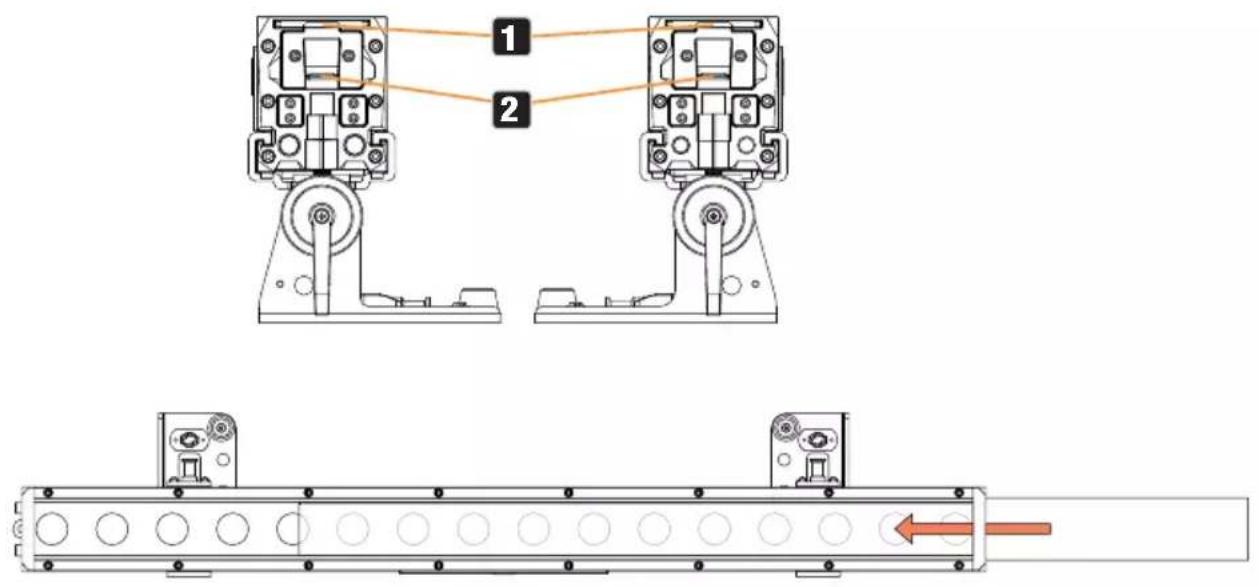
A standard frost filter is included with the PIXBAR ^® G2. To insert the frost filter into the holder provided for it 1 of the bar, open the sliding latch at one end of the bar (2, slide down the handle). After inserting the frost filter into the holder, close the latch again to prevent the filter from falling out.
GLARE SHIELD
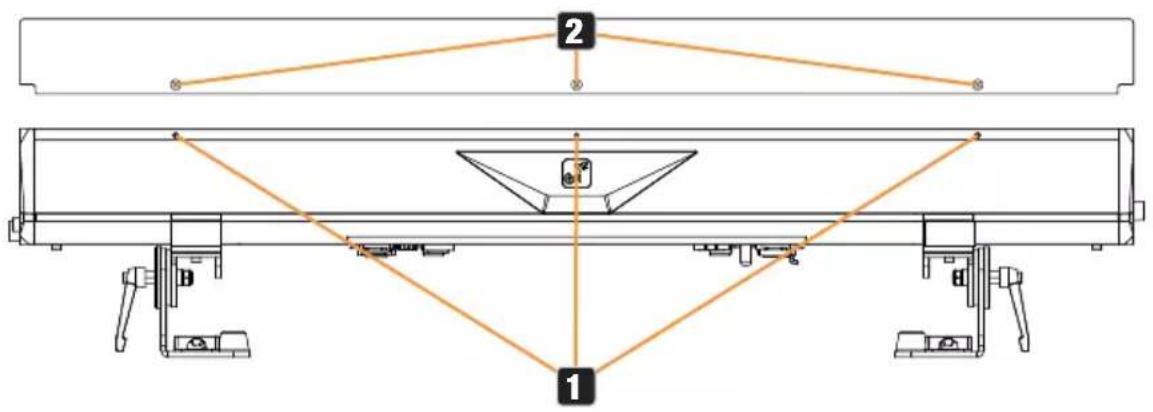
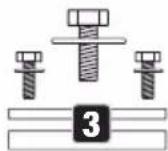
A glare shield is included with the PIXBAR® G2. On both sides of the PIXBAR® G2 there are three threads on the top edge of the housing 1. Mount the glare shield on the desired side of the PIXBAR® G2 using the three knurled screws 2.
CARE, MAINTENANCE AND REPAIR
In order to ensure the long-term, proper functioning of the device, it must be regularly cleaned and, if necessary, maintained. The maintenance requirement depends on the intensity of use and the environment in which it is used.
We generally recommend a visual inspection before each operation. Furthermore, we recommend carrying out all the applicable maintenance measures specified below once every 500 operating hours or, in the case of a lower intensity of use, at the latest after one year. Warranty claims may be limited in the event of defects resulting from inadequate maintenance.
CARE (carried out by user)
WARNING! Before carrying out any care or maintenance, the power supply – and, if possible, all device connections – must be disconnected.

PLEASE NOTE! Improper care can lead to impairment of the device or even its destruction.
- Housing surfaces must be cleaned with a clean, damp cloth. Make sure that no moisture can penetrate the device.
- Air inlets and outlets must be regularly cleaned of dust and dirt. If compressed air is used, make sure that damage to the device is prevented (e.g. fans must be blocked in this case, as they could otherwise over-rev.).
- Lines and plug contacts must be cleaned regularly and dust and dirt must be removed.
- In general, no cleaning agents or abrasive agents may be used, otherwise the surface finish may be damaged.
- Devices must generally be stored dry and protected from dust and dirt.
- To ensure correct and safe operation, all accessible or removable lenses and light-emitting apertures must be cleaned regularly.
MAINTENANCE AND REPAIR (by qualified personnel only)
DANGER! There are live components in the unit. Even after disconnecting the mains connection, there may still be residual voltage in the device, for example, due to charged capacitors.

PLEASE NOTE! There are no user-serviceable assemblies in the device.

PLEASE NOTE! Maintenance and repair work may only be carried out by sufficiently qualified specialist personnel. If in doubt, consult a specialist workshop.

PLEASE NOTE! Improperly performed maintenance work may affect the warranty claim.

PLEASE NOTE! For conversion or retrofit sets provided by the manufacturer, be sure to observe the enclosed installation instructions.
OPTIONAL ACCESSORIES
CLPBG2FILTER55
55° frost filter
CLPBG2FILTER70
70° frost filter
CLPBG2FILTER2555
25^ × 55^ Frost filter
CLPBG2STACKKIT
Connecting element for the secure mechanical connection of two PIXBAR ^® G2
CLPBG2VERTIMOUNT
Stop set for mounting a PIXBAR ^® G2 on the Omega mounting bracket CLOMEGABRACKET1 and for mounting on the connection set CLPBG2M20ADA
CLOMEGABRACKET1
Omega mounting bracket
CLPBG2M20ADA
Connection set for mounting a PIXBAR ^® G2 on a stand with M20 thread
DIMENSIONS (mm)

TECHNICAL DATA
| Item number CLPB400IPG2 CLPB600IPG2 | ||
| Product category Static LED light Static LED light | ||
| Type LED bar LED bar | ||
| Light source 16 x 4in1 RGBW 16 x 6in1 RGBWAUv | ||
| Luminous flux | 6500lm @ 6300K; R: 2500lm; G: 3600lm; W: 570lm; W: 5000lm | 5300lm @ Full On; R: 1580lm; G: 2755lm; B: 427lm; W: 3175lm; A: 1753; UV: n/a |
| Lens / optic 16 x Acrylic Lens 16 x Acrylic Lens | ||
| PWM Frequency | 650 Hz / 1530 Hz / 3600 Hz / 12000 Hz / 18900 kHz / 25000 kHz | 650 Hz / 1530 Hz / 3600 Hz / 12000 Hz / 18900 kHz / 25000 kHz |
| Dimmer response | 8 / 16 bit | 8 / 16 bit |
| Dimmer curves | Linear, exponential, s-curve, logarithmic | Linear, exponential, s-curve, logarithmic |
| Halogen simulation | Yes | Yes |
| Strobe | 0 Hz – 20 Hz | 0 Hz – 20 Hz |
| CRI | >84 @ 5600K | 77 |
| Beam angle / field angle | 25° / 42° | 24° / 46° |
| LED colour | R: 625nm; G: 518nm; B 545nm; W: 6036K | R: 635nm; G: 519nm; B: 448nm; W: 6100K; A: 602nm; UV: 400nm |
| Colour mixing | RGBW | RGBWAUv |
| Color control modes | RGBW Direct; CCT + Tint; HSI; Colour Presets | RGBWAUv Direct; CCT + Tint; HSI; Colour Presets |
| CCT | 2200K - 8000K | 2200K - 8000K |
| Colour Calibration | Raw; factory; smart | Raw; factory; smart |
| Control protocols | DMX; RDM; Wireless; Stand-Alone; Master-Slave; EZ-Remote | DMX; RDM; Wireless; Stand-Alone; Master-Slave; EZ-Remote |
| Data connections | 5-pin XLR in/out IP65; Wireless DMX | 5-pin XLR in/out IP65; Wireless DMX |
| DMX mode | 1CH; 3CH; 4CH; 7CH; 8CH; 10CH; 11CH; 16CH; 36CH; 48CH; 64CH; 68CH; D2CH; D4CH; D7CH | 1CH; 3CH; 6CH; 9CH; 12CH; 13CH; 20CH; 44CH; 48CH; 96CH; 100CH; D2CH; D4CH; D9CH |
| DMX functions: | Dimmer; Dimmer fine; Strobe Functions; Red; Red fine; Green; Green fine; Blue; Blue fine; White; White fine; Color Temperature; Tint; Color Presets; Color Preset Crossfade; Selection Folder; Pattern; Pattern Speed; | Dimmer; Dimmer fine; Strobe Functions; Red; Red fine; Green; Green fine; Blue; Blue fine; White; White fine; Amber; Amber fine; UV; UV fine; Color Temperature; Tint; Color Presets; Color Preset Crossfade; Selection Folder; Pattern; Pattern Speed; Pattern Transition; Running Effect Pattern; |
| DMX functions: | Pattern Transition; Running Effect Pattern; Background Dimmer; Background Dimmer fine; Background Strobe Functions; Background Red; Background Red fine; Background Green; Background Green fine; Background Blue; Background Blue fine; Background White; Background White; Background White fine; Background Color Temperature; Background Tint; Background Color Macro; Background Macro Crossfade; Device Settings; Grouping; DMX-Delay (EZ-Chase); Pixel: R1, G1, B1, W1,... R16, G16, B16, W16 | Background Dimmer; Background Dimmer fine; Background Strobe Functions; Background Red; Background Red fine; Background Green; Background Green fine; Background Blue; Background Blue fine; Background White; Background White fine; Background Amber; Background Amber fine; Background UV; Background UV fine; Background Color Temperature; Background Tint; Background Color Macro; Background Macro Crossfade; Device Settings; Grouping; DMX-Delay (EZ-Chase); Pixel: R1, G1, B1, W1, A1, Uv1,... R16, G16, B16, W16, A16, Uv16 |
| RDM functions: Cameo standard RDM functions Cameo standard RDM functions | ||
| Standalone | Auto; Static; CCT; HSI; Colour Preset; Play Loop; Slave; Timer | Auto; Static; CCT; HSI; Colour Preset; Play Loop; Slave; Timer |
| System Settings | Wireless; Display Reverse; Display off Timer; Autolock; Signal Fail; Dimmer Curve; Dimmer Response; Redshift; PWM Frequency; Color Calibration; Load Default; Store Default; Service | Wireless; Display Reverse; Display off Timer; Autolock; Signal Fail; Dimmer Curve; Dimmer Response; Redshift; PWM Frequency; Color Calibration; Load Default; Store Default; Service |
| User interface | 4-button navigation (MENU/ENTER/UP/DOWN) | 4-button navigation (MENU/ENTER/UP/DOWN) |
| Display 2 row OLED 2 row OLED | ||
| IP rating: IP65 for outdoor use IP65 for outdoor use | ||
| Ambient temperature rating (in operation) | T -20°C - 45°C (unit operational) -10°C - 45°C (display operational) | T -20°C - 45°C (unit operational) -10°C - 45°C (display operational) |
| Humidity 100% to 80% (non-condensing) 100% to 80% (non-condensing) | ||
| Cooling system Passive convection, fanless Passive convection, fanless | ||
| Noise level Noise free Noise free | ||
| Operation voltage 100–240 VAC / 50–60 Hz | 100–240 VAC / 50–60 Hz | |
| Max. current 0.77 A @ 230 V / 1.62 A @ 110 V | 0.77 A @ 230 V / 1.62 A @ 110 V | |
| Inrush current | 42 A | 39 A |
| Max power consumption | 180 V, 230 V, 110 V | 180 V, 230 V, 110 V |
| Standby power | 9 W | 9 W |
| Power connectors | Seetronic IP65 In + Out | Seetronic IP65 In + Out |
| Power link | Up to 9 units @ 230 V; up to 5 units @ 110 V | Up to 9 units @ 230 V; up to 5 units @ 110 V |
| Minimum distance to the illuminated surface | 0.3 m | 0.3 m |
| Minimum distance to normal flammable materials | 0.017 m | 0.017 m |
| Housing | String cast aluminium, black powder coated | String cast aluminium, black powder coated |
| Dimensions w/h/d | 1018 mm (1000 mm when units are linked) x 206 mm x 178 mm | 1018 mm (1000 mm when units are linked) x 206 mm x 178 mm |
| Weight | 11.8 kg 11.8 kg | |
| RDM UID | 0x08A4004C 0000-FFFF | 0x08A4004D 0000-FFFF |
EXPLANATIONS ON IP RATING
- An IP rating only reflects protection from solid objects and water. It does not describe general weather resistance, such as protection from UV radiation and temperature, etc.
- The first identification digit indicates protection from dust, solid objects and contact:
| IP2X Protected against solid foreign bodies ≥ 12.5 mm in diameter |
| IP3X Protected against solid foreign bodies ≥ 2.5 mm in diameter |
| IP4X Protected against solid foreign bodies ≥ 1.0 mm in diameter |
| IP5X Protected against dust in harmful quantities and completely protected against contact |
| IP6X Are dust-tight and completely protected against contact |
- The second identification digit indicates protection from water:
| IPX0 No protection |
| IPX1 Protection against dripping water |
| IPX2 Protection against dripping water when the device is tilted up to 15° |
| IPX3 Protection against falling spray water up to 60° from the vertical |
| IPX4 Protection against splashing water on all sides |
| IPX5 Protection against water jets (nozzle) from any angle |
| IPX6 Protection against strong water jets |
| IPX7 Protection against temporary immersion |
- In addition, some device-specific measures such as covers and sealing caps are necessary in order to achieve the specified rating (e.g. protective caps on unused connections).

The IP rating of the product can be found in the technical data and is printed on the device.
MINIMUM DISTANCE TO ILLUMINATED SURFACE
This symbol with distance information in metres (m) indicates the minimum distance of the luminaire to the illuminated surface. In this example, the distance is 0.5 m. The value valid for this unit can be found in the technical data in this manual and in the imprint on the unit housing!
MINIMUM DISTANCE TO NORMALLY FLAMMABLE MATERIALS
This symbol with distance indication in metres (m) indicates the minimum distance of the appliance to normally flammable materials. In this example, the distance is 0.5 m. For the value valid for this unit, please refer to the technical data in this manual!
DISPOSAL

PACKAGING:
- Packaging can be fed into the reusable material cycle using the usual disposal methods.
- Please separate the packaging in accordance with the disposal laws and recycling regulations in your country.
DEVICE:

- This appliance is subject to the European Directive on Waste Electrical and Electronic Equipment as amended. WEEE Directive Waste Electrical and Electronic Equipment. Old appliances do not belong in household waste. The old device must be disposed of via an approved disposal company or a municipal disposal facility. Please observe the applicable regulations in your country!
- Observe all disposal laws applicable in your country.
- As a private customer, you can obtain information on environmentally-friendly disposal options from the seller of the product or the appropriate regional authorities.
MANUFACTURER'S DECLARATIONS
Manufacturer's warranty & limitation of liability
Adam Hall GmbH | Adam-Hall-Str.1 | 61267 Neu-Anspach | Germany
E-mail: Info@adamhall.com / +49 (0)6081 / 9419-0
Our current warranty conditions and limitation of liability can be found at:
ISED STATEMENT
English: This device contains licence-exempt transmitter(s)/receiver(s) that comply with Innovation, Science and Economic Development Canada's licence-exempt RSS(s). Operation is subject to the following two conditions:
(1) This device may not cause interference.
(2) This device must accept any interference, including interference that may cause undesired operation of the device.
The digital apparatus complies with Canadian CAN ICES 5 (B)/NMB 5(B).
This device meets the exemption from the routine evaluation limits in section 2.5 of RSS 102 and compliance with RSS 102 RF exposure, users can obtain Canadian information on RF exposure and compliance.
This equipment complies with Canada radiation exposure limits set forth for an uncontrolled environment.
This equipment should be installed and operated with minimum distance 20cm between the radiator & your body.
Adam Hall GmbH hereby confirm that this product meets the following guidelines (where applicable):
Low-Voltage Directive (2014/35/EU)
EMC Directive (2014/30/EU)
RoHS (2011/65/EU)
RED (2014/53/EU)
EC Declaration of Conformity
Declarations of conformity for products subject to the LVD, EMC, RoHS Directive can be requested from info@adamhall.com
Declarations of conformity for products subject to RED can be downloaded from www.adamhall.com/compliance/
Subject to misprints and errors, as well as technical or other modifications!
DEUTSCH
Stand Alone -> Master/Alone -> Master
Stand Alone -> Master/Alone -> Alone

STAND-ALONE-BETRIEBSART COLOR PRESET

STAND-ALONE-BETRIEBSART CCT (Correlated Color Temperature)

STAND-ALONE-BETRIEBSART HSI (Hue - Saturation - Intensity)

STAND-ALONE-BETRIEBSART PLAY LOOP (8-Schritt-Farbsequenzen 1 - 8)

TIMER-FUNKTION
USER-PRESETS EDITIEREN (Edit User Color)

LOOP EDITIEREN (Edit Loop)
natural_image
Technical line drawing of a mechanical assembly with rollers and mounting brackets (no text or symbols)SPIN16 TV-ZAPFEN FÜR DIE MONTAGE VERWENDEN
natural_image
Pure geometric diagram with intersecting lines and arrows, no text or symbols present
natural_image
Pure mechanical diagram showing a bracket and a clamping tool without any text or symbolsSENKRECHTE BODENMONTAGE
natural_image
Simple line drawing of a tool and bracket with a numbered label (1) on the right side, no text or symbols present.
natural_image
Pure structural diagram of a vertical frame with horizontal and diagonal lines, no text or symbols present
natural_image
Simple line drawing of a tool with a curved arm and a rectangular block, no text or symbols present.
natural_image
Pure technical line drawing of a U-shaped structure without any text, numbers, or symbols2

4
VERTIKAL HÄNGENDE TRAVERSE SENKRECHTE BODENMONTAGE

natural_image
Technical line drawing of a mechanical assembly with no visible text or symbols
natural_image
Technical line drawing of a mechanical assembly with multiple vertical supports and mounting brackets (no text or symbols)FROSTFILTER
BLEND SCHUTZ
https://cdn-shop.adamhall.com/media/pdf/Manufacturers-Declarations-CAMEO_DE_EN_ES_FR.pdf
Stand Alone -> Master/Alone -> Master
Stand Alone -> Master/Alone -> Alone

MODE AUTONOME COLOUR PRESET

MODE AUTONOME CCT (Correlated Color Temperature)

MODE AUTONOME HSI (Hue - Saturation - Intensity)

ÉDITION DE PRESETS UTILISATEUR (Edit User Color)

ÉDITION DE BOUCLE (Edit Loop)
natural_image
Technical line drawing of a mechanical assembly with rollers and mounting brackets (no text or symbols)UTILISEZ L'EMBOUT TV SPIN16 POUR LE MONTAGE
natural_image
Pure structural diagram showing vertical and horizontal lines with no text, numbers, or symbols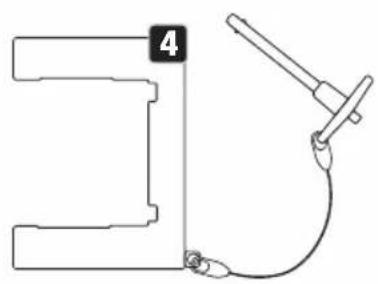
natural_image
Pure mechanical diagram showing a bracket and a clamping tool without any text or symbolsMONTAGE VERTICAL AU SOL
natural_image
Pure structural diagram with vertical and horizontal lines, no text or symbols present
natural_image
Pure mechanical diagram showing a curved pipe connected to a rectangular block with a vertical rod (no text or symbols)
natural_image
Pure technical line drawing of a U-shaped structure without any text, numbers, or symbols2

4
| BARRE TRANSVERSALE SUSPENDUE VERTICALEMENT | MONTAGE VERTICAL AU SOL |
FILTRE FROST
ÉCRAN ANTI-ÉBLOUISSEMENT
https://cdn-shop.adamhall.com/media/pdf/Manufacturers-Declarations-CAMEO_DE_EN_ES_FR.pdf
Directive CEM (2014/30/UE)
RoHS (2011/65/EU)
RED (2014/53/EU)
Foco PIXBAR IP65 G2 RGBW
▶ 1 foco PIXB08 IP65 G2 RGBWAUV
Stand Alone > Master/Alone > Master
Stand Alone -> Master/Alone -> Alone

MODO AUTÓNOMO. COLOR PRESET
MODO AUTÓNOMO CCT (Correlated Color Temperature)

MODO AUTÓNOMO. HSI (Hue - Saturation - Intensity)


TEMPORIZADOR

EDITAR PREAJUSTES DE USUARIO (Edit User Color)


EDITAR BUCLE (Edit Loop)

flowchart
graph TD
    A["Loop x"] --> B["Step"]
    B --> C["t-Step"]
    C --> D["t-Fade"]
    D --> E["Color Preset"]
natural_image
Technical line drawing of a mechanical assembly with rollers and mounting brackets (no text or symbols)natural_image
Pure structural diagram showing vertical and horizontal lines with no text, numbers, or symbols
natural_image
Pure mechanical diagram showing a bracket and connecting rod with a cable, no text or symbols presentMONTAJE VERTICAL EN EL SUELO
natural_image
Technical line drawing of a mechanical assembly with no visible text or symbols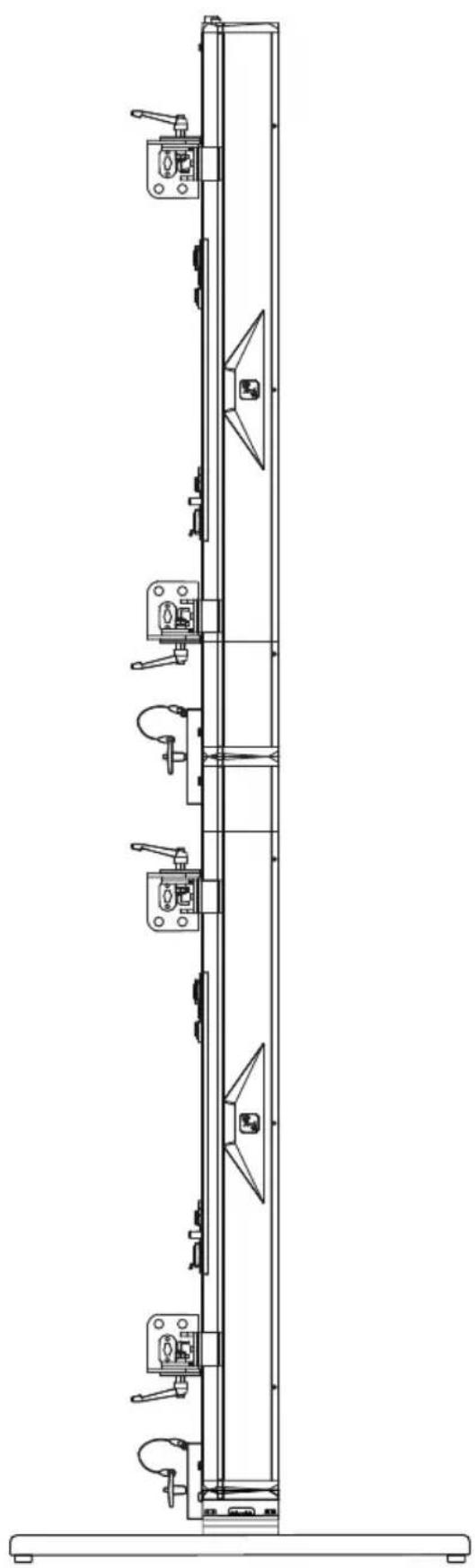
natural_image
Technical line drawing of a mechanical assembly with multiple vertical supports and mounting brackets (no text or symbols)FILTRO FROST
https://cdn-shop.adamhall.com/media/pdf/Manufacturers-Declarations-CAMEO_DE_EN_ES_FR.pdf
Stand Alone -> Master/Alone -> Master
Stand Alone -> Master/Alone -> Alone

WSTĘPNE USTAWIENIE KOLORU TRYB AUTONOMICZNY

TRYB PRACY STAND ALONE CCT (Correlated Color Temperature)

FUNKCJA TIMERA

EDYCJA USER-PRESETS (Edit User Color)
natural_image
Technical line drawing of a mechanical assembly with rollers and mounting brackets (no text or symbols)DO MONTAŻU NALEŻY UŻYĆ KRÓĆCA TV SPIN16
natural_image
Mechanical assembly diagram showing two steps of a valve or connector with arrows indicating motion (no text or symbols present)
natural_image
Technical line drawing of a mechanical assembly with no visible text or symbolsPIONOWY MONTAŻ WISZĄCY NA DRAŻKU
natural_image
Pure structural diagram of a vertical beam with diagonal supports and centerlines, no text or symbols present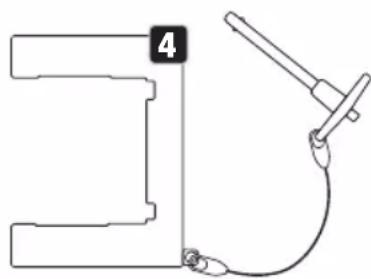
natural_image
Simple line drawing of a mechanical clamp and wire connection (no text or symbols)PIONOWY MONTAŻ PODŁOGOWY
natural_image
Technical line drawing of a mechanical assembly with multiple components and no visible text or symbols
natural_image
Technical line drawing of a mechanical assembly with multiple supports and mounting brackets (no text or symbols)FILTR FROST
OCHRONA PRZECIWODBLASKOWA
https://cdn-shop.adamhall.com/media/pdf/Manufacturers-Declarations-CAMEO DE EN ES FR.pdf
Stand Alone -> Master/Alone -> Master
Stand Alone -> Master/Alone -> Master


MODALITÀ STAND-ALONE COLOR PRESET

MODALITÀ STAND-ALONE CCT (Correlated Colour Temperature)
MODALITÀ STAND-ALONE HSI (Hue - Saturation - Intensity)

FUNZIONE TIMER

MODIFICARE I PRESET UTENTE (Edit User Color)


MODIFICARE LOOP (Edit Loop)


flowchart
graph TD
    A["Loop x"] --> B["Step"]
    B --> C["t-Step"]
    C --> D["t-Fade"]
    D --> E["Color Preset"]
natural_image
Technical line drawing of a mechanical assembly with rollers and mounting brackets (no text or symbols)PER IL MONTAGGIO, UTILIZZARE PERNI TV SPIN16
natural_image
Two-step diagram showing a mechanical assembly with arrows indicating motion, no text or symbols present.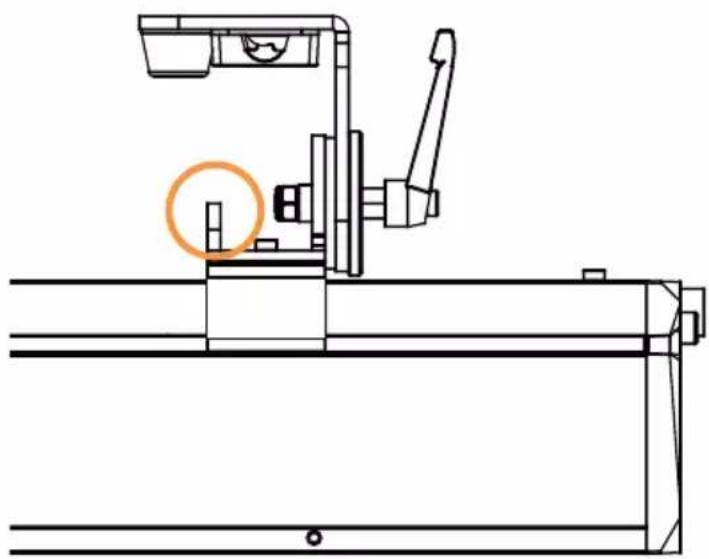
natural_image
Technical line drawing of a mechanical assembly with no visible text or symbolsMONTAGGIO VERTICALE A SOSPENSIONE SU BARRA TRASVERSALE
natural_image
Pure geometric diagram with intersecting lines and a central triangular shape, no text or symbols present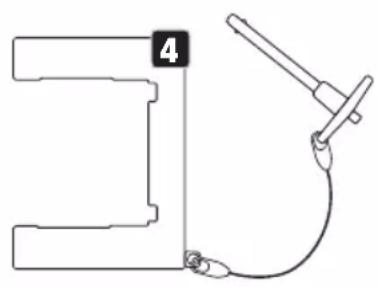
natural_image
Pure mechanical diagram showing a bracket with a labeled part and a connecting rod (no text or symbols)natural_image
Technical line drawing of a mechanical assembly with multiple components and mounting brackets (no text or symbols)natural_image
Technical line drawing of a mechanical assembly with multiple clamps and supports (no text or symbols)FILTRO FROST
| PB 400 IP G2 | |||||
| 1CHDim UC1 | |||||
| Channel Function Values | |||||
| 1(Color= StandAloneMode -Color Pre-set - UserColor 1) | Dimmer 000 - 255 0% to 100% | ||||
| PB 400 IP G2 | |||||
| 3CH Preset | |||||
| Channel Function Values | |||||
| 1 Dimmer 000 - 255 0% to 100% | |||||
| 2 Strobe Functions | 000 | 005 Open | |||
| 006 | 010 Closed | ||||
| 011 | 022 Ramp up/down slow to fast | ||||
| 023 | 033 Ramp up/down random slow to fast | ||||
| 034 | 045 Ramp up slow to fast | ||||
| 046 | 056 Ramp up random slow to fast | ||||
| 057 | 068 Ramp down slow to fast | ||||
| 069 | 079 Ramp down random slow to fast | ||||
| 080 | 102 Random Strobe effect slow to fast | ||||
| 103 | 127 | Strobe Break effect 5s to 1s (Short burst with break) | |||
| 128 | 250 Strobe slow to fast (<1Hz to 20Hz) | ||||
| 251 | 255 Open | ||||
| 3 Color Presets | 000 | 005 No function | |||
| 006 | 009 46 Dark Magenta | ||||
| 010 | 013 29 Plasa Red | ||||
| 014 | 017 26 Bright Red | ||||
| 018 | 021 127 Smokey Pink | ||||
| 022 | 025 36 Medium Pink | ||||
| 026 | 029 19 Fire | ||||
| 030 | 033 135 Deep Golden Amber | ||||
| 3 Color Presets | 034 - 037 778 Millennium Gold |
| 038 - 041 21 Gold Amber | |
| 042 - 045 157 Pink | |
| 046 - 049 110 Middle Rose | |
| 050 - 053 109 Light Salmon | |
| 054 - 057 35 Light Pink | |
| 058 - 061 134 Golden Amber | |
| 062 - 065 17 Surprise Peach | |
| 066 - 069 746 Brown | |
| 070 - 073 105 Orange | |
| 074 - 077 20 Medium Amber | |
| 078 - 081 768 Egg Yolk Yellow | |
| 082 - 085 15 Deep Straw | |
| 086 - 089 767 Nectarine | |
| 090 - 093 101 Yellow | |
| 094 - 097 100 Spring Yellow | |
| 098 - 101 88 Lime Green | |
| 102 - 105 121 LEE Green | |
| 106 - 109 738 Jas Green | |
| 110 - 113 89 Moss Green | |
| 114 - 117 139 Primary Green | |
| 118 - 121 124 Dark Green | |
| 122 - 125 323 Jade | |
| 126 - 129 354 Special Steel Blue | |
| 130 - 133 116 Medium Blue-Green | |
| 134 - 137 183 Moonlight Blue | |
| 138 - 141 132 Medium Blue | |
| 142 - 145 119 Dark Blue | |
| 146 - 149 716 Mikkel Blue | |
| 150 - 153 71 Tokyo Blue | |
| 154 - 157 181 Congo Blue | |
| 158 - 161 799 Special KH Lavender | |
| 162 - 165 707 Ultimate Violet | |
| 166 - 169 343 Special Medium Lavender | |
| 170 - 173 798 Chrysalis Pink | |
| 174 - 177 701 Provence | |
| 178 - 181 797 Deep Purple | |
| 182 - 185 48 Rose Purple | |
| 186 - 189 345 Fuchsia Pink | |
| 190 - 193 795 Magical Magenta | |
| 194 - 197 128 Bright Pink | |
| 3 Color Presets | 198 + 201 2 Rose Pink |
| 202 + 207 User Color 1 | |
| 208 + 213 User Color 2 | |
| 214 + 219 User Color 3 | |
| 220 + 225 User Color 4 | |
| 226 + 231 User Color 5 | |
| 232 + 237 User Color 6 | |
| 238 + 243 User Color 7 | |
| 244 + 249 User Color 8 | |
| 250 + 255 No function |
| PB 400 IP G2 | ||||||
| 4CH Di-rect 8Bit | 8CH Di-rect 16Bit | |||||
| Channel Channel Function Values | ||||||
| 1 1 Red | 000 - 255 | 0% to 100% | ||||
| 2 Red | fine 000 - 255 0% to 100% | |||||
| 2 3 Green | 000 - 255 | 0% to 100% | ||||
| 4 Green | fine 000 - 255 0% to 100% | |||||
| 3 5 | Blue 000 - 255 | 0% to 100% | ||||
| 6 | Blue fine | 000 - 255 | 0% to 100% | |||
| 4 7 | White 000 - 255 | 0% to 100% | ||||
| 8 | White fine | 000 - 255 | 0% to 100% | |||
| PB 400 IP G2 | |||||||
| 7CH Di-rect Ctrl | 10CH Di-rect CCT | ||||||
| Channel Channel Function Values Subgroup | |||||||
| 1 1 Dimmer | 00 - 255 | 0% to 100% | Dimmer | ||||
| 2 2 | Dimmer fine 000 - 255 | ||||||
| 3 | Strobe Functions | 000 - 005 Open | Ramp up/downslow to fast | Multi-functionalStrobe | |||
| 006 - 010 Closed | |||||||
| 011 - 022 | |||||||
| 023 - 033 | |||||||
| 034 - 045 | |||||||
| 046 - 056 | |||||||
| 3 Strobe Functions | 057 - 068 | Ramp down slow to fast | Multi-functional Strobe | |||
| 069 - 079 | Ramp down random slow to fast | |||||
| 080 - 102 | Random Strobe effect slow to fast | |||||
| 103 - 127 | Strobe Break effect 5s to 1s (Short burst with break) | |||||
| 128 - 250 | Strobe slow to fast (<1Hz to 20Hz) | |||||
| 251 - 255 Open | ||||||
| 3 4 Red 000 - 255 0% to 100% | Additive Color Mixing | |||||
| 4 5 Green 000 - 255 0% to 100% | ||||||
| 5 6 Blue 000 - 255 0% to 100% | ||||||
| 6 7 White 000 - 255 0% to 100% | ||||||
| 8 | Color Temperature (affects Color Mixing) | 000 - 005 Off | CCT | |||
| 006 - 006 Warm white | ||||||
| 007 - 046 | Warm white to 2700K | |||||
| 047 - 047 | Bulb White (2700K) | |||||
| 048 - 087 2700K to 3200K | ||||||
| 088 - 088 | Halogen White (3200K) | |||||
| 089 - 128 3200K to 4000K | ||||||
| 129 - 129 | Neutral White (4000K) | |||||
| 130 - 169 4000K to 5600K | ||||||
| 170 - 170 | Studio White (5600K) | |||||
| 171 - 210 5600K to 6500K | ||||||
| 211 - 211 | Daylight White (6500K) | |||||
| 212 - 251 | 6500K to Cold white | |||||
| 252 - 255 Cold white | ||||||
| 9 | Tint (affects Color Temperature) | 000 - 000 Off | Tint | |||
| 001 - 127 | Magenta -> Neutral | |||||
| 128 - 128 Neutral | ||||||
| 129 - 255 Neutral -> Green | ||||||
| 7 | 10 | Device settings(All settings are executed after holding value for 3 seconds)(please read remark 1*) | 000 - 024 No function | |||
| 025 - 025 | Record User Color 1 | User Colors | ||||
| 026 - 026 | Record User Color 2 | |||||
| 027 - 027 | Record User Color 3 | |||||
| 028 - 028 | Record User Color 4 | |||||
| 029 - 029 | Record User Color 5 | |||||
| 030 - 030 | Record User Color 6 | |||||
| 031 - 031 | Record User Color 7 | |||||
| 032 - 032 | Record User Color 8 | |||||
| 033 - 057 No function | ||||||
| 058 - 059 Pixel Mirroring Off | Pixel Mirroring | |||||
| 060 - 061 Pixel Mirroring On | ||||||
| 062 - 073 No function | ||||||
| 074 - 075 | Dimmer Response LED | Dimming | ||||
| 076 - 077 | Dimmer Response Halogen | |||||
| 078 - 081 No function | ||||||
| 082 - 083 DTW (Redshift) On | ||||||
| 084 - 085 DTW (Redshift) Off | ||||||
| 086 - 119 No function | ||||||
| 120 - 121 PWM 1 (650 Hz) | PWM Frequency | |||||
| 122 - 123 PWM 2 (1530 Hz) | ||||||
| 124 - 125 PWM 3 (3600 Hz) | ||||||
| 126 - 127 PWM 4 (12000 Hz) | ||||||
| 128 - 129 PWM 5 (18900 Hz) | ||||||
| 130 - 131 PWM 6 (25000 Hz) | ||||||
| 132 - 133 RAW | Color Calibration | |||||
| 134 - 135 Factory Calibration | ||||||
| 136 - 137 User Calibration | ||||||
| 138 - 139 Smart Calibration | ||||||
| 140 - 141 Display Always On | Display Functions | |||||
| 142 - 143 | Display Off after 20s | |||||
| 7 | 10 | Device settings(All settings are executed after holding value for 3 seconds)(please read remark 1*) | 144 - 163 No function | |||
| 164 - 165 | Dimmer Curve Linear | Dimmer Curve | ||||
| 166 - 167 | Dimmer Curve Exponential | |||||
| 168 - 169 | Dimmer Curve Logarithmic | |||||
| 170 - 171 | Dimmer Curve S-Curve | |||||
| 172 - 239 No function | ||||||
| 240 - 241 | Load Factory Defaults | Load Default | ||||
| 242 - 243 | Load Factory Defaults (without User Colours & Loops) | |||||
| 244 - 245 | Load User Default A | |||||
| 246 - 247 | Load User Default B | |||||
| 248 - 249 | Load User Default C | |||||
| 250 - 255 No function | ||||||
| PB 400 IP G2 | ||||||
| 11CH Effect Pattern | ||||||
| Channel Function Values Subgroup | ||||||
| 1 Dimmer 000 - 255 0% to 100% | Dimmer | |||||
| 2 Dimmer fine 000 - 255 0% to 100% | ||||||
| 3 Strobe Functions | 000 - 005 Open | Multi-functional Strobe | ||||
| 006 - 010 Closed | ||||||
| 011 - 022 | Ramp up/down slow to fast | |||||
| 023 - 033 | Ramp up/down random slow to fast | |||||
| 034 - 045 | Ramp up slow to fast | |||||
| 046 - 056 | Ramp up random slow to fast | |||||
| 3 Strobe Functions | 057 | 068 | Ramp down slow to fast | Multi-functional Strobe | |
| 069 | 079 | Ramp down ran-dom slow to fast | |||
| 080 | 102 | Random Strobe effect slow to fast | |||
| 103 | 127 | Strobe Break effect 5s to 1s (Short burst with break) | |||
| 128 | 250 | Strobe slow to fast (<1Hz to 20Hz) | |||
| 251 | 255 Open | ||||
| 4 Red | 000 - 255 0% to 100% | Additive Color Mixing | |||
| 5 Green | 000 - 255 0% to 100% | ||||
| 6 Blue | 000 - 255 0% to 100% | ||||
| 7 White | 000 - 255 0% to 100% | ||||
| 8 | Color Presets (override Color Mixing) | 000 | 005 No function | Color Presets | |
| 006 | 009 46 | Dark Magenta | |||
| 010 | 013 29 | Plasa Red | |||
| 014 | 017 26 | Bright Red | |||
| 018 | 021 127 | Smokey Pink | |||
| 022 | 025 36 | Medium Pink | |||
| 026 | 029 19 | Fire | |||
| 030 | 033 | 135 Deep Golden Amber | |||
| 034 | 037 | 778 Millennium Gold | |||
| 038 | 041 21 | Gold Amber | |||
| 042 | 045 157 | Pink | |||
| 046 | 049 110 | Middle Rose | |||
| 050 | 053 109 | Light Salmon | |||
| 054 | 057 35 | Light Pink | |||
| 058 | 061 134 | Golden Amber | |||
| 062 | 065 17 | Surprise Peach | |||
| 066 | 069 746 | Brown | |||
| 070 | 073 105 | Orange | |||
| 074 | 077 20 | Medium Amber | |||
| 078 | 081 | 768 Egg Yolk Yellow | |||
| 082 | 085 15 | Deep Straw | |||
| 086 | 089 767 | Nectarine | |||
| 090 | 093 101 | Yellow | |||
| 8 | Color Presets(override Color Mixing) | 094 - 097 100 | Spring Yellow | Color Presets |
| 098 - 101 88 | Lime Green | |||
| 102 - 105 121 | LEE Green | |||
| 106 - 109 738 | Jas Green | |||
| 110 - 113 89 | Moss Green | |||
| 114 - 117 | 139 Primary Green | |||
| 118 - 121 124 | Dark Green | |||
| 122 - 125 323 | Jade | |||
| 126 - 129 | 354 Special Steel Blue | |||
| 130 - 133 | 116 Medium Blue-Green | |||
| 134 - 137 | 183 Moonlight Blue | |||
| 138 - 141 132 | Medium Blue | |||
| 142 - 145 119 | Dark Blue | |||
| 146 - 149 716 | Mikkel Blue | |||
| 150 - 153 71 | Tokyo Blue | |||
| 154 - 157 181 | Congo Blue | |||
| 158 - 161 | 799 Special KH Lavender | |||
| 162 - 165 | 707 Ultimate Violet | |||
| 166 - 169 | 343 Special Medium Lavender | |||
| 170 - 173 798 | Chrysalis Pink | |||
| 174 - 177 701 | Provence | |||
| 178 - 181 797 | Deep Purple | |||
| 182 - 185 48 | Rose Purple | |||
| 186 - 189 345 | Fuchsia Pink | |||
| 190 - 193 | 795 Magical Magenta | |||
| 194 - 197 128 | Bright Pink | |||
| 198 - 201 2 | Rose Pink | |||
| 202 - 207 User | Color 1 | |||
| 208 - 213 User | Color 2 | |||
| 214 - 219 User | Color 3 | |||
| 220 - 225 User | Color 4 | |||
| 226 - 231 User | Color 5 | |||
| 232 - 237 User | Color 6 | |||
| 238 - 243 User | Color 7 |
| 8 | Color Presets(override Color Mixing) | 244 - 249 User Color 8 | Color Presets | ||
| 250 - 255 No function | |||||
| 9 Pattern Selection | 000 - 005 Off | Effect Pattern | |||
| 006 - 009 Pattern 1 | |||||
| 010 - 013 Pattern 2 | |||||
| 014 - 017 Pattern 3 | |||||
| 018 - 021 Pattern 4 | |||||
| 022 - 025 Pattern 5 | |||||
| 026 - 029 Pattern 6 | |||||
| 030 - 033 Pattern 7 | |||||
| 034 - 037 Pattern 8 | |||||
| 038 - 041 Pattern 9 | |||||
| 042 - 045 Pattern 10 | |||||
| 046 - 049 Pattern 11 | |||||
| 050 - 053 Pattern 12 | |||||
| 054 - 057 Pattern 13 | |||||
| 058 - 061 Pattern 14 | |||||
| 062 - 065 Pattern 15 | |||||
| 066 - 069 Pattern 16 | |||||
| 070 - 073 Pattern 17 | |||||
| 074 - 077 Pattern 18 | |||||
| 078 - 081 Pattern 19 | |||||
| 082 - 255 All LEDs on | |||||
| 10 Pattern Position & Speed | 000 - 005 | Effect Pattern Speed Stop | |||
| 006 - 127 | Effect Pattern Speed slow to fast | ||||
| 128 - 255 | Effect Pattern Speed fast to slow (backwards) | ||||
| 11 | Device settings (All settings are executed after holding value for 3 seconds)(please read remark 1*) | 000 - 024 No function | |||
| 025 - 025 | Record User Color 1 | User Colors | |||
| 026 - 026 | Record User Color 2 | ||||
| 027 - 027 | Record User Color 3 | ||||
| 028 - 028 | Record User Color 4 | ||||
| 029 - 029 | Record User Color 5 | ||||
| 030 - 030 | Record User Color 6 | ||||
| 11 | Device settings (All settings are executed after holding value for 3 seconds) (please read remark 1*) | 031 - 031 | Record User Color 7 | User Colors | |
| 032 - 032 | Record User Color 8 | ||||
| 033 - 057 No function | |||||
| 058 - 059 Pixel Mirroring Off | Pixel Mirroring | ||||
| 060 - 061 Pixel Mirroring On | |||||
| 062 - 073 No function | |||||
| 074 - 075 | Dimmer Response LED | Dimming | |||
| 076 - 077 | Dimmer Response Halogen | ||||
| 078 - 081 No function | |||||
| 082 - 083 DTW (Redshift) On | |||||
| 084 - 085 DTW (Redshift) Off | |||||
| 086 - 119 No function | |||||
| 120 - 121 PWM 1 (650 Hz) | PWM Frequency | ||||
| 122 - 123 PWM 2 (1530 Hz) | |||||
| 124 - 125 PWM 3 (3600 Hz) | |||||
| 126 - 127 PWM 4 (12000 Hz) | |||||
| 128 - 129 PWM 5 (18900 Hz) | |||||
| 130 - 131 PWM 6 (25000 Hz) | |||||
| 132 - 133 RAW | Color Calibration | ||||
| 134 - 135 Factory Calibration | |||||
| 136 - 137 User Calibration | |||||
| 138 - 139 Smart Calibration | |||||
| 140 - 141 Display Always On | Display Functions | ||||
| 142 - 143 | Display Off after 20s | ||||
| 144 - 163 No function | |||||
| 164 - 165 | Dimmer Curve Linear | Dimmer Curve | |||
| 166 - 167 | Dimmer Curve Exponential | ||||
| 168 - 169 | Dimmer Curve Logarithmic | ||||
| 170 - 171 | Dimmer Curve S-Curve | ||||
| 172 - 239 No function | |||||
| 240 - 241 | Load Factory Defaults | Load Default | |||
| 11 | Device settings (All settings are executed after holding value for 3 seconds) (please read remark 1*) | 242 | 243 | Load Factory Defaults (without User Colours & Loops) | Load Default |
| 244 | 245 | Load User Default A | |||
| 246 | 247 | Load User Default B | |||
| 248 | 249 | Load User Default C | |||
| 250 | 255 No function | ||||
| PB 400 IP G2 | |||||
| 16CHWash | |||||
| Channel Function Values Subgroup | |||||
| 1 Dimmer 000 - 255 0% to 100% | Dimmer | ||||
| 2 Dimmer fine 000 - 255 0% to 100% | |||||
| 3 Strobe Functions | 000 - 005 Open | Multi-functionalStrobe | |||
| 006 - 010 Closed | |||||
| 011 - 022 | Ramp up/downslow to fast | ||||
| 023 - 033 | Ramp up/downrandom slowto fast | ||||
| 034 - 045 | Ramp up slowdown to fast | ||||
| 046 - 056 | Ramp up randomslow to fast | ||||
| 057 - 068 | Ramp down slowdown to fast | ||||
| 069 - 079 | Ramp down ran-dom slow to fast | ||||
| 080 - 102 | Random Strobeeffect slow to fast | ||||
| 103 - 127 | Strobe Break effect 5s to 1s (Shortburst with break) | ||||
| 128 - 250 | Strobe slow to fast(<1Hz to 20Hz) | ||||
| 251 - 255 Open | |||||
| 4 Red 000 - 255 0% to 100% | Additive ColorMixing | ||||
| 5 Red fine 000 - 255 0% to 100% | Additive Color Mixing | ||||
| 6 Green 000 - 255 0% to 100% | |||||
| 7 Green fine 000 - 255 0% to 100% | |||||
| 8 Blue 000 - 255 0% to 100% | |||||
| 9 Blue fine 000 - 255 0% to 100% | |||||
| 10 White 000 - 255 0% to | 100% | ||||
| 11 White fine 000 - 255 | 0% to | 100% | |||
| 12 | Color Temperature (affects Color Mixing) | 000 - 005 Off | CCT | ||
| 006 - 006 Warm white | |||||
| 007 - 046 | Warm white to 2700K | ||||
| 047 - 047 Bulb White (2700K) | |||||
| 048 - 087 2700K to 3200K | |||||
| 088 - 088 | Halogen White (3200K) | ||||
| 089 - 128 3200K to 4000K | |||||
| 129 - 129 | Neutral White (4000K) | ||||
| 130 - 169 4000K to 5600K | |||||
| 170 - 170 | Studio White (5600K) | ||||
| 171 - 210 5600K to 6500K | |||||
| 211 - 211 | Daylight White (6500K) | ||||
| 212 - 251 | 6500K to Cold white | ||||
| 252 - 255 Cold white | |||||
| 13 | Tint (affects Color Temperature) | 000 - 000 Off | Tint | ||
| 001 - 127 | Magenta -> Neutral | ||||
| 128 - 128 neutral | |||||
| 129 - 255 Neutral -> Green | |||||
| 14 | Color Presets (override Color Mixing & Color Temperature) | 000 - 005 No function | Color | ||
| 006 - 009 46 Dark Magenta | |||||
| 010 - 013 29 Plasa Red | |||||
| 014 - 017 26 Bright Red | |||||
| 018 - 021 127 Smokey Pink | |||||
| 022 - 025 36 Medium Pink | |||||
| 026 - 029 19 Fire | |||||
| 030 - 033 | 135 Deep Golden Amber | ||||
| 14 | Color Presets (override Color Mixing & Color Temperature) | 034 - 037 | 778 Millennium Gold | Color | |
| 038 - 041 21 | Gold Amber | ||||
| 042 - 045 157 | Pink | ||||
| 046 - 049 110 | Middle Rose | ||||
| 050 - 053 109 | Light Salmon | ||||
| 054 - 057 35 | Light Pink | ||||
| 058 - 061 134 | Golden Amber | ||||
| 062 - 065 17 | Surprise Peach | ||||
| 066 - 069 746 | Brown | ||||
| 070 - 073 105 | Orange | ||||
| 074 - 077 20 | Medium Amber | ||||
| 078 - 081 | 768 Egg Yolk Yellow | ||||
| 082 - 085 15 | Deep Straw | ||||
| 086 - 089 767 | Nectarine | ||||
| 090 - 093 101 | Yellow | ||||
| 094 - 097 100 | Spring Yellow | ||||
| 098 - 101 88 | Lime Green | ||||
| 102 - 105 121 | LEE Green | ||||
| 106 - 109 738 | Jas Green | ||||
| 110 - 113 89 | Moss Green | ||||
| 114 - 117 139 | Primary Green | ||||
| 118 - 121 124 | Dark Green | ||||
| 122 - 125 323 | Jade | ||||
| 126 - 129 | 354 Special Steel Blue | ||||
| 130 - 133 | 116 Medium Blue-Green | ||||
| 134 - 137 | 183 Moonlight Blue | ||||
| 138 - 141 132 | Medium Blue | ||||
| 142 - 145 119 | Dark Blue | ||||
| 146 - 149 716 | Mikkel Blue | ||||
| 150 - 153 71 | Tokyo Blue | ||||
| 154 - 157 181 | Congo Blue | ||||
| 158 - 161 | 799 Special KH Lavender | ||||
| 162 - 165 707 | Ultimate Violet | ||||
| 166 - 169 | 343 Special Medium Lavender | ||||
| 170 - 173 798 | Chrysalis Pink | ||||
| 14 | Color Presets (override Color Mixing & Color Temperature) | 174 - 177 701 | Provence | Color | |
| 178 - 181 797 | Deep Purple | ||||
| 182 - 185 48 | Rose Purple | ||||
| 186 - 189 345 | Fuchsia Pink | ||||
| 190 - 193 | 795 Magical Magenta | ||||
| 194 - 197 128 | Bright Pink | ||||
| 198 - 201 2 | Rose Pink | ||||
| 202 - 207 User | Color 1 | ||||
| 208 - 213 User | Color 2 | ||||
| 214 - 219 User | Color 3 | ||||
| 220 - 225 User | Color 4 | ||||
| 226 - 231 User | Color 5 | ||||
| 232 - 237 User | Color 6 | ||||
| 238 - 243 User | Color 7 | ||||
| 244 - 249 User | Color 8 | ||||
| 250 - 255 No function | |||||
| 15 | Color Crossfade (affects CCT and Color Presets) | 000 - 005 0s (Off) | |||
| 006 - 105 | 0,1s - 10s (0,1s Steps) | ||||
| 106 - 214 | 11s - 119s (1s Steps) | ||||
| 215 - 244 | 2m - 4m50s (10s Steps) | ||||
| 245 - 255 | 5m - 15m (1m Steps) | ||||
| 16 | Device settings (All settings are executed after holding value for 3 seconds) (please read remark 1*) | 000 - 024 No function | |||
| 025 - 025 | Record User Color 1 | User Colors | |||
| 026 - 026 | Record User Color 2 | ||||
| 027 - 027 | Record User Color 3 | ||||
| 028 - 028 | Record User Color 4 | ||||
| 029 - 029 | Record User Color 5 | ||||
| 030 - 030 | Record User Color 6 | ||||
| 031 - 031 | Record User Color 7 | ||||
| 032 - 032 | Record User Color 8 | ||||
| 16 | Device settings (All settings are executed after holding value for 3 seconds) (please read remark 1*) | 033 - 057 No function | ||||
| 058 - 059 Pixel Mirroring Off | Pixel Mirroring | |||||
| 060 - 061 Pixel Mirroring On | ||||||
| 062 - 073 No function | ||||||
| 074 - 075 | Dimmer Response LED | Dimming | ||||
| 076 - 077 | Dimmer Response Halogen | |||||
| 078 - 081 No function | ||||||
| 082 - 083 DTW (Redshift) On | ||||||
| 084 - 085 DTW (Redshift) Off | ||||||
| 086 - 119 No function | ||||||
| 120 - 121 PWM 1 (650 Hz) | PWM Frequency | |||||
| 122 - 123 PWM 2 (1530 Hz) | ||||||
| 124 - 125 PWM 3 (3600 Hz) | ||||||
| 126 - 127 PWM 4 (12000 Hz) | ||||||
| 128 - 129 PWM 5 (18900 Hz) | ||||||
| 130 - 131 PWM 6 (25000 Hz) | ||||||
| 132 - 133 RAW | Color Calibration | |||||
| 134 - 135 Factory Calibration | ||||||
| 136 - 137 User Calibration | ||||||
| 138 - 139 Smart Calibration | ||||||
| 140 - 141 Display Always On | Display Functions | |||||
| 142 - 143 | Display Off after 20s | |||||
| 144 - 163 No function | ||||||
| 164 - 165 | Dimmer Curve Linear | Dimmer Curve | ||||
| 166 - 167 | Dimmer Curve Exponential | |||||
| 168 - 169 | Dimmer Curve Logarithmic | |||||
| 170 - 171 | Dimmer Curve S-Curve | |||||
| 172 - 239 No function | ||||||
| 240 - 241 | Load Factory Defaults | Load Default242 - 243 | ||||
| Load Factory Defaults (without User Colours & Loops) | ||||||
| 244 - 245 | Load User Default A | |||||
| 16 | Device settings (All settings are executed after holding value for 3 seconds) (please read remark 1*) | 246 - 247 | Load User Default B | Load Default | ||
| 248 - 249 | Load User Default C | |||||
| 250 - 255 No function | ||||||
| PB 400 IP G2 | ||||||
| 36CH Pattern | ||||||
| Channel Function Values Subgroup | ||||||
| 1 Dimmer 000 - 255 0% to 100% | Dimmer | |||||
| 2 Dimmer fine 000 - 255 0% to 100% | ||||||
| 3 Strobe Functions | 000 - 005 Open | Multi-functional Strobe | ||||
| 006 - 010 Closed | ||||||
| 011 - 022 | Ramp up/down slow to fast | |||||
| 023 - 033 | Ramp up/down random slow to fast | |||||
| 034 - 045 | Ramp up slow to fast | |||||
| 046 - 056 | Ramp up random slow to fast | |||||
| 057 - 068 | Ramp down slow to fast | |||||
| 069 - 079 | Ramp down random slow to fast | |||||
| 080 - 102 | Random Strobe effect slow to fast | |||||
| 103 - 127 | Strobe Break effect 5s to 1s (Short burst with break) | |||||
| 128 - 250 | Strobe slow to fast (<1Hz to 20Hz) | |||||
| 251 - 255 Open | ||||||
| 4 Red 000 - 255 | 0% to 100% | Additive Color Mixing | ||||
| 5 Red fine 000 - 255 | ||||||
| 6 | Green | 000 - 255 | 0% to 100% | |||
| 7 | Green fine 000 - 255 | |||||
| 8 | Blue | 000 - 255 | 0% to 100% | |||
| 9 | Blue fine | 000 - 255 | ||||
| 10 White 000 - 255 | 0% to 100% | Additive Color Mixing | ||||
| 11 White fine 000 - 255 | ||||||
| 12 | Color Temperature (affects Color Mixing) | 000 - 005 Off | CCT | |||
| 006 - 006 Warm white | ||||||
| 007 - 046 | Warm white to 2700K | |||||
| 047 - 047 Bulb White (2700K) | ||||||
| 048 - 087 2700K to 3200K | ||||||
| 088 - 088 | Halogen White (3200K) | |||||
| 089 - 128 3200K to 4000K | ||||||
| 129 - 129 | Neutral White (4000K) | |||||
| 130 - 169 4000K to 5600K | ||||||
| 170 - 170 | Studio White (5600K) | |||||
| 171 - 210 5600K to 6500K | ||||||
| 211 - 211 | Daylight White (6500K) | |||||
| 212 - 251 | 6500K to Cold white | |||||
| 252 - 255 Cold white | ||||||
| 13 | Tint (affects Color Temperature) | 000 - 000 Off | Tint | |||
| 001 - 127 | Magenta -> Neutral | |||||
| 128 - 128 neutral | ||||||
| 129 - 255 Neutral -> Green | ||||||
| 14 | Color Presets (override Color Mixing & Color Temperature) | 000 - 005 No function | Color | |||
| 006 - 009 46 Dark Magenta | ||||||
| 010 - 013 29 Plasa Red | ||||||
| 014 - 017 26 Bright Red | ||||||
| 018 - 021 127 Smokey Pink | ||||||
| 022 - 025 36 Medium Pink | ||||||
| 026 - 029 19 Fire | ||||||
| 030 - 033 | 135 Deep Golden Amber | |||||
| 034 - 037 | 778 Millennium Gold | |||||
| 038 - 041 21 Gold Amber | ||||||
| 042 - 045 157 Pink | ||||||
| 046 - 049 110 Middle Rose | ||||||
| 050 - 053 109 Light Salmon | ||||||
| 14 | Color Presets (override Color Mixing & Color Temperature) | 054 - 057 35 Light Pink |
| 058 - 061 134 Golden Amber | ||
| 062 - 065 17 Surprise Peach | ||
| 066 - 069 746 Brown | ||
| 070 - 073 105 Orange | ||
| 074 - 077 20 Medium Amber | ||
| 078 - 081 768 Egg Yolk Yellow | ||
| 082 - 085 15 Deep Straw | ||
| 086 - 089 767 Nectarine | ||
| 090 - 093 101 Yellow | ||
| 094 - 097 100 Spring Yellow | ||
| 098 - 101 88 Lime Green | ||
| 102 - 105 121 LEE Green | ||
| 106 - 109 738 Jas Green | ||
| 110 - 113 89 Moss Green | ||
| 114 - 117 139 Primary Green | ||
| 118 - 121 124 Dark Green | ||
| 122 - 125 323 Jade | ||
| 126 - 129 354 Special Steel Blue | ||
| 130 - 133 116 Medium Blue-Green | ||
| 134 - 137 183 Moonlight Blue | ||
| 138 - 141 132 Medium Blue | ||
| 142 - 145 119 Dark Blue | ||
| 146 - 149 716 Mikkel Blue | ||
| 150 - 153 71 Tokyo Blue | ||
| 154 - 157 181 Congo Blue | ||
| 158 - 161 799 Special KH Lavender | ||
| 162 - 165 707 Ultimate Violet | ||
| 166 - 169 343 Special Medium Lavender | ||
| 170 - 173 798 Chrysalis Pink | ||
| 174 - 177 701 Provence | ||
| 178 - 181 797 Deep Purple | ||
| 182 - 185 48 Rose Purple | ||
| 186 - 189 345 Fuchsia Pink | ||
| 190 - 193 795 Magical Magenta | ||
| 194 - 197 128 Bright Pink |
| 14 | Color Presets (override Color Mixing & Color Temperature) | 198 - 201 2 Rose Pink | Color | ||
| 202 - 207 User Color 1 | |||||
| 208 - 213 User Color 2 | |||||
| 214 - 219 User Color 3 | |||||
| 220 - 225 User Color 4 | |||||
| 226 - 231 User Color 5 | |||||
| 232 - 237 User Color 6 | |||||
| 238 - 243 User Color 7 | |||||
| 244 - 249 User Color 8 | |||||
| 250 - 255 No function | |||||
| 15 | Color Crossfade (affects CCT and Color Presets) | 000 - 005 0s (Off) | |||
| 006 - 105 | 0,1s - 10s(0,1s Steps) | ||||
| 106 - 214 | 11s - 119s(1s Steps) | ||||
| 215 - 244 | 2m - 4m50s(10s Steps) | ||||
| 245 - 255 | 5m - 15m(1m Steps) | ||||
| 16 Pattern Folder | 000 - 005 Off | Pattern | |||
| 006 - 064 Static Pattern 1 | |||||
| 065 - 128 Static Pattern 2 | |||||
| 129 - 192 Moving Pattern 1 | |||||
| 193 - 255 Moving Pattern 2 | |||||
| 17 Pattern Selection | 000 - 005 Off | ||||
| 006 - 009 1 | |||||
| 010 - 013 2 | |||||
| 014 - 017 3 | |||||
| 018 - 021 4 | |||||
| 022 - 025 5 | |||||
| 026 - 029 6 | |||||
| 030 - 033 7 | |||||
| 034 - 037 8 | |||||
| 038 - 041 9 | |||||
| 042 - 045 10 | |||||
| 046 - 229 11 to 49 | |||||
| 230 - 255 50 | |||||
| 18 Pattern Position & Speed | 000 - 005 | Effect PatternSpeed Stop | |||
| 006 - 127 | Effect PatternSpeed slow to fast | ||||
| 18 Pattern Position & Speed 128 - 255 | Effect Pattern Speed fast to slow (backwards) | Pattern | |||
| 19 Pattern Transition | 000 - 005 0s (Off) | ||||
| 006 - 255 0,1s to 5s | |||||
| 20 Pattern Fade/Wake Effect | 000 - 005 Off | ||||
| 006 - 127 Fade 0% to 100% | |||||
| 128 - 255 Wake 0% to 100% | |||||
| 21 Background Dimmer 000 - 255 0% to 100% | Background Dimmer | ||||
| 22 Background Dimmer fine 000 - 255 0% to 100% | |||||
| 23 Background Strobe | 000 - 005 Open | Background Strobe | |||
| 006 - 010 Closed | |||||
| 011 - 022 | Ramp up/down slow to fast | ||||
| 023 - 033 | Ramp up/down random slow to fast | ||||
| 034 - 045 | Ramp up slow to fast | ||||
| 046 - 056 | Ramp up random slow to fast | ||||
| 057 - 068 | Ramp down slow to fast | ||||
| 069 - 079 | Ramp down random slow to fast | ||||
| 080 - 102 | Random Strobe effect slow to fast | ||||
| 103 - 127 | Strobe Break effect 5s to 1s (Short burst with break) | ||||
| 128 - 250 | Strobe slow to fast (<1Hz to 20Hz) | ||||
| 251 - 255 Open | |||||
| 24 Background Red 000 - 255 | 0% to 100% | Background Color Mixing | |||
| 25 Background Red fine | 000 - 255 | ||||
| 26 Background Green 000 - 255 | 0% to 100% | ||||
| 27 Background Green fine | 000 - 255 | ||||
| 28 Background Blue | 000 - 255 | 0% to 100% | |||
| 29 Background Blue fine | 000 - 255 | ||||
| 30 Background White | 000 - 255 | 0% to 100% | |||
| 31 Background White fine | 000 - 255 | ||||
| 32 | Background Color Temperature (affects Background Color Mixing) | 000 - 005 Off | Background Color Mixing | |
| 006 - 006 Warm white | ||||
| 007 - 046 | Warm white to 2700K | |||
| 047 - 047 Bulb White (2700K) | ||||
| 048 - 087 2700K to 3200K | ||||
| 088 - 088 | Halogen White (3200K) | |||
| 089 - 128 3200K to 4000K | ||||
| 129 - 129 | Neutral White (4000K) | |||
| 130 - 169 4000K to 5600K | ||||
| 170 - 170 | Studio White (5600K) | |||
| 171 - 210 5600K to 6500K | ||||
| 211 - 211 | Daylight White (6500K) | |||
| 212 - 251 | 6500K to Cold white | |||
| 252 - 255 Cold white | ||||
| 33 | Background Tint (affects Back-ground Color Temperature) | 000 - 000 Off | ||
| 001 - 127 | Magenta -> Neutral | |||
| 128 - 128 neutral | ||||
| 129 - 255 Neutral -> Green | ||||
| 34 | Background Color Presets (override Background Color Mixing & Color Temperature) | 000 - 005 No function | ||
| 006 - 009 46 Dark Magenta | ||||
| 010 - 013 29 Plasa Red | ||||
| 014 - 017 26 Bright Red | ||||
| 018 - 021 127 Smokey Pink | ||||
| 022 - 025 36 Medium Pink | ||||
| 026 - 029 19 Fire | ||||
| 030 - 033 | 135 Deep Golden Amber | |||
| 034 - 037 | 778 Millennium Gold | |||
| 038 - 041 21 Gold Amber | ||||
| 042 - 045 157 Pink | ||||
| 046 - 049 110 Middle Rose | ||||
| 050 - 053 109 Light Salmon | ||||
| 054 - 057 35 Light Pink | ||||
| 058 - 061 134 Golden Amber | ||||
| 34 | Background Color Presets (override Background Color Mixing & Color Temperature) | 062 - 065 17 Surprise Peach |
| 066 - 069 746 Brown | ||
| 070 - 073 105 Orange | ||
| 074 - 077 20 Medium Amber | ||
| 078 - 081 768 Egg Yolk Yellow | ||
| 082 - 085 15 Deep Straw | ||
| 086 - 089 767 Nectarine | ||
| 090 - 093 101 Yellow | ||
| 094 - 097 100 Spring Yellow | ||
| 098 - 101 88 Lime Green | ||
| 102 - 105 121 LEE Green | ||
| 106 - 109 738 Jas Green | ||
| 110 - 113 89 Moss Green | ||
| 114 - 117 139 Primary Green | ||
| 118 - 121 124 Dark Green | ||
| 122 - 125 323 Jade | ||
| 126 - 129 354 Special Steel Blue | ||
| 130 - 133 116 Medium Blue-Green | ||
| 134 - 137 183 Moonlight Blue | ||
| 138 - 141 132 Medium Blue | ||
| 142 - 145 119 Dark Blue | ||
| 146 - 149 716 Mikkel Blue | ||
| 150 - 153 71 Tokyo Blue | ||
| 154 - 157 181 Congo Blue | ||
| 158 - 161 799 Special KH Lavender | ||
| 162 - 165 707 Ultimate Violet | ||
| 166 - 169 343 Special Medium Lavender | ||
| 170 - 173 798 Chrysalis Pink | ||
| 174 - 177 701 Provence | ||
| 178 - 181 797 Deep Purple | ||
| 182 - 185 48 Rose Purple | ||
| 186 - 189 345 Fuchsia Pink | ||
| 190 - 193 795 Magical Magenta | ||
| 194 - 197 128 Bright Pink | ||
| 198 - 201 2 Rose Pink | ||
| 202 - 207 User Color 1 |
| 34 | Background Color Presets(override Background Color Mixing & Color Temperature) | 208 - 213 User Color 2 | BackgroundColor Mixing | ||
| 214 - 219 User Color 3 | |||||
| 220 - 225 User Color 4 | |||||
| 226 - 231 User Color 5 | |||||
| 232 - 237 User Color 6 | |||||
| 238 - 243 User Color 7 | |||||
| 244 - 249 User Color 8 | |||||
| 250 - 255 No function | |||||
| 35 | Background Color Crossfade(affects Background CCT andColor Presets) | 000 - 005 0s (Off) | |||
| 006 - 105 | 0,1s - 10s(0,1s Steps) | ||||
| 106 - 214 | 11s - 119s(1s Steps) | ||||
| 215 - 244 | 2m - 4m50s(10s Steps) | ||||
| 245 - 255 | 5m - 15m(1m Steps) | ||||
| 36 | Device settings (All settingsare executed after holdingvalue for 3 seconds)(please read remark 1*) | 000 - 024 No function | |||
| 025 - 025 | Record UserColor 1 | User Colors | |||
| 026 - 026 | Record UserColor 2 | ||||
| 027 - 027 | Record UserColor 3 | ||||
| 028 - 028 | Record UserColor 4 | ||||
| 029 - 029 | Record UserColor 5 | ||||
| 030 - 030 | Record UserColor 6 | ||||
| 031 - 031 | Record UserColor 7 | ||||
| 032 - 032 | Record UserColor 8 | ||||
| 033 - 057 No function | |||||
| 058 - 059 Pixel Mirroring Off | Pixel Mirroring | ||||
| 060 - 061 Pixel Mirroring On | |||||
| 062 - 073 No function | |||||
| 074 - 075 | Dimmer ResponseLED | Dimming | |||
| 076 - 077 | Dimmer ResponseHalogen | ||||
| 078 - 081 No function | |||||
| 36 | Device settings (All settings are executed after holding value for 3 seconds) (please read remark 1*) | 082 - 083 DTW (Redshift) On | Dimming | ||
| 084 - 085 DTW (Redshift) Off | |||||
| 086 - 119 No function | |||||
| 120 - 121 PWM 1 (650 Hz) | PWM Frequency | ||||
| 122 - 123 PWM 2 (1530 Hz) | |||||
| 124 - 125 PWM 3 (3600 Hz) | |||||
| 126 - 127 PWM 4 (12000 Hz) | |||||
| 128 - 129 PWM 5 (18900 Hz) | |||||
| 130 - 131 PWM 6 (25000 Hz) | |||||
| 132 - 133 RAW | Color Calibration | ||||
| 134 - 135 Factory Calibration | |||||
| 136 - 137 User Calibration | |||||
| 138 - 139 Smart Calibration | |||||
| 140 - 141 Display Always On | Display Functions | ||||
| 142 - 143 | Display Off after 20s | ||||
| 144 - 163 No function | |||||
| 164 - 165 | Dimmer Curve Linear | Dimmer Curve | |||
| 166 - 167 | Dimmer Curve Exponential | ||||
| 168 - 169 | Dimmer Curve Logarithmic | ||||
| 170 - 171 | Dimmer Curve S-Curve | ||||
| 172 - 239 No function | |||||
| 240 - 241 | Load Factory Defaults | Load Default | |||
| 242 - 243 | Load Factory Defaults (without User Colours & Loops) | ||||
| 244 - 245 | Load User Default A | ||||
| 246 - 247 | Load User Default B | ||||
| 248 - 249 | Load User Default C | ||||
| 250 - 255 No function | |||||
| PB 400 IP G2 | |||||
| 48CH Pix-el RGB | |||||
| Channel Function Values Subgroup | |||||
| 1 Red | 1 000 - 255 0% to | 100% | Color Mixing Pixel 12 Gre | ||
| 3 Blue | 1 000 - 255 0% to | 100% | |||
| 4 Red | 2 000 - 255 0% to | 100% | Color Mixing Pixel 25 Gre | ||
| 6 Blue | 2 000 - 255 0% to | 100% | |||
| 7 Red | 3 000 - 255 0% to | 100% | Color Mixing Pixel 38 Gre | ||
| 9 Blue | 3 000 - 255 0% to | 100% | |||
| 10 Red | 4 000 - 255 0% to | 100% | Color Mixing Pixel 411 | ||
| 12 | Blue 4 000 - | 255 0% to 100% | |||
| 13 Red | 5 000 - 255 0% to | 100% | Color Mixing Pixel 514 | ||
| 15 | Blue 5 000 - | 255 0% to 100% | |||
| 16 Red | 6 000 - 255 0% to | 100% | Color Mixing Pixel 617 | ||
| 18 | Blue 6 000 - | 255 0% to 100% | |||
| 19 Red | 7 000 - 255 0% to | 100% | Color Mixing Pixel 720 | ||
| 21 | Blue 7 000 - | 255 0% to 100% | |||
| 22 Red | 8 000 - 255 0% to | 100% | Color Mixing Pixel 823 | ||
| 24 | Blue 8 000 - | 255 0% to 100% | |||
| 25 Red | 9 000 - 255 0% to | 100% | Color Mixing Pixel 926 | ||
| 27 | Blue 9 000 - | 255 0% to 100% | |||
| 28 | Red 10 | 000 - 255 0% to 100% | Color Mixing Pixel 10 | ||
| 29 | Green 10 | 000 - 255 0% to 100% | |||
| 30 | Blue 10 | 000 - 255 0% to 100% | |||
| 31 | Red 11 | 000 - 255 0% to 100% | Color Mixing Pixel 11 | ||
| 32 | Green 11 | 000 - 255 0% to 100% | |||
| 33 | Blue 11 | 000 - 255 0% to 100% | |||
| 34 | Red 12 | 000 - 255 0% to 100% | Color Mixing Pixel 12 | ||
| 35 | Green 12 | 000 - 255 0% to 100% | |||
| 36 | Blue 12 | 000 - 255 0% to 100% | |||
| 37 Red | 13 000 - 255 0% to 100% | Color Mixing Pixel 1338 Green 13 00 | |||
| 39 Blue | 13 000 - 255 0% to 100% | ||||
| 40 Red | 14 000 - 255 0% to 100% | Color Mixing Pixel 1441 Green 14 00 | |||
| 42 Blue | 14 000 - 255 0% to 100% | ||||
| 43 Red | 15 000 - 255 0% to 100% | Color Mixing Pixel 1544 Green 15 00 | |||
| 45 Blue | 15 000 - 255 0% to 100% | ||||
| 46 Red | 16 000 - 255 0% to 100% | Color Mixing Pixel 1647 Green 16 00 | |||
| 48 Blue | 16 000 - 255 0% to 100% |
| PB 400 IP G2 | ||||||
| 64CH Pix-el RGBW | 68CHPixel Dim | |||||
| Channel Channel Function Subgroup | ||||||
| 1 | Dimmer | 000 | 255 | 0% to 100% | Dimmer | |
| 2 Dimmer fine 000 - 255 | 0% to 100% | |||||
| 3 | Strobe Functions | 000 | 005 | Open | Multifunctional Strobe | |
| 006 | 010 | Closed | ||||
| 011 | 022 | Ramp up/down slow to fast | ||||
| 023 | 033 | Ramp up/down random slow to fast | ||||
| 034 | 045 | Ramp up slow to fast | ||||
| 046 | 056 | Ramp up random slow to fast | ||||
| 057 | 068 | Ramp down slow to fast | ||||
| 069 | 079 | Ramp down random slow to fast | ||||
| 080 | 102 | Random Strobe effect slow to fast | ||||
| 103 | 127 | Strobe Break effect 5s to 1s (Short burst with break) | ||||
| 128 | 250 | Strobe slow to fast (<1Hz to 20Hz) | ||||
| 251 | 255 | Open | ||||
| 4 | Device settings (All settings are executed after holding value for 3 seconds) (please read remark 1*) | 000 - 024 No function | ||
| 025 - 025 Record User Color 1 | User Colors | |||
| 026 - 026 Record User Color 2 | ||||
| 027 - 027 Record User Color 3 | ||||
| 028 - 028 Record User Color 4 | ||||
| 029 - 029 Record User Color 5 | ||||
| 030 - 030 Record User Color 6 | ||||
| 031 - 031 Record User Color 7 | ||||
| 032 - 032 Record User Color 8 | ||||
| 033 - 057 No function | ||||
| 058 - 059 Pixel Mirroring Off | Pixel Mirroring | |||
| 060 - 061 Pixel Mirroring On | ||||
| 062 - 073 No function | ||||
| 074 - 075 Dimmer Response LED | Dimming | |||
| 076 - 077 Dimmer Response Halogen | ||||
| 078 - 081 No function | ||||
| 082 - 083 DTW (Redshift) On | ||||
| 084 - 085 DTW (Redshift) Off | ||||
| 086 - 119 No function | ||||
| 120 - 121 PWM 1 (650 Hz) | PWM Frequency | |||
| 122 - 123 PWM 2 (1530 Hz) | ||||
| 124 - 125 PWM 3 (3600 Hz) | ||||
| 126 - 127 PWM 4 (12000 Hz) | ||||
| 128 - 129 PWM 5 (18900 Hz) | ||||
| 130 - 131 PWM 6 (25000 Hz) | ||||
| 132 - 133 RAW | Color Calibration | |||
| 134 - 135 Factory Calibration | ||||
| 136 - 137 User Calibration | ||||
| 138 - 139 Smart Calibration | ||||
| 140 - 141 Display Always On | Display Functions | |||
| 142 - 143 Display Off after 20s | ||||
| 144 - 163 No function | ||||
| 164 - 165 Dimmer Curve Linear | Dimmer Curve | |||
| 166 - 167 Dimmer Curve Exponential | ||||
| 168 - 169 Dimmer Curve Logarithmic | ||||
| 170 - 171 Dimmer Curve S-Curve | ||||
| 172 - 239 No function | ||||
| 240 - 241 Load Factory Defaults Load Default | ||||
| 4 | Device settings (All settings are executed after holding value for 3 seconds) (please read remark 1*) | 242 | 243 | Load Factory Defaults (without User Colours & Loops) | Load Default | |
| 244 | 245 Load User Default A | |||||
| 246 | 247 Load User Default B | |||||
| 248 | 249 Load User Default C | |||||
| 250 | 255 No function | |||||
| 1 5 Red 1 000 - 255 | 0% to 100% | Color Mixing Pixel 1 | ||||
| 2 6 Green 1 000 - 255 | 0% to 100% | |||||
| 3 7 Blue 1 000 - 255 | 0% to 100% | |||||
| 4 8 White 1 000 - 255 | 0% to 100% | |||||
| 5 9 Red 2 000 - 255 | 0% to 100% | Color Mixing Pixel 2 | ||||
| 6 10 Green 2 000 - 255 | 0% to 100% | |||||
| 7 11 Blue 2 000 - 255 | 0% to 100% | |||||
| 8 12 | White 2 000 - 255 | 0% to 100% | ||||
| 9 13 | Red 3 000 - 255 | 0% to 100% | Color Mixing Pixel 3 | |||
| 10 | 14 Green 3 000 - 255 | 0% to 100% | ||||
| 11 | 15 Blue 3 000 - 255 | 0% to 100% | ||||
| 12 | 16 | White 3 000 - 255 | 0% to 100% | |||
| 13 | 17 | Red 4 000 - 255 | 0% to 100% | Color Mixing Pixel 4 | ||
| 14 | 18 Green 4 000 - 255 | 0% to 100% | ||||
| 15 | 19 Blue 4 000 - 255 | 0% to 100% | ||||
| 16 | 20 | White 4 000 - 255 | 0% to 100% | |||
| 17 | 21 | Red 5 000 - 255 | 0% to 100% | Color Mixing Pixel 5 | ||
| 18 | 22 Green 5 000 - 255 | 0% to 100% | ||||
| 19 | 23 Blue 5 000 - 255 | 0% to 100% | ||||
| 20 | 24 | White 5 000 - 255 | 0% to 100% | |||
| 21 | 25 | Red 6 000 - 255 | 0% to 100% | Color Mixing Pixel 6 | ||
| 22 | 26 Green 6 000 - 255 | 0% to 100% | ||||
| 23 | 27 Blue 6 000 - 255 | 0% to 100% | ||||
| 24 | 28 | White 6 000 - 255 | 0% to 100% | |||
| 25 | 29 | Red 7 000 - 255 | 0% to 100% | Color Mixing Pixel 7 | ||
| 26 | 30 Green 7 000 - 255 | 0% to 100% | ||||
| 27 | 31 Blue 7 000 - 255 | 0% to 100% | ||||
| 28 | 32 | White 7 000 - 255 | 0% to 100% | |||
| 29 | 33 | Red 8 000 - 255 | 0% to 100% | Color Mixing Pixel 8 | ||
| 30 | 34 Green 8 000 - 255 | 0% to 100% | ||||
| 31 | 35 Blue 8 000 - 255 | 0% to 100% | ||||
| 32 | 36 | White 8 000 - 255 | 0% to 100% |
| 33 37 Red 9 000 - 255 0% to 100% | Color MixingPixel 9 | ||||||
| 34 38 Green 9 000 - 255 0% to 100% | |||||||
| 35 39 Blue 9 000 - 255 0% to 100% | |||||||
| 36 40 White 9 000 - 255 0% to 100% | |||||||
| 37 41 Red 10 000 - 255 0% to 100% | Color MixingPixel 10 | ||||||
| 38 42 Green 10 000 - 255 0% to 100% | |||||||
| 39 43 Blue 10 000 - 255 0% to 100% | |||||||
| 40 44 White 10 000 - 255 0% to 100% | |||||||
| 41 45 Red 11 000 - 255 0% to 100% | Color MixingPixel 11 | ||||||
| 42 46 Green 11 000 - 255 0% to 100% | |||||||
| 43 47 Blue 11 000 - 255 0% to 100% | |||||||
| 44 48 White 11 000 - 255 0% to 100% | |||||||
| 45 49 Red 12 000 - 255 0% to 100% | Color MixingPixel 12 | ||||||
| 46 50 Green 12 000 - 255 0% to 100% | |||||||
| 47 51 Blue 12 000 - 255 0% to 100% | |||||||
| 48 52 White 12 000 - 255 0% to 100% | |||||||
| 49 53 Red 13 000 - 255 0% to 100% | Color MixingPixel 13 | ||||||
| 50 54 Green 13 000 - 255 0% to 100% | |||||||
| 51 55 Blue 13 000 - 255 0% to 100% | |||||||
| 52 56 White 13 000 - 255 0% to 100% | |||||||
| 53 57 Red 14 000 - 255 0% to 100% | Color MixingPixel 14 | ||||||
| 54 58 Green 14 000 - 255 0% to 100% | |||||||
| 55 59 Blue 14 000 - 255 0% to 100% | |||||||
| 56 60 White 14 000 - 255 0% to 100% | |||||||
| 57 61 Red 15 000 - 255 0% to 100% | Color MixingPixel 15 | ||||||
| 58 62 Green 15 000 - 255 0% to 100% | |||||||
| 59 63 Blue 15 000 - 255 0% to 100% | |||||||
| 60 64 White 15 000 - 255 0% to 100% | |||||||
| 61 65 Red 16 000 - 255 0% to 100% | Color MixingPixel 16 | ||||||
| 62 66 Green 16 000 - 255 0% to 100% | |||||||
| 63 67 Blue 16 000 - 255 0% to 100% | |||||||
| 64 68 White 16 000 - 255 0% to 100% | |||||||
| PB 400 IP G2 | |||||||
| D2CH DimUC1 | D4CH Preset | D7CH Direct | |||||
| Channel Channel Function Values | |||||||
| 1Color = Stand Alone Mode - Color Preset - User Color 1 | 1 1 Dimmer 000 - 255 0% to 100% | 000 | 005 Open | ||||
| 2 | 2 | Strobe Functions | 006 | 010 Closed | |||
| 011 | 022 Ramp up/down slow to fast | ||||||
| 023 | 033 | Ramp up/down random slow to fast | |||||
| 034 | 045 Ramp up slow to fast | ||||||
| 046 | 056 | Ramp up random slow to fast | |||||
| 057 | 068 Ramp down slow to fast | ||||||
| 069 | 079 | Ramp down random slow to fast | |||||
| 080 | 102 | Random Strobe effect slow to fast | |||||
| 103 | 127 | Strobe Break effect 5s to 1s (Short burst with break) | |||||
| 128 | 250 | Strobe slow to fast (<1Hz to 20Hz) | |||||
| 251 | 255 Open | ||||||
| 3 Red | 000 - 255 0% to 100% | ||||||
| 4 | Green | 000 | 255 0% to 100% | ||||
| 5 | Blue | 000 | 255 0% to 100% | ||||
| 6 White | 000 - 255 | 0% to 100% | |||||
| 3 | Color Presets (over-ride Color Mixing) | 000 | 005 | No function | |||
| 006 | 009 | 46 Dark Magenta | |||||
| 010 | 013 | 29 Plasa Red | |||||
| 014 | 017 | 26 Bright Red | |||||
| 018 | 021 | 127 Smokey Pink | |||||
| 022 | 025 | 36 Medium Pink | |||||
| 026 | 029 | 19 Fire | |||||
| 030 | 033 135 | Deep Golden Amber | |||||
| 034 | 037 | 778 Millennium Gold | |||||
| 038 | 041 | 21 Gold Amber | |||||
| 042 | 045 | 157 Pink | |||||
| 046 | 049 | 110 Middle Rose | |||||
| 050 | 053 | 109 Light Salmon | |||||
| 054 | 057 | 35 Light Pink | |||||
| 058 | 061 | 134 Golden Amber | |||||
| 062-065 17 Surprise Peach | ||
| 066-069 746 Brown | ||
| 070-073 105 Orange | ||
| 074-077 20 Medium Amber | ||
| 078-081 768 Egg Yolk Yellow | ||
| 082-085 15 Deep Straw | ||
| 086-089 767 Nectarine | ||
| 090-093 101 Yellow | ||
| 094-097 100 Spring Yellow | ||
| 098-101 88 Lime Green | ||
| 102-105 121 LEE Green | ||
| 106-109 738 Jas Green | ||
| 110-113 | 89 Moss Green | |
| 114-117 | 139 Primary Green | |
| 118-121 | 124 Dark Green | |
| 122-125 | 323 Jade | |
| 126-129 | 354 Special Steel Blue | |
| 130-133 | 116 Medium Blue-Green | |
| 134-137 | 183 Moonlight Blue | |
| 138-141 | 132 Medium Blue | |
| 142-145 | 119 Dark Blue | |
| 146-149 | 716 Mikkel Blue | |
| 150-153 | 71 Tokyo Blue | |
| 154-157 | 181 Congo Blue | |
| 158-161 | 799 Special KH Lavender | |
| 162-165 | 707 Ultimate Violet | |
| 166-169 | 343 Special Medium Lavender | |
| 170-173 | 798 Chrysalis Pink | |
| 174-177 | 701 Provence | |
| 178-181 | 797 Deep Purple | |
| 182-185 | 48 Rose Purple | |
| 186-189 | 345 Fuchsia Pink | |
| 190-193 | 795 Magical Magenta | |
| 194-197 | 128 Bright Pink | |
| 198-201 2 Rose Pink | ||
| 202-207 | User Color 1 | |
| 208-213 | User Color 2 | |
| 214-219 | User Color 3 | |
| 220-225 | User Color 4 | |
| 226-231 | User Color 5 | |
| 232-237 | User Color 6 | |
| 3 | Color Pre-sets (over-ride Color Mixing) | 238 - 243 User Color 7 | ||||
| 244 - 249 User Color 8 | ||||||
| 250 - 255 No function | ||||||
| 2 4 7 DMX Delay | 000 - 005 Off (no delay) | |||||
| 006 - 255 0,1s to 2,0s | ||||||
| PB 600 IP G2 | |||||
| 1CHDim UC1 | |||||
| Channel Function Values | |||||
| 1(Color= StandAloneMode -Color Pre-set - UserColor 1) | Dimmer 000 - 255 0% to 100% | ||||
| PB 600 IPG2 | |||||
| 3CH | |||||
| Preset | |||||
| Channel Function Values | |||||
| 1 Dimmer 000 - 255 0% to | 100% | ||||
| 2 Strobe Functions | 000 | - | 005 | Open | |
| 006 | - | 010 | Closed | ||
| 011 | - | 022 | Ramp up/down slow to fast | ||
| 023 | - | 033 | Ramp up/down random slow to fast | ||
| 034 | - | 045 | Ramp up slow to fast | ||
| 046 | - | 056 | Ramp up random slow to fast | ||
| 057 | - | 068 | Ramp down slow to fast | ||
| 069 | - | 079 | Ramp down random slow to fast | ||
| 080 | - | 102 | Random Strobe effect slow to fast | ||
| 103 | - | 127 | Strobe Break effect 5s to 1s (Short burst with break) | ||
| 128 | - | 250 | Strobe slow to fast (<1Hz to 20Hz) | ||
| 251 | - | 255 | Open | ||
| 3 | Color Presets | 000 | - | 005 | No function |
| 006 | - | 009 | 46 Dark Magenta | ||
| 010 | - | 013 | 29 Plasa Red | ||
| 014 | - | 017 | 26 Bright Red | ||
| 3 Color Presets | 018 - 021 127 Smokey Pink |
| 022 - 025 36 Medium Pink | |
| 026 - 029 19 Fire | |
| 030 - 033 135 Deep Golden Amber | |
| 034 - 037 778 Millennium Gold | |
| 038 - 041 21 Gold Amber | |
| 042 - 045 157 Pink | |
| 046 - 049 110 Middle Rose | |
| 050 - 053 109 Light Salmon | |
| 054 - 057 35 Light Pink | |
| 058 - 061 134 Golden Amber | |
| 062 - 065 17 Surprise Peach | |
| 066 - 069 746 Brown | |
| 070 - 073 105 Orange | |
| 074 - 077 20 Medium Amber | |
| 078 - 081 768 Egg Yolk Yellow | |
| 082 - 085 15 Deep Straw | |
| 086 - 089 767 Nectarine | |
| 090 - 093 101 Yellow | |
| 094 - 097 100 Spring Yellow | |
| 098 - 101 88 Lime Green | |
| 102 - 105 121 LEE Green | |
| 106 - 109 738 Jas Green | |
| 110 - 113 89 Moss Green | |
| 114 - 117 139 Primary Green | |
| 118 - 121 124 Dark Green | |
| 122 - 125 323 Jade | |
| 126 - 129 354 Special Steel Blue | |
| 130 - 133 116 Medium Blue-Green | |
| 134 - 137 183 Moonlight Blue | |
| 138 - 141 132 Medium Blue | |
| 142 - 145 119 Dark Blue | |
| 146 - 149 716 Mikkel Blue | |
| 150 - 153 71 Tokyo Blue | |
| 154 - 157 181 Congo Blue | |
| 158 - 161 799 Special KH Lavender | |
| 162 - 165 707 Ultimate Violet | |
| 166 - 169 343 Special Medium Lavender | |
| 170 - 173 798 Chrysalis Pink | |
| 174 - 177 701 Provence | |
| 178 - 181 797 Deep Purple | |
| 182 - 185 48 Rose Purple | |
| 3 Color Presets | 186 - 189 345 Fuchsia Pink |
| 190 - 193 795 Magical Magenta | |
| 194 - 197 128 Bright Pink | |
| 198 - 201 2 Rose Pink | |
| 202 - 207 User Color 1 | |
| 208 - 213 User Color 2 | |
| 214 - 219 User Color 3 | |
| 220 - 225 User Color 4 | |
| 226 - 231 User Color 5 | |
| 232 - 237 User Color 6 | |
| 238 - 243 User Color 7 | |
| 244 - 249 User Color 8 | |
| 250 - 255 No function |
| PB 600 IPG2 | ||||||
| 6CH 12CH | ||||||
| Direct | Direct 16Bit | |||||
| Channel Channel Function Values | ||||||
| 1 1 Red | 000 - 255 | 0% to 100% | ||||
| 2 Red | fine 000 - 255 0% to 100% | |||||
| 2 3 Green | 000 - 255 0% to 100% | |||||
| 4 | Green fine | 000 - 255 0% to 100% | to 100% | |||
| 3 5 | Blue 000 - 255 | 0% to 100% | ||||
| 6 | Blue fine | 000 - 255 0% to 100% | to 100% | |||
| 4 7 | White 000 - 255 | 0% to 100% | ||||
| 8 | White fine | 000 - 255 0% to 100% | to 100% | |||
| 5 9 | Amber 000 - 255 | 0% to 100% | ||||
| 10 | Amber fine | 000 - 255 0% to 100% | to 100% | |||
| 6 | 11 UV | 000 - 255 0% to 100% | ||||
| 12 UV fine | 000 - 255 0% to 100% | |||||
| PB 600 IPG2 | |||||||
| 9CH 12CH | |||||||
| Direct Control | Direct CCT | ||||||
| Channel Channel Function Values Subgroup | |||||||
| 1 1 | Dimmer | 000 - 255 | 0% to 1 | 00% | Dimmer | ||
| 2 2 | Dimmer fine | 000 - 255 | 0% to 1 | 00% | |||
| 3 | Strobe Functions | 000 - 005 Open | Multi-functional Strobe | ||||
| 3 Strobe Functions | 006 - 010 Closed | Multi-functional Strobe | ||||
| 011 - 022 | Ramp up/down slow to fast | |||||
| 023 - 033 | Ramp up/down random slow to fast | |||||
| 034 - 045 | Ramp up slow to fast | |||||
| 046 - 056 | Ramp up random slow to fast | |||||
| 057 - 068 | Ramp down slow to fast | |||||
| 069 - 079 | Ramp down random slow to fast | |||||
| 080 - 102 | Random Strobe effect slow to fast | |||||
| 103 - 127 | Strobe Break effect 5s to 1s (Short burst with break) | |||||
| 128 - 250 | Strobe slow to fast (<1Hz to 20Hz) | |||||
| 251 - 255 Open | ||||||
| 3 4 Red 000 - 255 0% to 100% | Additive Color Mixing | |||||
| 4 5 Green 000 - 255 0% to 100% | ||||||
| 5 6 Blue 000 - 255 0% to 100% | ||||||
| 6 7 White 000 - 255 0% to 100% | ||||||
| 7 8 Amber 000 - 255 0% to 100% | ||||||
| 8 9 UV | 000 - 255 0% to 100% | |||||
| 10 | Color Temperature (affects Color Mixing) | 000 - 005 Off | CCT | |||
| 006 - 006 Warm white | ||||||
| 007 - 046 | Warm white to 2700K | |||||
| 047 - 047 | Bulb White (2700K) | |||||
| 048 - 087 2700K to 3200K | ||||||
| 088 - 088 | Halogen White (3200K) | |||||
| 089 - 128 3200K to 4000K | ||||||
| 10 | Color Temperature (affects Color Mixing) | 129 | 129 | Neutral White (4000K) | CCT | ||
| 130 | 169 400 | 0K to 5600K | |||||
| 170 | 170 | Studio White (5600K) | |||||
| 171 | 210 560 | 0K to 6500K | |||||
| 211 | 211 | Daylight White (6500K) | |||||
| 212 | 251 | 6500K to Cold white | |||||
| 252 | 255 Cold | white | |||||
| 11 | Tint (affects Color Temperature) | 000 | 000 Off | Tint | |||
| 001 | 127 | Magenta -> Neutral | |||||
| 128 | 128 Neutral | ||||||
| 129 | 255 | Neutral -> Green | |||||
| 9 | 12 | Device settings (All settings are executed after holding value for 3 seconds) (please read remark 1*) | 000 | 024 No function | |||
| 025 | 025 | Record User Color/User Preset 1 | User Colors | ||||
| 026 | 026 | Record User Color/User Preset 2 | |||||
| 027 | 027 | Record User Color/User Preset 3 | |||||
| 028 | 028 | Record User Color/User Preset 4 | |||||
| 029 | 029 | Record User Color/User Preset 5 | |||||
| 030 | 030 | Record User Color/User Preset 6 | |||||
| 031 | 031 | Record User Color/User Preset 7 | |||||
| 032 | 032 | Record User Color/User Preset 8 | |||||
| 033 | 057 No function | ||||||
| 9 | 12 | Device settings (All settings are executed after holding value for 3 seconds) (please read remark 1*) | 058 - 059 | Pixel Direction Mirroring Off | Pixel Mirroring | ||
| 060 - 061 | Pixel Direction Mirroring On | ||||||
| 062 - 073 No function | |||||||
| 074 - 075 | Dimmer Response LED | Dimming | |||||
| 076 - 077 | Dimmer Response Halogen | ||||||
| 078 - 081 No function | |||||||
| 082 - 083 | DTW (Redshift) On | ||||||
| 084 - 085 | DTW (Redshift) Off | ||||||
| 086 - 119 No function | |||||||
| 120 - 121 PWM 1 (650 Hz) | PWM Frequency | ||||||
| 122 - 123 | PWM 2 (1530 Hz) | ||||||
| 124 - 125 | PWM 3 (3600 Hz) | ||||||
| 126 - 127 | PWM 4 (12000 Hz) | ||||||
| 128 - 129 | PWM 5 (18900 Hz) | ||||||
| 130 - 131 | PWM 6 (25000 Hz) | ||||||
| 132 - 133 RAW | Color Calibration | ||||||
| 134 - 135 | Factory Calibration | ||||||
| 136 - 137 User Calibration | |||||||
| 138 - 139 | Smart Calibration | ||||||
| 140 - 141 | Display Always On | Display Functions | |||||
| 142 - 143 | Display Off after 20s | ||||||
| 144 - 163 No function | |||||||
| 164 - 165 | Dimmer Curve Linear | Dimmer Curve | |||||
| 166 - 167 | Dimmer Curve Exponential | ||||||
| 168 - 169 | Dimmer Curve Logarithmic | ||||||
| 9 | 12 | Device settings (All settings are executed after holding value for 3 seconds) (please read remark 1*) | 170 - 171 | Dimmer Curve S-Curve | Dimmer Curve | ||
| 172 - 239 No function | |||||||
| 240 - 241 | Load Factory Defaults | Load Default | |||||
| 242 - 243 | Load Facto-ry Defaults (without User Colours & Loops) | ||||||
| 244 - 245 | Load User Default A | ||||||
| 246 - 247 | Load User Default B | ||||||
| 248 - 249 | Load User Default C | ||||||
| 250 - 255 No function | |||||||
| PB 600 IPG2 | ||||||
| 13CH | ||||||
| Effect Pattern | ||||||
| Channel Function Values Subgroup | ||||||
| 1 Dimmer 000 - 255 0% to 100% | Dimmer | |||||
| 2 Dimmer fine 000 - 255 0% to 100% | ||||||
| 3 Strobe Functions | 000 | 005 Open | Multi-functional Strobe | |||
| 006 | 010 Closed | |||||
| 011 | 022 Ramp up/down slow to fast | |||||
| 023 | 033 | Ramp up/down random slow to fast | ||||
| 034 | 045 Ramp up slow to fast | |||||
| 046 | 056 | Ramp up random slow to fast | ||||
| 057 | 068 Ramp down slow to fast | |||||
| 069 | 079 | Ramp down random slow to fast | ||||
| 080 | 102 | Random Strobe effect slow to fast | ||||
| 103 | 127 | Strobe Break effect 5s to 1s (Short burst with break) | ||||
| 128 | 250 | Strobe slow to fast (<1Hz to 20Hz) | ||||
| 3 Strobe Functions 251 - 255 Open | Multi-functional Strobe | |||||
| 4 Red 000 - 255 0% to 100% | Additive Color Mixing | |||||
| 5 Green 000 - 255 0% to 100% | ||||||
| 6 Blue 000 - 255 0% to 100% | ||||||
| 7 White 000 - 255 0% to 100% | ||||||
| 8 Amber 000 - 255 0% to 100% | ||||||
| 9 | UV | 000 - 255 0% to 100% | ||||
| 10 | Color Presets (override Color Mixing) | 000 - 005 No function | Color | |||
| 006 - 009 46 Dark Magenta | ||||||
| 010 - 013 29 Plasa Red | ||||||
| 014 - 017 26 Bright Red | ||||||
| 018 - 021 127 Smokey Pink | ||||||
| 022 - 025 36 Medium Pink | ||||||
| 026 - 029 19 Fire | ||||||
| 030 - 033 135 Deep Golden Amber | ||||||
| 034 - 037 778 Millennium Gold | ||||||
| 038 - 041 21 Gold Amber | ||||||
| 042 - 045 157 Pink | ||||||
| 046 - 049 110 Middle Rose | ||||||
| 050 - 053 109 Light Salmon | ||||||
| 054 - 057 35 Light Pink | ||||||
| 058 - 061 134 Golden Amber | ||||||
| 062 - 065 17 Surprise Peach | ||||||
| 066 - 069 746 Brown | ||||||
| 070 - 073 105 Orange | ||||||
| 074 - 077 20 Medium Amber | ||||||
| 078 - 081 768 Egg Yolk Yellow | ||||||
| 082 - 085 15 Deep Straw | ||||||
| 086 - 089 767 Nectarine | ||||||
| 090 - 093 101 Yellow | ||||||
| 094 - 097 100 Spring Yellow | ||||||
| 098 - 101 88 Lime Green | ||||||
| 102 - 105 121 LEE Green | ||||||
| 106 - 109 738 Jas Green | ||||||
| 110 - 113 89 Moss Green | ||||||
| 114 - 117 139 Primary Green | ||||||
| 118 - 121 124 Dark Green | ||||||
| 122 - 125 323 Jade | ||||||
| 126 - 129 354 Special Steel Blue | ||||||
| 130 - 133 116 Medium Blue-Green | ||||||
| 10 | Color Presets (override Color Mixing) | 134 - 137 183 Moonlight Blue | Color | |||
| 138 - 141 132 Medium Blue | ||||||
| 142 - 145 119 Dark Blue | ||||||
| 146 - 149 716 Mikkel Blue | ||||||
| 150 - 153 71 Tokyo Blue | ||||||
| 154 - 157 181 Congo Blue | ||||||
| 158 - 161 799 Special KH Lavender | ||||||
| 162 - 165 707 Ultimate Violet | ||||||
| 166 - 169 343 Special Medium Lav-ender | ||||||
| 170 - 173 798 Chrysalis Pink | ||||||
| 174 - 177 701 Provence | ||||||
| 178 - 181 797 Deep Purple | ||||||
| 182 - 185 48 Rose Purple | ||||||
| 186 - 189 345 Fuchsia Pink | ||||||
| 190 - 193 795 Magical Magenta | ||||||
| 194 - 197 128 Bright Pink | ||||||
| 198 - 201 2 Rose Pink | ||||||
| 202 - 207 User Color 1 | ||||||
| 208 - 213 User Color 2 | ||||||
| 214 - 219 User Color 3 | ||||||
| 220 - 225 User Color 4 | ||||||
| 226 - 231 User Color 5 | ||||||
| 232 - 237 User Color 6 | ||||||
| 238 - 243 User Color 7 | ||||||
| 244 - 249 User Color 8 | ||||||
| 250 - 255 No function | ||||||
| 11 Pattern Selection | 000 - 005 Off | Effect Pattern | ||||
| 006 - 009 Pattern 1 | ||||||
| 010 - 013 Pattern 2 | ||||||
| 014 - 017 Pattern 3 | ||||||
| 018 - 021 Pattern 4 | ||||||
| 022 - 025 Pattern 5 | ||||||
| 026 - 029 Pattern 6 | ||||||
| 030 - 033 Pattern 7 | ||||||
| 034 - 037 Pattern 8 | ||||||
| 038 - 041 Pattern 9 | ||||||
| 042 - 045 Pattern 10 | ||||||
| 046 - 049 Pattern 11 | ||||||
| 050 - 053 Pattern 12 | ||||||
| 054 - 057 Pattern 13 | ||||||
| 058 - 061 Pattern 14 | ||||||
| 11 Pattern Selection | 062 - 065 Pattern 15 | Effect Pattern | ||||
| 066 - 069 Pattern 16 | ||||||
| 070 - 073 Pattern 17 | ||||||
| 074 - 077 Pattern 18 | ||||||
| 078 - 081 Pattern 19 | ||||||
| 082 - 255 All LEDs on | ||||||
| 12 | Pattern Position & Speed | 000 - 005 Effect Pattern Speed Stop | ||||
| 006 - 127 | Effect Pattern Speed slow to fast | |||||
| 128 - 255 | Effect Pattern Speed fast to slow (backwards) | |||||
| 13 | Device settings (All settings are executed after holding value for 3 seconds)(please read remark 1*) | 000 - 024 No function | ||||
| 025 - 025 | Record User Color/User Preset 1 | User Colors | ||||
| 026 - 026 | Record User Color/User Preset 2 | |||||
| 027 - 027 | Record User Color/User Preset 3 | |||||
| 028 - 028 | Record User Color/User Preset 4 | |||||
| 029 - 029 | Record User Color/User Preset 5 | |||||
| 030 - 030 | Record User Color/User Preset 6 | |||||
| 031 - 031 | Record User Color/User Preset 7 | |||||
| 032 - 032 | Record User Color/User Preset 8 | |||||
| 033 - 057 No function | ||||||
| 058 - 059 Pixel Direction Mirroring Off | Pixel Mirroring | |||||
| 060 - 061 Pixel Direction Mirroring On | ||||||
| 062 - 073 No function | ||||||
| 074 - 075 Dimmer Response LED | Dimming | |||||
| 076 - 077 Dimmer Response Halogen | ||||||
| 078 - 081 No function | ||||||
| 082 - 083 DTW (Redshift) On | ||||||
| 084 - 085 DTW (Redshift) Off | ||||||
| 086 - 119 No function | ||||||
| 120 - 121 PWM 1 (650 Hz) | PWM Frequency | |||||
| 122 - 123 PWM 2 (1530 Hz) | ||||||
| 124 - 125 PWM 3 (3600 Hz) | ||||||
| 126 - 127 PWM 4 (12000 Hz) | ||||||
| 13 | Device settings (All settings are executed after holding value for 3 seconds) (please read remark 1*) | 128 - 129 PWM 5 (18900 Hz) | PWM Frequency | |||
| 130 - 131 PWM 6 (25000 Hz) | ||||||
| 132 - 133 RAW | Color Calibration | |||||
| 134 - 135 Factory Calibration | ||||||
| 136 - 137 User Calibration | ||||||
| 138 - 139 Smart Calibration | ||||||
| 140 - 141 Display Always On | Display Functions | |||||
| 142 - 143 Display Off after 20s | ||||||
| 144 - 163 No function | ||||||
| 164 - 165 Dimmer Curve Linear | Dimmer Curve | |||||
| 166 - 167 Dimmer Curve Exponential | ||||||
| 168 - 169 Dimmer Curve Logarithmic | ||||||
| 170 - 171 Dimmer Curve S-Curve | ||||||
| 172 - 239 No function | ||||||
| 240 - 241 Load Factory Defaults | Load Default | |||||
| 242 - 243 | Load Factory Defaults (with-out User Colours & Loops) | |||||
| 244 - 245 Load User Default A | ||||||
| 246 - 247 Load User Default B | ||||||
| 248 - 249 Load User Default C | ||||||
| 250 - 255 No function | ||||||
| PB 600 IPG2 | ||||||
| 20CH | ||||||
| Wash | ||||||
| Channel Function Values Subgroup | ||||||
| 1 Dimmer 000 - 255 0% to 100% | Dimmer | |||||
| 2 Dimmer fine 000 - 255 0% to 100% | ||||||
| 3 Strobe Functions | 000 | - | 005 | Open | Multi-functional Strobe | |
| 006 | - | 01 | Closed | |||
| 011 | - | 02 | Ramp up/down slow to fast | |||
| 023 | - | 03 | Ramp up/down random slow to fast | |||
| 034 | - | 04 | Ramp up slow to fast | |||
| 046 | - | 05 | Ramp up random slow to fast | |||
| 057 | - | 06 | Ramp down slow to fast | |||
| 069 | - | 07 | Ramp down random slow to fast | |||
| 080 | - | 10 | Random Strobe effect slow to fast | |||
| 3 Strobe Functions | 103 - 127 | Strobe Break effect 5s to 1s (Short burst with break) | Multi-functional Strobe | ||
| 128 - 250 | Strobe slow to fast (<1Hz to 20Hz) | ||||
| 251 - 255 Open | |||||
| 4 Red | 000 - 255 0% to 100% | Additive Color Mixing | |||
| 5 Red | fine 000 - 255 0% to 100% | ||||
| 6 Green | 000 - 255 0% to 100% | ||||
| 7 Green | fine 000 - 255 0% to 100% | ||||
| 8 Blue | 000 - 255 0% to 100% | ||||
| 9 Blue | fine 000 - 255 0% to 100% | ||||
| 10 | White | 000 - 255 0% | to 100% | ||
| 11 | White fine | 000 - 255 0% | to 100% | ||
| 12 | Amber | 000 - 255 0% | to 100% | ||
| 13 | Amber fine | 000 - 255 0% | to 100% | ||
| 14 UV | 000 - 255 0% to 100% | ||||
| 15 UV fine | 000 - 255 0% to 100% | ||||
| 16 | Color Temperature (affects Color Mixing) | 000 - 005 Off | CCT | ||
| 006 - 006 Warm white | |||||
| 007 - 046 Warm white to 2700K | |||||
| 047 - 047 Bulb White (2700K) | |||||
| 048 - 087 2700K to 3200K | |||||
| 088 - 088 Halogen White (3200K) | |||||
| 089 - 128 3200K to 4000K | |||||
| 129 - 129 Neutral White (4000K) | |||||
| 130 - 169 4000K to 5600K | |||||
| 170 - 170 Studio White (5600K) | |||||
| 171 - 210 5600K to 6500K | |||||
| 211 - 211 Daylight White (6500K) | |||||
| 212 - 251 6500K to Cold white | |||||
| 252 - 255 Cold white | |||||
| 17 | Tint (affects Color Temperature) | 000 - 000 Off | Tint | ||
| 001 - 127 Magenta -> Neutral | |||||
| 128 - 128 neutral | |||||
| 129 - 255 Neutral -> Green | |||||
| 18 | Color Presets (over-ride Color Mixing & Color Temperature) | 000 - 005 No function | Color | ||
| 006 - 009 46 Dark Magenta | |||||
| 010 - 013 29 Plasa Red | |||||
| 014 - 017 26 Bright Red | |||||
| 018 - 021 127 Smokey Pink | |||||
| 022 - 025 36 Medium Pink | |||||
| 026 - 029 19 Fire | |||||
| 18 | Color Presets (over-ride Color Mixing & Color Temperature) | 030 - 033 135 Deep Golden Amber | |||
| 034 - 037 778 Millennium Gold | |||||
| 038 - 041 21 Gold Amber | |||||
| 042 - 045 157 Pink | |||||
| 046 - 049 110 Middle Rose | |||||
| 050 - 053 109 Light Salmon | |||||
| 054 - 057 35 Light Pink | |||||
| 058 - 061 134 Golden Amber | |||||
| 062 - 065 17 Surprise Peach | |||||
| 066 - 069 746 Brown | |||||
| 070 - 073 105 Orange | |||||
| 074 - 077 20 Medium Amber | |||||
| 078 - 081 768 Egg Yolk Yellow | |||||
| 082 - 085 15 Deep Straw | |||||
| 086 - 089 767 Nectarine | |||||
| 090 - 093 101 Yellow | |||||
| 094 - 097 100 Spring Yellow | |||||
| 098 - 101 88 Lime Green | |||||
| 102 - 105 121 LEE Green | |||||
| 106 - 109 738 Jas Green | |||||
| 110 - 113 89 Moss Green | |||||
| 114 - 117 139 Primary Green | |||||
| 118 - 121 124 Dark Green | |||||
| 122 - 125 323 Jade | |||||
| 126 - 129 354 Special Steel Blue | |||||
| 130 - 133 116 Medium Blue-Green | |||||
| 134 - 137 183 Moonlight Blue | |||||
| 138 - 141 132 Medium Blue | |||||
| 142 - 145 119 Dark Blue | |||||
| 146 - 149 716 Mikkel Blue | |||||
| 150 - 153 71 Tokyo Blue | |||||
| 154 - 157 181 Congo Blue | |||||
| 158 - 161 799 Special KH Lavender | |||||
| 162 - 165 707 Ultimate Violet | |||||
| 166 - 169 343 Special Medium Lav-ender | |||||
| 170 - 173 798 Chrysalis Pink | |||||
| 174 - 177 701 Provence | |||||
| 178 - 181 797 Deep Purple | |||||
| 182 - 185 48 Rose Purple | |||||
| 186 - 189 345 Fuchsia Pink | |||||
| 190 - 193 795 Magical Magenta | |||||
| 18 | Color Presets (over-ride Color Mixing & Color Temperature) | 194 - 197 128 Bright Pink | Color | ||
| 198 - 201 2 Rose Pink | |||||
| 202 - 207 User Color 1 | |||||
| 208 - 213 User Color 2 | |||||
| 214 - 219 User Color 3 | |||||
| 220 - 225 User Color 4 | |||||
| 226 - 231 User Color 5 | |||||
| 232 - 237 User Color 6 | |||||
| 238 - 243 User Color 7 | |||||
| 244 - 249 User Color 8 | |||||
| 250 - 255 No function | |||||
| 19 | Color Crossfade (affects CCT and Color Presets) | 000 - 005 0s (Off) | |||
| 006 - 105 0,1s - 10s (0,1s Steps) | |||||
| 106 - 214 11s - 119s (1s Steps) | |||||
| 215 - 244 2m - 4m50s (10s Steps) | |||||
| 245 - 255 5m - 15m (1m Steps) | |||||
| 20 | Device settings (All settings are executed after holding value for 3 seconds) (please read remark 1*) | 000 - 024 No function | |||
| 025 - 025 | Record User Color/User Preset 1 | User Colors | |||
| 026 - 026 | Record User Color/User Preset 2 | ||||
| 027 - 027 | Record User Color/User Preset 3 | ||||
| 028 - 028 | Record User Color/User Preset 4 | ||||
| 029 - 029 | Record User Color/User Preset 5 | ||||
| 030 - 030 | Record User Color/User Preset 6 | ||||
| 031 - 031 | Record User Color/User Preset 7 | ||||
| 032 - 032 | Record User Color/User Preset 8 | ||||
| 033 - 057 No function | |||||
| 058 - 059 Pixel Direction Mirroring Off | Pixel Mirroring | ||||
| 060 - 061 Pixel Direction Mirroring On | |||||
| 062 - 073 No function | |||||
| 074 - 075 Dimmer Response LED | Dimming | ||||
| 076 - 077 Dimmer Response Halogen | |||||
| 078 - 081 No function | |||||
| 082 - 083 DTW (Redshift) On | |||||
| 084 - 085 DTW (Redshift) Off | |||||
| 20 | Device settings (All settings are executed after holding value for 3 seconds) (please read remark 1*) | 086 - 119 No function | |||
| 120 - 121 PWM 1 (650 Hz) | PWM Frequency | ||||
| 122 - 123 PWM 2 (1530 Hz) | |||||
| 124 - 125 PWM 3 (3600 Hz) | |||||
| 126 - 127 PWM 4 (12000 Hz) | |||||
| 128 - 129 PWM 5 (18900 Hz) | |||||
| 130 - 131 PWM 6 (25000 Hz) | |||||
| 132 - 133 RAW | Color Calibration | ||||
| 134 - 135 Factory Calibration | |||||
| 136 - 137 User Calibration | |||||
| 138 - 139 Smart Calibration | |||||
| 140 - 141 Display Always On | Display Functions | ||||
| 142 - 143 Display Off after 20s | |||||
| 144 - 163 No function | |||||
| 164 - 165 Dimmer Curve Linear | Dimmer Curve | ||||
| 166 - 167 Dimmer Curve Exponential | |||||
| 168 - 169 Dimmer Curve Logarithmic | |||||
| 170 - 171 Dimmer Curve S-Curve | |||||
| 172 - 239 No function | |||||
| 240 - 241 Load Factory Defaults | Load Default | ||||
| 242 - 243 Load Factory Defaults (without User Colours & Loops) | |||||
| 244 - 245 Load User Default A | |||||
| 246 - 247 Load User Default B | |||||
| 248 - 249 Load User Default C | |||||
| 250 - 255 no function | |||||
| PB 600 IPG2 | ||||||
| 44CH | ||||||
| Pattern | ||||||
| Channel Function Values Subgroup | ||||||
| 1 Dimmer 000 - 255 0% to 100% | 000 | 005 Open | Dimmer | |||
| 2 Dimmer fine 000 - 255 0% to 100% | 006 | 010 Closed | ||||
| 3 Strobe Functions | 011 | 022 Ramp up/down slow to fast | Multi-functional Strobe | |||
| 023 | 033 | Ramp up/down random slow to fast | ||||
| 034 | 045 Ramp up slow to fast | |||||
| 046 | 056 | Ramp up random slow to fast | ||||
| 3 Strobe Functions | 057 - 068 Ramp down slow to fast | Multi-functional Strobe | |||
| 069 - 079 | Ramp down random slow to fast | ||||
| 080 - 102 | Random Strobe effect slow to fast | ||||
| 103 - 127 | Strobe Break effect 5s to 1s (Short burst with break) | ||||
| 128 - 250 | Strobe slow to fast (<1Hz to 20Hz) | ||||
| 251 - 255 Open | |||||
| 4 Red | 000 - 255 0% to 100% | Additive Color Mixing | |||
| 5 Red | fine 000 - 255 0% to 100% | ||||
| 6 Green | 000 - 255 0% to 100% | ||||
| 7 Green | fine 000 - 255 0% to 100% | ||||
| 8 Blue | 000 - 255 0% to 100% | ||||
| 9 Blue | fine 000 - 255 0% to 100% | ||||
| 10 | White | 000 - 255 0% to 100% | |||
| 11 | White fine | 000 - 255 0% to 100% | |||
| 12 | Amber | 000 - 255 0% to 100% | |||
| 13 | Amber fine | 000 - 255 0% to 100% | |||
| 14 UV | 000 - 255 0% to 100% | ||||
| 15 UV fine | 000 - 255 0% to 100% | ||||
| 16 | Color Temperature (affects Color Mixing) | 000 - 005 Off | CCT | ||
| 006 - 006 Warm white | |||||
| 007 - 046 Warm white to 2700K | |||||
| 047 - 047 Bulb White (2700K) | |||||
| 048 - 087 2700K to 3200K | |||||
| 088 - 088 Halogen White (3200K) | |||||
| 089 - 128 3200K to 4000K | |||||
| 129 - 129 Neutral White (4000K) | |||||
| 130 - 169 4000K to 5600K | |||||
| 170 - 170 Studio White (5600K) | |||||
| 171 - 210 5600K to 6500K | |||||
| 211 - 211 Daylight White (6500K) | |||||
| 212 - 251 6500K to Cold white | |||||
| 252 - 255 Cold white | |||||
| 17 | Tint (affects Color Temperature) | 000 - 000 Off | Tint | ||
| 001 - 127 Magenta -> Neutral | |||||
| 128 - 128 neutral | |||||
| 129 - 255 Neutral -> Green | |||||
| 18 | Color Presets (over-ride Color Mixing & Color Temperature) | 000 - 005 No function | Color | ||
| 006 - 009 46 Dark Magenta | |||||
| 010 - 013 29 Plasa Red | |||||
| 014 - 017 26 Bright Red | |||||
| 018 - 021 127 Smokey Pink | |||||
| 022 - 025 36 Medium Pink | |||||
| 026 - 029 19 Fire | |||||
| 030 - 033 135 Deep Golden Amber | |||||
| 034 - 037 778 Millennium Gold | |||||
| 038 - 041 21 Gold Amber | |||||
| 042 - 045 157 Pink | |||||
| 046 - 049 110 Middle Rose | |||||
| 050 - 053 109 Light Salmon | |||||
| 054 - 057 35 Light Pink | |||||
| 058 - 061 134 Golden Amber | |||||
| 062 - 065 17 Surprise Peach | |||||
| 066 - 069 746 Brown | |||||
| 070 - 073 105 Orange | |||||
| 074 - 077 20 Medium Amber | |||||
| 078 - 081 768 Egg Yolk Yellow | |||||
| 082 - 085 15 Deep Straw | |||||
| 086 - 089 767 Nectarine | |||||
| 090 - 093 101 Yellow | |||||
| 094 - 097 100 Spring Yellow | |||||
| 098 - 101 88 Lime Green | |||||
| 102 - 105 121 LEE Green | |||||
| 106 - 109 738 Jas Green | |||||
| 110 - 113 89 Moss Green | |||||
| 114 - 117 139 Primary Green | |||||
| 118 - 121 124 Dark Green | |||||
| 122 - 125 323 Jade | |||||
| 126 - 129 354 Special Steel Blue | |||||
| 130 - 133 116 Medium Blue-Green | |||||
| 134 - 137 183 Moonlight Blue | |||||
| 138 - 141 132 Medium Blue | |||||
| 142 - 145 119 Dark Blue | |||||
| 146 - 149 716 Mikkel Blue | |||||
| 150 - 153 71 Tokyo Blue | |||||
| 154 - 157 181 Congo Blue | |||||
| 158 - 161 799 Special KH Lavender | |||||
| 162 - 165 707 Ultimate Violet | |||||
| 18 | Color Presets (over-ride Color Mixing & Color Temperature) | 166 | 169 | 343 Special Medium Lav-ender | Color |
| 170 | 173 798 | Chrysalis Pink | |||
| 174 | 177 701 | Provence | |||
| 178 | 181 797 | Deep Purple | |||
| 182 | 185 48 | Rose Purple | |||
| 186 | 189 345 | Fuchsia Pink | |||
| 190 | 193 795 | Magical Magenta | |||
| 194 | 197 128 | Bright Pink | |||
| 198 | 201 2 | Rose Pink | |||
| 202 | 207 | User Color 1 | |||
| 208 | 213 | User Color 2 | |||
| 214 | 219 | User Color 3 | |||
| 220 | 225 | User Color 4 | |||
| 226 | 231 | User Color 5 | |||
| 232 | 237 | User Color 6 | |||
| 238 | 243 | User Color 7 | |||
| 244 | 249 | User Color 8 | |||
| 250 | 255 | No function | |||
| 19 | Color Crossfade (affects CCT and Color Presets) | 000 | 005 0s (Off) | ||
| 006 | 105 0,1s - 10s (0,1s Steps) | ||||
| 106 | 214 11s - 119s (1s Steps) | ||||
| 215 | 244 2m - 4m50s (10s Steps) | ||||
| 245 | 255 5m - 15m (1m Steps) | ||||
| 20 Pattern Folder | 000 | 005 Off | Pattern | ||
| 006 | 064 Static Pattern 1 | ||||
| 065 | 128 Static Pattern 2 | ||||
| 129 | 192 Effect Pattern 1 | ||||
| 193 | 255 Effect Pattern 2 | ||||
| 21 Pattern Selection | 000 | 005 Off | |||
| 006 | 009 1 | ||||
| 010 | 013 2 | ||||
| 014 | 017 3 | ||||
| 018 | 021 4 | ||||
| 022 | 025 5 | ||||
| 026 | 029 6 | ||||
| 030 | 033 7 | ||||
| 034 | 037 8 | ||||
| 038 | 041 9 | ||||
| 042 | 045 10 | ||||
| 046 | 229 11 to 49 | ||||
| 230 | 255 50 | ||||
| 22 | Pattern Position & Speed | 000 - 005 Effect Pattern Speed Stop | Pattern | ||
| 006 - 127 | Effect Pattern Speed slow to fast | ||||
| 128 - 255 | Effect Pattern Speed fast to slow (backwards) | ||||
| 23 Pattern Transition | 000 - 005 0s (Off) | ||||
| 006 - 255 0,1s to 5s | |||||
| 24 | Pattern Fade/Wake Effect | 000 - 005 off | |||
| 006 - 127 Fade 0% to 100% | |||||
| 128 - 255 Wake 0% to 100% | |||||
| 25 Background Dimmer 000 - 255 0% to 100% | Background Dimmer | ||||
| 26 | Background Dimmer fine | 000 - 255 0% to 100% | |||
| 27 Background Strobe | 000 - 005 Open | Background Strobe | |||
| 006 - 010 Closed | |||||
| 011 - 022 Ramp up/down slow to fast | |||||
| 023 - 033 | Ramp up/down random slow to fast | ||||
| 034 - 045 Ramp up slow to fast | |||||
| 046 - 056 | Ramp up random slow to fast | ||||
| 057 - 068 Ramp down slow to fast | |||||
| 069 - 079 | Ramp down random slow to fast | ||||
| 080 - 102 | Random Strobe effect slow to fast | ||||
| 103 - 127 | Strobe Break effect 5s to 1s (Short burst with break) | ||||
| 128 - 250 | Strobe slow to fast (<1Hz to 20Hz) | ||||
| 251 - 255 Open | |||||
| 28 Background Red 000 - 255 0% to 100% | Background Color Mixing | ||||
| 29 Background Red fine 000 - 255 0% to 100% | |||||
| 30 Background Green 000 - 255 0% to 100% | |||||
| 31 | Background Green fine | 000 - 255 0% to 100% | |||
| 32 Background Blue 000 - 255 0% to 100% | |||||
| 33 | Background Blue fine | 000 - 255 0% to 100% | |||
| 34 | Background White | 000 - 255 0% to 100% | |||
| 35 | Background White fine | 000 - 255 0% to 100% | |||
| 36 Background Amber 000 - 255 0% to 100% | |||||
| 37 | Background Amber fine | 000 | 255 0% | to 100% | Background Color Mixing |
| 38 Background UV 000 - 255 0% to 100% | |||||
| 39 Background UV fine 000 - 255 0% to 100% | |||||
| 40 | Background Color Temperature (affects Background Color Mixing) | 000 | 005 Off | ||
| 006 | 006 Warm white | ||||
| 007 | 046 Warm white to 2700K | ||||
| 047 | 047 Bulb White (2700K) | ||||
| 048 | 087 2700K to 3200K | ||||
| 088 | 088 Halogen White (3200K) | ||||
| 089 | 128 3200K to 4000K | ||||
| 129 | 129 Neutral White (4000K) | ||||
| 130 | 169 4000K to 5600K | ||||
| 170 | 170 Studio White (5600K) | ||||
| 171 | 210 5600K to 6500K | ||||
| 211 | 211 Daylight White (6500K) | ||||
| 212 | 251 6500K to Cold white | ||||
| 252 | 255 Cold white | ||||
| 41 | Background Tint (affects Background Color Temperature) | 000 | 000 Off | ||
| 001 | 127 Magenta -> Neutral | ||||
| 128 | 128 neutral | ||||
| 129 | 255 Neutral -> Green | ||||
| 42 | Background Color Presets (override Background Color Mixing & Color Temperature) | 000 | 005 No function | ||
| 006 | 009 46 Dark Magenta | ||||
| 010 | 013 29 Plasa Red | ||||
| 014 | 017 26 Bright Red | ||||
| 018 | 021 127 Smokey Pink | ||||
| 022 | 025 36 Medium Pink | ||||
| 026 | 029 19 Fire | ||||
| 030 | 033 135 Deep Golden Amber | ||||
| 034 | 037 778 Millennium Gold | ||||
| 038 | 041 21 Gold Amber | ||||
| 042 | 045 157 Pink | ||||
| 046 | 049 110 Middle Rose | ||||
| 050 | 053 109 Light Salmon | ||||
| 054 | 057 35 Light Pink | ||||
| 058 | 061 134 Golden Amber | ||||
| 062 | 065 17 Surprise Peach | ||||
| 066 | 069 746 Brown | ||||
| 070 | 073 105 Orange | ||||
| 074 | 077 20 Medium Amber | ||||
| 078 | 081 768 Egg Yolk Yellow | ||||
| 42 | Background Color Presets (override Background Color Mixing & Color Temperature) | 082 - 085 15 Deep Straw | |||
| 086 - 089 767 Nectarine | |||||
| 090 - 093 101 Yellow | |||||
| 094 - 097 100 Spring Yellow | |||||
| 098 - 101 88 Lime Green | |||||
| 102 - 105 121 LEE Green | |||||
| 106 - 109 738 Jas Green | |||||
| 110 - 113 89 Moss Green | |||||
| 114 - 117 139 Primary Green | |||||
| 118 - 121 124 Dark Green | |||||
| 122 - 125 323 Jade | |||||
| 126 - 129 354 Special Steel Blue | |||||
| 130 - 133 116 Medium Blue-Green | |||||
| 134 - 137 183 Moonlight Blue | |||||
| 138 - 141 132 Medium Blue | |||||
| 142 - 145 119 Dark Blue | |||||
| 146 - 149 716 Mikkel Blue | |||||
| 150 - 153 71 Tokyo Blue | |||||
| 154 - 157 181 Congo Blue | |||||
| 158 - 161 799 Special KH Lavender | |||||
| 162 - 165 707 Ultimate Violet | |||||
| 166 - 169 343 Special Medium Lavender | |||||
| 170 - 173 798 Chrysalis Pink | |||||
| 174 - 177 701 Provence | |||||
| 178 - 181 797 Deep Purple | |||||
| 182 - 185 48 Rose Purple | |||||
| 186 - 189 345 Fuchsia Pink | |||||
| 190 - 193 795 Magical Magenta | |||||
| 194 - 197 128 Bright Pink | |||||
| 198 - 201 2 Rose Pink | |||||
| 202 - 207 User Color 1 | |||||
| 208 - 213 User Color 2 | |||||
| 214 - 219 User Color 3 | |||||
| 220 - 225 User Color 4 | |||||
| 226 - 231 User Color 5 | |||||
| 232 - 237 User Color 6 | |||||
| 238 - 243 User Color 7 | |||||
| 244 - 249 User Color 8 | |||||
| 250 - 255 No function | |||||
| 43 | Background Color Crossfade (affects Background CCT and Color Presets) | 000 - 005 0s (Off) | Background Color Mixing | ||
| 006 - 105 0,1s - 10s (0,1s Steps) | |||||
| 106 - 214 11s - 119s (1s Steps) | |||||
| 215 - 244 2m - 4m50s (10s Steps) | |||||
| 245 - 255 5m - 15m (1m Steps) | |||||
| 44 | Device settings (All settings are executed after holding value for 3 seconds)(please read remark 1*) | 000 - 024 No function | |||
| 025 - 025 | Record User Color/User Preset 1 | User Colors | |||
| 026 - 026 | Record User Color/User Preset 2 | ||||
| 027 - 027 | Record User Color/User Preset 3 | ||||
| 028 - 028 | Record User Color/User Preset 4 | ||||
| 029 - 029 | Record User Color/User Preset 5 | ||||
| 030 - 030 | Record User Color/User Preset 6 | ||||
| 031 - 031 | Record User Color/User Preset 7 | ||||
| 032 - 032 | Record User Color/User Preset 8 | ||||
| 033 - 057 No function | |||||
| 058 - 059 Pixel Direction Mirroring Off | Pixel Mirroring | ||||
| 060 - 061 Pixel Direction Mirroring On | |||||
| 062 - 073 No function | |||||
| 074 - 075 Dimmer Response LED | Dimming | ||||
| 076 - 077 Dimmer Response Halogen | |||||
| 078 - 081 No function | |||||
| 082 - 083 DTW (Redshift) On | |||||
| 084 - 085 DTW (Redshift) Off | |||||
| 086 - 119 No function | |||||
| 120 - 121 PWM 1 (650 Hz) | PWM Frequency | ||||
| 122 - 123 PWM 2 (1530 Hz) | |||||
| 124 - 125 PWM 3 (3600 Hz) | |||||
| 126 - 127 PWM 4 (12000 Hz) | |||||
| 128 - 129 PWM 5 (18900 Hz) | |||||
| 130 - 131 PWM 6 (25000 Hz) | |||||
| 132 - 133 RAW | Color Calibration | ||||
| 134 - 135 Factory Calibration | |||||
| 136 - 137 User Calibration | |||||
| 138 - 139 Smart Calibration | |||||
| 44 | Device settings (All settings are executed after holding value for 3 seconds) (please read remark 1*) | 140 - 141 Display Always On | Display Functions | ||
| 142 - 143 Display Off after 20s | |||||
| 144 - 163 No function | |||||
| 164 - 165 Dimmer Curve Linear | Dimmer Curve | ||||
| 166 - 167 Dimmer Curve Exponential | |||||
| 168 - 169 Dimmer Curve Logarithmic | |||||
| 170 - 171 Dimmer Curve S-Curve | |||||
| 172 - 239 No function | |||||
| 240 - 241 Load Factory Defaults | Load Default | ||||
| 242 - 243 | Load Factory Defaults (with-out User Colours & Loops) | ||||
| 244 - 245 Load User Default A | |||||
| 246 - 247 Load User Default B | |||||
| 248 - 249 Load User Default C | |||||
| 250 - 255 no function | |||||
| PB 600 IP G2 | |||||
| 48CH Pix-el RGB | |||||
| Channel Function Values Subgroup | |||||
| 1 Red | 1 000 - 255 0% to 100% | Color Mixing Pixel 12 C | |||
| 3 Blue | 1 000 - 255 0% to 100% | ||||
| 4 Red | 2 000 - 255 0% to 100% | Color Mixing Pixel 25 C | |||
| 6 Blue | 2 000 - 255 0% to 100% | ||||
| 7 Red | 3 000 - 255 0% to 100% | Color Mixing Pixel 38 C | |||
| 9 Blue | 3 000 - 255 0% to 100% | ||||
| 10 | Red 4 000 - 255 0% to 100% | Color Mixing Pixel 4 | |||
| 11 | Green 4 000 - 255 0% to 100% | ||||
| 12 | Blue 4 000 - 255 0% to 100% | ||||
| 13 | Red 5 000 - 255 0% to 100% | Color Mixing Pixel 5 | |||
| 14 | Green 5 000 - 255 0% to 100% | ||||
| 15 | Blue 5 000 - 255 0% to 100% | ||||
| 16 | Red 6 000 - 255 0% to 100% | Color Mixing Pixel 6 | |||
| 17 | Green 6 000 - 255 0% to 100% | ||||
| 18 | Blue 6 000 - 255 0% to 100% | ||||
| 19 | Red 7 000 - 255 0% to 100% | Color Mixing Pixel 7 | |||
| 20 | Green 7 000 - 255 0% to 100% | ||||
| 21 | Blue 7 000 - 255 0% to 100% | ||||
| 22 Red | 8 000 - 255 0% to 100% | Color Mixing Pixel 823 | Green 8 C | ||||
| 24 Blue | 8 000 - 255 0% to 100% | ||||||
| 25 Red | 9 000 - 255 0% to 100% | Color Mixing Pixel 926 | Green 9 C | ||||
| 27 Blue | 9 000 - 255 0% to 100% | ||||||
| 28 Red | 10 000 - 255 0% to 100% | Color Mixing Pixel 1029 | Green 10 | ||||
| 30 | Blue 10 | 000 - 255 0% to 100% | |||||
| 31 Red | 11 000 - 255 0% to 100% | Color Mixing Pixel 1132 | Green 11 | ||||
| 33 | Blue 11 | 000 - 255 0% to 100% | |||||
| 34 Red | 12 000 - 255 0% to 100% | Color Mixing Pixel 1235 | Green 12 | ||||
| 36 | Blue 12 | 000 - 255 0% to 100% | |||||
| 37 Red | 13 000 - 255 0% to 100% | Color Mixing Pixel 1338 | Green 13 | ||||
| 39 | Blue 13 | 000 - 255 0% to 100% | |||||
| 40 Red | 14 000 - 255 0% to 100% | Color Mixing Pixel 1441 | Green 14 | ||||
| 42 | Blue 14 | 000 - 255 0% to 100% | |||||
| 43 Red | 15 000 - 255 0% to 100% | Color Mixing Pixel 1544 | Green 15 | ||||
| 45 | Blue 15 | 000 - 255 0% to 100% | |||||
| 46 Red | 16 000 - 255 0% to 100% | Color Mixing Pixel 1647 | Green 16 | ||||
| 48 | Blue 16 | 000 - 255 0% to 100% | |||||
| PB 600 IPG2 | ||||||
| 96CH | 100CH | |||||
| Pixel | Pixel Dim | |||||
| Channel | Channel | Function | Values | Subgroup | ||
| 1 | Dimmer | 000 | 255 | 0% to 100% | Dimmer | |
| 2 | Dimmer fine | 000 | 255 | 0% to 100% | ||
| 3 | Strobe Functions | 000 | 005 | Open | Multi-functional Strobe | |
| 006 | 010 | Closed | ||||
| 011 | 022 | Ramp up/down slow to fast | ||||
| 023 | 033 | Ramp up/down random slow to fast | ||||
| 034 | 045 | Ramp up slow to fast | ||||
| 3 Strobe Functions | 046 - 056 | Ramp up random slow to fast | Multi-functional Strobe | |||
| 057 - 068 | Ramp down slow to fast | |||||
| 069 - 079 | Ramp down random slow to fast | |||||
| 080 - 102 | Random Strobe effect slow to fast | |||||
| 103 - 127 | Strobe Break effect 5s to 1s (Short burst with break) | |||||
| 128 - 250 | Strobe slow to fast (<1Hz to 20Hz) | |||||
| 251 - 255 Open | ||||||
| 4 | Device settings(All settings are executed after holding value for 3 seconds)(please read remark 1*) | 000 - 024 No function | ||||
| 025 - 025 | Record User Color/User Preset 1 | User Colors | ||||
| 026 - 026 | Record User Color/User Preset 2 | |||||
| 027 - 027 | Record User Color/User Preset 3 | |||||
| 028 - 028 | Record User Color/User Preset 4 | |||||
| 029 - 029 | Record User Color/User Preset 5 | |||||
| 030 - 030 | Record User Color/User Preset 6 | |||||
| 031 - 031 | Record User Color/User Preset 7 | |||||
| 032 - 032 | Record User Color/User Preset 8 | |||||
| 033 - 057 No function | ||||||
| 058 - 059 | Pixel Direction Mirroring Off | Pixel Mirroring | ||||
| 060 - 061 | Pixel Direction Mirroring On | |||||
| 062 - 073 No function | ||||||
| 074 - 075 | Dimmer Response LED | Dimming | ||||
| 076 - 077 | Dimmer Response Halogen | |||||
| 078 - 081 No function | ||||||
| 082 - 083 DTW (Redshift) On | ||||||
| 4 | Device settings(All settings are executed after holding value for 3 seconds)(please read remark 1*) | 084 - 085 DTW (Redshift) Off Dimming | ||||
| 086 - 119 No function | ||||||
| 120 - 121 PWM 1 (650 Hz) | PWM Frequency | |||||
| 122 - 123 PWM 2 (1530 Hz) | ||||||
| 124 - 125 PWM 3 (3600 Hz) | ||||||
| 126 - 127 PWM 4 (12000 Hz) | ||||||
| 128 - 129 PWM 5 (18900 Hz) | ||||||
| 130 - 131 PWM 6 (25000 Hz) | ||||||
| 132 - 133 RAW | Color Calibration | |||||
| 134 - 135 Factory Calibration | ||||||
| 136 - 137 User Calibration | ||||||
| 138 - 139 Smart Calibration | ||||||
| 140 - 141 Display Always On | Display Functions | |||||
| 142 - 143 Display Off after 20s | ||||||
| 144 - 163 No function | ||||||
| 164 - 165 | Dimmer Curve Linear | Dimmer Curve | ||||
| 166 - 167 | Dimmer Curve Exponential | |||||
| 168 - 169 | Dimmer Curve Logarithmic | |||||
| 170 - 171 | Dimmer Curve S-Curve | |||||
| 172 - 239 No function | ||||||
| 240 - 241 | Load Factory Defaults | Load Default | ||||
| 242 - 243 | Load Factory Defaults (without User Colours & Loops) | |||||
| 244 - 245 Load User Default A | ||||||
| 246 - 247 Load User Default B | ||||||
| 248 - 249 Load User Default C | ||||||
| 250 - 255 No function | ||||||
| 1 5 Red 1 000 - 255 0% to 100% | Color Mixing Pixel 1 | |||||
| 2 6 Green 1 000 - 255 0% to 100% | ||||||
| 3 7 Blue 1 000 - 255 0% to 100% | ||||||
| 4 8 White 1 000 - 255 0% to 100% | ||||||
| 5 9 Amber 1 000 - 255 0% to 100% | ||||||
| 6 | 10 UV 1 000 - 255 0% to 100% | |||||
| 7 | 11 | Red 2 000 - 255 0% to 100% | Color Mixing Pixel 2 | |||
| 8 | 12 | Green 2 000 - 255 0% to 100% | ||||
| 9 | 13 Blue 2 000 - 255 0% to 100% | |||||
| 10 14 White 2 000 - | 255 0% to 100% | Color Mixing Pixel 2 | ||||
| 11 15 Amber 2 000 - | 255 0% to 100% | |||||
| 12 16 UV 2 000 - 25 | 5 0% to 100% | |||||
| 13 17 Red 3 000 - 2 | 55 0% to 100% | Color Mixing Pixel 3 | ||||
| 14 18 Green 3 000 - | 255 0% to 100% | |||||
| 15 19 Blue 3 000 - 25 | 5 0% to 100% | to | 100% | |||
| 16 20 White 3 000 - | 255 0% to 100% | |||||
| 17 21 Amber 3 000 - | 255 0% to 100% | |||||
| 18 22 UV 3 000 - 25 | 5 0% to 100% | |||||
| 19 23 Red 4 000 - 2 | 55 0% to 100% | Color Mixing Pixel 4 | ||||
| 20 24 Green 4 000 - | 255 0% to 100% | |||||
| 21 25 Blue 4 000 - 25 | 5 0% to 100% | to | 100% | |||
| 22 26 White 4 000 - | 255 0% to 100% | |||||
| 23 27 Amber 4 000 - | 255 0% to 100% | |||||
| 24 28 UV 4 000 - 25 | 5 0% to 100% | |||||
| 25 29 Red 5 000 - 2 | 55 0% to 100% | Color Mixing Pixel 5 | ||||
| 26 30 Green 5 000 - | 255 0% to 100% | |||||
| 27 31 Blue 5 000 - 25 | 5 0% to 100% | to | 100% | |||
| 28 32 White 5 000 - | 255 0% to 100% | |||||
| 29 33 Amber 5 000 - | 255 0% to 100% | |||||
| 30 34 UV 5 000 - 25 | 5 0% to 100% | |||||
| 31 35 Red 6 000 - 2 | 55 0% to 100% | Color Mixing Pixel 6 | ||||
| 32 36 Green 6 000 - | 255 0% to 100% | |||||
| 33 37 Blue 6 000 - 25 | 5 0% to 100% | to | 100% | |||
| 34 38 White 6 000 - | 255 0% to 100% | |||||
| 35 39 Amber 6 000 - | 255 0% to 100% | |||||
| 36 40 UV 6 000 - 25 | 5 0% to 100% | |||||
| 37 41 Red 7 000 - 2 | 55 0% to 100% | Color Mixing Pixel 7 | ||||
| 38 42 Green 7 000 - | 255 0% to 100% | |||||
| 39 43 Blue 7 000 - 25 | 5 0% to 100% | to | 100% | |||
| 40 44 White 7 000 - | 255 0% to 100% | |||||
| 41 45 Amber 7 000 - | 255 0% to 100% | |||||
| 42 46 UV 7 000 - 25 | 5 0% to 100% | |||||
| 43 47 Red 8 000 - 2 | 55 0% to 100% | Color Mixing Pixel 8 | ||||
| 44 48 Green 8 000 - | 255 0% to 100% | |||||
| 45 49 Blue 8 000 - 25 | 5 0% to 100% | to | 100% | |||
| 46 50 White 8 000 - | 255 0% to 100% | |||||
| 47 51 Amber 8 000 - | 255 0% to 100% | |||||
| 48 52 UV 8 000 - 25 | 5 0% to 100% | |||||
| 49 53 Red 9 000 - 2 | 55 0% to 100% | Color Mixing Pixel 9 | ||||
| 50 54 Green 9 000 - | 255 0% to 100% | |||||
| 51 55 Blue 9 000 - 25 | 5 0% to 100% | to | 100% | |||
| 52 56 White 9 000 - | 255 0% to 100% | Color Mixing Pixel 9 | ||||
| 53 57 Amber 9 000 - | 255 0% to 100% | |||||
| 54 58 UV 9 000 - 25 | 5 0% to 100% | |||||
| 55 59 Red 10 000 - | 255 0% to 100% | Color Mixing Pixel 10 | ||||
| 56 60 Green 10 000 - | - 255 0% to 100% | |||||
| 57 61 Blue 10 000 - | 255 0% to 100% | |||||
| 58 62 White 10 | 000 - 255 0% to 100% | |||||
| 59 63 | Amber 10 000 - 255 0% to 100% | |||||
| 60 64 | UV 10 000 - 255 0% to 100% | |||||
| 61 65 Red 11 000 - | 255 0% to 100% | Color Mixing Pixel 11 | ||||
| 62 66 Green 11 000 - | - 255 0% to 100% | |||||
| 63 67 Blue 11 000 - | 255 0% to 100% | |||||
| 64 68 White 11 | 000 - 255 0% to 100% | |||||
| 65 69 | Amber 11 000 - 255 0% to 100% | |||||
| 66 70 | UV 11 000 - 255 0% to 100% | |||||
| 67 71 Red 12 000 - | 255 0% to 100% | Color Mixing Pixel 12 | ||||
| 68 72 Green 12 000 - | - 255 0% to 100% | |||||
| 69 73 Blue 12 000 - | 255 0% to 100% | |||||
| 70 74 White 12 | 000 - 255 0% to 100% | |||||
| 71 75 | Amber 12 000 - 255 0% to 100% | |||||
| 72 76 | UV 12 000 - 255 0% to 100% | |||||
| 73 77 Red 13 000 - | 255 0% to 100% | Color Mixing Pixel 13 | ||||
| 74 78 Green 13 000 - | - 255 0% to 100% | |||||
| 75 79 Blue 13 000 - | 255 0% to 100% | |||||
| 76 80 White 13 | 000 - 255 0% to 100% | |||||
| 77 81 | Amber 13 000 - 255 0% to 100% | |||||
| 78 82 | UV 13 000 - 255 0% to 100% | |||||
| 79 83 Red 14 000 - | 255 0% to 100% | Color Mixing Pixel 14 | ||||
| 80 84 Green 14 000 - | - 255 0% to 100% | |||||
| 81 85 Blue 14 000 - | 255 0% to 100% | |||||
| 82 86 White 14 | 000 - 255 0% to 100% | |||||
| 83 87 | Amber 14 000 - 255 0% to 100% | |||||
| 84 88 | UV 14 000 - 255 0% to 100% | |||||
| 85 89 Red 15 000 - | 255 0% to 100% | Color Mixing Pixel 15 | ||||
| 86 90 Green 15 000 - | - 255 0% to 100% | |||||
| 87 91 Blue 15 000 - | 255 0% to 100% | |||||
| 88 92 White 15 | 000 - 255 0% to 100% | |||||
| 89 93 | Amber 15 000 - 255 0% to 100% | |||||
| 90 94 | UV 15 000 - 255 0% to 100% | |||||
| 91 95 Red 16 000 - | 255 0% to 100% | Color Mixing Pixel 16 | ||||
| 92 96 Green 16 000 - | - 255 0% to 100% | |||||
| 93 97 Blue 16 000 - | 255 0% to 100% | |||||
| 94 98 White 16 000 | - 255 0% to 100% | Color MixingPixel 16 | ||||
| 95 99 Amber 16 000 | - 255 0% to 100% | |||||
| 96 100 UV 16 000 - | 255 0% to 100% | |||||
| PB 600 IPG2 | |||||||
| D2CH D4CH D9CH | |||||||
| Dim UC1 | Preset | Direct | |||||
| Ch. | Ch. | Ch. | Function | Values | Subgroup | ||
| 1Color = Stand Alone Mode - Color Preset - User Color 1 | 1 | 1 Dimmer 000 | Strobe Functions | 255 | 0% | to 100% Dimmer | Multi-functional Strobe |
| 2 | 2 | 000 | 005 Open | ||||
| 006 | 010 Closed | ||||||
| 011 | 022 | Ramp up/down slow to fast | |||||
| 023 | 033 | Ramp up/down random slow to fast | |||||
| 034 | 045 Ramp up slow to fast | ||||||
| 046 | 056 | Ramp up random slow to fast | |||||
| 057 | 068 | Ramp down slow to fast | |||||
| 069 | 079 | Ramp down random slow to fast | |||||
| 080 | 102 | Random Strobe effect slow to fast | |||||
| 103 | 127 | Strobe Break effect 5s to 1s (Short burst with break) | |||||
| 128 | 250 | Strobe slow to fast (<1Hz to 20Hz) | |||||
| 251 | 255 Open | ||||||
| 3 | Red | 000 | 255 0% | to 100% | Additive Color Mixing | ||
| 4 | Green | 000 | 255 0% | to 100% | |||
| 5 | Blue | 000 | 255 0% | to 100% | |||
| 6 | White | 000 | 255 0% | to 100% | |||
| 7 | Amber | 000 | 255 0% | to 100% | |||
| 8 UV | 000 - 2 | 55 0% | to 100% | ||||
| 3 | Color Presets | 000 | 005 No function | Color | |||
| 006 | 009 46 Dark Magenta | ||||||
| 010 | 013 29 Plasa Red | ||||||
| 014 | 017 26 Bright Red | ||||||
| 018 | 021 127 Smokey Pink | ||||||
| 022 | 025 36 Medium Pink | ||||||
| 3 | Color Presets | 026 - 029 19 Fire | Color | ||||
| 030 - 033 | 135 Deep Golden Amber | ||||||
| 034 - 037 778 | Millennium Gold | ||||||
| 038 - 041 21 Gold Amber | |||||||
| 042 - 045 157 | Pink | ||||||
| 046 - 049 110 | Middle Rose | ||||||
| 050 - 053 109 | Light Salmon | ||||||
| 054 - 057 35 Light Pink | |||||||
| 058 - 061 134 | Golden Amber | ||||||
| 062 - 065 17 Surprise Peach | |||||||
| 066 - 069 746 Brown | |||||||
| 070 - 073 105 Orange | |||||||
| 074 - 077 20 Medium Amber | |||||||
| 078 - 081 768 Egg Yolk Yellow | |||||||
| 082 - 085 15 Deep Straw | |||||||
| 086 - 089 767 Nectarine | |||||||
| 090 - 093 101 Yellow | |||||||
| 094 - 097 100 Spring Yellow | |||||||
| 098 - 101 88 Lime Green | |||||||
| 102 - 105 121 LEE Green | |||||||
| 106 - 109 738 Jas Green | |||||||
| 110 - 113 89 Moss Green | |||||||
| 114 - 117 139 Primary Green | |||||||
| 118 - 121 124 Dark Green | |||||||
| 122 - 125 323 Jade | |||||||
| 126 - 129 354 Special Steel Blue | |||||||
| 130 - 133 116 Medium Blue-Green | |||||||
| 134 - 137 183 Moonlight Blue | |||||||
| 138 - 141 132 Medium Blue | |||||||
| 142 - 145 119 Dark Blue | |||||||
| 146 - 149 716 Mikkel Blue | |||||||
| 150 - 153 71 Tokyo Blue | |||||||
| 154 - 157 181 Congo Blue | |||||||
| 158 - 161 799 Special KH Lavender | |||||||
| 162 - 165 707 Ultimate Violet | |||||||
| 166 - 169 343 Special Medium Lavender | |||||||
| 170 - 173 798 Chrysalis Pink | |||||||
| 3 | Color Presets | 174 - 177 701 | Provence | Color | ||
| 178 - 181 797 | Deep Purple | |||||
| 182 - 185 48 | Rose Purple | |||||
| 186 - 189 345 | Fuchsia Pink | |||||
| 190 - 193 | 795 Magical Magenta | |||||
| 194 - 197 128 | Bright Pink | |||||
| 198 - 201 2 | Rose Pink | |||||
| 202 - 207 | User Color 1 | |||||
| 208 - 213 | User Color 2 | |||||
| 214 - 219 | User Color 3 | |||||
| 220 - 225 | User Color 4 | |||||
| 226 - 231 | User Color 5 | |||||
| 232 - 237 | User Color 6 | |||||
| 238 - 243 | User Color 7 | |||||
| 244 - 249 | User Color 8 | |||||
| 250 - 255 | No function | |||||
| 2 4 9 | DMX Delay | 000 - 005 | Off (no Delay) | DMX Delay | ||
| 006 - 255 | 0,1s to 2,0s |
EN: (1*) After the adjustments have been made, set the value to 000 to avoid disturbance by endless function call.

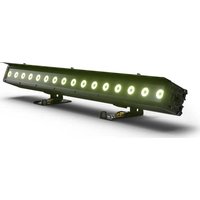
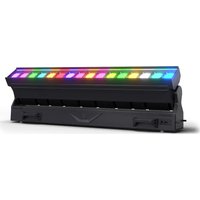
- PIXBAR® G2
- CONTENTS / INHALTSVERZEICHNIS / CONTENU / CONTENIDO / TREŚĆ / CONTENUTO
- ENGLISH
- DEUTSCH
- INFORMATION ON THIS USER MANUAL
- INTENDED USE
- DEFINITIONS AND SYMBOLS
- SAFETY INSTRUCTIONS
- DANGER:
- WARNING:
- ATTENTION:
- CAUTION:
- PLEASE NOTE:
- CAUTION! IMPORTANT INFORMATION REGARDING LIGHTING PRODUCTS!
- SIGNAL TRANSMISSION AND CONTROL BY RADIO
- TRANSMISSION VIA W-DMX
- NOTES ON PORTABLE OUTDOOR DEVICES
- PACKAGING CONTENT
- INTRODUCTION
- PIXBAR® 400 IP G2 Outdoor Spotlights
- PIXBAR® 600 IP G2 Outdoor Spotlights
- CONTROL FUNCTIONS:
- CLPB400IPG2
- CLPB600IPG2
- FEATURES:
- CONNECTIONS, OPERATING AND DISPLAY ELEMENTS
- POWER IN
- POWER OUT
- DMX IN
- DMX OUT
- OLED DISPLAY
- TOUCH-SENSITIVE CONTROLS
- PRESSURE EQUALISATION ELEMENT
- W-DMX™ ANTENNA
- OPERATION
- NOTE
- SETTING DMX START ADDRESS (DMX address)
- CONFIGURING DMX MODE (DMX Mode)
- DMX modes with DMX delay channel
- STAND-ALONE DIRECT LED MODE
- COLOUR PRESET STAND-ALONE MODE
- CCT STAND-ALONE MODE (Correlated Colour Temperature)
- STAND-ALONE MODE HSI (Hue - Saturation - Intensity)
- STAND-ALONE OPERATION MODE PLAY LOOP (8-step colour sequences 1 - 8)
- TIMER FUNCTION
- EDITING USER-PRESETS (Edit User Color)
- EDIT LOOP (Edit Loop)
- EZ REMOTE CONTROL VIA CAMEO UNICON (optionally available)
- SLAVE MODE
- Setup example:
- SYSTEM SETTINGS (Settings)
- SERVICE MENU (Service)
- SYSTEM INFORMATION (System Info)
- INSTALLATION
- MOUNTING A PIXBAR® ON A TRUSS
- USE SPIN16 TV SPIGOT FOR MOUNTING
- VERTICAL HANGING MOUNTING ON A TRUSS
- VERTICAL FLOOR MOUNTING
- VERTICALLY SUSPENDED TRUSS VERTICAL FLOOR MOUNTING
- FROST FILTER
- GLARE SHIELD
- CARE, MAINTENANCE AND REPAIR
- CARE (carried out by user)
- MAINTENANCE AND REPAIR (by qualified personnel only)
- OPTIONAL ACCESSORIES
- DIMENSIONS (mm)
- EXPLANATIONS ON IP RATING
- MINIMUM DISTANCE TO ILLUMINATED SURFACE
- MINIMUM DISTANCE TO NORMALLY FLAMMABLE MATERIALS
- DISPOSAL
- PACKAGING:
- DEVICE:
- MANUFACTURER'S DECLARATIONS
- ISED STATEMENT
- EC Declaration of Conformity
- STAND-ALONE-BETRIEBSART COLOR PRESET
- STAND-ALONE-BETRIEBSART CCT (Correlated Color Temperature)
- STAND-ALONE-BETRIEBSART HSI (Hue - Saturation - Intensity)
- STAND-ALONE-BETRIEBSART PLAY LOOP (8-Schritt-Farbsequenzen 1 - 8)
- TIMER-FUNKTION
- USER-PRESETS EDITIEREN (Edit User Color)
- LOOP EDITIEREN (Edit Loop)
- SPIN16 TV-ZAPFEN FÜR DIE MONTAGE VERWENDEN
- SENKRECHTE BODENMONTAGE
- VERTIKAL HÄNGENDE TRAVERSE SENKRECHTE BODENMONTAGE
- FROSTFILTER
- BLEND SCHUTZ
- MODE AUTONOME COLOUR PRESET
- MODE AUTONOME CCT (Correlated Color Temperature)
- MODE AUTONOME HSI (Hue - Saturation - Intensity)
- ÉDITION DE PRESETS UTILISATEUR (Edit User Color)
- ÉDITION DE BOUCLE (Edit Loop)
- UTILISEZ L'EMBOUT TV SPIN16 POUR LE MONTAGE
- MONTAGE VERTICAL AU SOL
- FILTRE FROST
- ÉCRAN ANTI-ÉBLOUISSEMENT
- MODO AUTÓNOMO. COLOR PRESET
- MODO AUTÓNOMO CCT (Correlated Color Temperature)
- MODO AUTÓNOMO. HSI (Hue - Saturation - Intensity)
- TEMPORIZADOR
- EDITAR PREAJUSTES DE USUARIO (Edit User Color)
- EDITAR BUCLE (Edit Loop)
- MONTAJE VERTICAL EN EL SUELO
- FILTRO FROST
- WSTĘPNE USTAWIENIE KOLORU TRYB AUTONOMICZNY
- TRYB PRACY STAND ALONE CCT (Correlated Color Temperature)
- FUNKCJA TIMERA
- EDYCJA USER-PRESETS (Edit User Color)
- DO MONTAŻU NALEŻY UŻYĆ KRÓĆCA TV SPIN16
- PIONOWY MONTAŻ WISZĄCY NA DRAŻKU
- PIONOWY MONTAŻ PODŁOGOWY
- FILTR FROST
- OCHRONA PRZECIWODBLASKOWA
- MODALITÀ STAND-ALONE COLOR PRESET
- MODALITÀ STAND-ALONE CCT (Correlated Colour Temperature)
- MODALITÀ STAND-ALONE HSI (Hue - Saturation - Intensity)
- FUNZIONE TIMER
- MODIFICARE I PRESET UTENTE (Edit User Color)
- MODIFICARE LOOP (Edit Loop)
- PER IL MONTAGGIO, UTILIZZARE PERNI TV SPIN16
- MONTAGGIO VERTICALE A SOSPENSIONE SU BARRA TRASVERSALE
Brand : Cameo
Model : PIXBAR 400 IP G2
Category : Lighting