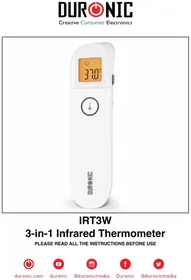
IRT3W - Thermometer Duronic - Free user manual and instructions
Find the device manual for free IRT3W Duronic in PDF.

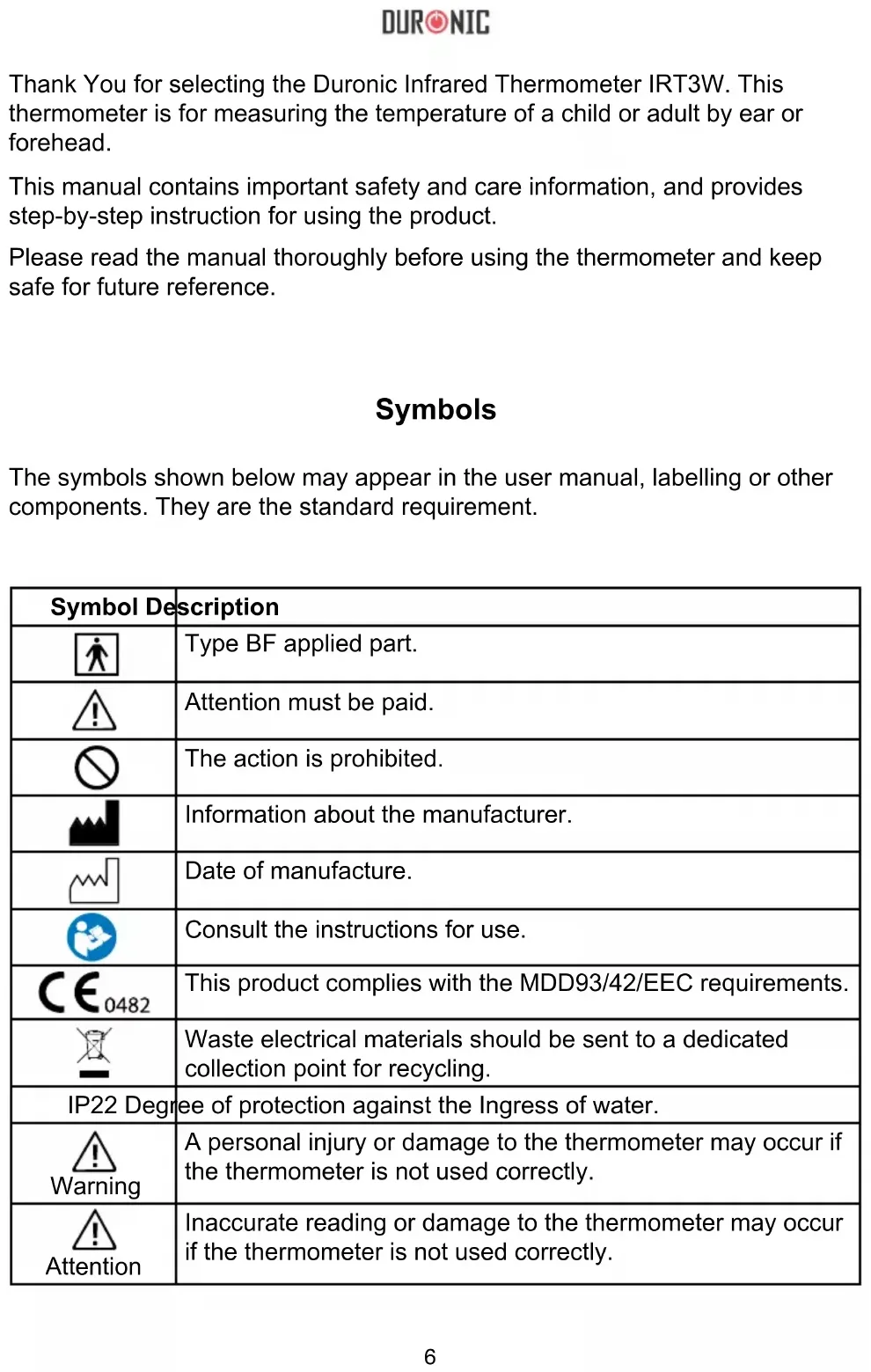


| Product type | 3-in-1 infrared thermometer |
| Brand | Duronic |
| Model | IRT3W |
| Dimensions | 149.3 x 38.1 x 43.4 mm |
| Weight | 86.7 g (with batteries) |
| Power supply | 2 AAA batteries (1.5 V each, DC 3V) |
| Measurement modes | Forehead, ear, object (surface temperature) |
| Measurement range (forehead) | 35.0 – 42.2 °C |
| Measurement range (ear) | 35.0 – 42.0 °C |
| Measurement range (object) | 0 – 100 °C |
| Accuracy (forehead/ear) | ±0.2 °C |
| Accuracy (object) | ±1 °C |
| Resolution | 0.1 °C / 0.1 °F |
| Measurement time | Approximately 1 second |
| Memory | 20 readings |
| Auto power off | After 10 ± 1 seconds of inactivity |
| Fever alert | Red light and double beep if > 37.5 °C |
| Measurement unit | °C / °F (switch) |
| Child/adult mode | Switch selection (child < 12 years) |
| Sound | Can be enabled/disabled |
| Protection rating | IP22 |
| Classification | Type BF applied part |
| Compliance | MDD93/42/EEC |
| Warranty | 1 year |
| Maintenance | Clean with a soft cloth; disinfect with 70% alcohol or chlorinated solution |
Frequently Asked Questions - IRT3W Duronic
User questions about IRT3W Duronic
0 question about this device. Answer the ones you know or ask your own.
Ask a new question about this device
Download the instructions for your Thermometer in PDF format for free! Find your manual IRT3W - Duronic and take your electronic device back in hand. On this page are published all the documents necessary for the use of your device. IRT3W by Duronic.
USER MANUAL IRT3W Duronic
Creative Consumer Electronics
text_image
37.0°C DURONICIRT3W
3-in-1 Infrared Thermometer
PLEASE READ ALL THE INSTRUCTIONS BEFORE USE

duronic.com

duronic

@duronicmedia

Duronic

@duronicmedia
DURONIC
Contents
English Manual 5
Thank You for selecting the Duronic Infrared Thermometer IRT3W. This thermometer is for measuring the temperature of a child or adult by ear or forehead.
This manual contains important safety and care information, and provides step-by-step instruction for using the product.
Please read the manual thoroughly before using the thermometer and keep safe for future reference.
Symbols
The symbols shown below may appear in the user manual, labelling or other components. They are the standard requirement.
| Symbol Description | |
 | Type BF applied part. |
 | Attention must be paid. |
 | The action is prohibited. |
 | Information about the manufacturer. |
 | Date of manufacture. |
 | Consult the instructions for use. |
 0482 0482 | This product complies with the MDD93/42/EEC requirements. |
 | Waste electrical materials should be sent to a dedicated collection point for recycling. |
| IP22 Degree of protection against the Ingress of water. | |
 Warning Warning | A personal injury or damage to the thermometer may occur if the thermometer is not used correctly. |
 Attention Attention | Inaccurate reading or damage to the thermometer may occur if the thermometer is not used correctly. |
DURONIC
Safety Information
Please read these instructions carefully and retain for future reference.

- Do not use the thermometer in an environment where anaesthetic mixture with air or with oxygen or where there is nitrous oxide. These are highly flammable.
- Do not try to charge the alkaline battery or throw it in fire, otherwise it may explode.
- This thermometer contains small parts that can be swallowed or can be a choking hazard to children. Keep the thermometer out of reach of children.
- Do not force the temperature probe of the thermometer into the ear canal as this may cause injury.
- Do not immerse the thermometer in water or expose it to direct sunlight.
- Do not subject the thermometer to vibration or impact.
- Do not use the thermometer with wet hands.
- This thermometer has 2x AAA 1.5V batteries. These are the only replaceable parts of the thermometer. Do not use the batteries with different voltages or specifications as they may cause damage.
- Do not disassemble the thermometer or attempt to repair it as this may cause permanent damage. If the thermometer stops working properly, contact Duronic directly for advice.
- This thermometer is designed for personal/household use only.
- It is not intended as a tool to diagnose or treat any health ailment or disease. The measurements attained are for reference only.
- It is dangerous to make a self-diagnosis based solely on obtained measurement results. Do not diagnose or treat the user based on the results of this thermometer. If you are concerned about the user's health, please consult a qualified medical practitioner/doctor.
DURONIC
- Normal body temperature varies from person to person. Tracking a person's body temperature will help determine whether they have fever.
- If you have done physical exercise or exerted yourself in any way, wait 20 minutes before using the thermometer to measure your temperature.
- The thermometer is suitable for an indoor environment without strong air flow (for example, winds created from a fan, air conditioner or heater) between the thermometer and the person being measured.
- Do not use the thermometer for purposes that are not specified in this manual. Follow the instructions in the “Operating Instructions” section and carefully operate the thermometer when measuring children’s temperature.
- Do not use the thermometer on a new-born baby or for continuous temperature monitoring purposes.
- This thermometer is intended for use on the forehead and the ear. Do not take temperature measurements on any other body parts otherwise the temperature readings may be inaccurate.
- Before measuring the temperature from the ear canal, check for any ear wax and clean before inserting the probe. If the ear is dirty, clean gently with a cotton swab before using the thermometer.
- When measuring temperature by the forehead, ensure that the forehead has no sweat or hair covering it as this may affect the reading.
- Do not hold the thermometer for a long time before using it because it is sensitive to surrounding temperatures and may then give an inaccurate reading when used.
- During measurement, do not use a mobile phone or any other device that may cause electromagnetic interference.
• Take care of the temperature probe lens as this is fragile.
- Remove the batteries if the thermometer will not be used for more than two months.
- Ensure the thermometer is cleaned after every use and stored in a clean dry place.
- Do not immerse the thermometer in water or any other liquid, as it is
DURONIC
not waterproof. Clean and disinfect the thermometer as described in the "Cleaning and Disinfection" section.
- Keep the temperature probe clean to ensure it can make accurate readings.
- Do not touch the tip of the temperature probe, on which a precise temperature sensor resides.
- The place you store the thermometer should be ambient and must not be extremely hot or cold. Always keep it at room temperature.
- Do not use the thermometer if the surrounding environment temperature higher than 40^ C (104°F) or lower than 10^ C (50°F), which is beyond the operating temperature range of the thermometer. It may affect the thermometer providing an accurate reading.
• After measuring temperature once, wait until the backlight turns off before you take another measurement.
- Make sure the ear canal is clean and dry before starting a measurement. If the ear canal is dirty it may affect the measurement taken and provide inaccurate results.
- Do not hold the thermometer for a long period of time because it is sensitive to ambient temperature.
Disposal
- Please ensure you take care when disposing of old used batteries. To protect the environment, we recommend they are sent to a designated battery recycling point. If unsure, contact your local council to find out where your nearest recycling point is.
- When the life of the thermometer has expired and it can no longer be used, please send it for disposal at the local refuse centre or return it back to the manufacturer for safe disposal.
DURONIC
Product Description
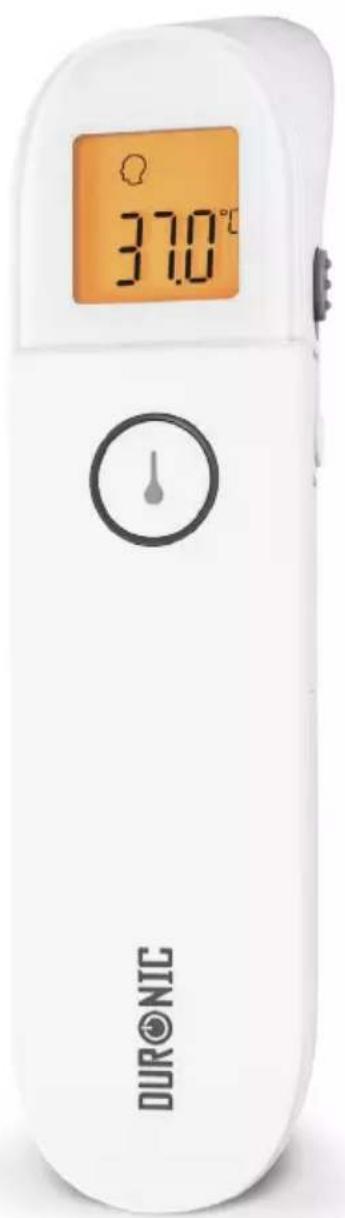
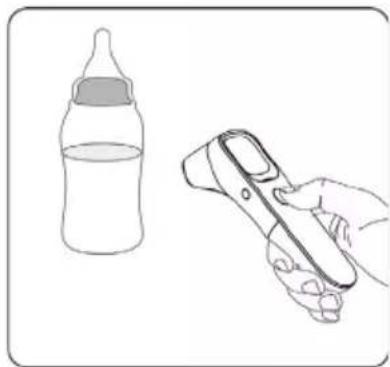
The Duronic IRT3W 3-in-1 Infrared Thermometer has been carefully developed for fast, safe and accurate temperature measurements of the ear and forehead. Using touch-free infrared technology, it can also be used for measuring the temperature of inanimate objects, such as the temperature of a baby bottle.
The IRT3W measures body temperature based on the infrared energy emitted from the eardrum or the forehead. Users can quickly get measurement results after positioning properly the temperature probe in the ear canal or forehead. It can also be used to measure the surface temperature of object (such as milk and water).
When using for measuring the temperature of a human body, please note that the forehead mode can be used by people of all ages, while the eardrum mode is intended for use on people above the age of 3 months old.
Do not use the thermometer on babies under 3 months of age. Do not use the thermometer if the ear is infected in any way.
Features
Safe to use: uses passive infrared receiving technology.
Easy to operate: ergonomically designed for comfortable use, has a one-button operation and a clear easy to read digital display.
Measures temperatures quickly: whether you are using the forehead mode or eardrum mode, both will measure body temperature quickly in just a couple of seconds.
Provides accurate readings: has an advanced infrared temperature sensor with high sensitivity as well as a high accuracy automatic temperature calibration.
Extra functions: this thermometer has a memory bank which will record 20 readings, has a fever alert notification, automatic power-off to save battery power, and can switch units between °C and °F.
Child mode and Adult mode: switch between the two modes for accurate readings. The child mode is recommended for people under 12 years of age.
DURONIC
How does the IRT3W work?
The IRT3W is a no-touch design thermometer that measures a person's temperature by capturing the infrared heat radiating from them and converting it into a readable temperature.
Inside the thermometer there is an infrared temperature sensor which collects infrared heat that is emitted naturally by either the eardrum or the skin surface. The heat is then focused by a lens onto the thermopile and measurement circuits, where it then gives you a reading in just seconds.
This innovative technology is safe to use and prevents the spreading of harmful germs.
It is quick, easy to use and non-invasive which means you can even measure a child while they are sleeping.
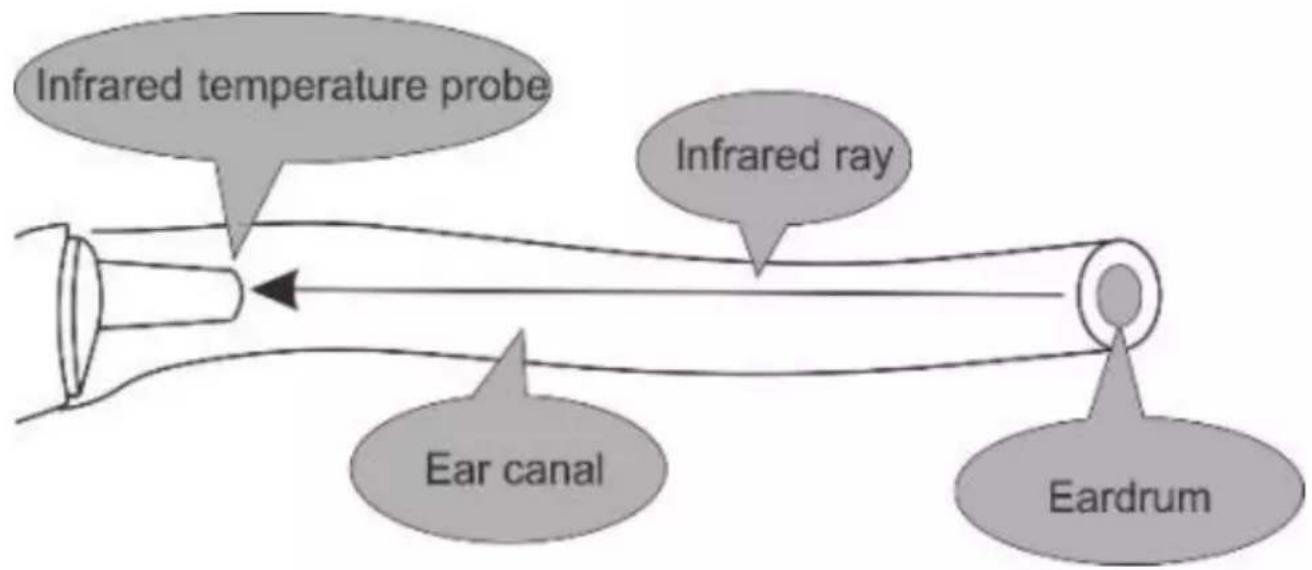
text_image
Infrared temperature probe Infrared ray Ear canal EardrumThermometer Components
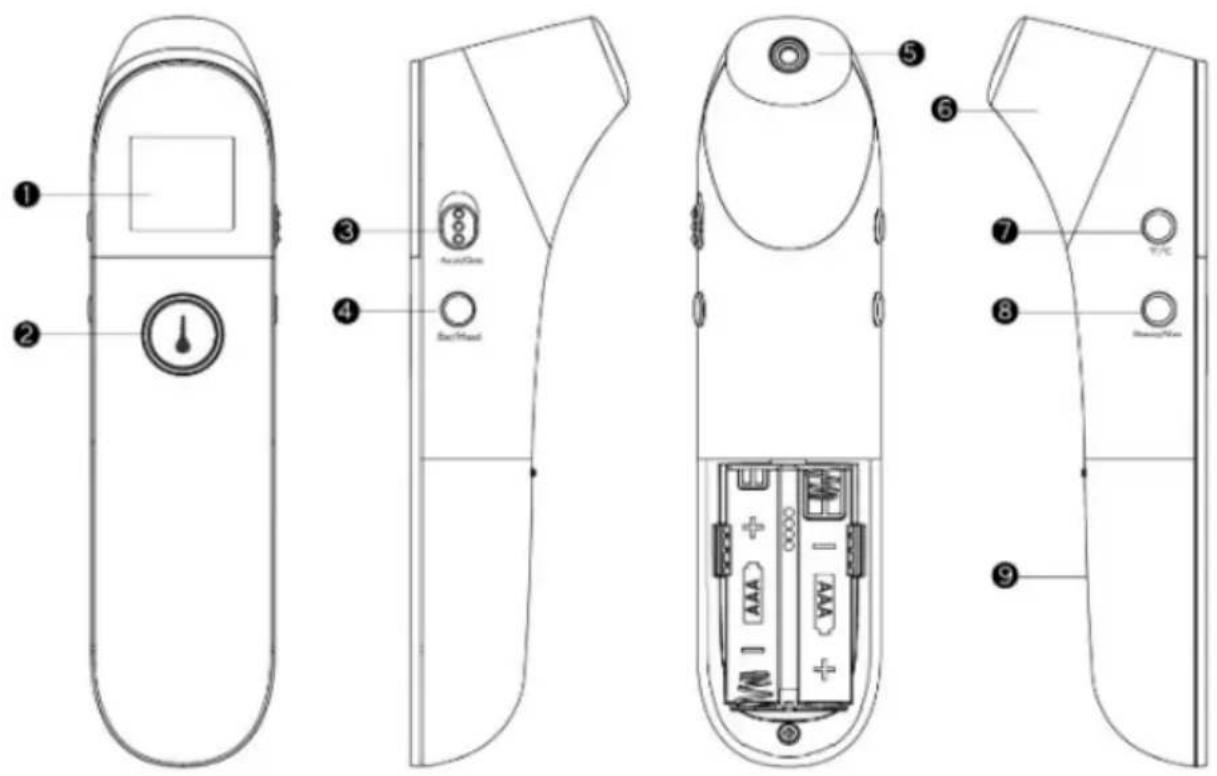
text_image
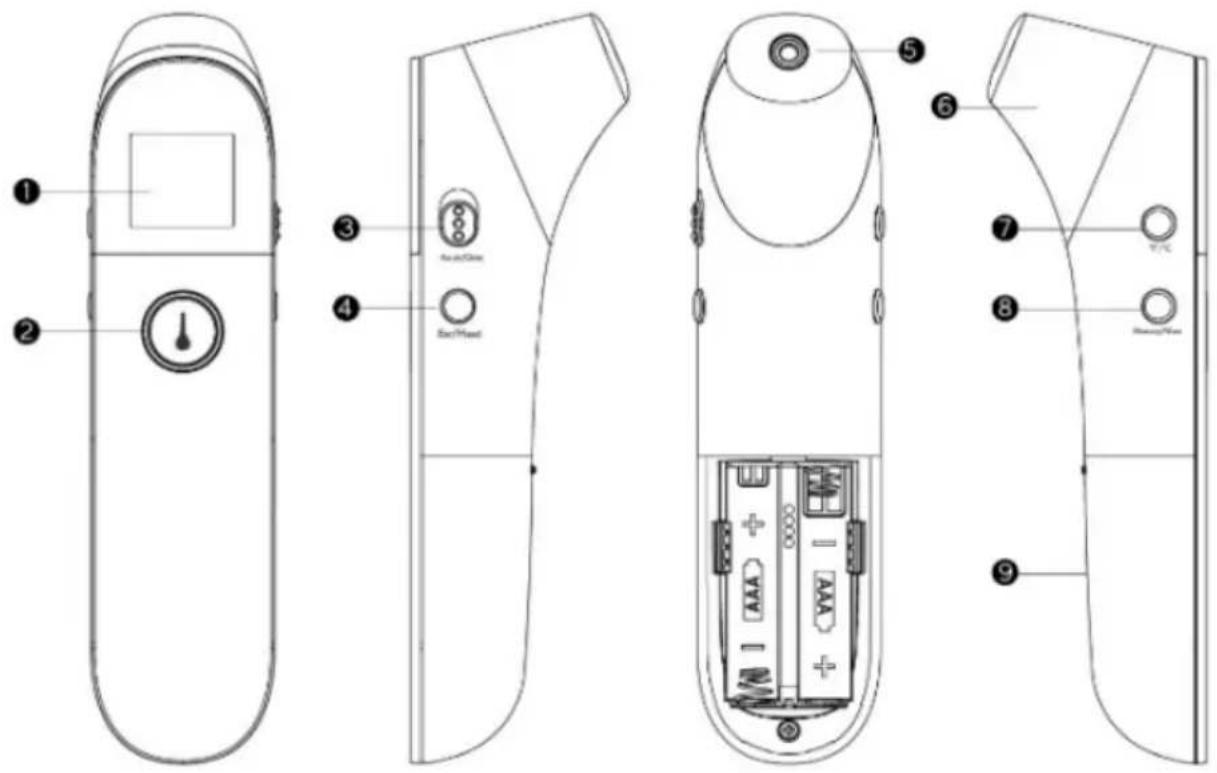
Technical diagram of a remote control device with labeled parts including display, buttons, and battery pack(1) LCD digital display screen
(2) Power button / Measure button
(3) Adult mode / Child mode switch
(4) Mode button (Forehead / Ear / Object)
(5) Probe (take off the cover when measuring the ear temperature)
(6) Probe cover (put the cover on when measuring the forehead temperature)
(7) Unit switch button (°C/°F)
(8) Memory button / Sound switch
(9) Battery cover
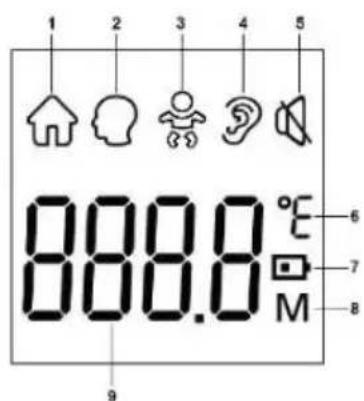
Display Description
(1) Object mode
(2) Adult forehead temperature mode
(3) Child forehead temperature mode
(4) Ear temperature mode
(5) Mute / un-mute
(6) Temperature unit (°C / °F)
(7) Low battery indicator
(8) Memory recall
(9) Temperature value
text_image
1 2 3 4 5 888.8 °C 6 7 8 9Sounds and Backlight Colour Indicators
| Range Sounds Backlight | |
| Forehead temperature (Adult / Child) | |
| 35.0°C-37.5°C / 95.0°F-99.5°F 1 long beep Orange | |
| 37.6°C-42.2°C / 99.6°F-108.0°F 3 short double beeps Red | |
| Ear temperature (Adult / Child) | |
| 35.0°C-37.5°C / 95.0°F-99.5°F 1 long beep Orange | |
| 37.6°C-42.0°C / 99.6°F-107.6°F 3 short double beeps Red | |
| Object temperature | |
| 0°C-100°C / 32.0°F-212°F 1 long beep Orange | |
Note: When the forehead and the ear temperature is between 35.0^ / 95.0^ and 37.5^ / 99.5^ , there will be a long beep and an orange backlight. This indicates that your body temperature is normal.
When the forehead temperature is between 37.6^ / 99.6^ and 42.2^ / 108.0^ , and the ear temperature is between 37.6^ / 99.6^ and 42.0^ / 107.6^ , there will be 3 short double beeps and a red backlight. This indicates that your body temperature is a little high. You may have a fever. Please consult your doctor if you are not sure or if you are concerned.
What is Normal Body Temperature
The normal range varies from person to person and can fluctuate throughout the day. The normal range also varies depending on what part of the body you are measuring. Therefore, measurements taken from, for instance, the head and ear, should not be compared directly.
To determine if an individual is experiencing an elevated body temperature and/or having a fever, it is critical to know the individual's normal body temperature when he/she is well. Take multiple readings to obtain the normal body temperature range and note the specific place on the body that was measured, for example: forehead or eardrum temperature.
| Place on Body Normal Temperature Range | |
| Forehead 34.7°C - 37.3°C (94.5°F - 99.1°F) | |
| Eardrum 35.8°C - 38.0°C (96.4°F - 100.4°F) | |
| Mouth 35.5°C - 37.5°C (95.9°F - 99.5°F) | |
| Armpit 34.7°C - 37.3°C (94.5°F - 99.1°F) |
Normal body temperature can vary slightly depending on age and gender.
Generally, new-born babies or children have higher body temperatures than adults, and adults have higher body temperatures than the elderly. Also, woman's body temperature can be approximately 0.3^ C (0.5 °F) higher than a man's.
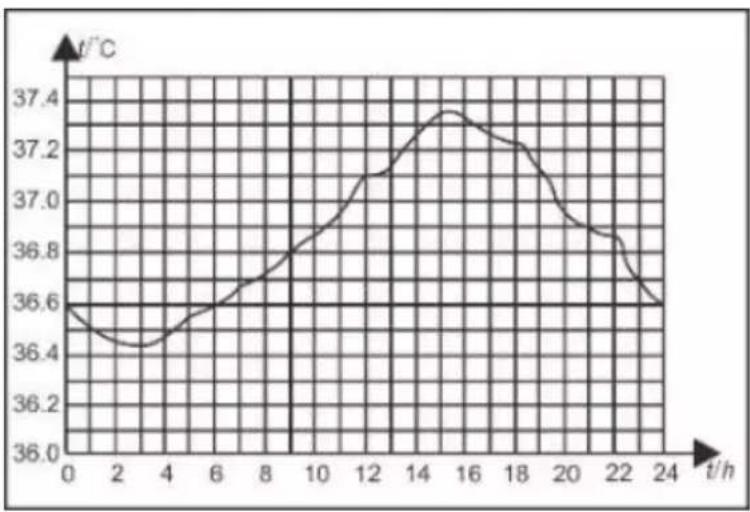
Variation in Body Temperature
line
| t/h | t/°C | | --- | ---- | | 0 | 36.6 | | 2 | 36.4 | | 4 | 36.5 | | 6 | 36.6 | | 8 | 36.8 | | 10 | 37.0 | | 12 | 37.1 | | 14 | 37.3 | | 16 | 37.4 | | 18 | 37.3 | | 20 | 37.1 | | 22 | 36.9 | | 24 | 36.6 |Normal body temperature fluctuates throughout the day and is also affected by external factors.
The body temperature of an individual is the lowest between 2:00 a.m. and 4:00 a.m. and the highest between 2:00 p.m. and 8:00 p.m. An individual's body temperature typically changes by less than 1^ (1.8°F) each day.
Operating Instructions
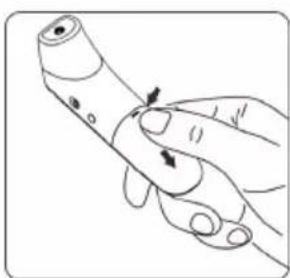
Before first use, take the battery cover off and remove the piece of plastic insulation from between the batteries.
natural_image
Illustration of a hand holding a pen or tube with an arrow indicating force application (no text or symbols present)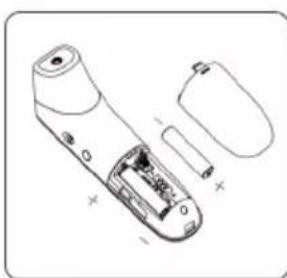
natural_image
Line drawing of a handheld electronic device with internal components and external casing (no text or symbols)Measuring Ear Temperature (Adult / Child)
| Screen Display Operating Instructions Displayed State | Sound and Backlight Colour | |
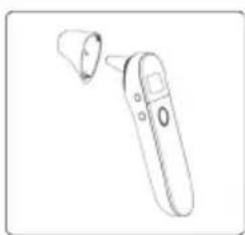
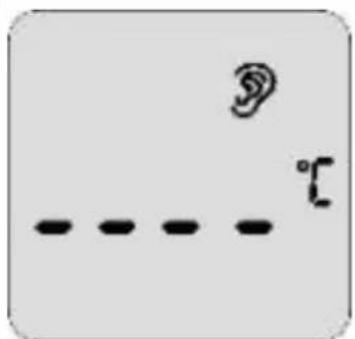 | Take off the probe cover, press and release the power/measure button for 1 second to turn on the thermometer. | See the table in the “Sounds and backlight color instructions” section. |
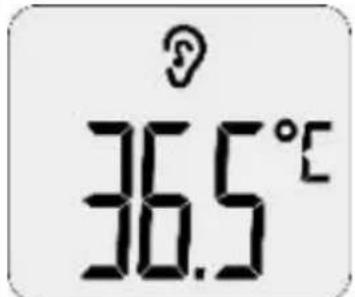 | 2. Press the mode button, the thermometer enters the ear mode. The ear symbol is displayed on the screen. | |
| 3. Switch to the adult or child measurement mode by flicking the side adult/child switch. | ||
| Ear temperature for adult | 4. Insert the temperature probe into a proper position in the ear canal. Press the power/measure button to start a measurement. | |
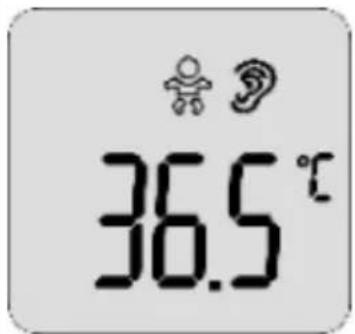 | 5. The temperature will be displayed on the screen. | |
| Ear temperature for child | ||
natural_image
Line drawing of a handheld electronic device with a small cylindrical component (no text or symbols)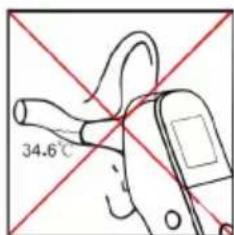
text_image
34.6°C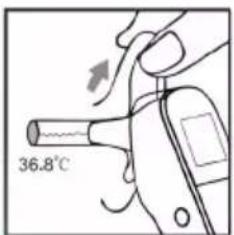
text_image
36.8°C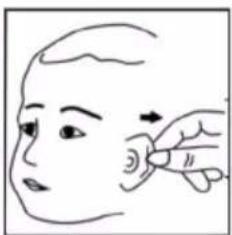
natural_image
Illustration of a hand pointing to an ear area on the head (no text or symbols)
natural_image
Line drawing of a human face profile (no text or symbols)- Do not force the thermometer into the ear canal, otherwise injury may occur.
- Children's ear drums are naturally smaller, so please take care.
- When taking the temperature on an adult, gently pull the ear up and back to make sure the ear canal is straight so that the temperature probe can receive an infrared ray from the ear drum.
Measuring Forehead Temperature (Adult / Child)
| Screen Display Operating Instructions Displayed State | Sound and Backlight Colour | |
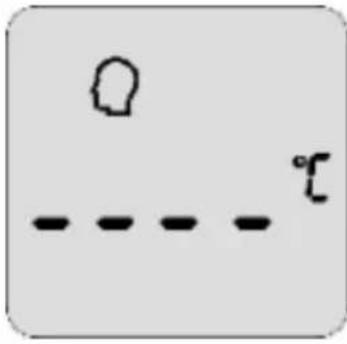 | 1. Put the cover on the probe, press and release the power/measure button for 1 second to turn on the thermometer. | See the table in the “Sounds and backlight color instructions” section. |
| 2. Press the mode button, the thermometer enters the forehead mode. The head symbol is displayed on the screen. | ||
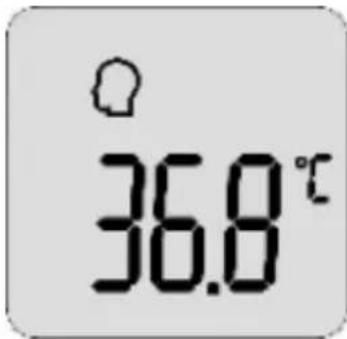 | 3. Switch to the adult or child measurement mode by flicking the side adult/child switch. | |
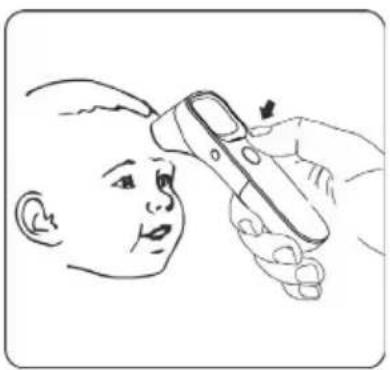
| Forehead temperature for adult | 4. Point the thermometer to the sides of the forehead about 1-3cm away from the skin surface. | |
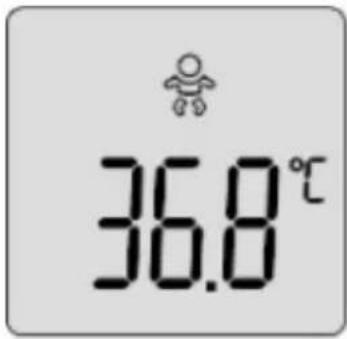 | 5. Press and release the power/measure button. The temperature will be displayed on the screen. | |
| Forehead temperature for child | ||
natural_image
Line drawing of a child receiving medical or health treatment from a handheld device (no text or symbols present)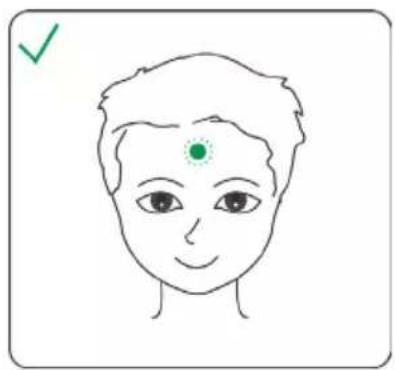
natural_image
Simple line drawing of a human face with a green checkmark and dot on the forehead (no text or symbols)Measuring Object Temperature (Adult / Child)
| Screen Display Operating Instructions Displayed State | Sound and Backlight Colour | |
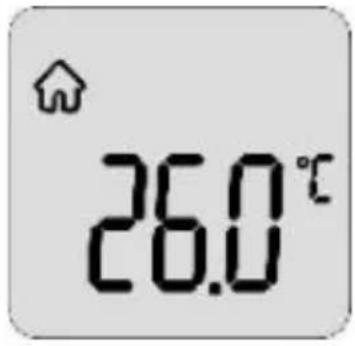
 | Press and release the power/measure button for 1 second to turn on the thermometer.2. Then press the mode button. The thermometer enters object mode. The object mode symbol is displayed on the screen.3. Point the thermometer to the centre of the object.4. Press and release the power/measure button.5. The temperature will be displayed on the screen. | See the table in the “Sounds and backlight color instructions” section. |
 | ||
natural_image
Illustration of a baby bottle and a handheld device (no text or symbols)Out of Range Displays
An out of range indicator (either 'HI' or 'LO') will appear if the temperature you are measuring is either too high or too low for the thermometer to measure.
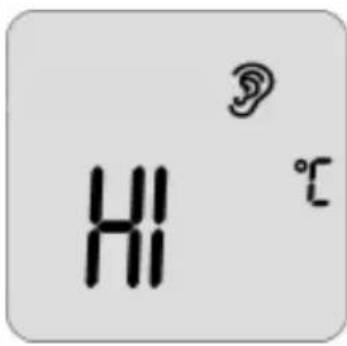 | In ear mode, a temperature reading of more than 42.0°C (107.6°F).In forehead mode, a temperature reading of more than 42.2°C (108.0°F).In object mode, a temperature reading of more than 100°C (212.0°F). | A long beep with the red backlight. |
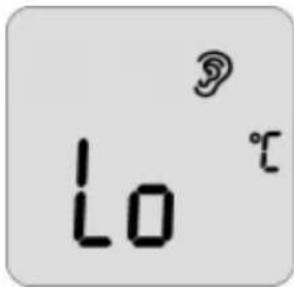 | Inear mode, a temperature reading of less than 35.0°C (95.0°F)Inforehead mode, a temperature reading of less than 35.0°C (95.0°F)Inobject mode, a temperature reading of less than 0°C (32.0°F) | A long beep with the red backlight. |
Recalling Recordings
| Screen Display | Operating Instructions Displayed State | Sound and Backlight Colour |
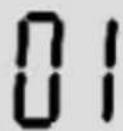 | 1. Press and release the power/measure button for 1 second to turn on the thermometer.2. Press the memory button to enter the memory mode.3. When the memory button is released, “1” will be shown, followed by the recorded reading.4. Press the memory button again for the next recorded data. “2” will be shown, followed by the recorded reading.5. A maximum of 20 temperature readings can be recalled.6. When the maximum number of records is exceeded, the oldest recorded memory will be overwritten. | Silent with the orange backlight. |
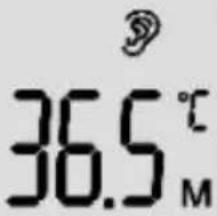 | ||
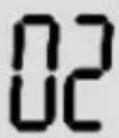 | Note:“1” represents the newest data, “20” represents the oldest. | |
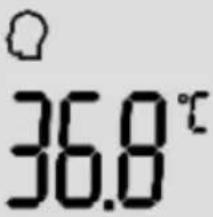 |
No memory data / Clear memory data
| Screen Display Operating Instructions Displayed State | Sound and Backlight Colour | |
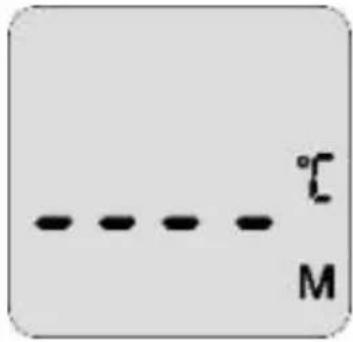 | When there is no memory data, this display is shown.To clear any saved data,simply remove the batteries and then put them back in again. This will clear all the memory data. | When the power is turned back on, there will be a long beep and the backlight turns from orange to red. |
Switching between Mute and Un-Mute
| Screen Display Operating Instructions Displayed State | Sound and Backlight Colour | |
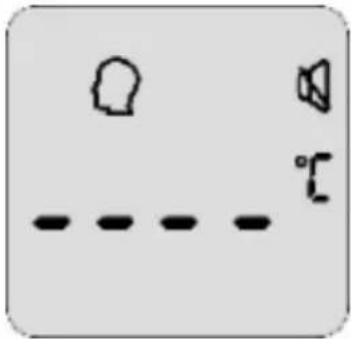
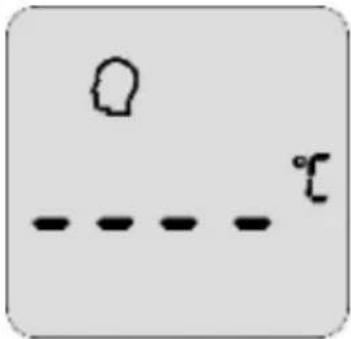 | 1. Press and release the power/measure button for 1 second to turn on the thermometer2. Press and hold the memory/mute button for about 2 seconds to switch the sound on or off.3. When the sound is turned on, it will beep once.4. When the sound is turned off, the mute symbol will be displayed. | When the sound is turned on, there will be a long beep and the backlight is orange. |
 | ||
Switching Between Object and Body Temperature Modes
| Screen Display | Operating Instructions Displayed State | Sound and Backlight Colour |
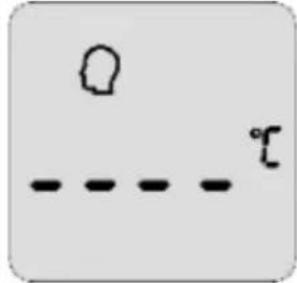
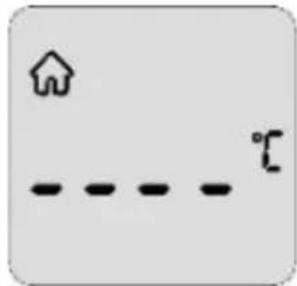 | Press the mode button to switch between: object temperature object temperature forehead temperature forehead temperature or ear temperature or ear temperature | Silent with the orange backlight. |
 | ||
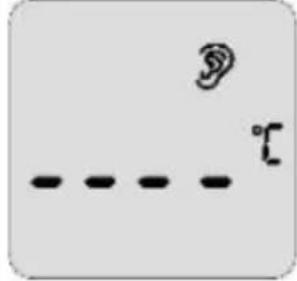 |
Switching Between Centigrade and Fahrenheit (°C / °F)
| Screen Display | Operating Instructions Displayed State | Sound and Backlight Colour |
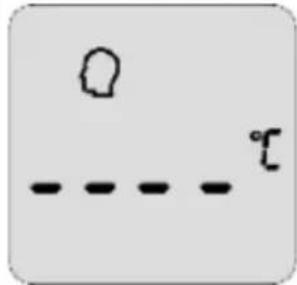 | To change the measurement unit to either Centigrade (°C) and Fahrenheit (°F), simply press the F/C button once on the side of the thermometer. | Silent |
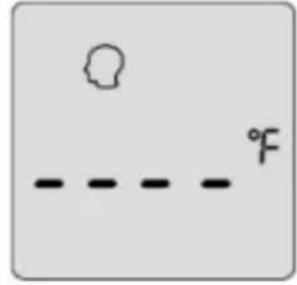 | To change it back, press the button once again. |
Error Messages & Low Battery Warning
| Screen Display | Operating Instructions Displayed State | Sound and Backlight Colour |
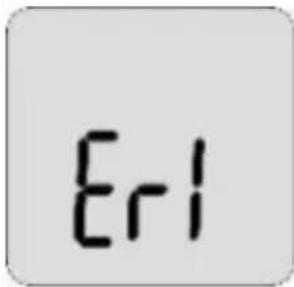 | If the surrounding environment is either higher than 40.0°C (104.0°F) or lower than 10.0°C (50.0°F), the thermometer cannot function properly. It will show as an error message ‘Er1’. | Silent with the orange backlight. |
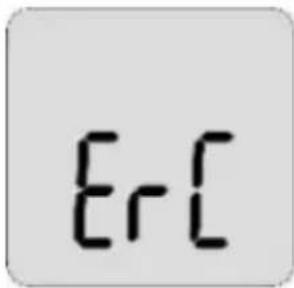 | If an error occurs when data is being read from or written to the memory, or the temperature correction is not complete, then the error message ‘ErC’ will show. | A long beep with the red backlight. |
 | When the battery is running low, the low battery symbol will appear on the display.Please replace the batteries. | Silent |
Error Messages & Low Battery Warning
| Screen Display | Operating Instructions Displayed State | Sound and Backlight Colour |
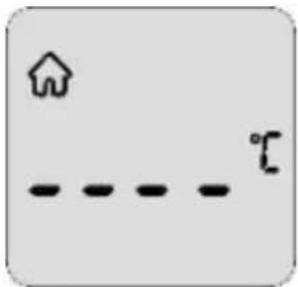 | If the surrounding environment is either higher than 40.0°C (104.0°F) or lower than 10.0°C (50.0°F), the thermometer cannot function properly. It will show as an error message ‘Er1’. | Silent with the orange backlight. |
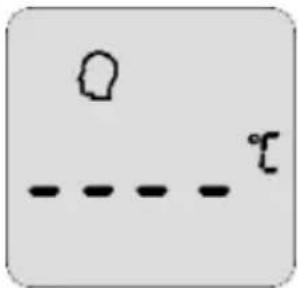 | If an error occurs when data is being read from or written to the memory, or the temperature correction is not complete, then the error message ‘ErC’ will show. | A long beep with the red backlight. |
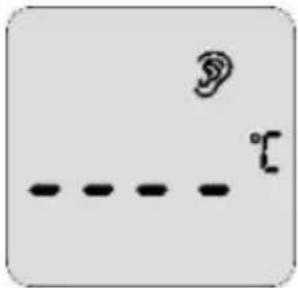 | When the battery is running low, the low battery symbol will appear on the display.Please replace the batteries. | Silent |
DURONIC
After Taking a Measurement
• After each measurement, you can enter the memory mode and see past temperature readings. For more details, see the previous section titled 'Recalling Records'.
• After each measurement, clean the temperature probe with a soft cloth, and put the thermometer in a dry and well-ventilated place.

REMEMBER: It is dangerous to make a self-diagnosis or conduct self-treatment based on the obtained measurement results from this thermometer. If you think you or the person using the thermometer could be unwell, or you are worried in any way, please consult a doctor for advice and treatment.
Replacing Batteries
If the low-battery symbol is displayed on the screen, it is time to replace the batteries.
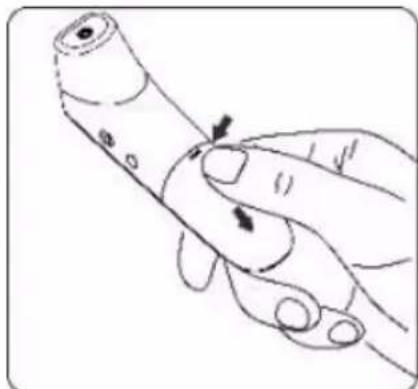
- Slide the battery cover off along the marked direction and take it off.
- Insert the two AAA batteries into the compartment according to the stated polarities.

Make sure that the batteries are installed correctly. Otherwise, the thermometer may be damaged.
Batteries of a same type should be used. Dispose of any used batteries safely and responsibly in accordance with the local council guidelines.
natural_image
Illustration of a hand holding a pen or tube with arrows indicating movement or force (no text or symbols)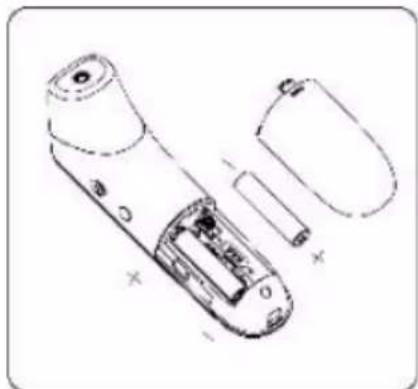
natural_image
Technical line drawing of a remote control device showing internal components and battery casing (no text or symbols)Cleaning and Disinfection
Cleaning
Recommended detergents:
• Medical detergents
• Mild household detergents
Cleaning steps:
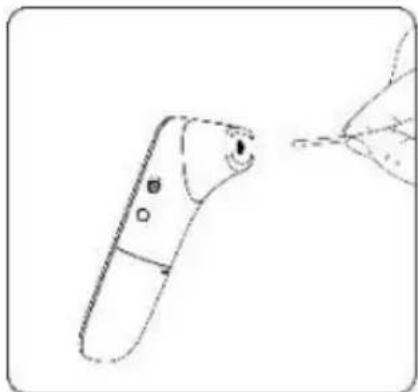
(1) Take the batteries out before cleaning.
(2) Clean the temperature probe with a soft cloth. Clean the lens of the temperature probe with a cotton swab.
(3) Wipe the thermometer body with a slightly damp soft cloth.
natural_image
Line drawing of a handheld device with a hand interacting with it (no text or symbols)
Keep water out of the lens during the cleaning process. Otherwise, the lens may be damaged.
The lens may be scratched if it is cleaned with a hard object, which might result in inaccurate readings.
Do not clean the thermometer with corrosive cleansers. During the cleaning process, do not immerse any part of the thermometer into liquid, or allow liquid to penetrate the thermometer.
Disinfection
Recommended disinfectants:
• Isopropyl alcohol solution (concentration: 70%)
• Medicinal alcohol (concentration: 75%)
• Sodium hypochlorite solution (concentration: 3%)
Disinfecting steps:
1) Wet the clean soft cloth with a small quantity of disinfectant, wipe the thermometer and quickly dry it.
2) Disinfect the thermometer body and the area around the temperature probe with a cloth slightly moistened with 75% medical alcohol.

Do not use hot steam or ultraviolet radiation for disinfection. Otherwise, the thermometer may be damaged or quickly aged.
It is recommended to disinfect the thermometer before and after each use. The disinfection time is completed within 1 minute, and the number of repetitions per disinfection is not more than 2 times.
Clean and disinfect the thermometer under the temperature of +10°C\~+40°C (50°F-104°F), the relative humidity of 15%\~85%RH (no condensation) and the barometric pressure of 86kPa\~106kPa.
Maintenance
To prolong the life of your IRT3W thermometer and ensure that it is
always ready and safe to use, please do the following on a regular basis:
- Check whether it has any potential safety hazards, e.g. whether the lens is broken, the casing has cracks or if the sensing head is polluted.
- Do not use the thermometer if it is damaged as this is a potential safety hazard.
- Clean the thermometer if not used for a long time.
- After each use, clean the temperature probe as described in the “Cleaning and Disinfection” chapter.
- Store the thermometer in a dry, dust-free, and well-ventilated place. Make sure that the thermometer is not exposed to direct sunlight.
- Remove the batteries if the thermometer will not be used for more than two months.
Troubleshooting
| Problem Possible Cause Solution | ||
| The thermometer fails to power on. | Low battery. Change the batteries. | |
| Polarities of the batteries are reversed. | Make sure that the batteries are installed correctly. | |
| The thermometer is damaged. | Contact the manufacturer. | |
| “Er1” is displayed. The ambient temperature is lower than 10°C (50.0°F) or higher than 40°C (104°F). | Take a measurement under an ambient temperature between 10°C (50.0°F) and 40°C (104°F). | |
| The temperature reading is lower than the typical body temperature range. | The lens of the temperature probe is dirty. | Clean the lens using a cotton swab. |
| The thermometer probe is not aligned to the eardrum. | Reposition the thermometer probe so that it is aligned to the eardrum. | |
| The thermometer is used within 30 minutes after being taken from a cold environment. | Wait for more than 30 minutes after the thermometer is moved into the measurement environment. | |
| The temperature reading is higher than the typical body temperature range. | The temperature probe is damaged. | Contact Duronic. |
Specifications
| Product Name 3-in-1 Infrared Thermometer | |
| Product Model IRT3W | |
| Power Supply Mode | Internal power supply |
| Operating Voltage | DC 3V |
| Battery Model AAA x 2 | |
| Operating Mode Continuous operating | |
| Display Segment LCD | |
| Measure time About 1 second | |
| Latency Time About 3 second | |
| Measuring Range Forehead mode:35.0°C-42.2°C (95.0°F-108.0°F)Ear mode:35.0°C-42.0°C (95.0°F-107.6°FObject mode:0.0°C-100.0°C (32.0°F-212.0°F) | |
| Accuracy (Laboratory) | Forehead mode: ±0.2°C (±0.4°F)Ear mode: ±0.2°C (±0.4°F)Object mode: ±1.0°C/±2.0°F |
| Resolution 0.1°C (0.1°F) | |
| Memory 20 temperature readings | |
| Low-battery Alert The low-battery symbol is displayed if the power voltage is lower than 2.4 V±0.1V | |
| Automatic Power-off | The thermometer automatically powers off if it is not used in 10±1 seconds. |
| Outer dimensions (mm) | 149.3 x 38.1 x 43.4mm |
| Weight (g) Thermometer (with batteries): 86.7 g | |
| Operating Environment | Temperature: 10°C~ 40°C (50°F-104°F)Humidity: 15%-95% RH, non-condensingAtmospheric pressure: 86-106 kPa |
The infrared thermometer has been tested and conforms to the standard ASTM E1965-98. ASTM laboratory accuracy requirements in the display range of 96.8^ F to 102.2^ F ( 36^ C- 39^ C) for ear canal IR thermometers is ±0.4^ F ( ±0.2^ C). Note that for mercury-in-glass and electronic thermometers, the requirement per ASTM Standards E667-86 and E1112-86 is ±0.2^ F ( ±0.1^ C).
DURONIC
Security Class
Type of protection against electric shock: internally powered equipment.
Degree of protection against electric shock: ☐ Type BF applied part.
• Degree of protection against ingress of water: IP22
- Safety degree of using in flammable anaesthetic gas blending with air, oxygen or nitrous oxide: Non-AP/APG
- No application parts of the thermometer prevents defibrillation charge effect.
- No application parts of the thermometer output signal.
- The thermometer is impermanent installed device.
Storage and Transportation
- The thermometer can be transported using general transportation tools.
- Severe vibration, shock, or rain must be avoided during transportation.
- The thermometer must be packaged and then stored in a well-ventilated room without corrosive gas. The ambient temperature must be between -20^ and +55^(-4^ - 131^) , the relative humidity must be lower than 95% (non-condensing), and the atmospheric pressure must be 50 - 106 kPa.
EMC Information/Guidance and Manufacture's Declaration

CAUTION
- The Infrared Thermometer IRT3W needs special precautions regarding EMC and needs to be installed and put into service according to the EMC information provided for in the ACCOMPANYING DOCUMENTS.
- Portable and mobile RF communications equipment can affect Infrared Thermometer IRT3W.
- The Infrared Thermometer IRT3W should not be used adjacent to or stacked with other equipment.
| Guidance and Manufacturer's Declaration – Electromagnetic Emission: for all equipment and systems | ||
| The Infrared Thermometer IRT3W is intended for use in the electromagnetic environment specified below. The customer or the user of the Infrared Thermometer IRT3W should assure that it is used in such an environment. | ||
| Emissions test | Compliance E | Electromagnetic environment - guidance |
| RF emissions CISPR 11 | Group 1 | The Infrared Thermometer IRT3W uses RF energy only for its internal function. Therefore, its RF emissions are very low and are not likely to cause any interference in nearby electronic equipment. |
| RF emissions CISPR 11 | Class B | The Infrared Thermometer IRT3W is suitable for use in all establishments, including domestic establishments and those directly connected to the public low- voltage power supply network that supplies buildings used for domestic purposes. |
| Guidance and Manufacturer's Declaration – Electromagnetic Immunity: for all equipment and systems | |||
| The Infrared Thermometer IRT3W is intended for use in the electromagnetic environment specified below. The customer or the user of the Infrared Thermometer IRT3W should assure that it is used in such an environment. | |||
| Immunity test | EC 60601 test level | Compliance level | Electromagnetic environment-guidance |
| Electrostatic discharge (ESD) IEC 61000-4-2 | ±6 kV contact ±8 kV air | ±6 kV contact ±8 kV air | Floors should be wood, concrete or ceramic tile. If floors are covered with synthetic material, the relative humidity should be at least 30 %. |
| Power frequency (50/60 Hz) magnetic field | 3 A/m 3 A/m | Power frequency | magnetic fields should be at levels characteristic of a typical location in a typical commercial or hospital environment. |
| Guidance and Manufacturer's Declaration – Electromagnetic Immunity: for equipment and systems that are not life-supporting | |||
| The Infrared Thermometer IRT3W is intended for use in the electromagnetic environment specified below. The customer or the user of the Infrared Thermometer IRT3W should assure that it is used in such an environment. | |||
| Immunity test | IEC 60601 test level | Compliance level | Electromagnetic environment-guidance |
| Radiated RF IEC 61000-4-3 | 3 V/m80 MHz to 2.5 GHz | 3 V/m Portable | and mobile RF communications equipment should be used no closer to any part of the IRT3W, including cables, than the recommended separation distance calculated from the equation applicable to the frequency of the transmitter.Recommended separation distance d = [ 3.5E_1 ] 80 MHz to 800 MHz d = [ 7E_1 ] 800 MHz to 2.5 GHzwhere p is the maximum output power rating of the transmitter in watts (W) according to the transmitter manufacturer and d is the recommended separation distance in metres (m). Field strengths from fixed RF transmitters, as determined by an Electromagnetica site survey, should be less than the compliance level in each frequency range. ^b Interference may occur in the vicinity of equipment marked with the following symbol: [IMAGE] |
| NOTE 1: At 80 MHz and 800 MHz, the higher frequency range applies. |
| NOTE 2: These guidelines may not apply in all situations. Electromagnetic is affected by absorption and reflection from structures, objects, and people. |
| a. Field strengths from fixed transmitters, such as base stations for radio (cellular/cordless) telephones and land mobile radios, amateur radio, AM and FM radio broadcast and TV broadcast cannot be predicted theoretically with accuracy. To assess the electromagnetic environment due to fixed RF transmitters, an electromagnetic site survey should be considered. If the measured field strength in the location in which the IRT3W is used exceeds the applicable RF compliance level above, the IRT3W should be observed to verify normal operation. If abnormal performance is observed, additional measures may be necessary, such as re-orienting or relocating the IRT3W. |
| b. Over the frequency range 150 kHz to 80 MHz, field strengths should be less than 3 V/m. |
| Recommended separation distances between portable and mobile RF communications equipment and the EQUIPMENT or SYSTEM: for EQUIPMENT and SYSTEMS that are not LIFE-SUPPORTING | ||
| The Infrared Thermometer IRT3W is intended for use in an electromagnetic environment in which radiated RF disturbances are controlled. The customer or the user of the Infrared Thermometer IRT3W can help prevent electromagnetic interference by maintaining a minimum distance between portable and mobile RF communications equipment (transmitters) and the Infrared Thermometer IRT3W as recommended below, according to the maximum output power of the communications equipment. | ||
| Rated maximum output power of transmitter W | Separation distance according to frequency of transmitter m | |
| 80 MHz to 800 MHz 800 MHz d = [ 3.5E_1 ] | to 2.5 GHz d = [ 7E_1 ] | |
| 0.01 0.12 0.23 | ||
| 0.1 0.38 0.73 | ||
| 1 1.2 2.3 | ||
| 10 3.8 7.3 | ||
| 100 12 23 | ||
For transmitters rated at a maximum output power not listed above, the recommended separation distance d in metres (m) can be estimated using the equation applicable to the frequency of the transmitter, where P is the maximum output power rating of the transmitter in watts (W) according to the transmitter manufacturer.
NOTE 1: At 80 MHz and 800 MHz, the separation distance for the higher frequency range applies.
NOTE 2: These guidelines may not apply in all situations. Electromagnetic propagation is affected by absorption and reflection from structures, objects, and people.
Contact Information
Distributed by: Shine-mart Ltd.
Manufactured by: Shenzhen Jumper Medical Equipment Co. Ltd
Authorized European Representative: Wellkang Ltd
| EC | REP |
DURONIC
Warranty
1 Year Guarantee from Shine-Mart Ltd, Trademark owners of Duronic Products. NOTE: THESE STATEMENTS DO NOT AFFECT YOUR STATUTORY RIGHTS AS A CONSUMER
This product has been manufactured under the strictest or quality control procedures, and using the highest quality of materials, to ensure excellent performance and reliability. It will give very good and long lasting service, provided it is properly used and maintained. The product is guaranteed for 1 years from the date of original purchase. If any defect arises due to a faulty materials or poor workmanship, the faulty product must be returned to the original place of purchase. Refund or replacement is at the discretion of that company.
Duronic Products are offered with a 1 year guarantee under the following conditions:
- The product must be returned to the retailer with original proof of purchase.
- The product must be installed and used in accordance with the instructions contained in this operating manual.
- It must be used only for domestic purposes.
- It does not cover wear and tear, malicious damage, misuse, neglect, inexpert repairs or consumable parts.
- Shine-Mart Ltd has no responsibilities for accidental or consequential loss or damage.
- Shine-Mart Ltd are not liable to carry out any type of servicing work, under the guarantee
- Valid in the UK only
This product is fitted with CE:1363 plug and fuse Imported by Shine-Mart Ltd, RM3 8SB

Information on waste Disposal for Consumers of
Electrical & Electronic Equipment.
This mark on a product and/or accompanying documents indicates that when it is to be disposed of, it must be treated as Waste Electrical & Electronic Equipment, (WEEE).
Any WEEE marked products must not be mixed with general household waste, but kept separate for the treatment, recovery and recycling of the materials used.
For proper treatment, recovery and recycling; please take all WEEE marked waste to your Local Authority Civic waste site, where it will be accepted free of charge.
If customers dispose of Waste Electrical & Electronic Equipment correctly, they will be helping to save valuable resources and preventing any potential negative effects upon human health and the environment, of any hazardous materials that the waste may contain.
Follow Us

text_image
duronic.com duronic @duronicmedia duronic @duronicmediatext_image
Infrared temperature probe Infrared ray Ear canal EardrumDURONIC
text_image
Technical diagram of a remote control device with labeled parts including LCD, battery, and control buttonsline
| t/h | t/°C | | --- | ---- | | 0 | 36.6 | | 2 | 36.4 | | 4 | 36.5 | | 6 | 36.6 | | 8 | 36.8 | | 10 | 37.0 | | 12 | 37.1 | | 14 | 37.3 | | 16 | 37.4 | | 18 | 37.3 | | 20 | 37.1 | | 22 | 36.9 | | 24 | 36.6 |natural_image
Illustration of a handheld electronic device with a hand holding a cable and its internal components being inserted (no text or symbols present)natural_image
Line drawing of a handheld electronic device with a circular port and lens (no text or symbols)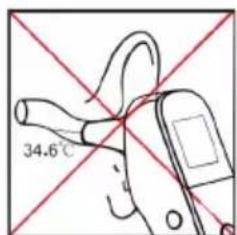
text_image
34.6°C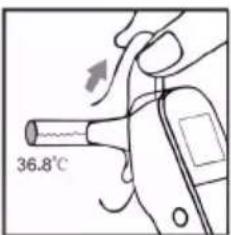
text_image
36.8°C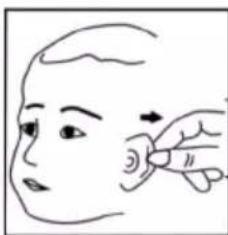
natural_image
Line drawing of a person's face with a finger pointing to the ear area (no text or symbols)
natural_image
Line drawing of a human face profile with visible eye and ear (no text or symbols)natural_image
Line drawing of a child receiving medical or CT scan with an otoscope (no text or symbols)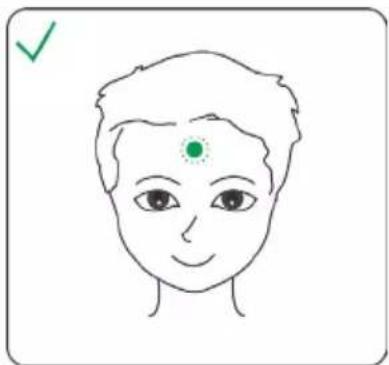
natural_image
Simple line drawing of a human face with a green dot on the forehead and a checkmark in the top-left corner (no text or symbols)natural_image
Illustration of a baby bottle and a hand holding a medical tool (no text or symbols)natural_image
Line drawing of a hand holding a pen or stylus with arrows indicating movement (no text or symbols)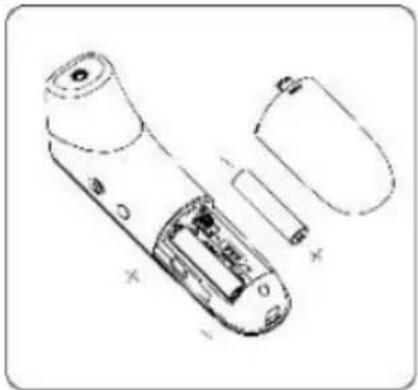
natural_image
Technical line drawing of a remote control device with battery and casing (no text or symbols)DURONIC
natural_image
Line drawing of a remote control device with a hand interacting with it (no text or symbols)
- Make sure the ear canal is clean and dry before starting a measurement. If the ear canal is dirty it may affect the measurement taken and provide inaccurate results.
Entsorgung
text_image
Infrared temperature probe Infrared ray Ear canal Eardrumtext_image
Technical diagram of a remote control device with labeled parts including buttons, dials, and battery packline
| t/h | t/°C | | --- | ---- | | 0 | 36.6 | | 2 | 36.4 | | 4 | 36.5 | | 6 | 36.6 | | 8 | 36.8 | | 10 | 37.0 | | 12 | 37.1 | | 14 | 37.3 | | 16 | 37.4 | | 18 | 37.3 | | 20 | 37.1 | | 22 | 36.9 | | 24 | 36.6 |natural_image
Illustration of a hand holding a medical or surgical tool with an arrow indicating force application (no text or symbols present)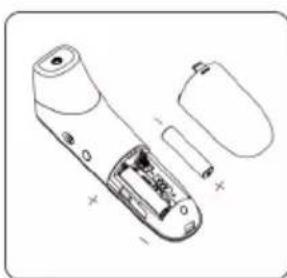
natural_image
Technical line drawing of a handheld electronic device with internal components and battery housing (no text or symbols)natural_image
Line drawing of a handheld electronic device with a small inset showing a lens (no text or symbols)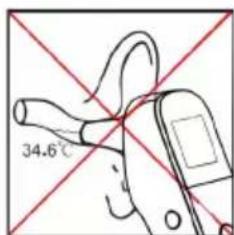
text_image
34.6°C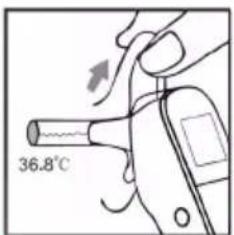
text_image
36.8°C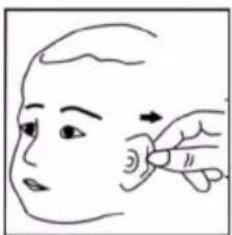
natural_image
Line drawing of a hand holding a small object near the head, with an arrow indicating motion (no text or symbols)
natural_image
Line drawing of a human face profile (no text or symbols)natural_image
Line drawing of a child receiving medical or CT scan with an otoscope (no text or symbols)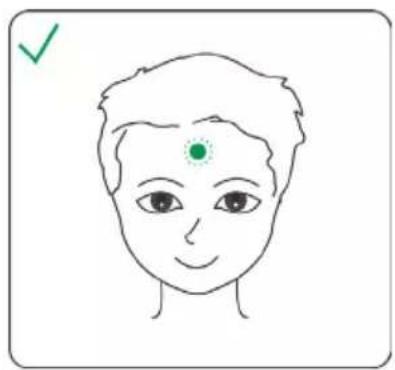
natural_image
Simple line drawing of a human face with a green checkmark and dot on the forehead (no text or symbols)natural_image
Illustration of a baby bottle and a hand holding a medical device (no text or symbols)natural_image
Illustration of a hand holding a pen or tube with arrows indicating movement or force (no text or symbols)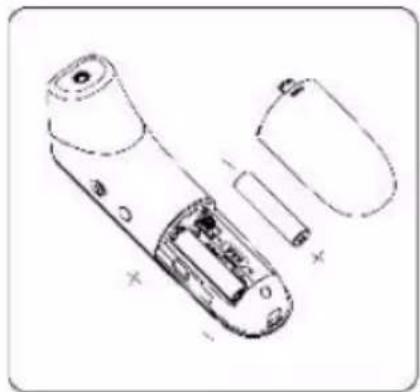
natural_image
Technical line drawing of a remote control device with internal components and housing (no text or symbols)natural_image
Line drawing of a handheld device with a hand interacting with it (no text or symbols)
text_image
Infrared temperature probe Infrared ray Ear canal Eardrumtext_image
Technical diagram of a remote control device with labeled parts including display, buttons, and battery packline
| t/h | t/°C | | --- | ---- | | 0 | 36.6 | | 2 | 36.4 | | 4 | 36.5 | | 6 | 36.6 | | 8 | 36.8 | | 10 | 37.0 | | 12 | 37.1 | | 14 | 37.3 | | 16 | 37.4 | | 18 | 37.3 | | 20 | 37.1 | | 22 | 36.9 | | 24 | 36.6 |natural_image
Illustration of a handheld electronic device with a hand holding a cable and its internal components being inserted (no text or symbols present)natural_image
Line drawing of a handheld electronic device with a circular lens and a small screen (no text or symbols)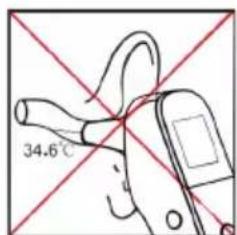
text_image
34.6°C
text_image
36.8°C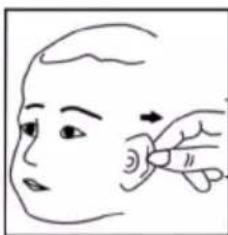
natural_image
Line drawing of a person's face with a finger pointing to the ear area (no text or symbols)
natural_image
Line drawing of a human face profile with visible eye and ear (no text or symbols)natural_image
Line drawing of a child receiving a medical or CT scan device (no text or symbols present)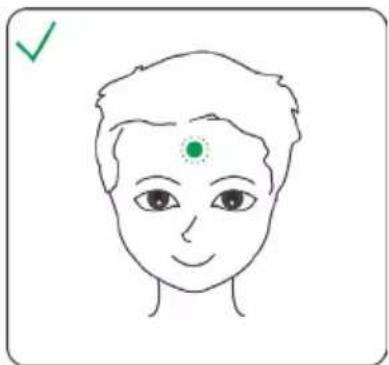
natural_image
Simple line drawing of a human face with a green dot on the forehead and a checkmark in the top-left corner (no text or symbols)natural_image
Illustration of a baby bottle and a hand holding a medical device (no text or symbols)natural_image
Illustration of a hand holding a pen or tube with arrows indicating movement or force (no text or symbols)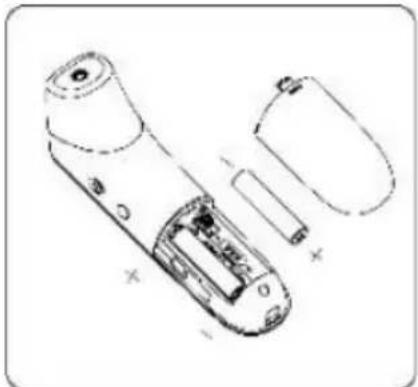
natural_image
Technical line drawing of a remote control device showing internal components and battery casing (no text or labels)natural_image
Line drawing of a remote control device with a hand interacting with it (no text or symbols)
text_image
Infrared temperature probe Infrared ray Ear canal EardrumComponenti del termometro
text_image
Technical diagram of a remote control device with labeled parts including display, buttons, and battery packline
| t/h | t/°C | | --- | ---- | | 0 | 36.6 | | 2 | 36.4 | | 4 | 36.5 | | 6 | 36.6 | | 8 | 36.8 | | 10 | 37.0 | | 12 | 37.1 | | 14 | 37.3 | | 16 | 37.4 | | 18 | 37.3 | | 20 | 37.1 | | 22 | 36.9 | | 24 | 36.6 |natural_image
Illustration of a hand holding a medical or surgical tool with an arrow indicating force application (no text or symbols present)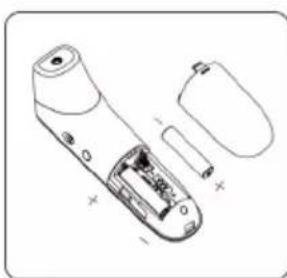
natural_image
Technical line drawing of a handheld electronic device with internal components and battery housing (no text or symbols)natural_image
Line drawing of a handheld electronic device with a circular port and handle (no text or symbols)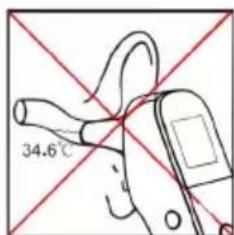
text_image
34.6°C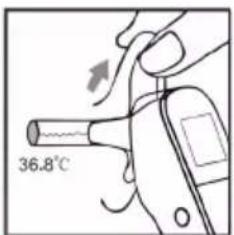
text_image
36.8°C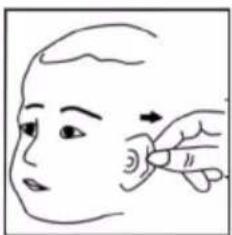
natural_image
Line drawing of a person's head and face with a finger pointing to the ear area (no text or symbols)
natural_image
Line drawing of a human face profile (no text or symbols)natural_image
Line drawing of a child receiving medical or CT scan with an arrow indicating direction (no text or symbols)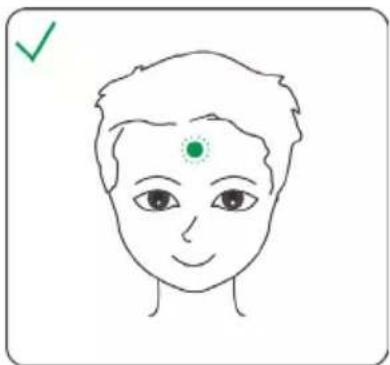
natural_image
Simple line drawing of a human face with a green dot on the forehead and a checkmark in the top-left corner (no text or symbols)natural_image
Illustration of a baby bottle and a handheld device (no text or symbols)natural_image
Line drawing of a hand holding a pen or tube with arrows indicating movement (no text or symbols)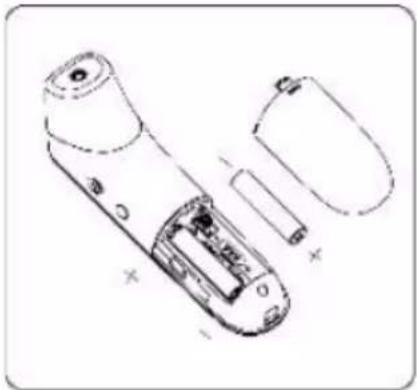
natural_image
Technical line drawing of a remote control device showing internal components and casing (no text or symbols)natural_image
Line drawing of a handheld device with a hand interacting with it (no text or symbols)
text_image
Infrared temperature probe Infrared ray Ear canal Eardrumtext_image
Technical diagram of a remote control device with labeled parts including display, buttons, and internal componentsline
| t/h | t/°C | | --- | ---- | | 0 | 36.6 | | 2 | 36.4 | | 4 | 36.5 | | 6 | 36.6 | | 8 | 36.8 | | 10 | 37.0 | | 12 | 37.1 | | 14 | 37.3 | | 16 | 37.4 | | 18 | 37.2 | | 20 | 37.0 | | 22 | 36.8 | | 24 | 36.6 |natural_image
Illustration of a hand holding a remote control device with an open battery pack (no text or symbols)natural_image
Line drawing of a handheld electronic device with a small inset showing a lens (no text or symbols)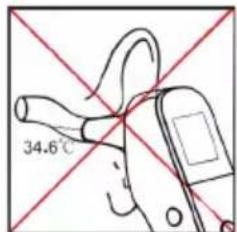
text_image
34.6°C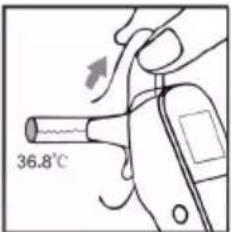
text_image
36.8°C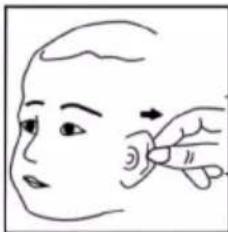
natural_image
Line drawing of a person's face with a finger pointing to the ear area (no text or symbols)
natural_image
Line drawing of a human face profile with visible eye and ear (no text or symbols)natural_image
Line drawing of a child receiving a medical or CT scan device (no text or symbols present)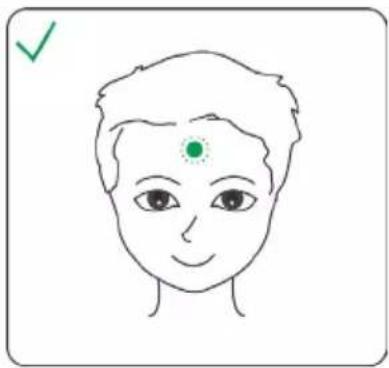
natural_image
Simple line drawing of a human face with a green dot on the forehead and a checkmark in the top-left corner (no text or symbols)natural_image
Illustration of a baby bottle and a hand holding a medical device (no text or symbols)natural_image
Illustration of a hand holding a pen or tube with arrows indicating movement or force (no text or symbols)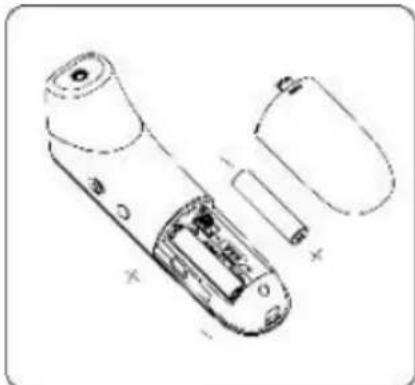
natural_image
Technical line drawing of a remote control device with internal components and battery casing (no text or symbols)natural_image
Line drawing of a remote control device with a hand interacting with it (no text or symbols)
text_image
Technical diagram of a remote control device with labeled parts including display, buttons, and battery packline
| t/h | t/°C | | --- | ---- | | 0 | 36.6 | | 2 | 36.4 | | 4 | 36.5 | | 6 | 36.6 | | 8 | 36.8 | | 10 | 37.0 | | 12 | 37.1 | | 14 | 37.3 | | 16 | 37.4 | | 18 | 37.3 | | 20 | 37.1 | | 22 | 36.9 | | 24 | 36.6 |natural_image
Illustration of a hand holding a pen or tube with an arrow indicating force application (no text or symbols present)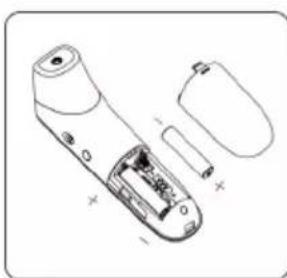
natural_image
Technical line drawing of a handheld electronic device with internal components and battery housing (no text or symbols)Oortemperatuur Meten (Volwassene / Kind)
natural_image
Line drawing of a handheld electronic device with a circular lens and ear (no text or symbols)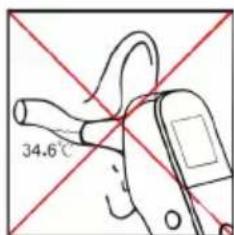
text_image
34.6°C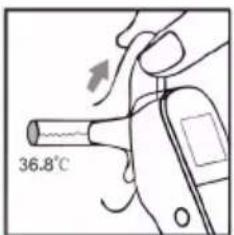
text_image
36.8°C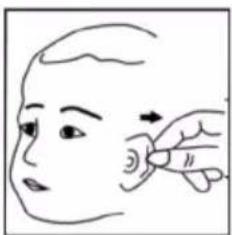
natural_image
Line drawing of a person's face with an arrow pointing to the ear area, no text or symbols present
natural_image
Line drawing of a human face profile (no text or symbols)natural_image
Line drawing of a child receiving a medical or CT scan device (no text or symbols present)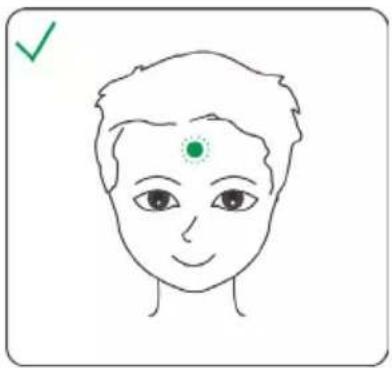
natural_image
Simple line drawing of a human face with a green dot on the forehead and a checkmark in the top-left corner (no text or symbols)natural_image
Illustration of a baby bottle and a handheld device (no text or symbols)natural_image
Illustration of a hand holding a pen or tube with arrows indicating movement or force (no text or symbols)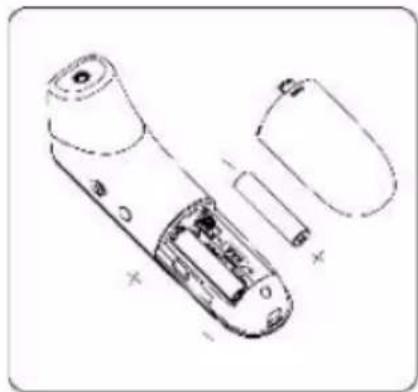
natural_image
Technical line drawing of a remote control device with internal components and battery housing (no text or symbols)Reinigen en Desinfecteren
Reinigen
natural_image
Line drawing of a handheld device with a hand interacting with it (no text or symbols)