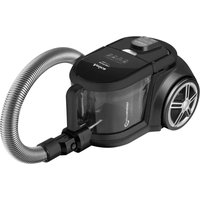
Akman VM 4014 - Vacuum Cleaner AMICA - Free user manual and instructions
Find the device manual for free Akman VM 4014 AMICA in PDF.



| Product type | Bagless vacuum cleaner |
| Brand | Amica |
| Model | Akman VM 4014 |
| Net weight | 4.5 kg |
| Power supply | AC 220-240 V, 50 Hz |
| Nominal power | 800 W |
| Maximum power | 900 W |
| Dust container type | Removable transparent container |
| Filters | Washable intake filter, washable exhaust filter |
| Main brush | Turbo brush for carpets and hard floors |
| Included accessories | Metal telescopic tube, 2-in-1 nozzle (crevices and furniture), parquet brush, universal brush nozzle |
| Remote control | Yes, integrated into the handle (2 AAA 1.5 V batteries not included) |
| Remote control functions | On/off, power adjustment (+, -), standby |
| Cable length | Approx. 6 m (yellow and red markings) |
| Automatic cable rewinder | Yes, rewinding button |
| Radio frequency band | 433.050 - 434.790 MHz |
| Radio signal power | < -20 dBm |
| Noise level | Not specified (estimated 75-80 dB) |
| Filter maintenance | Monthly cleaning recommended, replacement every 6 months |
| Intended use | Domestic use only |
| Marking | Compliant with Directive 2014/53/EU |
Frequently Asked Questions - Akman VM 4014 AMICA
The batteries must be inserted before first use.
If the container is not full, check that the brush, hose or tube are not obstructed.
Also clean the intake and exhaust filters.
Using without a filter can damage the motor.
Wash it with warm water without detergent, and let it dry completely before reinstalling.
The intake filter is cleaned when dirt is visible.
If the problem persists, the rewinding mechanism may be defective, contact technical support.
Do not expose it to rain, moisture or extreme temperatures.
Adjust the power according to the type of surface.
Take it to a collection point for used electrical and electronic equipment in accordance with Directive 2012/19/EC.
User questions about Akman VM 4014 AMICA
0 question about this device. Answer the ones you know or ask your own.
Ask a new question about this device
Download the instructions for your Vacuum Cleaner in PDF format for free! Find your manual Akman VM 4014 - AMICA and take your electronic device back in hand. On this page are published all the documents necessary for the use of your device. Akman VM 4014 by AMICA.
USER MANUAL Akman VM 4014 AMICA
PL INSTRUKCJA OBSŁUGI 2
EN USER MANUAL 6
CS NÁVOD K OBSLUZE 10
SK NÁVOD NA OBSLUHU 14
OBSŁUGA:
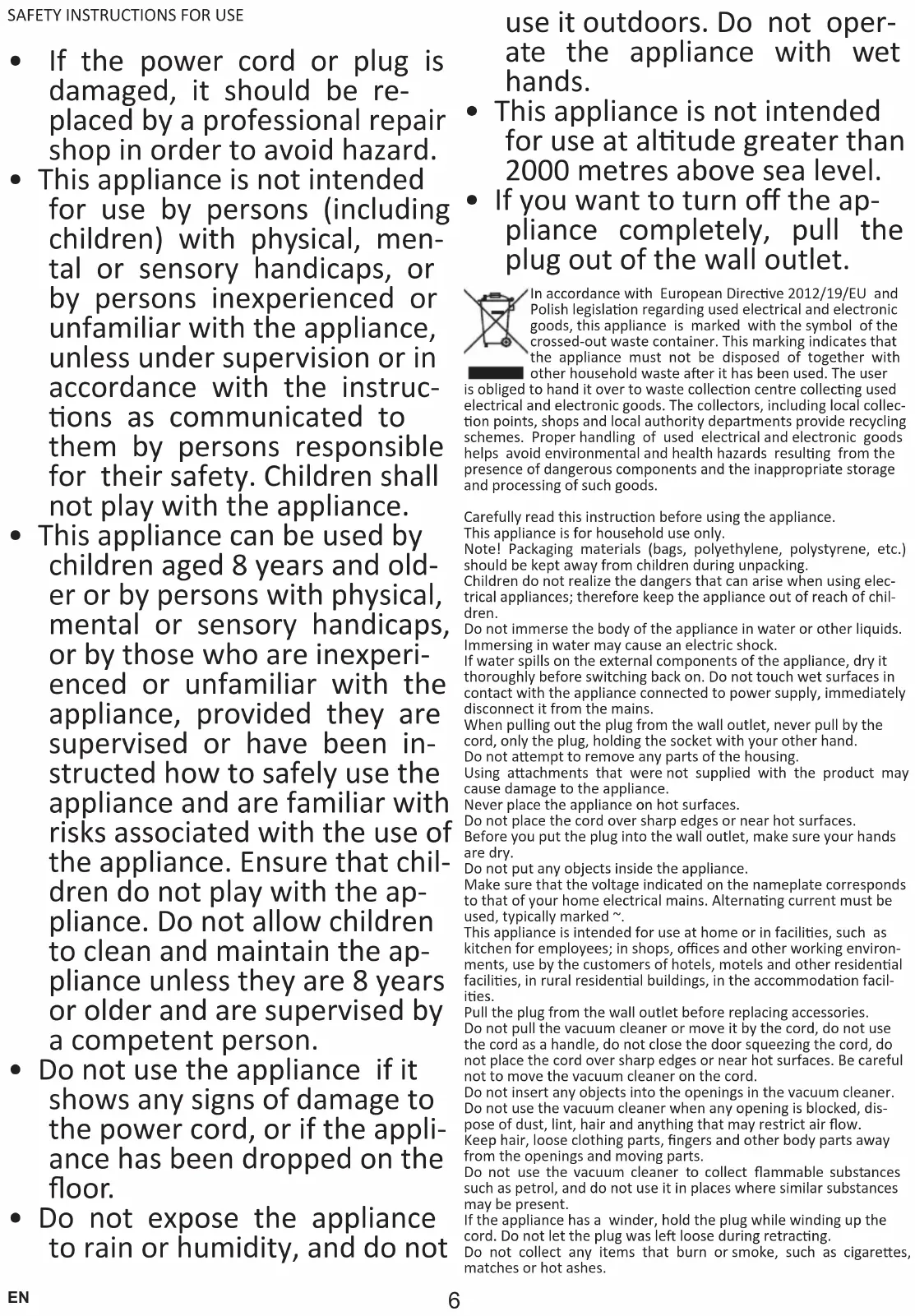
- If the power cord or plug is damaged, it should be replaced by a professional repair shop in order to avoid hazard.
- This appliance is not intended for use by persons (including children) with physical, mental or sensory handicaps, or by persons inexperienced or unfamiliar with the appliance, unless under supervision or in accordance with the instructions as communicated to them by persons responsible for their safety. Children shall not play with the appliance.
- This appliance can be used by children aged 8 years and older or by persons with physical, mental or sensory handicaps, or by those who are inexperienced or unfamiliar with the appliance, provided they are supervised or have been instructed how to safely use the appliance and are familiar with risks associated with the use of the appliance. Ensure that children do not play with the appliance. Do not allow children to clean and maintain the appliance unless they are 8 years or older and are supervised by a competent person.
- Do not use the appliance if it shows any signs of damage to the power cord, or if the appliance has been dropped on the floor.
- Do not expose the appliance to rain or humidity, and do not
use it outdoors. Do not operate the appliance with wet hands.
- This appliance is not intended for use at altitude greater than 2000 metres above sea level.
- If you want to turn off the appliance completely, pull the plug out of the wall outlet.
In accordance with European Directive 2012/19/EU and Polish legislation regarding used electrical and electronic goods, this appliance is marked with the symbol of the crossed-out waste container. This marking indicates that the appliance must not be disposed of together with other household waste after it has been used. The user
is obliged to hand it over to waste collection centre collecting used electrical and electronic goods. The collectors, including local collection points, shops and local authority departments provide recycling schemes. Proper handling of used electrical and electronic goods helps avoid environmental and health hazards resulting from the presence of dangerous components and the inappropriate storage and processing of such goods.
Carefully read this instruction before using the appliance.
This appliance is for household use only.
Note! Packaging materials (bags, polyethylene, polystyrene, etc.) should be kept away from children during unpacking.
Children do not realize the dangers that can arise when using electrical appliances; therefore keep the appliance out of reach of children.
Do not immerse the body of the appliance in water or other liquids. Immersing in water may cause an electric shock.
If water spills on the external components of the appliance, dry it thoroughly before switching back on. Do not touch wet surfaces in contact with the appliance connected to power supply, immediately disconnect it from the mains.
When pulling out the plug from the wall outlet, never pull by the cord, only the plug, holding the socket with your other hand.
Do not attempt to remove any parts of the housing.
Using attachments that were not supplied with the product may cause damage to the appliance.
Never place the appliance on hot surfaces.
Do not place the cord over sharp edges or near hot surfaces.
Before you put the plug into the wall outlet, make sure your hands are dry.
Do not put any objects inside the appliance.
Make sure that the voltage indicated on the nameplate corresponds to that of your home electrical mains. Alternating current must be used, typically marked \~.
This appliance is intended for use at home or in facilities, such as kitchen for employees; in shops, offices and other working environments, use by the customers of hotels, motels and other residential facilities, in rural residential buildings, in the accommodation facilities.
Pull the plug from the wall outlet before replacing accessories.
Do not pull the vacuum cleaner or move it by the cord, do not use the cord as a handle, do not close the door squeezing the cord, do not place the cord over sharp edges or near hot surfaces. Be careful not to move the vacuum cleaner on the cord.
Do not insert any objects into the openings in the vacuum cleaner. Do not use the vacuum cleaner when any opening is blocked, dispose of dust, lint, hair and anything that may restrict air flow. Keep hair, loose clothing parts, fingers and other body parts away from the openings and moving parts.
Do not use the vacuum cleaner to collect flammable substances such as petrol, and do not use it in places where similar substances may be present.
If the appliance has a winder, hold the plug while winding up the cord. Do not let the plug was left loose during retracting.
Do not collect any items that burn or smoke, such as cigarettes, matches or hot ashes.
Do not use the vacuum cleaner without a dust bag and/or filters. If the opening, which sucks air, hose or telescopic tube are clogged, you should immediately turn off the vacuum cleaner. Before restarting the vacuum cleaner, first remove the blocking item.
Do not use the vacuum cleaner too close to heaters, radiators, cigarette butts, etc.
Before using the vacuum cleaner, remove sharp objects from the floor to avoid damaging the dust bag.
Do not collect fine particles such as: flour, gypsum, printer toners, etc., as this may clog filters and damage the vacuum cleaner.
Make sure that extension tube is fully withdrawn before you put away your vacuum cleaner either in vertical or horizontal position. NOTE:
Batteries are not included with the product. You need to purchase batteries to power the control unit integrated in the handle (2 x 1.5V AAA batteries).
Amica S.A. hereby declares that the type of radio emitting equipment, vacuum cleaner, models VM 4011/VM 4012/VM 4013/VM 4014 comply with Directive 2014/53/EU. The full text of the EU declaration of conformity is available on our website at: www.amica.pl.
Frequency bands 433.050-434.790MHz
The maximum power of a radio signal transmitted in a frequency band
<-20dBm
SPECIFICATION:
| Power specification: AC 220-240V / 50Hz | |
| Nominal power: 800W | |
| Maximum power: 900W | |
| Net weight: 4.5 kg* | |
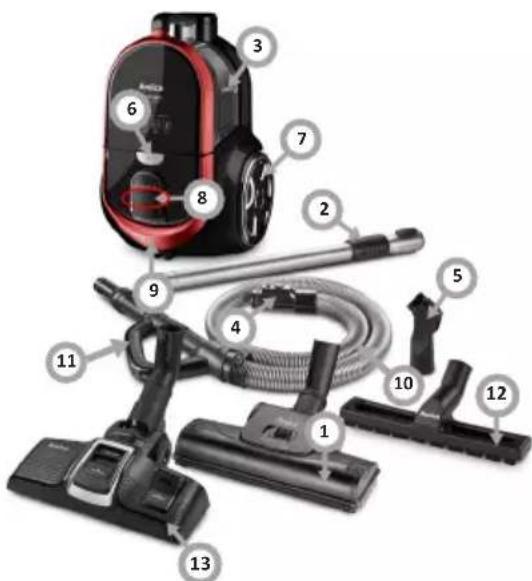
YOUR APPLIANCE:
- Turbo brush
- Metal tube
- Dust bin
- Hose connection
- 2-in-1 crevice and book attachment
- Dust container release button
- Rear wheel
- Speed control buttons
- Power cord retract button
- Hose
- Handle controls
- Parquet brush
- 2-in-1 all-purpose suction brush
OPERATE THE APPLIANCE:
Before first use
Always unplug the appliance before attaching or removing attachments!
- Before using this product, please install the batteries in the battery compartment of the control handle. Carefully open the battery compartment cover and insert two 1.5V AAA batteries. Close the battery compartment cover. Then connect the vacuum cleaner to the mains socket and press the on/off button on the vacuum cleaner to start it. Then press any control button and now the appliance can be controlled remotely from the handle.
- Note: When inserting batteries observe correct polarity of battery "+" and "-" terminals. If the vacuum cleaner is not used for a long time, remove the batteries from the battery compartment of the control handle.
Control speed using the handle
- The remote control handle has three buttons for operating the vacuum cleaner. The "+" and "-" buttons can be used to adjust the suction power of the vacuum cleaner. Use the button on the control handle to turn off the appliance.
- Note! No indicator on the remote control handle lights up when you press any button. For battery replacement, see chapter "Before using for the first time."
- Note! The remote control handle will only work if the power button on the appliance is pressed. If the vacuum cleaner does not respond to the control panel buttons on the handle despite the batteries being fully charged, you must pair the control panel with the vacuum cleaner. See the section: "Pair the handle control panel with the vacuum cleaner."
Pair the handle control panel with the vacuum cleaner.
- Pair the handle control panel with the vacuum cleaner: Insert the new batteries into the handle battery compartment (see section "Before first use") and connect the vacuum cleaner to the wall power outlet. Turn on the vacuum cleaner using the on/off button on the appliance. Hold down the "+" and "-" buttons until the indicators on the screen light up in sequence. Press the remote control button in the handle. Now the handle control panel is paired with the vacuum cleaner.
Assemble the appliance
Always unplug the appliance before attaching or removing attachments!
- Insert the end of the hose into the inlet opening.
Note! Figures are for illustrative purposes only. Individual models may vary.
* depending on model

- To remove the hose hold the end of the hose, press the tab on the connector and pull the hose out of the inlet.
- Hold the flexible hose coupler and insert it into the larger opening in the tube.
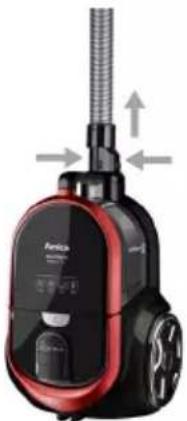
- Connect the telescopic tube with the hose and the brush.
- Extend the telescopic tube to the desired length.
- Before you start vacuuming, extend power cord cable to sufficient length and insert the plug into the wall socket. The yellow mark on the power cord indicates it is extended almost all the way. When you see the red mark do not pull the power cord any further.
- Use the on/off button to turn on the appliance. When you have finished using the appliance, press the on/off button to turn off the vacuum cleaner.
- Unplug the cord from the wall outlet.
- Wind up the connecting cord by pressing the power cord retract button. To do this hold the cord to prevent it from tangling or bumping the plug on the vacuum cleaner housing.
- Disconnect the suction attachment — cleaning head from the tube and disconnect the telescopic tube from the hose.
- Close the telescopic tube.
- Use the symbols on the display as a guide. Press the plus button (increases the suction power) or the minus button (reduces the suction power).
• Fabric curtains (lowest setting)

• Upholstery (sofa, high-end carpets and rugs)
• Hard floors (highest setting)

- Plain carpets

CLEANING AND CARE
Empty the dust bin
- Unplug the power cord from the power wall outlet before cleaning. Empty the dust container, when the vacuum cleaner becomes louder or when the suction power has decreased. Check if dust container is full after each use. If necessary, empty the container.
- Hold the dust container and the handle and press the release button.
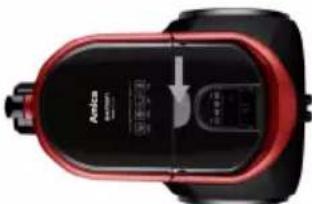
- Remove the dust container from the appliance.
- Open the top cover of the dust container, then empty the dust into the waste bin.
If the vacuum cleaner loses power, check how full the container is. If the dust container is not full, check whether the suction brush or the hose or tube is blocked with large items stopping the air flow. After removing any obstruction, start the appliance again.
Clean and replace the inlet filter
- Before cleaning the filter, remove the power cord plug from the wall outlet.
- The filter shall be cleaned when there are visible stains on it, wash the filter in warm water with no detergent. Use it only when completely dry.
• Always use the vacuum cleaner with a filter in place. -
Failure to install the filter may result in motor damage.
-
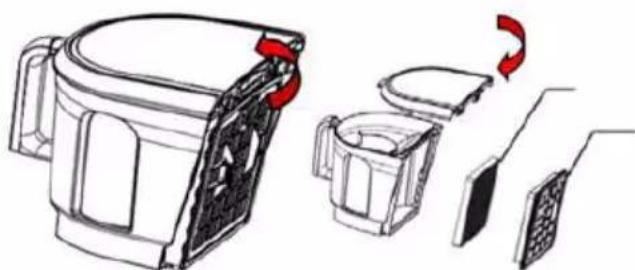
Remove the filter by sliding it out of the guides upwards.
-
Clean the filter or replace with a new one.
-
Reinstall the filter by placing it back into the guides. Ensure the filter is completely dry before inserting it.
CLEAN AND REPLACE THE EXHAUST FILTER
- Before cleaning the filter, remove the power cord plug from the wall outlet.
- Clean the filter when it is clearly soiled. Shake dirt off the filter and then brush it with a soft bristle brush. Then rinse the filter in lukewarm water and do not use any detergent. Do not direct strong jet of water onto the filter. Use it only when
Note! Figures are for illustrative purposes only. Individual models may vary.
completely dry. If the filter is too dirty or damaged replace the filter with a new one.
- Depending on the intensity of use, it is recommended that you clean the filter once a month and replace it with a new one every six months.
• Always use the vacuum cleaner with a filter in place. -
It is recommended that you only use original Amica filters for your vacuum cleaner.
-
Open the air exhaust cover.
-
Remove the filter from the back of the vacuum chamber.
- Clean it or replace it with a new one.
Cleaning filters.
Rinse the filter with warm water and let dry completely.
In the event of any fault:
- Turn off the appliance.
- Unplug the appliance from power.
- By following the instructions given in the table below, you can correct some minor issues. Please check all points in the table before you refer the repair to customer service.
Problem Reason Remedy
| 1. The appliance does not work | No power Check the circuit breaker, reset if tripped, replace a blown fuse | |
| 2. Reduced suction power of the vacuum cleaner | Vacuum cleaner hose clogged | Remove dust, hair, and other obstructions that may reduce airflow. |
If the problem is not solved, unplug the appliance from power and report the fault to the nearest service centre. Note! All repairs must be performed by qualified service technicians.
OBSLUHA:
POUŽÍVANIE:
Pred prvým použitím
HANDHABUNG:
FONCTIONNEMENT :
USO:
Antes de primer uso
ОБСЛУЖВАНЕ:
ЕКСПЛУАТАЦІЯ:
OPERARE:
- YOUR APPLIANCE
- BEFORE FIRST USE
- CONTROL SPEED USING THE HANDLE
- PAIR THE HANDLE CONTROL PANEL WITH THE VACUUM CLEANER
- ASSEMBLE THE APPLIANCE
- CLEANING AND CARE
- EMPTY THE DUST BIN
- CLEAN AND REPLACE THE INLET FILTER
- CLEAN AND REPLACE THE EXHAUST FILTER
- CLEANING FILTERS
- IN THE EVENT OF ANY FAULT
- OBSLUHA
- PRED PRVÝM POUŽITÍM
- ANTES DE PRIMER USO
- ОБСЛУЖВАНЕ
- ЕКСПЛУАТАЦІЯ
Brand : AMICA
Model : Akman VM 4014
Category : Vacuum Cleaner