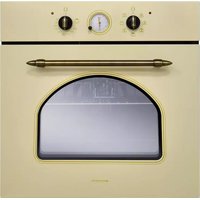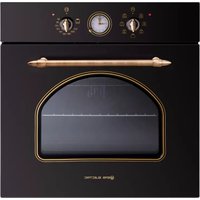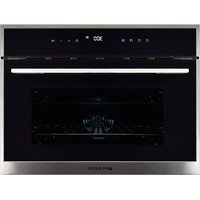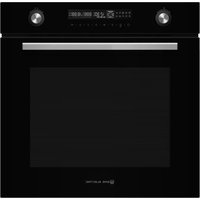
EMV72PGN - Oven EAS Electric - Free user manual and instructions
Find the device manual for free EMV72PGN EAS Electric in PDF.



| Brand | EAS Electric |
| Model | EMV72PGN |
| Product type | Built-in electric oven |
| Dimensions (W x H x D) | 596 x 595 x 560 mm (approx.) |
| Net weight | 42 kg |
| Usable volume | 72 L |
| Power supply | 220-240 V~, 50-60 Hz, 3.2 kW |
| Energy efficiency class | A+ |
| Energy consumption (conventional) | 1.06 kWh/cycle |
| Energy consumption (forced air) | 0.69 kWh/cycle |
| Cooking modes | Conventional, Convection, ECO, Radiant heat, Dual grill, Dual grill + fan, Pizza, Bottom heat, Defrosting, Fermentation |
| Additional functions | Pyrolytic self-cleaning, Fast preheat, Timer, Child lock, Demo mode, Sabbath mode |
| Cleaning type | Pyrolytic (self-cleaning) |
| Cavity material | Enamel |
| Door material | Glass |
| Number of grid levels | 5 |
| Included accessories | Grid, drip tray, baking tray, door lock (depending on model) |
| Interior lighting | Halogen bulb 25 W, 230 V |
| Warranty | 3 years (Spain and Portugal) |
Frequently Asked Questions - EMV72PGN EAS Electric
User questions about EMV72PGN EAS Electric
0 question about this device. Answer the ones you know or ask your own.
Ask a new question about this device
Download the instructions for your Oven in PDF format for free! Find your manual EMV72PGN - EAS Electric and take your electronic device back in hand. On this page are published all the documents necessary for the use of your device. EMV72PGN by EAS Electric.
USER MANUAL EMV72PGN EAS Electric
natural_image
Abstract arrangement of gray and white triangular shapes (no text or symbols)HORNO
OVEN
FOUR
FORNO

natural_image
Simple line drawing of a window with two circles above the top panel (no text or symbols)EMV72PGN
natural_image
Line drawing of a rectangular tray with horizontal slats and side handles (no text or symbols)Rejilla
natural_image
Simple line drawing of a rectangular tray with side handles (no text or symbols)Bandeja
text_image
Diagram showing a sewing machine's side panel with screw fasteners and a magnified inset highlighting the down-left corner.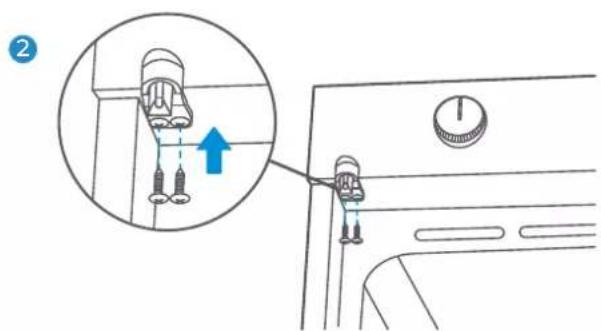
text_image
Diagram showing a car interior with a close-up of a component being inserted, highlighting the valve mechanism.natural_image
Diagram of an oven with internal air ducts and a close-up inset showing a hand holding a device (no text or symbols)natural_image
Technical illustration of an oven with internal air ducts and a magnified inset showing the interior mechanism (no text or symbols)natural_image
Diagram of a door with a blue arrow pointing to the door panel (no text or symbols present)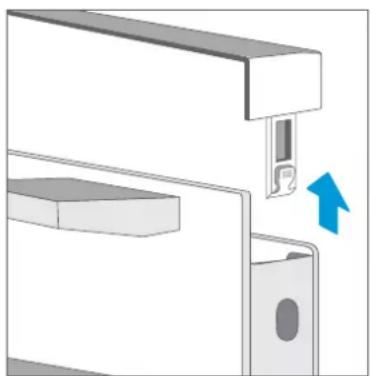
natural_image
Mechanical assembly diagram showing a bracket with a close-up of a slot and a blue arrow indicating direction (no text or symbols)
natural_image
Diagram of a mechanical assembly with a blue arrow indicating a downward motion (no text or symbols present)Atención
text_image
Diagram showing a door with internal structure and three labeled components, illustrating a process or assembly step.natural_image
Technical line drawing of a mechanical assembly with layered components and a directional arrow (no text or symbols)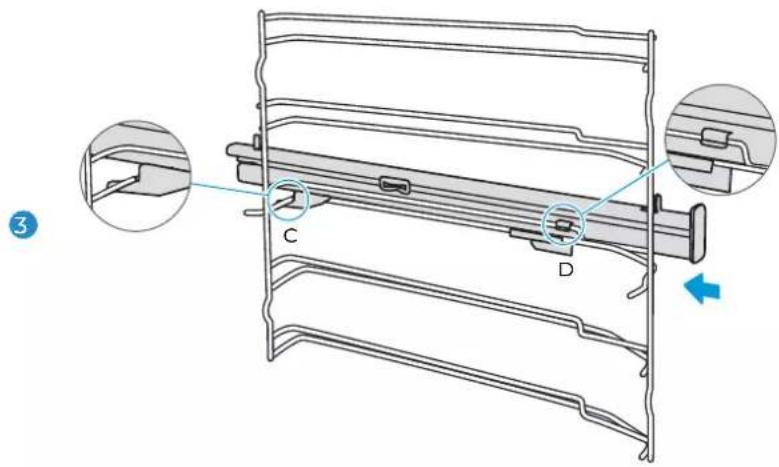
text_image
Technical diagram of a mechanical component with labeled parts C and D, showing cross-sectional views and a blue directional arrow.natural_image
Technical line drawing of a mechanical assembly with no visible text or symbols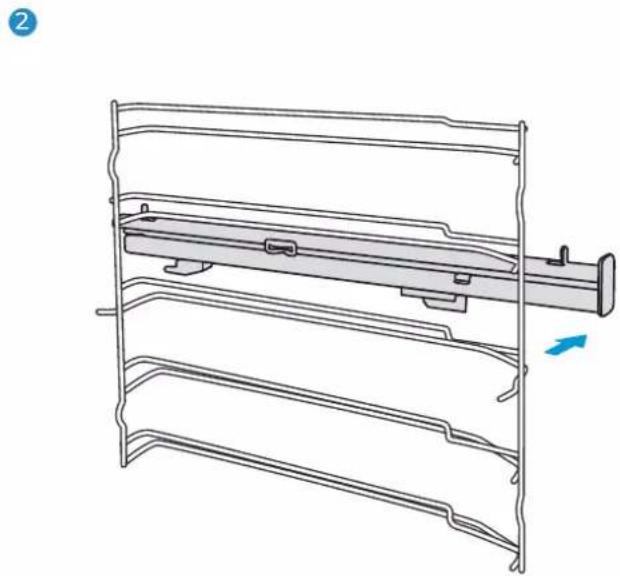
natural_image
Technical line drawing of a mechanical assembly with layered components and a blue arrow indicating direction (no text or symbols)PUERTA DEL APARATO
natural_image
Pure technical line drawing of a rectangular component with internal features, no text or symbols present3 SAFETY INFORMATION
5 Warning
8 Causes of damage
9 INSTALLATION
10 OPERATING THE APPLIANCE
10 EMV72PGN
10 Component
11 Before using the appliance
12 Types of heating
13 Using your appliance
17 ACCESSORIES
19 ENERGY EFFICIENT USE
19 ENVIRONMENT
19 HEALTH
20 MAINTENANCE YOUR APPLIANCE
22 Pyrolytic self-cleaning function
29 APPLIANCE DOOR
31 CURE YOUR APPLIANCE WHEN NEEDED
34 CUSTOMER SERVICE
36 TIPS AND TRICKS
37 TYPICAL RECIPES
37 Cakes
38 Bread & pizza
39 Meat
39 TEST FOOD ACCORDING TO EN 60350-1 ENERGY
40 EFFICIENCY ACCORDING TO EN 60350-1
41 COOKING BY ECO MODE
41 DATASHEET (EU 65/2014 & EU 66/2014)
42 WARRANTY
SAFETY INFORMATION
Thank you for buying an EAS Electric Built-in Oven. Before unpacking it, please read these instructions carefully. Only then will you be able to operate your appliance safely and correctly. Warmly recommend retain the instruction manual and installation instructions for future use or for subsequent owners.
- Means for disconnection must be incorporated in the fixed wiring in accordance with the wiring rules. A disconnection incorporated in the fixed wiring is to be provided.
- Fixed wiring insulation must be protected, for example, by insulating sleeving hav-ing an appropriate temperature rating.
- Disconnection incorporated in the fixed wiring is in accordance with AS/NZS 3000
- The appliance and its accessible parts become hot during use. Young children should be kept away.
- During use the appliance becomes hot. Care should be taken to avoid touching heating elements inside the oven.
- This appliance can be used by children aged from 8 years and above and persons with reduced physical, sensory or mental capabilities or lack of experience and knowledge if they have been given supervision or instruction concerning use of the appliance in a safe way and understand the hazards involved.
-
Children less than 8 years of age shall be kept away unless continuously supervised. Children being supervised not to play with the appliance. The appliance is not to be used by persons (including children) with reduced physical, sensory or metal capabilities, or lack of experience and knowledge, unless they have been given supervision or instruction.
-
Children shall not play with the appliance.
- Do not use harsh abrasive cleaners or sharp metal scrapers to clean the oven door glass since they can scratch the surface, which may result in shattering of the glass. A steam cleaner is not be used.
- Cleaning and user maintenance shall not be made by children without supervision.
- Excess spillage must be remove before cleaning.
- Under cleaning conditions the surfaces may be get hotter than usual. The oven must be switched off before removing the guard and after cleaning, the guard must be replaced in accordance with instructions.
- Check the appliance if there is any damage after unpacking it. Do not connect the appliance if it has been damaged. Only a licensed professional may connect appliances without plugs. Damage caused by incorrect connection is not covered under warranty.
- Ensure that the appliance is switched off before replacing the lamp to avoid the possibility of electric shock.
- Only use this appliance indoors. The appliance must only be used for the preparation of food and drink. The appliance must be supervised during operation.
- Please always slide accessories into the cavity the right way round.
- Above information is under the guidance of IEC 60335-1 / EN 60335-1 / IEC 60335-2-6 / EN 60335-2-6.
WARNING
Risk of electric shock!
-
Incorrect repairs are dangerous. Repairs may only be carried out and damaged power cables replaced by one of our trained after-sales technicians.
-
If the appliance is defective, unplug the appliance from the mains or switch off the circuit breaker in the fuse box. Contact the after-sale service.
-
The cable insulation on electrical appliances may melt when touching hot parts of the appliance. Never bring electrical appliance cables into contact with hot parts of the appliance.
-
Do not use any high-pressure cleaners or steam cleaners, which can result in an electric shock.
-
A defective appliance may cause electric shock. Never switch on a defective appliance. Unplug the appliance from the mains or switch off the circuit breaker in the fuse box. Contact the after-sales service.
Risk of fire!
-
Combustible items stored in the cavity may catch fire. Never store combustible items in the cavity. Never open the appliance door if there is smoke inside. Switch off the appliance and unplug it from the mains or switch off the circuit breaker in the fuse box.
-
A draught is created when the appliance door is opened. Greaseproof paper may come into contact with the heating element and catch fire. Do not place greaseproof paper loosely over accessories during preheating. Always weight down the greaseproof paper with a dish or a baking tin. Only cover the surface required with greaseproof paper. Greaseproof paper must not protrude over the accessories.
Risk of injury!
-
Scratched glass in the appliance door may develop into a crack. Do not use a glass scraper, sharp or abrasive cleaning aids or detergents.
-
The hinges on the appliance door move when opening and closing the door, and you may be trapped. Keep your hands away from the hinges.
Risk of burns!
-
The appliance becomes very hot. Never touch the interior surfaces of the appliance or the heating elements.
-
Always allow the appliance to cool down.
-
Keep children at a safe distance.
-
Accessories and ovenware become very hot. Always use oven gloves to remove accessories or ovenware from the cavity.
-
Alcoholic vapors may catch fire in the hot cooking compartment. Never prepare food containing large quantities of drinks with high alcohol content. Only use small quantities of drinks with high alcohol content. Open the appliance door with care.
Risk of scalding!
-
The accessible parts become hot during operation. Never touch the hot parts. Keep children at a safe distance.
-
When you open the appliance door, hot steam can escape. Steam may not be visible, depending on its temperature. When opening, do not stand too close to the appliance. Open the appliance door carefully. Keep children away.
- Water in a hot cavity may create hot steam. Never pour water into the hot cavity.
Hazard due to magnetism!
Permanent magnets are used in the control panel or in the control elements. They may affect electronic implants, e.g. heart pacemakers or insulin pumps. Wearers of electronic implants must stay at least 10 cm away from the control panel.
Causes of Damage
- Accessories, foil, greaseproof paper or ovenware on the cavity floor: do not place accessories on the cavity floor. Do not cover the cavity floor with any sort of foil or greaseproof paper. Do not place ovenware on the cavity floor if a temperature of over 50 °C has been set. This will cause heat to accumulate. The enamel will be damaged.
- Aluminum foil: Aluminum foil in the cavity must not come into contact with the door glass. This could cause permanent discoloration of the door glass.
- Silicone pans: Do not use any silicone pans, or any mats, covers or accessories that contain silicone. The oven sensor may be damaged.
- Water in a hot cooking compartment: do not pour water into the cavity when it is hot. This will cause steam. The temperature change can cause damage to the enamel.
- Moisture in the cavity: Over an extended period of time, moisture in the cavity may lead to corrosion. Allow the appliance to dry after use. Do not keep moist food in the closed cavity for extended periods of time. Do not store food in the cavity.
- Cooling with the appliance door open: Following operation at high temperatures, only allow the appliance to cool down with the door closed. Do not trap anything in the appliance door. Even if the door is only left open a crack, the front of nearby furniture may become damaged over time. Only leave the appliance to dry with the door open if a lot of moisture was produced while the oven was operating.
- Fruit juice: when baking particularly juicy fruit pies, do not pack the baking tray too generously. Fruit juice dripping from the baking tray leaves stains that cannot be removed. If possible, use the deeper universal pan.
- Extremely dirty seal: If the seal is very dirty, the appliance door will no longer close properly during operation. The fronts of adjacent units could be damaged. Always keep the seal clean.
- Appliance door as a seat, shelf or worktop: Do not sit on the appliance door or place or hang anything on it. Do not place any cookware or accessories on the appliance door.
- Inserting accessories: depending on the appliance model, accessories can scratch the door panel when closing the appliance door. Always insert the accessories into the cavity as far as they will go.
- Carrying the appliance: do not carry or hold the appliance by the door handle. The door handle cannot support the weight of the appliance and could break.
- If you use the residual heat of the switched off oven to keep food warm, a high moisture content inside the cavity can occur. This may lead to condensation and can cause corrosion damage of your high quality appliance as well as harm your kitchen. Avoid condensation by opening the door or use “Defrost” mode.
INSTALLATION

text_image
min.585 max.595 min.35 min.50 min.35 min.5 min.35 min.50 min.35 min.585 max.595 min.35 min.50 min.35 min.585 max.595 min.35 min.50 min.35 min.585 max.595 min.35 min.50 min.35 min.585 max.595 min.35 min.50 min.35 min 600 460 105 435 20 596 576 530 546 595 596To operate this appliance safe, please be sure that it has been installed to a professional standard respecting the installation instructions. Damages occur because of incorrect installation are not within the warranty.
While doing the installation, please wear protective gloves to prevent yourself from getting cut by sharp edges.
Check the appliance if there is any damage before installation and do not connect the appliance if there is.
Before turning on the appliance, please clean up all the packaging materials and adhesive film from the appliance.
The dimensions attached are in mm.
It is necessary to have the plug accessible or incorporate a switch in the fixed wiring, in order to disconnect the appliance from the supply after installation when necessary. Warning: The appliance must not be installed behind a decorative door in order to avoid overheating.
OPERATING THE APPLIANCE
EMV72PGN
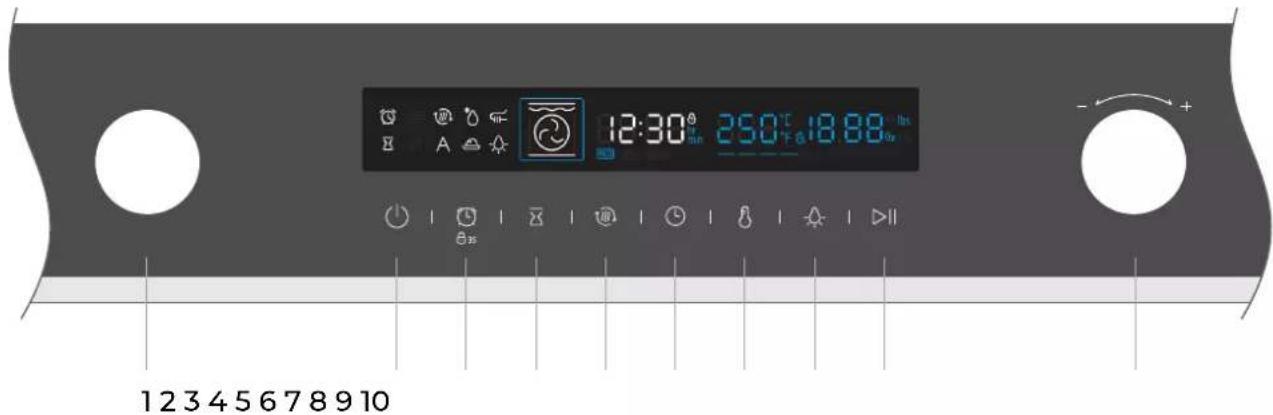
COMPONENT
text_image
12:30° 25.0°C 18.88 fps - +| 1. Oven – Function | Turn this knob to change heating mode. |
| 2. ON / OFF | Switch on and off oven. |
| 3. Timer / Child-Proof Lock | Use timer function/use child-proof lock with 3s press |
| 4. End time | Set an end time to the cooking duration. |
| 5. Quick preheat | Use this to have a quick preheat. |
| 6. Duration & Clock Setting | Set a duration time then select function & set clock in standby mode. |
| 7. Temperature Setting | Press to set temperature. |
| 8. Lamp ON / OFF | Switch on and off the lamp. |
| 9. Start / Pause | Start and pause the cooking process. |
| 10. Adjust | Change the adjustment values shown in the display. |
BEFORE USING THE APPLIANCE
First using for the first time
Before using the appliance to prepare food for the first time, you must clean the cavity and accessories.
- Remove all stickers, surface protection foils and transport protection parts.
- Remove all accessories and the side-racks from the cavity.
- Clean the accessories and the side-racks thoroughly using soapy water and a dish cloth or soft brush.
- Ensure that the cavity does not contain any leftover packaging, such as polystyrene pellets or wooden piece which may cause risk of fire.
- Wipe the smooth surfaces in the cavity and the door with a soft, wet cloth.
- To remove the new-appliance smell, heat up the appliance when empty and with the oven door closed.
- Keep the kitchen highly ventilated while the appliance is heating up first time. Keep children and pets out of the kitchen during this time. Close the door to the adjacent rooms.
- Adjust the settings indicated. You can find out how to set the heating type and the temperature in the next section.
→"Using Your Appliance" on page 10
Settings
Heating Mode
Time

2h
After the appliance has cooled down:
- Clean the smooth surfaces and the door with soapy water and a dish cloth.
- Dry all surfaces.
- Install the side-racks.
Setting the time
Before the oven can be used, the time should be set.
- After the oven has been electrically connected, touch the clock symbol
you can set time of day in hours by turn right knob. - Touch clock symbol 📊 again then you can set time in minutes by right knob.
- Touch clock 🔒 symbol to finish the setting.

NOTE: The clock has a 24 hour display.
TYPES OF HEATING
Your appliance has various operating modes which make your appliance easier to use. To enable you to find the correct type of heating for your dish, we have explained the differences and scopes of application here.
| Types of Heating Temperature Use | |||
 | Conventional | For traditional baking and roasting on one level. Especially suitable for cakes with moist toppings. | |
 | Convection | For baking and roasting on one or more levels. Heat comes from the ring heater surrounding the fan evenly. | |
 | ECO | For energy-saved cooking. | |
 | Conventional + Fan | For baking and roasting on one or more levels. The fan distributes the heat from the heating elements evenly around the cavity. | |
 | Radiant Heat | For grilling small amounts of food and fo browning food. Please put the food in the center part under the grill heating element. | |
 | Double Grill + Fan | For grilling flat items and for browning food. The fan distributes the heat evenly around the cavity. | |
 | Double Grill | For grilling flat items and for browning food | |
 | Pizza | For pizza and dishes which need a lot of heat from underneath. The bottom heater and ring heater will work. | |
 | Bottom Heat | For add extra browning to the bases of pizzas, pies, and pastries. Heating come from the bottom heater. | |
 | Defrost | For gently defrosting frozen food. | |
 | Fermentation | For making yeast dough and sourdough to prove and culturing yogurt. | |
| Types of additional function Temperature Use | |||
 | Pyrolytic Self-cleaning | Unadjustable | To heat up to a very high temperature. Residues will burn |
Notes
- To defrost big portions of food, it is possible to remove the side-racks and place the container on the cavity floor.
- To warming tableware, it is beneficial to remove the side-racks and the heating modes "Hot Air Grilling" and "Fan Heating" with temperature setting of 50^ C are useful. "Hot Air Grilling" should be used, if more than half of the cavity floor is covered by the tableware.
- Due to an optimum evenness of heat distribution inside the cavity during "Fan Heating", the fan will work at certain times of the heating process, to guaranty the best possible performance.
Caution
- If you open the appliance door during an on-going operation, the operation will be paused. Please be especially careful with the risk of burns.
- Do not cover the ventilation slots. Otherwise, the appliance may overheat. To make the appliance cools down more quickly after the operation, the cooling fan may continue to run for a period afterward.
Cooling fan
The cooling fan switches on and off as required. The hot air escapes above the door.
USING YOUR APPLIANCE
Cooking with oven
- After the oven has been electrically connected, turn the oven-function knob to select functions, turn the adjust knob the set cooking temperature.
- Touch ▶ symbol oven begins to work, if not, oven will back to clock after 10 minutes.
- During the cooking process, you can touch ⏻ to cancel or ▶ to pause it.
NOTE: After temperature setting, you can touch clock symbol ⏻ to set the cooking duration time, you can set it by turn adjust knob.
Quick preheat
You can use quick preheat to shorten the preheat time. Then you select a function, touch the quick preheat symbol 📂, the mark of quick preheat in the screen will light up. If this function can't quick preheat, then there will be a "beep", defrost, fermentation and "ECO" functions cannot be preheated quickly.
Set end time
- Complete clock setting;
- Touch the icon, set the hour bit through the right knob, press ☒, set the minute bit through the right knob, and touch the ☒ icon to complete the confirmation;
- Turn the left knob to select the function; set the time and temperature through the right knob;
Notes
- For example, when you set end time is 10 o'clock, and cooking duration time is 1 hour, oven will heat up at 9 o'clock, and finish at 10 o'clock.
- Probe, defrost and fermentation functions cannot enter the appointment function.
Change during cooking
During the period of appliance operating, you can change the heating type setting and temperature setting by
oven-function or adjust knob. After the change, if there no other action after 6 seconds the oven will heat as what you changed.
If you want change cooking duration time in the cooking process, please touch and change it by adjust knob.
After the change, if there no other action after 6 seconds the oven will heat as what you changed. During the cooking process with a finish time setting, you can't do any change.
When you want cancel the cooking process, please touch.
Notes
- Changing modes/temperature/rest cooking time may have some negative influences for the result of cooking, we warmly recommend you not to do so unless you are well experienced on cooking.
- Changing modes/temperature/rest cooking time may have some negative influences for the result of cooking, we warmly recommend you not to do so unless you are well experienced on cooking.
Caution!
After the appliance switched off, it becomes very hot especially inside the cavity. Never touch the interior surfaces of the appliance or the heating elements. Use oven gloves to remove accessories or ovenware from the cavity, and allow the appliance to cool down. Keep children at a safe distance at the same time to avoid the injury of burns.
Timer
You can use timer function by 📞. When the time arrived, oven will give "beep" touch for remind.
At the first touch of 📄, set timer by hours, then touch 📄 again, set timer by minutes.
Touch 📟 again, then the setting is finished.
You can set the timer before and during cooking process, but when you are selecting function and temperature, it's not available.
Childproof lock
Your appliance has a childproof lock so that children cannot switch it on accidentally or change any settings.
When you give a long press for 3 seconds, childproof lock is activated. A long press for 3 seconds again the oven is unlocked.
You can activate and deactivate childproof lock when the oven is work or not. Give a long press for 3 seconds you can switch on and off the childproof lock. When the childproof is on, there will be a Ⓗ35 in the status bar.

DEMO WITH SABBAT MODE
Demo mode
Demonstration mode, with power-off saving data function. Power off saving function: for example, when the demo mode is set to on, power off and then on is still on. After the demonstration mode is turned on, the heating pipe does not work.
1.. In standby mode, press and hold the "◀" key to enter the demonstration mode and display "off";
2. Turn the knob to the right to turn on the demonstration mode, display "off", turn the knob to the left to turn off the demonstration mode, display "on";
Note:
you can press the cancel key to exit the setting, or wait for 3 seconds to automatically exit the demo mode setting state and return to the standby state.
Sabbath mode
Sabbath mode has the function of power off saving data. Save cooking data every 25 minutes. If the power is cut off during operation, after power on again, the Sabbath
mode will continue to run until the cooking time is 0, or press the standby mode.
key to return to
-
In standby mode, press and hold the fast preheating key for 3 seconds to enter
-
Turn the knob to adjust the cooking time.
-
Press start key or start Sabbath mode automatically after 8 second.
Note:
- During operation, only the ⏻key is valid, and other keys are invalid.
2.. During the operation of sabbath mode, the furnace door is opened or closed, and the furnace light is not on.
- During operation, only the ⏻key is valid, and other keys are invalid. 2.. During the operation of sabbath mode, the furnace door is opened or closed, and the furnace light is not on.
ACCESSORIES
Your appliance is accompanied by a range of accessories. Here, you can find an overview of the accessories included and information on how to use them correctly.
Accessories included
Your appliance is equipped with the following accessories:
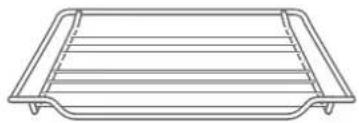
natural_image
Line drawing of a rectangular tray with horizontal lines and side handles (no text or symbols)Wire Rack
For ovenware, cake tins and ovenproof dishes. For roasts and grilled food

natural_image
Simple line drawing of a rectangular tray with side handles (no text or symbols)Baking Tray
For tray bakes and small baked products.

Door Lock
Stop children opening the door and getting burn
You can use the tray to place liquid or cooking food with juice.
Only use original accessories. They are specially adapted for your appliance.
You can buy accessories from the after-sales service, from specialist retailers or online.
Note
The accessories may deform when they become hot. This does not affect their function. Once they have cooled down again, they regain their original shape.
Doorlock installation
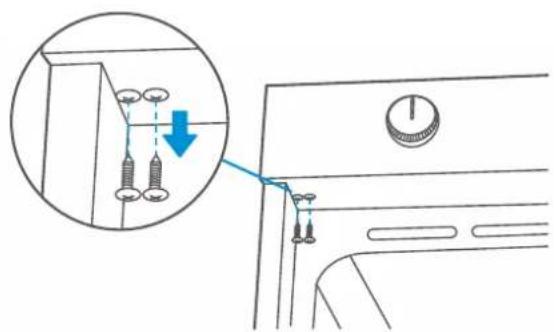
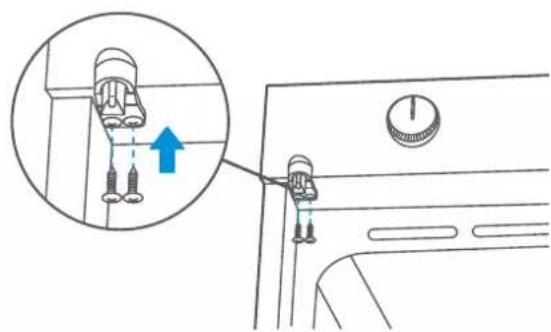
If your appliance is equipped with a door lock (depends on the actual machine), follow the steps below:
- Loosen two screws at left bottom corner of control panel, as shown in picture 1 ;
- Take out the doorlock from the accessory, and fasten it with two screws at the bottom of contorl panel as shown in picture 2.
- If the doorlock function is not necessary, just keep two screws in the panel without installing.
1
text_image
Diagram showing a door handle mechanism with labeled parts and a magnified inset highlighting a valve or adjustment.2
text_image
Diagram showing a sewing machine's seatbelt mechanism with an inset close-up highlighting the needle insertion point.Inserting accessories
The cavity has five shelf positions. The shelf positions are counted from the bottom up. The accessories can be pulled out approximately halfway without tipping.
Notes
- Ensure that you always insert the accessories into the cavity the right way round like the picture below.
- Always insert the accessories fully into the cavity so that they do not touch the appliance door.
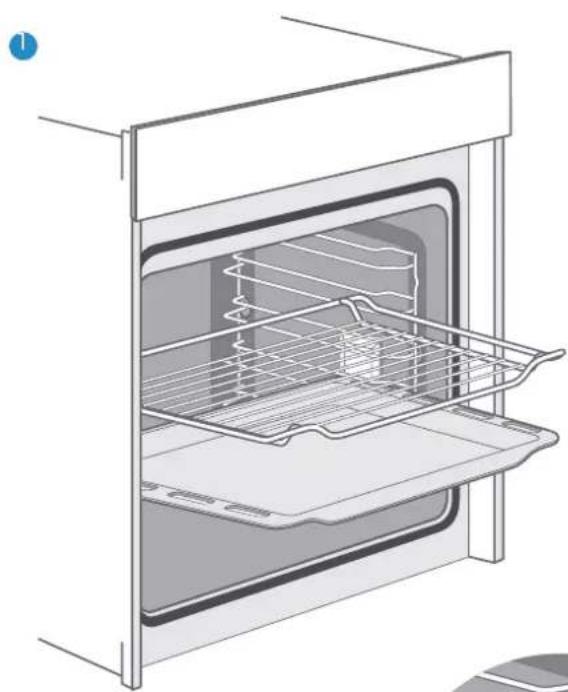
natural_image
Line drawing of an open oven with a rack and lid, showing internal structure (no text or symbols)
text_image
2 5 4 3 2 1
natural_image
Close-up of a metal grid structure with white insulation and wire, no visible text or symbols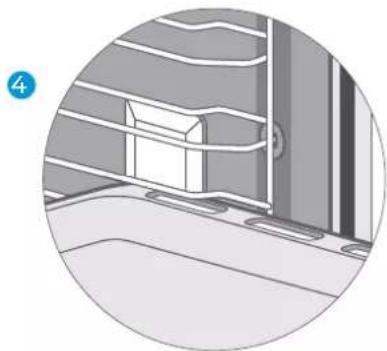
natural_image
Interior view of a room with horizontal slats and a window, no visible text or symbolsTilt protection
Accessories can be approximately pulled halfway out until they lock in place. The locking function prevents accessories from tilting with the gravity of food and accessories themselves while they get pulled out. Accessories should be inserted into cavity correctly for the tilt protection. When inserting the wire rack, ensure the wire rack is onto the right facing direction like the picture 1 and 3.
When inserting the backing tray, ensure the backing tray is onto the right facing direction like the picture 1 and 4.
ENERGY EFFICIENT USE
- Remove all accessories, which are not necessary during the cooking & baking process.
- Do not open the door during the cooking & baking process. If you open the door during cooking & baking, switch the mode to "Lamp" (Without change the temperature setting)
- Decrease the temperature setting in not fan assisted modes to 50^ C at 5min to 10min before end of cooking & baking time. So you can use the cavity heat to complete the process.
- Use "Fan Heating", whenever possible. You can reduce the temperature by 20^ C to 30^ C.
- You can cook and bake using "Fan Heating" on more than one level at the same time. If it is not possible to cook and bake different dishes at the same time, you can heat one after the other to use the preheat status of the oven.
- Do not preheat the empty oven, if it is not required.
- If necessary put the food into the oven immediately after reaching the temperature indicated by switching off the indicator light the first time.
- Do not use reflective foil, like aluminum foil to cover the cavity floor.
- Use the timer and or a temperature probe whenever possible.
- Use dark mat finish and light weighted baking molds and containers.
- Try not to use heavy accessories with shiny surfaces, like stainless steel or aluminum.
ENVIRONMENT
The european directive 2012/19/UE on wasted electrical and electronic equipments (WEEE), requires that household electrical appliances must not be disposed of in the normal unsorted municipal waste stream. appliances must be collected separately in order to optimize the recovery and recycling of the materials they contain, and reduce the impact on human health and the environment.
The crossed out “wheeled bin” symbol on the product reminds you of your obligation, that when you disposed of the appliances, it must be separately collected. Consumers should contact their local authority or retailer for information concerning the correct disposal of their old appliance.
HEALTH
Acrylamide occurs mainly by heating up starchy food (i.e. potato, French fries, bread) to very high temperatures over long times.
Tips
- Use short cooking times.
- Cook food to a golden yellow surface color, do not burn it to dark brown colors.
- Bigger portions have less acrylamide.
- Use "Fan Heating" mode if possible.
- French fries: Use more than 450g per tray, place them evenly spread and turn them time by time. Use the product information if available to get the best cooking result.
MAINTENANCE YOUR APPLIANCE
Cleaning Agent
With good care and cleaning, your appliance will retain its appearance and remain fully functioning for a long time to come. We will explain here how you should correctly care for and clean your appliance.
To ensure that the different surfaces are not damaged by using the wrong cleaning agent, observe the information in the table. Depending on the appliance model, not all of the areas listed may be on/in your appliance.
Caution!
Risk of surface damage
Do not use:
- Harsh or abrasive cleaning agents.
- Cleaning agents with a high alcohol content.
- Hard scouring pads or cleaning sponges.
- High-pressure cleaners or steam cleaners.
- Special cleaners for cleaning the appliance while it is hot.
Wash new sponge cloths thoroughly before use.
Tip
Highly recommended cleaning and care products can be purchased through specialized retailers.
Observe the respective manufacturer's instructions.
| CleaningArea Appliance exterior | |
| Appliance exteriorStainless steelfront | Hot soapy water:Clean with a dish cloth and then dry with a soft cloth.Remove flecks of limescale, grease, starch and albumin (e.g. egg white) immediately.Corrosion can form under such flecks.Special stainless steel cleaning products suitable for hot surfaces are available from our after-sales service or from specialist retailers. Apply a very thin layer of the cleaning product with a soft cloth. |
| Plastic | Hot soapy water:Clean with a dish cloth and then dry with a soft cloth. Do not use glass cleaner or a glass scraper. |
| Painted surfaces | Hot soapy water:Clean with a dish cloth and then dry with a soft cloth. |
| Control panel | Hot soapy water:Clean with a dish cloth and then dry with a soft cloth. Do not use glass cleaner or a glass scraper. |
| Door panels | Hot soapy water:Clean with a dish cloth and then dry with a soft cloth.Do not use a glass scraper or a stainless steel scouring pad. |
| Door handle | Hot soapy water:Clean with a dish cloth and then dry with a soft cloth.If descaler comes into contact with the door handle, wipe it off immediately. Otherwise, any stains will not be able to be removed. |
| Enamel surfaces and self-cleaning surfaces | Observe the instructions for the surfaces of the cooking com-partment that follow the table. |
| Glass cover for the interior lighting | Hot soapy water:Clean with a dish cloth and then dry with a soft cloth.If the cooking compartment is heavily soiled, use oven cleaner. |
| Door sealDo not remove | Hot soapy water:Clean with a dish cloth. Do not scour. |
| Accessories | Hot soapy water:Soak and clean with a dish cloth or brush.If there are heavy deposits of dirt, use a stainless steel scouring pad. |
| Rails | Hot soapy water:Soak and clean with a dish cloth or brush. |
| Pull-out system | Hot soapy water:Clean with a dish cloth or a brush.Do not remove the lubricant while the pull-out rails are pulled out. It is best to clean them when they are pushed in.Do not clean in the dishwasher. |
| Meat thermometer | Hot soapy water:Clean with a dish cloth or a brush. Do not clean in the dishwasher. |
Notes
-
Slight differences in color on the front of the appliance are caused by the use of different materials, such as glass, plastic and metal.
-
Shadows on the door panels, which look like streaks, are caused by reflections made by the interior lighting.
- Enamel is baked on at very high temperatures. This can cause some slight color variation. This is normal and does not affect operation. The edges of thin trays cannot be completely enameled. As a result, these edges can be rough. This does not impair the anti-corrosion protection.
- Always keep the appliance clean and remove dirt immediately so that stubborn deposits of dirt do not build up.
Tips
- Clean the cooking compartment after each use. This will ensure that dirt cannot be baked on.
- Always remove flecks of lime scale, grease, starch and albumin (e.g. egg white) immediately.
- Remove flecks of food with sugar content immediately, if possible, when the fleck is still warm.
- Use suitable ovenware for roasting, e.g. a roasting dish.
Pyrolytic self-cleaning function
Your appliance is equipped with "Pyrolytic Self-cleaning" mode. You can use this mode to clean the cooking compartment effortlessly.
The cooking compartment is heated up to a very high temperature. Residues from roasting, grilling and baking will burn. For now we only provide one cleaning setting for your safety, the temperature and operating time can not be adjusted with this operating mode.
Notes
For your safety, the cooking compartment locks door automatically. It cannot be opened until the temperature reduces to a section which is relatively safe. The interior lighting re-mains off during cleaning.
WARNING
Risk of burns!
- The cooking compartment becomes extremely hot during the pyrolytic mode. Never open the appliance door. Allow the appliance to cool down. Keep children, disabled and old people without self-care ability away from the appliance.
- The appliance will become very hot on the outside during the cleaning function. Never touch the appliance door. Allow the appliance to cool down. Keep children, disabled and old people without self-care ability away from the appliance.
Risk of harm to health!
Pyrolytic mode heats up the cooking compartment to a very high temperature so that remnants left over from roasting, grilling, baking and so on will burn off. This process releases vapours, which can irritate the mucous membranes. While the cleaning function is running, keep the kitchen well ventilated. Do not remain in the room for long periods. Keep children, pets away and always follow manual's or professional's instructions.
Before starting the pyrolytic mode
Caution!
- Remove accessories and cookware including pull-out rails from the cooking compartment be-fore running the pyrolytic mode. No excess spillage allowed to be retained in the cavity. By do-ing this will you not only ensure that you achieve good cleaning results throughout the entire cooking compartment but also ensure that accessories can meet the requirement of long service life.
- Before starting the cleaning function, remove the worst of the food remnants manually.
- Clean the inside of the appliance door and along the edges of the cooking compartment in the area around the seal. Do not scrub or remove the seal.
- While doing these operations, make sure that the oven switched off.
WARNING
Risk of fire!
- A large number of food remnants, fat and meat juices may catch fire when pyrolytic mode is in progress. Before you start the cleaning function, always remove the worst of the food residues and remnants from the cooking compartment. Do not use pyrolytic mode for cleaning accessories.
- The appliance will become very hot on the outside during pyrolytic mode. Never hang combustible objects, e.g. tea towels, on the door handle. Do not place anything against the front of the appliance. Keep children away from the appliance.
- If the door seal is damaged, a large amount of heat will be generated around the door. Do not scrub or remove the seal. Never operate the appliance if the seal is damaged or missing.
Risk of serious harm to health!
The appliance becomes very hot when pyrolytic mode is in progress. The coating on baking trays and tins is destroyed and noxious gases are released. Never clean baking trays or baking tins using pyrolytic mode. In general, you must not use pyrolytic mode for cleaning accessories.
Setting pyrolytic self-cleaning mode
- Switch on the oven by pressing the button ⏻.
- Select the "Pyrolytic" operating mode by pressing
When the function area is changed to an icon shows 🔍, it means pyrolytic mode.
-
Check if all the accessories and foods are removed, get the door well closed.
-
Press the "Start/stop" button ▷ to start the cleaning operation.
Ventilate the kitchen when the cleaning function is running.
The cooking compartment locks the door shortly after operation starts. The cooking compartment cannot be opened until the temperature reduces to a section which is relatively safe.
Pyrolysis mode end signal
An audible signal sounds continuously and the oven stops heating. It means pyrolytic mode gets finished. You can press the ▶ to turn off the sounds, or the sounds button will turns off automatically later.
Furnace door cannot be opened
Once the pyrolysis mode is activated, the oven will automatically lock and the furnace door cannot be opened.
Adjusting the cleaning setting
Once cleaning starts, you cannot change any setting expect pausing and stopping.
Once the pyrolytic mode has finished
Once the cooking compartment has cooled down, use a damp cloth to wipe off the ash that has been left behind in the cooking compartment and around the appliance door.
After cleaning, the guard must be replaced in accordance with instructions.
Notes
- During the pyrolytic mode, the frame on the inside of the appliance may discolour. This is normal and does not affect performance. The discolouration can be removed with the help of stainless-steel cleaning agent.
- Bad soiling may cause white deposits to remain on the enamel surfaces. This is residues from the food and is harmless. It does not affect performance. You can remove these residues using lemon juice or other kinds of cleaning agents if needed.
Removing the appliance door
- Open the appliance door fully.
- Fold open the two locking levers on the left and right
- Close the appliance door as far as the limit stop.
- With both hands, grip the door on the left- and right-hand side, and pull it out upwards.
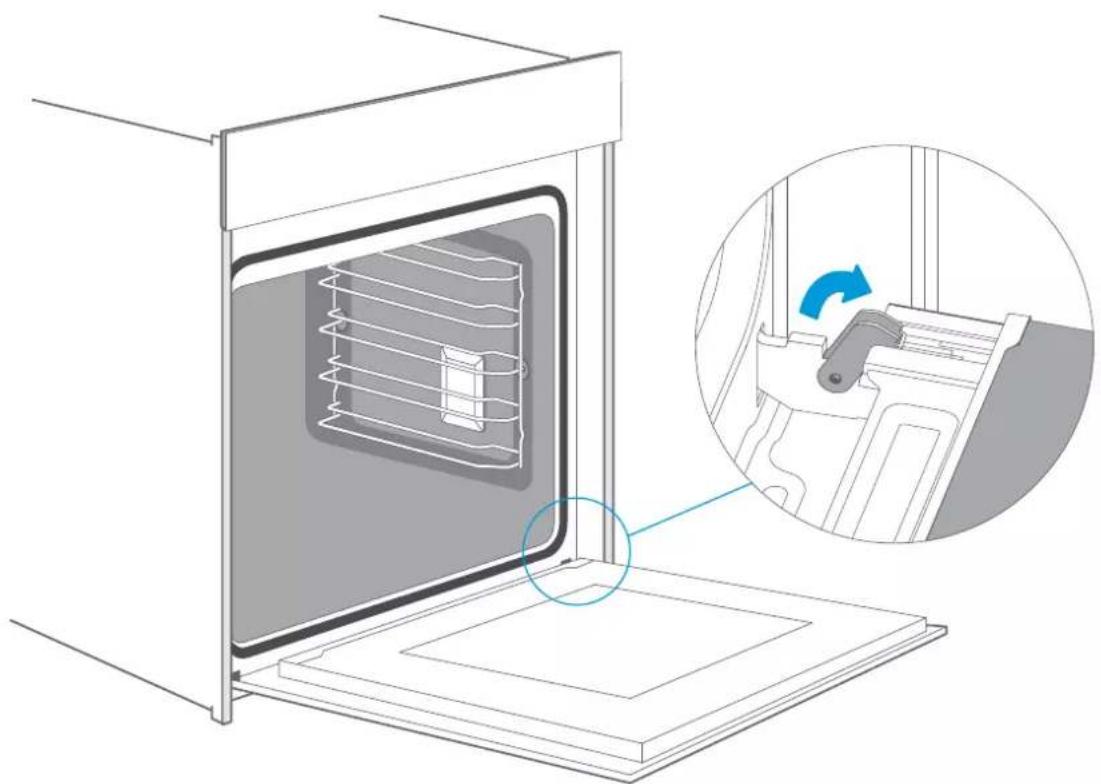
natural_image
Diagram of an oven with internal air ducts and a close-up inset showing the interior mechanism (no text or symbols)Fitting the appliance door
Reattach the appliance door in the opposite sequence to removal.
- When attaching the appliance door, ensure that both hinges are placed right onto the installing holes of the front panel of the cavity.
Ensure that the hinges are inserted into the correct position. You must be able to insert them easily and without resistance. If you can feel any resistance, check that the hinges are inserted into the holes right.
- Open the appliance door fully. While opening the appliance door, you can make another check if the hinges are onto the right position. If you make the fitting wrong, you will not be able to make the appliance door fully opened.
Fold both locking levers closed again.
- Close the cooking compartment door. By the same time, we warmly recommend you to check one more time, if the door is onto the right position and if the ventilation slots are not half-sealed.
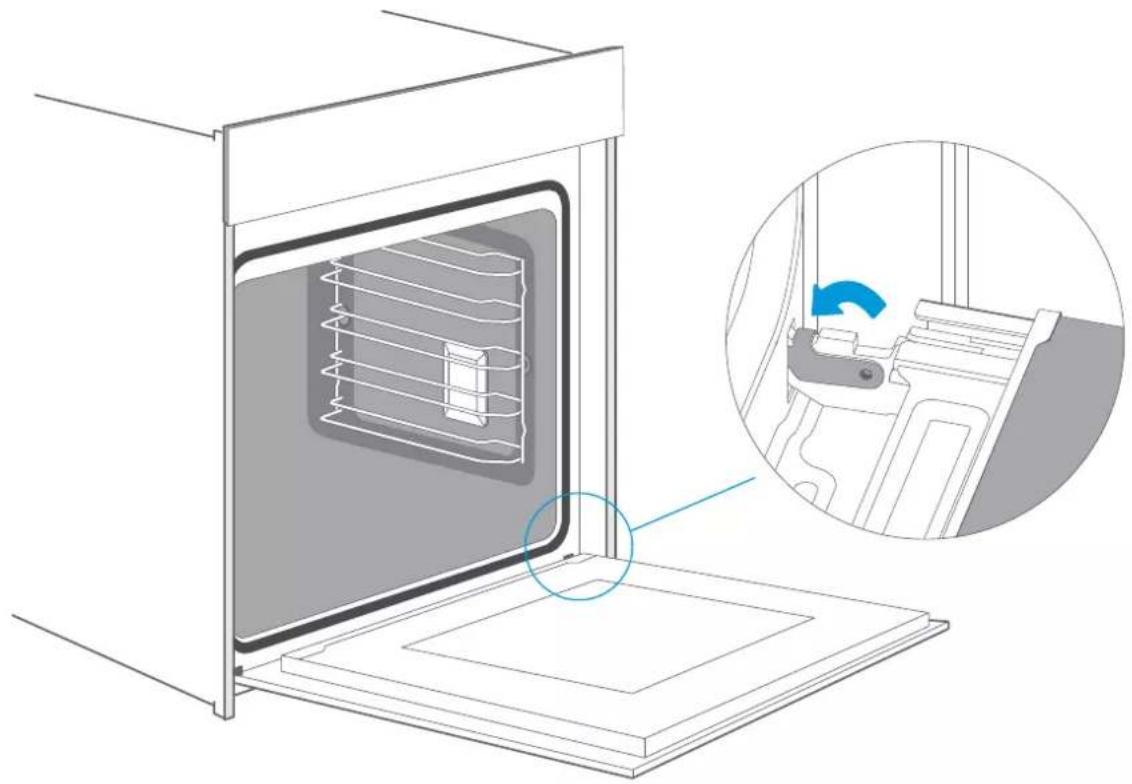
natural_image
Technical illustration of an oven with internal air ducts and a close-up inset showing the interior mechanism (no text or symbols)Removing the door cover
The plastic inlay in the door cover may become discolored. To carry out thorough cleaning, you can remove the cover.
Remove the appliance door like instructed above.
- Press on the right and left side of the cover.
- Remove the cover.
- After removing the door cover, that rest parts of the appliance door can be easily taken off so that you can go on with the cleaning. When the cleaning of the appliance door has finished, put the cover back in place and press on it until it clicks audibly into place.
- Fitting the appliance door and close it.

natural_image
Diagram of a door with a blue arrow pointing to the door handle (no text or symbols present)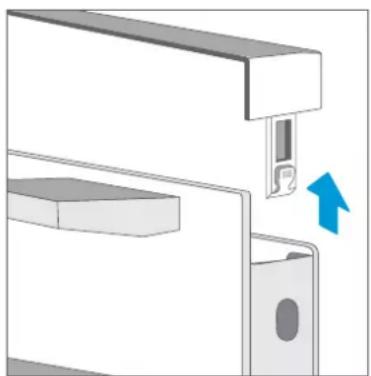
natural_image
Mechanical assembly diagram showing a bracket with a close-up of a slot and a blue arrow indicating direction (no text or symbols)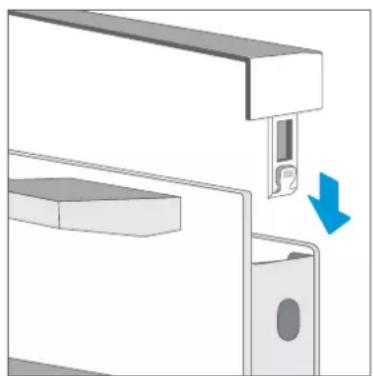
natural_image
Diagram of a mechanical assembly with a blue arrow indicating a downward motion (no text or symbols present)Caution!
While the appliance door is well installed, the door cover can also be taken off, by this time.
- Removing the door cover means to set the inner glass of the appliance door free, the glass can be easily moved and cause damage or injury.
- As removing the door cover and inner glass means to reduce the overall weight of the appliance door. The hinges can be easier to be moved when closing the door and you may be trapped. Keep your hands away from the hinges.
Because of the 2 points above, we strongly recommend you not to remove the door cover unless the appliance door removed. Damage caused by incorrect operation is not covered under warranty.
Rails
When you want have a good cleaning for the rails and cavity, you can remove the shelves and clean it. In this way your appliance will retain its appearance and remain fully functional for a long time.
- Pull the front part of the side rails horizontally to the opposite direction until the feature gets out; Later on you can remove the shelves out like the picture below. into the holes of cavity rightly first of all, then insert the feature back into To put the side rails back to the cavity, to make the back part of the shelves insert the cavity.

text_image
Diagram illustrating a cooling system with labeled components and directional arrows, showing a 3D panel inside a chamber and a rack structure.Fix the telescopic runners
( take the left side for example same for right side)
-
Put the point A and B of the telescopic runners horizontally on the outer wire.
-
degrees.
-
Push forward the telescopic runners, make the point C buckled onto the lower wire and the point D buckled onto the upper wire.
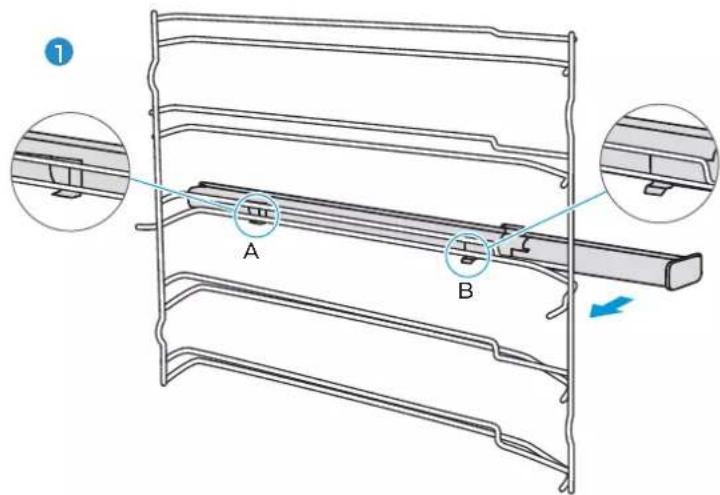
text_image
A B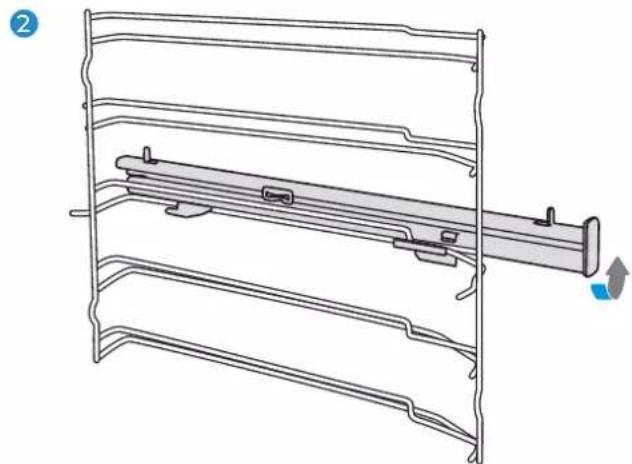
natural_image
Technical line drawing of a mechanical assembly with layered components and a directional arrow (no text or symbols)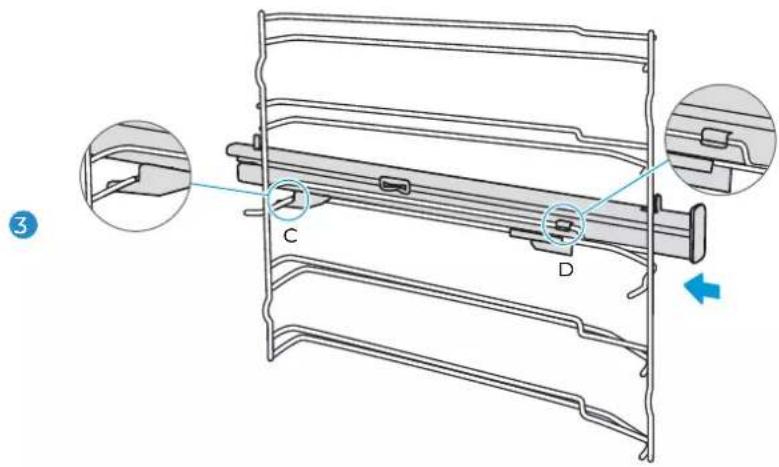
text_image
Technical diagram of a mechanical component with labeled parts C and D, showing cross-sectional views and a blue directional arrow.Remove the telescopic runners (take the left side for example same for right side)
- Lift up one end of the telescopic runners hard.
- Lift up the whole telescopic runners and remove backward.

natural_image
Technical line drawing of a mechanical assembly with no visible text or symbols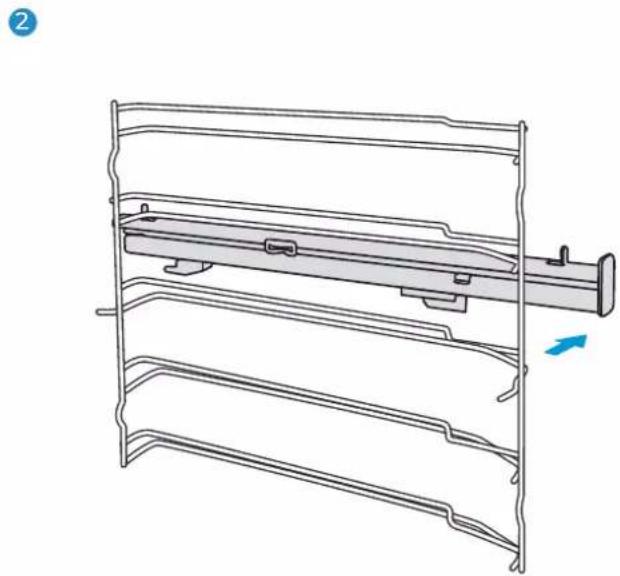
natural_image
Technical line drawing of a mechanical assembly with layered components and a blue arrow indicating direction (no text or symbols)APPLIANCE DOOR
With good care and cleaning, your appliance will retain its appearance and remain fully functional for a long time to come. This will tell you how to remove the appliance door and clean it.
For cleaning purposes and to remove the door panels, you can detach the appliance door. The appliance door hinges each have a locking lever.
When the locking levers are closed, the appliance door is secured in place. It cannot be detached. When the locking levers are open in order to detach the appliance door, the hinges are locked. They cannot snap shut.

natural_image
Diagram of a mechanical component with a blue arrow indicating rotation (no text or symbols present)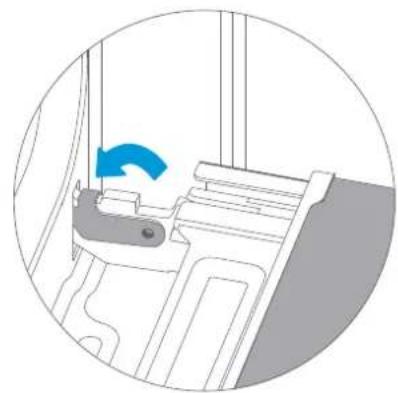
natural_image
Diagram of a mechanical device with a blue arrow indicating rotation or force direction (no text or symbols present)Warning – Risk of injury!
- If the hinges are not locked, they can snap shut with great force. Ensure that the locking levers are always fully closed or, when detaching the appliance door, fully
- open. The hinges on the appliance door move when opening and closing the door, and you may be trapped. Keep your hands away from the hinges.
Change the power cord
Position A show the terminal box position on the back of the back outer case and it's closed.
Steps: a. cut off the power, use small flat screwdriver to open two snap 1, 2.
b. use Phillips screwdriver to take off screws 3, 4, 5 and 6.
c. change the new power cord, fix the yellow/green wire on 3, brother wire on 4, blue wire on 5.
d. twist screw 6 closed the terminal box cover finish the changing.

natural_image
Pure technical line drawing of a rectangular component with internal features, no text or symbols present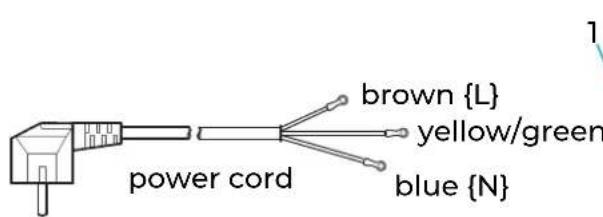
text_image
power cord brown {L} yellow/green blue {N}
text_image
1 2 3 4 5 6 lenterminal boxback outer
CURE YOUR APPLIANCE WHEN NEEDED
If a fault occurs, before calling the after-sales service, please ensure that is not because of incorrect operations and refer to the fault table, attempt to correct the fault yourself. You can often easily rectify technical faults on the appliance yourself.
If a dish does not turn out exactly as you wanted, you can find many tips and instructions for preparation at the end of the operating manual.
| Fault Possible Cause Notes/remedy | ||
| The appliance does not work. | Faulty fuse. | Check the circuit breaker in the fuse box. |
| Power cut | Check whether the kitchen light or other kitchen appliances are working. | |
| Knobs have fallen out of the support in the control panel. | Knobs have been accidentally disengaged. | Knobs can be removed.Simply place knobs back in their support in the control panel and push them in so that they engage and can be turned as usual. |
| Knobs can no longer be turned easily. | There is dirt under knobs | Knobs can be removed.To disengage knobs, simply remove them from the support.Alternatively, press on the outer edge of knobs so that they tip and can be picked up easily.Carefully clean the knobs using a cloth and soapy water. Dry with a soft cloth.Do not use any sharp or abrasive materials.Do not soak or clean in the dishwasher.Do not remove knobs too often so that the support remains stable |
| Fan does not work all the time in the mode: “Fan Heating” | This is a normal operation due to the best possible heat distribution and best possible performance of the oven. | |
| After a cooking process a noise can be heard and a air flow in the near of the control panel can be observed. | The cooling fan is still working, to prevent high moisture conditions in the cavity and cool down the oven for your convenience. The cooling fan will switch off automatically. | |
| The food is not sufficient cooked in the time given by the recipe. | A temperature different from the recipe is used.Double check the temperatures. The ingredient quantities are different to the recipe. Double check the recipe. | |
| Uneven browning | The temperature setting is too high, or the shelf level could be optimized. Double check the recipe and settings. The surface finish and or color and or material of the baking ware were not the best choice for the select-ed oven function. When use radiant heat, such as “Top & Bottom Heating” mode, use mat finished, dark colored and light weighted oven ware. | |
| The lamp doesn’t turn on The lamp needs to be replaced. | ||
Warning-Risk of electric shock!
Incorrect repairs are dangerous. Repairs may only be carried out and damaged power cables replaced by one of our trained after-sales technicians. If the appliance is defective, unplug the appliance from the mains or switch off the circuit breaker in the fuse box. Contact the after-sales service.
Maximum operating time
The maximum operating time of this appliance is 9 hours, to prevent that you forget shot off the power.
Replacing the lamp on the corner of the cavity
If the cavity lamp fails, it must be replaced. Heat-resistant, 25 watt, 230 V halogen lamps are available from the after-sales service or specialist retailers.
When handling the halogen lamp, use a dry cloth. This will increase the service life of the lamp.
WARNING
Risk of electric shock!
When replacing the lamp, the lamp socket contacts are live. Before replacing the lamp, unplug the appliance from the mains or switch off the circuit breaker in the fuse box.
Risk of burns!
The appliance becomes very hot. Never touch the interior surfaces of the appliance or the heating elements. Always allow the appliance to cool down. Keep children at a safe distance.
- Place a towel in the cold cavity to prevent damage.
- Turn the glass cover anti-clockwise to remove it (Corner lamp); Pull the lateral grid out and then pry the glass cover off slightly by a tool with a flat head (Lateral lamp).
- Pull out the lamp - do not turn it.
- Assemble the glass cover back in.
- Remove the towel and switch on the circuit breaker to see if lamp switches on.
- For the lateral lamp, if it works well after the replacement, please remember to put the lateral grid back.

text_image
Corner Lamp ① ②Lateral Lamp
Glass cover
If the glass cover of the halogen lamp is damaged, it must be replaced. You can obtain a new glass cover from the after-sales service. Please specify the E number and FD number of your appliance.
CUSTOMER SERVICE
Our after-sales service is there for you if your appliance needs to be repaired. We will always find an appropriate solution. Please contact the dealer where you by this appliance. When calling us, please give the model number and S/N so that we can provide you with the correct advice. The rating plate bearing these numbers can be found when you open the appliance door.
Model: EMV72PGN
Rated voltage: 220-240V\~
Rated frequency: 50Hz-60Hz
3.2 kW
Company: EAS ELECTRIC SMART TECHNOLOGY S.L.

S/N:XXXXXXXXXXXXXX
To save time, you can make a note of the model of your appliance and the telephone number of the aftersales service in the space below, should it be required.
MAINTENANCE CARD
| Model number | Purchasing date |
| Serial number | Purchasing store |
Warning
This appliance shall be installed in accordance with the regulations in force and only used in a well ventilated space. Read the instructions before installing or using this appliance.
Note
Please note that a visit from an after-sales service engineer is not free of charge, even during the warranty period.
Rely on the professionalism of the manufacturer. You can therefore be sure that the repair is carried out by trained service technicians who carry original spare parts for your appliances.
Above, thank you again for buying your EAS Electric Built-in Oven, and we wish that our appliance will bring you delicious food and happy life.
TIPS AND TRICKS
| You want to cook your own recipe | Try to use settings of similar recipes first and optimize the cooking process due to the result. |
| Is the cake baked ready? | Put a wooden stick inside the cake about 10 minutes before the given baking time is reached. If there is no raw dough at the stick after pulling out, the cake is ready. |
| The cake loses massive volume during cooling down after baking | Try to lower the temperature setting by 10°C and double check the food preparing instructions regarding the mechanical handling of the dough. |
| The height of the cake is in the middle much higher than at the outer ring | Do not grease the outer ring of the spring form |
| The cake is too brown at the top | Use a lower shelf level and or use a lower set temperature (this may lead to a longer cooking time) |
| The cake is too dry | Use a 10°C higher set temperature (this may lead to a shorter cooking time) |
| The food is good looking but the humidity inside is too high | Use a 10°C lower set temperature (this may lead to a longer cooking time) and double check the recipe |
| The browning is uneven | Use a 10°C lower set temperature (this may lead to a longer cooking time). Use the “Top & Bottom Heating” mode on one level. |
| The cake is less browned on the bottom | Choose a level down |
| Baking on more than one level at the same time: One shelf is darker than the other. | Use a fan assisted mode for baking at more than one level and take out the trays individually when ready. It is not necessary that all trays are ready at the same time. |
| Condensing water during baking | Steam is part of baking and cooking and moves normally out of the oven together with the cooling air flow. This steam may condensate at different surfaces at the oven or near to the oven and build water droplets. This is a physical process and cannot be avoid completely. |
| Which kind of baking ware can be used? | Every heat resistant baking ware can be used. It is recommended not to use aluminum in direct contact with food, especially when it is sour.Please ensure a good fitting between container and lid. |
| How to use the grill function? | Preheat the oven for 5 minutes and place the food in the level given by this manual.Close the oven door when you use any grilling mode.Do not use the oven when the door is open, except for load / remove / check the food. |
| How to keep clean the oven during grilling ? | Use the tray filled with 2 liter of water in at level 1.Nearly all fluids drip down from the food placed on the rack will captured by the tray. |
| The heating element in all grilling modes are switching on and off over the time. | It is a normal operation and depends on the temperature setting. |
| How to calculate the oven settings, when the weight of a roast is not given by a recipe? | Choose the settings next to the roast weight and change the time slightly.Use a meat probe if possible to detect the temperature inside the meat.Place the head of the meat probe carefully in the meat, due to the manufacturer instructions.Make sure, that the head of the probe is placed in the middle of the biggest part of the meat, but not in the near of a bone or hole. |
| What happens if a fluid is poured to a food in the oven during the baking or cooking process? | The fluid will boil and steam will arise as a normal physical process.Please be careful, because the steam is hot. See also “Condensing water during baking” for more information. If the fluid contains alcohol, the boiling process will be quicker and can lead to flames in the cavity. Make sure, that the oven door is closed during such kind of processes. Please control the baking or cooking process carefully. Open the door very gentle and only if necessary. |
TYPICAL RECIPES
| CAKE | LevelForm Mode Temp.in °C | Duration in minutes | |||
| Sponge Cake (simple) in a Box shape | Box | 2 | Conventional with Fan | 170 | 50 |
| Sponge Cake (simple) in a Box shape | Box | 1 | Conventional 70 | 140 | |
| Sponge Cake with Fruits in a round Form | Round form | 1 | Conventional with Fan | 150 | 50 |
| Sponge Cake with Fruits on a Tray | Tray Conventional | 140 | 70 | ||
| Raisins Brioche Muffins (Yeast Cake) | Muffin form | 2 | Conventional | 220 | p.h.t.:19:00b.t.: 11:00 |
| Gugelhupf (with Yeast) | Tray | 1 | Conventional | 150 | p.h.t.:11:00b.t.:60:00 |
| Muffins | Muffin form | 1 | Conventional | 160 | p.h.t.: 8:30b.t.: 30:00 |
| Muffins | Muffin form | 1 | Conventional with Fan | 150 | p.h.t.: 8:30b.t.: 30:00 |
| Apple Yeast Cake on a Tray | Tray p.h.t.: 10:00 1 | Conventional with Fan | 160 | b.t.: 42:30 | |
| Water Sponge Cake (6 Eggs) | Spring form | 1 | Conventional | 160 | p.h.t.: 9:30b.t.: 41:00 |
| Water Sponge Cake (4 Eggs) | Spring form | 1 Conventional | 160 | p.h.t.: 9:00b.t.: 26:00 | |
| Water sponge Cake | Spring form | 1 | Convention | 160 | 35 |
| Apple Yeast Cake on a Tray | Tray 2 p.h.t.: 8:00 | Conventional with Fan | 150 | b.t.: 42:00 | |
| Hefezopf (Callah) | Tray | 2 | Conventional with Fan | 150 | 40 |
| Small Cakes 20 | Tray | 2 | Convention | 150 | 36 |
| Small Cakes 40 | Tray | 2+4 | Convention | 150 | p.h.t:10:00b.t.:34:00 |
| Butter Yeast Cake | Tray | 2 | Conventional | 150 | p.h.t.: 8:00b.t.: 30:00 |
| Shortbread 170 | Tray | 2 | Conventional | p.h.t.: 8:00b.t.: 13:00 | |
| Shortbread 2 Trays | Tray | 2+4 | Conventional with Fan | 160 | p.h.t:8:20b.t.: 12:00 |
| Vanilla Cookies | Tray | 2 | Conventional | 160 | p.h.t.: 8:00b.t.: 10:00 |
| Vanilla Cookies | Tray | 2+4 | Conventional with Fan | 150 | p.h.t.:8:00b.t.: 14:00 |
| BREAD | LevelForm Mode Temp.in °C | Duration in minutes | |||
| White Bread (1 kg Flour) Box shape | Box 11 | Conventional | 70 | p.h.t.: 9:20b.t.: 50:00 | |
| White Bread (1 kg Flour) Box shape | Box 1170 | p.h.t.: 12:00 | Conventional with Fan | b.t.: 45:00 | |
| Fresh Pizza (thin) | Tray | 2 | Conventional | 170 | p.h.t.: 9:30b.t.: 21:00 |
| Fresh Pizza (thick) | Tray | 2 | Conventional | 170 | p.h.t.: 10:00b.t.: 45:00 |
| Fresh Pizza (thick) | Tray | 2 | Conventional with Fan | 170 | p.h.t.:8:00b.t.: 41:00 |
| Convention | 190 1Tray | Bread:9:00b.t.:30:00 | |||
Note : p.h.t means preheat time, b.t. means baking time.
| MEAT | LevelForm | Mode Temp.in °C | Duration in minutes | ||
| Beef Tender Loin 1,6 KG | Tray 2 | Double Grill with fan | 180 55 | ||
| Meatloaf 1 kg Meat | Tray | 1 | Conventional | 180 | 75 |
| Tray 180 | Chicken 1 kg L1:Tray | Double Grill with fan | 50 | ||
| Fish (2,5 kg) | Tray | 2 | Conventional | 170 | 70 |
| Ribs Tomahawk Cooked B.T. | Tray | 3 | Convention | 120 | 85 |
| Pork Roast of the neck (1,2kg) | Tray | 1 | Convention | 160 | 82 |
| Chicken 1,7kg | Tray | L2:Rack L1:Tray | Convention | 180 | 78 |
TEST FOOD ACCORDING TO EN 60350-1
| RECIPES | FAccessories | Level Time(min) Pre-heat | ||||
| Sponge cake |  | 170 | 1 | 30-35 | No | |
| Sponge cake |  | 160 | 1 | 30-35 | No | |
| Small cake | 1 tray |  | 150 | 2 | 30-40 | Yes |
| Small cake | 1 tray |  | 150 | 2 | 40-50 | Yes |
| Small cake | 2 trays L2&L4 |  | 150 | 30-35 | Yes | |
| Cheese cake |  | 150 | 1 | 70-80 | No | |
| Apple pie |  | 170 | 1 | 80-85 | No | |
| Apple pie |  | 160 | 1 | 70-80 | No | |
| Bread | 1 tray |  | 210 | 1 | 30-35 | Yes |
| Bread | 1 tray |  | 190 | 1 | 30-35 | Yes |
TEST FOOD ACCORDING TO EN 60350-1
| RECIPES | FAccessories | Level Time(min) Pre-heat | ||||
| Rack |  | Max | 5 | 6-8 | Yes 5minToast | |
| chicken | Rack & tray |  | 180 | Rack 2 Tray 1 | 75-80 | Yes |
- In chicken recipe, begin with the backside on top and turn the Chicken after 30 min. to the top side.
- Use a dark, frosted mold and place it on the rack.
- Take out the trays at the moment, when the food is ready, even when it is not at the end of the given baking time.
- Choose the lower temperature and check after the shortest time, given in the table.
- If using the tray to capture fluids dripping from the food placed on the rack during any grilling mode, the tray should be set to level 1 and filled with some water.
- The burger patties should turned around after 2/3 of the time.
ENERGY EFFICIENCY ACCORDING TO EN 60350-1
Please note the following information:
- The measurement is carried out in the "ECO" mode to determine the data regarding the forced air mode and the label-class.
- The measurement is carried out in the "Top & Bottom Heating" mode to determine the data regarding the conventional mode.
- During the measurement only the necessary accessory is in the cavity. All other parts have to be removed.
- The oven is installed as described in the installation guide and placed in the middle of the cabinet.
- It is necessary for the measurement to close the door like in the household, even when the cable disturbs the sealing function of the gasket during the measurement. To make sure that there are no negative effects regarding the disturbed sealing due to the energy data, it is necessary to close the door carefully during the measurement. It is may be required to use a tool to guaranty the sealing of the gasket like in the household, where no cable disturbs the sealing function.
- The determination of the cavity volume carried out for the usage "Defrost" as described on page 14. To ensure an efficient use of the oven, all accessories including side-racks are removed.
COOKING BY ECO MODE
ECO mode is heat by bottom and ring heater, with this mode you can save energy during cooking.
| RECIPES | Accessories | Level Time(min) | Pre-heat | ||
| Challah 1 tray | 180 | 1 | 45-50 | No | |
| Pork Roast | 1 tray | 200 | 1 | 80-85 | No |
| Clafouti Cherry Cake | Round form | 200 | 1 | 55-60 | No |
| Beef Roast 1.3kg | 1 tray | 200 | 1 | 80-85 | No |
| Brownies | Rack and glass plate | 180 | 1 | 55-60 | No |
| Potato Gratin | Rack and round plate | 180 | 1 | 65-70 | No |
| Lasangne | Rack and glass plate | 180 | 1 | 75-80 | No |
| Cheese Cake | 160 | 1 80-90 | No | ||
DATASHEET (EU 65/2014 & EU 66/2014)
| EAS Electric EMV72PGN | |
| Mass of the Oven | 42kg |
| No of Cavities | 1 |
| Heat Source | Electric |
| Usable Volume | 72L |
| ECelectric, cavity (Conventional) | 1.06kWh/cycle |
| ECelectric, cavity (Forced Air) | 0.69kWh/cycle |
| EEICavity | 81.9 |
| Energy Efficiency Class (A+++ to D) | A+ |
Note
All oven modes described on Page 9 and 15 are main functions of the oven.
Contenu
3 INSTRUCTIONS DE SÉCURITÉ
5 Avertissement
8 Causes de dommage
9 INSTALLATION
10 FONCTIONNEMENT DE L'APPAREIL
10 EMV72PGN
10 Composants
natural_image
Line drawing of a rectangular tray with horizontal slats (no text or symbols)Grille
natural_image
Simple line drawing of a rectangular tray with side handles (no text or symbols)Plateau
text_image
Diagram showing a door handle with screw fasteners and a blue arrow indicating a drop or adjustment, labeled with number 1.
text_image
Diagram showing a car interior with a close-up of a valve mechanism and a blue arrow indicating direction, labeled with number 2.Insertion des accessoires
natural_image
Line drawing of an oven with a rack and insulation material inside (no text or symbols)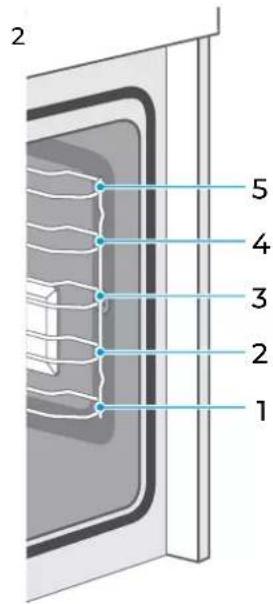
text_image
2 5 4 3 2 1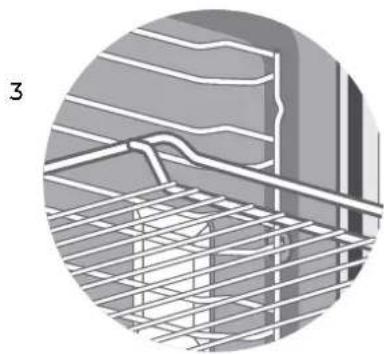
natural_image
Cross-sectional diagram of a structural grid with rebar, showing layered materials and insulation (no text or symbols)
natural_image
Circular diagram showing a window with horizontal bars and a small object, no text or symbols presentnatural_image
Diagram of an oven with internal air ducts and a close-up inset showing a hand holding a device (no text or symbols)natural_image
Technical illustration of an oven with internal air ducts and a close-up inset showing a mechanical component (no text or symbols)natural_image
Diagram of a door with a blue arrow pointing to the door handle (no text or symbols present)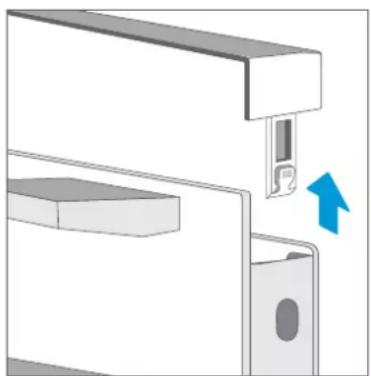
natural_image
Mechanical assembly diagram showing a bracket with a close-up of a slot and a blue arrow indicating direction (no text or symbols)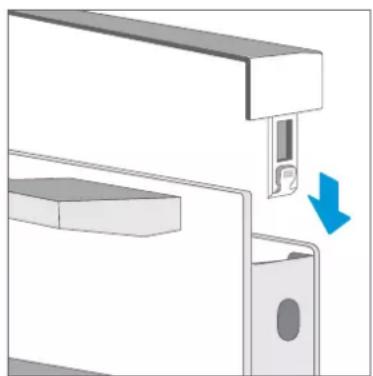
natural_image
Diagram of a mechanical assembly with a blue arrow indicating a downward motion (no text or symbols present)Attention
text_image
Diagram showing a door with internal structure and three labeled components, illustrating a process or assembly step.natural_image
Technical line drawing of a mechanical assembly with layered components and a directional arrow (no text or symbols)
text_image
Technical diagram of a mechanical component with labeled parts C and D, showing cross-sectional views and a blue directional arrow.natural_image
Technical line drawing of a mechanical assembly with multiple parallel plates and a central shaft (no text or symbols)2

natural_image
Technical line drawing of a multi-tiered mechanical or electrical component with no visible text or symbolsPORTE DE L'APPAREIL
natural_image
Pure technical line drawing of a rectangular component with two internal rounded sections and a labeled point A (no text or symbols beyond label)arrière du four

CONDITIONS DE LA GARANTIE
natural_image
Line drawing of a rectangular tray with horizontal slats and side handles (no text or symbols)Grelha
natural_image
Simple line drawing of a rectangular tray with side grout (no text or symbols)Bandeja
text_image
Diagram showing screw installation process with magnified detail and directional arrow indicating movement
text_image
Diagram showing a car interior with two sensors and a dial, highlighting a blue arrow indicating direction of movement or force.natural_image
Diagram of a refrigerator interior showing the oven with internal air ducts and a close-up of the interior's door mechanism (no text or symbols present)natural_image
Technical illustration of an oven with internal air ducts and a magnified inset showing the interior mechanism (no text or symbols)natural_image
Diagram of a door with a blue arrow pointing to the door panel (no text or symbols present)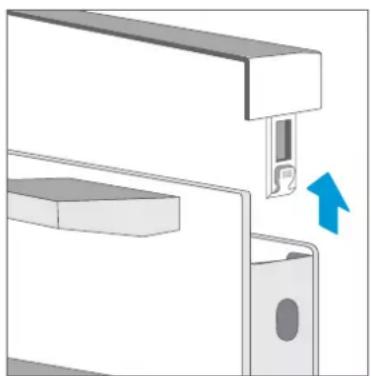
natural_image
Mechanical assembly diagram showing a bracket with a close-up of a slot and a blue arrow indicating direction (no text or symbols)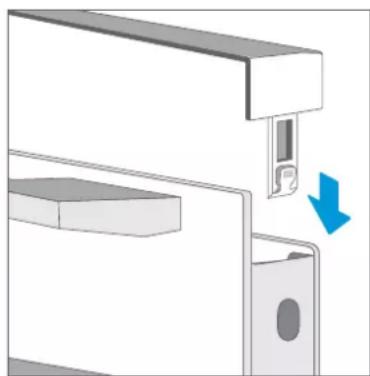
natural_image
Diagram of a mechanical assembly with a blue arrow indicating a downward motion (no text or symbols present)Atenção
text_image
Diagram showing a door with internal structure and three labeled arrows indicating flow or movement, alongside a wire rack diagram.natural_image
Technical line drawing of a mechanical assembly with layered components and a directional arrow (no text or symbols)
text_image
Technical diagram of a mechanical component with labeled parts C and D, showing cross-sectional views and a blue directional arrow.natural_image
Technical line drawing of a mechanical assembly with no visible text or symbols
natural_image
Technical line drawing of a multi-tiered storage rack or shelf assembly (no text or symbols)PORTA DO APARELHO
natural_image
Two circular diagrams showing a mechanical component with blue directional arrows indicating rotation (no text or symbols present)Scan for manual in other languages and further updates: