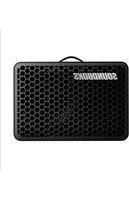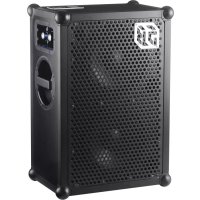
4 - Speaker SOUNDBOKS - Free user manual and instructions
Find the device manual for free 4 SOUNDBOKS in PDF.

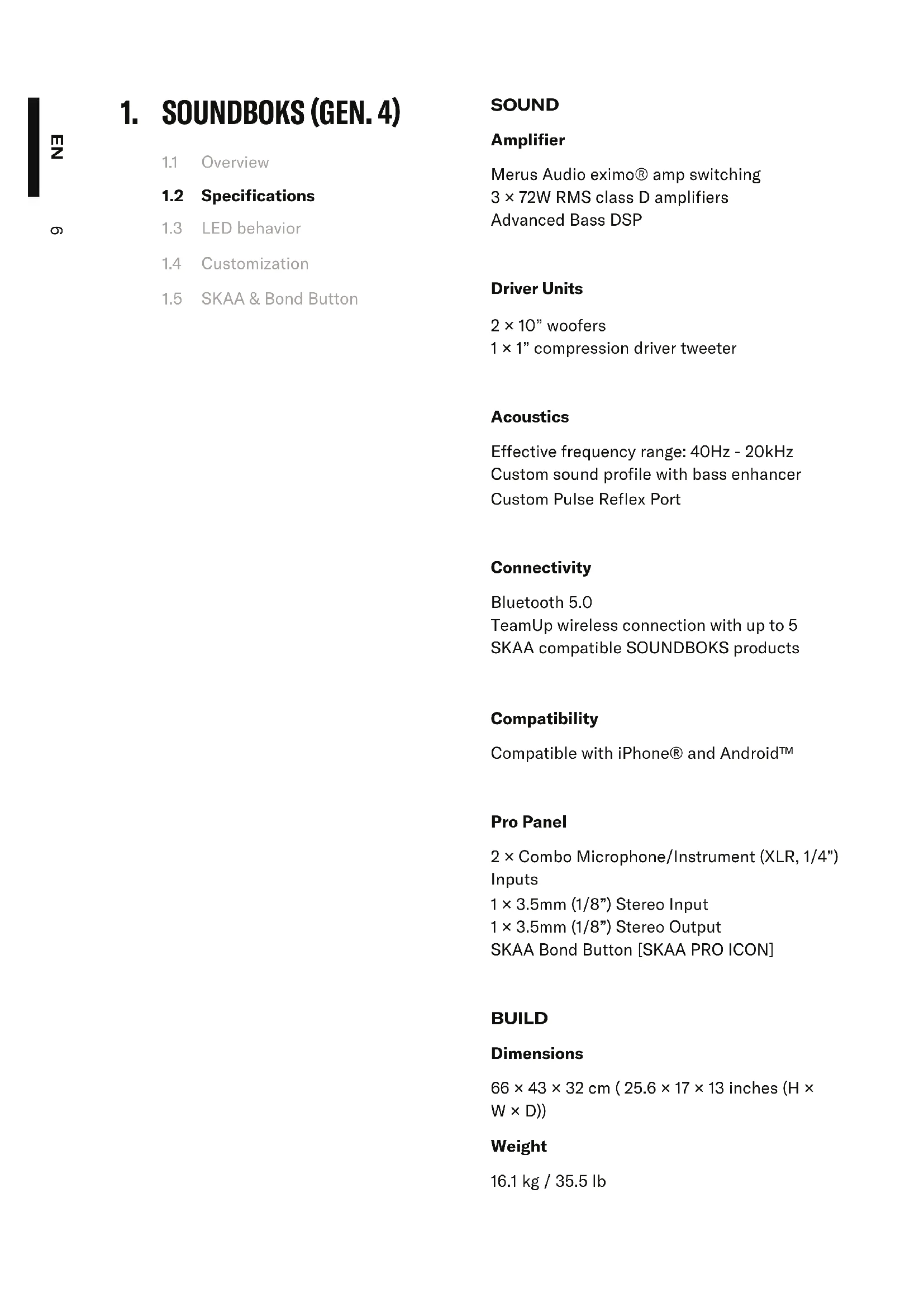


| Product type | Wireless amplified speaker |
| Brand and model | SOUNDBOKS Gen. 4 |
| Weight | 16.1 kg (35.5 pounds) |
| Amplification | 3 × 72 W RMS Class D amplifiers (Merus Audio eximo®) |
| Speakers | 2 x 10" woofers + 1 x 1" compression tweeter (104 dB) |
| Frequency response | 40 Hz - 20 kHz |
| Wireless connectivity | Bluetooth 5.0, SKAA (TeamUp up to 5 speakers) |
| Power supply | Integrated rechargeable battery (BATTERYBOKS) 99.84 Wh / 7.8 Ah |
| Battery life | 40 hours at half volume, 5 hours at full volume |
| Charging time | Approximately 3.5 hours |
| Audio inputs | 2 × combo Mic/Instrument (XLR/6.35 mm jack), 1 × 3.5 mm stereo input |
| Audio output | 1 × 3.5 mm stereo output |
| Pro Panel | SKAA Bond button, professional audio connectors |
| Cabinet materials | Poplar wood, powder-coated aluminum chassis, steel grille, silicone corners |
| Grille | Interchangeable and customizable (easy to paint) |
| Battery | Removable, interchangeable, 5-level LED indicator |
| Stand mount | 1 × 35 mm diameter |
| Operating temperature | -20 °C to 55 °C (charging: 0 °C to 40 °C) |
| Recommended storage | 5 °C to 20 °C for optimal battery lifespan |
| Safety | Protection against overvoltage, short circuits, overheating; standby mode after 14 days |
| Maintenance and cleaning | Clean with a damp cloth without cleaning products; avoid moisture |
| Spare parts and repairability | Battery and grille interchangeable; repair by SOUNDBOKS or authorized dealer |
| Warranty | 2 years (limited, subject to conditions) |
| General information | Battery operation only; charger not suitable for direct power supply |
Frequently Asked Questions - 4 SOUNDBOKS
User questions about 4 SOUNDBOKS
0 question about this device. Answer the ones you know or ask your own.
Ask a new question about this device
Download the instructions for your Speaker in PDF format for free! Find your manual 4 - SOUNDBOKS and take your electronic device back in hand. On this page are published all the documents necessary for the use of your device. 4 by SOUNDBOKS.
USER MANUAL 4 SOUNDBOKS
SOUNDBOKS (GEN. 4) USER MANUAL
Manuel de l'Utilisateur | Manual De Uso | Benutzerhandbuch | 用户手册 | دليل المستخدم
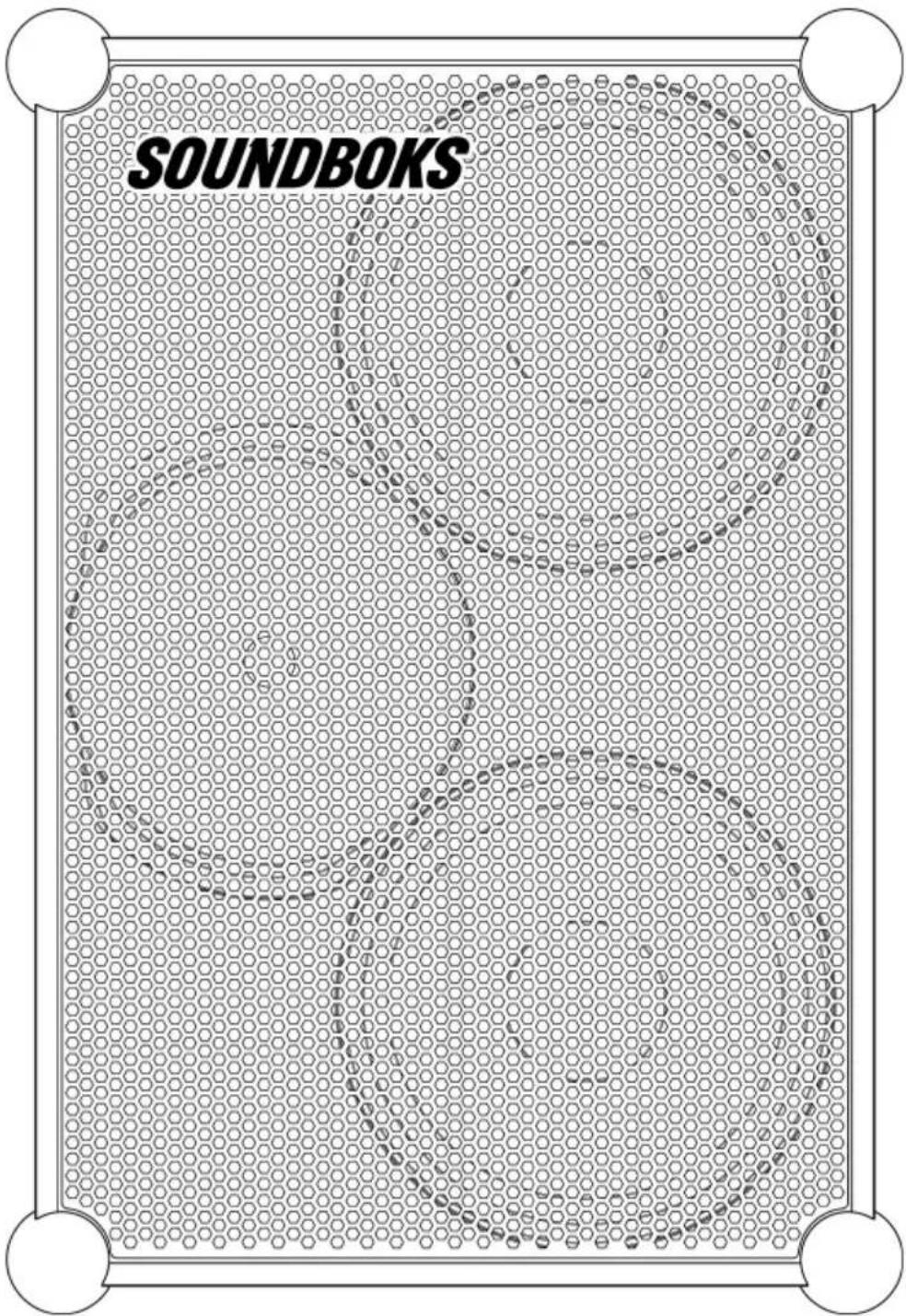
THE NEXT GENERATION OF SOUNDBOKS
Harness the full power of a new level of sound, design and Bluetooth Performance. This is SOUNDBOKS (Gen. 4).
natural_image
Technical line drawing of a sound-absorber device with labeled panel (no text or symbols beyond label)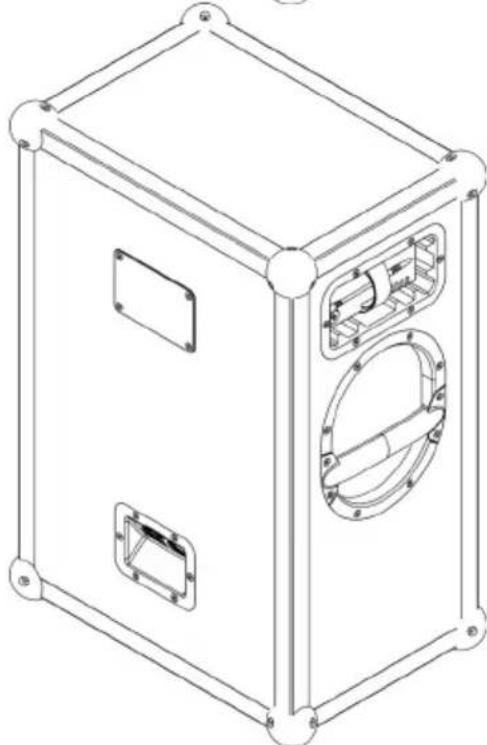
natural_image
Line drawing of a rectangular electronic device with two internal compartments and mounting brackets (no text or symbols)
Questions?
Get quick answers
here.

natural_image
Technical line drawing of a mechanical assembly with no visible text or symbols01 Charge your BATTERYBOKS fully for \~3.5 hours for optimal performance.
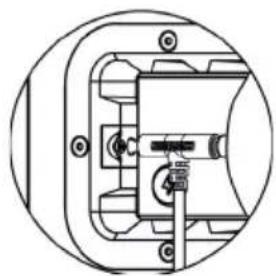
02 Once charged, slide (don't force) your BATTERYBOKS into the battery slot until it fits snugly. Then plug in the DC connector.
Never plug the charger directly into your speaker without the battery. Your charger is not a power supply.
natural_image
Technical line drawing of a mechanical assembly with no visible text or symbols03 The charger is not a power supply. The SOUNDBOKS is designed to operate on battery only. The charger T-jack was designed to be used together with your battery only while playing at moderate volumes. Keep your SOUNDBOKS under half volume—12 o'clock on the dial with 5 lights illuminated—when playing and charging simultaneously.
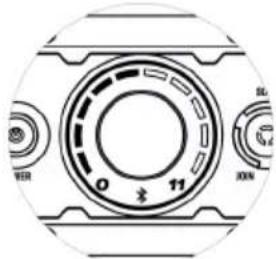
04 Power up your speaker by pressing the Power Button. When the LEDs around the volume knob light up, you're ready to connect.
05 To connect, go to your device's Bluetooth settings, find and select SOUNDBOKS #YourTeamID. Your unique Team ID is located on the back of your speaker.
06 Choose your favorite song, turn up, go out and Break Through the Noise.
1. O&SOUNDBOKS (GEN. 4)
1.1 Overview
1.2 Specifications
1.3 LED behavior
1.4 Customization
1.5 SKAA & Bond Button
BATTERYBOKS & CHARGER2. 14
2.1 Overview
2.2 Charging the BATTERYBOKS
- WARRANTY AND SERVICE 16
- LIMITATION OF LIABILITY 18
- DISCLAIMER 19
- COMPLIANCE 20
- WARNING, CAUTION & NOTICE 22
- INTENDED USE 25
- DISPOSAL INFORMATION 26
- MARKINGS 27
- FINAL REMARKS 28
1. SOUNDBOKS (GEN. 4)
1.1 Overview
1.2 Specifications
1.3 LED behavior
1.4 Customization
1.5 SKAA & Bond Button
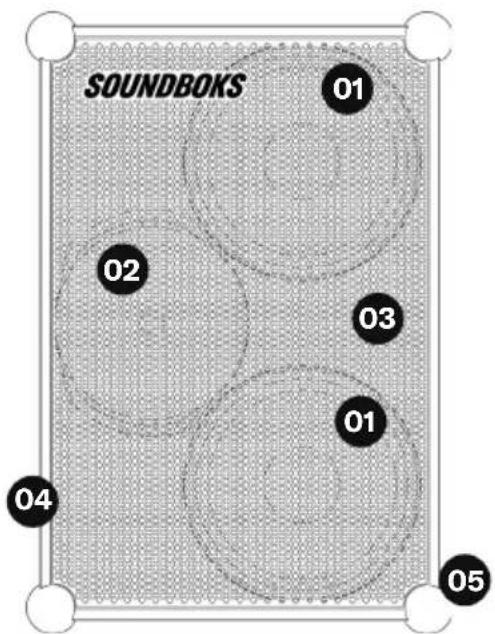
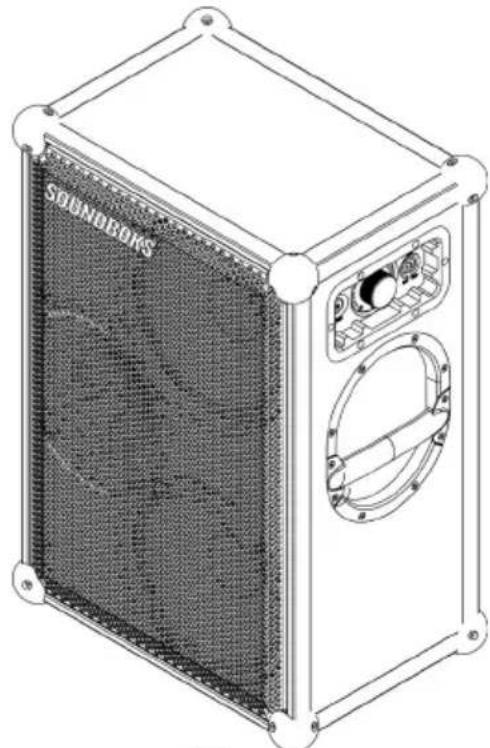
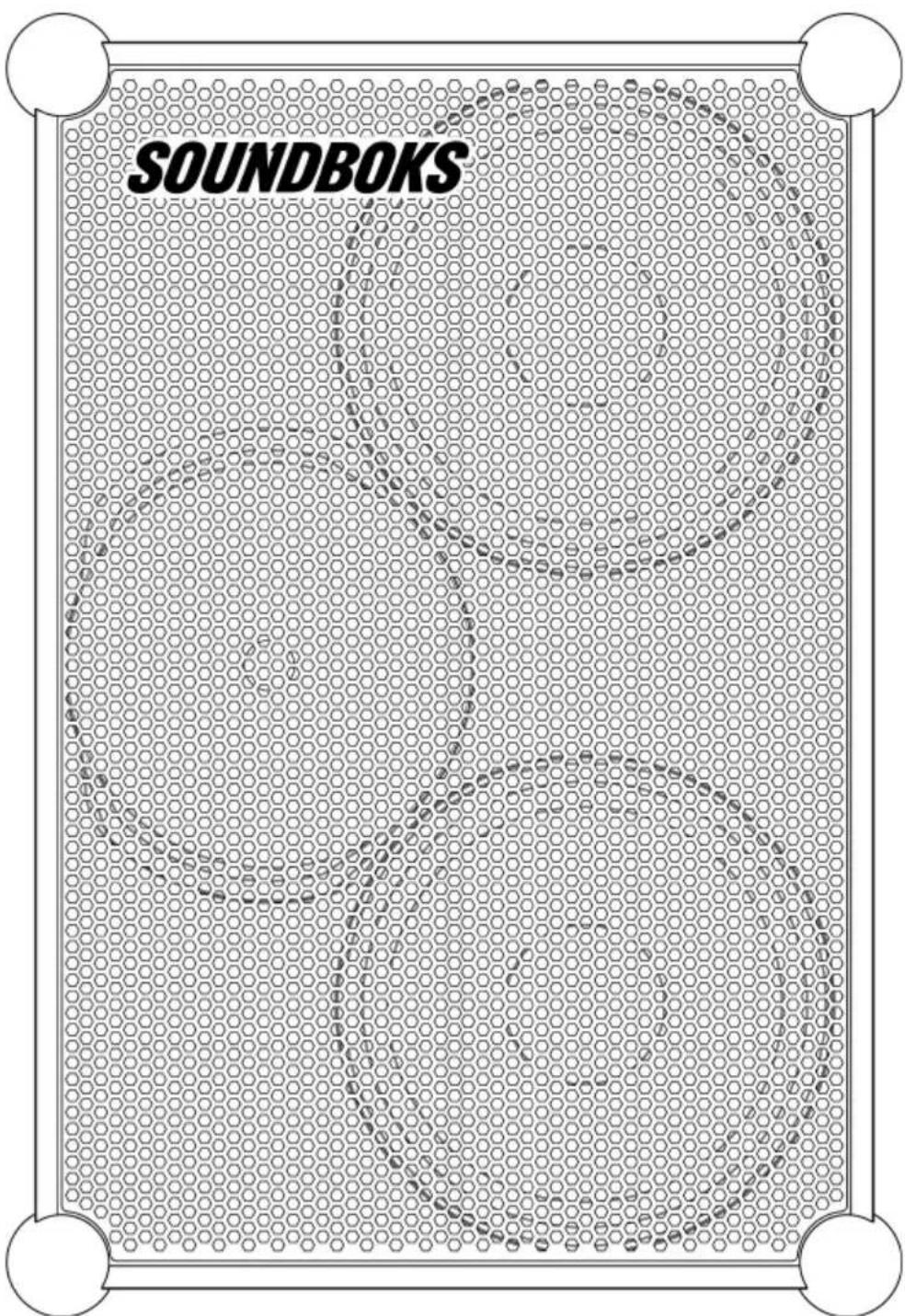
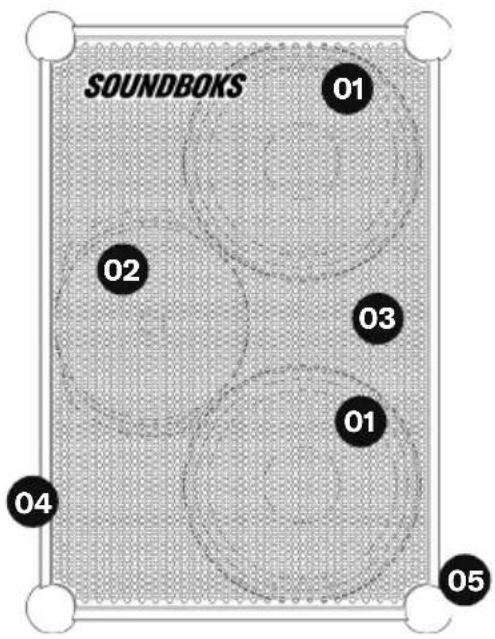
01 Bass Drivers
02 Tweeter
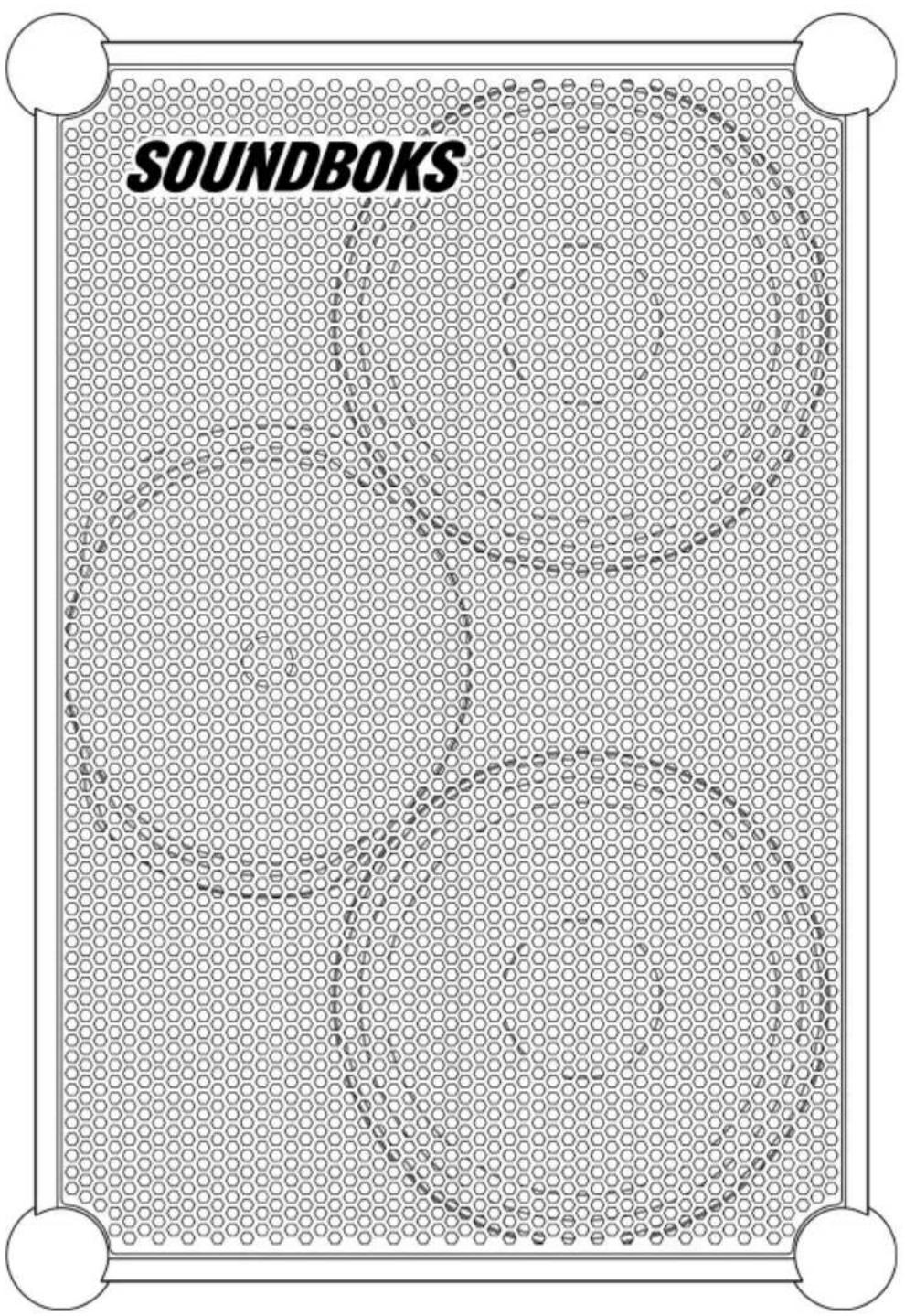
03 Lock-In Grill
04 Powder-Coated Aluminum Angles
05 Silicone Rubber Ball Corners
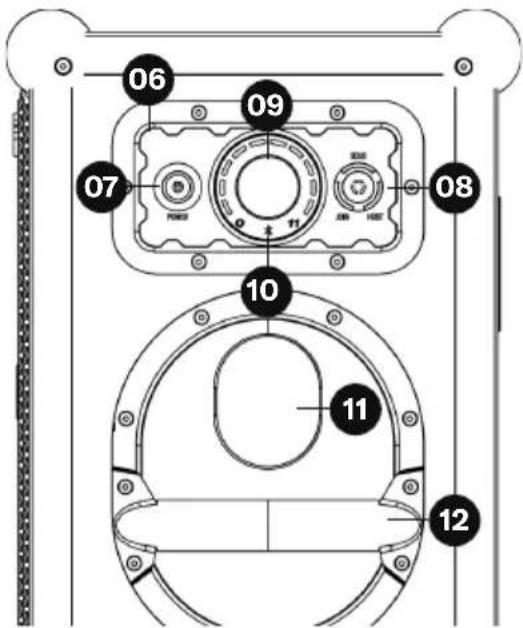
06 UI Panel
07 POWER Button
08 TeamUP Button (SOLO/HOST/JOIN)
09 VOLUME Knob
10 Bluetooth LED Indicator
11 Pulse Reflex Port
12 Powder-Coated Steel Handle
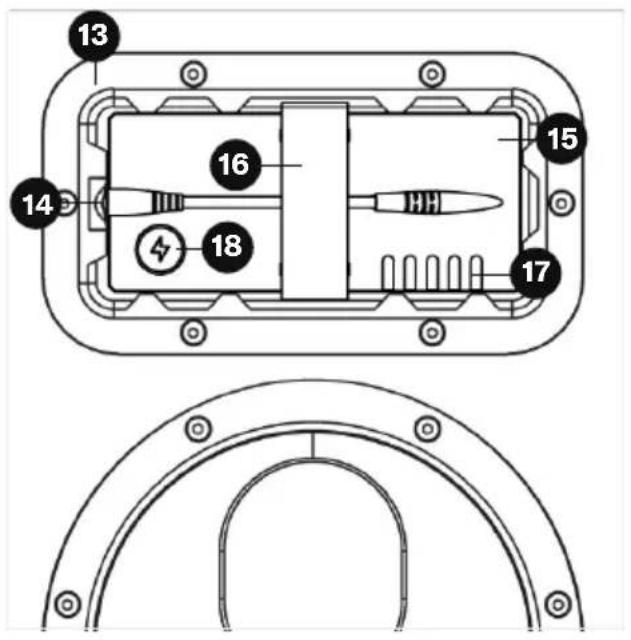
13 Battery Port
14 DC Input
15 BATTERYBOKS
16 Strap
17 LED Battery Life Indicator
18 Battery Level Status Button
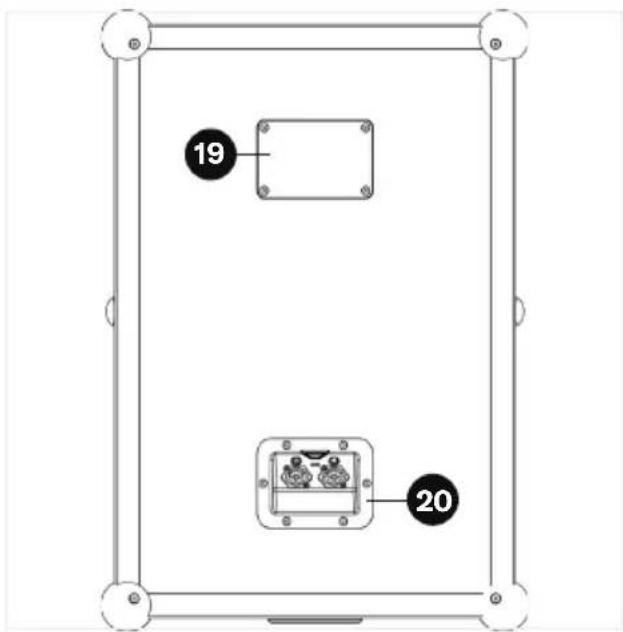
19 Unique SOUNDBOKS (Gen. 4) Team ID
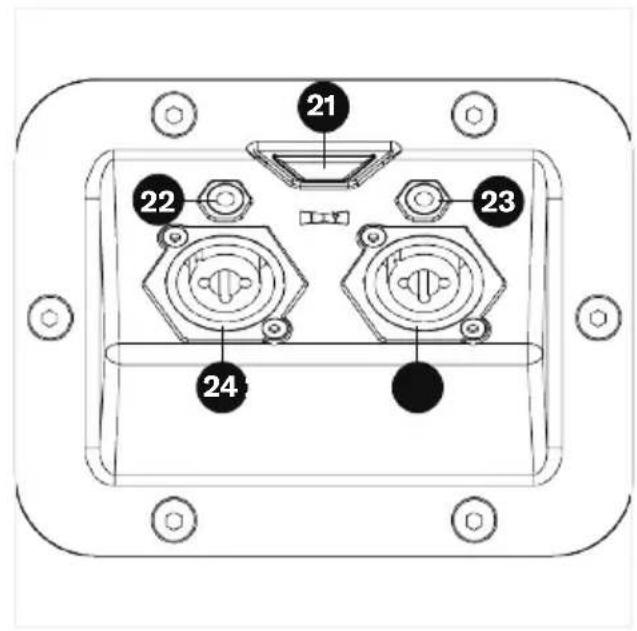
20 Pro-Panel
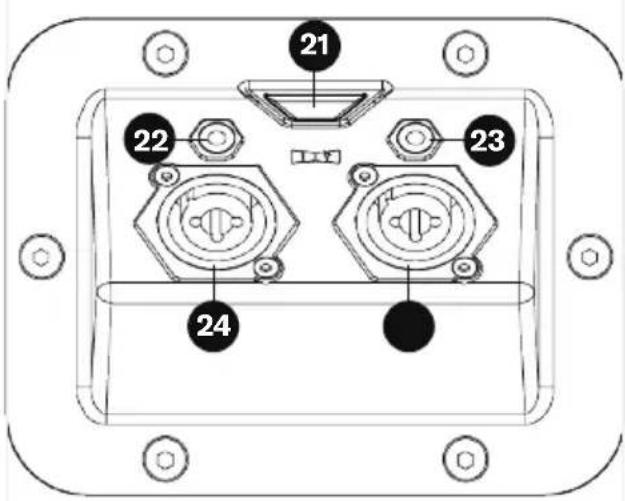
21 SKAA Bond Button and Indicator LED
22 3.5mm (1/8") Stereo Input
23 3.5mm (1/8") Stereo Output
24 Combo Microphone/Instrument (XLR, 1/4") Inputs
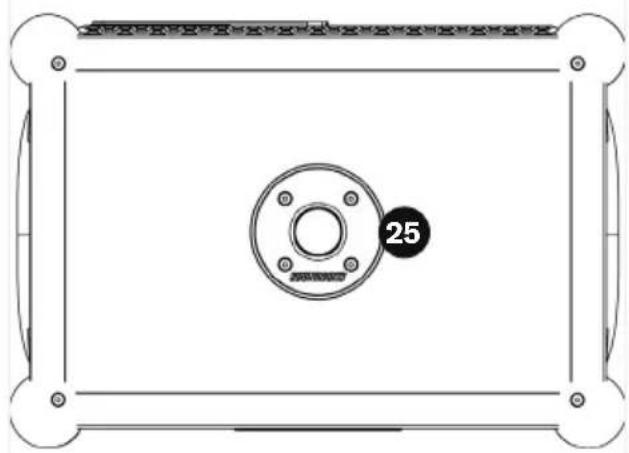
natural_image
Technical diagram of a rectangular frame with a central circular component and bolt holes, no text or symbols present.25 Pole Mount
1. SOUNDBOKS (GEN. 4)
1.1 Overview
1.2 Specifications
1.3 LED behavior
1.4 Customization
1.5 SKAA & Bond Button
SOUND
Amplifier
Merus Audio eximo® amp switching
3 × 72W RMS class D amplifiers
Advanced Bass DSP
Driver Units
2 × 10" woofers
1 × 1" compression driver tweeter
Acoustics
Effective frequency range: 40Hz - 20kHz
Custom sound profile with bass enhancer
Custom Pulse Reflex Port
Connectivity
Bluetooth 5.0
TeamUp wireless connection with up to 5
SKAA compatible SOUNDBOKS products
Compatibility
Compatible with iPhone® and Android™
Pro Panel
2 × Combo Microphone/Instrument (XLR, 1/4")
Inputs
1 × 3.5mm (1/8") Stereo Input
1 × 3.5mm (1/8") Stereo Output
SKAA Bond Button [SKAA PRO ICON]
BUILD
Dimensions
66 × 43 × 32 cm ( 25.6 × 17 × 13 inches (H ×
W × D))
Weight
16.1 kg / 35.5 lb
Materials
Poplar cabinet
Powder-coated aluminum frame
Powder coated steel handles
Powder coated or liquid coated (color variant dependent) steel grill
Silicone ball corners
Features
Swappable grill and batteries
Pulse Reflex Port
1 × ∅35mm Pole mount
UI Panel:
Volume control
HOST/JOIN mode for wireless TeamUP
Temperature
General use: -20°C to 55°C
Recommended storage: 5°C to 20°C for an optimal product lifetime
BATTERY
Design
5-Step LED battery-life indicator
Reinforced DC-connector
Cell Type
Li-Ion Rechargeable Battery
Lithium Iron Phosphate (LiFePO4)
Battery Performance
Output: 12.8V ---
Discharge Temperature - 20°C to 55°C (-4°F to 131°F)
Charge Temperature 0°C to 40°C (32°F to 104°F)
Capacity: 99.84Wh or 7.8Ah

Battery Life
40 hours at mid-volume
5 hours at full volume
3.5 hours for full recharge
Battery Management System (BMS)
Over and under-discharge protection
Short circuit protection
Overheat protection
Cell voltage management
Sleep mode starts after 14 days of inactivity.
Press the [icon_lightning_carcoal, size to fit inline] button to wake up.
Transport
Battery is safety certified for safe transport according to UN38.3
CHARGER
Charger Performance
Input: 100-240V \~ 50-60Hz, 1.2A MAX
Output: 14.0V = 3.3A
1. SOUNDBOKS (GEN. 4)
1.1 Overview
1.2 Specifications
1.3 LED behavior
1.4 Customization
1.5 SKAA & Bond Button
Your SOUNDBOKS (Gen. 4) will preserve power by deactivating trailing LEDs after 10 seconds of constant volume level.

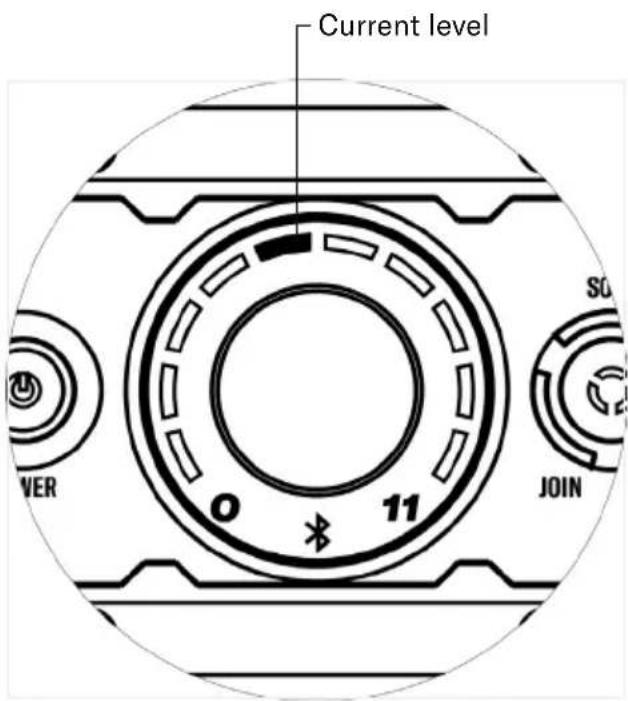
1. SOUNDBOKS (GEN. 4)
1.1 Overview
1.2 Specifications
1.3 LED behavior
1.4 Customization
1.5 SKAA & Bond Button
The latest SOUNDBOKS grill is built for easy customization—all you need to do is pop off the grill, remove the logo, believe in your creative self, and you can transform your new SOUNDBOKS into a work of art.
Here's a step-by-step guide to start customizing.

natural_image
Simple line drawing of a U-shaped pipe or handle with two curved ends (no text or symbols)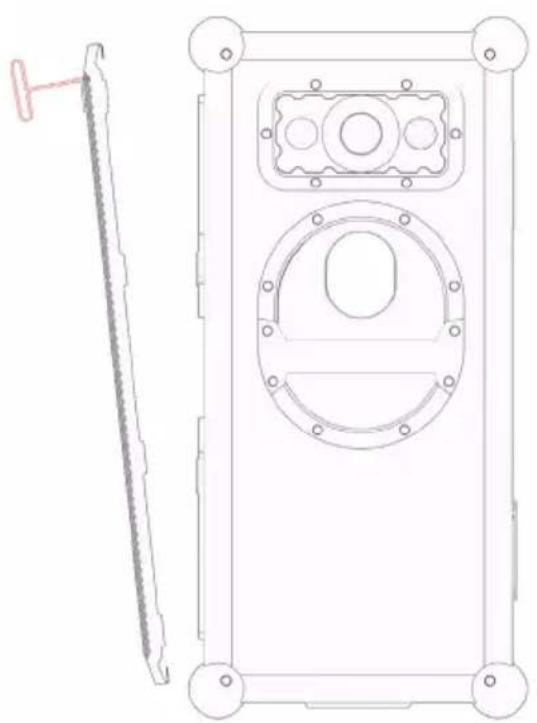
natural_image
Technical line drawing of a mechanical component with a side view showing a tool and a circular housing (no text or symbols)Remove Grill
The SOUNDBOKS (Gen. 4) grill is attached to the speaker using a snap-fit fastener, and can be removed with the included Grill Removal Tool. This tool consists of a handle and a rubberized tip.
To remove the grill, use the rubberized tip to hook into the holes of the grill. Pulling by the corners of the grill will be the easiest. Carefully start to pull the grill off of the speaker. Loosen the grill evenly in multiple points along the edges until it comes off and can be removed by hand.
Remove SOUNDBOKS Logo
Keep that logo clean. Unscrew the logo and put it somewhere safe.
Express Yourself
Make the SOUNDBOKS your own. The grill can handle most types of paint—just be sure to apply a layer of primer before and sealer after to make it last.
Party On
Replace the logo and pop the grill back on. Connect your music, crank it up and take your custom SOUNDBOKS out into the world.
1. SOUNDBOKS (GEN. 4)
1.1 Overview
1.2 Specifications
1.3 LED behavior
1.4 Customization
1.5 SKAA & Bond Button
The following is the official SKAA RECEIVER USER'S GUIDE. It describes in detail how to operate and troubleshoot the Bond Button, located on the back of your SOUNDBOKS (Gen. 4) on the Pro Panel. The Bond Button is the control button for JOIN-mode through the
wireless daisy chaining feature, TeamUP. Each SKAA® receiver has a Green List which remembers your favorite transmitters. A Green Indicator on your receiver means you are listening to a favorite or hunting for one. Your receiver can also explore to find new transmitters—an Amber Indicator means you are exploring for transmitters that are not on your Green List. A Cluster is a product with two or more pieces that behave as one. The Bond Button lets you select which transmitter you're listening to. The Bond Button has the logo consisting of two arrows.

The SKAA Compatible Badge found on the Product certifies that this Product has been tested and is fully compliant with all of the requirements of the SKAA Standard and has been granted SKAA Certification. This Product will work seamlessly with other products in the SKAA ecosystem of audio transmitting and receiving devices. For more information on the SKAA Standard, please visit www.SKAA.com. The SKAA® name as well as its associated marks, logos and icons are trademarks or registered trademarks of Eleven Engineering Incorporated.
| Command | IndicatorBond Button Meani | ||
| Hold a few seconds | Add / Delete Manually add / delete the current transmitter to / from your Green List. | • to •• flash | AddedDeleted |
| - | Auto Add SKAA will automatically add the current Amber transmitter to your Green List if you listen to it for 30 minutes. | • to • | Added |
| 1 Click | Green Mode Rotate through your list of favourite transmitters (Green List) — when a favourite transmitter is found, the search stops and audio plays from that transmitter. | • dim• flash• bright | HuntingNext one Bonded |
| 2 Clicks | Amber Mode Explore for new, unknown transmitters (ones which are not already on your Green List). | • dim• bright | Hunting Bonded |
| 3 Clicks | Mute do again to Unmute; any Click command will first Unmute and then do its function. | • , • or • slow flash | Muted |
| 4 Clicks | Red Mode If you have 2 or more transmitters on your Green List, power on just the one you want to hear and it plays automatically | • dim• bright | Hunting Bonded |
| 6 Clicks | Factory Reset Clear Green List. Start over! | • flash | Reset done |
| Hold during power on | 1. Place JOIN speakers to be added to the cluster within 3 meters of the Master JOIN speaker.2. Power off HOST speaker.3. Power on all JOIN speakers to be added to the cluster, but keep the Master JOIN speaker powered off.4. On the Master JOIN speaker, hold down the Bond button before pressing Power Button - hold both down and wait until red flashing starts - first release the power button, then the Bond button. The Master JOIN speaker now blinks red. All other LEDs on the Master JOIN speaker go dark. | • flash• bright | Receiver has entered Cluster Up mode.The Cluster has been successfully made |
- While Master JOIN LED blinks red, press the Connect button until JOIN is selected on all JOIN speakers you want to add to the cluster. You will have only 10 seconds for this step.
- When all JOIN speakers are accepted into the cluster, their LED will turn to constant RED.
- Once all of the cluster JOIN LEDS are solid red, power off all of the JOIN speakers.
- Power on the HOST speaker and put it in HOST mode, by clicking the Connect button. Connect BT audio or AUX to play back music on the HOST speaker.
- Power on JOIN speakers in the cluster and put these in JOIN mode. All speakers are now playing music from the HOST. The volume on all JOIN speakers can be controlled from any of the JOIN speakers in the cluster, the 3 click function of the BOND button is also shared amongst the cluster to mute all JOIN speakers.
The Bond button on the Master JOIN speaker has the same click function as described above. The HOST speaker volume is controlled by its own and is isolated from the cluster. To cancel cluster mode on a unit repeat step 4. Wait for solid red, then 6 click the Bond button
2. BATTERYBOKS & CHARGER
2.1 Overview
2.2 Charging the BATTERYBOKS
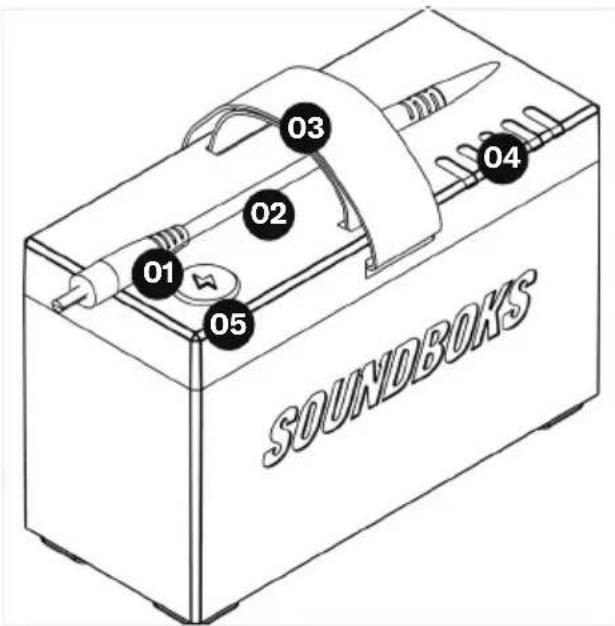
01 Battery DC Plug
02 DC Cable
03 Carry Strap
04 LED Battery Life Indicator
05 Battery Level Status Button
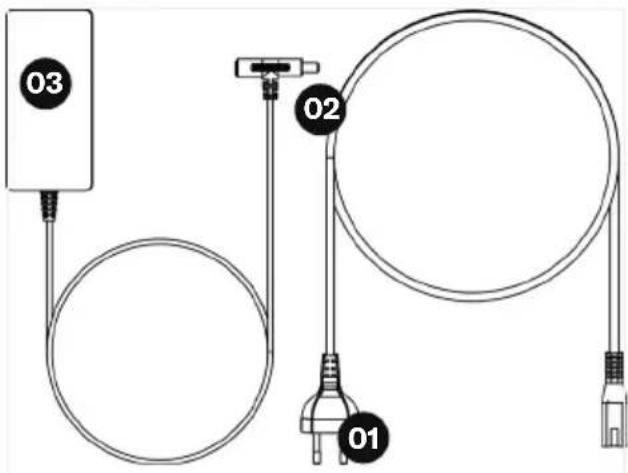
Regional plug for reference only
01 Power Supply Cable
02 Battery DC Input
03 Charger DC Plug
2. BATTERYBOKS & CHARGER
2.1 Overview
2.2 Charging the BATTERYBOKS
Remember to unplug your battery after it has been fully charged and never to leave it charging for more than 6 hours at a time, as this can potentially damage the battery. Here are the two ways of charging your BATTERYBOKS:
Charge the battery outside of the SOUNDBOKS (Gen. 4)
Insert the BATTERYBOKS DC Plug into the DC Input of your charger and plug the charger's power supply cable into your nearest power outlet
Charge the battery while it's in the SOUNDBOKS (Gen. 4)
The charger is not a power supply. The SOUNDBOKS is designed to operate on battery only. The charger T-jack was designed to be used together with your battery only while playing at moderate volumes. Keep your SOUNDBOKS under half volume—12 o'clock on the dial with 5 lights illuminated—when playing and charging simultaneously.
IMPORTANT
Never use the SOUNDBOKS (Gen. 4) without a BATTERYBOKS, i.e. by plugging the charger directly to the SOUNDBOKS (Gen. 4).
Use only an official charger and battery sold by SOUNDBOKS or other approved distributor. All official SOUNDBOKS chargers and batteries carries the SOUNDBOKS logo on the back print
WARRANTY AND SERVICE3.
SOUNDBOKS WARRANTS ("LIMITED WARRANTY") THAT THE SOUNDBOKS PRODUCT IS FREE OF DEFECTS IN MATERIALS AND WORKMANSHIP AT THE TIME OF THE ORIGINAL PURCHASE BY THE END-USER (THE "CUSTOMER" OR "YOU"). THIS LIMITED WARRANTY COVERS THE FUNCTIONALITY OF THE SOUNDBOKS PRODUCT FOR ITS NORMAL, INTENDED USE IN AN ENVIRONMENT AS SPECIFIED BELOW ONLY AND DOES NOT COVER MALFUNCTIONS THAT RESULT FROM IMPROPER OR UNREASONABLE USE OR MAINTENANCE AS FURTHER SPECIFIED BELOW IN SECTION 4, AS WELL AS ANY UNAUTHORIZED REPAIR, NORMAL WEAR AND TEAR, OR EXTERNAL CAUSES SUCH AS ACCIDENTS, ABUSE, OR OTHER ACTIONS OR EVENTS BEYOND OUR REASONABLE CONTROL.
This Limited Warranty is issued to the Customer who buys a new SOUNDBOKS product directly from SOUNDBOKS. This Limited Warranty cannot be assigned or transferred to any subsequent purchaser or user. Any SOUNDBOKS product purchased from an authorized retailer is covered by the warranty terms provided by such authorized retailer. The Limited Warranty is limited to the repair or replacement of the SOUNDBOKS product at SOUNDBOKS' discretion, and neither costs for transportation, removal, nor installation of a SOUNDBOKS product is covered by this Limited Warranty. This Limited Warranty extends to TWO (2) YEARS from the Customer's original purchase of the
SOUNDBOKS product. If SOUNDBOKS receives, during the applicable warranty period, a valid notice of a defect of any SOUNDBOKS product covered by SOUNDBOKS' warranty, for a list of covered products go to SOUNDBOKS.com/help. SOUNDBOKS will, at SOUNDBOKS' option,
a) within reasonable time after being notified of the defect:
b) repair the defect at no charge, using new or refurbished replacement parts, or
c) replace the product.
Response time may vary from country to country and is, among other things, subject to availability of parts, labor and transport.
TO OBTAIN SERVICE: VISIT SOUNDBOKS. COM/HELP
THIS LIMITED WARRANTY GIVES YOU SPECIFIC LEGAL RIGHTS AND YOU MAY ALSO HAVE OTHER LEGAL RIGHTS, WHICH VARY FROM STATE TO STATE. WE LIMIT THE DURATION AND REMEDIES OF ALL IMPLIED WARRANTIES, INCLUDING WITHOUT LIMITATION THE WARRANTIES OF MERCHANTABILITY AND FITNESS FOR A PARTICULAR PURPOSE TO THE DURATION OF THIS EXPRESS LIMITED WARRANTY. SOME U.S. STATES DO NOT ALLOW LIMITATIONS ON HOW LONG AN IMPLIED WARRANTY LASTS, SO THE ABOVE LIMITATION MAY NOT APPLY TO YOU.
THE TERMS AND CONDITIONS FOR THE PURCHASE OF THE SOUNDBOKS PRODUCTS SPECIFY THE WARRANTY FOR DEFECTS AND CONFORMITY, AND A POSSIBLE ADDITIONAL COMMERCIAL WARRANTY, THAT IS GRANTED BY SOUNDBOKS. THE TERMS AND CONDITIONS FOR CONSUMERS (B2C) AND FOR BUSINESS PURCHASERS (B2B) CAN BE FOUND AT (www.SOUNDBOKS.com/terms). SPECIFIC TERMS AND CONDITIONS APPLY IN CASE THE PRODUCT IS USED FOR RENTAL ACTIVITY. THE RIGHTS UNDER THE RESPECTIVE WARRANTIES, THEIR CONDITIONS, LIMITATIONS AND REMEDIES ARE SPECIFIED IN THESE TERMS AND CONDITIONS. WE ADVISE YOU TO READ OUR TERMS AND CONDITIONS. CONSUMERS WITH RESIDENCE IN THE EU ARE REMINDED THAT THEY ARE ENTITLED TO A LEGAL GUARANTEE.
How to obtain warranty service or make a warranty claim:
In Europe:
SOUNDBOKS ApS, Esromgade 15, 2200 Copenhagen N, Denmark; CVR nr. 36457597, E-Mail: info@SOUNDBOKS.com.
Contact the service provider and follow the procedures specified by the service provider. In the US and Canada: Contact SOUNDBOKS Inc., 1968 S. Coast Hwy #2510 Laguna Beach CA 92651 USA, E-Mail: info@SOUNDBOKS.com.
The serial number of your SOUNDBOKS (Gen. 4) can be found on the inside of the battery compartment.
LIMITATION OF LIABILITY4.
THE REMEDIES DESCRIBED ABOVE ARE YOUR SOLE AND EXCLUSIVE REMEDIES AND OUR ENTIRE LIABILITY FOR ANY BREACH OF THIS LIMITED WARRANTY. OUR LIABILITY SHALL UNDER NO CIRCUMSTANCES EXCEED THE ACTUAL AMOUNT PAID BY YOU FOR THE DEFECTIVE PRODUCT, NOR SHALL WE UNDER ANY CIRCUMSTANCES BE LIABLE FOR ANY CONSEQUENTIAL, INCIDENTAL, SPECIAL OR PUNITIVE DAMAGES OR LOSSES, WHETHER DIRECT OR INDIRECT. SOME U.S. STATES DO NOT ALLOW THE EXCLUSION OR LIMITATION OF INCIDENTAL OR CONSEQUENTIAL DAMAGES, SO THE ABOVE LIMITATION OR EXCLUSION MAY NOT APPLY TO YOU.
DISCLAIMER5.
Except as provided by the Limited Warranty and to the extent permitted by law, in no event and under no circumstances can SOUNDBOKS, its employees, affiliates, its board of directors, any of and/or the company owners, or its third party suppliers be held accountable for direct, indirect, special, random, or consequential damages (including but not limited to financial loss, personal damages, and loss of assets and property) whether based on contract, tort or any other legal theory, hereunder but not limited to direct, indirect, special, random, or consequential damages caused by careless, wrong and inexpedient usage of the product. SOUNDBOKS needs to, in connection with the aforementioned, draw special attention to the fact that the following actions will exempt SOUNDBOKS from any responsibility:
- Wrongly plugging in the batteries and the speaker
- Prolonged exposure of the SOUNDBOKS product to any form of precipitation
- Submerging any part of the SOUNDBOKS product in any form of liquid
- Using SOUNDBOKS products for other purposes than what they are regularly used for
• Using other chargers than the one produced and delivered by SOUNDBOKS
• Using other batteries than the ones produced and delivered by SOUNDBOKS - Unsanctioned modification, rebuilding or repurposing of any parts of any SOUNDBOKS product, with the exception of the removal and customization of the SOUNDBOKS grill, using the provided tool
COMPLIANCE6.
EU
CE
Hereby, SOUNDBOKS ApS, the manufacturer of the SOUNDBOKS (Gen. 4), declares that this SOUNDBOKS (Gen. 4) is in compliance with the essential requirements and other relevant provisions of the following EU Directives:
Radio Equipment Directive 2014/53/EU
Electromagnetic Compatibility 2014/30/EU
Low-voltage Directive 2014/35/EU
EcoDesign Directive 2009/125/EC and Regulation (EU) 2017/1369
RoHS Directive 2011/65/EU with Directive 2015/863/EU
REACH SVHC Regulation (EC) No 1907/2006
WEEE Directive 2012/19/EU
This product contains batteries that are covered under the 2006/66/EC European Battery Directive, amended by Directive 2013/56, which cannot be disposed of with normal household waste. Please follow local regulations.
You may obtain a free copy of the Declaration of Conformity by contacting SOUNDBOKS ApS.
UNITED STATES
Importer:
SOUNDBOKS INC
1968 S. Coast Hwy #2510
Laguna Beach CA 92651 USA
This device complies with Part 15 of the FCC Rules. Operation is subject to the following two conditions:
• This device may not cause harmful interference, and
- This device must accept any interference received, including interference that may cause undesired operation.
This equipment has been tested and found to comply with the limits for a Class B digital device, pursuant to part 15 of the FCC Rules. These limits are designed to provide reasonable protection against harmful interference in a residential installation.
This equipment generates, uses and can radiate radio frequency energy and, if not installed and used in accordance with the instructions, may cause harmful interference to radio communications. However, there is no guarantee that interference will not occur in a particular installation.
If this equipment does cause harmful interference to radio or television reception, which can be determined by turning the equipment off and on, the user is encouraged to try to correct the interference by one or more of the following measures:
- Reorient or relocate the receiving antenna.
- Increase the separation between the equipment and receiver.
- Connect the equipment into an outlet on a circuit different from that to which the receiver is connected.
- Consult the dealer or an experienced radio/TV technician for help.
CAUTION:
Any changes or modifications not expressly approved by the grantee of this device could void the user's authority to operate the equipment.
RF exposure warning
This equipment must be installed and operated in accordance with provided instructions, and the antenna(s) used for this transmitter must be installed to provide a separation distance of at least 20 cm from all persons and must not be co-located or operating in conjunction with any other antenna or transmitter.
End-users and installers must provide antenna installation instructions and transmitter operating conditions for satisfying RF exposure compliance.
CANADA
Industry Canada statement
This device contains license-exempt transmitter(s)/ receiver(s) that comply with Innovation, Science and Economic Development Canada's license-exempt RSS(s). Operation is subject to the following two conditions:
- This device may not cause interference,
- This device must accept any interference, including interference that may cause undesired operation of the device.
Radio Frequency (RF) Exposure Information
The radiated output power of the Wireless Device is below the Innovation, Science and Economic Development Canada (ISED) radio frequency exposure limits. The Wireless Device should be used in such a manner such that the potential for human contact during normal operation is minimized. This device has also been evaluated and shown compliant with the ISED RF Exposure limits under mobile exposure conditions (antennas are greater than 20 cm from a person's body).
7. WARNING, CAUTION & NOTICE
WARNING
WARNING indicates a hazardous situation which, if not avoided, could result in death or serious injury.
CAUTION
CAUTION indicates a hazardous situation which, if not avoided, could result in minor or moderate injury.
NOTICE
NOTICE is used to injury address practices not related to physical.
WARNING
SPEAKER
- This speaker is extremely loud. Be cautious when standing in front of or near the speaker as it can result in hearing damage.
- If you notice any signs of possible damage, such as melted plastic, abnormally high temperatures, or odors coming from your speaker, turn off your product. Contact SOUNDBOKS via info@SOUNDBOKS.com.
- If the device emits smoke, smells burnt, or produces unusual sounds, immediately disconnect it from the mains or the battery and do not operate it further. Contact SOUNDBOKS via info@SOUNDBOKS.com.
- An unstable base may cause the unit to tip and injure or even kill a person; children are particularly at risk. You can prevent a large number of accidents by taking the following precautions:
° Always use on a stable surface. Do not place the SOUNDBOKS speaker where it might fall and injure
someone.
° If the SOUNDBOKS speaker is not securely mounted, do not use it in vehicles, in unstable locations, on wobbly tripods or furniture, with insufficient brackets, etc.
° Place the SOUNDBOKS speaker in such a way that it cannot be knocked over inadvertently and make sure that the cables do not pose a trip hazard.
° When storing the SOUNDBOKS speaker, also ensure that it stands safely and that it cannot be knocked down or over.
CHARGER
- Be sure to read the instructions chapter for the charger and AC cable before use.
- To avoid the risk of shock or product damage, always use the SOUNDBOKS speaker with the approved charger, such as the one provided with the unit.
- Never carry the charger by the cable..
- The power cord and charger are for indoor use only.
- Only use an official SOUNDBOKS charger.
- Never connect the charger directly to the speaker without the battery connected.
BATTERY
- Be sure to read the instructions chapter for the battery before use.
- Handling rechargeable batteries improperly may lead to fire or explosion.
- Keep the rechargeable battery away from paper clips, coins, keys, screws, or other metallic objects that could bridge the contacts. Short-circuiting caused by bridged rechargeable battery contacts may result in burns or fire.
-
Only use official SOUNDBOKS batteries.
-
Use of car batteries or unofficial batteries may lead to dangerous situations, including risks of fire or explosion.
- If used incorrectly, corrosive battery acid may leak out of the rechargeable battery, avoid any contact with it. In the event of accidental contact, immediately rinse with plenty of water and seek medical attention.
- Never carry the rechargeable battery by the cable.
- Avoid bumps and abrupt stresses.
- Risk of fire or explosion if the battery is replaced by an incorrect type.
- Disposal of a battery into fire or hot oven, or mechanically crushing or cutting of a battery can result in an explosion
• Leaving a battery in an extremely high temperature surrounding environment that can result in an explosion or the leakage of flammable liquid or gas. - A battery subjected to extremely low air pressure that may result in an explosion or the leakage of flammable liquid or gas.
GENERAL
- Never allow children to operate electrical devices unsupervised.
- Never open the device housing. Repairs may only be carried out by an authorized specialist workshop. In the process, only parts that correspond to the original device data may be used.
- Only use the accessory products specified by the manufacturer.
-
If water or other debris ends up penetrating the housing, immediately pull the main plug and remove the rechargeable battery. Then contact SOUNDBOKS via info@SOUNDBOKS.com.
-
Never modify any part of the device. Unauthorized interventions may affect safety, functionality and warranty. The only part allowed modification is the front grill.
- This device and its accessories can expose you to chemicals including lead, which is known to the State of California to cause cancer and birth defects or other reproductive harm.
CAUTION
Extended listening at high volumes may lead to hearing loss. To avoid damage to health, avoid extended listening at high volumes.
NOTICE
- This device operates in the following frequency Bands (for BT, BLE & 2.4G); 2402\~2480MHz. The maximum radio-frequency power transmitted is 8.4dBm
- Gross misuse and incorrect care are the main reasons for damage to high-performance rechargeable batteries.
- Avoid deep discharge of under 20% for optimal rechargeable battery power.
- Recharge your rechargeable battery frequently.
- Store your rechargeable battery in a cool, but frost-free area, ideally at 15°C/59°F. Higher temperatures result in a higher rate of self-discharge and shorten the intervals between charges.
- Do not expose the rechargeable battery to direct sunlight or other sources of heat.
-
A deep discharge damages the rechargeable battery cells. The most frequent cause of deep discharge is prolonged storage or failure to use a partially discharged rechargeable battery. Only store the rechargeable battery once it is fully charged.
-
If the SOUNDBOKS is subjected to warm temperatures after being cold (e.g. after transport), condensation may occur inside of it. In this case, wait at least 2 hours before you connect and activate the SOUNDBOKS.
- Do not place open fire sources such as burning candles or similar on the SOUNDBOKS.
- Do not place the SOUNDBOKS near heat sources (e.g. heaters, ovens).
- Ensure sufficient ventilation.
- Do not cover with curtains, blankets, posters or similar. The buildup of heat inside any SOUNDBOKS product can shorten its lifetime.
- If the SOUNDBOKS is to be unattended for a prolonged period (e.g. when on vacation), power down and disconnect the unit. Be sure to secure your SOUNDBOKS in a clean, dry, and sheltered location.
- Avoid electrostatic charge or discharge. Never use synthetic cloths or sponges to clean any part of the device; instead only use cloths moistened with water without any additives.
INTENDED USE8.
This product is a loudspeaker intended for playing music and sound in connection with a music device such as a smartphone, tablet, or other compatible devices. This product must not be used for any other purposes. Any other use or use under other operation conditions is considered to be improper and may result in personal injury or property damage. No liability will be assumed for damages resulting from improper use.
9. DISPOSAL INFORMATION
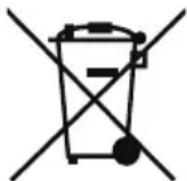
This product contains batteries and recyclable electronics. To protect the environment, do not dispose with general household waste, but bring to appropriate local collection points.
SOUNDBOKS packaging material can be recycled, we recommend to sort parts marked with recycle symbols separately during disposal.
The Bluetooth® trademark and logos are registered trademarks owned by Bluetooth SIG, Inc. and the use thereof is under license.
iPhone® is a registered trademark of Apple, Inc.
Android ^TM is a trademark of Google, Inc.

The SKAA Compatible Badge found on the Product certifies that this Product has been tested and is fully compliant with all of the requirements of the SKAA Standard and has been granted SKAA Certification. This Product will work seamlessly with other products in the SKAA ecosystem of audio transmitting and receiving devices. For more information on the SKAA Standard, please visit www.SKAA.com. The SKAA® name as well as its associated marks, logos and icons are trademarks or registered trademarks of Eleven Engineering Incorporated.
FINAL REMARKS11.
We hope that you'll have an awesome time with your SOUNDBOKS product, and please feel free to reach out to us with questions, ideas, or anything else. We'd love to talk to you!
Please feel free to write us on info@
SOUNDBOKS.com
U.S. Business Address:
SOUNDBOKS Inc.
1968 S. Coast Hwy #2510
Laguna Beach CA 92651
For rest of the World:
SOUNDBOKS ApS
CVR: 36457597
Esromgade 15, 1107
2200 Copenhagen N
Denmark
SOUNDBOKS (GEN. 4) MANUEL D'UTILISATION
LA NOUVELLE GÉNÉRATION DE SOUNDBOKS
natural_image
Line drawing of a soundproofs device with mesh cover and circular vent (no text or symbols on body)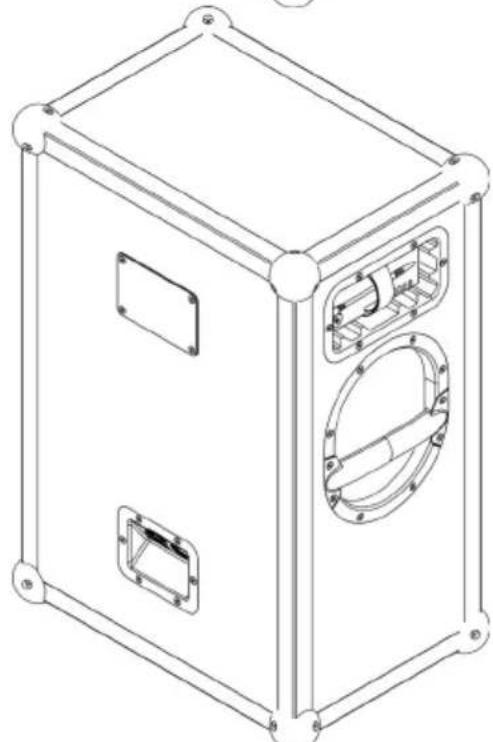
natural_image
Line drawing of a rectangular electronic device with mounting brackets and internal compartments (no text or symbols)natural_image
Technical diagram of a mechanical assembly with no visible text or symbolsnatural_image
Technical line drawing of a mechanical assembly with no visible text or symbols1.2 Specifications
1.3 LED behavior
1.4 Customization
1.5 SKAA & Bond Button
natural_image
Technical line drawing of a rectangular frame with a central circular component and bolt holes, no text or symbols present.1 × 3.5mm (1/8") Stereo Input
1 × 3.5mm (1/8") Stereo Output
SKAA Bouton Bond
CONSTRUCTION
Dimensions
66 × 43 × 32 cm ( 25,6 × 17 × 13 pouces (H × L × P)
Poids
Batterie Li-ion rechargeable
Lithium-fer-phosphate (LiFePO4)
natural_image
Simple line drawing of a U-shaped pipe or handle with two curved ends (no text or symbols)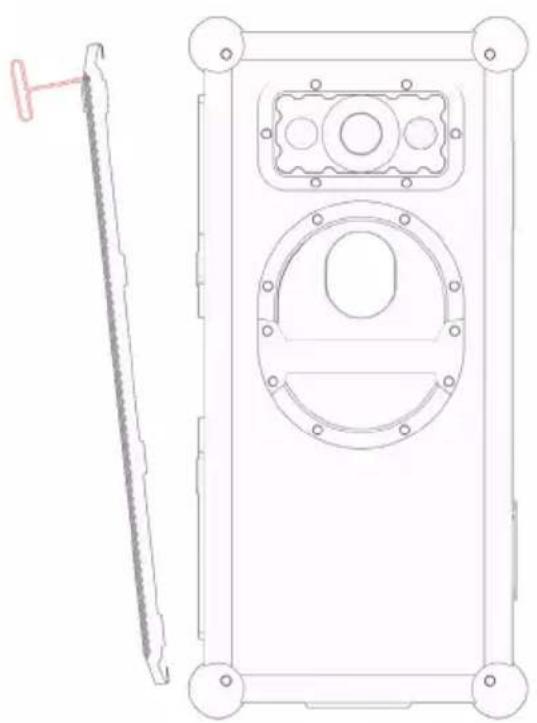
natural_image
Technical line drawing of a mechanical component with a side view showing a tool and a circular housing (no text or symbols)Retirez la grille
Retirez le logo SOUNDBOKS
1968 S. Coast Hwy #2510
Laguna Beach CA 92651 USA
normal operation is minimized. This device has also been evaluated and shown compliant with the ISED RF Exposure limits under mobile exposure conditions (antennas are greater than 20 cm from a person's body).
7. AVERTISSEMENT, MISE EN GARDE ET AVIS
WARNING
1968 S. Coast Hwy #2510
Laguna Beach CA 92651
United States of America
SOUNDBOKS (GEN. 4) MANUAL DE USO
natural_image
Line drawing of a portable electronic device with a mesh panel and circular vent (no text or symbols)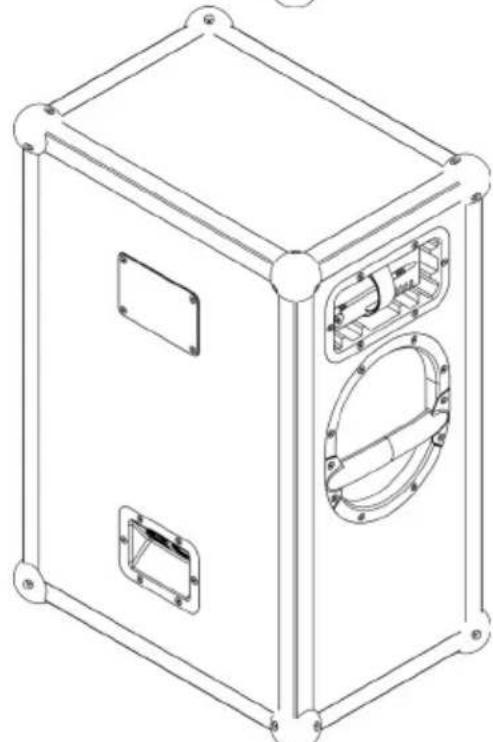
natural_image
Technical line drawing of a rectangular electronic device with mounting holes and internal compartments (no text or symbols)natural_image
Technical diagram of a mechanical assembly with no visible text or symbols01 Cargue completamente su batteria BATTERYBOKS durante aproximadamente 3,5 horas para optimizar el rendimiento.
natural_image
Technical line drawing of a mechanical assembly with no visible text or symbolsnatural_image
Technical diagram of a rectangular frame with a central circular component and bolt holes, no text or symbols present.natural_image
Simple line drawing of a U-shaped pipe or handle with two curved ends (no text or symbols)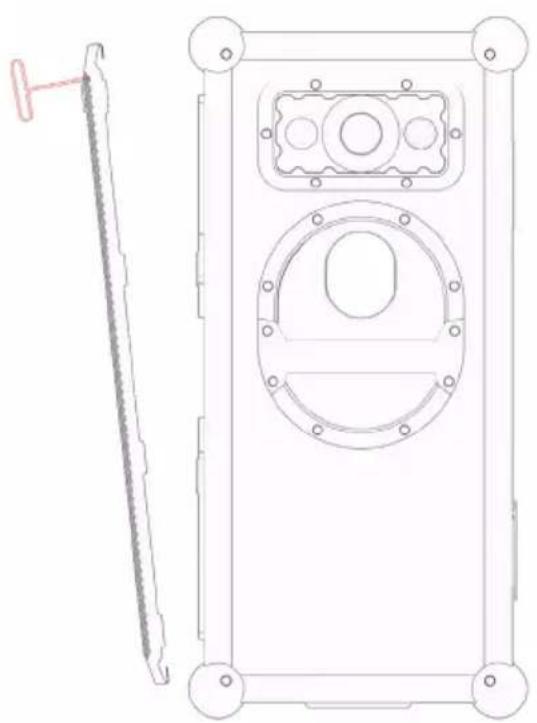
natural_image
Technical line drawing of a mechanical device with a side view showing a tool and a circular component (no text or symbols)1968 S. Coast Hwy #2510
Laguna Beach CA 92651 USA
1968 S. Coast Hwy #2510
Laguna Beach CA 92651
natural_image
Technical line drawing of a sound-absorber device with labeled panel and circular vent (no text or symbols beyond label)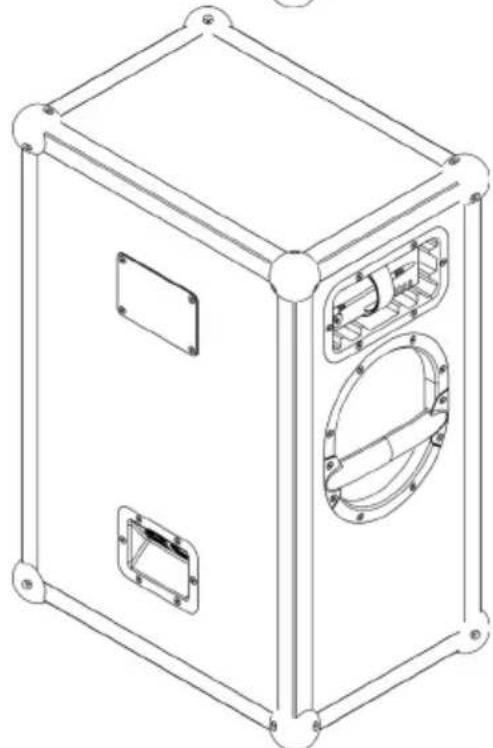
natural_image
Line drawing of a rectangular electronic device with mounting holes and internal compartments (no text or symbols)natural_image
Technical diagram of a mechanical assembly with no visible text or symbolsnatural_image
Technical line drawing of a mechanical assembly with no visible text or symbolsnatural_image
Technical line drawing of a rectangular frame with a central circular component and bolt holes (no text or symbols)25 Stangenhalterung
1. SOUNDBOKS (GEN. 4)
1.2 Spezifikationen
Battery Management System (BMS)
natural_image
Simple line drawing of a U-shaped pipe or handle with two curved ends (no text or symbols)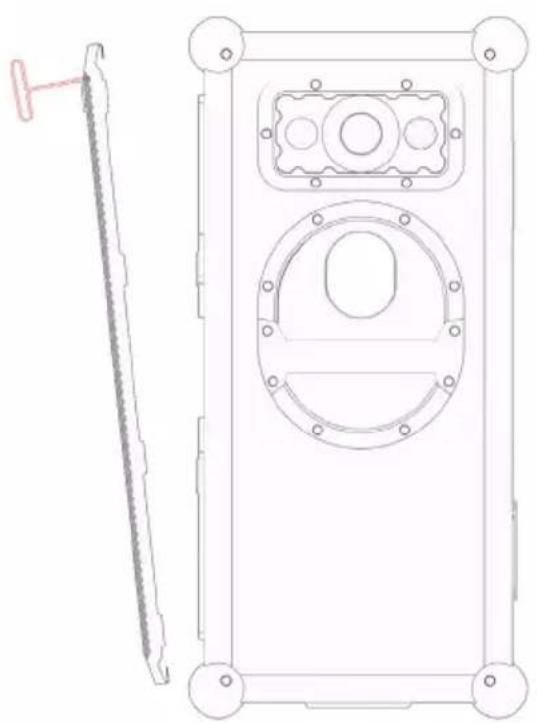
natural_image
Technical line drawing of a mechanical component with a side view showing a tool and a circular housing (no text or symbols)Grill entfernen
1968 S. Coast Hwy #2510
Laguna Beach CA 92651 USA
1968 S. Coast Hwy #2510
Laguna Beach CA 92651
United States of America
natural_image
Line drawing of a sound-absorber device with mesh cover and circular vent (no text or symbols)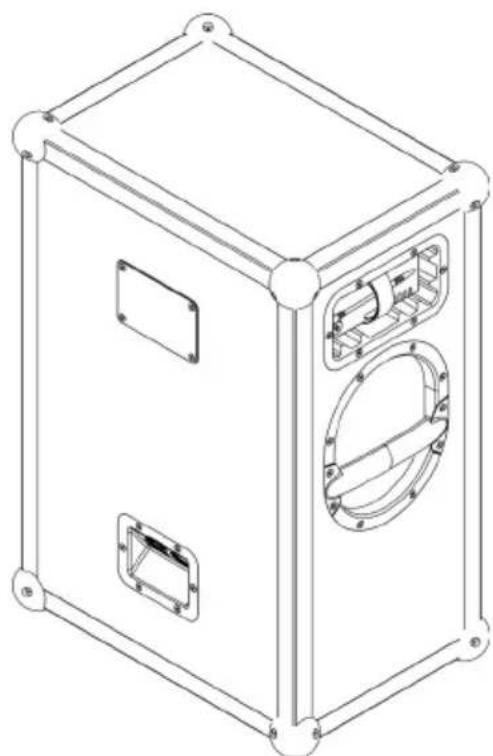
natural_image
Line drawing of a rectangular electronic device with mounting flanges and internal compartments (no text or symbols)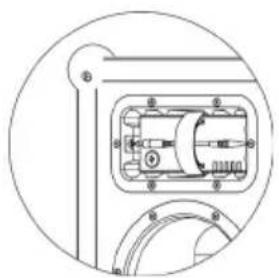
natural_image
Technical diagram of a mechanical assembly with no visible text or symbolsnatural_image
Technical line drawing of a mechanical assembly with no visible text or symbolsnatural_image
Technical diagram of a rectangular frame with a central circular component and bolt holes, no text or symbols present.25 立杆安装
1. SOUNDBOKS (第4代)
natural_image
Simple line drawing of a curved pipe or handle (no text or symbols)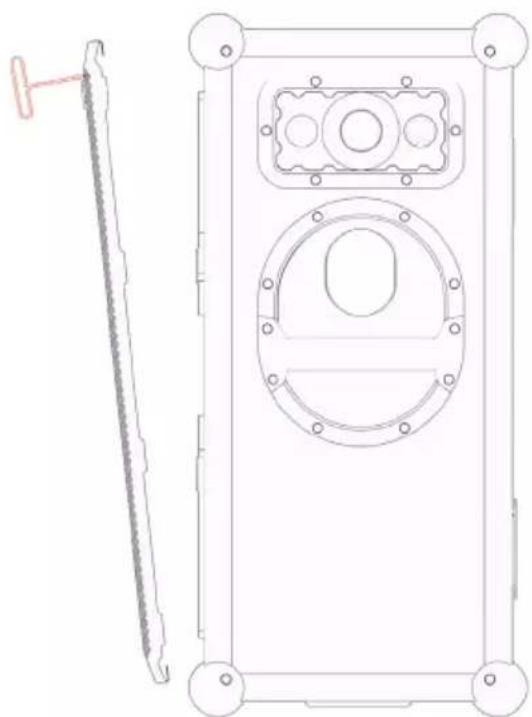
natural_image
Technical line drawing of a mechanical component with a side view showing a tool and a circular housing (no text or symbols)移除网罩
1968 S. Coast Hwy #2510
Laguna Beach CA 92651
United States of America
世界其它地区:
SOUNDBOKS ApS
CVR:36457597
Esromgade 15, 1107
2200 Copenhagen N
Denmark
natural_image
Technical diagram of a mechanical assembly with no visible text or symbolsnatural_image
Line drawing of a soundproofs device with mesh cover and circular vent (no text or symbols on body)natural_image
Technical line drawing of a mechanical assembly with no visible text or symbolsnatural_image
Line drawing of a rectangular electronic device with mounting brackets and internal compartments (no text or symbols)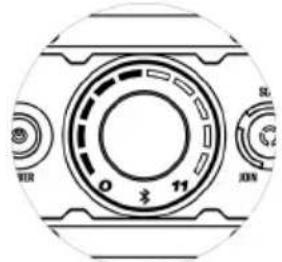
natural_image
Technical line drawing of a rectangular frame with a central circular component and bolt holes (no text or symbols)25 مسند قائم
natural_image
Technical line drawings of a mechanical device with three views: top is a curved pipe, bottom is a rectangular housing with circular components (no text or symbols)إزالة الشبكة
SOUNDBOKS ApS, Esromgade 15, 2200 Copenhagen info@: ,N, Denmark; CVR nr. 36457597 .SOUNDBOKS.com
S. Coast Hwy #2510 1968
Laguna Beach CA 92651
,S. Coast Hwy #2510 1968
Laguna Beach CA 92651