WL-100C - Alarm clock radio LANAFORM - Free user manual and instructions
Find the device manual for free WL-100C LANAFORM in PDF.



| Product Type | Dawn and dusk simulator / Radio alarm clock |
| Brand | Lanaform |
| Model | WL-100C |
| Reference | LA190203 |
| Power Supply | DC 5V 2A (via included USB mains adapter) |
| Power Consumption | 10 W |
| FM Frequency Band | 87.5 - 108 MHz |
| Backup Power | 3 AAA batteries (not included) |
| Connectivity | Bluetooth 4.2+, Lanaform Connect app (iOS/Android) |
| Main Functions | Sunrise and sunset simulation, FM radio, dual alarm, colored ambient light, 5 nature sounds + beep, sleep function, snooze, USB smartphone charger |
| Available Settings | Screen brightness (2 levels + auto), LED light intensity (30 levels), sound volume (15 levels) |
| Ports | USB port (smartphone charging, 5V-1A), micro USB port (power supply) |
| Antenna | Retractable wire antenna |
| Package Contents | WL-100C simulator, USB cable, mains adapter, instruction manual |
| Care and Cleaning | Clean with a dry cloth; do not immerse; do not use abrasive products |
| Safety Precautions | Do not use in humid environment; do not block openings; unplug before cleaning; use only recommended accessories |
| Warranty | 2 years against defects in materials and workmanship |
| Disposal | Follow local regulations; remove batteries before disposal |
Frequently Asked Questions - WL-100C LANAFORM
User questions about WL-100C LANAFORM
0 question about this device. Answer the ones you know or ask your own.
Ask a new question about this device
Download the instructions for your Alarm clock radio in PDF format for free! Find your manual WL-100C - LANAFORM and take your electronic device back in hand. On this page are published all the documents necessary for the use of your device. WL-100C by LANAFORM.
USER MANUAL WL-100C LANAFORM
natural_image
White circular object with segmented edges and a central oval, resembling a stylized helmet or device (no text or symbols visible)EN ENGLISH SMART SUNRISE & SUNSET SIMULATOR
FR FRANÇAIS SIMULATEUR D'AUBE ET DE CRÉPUSCULE CONNECTÉ
NL NEDERLANDS VERBONDEN
LICHTWEKKER
CS ČEŠTINA PROPOJENÝ SIMULÁTOR VÝCHODU A ZÁPADU SLUNCE
SK SLOVENČINA PRIPOJENÝ SIMULÁTOR SVITANIA A SÚMRAKU
SL SLOVENŠČINA
POVEZAN SIMULATOR ZORE IN MRAKA
LT LIETUVIU
PRIE INTERNETO JUNGIAMAS SAULÉTEKIO IR SAULÉLYDŽIO SIMULIATORIUS
2
ENGLISH
EN
Precautions for use
⚠️ Please read all the instructions before using your product, in particular these few basic safety instructions.
The photographs and other product images in these instructions and on the packaging are as accurate as possible but may not provide a perfect representation of the product.
⚠ Warning
Do not use this device if the plug is damaged, if the device is not working properly, if it has been dropped on the floor, if it is damaged or if it has fallen into water. Have the device examined and repaired by the supplier or their after-sales department. Do not connect or disconnect the USB cable with wet hands. If the USB cable is damaged, it must be replaced by a similar USB cable available from the supplier or the supplier's after-sales department. Before connecting the device, check that the voltage shown on the device corresponds to the local voltage. Unplug the device before cleaning it. Keep the power cable away from hot surfaces. Do not use this device in a damp environment (in a bathroom, near a shower, etc.). Do not use this device under a cover or under a cushion. Excessive heat may cause a fire, electrocution or injury to a person. Do not expose the device to direct sunlight or high temperatures.
Caution
Only use this device in accordance with the instructions given in this manual. Lanaform cannot be held liable in the event of accidental damage resulting
from any use contrary to the instructions given in these instructions for use. This device is not intended to be used by people (including children) with reduced physical, sensory or mental capabilities, or people with lack of experience or knowledge, unless they are supervised or instructed on the use of the device by a person responsible for their safety. Children should be supervised to make sure they do not play with the device. Make sure that children and minors do not play with or use the device. Do not use accessories that are not recommended by Lanaform or that are not supplied with this device. This device must not be modified in any way. Place the power lead so that no one can trip over it. Do not carry this device around by its power lead and do not use this lead as a handle. Never allow anything to fall into and never insert any object into any of the openings.
Presentation
Thank you for choosing the Lanaform WL-100C Sunrise and Sunset Simulator. This multi-function WL-100C Sunrise and Sunset Simulator will help you calm your mornings to start your day well and will help you fall asleep peacefully. With a sleep aid feature, the WL-100C is fully connected for simple and effective remote control.
Contents of the packaging
• 1 WL-100C Sunrise and Sunset Simulator
• 1 USB charging cable
- 1 adapter
• 1 instruction manual
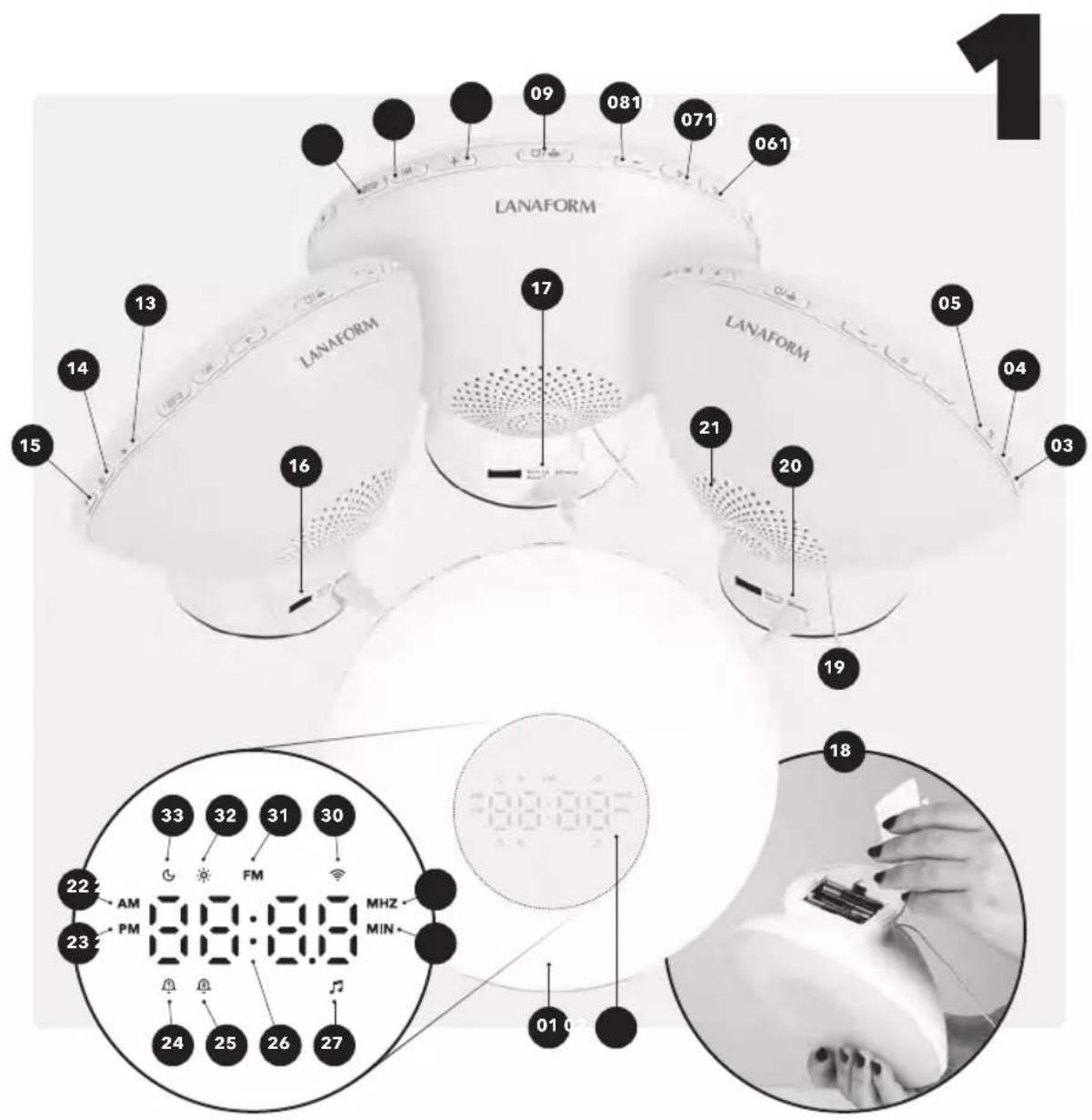
Description
Device
01 Light panel
02 Display
03 Illuminated display
04 Set time & 12/24-hour time format
05 Sleep function
06 Alarm 1
07 Alarm 2
08 - button
09 Snooze/reset Bluetooth function
10 + button
11 Light button
12 Coloured light button
13 Volume down
14 Radio/radio scan button
15 Volume up
16 USB port
17 Reset function
18 Battery compartment
19 Radio antenna
20 Micro USB port
21 Speaker
Display
22 Before noon (only displayed in 12-hour format)
23 Afternoon (only displayed in 12-hour format)
24 Alarm 1
25 Alarm 2
26 Time/radio station display
27 Alarm music setting
28 Alarm timer setting
29 Radio scan
30 Bluetooth connection
31 FM radio
32 Alarm light setting
33 Sleep function
Preparation before use
01 Remove the packaging material.
02 Check that all parts are present at the time of delivery.
03 Check that the device and cable are not damaged.
04 Remove the battery cover underneath the device and insert the batteries (3 x AAA, not included), observing the correct polarity. The batteries serve as a back-up power supply in the event of a power cut.
05 Connect the USB cable to the micro-USB port on the back of the device and to the USB adapter.
06 Then plug the mains power adaptor into a suitable mains socket.
Recommendations for power supply via USB
For optimal performance, it is recommended to use the supplied USB AC adapter or an adapter capable of providing at least 2.0A.
Lanaform Connect app
You can connect the WL-100C Sunrise and Sunset Simulator to your smartphone by Bluetooth. To do this, you only need to download the free Lanaform Connect app. The Lanaform Connect app is available on the App Store (iOS) and on Google Play (Android™).
The Lanaform Connect app offers the following functions:
- Set the time
- Adjust the display brightness
- Sunrise and sunset alarm control
- Ambient light control
- Radio control
- Activate the sleep aid function
System requirements: iOS ≥10.0, Android™ ≥5.0, Bluetooth ≥4.2.
© Note
You can also use the same functions of the Sunrise and Sunset Simulator without the Lanaform Connect app.
The app also allows you to choose the days (Monday-Sunday) on which you want to activate the alarm, which is not initially possible to set from the Sunrise and Sunset Simulator.
Automatically connect the device to the Lanaform Connect app
Follow the instructions in the chapter "Preparation before use".
① Note
The Bluetooth symbol flashes rapidly( )If not, "reset" the device by holding down the "Bluetooth Connection" button. for several seconds.
- Make sure the Bluetooth feature is enabled on your smartphone.
- Download the free Lanaform Connect app from the App Store (iOS) or from Google Play (Android™).
- Launch the Lanaform Connect app and follow the instructions.
- Click Connect a New Device or press the + button at the top of the screen. Follow the on-screen instructions to connect the device to your network.
Note
Please ensure that localization is activated on your smartphone before connecting the device to the Lanaform Connect application.
Instructions
Note
The following instructions refer to settings using the device controls. You can also access the same settings from the Lanaform Connect app on your smartphone.
Setting the time
01 When first using, you must set the time for the Wake-up Light. Once the device is connected, the time display will flash for 10 seconds, allowing you to set the time.
02 To set the time, press the "+" and "-" buttons. Then press the "Set time & 12/24-hour time format" button.
03 The minutes display will now flash. To set the minutes, press the "+" and "-" buttons. Press the "Set time & 12/24-Hour time format" button again.
04 The display indicates "Ct On". This function allows you to synchronise the time on the device with that on your smartphone, as long as it is connected to the Lanaform Connect app. To disable this function, press the "+" or "-" buttons. The display indicates "Ct Off". Then press the "Set time & 12/24-hour time format" button.
© Note
To increase or decrease the hours or minutes, hold down the "+" or "-" button.
You can choose between a 24-hour or 12-hour display mode by pressing the "Set time & 12/24-hour time format" button once. When you select the 12-hour mode, the control display shows the time of day as "AM" or "PM".
If the hour symbol is no longer blinking when you want to set the time, simply press the "Set time & 12/24-hour time format" button once.
Adjusting the display brightness
You can choose from two light intensities for the display. Press the "Illuminated display" button successively to select the desired light intensity or to turn it off.
© Note
You can also synchronise the light intensity of the display screen according to the ambient brightness. To do this, press and hold the "Illuminated display" button for a few seconds. The display indicates "On". The light intensity is now synchronised according to the ambient brightness. To turn it off, press and hold the light button on the display. The display indicates "Off".
Sunrise function - Setting the alarm
The sunrise function allows you to wake up gently to a sunrise simulation, the sound of nature or your favourite radio station. You can set two different alarm times (alarm 1 and alarm 2) for the wake-up alarm.
01 To activate alarm 1 or 2, press the "Alarm 1 or 2" button. The alarm 1 or 2 symbol is shown on the display.
02 To set alarm 1 or 2, press and hold the alarm 1 or 2 button for 3 seconds.
03 The wake-up alarm symbol 1 or 2 is then shown on the display.
04 The alarm time starts flashing.
05 Set the desired wake-up time using the "+" and "-" buttons. Then press the "Set time and 12/24-hour time format" button. The minutes display will now flash.
06 To set the minutes, press the "+" and "-" buttons. To navigate more quickly between hours or minutes, hold down the "+" or "-" button.
Setting the alarm mode
The F1 alarm mode is now displayed on the screen and flashes. There are three possible combinations for the alarm
01 F1: light + sounds
02 F2: light
03 F3: sound
To select the desired mode, press the "+" and "-" buttons and then press the alarm 1 or 2 buttons to confirm your choice. Depending on the
mode chosen, the music and light settings symbols for alarm mode will flash. The sound mode display starts flashing.
© Note
The sunrise simulation will activate 30 minutes before wake-up time. The LED gradually becomes brighter until the wake-up time.
Alarm sound setting
You can choose between 5 sounds (4 nature sounds + 1 beep) or FM radio.
01 Press the "+" and "-" buttons to select the desired nature sound (S-1 to S-5) or the radio (S6). Then press the alarm 1 or 2 buttons to confirm your choice.
02 The sound volume display now starts flashing.
03 To adjust the alarm sound volume, press the "+" and "-" buttons successively to the desired level (V01 to V15). Then press the alarm 1 or 2 buttons to confirm your choice. The light intensity display flashes.
© Note
If the FM radio is on at the time of the wake-up alarm, the radio will stop with the wake-up alarm, and the nature sound will sound for 2 minutes before the radio automatically restarts.
End light intensity adjustment
It is possible to adjust the end light intensity of the sunrise simulator to a level of your choice from 30 intensities offered. To do this, select the desired intensity using the "+" and "-" buttons.
Snooze function
When a tone sounds, you can stop it temporarily by pressing the snooze button. The alarm will then sound again after 5 minutes, each time the snooze button is pressed.
Disable the alarm
When the alarm sounds, press any button to turn it off except the snooze button. Without any intervention on your part, the alarm will stop automatically after 5 minutes. In the app, you can select the duration from 1 to 15 minutes.
During the sunrise simulation process, you can also turn off the light by holding down the "light" button for a few seconds. If your wake-up mode includes sound, it will sound at the time of the programmed wake-up.
Note
The above operations do not deactivate the alarm. This will sound again the next day at the set time. If you want to permanently deactivate alarm 1 or 2, press the alarm 1 or 2 button again. The corresponding symbol disappears.
Snooze Function - Setting the Alarm
With the WL-100C, you can also use a sunset simulation to fall asleep peacefully. Once this function is activated, the light will start at the selected intensity and will gradually reduce until it turns off.
You can combine this function with one of the 6 sounds specially developed to help you fall
asleep. These continuous neutral sounds, using specific frequencies, are used to cover ambient noise. The diffusion of these sounds promotes a relaxing effect in the user: by focusing on an undifferentiated sound, the user's brain activity decreases and the worries that would prevent them from falling asleep take a back seat.
You can also choose only one of these 6 sounds (S1-S6) to fall asleep to or your favourite radio station (S7). The sound will gradually decrease until it turns off after the chosen duration.
To adjust the sleep function, press the "sleep function" button. The symbol flashes on the display screen.
© Note
The sleep function starts when it is activated, regardless of the time.
Setting the mode (sound+light (F1)), light (F2), sound (F3), sounds (S1-S7), sound volume (U01-U15) and the start light intensity (L01-L30) is similar to the settings for the "Sunrise" function. To confirm your choices, press the "sleep function" button.
You can choose from 3 durations (15/30/60 minutes). To select one of them, press the "+" and "-" buttons. To confirm your choice, press the "sleep function" button.
When the sleep function is activated, you can adjust the intensity of the light, the sound volume or even change the radio station:
01 Press and hold the "+" and "-" buttons to change the radio station.
02 Press the volume up and down buttons to adjust the sound volume.
03 Press the buttons to adjust the intensity of the light.
To disable sleep mode, press and hold the "snooze function" button for several seconds.
Lamp/ambient light function with colour change
You can also use the wake-up light as a normal lamp or as a colour changing ambient light.
- To activate the normal lamp, press the "light" button once. You can then adjust the light intensity (L1 to L30) by pressing the "+" and "-" buttons.
- To activate the ambient light, press the "coloured light" button. The LEDs then change colour automatically. You can also select one of the 6 specific colours by pressing the "+" and "-" buttons. You can then adjust the light intensity by holding the "+" and "-" buttons.
Listen to the radio
The light alarm clock has a flexible aerial on the back of the device. Unwind the wire and place it in the most extended position to ensure the best reception.
- Press the FM radio button to activate it. The icon flashes on the display.
- To start the automatic station search, press and hold down the "radio
scan" button, then release it. The device will start searching for stations and save them automatically.
- Once the stations are saved, you can choose the desired station by holding down the "+" and "-" buttons. The symbol 'P' is displayed in front of the station number.
- If you still want to search manually, press the "+" and "-" buttons until you reach the desired station.
- To change the volume of the radio, press the volume setting button successively.
Smartphone charging
The Sunrise and Sunset Simulator has a USB port located on the back of the device so that you can charge your smartphone.
Battery operation
The wake-up light can be used on batteries. In the event of a power cut, they provide a back-up for the wake-up time.
Device reset
To shut down and restart the device with the factory settings, you can reset it. To do this, insert a sharp object into the hole on the back of the product and apply gentle pressure.
Cleaning
- Make sure no water gets inside the device. If this should happen, wait until the device is completely dry before using it again.
- Never immerse the device and mains adapter in water or other liquids.
- Protect the device from being knocked, humidity, dust, chemical products, high temperature variations and sources of heat that are too close (oven, radiator).
- Clean the device using a dry cloth.
- Do not use abrasive cleaners.
• Always change the batteries on time and use the same type of batteries. - Do not use rechargeable batteries.
- Leaking batteries may damage the device. If you do not use the device for an extended period of time, remove the batteries from the battery compartment.
- Used or damaged batteries may cause skin irritation. Wear appropriate protective gloves.
Storage
Store the device in a cool, dry place, out of the reach of children.
Technical data
• Reference: LA190203
• Power supply: DC 5V 2A
- Consumption: 10W
- AC/DC adapter input: 100-240V\~50/60 Hz 0.5A
• Phone charging power supply: 5V 1A
• FM band frequency: 87.5 - 108 MHz
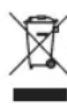
Adviceregarding the disposal of waste
All the packaging is composed of materials that pose no hazard for the environment and which can be disposed of at your local sorting centre to be used as secondary raw materials. The cardboard may be disposed of in a paper recycling bin. The packaging film must be taken to your local sorting and recycling centre.
When you have finished using the device, please dispose of it in an environmentally friendly way and in accordance with the law.
Prior to disposal, please remove the battery and dispose of it at a collection point so that it can be recycled.
Under no circumstances should spent batteries be disposed of with household waste.
Limited warranty
Lanaform guarantees this product against any material or manufacturing defect for a period of two years from the date of purchase, except in the circumstances described below.
The Lanaform guarantee does not cover damage caused as a result of normal wear to this product. In addition, the guarantee covering this Lanaform product does not cover damage caused by abusive or inappropriate or incorrect use, accidents, the use of unauthorized accessories, changes made to the product or any other circumstance, of whatever sort, that is outside Lanaform's control.
Lanaform may not be held liable for any type of circumstantial, indirect or specific damage.
All implicit guarantees relating to the suitability of the product are limited to a period of two years from the initial date of purchase as long as a copy of the proof of purchase can be supplied.
On receipt, Lanaform will repair or replace your appliance at its discretion and will return it to you. The guarantee is only valid through Lanaform's Service Centre. Any attempt to maintain this product by a person other than Lanaform's Service Centre will render this guarantee void.
FRANÇAIS
FR
Mises en garde
Application Lanaform Connect
natural_image
Close-up of a white circular object with a smooth surface and small markings, resembling a lens or cover (no text or symbols visible)LANAFORM
WL-100C
LA190203 / LOT 001
Manufacturer & Importer
Lanaform SA
Postal Address