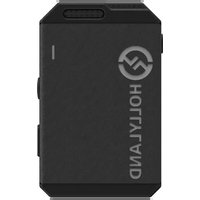
Lark Max - Microphone Hollyland - Free user manual and instructions
Find the device manual for free Lark Max Hollyland in PDF.


| Product Type | Wireless Microphone (Transmitter/Receiver System) |
| Brand | Hollyland |
| Model | Lark Max |
| Dimensions (Transmitter) | 48.5 x 30.3 x 19.37 mm |
| Dimensions (Receiver) | 58 x 40.83 x 23.17 mm |
| Dimensions (Charging Case) | 115 x 46 x 63 mm |
| Weight (Transmitter) | 33 g |
| Weight (Receiver) | 60 g |
| Weight (Charging Case) | 193.5 g |
| Battery Type | Built-in LiPo (Transmitter 300 mAh, Receiver 490 mAh, Case 2800 mAh) |
| Battery Life (Transmitter) | Approximately 7.5 hours (recording up to 14 hours) |
| Battery Life (Receiver) | Approximately 9 hours |
| Main Features | 8 GB internal recording, ENC noise reduction, AMOLED touchscreen, 2 TX + 1 RX and 1 TX + 1 RX modes, range up to 250 m (LOS), 2.4 GHz digital transmission |
| Maintenance and Cleaning | Clean with a soft, dry cloth. Do not use harsh liquids. |
| Safety | Do not expose to heat (oven, microwave). Use only original accessories. Do not open the battery. |
| Spare Parts and Repairability | USB-C cables, wind muff, clips. For any repairs, contact Hollyland support. |
| General Information | Professional wireless microphone system for camera, smartphone, and recorder. Compatible with iPhone (via USB-C to Lightning cable) and Android (USB-C). |
Frequently Asked Questions - Lark Max Hollyland
User questions about Lark Max Hollyland
0 question about this device. Answer the ones you know or ask your own.
Ask a new question about this device
Download the instructions for your Microphone in PDF format for free! Find your manual Lark Max - Hollyland and take your electronic device back in hand. On this page are published all the documents necessary for the use of your device. Lark Max by Hollyland.
USER MANUAL Lark Max Hollyland
Thank you for purchasing Hollyland LARK MAX wireless microphone system. Please read this User Manual carefully before using the product.
Key Features
● Extremely compact, portable design
● 2 TX + 1 RX and 1 TX + 1 RX modes
● Multiple LARK MAX systems working together in the same environment with frequency hopping technology
● Built-in lithium battery with ultra-long operating time
● Charging case for storage and charging
● Automatic switch to the external microphone
● Professional-level wireless audio specifications
● Environmental Noise Cancellation (ENC) technology on the transmitter to eliminate environmental noise
● 2.4GHz digital wireless transmission to deliver crystal-clear sound
● Transmitter capability of working as a standalone recorder, with 8GB of built-in storage
● AMOLED touchscreen on the receiver to display recording status, wireless information, and more
Interface Description
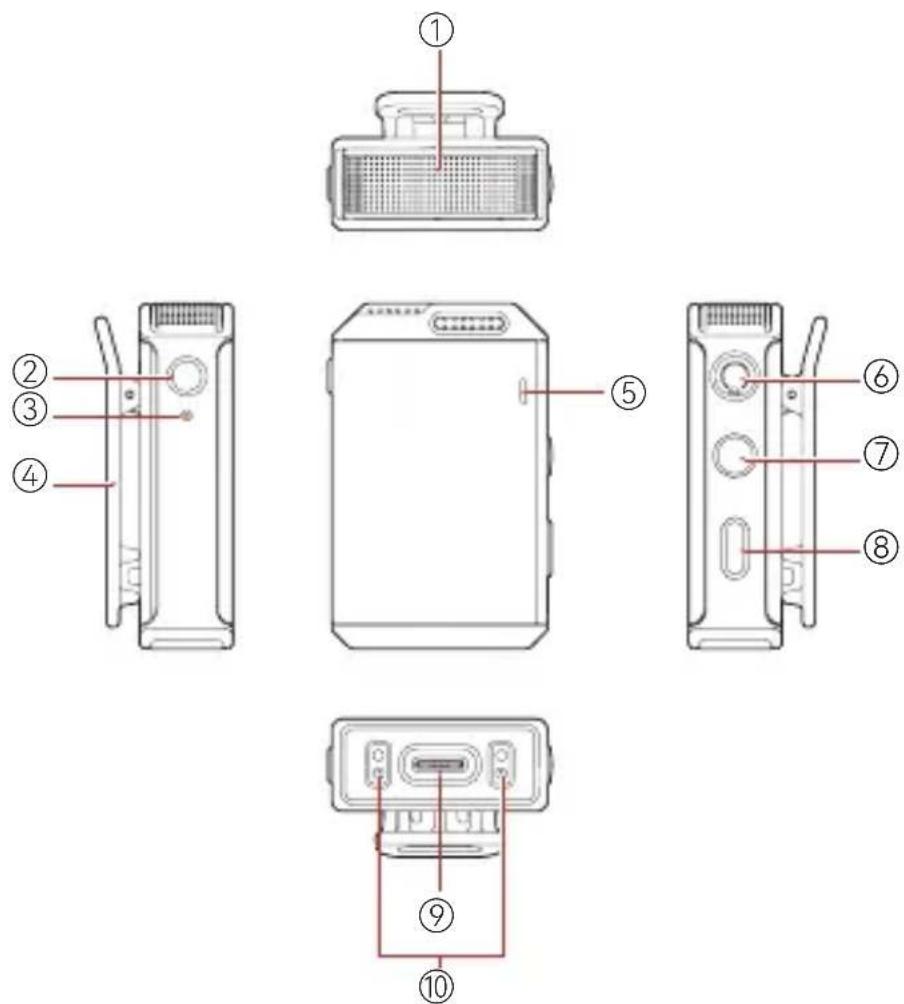
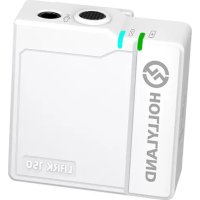
A: Transmitter
① Built-in Microphone
② REC Button
③ REC Indicator
④ Back Clip
⑤ Status Indicator
⑥ 3.5mm Audio Input Interface
⑦ Power Button
⑧Pairing/Noise
Cancellation Button
⑨ USB-C Interface
⑩Contacts
Interface Description
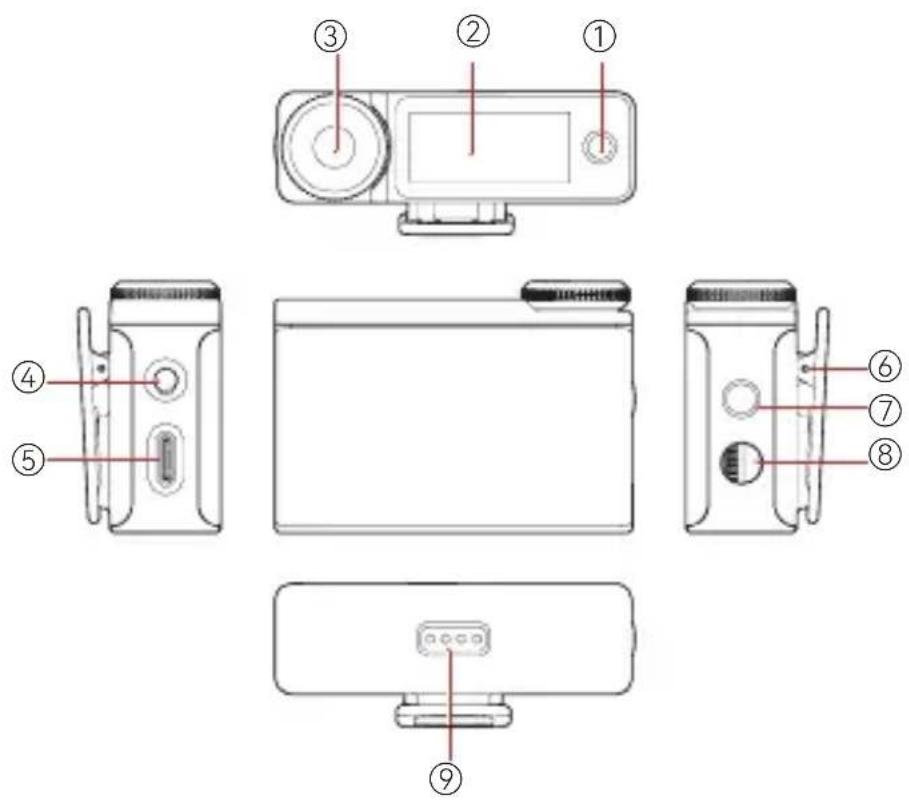
B: Receiver
① On-Screen Home Button
②AMOLEDTouchscreen
③ Control Knob
④3.5mmTRS
Headphone Interface
⑤ USB-C Interface
⑥ Back Clip
⑦ Power/Screen Lock Button
⑧3.5mmTRSAudio Output Interface
⑨Contacts
Interface Description
natural_image
Simple line drawing of a rectangular container with a handle and a small mark at the bottom (no text or symbols)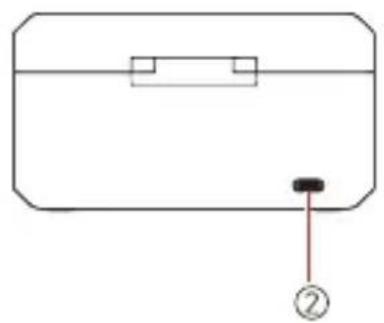
natural_image
Simple line drawing of a rectangular object with a black button and a numbered label (no text or symbols)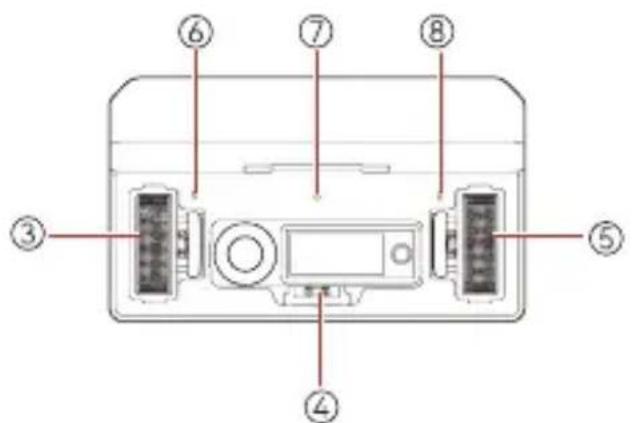
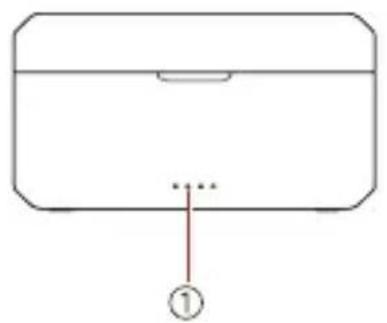
C: Charging Case
① Charging Case Battery Level Indicator
② USB-C Interface
③ Transmitter 1 Charging / Storage Slot
④ Receiver Charging/Storage Slot
⑤ Transmitter 2 Charging / Storage Slot
⑥ Transmitter 1 Charging Indicator
⑦ Receiver Charging Indicator
⑧ Transmitter 2 Charging Indicator
Display Description
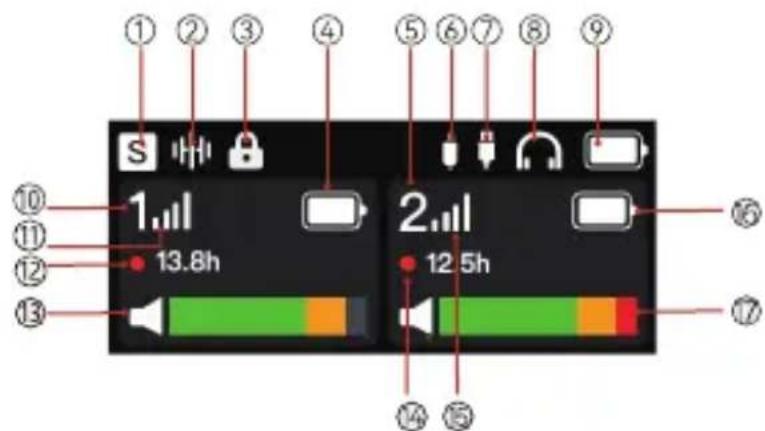
A: Receiver Main Interface (Outside the Charging Case)
| 1 Recording Mode USB Connection | 13 Transmitter 1 Input Volume | ||
| 2 Noise Cancellation Status | 8 Headphone Connection | 14 Transmitter 2 Remaining Recording Time | |
| 3 Screen Lock Status Receiver | Battery Level | 15 Transmitter 2 Signal Strength | |
| 4 Transmitter 1 Battery Level | Transmitter 1 Identifier | 16 Transmitter 2 Battery Level | |
| 5 Transmitter 2 Identifier | 11 Transmitter 1 Signal Strength | 17 Transmitter 2 Input Volume | |
| 6 3.5mm Audio Output Connection | 12 Transmitter 1 Remaining Recording Time | ||
Display Description
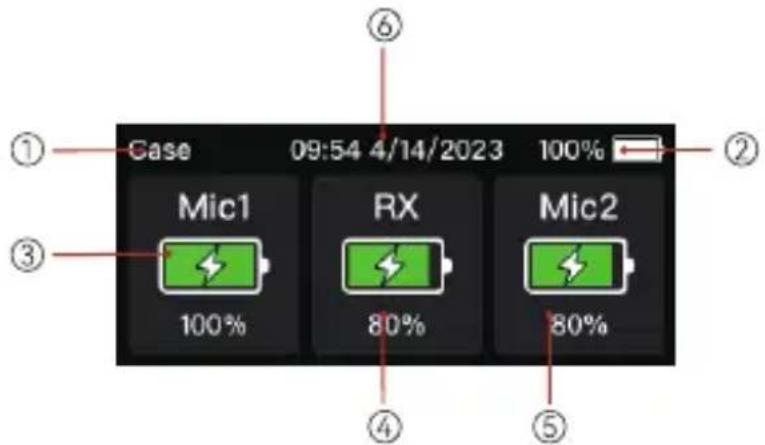
B: Receiver Main Interface (in the Charging Case)
① The Receiver Is in the Charging Case Receiver Battery Level
② Charging Case Battery Level Transmitter 2 Battery Level
③ Transmitter 1 Battery Level Date & Time
Display Description
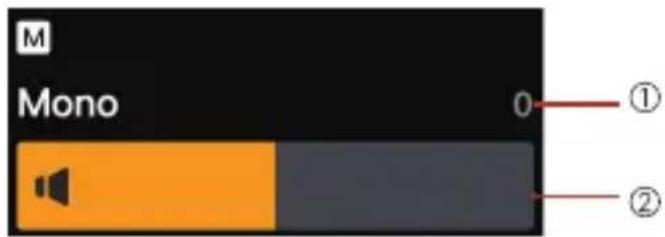
C: Receiver Output Volume Interface
① Output Volume in Mono Mode Output Volume Bar in Mono Mode
Settings: To enter the output volume settings interface from the main interface, simply rotate the control knob. You can adjust the output volume in mono mode by rotating the control knob or sliding the output volume bar.
Display Description
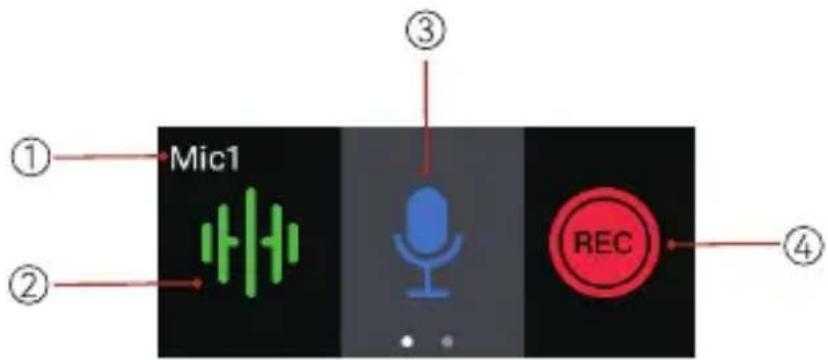
D: Receiver Quick Settings Interface
| 1 | Quick Settings Interface for Transmitter 1 | 3 | Mute Switch |
| 2 | ENC Switch Recording Switch | ||
Settings: To enter the quick settings interface for transmitter 1 or transmitter 2 from the main interface, simply tap on the corresponding transmitter area. You can switch between the functions on the quick settings interface by rotating the control knob or tapping the function icons. To return to the main interface, simply tap the on-screen home button.

Display Description

REC Mode
E: Receiver Menu Interface
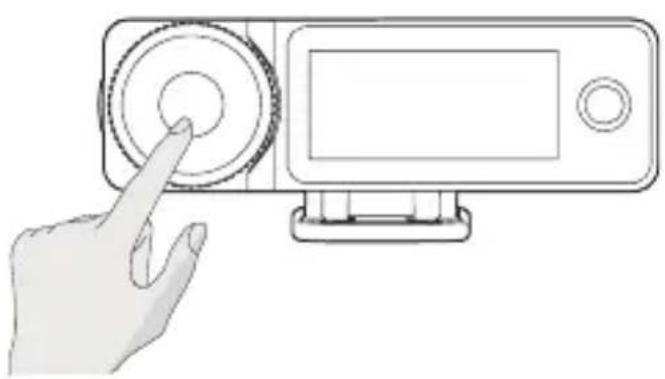
Settings: Press the control knob to enter the menu interface from the main interface. Rotate the control knob or tap on the touchscreen to select a menu, and then press the control knob or tap the menu to enter its sub-menu interface. To return to the previous interface, simply tap the on-screen home button.
Indicator Description
Transmitter Status Indicator
Pattern Description
Blue light flashing quickly Pairing
Blue light flashing slowly Disconnected from the receiver
Steady blue light Connected to the receiver
Steady green light ENC ON & Connected to the receiver
Steady pink light Upgrading
Steady red light Mute ON
Breathing red light flashing Low battery
Breathing orange light, returning to the
previous state after 5 seconds
Power ON & Charging
Breathing orange light Power OFF & Charging
Steady orange light Power OFF & Fully charged
Indicator Description
Transmitter REC Indicator
| Pattern Description |
| Steady red light Recording |
| Light OFF Not recording |
Charging Case Indicator
| Pattern Description | |
| One light outside the charging case flashing when the charging case is connected via USB | Charging case in charging mode |
| Four steady lights outside the charging case | Charging case fully charged |
| Breathing light inside the charging case | Transmitter/Receiver in charging mode |
| Steady light inside the charging case | Transmitter/Receiver fully charged |
Indicator Description
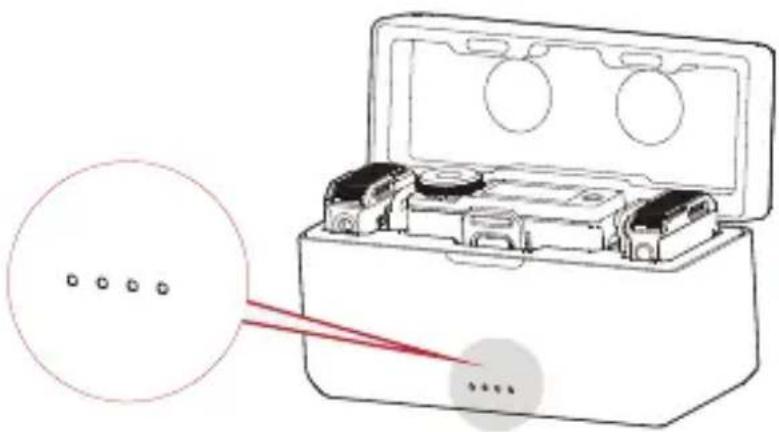
Pattern Battery Level
| One LED ON, flashing red | Low battery. The transmitter and the receiver cannot be charged using the charging case. |
One LED ON 25%
Two LEDs ON 50%
Three LEDs ON 75%
Four LEDs ON 100%
Receiver Menu Description
natural_image
Hand interacting with a device via a button (no text or symbols visible)Press the control knob to enter the menu interface from the main interface. The menu operations are as follows:
- Select REC Mode to set the receiver output mode.
a. Stereo
b. Mono
C. Safety Track
Note: The safety track mode is only supported when a camera is connected. When third-party apps are used for recording, it is recommended to select the mono mode.
Receiver Menu Description
- Select Mic Settings to set the transmitter parameters.
a. Mic Gain: Press the control knob or tap to adjust the transmitter input gain.
b. Auto Record: The default value is OFF. If Auto Record is set to ON, the transmitter will automatically start internal recording when it is turned on.
c. REC Stop Lock: The default value is OFF. If REC Stop Lock is set to ON, recording cannot be stopped on the transmitter and can only be stopped on the receiver.
d. Auto OFF: The default value is 15min, indicating that the transmitter will automatically turn off when it is not paired with the receiver and there is no operation of it within 15 minutes. If Auto OFF is set to Never, the transmitter will not turn off automatically.
e. LED Brightness: The default value is Normal. It allows you to set the brightness of the transmitter status indicator light. You can set it to Low as required.
f. Storage: Press the control knob or tap to view the remaining recording time of the transmitter and format the transmitter storage (when the storage is full, the earliest recording file will be automatically deleted).
- Select Phone Speaker to set whether audio can be played on the phone speaker without unplugging the receiver from the mobile phone.
a. OFF: Audio play on the phone speaker is disabled.
b. ON: Audio can be played on the phone speaker without unplugging the receiver from the mobile phone.
Receiver Menu Description
- SelectEQ to configure audio settings.
a. Hi-Fi: Select this mode to ensure Hi-Fi audio pickup with high restoration.
b. Low Cut: Select this mode to filter low-frequency sound.
c. Vocal Boost: Select this mode to increase voice intelligibility.
- Select System Settings to configure system settings.
a. Pairing: Press the control knob or tap to set the receiver to pairing mode.
b. Brightness: Press the control knob or tap to adjust the brightness of the receiver touchscreen.
c. Upgrade Mode: Press the control knob or tap to activate the device upgrade process.
d. Date: Press the control knob or tap to set the date for the receiver. The settings will be synchronized to the connected transmitter.
e. Time: Press the control knob or tap to set the time for the receiver. The settings will be synchronized to the connected transmitter.
f. Language: Press the control knob or tap to set the device language to English or Chinese.
g. Factory Reset: Press the control knob or tap to reset the device to the default settings.
h. Version Info: Press the control knob or tap to check the receiver firmware version, connected transmitter firmware version, and SN.
Operation Instructions
The preferred position for attaching the transmitter is the collar near the speaker's neck area. If the speaker's voice is louder, position the transmitter in the upper chest area. The transmitter can be attached via its back clip or the clip magnet.
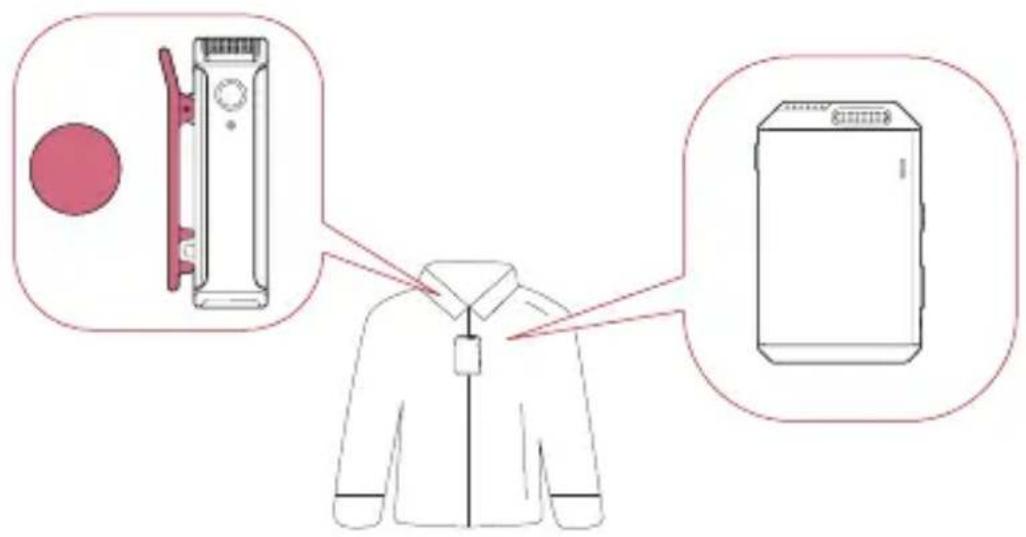
Note: Placement of the transmitter in different positions will result in recorded sound volume fluctuations. Avoid any obstructions of the transmitter during recording. It is recommended to use the furry windshield to prevent audio interference when using the transmitter outdoors.
Operation Instructions
Connecting the Receiver to an iPhone
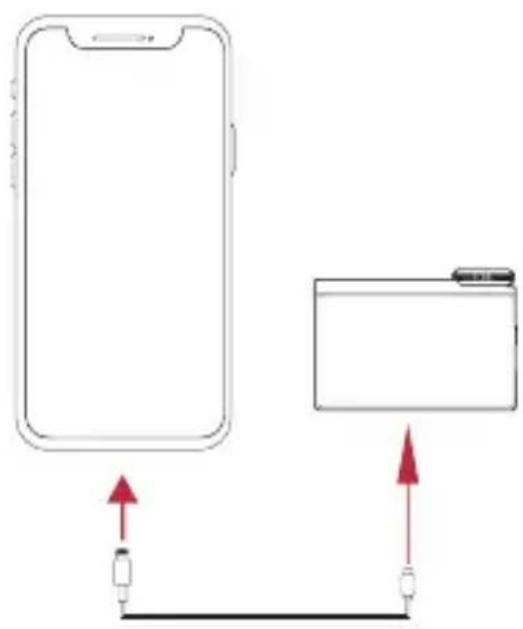
- Connect the receiver to an iPhone using a USB-C to Lightning cable.
- A USB connection icon will be displayed on the receiver touchscreen.
- Open the recorder or camera app on the mobile phone to start recording.
EN-18
Operation Instructions
Connecting the Receiver to an Android Phone with a USB-C Interface
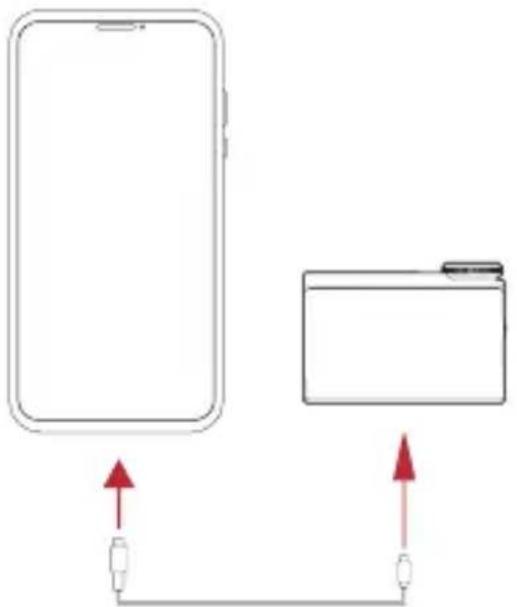
- Connect the receiver to an Android phone with a USB-C interface using a USB-C to USB-C cable.
- A USB connection icon will be displayed on the receiver touchscreen.
- Open the recorder or camera app on the mobile phone to start recording.
natural_image
Diagram showing two devices connected by a cable, with red arrows indicating direction of connection (no text or symbols)Note: It is recommended to use the original USB-C to Lightning and USB-C to USB-C cables. Otherwise, compatibility issues may occur, which could result in sound distortion or other audio problems.
Operation Instructions
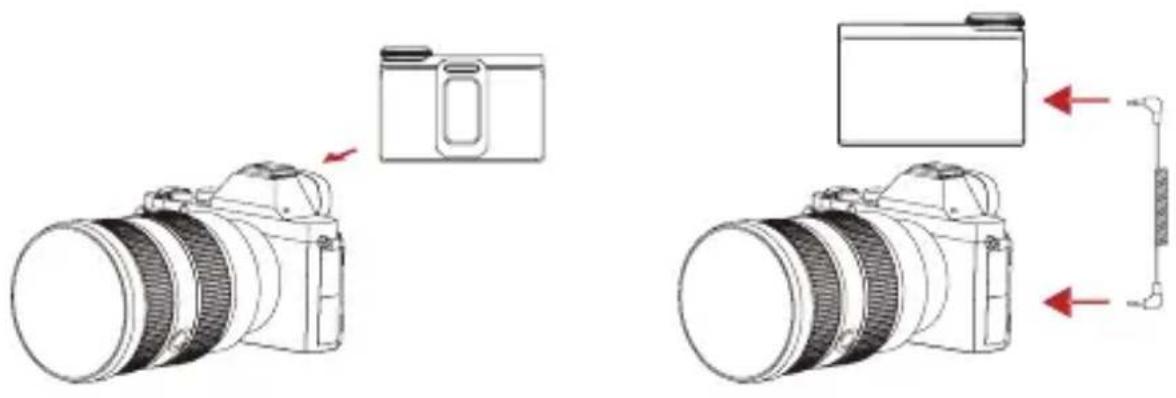
Connecting the Receiver to a Camera
- Attach the receiver to a camera via the hot shoe or cold shoe using the back clip.
- Connect the 3.5mm audio output interface on the receiver to the 3.5mm audio input interface on the camera using a 3.5mm TRS to 3.5mm TRS cable.
- Set the recording volume of the camera to the lowest and the output volume of the receiver to the medium to ensure the best recording level.
EN-20
Operation Instructions
Pairing
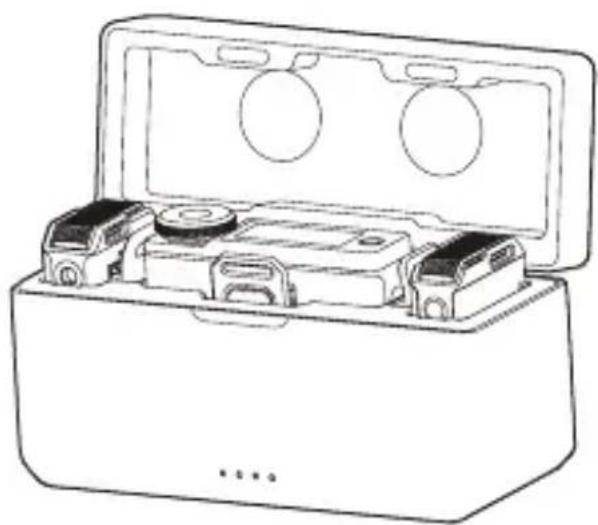
The transmitter and the receiver are paired by default. Follow either of the following two ways to pair the transmitter and the receiver if they are disconnected.
- Auto pairing: Place the transmitter and the receiver in the charging case, and they will pair automatically. (Figure 1)
- Manual pairing: Turn on the transmitter and the receiver, and press and hold the pairing button on the transmitter to enter pairing mode. In this case, the transmitter status indicator light flashes quickly. Then, select System Settings on the receiver touchscreen and tap Pairing to start pairing. If the transmitter status indicator light turns steady blue, pairing is successful. (Figure 2)
natural_image
Line drawing of a closed toolbox with internal compartments and circular cutouts (no text or symbols)Figure 1 Figure 2
natural_image
Illustration of a hand pressing a button on a device panel (no text or symbols visible)EN-21
Operation Instructions
Noise Cancellation
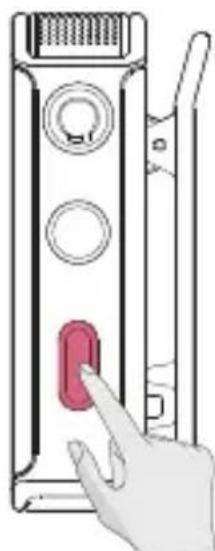
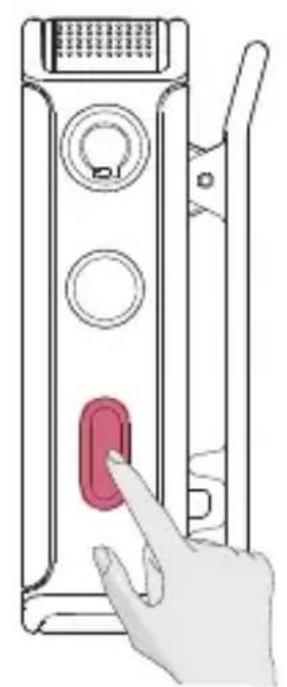
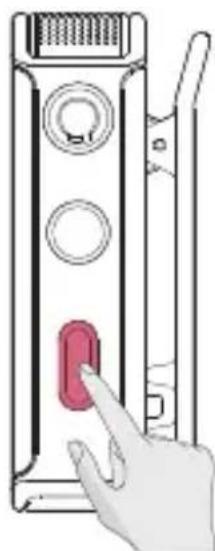
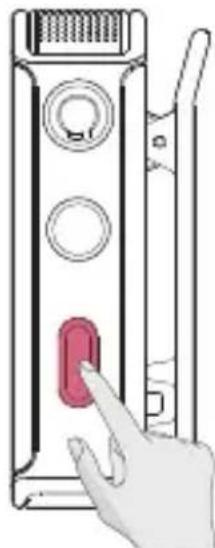
Press the noise cancellation button on the transmitter to enable the noise cancellation function. In this case, the transmitter status indicator light turns green.
Recording
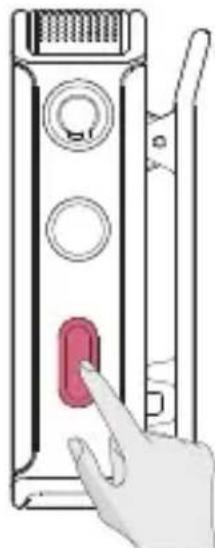
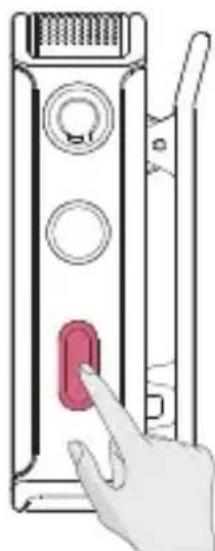
Press the REC button on the transmitter to enable the recording function. In this case, the transmitter REC indicator light turns steady red.
natural_image
Illustration of a hand pressing a button on a device panel (no text or symbols visible)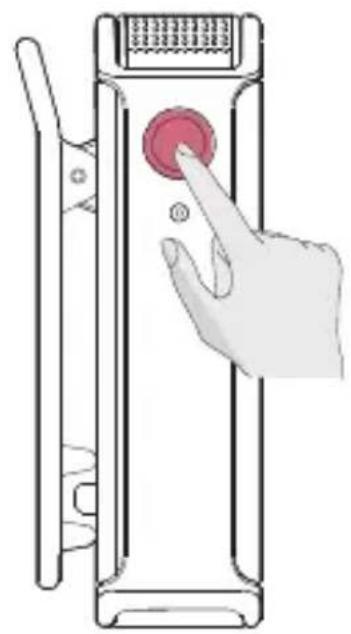
natural_image
Illustration of a hand pressing a button on a device panel (no text or symbols visible)EN-22
Operation Instructions
Mute
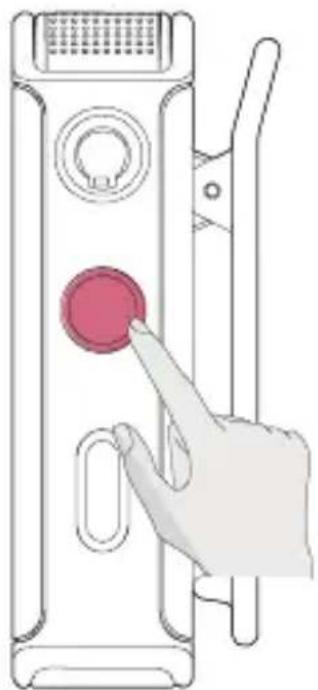
Press the power button on the transmitter twice to mute the transmitter. In this case, the transmitter status indicator light turns steady red.
natural_image
Illustration of a hand pressing a button on a device panel (no text or symbols visible)Screen Lock
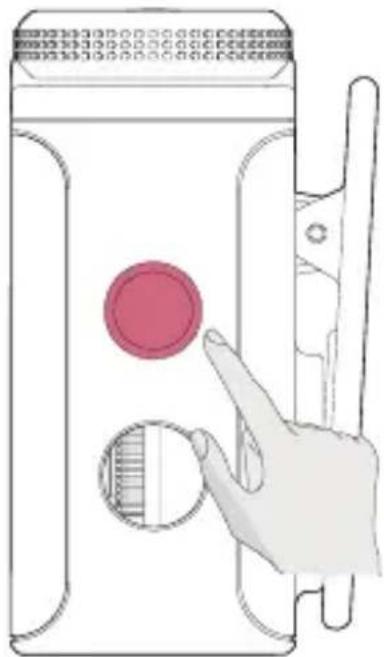
Press the power/screen lock button on the receiver to lock the screen to avoid unexpected operations, except for turning the device on or off. To unlock the screen, simply press the button again.
natural_image
Illustration of a hand interacting with a device panel showing a red circular button and a magnified view of the screen (no text or symbols)EN-23
Operation Instructions
Transmitter Recording
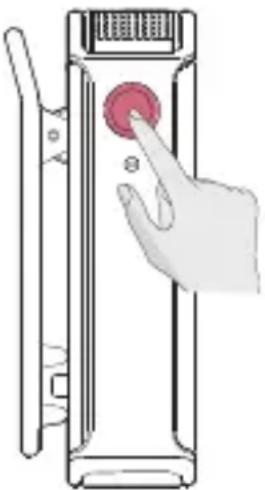
- After turning on the transmitter, press the REC button to start recording. In this case, the transmitter REC indicator light turns steady red. Press the REC button again to stop recording.
- The recorded audio format of the transmitter is lossless 48 kHz/24-bit mono WAV — an unprocessed RAW file. When the recording lasts for an extended period, the file will be split up automatically every 30 minutes.
- The transmitter is supported with 8GB of built-in memory for storing the recording files automatically. If the storage is full, newly recorded audio will overwrite the older recorded audio automatically.
- The recording file can be exported by connecting the transmitter to a computer or mobile phone.
- The transmitter storage can be formatted via the receiver or other devices such as a computer or mobile phone.
natural_image
Illustration of a hand pressing a button on a vertical device (no text or symbols visible)EN-24
Firmware Update
When new firmware is available, update the firmware by connecting the transmitter, the receiver, and the charging case to a computer separately.
How to Update the Firmware:
Receiver Firmware Update
- Select System Settings > Upgrade Mode from the main interface on the receiver touchscreen.
- Connect the receiver to the computer using the USB-C cable provided and copy the firmware update file to the receiver.
- Unplug the USB-C cable from the computer after the file is copied. Then, the receiver firmware update will start automatically and the message "Upgrading..." will be displayed on the receiver touchscreen. During the firmware update, operations of the receiver are not allowed until the message "Upgraded successfully. The device will restart soon." is displayed.
- After the firmware is updated successfully, the receiver will restart automatically.
Firmware Update
Transmitter Firmware Update
- Turn on the transmitter, connect the transmitter to the computer using the USB-C cable provided, and copy the firmware update file to the transmitter.
- Unplug the USB-C cable from the computer after the file is copied. Then, the transmitter firmware update will start automatically. During the firmware update, the transmitter status indicator light turns steady pink and will return to the previous state after the firmware update is completed.
- After the firmware is updated successfully, the transmitter will restart automatically.
Specifications
| Name LARK MAX Transmitter | |
| Dimensions | Approx. 48.5mm x 30.3mm x 19.37mm(1.9" x 1.2" x 0.76") |
| Weight Approx. 33g (1.16oz) | |
| Transmission Range Up to 820ft (250m) for LOS/197ft (60m) for NLOS | |
| Modulation Mode GFSK | |
| EIRP <20dBm | |
| Operating Frequency 2400MHz-2483.5MHz | |
| Battery Type RoHS-compliant LiPo | |
| Battery Capacity 300mAh | |
| Battery Voltage 3.87V | |
| Battery Energy 1.161Wh | |
| Charging Temperature 0°C to 45°C | |
| Operating Temperature -20°C to 45°C | |
| Charging Time <2 hours | |
| Operating Time | Approx. 7.5 hours |
Specifications
| Recording Time Approx. 14 hours | |
| Recorded Audio Format 48 kHz/24-bit WAV | |
| Mic Polar Pattern Omnidirectional | |
| Mic Sensitivity -36dBFS±1dB@1 kHz, 94dB SPL | |
| Input Dynamic Range 98dB (Default)/106dB (Max) | |
| Frequency Response 20 Hz-20 kHz (Low Cut disabled) | |
| Signal-to-Noise Ratio 70dB | |
| Sound Pressure Level 120dB SPL (Default)/128dB SPL (Max) | |
| Equivalent Noise 24dBA |
Note: The transmission range is measured in an unobstructed outdoor environment free of interference.
Specifications
| Name LARK MAX Receiver | |
| Dimensions | Approx. 58mm x 40.83mm x 23.17mm(2.3" x 1.6" x 0.9") |
| Weight Approx. 60g (2.1oz) | |
| Touchscreen 1.1" AMOLED | |
| Touchscreen Resolution 126 x 294 pixels | |
| Modulation Mode GFSK | |
| EIRP <20dBm | |
| Operating Frequency 2400MHz-2483.5MHz | |
| Battery Type RoHS-compliant LiPo | |
| Battery Capacity 490mAh | |
| Battery Voltage 3.87V | |
| Battery Energy 1.896Wh | |
| Charging Temperature 0°C to 45°C | |
| Operating Temperature -20°C to 45°C | |
| Charging Time <2 hours | |
| Operating Time | Approx. 9 hours |
EN-29
Specifications
| Name LARK MAX Charging | Case |
| Dimensions | Approx. 115mm x 46mm x 63mm(4.5" x 1.8" x 2.5") |
| Weight Approx. 193.5g (6.8oz) | |
| Battery Type RoHS-compliant LiPo | |
| Battery Capacity 2800mAh | |
| Battery Voltage 3.85V | |
| Battery Energy 10.78Wh | |
| Charging Time <2 hours | |
| Operating Temperature -20°C to 45°C | |
| Charging Temperature 0°C to 45°C | |
| Max Charging Times Approx. two times of charging for 2 TX and 1 RX |
Note: The data provided above is based on laboratory testing results.
Disclaimer
- Please read and follow all the instructions carefully.
- Please note all the warnings.
- Do not place the product near or inside heating devices (including but not limited to microwave ovens, induction cookers, electric ovens, electric heaters, pressure cookers, water heaters, and gas stoves) to prevent the battery from overheating and exploding.
- Use only parts and accessories specified or provided by Hollyland. The use of non-original parts or accessories may cause electric shock, fire, explosion, or other dangers.
- Please hand over all maintenance work to qualified personnel. No matter what kind of damage the product suffers, such as damage to the power cable or plug, liquid penetration, objects falling into the product, rain, dampness, failure to work normally, or fall, maintenance is required.
Compliance Information
CE Compliance Notice:
CE
• EU Declaration of Conformity
Hollyland hereby declares that the device is in compliance with the essential requirements and other relevant
provisions of directives 2014/53/EU, 2011/65/EU and (EU)2015/863.
The original EU declaration of conformity may be found at www.hollyland.com.
• National restrictions
This device may be used in all member states of the EU and Northern Ireland.
 | AT | BE | BG | CH | CY | CZ | DE |
| DK | EE | EL | ES | FI | FR | HR | |
| HU | IE | IS | IT | LI | LT | LU | |
| LV | MT | NL | NO | PL | PT | RO | |
| SE | SI | SK | TR | UK(NI) | |||
EN-32
Compliance Information
- CAUTION
RISK OF EXPLOSION IF BATTERY IS REPLACED BY AN INCORRECT TYPE. DISPOSE OF USED BATTERIES ACCORDING TO THE INSTRUCTIONS.
- RECYCLING
This product bears the selective sorting symbol for Waste electrical and electronic equipment (WEEE). This means that this product must be handled pursuant to European directive 2012/19/EU in order to be recycled or dismantled to minimize its impact on the environment. User has the choice to give his product to a competent recycling organization or to the retailer when he buys a new electrical or electronic equipment.

Compliance Information
FCC Requirement:

FCC ID:2ADZC-6902T FCC ID:2ADZC-6902R
Any changes or modifications not expressly approved by the party responsible for compliance could void the user's authority to operate the equipment. This device complies with Part 15 of the FCC Rules. Operation is subject to the following two conditions: (1) this device may not cause harmful interference, and (2) this device must accept any interference received, including interference that may cause undesired operation.
FCC Radiation Exposure Statement:
The device has been tested and found to comply with FCC SAR limits.
Compliance Information
Note:
This equipment has been tested and found to comply with the limits for a Class B digital device, pursuant to Part 15 of the FCC Rules. These limits are designed to provide reasonable protection against harmful interference in a residential installation. This equipment generates, uses, and can radiate radio frequency energy and, if not installed and used in accordance with the instructions, may cause harmful interference to radio communications. However, there is no guarantee that interference will not occur in a particular installation. If this equipment does cause harmful interference to radio or television reception, which can be determined by turning the equipment off and on, the user is encouraged to try to correct the interference by one or more of the following measures:
— Reorient or relocate the receiving antenna.
— Increase the separation between the equipment and receiver.
— Connect the equipment into an outlet on a circuit different from that to which the receiver is connected.
— Consult the dealer or an experienced radio/TV technician for help.
Compliance Information
UK Compliance Notice

• UK Declaration of Conformity
Hollyland hereby declares that the device is in compliance with the essential requirements and other relevant provisions of the Radio Equipment Regulations 2017.
The original UK declaration of conformity may be found at www.hollyland.com.
• National restrictions
This device may only be used indoors in Great Britain.
NCC Compliance Notice:

CCAJ23LP1CB0T9

CCAJ23LP1CC0T2
natural_image
Green circular icon with a person walking, surrounded by curved arrows (no text or symbols)
FR
If you encounter any problems in using the product or need any help, please contact Hollyland Support Team via the following ways:
Hollyland User Group
HollylandTech
HollylandTech
HollylandTech
support@hollyland.com
www.hollyland.com
Statement
All copyrights belong to Shenzhen Hollyland Technology Co., Ltd. Without the written approval of Shenzhen Hollyland Technology Co., Ltd., no organization or individual may copy or reproduce part or all of any written or illustrative content and disseminate it in any form.
Trademark Statement
All the trademarks are owned by Shenzhen Hollyland Technology Co., Ltd.
Note:
Due to product version upgrades or other reasons, this User Manual will be updated from time to time. Unless otherwise agreed, this document is provided as a guide for use only. All representations, information, and recommendations in this document do not constitute warranties of any kind, express, or implied.
Introduction
natural_image
Simple line drawing of a rectangular container with a handle and a small mark, labeled with number ① (no text or symbols on the diagram itself)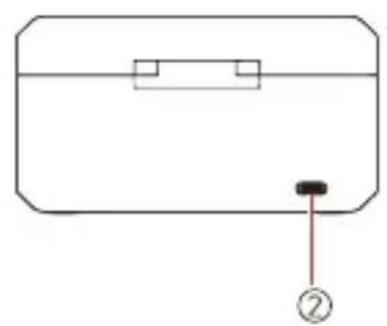
natural_image
Simple line drawing of a rectangular container with a handle and a small black button labeled '②' (no text or symbols on the object itself)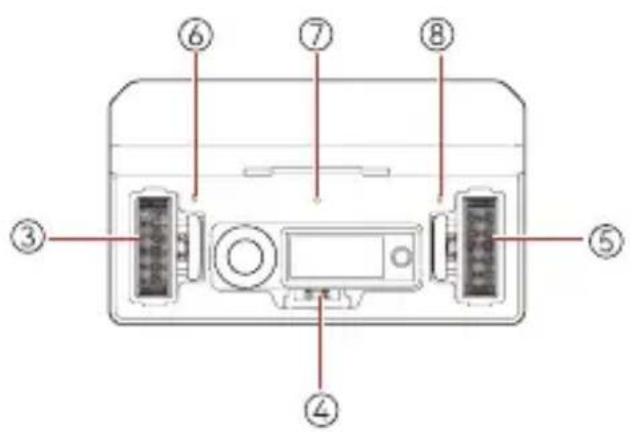
natural_image
Hand interacting with a device via a circular button (no text or symbols visible)natural_image
Diagram showing two devices connected by a cable, with red arrows indicating direction of connection (no text or symbols)natural_image
Line drawing of a closed toolbox with internal compartments and circular cutouts (no text or symbols)Figure 1 Figure 2
natural_image
Illustration of a hand pressing a button on a device panel (no text or symbols visible)FR-21
natural_image
Illustration of a hand pressing a button on a device panel (no text or symbols visible)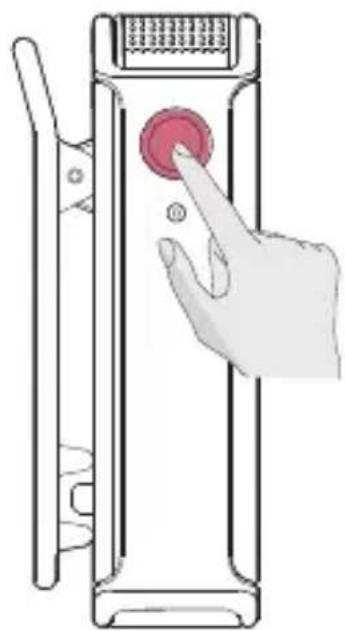
natural_image
Illustration of a hand pressing a red button on a device panel (no text or symbols)FR-22
natural_image
Illustration of a hand pressing a button on a device panel (no text or symbols visible)natural_image
Illustration of a hand interacting with a device panel showing a red circular button and a magnified view of the screen (no text or symbols)FR-23
natural_image
Illustration of a hand pressing a button on a vertical device (no text or symbols visible)FR-24
UK Compliance Notice

• UK Declaration of Conformity
Hollyland hereby declares that the device is in compliance with the essential requirements and other relevant provisions of the Radio Equipment Regulations 2017.
The original UK declaration of conformity may be found at www.hollyland.com.
• National restrictions
This device may only be used indoors in Great Britain.
NCC Compliance Notice:

CCAJ23LP1CB0T9

CCAJ23LP1CC0T2
natural_image
Green circular icon with a person walking, surrounded by curved arrows (no text or symbols)
FR
Hollyland User Group
HollylandTech
HollylandTech
HollylandTech
support@hollyland.com
www.hollyland.com
Déclaration
natural_image
Simple line drawing of a rectangular container with a slot and a label pointing to the bottom (no text or symbols on the diagram itself)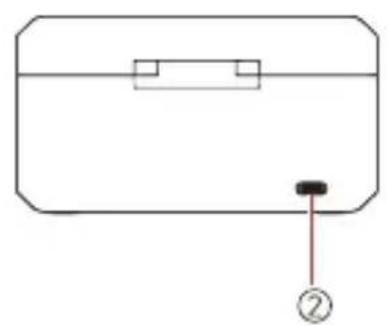
natural_image
Simple line drawing of a rectangular container with a handle and a small black button labeled '②' (no text or symbols on the object itself)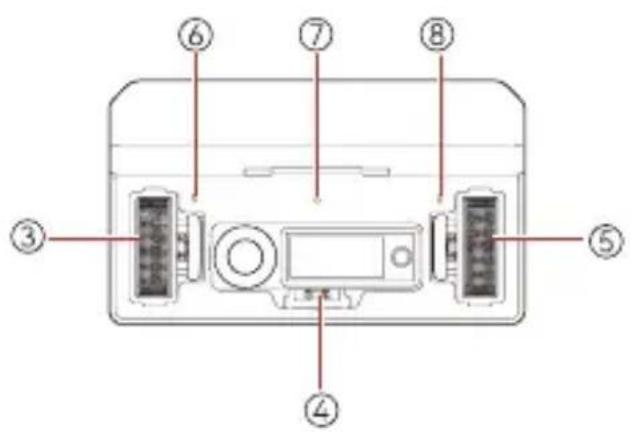
C: Ladekoffer
Pattern Akkustand
natural_image
Illustration of a hand pressing a button on a device (no text or symbols visible)DE-18
natural_image
Diagram showing two devices connected by a cable, with red arrows indicating direction of connection (no text or symbols)DE-20
natural_image
Line drawing of a mechanical device with open lid and internal compartments (no text or symbols)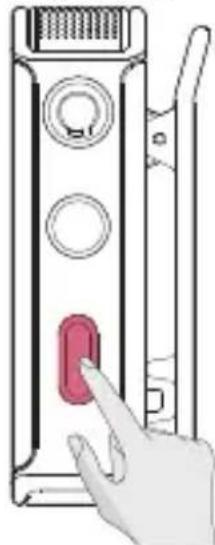
natural_image
Illustration of a hand pressing a red button on a device panel (no text or symbols visible)natural_image
Illustration of a hand pressing a button on a device panel (no text or symbols visible)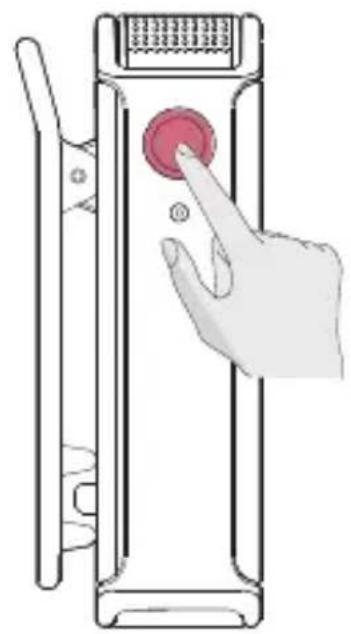
natural_image
Illustration of a hand pressing a button on a device panel (no text or symbols)DE-22
natural_image
Illustration of a hand pressing a button on a device panel (no text or symbols visible)Touchscreen-Sperre
natural_image
Illustration of a hand interacting with a device panel showing a red circular button and a finger pointing at it (no text or symbols present)DE-23
natural_image
Illustration of a hand pressing a button on a device panel (no text or symbols visible)DE-24
UK Compliance Notice

• UK Declaration of Conformity
Hollyland hereby declares that the device is in compliance with the essential requirements and other relevant provisions of the Radio Equipment Regulations 2017.
The original UK declaration of conformity may be found at www.hollyland.com.
• National restrictions
This device may only be used indoors in Great Britain.
NCC Compliance Notice:

CCAJ23LP1CB0T9

CCAJ23LP1CC0T2
natural_image
Green circular icon with a person walking, surrounded by curved arrows (no text or symbols)
FR
Hollyland User Group

HollylandTech

HollylandTech

HollylandTech

support@hollyland.com

www.hollyland.com
natural_image
Simple line drawing of a rectangular container with a slot and a label pointing to the bottom (no text or symbols on the diagram itself)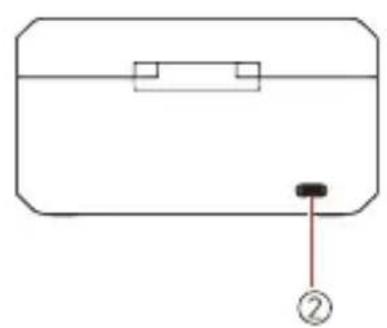
natural_image
Simple line drawing of a rectangular object with a black dot and a numbered label (no text or symbols)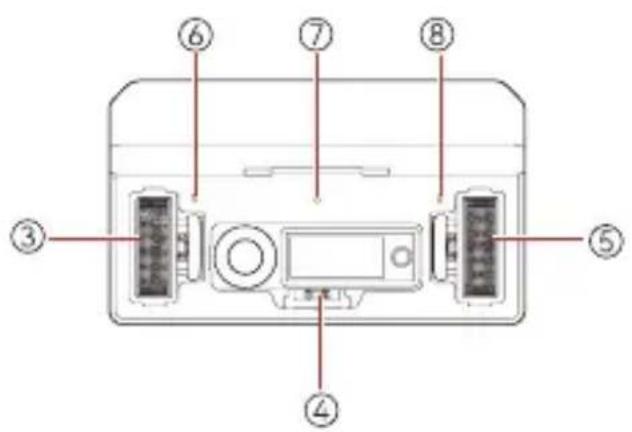
natural_image
Illustration of a hand pressing a button on a device (no text or symbols visible)natural_image
Diagram showing two devices connected by a cable, with red arrows indicating direction of connection (no text or symbols)natural_image
Line drawing of a mechanical device with open lid and internal compartments (no text or symbols)Figura 1 Figura 2
natural_image
Illustration of a hand pressing a button on a device panel (no text or symbols visible)natural_image
Illustration of a hand pressing a button on a device panel (no text or symbols visible)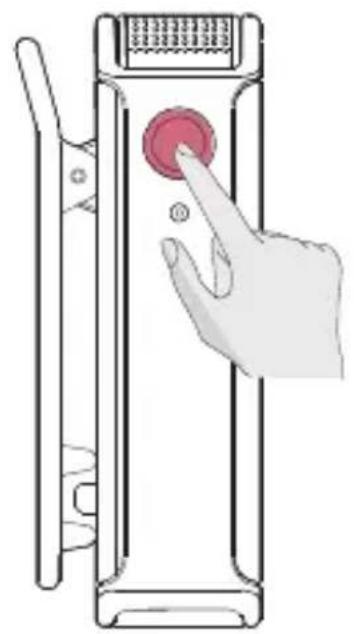
natural_image
Illustration of a hand pressing a button on a device panel (no text or symbols visible)natural_image
Illustration of a hand pressing a button on a device panel (no text or symbols visible)Blocco schermo
natural_image
Illustration of a hand interacting with a device panel showing a red circular button and a finger pointing at it (no text or symbols present)natural_image
Illustration of a hand pressing a red button on a vertical device (no text or symbols visible)IT-24
UK Compliance Notice

• UK Declaration of Conformity
Hollyland hereby declares that the device is in compliance with the essential requirements and other relevant provisions of the Radio Equipment Regulations 2017.
The original UK declaration of conformity may be found at www.hollyland.com.
• National restrictions
This device may only be used indoors in Great Britain.
NCC Compliance Notice:

CCAJ23LP1CB0T9

CCAJ23LP1CC0T2
natural_image
Green circular icon with a person walking, surrounded by curved arrows (no text or symbols)
FR
Hollyland User Group

HollylandTech

HollylandTech

HollylandTech

support@hollyland.com

www.hollyland.com
Dichiarazione
natural_image
Simple line drawing of a rectangular container with a handle and a small mark at the bottom (no text or symbols)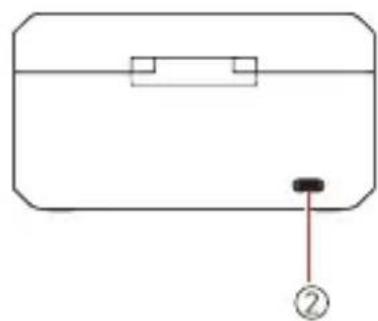
natural_image
Simple line drawing of a rectangular box with a handle and a small black button labeled '②' (no text or symbols on the object itself)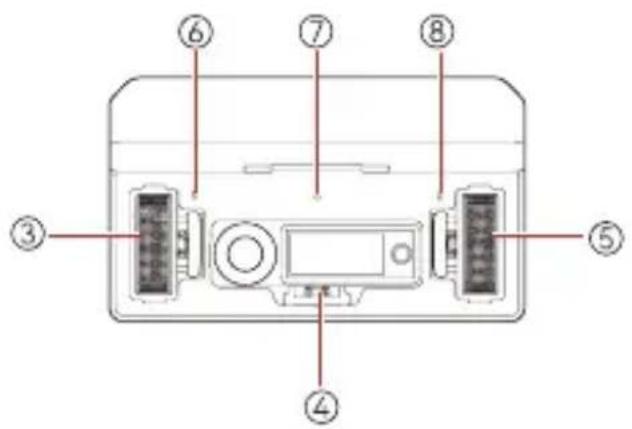
C: Estuche de carga
natural_image
Illustration of a hand pressing a button on a device (no text or symbols visible)natural_image
Diagram showing two devices connected by a cable, with red arrows indicating direction of connection (no text or symbols)natural_image
Line drawing of a mechanical device with open lid and internal compartments (no text or symbols)Figura 1 Figura 2
natural_image
Illustration of a hand pressing a button on a device panel (no text or symbols visible)natural_image
Illustration of a hand pressing a button on a device panel (no text or symbols visible)
natural_image
Illustration of a hand pressing a button on a vertical device (no text or symbols visible)natural_image
Illustration of a hand pressing a button on a device panel (no text or symbols visible)Bloqueo de pantalla
natural_image
Illustration of a hand interacting with a device panel and a red circular button (no text or symbols)natural_image
Illustration of a hand pressing a red button on a vertical device (no text or symbols visible)ES-24
UK Compliance Notice

• UK Declaration of Conformity
Hollyland hereby declares that the device is in compliance with the essential requirements and other relevant provisions of the Radio Equipment Regulations 2017.
The original UK declaration of conformity may be found at www.hollyland.com.
• National restrictions
This device may only be used indoors in Great Britain.
NCC Compliance Notice:

CCAJ23LP1CB0T9

CCAJ23LP1CC0T2
natural_image
Green circular icon with a person walking, surrounded by curved arrows (no text or symbols)
FR
Hollyland User Group
HollylandTech
HollylandTech
HollylandTech
support@hollyland.com
www.hollyland.com
Advertencia
natural_image
Simple line drawing of a rectangular container with a handle and a small mark at the bottom (no text or symbols)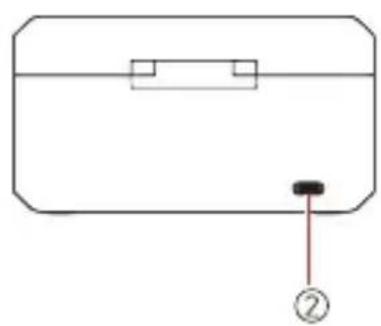
natural_image
Simple line drawing of a rectangular device with a handle and a labeled point (no text or symbols)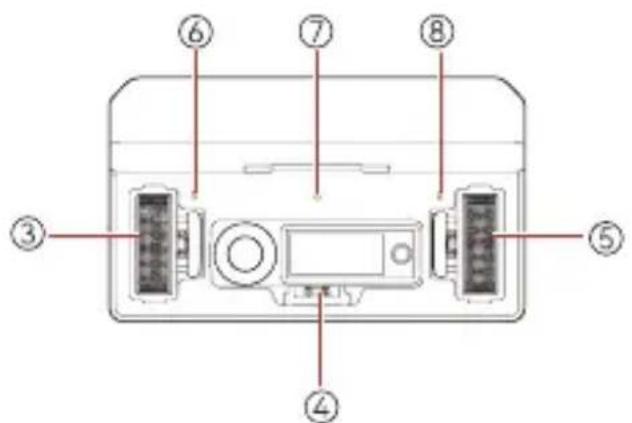
C: Estojo de carregamento
A: Interface principal do receptor (fora do estojo de carregamento)
B: Interface principal do Receptor (no estojo de carregamento)
C: Interface de volume de saída do receptor

natural_image
Hand pressing a button on a device (no text or symbols visible)natural_image
Diagram showing two devices connected by a cable, with red arrows indicating direction of connection (no text or symbols)natural_image
Line drawing of a closed toolbox with internal compartments and circular cutouts (no text or symbols)Figura 1 Figura 2
natural_image
Illustration of a hand pressing a button on a device panel (no text or symbols visible)natural_image
Illustration of a hand pressing a button on a device panel (no text or symbols visible)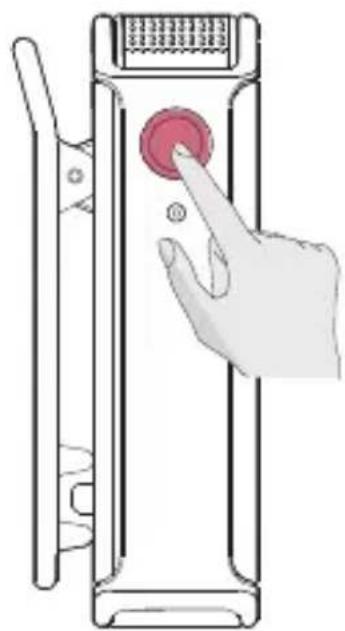
natural_image
Illustration of a hand pressing a red button on a device panel (no text or symbols)natural_image
Illustration of a hand pressing a button on a device panel (no text or symbols visible)Bloqueio de tela
natural_image
Illustration of a hand interacting with a device panel showing a red circular button and a finger pointing at it (no text or symbols present)natural_image
Illustration of a hand pressing a button on a device panel (no text or symbols visible)PT-24
UK Compliance Notice

• UK Declaration of Conformity
Hollyland hereby declares that the device is in compliance with the essential requirements and other relevant provisions of the Radio Equipment Regulations 2017.
The original UK declaration of conformity may be found at www.hollyland.com.
• National restrictions
This device may only be used indoors in Great Britain.
NCC Compliance Notice:

CCAJ23LP1CB0T9

CCAJ23LP1CC0T2
natural_image
Green circular icon with a person walking, surrounded by curved arrows (no text or symbols)
FR
Hollyland User Group

HollylandTech

HollylandTech

HollylandTech

support@hollyland.com

www.hollyland.com
Declaração
- Key Features
- Interface Description
- A: Transmitter
- B: Receiver
- C: Charging Case
- Display Description
- C: Receiver Output Volume Interface
- E: Receiver Menu Interface
- Indicator Description
- Transmitter Status Indicator
- Pattern Description
- Receiver Menu Description
- Operation Instructions
- Connecting the Receiver to an iPhone
- Connecting the Receiver to an Android Phone with a USB-C Interface
- Connecting the Receiver to a Camera
- Pairing
- Noise Cancellation
- Recording
- Mute
- Screen Lock
- Transmitter Recording
- Firmware Update
- How to Update the Firmware:
- Receiver Firmware Update
- Transmitter Firmware Update
- Specifications
- Disclaimer
- Compliance Information
- CE
- - CAUTION
- - RECYCLING
- FCC Radiation Exposure Statement:
- Note:
- FR
- Statement
- Trademark Statement
- Introduction
- Déclaration
- C: Ladekoffer
- Touchscreen-Sperre
- Blocco schermo
- Dichiarazione
- C: Estuche de carga
- Bloqueo de pantalla
- Advertencia
- C: Estojo de carregamento
- C: Interface de volume de saída do receptor
- Bloqueio de tela
- Declaração
Brand : Hollyland
Model : Lark Max
Category : Microphone