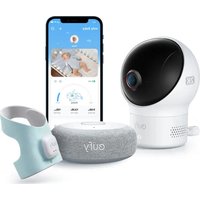
Smart Sock S340 - Baby monitors eufy - Free user manual and instructions
Find the device manual for free Smart Sock S340 eufy in PDF.


| Product Type | Baby Monitor with Connected Sock and 2K Camera |
| Brand | eufy |
| Model | Smart Sock S340 |
| Components | Sock Base, Smart Sock (sensor), 2K Baby Camera |
| Sock Base Power | 5V/1A AC Adapter (included) |
| Camera Power | 5V/2A AC Adapter (included) |
| Sock Battery | Rechargeable via magnetic contact |
| Connectivity | Bluetooth (sock), 2.4 GHz Wi-Fi (camera) |
| Camera Resolution | 2K |
| Main Functions | Heart rate and movement monitoring, dropped sock detection, audible and visual alarms, snooze function, notifications on eufy Baby app |
| Camera Mounting | Wall, corner, crib |
| Storage | microSD card (included) |
| Recommended Age | Up to 18 months (healthy child) |
| Warning | Not medical, does not replace parental supervision. Risk of strangulation with cables. |
| Sock Care | Sock cover is washable; sensor can be wiped with a soft cloth |
| Box Contents | Sock base, smart sock, 2K camera, AC adapters (EU/AU depending on version), cables, microSD card, crib mount, mounting kit, manual |
| Repairability | Contact eufy customer service for repairs |
Frequently Asked Questions - Smart Sock S340 eufy
User questions about Smart Sock S340 eufy
0 question about this device. Answer the ones you know or ask your own.
Ask a new question about this device
Download the instructions for your Baby monitors in PDF format for free! Find your manual Smart Sock S340 - eufy and take your electronic device back in hand. On this page are published all the documents necessary for the use of your device. Smart Sock S340 by eufy.
USER MANUAL Smart Sock S340 eufy
Anker Innovations Limited. All rights reserved, eufy BABY and the eufy BABY Logo are trademarks of Anker Innovations Limited, registered in the United States and other countries. All other trademarks are the property of their respective owners.
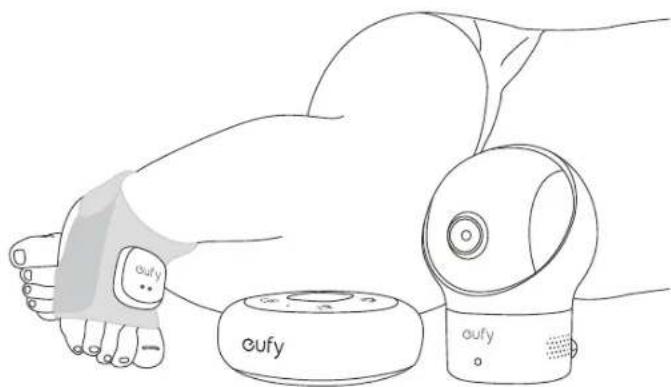
natural_image
Line drawing of a robotic hand holding a small device labeled 'oufy' (no text or symbols on the device itself)PAP 22
Raccolta Carta
51005004358 V01
English
Deutsch
Español
Français
Italiano
Nederlands
Português

WARNINGS / IMPORTANT SAFETY INSTRUCTIONS

WARNING
This product is not a medical device. It is not intended for use as a medical device or to replace a medical device. It is not intended to and can not be used to diagnose, treat, cure, or prevent any disease or other condition, including but not limited to, Sudden Infant Death Syndrome(SIDS).
Remember:
• This product is meant for use with healthy children up to 18 months of age. If your children has a pre-existing medical condition, consult your doctor before use.
• This product is an aid, it is not a substitute or should not be substituted for the care and oversight of an adult or consultation with medical professionals.
- This product is designed and intended for tracking a baby's sleep patterns, sleep training, and general wellness purposes. False positive or false negative readings about your baby's heart rate are a potential risk of this product.
• Do not use this product as a diagnostic tool.
- Do not use this product as an excuse for unsafe sleep habits.
SAFETY INSTRUCTIONS
FOR YOUR SAFETY AND THE SAFETY OF THE BABY. RESPOND IMMEDIATELY WHENEVER A NOTIFICATION SOUNDS.
Always read and obey all important safety messages or instructions mentioned in this manual and the eufy Baby app.
- Strangulation Hazard: Children get STRANGLED in cords. Keep cords out of the reach of children (more than 1m / 3ft away). Never use extension cords with AC adapters. Only use the AC adapters provided.
- When using the cot mount, attach out of the reach of the child. Do not use the cot mount when the child starts trying to get up on its hands and knees in a crawling position.
• Choking Hazard: Keep sock sensor out of children's mouths. - For babies with sensitive skin, frequently switch between feet. Take off the sock immediately in case of redness, swelling, or skin irritation.
• Tear off the protective film on the sock sensor before use.

natural_image
Simple line drawing of a mechanical component with concentric circles and a small circular feature (no text or symbols)AT A GLANCE
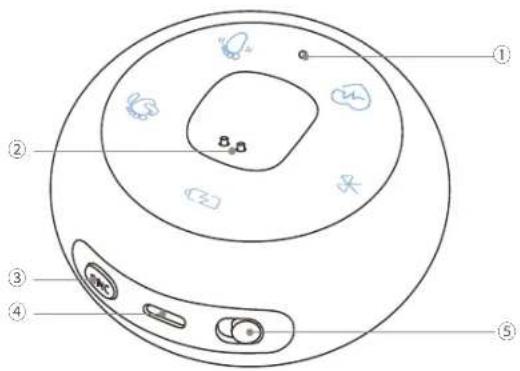
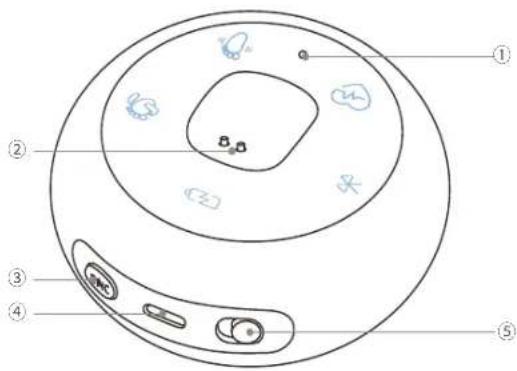
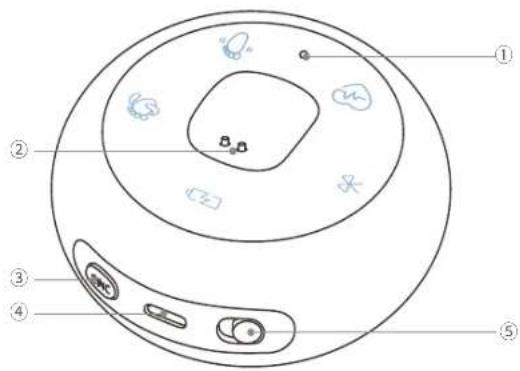
Sock Base
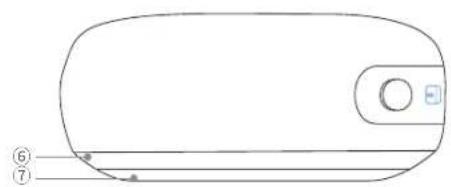
natural_image
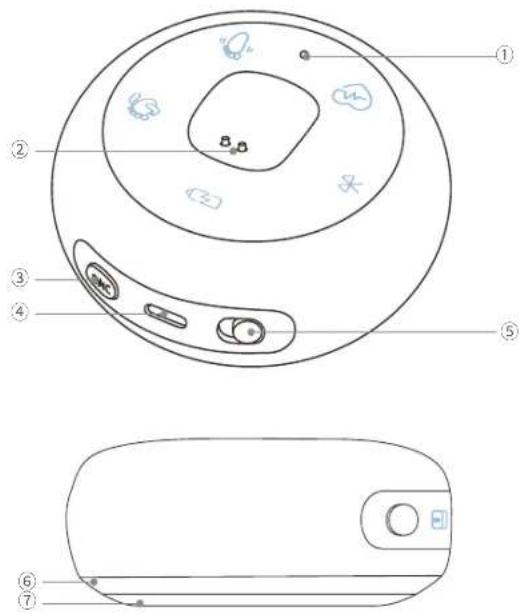
Line drawing of a rounded rectangular object with a circular button and two labeled points (6 and 7) on its surface (no text or symbols beyond labels)T8351/S300 Smart Sock Base
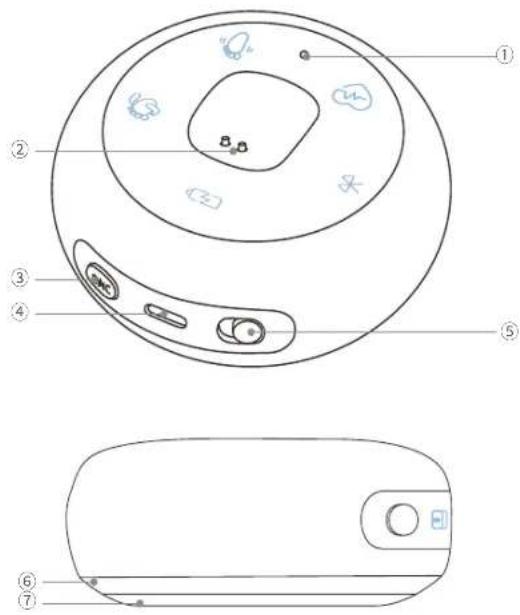
① System Indicator
② Magnetic Charging Pin
③ SYNC Button
④ Power Port
⑤ Alarm ON/OFF
| Icon Indicator Description | ||
 | Sock Battery | Flashing: Low Battery ON: Charging |
 | Bluetooth Flashing: Disconnected | |
 | Baby Uncomfortable | Flashing: Check on Your Baby |
| [BAGX] | Sock Misaligned Flashing: Sock Has Fallen Off | |
 | Baby Movement Flashing: Baby is Moving | |
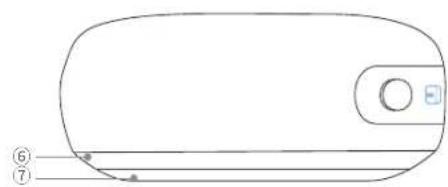
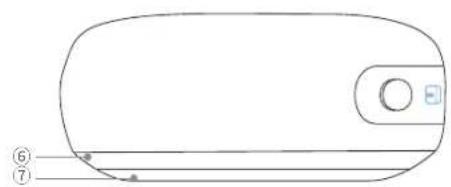
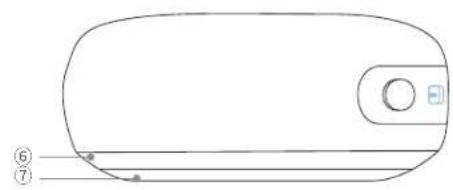
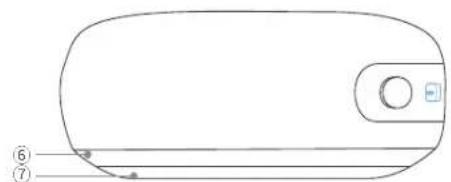
⑥ Ring Light
- Working Properly
- Low Battery, Disconnected Bluetooth, Sock Has Fallen Off
Check on Your Baby
⑦ Snooze Button
Smart Sock
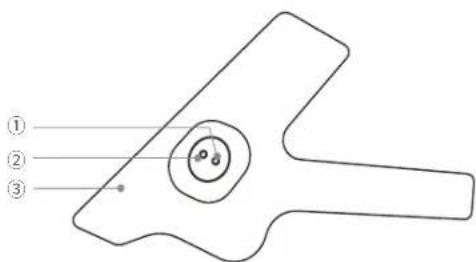
T8340/S300 Smart Sock Sensor
① Sensor Status Indicator
Flashing Red: Waiting to Connect
• Solid Red: Charging and Connected
• Solid Green: Fully Charged and Connected
② Sock Sensor
③ Sock Wrap
2K Baby Camera
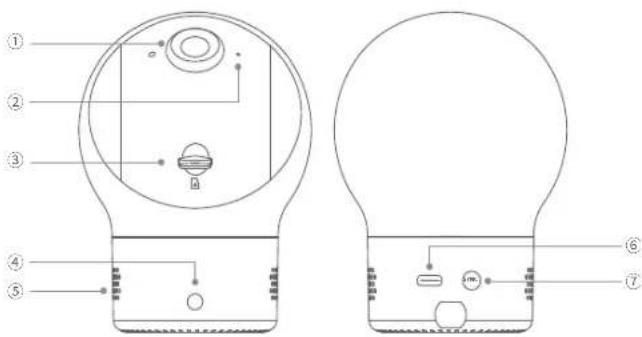
T8360/S300 Baby Monitor
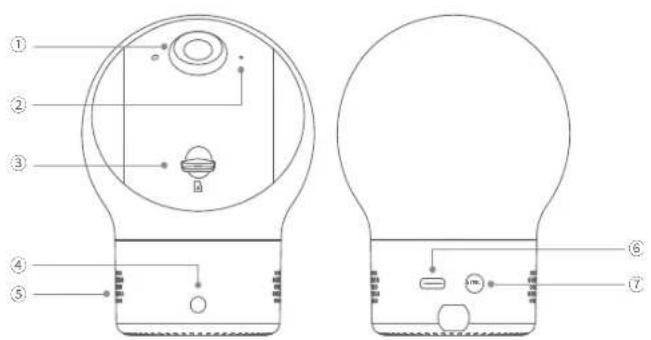
① 2K Camera Lens
② Microphone
③ microSD Card Slot (microSD card provided)
④ LED Indicator
Solid White: Powered On
Flashing White: Waiting to Connect
- Flashing White Rapidly: Firmware Updating
⑤ Speaker
⑥ USB-C Port
⑦ SYNC Button
POWERING ON
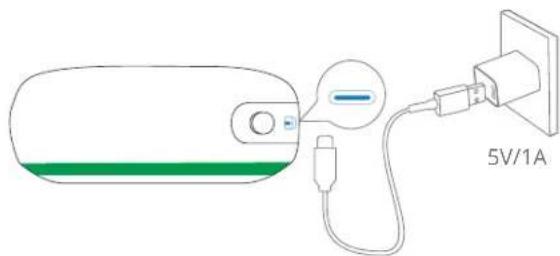
- Power on the Sock Base.
Connect the Sock Base to a power outlet, then wait for a few seconds until the bottom ring light turns green.
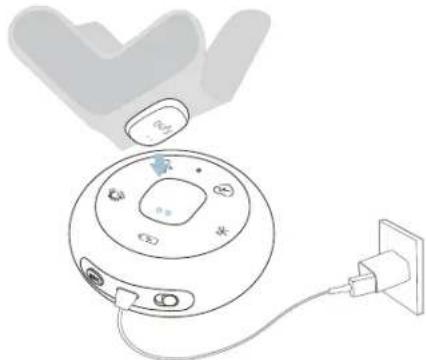
- Charge the Smart Sock.
Place the Smart Sock on the Sock Base. The sensor status indicator will flash red.
natural_image
Diagram of a device with a circular dial and plug, showing internal components and connections (no text or symbols)| Status LED Description | |
| ★ Flashing Red Charging and Waiting to Connect | |
| ● Solid Red Charging and Connected | |
| ● Solid Green Fully Charged and Connected | |
3. Power on the Baby Camera.
Connect the Baby Camera to the power adapter (5V/2A), then plug the adapter into a power outlet.
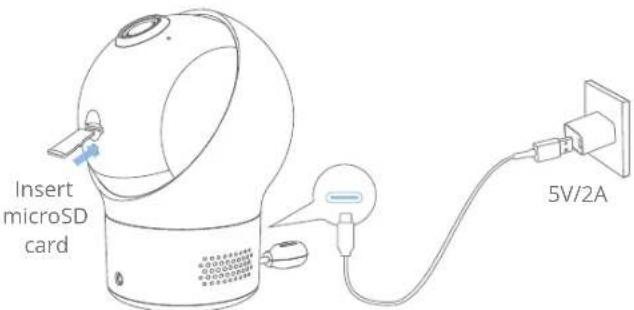
| Status LED Description | |
| Solid White Powered On | |
| Flashing White Waiting to Connect | |
| Flashing White Fast Firmware Updating |
ADDING DEVICES TO THE EUFY BABY APP
- Download the eufy Baby app from App Store (iOS devices) or Google Play (Android devices), then sign up for an account.
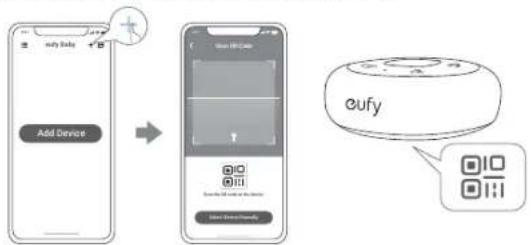
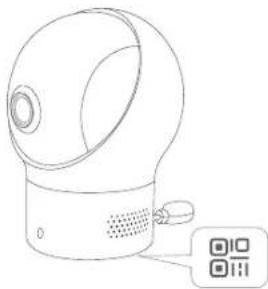
- Scan the QR code on the bottom of the Sock Base.
flowchart
graph LR
    A["Add Device"] --> B["User Interface"]
    B --> C["eufy"]
- Press and hold the SYNC button for 2 seconds, then follow the in-app instructions to add the Sock Base.
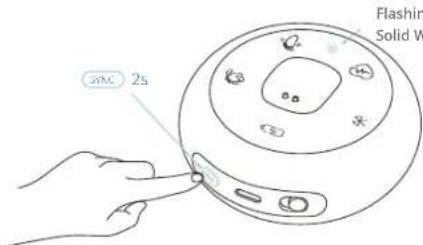
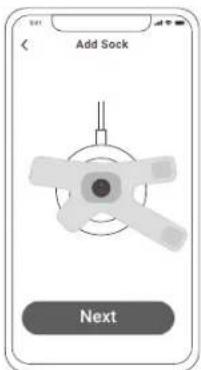
- Place the Smart Sock on the Sock Base, then follow the in-app instructions to add the Smart Sock.
- Scan the QR code on the bottom of the camera using your eufy Baby app, and follow in-app instructions to complete the setup.
natural_image
Line drawing of a smart air purifier device with a control panel and QR code (no text or symbols on the device itself)CHOOSING A SOCK WRAP
Choose the size that provides the right fit — not too tight, not too loose, and with room for your baby's skin to breathe. This keeps your baby comfortable and makes the sensors more accurate.
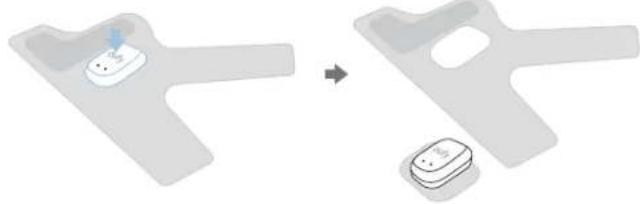
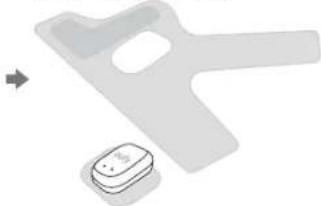
- Push the sensor down.
natural_image
Diagram showing a device being processed into two labeled components (no text or symbols present)- Install the sensor on the chosen wrap.
- Take out the sensor.
natural_image
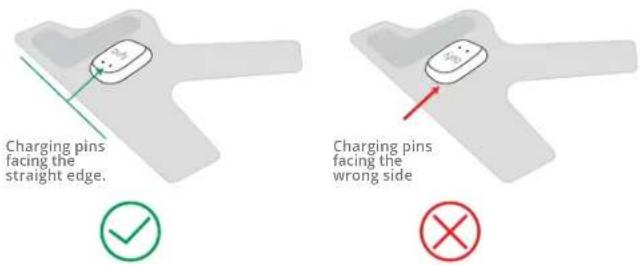
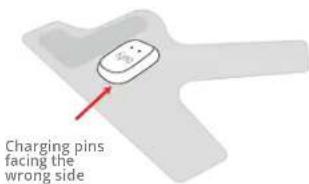
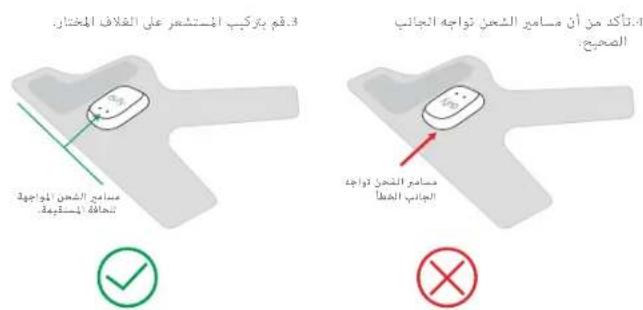
Two electronic components: a plastic Y-shaped device and a small rectangular device with a labeled pin (no text or symbols visible)- Make sure the charging pins are facing the correct side.

WEARING SOCK FOR BABY
Wear the sock on either foot of the baby.
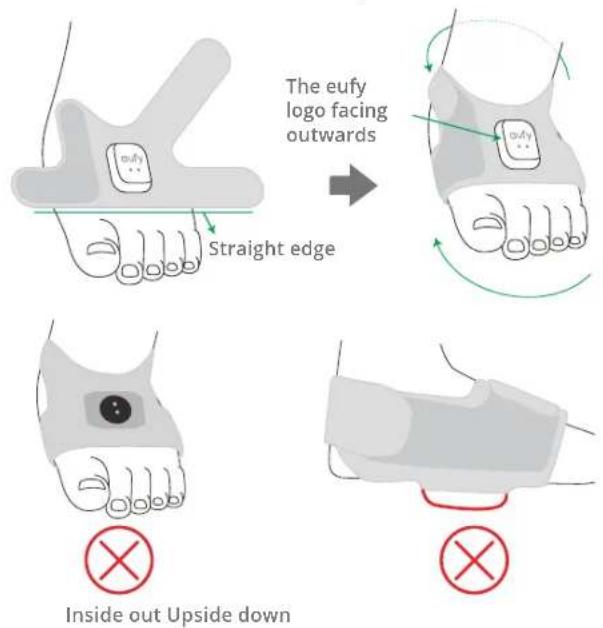

- Do not wear the sock too tightly or loosely. Take off the sock immediately in case of redness, swelling, or skin irritation.
• For babies with sensitive skin, frequently switch between feet.
• To charge the sock, place it on the Sock Base, and make sure the sock battery indicator on the Sock Base turns red.
SOCK BASE ALARMS
The Sock Base sends you prompts with sound and light to keep you aware of your baby's sleep status and when they might be uncomfortable and require your assistance. You will also get notifications on your phone via the eufy Baby app.
Snooze the Alarms
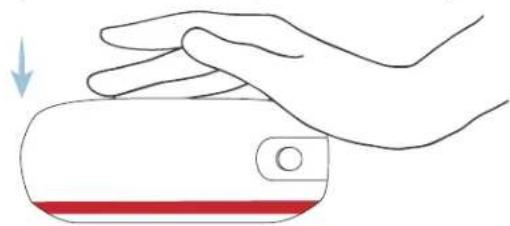
To snooze the alarms, pat the Sock Base when the alarm goes off. You will not receive any alerts or phone notifications for 10 minutes while Sock Base is snoozed. If there is still an abnormal reading after 10 minutes, you will receive alerts and phone notifications again.
natural_image
Illustration of a hand pressing down on a cylindrical object with a red stripe and circular button (no text or symbols)Turn Off the Alarms
To turn off the alarms, slide the switch to OFF. Slide the switch back to ON if you want to receive alerts from Sock Base again.
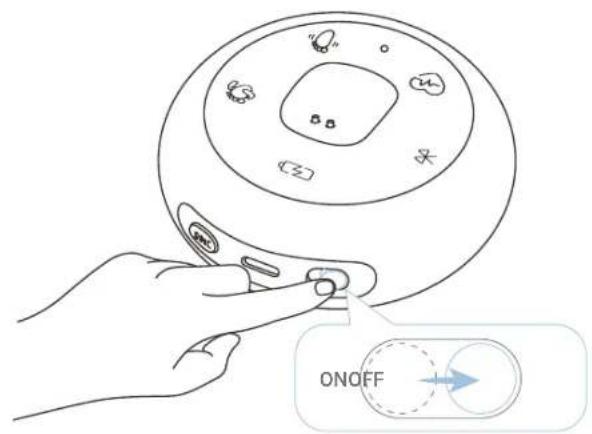
To turn the phone notifications on or off, go to My Device >Smart Sock >Notification setting in the eufy Baby app.
MOUNTING THE BABY CAMERA
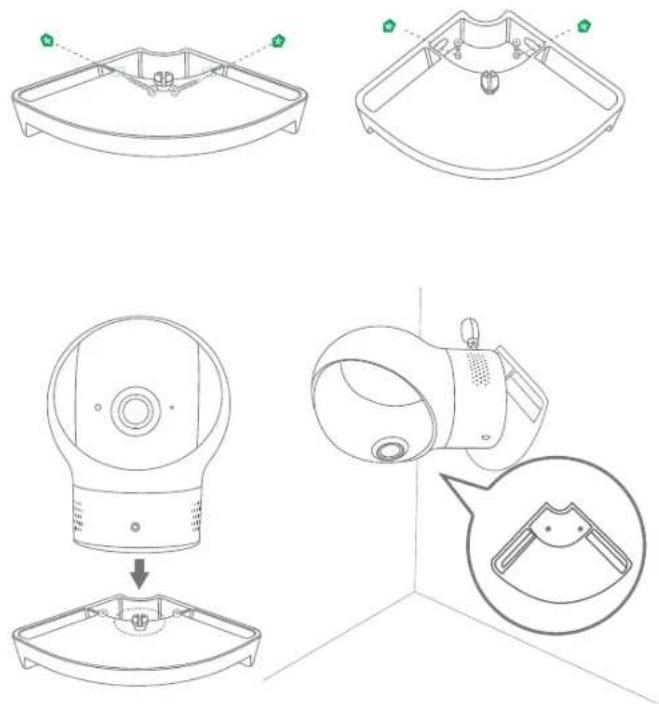
You have three options to mount the Baby Camera: on the wall, in the corner, or on the crib.
natural_image
Technical line drawings of a device component with exploded and assembled views (no text or symbols)Notice (EU and the United Kingdom)
This product complies with the radio interference requirements of the European Community.
Declaration of Conformity
Hereby, Anker Innovations Limited declares that this device is in compliance with the essential requirements and other relevant provisions of Directive 2014/53/EU. For the declaration of conformity, visit the Web site; https://uk.eufylife.com/.
This product can be used across EU member states.
The adapter shall be installed near the equipment and shall be easily accessible. Do not use the Device in the environment at too high or too low temperature, never expose the Device under strong sunshine or too wet environment. The suitable temperature for the product and accessories is 0^ C to 35^ C.
When charging, please place the device in an environment that has a normal room temperature and good ventilation.
It is recommended to charge the device in an environment with a temperature that ranges from 5^ C \~ 25^ C.
Please ensure to use only the charger offered by the manufacturer. Using unauthorized charger may cause danger and violate the authorization of the product and the guarantee article.
The chargers are for indoor use only. The plug is considered as disconnect device of adapter.
The charger for T8340 type is TEKA-UCA10EU(EU), TEKA-UCA10AU(AU), output voltage/current is 5Vdc/1A.
The charger for T8351 type is TEKA-UCA10EU(EU), TEKA-UCA10AU(AU), output voltage/current is 5Vdc/1A.
The charger for T8360 type is TEKA-UCA20EU(EU), TEKA-UCA20AU(AU), output voltage/current is 5Vdc/2A.
CAUTION RISK OF EXPLOSION IF BATTERY IS REPLACED BY AN INCORRECT TYPE. DISPOSE OF USED BATTERIES ACCORDING TO THE INSTRUCTIONS
RF exposure information:
T8340 has been evaluated and following general RF exposure requirement. The device can be used in portable exposure conditions without restriction.
T8360/T8351 has been evaluated to meet general RF exposure requirements and can be used in fixed exposure condition. The Maximum Permissible Exposure (MPE)
level has been calculated based on a distance of 0-20 cm between the device and the human body. To maintain compliance with RF exposure requirement, use product that maintains a 20cm distance between the device and human body.
Bluetooth Operating Frequency Range: 2493–2499 MHz
Bluetooth Max Output Power: 4.82 dBm(E1RP for T8340); 3.63 dBm(E1RP for T8351); 5.43 dBm(FRIP for T8360)
Wi-Fi Operating Frequency Range: 2412\~2472 MHz(2.4G);
Wi-Fi Max Output Power: 13.47 dBm(ERIP for T8351); 17.66 dBm(ERIP for T8360)
The following Importer is the responsible party (contract for EU matters)
Anker Technology (UK) Limited I GNR8, 49 Clarendon Road, Watford, Hertfordshire, WD17 1HP, United Kingdom

This product is designed and manufactured with high quality materials and components, which can be recycled and reused.

This symbol means the product must not be discarded as household waste, and should be delivered to an appropriate collection facility for recycling. Proper disposal and recycling helps protect natural resources, human health and the environment. For more information on disposal and recycling of this product, contact your local municipality, disposal service, or the shop where you bought this product.
natural_image
Simple line drawing of a Y-shaped object with a central circular feature and a small blue dot (no text or symbols)AUF EINEN BLICK
Sock Base
T8351/S300 Smart Sock Base
T8360/S300 Baby Monitor
natural_image
Illustration of a circular device with labeled buttons and an attached plug (no text or symbols)23 DE
flowchart
graph LR
    A["Add Device"] --> B["Device Selection"]
    B --> C["eufy"]
natural_image
Line drawing of a smart speaker with a QR code icon (no text or symbols on the device itself)DE 26
DIE AUSWAHL EINES SOCKENVERPACKUNGSDESIGNS
natural_image
Simple 3D diagram of a Y-shaped object with a small white icon and a blue arrow pointing to it (no text or symbols)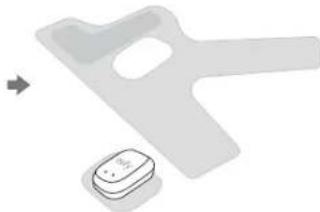
natural_image
Two gray plastic components: a large handle and a small rectangular base with a small circular element, both without any text or symbols.Anker Technology (UK) Limited I GNR8, 49 Clarendon Road, Watford, Hertfordshire, WD17 1HP, United Kingdom

natural_image
Simple line drawing of a mechanical part with concentric circles and a small circular feature (no text or symbols)VISTA GENERAL
Base del calcetín
natural_image
Line drawing of a rounded rectangular object with a circular button and two labeled points (6 and 7) on its surface, no text or symbols present.T8351/S300 Smart Sock Base
T8360/S300 Baby Monitor
natural_image
Line drawing of a circular device with attached plug and cable, no text or symbols presentflowchart
graph LR
    A["Add Device"] --> B["Device Selection"]
    B --> C["Control Interface"]
    C --> D["oufy"]
natural_image
Line drawing of a smart air purifier device with a control panel and QR code label (no text or symbols on the device itself)SELECCIONANDO UNA ENVOLTURA PARA CALCETINES
natural_image
3D rendered Y-shaped object with a small circular feature and a small blue arrow, no text or symbols visible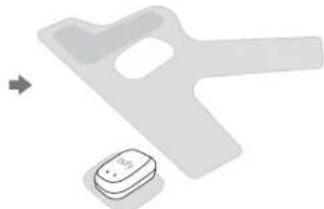
natural_image
Two electronic components: a plastic door and a small battery with a labeled terminal (no text or symbols visible)natural_image
Illustration of a hand pressing down on a device with a red stripe (no text or symbols)Apague las alarmas
natural_image
Technical line drawings of a device component with exploded and assembled views (no text or symbols)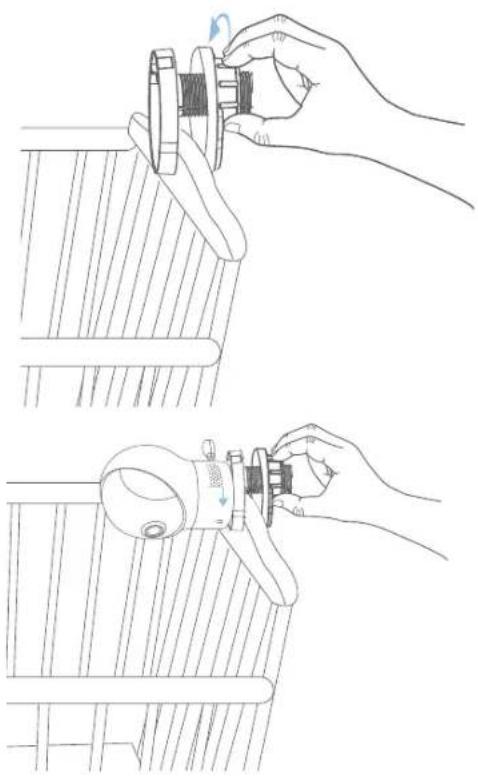
natural_image
Line drawing showing two hand positions on a wooden table, one adjusting a mechanical component and the other adjusting a circular component (no text or symbols)Anker Technology (UK) Limited I GNR8, 49 Clarendon Road, Watford, Hertfordshire, WD17 1HP, United Kingdom

natural_image
Simple line drawing of a mechanical part with a circular feature and a pointer (no text or symbols)RÉCAPITULATIF
Base de chaussette
T8351/S300 Smart Sock Base
T8360/S300 Baby Monitor
natural_image
Diagram of a device with a power plug connected to a circular display case (no text or symbols visible)flowchart
graph LR
    A["Add Device"] --> B["User Interface"]
    B --> C["eufy"]
natural_image
Line drawing of a smart speaker with a QR code icon (no text or symbols on the device itself)CHOISIR UN EMBALLAGE POUR CHAUSSETTES
natural_image
Simple 3D-rendered abstract shape with a small central icon (no text or symbols)natural_image
Two plastic electronic components: a Y-shaped device and a small rectangular device with a button, shown without any text or symbols.natural_image
Illustration of a hand pressing down on a cylindrical object with a red stripe and a downward arrow (no text or symbols)Anker Technology (UK) Limited I GNR8, 49 Clarendon Road, Watford, Hertfordshire, WD17 1HP, United Kingdom
natural_image
Simple line drawing of a mechanical part with concentric circles and a small dot (no text or symbols)69 IT IT 70
natural_image
Line drawing of a rounded rectangular object with a circular button and two labeled points (6 and 7) on its side, no text or symbols present.T8351/S300 Smart Sock Base
T8340/S300 Smart Sock Sensor
T8360/S300 Baby Monitor
natural_image
Line drawing of a circular device with attached plug and cable, no text or symbols presentflowchart
graph LR
    A["Add Device"] --> B["User ID Card"]
    B --> C["Control Interface"]
    C --> D["oufy"]
natural_image
Line drawing of a smart air purifier device with a QR code icon (no text or symbols on the device itself)SCEGLIERE UNA FASCIA PER CALZE
natural_image
3D rendered diagram of a mechanical component with a small central component and a blue arrow indicating direction (no text or symbols)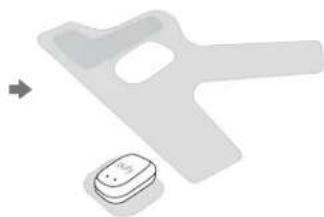
natural_image
Two electronic devices: a gray plastic door and a small rectangular device with a battery, both without any visible text or symbols.natural_image
Illustration of a hand pressing down on a device with a red stripe and circular button (no text or symbols)natural_image
Technical line drawings of a medical device with internal components and a close-up view of the device's internal structure (no text or symbols)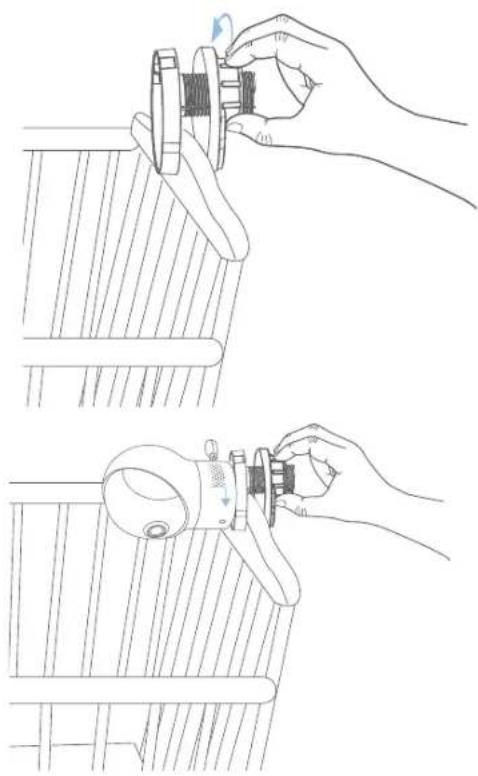
natural_image
Line drawing showing two hand positions: one adjusting a mechanical component, the other adjusting a tool (no text or symbols present)Anker Technology (UK) Limited I GNR8, 49 Clarendon Road, Watford, Hertfordshire, WD17 1HP, United Kingdom

natural_image
Simple line drawing of a mechanical component with a circular feature and a small blue dot (no text or symbols)IN EEN OOGOPSLAG
Sokkenbasis
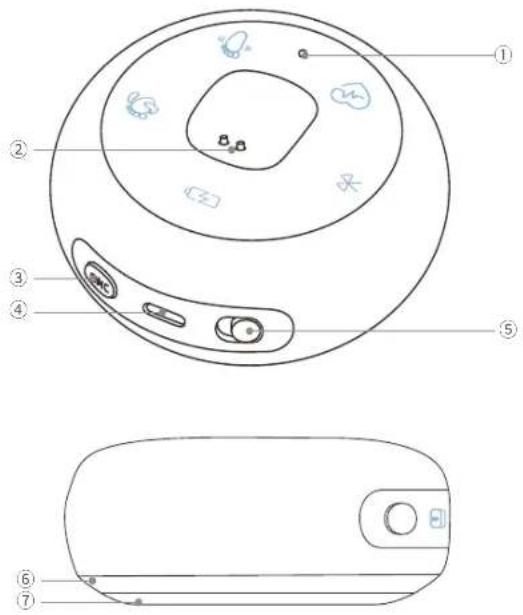
T8351/S300 Smart Sock Base
① Systeemindicator
② Magnetische Oplaadpin
③ SYNC-knop
④ Voedingsingang
⑤ Alarm AAN/UIT
T8360/S300 Baby Monitor
① 2K Camera Lens
② Microfoon
③ microSD-kaartsleuf (microSD-kaart meegeleverd)
④ LED-indicator
- Solide wit: ingeschakeld
Knipperend Wit: Wachten op Verbinding
◆ Knipperend Wit Snel: Firmware-update
⑤ Spreker
⑥ USB-C Poort
⑦ SYNC-knop
AANZETTEN
natural_image
Line drawing of a washing machine with attached power outlet (no text or symbols)91 NL
flowchart
graph LR
    A["Add Device"] --> B["eufy"]
    B --> C["Smart Speaker Icon"]
natural_image
Line drawing of a smart speaker with a digital display unit (no text or symbols)NL 94
KIEZEN VAN EEN SOKOMSLAG
natural_image
Simple 3D diagram of a Y-shaped object with a small white object inside, no text or symbols present.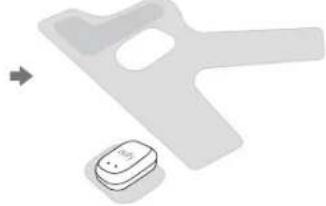
natural_image
Two plastic electronic components: a Y-shaped device and a small rectangular component with a button, shown without any text or symbols.natural_image
Illustration of a human foot with a small device labeled 'outy' and green curved arrows indicating rotation or movement (no text or symbols beyond the device label)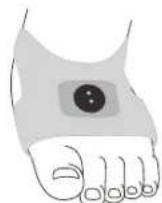

natural_image
Simple line drawing of a mechanical component or bracket (no text or symbols)

natural_image
Illustration of a hand pressing down on a device component with a red stripe (no text or symbols)Zet de alarmen uit
Anker Technology (UK) Limited I GNR8, 49 Clarendon Road, Watford, Hertfordshire, WD17 1HP, United Kingdom

natural_image
Simple line drawing of a mechanical component with a central circular feature and two small dots (no text or symbols)103 PT PT 104
VISÃO GERAL
Base para meias
T8351/S300 Smart Sock Base
T8340/S300 Smart Sock Sensor
① Indicador de Status do Sensor
T8360/S300 Baby Monitor
natural_image
Line drawing of a CD or DVD device with an attached plug and cable, no text or symbols presentflowchart
graph LR
    A["Add Device"] --> B["App Interface"]
    B --> C["eufy"]
natural_image
Line drawing of a smart speaker with a control panel (no text or symbols)ESCOLHENDO UMA EMBALAGEM DE MEIA
natural_image
Simple 3D diagram of a Y-shaped object with a small inset showing a blue arrow pointing to a small dot (no text or symbols)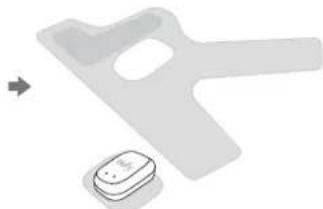
natural_image
Two electronic devices: a gray plastic door and a white USB flash unit, with no visible text or symbols.natural_image
Illustration of a hand pressing down on a cylindrical object with a red stripe, no text or symbols presentDesligue os alarmes
natural_image
Technical line drawings of a device component with exploded and assembled views (no text or symbols)
natural_image
Line drawing showing two hand positions: one adjusting a mechanical component, the other adjusting a device (no text or symbols present)Aviso (Europa e Reino Unido)
Anker Technology (UK) Limited I GNR8, 49 Clarendon Road, Watford, Hertfordshire, WD17 1HP, United Kingdom

natural_image
Simple line drawing of a mechanical part with a central circular feature and two small dots, no text or symbols present.$$ ① \text { مؤشر Organization } $$
T8351/S300 Smart Sock Base
2K لفقط اریمک
T8360/S300 Baby Monitor
T8340/S300 Smart Sock Sensor
natural_image
Line drawing of a circular device with a plug and cable, connected to an electrical outlet (no text or symbols)natural_image
Line drawing of a smart air purifier device with a control panel and QR code (no text or symbols on the device itself)flowchart
graph LR
    A["Add Device"] --> B["Home Screen"]
    B --> C["eufy"]
natural_image
Line drawing showing two hand positions (top and bottom) of a mechanical device with a knob, no text or symbols present.Anker Innovations Limited
Room 1318-19, Hollywood Plaza, 610 Nathan Road,
Mongkok, Kowloon, Hong Kong
f @EufyOfficial @EufyOfficial