MB 749 W - Radio Trevi - Free user manual and instructions
Find the device manual for free MB 749 W Trevi in PDF.



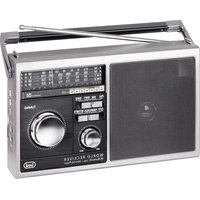
| Product type | Portable radio with MP3 player, Bluetooth and AUX |
| Brand | Trevi |
| Model | MB 749 W |
| Dimensions | 278 x 203 x 73 mm |
| Weight | 1050 g |
| Mains power | 230 V ~ 50 Hz |
| Battery power | 4 D batteries (UM1) |
| Radio wavebands | FM 87.5-108 MHz, AM 530-1710 kHz, SW1/SW2 3-23 MHz |
| Bluetooth | Power 2.5 mW, frequency 2.4 GHz |
| Main functions | FM/AM/SW radio, MP3 player (USB and microSD), AUX input, Bluetooth, headphone |
| Inputs | USB, microSD, AUX 3.5 mm, headphone 3.5 mm |
| Controls | Power/off/function selector, tuning, volume, track navigation (PREV, NEXT, PLAY/PAUSE) |
| Antenna | Telescopic antenna (FM) |
| Cleaning | Soft cloth slightly damp; avoid solvents and abrasives |
| Safety | Do not expose to water, flames, leave 5 cm on sides for ventilation |
| Use | Domestic (non-professional) |
| Repairability | TREVI authorized service center |
| Included accessories | Power cord (according to source) |
Frequently Asked Questions - MB 749 W Trevi
User questions about MB 749 W Trevi
0 question about this device. Answer the ones you know or ask your own.
Ask a new question about this device
Download the instructions for your Radio in PDF format for free! Find your manual MB 749 W - Trevi and take your electronic device back in hand. On this page are published all the documents necessary for the use of your device. MB 749 W by Trevi.
USER MANUAL MB 749 W Trevi
EN If you will not find your language on the instruction manual, please go on our website www.trevi.it to find it
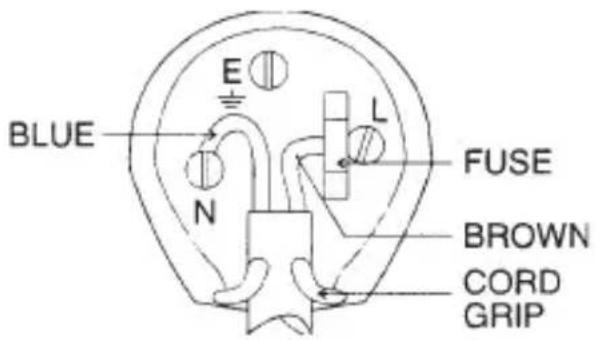
The wires in this mains lead are coloured in accordance with the following wiring codes:
Blue: .... Neutral
Brown:......Live
The wires in this mains lead must be connected to the terminals in the plug as follows:
Blue wire: N or Black
Brown wire: L or Red
Neither wire is to be connected to the earth (E or W) terminal of three-pin plug.
Should the fuse fail in the plug remove the plug form the wall socket and replace the fuse with a 3 Amp. ASTA approved BS 1362 fuse.
text_image
BLUE E N L FUSE BROWN CORD GRIP
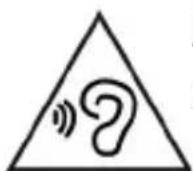
To avoid possible hearing damage, limit the time listening at high volumes.
natural_image
Technical line drawing of a mechanical device with a handle and labeled part (no text or symbols present)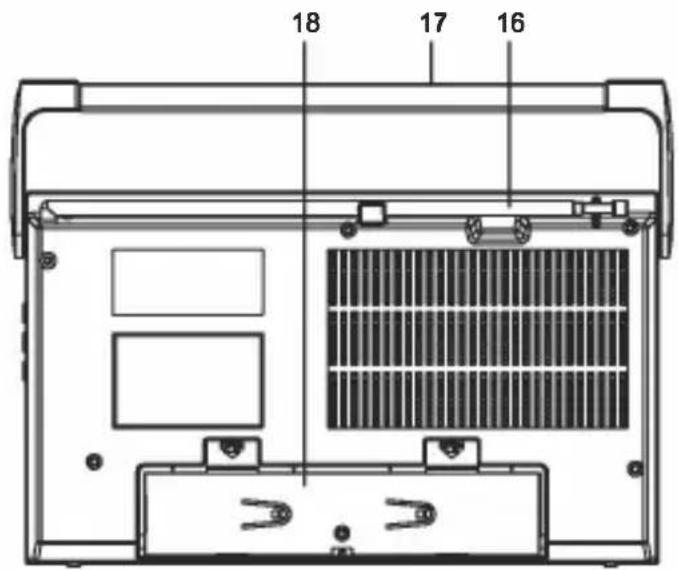
text_image
18 17 16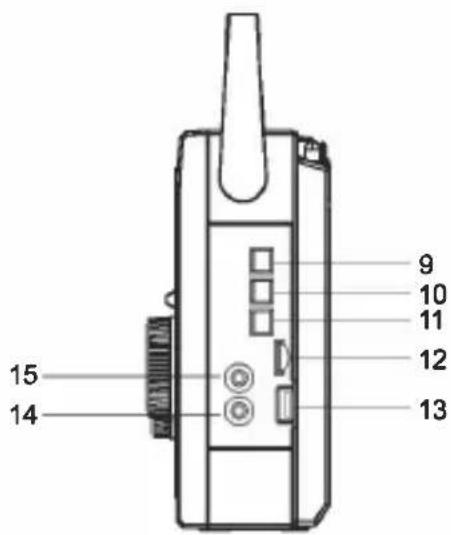
text_image
15 14 9 10 11 12 13This is a precision electronic appliance; avoid using it in the following cases:
- Near magnetic fields.
- Near heat sources such as heaters and stoves.
• In very humid places such as bathrooms, swimming pools, etc ...
• In very dusty places.
• In places subject to strong vibrations. - Do not bring your ear close to the speaker during the setting up and volume adjustment phases, and in particular to keep the volume to a minimum in the ignition phase.
- Position the appliance so that there is always enough space on its sides for the free circulation of air (at least 5 cm).
- If liquids penetrate inside the appliance, immediately disconnect the plug from the socket and take the appliance to the nearest authorized TREVI service center.
- Always check before recharging the appliance, that the power and connection cables are installed correctly.
- No naked flame sources, such as lighted candles, should be placed on the appliance.
- The appliance must not be exposed to dripping or splashing water and no objects filled with liquid, such as vases, must be placed on the appliance.
- Before turning on the appliance, always check that the power cable and the connection cable are installed correctly.
- The power adapter must be connected to an outlet near the device and must be easily accessible.
- If you notice excessive heat on the device or on the power adapter, immediately disconnect the plug from the main power socket.
- Do not pull on the power cable
- Keep this manual for future reference.
CARE AND MAINTENANCE
Use a slightly damp soft cloth for cleaning. Do not use solvents and abrasive substances.
IMPORTANT
This device is designed for home use (not professional use). This appliance has been carefully built to ensure long-lasting perfect performance. However, should any inconvenience occur, please contact your local authorised TREVI Service Centre.
TREVI follows a policy of ongoing research and development. Therefore products may have different features from those described.
TOOLTIP
text_image
1 2 3 F M E2 C G H I J K L M1A A M B0 B1 B2 B3 B4 B5 B6 B7 B8 B9 B10 IN1 IN2 IN3 IN4 IN5 IN6 IN7 IN8 IN9 IN10 FM AM NM NM TURNS DC PWM CLK FM-AM 4 5 6 7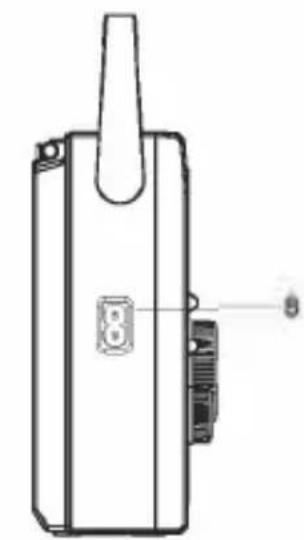
natural_image
Technical line drawing of a mechanical device with a handle and labeled part (no text or symbols present)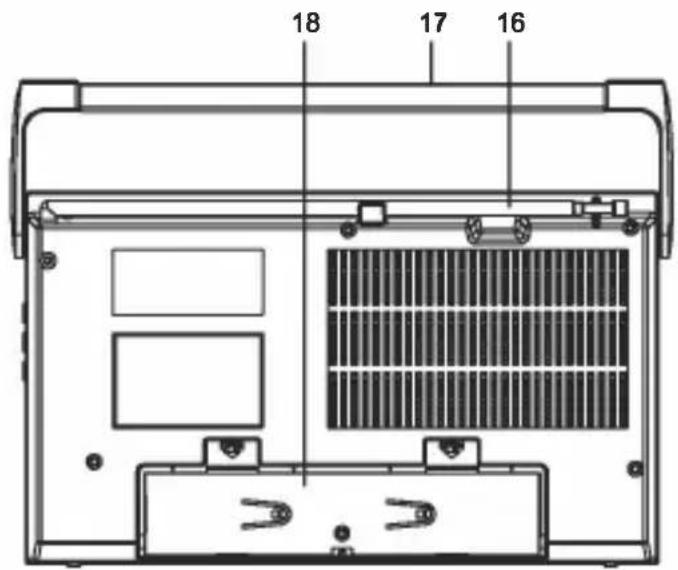
text_image
18 17 16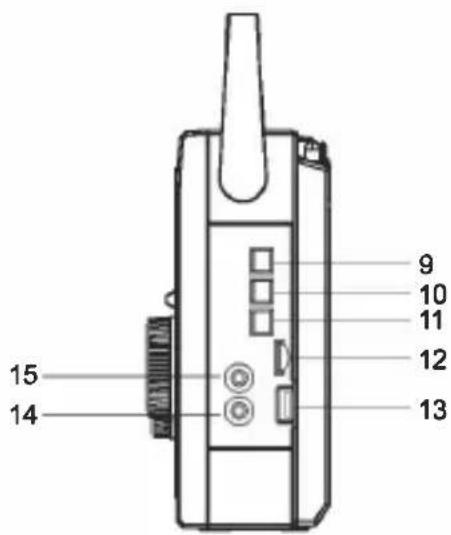
text_image
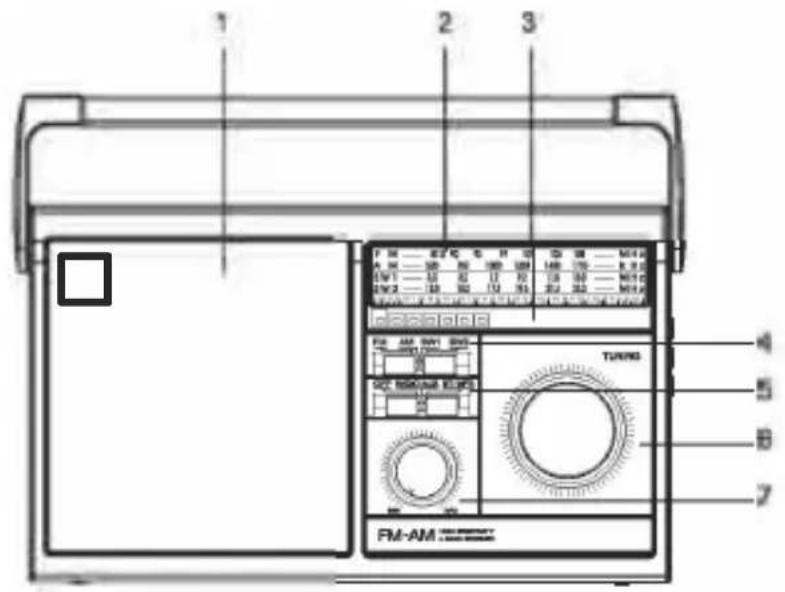
15 14 9 10 11 12 131 Speaker
2. Tuning indicator
3. BT/Signal strength indicator
4. Radio band selector
5. Power on/off/Function selector
6. Tuning control
7. Volume adjustment
8. 230V\~50Hz mains power socket
9. PREV button, previous track
- PLAY/PAUSE button, activates/pauses playback of a track
- NEXT button, next track
- microSD memory input
- USB memory input
- AUX IN input
- Headphone input
- Antenna
- Handle
- Battery compartment
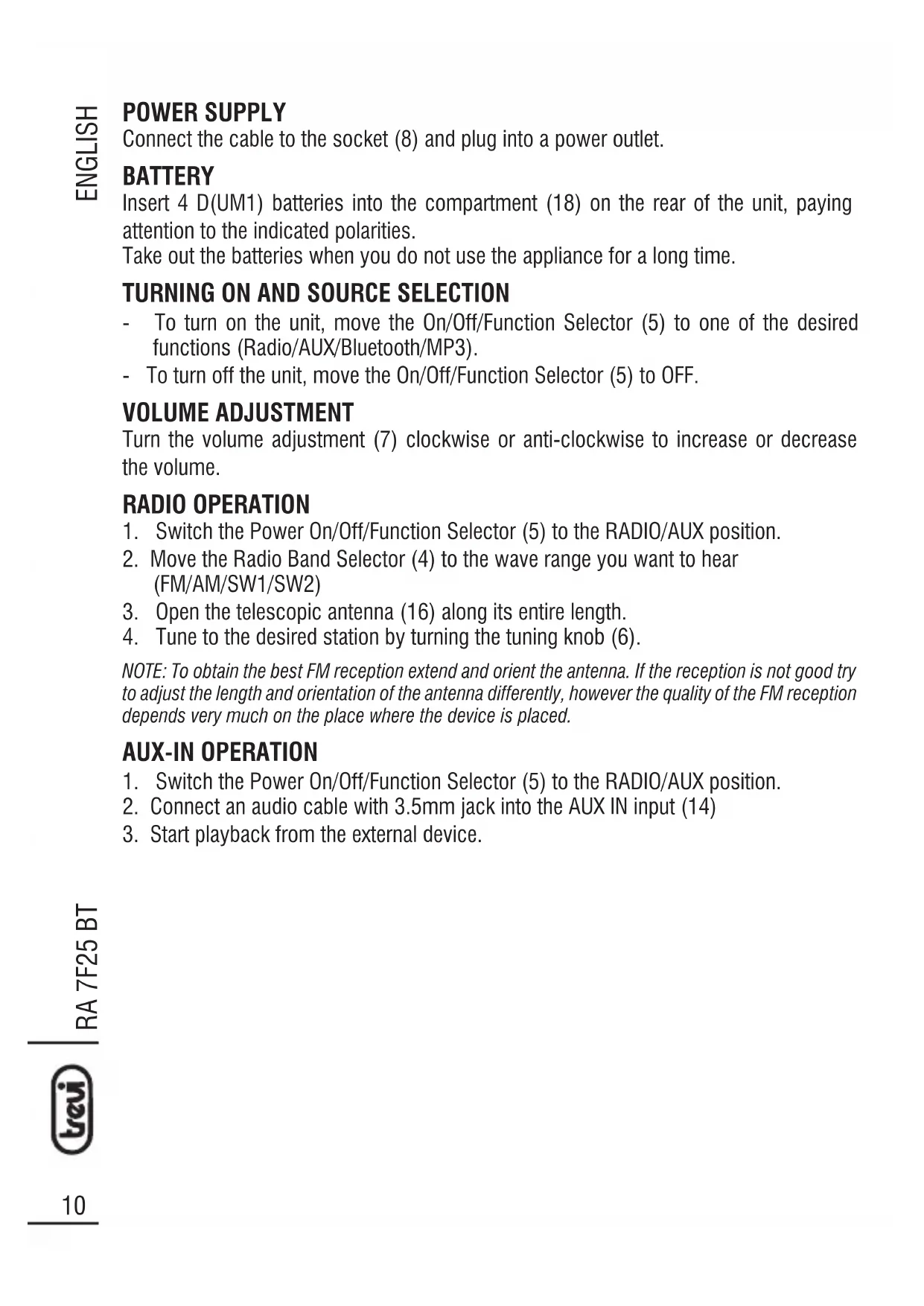
POWER SUPPLY
Connect the cable to the socket (8) and plug into a power outlet.
BATTERY
Insert 4 D(UM1) batteries into the compartment (18) on the rear of the unit, paying attention to the indicated polarities.
Take out the batteries when you do not use the appliance for a long time.
TURNING ON AND SOURCE SELECTION
- To turn on the unit, move the On/Off/Function Selector (5) to one of the desired functions (Radio/AUX/Bluetooth/MP3).
- To turn off the unit, move the On/Off/Function Selector (5) to OFF.
VOLUME ADJUSTMENT
Turn the volume adjustment (7) clockwise or anti-clockwise to increase or decrease the volume.
RADIO OPERATION
- Switch the Power On/Off/Function Selector (5) to the RADIO/AUX position.
- Move the Radio Band Selector (4) to the wave range you want to hear (FM/AM/SW1/SW2)
- Open the telescopic antenna (16) along its entire length.
- Tune to the desired station by turning the tuning knob (6).
NOTE: To obtain the best FM reception extend and orient the antenna. If the reception is not good try to adjust the length and orientation of the antenna differently, however the quality of the FM reception depends very much on the place where the device is placed.
AUX-IN OPERATION
- Switch the Power On/Off/Function Selector (5) to the RADIO/AUX position.
- Connect an audio cable with 3.5mm jack into the AUX IN input (14)
- Start playback from the external device.
MP3 PLAYER
- Insert a USB memory in the input (13) or a microSD memory in the input (12) respecting the direction of insertion.
- Switch the Power On/Off/Function Selector (5) to the BT/MP3 position. Playback will start automatically.
- Press the PLAY/PAUSE button (10) to stop playing the tracks. Press it again to resume playback.
- Press the PREV button (9) to play the previous track.
- Press the NEXT button (11) to play the next track.
- Press and hold the PREV and NEXT buttons to quickly scroll the track you are listening to. Release the buttons to return to normal playback.
- If both USB and microSD memories are present, press and hold the PLAY/PAUSE button (10) to switch between the two memories.
BLUETOOTH
NOTE: Remove the USB/microSD memories if they are present in their respective slots.
- Switch the Power On/Off/Function Selector (5) to the BT/MP3 position.
- Follow the instructions on your device to search for the device.
- Search for the device named "MB 749 W", perform the pairing and enter the PIN "0000" if required.
- Once the coupling has been completed, the device will issue a confirmation message.
- Start playing the music from your device to start listening.
- Press the PLAY/PAUSE button (10) to stop playing the tracks. Press it again to resume playback.
- Press the PREV button (9) to play the previous track.
- Press the NEXT button (11) to play the next track.
TECHNICAL FEATURES
Power supply: 230V\~50Hz 4x batteries D(UM1)
Reception range: FM 87.5 - 108.0 MHz
AM 530 - 1710 KHz
SW1/SW2 3 - 23MHz
Bluetooth transmission power: 2.5mW
Bluetooth transmission frequency: .....2.4GHz
Dimensions: 278 x 203 x 73mm
Weight: 1050g
NOTES D'EMPLOI
natural_image
Technical line drawing of a mechanical device with a handle and labeled part (no text or symbols present)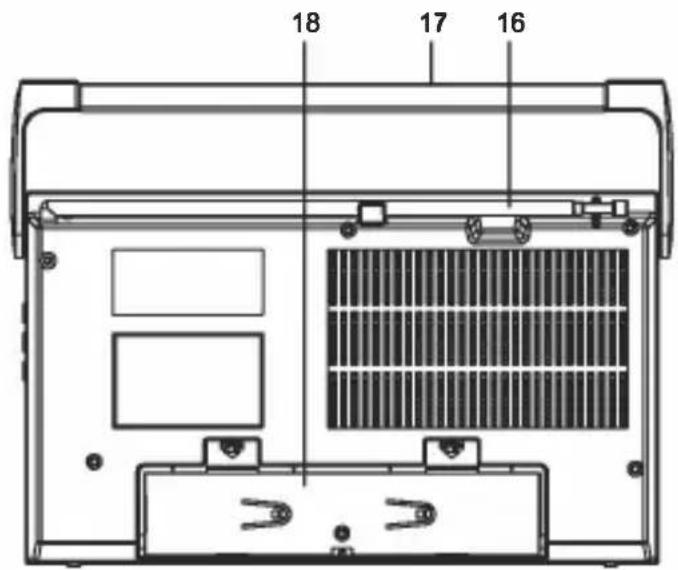
text_image
18 17 16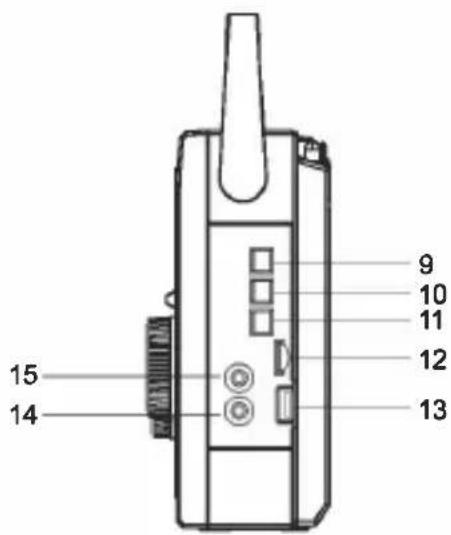
text_image
15 14 9 10 11 12 13FONCTIONNEMENT AUX-IN
natural_image
Technical line drawing of a mechanical device with a handle and labeled part (no text or symbols present)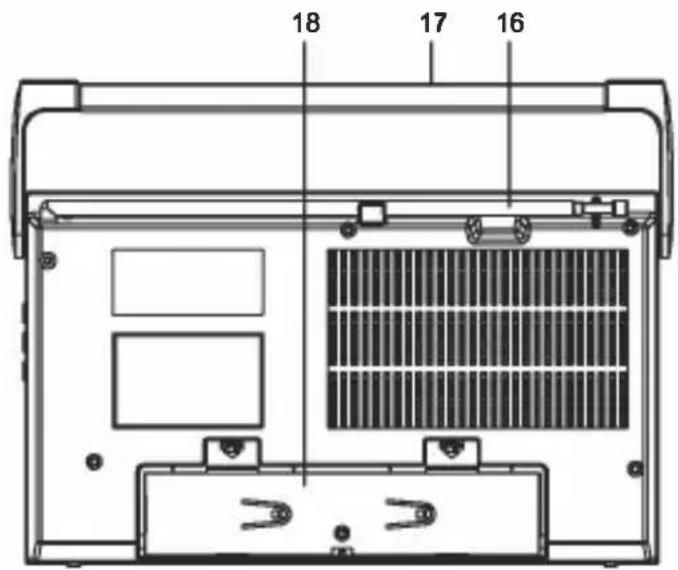
text_image
18 17 16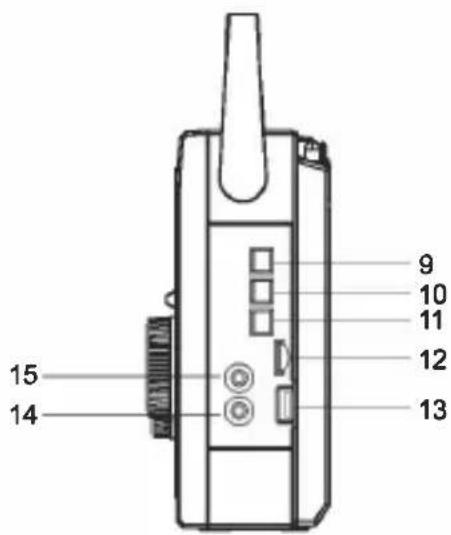
text_image
15 14 9 10 11 12 13natural_image
Technical line drawing of a mechanical device with a handle and labeled part (no text or symbols present)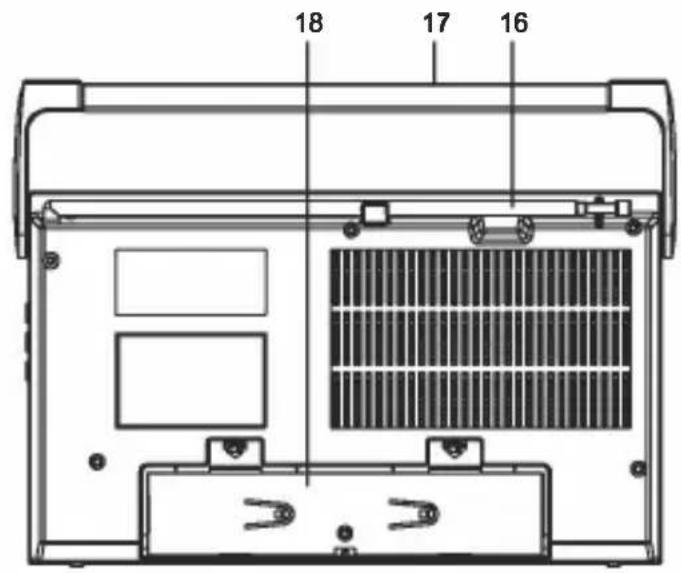
text_image
18 17 16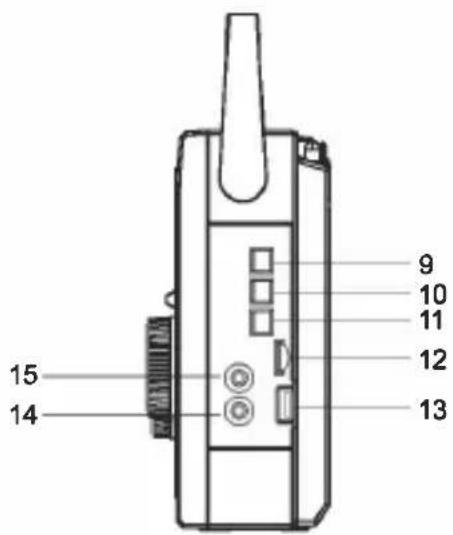
text_image
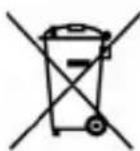
15 14 9 10 11 12 13■ Precautions for correct disposal of the product.
The symbol shown on the equipment indicates that waste must be disposed of in “separate collection” and so the product must not be disposed of together with urban waste.
The user must take the product to special “separate waste collection centres” provided by local government, or deliver it to the retailer against the purchase of a new product.
Separate collection of waste and subsequent treatment, recycling and disposal operations promotes the production of equipment with recycled materials and limits negative effects on the environment and on health caused by improper handling of waste.
Illegal disposal of the product leads to the enforcement of administrative penalties.
SIMPLIFIED EU DECLARATION OF CONFORMITY
Hereby TREVI Spa declares that the radio equipment type MB 749 W is in compliance with directive 2014/53/EU.
The full text of the EU declaration of conformity is available at the following internet address: https://www.trevi.it/dms/zidi/TREVI/DOCMB749W.pdf