
DR 750 BT - Radio Trevi - Free user manual and instructions
Find the device manual for free DR 750 BT Trevi in PDF.


| Product type | Portable radio with Bluetooth |
| Brand | Trevi |
| Model | DR 750 BT |
| Dimensions (L x H x D) | Approximately 20 x 12 x 8 cm |
| Weight | Approximately 500 g with batteries |
| Power supply | 4 AA batteries (not included) or 5V mains adapter (not included) |
| Power consumption | 3 W max |
| Main functions | FM/AM radio, Bluetooth 5.0 for audio streaming, built-in speaker, LCD display, 3.5mm headphone jack, USB port for charging |
| FM frequency range | 87.5 – 108 MHz |
| AM frequency range | 530 – 1600 kHz |
| Station memory | 30 presets (20 FM, 10 AM) |
| Audio output power | 3 W RMS |
| Bluetooth connectivity | Range up to 10 m, compatible with smartphones and tablets |
| Battery life | Approximately 15 hours at moderate volume |
| Care and cleaning | Wipe with a soft, dry cloth. Do not use abrasive products or solvents. Protect from moisture and extreme temperatures. |
| Safety | Do not expose to water. Use only recommended accessories. Keep out of reach of children under 3 years due to small parts. |
| Spare parts and repairability | Spare parts not directly available. Contact Trevi after-sales service for repairs. Repairability index not provided. |
| General information | Manual available in multiple languages. 2-year warranty. Made in China. |
Frequently Asked Questions - DR 750 BT Trevi
User questions about DR 750 BT Trevi
0 question about this device. Answer the ones you know or ask your own.
Ask a new question about this device
Download the instructions for your Radio in PDF format for free! Find your manual DR 750 BT - Trevi and take your electronic device back in hand. On this page are published all the documents necessary for the use of your device. DR 750 BT by Trevi.
USER MANUAL DR 750 BT Trevi
Do not use power supply with a voltage higher than 5V, cause damage to the player.
Listen at high volume for long periods of time, may damage your hearing.
Avoid placing the player:
- Near magnetic fields.
- Near any heat sources such as heaters and stoves.
- In very damp places like bathrooms, swimming pools, etc...
- In very dusty places.
- In places subject to strong vibrations.
Place the appliance so that its sides there is always enough room for free air circulation (at least 5 cm).
If liquids penetrate into the appliance immediately disconnect the plug from the wall socket and set the appliance to your nearest authorised TREVI Service Centre.
Always check before charging, power cables and connection are installed properly.
CARE AND MAINTENANCE
For cleaning it is recommended to use a soft, slightly damp cloth. Avoid solvents or abrasive substances.
IMPORTANT
The construction of this device guarantees long flawless operation. However, if come some problem, you should consult your nearest authorized service center.
TREVI pursues a policy of continuous research and development. Therefore, the products may show different characteristics from those described.
WARNING FOR A CORRECT USE OF RECHARGEABLE BATTERY
- Recharge the battery in an ambient temperature between 5°C and 35°C.
- Don't recharge more than the suitable period to prevent the risk of overheating and burst.
- Don't recharge the battery for more than 4 hours.
- Recharging the battery over the suitable period or an extended period of inactivity may reduce battery duration.
- Rechargeable battery is liable to wear and tear and its performance will reduce gradually.
- To extend the duration of the battery use it when is completely charged up to the complete discharging, then recharge it fully before use it again. Recharge a battery not completely consumed, will result a reduced duration. In this case, repeat the full charging/discharging cycle many times.
- Avoid recharge the battery for the whole night.
PACKAGE CONTENTS
- Radio player
- USB/micro-USB cable
- User manual
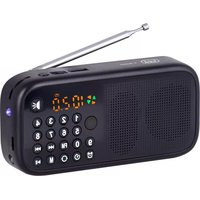
DESCRIPTION LINKS AND CONTROLS


- Carrying handle
- LED Display
- Auto Tuning Scan, Play/Pause
- Switch Mode
- Speaker
- Volume control knob
-
NEXT button
-
PREV button
- Subwoofer
- Micro SD memory slot
- USB Socket
- ON/OFF Switch
- Power Socket micro-USB DC 5V
CHARGING THE BATTERY
At the first use of the device, charge it for 3 hours.
- Connect the USB cable to the current Power Socket micro-USB (13) of the device. Connect the other end to the USB port of the PC or AC adapter (not included) with Usb socket.
- The battery indicator on the display will blink to indicate the charging process.
Note: For a good battery life it is recommended to keep the unit off during charging.
3. At the end of charging the battery indicator on the display will turn on.
POWERING ON/OFF
- Move the ON/OFF switch (12) in ON position to turn on the unit.
- Move the ON/OFF switch (12) in OFF position to turn off the power.

VOLUME ADJUSTMENT
- Turn the Volume knob (6) clockwise to increase the volume of the device.
- Turn the Volume knob (6) counterclockwise to decrease the volume of the device.
RADIO FUNCTION
AUTOMATIC STORING
- Place the unit in an area free of interference and switch it on.
- Press MODE button (4) several times until the voice guidance will announce "FM mode" and the display (2) show Radio frequency.
- Press the Play/Pause button to search and automatic storage radio frequencies; research/storage will stop at full scan the radio band. At the end it will play the first preset radio station.
RECALL STORED STATION
To call the number of a preset station use the UP (7) to increase the number and DOWN (8) to decrease the number.
Note: The quality of FM reception depends on the place where the device is placed. The proximity of TV sets, fluorescent lamps, or other appliances may cause interference in the reception of radio programs, in this case removed the radio player.
BLUETOOTH® FUNCTION
PAIR TO YOUR BLUETOOTH® DEVICE
- Place the speaker near the Bluetooth ^® device to be connected and turn on the unit.
- Press the MODE button (4) several times until the voice guidance will announce “The Bluetooth device is ready to pair” and the display (2) will show “Blue”.
- Follow the instructions of your external device to search for the speaker.
- Search the speaker named "DR 750 BT" or "YPS_B105" and enter the PIN "0000" if required.
- After connection the voice guidance will announce "the Bluetooth device is connected".
Notes:
- The speaker can only works with a Bluetooth ^ connection, free It can not be interrupted during normal operation.
- When the Bluetooth ^® pairing with external devices fails, delete another Bluetooth ^® device connection list, restart the speaker and Bluetooth ^® try the signal again.
The proximity of TV sets, fluorescent lamps or other appliances may cause interference in the reception of radio programs, in this case removed the boombox.
CONTROLS AVAILABLE IN BLUETOOTH® MODE
- Press DOWN button (8) once to skip to previous song, press UP (7) button once to skip to next song.
- Press Play/Pause (3) to get the music pause, to resume playing music press Play/ Pause (3).
CONTROLS AVAILABLE IN FREE HANDS MODE
This device has an internal microphone connected so that they can be used as a responder handsfree phone conversations, controllable directly from its simple keyboard without having to touch the phone.
When you receive a call, the speaker will sound an alert
- Press once MODE button (4) to accept the call and activate the speakerphone feature, press it again to end the call.
Note: The handsfree function is active only in Bluetooth ^® mode.
MICRO SD CARD/ USB FUNCTION
- Insert a Micro SD card in the slot (10) or USB memory in socket (11) and turn on the unit.
- Press MODE button (4) several times until you hear "Music mode" and the display (2) will show "Load".
- Playback will start automatically.
- Press once DOWN button (8) to skip to previous song, press once UP button (7) to skip to next song.
- Press the Play/Pause (3) to pause, press it again to resume play.
TECHNICAL CHARACTERISTICS
Music power:....3W
S/N Ratio: 85dB
FM Range: 87.5 - 108MHz
Bluetooth version: 2.1 + EDR
Power Supply: ....Lithium Rechargeable battery via micro-USB DC 5V
Dimensions: 97 x 97 x 66mm
INFORMATION ON REMOVAL AND DISPOSAL OF THE BATTERY
Warning: the operation of removal and disposal is reserved exclusively to the specialized technical personnel!
- Remove the four screws that fasten the cabinet.
- Raise the rear moving.
- Unsolder contacts and remove the battery from its compartment.
Whatever type of battery, it must not be thrown into household waste, fire or water. Each type of battery must be recycled or disposed of at appropriate collection dedicated centres.

Precautions for correct disposal of the product.

The symbol shown on the equipment indicates that waste must be disposed of in “separate collection” and so the product must not be disposed of together with urban waste.
The user must take the product to special “separate waste collection centres” provided by local government, or deliver it to the retailer against the purchase of a new product.
Separate collection of waste and subsequent treatment, recycling and disposal operations promotes the production of equipment with recycled materials and limits negative effects on the environment and on health caused by improper handling of waste.
Illegal disposal of the product leads to the enforcement of administrative penalties.
WARRANTY
- This unit is guaranteed for a period of 24 months from the date of production printed on the product itself or on label on product.
- The warranty is valid only if the unit has not been tampered with. The warranty is valid only at authorized TREVI assistance centres, that will repair manufacturing defects, excluded replacement of labels and removable parts.
- TREVI is not liable for damage to people or things caused by the use of this unit or by the interruption in the use of this unit.
NOTES D'EMPLOI
CONDITIONS DE GARANTIE
- Radio-player
- USB Kabel/Micro-USB
- Benutzerhandbuch


- CARE AND MAINTENANCE
- IMPORTANT
- WARNING FOR A CORRECT USE OF RECHARGEABLE BATTERY
- PACKAGE CONTENTS
- DESCRIPTION LINKS AND CONTROLS
- CHARGING THE BATTERY
- POWERING ON/OFF
- VOLUME ADJUSTMENT
- RADIO FUNCTION
- AUTOMATIC STORING
- RECALL STORED STATION
- BLUETOOTH® FUNCTION
- PAIR TO YOUR BLUETOOTH® DEVICE
- Notes:
- CONTROLS AVAILABLE IN BLUETOOTH® MODE
- CONTROLS AVAILABLE IN FREE HANDS MODE
- MICRO SD CARD/ USB FUNCTION
- TECHNICAL CHARACTERISTICS
- INFORMATION ON REMOVAL AND DISPOSAL OF THE BATTERY
- Precautions for correct disposal of the product.
- WARRANTY
- NOTES D'EMPLOI
- CONDITIONS DE GARANTIE
Brand : Trevi
Model : DR 750 BT
Category : Radio