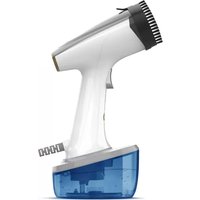
Niagara Pro PC1503 - Iron SOLAC - Free user manual and instructions
Find the device manual for free Niagara Pro PC1503 SOLAC in PDF.



| Product Type | Garment Steamer |
| Brand | Solac |
| Model | Niagara Pro PC1503 |
| Power Supply | Mains (220-240 V ~ 50/60 Hz) |
| Power | 1500 W |
| Soleplate Type | Ceramic |
| Water Tank | Removable, twist-open |
| Functions | Continuous steam, auto shut-off, thermal safety |
| Auto Shut-Off | After 20 minutes of inactivity |
| Included Accessories | Brush for delicate garments |
| Recommended Use | Vertical, on hanging clothes |
| Recommended Water Type | Distilled water if water is hard |
| Cleaning | Damp cloth, do not immerse |
| Descaling | With white vinegar/water solution (1/3 vinegar, 2/3 water) |
| Storage | After cooling, empty reservoir |
| Warranty | In accordance with applicable legislation, contact approved after-sales service |
| Weight | Approximately 1 kg |
| Dimensions (L x W x H) | Approximately 25 x 12 x 18 cm |
Frequently Asked Questions - Niagara Pro PC1503 SOLAC
User questions about Niagara Pro PC1503 SOLAC
0 question about this device. Answer the ones you know or ask your own.
Ask a new question about this device
Download the instructions for your Iron in PDF format for free! Find your manual Niagara Pro PC1503 - SOLAC and take your electronic device back in hand. On this page are published all the documents necessary for the use of your device. Niagara Pro PC1503 by SOLAC.
USER MANUAL Niagara Pro PC1503 SOLAC
EN. Instructions for use
FR. Mode d'emploi
ES
(Original instructions)
Garment Steamer
PC1503
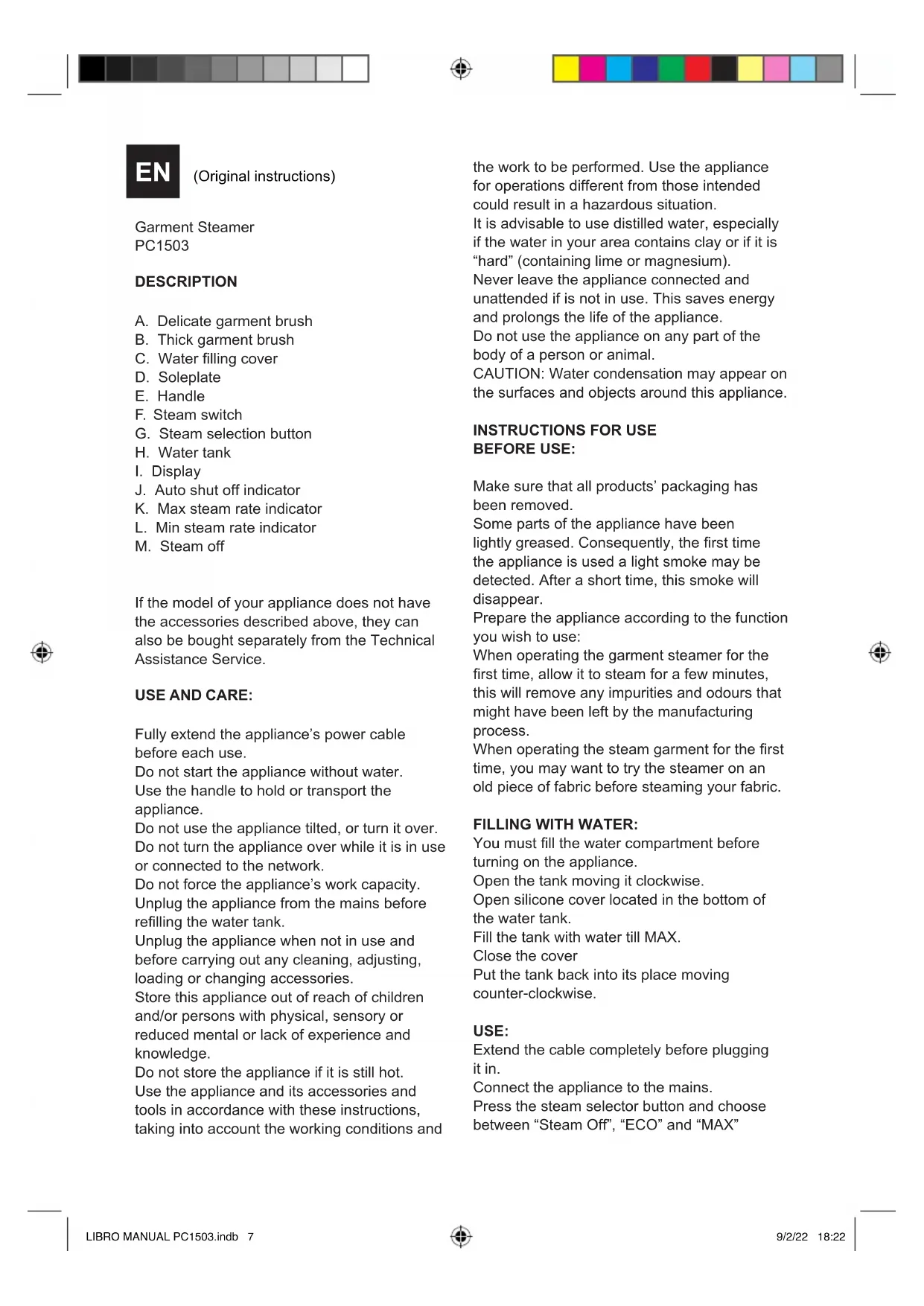
DESCRIPTION
A. Delicate garment brush
B. Thick garment brush
C. Water filling cover
D. Soleplate
E. Handle
F. Steam switch
G. Steam selection button
H. Water tank
I. Display
J. Auto shut off indicator
K. Max steam rate indicator
L. Min steam rate indicator
M. Steam off
If the model of your appliance does not have the accessories described above, they can also be bought separately from the Technical Assistance Service.
USE AND CARE:
Fully extend the appliance's power cable before each use.
Do not start the appliance without water.
Use the handle to hold or transport the appliance.
Do not use the appliance tilted, or turn it over.
Do not turn the appliance over while it is in use or connected to the network.
Do not force the appliance's work capacity.
Unplug the appliance from the mains before refilling the water tank.
Unplug the appliance when not in use and before carrying out any cleaning, adjusting, loading or changing accessories.
Store this appliance out of reach of children and/or persons with physical, sensory or reduced mental or lack of experience and knowledge.
Do not store the appliance if it is still hot.
Use the appliance and its accessories and tools in accordance with these instructions, taking into account the working conditions and
the work to be performed. Use the appliance for operations different from those intended could result in a hazardous situation.
It is advisable to use distilled water, especially if the water in your area contains clay or if it is "hard" (containing lime or magnesium).
Never leave the appliance connected and unattended if is not in use. This saves energy and prolongs the life of the appliance.
Do not use the appliance on any part of the body of a person or animal.
CAUTION: Water condensation may appear on the surfaces and objects around this appliance.
INSTRUCTIONS FOR USE
BEFORE USE:
Make sure that all products' packaging has been removed.
Some parts of the appliance have been lightly greased. Consequently, the first time the appliance is used a light smoke may be detected. After a short time, this smoke will disappear.
Prepare the appliance according to the function you wish to use:
When operating the garment steamer for the first time, allow it to steam for a few minutes, this will remove any impurities and odours that might have been left by the manufacturing process.
When operating the steam garment for the first time, you may want to try the steamer on an old piece of fabric before steaming your fabric.
FILLING WITH WATER:
You must fill the water compartment before turning on the appliance.
Open the tank moving it clockwise.
Open silicone cover located in the bottom of the water tank.
Fill the tank with water till MAX.
Close the cover
Put the tank back into its place moving counter-clockwise.
USE:
Extend the cable completely before plugging it in.
Connect the appliance to the mains.
Press the steam selector button and choose between "Steam Off", "ECO" and "MAX"
position.
The indicator will flash until the desired temperature is reached and will remain it.
Push on time the Steam button to start working.
NOTE: It is not necessary to keep the button pressed to have steam, with one time is enough, once you no longer want steam press the button again to end the operation.
Orient the appliance to direct the steam flow in the desired direction
NOTE: If you do not change the mode every 25 seconds the product will steam
STEAM GARMENT:
The steam garment is easy to use and is perfect for removing wrinkles/creases from garments and curtains as well as refreshing furnishings fabrics.
It can be used on most fabric as long as the fabric is hanging or where the garment steamer can be easily used in an upright position moving over the fabric in an up and down motion.
NOTE: the garment steamer is designed to be used in an upright position on hanging garments, refrain from using the steamer in or on garments in a horizontal position.
Hang the garment from a hanger and stretch the fabric slightly with one hand.
Check that there is ventilation behind the fabric.
Check garment pockets are empty.
NOTE: we recommend you do not steam over metal accessories, use caution and steam around the metal accessories.
To steam curtains
-
wash and dry curtains as directed, according to the fabric type.
-
hang the curtains and steam when they are hanging in place.
-
lightly stretch the curtain with one hand while steaming to help remove creases more easily.
To steam upholstery
-
the garment steamer can be used to help freshen up upholstery, slip covers on furniture and cushions from the furniture and in the room. before steaming, always test on a small area of the fabric that is not visible.
-
keeping the garment steamer in an upright position and using and up and down motion. lightly steam over the fabric of your furniture.
cushions should be removed and held upright for steaming. allow cushions to dry thoroughly before replacing on furniture.
ONCE YOU HAVE FINISHED USING THE APPLIANCE:
Press the steam selection button for a while, you will see that the light will be switched off. Unplug the appliance from the mains.
Remove the water from the water tank. Let the product cool down.
Clean the appliance.
ASSEMBLE THE ACCESSORIES
Attention. Always let the steamer cool down before assembling or removing the attachments.
Assembly of accessories.
1 Align the bottom protruding part of the accesory into the bottom groove of the steam head.
2 Push the head of the accessory until the top protruding part also clicks in the top groove of the steam head.
SAFETY THERMAL PROTECTOR:
The appliance has a safety device, which protects the appliance from overheating. If the appliance turns itself off and does not switch itself on again, disconnect it from the mains supply, and wait for approximately 15 minutes before reconnecting. If the machine does not start again seek authorised technical assistance.
AUTO OFF
When the product is not used for 20 minutes, the AUTO-OFF light comes on and then the product will switch off automatically.
DECALCIFICATION
If the appliance begins to begins to produce steam more slowly than, or stops producing steam and then starts again, you may need to decalcify your steamer. Decalcification refers to removing the calcium deposits that form over time on the metal parts of the steamer. For best performance from the Garment Steamer, please decalcify the unit from time to time. The frequency depends upon the hardness of the water being used and how often you use the steamer.
Method.
- To decalcify, use a solution of 1/3 white vinegar 2/3 water in the water tank.
- Plug the unit into electrical outlet. Wait until the red light goes off. Press the mode selection button until the MAX mode is set, wait until the product has reached the proper temperature then push the steam button, Release the steam button, unplug from electrical outlet, and allow to cool for 30 minutes.
Repeat the above procedure as many times as necessary until a normal steam rate returns, usually 2 to 3 times. With each repeated cycle, use a fresh solution of vinegar and water.
Run one cycle of distilled water through the unit at the completion of decalcification before using the product again.
CLEANING
Disconnect the appliance from the mains and allow it to cool before undertaking any cleaning task.
Clean the electrical equipment and the mains connection with a damp cloth and dry. DO NOT IMMERSE IN WATER OR ANY OTHER LIQUID.
Clean the equipment with a damp cloth with a few drops of washing-up liquid and then dry.
Do not use solvents, or products with an acid or base pH such as bleach, or abrasive products, for cleaning the appliance.
Never submerge the appliance in water or any other liquid or place it under running water.


TROUBLESHOOTING GUIDE
| Problem Possible solution | |
| The steamer does not heat up Check main plug is inserted correctly.Check power supply.Check power button. | |
| The steamer does not produce steam | Check the water level and the water tank inlet cover is properly covered.Press the steam activation button harder.Hold the steamer in an upright position. |
| Water spills from the water tank | Make sure water is not over the MAXIMUM level.Make sure water tank inlet cover is properly closed.Always use the steamer in an upright position as per the operating instructions. |
| The steamer is producing a loud humming or pumping sound | Check water level; if there is no water or it is low, refill the water tank. |
| The steamer does not seem to be removing creases easily | Hold the steamer in an upright position and stretch the fabric downward to ensure best results. |
| Unsure when to use the fabric brush | Use when steaming is to directly touch the fabric.When steaming delicate fabric, such as silk to reduce the risk of water dripping onto the garment while steaming. |
| Avoiding discolouring of metal accessories on the garment | Do not directly hover the garment steamer over the metal accessories. |
FR
ACOBLEU-HI L'ACCESSORI
A TARTOZÉKOK FELHELYEZÉSE
This product enjoys the recognition and protection of the legal guarantee in accordance with current legislation. To enforce your rights or interests you must go to any of our official technical assistance services.
You can find the closest one by accessing the following web link: http://solac.com. You can also request related information by contacting us by phone. You can download this instruction manual and its updates at http://solac.com
FR. GARANTIE ET ASSISTANCE TECHNIQUE
CA. GARANTIA I ASSISTÈNCIA TÈCNICA
Big distribution society
4 Rue 13 Lot Smara, Oulfa, Casablanca
(+212) 522 89 40 21
ME. MONTENEGRO - EUROPE
Rastovac bb, 81400
Niksic
+382 40 217 055
MXN. MEXICO - AMERICA
Unit 25 & 26, San Croy Office Park, Die
Agora Road, Croydon, Kempton Park, 1619
Johannesburg
(+27) 011 392 5652



sOlac
www.solac.com


- ES
- (Original instructions)
- DESCRIPTION
- USE AND CARE:
- INSTRUCTIONS FOR USE
- BEFORE USE:
- FILLING WITH WATER:
- USE:
- STEAM GARMENT:
- To steam curtains
- To steam upholstery
- ONCE YOU HAVE FINISHED USING THE APPLIANCE:
- ASSEMBLE THE ACCESSORIES
- SAFETY THERMAL PROTECTOR:
- AUTO OFF
- DECALCIFICATION
- Method.
- CLEANING
- TROUBLESHOOTING GUIDE
- FR
- ACOBLEU-HI L'ACCESSORI
- A TARTOZÉKOK FELHELYEZÉSE
- GARANTIE ET ASSISTANCE TECHNIQUE
- GARANTIA I ASSISTÈNCIA TÈCNICA
- MONTENEGRO - EUROPE
- MEXICO - AMERICA
- sOlac
Brand : SOLAC
Model : Niagara Pro PC1503
Category : Iron