FLAT PRO 18 G2 - Lamp Cameo - Free user manual and instructions
Find the device manual for free FLAT PRO 18 G2 Cameo in PDF.



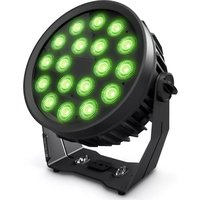
| Product type | Outdoor LED projector |
| Brand | Cameo |
| Model | FLAT PRO 18 G2 (CLPFLATPRO18G2) |
| Number of LEDs | 18 |
| LED type | RGBWA 10 W (5 in 1) |
| Luminous flux | 6600 lm |
| Beam angle | 33.5° (18.5° at half intensity) |
| Adjustable PWM frequency | 650 Hz / 1530 Hz / 2000 Hz / 3600 Hz / 12 kHz / 25 kHz |
| Operating voltage | 100-240 V AC, 50-60 Hz |
| Power consumption | 170 W |
| Power connector | Neutrik True1 (IN / OUT) |
| Fuse | F4A / 250 V (5 x 20 mm) |
| Electrical protection | Class I |
| Protection rating | IP65 |
| Min. distance to illuminated surface | 0.5 m |
| Min. distance to flammable materials | 0.5 m |
| Ambient operating temperature | -15 °C to 45 °C |
| Cooling | Convection (silent) |
| DMX modes | 1, 3, 5, 10, 13 channels (without offset); 2, 4, 6, 11, 14 channels (with offset) |
| Standalone functions | Auto, Static, CCT, Color Preset, User Color, Loop |
| Protocols | DMX512, RDM |
| Display | OLED screen with backlit capacitive buttons |
| Dimensions (W × H × D, with bracket) | 339 × 353 × 170 mm |
| Weight (with bracket) | 8.3 kg |
| Housing material | Metal, black |
| Package contents | Fixture, power cord, user manual |
Frequently Asked Questions - FLAT PRO 18 G2 Cameo
User questions about FLAT PRO 18 G2 Cameo
0 question about this device. Answer the ones you know or ask your own.
Ask a new question about this device
Download the instructions for your Lamp in PDF format for free! Find your manual FLAT PRO 18 G2 - Cameo and take your electronic device back in hand. On this page are published all the documents necessary for the use of your device. FLAT PRO 18 G2 by Cameo.
USER MANUAL FLAT PRO 18 G2 Cameo
natural_image
Three black circular laser headsets with green and orange LED lights, displayed against a white background (no text or symbols visible)







FIRMWARE VERSION 1.03 AND LATER
INFORMATION ON THIS USER MANUAL 5
INTENDED USE 5
DEFINITIONS AND SYMBOL DECLARATIONS 5
SAFETY INSTRUCTIONS 6
NOTES ON PORTABLE OUTDOOR DEVICES 9
DELIVERY SCOPE 9
INTRODUCTION 9
CONNECTIONS, OPERATING AND DISPLAY ELEMENTS 10
OPERATION 12
SET-UP AND INSTALLATION 24
CARE, MAINTENANCE AND REPAIR 25
OPTIONAL ACCESSORIES 26
DMX TECHNOLOGY 26
TECHNICAL DATA 28
EXPLANATION OF IP PROTECTION CLASS 29
MINIMUM DISTANCE TO ILLUMINATED SURFACE 30
MINIMUM DISTANCE TO NORMALLY FLAMMABLE MATERIALS 30
DISPOSAL 31
MANUFACTURER'S DECLARATIONS 31
DEUTSCH
This device has been developed and manufactured to the highest quality standards to ensure many years of problem-free operation. Please read this manual carefully to be able to use your new Cameo product quickly and optimally. Further information about Cameo Light is available on our website CAMEOLIGHT.COM.
INFORMATION ON THIS USER MANUAL
- Carefully read the safety instructions and the entire manual before operating the device.
- Observe the warnings on the device and in the user manual.
• Always keep the user manual within reach. - If you sell or pass on the device, it is important that you also include this user manual, as it is an integral part of the product.
INTENDED USE
The product is a device for event technology!
This product has been developed for professional use in the field of event technology and is not suitable for use as domestic lighting!
Furthermore, this product is only intended for qualified users with specialist knowledge of event technology!
Use of the product outside the specified technical data and operating conditions is considered inappropriate!
Liability for damage and third-party damage to persons and property due to inappropriate use is excluded!
The product is not suitable for:
- Use by persons (including children) with limited physical, sensory or mental abilities or lack of experience and knowledge.
• Children (children must be instructed not to play with the device).
DEFINITIONS AND SYMBOL DECLARATIONS
- HAZARD: The word HAZARD, possibly in combination with a symbol, is used to indicate immediately dangerous situations or conditions affecting life and limb.
- WARNING: The word WARNING, possibly in combination with a symbol, indicates potentially dangerous situations or conditions affecting life and limb.
- CAUTION: The word CAUTION, possibly in combination with a symbol, indicates situations or conditions that could lead to injury.
- ATTENTION: The word ATTENTION, possibly in combination with a symbol, indicates situations or states that may lead to property damage and/or environmental damage.

This symbol identifies hazards that can cause electric shock.

This symbol identifies hazardous areas or hazardous situations.

This symbol indicates hazards caused by hot surfaces.

This symbol indicates hazards caused by intense light sources.

This symbol indicates a device in which there are no user-replaceable parts.

This symbol indicates additional information on the operation of the product.
SAFETY INSTRUCTIONS
HAZARD:
- Do not open the device and do not perform any modifications.
- If your device no longer functions properly, if liquids or objects get inside it or if it has been damaged in any other way, switch it off immediately and unplug it from the power source. The device may be repaired only by authorised repair technicians.
- For devices of protection class 1, the protective conductor must be connected correctly. Never disconnect the protective conductor. Devices of protection class 2 do not have a protective conductor.
- Ensure that live cables are not kinked or otherwise mechanically damaged.
- Never bypass the device fuse.

WARNING:
- The device may not be operated if it shows obvious signs of damage.
- The device may only be installed in a voltage-free state.
- If the device's power cable is damaged, the device may not be used.
- Permanently connected mains cables may only be replaced by a qualified person.

CAUTION:
- Do not switch on the device if it has been exposed to extreme temperature fluctuations (for example, following transport). Moisture and condensation can damage the device. Switch on the device only when it has reached room temperature.
- Ensure that the voltage and frequency of the mains supply match the values specified on the device. If the device has a voltage selector switch, do not connect the device until it has been set correctly. Use only suitable power cables.
- To disconnect the device from the mains on all poles, it is not sufficient to press the on/off switch on the device.
- Make sure that the fuse used corresponds to the type printed on the device.
- Ensure that suitable measures have been taken against overvoltage (e.g. lightning strikes).
- Observe the specified maximum output current on devices with a Power Out connection. Ensure that the total current consumption of all connected devices does not exceed the specified value.
- Only replace pluggable mains cables with equivalent cables that correspond to the cable originally supplied. The cross-section must not fall below the cross-section of the original cable.

HAZARD:
- Choking hazard! Plastic bags and small parts must be kept out of reach of persons (including children) with reduced physical, sensory or mental capabilities.
- Risk of falling! Make sure that the device is securely installed and will not fall down. Only use suitable stands or mountings (particularly for fixed installations). Ensure that accessories are properly installed and secured. Ensure that applicable safety regulations are observed.

WARNING:
- Use the device in the prescribed manner only.
- Operate the device using only accessories of the type recommended and supplied by the manufacturer.
- Observe safety regulations applicable in your country during installation.
- After connecting the device, ensure that all cables are routed so as to avoid damage or accidents, such as from tripping.
- Always observe the specified minimum distance to normally flammable materials! Unless explicitly stated, the minimum distance is 0.3 m.
- Always observe the minimum distance to the illuminated surface that can be read on the device!

CAUTION:
- Moving components such as mounting brackets or other movable components may become jammed.
- In the case of devices with motor-driven components, there is a risk of injury due to the movement of the device. Sudden device movement can cause shock-reactions.
- The housing surface of the device can become very hot during regular operation. Ensure that accidental touching of the housing is not possible. Always allow the lamp to cool sufficiently before removal, maintenance work and charging etc.


CAUTION:
- Do not install or use the device in the vicinity of radiators, accumulators, stoves, or other heat sources. Ensure that the device is always installed in such a way that it is sufficiently cooled and cannot overheat.
- Do not place any ignition sources, such as burning candles, near the device.
- Ventilation openings may not be covered and fans may not be blocked.
- For transport, use the original packaging or packaging provided by the manufacturer.
- Avoid any impacts to or shaking of the device.
- Observe the IP rating and the ambient conditions such as temperature and humidity according to the specification.
- Devices can be continuously further developed. In the event of deviating information on operating conditions, performance or other device properties between the user manual and the device labelling, the information on the device always takes priority.
- The device is not suitable for tropical climate zones or for operation over 2,000 m above sea level.
- Unless explicitly stated, the device is not suitable for operation under marine conditions.
CAUTION! IMPORTANT INFORMATION REGARDING LIGHTING PRODUCTS!

-
Never look directly into the beam of light, not even for a short period of time.
-
Never look into the beam of light using optical devices such as a magnifying glass.

- Stroboscopic effects may cause epileptic seizures in susceptible people!

- A permanently installed lamp is built into this lighting unit. This may not be replaced by the user. In the event of an error, please contact your sales partner.
NOTES ON PORTABLE OUTDOOR DEVICES

- Temporary operation! Event equipment is generally only designed for temporary operation.
- Continuous operation or permanent structural installation – particularly outdoors – can impair the function, surfaces and seals and accelerate material fatigue.
- Damage to the surface coating can impair the device's corrosion protection. Damaged surface coating (e.g. scratches) must be promptly repaired by suitable measures.
DELIVERY SCOPE
Remove the product from the packaging and remove all packing material.
Please check the completeness and integrity of the delivery and please notify your distributor immediately after purchase if the delivery is not complete or damaged.
With the package you have purchased you have received:
- Headlamp
- power cord
- Instruction manual
INTRODUCTION
7 X 10 W RGBWA LED OUTDOOR SPOTLIGHT
CLPFLATPRO7G2
12 X 10 W RGBWA LED OUTDOOR SPOTLIGHT
CLPFLATPRO12G2
18 X 10 W RGBWA LED OUTDOOR SPOTLIGHT
CLPFLATPRO18G2
CONTROL FUNCTIONS
▶ DMX modes without DMX delay channel: 1-channel, 3-channel 1, 3-channel 2, 5-channel 1, 5-channel 2, 10-channel and 13-channel DMX control
▶ DMX modes with DMX delay channel: 2-channel, 4-channel 1, 4-channel 2, 6-channel 1, 6-channel 2, 11-channel and 14-channel DMX functions
▶ Master / slave operation
▶ Standalone functions
RDM
FEATURES
10 W 5-in-1 RGBWA LEDs. Protection class IP65. 3-pin IP65 DMX connections. True 1 compatible power connections IN and OUT. OLED display. Flicker-free operation through adjustable PWM frequency. Silent due to convection cooling. Operating voltage 100–240 V AC. The spotlights feature the RDM standard (remote device management). This remote device management allows the user to view the status and configuration of RDM end devices via an RDM-capable controller.
CONNECTIONS, OPERATING AND DISPLAY ELEMENTS

text_image
CAMOO® FLAT PRO® 12 G2 10 7 5 6 8 POWER IN POWER OUT MAX. POWER OUT: 31 A POWER CONSUMPTION: 114 W - WTR/INT. C.9 kg 11 10 9 11 11 ©CEX ©CEX ©CEX ©CEX ©CEX ©CEX ©CEX ©CEX ©CEX ©CEX ©CEX ©CEX ©CEX ©CEX ©CEX ©CEX ©CEX ©CEX ©CEX ©CEX ©CEX ©CEX ©CEX ©CEX ©CEX ©CEx ©CEx ©CEx ©CEx ©CEx ©CEx ©CEx ©CEx ©CEx ©CEx ©CEx ©CEx ©CEx ©CEx ©CEx ©CEx ©CEx ©CEx ©CEx ©CEx ©CEx ©CEx ©CEx ©CEx ©CEx ©CEex ©CEex ©CEex ©CEex ©CEex ©CEex ©CEex ©CEex ©CEex ©CEex ©CEex ©CEex ©CEex ©CEex ©CEex ©CEex ©CEex ©CEex ©CEex ©CEex ©CEex ©CEex ©CEex ©CEex ©CEex ©CEEx ©CEEx ©CEEx ©CEEx ©CEEx ©CEEx ©CEEx ©CEEx ©CEEx ©CEEx ©CEEx ©CEEx ©CEEx ©CEEx ©CEEx ©CEEx ©CEEx ©CEEx ©CEEx ©CEEx ©CEEx ©CEEx ©CEEx ©CEEx ©CEEx ©CEex ©CEex ©CEex ©CEex ©CEex ©CEex ©CEex ©CEex ©CEex ©CEex ©CEex ©CEex ©CEex ©CEex ©CEex ©CEexThe models CLPFLATPRO7G2, CLPFLATPRO12G2 and CLPFLATPRO18G2 have identical connections, Operating and display elements, the position of the connections varies slightly.
1 POWER IN
TRUE 1-compatible power input socket. Operating voltage 100–240 V AC/50–60 Hz. A suitable mains cable with IP65 plug is included. When not in use, always close with the appropriate rubber sealing cap.
2 POWER OUT
TRUE 1-compatible mains output socket for supplying power to additional Cameo spotlights (for maximum output current, see label on back of housing). When not in use, always close with the appropriate rubber sealing cap.
3 DMX IN
Male IP65 3-pin XLR socket for connection to a DMX control device (e.g. DMX console) When not in use, always close with the appropriate rubber sealing cap.
4 DMX OUT
Female IP65 3-pin XLR socket for sending the DMX control signal. When not in use, always close with the appropriate rubber sealing cap.
5 FUSE
IP65 fuse holder for 5 x 20 mm micro fuses. IMPORTANT: Replace the fuse only with a fuse of the same type and of the same value (see stamp on back of device). In the event of repeated fuse failure, please contact an authorised service centre.
6 PRESSURE EQUALISATION ELEMENT
The pressure equalisation element serves to prevent condensation inside the housing. In order to ensure its proper function, the element must be protected from contamination.
7 OLED DISPLAY
The OLED display shows the currently activated mode (main display), the menu items in the selection menu and the numerical value or operating mode in certain menu items. If there is no input for approx. 30 seconds, the display automatically returns to the main display. Note regarding the main display in operating modes with external control: As soon as the control signal is interrupted, the characters in the display begin to flash. When there is a control signal again, the flashing stops. Briefly pressing UP on the control panel when in the main display rotates the display by 180^ .
8 ILLUMINATED CONTROL PANELS
Illumination of the control panels is activated as soon as one of the capacitive control panels is touched; only then is operation via control panels possible. If no input is made within approx. 30 seconds, the control panel illumination goes off.
MENU – Press MENU to access the selection menu. Press repeatedly to return to the main display. Pressing MENU without confirming a value or status change with ENTER restores the previously confirmed value or status.
ENTER – Press ENTER to access the menu levels to make value changes and use the ENTER control field to access the submenus. Confirm value or status changes by pressing ENTER.
UP and DOWN – Select individual menu items in the selection menu (DMX address, operating mode etc.) and in the submenus.
Allow changes to the value in a menu item, such as the DMX address, as required.
9 STAND AND MOUNTING BRACKET
Four rubber feet on the underside of the stand and/or mounting bracket ensure that it can be securely placed on suitable surfaces while at the same time protecting the surface from scratches. When installing the traverse mounting, use an optional traverse clamp (Omega bracket and the 16 mm spigot SPIN16® with folding mechanism are available as options).
10 CARRY HANDLE/SECURING POINT
The practical carry handle also serves to secure the spotlight in the event of traverse mounting.
11 GRIP SCREWS
The two grip screws are used for adjusting and fixing the stand and/or mounting bracket.
PLEASE NOTE: To protect the input and output sockets from splash water in accordance with IP65 protection class, they must be correctly closed using the appropriate IP65 plugs or the rubber sealing caps must be used to close them.
OPERATION
PLEASE NOTE
As soon as the spotlight is correctly connected to the power supply, the following will be displayed in succession: "Welcome to Cameo", the model name and the software version. After this process, the spotlight is ready for operation and the previously activated operating mode is launched.
▶ To return directly from the submenus to the main display, press and hold the MENU control for around 3 seconds. The main display is activated automatically if no input is made within approximately 30 seconds. To navigate one level up in the submenus, briefly press MENU.
▶ To directly access the previously edited menu item, briefly press MENU and ENTER at the same time.
▶ Briefly pressing UP when in the main display rotates the display by 180^ .
▶ To quickly change a value, such as the DMX start address, press and hold UP or DOWN.
▶ Before changing device settings, ensure that the control panel is dry and dust free, in order not to impair its functionality.
MAIN DISPLAY DMX OPERATING MODE
The display shows the DMX address and current DMX start address (in the example 001). If the DMX delay is activated, the delay group and delay time are also displayed.

MAIN DISPLAY STANDALONE MODE
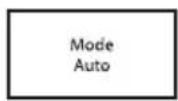
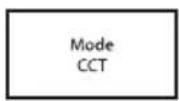
The display shows the currently activated standalone mode (Mode Auto, Mode Static, Mode CCT, Mode Color Preset, Mode User Color, Mode Loop).



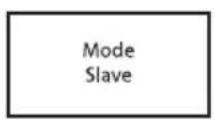
MAIN DISPLAY SLAVE MODE
The display shows Mode Slave. If the slave unit is assigned to a slave group, the slave group and the delay time set in the master unit under the standalone operating modes Auto and Loop are also displayed.

CONFIGURE DMX START ADDRESS
Press MENU to access the main menu. Now use UP and DOWN to select the menu item DMX Mode and confirm with ENTER. Again use UP and DOWN to select the desired DMX mode and confirm with ENTER (DMX modes with DMX delay channel are identified with ,D'). Tables with the channel assignment of the different DMX modes can be found in these instructions under DMX CONTROL.

text_image
---- Menu ---- ► DMX Address DMX Mode DMX Delay Stand Alone Slave Settings System Info
CONFIGURE DMX MODE
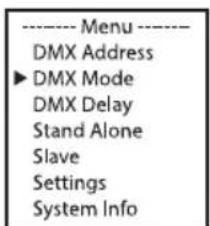
Press MENU to access the main menu. Now use UP and DOWN to select the menu item DMX Mode and confirm with ENTER. Again use UP and DOWN to select the desired DMX mode and confirm with ENTER. Tables with the channel assignment of the different DMX modes can be found in these instructions under DMX CONTROL.
text_image
---- Menu ---- DMX Address ► DMX Mode DMX Delay Stand Alone Slave Settings System Info
text_image
---DMX Mode --- ► 1CH D2CH 3CH1 D4CH1 3CH2 D4CH2 5CH1 D6CH1 5CH2 D6CH2 10CH D11CH 13CH D14CHDMX DELAY
The DMX Delay function is a simple way to create a running light effect with a large number of spotlights that are all the same model and that are all running the same software version. This is otherwise only achievable with a suitable DMX controller and time-consuming programming. All the spotlights used in this are set to the same DMX operating mode and controlled via the same DMX start address.
Manually setting the DMX delay for DMX modes without DMX delay channel:
Starting from the main display, press MENU to enter the main menu. Use the buttons ▲ and ▼ to select the menu item DMX Delay and confirm with ENTER. Again use ▲ and ▼ to select the desired submenu item, confirm with ENTER and set the value or status accordingly. Confirm all entries with ENTER. Assign the spotlights to one of up to 47 groups as desired (maximum group number depends on the activated DMX operating mode). Multiple spotlights may be assigned to a group. The group number is also the factor by which the set delay time is multiplied. The delay time (delay time of the DMX signal) can be set manually at each spotlight separately with different values (0.0 s to 2.0 s in 0.1 s increments).

text_image
---- Menu ---- DMX Address DMX Mode ►DMX Delay Stand Alone Slave Settings System Info ---- Delay ---- ►Group 0 Delay 0.0sSetup example:

flowchart
graph LR
    A["DMX Controller"] --> B["Spotlight (group) 0 no delay\n► Group 0\nDelay 0.0s"]
    B --> C["Spotlight (group) 1\n► Group 1\nDelay 1.5s"]
    C --> D["Spotlight (group) 2\n► Group 2\nDelay 1.5s"]
    D --> E["Spotlight (group) 3\n► Group 3\nDelay 1.5s"]
    E --> F["Spotlight (group) 4\n► Group 4\nDelay 1.5s"]
    F --> G["Spotlight (group) 5\n► Group 5\nDelay 1.5s"]
    B --> H["Spotlight (group) 0 no delay\n► Group 0\nDelay 0.0s"]
    C --> I["Spotlight (group) 1\n► Group 1\nDelay 1.5s"]
    D --> J["Spotlight (group) 2\n► Group 2\nDelay 1.5s"]
    E --> K["Spotlight (group) 3\n► Group 3\nDelay 1.5s"]
    F --> L["Spotlight (group) 4\n► Group 4\nDelay 1.5s"]
    G --> M["Spotlight (group) 5\n► Group 5\nDelay 1.5s"]
Setting the DMX delay for DMX modes with DMX delay channel:
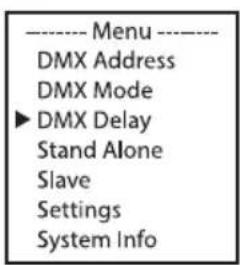
Starting from the main display, press MENU to enter the main menu. Use the buttons ▲ and ▲ to select the menu item DMX Delay and confirm by pressing ENTER twice. Assign the spotlights to one of up to 47 groups as desired (maximum group number depends on the activated DMX operating mode). Multiple spotlights may be assigned to a group. The group number is also the factor by which the set delay time is multiplied. Confirm each entry by pressing ENTER.
text_image
---- Menu ---- DMX Address DMX Mode ►DMX Delay Stand Alone Slave Settings System Info
The delay time (delay time of the DMX signal) is set by means of a DMX controller in the separate DMX delay channel of the corresponding DMX mode (0.0 s to 2.0 s in 0.1 s increments).
Setup example:

flowchart
graph LR
    A["DMX Controller DMX Delay 0.5s"] --> B["Spotlight (group) 0 no delay"]
    B --> C["Spotlight (group) 1 0,5s delay"]
    C --> D["Spotlight (group) 2 1s delay"]
    D --> E["Spotlight (group) 3 1,5s delay"]
    E --> F["Spotlight (group) 4 2s delay"]
    F --> G["Spotlight (group) 5 2,5s delay"]

    B --> H["Delay Group 0"]
    C --> I["Delay Group 1"]
    D --> J["Delay Group 2"]
    E --> K["Delay Group 3"]
    F --> L["Delay Group 4"]
    G --> M["Delay Group 5"]
AUTO STANDALONE MODE
The 6 available auto-programmes each comprise non-editable color-change sequences; Random scenes, brightness, speed and delay can be set separately for each programme in some cases.
Starting from the main display, press MENU to enter the main menu. Now use UP and DOWN to select the Stand Alone menu item and confirm with ENTER. Use UP and DOWN again to select the Auto standalone mode and confirm with ENTER. Now use UP and DOWN to select the desired programme and confirm with ENTER.

text_image
---- Menu ---- DMX Address DMX Mode DMX Delay ► Stand Alone Slave Settings System Info
text_image
Mode ▶ Auto Static CCT Color Preset User Color Loop
text_image
Auto ► 7 Color Jump 7 Color Fade 15 Color Jump 15 Color Fade Random Jump Random Fade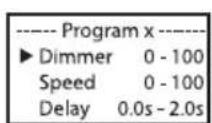
This will take you to the submenu for setting the submenu items (see table, select with UP and DOWN, confirm with ENTER, change value or status with UP and DOWN, confirm with ENTER). The settings for each programme are made separately and are retained even after restarting the device.
| AUTO STANDALONE MODE | ||
| Dimmer Sets brightness 0–100 | ||
| Speed Sets running speed 0–100 | ||
| Delay Delay time for slave groups 0.0 s to 2.0 s | ||
STATIC STANDALONE MODE
The Static standalone mode allows the Dimmer, Strobe, R, G, B, W and A values to be set directly on the device with values in a similar way to with a DMX controller. In this way, an individual scene can be created without an additional DMX controller.
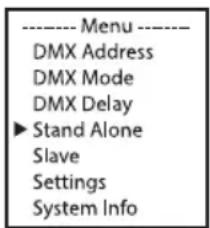
Starting from the main display, press MENU to enter the main menu. Using UP and DOWN, select the Standalone menu item and confirm with ENTER. Again use UP and DOWN to select the
Static standalone mode and confirm with ENTER. Using UP and DOWN, now select the menu item that you wish to edit and confirm with ENTER. You can use UP and DOWN to configure the desired value between 000 and 255. The strobe effect values correspond to those in channel 2 of the DMX table 3 CH Mode 1. Confirm all entries with ENTER.
text_image
---- Menu ---- DMX Address DMX Mode DMX Delay ► Stand Alone Slave Settings System Info
text_image
Mode Auto ► Static CCT Color Preset User Color Loop
text_image
---- Static Mode ---- ► Dimmer 000 - 255 Strobe 000 - 255 Red 000 - 255 Green 000 - 255 Blue 000 - 255 White 000 - 255 Amber 000 - 255CCT STANDALONE MODE (CORRELATED COLOR TEMPERATURE)
The CCT standalone mode allows the color temperature to be adjusted from 1800 K to 7500 K in 100 K steps, and the tint and brightness (dimmer) can also be adjusted.
Starting from the main display, press MENU to enter the main menu. Using UP and DOWN, select the Standalone menu item and confirm with ENTER. Using UP and DOWN, select the standalone mode CCT and confirm with ENTER. Now select the menu item you wish to edit using UP and DOWN, confirm with ENTER and adjust the desired value using UP and DOWN. Confirm all entries with ENTER.

text_image
---- Menu ---- DMX Address DMX Mode DMX Delay ► Stand Alone Slave Settings System Info
text_image
---- Mode ---- Auto Static ► CCT Color Preset User Color Loop
COLOR PRESET STANDALONE MODE
15 different color presets are available. The brightness can be separately set for each preset. Starting from main display 1, press MENU to enter the main menu. Using UP and DOWN, select the menu item Standalone and confirm with ENTER. Using UP and DOWN, select the standalone mode Color Preset and confirm with ENTER. Now use UP and DOWN to select the desired color as a preset and confirm with ENTER (Color Off = blackout). You can set the desired brightness from 000 to 100 using UP and DOWN, confirm all entries with ENTER.

text_image
---- Menu ---- DMX Address DMX Mode DMX Delay ► Stand Alone Slave Settings System Info

text_image
Color Preset ---- ► Color Off Red 0 - 100 Amber 0 - 100 Yellow W 0 - 100 Yellow 0 - 100 Green 0 - 100 Turquoise 0 - 100 Cyan 0 - 100
text_image
Blue 0 - 100 Lavender 0 - 100 Mauve 0 - 100 Magenta 0 - 100 Pink 0 - 100 Warm White 0 - 100 White 0 - 100 Cold White 0 - 100USER COLOR STANDALONE MODE
The User Color standalone mode allows you to store four individual color presets for overall brightness, strobe and a color blend of R, G, B, W and A directly in the device.
Starting from the main display, press MENU to enter the main menu. Using UP and DOWN, select the menu item Standalone and confirm with ENTER. Again use UP and DOWN to select the standalone mode User Color and confirm with ENTER. Using UP and DOWN, now select the desired preset (Color 1 - Color 4) and confirm with ENTER. Using UP and DOWN, now select the menu item that you wish to edit and confirm with ENTER. You can use UP and DOWN to configure the desired value between 000 and 255. The strobe effect values correspond to those in channel 2 of the DMX table 4 CH Mode 1. Confirm all entries with ENTER.

text_image
---- Menu ---- DMX Address DMX Mode DMX Delay ► Stand Alone Slave Settings System Info
text_image
Mode Auto Static CCT Color Preset ► User Color Loop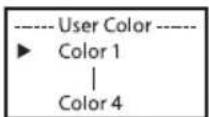

text_image
Color x ► Dimmer 0 - 255 Strobe 0 - 255 Red 0 - 255 Green 0 - 255 Blue 0 - 255 White 0 - 255 Amber 0 - 255LOOP STANDALONE MODE
The Loop standalone mode allows you to individually configure, store and access up to four different color changing programmes. Brightness, step time, fade time and delay (signal delay) are also separately configurable.
Starting from the main display, press MENU to enter the main menu. Using UP and DOWN, select the menu item Standalone and confirm with ENTER. Using the UP and DOWN buttons, select the standalone mode Loop and confirm with ENTER. Using UP and DOWN, now select the desired loop (Loop 1 to 4) and confirm with ENTER.

text_image
---- Menu ---- DMX Address DMX Mode DMX Delay ► Stand Alone Slave Settings System Info ---- Mode ---- Auto Static CCT Color Preset User Color ► Loop ---- Loop ---- ► Loop 1 | Loop 4 ---- Loop x ---- ► Dimmer 0 - 100 Steptime 0.1s-10.0s Fadetime 0%-100% Delay 0.0s - 2.0s 1.Step Red 2.Step Green 3.Step Blackout 4.Step --This will take you to the submenu for setting the submenu items (see table, select with UP and DOWN, confirm with ENTER, change value or status with UP and DOWN, confirm with ENTER). The settings for each loop are made separately and are retained even after restarting the device.
| STANDALONE MODE LOOP (Loop 1 – Loop 4) | ||
| Dimmer Sets brightness 0–100 | ||
| Step time | Sets step time 0.1 s to 10.0 s | |
| Fade time | Sets fade time in percent 0% to 100% | |
| Delay Delay time for slave groups 0.0 s to 2.0 s | ||
| Step 1 15 colors from Color Preset Red – C White | ||
| Step 2 „ „ | ||
| Step 3 15 colors from Color Preset Red – C White | ||
| --- Skip step | ||
| Step 4 „ „ | ||
SLAVE MODE
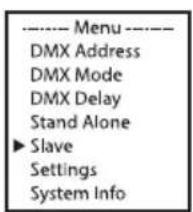
Standard slave mode: Starting from the main display, press MENU to enter the main menu. Now use UP and DOWN to select the menu item Slave, confirm with ENTER, select Slave Group 0 and again confirm with ENTER. Connect the slave and the master units (same model, same software version) using a DMX cable, and enable one of the standalone modes on the master unit (Auto, Static, Color Preset, User Color, Loop). The slave unit will now follow the master unit.

text_image
---- Menu ---- DMX Address DMX Mode DMX Delay Stand Alone ► Slave Settings System Info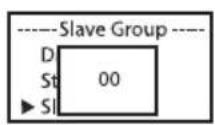
Main display
Advanced slave mode: If you wish to control the slave units in master/slave mode using one of the Auto or Loop standalone modes, the control signal can be reproduced with a time delay of up to 24 steps. The delay is set in the sub-menu item Delay in the relevant standalone mode, the delay factor is set in the slave menu of the corresponding spotlight. This is a simple way to create a running light effect with a large number of spotlights that are all the same model and have the same software version. This is otherwise only possible using a suitable DMX controller and time-consuming programming.
text_image
---- Menu ---- DMX Address DMX Mode DMX Delay Stand Alone ► Slave Settings System Info

Main display
with group number
and delay time in master unit
Assign the spotlights to one of up to 24 groups according to preference, whereby several spotlights can be assigned to one group. The group number is also the factor by which the delay time set in the master unit is multiplied (see setup example).

flowchart
graph LR
    A["Master-Einheit Auto Program 1 Delay 0.5s"] --> B["Slave Group 0 kein Delay"]
    B --> C["Mode Slave"]
    C --> D["Slave Group 1 0.5s Delay"]
    D --> E["Mode Slave Group 01 0.5s"]
    E --> F["Slave Group 2 1s Delay"]
    F --> G["Mode Slave Group 02 0.5s"]
    G --> H["Slave Group 3 1.5s Delay"]
    H --> I["Mode Slave Group 03 0.5s"]
    I --> J["Mode Slave Group 03 0.5s"]
    J --> K["Mode Slave Group 03 0.5s"]
    K --> L["Slave Group 4 2s Delay"]
    L --> M["Mode Slave Group 04 0.5s"]
    M --> N["Slave Group 5 2.5s Delay"]
SYSTEM SETTINGS (SETTINGS)
Starting from the main display, press MENU to enter the main menu. Use UP and DOWN to select the menu item Settings and confirm with ENTER.

This will take you to the submenu for setting the submenu items (see table, select with UP and DOWN, confirm with ENTER, change value or status with UP and DOWN, confirm with ENTER).
| Settings | ||||
| Display Reverse = | Rotate display Off No display rotation | |||
| On Display is rotated by 180° (e.g. for overhead installation) | ||||
| Display backlight = | Display lighting Off Deactivates after approxi- | mately 30 seconds of inactivity | ||
| Signal Fail = Operating status with DMX signal fault | Hold Last command and is retained | |||
| Blackout Activates blackout | ||||
| Fade slow fade out to blackout | ||||
| User Color 1 User Color 1 is activated | ||||
| PWM Frequency = | LED PWM frequency 650Hz, 1530Hz, 2000Hz, 3600Hz, 12kHz, 25kHz | Select LED PWM frequency | ||
| Dimmer response | Dimmer response LED | Lamp responds abruptly to changes in DMX value | ||
| Halogen | Spotlight behaves like a halogen spotlight with soft brightness changes | |||
| Dimmer curve = Dimmer curve Linear Light intensity increases | linearly with DMX value | |||
| Exponential Light intensity can be finely adjusted at lower DMX values and broadly adjusted at higher DMX values | ||||
| Logarithmic Light intensity can be broadly adjusted at lower DMX values and finely adjusted at higher DMX values | ||||
| S-curve Light intensity can be finely adjusted at lower and higher DMX values and broadly adjusted at medium DMX values | ||||
| Redshift = accurately mimics the color drift of dimming a halogen spotlight. When dimming the spotlight, the color temperature changes automatically to increasingly warm white tones and amber (and vice versa). | Off Color drift is disabled | |||
| On Color drift is enabled | ||||
| Color calibration = Color calibration Calibrated | Factory calibration of R, G, B and A (across all modes) | |||
| RAW R, G, B, W and A with maximum value 255 | ||||
| User Individual color calibration. Cross-mode brightness setting of R, G, B, W and A values from 0 - 255 | ||||
| Reset = Reset settings | Factory Reset to factory settings: | Perform reset with ENTER, cancel with MENU | ||
| Preset A Reset to | Preset A: Perform reset with ENTER, cancel with MENU | |||
| Preset B Reset to | Preset B: Perform reset with ENTER, cancel with MENU | |||
| Preset C Reset to | Preset C: Perform reset with ENTER, cancel with MENU | |||
| Edit Preset = Store all system settings in 3 individual presets | Preset A Store with ENTER | |||
| Preset B Store with ENTER | ||||
| Preset C Store with ENTER | ||||
| Autolock = Automatic locking of the controls | Off Automatic locking of the controls is disabled | |||
| On Automatic locking of the controls after approximately 30 seconds of inactivity. Display shown upon attempted use “LOCKED”. Unlock: Press and hold UP and DOWN simultaneously for approx. 5 seconds | ||||
Starting from the main display, press MENU to enter the main menu. Now use UP and DOWN to select the menu item System Info and confirm with ENTER.

text_image
---- Menu ---- DMX Address DMX Mode DMX Delay Stand Alone Slave Settings ►System InfoThis will take you to the submenu for accessing the system information (see table, selection with UP and DOWN, confirm with ENTER, change status with UP and DOWN, confirm with ENTER).
| System Info | ||||
| Firmware = Displays device firmware Main CPU | V1.xx | |||
| Temperature = Displays temperature of LED unit | LED xxx°C / xxx°F | |||
| Celsius/Fahrenheit Celsius (= display in degrees Celsius) | ||||
| Operation Time | = Displays operating time OpTime | xxxx:xxh Displays total operating time in hours and minutes | ||
MANUAL LOCKING FUNCTION
In addition to the ability to automatically protect the lamp from accidental and unauthorised operation (see "Settings" – "Auto-lock"), the controls can also be locked manually. For this purpose, press and hold UP and DOWN simultaneously for approximately 5 seconds. "Locked!" is now displayed and it is no longer possible to change the spotlight's settings via the controls. To unlock, press and hold UP and DOWN simultaneously for approximately 5 seconds. The display will show the previously displayed information.
SET-UP AND INSTALLATION
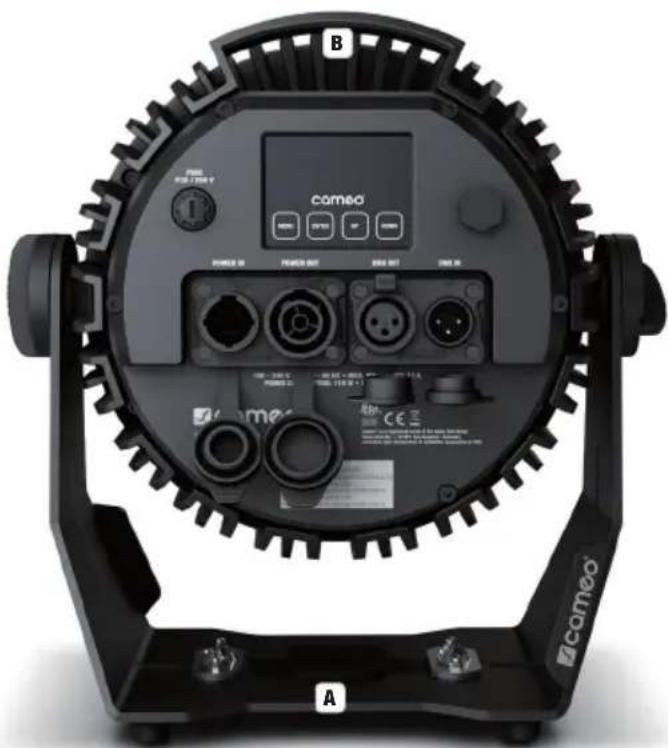
Four rubber feet on the underside of the stand and/or mounting bracket ensure that it can be securely placed on suitable surfaces while at the same time protecting the surface from scratches. When installing the traverse mounting, use an optional traverse clamp to be fastened at the mounting point A (Omega bracket and the 16 mm spigot SPIN16® with folding mechanism are available as options). Ensure firm connections and secure the spotlight with a suitable safety rope at the securing point provided B (carry handle).

Important safety notice: Overhead mounting requires extensive experience, including the calculation of the limit values for load, the installation materials and regular safety inspection of all installation materials and spotlights. If you do not have these qualifications, do not attempt to perform an installation yourself. Refer instead to a qualified professional. There is a risk that devices that are incorrectly mounted and secured may come loose and fall down. This can cause serious injury or death.
text_image
B COMEO COMO COMO COMO COMO COMO COMO COMO COMO COMO COMO COMO COMO COMO COMO COMO COMO COMO COMO COMO COMO COMO COMO COMO COMO COMO COMO COMO COMO COMO COMO COMO COMO COMO COMOCARE, MAINTENANCE AND REPAIR
To ensure the device functions properly over the long term, it must be maintained and serviced regularly – at least every 3,000 operating hours or, at the latest, after one year.
CARE (carried out by user)

WARNING! Before carrying out any work, the power supply – and, if possible, all device connections – must be disconnected.

PLEASE NOTE! Improper care can lead to impairment of the device or even its destruction.
- Housing surfaces must be cleaned with a clean, damp cloth. Make sure that no moisture can penetrate into the device.
- Air inlets and outlets must be regularly cleaned of dust and dirt. If compressed air is used, make sure that damage to the device is prevented (e.g. fans must be blocked in this case, as they could otherwise over-rev.).
- Lines and plug contacts must be cleaned regularly and dust and dirt must be removed.
- In general, no cleaning agents or abrasive agents may be used, otherwise the surface finish may be damaged.
- Devices must generally be stored dry and protected from dust and dirt.
- To ensure correct and safe operation, all accessible or removable lenses and light-emitting apertures must be cleaned regularly.
MAINTENANCE AND REPAIR (BY QUALIFIED PERSONNEL ONLY)

HAZARD! There are live components in the device. Even after disconnecting the mains connection, there may still be residual voltage in the device, for example, due to charged capacitors.

PLEASE NOTE! There are no user-serviceable assemblies in the device.

PLEASE NOTE! Maintenance and repair work may only be carried out by sufficiently qualified specialist personnel. If in doubt, consult a specialist workshop.

PLEASE NOTE! Improperly performed maintenance work may affect the warranty claim.

PLEASE NOTE! For conversion or retrofit sets provided by the manufacturer, it is essential to observe the enclosed installation instructions.
OPTIONAL ACCESSORIES
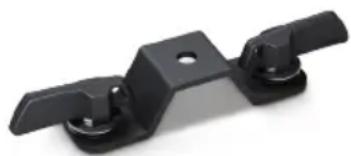
Omega mounting bracket CLOMEGABRACKET1
natural_image
Black metal bracket component with two side slots and a circular hole (no text or symbols)16 mm TV spigot with folding mechanism CLZSPIN16

DMX TECHNOLOGY
DMX-512
DMX (Digital Multiplex) is the designation for a universal transmission protocol for
communications between corresponding devices and controllers.
A DMX controller sends DMX data to the connected DMX device(s).
The DMX data is always transmitted as a serial data stream that is
natural_image
Coiled black cable with two connectors (no text or symbols visible)forwarded from one connected device to the next via the "DMX IN" and "DMX OUT" connectors (XLR plug-type connectors) that are found on every DMX-capable device, provided the maximum number of devices does not exceed 32 units. The last device in the chain needs to be equipped with a terminator (terminating resistor).
DMX CONNECTION
DMX is the common "language" via which a very wide range of types and models of equipment from various manufacturers can be
connected with one another and controlled via a central controller, provided that all of the devices and the controller are DMX compatible. For optimum data transmission, it is necessary to keep the connecting cables between the individual devices as short as possible.
The order in which the devices are integrated in the DMX network has no influence on the addresses. Thus the device with the DMX address 1 can be located at any position in the (serial) DMX chain: at the beginning, at the end or somewhere in the middle. If the DMX address 1 is assigned to a device, the controller "knows" that it should send all data allocated to address 1 to this device regardless of its position in the DMX network.
SERIAL CONNECTION OF MULTIPLE LIGHTS
- Connect the male XLR connector (3-pin or 5-pin) of the DMX cable to the DMX output (female XLR socket) of the first DMX device (e.g. DMX-Controller).
- Connect the female 3-pin XLR connector of the DMX cable connected to the first projector to the DMX input (male 3-pin socket) of the next DMX device. In the same way, connect the DMX output of this device to the DMX input of the next device and repeat until all devices have been connected. Please note that as a rule, DMX devices are connected in series and connections cannot be shared without active splitters. The maximum number of DMX devices in a DMX chain should not exceed 32 units.
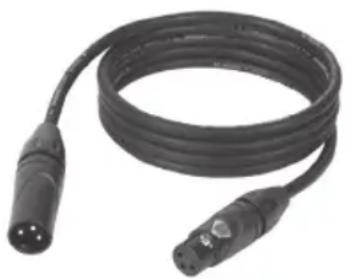
The Adam Hall 3 STAR, 4 STAR, and 5 STAR product ranges include an extensive selection of suitable cables.
DMX CABLES
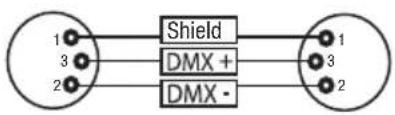
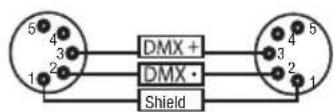
When fabricating your own cables, always observe the illustrations on this page. Never connect the shielding of the cable to the ground contact of the plug, and always make certain that the shielding does not come into contact with the housing of the XLR plug. If the shielding is connected to the ground, this can lead to short-circuiting and system malfunctions.
PIN ASSIGNMENT
DMX cable with 3-pin XLR connectors: DMX cable with 5-pin XLR connectors (pin 4 and 5 are not used):
flowchart
graph LR
    A["1"] --> B["Shield"]
    C["3"] --> B
    D["2"] --> B
    B --> E["1"]
    B --> F["3"]
    B --> G["2"]
DMX TERMINATORS (TERMINATING RESISTORS)
To prevent system errors, the last device in a DMX chain needs to be equipped with a terminating resistor (120 ohm, 1/4 Watt).
3-pin XLR connector with a terminating resistor: K3DMXT3
5-pin XLR connector with a terminating resistor: K3DMXT5
PIN ASSIGNMENT
3-pin XLR connector: 5-pin XLR connector:

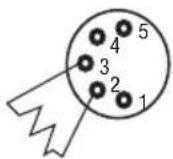
DMX ADAPTER
The combination of DMX devices with 3-pin connectors and DMX devices with 5-pin connectors in a DMX chain is possible with suitable adapters.
PIN ASSIGNMENT
DMX Adapter 5-pin XLR male to 3-pin XLR female: K3DGF0020
Pins 4 and 5 are not used.
PIN ASSIGNMENT
DMX Adapter 3-pin XLR male to 5-pin XLR female: K3DHM0020
Pins 4 and 5 are not used.


Additional features: Power cord included; SPIN16 and Omega bracket available as optional accessories
TECHNICAL DATA
| Product number: CLPFLATPRO7G2 CLPFLATPRO12G2 CLPFLATPRO18G2 | |||
| Product type: LED spotlight | |||
| Type: Outdoor spotlight | |||
| Colour spectrum: RGBWA | |||
| Number of LEDs: 7 12 18 | |||
| LED type: 10 W | |||
| LED PWM frequency: 650 Hz, 1530 Hz, 2000 Hz, 3600 Hz, 12 kHz, 25 kHz (adjustable) | |||
| Beam angle (half-peak divergence): | 33.5° (18.5°) | ||
| DMX input: 3-pin male | |||
| DMX output: | 3-pin female | ||
| DMX modes: | Without DMX delay channel: 1-channel, 3-channel 1, 3-channel 2, 5-channel 1, 5-channel 2, 10-channel, 13-channel With DMX delay channel: 2-channel, 4-channel 1, 4-channel 2, 6-channel 1, 6-channel 2, 11-channel, 14-channel | ||
| DMX functions: | Dimmer, fine dimmer, strobe, RGBWA, colour temperature, colour presets, chaser selection, colour mode fading, system setting, DMX delay | ||
| Control: | DMX512, RDM | ||
| Standalone functions: | Auto programs, static, CCT mode, colour presets, user colours, loop function | ||
| Operating elements: | Mode, Enter, Up, Down | ||
| Display elements: | OLED display | ||
| Operating voltage: | 100–240 V AC/50–60 Hz | ||
| Power consumption: | 60 W | 110 W | 170 W |
| Luminous flux: | 2400 lm | 4300 lm | 6600 lm |
| Calibration modes: | Calibrated, RAW, User | ||
| Power supply connections: Neutrik True One compatible (IN/OUT) | |||
| Electrical protection class: 1 | |||
| Max. output current: 12 A 11 A 10 A | |||
| Fuse: F2A / 250 V | (5 x 20 mm) | F3A / 250 V(5 x 20 mm) | F4A / 250 V(5 x 20 mm) |
| Ambient temperature (in operation): | -15° - 45° | ||
| Protection class: IP65 | |||
| Minimum distance to illuminated surface: | 0.5 m | ||
| Minimum distance to normally flammable materials: | 0.5 m | ||
| Housing colour: Black | |||
| Housing material: Metal | |||
| Housing cooling: Convection cooling | |||
| Dimensions (W x H x D, including mounting bracket): | 241 x 253 x 142 mm | 292 x 300 x 156 mm | 339 x 353 x 170 mm |
| Weight (incl. mounting bracket): | 4.1 kg 5.9 kg 8.3 kg | ||
EXPLANATION OF IP PROTECTION CLASS
- An IP rating only reflects protection from solid objects and water. It does not describe general weather resistance, such as protection from UV radiation and temperature, etc.
- The first identification digit indicates protection from dust, solid objects and contact:
| IP2X | Protected against solid foreign bodies ≥ 12.5 mm in diameter |
| IP3X | Protected against solid foreign bodies ≥ 2.5 mm in diameter |
| IP4X | Protected against solid foreign bodies ≥ 1.0 mm in diameter |
| IP5X | Protected against dust in harmful quantities and completely protected against contact |
| IP6X | Are dust-tight and completely protected against contact |
- The second identification digit indicates protection from water:
| IPX0 no | protection |
| IPX1 | Protection against dripping water |
| IPX2 | Protection against dripping water when the device is tilted up to 15° |
| IPX3 | Protection against falling spray water up to 60° from the vertical |
| IPX4 | Protection against splashing water on all sides |
| IPX5 | Protection against water jets (nozzle) from any angle |
| IPX6 | Protection against strong water jets |
| IPX7 | Protection against temporary immersion |
- In addition, some device-specific measures such as covers and sealing caps are necessary in order to achieve the specified protection class (e.g. protective caps on unused connections).

The IP rating of the product can be found in the technical data and is printed on the device.
MINIMUM DISTANCE TO ILLUMINATED SURFACE
0.5 m This symbol with distance specification in metres (m) indicates the minimum distance between the light head and the illuminated surface. In this example the distance is 0.5 m.
MINIMUM DISTANCE TO NORMALLY FLAMMABLE MATERIALS
·s D_0.5 m This symbol with distance specification in metres (m) indicates the minimum distance between the light head and normally flammable materials. In this example the distance is 0.5 m.
DISPOSAL

PACKAGING:
- Packaging can be fed into the reusable material cycle using the usual disposal methods.
- Please separate the packaging in accordance with the disposal laws and recycling regulations in your country.

DEVICE:
- This device is subject to the European Directive on Waste Electrical and Electronic Equipment, as amended. WEEE Directive Waste Electrical and Electronic Equipment. Old appliances do not belong in household waste. The old device must be disposed of via an approved disposal company or a municipal disposal facility. Please observe the applicable regulations in your country!
- Observe all disposal laws applicable in your country.
- As a private customer, you can obtain information on environmentally-friendly disposal options from the seller of the product or the appropriate regional authorities.
MANUFACTURER'S DECLARATIONS
MANUFACTURER'S WARRANTY & LIMITATION OF LIABILITY
Adam Hall GmbH, Adam-Hall-Str. 1, D-61267 Neu Anspach / E-mail Info@adamhall.com / +49 (0)6081 / 9419-0.
Our current warranty conditions and limitation of liability can be found at:
https://cdn-shop.adamhall.com/media/pdf/Manufacturers-Declarations-CAMEO_DE_EN_ES_FR.pdf.
Contact your sales partner for service.
CE CONFORMITY
Adam Hall GmbH hereby confirm that this product meets the following guidelines (where applicable):
Low-Voltage Directive (2014/35/EU)
EMC Directive (2014/30/EU)
RoHS (2011/65/EU)
RED (2014/53/EU)
EC DECLARATION OF CONFORMITY
Declarations of conformity for products subject to the LVD, EMC, RoHS Directive can be requested from info@adamhall.com.
Declarations of conformity for products subject to RED can be downloaded from www.adamhall.com/compliance/.
SUBJECT TO MISPRINTS AND ERRORS, AS WELL AS TECHNICAL OR OTHER MODIFICATIONS!
DEUTSCH
text_image
Mode ▶ Auto Static CCT Color Preset User Color Loop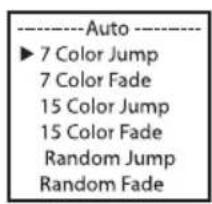
text_image
Auto ► 7 Color Jump 7 Color Fade 15 Color Jump 15 Color Fade Random Jump Random Fade
text_image
---- Program x ---- ► Dimmer 0 - 100 Speed 0 - 100 Delay 0.0s - 2.0sSicherungspunkt B (Tragegriff).

natural_image
Black plastic mechanical bracket with two side flanges and a central hole (no text or symbols)natural_image
Coiled black cable with two connectors and a connector pin (no text or symbols visible)DMX-VERBINDUNG:
DMX-Adapter 5-Pol XLR male auf 3-Pol XLR female: K3DGF0020
https://cdn-shop.adamhall.com/media/pdf/Manufacturers-Declarations-CAMEO_DE_EN_ES_FR.pdf.
text_image
CAMOO® FLAT PRO® 12 G2 10 7 5 6 8 POWER IN POWER OUT MAX. POWER INT: 11 A POWER CONSPORATION: 114 W - WTR/INT: 5.9 kg 11 10 9 11 11 ©CE ©CE ©CE ©CE ©CE ©CE ©CE ©CE ©CE ©CE ©CE ©CE ©CE ©CE ©CE ©CE ©CE ©CE ©CE ©CE ©CE ©CE ©CE ©CE ©CE ©CE ©CE ©CE ©CE ©CE ©CE ©CE ©CE ©CEtext_image
Mode ▶ Auto Static CCT Color Preset User Color Loop
text_image
Auto ► 7 Color Jump 7 Color Fade 15 Color Jump 15 Color Fade Random Jump Random Fade
text_image
---- Program x ---- ► Dimmer 0 - 100 Speed 0 - 100 Delay 0.0s - 2.0snatural_image
Black plastic mechanical bracket with two side slots and a central hole (no text or symbols visible)natural_image
Coiled black cable with two connectors and a terminal connector (no text or symbols visible)PROTOCOLE DMX
https://cdn-shop.adamhall.com/media/pdf/Manufacturers-Declarations-CAMEO_DE_EN_ES_FR.pdf.
Directive CEM (2014/30/UE)
RoHS (2011/65/UE)
RED (2014/53/UE)
DÉCLARATION DE CONFORMITÉ UE
flowchart
graph LR
    A["DMX Controller DMX Delay 0.5s"] --> B["--- Delay --- Group 0"]
    B --> C["--- Delay --- Group 1"]
    C --> D["--- Delay --- Group 2"]
    D --> E["--- Delay --- Group 3"]
    E --> F["--- Delay --- Group 4"]
    F --> G["--- Delay --- Group 5"]
    B --> H["--- Delay --- Group 3"]
    C --> I["--- Delay --- Group 3"]
    D --> J["--- Delay --- Group 3"]
    E --> K["--- Delay --- Group 3"]
    F --> L["--- Delay --- Group 4"]
    G --> M["--- Delay --- Group 5"]
MODO AUTÓNOMO AUTO
text_image
Mode ▶ Auto Static CCT Color Preset User Color Loop
text_image
Auto ► 7 Color Jump 7 Color Fade 15 Color Jump 15 Color Fade Random Jump Random Fade
natural_image
Black metal bracket component with two side slots and a circular hole (no text or symbols)natural_image
Coiled black cable with two connectors and a 3-pin connector (no text or symbols visible)https://cdn-shop.adamhall.com/media/pdf/Manufacturers-Declarations-CAMEO_DE_EN_ES_FR.pdf.
9 UCHWYT DO STATYWU I MONTAŻOWY
text_image
Mode ▶ Auto Static CCT Color Preset User Color Loop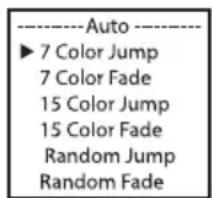
text_image
Auto ► 7 Color Jump 7 Color Fade 15 Color Jump 15 Color Fade Random Jump Random Fade
text_image
---- Program x ---- ► Dimmer 0 - 100 Speed 0 - 100 Delay 0.0s - 2.0snatural_image
Coiled black cable with two connectors and a 3-pin connector (no text or symbols visible)ZŁĄCZE DMX:
https://cdn-shop.adamhall.com/media/pdf/Manufacturers-Declarations-CAMEO_DE_EN_ES_FR.pdf.
text_image
Mode ▶ Auto Static CCT Color Preset User Color Loop
text_image
Auto ► 7 Color Jump 7 Color Fade 15 Color Jump 15 Color Fade Random Jump Random Fade
text_image
---- Program x ---- ► Dimmer 0 - 100 Speed 0 - 100 Delay 0.0s - 2.0snatural_image
Coiled black cable with two connectors (no text or symbols visible)COLLEGAMENTO DMX:
https://cdn-shop.adamhall.com/media/pdf/Manufacturers-Declarations-CAMEO_DE_EN_ES_FR.pdf.
| D2CH Mode (with DMX-Delay Channel, preselect color in stand-alone mode Static, CCT, Color Preset or User Color) | ||||
| Ch. Function Values Sub-Group | ||||
| 1 Dimmer 000 - 255 0% to 100% | Dimmer | |||
| 2 DMX Delay | 000 - 005 No Delay | DMX Delay | ||
| 006 - 255 0,1s -> 2,0s | ||||
| D4CH1 Mode (with DMX-Delay Channel) | |||||
| Ch. Function Values Sub-Group | |||||
| 1 Dimmer 000 - 255 0% to 100% Dimmer | |||||
| 2 Strobe functions | 000 - 005 Strobe open | Multifunctional Strobe | |||
| 006 - 010 Strobe closed | |||||
| 011 - 022 Ramp up/down, slow -> fast | |||||
| 023 - 033 | Ramp up/down random, slow->fast | ||||
| 034 - 045 Ramp up, slow -> fast | |||||
| 046 - 056 | Ramp up random, slow -> fast | ||||
| 057 - 068 Ramp down, slow -> fast | |||||
| 069 - 079 | Ramp down random, slow -> fast | ||||
| 080 - 102 | Random Strobe effect, slow -> fast | ||||
| 103 - 127 | Strobe Break effect, 5s.....1s (short burst with break) | ||||
| 128 - 250 | Strobe slow -> fast <1Hz - 20Hz | ||||
| 251 - 255 Strobe open | |||||
| 3 | Color Presets & Color Jumping & Color Fading | 000 - 005 Color off | Color Preset | |||
| 006 - 013 Red | ||||||
| 014 - 021 Amber | ||||||
| 022 - 029 Yellow warm | ||||||
| 030 - 037 Yellow | ||||||
| 038 - 045 Green | ||||||
| 046 - 053 Turquoise | ||||||
| 054 - 061 Cyan | ||||||
| 062 - 069 Blue | ||||||
| 070 - 077 Lavender | ||||||
| 078 - 085 Mauve | ||||||
| 086 - 093 Magenta | ||||||
| 094 - 101 Pink | ||||||
| 102 - 109 Warm White | ||||||
| 110 - 117 White | ||||||
| 118 - 125 Cold White | ||||||
| 126 - 127 Color Jumping Stop | ||||||
| 128 - 164 | Color Jumping Speed slow -> fast / Color 1 -> 12 | |||||
| 165 - 201 | Color Fading Speed slow -> fast / Color 1 -> 12 | |||||
| 202 - 207 User | Color_1 | |||||
| 208 - 213 User | Color_2 | |||||
| 214 - 219 User | Color_3 | |||||
| 220 - 225 User | Color_4 | |||||
| 226 - 255 no function | ||||||
| 4 DMX Delay | 000 - 005 No Delay | DMX Delay | ||||
| 006 - 255 0,1s -> 2,0s | ||||||
| D4CH2 Mode (with DMX-Delay Channel) | |||||
| Ch. Function Values Sub-Group | |||||
| 1 Dimmer 000 - 255 0% to 100% Dimmer | |||||
| 2 | Color Temperature | 000 + 005 off | CCT | ||
| 006 + 008 Bulb White (2700K) | |||||
| 009 + 011 Halogen White (3200K) | |||||
| 012 + 014 Neutral White (4000K) | |||||
| 015 + 017 Studio White (5600K) | |||||
| 018 + 020 Daylight White (6500K) | |||||
| 021 + 255 1800K - 7500K | |||||
| 3 | Tint(affects Color Temperature) | 000 | 000 | Off | Tint | |
| 001 | 127 | Magenta -> Neutral | ||||
| 128 | 128 | neutral | ||||
| 129 | 255 | Neutral -> Green | ||||
| 4 DMX Delay | 000 | 005 | No Delay | DMX Delay | ||
| 006 | 255 | 0,1s | -> 2,0s | |||
| 6CH1 Mode (with DMX-Delay Channel) | |||||
| Ch. Function Values Sub-Group | |||||
| 1 Red 000 - 255 0% to | 100% | Red | |||
| 2 Green 000 - 255 0% to | 100% | Green | |||
| 3 Blue 000 - 255 0% to | 100% | Blue | |||
| 4 White | 000 - 25 | 5 0% | to 100% | White | |
| 5 Amber | 000 - 25 | 5 0% | to 100% | Amber | |
| 6 DMX Delay | 000 - 00 | 5 No Delay | DMX Delay | ||
| 006 - 25 | 5 0,1s | -> 2,0s | |||
| 6CH2 Mode (with DMX-Delay Channel) | ||||||
| Ch. Function Values Sub-Group | ||||||
| 1 Dimmer 000 - 255 0% to 100% | Dimmer | |||||
| 2 | Strobe | 000 - 005 Strobe open | Strobe | |||
| 006 - 255 | Strobe slow -> fast <1Hz - 20Hz | |||||
| 3 | Chase | 000 - 005 | No Chase, Color Preset 1 is on | Chase | ||
| 006 - 026 Jump 10,0s -> 4,0s | ||||||
| 027 - 127 Jump 4,0s -> 0,1s | ||||||
| 128 - 148 Fade 10,0s -> 4,0s | ||||||
| 149 - 255 Fade 4,0s -> 0,1s | ||||||
| 3 | Color Presets 1 & Color Jumping & Color Fading | 000 + 005 Color off | Color Preset | |||
| 006 + 013 Red | ||||||
| 014 + 021 Amber | ||||||
| 022 + 029 Yellow warm | ||||||
| 030 + 037 Yellow | ||||||
| 038 + 045 Green | ||||||
| 046 + 053 Turquoise | ||||||
| 054 + 061 Cyan | ||||||
| 062 + 069 Blue | ||||||
| 070 + 077 Lavender | ||||||
| 078 + 085 Mauve | ||||||
| 086 + 093 Magenta | ||||||
| 094 + 101 Pink | ||||||
| 102 + 109 Warm White | ||||||
| 110 + 117 White | ||||||
| 118 + 125 Cold White | ||||||
| 126 + 201 no function | ||||||
| 202 + 207 User Color_1 | ||||||
| 208 + 213 User Color_2 | ||||||
| 214 + 219 User Color_3 | ||||||
| 220 + 225 User Color_4 | ||||||
| 226 + 255 no function | ||||||
| 5 Color Presets 2 000 - | 255 same like Color Presets 1 Color Preset | |||||
| 6 DMX Delay | 000 + 005 No Delay | DMX Delay | ||||
| 006 + 255 0,1s -> 2,0s | ||||||
| 11CH Mode (with DMX-Delay Channel) | |||||
| Ch. Function Values Sub-Group | |||||
| 1 Red 000 - 255 0% to | 100% | Red | |||
| 2 Red fine 000 - 255 0% to | 100% | ||||
| 3 | Green | 000 - 25 | 5 0% | to 100% | Green |
| 4 | Green fine | 000 - 25 | 5 0% | to 100% | |
| 5 | Blue | 000 - 25 | 5 0% | to 100% | Blue |
| 6 | Blue fine | 000 - 25 | 5 0% | to 100% | |
| 7 | White | 000 - 25 | 5 0% | to 100% | White |
| 8 | White fine | 000 - 25 | 5 0% | to 100% | |
| 9 | Amber | 000 - 25 | 5 0% | to 100% | Amber |
| 10 | Amber fine | 000 - 25 | 5 0% | to 100% | |
| 11 | DMX Delay | 000 + 005 No Delay | DMX Delay | ||
| 006 + 25 | 5 0,1s | -> 2,0s | |||
| 14CH Mode (with DMX-Delay Channel) | |||||
| Ch. Function Values Sub-Group | |||||
| 1 Dimmer 000 - 255 0% to 100% | Dimmer | ||||
| 2 Dimmer fine 000 - 255 0% to 100% | |||||
| 3 Strobe functions | 000 - 005 Strobe open | Multifunctional Strobe | |||
| 006 - 010 Strobe closed | |||||
| 011 - 022 Ramp up/down, slow -> fast | |||||
| 023 - 033 | Ramp up/down random, slow->fast | ||||
| 034 - 045 Ramp up, slow -> fast | |||||
| 046 - 056 | Ramp up random, slow -> fast | ||||
| 057 - 068 Ramp down, slow -> fast | |||||
| 069 - 079 | Ramp down random, slow -> fast | ||||
| 080 - 102 | Random Strobe effect, slow -> fast | ||||
| 103 - 127 | Strobe Break effect, 5s......1s (short burst with break) | ||||
| 128 - 250 | Strobe slow -> fast <1Hz - 20Hz | ||||
| 251 - 255 Strobe open | |||||
| 4 Red 000 - 255 0% to 100% | |||||
| 5 Green | 000 - 255 0% to 100% | Green | |||
| 6 Blue | 000 - 255 0% to 100% | Blue | |||
| 7 White | 000 - 255 0% to 100% | White | |||
| 8 Amber | 000 - 255 0% to 100% | Amber | |||
| 9 Color Temperature (override RGBWA) | 000 - 005 off | CCT | |||
| 006 - 008 Bulb White (2700K) | |||||
| 009 - 011 Halogen White (3200K) | |||||
| 012 - 014 Neutral White (4000K) | |||||
| 015 - 017 Studio White (5600K) | |||||
| 018 - 020 Daylight White (6500K) | |||||
| 021 - 255 1800K - 7500K | |||||
| 10 Tint (affects Color Temperature) | 000 - 000 Off | Tint | |||
| 001 - 127 Magenta -> Neutral | |||||
| 128 - 128 neutral | |||||
| 129 - 255 Neutral -> Green | |||||
| 11 | Color Presets (override RGBWA + CCT) & Color Jumping & Color Fading | 000 + 005 Color off | Color Preset | |||
| 006 + 013 Red | ||||||
| 014 + 021 Amber | ||||||
| 022 + 029 Yellow warm | ||||||
| 030 + 037 Yellow | ||||||
| 038 + 045 Green | ||||||
| 046 + 053 Turquoise | ||||||
| 054 + 061 Cyan | ||||||
| 062 + 069 Blue | ||||||
| 070 + 077 Lavender | ||||||
| 078 + 085 Mauve | ||||||
| 086 + 093 Magenta | ||||||
| 094 + 101 Pink | ||||||
| 102 + 109 Warm White | ||||||
| 110 + 117 White | ||||||
| 118 + 125 Cold White | ||||||
| 126 + 127 Color Jumping Stop | ||||||
| 128 + 164 | Color Jumping Speed slow -> fast / Color 1 -> 12 | |||||
| 165 + 201 | Color Fading Speed slow -> fast / Color 1 -> 12 | |||||
| 202 + 207 User | Color_1 | |||||
| 208 + 213 User | Color_2 | |||||
| 214 + 219 User | Color_3 | |||||
| 220 + 225 User | Color_4 | |||||
| 226 + 255 no function | ||||||
| 12 | Color Preset Crossfade | 000 + 005 no function | ||||
| 006 + 105 0,1s - 10s (0,1s Steps) | ||||||
| 106 + 214 11s - 119s (1s Steps) | ||||||
| 215 + 244 2m - 4m50s (10s Steps) | ||||||
| 245 + 255 5m - 15m (1m Steps) | ||||||
| 13 | Device Settings(please read remark 1*) | 000 | 073 | No function | |
| 074 | 075 | Dimmer Response LED (hold 1,5 s) | |||
| 076 | 077 | Dimmer Response Halogen(hold 1,5 s) | |||
| 078 | 081 | No function | |||
| 082 | 083 | DTW (Redshift) on (hold 1,5 s) | |||
| 084 | 085 | DTW (Redshift) off (hold 1,5 s) | |||
| 086 | 119 | No function | |||
| 120 | 121 | PWM 1 (650 Hz) (hold 3s) | |||
| 122 | 123 | PWM 2 (1530 Hz) (hold 3s) | |||
| 124 | 125 | PWM 3 (2000 Hz) (hold 3s) | |||
| 126 | 127 | PWM 4 (3600 Hz) (hold 3s) | |||
| 128 | 129 | PWM 5 (12 kHz) (hold 3s) | |||
| 130 | 131 | PWM 6 (25 kHz) (hold 3s) | |||
| 132 | 133 | RAW (hold 3s) | |||
| 134 | 135 | Calibrated (hold 3s) | |||
| 136 | 137 | User Calibrated (hold 3s) | |||
| 138 | 139 | No function | |||
| 140 | 141 | Display on (hold 3s) | |||
| 142 | 143 | Display off (hold 3s) | |||
| 144 | 163 | No function | |||
| 164 | 165 | Dimmer Curve Linear (hold 3s) | |||
| 166 | 167 | Dimmer Curve Exponential(hold 3s) | |||
| 168 | 169 | Dimmer Curve Logarithmic(hold 3s) | |||
| 170 | 171 | Dimmer Curve S-Curve (hold 3s) | |||
| 172 | 255 | No function | |||
| 14 DMX Delay | 000 | 005 | No Delay | DMX Delay | |
| 006 | 255 | 0,1s -> 2,0s | |||
EN: (1*) After the adjustments have been made, set the value to 000 to avoid disturbance by endless function call.
DE: (1*) Nachdem die Einstellungen vorgenommen wurden, stellen Sie den Wert auf 000 ein, um Störungen durch endlosen Funktionsaufruf zu vermeiden.
FR: (1*) Une fois les ajustements effectués, réglez la valeur sur 000 pour éviter les perturbations par appel de fonction sans fin.
ES: (1*) Después de realizar los ajustes, establezca el valor en 000 para evitar perturbaciones mediante una llamada de función sin fin.
PL: (1*) Po dokonaniu ustawień ustaw wartość na 000, aby uniknąć zakłóceń przez niekończące się wywołanie funkcji.
IT: (1*) Dopo aver effettuato le regolazioni, impostare il valore su 000 per evitare disturbi causati da una chiamata a funzione infinita.