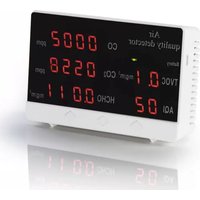
00186425 - Air quality detector HAMA - Free user manual and instructions
Find the device manual for free 00186425 HAMA in PDF.



| Product type | Air quality detector |
| Brand | Hama |
| Model | 00186425 |
| Dimensions (W x D x H) | 125 x 80 x 35 mm |
| Power supply | 5V 630 mA via micro-USB cable, built-in 1000 mAh battery |
| Screen type | LED digital display |
| Measurement functions | TVOC, HCHO, CO2, CO, AQI |
| Measurement error | 3 to 30% |
| Preheat time | 120 seconds |
| Charging time | Approximately 4 hours |
| Battery life | 180 to 240 minutes |
| Maintenance | Slightly damp lint-free cloth without aggressive detergent |
| Safety instructions | Indoor use only, avoid moisture, heat, shocks |
| Recycling | Compliant with WEEE (2012/19/EU) and battery (2006/66/EC) directives |
| Warranty | Exclusion of liability for professional or medical use |
Frequently Asked Questions - 00186425 HAMA
User questions about 00186425 HAMA
0 question about this device. Answer the ones you know or ask your own.
Ask a new question about this device
Download the instructions for your Air quality detector in PDF format for free! Find your manual 00186425 - HAMA and take your electronic device back in hand. On this page are published all the documents necessary for the use of your device. 00186425 by HAMA.
USER MANUAL 00186425 HAMA
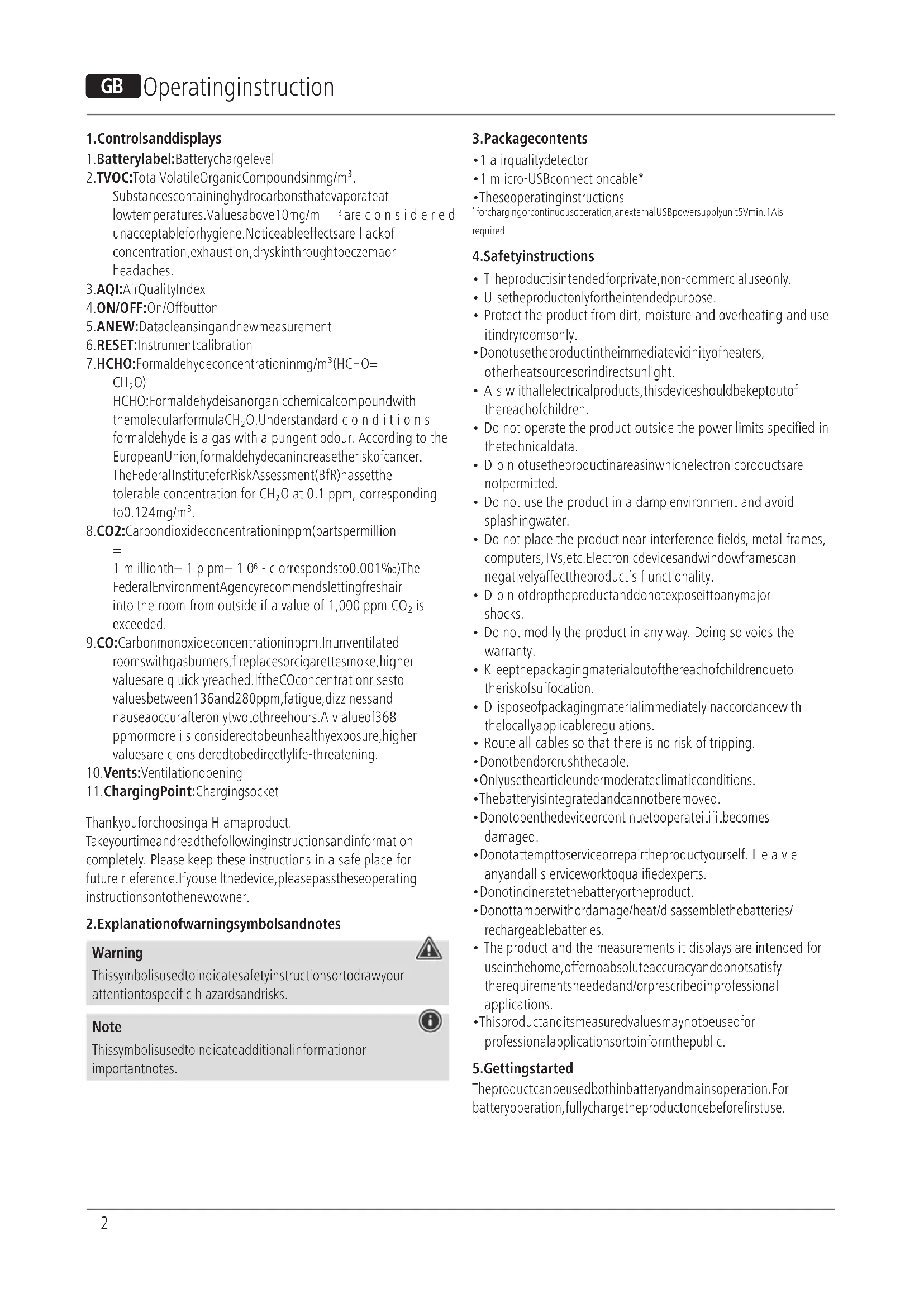
- Batterylabel: Batterychargelevel
2.TVOC:TotalVolatileOrganicCompoundsinmg/m ^3 . Substancescontaininghydrocarbonsthatevaporateat lowtemperatures.Valuesabove10mg/m ^3 are considered unacceptableforhygiene.Noticeableeffectsare lackof concentration,exhaustion,dryskinthroughtoeczemaor headaches.
3.AQI:AirQualityIndex
4.ON/OFF:On/Offbutton
5.ANEW:Datacleansingandnewmeasurement - RESET: Instrumentcalibration
- HCHO: Formaldehyde concentration in mg/m ^3 (HCHO=CH 2 O)
HCHO: Formaldehyde is an organic chemical compound with the molecular formula CH 2 O. Understand conditions formaldehyde is a gas with a pungent odour. According to the European Union, formaldehyde can increase the risk of cancer. The Federal Institute for Risk Assessment (BfR) has the tolerable concentration for CH 2 O at 0.1 ppm, corresponding to 0.124 mg/m ^3 .
8.CO2:Carbondioxideconcentrationinppm(partspermillion = 1 m illionth= 1 p pm= 1 0^6 - c orrespondsto0.001‰)The FederalEnvironmentAgency recommends lettingfreshair into the room from outside if a value of 1,000 ppm CO2 is exceeded.
9.CO:Carbonmonoxideconcentrationinppm.Inunventilated roomswithgasburners,fireplacesorcigarettesmoke,higher valuesare q quicklyreached.IftheCOconcentrationrisesto valuesbetween136and280ppm,fatigue,dizzinessand nauseaoccurafteronlytwotothreehours.A v alueof368 ppmormore i s consideredtobeunhealthyexposure,higher valuesare c onsideredtobedirectlylife-threatening. - Vents: Ventilationopening
- ChargingPoint:Chargingsocket
Thankyouforchoosinga H amaproduct.
Takeyourtimeandreadthefollowinginstructionsandinformation completely. Please keep these instructions in a safe place for future r eference.Ifyousellthedevice,pleasepasstheseoperating instructionsontothenewowner.
2. Explanationofwarningsymbolsandnotes
Warning
This symbol is used to indicate safety instructions to draw your attention to specific hazards and risks.

Note
This symbol is used to indicate additional information or important notes.

3.Packagecontents
• 1 a irqualitydetector
- 1 m micro-USBconnectioncable*
• Theseoperatinginstructions
* forchargingorcontinuousoperation,anexternalUSBpowersupplyunit5Vmin.1Ais required.
4. Safetyinstructions
- The product is intended for private, non-commercial use only.
• U setheproductonlyfortheintendedpurpose. - Protect the product from dirt, moisture and overheating and use itindryroomsonly.
- Donotusetheproductintheimmediatevicinityofheaters, otherheatsourcesorindirectsunlight.
- A s w ithallelectricalproducts, thisdeviceshouldbekeptoutofthereachofchildren.
- Do not operate the product outside the power limits specified in the technical data.
- Do not usetheproductinareasinwhichelectronicproductsare notpermitted.
- Do not use the product in a damp environment and avoid splashingwater.
- Do not place the product near interference fields, metal frames, computers, TVs, etc. Electronic devices and windowframes can negatively affect the product's functionality.
- D o n otdroptheproductanddonotexposeittoanymajor shocks.
- Do not modify the product in any way. Doing so voids the warranty.
- Keep the packaging material out of thereach of child rendueto therisk of suffocation.
- D isposeofpackagingmaterialimmediatelyinaccordancewith thelocallyapplicableregulations.
- Route all cables so that there is no risk of tripping.
- Donotbendorcrushthecable.
• Only u sethearticleundermoderateclimaticconditions.
• The battery is integrated and cannot be removed. - Donotopenthedeviceorcontinuetooperateitifitbecomes damaged.
- Donotattempttoserviceorrepairtheproductyourself. Leave anyandall s serviceworktoqualifiedexperts.
- Donotincineratethebatteryortheproduct.
- Donottamperwithordamage/heat/disassemblethebatteries/rechargeablebatteries.
- The product and the measurements it displays are intended for useinthehome,offernoabsoluteaccuracyanddonotsatisfy therequirementsneededand/orprescribedinprofessional applications.
- Thisproductanditsmeasuredvaluesmaynotbeusedfor professionalapplicationsortoinformthepublic.
5. Gettingstarted
Theproductcanbeusedbothinbatteryandmainsoperation. For batteryoperation, fullychargetheproductoncebeforefirstuse.
5.1 Batteryoperation
Warning- r echargeablebattery

- OnlyusesuitablechargingdevicesorUSBconnectionstochargetheproduct.
- DonotusedefectivechargersorUSBportsanddonotattempttorepairthem.
- Donotoverchargetheproductorallowthebatterytocompletelydischarge.
- Avoid storing, charging and using in extreme temperatures and at extremely low atmospheric pressures (such as at high altitudes).
-
Chargeregularly(atleastquarterly)duringperiodsofprolongedstorage.
-
Connect the supplied micro-USB charging cable to the micro-USB port (11) on the product.
- Connect the free plug on the micro-USB charging cable to a suitable USB charger. To do this, consult the operating instructions for the USBchargeryouare u sing.
- The battery indicator (1) indicates the charge level by means of the red-yellow-green colour code.
- When the battery is fully charged (green) the charging process can be terminated. Disconnect the product from the mains.
- In the case of battery operation, the display goes out after approx. 30 minutes. Press ON/OFF (4) briefly to make the display appear again.
Note- c hargingprocess

• A complete charging cycle takes about 4 hours.
• Theproduct'sbatterycanbechargedbothwhenitisswitchedonandoff.
- Whenfullycharged(green), themaximumoperatingtimeisapprox. 180to240minutes.
5.2Mainsoperation
- Connect the supplied micro-USB charging cable to the micro-USB port (11) on the product.
- Connect the free plug on the micro-USB charging cable to a suitable USB charger. To do this, consult the operating instructions for the USBchargeryouare u sing.
- In continuous operation with a USB cable, the display is permanently visible.
5.3 Switchingon/off
- Removetheprotectivefilmfromthedisplay.
- Press and hold ON/OFF (4) for approximately 3 seconds to switch on the product.
• After switching on, the device needs approx. 120 seconds to warm up. This is displayed in the CO field (9) and is incremented. - The device requires an operating time of approx. 10 to 60 minutes for a meaningful measurement. In small rooms (such as cupboards, drawers etc.) the operating time is approx. 3 to 15 minutes.
-
A frequent fluctuation of the display is normal and shows the constantly repeated measurements. The overall result is shown as the AQI value(3).
-
Airqualityguidelines(AQI)
| HCHOmg/m30 - 0 | .080 | 0.081- 0 .100 | 0.101- 0 .200 | 0.201 - 0.500 | 0.501 - 1.000 | 1.001 - 1.999 |
| TVOC mg/m3 | 0 - 0.5 | 0.5 - 0.6 | 0.6 - 1.5 | 1.5 - 3.0 | 3.0 - 6.0 | 6.0 - 12.0 |
| CO2 ppm | 0 - 450 | 451 - 1000 | 1001 - 1500 | 1501 - 2000 | 2001 - 3000 | 3001 - 5000 |
| CO ppm | 0 - 50 | 51 - 100 | 101 - 200 | 201 - 400 | 401 - 800 | 801 - 2400 |
| AQI | 01 | 02 | 03 | 04 | 05 | 06 |
| Good | Moderate | Unhealthyfor sensitivepeople | Unhealthy | Veryunhealthy | Endangeringhealth |
Specifically by providing the value for the CO2 concentration in the air (8), conclusions can be drawn about aerosols with viruses (e.g. Covid 19) present in the air. Although these are not directly detectable, increased CO2 pollution is at the same time a measure of virus-contaminatedair. This can be remedied by regularairing.
Permanently inhaling bad and stale air can cause tiredness, headaches, eye irritation, etc. The ability to perform and concentrate decreases noticeably as a result.
Thedisplayoftheconcentrationsofcarbonmonoxide(9), formaldehyde(7)andothervolatilecompounds(2)alsohelpsto ensure t hatremedialactioncanbetakingoodtimebymeansof ventilation. Furthermore,thedifferentdisplayscanhelptoidentify thecorrespondingsources:e.g.formaldehydeemissionsfrom furniture,woodpanelling,etc.Respiratorydiseasescanthusbe preventedanda h ealthyindoorclimatecreated.
7. Resettofactorysettings(e.g.afterrelocation)
- Press and hold ANEW (5) for around 3 seconds to reset the producttothefactorydefaultsettings.
- All previous measurements are permanently deleted.
8. Recalibration of the product
- Press and hold Reset (6) for approximately 3 seconds to recalibratetheproduct.
- Calibrations should be carried out outdoors, as CO2 level there are u suallyaround 400-450 ppm.
- Please ensure that there is no CO2 source in the immediate vicinity. A voiddirectsunlightandrain.
9. Care and maintenance
Note

Disconnect the device from them before c leaning and during prolonged period so of non-use.
- Only clean this product with a slightly damp, lint-free cloth and donotuseaggressivecleaningagents.
- Ensure that no water is able to enter the product.
10.WarrantyDisclaimer
Themeasuringdevicemustnotbeusedasa warningdevicefor dangerouslyhighconcentrations(e.g.industrialsafetymonitoring). Itisnotsuitableformedicalinstitutions,certificationortest measurements. Themeasuringdeviceisprimarilyusedfortesting purposesandfororientationinprivatehouseholds.Noliabilityis acceptedforpossibledamageincaseofmalfunction. ItisnotpossibletotransferdataviatheUSBcable.
HamaGmbH& C o K G a ssumesnoliabilityandprovidesno warrantyfordamageresultingfromimproperinstallation/mounting,improperuseoftheproductorfromfailure t o o s v e theoperatinginstructionsand/orsafetynotes.
11.Technicaldata
| DisplaymodeLEDdigitaldisplay | |
| Devidedimensions125x 80 x 35 cm | |
| Measurementerror3 - 30% | |
| Pre-warmingtimeafter switchon | 120seconds |
| Operatingvoltage5V630mA | |
| Batterycapacity1000mAh | |
| ChargingtimeApprox.4 hours | |
| StandbyTimeApprox.180-240minutes | |
12. Recycling information
Noteonenvironmentalprotection:
Following the implementation of European Directive 2012/19/EU and 2006/66/EU into thenational illegal systems, the following applies: electrical and electronic devices as well as batteries must not be disposed of with householdwaste. Consumers are o bligedbylawtoreturnelectrical andelectronicdevicesaswellasbatteriestothe designatedpublic collectionpointsortothepointofsaleattheendoftheirservice lives. Detailedinformationonthistopicisdefinedinthenational lawsoftherespectivecountry. This presence of the abovesymbol ontheproduct, operating instructionsorpackageindicate that the product is subject to theeregulations. By recycling, reusing thematerials or other forms of utilising old devices/batteries, you are making an important contribution to protecting our environment.
4.ON/OFF:Ein/AusTaste
86652Monheim/Germany
Service& Support

www.hama.com

+499091502-0
D GB
CE
All listed brands are trademarks of the corresponding companies. Errors and omissions excepted, and subject to technical changes. Our general terms of delivery and payment are applied.
