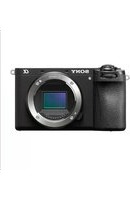
Alpha A6700 - Camera SONY - Free user manual and instructions
Find the device manual for free Alpha A6700 SONY in PDF.



| Brand | Sony |
| Model | Alpha A6700 |
| Product type | Interchangeable lens camera |
| Lens mount | Sony E-mount |
| Sensor | APS-C CMOS, 26 effective megapixels |
| Total pixels | Approx. 27 million |
| Dimensions (W × H × D) | 122.0 × 69.0 × 75.1 mm |
| Weight (with battery and SD card) | 493 g |
| Power supply | Rechargeable battery NP-FZ100 (7.2 V) |
| Charging | USB Type-C, compatible with USB-PD (9 V/3 A or 9 V/2 A) |
| Shooting modes | Photo, Movie, S&Q (slow/fast motion) |
| Wireless connection | Wi-Fi 802.11 a/b/g/n/ac (2.4/5 GHz), Bluetooth |
| Viewfinder | Electronic |
| Operating temperature | 0 to 40 °C |
| Storage temperature | -20 to 55 °C |
| Supplied accessories | NP-FZ100 battery, shoulder strap, eyecup, body cap, hot shoe cap, startup guide, reference guide |
| Maintenance | Avoid direct sunlight exposure, use lens cap |
| Safety | Contains magnets, do not use near medical devices |
| Repairability | Spare parts available via Sony, interchangeable lenses |
| Manual | 147 pages, available in French |
Frequently Asked Questions - Alpha A6700 SONY
User questions about Alpha A6700 SONY
0 question about this device. Answer the ones you know or ask your own.
Ask a new question about this device
Download the instructions for your Camera in PDF format for free! Find your manual Alpha A6700 - SONY and take your electronic device back in hand. On this page are published all the documents necessary for the use of your device. Alpha A6700 by SONY.
USER MANUAL Alpha A6700 SONY
https://www.sony.net/SonyInfo/Support/
SONY®
5-051-977-41(1)
06700
α6700
E-mount

"Help Guide" (Web manual) Refer to "Help Guide" for in-depth instructions on the many functions of the camera.
https://rd1.sony.net/help/ilc/2320/h_zz/
| Interchangeable Lens Digital Camera/Startup Guide EN | |
| Appareil photo à objectif interchangeable/Guide de démarrage FR | |
| Digitalkamera mit Wechselobjektiv/Einführungsanleitung DE | |
| Cámara Digital de Lentes Intercambiables/Guía de inicio ES | |
| Fotocamera digitale con obiettivo intercambiabile/Guida di avvio IT | |
| Câmara Digital de Objetivas intercambiáveis/Guía de início PT | |
| Digitale camera met verwisselbare lens/Beknopte gids NL | |
| Aparat cyfrowy z wymiennymi obiektywami/Przewodnik uruchamiania | PL |
| Цифровой фотоаппарат со сменным объективом/Руководство по началу работы | RU |
| Цифрова камера зі змінним об'єктивом/Посібник із початку роботи | UA |
| Digitalkamera med utbytbart objektiv/Startguide SE | |
| Digitaalinen kamera vaihdettavalla objektiivilla/Aloitusopas FI | |
| Digitalkamera med utskiftbart objektiv/Startveiledning NO | |
| Digitalkamera med udskifteligt objektiv/Startvejledning DK | |
©2023 Sony Corporation
Printed in Thailand
5051977410
ILCE-6700
About the "Help Guide"

For detailed instructions on using the camera, refer to the "Help Guide" (web manual). https://rd1.sony.net/help/ilc/2320/h_zz/
ILCE-6700 Help Guide

Preparations
Checking the supplied items
The number in parentheses indicates the number of pieces.
- Camera (1)
- Rechargeable battery pack NP-FZ100 (1)
- Shoulder strap (1)
- Eyepiece cup (1)
- Body cap (1)*
* Only for the ILCE-6700/ILCE-6700M
- Shoe cap (1) (attached to the camera)
- Startup Guide (this manual) (1)
• Reference Guide (1)
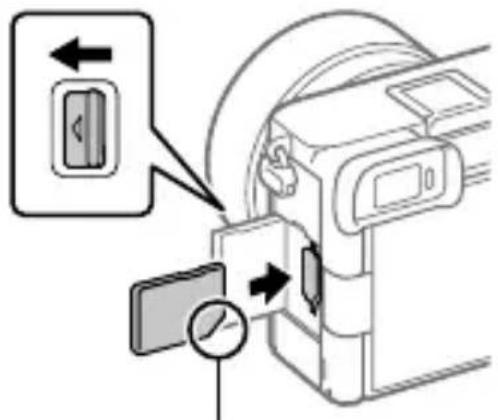
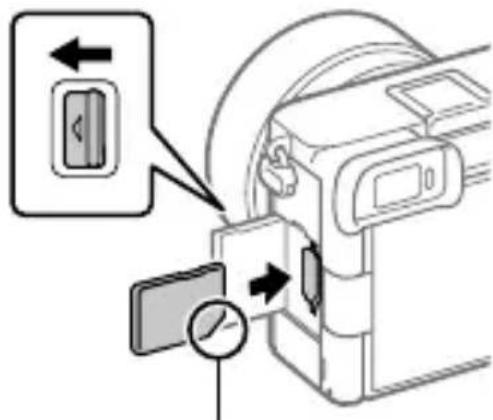
Inserting the battery pack (supplied)/memory card (sold separately) into the camera
Open the battery cover and the memory card cover, insert the battery/memory card, and close the covers.
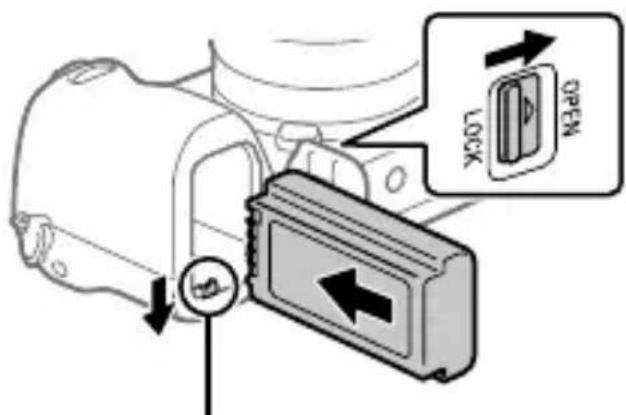
Insert the battery pack while pressing the lock lever.

Ensure the notched corner faces correctly.
EN
This camera is compatible with SD memory cards.
When you use a memory card with this camera for the first time, format the card using the camera in order to stabilize the performance of the memory card.
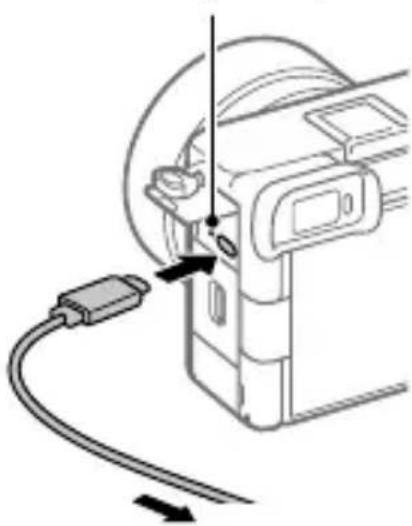
Charging the battery pack
Charge lamp
natural_image
Diagram of a device with a cable and connector, showing no text or symbolsTo an external power source
① Turn the power off.
- If the camera is turned on, the battery pack will not be charged.
② Using a commercially available USB Type-C cable, connect the USB Type-C terminal on the camera to an external power source, such as a commercially available USB AC adapter or mobile battery.
- The charge lamp will light up when charging starts. When the charge lamp turns off, charging is completed.
This camera is compatible with USB-PD (USB Power Delivery). When a device compatible with USB-PD is connected to the camera, fast charging is possible. We recommend using a USB-PD device that is compatible with an output of 9 V/3 A or 9 V/2 A.
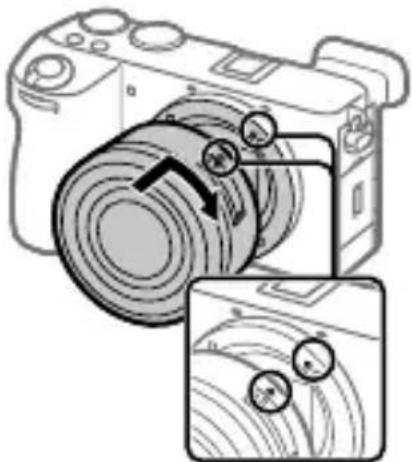
Attaching a lens
natural_image
Diagram of a digital camera with scroll wheel and two circular buttons, shown in two views (no text or symbols)Mounting indexes
① Mount the lens by aligning the two white index marks (mounting indexes) on the lens and camera.
② While pushing the lens lightly toward the camera, turn the lens slowly in the direction of the arrow until it clicks into the locked position.
Performing initial setup for the camera
By establishing a Bluetooth connection (pairing) between the camera and a smartphone, you can perform initial camera setup such as date and time settings from the smartphone. Install the dedicated application on your smartphone in advance, and then follow steps ① to ④ under “Procedures for initial camera setup.”
Installing the dedicated smartphone application

Install the application from the following website. Also, update to the latest version of the dedicated application. The specifications of the dedicated application may change without notice.
https://www.sony.net/ca/
Procedures for initial camera setup
ON/OFF (Power) switch

natural_image
Technical line drawing of a mechanical component with no visible text or symbolsControl wheel/center button
① Set the ON/OFF (Power) switch to "ON" to turn on the camera.
② Select the desired language and then press the center of the control wheel.
- The privacy notice screen will appear. Read the privacy notice regarding biometrics by opening the link using your smartphone, etc.
③ Press the center of the control wheel.
4 Follow the instructions on the camera screen to connect the camera with your smartphone and perform the initial setup.
- You can also configure or change the initial settings later from the MENU of the camera.
Connecting (pairing) the camera with your smartphone later
For details on the connection method, refer to the following Help Guide URL: https://rd1.sony.net/help/ilc/2320_pairing/h_zz/
Shooting still images
Mode dial
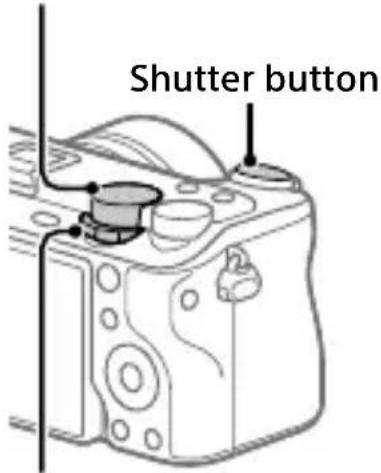
Still/Movie/S&Q dial
① Turn and set the Still/Movie/S&Q dial to 📋 till).
② Select the desired shooting mode by turning the mode dial.
③ Press the shutter button halfway down to focus.
4 Press the shutter button all the way down.
Notes on use
Refer to "Precautions" in the "Help Guide" as well.
Notes on handling the product
- Do not leave the lens or the viewfinder exposed to a strong light source such as sunlight. Because of the lens's condensing function, doing so may cause smoke, fire, or a malfunction inside the camera body or the lens. If you have to leave the camera exposed to a light source such as sunlight, attach the lens cap to the lens.
- If sunlight or other strong light enters the camera through the lens, it may focus inside the camera and cause smoke or fire. Attach the lens cap when storing the camera. When shooting with backlighting, keep the sun sufficiently far away from the angle of view. Even if it is slightly away from the angle of view, smoke or fire may still occur.
- Do not look at sunlight or a strong light source through the lens when it is detached. This may result in unrecoverable damage to the eyes or cause a malfunction.
- This camera (including accessories) has magnet(s) which may interfere with pacemakers, programmable shunt valves for hydrocephalus treatment, or other medical devices. Do not place this camera close to persons who use such medical devices. Consult your doctor before using this camera if you use any such medical device.
-
Increase the volume gradually. Sudden loud noises can damage your ears. Be especially careful when listening to headphones.
-
Do not leave the camera, the supplied accessories, or memory cards within the reach of infants. They may be accidentally swallowed. If this occurs, consult a doctor immediately.
- When shooting with the viewfinder, you may experience symptoms such as eyestrain, fatigue, motion sickness, or nausea. We recommend that you take a break at regular intervals when you are shooting with the viewfinder.
- If the monitor or electronic viewfinder is damaged, stop using the camera immediately. The damaged parts may harm your hands, face, etc.
- When shooting still images continuously, the monitor or viewfinder may flash between the shooting screen and a black screen. If you keep watching the screen in this situation, you may experience uncomfortable symptoms such as feeling of unwellness. If you experience uncomfortable symptoms, stop using the camera, and consult your doctor as necessary.
-
When recording or streaming for long periods of time or recording 4K movies, if the same part of your skin touches the camera for a long period of time while using the camera, even if the camera does not feel hot to you, it may cause symptoms of a low-temperature burn such as redness or blistering. Pay special attention in the following situations and use a tripod, etc.
-
When using the camera in a high temperature environment
- When someone with poor circulation or impaired skin sensation uses the camera
- When using the camera with [Auto Power OFF Temp.] set to [High]
Sony lenses/accessories
Using this unit with products from other manufacturers may affect its performance, leading to accidents or malfunction.
Note on the 5 GHz band for wireless LAN
When using the wireless LAN function outdoors, set the band to 2.4 GHz by following the procedure below. (WW542541 only)
- MENU → (Network) → [Wi-Fi] → [Wi-Fi Frequency Band]
How to turn off wireless network functions (Wi-Fi, etc.) temporarily
When you board an airplane, etc., you can turn off all wireless network functions temporarily using [Airplane Mode].
For Customers in the U.S.A. and Canada
This equipment complies with FCC radiation exposure limits set forth for an uncontrolled environment and meets the FCC radio frequency (RF) Exposure Guidelines. This equipment has very low levels of RF energy that is deemed to comply without testing of specific absorption rate (SAR). The available scientific evidence does not show that any health problems are associated with using low power wireless devices. There is no proof, however, that these low power wireless devices are absolutely safe. Low power Wireless devices emit low levels of radio frequency energy (RF) in the microwave range while being used. Whereas high levels of RF can produce health effects (by heating tissue), exposure of low-level RF that does not produce heating effects causes no known adverse health effects. Many studies of low-level RF exposures have not found any biological effects. Some studies have suggested that some biological effects might occur, but such findings have not been confirmed by additional research.
This equipment has been tested and found to comply with ISED radiation exposure limits set forth for an uncontrolled environment and meets RSS-102 of the ISED radio frequency (RF) Exposure rules.
For Customers in the U.S.A.
For question regarding your product or for the Sony Service Center nearest you, call 1-800-222-SONY (7669).
Supplier's Declaration of Conformity
Trade Name : SONY
Model : WW542541
Responsible Party : Sony Electronics Inc.
Address : 16535 Via Esprillo, San Diego, CA 92127 U.S.A.
Telephone Number : 858-942-2230
Important note on use of 5 GHz wireless LAN
Compliance with FCC requirement 15.407(c)
Data transmission is always initiated by software, which is the passed down through the MAC, through the digital and analog baseband, and finally to the RF chip. Several special packets are initiated by the MAC.
These are the only ways the digital baseband portion will turn on the RF transmitter, which it then turns off at the end of the packet. Therefore, the transmitter will be on only while one of the aforementioned packets is being transmitted. In other words,
this device automatically discontinue transmission in case of either absence of information to transmit or operational failure.
Frequency Tolerance: ±20 ppm
For Customers in Canada
5 150-5 350 MHz band is restricted to indoor operation only.
High-power radars are allocated as primary users (i.e. priority users) of the bands 5 250-5 350 MHz and 5 650-5 850 MHz and that these radars could cause interference and/or damage to LE-LAN devices.
For Customers in Europe
| IEEE802.11b/g/n | 2 400 MHz < 60 mW e.i.r.p. |
| IEEE802.11a/n/ac | 5 150 -5 350 MHz5 470 -5 725 MHz |
| IEEE802.11a/n/ac | 5 725 -5 850 MHz |
| Bluetooth | 2 400 MHz < 10 mW e.i.r.p. |
Hereby, Sony Corporation declares that this equipment is in compliance with Directive 2014/53/EU.
The full text of the EU declaration of conformity is available at the following internet address:
https://www.compliance.sony.eu
Hereby, Sony Corporation declares that this equipment is in compliance with the UK relevant statutory requirements.
The full text of the declaration of conformity is available at the following internet address:
https://compliance.sony.co.uk
For this radio equipment the following restrictions on putting into service or of requirements for authorization of use apply in AT/BE/BG/CY/CZ/DK/EE/FI/FR/DE/EL/HU/IE/IT/LV/LT/LU/MT/NL/PL/PT/RO/SK/SI/ES/SE/UK/UK(NI)/HR/IS/LI/NO/CH/AL/BA/MK/MD/RS/ME/XK/TR: 5 150 - 5 350 MHz band is restricted to indoor operations only.
The power delivered by the charger must be between min 2.5 Watts required by the radio equipment, and max 27 Watts in order to achieve the maximum charging speed. USB PD fast charging

For customers who purchased their camera from a store in Japan that caters to tourists
Note
Some certification marks for standards supported by the camera can be confirmed on the screen of the camera.
Select MENU → (Setup) →
[Setup Option] → [Certification Logo].
Specifications
Camera
[System]
Camera Type: Interchangeable Lens Digital Camera
Lens: Sony E-mount lens
[Image sensor]
Image format: APS-C size, CMOS image sensor
Effective pixel number of camera: Approx. 26 000 000 pixels
Total pixel number of camera: Approx. 27 000 000 pixels
[General]
Rated input: 7.2 V, -3.6 W
Operating temperature: 0 to 40 °C (32 to 104 °F)
Storage temperature: -20 to 55 °C (-4 to 131 °F)
Dimensions (W/H/D) (Approx.): 122.0 × 69.0 × 75.1 mm 122.0 × 69.0 × 63.6 mm (from grip to monitor) 4 7/8 × 2 3/4 × 3 in. 4 7/8 × 2 3/4 × 2 5/8 in. (from grip to monitor)
Mass (Approx.): 493 g (1 lb 1.4 oz) (including battery pack, SD Card)
[Wireless LAN]
WW542541 (see name plate on the bottom of camera)
Supported format: IEEE 802.11 a/b/g/n/ac
Frequency band: 2.4 GHz/5 GHz
WW786845 (see name plate on the bottom of camera)
Supported format: IEEE 802.11 b/g/n
Frequency band: 2.4 GHz
Rechargeable battery pack NP-FZ100
Rated voltage: 7.2 V---
Design and specifications are subject to change without notice.
Compatible iPhone/iPad models
iPhone 14 Pro Max, iPhone 14 Pro, iPhone 14 Plus, iPhone 14, iPhone SE (3rd generation), iPhone 13 Pro Max, iPhone 13 Pro, iPhone 13, iPhone 13 mini, iPhone 12 Pro Max, iPhone 12 Pro, iPhone 12, iPhone 12 mini, iPhone SE (2nd generation), iPhone 11 Pro Max, iPhone 11 Pro, iPhone 11, iPhone XS Max, iPhone XS, iPhone XR, iPhone X, iPhone 8 Plus, iPhone 8, iPhone 7 Plus, iPhone 7, iPhone SE, iPhone 6s Plus, iPhone 6s, iPad Air (3rd, 4th, and 5th generation), iPad (5th through 9th generation), iPad mini (6th generation), iPad Pro 12.9-inch (1st through 5th generation), iPad Pro 11-inch (3rd generation), iPad Pro 11-inch (2nd generation), iPad Pro 11-inch, iPad Pro 10.5-inch, iPad Pro 9.7-inch, iPad Air 2, iPad mini (5th generation), iPad mini 4 (As of December 2022)
Trademarks/Licenses
• is a trademark of Sony Group Corporation.
• Apple, iPhone and iPad are trademarks of Apple Inc., registered in the U.S. and other countries.
- USB Type-C® and USB-C® are registered trademarks of USB Implementers Forum.
- Wi-Fi, the Wi-Fi logo and Wi-Fi Protected Setup are registered trademarks or trademarks of the Wi-Fi Alliance.
- The Bluetooth® word mark and logos are registered trademarks owned by Bluetooth SIG, Inc. and any use of such marks by Sony Group Corporation and its subsidiaries is under license.
• QR Code is a trademark of Denso Wave Inc.
- In addition, system and product names used in this manual are, in general, trademarks or registered trademarks of their respective developers or manufacturers. However, the ™ or ® marks may not be used in all cases in this manual.
- Use of the Made for Apple badge means that an accessory has been designed to connect specifically to the Apple product(s) identified in the badge, and has been certified by the developer to meet Apple performance standards. Apple is not responsible for the operation of this device or its compliance with safety and regulatory standards.
Made for
iPhone | iPad
Additional information on this product and answers to frequently asked questions can be found at our Customer Support Website.
https://www.sony.net/
IMPORTANT – Read the End User Software License Agreement before using your Sony product.
Using your product indicates your acceptance of the End User Software License Agreement. The software license agreement between you and Sony is available at the following URL:
(https://rd1.sony.net/help/di/el23/h_zz/)
https://rd1.sony.net/help/ilc/2320/h_zz/
natural_image
Diagram of a device with a cable and connector, showing no text or symbolsnatural_image
Diagram of a digital camera with scroll wheel and two circular buttons, shown in two views (no text or symbols)Repères de montage
https://www.sony.net/ca/
natural_image
Technical line drawing of a mechanical component with no visible text or symbolsBatterie rechargeable NP-FZ100
natural_image
Diagram of a device with a cable and connector, showing no text or symbolsnatural_image
Diagram of a digital camera with scroll wheel and two circular buttons, shown in two views (no text or symbols)Ansetzindexe
https://www.sony.net/ca/
https://rd1.sony.net/help/ilc/2320/h_zz/
natural_image
Diagram of a device with a cable and connector, showing no text or symbolsnatural_image
Diagram of a DSLR camera with scroll wheel and adjustment arrows, shown in two views (no text or symbols)Índices de montura
https://www.sony.net/ca/
- MENU → (Red) → [Wi-Fi] → [Banda de frec. Wi-Fi]
https://rd1.sony.net/help/ilc/2320/h_zz/
ILCE-6700 Guida

Preparazioni
natural_image
Diagram of a digital camera with two circular adjustment knobs and a magnified inset showing the lens adjustment (no text or symbols present)Indici di montaggio
https://www.sony.net/ca/
natural_image
Technical line drawing of a mechanical component with no visible text or symbols- MENU → (Rete) → [Wi-Fi] → [Banda freq. Wi-Fi]
Dimensioni (L/A/P) (circa): 122,0 × 69,0 × 75,1 mm 122,0 × 69,0 × 63,6 mm (dall'impugnatura al monitor)
https://rd1.sony.net/help/ilc/2320/h_zz/
natural_image
Diagram of a device with a cable and connector, showing no text or symbolsnatural_image
Diagram of a digital camera with scroll wheel and cable, shown in two views (no text or symbols)Índices de montagem
https://www.sony.net/ca/
https://rd1.sony.net/help/ilc/2320/h_zz/
ILCE-6700 Helpgids

Voorbereidingen
natural_image
Diagram of a device with a cable and connector, showing no text or symbolsnatural_image
Diagram of a DSLR camera with an attached circular lens and two inset views showing the lens assembly (no text or symbols present)Vattingmarkeringen
https://www.sony.net/ca/
natural_image
Technical line drawing of a mechanical component with no visible text or symbols- MENU → (Netwerk) → [Wi-Fi]
→ [Wi-Fi-frequent.band]
https://rd1.sony.net/help/ilc/2320/h_zz/
natural_image
Diagram of a device with a cable and connector, showing directional arrows (no text or symbols)natural_image
Diagram of a digital camera with scroll wheel and two circular buttons, shown in two views (no text or symbols)Wskaźniki mocowania
natural_image
Technical line drawing of a mechanical component with no visible text or symbolshttps://rd1.sony.net/help/ilc/2320/h_zz/
natural_image
Diagram of a device with a cable and connector, no text or symbols presentnatural_image
Diagram of a digital camera with scroll wheel and adjustment arrows, shown in two views (no text or symbols)Метка крепления
https://www.sony.net/ca/
https://rd1.sony.net/help/ilc/2320/h_zz/
ILCE-6700 Довідка

Підготовка
natural_image
Diagram of a device with a cable and connector, showing no text or symbolsnatural_image
Diagram of a digital camera with scroll wheel and two circular adjustment buttons, shown in two views (no text or symbols)https://www.sony.net/ca/
natural_image
Technical line drawing of a mechanical component with no visible text or symbolshttps://rd1.sony.net/help/ilc/2320/h_zz/
natural_image
Diagram of a device with a cable and connector, showing no text or symbolsnatural_image
Diagram of a DSLR camera with two circular adjustment arrows indicating rotation (no text or symbols present)Monteringsmärken
https://www.sony.net/ca/
Aseta akku samalla, kun painat lukitusvipua.
natural_image
Diagram of a device with a cable and connector, showing no text or symbolsnatural_image
Diagram of a digital camera with scroll wheel and adjustment arrows, shown in two views (no text or symbols)Kiinnitinindeksit
https://www.sony.net/ca/
natural_image
Technical line drawing of a mechanical component with no visible text or symbolsKiekkopainike/keskipainike
Hvis du vil vite mer om bruk av kameraet, kan du se "Hjelpeveiledning" (Internett-håndbok). https://rd1.sony.net/help/ilc/2320/h_zz/
ILCE-6700 Hjelpeveiledning

Forberedelser
Kontrollere leverte deler
Tallet i parentes angir antall deler.
- Kamera (1)
• Oppladbart batteri NP-FZ100 (1) - Skulderrem (1)
- ∅yemusling (1)
- Kamerahusdeksel (1)*
* Bare for ILCE-6700/ILCE-6700M
Sett inn batteriet mens du trykker ned läsehendelen.
natural_image
Diagram of a device with a cable and connector, showing no text or symbolsTil en ekstern strømkilde
① Slå av strømmen.
natural_image
Diagram of a digital camera with scroll wheel and two circular buttons, shown in two views (no text or symbols)Fatningsindekser
ON/OFF (Strømbryter)

natural_image
Technical line drawing of a mechanical component with no visible text or symbolsKontrollhjul/senterknapp
Mål (B/H/D) (ca.): 122,0 × 69,0 × 75,1 mm 122,0 × 69,0 × 63,6 mm (fra grep til skjerm)
Vekt (ca.): 493 g (inkludert batteri, SD-kort)
[Trådløst LAN]
WW542541
natural_image
Diagram of a device with a cable and connector, showing no text or symbolsTil en ekstern strømkilde
natural_image
Diagram of a digital camera with scroll wheel and two circular buttons, shown in two views (no text or symbols)Monteringsindeks
https://www.sony.net/ca/
iPhone 11, iPhone XS Max, iPhone XS,
iPhone XR, iPhone X, iPhone 8 Plus,
iPhone 8, iPhone 7 Plus, iPhone 7,
iPhone SE, iPhone 6s Plus, iPhone 6s,
(3. generation), iPad Pro 11"
(2. generation), iPad Pro 11",
iPad Pro 10,5", iPad Pro 9,7", iPad Air 2,
- SONY®
- 06700
- α6700
- E-mount
- About the "Help Guide"
- Preparations
- Checking the supplied items
- Inserting the battery pack (supplied)/memory card (sold separately) into the camera
- Charging the battery pack
- Attaching a lens
- Performing initial setup for the camera
- Installing the dedicated smartphone application
- Procedures for initial camera setup
- Connecting (pairing) the camera with your smartphone later
- Shooting still images
- Notes on use
- Refer to "Precautions" in the "Help Guide" as well.
- Notes on handling the product
- Sony lenses/accessories
- Note on the 5 GHz band for wireless LAN
- How to turn off wireless network functions (Wi-Fi, etc.) temporarily
- For Customers in the U.S.A. and Canada
- For Customers in the U.S.A.
- Supplier's Declaration of Conformity
- Important note on use of 5 GHz wireless LAN
- For Customers in Canada
- 150-5 350 MHz band is restricted to indoor operation only.
- For customers who purchased their camera from a store in Japan that caters to tourists
- Note
- Specifications
- Camera
- [System]
- [Image sensor]
- [General]
- [Wireless LAN]
- Rechargeable battery pack NP-FZ100
- Compatible iPhone/iPad models
- Trademarks/Licenses
- IMPORTANT – Read the End User Software License Agreement before using your Sony product.
- Batterie rechargeable NP-FZ100
- Preparazioni
- Voorbereidingen
- Підготовка
- Forberedelser
- Kontrollere leverte deler
- [Trådløst LAN]
Brand : SONY
Model : Alpha A6700
Category : Camera