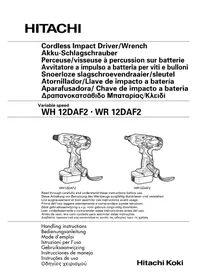
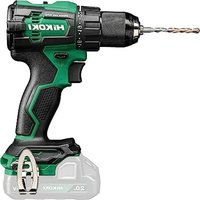
WH12DAF2 - Screwdriver HiKOKI - Free user manual and instructions
Find the device manual for free WH12DAF2 HiKOKI in PDF.



| Product Type | Cordless Impact Driver |
| Brand | HiKOKI |
| Model | WH12DAF2 |
| No-load Speed | 0 - 2500 min⁻¹ |
| Screwing capacity (screws) | M4 - M8 |
| Screwing capacity (ordinary bolts) | M5 - M12 |
| Screwing capacity (high tensile bolts) | M5 - M10 |
| Maximum tightening torque | 110 N·m (1120 kgf·cm) |
| Battery type | Ni-Cd or Ni-MH |
| Battery voltage | 12 V |
| Battery capacity | 1.4 Ah (EB1214S), 2.0 Ah (EB1220BL), 2.6 Ah (EB1226HL) |
| Weight (with battery) | 1.6 kg (with EB1214S) |
| Charger included | UC14YFA or UC18YG (depending on version) |
| Charging time (EB1214S) | Approx. 30 minutes (at 20°C) |
| Main features | Variable speed, reverse rotation, integrated LED light, adjustable hook |
| Safety | Hearing protection recommended, battery lock |
| Maintenance and cleaning | Wipe with a dry or soapy cloth, do not use solvents |
| Storage | Temperature below 40°C, out of reach of children |
| Included accessories | Charger, plastic case |
| Spare parts and repairability | Repairs by Hitachi authorized service, parts list available |
Frequently Asked Questions - WH12DAF2 HiKOKI
User questions about WH12DAF2 HiKOKI
0 question about this device. Answer the ones you know or ask your own.
Ask a new question about this device
Download the instructions for your Screwdriver in PDF format for free! Find your manual WH12DAF2 - HiKOKI and take your electronic device back in hand. On this page are published all the documents necessary for the use of your device. WH12DAF2 by HiKOKI.
USER MANUAL WH12DAF2 HiKOKI
natural_image
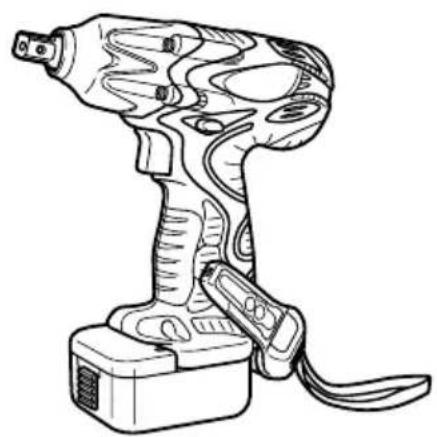
Line drawing of a handheld electric drill press with attached trigger and base (no text or symbols)WH12DAF2
natural_image
Line drawing of a handheld electric drill press with attached trigger and base (no text or symbols)WR12DAF2
Read through carefully and understand these instructions before use. Diese Anleitung vor Benutzung des Werkzeugs sorgfältig durchlesen und verstehen. Lire soigneusement et bien assimiler ces instructions avant usage. Prima dell'uso leggere attentamente e comprendere queste istruzioni. Deze gebruiksaanwijzing s.v.p. voor gebruik zorgvuldig doorlezen. Leer cuidadosamente y comprender estas instrucciones antes del uso. Antes de usar, leia com cuidado para assimilar estas instruções. Διαβάστε προσεκτικά και κατανοήσετε αυτές τις οδηγίες πριν τη χρήση.
Handling instructions Bedienungsanleitung Mode d'emploi Istruzioni per l'uso Gebruiksaanwijzing Instrucciones de manejo Instruções de uso Οδηγίες χειρισμού
1
2
3
4
5
6
7
8
9
10
natural_image
Anatomical illustration of a human head with a finger insertion, showing the needle being inserted (no text or labels present)11
12
13
14
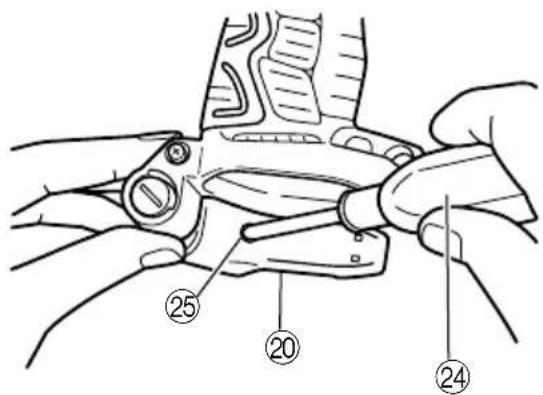
15
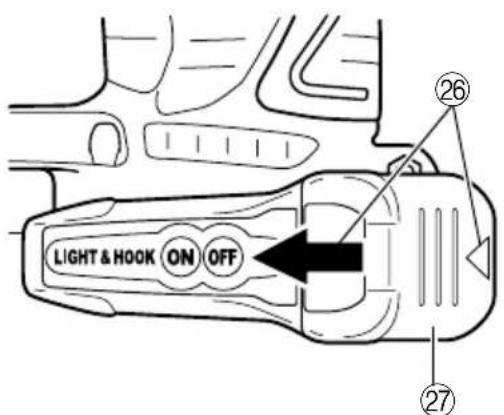
16
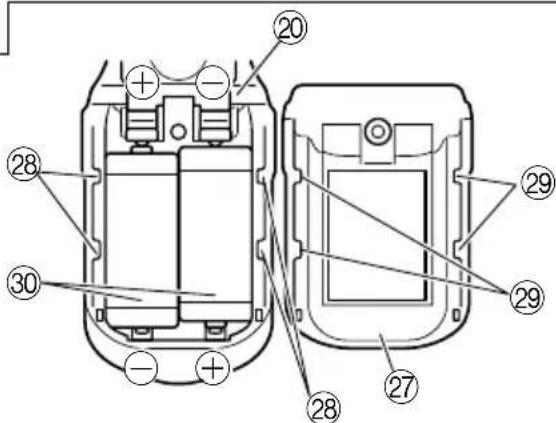
17
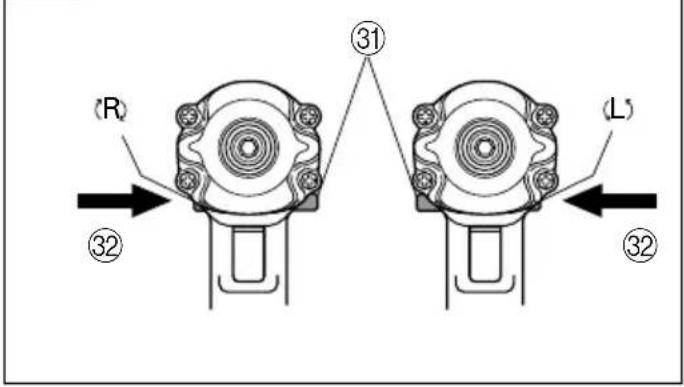
| English Deutsch | Français Italiano | |||
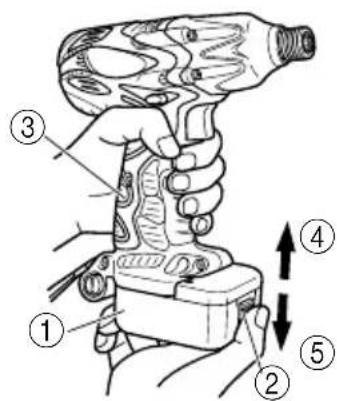
| 1 | 12 V Rechargeable battery | Akkumulator, 12 V | Batterie rechargeable, 12 V | Batteria ricaricabile, 12 V |
| 2 | Latch | Schnapper | Loquet | Fermo |
| 3 | Handlee | Griff | Poignée | Impugnatura |
| 4 | Insert | Einsatz | Insérer | Inserire |
| 5 | Pull out | Herausziehen | Tirer | Estrarre |
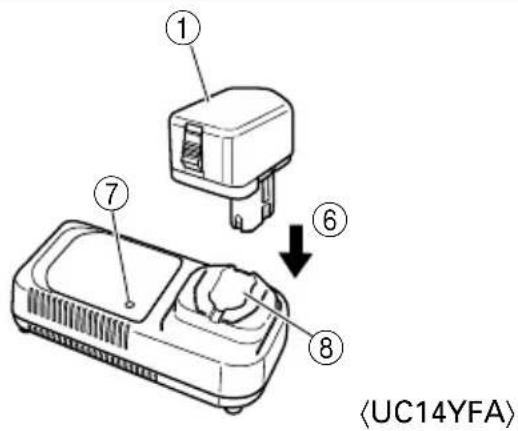
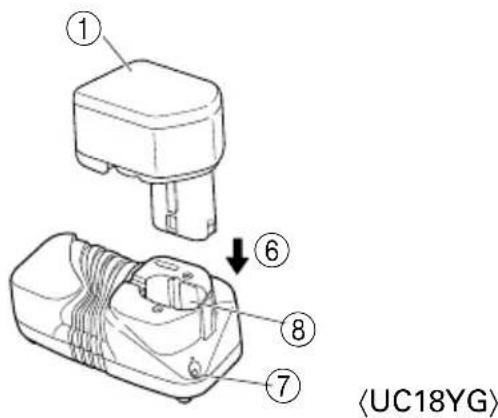
| 6 | Insert | Einsetz | Insérer | Inserire |
| 7 | Pilot lamp | Kontrollampe | Lampe pilote | Spia |
| 8 | Hole for connecting the rechargeable battery | Anschlußlon für Akkumulator | Orifice de raccordement de la batterie rechargeable | Foro di collegamento della batería recargable |
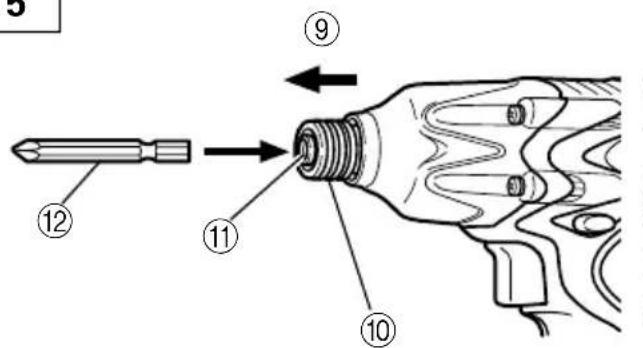
| 9 | Movement | Bewegung | Mouvement | Movimento |
| 10 | Guide sleeve | Führungsmanschette | Manchon-guide | Manicotto guida |
| 11 | Hexagonal hole in the anvil | Sechskantloch in der Schabotte | Orifice hexagonal de la chabotte | Foro esagonale nel basaménto |
| 12 | Driver bit | Dreherspitze | Mèche | Testa avvitatrice |
| 13 | Hexagonal socket | Sechskantbuchse | Douille hexagonal | Chiave de incavo esagonale |
| 14 | Groove | Schlitz | Rainure | Scanalature |
| 15 | Anvil | Schabotte | Chabotte | Basamento |
| 16 | Pin | Stift | Goupille | Spina |
| 17 | Ring | Ring | Aunneau | Anello |
| 18 | Hole | Öffnung | Orifice | Foro |
| 19 | Plunger | Preßkolben | Piston | Stantuffo |
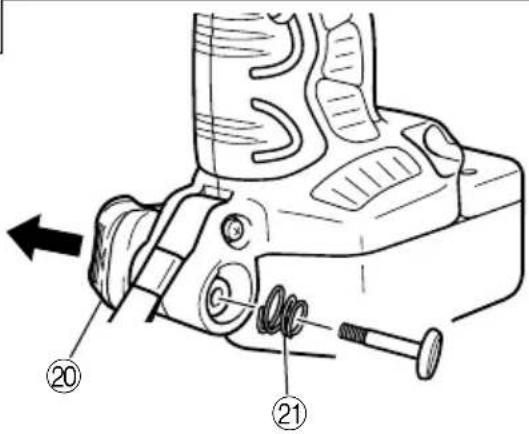
| 20 | Hook | Haken | Crochet | Grancio |
| 21 | Spring | Feder | Ressort | Molla |
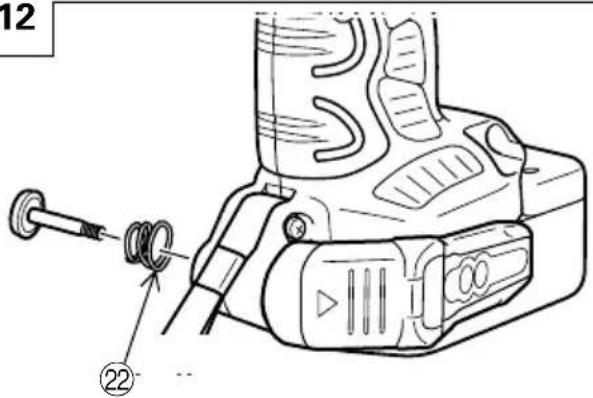
| 22 | Larger diameter faces away | Der große Durchmesser weist zur anderen Seite | Gros diamètre dirigé vers l'extérieur | Diametro più grande lontano da sé |
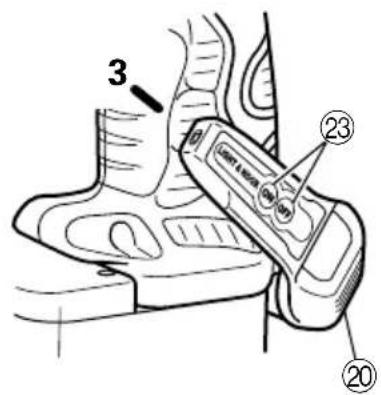
| 23 | Switch | Schalter | Interrupteur | Interruttore |
| 24 | Phillips-head screwdriver | Kreuzschlitzschraubenzieher | Tournevis à tête Phillips | Cacciavite con testa a croce |
| 25 | Screw | Schraube | Vis | Vite |
| 26 | Arrow | Pfeil | Flèche | Freccia |
| 27 | Hook cover | Hakenabdeckung | Cache de crochet | Coperchio gancio |
| 28 | Indentation | Einkerbung | Entaille | Tacca |
| 29 | Protuberance | Vorsprung | Saillie | Sporgenza |
| 30 | AAAA batteries | Batterien der Größe AAAA | Piles AAAA | Pile AAAA |
| 31 | Push button | Druckknopf | Poussoir | Tasto da premere |
| 32 | Push | Drücken | Pousser | Spingere |
| Nederlands Español | Português Ελληνικά | |||
| 1 | Oplaadbare batterij, 12 V | Batería recargable, 12 V | Bateria de 12 V recarregável | 12 V Επαναφορτιζόμενη μπαταρία |
| 2 | Vergrendeling | Enganche | Lingüeta | Μάνδαλο |
| 3 | Handgreep | Mango | Cabo | Χερούλι |
| 4 | Insteken | Insertar | Inserir | Εισχωρήστε |
| 5 | Uittrekken | Sacar | Retirar | Βραβήξτε έξω |
| 6 | Insteken | Insertar | Inserir | Εισχωρήστε |
| 7 | Kontrolelampje | Lámpara piloto | Lâmpada piloto | Δοκιμαστική λάμπα |
| 8 | Aansluiting voor oplaadbare batterij | Agujero para conectar la batería recargable | Orificio para conectar a bateria recarregável | Τρύπα για την σύνδεση της επαναφορτιζόμενης μπαταρίας |
| 9 | Beweging | Movimiento | Movimento | Κίνηση |
| 10 | Geleide ring | Manguito guía | Manga-guia | Οδηγητικός βραχίονας |
| 11 | Zeshoekige opening in het draaistuk | Orificio hexagonal en el yunque | Orificio sextavado na bigorna | Εξάγωνη τρύπα στον άκμονα |
| 12 | Schroefstuk | Punta de destornillador | Chave de fenda | Λεπίδα κίνησης |
| 13 | Zeschoekige bus | Recaptáculo hexanogal | Encaixe longo | Μακριά υποδοχή |
| 14 | Groef | Ranura | Ranhura | Αυλάκωση |
| 15 | Draaistuk | Yunque | Bigorna | Άκμονας |
| 16 | Pen | Pasador | Pino | Πείρος |
| 17 | Ring | Anillo | Anel | Δακτύλιος |
| 18 | Opening | Orificio | Orificio | Τρύπα |
| 19 | Plunjer | Embolo | Pistão | Έμβολο |
| 20 | Haak | Gancho | Gancho | Άγκιστρο |
| 21 | Veer | Resorte | Mola | Ελατήριο |
| 22 | De grotere diameter wijst van u vandaan | El diámetro más grande queda en dirección opuesta | O diâmetro maior dá para fora | Η μεγαλύτερη διάμετρος βλεπει προς άλλη κατεύθυνση |
| 23 | Schakelaar | Interruptor | Comutador | Διακόπτης |
| 24 | Kruiskopschroevendraaier | Destornillador con cabeza Phillips | Chave Phillips | Κατσαβίδι κεφαλής Phillips |
| 25 | Schroef | Tomillo | Parafuso | Βίδα |
| 26 | Pijl | Flecha | Seta | Βέλος |
| 27 | Afdekking haak | Cubierta del gancho | Tampa do gancho | Κάλυμμα αγκίστρου |
| 28 | Inkeping | Indentación | Entalhe | Αυλάκωση |
| 29 | Uitsteeksel | Saliente | Protuberância | Προεξοχή |
| 30 | AAAA batterijen | Pilas AAAA | Pilhas AAAA | AAAA μπαταρίες |
| 31 | Druktoets | Pulsador | Interruptor | Κουμπί ώθησης |
| 32 | Drukken | Presionar | Apertar | Σπρώξε |
| Symbols⚠ WARNINGThe following show symbols used for the machine. Be sure that you understand their meaning before use. | Symbole⚠ WARNUNGDie folgenden Symbole werden für diese Maschine verwendet. Achten Sie darauf, diese vor der Verwendung zu verstehen. | Symboles⚠ AVERTISSEMENTLes symboles suivants sont utilisés pour l’outil. Bien se familiariser avec leur signification avant d’utiliser l’outil. | Simboli⚠ AVVERTENZADi seguito mostriamo i simboli usati per la macchina. Assicurarsi di comprenderne il significato prima dell’uso. | |
 | Read all safety warnings and all instructions.Failure to follow the warnings and instructions may result in electric shock, fire and/or serious injury. | Lesen Sie sämtliche Sicherheitshinweise und Anweisungen durch.Wenn die Warnungen und Anweisungen nicht befolgt werden, kann es zu Stromschlag, Brand und/oder ernsthaftenVerletzungen kommen. | Lire tous les avertissements de sécurité et toutes les instructions.Tout manquement à observer ces avertissements et instructions peut engendrer des chocs électriques, des incendies et/ou des blessures graves. | Leggere tutti gli avvertimenti di sicurezza e tutte le istruzioni.La mancata osservanza degli avvertimenti e delle istruzioni potrebbe essere causa di scosse elettriche, incendi e/o gravi lesioni. |
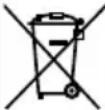 | Only for EU countriesDo not dispose of electric tools together with household waste material!In observance of European Directive 2002/96/EC on waste electrical and electronic equipment and its implementation in accordance with national law, electric tools that have reached the end of their life must be collected separately and returned to an environmentally compatible recycling facility. | Nur für EU-LänderWerfen Sie Elektrowerkzeuge nicht in den Hausmüll!Gemäss Europäischer Richtlinie 2002/96/EG über Elektro- und Elektronik-Altgeräte und Umsetzung in nationales Recht müssen verbrauchte Elektrowerkzeuge getrennt gesammelt und einer umweltgerechtenWiederververitung zugeführt werden. | Pour les pays européens uniquementNe pas jeter les appareils électriques dans les ordures ménagères!Conformément à la directive européenne 2002/96/EG relative aux déchets d’équipements électriques ou électroniques (DEEE), et à sa transposition dans la législation nationale, les appareils électriques doivent être collectés à part et être soumis à un recyclage respectueux de l’environnement. | Solo per Paesi UENon gettare le apparecchiature elettriche tra i rifiuti domestici.Secondo la Direttiva Europea 2002/96/CE sui rifiuti di apparecchiature elettriche ed elettroniche e la sua attuazione in conformità alle norme nazionali, le apparecchiature elettriche esauste devono essere raccolte separatamente, al fine di essere reimpiegate in modo eco-compatibile. |
| Symbolen⚠ WAARSCHUWINGHieronder staan symbolen afgebeeld die van toepassing zijn op deze machine. U moet de betekenis hiervan begrijpen voor gebruik. | Símbolos⚠ ADVERTENCIAA continuación se muestran los símbolos usados para la máquina. Asegúrese de comprender su significado antes del uso. | Símbolos⚠ AVISOA seguir aparecem os símbolos utilizados pela máquina. Assimile bem seus significados antes do uso. | Σύμβολα⚠ ΠΡΟΣΟΧΗΤα παρακάτω δείχνουν τα σύμβολα που χρησιμοποιούνται στο μηχάνημα. Βεβαιωθείτε ότι κατανοείτε τη σημασίας τους πριν τη χρήση. | |
 | Lees alle waarschuwingen en instructies aandachtig door.Nalating om de waarschuwingen en instructies op te volgen kan in een elektrische schok, brand en/of ernstig letsel resulteren. | Lea todas las instrucciones y advertencias de seguridad.Si no se siguen las advertencias e instrucciones, podría producirse una descarga eléctrica, un incendio y/o daños graves. | Leia todas as instruções e avisos de segurança.Se não seguir todas as instruções e os avisos, pode provocar um choque eléctrico, incêndio e/ou ferimentos graves. | Διαθάζετε όλες τις προειδοποιήσεις ασφαλείας και όλες τις οδηγίες.Η μη τήρηση των προειδοποιήσεων και οδηγιών μπορεί να προκαλέσει ηλεκτροπιλήξια, πυρκαγιά καιή σοβαρό τραιματισμό. |
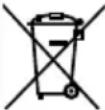 | Alleen voor EU-landen Geef elektrisch gereedschap niet met het huisvuil mee!Volgens de Europese richtlijn 2002/96/EG inzake oude elektrische en elektronische apparaten en de toepassing daarvan binnen de nationale wetgeving, dient gebruikt elektrisch gereedschap gescheiden te worden ingezameld en te worden afgevoerd naar een recycle bedrijf dat voldoet aan de geldende milieu-eisen. | Sólo para países de la Unión Europea¡No deseche los aparatos eléctricos junto con los residuos domésticos!De conformidad con la Directiva Europea 2002/96/CE sobre residuos de aparatos eléctricos y electrónicos y su aplicación de acuerdo con la legislación nacional, las herramientas eléctricas cuya vida útil haya llegado a su fin se deberán recoger por separado y trasladar a una planta de reciclaje que cumpla con las exigencias ecológicas. | Apenas para países da UE Não deite ferramentas eléctricas no lixo doméstico!De acordo com a directiva europeia 2002/96/CE sobre ferramentas eléctricas e electrónicas usadas e a transposição para as leis nacionais, as ferramentas eléctricas usadas devem ser recolhidas em separado e encaminhadas a uma instalação de reciclagem dos materiais ecológica. | Μόνο για τις χώρες της ΕΕΜην πετάτε τα ηλεκτρικά εργαλεία στον κάδο οικιακών απορριμμάτων!Σύμφωνα με την ευρωπαϊκή οδηγία 2002/96/ΕΚ περί ηλεκτρικών και ηλεκτρονικών συσκευών και την ενσωμάτωσή της στο εθνικό δίκαιο, τα ηλεκτρικά εργαλεία πρέπει να συλλέγονται ξεχωριστά και να επιστρέφονται για ανακύκλωση με τρόπο φιλικό προς το περιβάλλον. |
GENERAL POWER TOOL SAFETY WARNINGS
WARNING
Read all safety warnings and all instructions.
Failure to follow the warnings and instructions may result in electric shock, fire and/or serious injury.
Save all warnings and instructions for future reference.
The term "power tool" in the warnings refers to your mains-operated (corded) power tool or battery-operated (cordless) power tool.
1) Work area safety
a) Keep work area clean and well lit.
Cluttered or dark areas invite accidents.
b) Do not operate power tools in explosive atmospheres, such as in the presence of flammable liquids, gases or dust.
Power tools create sparks which may ignite the dust or fumes.
c) Keep children and bystanders away while operating a power tool.
Distractions can cause you to lose control.
2) Electrical safety
a) Power tool plugs must match the outlet.
Never modify the plug in any way.
Do not use any adapter plugs with earthed (grounded) power tools.
Unmodified plugs and matching outlets will reduce risk of electric shock.
b) Avoid body contact with earthed or grounded surfaces, such as pipes, radiators, ranges and refrigerators.
There is an increased risk of electric shock if your body is earthed or grounded.
c) Do not expose power tools to rain or wet conditions.
Water entering a power tool will increase the risk of electric shock.
d) Do not abuse the cord. Never use the cord for carrying, pulling or unplugging the power tool. Keep cord away from heat, oil, sharp edges or moving parts.
Damaged or entangled cords increase the risk of electric shock.
e) When operating a power tool outdoors, use an extension cord suitable for outdoor use.
Use of a cord suitable for outdoor use reduces the risk of electric shock.
f) If operating a power tool in a damp location is unavoidable, use a residual current device (RCD) protected supply.
Use of an RCD reduces the risk of electric shock.
3) Personal safety
a) Stay alert, watch what you are doing and use common sense when operating a power tool. Do not use a power tool while you are tired or under the influence of drugs, alcohol or medication. A moment of inattention while operating power tools may result in serious personal injury.
b) Use personal protective equipment. Always wear eye protection.
Protective equipment such as dust mask, non-skid safety shoes, hard hat, or hearing protection used for appropriate conditions will reduce personal injuries.
c) Prevent unintentional starting. Ensure the switch is in the off-position before connecting to power source and/or battery pack, picking up or carrying the tool.
Carrying power tools with your finger on the switch or energising power tools that have the switch on invites accidents.
d) Remove any adjusting key or wrench before turning the power tool on.
A wrench or a key left attached to a rotating part of the power tool may result in personal injury.
e) Do not overreach. Keep proper footing and balance at all times.
This enables better control of the power tool in unexpected situations.
f) Dress properly. Do not wear loose clothing or jewellery. Keep your hair, clothing and gloves away from moving parts.
Loose clothes, jewellery or long hair can be caught in moving parts.
g) If devices are provided for the connection of dust extraction and collection facilities, ensure these are connected and properly used.
Use of dust collection can reduce dust related hazards.
4) Power tool use and care
a) Do not force the power tool. Use the correct power tool for your application.
The correct power tool will do the job better and safer at the rate for which it was designed.
b) Do not use the power tool if the switch does not turn it on and off.
Any power tool that cannot be controlled with the switch is dangerous and must be repaired.
c) Disconnect the plug from the power source and/or the battery pack from the power tool before making any adjustments, changing accessories, or storing power tools.
Such preventive safety measures reduce the risk of starting the power tool accidentally.
d) Store idle power tools out of the reach of children and do not allow persons unfamiliar with the power tool or these instructions to operate the power tool.
Power tools are dangerous in the hands of untrained users.
e) Maintain power tools. Check for misalignment or binding of moving parts, breakage of parts and any other condition that may affect the power tools operation.
If damaged, have the power tool repaired before use.
Many accidents are caused by poorly maintained power tools.
f) Keep cutting tools sharp and clean.
Properly maintained cutting tools with sharp cutting edges are less likely to bind and are easier to control.
g) Use the power tool, accessories and tool bits etc. in accordance with these instructions, taking into account the working conditions and the work to be performed.
Use of the power tool for operations different from those intended could result in a hazardous situation.
5) Battery tool use and care
a) Recharge only with the charger specified by the manufacturer.
A charger that is suitable for one type of battery pack may create a risk of fire when used with another battery pack.
b) Use power tools only with specifically designated battery packs.
Use of any other battery packs may create a risk of injury and fire.
c) When battery pack is not in use, keep it away from other metal objects like paper clips, coins, keys, nails, screws, or other small metal objects that can make a connection from one terminal to another.
Shorting the battery terminals together may cause burns or a fire.
d) Under abusive conditions, liquid may be ejected from the battery; avoid contact. If contact accidentally occurs, flush with water. If liquid contacts eyes, additionally seek medical help. Liquid ejected from the battery may cause irritation or burns.
6) Service
a) Have your power tool serviced by a qualified repair person using only identical replacement parts.
This will ensure that the safety of the power tool is maintained.
PRECAUTION
Keep children and infirm persons away.
When not in use, tools should be stored out of reach of children and infirm persons.
PRECAUTIONS FOR CORDLESS IMPACT DRIVER
-
This is portable tool for tightening and loosenig screws. Use it only for these operation.
-
Use the earplugs if using for a long time.
-
One-hand operation is extremely dangerous; hold the unit firmly with both hands when operating.
-
After installing the driver bit, pull lightly out the bit to make sure that it does not come loose. If the bit is not installed properly, it can come loose during use, which can be dangerous.
-
Use the bit that matches the screw.
-
Tightening a screw with the impact driver at an angle to that screw can damage the head of the screw and the proper force will not be transmitted to the screw. Tighten with this impact driver lined up straight with the screw.
-
Always charge the battery at a temperature of 0 - 40°C.
A temperature of less than 0^ C will result in over charging which is dangerous. The battery cannot be charged at a temperature greater than 40^ C. The most suitable temperature for charging is that of 20 – 25^ C.
- Do not use the charger continuously.
When one charging is completed, leave the charger for about 15 minutes before the next charging of battery.
-
Do not allow foreign matter to enter the hole for connecting the rechargeable battery.
-
Never disassemble the rechargeable battery and charger.
-
Never short-circuit the rechargeable battery. Short-circuiting the battery will cause a great electric current and overheat. It results in burn or damage to the battery.
-
Do not dispose of the battery in fire. If the battery burnt, it may explode.
-
Do not insert object into the air ventilation slots of the charger. Inserting metal objects or inflammables into the charger air ventilation slots will result in electrical shock hazard or damaged charger.
-
Bring the battery to the shop from which it was purchased as soon as the post-charging battery life becomes too short for practical use. Do not dispose of the exhausted battery.
-
Using an exhausted battery will damage the charger.
PRECAUTIONS FOR CORDLESS IMPACT WRENCH
-
This is a portable tool for tightening and loosening bolts and nuts. Use it only for these operation.
-
Use the earplugs if using for a long time.
-
One-hand operation is extremely dangerous; hold the unit firmly with both hands when operating.
-
Check that the socket is not cracked or broken. Broken or cracked sockets are dangerous. Check the socket before using it.
-
Secure the socket with the socket pin and the ring. If the socket pin or ring securing the socket is damaged, the socket may come off from the impact wrench, which is quite dangerous. Do not use socket pins or rings that are deformed, worn out, cracked, or in any other way damaged. Always make sure to install the socket pin and ring in the correct position.
-
Check the tightening torque.
The appropriate torque for tightening a bolt depends on the material the bolt is made of, its dimensions, grade, etc.
Also, the tightening torque generated by this impact wrench depends on the materials and dimensions of the bolt, how long the impact wrench is applied for the way in which the socket is installed, etc. Also the torque when the battery has just been charged and when it is about to run out are slightly different. Use a torque wrench to check that the bolt has been tightened with the appropriate torque.
-
Stop the impact wrench before switching the direction of rotation. Always release the switch and wait for impact wrench to stop before switching the direction of rotation.
-
Never touch the turning part.
Do not allow the turning socket section to get near your hands or any other part of your body. You could be cut or caught in the socket. Also, be careful not to touch the socket after using continuously it for a long time. It gets quite hot and could burn you.
- Never let the impact wrench turn without a load when using the universal joint.
If the socket turns without being connected to a load, the universal joint causes the socket to turn wildly. You could get hurt or the movement of the socket could shake the impact wrench so much as to make you drop it.
- Always charge the battery at a temperature of 0 - 40°C.
A temperature of less than 0^ C will result in over charging which is dangerous. The battery cannot be charged at a temperature greater than 40^ C. The most suitable temperature for charging is that of 20 – 25^ C.
- Do not use the charger continuously.
When one charging is completed, leave the charger for about 15 minutes before the next charging of battery.
-
Do not allow foreign matter to enter the hole for connecting the rechargeable battery.
-
Never disassemble the rechargeable battery and charger.
- Never short-circuit the rechargeable battery. Short-circuiting the battery will cause a great electric current and overheat. It results in burn or damage to the battery.
- Do not dispose of the battery in fire. If the battery burnt, it may explode.
-
Do not insert object into the air ventilation slots of the charger. Inserting metal objects or inflammables into the charger air ventilation slots will result in electrical shock hazard or damaged charger.
-
Bring the battery to the shop from which it was purchased as soon as the post-charging battery life becomes too short for practical use. Do not dispose of the exhausted battery.
- Using an exhausted battery will damage the charger.
MODEL
WH12DAF2:with charger and case
WR12DAF2:with charger and case
SPECIFICATIONS
POWER TOOL
| Model WH12DAF2 WR1 | 2DAF2 | |
| No-load speed 0 - 25 | 00 min | -1 |
| Capacity M4 - M8 (S | small screw) M6 - M14 (Ordinary bolt)M5 - M12 (Ordinary bolt) M6 - M10 (High tension bolt) | |
| Tightening torque | Maximum 110 N·m {1120 kgf·cm}Tightening is M12 high tension bolt(strength grade 12.9), when fully charged at 20°C temp.Tightening time: 3 sec. | Maximum 130 N·m {1330 kgf·cm}Tightening is M12 high tension bolt(strength grade 12.9), when fully charged at 20°C temp.Tightening time: 3 sec. |
| Rechargeable battery | EB1214S: Ni-Cd battery, 12 V (1.4 Ah 10 cells) | |
| EB1220BL: Ni-Cd battery, 12 V (2.0 Ah 10 cells) | ||
| EB1226HL: Ni-MH battery, 12 V (2.6 Ah 10 cells) | ||
| Weight 1.6 kg (EB1214S Installation) | ||
CHARGER
| Model UC14YFA UC18YG | ||
| Charging time EB1214S: Approx. 30 min. (at 20°C) EB1214S: Approx. 30 min. (at 20°C) | ||
| Charging voltage | 7.2 – 14.4 V 7.2 – 18 V | |
| Weight | 0.6 kg | 0.3 kg |
"x" Indicates that the battery pack is not compatible with that specific charger.
NOTE: The charging time may vary according to the ambient temperature and power source voltage.
STANDARD ACCESSORIES
- Charger (UC14YFA or UC18YG) 1
- Plastic case .... 1
Standard accessories are subject to change without notice.
OPTIONAL ACCESSORIES
(Sold separately)
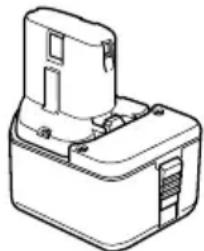
- Battery (EB1214S, EB1220BL, EB1226HL)
natural_image
Line drawing of a mechanical component with no visible text or symbols- For WH12DAF2
There are two types of attachment sizes for the driver bit and the socket. Please refer to the table below and select the attachment size for the driver bit or socket that is appropriate for your WH12DAF2.
| Attachment size Purchase location | ||
| Type-L | 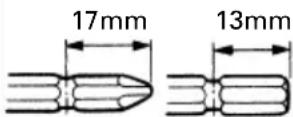 | Republic of Korea, Taiwan, Hong Kong, People's Republic of China, Republic of Singapore |
| Type-S | 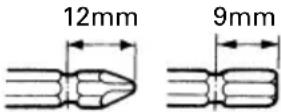 | Other than above regions. |
3. For WR12DAF2
The WR12DAF2 type is a 12.7 square driver specification. Please select the socket with the appropriate attachment size.
Optional accessories are subject to change without notice.
APPLICATION
〈WH12DAF2〉
○Driving and removing of small screws, small bolts, etc.
○Tightening and loosening of all types of bolts and nuts, used for securing structural items
BATTERY REMOVAL/INSTALLATION
1. Battery removal
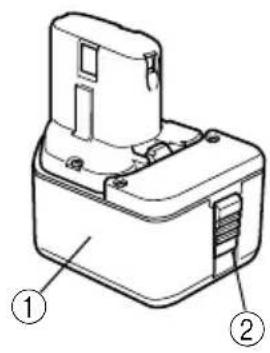
Hold the handle tightly and push the battery latch to remove the battery. (See Fig. 1 and 2)
CAUTION:
Never short-circuit the battery.
2. Battery installation
Insert the battery while observing its polarities. (See Fig. 2)
Table 1
| Indications of the lamps | |||
| Before charging | Blinks (RED) |  | |
| While charging | Lights (RED) |  | |
| Charging complete | Blinks (RED) |  | |
| Charging impossible | Flickers (RED) | 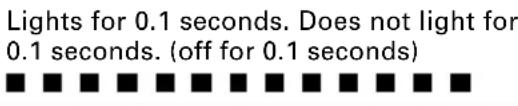 | Malfunction in the battery or the charger. |
| Charging impossible | Lights (GREEN) |  | The battery temperature is high, making recharging impossible. |
(2) Regarding the temperatures of the rechargeable battery The temperatures for rechargeable batteries are as shown in the table below, and batteries that have become hot should be cooled for a while before being recharged.
Table 2 Recharging ranges of batteries
| Rechargeable batteries which | Temperatures at the battery can be recharged |
| EB1214S, EB1220BL -5°C - 60°C | |
| EB1226HL 0°C - 45°C |
4. Disconnect the charger's power cord from the receptacle.
5. Hold the charger firmly and pull out the battery.
NOTE:
Be sure to pull out the battery from the charger after use, and then keep it.
Regarding electric discharge in case of new batteries, etc.
As the internal chemical substance of new batteries and batteries that have not been used for an extended period is not activated, the electric discharge might be low when using them the first and second time. This is a temporary phenomenon, and normal time required for recharging will be restored by recharging the batteries 2 – 3 times.
How to make the batteries perform longer
(1) Recharge the batteries before they become completely exhausted.
When you feel that the power of the tool becomes weaker, stop using the tool and recharge its battery. If you continue to use the tool and exhaust the electric current, the battery may be damaged and its life will become shorter.
(2) Avoid recharging at high temperatures.
A rechargeable battery will be hot immediately after use. If such a battery is recharged immediately after use, its internal chemical substance will deteriorate, and the battery life will be shortened. Leave the battery and recharge it after it has cooled for a while.
CAUTION:
○If the battery is charged while it is heated because it has been left for a long time in a location subject to direct sunlight or because the battery has just been used, the pilot lamp of the charger lights up green. In such a case, first let the battery cool, then start charging.
When the pilot lamp flickers in red quickly (at 0.2-second intervals), check for and take out any foreign objects in the charger's battery installation hole. If there are no foreign objects, it is probable that the battery or charger is malfunctioning. Take it to your Authorized Service Center.
○Since the built-in micro computer takes about 3 seconds to confirm that the battery being charged with UC14YFA is taken out, wait for a minimum of 3 seconds before reinserting it to continue charging. If the battery is reinserted within 3 seconds, the battery may not be properly charged.
Before using the power tool, charge the battery as follows.
- Connect the charger power cord to the receptacle Connecting the power cord will turn on the charger.
2. Insert the battery into the charger
Insert the battery firmly while observing its direction, until it contacts the bottom of the charger (the pilot lamp lights up) (See Fig. 4).
CAUTION
If the pilot lamp does not light up, pull out the power cord from the receptacle and check the battery mounting condition.
○Regarding the temperatures of the rechargeable battery
The temperatures for rechargeable batteries are as shown in Table 3.
Table 3 Recharging ranges of batteries
| Rechargeable batteries w | Temperatures at which the battery can be recharged |
| EB1214S, EB1220BL 0°C | - 45°C |
○The pilot lamp goes off to indicate that the battery is fully charged.
The battery charging time becomes longer when a temperature is low or the voltage of the power source is too low.
When the pilot lamp does not go off even if more than 120 minutes have elapsed after starting of the charging, stop the charging and contact your HITACHI AUTHORIZED SERVICE CENTER.
CAUTION
If the battery is heated due to direct sunlight, etc., just after operation, the charger pilot lamp may not light up. At that time, cool the battery first, then start charging.
3. Disconnect the charger's power cord from the receptacle
4. Hold the charger firmly and pull out the battery NOTE
After charging, pull out batteries from the charger first, and then keep the batteries properly.
Regarding electric discharge in case of new batteries, etc.
As the internal chemical substance of new batteries and batteries that have not been used for an extended period is not activated, the electric discharge might be low when using them the first and second time. This is a temporary phenomenon, and normal time required for recharging will be restored by recharging the batteries 2 – 3 times.
How to make the batteries perform longer.
(1) Recharge the batteries before they become completely exhausted.
When you feel that the power of the tool becomes weaker, stop using the tool and recharge its battery. If you continue to use the tool and exhaust the electric current, the battery may be damaged and its life will become shorter.
(2) Avoid recharging at high temperatures.
A rechargeable battery will be hot immediately after use. If such a battery is recharged immediately after use, its internal chemical substance will deteriorate, and the battery life will be shortened. Leave the battery and recharge it after it has cooled for a while.
PRIOR TO OPERATION
- Preparing and checking the work environment
Make sure that the work site meets all the conditions laid forth in the precautions.
- Checking the battery
Make sure that the battery is installed firmly. If it is at all loose it could come off and cause an accident.
- Installing the bit (WH12DAF2)
Always follow the following procedure to install driver bit. (Fig. 5)
(1) Pull the guide sleeve away from front of the tool.
(2) Insert the bit into the hexagonal hole in the anvil.
(3) Release the guide sleeve and it returns to its original position.
CAUTION:
If the guide sleeve does not return to its original position, then the bit is not installed properly.
- Selecting the socket matched to the bolt (WR12DAF2)
Be sure to use a socket which is matched to the bolt to be tightened. Using an improper socket will not only result in insufficient tightening but also in damage to the socket or nut.
A worn or deformed hex. or square-holed socket will not give an adequate tightness for fitting to the nut or anvil, consequently resulting in loss of tightening torque.
Pay attention to wear of socket hole, and replace before further wear has developed.
Finally, install the socket prescribed in Item 5. The section on "Optional Accessories" details the relationship between bolt sizes and sockets. Sockets are named according to the dihedral width of the hexagonal hole.
- Installing a socket (WR12DAF2)
Select the socket to be used.
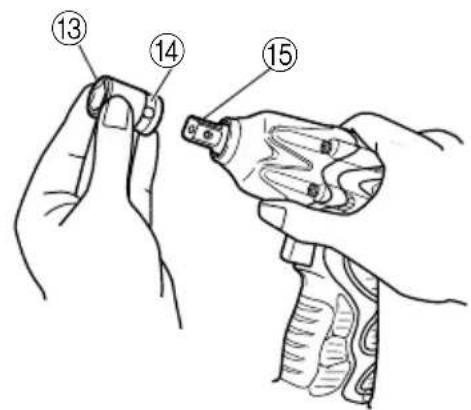
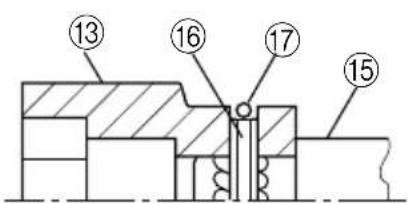
● Pin, O-ring type (Fig. 6 and 7)
(1) Align the hole in the socket with the hole in the anvil and insert the anvil into the socket.
(2) Insert the pin into the socket.
(3) Attach the ring to the groove on the socket.
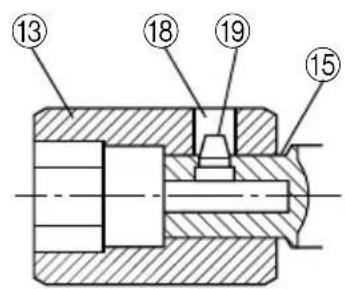
●Plunger type (Fig. 8)
Align the plunger located in the square part of the anvil with the hole in the hex. socket. Then push the plunger, and mount the hex. socket on the anvil. Check that the plunger is fully engaged in the hole. When removing the socket, reverse the sequence.
HOW TO USE
CAUTION:
When using the light equipped hook, pay sufficient attention so that the main equipment does not fall. If the tool falls, there is a risk of accident.
○Do not attach the tip tool except phillips bit to the tool main unit when carrying the tool main unit with the light equipped hook suspended from a waist belt.
Injury may result if you carry the equipment suspended from the waist belt with sharp tipped components such as drill bit attached.
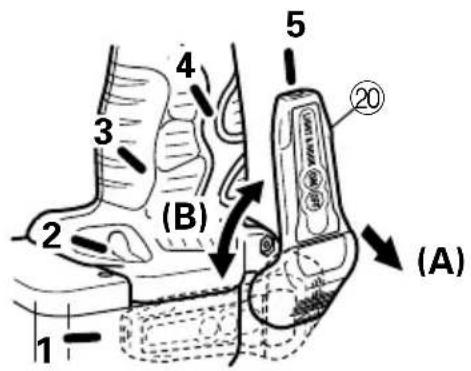
- Using the light equipped hook
The light equipped hook can be installed on the right or left side and the angle can be adjusted in 5 steps between 0^ and 80^ .
(1) Operating the hook
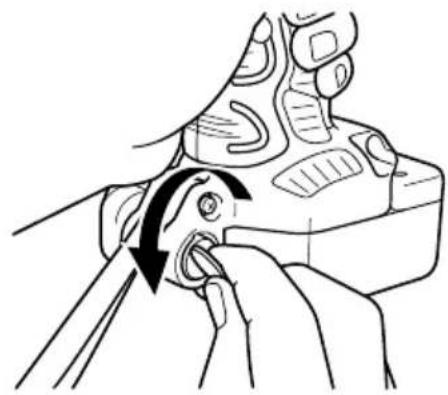
(a) Pull out the hook toward you in the direction of arrow (A) and turn in the direction of arrow (B). (Fig. 9)
(b) The angle can be adjusted in 5 steps ( 0^ , 20^ , 40^ , 60^ , 80^ ).
Adjust the angle of the hook to the desired position for use.
(2) Switching the hook position
CAUTION:
Incomplete installation of the hook may result in bodily injury when used.
(a) Securely hold the main unit and remove the screw using a slotted head screwdriver or a coin. (Fig. 10)
(b) Remove the hook and spring. (Fig. 11)
(c) Install the hook and spring on the other side and securely fasten with screw. (Fig. 12)
NOTE:
Pay attention to the spring orientation. Install the spring with larger diameter away from you. (Fig. 12)
(3) Using as an auxiliary light
(a) Press the switch to turn off the light. If forgotten, the light will turn off automatically after 15 minutes.
(b) The direction of the light can be adjusted within the range of hook positions 1 - 5. (Fig. 13)
○Lighting time
AAAA manganese batteries: approx. 15 hrs.
AAAA alkali batteries: approx. 30 hrs.
CAUTION:
Do not look directly into the light.
Such actions could result in eye injury.
(4) Replacing the batteries
(a) Loosen the hook screw with a phillips-head screwdriver (No. 1). (Fig. 14) Remove the hook cover by pushing in the direction of the arrow. (Fig. 15)
(b) Remove the old batteries and insert the new batteries. Align with the hook indications and position the plus (+) and minus (−) terminals correctly. (Fig. 16)
(c) Align the indentation in the hook main body with the protuberance of the hook cover, press the hook cover in the direction opposite to that of the arrow shown in Fig. 15 and then tighten the screw. Use commercially available AAAA batteries (1.5 V).
NOTE:
Do not tighten the screw excessively. Such action could strip the screw threads.
CAUTION:
○Failure to observe the following can result in battery leakage, rust or malfunction.
Position the plus (+) and minus (−) terminals correctly. Replace both batteries at the same time. Do not mix old and new batteries.
Remove exhausted batteries from the hook immediately.
○Do not discard batteries together with normal trash and do not throw batteries into fire.
○Store batteries out of the reach of children.
○Use batteries correctly in accordance with the battery specifications and indications.
2. Check the rotational direction
The bit rotates clockwise (viewed from the rear side) by pushing the R-side of the push button.
The L-side of the push button is pushed to turn the bit counterclockwise. (See Fig. 17) (The (L) and (R) marks are provided on the body.)
CAUTION:
The push button cannot be switched while the impact driver is turning. To switch the push button, stop the impact driver, then set the push button.
3. Switch operation
When the trigger switch is depressed, the tool rotates. When the trigger is released, the tool stops.
The rotational speed can be controlled by varying the amount that the trigger switch is pulled. Speed is low when the trigger switch is pulled slightly and increases as the trigger switch is pulled more.
4. Tightening and loosening screws (WH12DAF2)
Install the bit that matches the screw, line up the bit in the grooves of the head of the screw, then tighten it.
Push the impact driver just enough to keep the bit fitting the head of the screw.
CAUTION:
Applying the impact driver for too long tightens the screw too much and can break it.
Tightening a screw with the impact driver at an angle to that screw can damage the head of the screw and the proper force will not be transmitted to the screw. Tighten with this impact driver lined up straight with the screw.
5. Number of screws tightenings possible (WH12DAF2)
Please refer to the table below for the number of screw tightened possible with one charge.
EB1214S
| Screw used No. of tightenings | |
| Wood screw 4 × 50 (Soft wood) | Approx. 190 |
| Machine screw M8 × 16 | Approx. 500 |
These values may vary slightly, according to surrounding temperature and battery characteristics.
6. Number of bolt tightened possible (WR12DAF2)
Please refer to the table below for the number of bolt tightened possible with one charge.
EB1214S
| Bolt used No. of tightenings | |
| M12 × 45 High tension bolt | Approx. 87 |
These values may vary slightly, according to surrounding temperature and battery characteristics.
NOTE:
The use of the battery EB1226HL in a cold condition (below 0 degree Centigrade) can sometimes result in the weakened tightening torque and reduced amount of work. This, however, is a temporary phenomenon, and returns to normal when the battery warms up.
OPERATIONAL CAUTIONS
1. Resting the unit after continuous work
After use for continuous bolt-tightening work, rest the unit for 15 minutes or so when replacing the battery. The temperature of the motor, switch, etc., will rise if the work is started again immediately after battery replacement, eventually resulting in burnout.
NOTE:
Do not touch the hammer case, as it gets very hot during continuous work.
2. Cautions on use of the speed control switch
This switch has a built-in, electronic circuit which steplessly varies the rotation speed. Consequently, when the switch trigger is pulled only slightly (low speed rotation) and the motor is stopped while continuously driving in screws, the components of the electronic circuit parts may overheat and be damaged.
3. Tightening torque
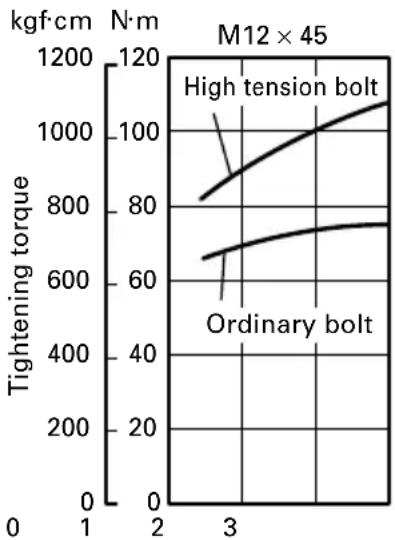
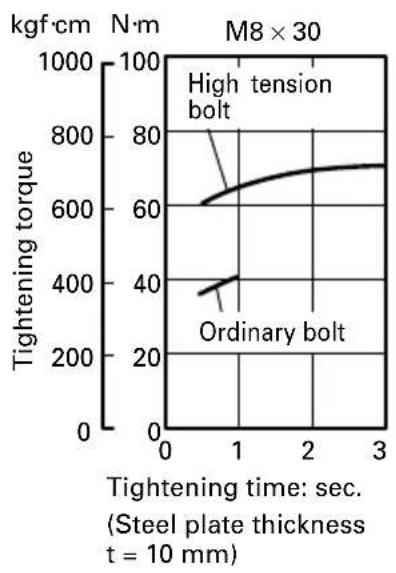
Refer to Fig. 18 and Fig. 19 for the tightening torque of bolts (according to size), under the conditions shown in Fig. 20. Please use this example as a general reference, as tightening torque will vary according to tightening conditions.
NOTE:
○If a long striking time is used, screws will be strongly tightened. This may cause the screw to break, or may damage the tip of the bit.
☐If the unit is held at an angle to the screw being tightened, the head of the screw may be damaged, or the specified torque may not be transmitted to the screw. Always keep the unit and the screw being tightened in a straight line.
4. Use a tightening time suitable for the screw
The appropriate torque for a screw differs according to the material and size of the screw, and the material being screwed etc., so please use a tightening time suitable for the screw. In particular, if a long tightening time is used in the case of screws smaller than M8, there is a danger of the screw breaking, so please confirm the tightening time and the tightening torque beforehand.
5. Work at a tightening torque suitable for the bolt under impact
The optimum tightening torque for nuts or bolts differs with material and size of the nuts or bolts. An excessively large tightening torque for a small bolt may stretch or break the bolt. The tightening torque increases in proportion to the operaton time. Use the correct operating time for the bolt.
6. Holding the tool
Hold the impact wrench firmly with both hands. In this case hold the wrench in line with the bolt.
It is not necessary to push the wrench very hard. Hold the wrench with a force just sufficient to counteract the impact force.
7. Confirm the tightening torque
The following factors contribute to a reduction of the tightening torque. So confirm the actual tightening torque needed by screwing up some bolts before the job with a hand torque wrench. Factors affecting the tightening torque are as follows.
(1) Voltage
When the discharge margin is reached, voltage decreases and tightening torque is lowered.
(2) Operating time
The tightening torque increases when the operating time increases. But the tightening torque does not increase above a certain value even if the tool is driven for a long time. (See Fig. 18 and 19)
(3) Diameter of bolt
The tightening torque differs with the diameter of the bolt as shown in Fig. 18 and 19. Generally a larger diameter bolt requires larger tightening torque.
(4) Tightening conditions
The tightening torque differs according to the torque ratio; class, and length of bolts even when bolts with the same size threads are used. The tightening torque also differs according to the condition of the surface of workpiece through which the bolts are to be tightened. When the bolt and nut turn together, torque is greatly reduced.
(5) Using optional parts (WR12DAF2)
The tightening torque is reduced a little when an extension bar, universal joint or a long socket is used.
(6) Clearance of the socket (WR12DAF2)
A worn or deformed hex. or a square-holed socket will not give an adequate tightness to the fitting between the nut or anvil, consequently resulting in loss of tightening torque.
Using an improper socket which does not match to the bolt will result in an insufficient tightening torque.
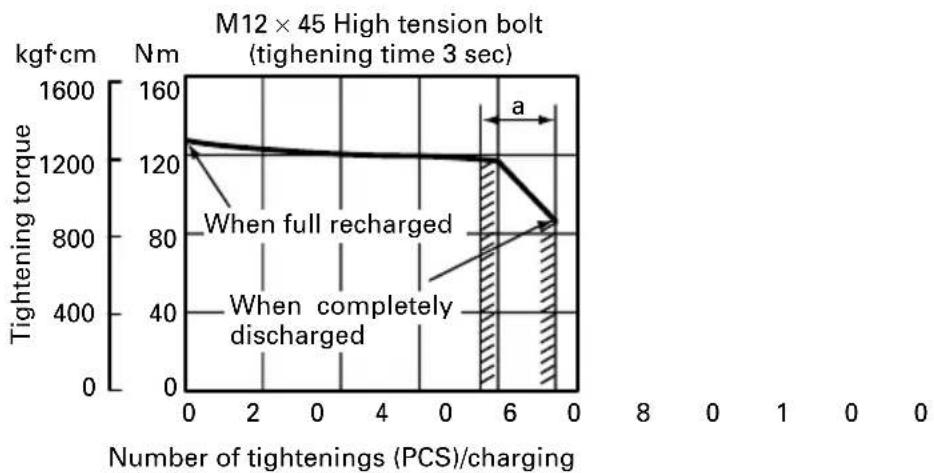
(7) Tightening torque varies, depending on the battery's charge level. (WR12DAF2)
Fig. 21 show examples of the relationship between tightening torque and the number of tightenings, for WR12DAF2. As shown, tightening torque gradually weakens with the increase in the number of tightenings. In particular, as the torque decreases very close to the complete discharge ("a" margin in graph), the unit's impact weakens, the number of time impacts declines and tightening torque drops off abruptly. If this occurs, check torque level, then recharge the battery if necessary.
〈WH12DAF2〉
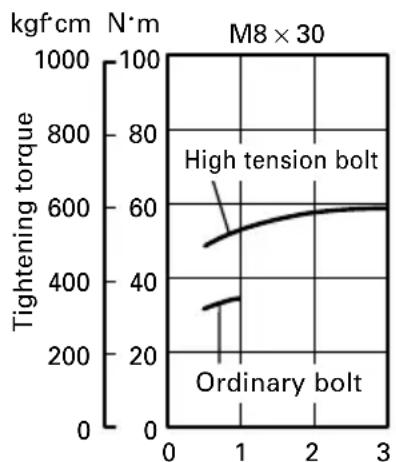
line
| Bolt Type | Tightening Torque (kgf·cm) | | --------------- | -------------------------- | | High tension | 500 | | Ordinary bolt | 300 |Tightening time: sec. (Steel plate thickness t = 10 mm)
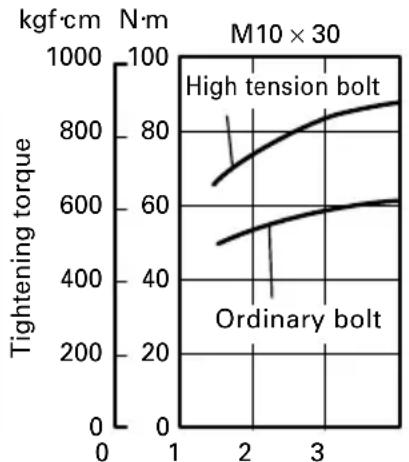
line
| Bolt Type | Tightening torque (kgf·cm) | | --------------- | -------------------------- | | High tension bolt | 800 | | Ordinary bolt | 600 |Tightening time: sec. (Steel plate thickness t = 10 mm)
line
| Bolt Type | Tightening torque (kgf·cm) | | ----------------- | -------------------------- | | High tension bolt | 800 | | Ordinary bolt | 600 |Tightening time: sec.
(Steel plate thickness t = 25 mm)
Fig. 18
〈WR12DAF2〉
line
| Tightening time: sec. | Tightening torque (kgf·cm) | | --------------------- | -------------------------- | | 0 | 600 | | 1 | 700 | | 2 | 750 | | 3 | 750 |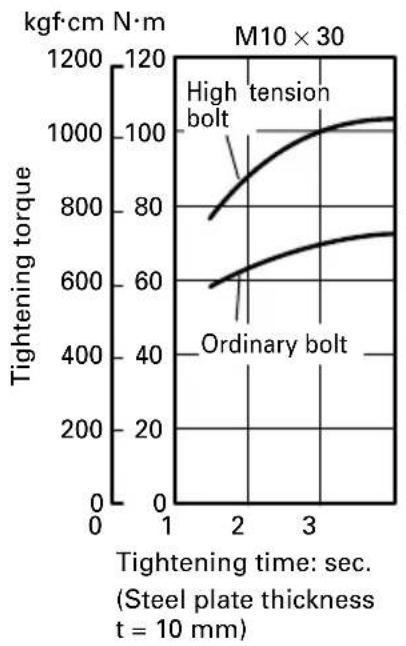
line
| Tightening time: sec. | High tension bolt (kgf·cm N·m) | Ordinary bolt (kgf·cm N·m) | | --------------------- | ------------------------------- | -------------------------- | | 2 | 800 | 600 | | 3 | 1050 | 750 |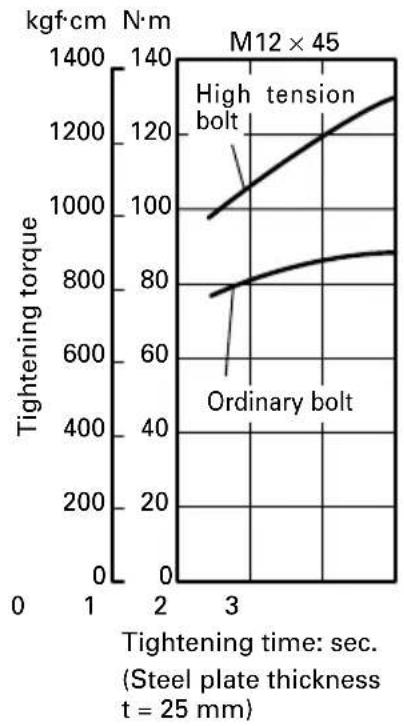
line
| Tightening time (sec.) | Tightening torque (kgf·cm) - High tension bolt | Tightening torque (kgf·cm) - Ordinary bolt | | ---------------------- | ----------------------------------------------- | ------------------------------------------- | | 3 | 1000 | 800 |Fig. 19
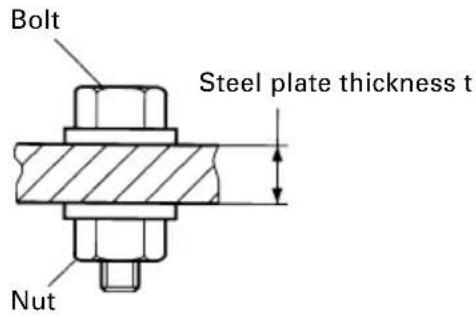
*The following bolt is used.
Ordinary bolt: Strength grade 4.8
High tension bolt: Strength grade 12.9
(Explanation of strength grade:
4 — Yield point of bolt: 32 kgf/mm ^2 8 — Pulling strength of bolt: 40 kgf/mm ^2 )
Fig. 20
〈WR12DAF2〉
line
| Number of tightenings (PCS)/charging | Tightening torque (kgf·cm) | | ------------------------------------ | -------------------------- | | 0 | 1200 | | 6 | 1200 | | 0 | 800 |Fig. 21
MAINTENANCE AND INSPECTION
1. Inspecting the driver bit (WH12DAF2)
Using a broken bit or one with a worn out tip is dangerous because the bit can slip. Replace it.
2. Inspecting the socket (WR12DAF2)
A worn or deformed hex. or a square-holed socket will not give an adequate tightness to the fitting between the nut or anvil, consequently resulting in loss of tightening torque. Pay attention to wear of a socket holes periodically, and replace with a new one if needed.
3. Inspecting the mounting screws
Regularly inspect all mounting screws and ensure that they are properly tightened. Should any of the screws be loose, retighten them immediately. Failure to do so may result in serious hazard.
4. Cleaning of the outside
When the impact driver is stained, wipe with a soft dry cloth or a cloth moistened with soapy water. Do not use chloric solvents, gasoline or paint thinner, as they melt plastics.
5. Storage
Store the impact driver in a place in which the temperature is less than 40^ C, and out of reach of children.
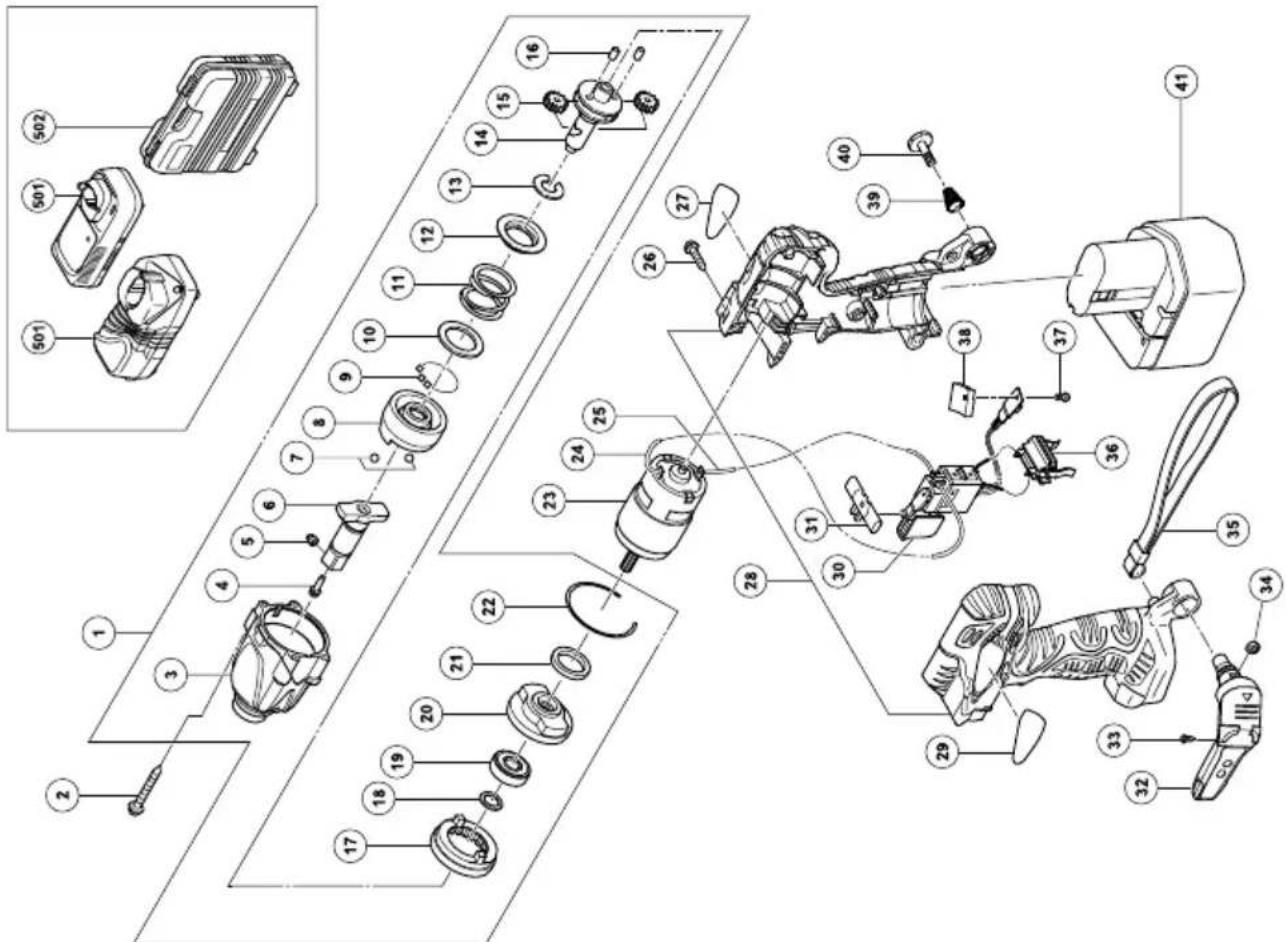
6. Service parts list
A : Item No.
B : Code No.
C : No. Used
D:Remarks
CAUTION:
Repair, modification and inspection of Hitachi Power Tools must be carried out by an Hitachi Authorized Service Center.
This Parts List will be helpful if presented with the tool to the Hitachi Authorized Service Center when requesting repair or other maintenance.
In the operation and maintenance of power tools, the safety regulations and standards prescribed in each country must be observed.
MODIFICATIONS:
Hitachi Power Tools are constantly being improved and modified to incorporate the latest technological advancements.
Accordingly, some parts (i.e. code numbers and/or design) may be changed without prior notice.
GUARANTEE
We guarantee Hitachi Power Tools in accordance with statutory/country specific regulation. This guarantee does not cover defects or damage due to misuse, abuse, or normal wear and tear. In case of complaint, please send the Power Tool, undismantled, with the GUARANTEE CERTIFICATE found at the end of this Handling instruction, to a Hitachi Authorized Service Center.
NOTE:
Due to HITACHI's continuing program of research and development, the specifications herein are subject to change without prior notice.
IMPORTANT:
Correct connection of the plug
The wires of the mains lead are coloured in accordance with the following code:
Blue: -Neutral
Brown: -Live
As the colours of the wires in the mains lead of this tool may not correspond with the coloured markings identifying the terminals in your plug proceed as follows: The wire coloured blue must be connected to the terminal marked with the letter N or coloured black.
The wire coloured brown must be connected to the terminal marked with the letter L or coloured red.
Neither core must be connected to the earth terminal.
NOTE:
This requirement is provided according to BRITISH STANDARD 2769: 1984.
Therefore, the letter code and colour code may not be applicable to other markets except United Kingdom.
Information concerning airborne noise and vibration
The measured values were determined according to EN60745 and declared in accordance with ISO 4871.
Measured A-weighted sound power level: 102 dB (A)
Measured A-weighted sound pressure level: 91 dB (A)
Uncertainty KpA: 3 dB (A).
Wear hearing protection.
Vibration total values (triax vector sum) determined according to EN60745.
Vibration emission value a_h = 7.2 m/s^2
Uncertainty K = 1.8 m/s ^4
WARNING
○The vibration emission value during actual use of the power tool can differ from the declared value depending on the ways in which the tool is used.
To identify the safety measures to protect the operator that are based on an estimation of exposure in the actual conditions of use (taking account of all parts of the operating cycle such as the times when the tool is switched off and when it is running idle in addition to the trigger time).
natural_image
Line drawing of a mechanical component with no visible text or symbols2. Für WH12DAF2
natural_image
Line drawing of a mechanical component with no visible text or symbols2. Pour WH12DAF2
natural_image
Line drawing of a mechanical component with no visible text or symbols2. Per WH12DAF2
- Acculader (UC14YFA of UC18YG) 1
- Plastic doos .... 1
natural_image
Line drawing of a mechanical component with no visible text or symbols2. Bij WH12DAF2
natural_image
Line drawing of a mechanical component with no visible text or symbols2. Para WH12DAF2
natural_image
Technical line drawing of a mechanical component with mounting holes and a housing (no text or symbols)2. Para a WH12DAF2
natural_image
Line drawing of a mechanical component with no visible text or symbols2. Гіа то WH12DAF2
WR12DAF2
| A | B | C | D | A | B | C | D |
| 1 324-856 | 1 | "3-22" | 39 319-926 | 1 | |||
| 2 992-630 | 4 D4 × 40 | 40 319-927 | 1 M5 | ||||
| 3 324-857 | 1 | 41-1 ————1EB1214S | |||||
| 4 323-194 | 1 | 41-2 ————1EB1220BL | |||||
| 5 323-193 | 1 | 41-3 ————1EB1226HL | |||||
| 6 323-192 | 1 | 501-1 ————1UC18YG | |||||
| 7 959-154 | 2 | D5.556 | 501-2 ————1UC14MFA | ||||
| 8 323-949 | 1 | 502-1 324-359 1 | |||||
| 9 321-934 | 28 | D3 | 502-2 322-611 1 "GBR" | ||||
| 10 315-978 | 1 | ||||||
| 11 323-944 | 1 | ||||||
| 12 316-172 | 1 | ||||||
| 13 316-171 | 1 | ||||||
| 14 323-945 | 1 | ||||||
| 15 323-941 | 2 | ||||||
| 16 323-942 | 2 | ||||||
| 17 323-946 | 1 | ||||||
| 18 319-911 | 1 | ||||||
| 19 690-1VV | 1 | 6901VVCMPS2L | |||||
| 20 323-947 | 1 | ||||||
| 21 321-894 | 1 | ||||||
| 22 321-893 | 1 | ||||||
| 23 323-948 | 1 | ||||||
| 24 321-876 | 1 | 115L | |||||
| 25 321-877 | 1 | 60L | |||||
| 26 302-086 | 7 D4 × 20 | ||||||
| 27 ————1 | |||||||
| 28 324-855 | 1 | ||||||
| 30 321-917 | 1 | ||||||
| 31 321-871 | 1 | ||||||
| 29 ————1 | |||||||
| 32 321-918 | 1 " 33, 34" | ||||||
| 33 321-672 | 2 D2 × 6 | ||||||
| 34 320-288 | 1 M5 | ||||||
| 35 306-952 | 1 | ||||||
| 36 323-710 | 1 | ||||||
| 37 320-777 | 1 | ||||||
| 38 320-776 | 1 | ||||||
| English | Nederlands | ||
| GUARANTEE CERTIFICATE1Model No.2Serial No.3Date of Purchase4Customer Name and Address5Dealer Name and Address(Please stamp dealer name and address) | GARANTIEBEWIJS1Modelnummer2Serienummer3Datum van aankoop4Naam en adres van de gebruiker5Naam en adres van de handelaar(Stempel a.u.b. naam en adres vande de handelaar) | ||
| Deutsch | Español | ||
| GARANTIESCHEIN1Modell-Nr.2Serien-Nr.3Kaufdaturn4Name und Anschrift des Kunden5Name und Anschrift des Händlers(Bitte mit Namen und Anschrift des Handlers abstempeln) | CERTIFICADO DE GARANTIA1Número de modelo2Número de serie3Fecha de adquisición4Nombre y dirección del cliente5Nombre y dirección del distribudor(Se ruega poner el sellú del distribudor con su nombre y dirección) | ||
| Français Português | |||
| CERTIFICAT DE GARANTIE1No. de modèle2No. de série3Date d'achat4Nom et adresse du client5Nom et adresse du revendeur(Cachet portant le nom et l'adresse du revendeur) | CERTIFICADO DE GARANTIA1Número do modelo2Número do série3Data de compra4Nome e morada do cliente5Nome e morada do distribuidor(Por favor, carímbe o nome e morada do distribuidor) | ||
| Italiano Ελληνικά | |||
| CERTIFICATO DI GARANZIA1Modello2N° di serie3Data di acquisto4Nome e indirizzo dell'acquirente5Nome e indirizzo del rivenditore(Si prega di apporre il timbro con questi dati) | ΠΙΣΤΟΠΟΙΗΤΙΚΟ ΕΓΓΥΗΣΗΣ1Αρ. Μοντέλου2Αύξων Αρ.3Ημερομηνία αγοράς4Όνομα και διεύθυνση πελάτη5Όνομα και διεύθυνση μεταπωλητή(Παρακαλούμε να χρησιμοποιηθεί σφραγίδα) | ||
HITACHI
| 1 | |
| 2 | |
| 3 | |
| 4 | |
| 5 |
Hitachi Koki
natural_image
Line drawing of a quill pen with inkwell (no text or symbols)
natural_image
Line drawing of a quill pen in an inkwell (no text or symbols)Hitachi Power Tools Europe GmbH
Siemensring 34, 47877 willich 1, F. R. Germany
Tel: +49 2154 49930
Fax: +49 2154 499350
URL: http://www.hitachi-powertools.de
Hitachi Power Tools Netherlands B. V.
Brabanthaven 11, 3433 PJ Nieuwegein, The Netherlands
Tel: +31 30 6084040
Fax: +31 30 6067266
URL: http://www.hitachi-powertools.nl
Hitachi Power Tools (U. K.) Ltd.
Precedent Drive, Rooksley, Milton Keynes, MK 13, 8PJ, United Kingdom
Tel: +44 1908 660663
Fax: +44 1908 606642
URL: http://www.hitachi-powertools.co.uk
Hitachi Power Tools France S. A. S.
Prac del' Eglantier 22, rue des Crerisiers Lisses, C. E. 1541,
91015 EVRY CEDEX, France
Tel: +33 1 69474949
Fax: +33 1 60861416
URL: http://www.hitachi-powertools.fr
Hitachi Power Tools Belgium N.V. / S.A.
Koningin Astridlaan 51, 1780 Wemmel, Belgium
Tel: +32 2 460 1720
Fax: +32 2 460 2542
URL http://www.hitachi-powertools.be
Hitachi Fercad Power Tools Italia S.p.A
Via Retrone 49-36077, Altavilla Vicentina (VI), Italy
Tel: +39 0444 548111
Fax: +39 0444 548110
URL: http://www.hitachi-powertools.it
Hitachi Power Tools Iberica, S.A.
C / Migjorn, s/n, Poligono Norte, 08226 Terrassa, Barcelona, Spain
Tel: +34 93 735 6722
Fax: +34 93 735 7442
URL: http://www.hitachi-powertools.es


- GENERAL POWER TOOL SAFETY WARNINGS
- WARNING
- Save all warnings and instructions for future reference.
- 1) Work area safety
- 2) Electrical safety
- 3) Personal safety
- 4) Power tool use and care
- PRECAUTION
- PRECAUTIONS FOR CORDLESS IMPACT DRIVER
- PRECAUTIONS FOR CORDLESS IMPACT WRENCH
- MODEL
- SPECIFICATIONS
- STANDARD ACCESSORIES
- OPTIONAL ACCESSORIES
- (Sold separately)
- For WR12DAF2
- APPLICATION
- 〈WH12DAF2〉
- BATTERY REMOVAL/INSTALLATION
- Battery removal
- CAUTION:
- Battery installation
- Disconnect the charger's power cord from the receptacle.
- Hold the charger firmly and pull out the battery.
- NOTE:
- Regarding electric discharge in case of new batteries, etc.
- How to make the batteries perform longer
- Insert the battery into the charger
- CAUTION
- Disconnect the charger's power cord from the receptacle
- Hold the charger firmly and pull out the battery NOTE
- How to make the batteries perform longer.
- PRIOR TO OPERATION
- HOW TO USE
- Check the rotational direction
- Switch operation
- Tightening and loosening screws (WH12DAF2)
- Number of screws tightenings possible (WH12DAF2)
- Number of bolt tightened possible (WR12DAF2)
- OPERATIONAL CAUTIONS
- Resting the unit after continuous work
- Cautions on use of the speed control switch
- Tightening torque
- Use a tightening time suitable for the screw
- Work at a tightening torque suitable for the bolt under impact
- Holding the tool
- Confirm the tightening torque
- Voltage
- Operating time
- Diameter of bolt
- Tightening conditions
- Using optional parts (WR12DAF2)
- Clearance of the socket (WR12DAF2)
- Tightening torque varies, depending on the battery's charge level. (WR12DAF2)
- MAINTENANCE AND INSPECTION
- Inspecting the driver bit (WH12DAF2)
- Inspecting the socket (WR12DAF2)
- Inspecting the mounting screws
- Cleaning of the outside
- Storage
- Service parts list
- MODIFICATIONS:
- GUARANTEE
- IMPORTANT:
- Correct connection of the plug
- Information concerning airborne noise and vibration
- Für WH12DAF2
- Pour WH12DAF2
- Per WH12DAF2
- Bij WH12DAF2
- Para WH12DAF2
- Para a WH12DAF2
- Гіа то WH12DAF2
- HITACHI
- Hitachi Power Tools Europe GmbH
- Hitachi Power Tools Netherlands B. V.
- Hitachi Power Tools (U. K.) Ltd.
- Hitachi Power Tools France S. A. S.
- Hitachi Power Tools Belgium N.V. / S.A.
- Hitachi Fercad Power Tools Italia S.p.A
- Hitachi Power Tools Iberica, S.A.
Brand : HiKOKI
Model : WH12DAF2
Category : Screwdriver