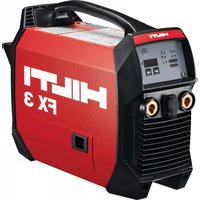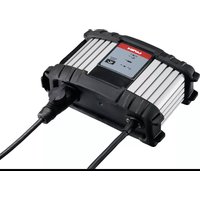
FX 3 - Welding machine HILTI - Free user manual and instructions
Find the device manual for free FX 3 HILTI in PDF.


| Product Type | Charger for welding machine |
| Brand | Hilti |
| Model | FX 3 |
| Dimensions (L x W x H) | 270 mm x 168 mm x 100 mm |
| Weight | 2 kg |
| Input voltage | 220-240 V / 110-120 V / 100 V (depending on version) |
| Mains frequency | 50-60 Hz |
| Max input current | 9.5 A (220-240 V) / 15 A (110-120 V) / 15.7 A (100 V) |
| Max output power | 1040 W (220-240 V) |
| Max output current (DC) | 18 A |
| Typical charging time (80 %) | 50 min |
| Fast charging time (80 %) | 30 min |
| Compatible battery type | Hilti FX 3-A (only) |
| Protection | Overload protection, automatic switch to maintenance mode |
| Protection class | I (with protective conductor) |
| Degree of protection | IP 40 |
| Operating temperature | -10 °C to 40 °C |
| Storage temperature | -20 °C to 55 °C |
| Relative humidity (20 °C) | 90 % |
| Relative humidity (40 °C) | 50 % |
| Recyclable materials | Yes (majority of recyclable materials) |
| Included accessories | Charger, user manual |
Frequently Asked Questions - FX 3 HILTI
User questions about FX 3 HILTI
0 question about this device. Answer the ones you know or ask your own.
Ask a new question about this device
Download the instructions for your Welding machine in PDF format for free! Find your manual FX 3 - HILTI and take your electronic device back in hand. On this page are published all the documents necessary for the use of your device. FX 3 by HILTI.
USER MANUAL FX 3 HILTI
text_image
Diagram of a mechanical device with numbered parts labeled ①, ②, and ③
text_image
QUICK CHARGE HILTI
natural_image
Coiled electrical plug with labeled connectors (no text or symbols on the cable itself)
text_image
Diagram showing connection of an electrical component with labeled parts and directional arrows indicating wiring or connection points.C 53
en Original operating instructions .... 1
Original operating instructions
1 Information about the operating instructions
1.1 About these operating instructions
- Read these operating instructions before the product is used or operated for the first time. This is a prerequisite for safe, trouble-free handling and use of the product.
- Observe the safety instructions and warnings in these operating instructions and on the product.
- Always keep the operating instructions with the product and make sure that the product is accompanied by these operating instructions only, when the product is given to other persons.
1.2 Explanation of symbols used
1.2.1 Warnings
Warnings alert persons to hazards that occur when handling or using the product. The following signal words are used:

DANGER
DANGER !
- Draws attention to imminent danger that will lead to serious personal injury or fatality.

WARNING
WARNING!
- Draws attention to a potential threat of danger that can lead to serious injury or fatality.

CAUTION
CAUTION!
- Draws attention to a potentially dangerous situation that could lead to personal injury or damage to the equipment or other property.
1.2.2 Symbols in the documentation
The following symbols are used in this document:

Read the operating instructions before use.

Instructions for use and other useful information

Dealing with recyclable materials

Do not dispose of electric equipment and batteries as household waste
1.2.3 Symbols in the illustrations
The following symbols are used in illustrations:
| 2 | These numbers refer to the corresponding illustrations found at the beginning of these operating instructions |
| 3 | The numbering reflects the sequence of operations shown in the illustrations and may deviate from the steps described in the text |
| 11 | Item reference numbers are used in theoverview illustrationsand refer to the numbers used in theproduct overview section |
| ●! | This symbol is intended to draw special attention to certain points when handling the product. |
1.3 Product-dependent symbols
1.3.1 Symbols on the product
Symbols used in relation to the product.


The power tool supports near-field communication (NFC) technology, which is compatible with iOS and Android platforms.
If applied on the product, the product has been certified by this certification body for the US and Canadian markets according to the applicable standards.
1.4 Stickers on the product
Symbols and warnings on the charger
| For indoor use only | |
| EMC Emission Class A | Emissions class A in accordance with the applicable standards for electro-magnetic compatibility. |
2 Safety
2.1 Safety instructions
WARNING Study all safety instructions and other instructions, images and technical data with which this power tool is provided. Failure to observe the instructions below can result in electric shock, fire and/or serious injury.
Keep all safety precautions and instructions for future reference.
Work area safety
- Keep your work area clean and well lit. Cluttered or poorly lit work areas invite accidents.
- Keep the work area and the surrounding air free from dust and other substances such as corrosive gases.
- Keep children and other persons clear when the product is in use.
Electrical safety
▶ An electric shock can be life-threatening or even fatal.
- Do not touch live parts inside or outside the product.
- Replace loose connectors and damaged leads before use. All leads and lines must be securely connected, undamaged and insulated.
- Do not wrap leads and lines round your body or parts of the body.
-
Disconnect products not in use from the AC supply.
-
Disconnect the AC supply and the connection between welding machine and charger before beginning cleaning and maintenance work or if charging is interrupted.
- Do not expose the product to rain or snow. Avoid ingress of moisture.
▶ To reduce the risk of damage to connectors and leads, when disconnecting always pull only the connector, never the lead. - Do not operate the charger with a damaged lead or connector. Immediately replace the damaged lead or connector.
- Do not operate the charger if it has received a hard knock, was dropped or has been damaged in any other way.
- Do not disassemble the charger. Incorrect re-assembly can lead to a fire risk and electric shock. If maintenance or repair becomes necessary, consult Hilti Service.
▶ Operate products with a protective earth conductor only when connected to a power supply system with protective earth and a power outlet with protective earth contact.
Battery charger use and care
To avoid injuries, use the charger only to charge the battery of the Hilti FX 3-A welding machine.
To avoid injuries, operate the product only with all safety devices in full working order. Before you switch the product on, make sure that no-one is going to be put at risk.
▶ Use the product and accessories only when they are in perfect working order.
▶ Never tamper with or modify the product or accessories in any way.
The use of accessories not recommended or sold by Hilti can lead to a fire hazard, an electric shock or injury to persons.
The location at which the charger is used should be clean, cool, dry and protected from frost.
The charger must be able to give off heat while charging is in progress. Accordingly, remove the charger from the toolbox. Do not operate the charger inside a closed container.
- Maintain the product carefully. Check to ensure that no parts are broken or damaged in such a way that the appliance may no longer function correctly. If parts are damaged, have the parts repaired before using the appliance.
- Misuse can result in liquid escaping from the battery. Avoid contact with this liquid. If contact accidentally occurs, rinse with water. Seek medical attention if the liquid comes into contact with the eyes. Liquid escaping from the battery can cause skin irritation or burns.
- Do not charge or continue to use a damaged welding machine (e.g. with cracks, broken parts, bent or pushed-in and/or pulled-out contacts).
Service
▶ Have your product repaired only by qualified, skilled personnel, using only genuine Hilti spare parts. The safety of the product can thus be maintained.
3 Description
3.1 Product overview
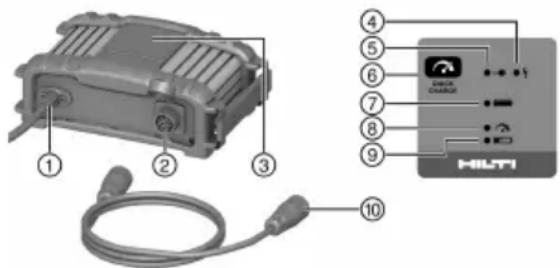
text_image
Diagram of a HLT device with labeled components including a battery, cable, and control panel① Supply cord
② Charging cable socket
③ Operating panel
④ Fault indicator (red)
⑤ Power-in indicator (green)
⑥ Quick charge button
⑦ Fully-charged indicator (green)
⑧ Quick charge indicator (green)
⑨ Charge indicator (green)
⑩ Charging cord
3.2 Intended use
The product described is a charger for the FX 3-A welding machine. It is designed to be connected to power outlets providing an AC (alternating current) voltage of 100 to 127 volts or 220 to 240 volts (depending on country-specific version). Observe the information on the type identification plate of your charger.
• More information is available from your Hilti Store or from www.hilti.group
3.2.1 Foreseeable misuse
Never try to use the product to charge other batteries or products other than the Hilti FX 3-A.
3.3 Using extension cords
The use of an inappropriate extension cord can lead to risk of fire and electric shock. If the use of an extension cord is necessary, make sure that
- the pins of the extension cord connector are of the matching number, size and shape to mate with the connector of the charger,
- the extension cord is correctly wired and in good electrical condition,
- the conductor gauge is adequate for the charger's AC amperage.
3.3.1 Maximum length of an extension cord
| AWG 16 | AWG 12 | AWG 10 | AWG 8 |
| 7.6 m(24 ft - 11 in) | 15.2 m(49 ft - 10 in) | 30.5 m(100 ft - 1 in) | 45.6 m(149 ft - 7 in) |
3.3.2 Overcharge protection
The product has overcharge protection. When the battery is fully charged the charger automatically switches to the maintenance mode.
3.4 Items supplied
Charger, operating instructions
Other system products approved for use with this product can be found at your local Hilti Store or at: www.hilti.group
4 Technical data
| C 53 | ||
| Supply frequency 220-240 V | 50 Hz ... 60 Hz | |
| 110-120 V | 50 Hz ... 60 Hz | |
| 100 V | 50 Hz ... 60 Hz | |
| Mains (AC) voltage 220-240 V | 220 V ... 240 V | |
| 110-120 V | 110 V ... 120 V | |
| 100 V | 100 V | |
| Maximum supply current 220-240 V | 9.5 A | |
| 110-120 V | 15 A | |
| 100 V | 15.7 A | |
| Maximum AC supply fuse rating 220-240 V | 16 A | |
| 110-120 V | 20 A | |
| 100 V | 16 A | |
| Maximum output power 220-240 V | 1,040 W | |
| 110-120 V | 1,000 W | |
| 100 V | 840 W | |
| Maximum output current (DC) 220-240 V | 18 A | |
| 110-120 V | 18 A | |
| 100 V | 18 A | |
| Protection class (with protective earth) | I | |
| Overvoltage category | II | |
| Typical charging time (to 80 % battery capacity) | 50 min | |
| Typical charging time on quick charge (to 80 % battery capacity) | 30 min | |
| Dimensions (L x W x H) | 270 mm x 168 mm x 100 mm(10.6 in x 6.6 in x 3.9 in) | |
| Weight | 2 kg(4 lb) | |
| Degree of protection | IP 40 | |
| Relative air humidity 20 °C (68 °F) | 90 % | |
| 40 °C (104 °F) | 50 % | |
| Ambient temperature for operation | -10 °C ... 40 °C(14 °F ... 104 °F) | |
| Storage temperature | -20 °C ... 55 °C(-4 °F ... 131 °F) | |
5 Preparations at the workplace

CAUTION
Risk of injury! Inadvertent starting of the product.
▶ Unplug the supply cord before making adjustments to the power tool or before changing accessories.
Observe the safety instructions and warnings in this documentation and on the product.
5.1 Setting up the product
Set-up conditions for charging and in operation
- The charger must be able to emit heat while in operation. The air vents must therefore remain unobstructed.
- The surface on which the product is set must be smooth and level, so that the product does not tip over or fall.
- The charger has no protection against the ingress of moisture and is to be used inside dry rooms only.
5.2 Charging the battery 2
Fully charge the battery before using it for the first time.
- Make sure that the contacts on the welding machine and the contacts on the charger are clean and dry.
-
Connect the charging cord to the charger and to the welding machine.
-
Plug the supply cord plug into a power outlet.
The power-in indicator and the charge indicator on the charger show steadily.
The battery charge state indicator on the welding machine flashes and the segments show the battery's current state of charge.
- If you want to charge the battery more quickly, press the quick charge button.
The power-in indicator and the quick charge indicator on the charger show steadily.
The battery charge state indicator on the welding machine flashes and the segments show the battery's current state of charge.

To switch off the quick charge mode, press the quick charge button again.
- When the battery is fully charged the charger automatically switches to the maintenance mode.
On the charger, the power-in indicator and the fully-charged indicator show steadily. On the welding machine, all segments of the battery charge state indicator show.
- Then disconnect the supply cord plug from the power outlet and disconnect the connection between charger and welding machine.
6 Care and maintenance

WARNING
Electric shock hazard! Attempting care and maintenance with the supply cord connected to a power outlet and/or the charging cord connected can lead to severe injury and burns.
▶ Always unplug all cords before carrying out care and maintenance tasks!
Care
- Carefully remove stubborn dirt from the tool.
- Use only a slightly damp cloth to clean the casing. Do not use cleaning agents containing silicone as these can attack the plastic parts.
Maintenance

WARNING
Danger of electric shock! Improper repairs to electrical components may lead to serious injuries including burns.
- Repairs to the electrical section of the tool or appliance may be carried out only by trained electrical specialists.
- Check all visible parts and controls for signs of damage at regular intervals and make sure that they all function correctly.
- Do not operate the product if signs of damage are found or if parts malfunction. Have it repaired immediately by Hilti Service.
• After cleaning and maintenance, fit all guards or protective devices and check that they function correctly.

To help ensure safe and reliable operation, use only genuine Hilti spare parts and consumables. Spare parts, consumables and accessories approved by Hilti for use with the product can be found at your local Hilti Store or online at: www.hilti.group
7 Transport and storage
▶ After transporting, always check all visible parts and controls for signs of damage and make sure that they all function correctly.
▶ After a long period of storage, always check all visible parts and controls for signs of damage and make sure that they all function correctly.
- Do not store the product in a potentially explosive environment.
▶ Always store this product with the electric supply cable unplugged from the electricity supply.
8 Troubleshooting
If the trouble you are experiencing is not listed in this table or you are unable to rectify the problem by yourself, contact Hilti Service.
| Malfunction Possible cause | Action to be taken | |
 Power-in indicator shows steadily, fault indicator shows steadily Power-in indicator shows steadily, fault indicator shows steadily | Fault in the charger ▶ Contact Hilti Service. | |
 Power-in indicator shows steadily, fault indicator flashes Power-in indicator shows steadily, fault indicator flashes | Fault in the welding machine | ▸ Contact Hilti Service. |
 Power-in indicator and fault indicator flash Power-in indicator and fault indicator flash | Fault in the electricity supply (over heating or overvoltage) | ▸ Unplug the supply cord from t power outlet and disconnect th charging cord from the charge▸ Check the supply voltage from the electricity supply. |
| AC supply fuse or automatic fuse trips | Fuse in AC supply too weak / wrong automatic fuse | ▸ Unplug the supply cord from t power outlet and disconnect th charging cord from the charge▸ Use fuses of correct ampere ratings. |
| AC supply fuse trips in no-load operation. | ▸ Unplug the supply cord from t power outlet and disconnect th charging cord from the charge▸ Consult Hilti Service. |
9 Disposal
Most of the materials from which Hilti tools and appliances are manufactured can be recycled. The materials must be correctly separated before they can be recycled. In many countries, your old tools, machines or appliances can be returned to Hilti for recycling. Ask Hilti Service or your Hilti representative for further information.

- Do not dispose of power tools, electronic equipment or batteries as household waste!
10 Manufacturer's warranty
▶ Please contact your local Hilti representative if you have questions about the warranty conditions.
11 Further information
For more information on operation, technology, environment and recycling, follow this link: qr.hilti.com/manual?id=2302422
This link is also to be found at the end of the documentation, in the form of a QR code.
text_image
Diagram of a wireless device with labeled components including a coiled cable and an HLT1 interface panel.text_image
Diagram showing labeled components of an HVTI device with numbered parts and a connected interface paneltext_image
Diagram showing labeled components of an HILTI device with cable and connector detailsnatural_image
Icon of a person reading a book inside a circle with a right-pointing arrow (no text or symbols)
text_image
QR code image containing encoded data, no visible human-readable text
text_image
HILTIHilti Corporation
LI-9494 Schaan
Tel.:+423 234 21 11
Fax:+423 234 29 65
www.hilti.group