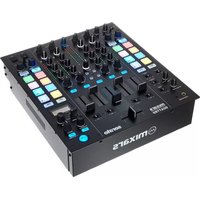
Duo MKII - DJ Equipment Mixars - Free user manual and instructions
Find the device manual for free Duo MKII Mixars in PDF.



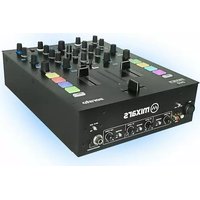
| Product Type | DJ Console / DJ Mixer |
| Brand | Mixars |
| Model | Duo MKII |
| Power Supply | AC 100-240V, 50/60Hz |
| Power Consumption | 13 W |
| Dimensions (approx.) | 330 x 250 x 70 mm |
| Weight (approx.) | 3.2 kg |
| Number of Channels | 2 |
| Inputs | 2 x Phono/Line (RCA), 2 x Line (RCA), 1 x Micro (XLR/TRS combo), 1 x Aux (3.5 mm Jack) |
| Outputs | 2 x Master XLR (bal), 2 x Booth TRS (bal), 2 x Master RCA (unbal), 2 x Rec RCA (unbal), 1 x Headphone (6.35 mm Jack + mini-jack) |
| Audio Interface | USB B class-compliant (Mac), driver required (Windows) |
| Built-in USB Hub | 2 additional USB ports |
| Main Functions | Adjustable crossfader, channel faders, 3-band EQ, analog filter, performance pads (cue, sample), FX (2 banks), Loop/Roll, sync, library control |
| Software Compatibility | Serato DJ (Serato guide included) |
| Mic/Aux Input | Yes, with level and tone control |
| Headphone Output | Yes, with mix and volume control, split cue mode |
| Safety | Do not expose to water or humidity; use in temperate climate; refer repairs to qualified personnel |
| Maintenance | Clean with dry cloth only |
| Included Accessories | Quick start guide, USB cable, power cord |
| Repairability | No user-serviceable parts; refer to qualified technician |
Frequently Asked Questions - Duo MKII Mixars
User questions about Duo MKII Mixars
0 question about this device. Answer the ones you know or ask your own.
Ask a new question about this device
Download the instructions for your DJ Equipment in PDF format for free! Find your manual Duo MKII - Mixars and take your electronic device back in hand. On this page are published all the documents necessary for the use of your device. Duo MKII by Mixars.
USER MANUAL Duo MKII Mixars
Professional 2 channel Battle mixer with integrated audio interface for Serato DJ
EN FR D IT ES
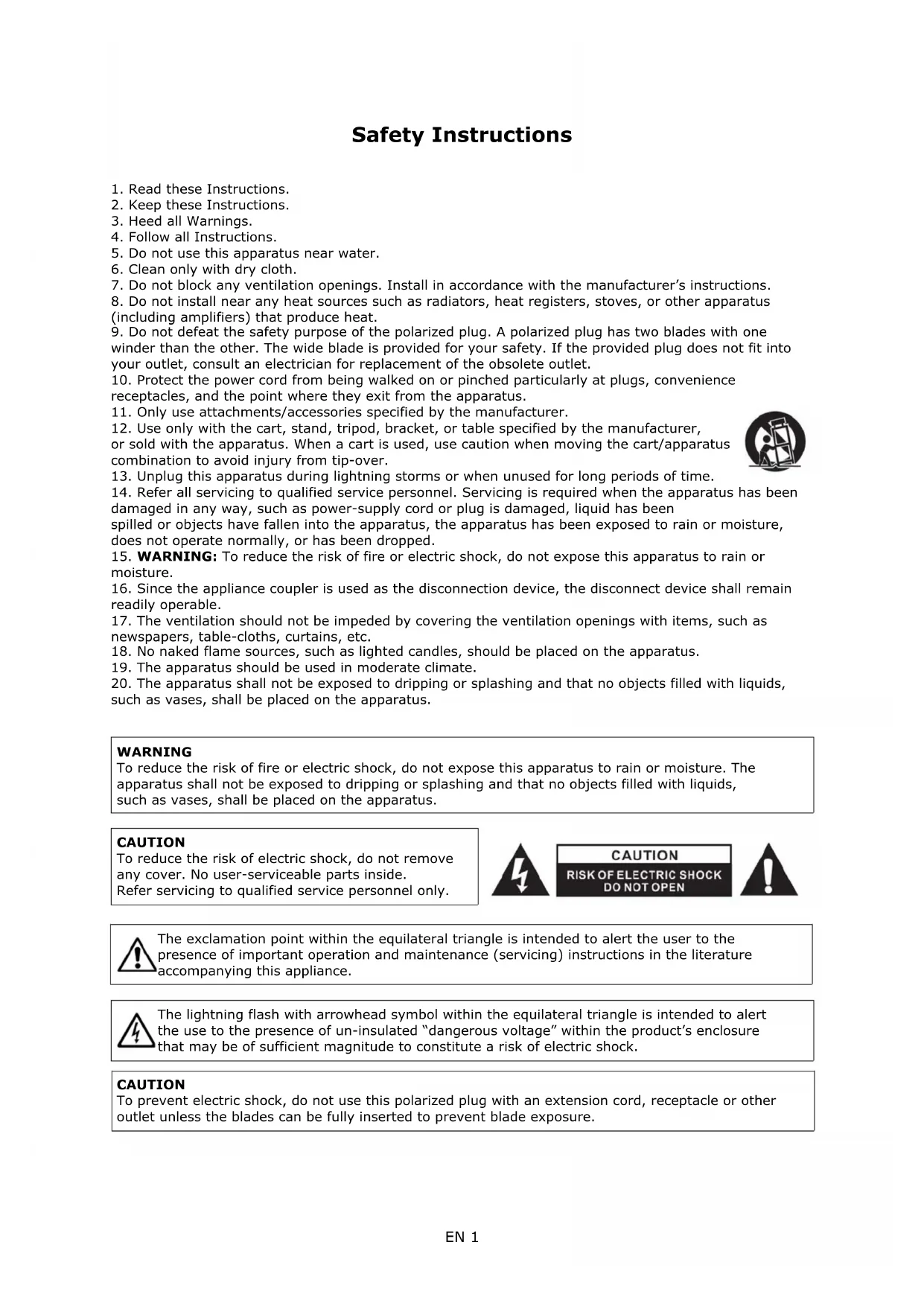
Safety Instructions
-
Read these Instructions.
-
Keep these Instructions.
-
Heed all Warnings.
-
Follow all Instructions.
-
Do not use this apparatus near water.
-
Clean only with dry cloth.
-
Do not block any ventilation openings. Install in accordance with the manufacturer's instructions.
-
Do not install near any heat sources such as radiators, heat registers, stoves, or other apparatus (including amplifiers) that produce heat.
-
Do not defeat the safety purpose of the polarized plug. A polarized plug has two blades with one winder than the other. The wide blade is provided for your safety. If the provided plug does not fit into your outlet, consult an electrician for replacement of the obsolete outlet.
-
Protect the power cord from being walked on or pinched particularly at plugs, convenience receptacles, and the point where they exit from the apparatus.
-
Only use attachments/accessories specified by the manufacturer.
-
Use only with the cart, stand, tripod, bracket, or table specified by the manufacturer, or sold with the apparatus. When a cart is used, use caution when moving the cart/apparatus combination to avoid injury from tip-over.
-
Unplug this apparatus during lightning storms or when unused for long periods of time.
-
Refer all servicing to qualified service personnel. Servicing is required when the apparatus has been damaged in any way, such as power-supply cord or plug is damaged, liquid has been spilled or objects have fallen into the apparatus, the apparatus has been exposed to rain or moisture, does not operate normally, or has been dropped.
-
WARNING: To reduce the risk of fire or electric shock, do not expose this apparatus to rain or moisture.
-
Since the appliance coupler is used as the disconnection device, the disconnect device shall remain readily operable.
-
The ventilation should not be impeded by covering the ventilation openings with items, such as newspapers, table-cloths, curtains, etc.
-
No naked flame sources, such as lighted candles, should be placed on the apparatus.
-
The apparatus should be used in moderate climate.
-
The apparatus shall not be exposed to dripping or splashing and that no objects filled with liquids, such as vases, shall be placed on the apparatus.
WARNING
To reduce the risk of fire or electric shock, do not expose this apparatus to rain or moisture. The apparatus shall not be exposed to dripping or splashing and that no objects filled with liquids, such as vases, shall be placed on the apparatus.
CAUTION
To reduce the risk of electric shock, do not remove any cover. No user-serviceable parts inside.
Refer servicing to qualified service personnel only.

CAUTION
RISK OF ELECTRIC SHOCK DO NOT OPEN


The exclamation point within the equilateral triangle is intended to alert the user to the presence of important operation and maintenance (servicing) instructions in the literature accompanying this appliance.

The lightning flash with arrowhead symbol within the equilateral triangle is intended to alert the use to the presence of un-insulated "dangerous voltage" within the product's enclosure that may be of sufficient magnitude to constitute a risk of electric shock.
CAUTION
To prevent electric shock, do not use this polarized plug with an extension cord, receptacle or other outlet unless the blades can be fully inserted to prevent blade exposure.

Accessories and Driver Installation
Check for the following parts included in the package with the main unit:
Hardware guide x 1 USB Cable x 1 AC cord x 1
Driver installation
The Mixars Duo is a class-compliant device for Mac OS X however will require drivers for Windows. Please make sure you have completed driver installation before use with Serato DJ.
Mac
No driver needed
Windows
Download the driver via our website: www.mixars.com
Double click on the .exe file to start installation and follow the on-screen instructions.
Please note that you may have to reconnect DUO after installation.
Controls and functions
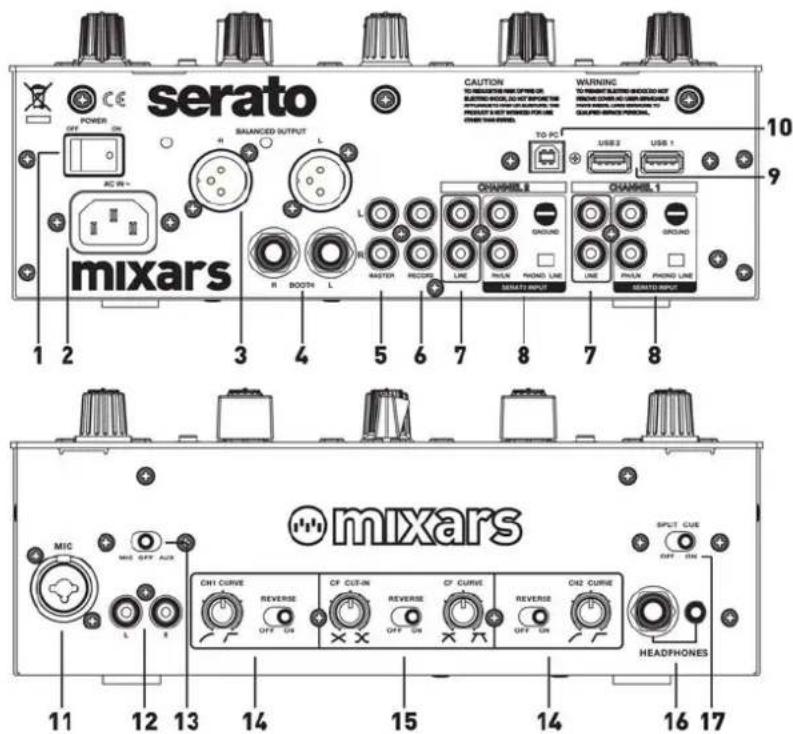
Rear
1. Power On/Off switch
Turns the power of the unit On and Off.
2. AC In
Connect the powercord here.
3. Main output, Balanced XLR
Main Balanced XLR output, controlled via the «Master» knob (see 30).
4. Booth Output, TRS
Secondary TRS output (Bal.), controlled via the «Booth» knob (see 31).
5. Secondary Master output, RCA
Secondary RCA Master output (Unbal.), controlled via the «Master» knob (see 30).
6. Additional Rec. output
Additional RCA Record output (Unbal.), controlled via the «Master» knob (see 30).
7. Secondary Line inputs
Line signal dedicated secondary input for each channel.
8. Main Phono/Line inputs
Main Phono / Line Inputs for each channel. Use the dedicated «Phono / Line» button nearby for selecting the right setting depending on the equipment used (Phono or Line sources).
9. USB Hub
2 x Extra USB Inputs for connecting various accessories to your computer.
10. Main USB soundcard output
Connect the mixer to your computer using the included USB cable for using it with Serato DJ.
Front
11. Mic input
XLR / TRS Combo Microphone input, controlled via the «MIC/AUX» knob (see 25).
12. Aux input
Additional Aux input for connecting various Line signal sources, controlled via the «MIC/AUX» knob (see 25).
13. Mic / Aux switch
Select if Using the Mic Input (switch towards left) or the Aux input (switch towards right) Center position turns the Mic/Aux Input off.
14. Channel Fader Curve Adjustment and Reverse switch
Adjust the Channel fader curve characteristics for the corresponding channel and enable or disable Reverse for each channel.
15. Crossfader adjustment and reverse switch Cf Cut-In:
Personalize your Cut. Adjust the Cut-In time for the crossfader. Turn towards left for minumum dead space - faster cut, and towards right for a larger dead space - slower/longer cut-in.
Cf Curve:
Adjust the Crossfader curve from Hard (towards right) to Soft (towards left).
Reverse switch:
Reverses the Left with the Right Channel.
16. Headphones output
TRS and Mini-Jack Headphones output controlled via the «Headphones» knob (see 29).
17. Split Cue On/Off switch
If enabled, the headphones signal gets split: Master signal on one channel, and the enabled Cue signals selected via the «CUE» buttons (see 32), on the other channel.
text_image
serato POWER AC IN+ BALANCED OUTPUT R BOOT L MASTER RECORD LINE PHILN PHONE LINE SERATE INPUT CAUTION TO REDUCED FROM OFF ON BEARING OUT, BLAST INCOME WARNING TO PRESENT SENSORS ON HOURS ON CHAPES AND CAN BE REPRODUCED WARNING TO PRESENT SENSORS ON HOURS ORANGE WITH SIDES FORUM 10 9 1 2 3 4 5 6 7 8 7 8 10 USER 2 USB 1 CHANNEL 1 CHANNEL 2 GROUND GROUND SERCID INPUT MIC MIC OFF AUX mixars C41 CURVE. REVERSE OFF ON CF CUT-IN REVERSE OFF ON CF CURVE. REVERSE OFF ON C42 CURVE. SPLIT CUE OFF ON HEADPHONES 11 12 13 14 15 14 16 17Please visit https://serato.com/hardware/mixars-duo for our Duo - Serato DJ Quickstart Guide.
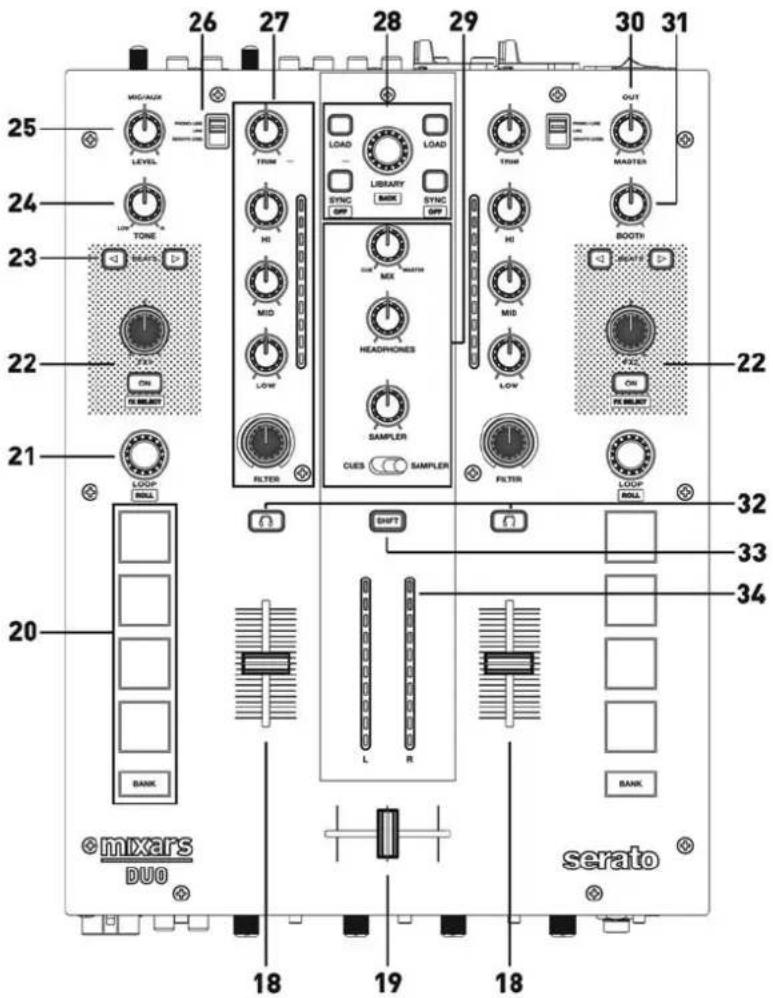
Top
18. Channel faders
Adjust the volume level of the corresponding channel.
19. Crossfader
Switch between Left, Right, or the mix of both channels.
20. Pads
Use to trigger cue points and samples in Serato DJ. Bank:
Switch between pad bank 1 (Cues from 1 to 4) and pad bank 2 (Cues from 5 to 8).
21. Loop / Loop roll
Control the loop and loop roll function in Serato DJ by turning and pressing the knob. Press and hold the «SHIFT» button (see 33) for controlling the loop roll function.
22. FX 1 and FX 2 Control
Adjust the intensity of the corresponding effect by turning the knob, and turn the effect on and off by pressing the «ON» Button. Press and hold «SHIFT» for enabling FX select.
23. Beats
Select the beat fraction for the FX synchronization.
24. Mic / Aux Tone adjust
Adjust the tone of the Mic or Aux input.
25. Mic / Aux Level
Adjust the level of the Mic or Aux input
26. Source Switch
Select the input to be controlled on the corresponding channel.
Switch between Phono/Line (see 8), Line (see 7) or Serato - USB (see 10).
27. Trim, EQ, Filter and channel level meters Trim:
Adjust the overall level for the corresponding channel.
Hi, Mid, Low:
Adjust the equalizer settings for the corresponding channel.
Filter:
Control the analogue filter for the corresponding channel. Center position: Off
Level meters:
Display the level of the corresponding channel adjusted via the «Trim» control.
28. Library, Load and Sync controls
Load:
Load a track on the corresponding deck by pressing the «Load» Buttons.
Library:
Scroll the Library by turning the «Library» knob and display the next level by pressing it. Hold «Shift» and press for turning to the previous level. Sync:
Synchronize a track to another by pressing the corresponding «Sync» button and turn off the function by pressing «Sync» while holding «Shift».
29. Headphones and Sampler controls Mix:
Turn for adjusting between Cue and Master signal. Headphones:
Adjust the headphones volume.
Sampler:
Adjust the volume of the sample player.
Cue/Sampler switch:
Select if controlling the Cue Points or the Sample player with the «Pads» (see 20).
30. Master volume
Adjust the volume of the master level signal.
31. Booth
Adjust the level of the «Booth» output.
32. Cue On/Off
Assign the corresponding channel to the Cue signal.
33. Shift button
See Points 21, 22, 28. Hold for enabling the controls:
Loop Roll, FX select, Sync-off and Library-back.
34. Master Level Meters
Display the Master Level Signal.
Please note that all faders and controls support MIDI
text_image
26 27 28 29 30 31 25 MIX/AUX LEVEL TONE LOAD TMN HI LIBRARY SYNC OFF SYNC OFF OUT THUR MASTER 24 23 SEATS ON RANGE RANGE 22 21 LOOP ROLL 20 BANK © mixars DUO 18 19 18 32 33 34 CUES SAMPLER FILTER SWIFT L R BANK SERATOSpecifications
1. GENERAL SECTION
POWER SOURCE AC 100\~240V 50/60Hz
POWER CONSUMPTION 13WATTS
DIMENSIONS 265mm (W) X 369mm (D) X 104.1mm (H)
WEIGHT 4.15kg
2. INPUT/OUTPUT IMPEDANCE & SENSITIVITY:
(1KHz INPUT, MIC/AUX, TRIM, MASTER AT MAX.)
2-1.
INPUT IMPEDANCE AND REFERENCE INPUT LEVEL:
2-2. OUTPUT IMPEDANCE AND REFERENCE OUT LEVEL:
Nominal Limited
MASTER : 1K OHM /0dBV (1V) ± 1dB ± 2dB
BALANCED : 600 OHM /0dBV (1V) ± 1dB ± 2dB
BOOTH : 600 OHM /0dBV (1V) ± 1dB ± 2dB
PHONES: 33 OHM /-3dBV (708mV) ± 1dB ± 2dB
RECORD: 1K OHM /-9dBV (400mV) ± 1dB ± 2dB
3. FREQUENCY RESPONSE: (REFERENCE INPUT LEVEL, MIC/AUX, TRIM, MASTER AT MAX.)
Nominal Limited
| LINE: | 20 - 20K Hz | +1/-1.5dB | +2/-3dB |
| AUX: | 20 - 20K Hz | +1/-1.5dB | +2/-3dB |
| PHONO: | 20 - 20K Hz | +1/-2dB | +2/-3dB (RIAA) |
| MIC: | 20 - 20K Hz | +1/-2dB | +2/-3dB |
4. MAXIMUM INPUT:
(MIC/AUX, TRIM, MASTER AT 9 O'CLOCK. ADJUST INPUT 1KHz LEVEL TO OUTPUT LEVEL LESS THAN 1% T.H.D WITH A-w/20KHz LPF)
Nominal Limited
LINE : +15dBV +14dBV
AUX : +15dBV +14dBV
PHONO : -21dBV -22dBV
MIC : -25dBV -26dBV
5. MAXIMUM OUTPUT: ( MIC/AUX, TRIM, MASTER AT MAX. ADJUST INPUT 1KHz LEVEL TO OUTPUT LEVEL LESS THAN 1% T.H.D WITH A-w/20kHz LPF )
Nominal Limited
(1) Low Band: (Low Band Reference Frequency is 70Hz)
Maximum level: +12
± 1dB
± 1.5dB
Minimum level: -25
± 1dB
± 1.5dB
(2) Middle Band: (Middle Band Reference Frequency is 1KHz)
Maximum level: +12
± 1dB
± 1.5dB
Minimum level: -25
± 1dB
± 1.5dB
(3) High Band:
(Hi Band Reference Frequency is 13KHz)
Maximum level: +12
± 1dB
± 1.5dB
Minimum level: -25
± 1dB
± 1.5dB
- AUDIO CARD USB
USB
24 Bit
48 kHz
Loop Roll, FX select, Sync-off et Library-back.
34. Master Level Meters
DIMENSIONS 265mm (W) X 369mm (D) X 104.1mm (H)
WEIGHT 4.15kg
2. INPUT/OUTPUT IMPEDANCE & SENSITIVITY:
(1KHz INPUT, MIC/AUX, TRIM, MASTER AT MAX.)
2-1.
INPUT IMPEDANCE AND REFERENCE INPUT LEVEL:
2-2. OUTPUT IMPEDANCE AND REFERENCE OUT LEVEL:
Nominal Limited
MASTER : 1K OHM /0dBV (1V) ± 1dB ± 2dB
BALANCED : 600 OHM /0dBV (1V) ± 1dB ± 2dB
BOOTH : 600 OHM /0dBV (1V) ± 1dB ± 2dB
PHONES: 33 OHM /-3dBV (708mV) ± 1dB ± 2dB
RECORD: 1K OHM /-9dBV (400mV) ± 1dB ± 2dB
3. FREQUENCY RESPONSE: (REFERENCE INPUT LEVEL, MIC/AUX, TRIM, MASTER AT MAX.)
Nominal Limited
| LINE: | 20 - 20K Hz | +1/-1.5dB | +2/-3dB |
| AUX: | 20 - 20K Hz | +1/-1.5dB | +2/-3dB |
| PHONO: | 20 - 20K Hz | +1/-2dB | +2/-3dB (RIAA) |
| MIC: | 20 - 20K Hz | +1/-2dB | +2/-3dB |
4. MAXIMUM INPUT:
(MIC/AUX, TRIM, MASTER AT 9 O'CLOCK. ADJUST INPUT 1KHz LEVEL TO OUTPUT LEVEL LESS THAN 1% T.H.D WITH A-w/20KHz LPF)
Nominal Limited
LINE : +15dBV +14dBV
AUX : +15dBV +14dBV
PHONO : -21dBV -22dBV
MIC : -25dBV -26dBV
5. MAXIMUM OUTPUT: ( MIC/AUX, TRIM, MASTER AT MAX. ADJUST INPUT 1KHz LEVEL TO OUTPUT LEVEL LESS THAN 1% T.H.D WITH A-w/20kHz LPF )
Nominal Limited
(Low Band Reference Frequency is 70Hz)
Maximum level:
± 1dB
± 1.5dB
Minimum level:
± 1dB
± 1.5dB
(2) Middle Band:
(Middle Band Reference Frequency is 1KHz)
Maximum level:
± 1dB
± 1.5dB
Minimum level:
± 1dB
± 1.5dB
(3) High Band:
(Hi Band Reference Frequency is 13KHz)
Maximum level:
± 1dB
± 1.5dB
Minimum level:
± 1dB
± 1.5dB
- AUDIO CARD
USB
24 Bit
48 kHz
6. Extra Rec. Output
DIMENSIONS 265mm (W) X 369mm (D) X 104.1mm (H)
WEIGHT 4.15kg
2. INPUT/OUTPUT IMPEDANCE & SENSITIVITY:
(1KHz INPUT, MIC/AUX, TRIM, MASTER AT MAX.)
2-1.
INPUT IMPEDANCE AND REFERENCE INPUT LEVEL:
2-2. OUTPUT IMPEDANCE AND REFERENCE OUT LEVEL:
Nominal Limited
MASTER : 1K OHM /0dBV (1V) ± 1dB ± 2dB
BALANCED : 600 OHM /0dBV (1V) ± 1dB ± 2dB
BOOTH : 600 OHM /0dBV (1V) ± 1dB ± 2dB
PHONES: 33 OHM /-3dBV (708mV) ± 1dB ± 2dB
RECORD: 1K OHM /-9dBV (400mV) ± 1dB ± 2dB
3. FREQUENCY RESPONSE: (REFERENCE INPUT LEVEL, MIC/AUX, TRIM, MASTER AT MAX.)
Nominal Limited
| LINE: | 20 - 20K Hz | +1/-1.5dB | +2/-3dB |
| AUX: | 20 - 20K Hz | +1/-1.5dB | +2/-3dB |
| PHONO: | 20 - 20K Hz | +1/-2dB | +2/-3dB (RIAA) |
| MIC: | 20 - 20K Hz | +1/-2dB | +2/-3dB |
4. MAXIMUM INPUT:
(MIC/AUX, TRIM, MASTER AT 9 O'CLOCK. ADJUST INPUT 1KHz LEVEL TO OUTPUT LEVEL LESS THAN 1% T.H.D WITH A-w/20KHz LPF)
Nominal Limited
LINE : +15dBV +14dBV
AUX : +15dBV +14dBV
PHONO : -21dBV -22dBV
MIC : -25dBV -26dBV
5. MAXIMUM OUTPUT: ( MIC/AUX, TRIM, MASTER AT MAX. ADJUST INPUT 1KHz LEVEL TO OUTPUT LEVEL LESS THAN 1% T.H.D WITH A-w/20kHz LPF )
Nominal Limited
(Low Band Reference Frequency is 70Hz)
Maximum level:
± 1dB
± 1.5dB
Minimum level:
± 1dB
± 1.5dB
(2) Middle Band:
(Middle Band Reference Frequency is 1KHz)
Maximum level:
± 1dB
± 1.5dB
Minimum level:
± 1dB
± 1.5dB
(3) High Band:
(Hi Band Reference Frequency is 13KHz)
Maximum level:
± 1dB
± 1.5dB
Minimum level:
± 1dB
± 1.5dB
- AUDIO CARD
USB
24 Bit
48 kHz
AVVERTENZE DI SICUREZZA
27. Trim, EQ, Filter e channel level meters
Trim:
Loop Roll, FX select, Sync-off and Library-back.
34. Master Level Meter
DIMENSIONS 265mm (W) X 369mm (D) X 104.1mm (H)
WEIGHT 4.15kg
2. INPUT/OUTPUT IMPEDANCE & SENSITIVITY:
(1KHz INPUT, MIC/AUX, TRIM, MASTER AT MAX.)
2-1.
INPUT IMPEDANCE AND REFERENCE INPUT LEVEL:
2-2. OUTPUT IMPEDANCE AND REFERENCE OUT LEVEL:
Nominal Limited
MASTER : 1K OHM /0dBV (1V) ± 1dB ± 2dB
BALANCED : 600 OHM /0dBV (1V) ± 1dB ± 2dB
BOOTH : 600 OHM /0dBV (1V) ± 1dB ± 2dB
PHONES: 33 OHM /-3dBV (708mV) ± 1dB ± 2dB
RECORD: 1K OHM /-9dBV (400mV) ± 1dB ± 2dB
3. FREQUENCY RESPONSE: (REFERENCE INPUT LEVEL, MIC/AUX, TRIM, MASTER AT MAX.)
Nominal Limited
| LINE: | 20 - 20K Hz | +1/-1.5dB | +2/-3dB |
| AUX: | 20 - 20K Hz | +1/-1.5dB | +2/-3dB |
| PHONO: | 20 - 20K Hz | +1/-2dB | +2/-3dB (RIAA) |
| MIC: | 20 - 20K Hz | +1/-2dB | +2/-3dB |
4. MAXIMUM INPUT:
(MIC/AUX, TRIM, MASTER AT 9 O'CLOCK. ADJUST INPUT 1KHz LEVEL TO OUTPUT LEVEL LESS THAN 1% T.H.D WITH A-w/20KHz LPF)
Nominal Limited
LINE : +15dBV +14dBV
AUX : +15dBV +14dBV
PHONO : -21dBV -22dBV
MIC : -25dBV -26dBV
5. MAXIMUM OUTPUT: ( MIC/AUX, TRIM, MASTER AT MAX. ADJUST INPUT 1KHz LEVEL TO OUTPUT LEVEL LESS THAN 1% T.H.D WITH A-w/20kHz LPF )
Nominal Limited
(Low Band Reference Frequency is 70Hz)
Maximum level:
± 1dB
± 1.5dB
Minimum level:
± 1dB
± 1.5dB
(2) Middle Band:
(Middle Band Reference Frequency is 1KHz)
Maximum level:
± 1dB
± 1.5dB
Minimum level:
± 1dB
± 1.5dB
(3) High Band:
(Hi Band Reference Frequency is 13KHz)
Maximum level:
± 1dB
± 1.5dB
Minimum level:
± 1dB
± 1.5dB
- AUDIO CARD
USB
24 Bit
48 kHz
27. Trim, EQ, Filter y channel level meters Trim:
Loop Roll, FX select, Sync-off and Library-back.
34. Master Level Meter
DIMENSIONS 265mm (W) X 369mm (D) X 104.1mm (H)
WEIGHT 4.15kg
2. INPUT/OUTPUT IMPEDANCE & SENSITIVITY:
(1KHz INPUT, MIC/AUX, TRIM, MASTER AT MAX.)
2-1.
INPUT IMPEDANCE AND REFERENCE INPUT LEVEL:
2-2. OUTPUT IMPEDANCE AND REFERENCE OUT LEVEL:
Nominal Limited
MASTER : 1K OHM /0dBV (1V) ± 1dB ± 2dB
BALANCED : 600 OHM /0dBV (1V) ± 1dB ± 2dB
BOOTH : 600 OHM /0dBV (1V) ± 1dB ± 2dB
PHONES: 33 OHM /-3dBV (708mV) ± 1dB ± 2dB
RECORD: 1K OHM /-9dBV (400mV) ± 1dB ± 2dB
3. FREQUENCY RESPONSE: (REFERENCE INPUT LEVEL, MIC/AUX, TRIM, MASTER AT MAX.)
Nominal Limited
| LINE: | 20 - 20K Hz | +1/-1.5dB | +2/-3dB |
| AUX: | 20 - 20K Hz | +1/-1.5dB | +2/-3dB |
| PHONO: | 20 - 20K Hz | +1/-2dB | +2/-3dB (RIAA) |
| MIC: | 20 - 20K Hz | +1/-2dB | +2/-3dB |
4. MAXIMUM INPUT:
(MIC/AUX, TRIM, MASTER AT 9 O'CLOCK. ADJUST INPUT 1KHz LEVEL TO OUTPUT LEVEL LESS THAN 1% T.H.D WITH A-w/20KHz LPF)
Nominal Limited
LINE : +15dBV +14dBV
AUX : +15dBV +14dBV
PHONO : -21dBV -22dBV
MIC : -25dBV -26dBV
5. MAXIMUM OUTPUT: ( MIC/AUX, TRIM, MASTER AT MAX. ADJUST INPUT 1KHz LEVEL TO OUTPUT LEVEL LESS THAN 1% T.H.D WITH A-w/20kHz LPF )
Nominal Limited
(Low Band Reference Frequency is 70Hz)
Maximum level:
± 1dB
± 1.5dB
Minimum level:
± 1dB
± 1.5dB
(2) Middle Band:
(Middle Band Reference Frequency is 1KHz)
Maximum level:
± 1dB
± 1.5dB
Minimum level:
± 1dB
± 1.5dB
(3) High Band:
(Hi Band Reference Frequency is 13KHz)
Maximum level:
± 1dB
± 1.5dB
Minimum level:
± 1dB
± 1.5dB
- AUDIO CARD
USB
24 Bit
48 kHz