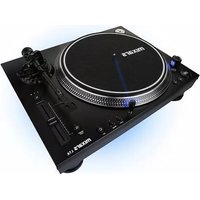
LTA - Turntable Mixars - Free user manual and instructions
Find the device manual for free LTA Mixars in PDF.



| Product type | Turntable |
| Brand | Mixars |
| Model | LTA |
| Power supply | AC 115/230 V, 60/50 Hz |
| Speeds | 33 1/3 and 45 RPM |
| Pitch range | ±8%, ±16%, ±50% |
| Pitch control | Slider with quartz lock |
| Reverse play | Yes |
| Tonearm type | S-shaped tonearm |
| Headshell | Removable headshell |
| Counterweight | Included |
| Anti-skating | Adjustable |
| Outputs | Phono/Line (switchable), additional line output |
| Target light | Yes |
| 45 RPM adapter | Included |
| Platter | Removable |
| Cleaning | Dry cloth only |
| Safety | Do not expose to water or moisture; do not block ventilation |
| Spare parts | Headshell, counterweight, platter, 45 RPM adapter |
| General information | Use in temperate climate; unobstructed ventilation |
Frequently Asked Questions - LTA Mixars
User questions about LTA Mixars
0 question about this device. Answer the ones you know or ask your own.
Ask a new question about this device
Download the instructions for your Turntable in PDF format for free! Find your manual LTA - Mixars and take your electronic device back in hand. On this page are published all the documents necessary for the use of your device. LTA by Mixars.
USER MANUAL LTA Mixars
mixars
LTA / STA
Professional High-Torque Turntable
EN/FR/D/IT/ES
Safety Instructions
- Read these Instructions.
- Keep these Instructions.
- Heed all Warnings.
- Follow all Instructions.
- Do not use this apparatus near water.
- Clean only with dry cloth.
- Do not block any ventilation openings. Install in accordance with the manufacturer's instructions.
- Do not install near any heat sources such as radiators, heat registers, stoves, or other apparatus (including amplifiers) that produce heat.
- Do not defeat the safety purpose of the polarized plug. A polarized plug has two blades with one winder than the other. The wide blade is provided for your safety. If the provided plug does not fit into your outlet, consult an electrician for replacement of the obsolete outlet.
- Protect the power cord from being walked on or pinched particularly at plugs, convenience receptacles, and the point where they exit from the apparatus.
- Only use attachments/accessories specified by the manufacturer.
- Use only with the cart, stand, tripod, bracket, or table specified by the manufacturer, or sold with the apparatus. When a cart is used, use caution when moving the cart/apparatus combination to avoid injury from tip-over.
- Unplug this apparatus during lightning storms or when unused for long periods of time.
- Refer all servicing to qualified service personnel. Servicing is required when the apparatus has been damaged in any way, such as power-supply cord or plug is damaged, liquid has been spilled or objects have fallen into the apparatus, the apparatus has been exposed to rain or moisture, does not operate normally, or has been dropped.
- WARNING: To reduce the risk of fire or electric shock, do not expose this apparatus to rain or moisture.
- Since the appliance coupler is used as the disconnection device, the disconnect device shall remain readily operable.
- The ventilation should not be impeded by covering the ventilation openings with items, such as newspapers, table-cloths, curtains, etc.
- No naked flame sources, such as lighted candles, should be placed on the apparatus.
- The apparatus should be used in moderate climate.
- The apparatus shall not be exposed to dripping or splashing and that no objects filled with liquids, such as vases, shall be placed on the apparatus.
WARNING
To reduce the risk of fire or electric shock, do not expose this apparatus to rain or moisture. The apparatus shall not be exposed to dripping or splashing and that no objects filled with liquids, such as vases, shall be placed on the apparatus.
CAUTION
To reduce the risk of electric shock, do not remove any cover. No user-serviceable parts inside.
Refer servicing to qualified service personnel only.
CAUTION
RISK OF ELECTRIC SHOCK DO NOT OPEN


The exclamation point within the equilateral triangle is intended to alert the user to the presence of important operation and maintenance (servicing) instructions in the literature accompanying this appliance.

The lightning flash with arrowhead symbol within the equilateral triangle is intended to alert the use to the presence of un-insulated "dangerous voltage" within the product's enclosure that may be of sufficient magnitude to constitute a risk of electric shock.
CAUTION
To prevent electric shock, do not use this polarized plug with an extension cord, receptacle or other outlet unless the blades can be fully inserted to prevent blade exposure.

Accessories and specifications
Check for the following parts included in the package with the main unit:
| Instruction manual x 1 Headshell | x 1 AC cord x 1 | |
| Counter weight x 1 Target light | x 1 Platter x1 | |
| RCA Cord X1 45 rpm adapter x | 1 Slipmat x 1 |
Specifications
Power Supply AC 115/230V, 60/50Hz
Power Consumption 10Watts
Dimensions 450 (W) x 353 (D) x 144.6 (H) mm
Weight 10 Kg
Controls and functions
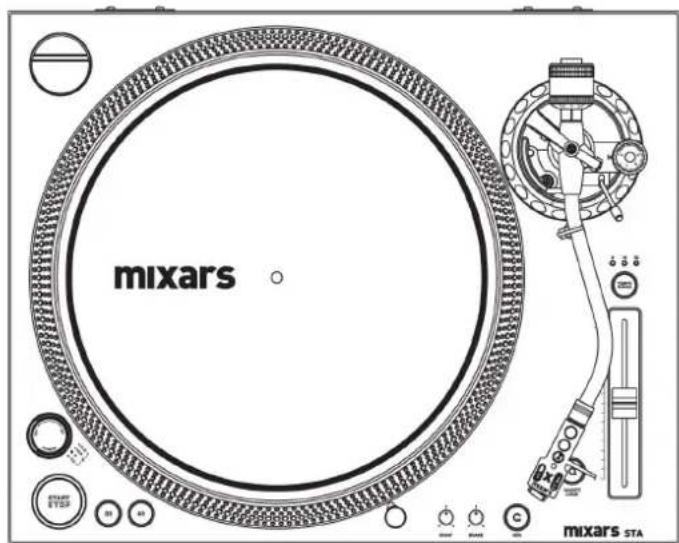
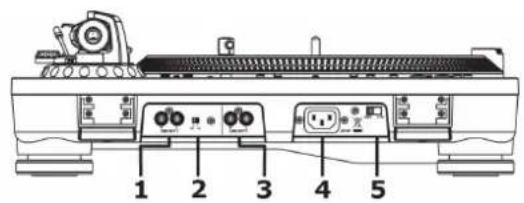
1. Phono / Line output
Connect the turntable to any phono or line level input, using the supplied cinch/cinch cable. Be sure to put the phono/line switch in the right position.
2. Phono / Line switch
Depending on the position of the phono/line switch, you can connect the turntable to any phono or line level input.
3. Additional Line output
Secondary line-level output.
4. Power cord connector
Used to connect the included power cord.
5. AC voltage selector
Make sure the selector is set properly.
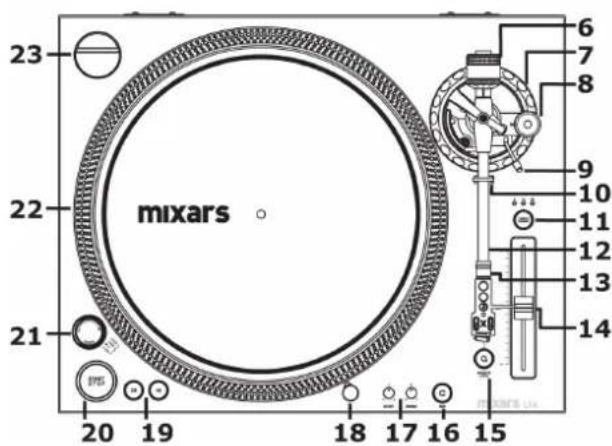
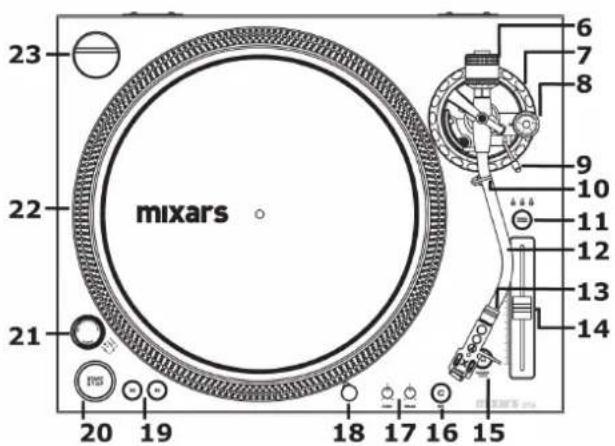
6. Counterweight
Adjustment creates the proper downward pressure of the stylus to the record. Attach by sliding the counterweight onto the rear of the tone arm. Twist it lightly and it will screw onto the rear shaft of the tonearm.
7. Tonearm height adjustment
Adjust the hight of the tonearm.
8. Anti skate knob
(Only applies on "S" tonearm)
When a record is playing, a force is generated drawing the stylus towards the center of the record. This control compensates for that force and needs to be set to the same value as the counterweight pressure ring.
9. Tonearm lift
This elevates the tone arm above the record surface.
10. Tonearm clamp and rest
Use this rest for the tonearm and clamp it in position during transportation.
11. Pitch select
Sets the adjustment range of the pitch slider.
Press the button to switch between
+/-8%, +/-16% and +/-50% pitch.
12. Tonearm
13. Headshell locking nut
Attach the headshell by inserting it into the front end of the tonearm and then turn the locking nut clockwise.
14. Pitch slider
Use this to change the speed of the platter.
15. Quartz lock
on - will hold the speed at 0%
off - will allow the use of the pitch adjust.
16. Reverse button
This button is used to reverse the direction of the platter rotation.
17. Motor start / brake adjustment
Adjust the starting and braking time of the motor by turning the control clockwise for a longer start or stop time and counter-clockwise for the fastest start or stop time.
18. Target light
Insert target light to the deck and it will light up.
19. Platter speeds
33 rpm and 45 rpm.
20. Start / stop button
Press the button to start / stop the turntable.
21. Power switch
This switch turns the power on or off.
22. Platter
23. 45 RPM adapter
Place on center spindle for playing 7" records with large center holes.
Set-up
Headshell and Cartridge Assembly
When installing a cartridge (not included), refer to the operating instructions of that cartridge. During installation, attach the stylus protector to guard the stylus tip from damage.
Connect the Headshell lead wires to the cartridge terminals. The terminals of cartridges and the Headshell lead wires are color coded. Connect each lead wire to the cartridge terminals of the same color.
White (L+) Left channel +
Blue (L-) Left channel -
Red (R+) Right channel +
Green (R-) Right channel -
Turntable Assembly
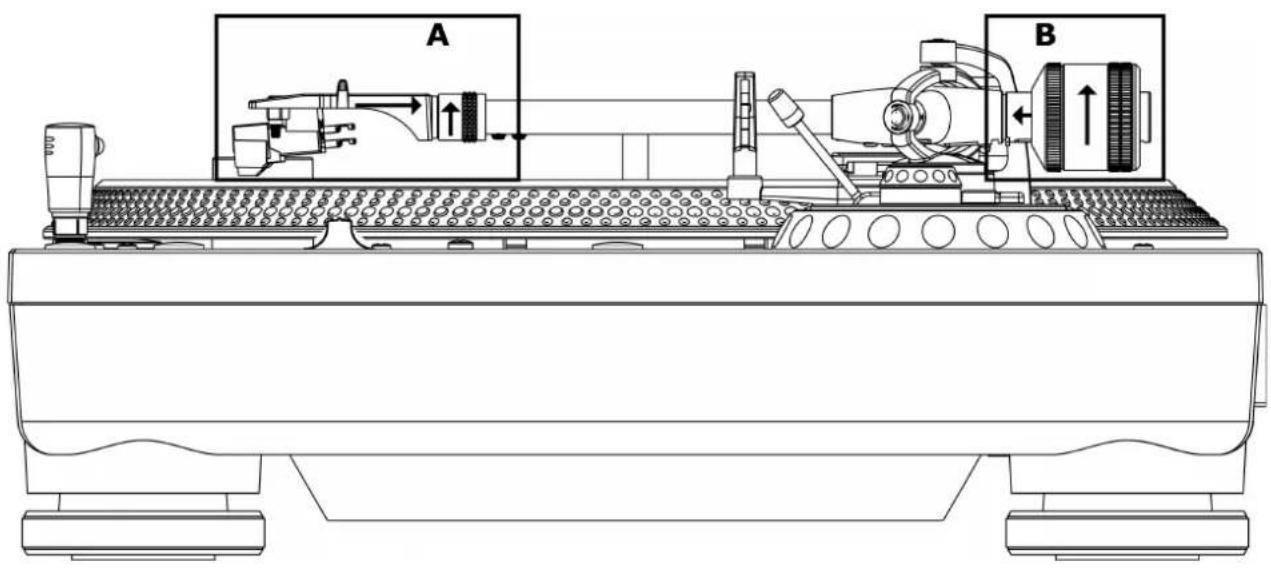
A. Headshell:
Insert the Headshell into the front end of the Tonearm Assembly. While holding Headshell firmly into the front end of the tonearm assembly, turn the Headshell Locking Nut counterclockwise to firmly secure the Headshell to Tonearm Assembly.
B. Counterweight:
Locate and remove the tonearm Counterweight from the packaging.
Slide Counterweight onto the rear of the Tonearm.
Turn it lightly and it will screw onto the rear shaft of the tonearm.
Power Consumption 10Watts
Dimensions 450 (W) x 353 (D) x 144.6 (H) mm
Weight 10 Kg
Used to connect the included power cord.
Power Consumption 10Watts
Dimensions 450 (W) x 353 (D) x 144.6 (H) mm
Weight 10 Kg
Power Consumption 10Watts
Dimensions 450 (W) x 353 (D) x 144.6 (H) mm
Weight 10 Kg
Comandi e funzioni
Power Consumption 10Watts
Dimensions 450 (W) x 353 (D) x 144.6 (H) mm
Weight 10 Kg
2. Interruptor Phono / Line
- MIXARS
- LTA / STA
- PROFESSIONAL HIGH-TORQUE TURNTABLE
- SAFETY INSTRUCTIONS
- WARNING
- CAUTION
- ACCESSORIES AND SPECIFICATIONS
- SPECIFICATIONS
- CONTROLS AND FUNCTIONS
- PHONO / LINE OUTPUT
- PHONO / LINE SWITCH
- ADDITIONAL LINE OUTPUT
- POWER CORD CONNECTOR
- AC VOLTAGE SELECTOR
- COUNTERWEIGHT
- TONEARM HEIGHT ADJUSTMENT
- ANTI SKATE KNOB
- TONEARM LIFT
- TONEARM CLAMP AND REST
- PITCH SELECT
- TONEARM
- HEADSHELL LOCKING NUT
- PITCH SLIDER
- QUARTZ LOCK
- REVERSE BUTTON
- MOTOR START / BRAKE ADJUSTMENT
- TARGET LIGHT
- PLATTER SPEEDS
- START / STOP BUTTON
- POWER SWITCH
- PLATTER
- 45 RPM ADAPTER
- SET-UP
- HEADSHELL AND CARTRIDGE ASSEMBLY
- TURNTABLE ASSEMBLY
- HEADSHELL
- COMANDI E FUNZIONI
- INTERRUPTOR PHONO / LINE
Brand : Mixars
Model : LTA
Category : Turntable