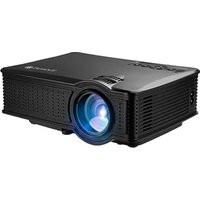
LV-HD151 - Projector LA VAGUE - Free user manual and instructions
Find the device manual for free LV-HD151 LA VAGUE in PDF.



| Product type | Portable LED projector |
| Brand | LA VAGUE |
| Model | LV-HD151 |
| Display technology | LCD |
| Native resolution | 800 x 480 pixels |
| Brightness | 1500 lumens |
| Contrast ratio | 1000:1 |
| Projection distance | Up to 4 m |
| Screen size | 100 to 380 cm |
| Aspect ratio | 16:9 / 4:3 |
| Keystone correction | ±15° manual |
| Light source | LED |
| Lamp life | Approximately 30,000 hours |
| Power supply | 110-240 V ~ 50/60 Hz |
| Power consumption | 60 W |
| Dimensions (L x W x H) | 208 x 165 x 80 mm |
| Weight | 949 g |
| Inputs | USB, SD, HDMI, AV, VGA |
| Outputs | Headphone (3.5 mm jack), USB 5 V (500 mA) |
| Multimedia functions | Playback of photos, music, videos, text from USB/SD |
| Remote control | Included (battery not supplied) |
| Safety | Do not look into the lens; do not open; use a grounded outlet |
| Maintenance | Clean the lens with a soft cloth; store in original packaging |
| Spare parts / Repairability | No user-serviceable parts; contact the supplier |
Frequently Asked Questions - LV-HD151 LA VAGUE
User questions about LV-HD151 LA VAGUE
0 question about this device. Answer the ones you know or ask your own.
Ask a new question about this device
Download the instructions for your Projector in PDF format for free! Find your manual LV-HD151 - LA VAGUE and take your electronic device back in hand. On this page are published all the documents necessary for the use of your device. LV-HD151 by LA VAGUE.
USER MANUAL LV-HD151 LA VAGUE
natural_image
Black projector with visible lens and ventilation slots (no text or symbols)Bedienungsanleitung
Multimediale Formate
natural_image
Line drawing of a three-pin audio jack cable (no text or symbols)Verbinden
natural_image
Black projector with visible lens and ventilation grille (no text or symbols)LED Projector User Manual
Please read this entire user manual carefully before using the projector. Due to the continuous changes and improvements in technology, we reserve the right to change specifications, product appearance, UI interface and/or update software without prior notice.
Warning
- Please read the entire user manual carefully before using the projector.
- Please use standard electrical power and a grounded outlet to guarantee the stability of the power supply.
- Only use the power source indicated on the projector.
- Please do not open the projector. There are no user serviceable parts in the projector. Opening the projector will void warranty. If you have a problem with your projector, please contact your supplier.
- Please do not look directly into the projector lens. The bright light could harm your eyes.
- Please do not place the projector on a surface that could block the airflow from the vents. Even soft fabric could obstruct the air flow. Place on a stable, hard surface.
- Please keep the projector away from liquids and moisture. The projector is not waterproof or water resistant and is not suitable for outdoor use.
- To prevent electrical shock please keep the projector away from moisture.
- Please turn off and unplug the projector when not in use.
- Please use the original packaging material when storing your projector.
Product Overview

- Signal Source
2.Menu
3.OK Button
4.Arrow Keys
5.Back
6.Power
7.SD Input
8.Video HD Input
9.Video Input
- Earphone/3.5mm AUDIO OUT
11.5V Output
12.USB Input
-
Lens Focus
-
Keystone Correction
15.Lens
16.Power Input(110-240V)
-
VGA Input
-
Lens Cap
Remote Control

- Mute button: Turn sound on or off.
2.ZOOM Button:Zoom selection modes(4:3/16:9/Auto). - Power Button: Turn projector power on or off.
4/5.Flip Buttons:Flips Images/Videos. - LISTEN Button: Turns Images/Videos off(Sound only mode).
7/10.Volume Control Buttons:Turn Volume up or down.
8/9/11/12.Playback Buttons:(Next/Previous/Fast Forward/Rewind).
13.Play/Pause Button
15.SOURCE Button:Media/Input source selection menu.
14/16/18/20.Menu Selection Arrow Keys:(Up/Left/Right/Down).
17.OK Button:Confirm menu selections. - MENU Button: Projector Main Menu: (Picture/Sound/Option Menu Selections).
- EXIT Button: Exits current selected menu/mode.
22.PIC Button: Image only mode shortcut. (This key is invalid).
23.SOUND Button: Music only mode shortcut. (This key is invalid). - Freeze Button: This key is invalid for this model.
Specifications
| Imaging System | LCD | Keystone Correction | ±15°Manual |
| Contrast | 1000:1 | USB Power | 5V 500mA Out |
| Physical Resolution | 800*480 | Power | 110-240V~50/60HZ |
| Light Source | LED | Project KW | 60W |
| Projection distance | Max. 4 m | Input interface | USB/SD/HDMI/AV/VGA |
| Projection size | 100-380 cm | Output interface | Earphone |
| Aspect Ratio | 16:9 / 4:3 | Projector Size | 208*165*80mm |
| Lumens | 1500 Lumens | Projector Weight | 949g |
Operating Instructions
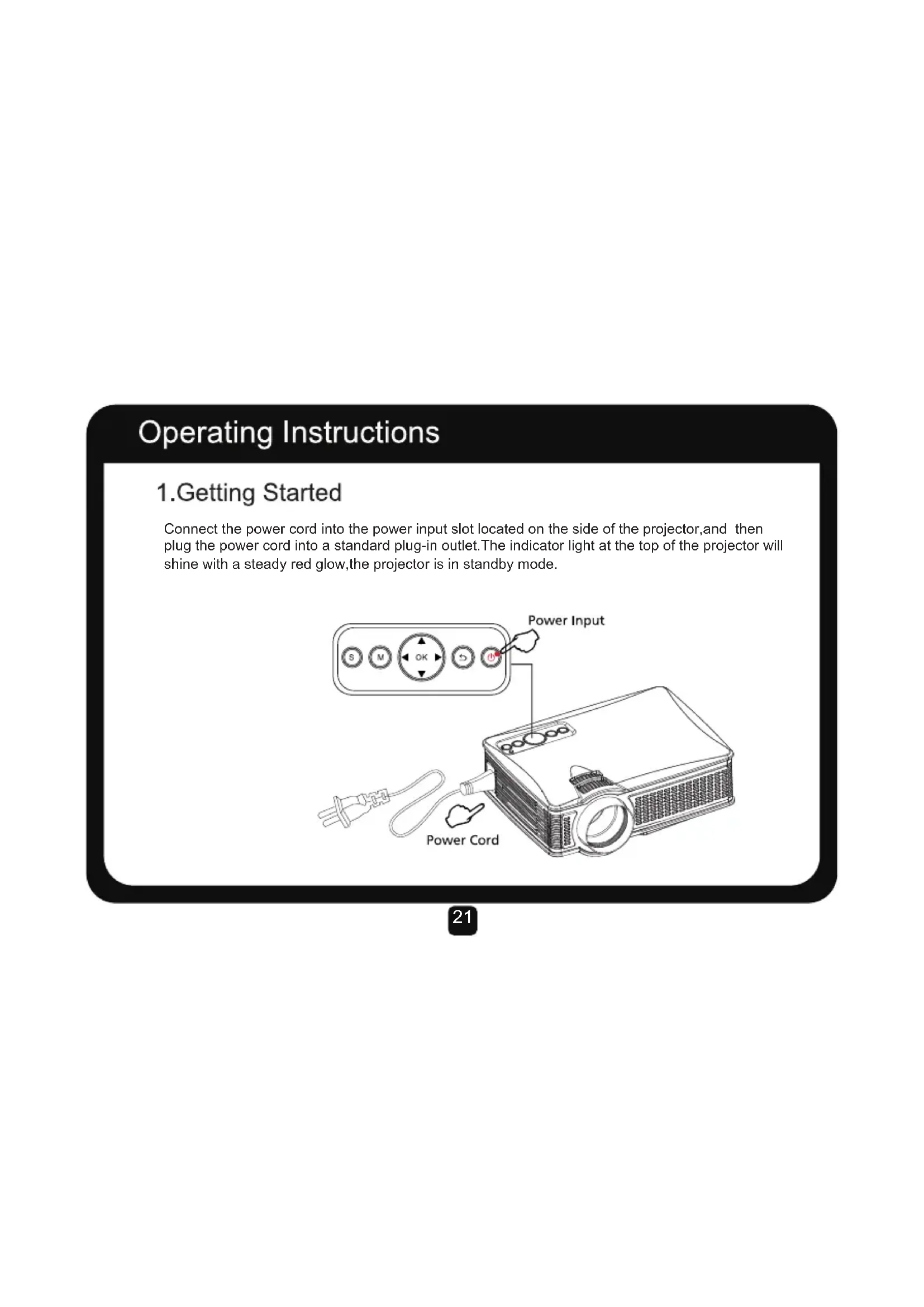
1. Getting Started
Connect the power cord into the power input slot located on the side of the projector, and then plug the power cord into a standard plug-in outlet. The indicator light at the top of the projector will shine with a steady red glow, the projector is in standby mode.

Operating Instructions
2. Power On/Off
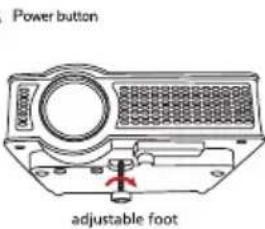
Press the "power" button on the top of the projector, or the "power" button on the remote control. The indicator light at the top of the projector will shine with a steady green glow, the projector is on (Press the "power" button again, on either the projector or the remote control, to turn the projector off). Remove the Lens Cap form the Lens. To raise or lower the front of the projector, adjust the foot located on the base.

natural_image
Line drawing of a device with a power button and a 3D object (no text or symbols on the diagram itself)
Operating Instructions
3. Startup/Multi-Media Interface
After the projector power has been turned on, the multi-media boot screen will appear as shown.

Multi-Media Interface
Operating Instructions
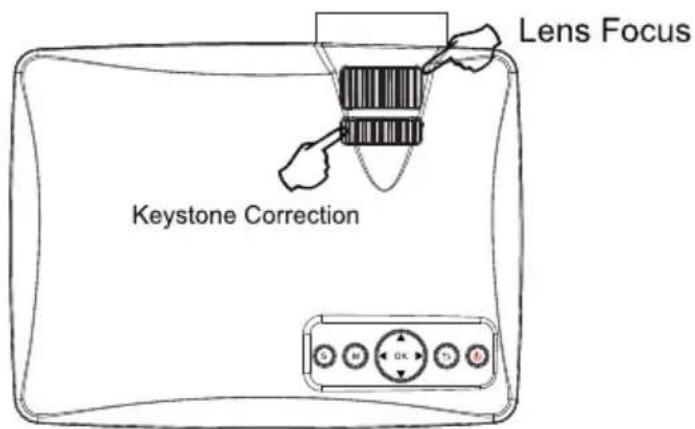
4. Keystone Correction/Image Focus
Use the Keystone Correction Turn Dial located at the top of the projector to adjust the angle of the projector, and the Lens Focus Turn Dial also located at the top of the projector to adjust the image focus and make the picture appear clearly.
Multimedia formats
| File | Support format | Filename extension | Internal decoding format |
| picture | JPEG | .jpg | --- |
| BMP | .bmp | --- | |
| PNG | .png | --- | |
| music | WMA | .wma | --- |
| MP3 | .MP3 | --- | |
| MP4 | .M4A | .dat/.mpg/.mpeg | |
| movie | RM/RMVB | .rm/.rmvb | RV8/9/10 |
| MPEG1 | .dat/.mpg/.mpeg | --- | |
| MPEG2 | .mpg | --- | |
| MPEG4 | mp4 | DIVX,XVID | |
| H264 | mov | MPEG1,2,4 | |
| MOV | mp4 | --- | |
| FLV | .flv | H264 | |
| Vc1 | .wmv/.asf | vc1 | |
| DivX | .DIVX/.AVI | MPEG,DIVX |
Connecting

flowchart
graph TD
    A["Neural Display"] --> B["OUT 5V"]
    C["HDMI"] --> D["HD/UV Interface"]
    E["VGA Input"] --> F["Device 1"]
    E --> G["Device 2"]
    E --> H["Device 3"]
    I["Camera"] --> J["Device 4"]
    K["Headphones"] --> L["Device 5"]
Connecting
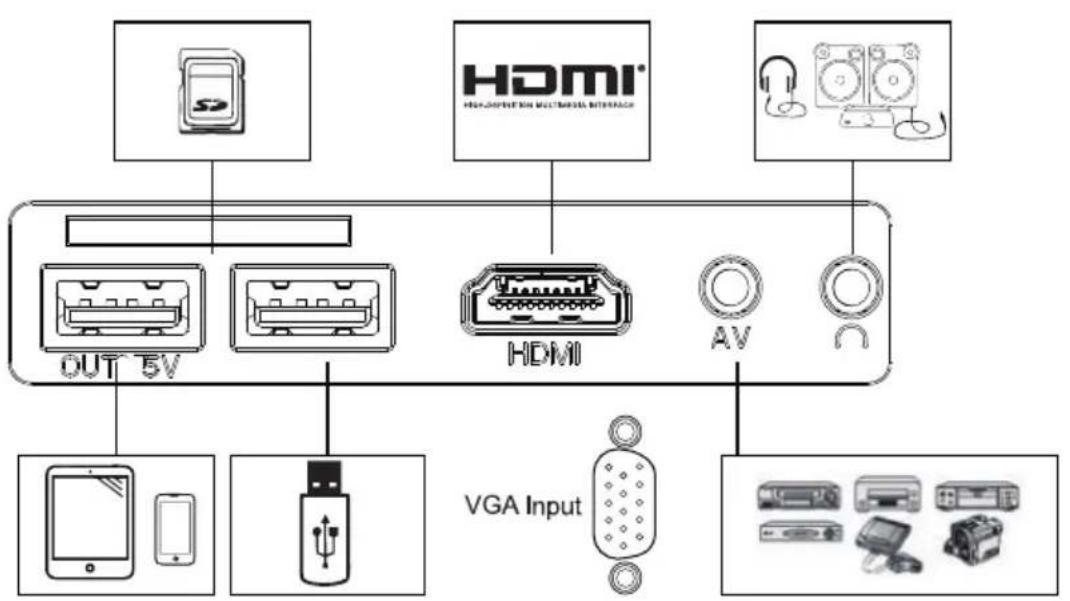
1. Network/Multimedia Connection
Connect the USB drive (not included), or an SD card (not included) into the corresponding inputs located at the side of the projector.
Select the media source "USB", and then select the desired media (Photo/Movie/Music/File). Select the file(s) that you would like to view and then press the "Play/Pause" button on the remote control.
| Input Source |
| AV |
| VGA |
| HDMI |
| USB |

Connecting
2.AV Video Equipment Connection
Connect the included 3-in-1 video cable to the corresponding input located at the side of the projector to connect AV equipment. Select the media source "AV".
| Input Source |
| AV |
| VGA |
| HDMI |
| USB |

natural_image
Line drawing of a three-pin audio jack cable (no text or symbols)Connecting
3.HDMI Equipment Connection
Connect the computer or other HDMI/VGA devices to the corresponding input located on the side of the projector. Select the media source "HDMI" or "VGA".

4. Audio Equipment Connection
Connect 3.5mm earphones and other supported sound equipment into the corresponding input located at the side of the projector.
5. Other Connections
Connect supported Mobile Phones and Tablets into the OUT 5V input slot located on the side panel of the projector (only with the purpose of charging).
Main Menu
1. Picture Menu

| Picture Mode Standard | Standard Standard/Warm/User/Dynamic |
| Color Temperature | Standard/Warm/Cool |
| Aspect Ratio | Auto/4:3/16:9 |
| X_Zoom | 0-100 |
| Y_Zoom | 0-100 |
| Noise Reduction | OFF/LOW/MID/HIGH |
| PC Setting | ---- |
| Flip Horizon | OFF/ON |
| Flip Vertical | OFF/ON |
Main Menu
2. Sound Menu
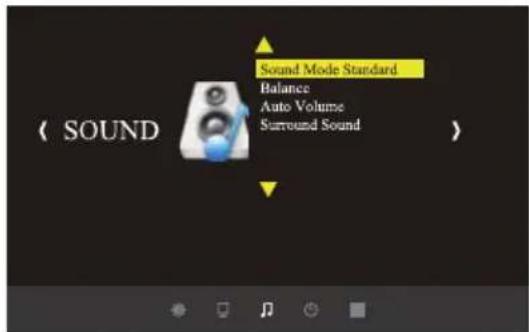
| Sound Mode | Music/Movie/Sport/User/Standard |
| Balance | (-50~50) |
| Auto-Volume | OFF/ON |
| Surround Sound | OFF/Surround |
Main Menu
3. Option Menu

| Language | English/German/French/Italian... |
| Restore Factory Default | YES/ON |
| HDMI CEC | Device List/HDMI CEC/Auto Standby |
| Color Range 0-255 | ---- |
| Upgrade USB | Software Update |

LA VAGUE
French

natural_image
Black projector with visible lens and ventilation grille (no text or symbols)Mode d'emploi
Formats multimédias
| Fichier | Formats supportés Extension de nom de fichier Format de décodage interne | ||
| Photo | JPEG | .jpg | --- |
| BMP | .bmp | --- | |
| PNG | .png | --- | |
| Musique | WMA | .wma | --- |
| MP3 | .MP3 | --- | |
| MP4 | .M4A | .dat/.mpg/.mpeg | |
| Film | RM/RMVB | .rm/.rmvb | RV8/9/10 |
| MPEG1 | .dat/.mpg/.mpeg | --- | |
| MPEG2 | .mpg | --- | |
| MPEG4 | mp4 | DIVX,XVID | |
| H264 | mov | MPEG1,2,4 | |
| MOV | mp4 | --- | |
| FLV | .flv | H264 | |
| Vc1 | .wmv/.asf | vc1 | |
| DivX | .DIVX/.AVI | MPEG,DIVX | |
Connexion

flowchart
graph TD
    A["Neural Display"] --> B["OUT 5V"]
    C["HDMI"] --> D["Neural Display"]
    E["VGA Input"] --> F["Neural Display"]
    G["Device 1"] --> H["Smartphone"]
    I["Device 2"] --> J["Smartphone"]
    K["Device 3"] --> L["LED Chip"]
    M["Device 4"] --> N["AC Bus"]
    O["Device 5"] --> P["AC Bus"]
    Q["Device 6"] --> R["AC Bus"]
    S["Device 7"] --> T["AC Bus"]
    U["Device 8"] --> V["AC Bus"]
    W["Device 9"] --> X["AC Bus"]
    Y["Device 10"] --> Z["AC Bus"]
Connexion
natural_image
Line drawing of a three-pin cable with connectors (no text or symbols)Connexion
natural_image
Black projector with visible lens and ventilation slots (no text or symbols)Formati multimediali
| File | Formato di supporto E | Estensione nome file Formato | nterno di decodifica |
| Immagine | JPEG | .jpg | --- |
| BMP | .bmp | --- | |
| PNG | .png | --- | |
| Musica | WMA | .wma | --- |
| MP3 | .MP3 | --- | |
| MP4 | .M4A | .dat/.mpg/.mpeg | |
| Film | RM/RMVB | .rm/.rmvb | RV8/9/10 |
| MPEG1 | .dat/.mpg/.mpeg | --- | |
| MPEG2 | .mpg | --- | |
| MPEG4 | mp4 | DIVX,XVID | |
| H264 | mov | MPEG1,2,4 | |
| MOV | mp4 | --- | |
| FLV | .flv | H264 | |
| Vc1 | .wmv/.asf | vc1 | |
| DivX | .DIVX/.AVI | MPEG,DIVX |
Collegamento

flowchart
graph TD
    A["Neural Display"] --> B["OUT 5V"]
    C["HDMI"] --> D["Neural Display"]
    E["VGA Input"] --> F["Neural Display"]
    B --> G["Smartphone & Smartphone"]
    B --> H["USB Chip"]
    D --> I["Analog Interface"]
    D --> J["AV"]
    D --> K["Control Panel"]
Collegamento
natural_image
Black projector with visible lens and ventilation slots (no text or symbols)Formatos multimedia
| Fichero | Formato de soporte | Extensión de nombre de fichero | Formato de decodificación interna |
| Imagen | JPEG | .jpg | --- |
| BMP | .bmp | --- | |
| PNG | .png | --- | |
| Música | WMA | .wma | --- |
| MP3 | .MP3 | --- | |
| MP4 | .M4A | .dat/.mpg/.mpeg | |
| Película | RM/RMVB | .rm/.rmvb | RV8/9/10 |
| MPEG1 | .dat/.mpg/.mpeg | --- | |
| MPEG2 | .mpg | --- | |
| MPEG4 | mp4 | DIVX,XVID | |
| H264 | mov | MPEG1,2,4 | |
| MOV | mp4 | --- | |
| FLV | .flv | H264 | |
| Vc1 | .wmv/.asf | vc1 | |
| DivX | .DIVX/.AVI | MPEG,DIVX |
Conexión
flowchart
graph TD
    A["Neural Display"] --> B["OUT 5V"]
    C["HDMI"] --> D["Neural Display"]
    E["VGA Input"] --> F["Device with USB"]
    G["Hardware"] --> H["Device with Smartphones"]
Conexión
1. Conexión de red/multimedia
natural_image
Line drawing of a three-pin cable with connectors (no text or symbols)Conexión
80333 Munich, Germany
Model: LV-HD171
www.vehnsgroup.com
MADE IN CHINA


RoHS
Compliant
- Bedienungsanleitung
- Verbinden
- LED Projector User Manual
- Warning
- Remote Control
- Operating Instructions
- Getting Started
- Power On/Off
- Startup/Multi-Media Interface
- Keystone Correction/Image Focus
- Connecting
- Network/Multimedia Connection
- 2.AV Video Equipment Connection
- 3.HDMI Equipment Connection
- Audio Equipment Connection
- Other Connections
- Main Menu
- Picture Menu
- Sound Menu
- Option Menu
- LA VAGUE
- Mode d'emploi
- Connexion
- Collegamento
- Conexión
- Conexión de red/multimedia
Brand : LA VAGUE
Model : LV-HD151
Category : Projector