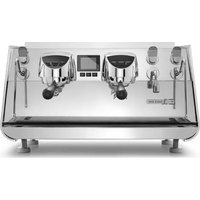
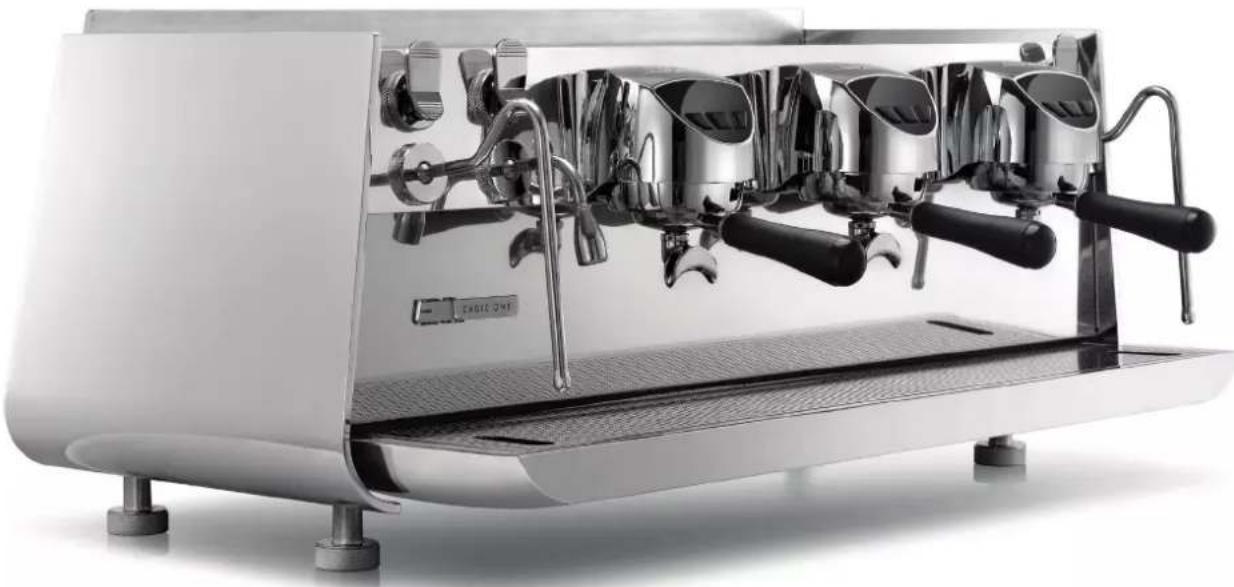
Eagle One - Coffee machine Victoria Arduino - Free user manual and instructions
Find the device manual for free Eagle One Victoria Arduino in PDF.



| Product Type | Professional coffee machine |
| Brand | Victoria Arduino |
| Model | Eagle One |
| Power supply | 220-240 V, 50-60 Hz |
| Power | 6500 W |
| Service pressure | 0.165 MPa (boiler) |
| Maximum supply pressure | 0.65 MPa |
| Recommended mains water pressure | 2-6 bar |
| Minimum water flow | 200 l/h |
| Operating temperature | +5 °C to +25 °C |
| Recommended water hardness | 50-60 ppm (3-5 °f) |
| Number of groups | 1, 2 or 3 (depending on version) |
| Programmable functions | Doses, temperature, pre-infusion, EasyCream (option) |
| Connectivity | Bluetooth, MyVictoriaArduino app |
| Display | Color touchscreen |
| Cup warmer | Yes, programmable (option) |
| Automatic washing system | Automatic cycle with blind filter |
| Safety system | Safety thermostat, automatic shutdown, grounding |
| Body material | Stainless steel |
| Cleaning | Shower cleaning, softener regeneration, no water jet |
| Intended use | Professional use (coffee, hot water, steam) |
Frequently Asked Questions - Eagle One Victoria Arduino
User questions about Eagle One Victoria Arduino
0 question about this device. Answer the ones you know or ask your own.
Ask a new question about this device
Download the instructions for your Coffee machine in PDF format for free! Find your manual Eagle One - Victoria Arduino and take your electronic device back in hand. On this page are published all the documents necessary for the use of your device. Eagle One by Victoria Arduino.
USER MANUAL Eagle One Victoria Arduino
text_image
Victoria ArduinoINSPIRED BY YOUR PASSION.
natural_image
Modern white espresso machine with dual levers and black handles (no visible text or symbols)[E]
EAGLE ONE
EN USER HANDBOOK (Translation of the Original Instructions)
FR MANUEL D'INSTRUCTIONS (Traduction des Instructions Originales)
INDICE
INDEX
SOMMAIRE
3 | PRESCRIZIONI DI SICUREZZA
10 SAFETY INDICATIONS
17 PRESCRIPTIONS DE SÉCURITÉ
24 INFORMAZIONI GENERALI / GENERAL INFORMATIONS / INFORMATIONS GÉNÉRALES
25 DATI TECNICI/TECHNICAL DATA/DONNÉES TECHNIQUES
26 DESCRIZIONE DELL'APPARECCHIO / APPLIANCE DESCRIPTION / DESCRIPTION DE L'APPAREIL
29 INSTALLAZIONE / INSTALLATION / INSTALLATION
33 REGOLAZIONI DEL TECNICO QUALIFICATO / QUALIFIED TECHNICIAN ADJUSTMENTS / RÉGLAGES DU TECHNICIEN QUALIFIÉ
37 UTILIZZO / USE / UTILISATION
42 PROGRAMMAZIONE / PROGRAMMING / PROGRAMMATION
82 APP BLUETOOTH "MYVICTORIAARDUINO" / "MYVICTORIAARDUINO" BLUETOOTH APP / APP BLUETOOTH "MYVICTORIAARDUINO"
88 PULIZIA/CLEANING/NETTOYAGE
91 MANUTENZIONE / MAINTENANCE / ENTRETIEN
92 MESSAGGI FUNZIONALI / FUNCTIONAL MESSAGES / MESSAGES FONCTIONNELLES
94 | SCHEMI / DIAGRAM / SCHÉMAS
natural_image
Symbol of a light bulb inside a black circle (no text or numbers present)text_image
Safety warning illustration showing hazard symbols and a cross symbol over a landscape with trees and hillsnatural_image
Symbol of a trash bin crossed out by two diagonal lines (no text or labels)text_image
Waltie Aetone Waltie Aetone + +
text_image
Safety warning illustration showing a person using a tool to switch from a device labeled 'T', with warning symbols and hazard signs.text_image
Safety warning illustration showing hazard symbols and a cross symbol over a landscape with construction equipmentEN SAFETY INDICATIONS
- The present manual is an integral and essential part of the product and is to be delivered to the user. Carefully read all warnings in the manual as they provide important information required to install, use and maintain the unit safely. Keep this manual in a safe place for further consultation.
- This unit must only be used for the purposes described in the present manual. The manufacturer cannot be held responsible for any damages caused by improper, mistaken and unreasonable use.
- Before using the machine, read this manual in its entirety or, at the very least, read the safety and set up instructions.
- This appliance can be used by children aged from 8 years and above and persons with reduced physical, sensory or mental capabilities or lack of experience and knowledge if they have been given supervision or instruction concerning use of the appliance in a safe way and understand the hazards involved. Children must not play with the appliance. Cleaning and maintenance must not be carried out by children unless supervised.
- The machine can be used only with ground coffee.
- After having removed the packaging, make certain that the unit is not damaged in any way. If you have any doubts, do not use the unit and contact a professionally qualified person. Always keep all packaging (plastic bags, polystyrene foam, nails, etc..) out of the reach of children as they are a potential source of danger and never loiter the environment with such materials.
- The appliance is only to be installed in locations where its use and maintenance is restricted to trained personnel.
- The access to the service area is restricted to persons having knowledge and practical experience of the appliance, in particular as far as safety and hygiene are concerned.
- The machine must be installed on a horizontal surface at appropriate height so that the top of the machine is higher than 1.2 m.
- The appliance is not suitable for installation in an area where a water jet could be used.
- The appliance must not be cleaned by a water jet.
• The max inlet pressure value is 0.65 MPa.
- The A-weighted sound pressure level is below 70 dB.
- To facilitate aeration of the unit, position the aeration portion of the machine 10 cm from walls or other machinery.
- Remember that to install, maintain, unload and regulate the unit, the qualified operator must always wear work gloves and safety shoes.
- Before turning on the unit make certain that the rating indicated on the label matches the available power supply. The nameplate can be seen inside the machine when removing the water collection tray. The machine must be installed according to the applicable federal, state and local standards (codes) in force with regard to plumbing systems including back-flow prevention devices. For this reason, the plumbing connections must be carried out by a qualified technician. The warranty ex-
pires if the characteristics of the power supply do not correspond to the nameplate data.
- When installing the device, it is necessary to use the parts and materials supplied with the device itself. Should it be necessary to use other parts, the installation engineer needs to check their suitability for use in contact with water for human consumption. The installer must Make the hydraulic connections respecting the rules of hygiene and water safety to environmental protection in force in the place of installation. So for the hydraulic plant contact an authorized technician. Always utilise the new hose supplied for connection to the water supply. Old hoses must not be utilised.
- It is advisable the installation of a residual current device (RCD) having a rated residual operating current not exceeding 30 mA.
- The appliance must be permanently connected to the power mains via a disconnect device having a contact separating mechanism in all poles that provide the total disconnection in the overvoltage category III and that must be installed in the power supply system as per wiring standards.
- For Australian and New Zealand markets the disconnection switch must be installed according to AS/NZS 3000 standard.

natural_image
Pure electrical circuit symbol for a lamp, no text or labels present- In case of installation in kitchens, connect the equipotential conductor to the terminal in the machine bottom indicated by the symbol.
- The manufacturer cannot be held responsible for any damages incurred if the system is not grounded.
- For electrical safety, this machine requires a ground system. Contact a technically certified electrician who must check that the line electrical capacity is adequate for the maximum capacity indicated on the unit label.
- There are some basic rules for the use of any electrical appliance. In particular:
- Never touch the unit with wet hands or feet;
- Never use the unit with bare feet;
- Never use extension cords in areas equipped with baths or showers;
- Never pull on the power supply cord to unplug the unit;
- Never leave the unit exposed to atmospheric agents (rain, direct sunlight, etc..);
-
Never let children, unauthorized personnel or anyone who has not read this manual operate the unit.
-
The qualified electrician must also check that the section of the installation's cables is large enough for the absorbed power of the appliance.
- Never use adapters, multiple jacks or extension cords. When such items prove absolutely necessary, call in a qualified electrician.
- To prevent dangerous overheating, it is advisable to fully extend the power supply cord. Never block the intake and/or heat dissipation grills, in particular those for the cup warmer.
- The user must never replace the unit's power supply cord. If this cord is damaged, turn off the unit and have it replaced by a professionally qualified technician.
EJ
EAGLE ONE
Victoria Arduino
INSPIRED BY YOUR PASSION.
- Should it be necessary to replace the power cord, this replacement operation must only be performed by an authorized service centre or by the manufacturer.
- The device needs to be supplied with water that is suitable for human consumption and compliant with the regulations in force in the place of installation. The installation engineer needs confirmation from the owner/manager of the system that the water complies with the requirements and standards stated above.
- For machines connected to the mains water supply, the minimum pressure must be 0.2 MPa (2 bar) and the maximum pressure for correct machine operation must not exceed 0.65 MPa (6,5 bar).
- The operating temperature must be within the range of [+5, +25]^ . In case of prolonged storage at a temperature below 2^ , empty the machine hydraulic system to prevent it from freezing. In case of freezing, do not switch the machine on before having reconditioned it for at least 1 hour at a suitable room temperature.
- At the end of installation, the device is switched on and taken to rated operating conditions, leaving it in a state in which it is “ready for operation”.
-
After reaching the “ready for operation” condition, the following dispensing operations are carried out:
-
100% of the coffee circuit through the coffee dispenser (for more than one dispenser, this is divided equally);
- 100% of the hot water circuit through the water dispenser (for several dispensers it is divided equally).
-
Open the steam outlet for 1 minute.
-
At the end of installation, it is good practice to draw up a report of the operations.
- It is forbidden to leave the machine switched on without the presence and surveillance of a qualified operator. Simonelli Group is not responsible for damages caused by failure to comply with this prohibition.
- Be extremely careful when using the steam nozzle. Never place your hands under the nozzle and never touch it right after use.
- Before cleaning the unit, follow the instructions given in this manual at chapter 9 carefully.
- Once started the washing machine, do not interrupt, the detergent residue may remain inside the delivery unit.
- In case of breakdown or poor function, turn off the unit. Never tamper with the unit. Contact only professionally qualified personnel. Only the manufacturer or an authorized service center can make repairs and only using original spare parts. Non compliance with the above can compromise machine safety.
- In case of fire, disconnect power to the machine by turning off the main switch. Its absolutely avoid to extinguish the fire with water while power to the machine is on.
-
Before performing any sort of maintenance, the authorized technician must turn off the unit and unplug it from the mains.
-
When the machine is left unattended for a long period, close the water inlet tap.
- New hose set supplied with the appliance is to be used and that old set should not be reused.
text_image
Safety warning illustration showing hazard symbol with warning sign and cross symbol over a landscape background- Should you decide to stop using this type of unit, we suggest you render it inoperable by having the power cord disconnected by a skilled technician or authorised service centre.
- Never dispose of the machine in the environment: to dispose of the machine, contact an authorized center or contact the manufacturer for pertinent indications.
INFORMATION TO THE USERS
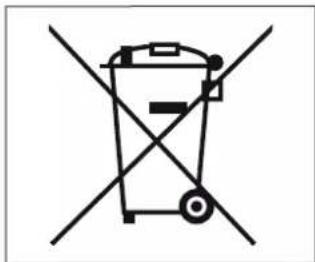
natural_image
Symbol of a trash bin crossed out by two diagonal lines (no text or labels)Under the senses of the Directives/Guidelines 2011/65/EU concerning the reduction of the use of dangerous substances in electric and electronic equipment, as well as the disposal of wastes".
The symbol of the crossed large rubbish container that is present on the machine points out that the product at the end of its life cycle must be collected separately from the other wastes. The user for this reason will have to give the equipment that got to its life cycle to the suitable separate waste collection centres of electronic and electro-technical wastes, or to give it back to the sell-
er or dealer when buying a new equipment of equivalent type, in terms of one to one.
The suitable separate waste collection for the following sending of the disused equipment to recycling, the dealing or handling and compatible environment disposal contributes to avoid possible negative effects on the environment and on the people's health and helps the recycling of the materials the machine is composed of. The user's illegal disposal of the product implies the application of administrative fines as stated in Law Decree n.22/1997" (article 50 and followings of the Law Decree n.22/1997).
PREPARATION BY THE PURCHASER
• Preparation of the installation site.
The purchaser must prepare the surface on which the machine will stand suitable to support the machine weight (see the installation chapter).
• Electrical requirements.
The mains power installation must comply with the safely regulations and standards in force in the country of installation and must include an efficient earth system. An omnipolar cut-off device must be installed on the power line upstream of the machine.


The power wires must be sized according to the maximum current required by the machine to ensure a total voltage loss under full load of less than 2%.
- Plumbing requirements.
Prepare a suitable drain and a mains that supply water a maximum hardness of 3/5 French degrees (60/85 ppm).
SYMBOLS

A

B

C

D

E
A General hazard
B Electrical shock hazard
C Burns hazard
D Hazard of damage to the machine
E Operation reserved for the qualified technician, in compliance with current standards
RESIDUAL RISKS
Although the manufacturer has provided mechanical and electrical safety systems, dangerous areas persist during the use of the machine:

• Coffee dispensing groups.
- Steam wand.
- Hot water wand.
- Cup warmer.
MACHINE RECEIVING
TRANSPORT
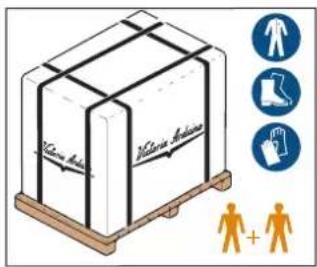
text_image
Vicente Anione Vicente Anione Human Foot Clothing Human + Human
The machine is transported on pallets containing several machines inside cartons strapped to the pallet.
Operators performing any shipping or handling operations must wear gloves, safety shoes and overalls with elasticized cuffs.
The machine must be moved by 2 or more operators.
Failure to respect current safety regulations and standards on lifting and handling materials absolves the Manufacturer from all liability for possible damage to person or things.
MOVEMENTS
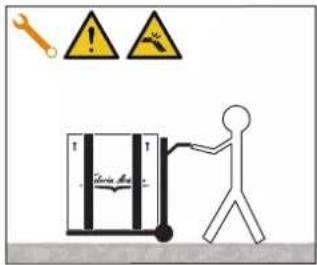
text_image
Tennis Bar- Slowly lift the pallet about 30 ~cm from the ground and reach the loading area.
• After checking that there are no obstacles, things or people, proceed with the loading.
- Once you arrive at your destination, always with a suitable lifting device (e.g. forklift), after making sure that there are no things or people in the unloading area, take the pallet to the ground and move it about 30 cm from the ground, until to the storage area.
STORED
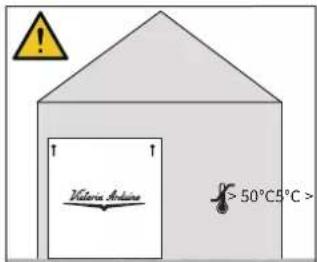
text_image
Victoria Andina > 50°C 5°C >The package containing the machine must be stored away from atmospheric agents.
Before performing the following operations, make certain that the load is in stable and will not fall when the straps are cut.
Wearing gloves and safety shoes, the operator must cut the straps and store the product. During this operation, see the product technical features for the weight of the machine being stored and proceed as necessary.
EJ
EAGLE ONE
Victoria Arduino
INSPIRED BY YOUR PASSION.
UNPACKING
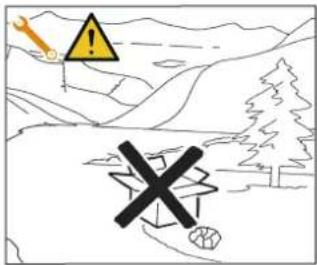
text_image
Safety warning illustration showing a yellow warning sign, a warning symbol with an exclamation mark, and a construction vehicle in a mountainous landscape.Once the machine has been released from the pallet or container, do not pollute the environment with these items.
CONTENTS CHECK
Upon receipt of the box, check that the packaging is intact and visually undamaged. Inside the packaging must be the instruction manual and the relative kit.
In case of damage or faults, contact your local dealer.
For any communication, always communicate the serial number.
The communication must be carried out within 8 days from the receipt of the machine.
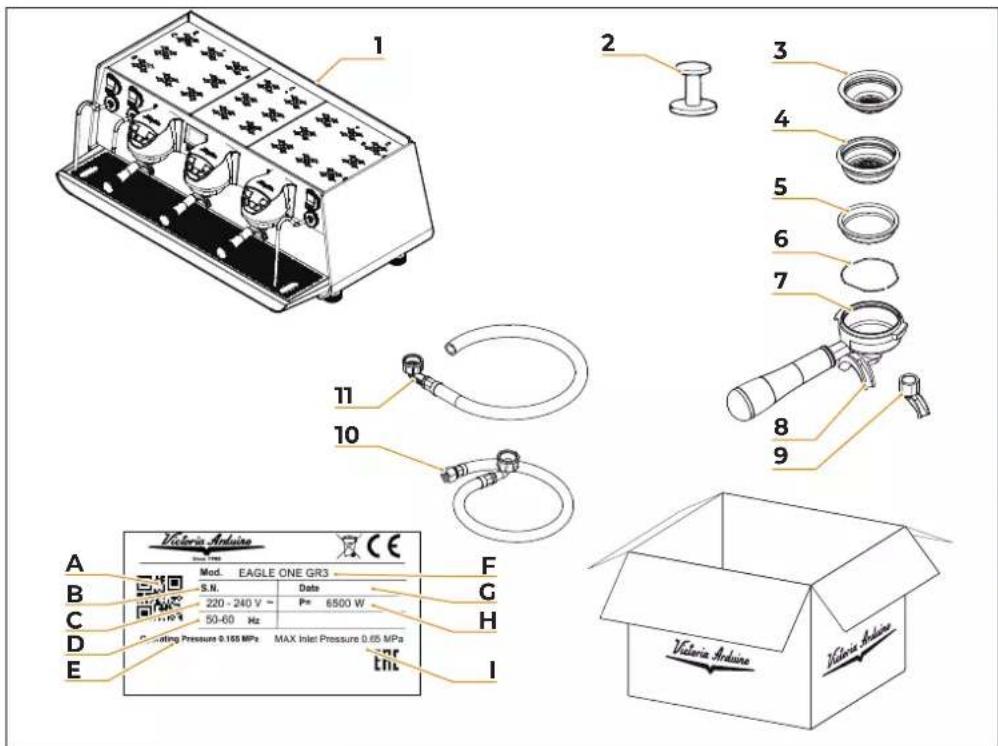
text_image
1 2 3 4 5 6 7 8 9 10 11 Victoria Arduino Mod. EAGLE ONE GR3 S.N. Date 220 - 240 V ~ Pm 6500 W 50-60 Hz Drilling Pressure 0.165 MPa MAX Inlet Pressure 0.65 MPa Enc A B C D E F G H I Victoria Arduino1 Machine (example image)
2 Coffee tamper (1 unit)
3 Single filter (1 unit)
4 Double filter (1 for each group)
5 Blind filter (1 for each group)
6 Spring (group number + 1)
7 Filter-holder (group number + 1)
8 Double delivery spout (1 for each group)
9 Single delivery spout (1 for each group)
10 Filling tube 3/8" (1 unit)
11 Draining pipe ∅25 (1 unit)
A QR Code
B Serial number
C Power supply
D Frequency
E Water main operating pressure
F Model and version
G Production date
H Power
Water main max pressure
FR PRESCRIPTIONS DE SÉCURITÉ
natural_image
Pure electrical circuit symbol for a lamp, no text or labels presenttext_image
Safety warning illustration showing hazard symbols and a cross symbol over a landscape with trees and hillsnatural_image
Symbol of a trash bin crossed out by two diagonal lines (no text or labels)text_image
Electric Heattext_image
Safety warning illustration showing hazard symbols and a cross symbol over a landscape with trees and hillsMACHINE À CAFÉ MODÈLE: EAGLE ONE
2
DATI TECNICI
TECHNICAL DATA
DONNÉES TECHNIQUES
| GruppiGroupsGroupes | 2 | 3 | |
| VoltaggioVoltageVoltage | V 220-380 | ||
| PotenzaPowerPuissance | W 3000 3600 | ||
| Capacità caldaia vaporeSteam boiler capacityCapacité chaudière vapeur | 17 | ||
| Peso nettoNet weightPoids net | kg/lb | 68,5 / 151,02 84 / 185,19 | |
| Peso lordoGross weightPoids brut | kg 82,7 / 182,32 99,3 / 218,92 | ||
| Dimensioni / Dimensions / Dimensions | |||
| A | mminch | 1054,13 | |
| X | mminch | 75829,84 | 98838,9 |
| Y | mminch | 58623,07 | |
| Z | mminch | 43717,2 | |
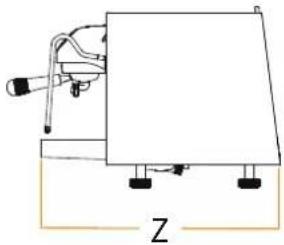
natural_image
Simple line drawing of a mechanical device with a base and mounting feet, labeled 'Z' at the bottom (no text or symbols on the diagram itself)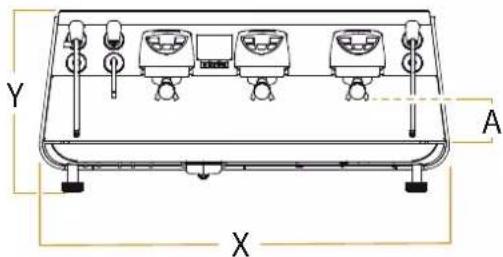
text_image
Y A X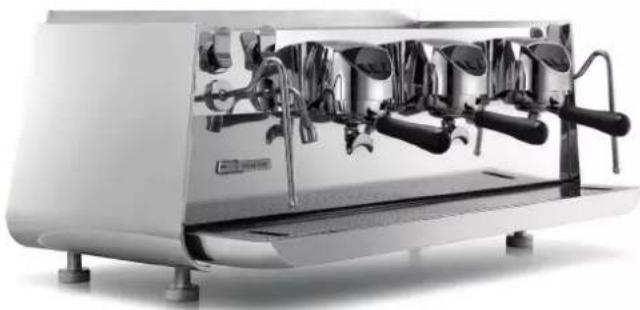
natural_image
Exterior view of a modern white espresso machine with multiple leavers (no visible text or labels)3
1 Delivery units
2 Cup warmer
3 Machine foot
4 Steam knob
5 Steam nozzle
6 Water collecting dray
7 Filter-holder
8 Hot water nozzle
9 Steam nozzle
10 Steam knob
11 Hot water nozzle
P1 Main display
P2 Group display
P3 Coffee delivery button dose 1
P4 Coffee delivery button dose 2
P5 Coffee delivery button dose 3
P6 Cleaning button
P7 Cup warmer ON/OFF button
P8 Machine ON/OFF button
FR
- Machine designed and built respecting what is expressed in the declaration of conformity.
- It must be used by professionals in the sector for the supply of coffee, water and steam.
- An area for the preheating of the cups has been provided. Only for this use must be used, any other use is to be considered improper use and therefore dangerous.
3.1
USAGE PRÉVU
This chapter lists a number of reasonably foreseeable improper uses. The machine must, however, always be used in respect of the instructions given in this manual.
- Use by non-professional operators.
- Introduction of liquids other than softened drinking water with a maximum hardness of 3/5 French degrees (60/85 ppm).
- Touching the delivery areas with the hands.
- Introduction, into the filter holder, ground different than coffee.
- Placing objects other than cups on the cup warmer.
- Resting containers of liquid on the cup warmer.
- Heating drinks or other non-food substances.
• Covering the cup warmer with cloths. - Obstructing the vents with cloths or other items.
• Using the machine if wet.
3.2
USAGE NON CONFORME
text_image
Victoria Arduino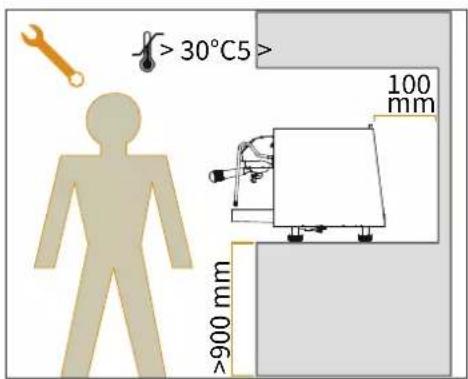
text_image
>30°C5> 100 mm >900 mm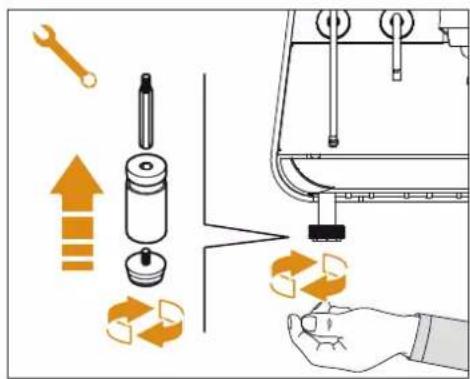
text_image
Diagram illustrating mechanical assembly steps with labeled components and directional arrows indicating motion or movement.IT
To lift the machine are necessary 2 or more operators.
4.1
POSITIONING
Before installing the machine, make sure the area where it will be installed is compatible for the size and weight of the machine.
- Position the machine on a horizontal plane at least 900 mm high from the ground.
- Keep at least 100 mm around the machine for proper ventilation.
- Adjust the machine by acting on the feet.
FR
text_image
Technical diagram showing a mechanical or electrical system with labeled components and directional arrows indicating flow or movement.IT
EN
FR
4.2
Avoid throttling in the connecting tubes. Assess that the
drain pipe is able to eliminate waste. It is forbidden to use connecting pipes already used in the past. Filter maintenance is the responsibility of the purchaser.
1 Mesh filter
2 Softener
3 Drain 50 mm
Failing to maintain water into the correct levels will void the warranty.
WATER SPECIFICATIONS
• Total hardness 50-60 ppm (parts per million).
- Water line pressure between 2–6 bar and water to be cold.
• Min flow rate: 200 l/hr.
• Filtration level below 1.0 micron.
- tds (total dissolved solids) level between 50 – 250 ppm.
- Alkalinity level between 10 – 150 ppm.
- Chlorine level less than 0.50 mg/l.
• ph level between 6.5 and 8.5.
4.2
BRANCHEMENT À L'EAU

Prior to connecting the machine to the electrical mains, assess that the voltage shown on the machine's data plate corresponds with that of the mains.
4.3
BRANCHEMENT ÉLECTRIQUE
At the end of installation, the device is switched on and taken to rated operating conditions, leaving it in a state in which it is "ready for operation".
After reaching the "ready for operation" condition, the following dispensing operations are carried out:
- 100% of the coffee circuit through the coffee dispenser (for more than one dispenser, this is divided equally);
- Open the steam outlet for 1 minute; - Complete emptying of the steam boiler. Repeat this operation at least 3 times.
At the end of installation, it is good practice to draw up a report of the operations.
4.4
OPÉRATIONS PRÉLIMINAIRES
text_image
Technical diagram showing a mechanical assembly with labeled components and a wrench indicating tool directionIT
The operations described below must be carried out only by specialized technicians.
The Manufacturer is not responsible for any damage to things or persons deriving from a failure to comply with the above.
5.1
HOT WATER ECONOMISER ADJUSTMENT
Operation carried out whit the machine turned on.
Act with a screwdriver on the screw located at the top of the machine:
- Turn the adjustment screw CLOCK-WISE to INCREASE the temperature of the hot water.
- Turn the adjustment screw ANTI-CLOCKWISE to DECREASE the temperature of the hot water.
FR
All models EAGLE ONE are equipped with a level gauge to keep the water level inside the boiler constant.
At the first start, the machine automatically loads water for 90 seconds, at the end of which it stops if it has reached the level.
If the machine still requires water, the continuous/stop buttons flash. Simply restart the machine to complete filling. At the end of the installation, the qualified technician must provide the total replacement of the water contained in the boiler for at least three times before using effectively the machine.
text_image
Diagram showing mechanical assembly with labeled components and directional arrows, including a plus sign and a minus sign.IT
To adjust the service pressure of the boiler, thus regulating the water temperature, according to the various requirements or features of the coffee used, adjust the pressure gauge from the display on the page "Temperatures / Steam temperature". See the relevant paragraph for further information.
Recommended value: 1 - 1.4 bar (according to the type of coffee).
To adjust the pump pressure, use the setting knob underneath the machine:
• INCREASE (clockwise).
- DECREASE (counter-clockwise).
Recommended value: 9 bar.
FR
5.3 RÉGLAGE PRESSOSTAT / POMPE
For correct functioning of the machine, personalising each button panel card at time of replacement is necessary; proceed as follows on the selectors placed on the card (on the key side).
The keyboard name is indicate on the selector side.
FR
5.4 REEMPLACEMENT DES CLAVIERS
natural_image
Technical line drawing showing a hand operating a mechanical device with multiple components and a vertical pole (no text or symbols present)IT
text_image
4"EN
Before starting to use the appliance, the operator must be sure to have read and understood the safety prescriptions contained in this booklet.
6.1
MACHINE ON / OFF
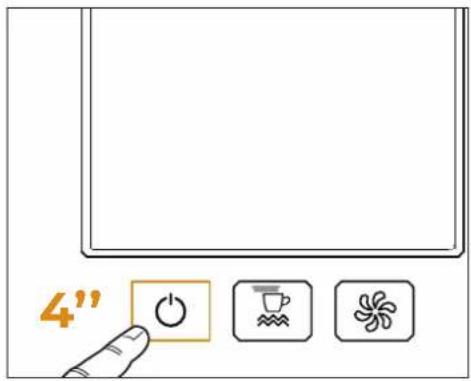
To switch the machine on or off, press the switching on button situated on the bottom right side.
With the machine in power, keep the switching on button (P8) pressed for 4 seconds to let the machine start.
If the self-diagnostics reports anomalies or failures, the operator MUST NOT intervene. Please contact the Service Centre.
For electronic card maintenance, turn the machine off by means of the external main switch or disconnect the plug.
FR
text_image
Diagram illustrating a mechanical assembly with labeled parts and directional arrows indicating process flow or adjustment.IT
After commissioning the machine:
- Insert the desired filter (single or double inside the filter holder).
- Fill the filter with coffee appropriately ground.
- Press the coffee in the filter uniformly using the appropriate presser.
- Clean the edge of the filter of coffee residues and insert the filter holder into the dispensing unit.
Before insert the filter holder, the group must be purged for at least 2 seconds to refresh the water present in the circuit, turning on and off the supply. - Insert the filter holder inside the dispensing group.
- Position the cup/s under the spout/s and press the desired coffee button.
At the end of each coffee dispensing leave the filter-holder inserted in the unit so that it will keep warm.
FR
6.2 DISTRIBUTION CAFÉ
text_image
Safety warning illustration showing a hand holding a smokestack with a red 'X' symbol, indicating no hazard or failure.IT
text_image
Diagram showing a hand pressing a button on a device with warning symbol and directional arrows indicating motion or force.EN
natural_image
Illustration of a hand holding a pitcher with a warning symbol above (no text or labels)FR
6.3
EROGAZIONE VAPORE
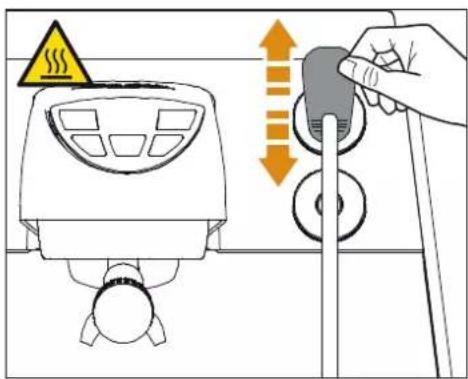
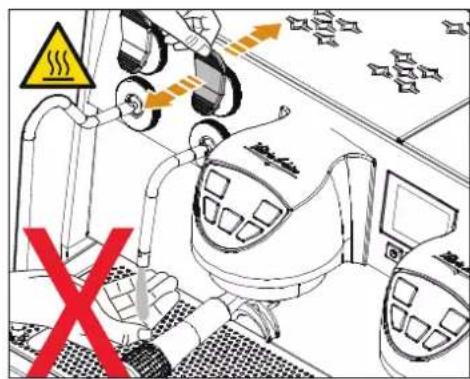
While using the steam nozzle, you must pay attention to not place your hands beneath it or touch just after it has been used.
Before use the steam wand, cleaning out of the condensation for at least 2 seconds.
To use steam just pull or push the provided lever.
By pulling it completely the lever will hold a position of maximum delivery; by pushing it, the lever will automatically give way.
The two steam nozzles are articulated to guarantee their easy use.
6.3
DISTRIBUTION VAPEUR
text_image
Diagram illustrating a heating process with warning symbol and directional arrows indicating temperature changeIT
text_image
Diagram showing a hand pouring liquid into a container with a warning sign and warning triangle, likely illustrating a chemical or industrial process.EN
text_image
Safety warning diagram showing a robot inside a vehicle with warning symbols and a red 'X' indicating no hazard.FR
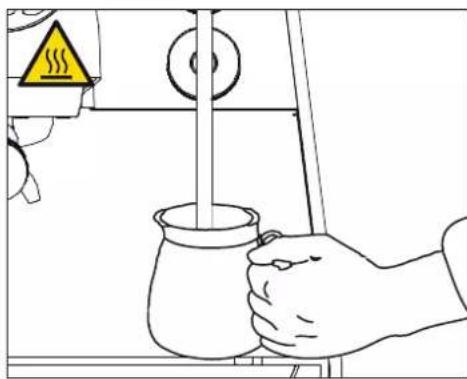
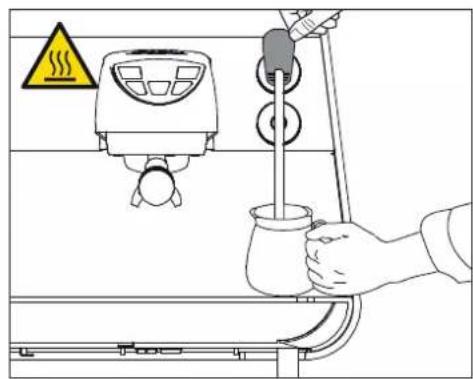
Immerse the nozzle all the way into a container 1/3 full of milk.
Turn on the steam.
Before the milk has reached the desired temperature, pull the nozzle slightly up and lightly move it vertically across the surface of the milk.
When you have completed the procedure, clean the nozzle carefully with a soft cloth.
6.4 PRÉPARATION DU CAPPUCCINO
6.5 HOT WATER DISPENSING
While using the hot water nozzle, pay careful attention not to place your hands beneath it or touch it just after it has been used.
The use of the hot water wand must always be preceded by the purge of the hydraulic circuit for at least 2 seconds.
6.5 DISTRIBUTION EAU CHAUDE
text_image
Diagram illustrating a steam heating system with warning sign, smoke, and control panel componentsIT
- Place a suitable container under the hot water nozzle.
- Pull the knob towards the front or push it towards the back to dispense hot water.
Two delivery doses of hot water can be set, one by puling the lever and the other by pushing it.
Hot water can be delivered at the same time as coffee.
6.6
STEAM WAND WITH TEMPERATURE PROBE (EASYCREAM-OPTIONAL)
As an optional extra, the machine can be equipped with an Easycream steam nozzle in place of the hot water nozzle.
On this version, the hot water nozzle is fitted in place of the manual steam nozzle.
The automatic steam nozzle can be used to deliver steam to foam milk or heat other liquids.
Place a suitable container with milk or another beverage inside it beneath the automatic steam nozzle.
Pull the knob towards the front. The steam nozzle will dispense steam until the liquid reaches the temperature set.
Victoria Arduino
INSPIRED BY YOUR PASSION.
FR
PROGRAMMAZIONE PROGRAMMING PROGRAMMATION

M
text_image
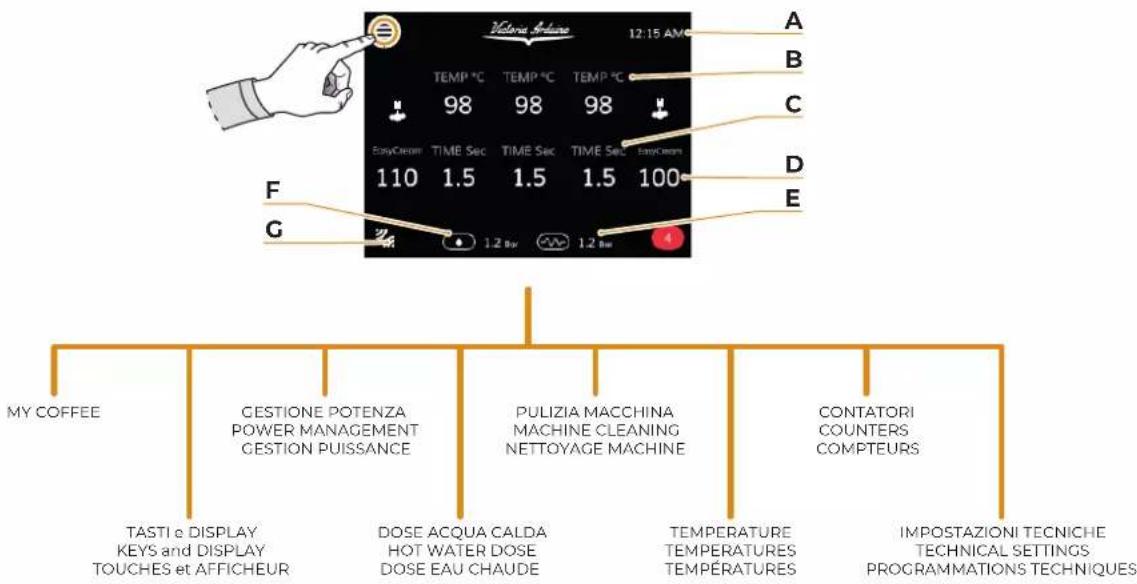
Victoria Ablone 12:15 AM A B C D E F G TEMP °C TEMP °C TEMP °C 98 98 98 EasyContent TIME Sec TIME Sec TIME Sec EasyContent 110 1.5 1.5 1.5 100 1.2 Bw 1.2 Bw MY COFFEE GESTIONE POTENZA POWER MANAGEMENT GESTION PUISSANCE PULIZIA MACCHINA MACHINE CLEANING NETTOYAGE MACHINE CONTATORI COUNTERS COMPTEURS TASTI e DISPLAY KEYS and DISPLAY TOUCHES et AFFICHEUR DOSE ACQUA CALDA HOT WATER DOSE DOSE EAU CHAUBE TEMPERATURE TEMPERATURES TEMPERATURES IMPOSTAZIONI TECNICHE TECHNICAL SETTINGS PROGRAMMATIONS TECHNIQUESIT
A Time
B Coffee group temperature
C Coffee dose delivery time
D EasyCream nozzle temperature (optional)
E Coffee boiler temperature
F Steam boiler temperature
G Bluetooth switching on
FR
In this menu there is only the "Default" item, that is the default setting of the doses.
1 Delete recipe
A To main menu
B Create new recipe
The following paragraphs describes the functions the MY COFFEE menu allows to set for each single group.
FR
7.1 MY COFFEE
To set the coffee delivery temperature for each single group using the buttons - (C) and + (D).
A To main menu
B Save recipe
C Decrease
D Increase
E To previous page
F To next page
FR
7.1.1
PROGRAMMER TEMPÉRATURE CAFÉ
To set water doses (cc) relating the keys of each single group using the buttons - (C) and + (D).
1 Normal dose
2 Long dose
3 Continuous dose
A To main menu
B Save recipe
C Decrease
D Increase
E To previous page
F To next page
7.1.2
PROGRAMMER DOSES
It allows to enable, disable and/or set the prewetting function:
1 Enable/disable prewetting
2 Prewetting ON Time
3 Prewetting OFF Time
4 Prewetting duration
A A To main menu
B B Save recipe
C C Decrease
D D Increase
E E To previous page
F F To next page
7.1.3
PRÉ-INFUSION
A A To main menu
B B Decrease
C C Increase
FR
7.1.4
EASYCREAM
flowchart
graph TD
    A["RECIPE 1<br>SET COFFEE TEMPERATURE<br>T. coffee (°C)<br>- 98 +"] --> B["DO you want to save the changes made to the recipe?<br>OK CANCEL"]
    B --> C["Digit NAME<br>Name of the recipe..."]
    C --> D["SPACE"]
IT
7.1.5
SALVATAGGIO RICETTE
After having set the parameters, press (B) to save the recipe:
1 Confirm saving
2 Delete saving
3 Recipe name
4 Alphanumeric keyboard
After having entered the recipe name, press again (A) to go back to the main menu.
A To main menu
B Data saving
A To main menu
B Data saving
FR
7.1.4
SAUVEGARDE RECETTES
- Unit of measurement
- Brightness
Options - Screensaver
A To main menu
The following paragraphs describe the above-mentioned functions in detail.
7.2
TOUCHES ET AFFICHEUR
text_image
UNIT OF MEASURE TEMPERATURE °C 1IT
7.2.1
UNITÀ DI MISURA
It allows to set the unit of measurement.
Press the "Temperature" field (1) to change the unit of measurement:
It allows to set brightness of:
1 External LEDs
2 Keys
3 Display
4 LED bar
A To previous menu
B Decrease
C Increase
Brightness setting of the external LEDs (1) allows to adjust the LEDs situated underneath the delivery groups, while the LED bar (4) is positioned on the machine back.
7.2.2
LUMINOSITÉ
text_image
OPTIONS Brewing temperature ON Brewing time Duration (sec) ON < 5 > Ext. brewing time Duration (sec) ON < 5 > 3 4 5IT
7.2.3
OPZIONI
1 It enables/disables the visualization of the delivery temperature
2 It enables/disables the visualization on the display of the delivery time
3 Visualization time of the delivery time on display
4 It enables/disables the visualization of the delivery time on the group display
5 Visualization time of the delivery time on the group displays
A To previous menu
B Decrease
C Increase
FR
7.2.3
OPTIONS
Permet de programmer:
It allows to select the screensaver, which is visualized on the display during standby.
Press (B) to load the images to be used as screensaver.
1 Delete screensaver
A To previous menu
B Load screensaver from USB
C To previous page
D To next page
7.2.4
SCREENSAVER
text_image
POWER MANAGEMENT WEEKLY PROGRAMMINGIT
EN
FR
7.3
GESTIONE POTENZA
This menu allows to access the functions:
• Power management
• Weekly programming
A To main menu
7.3
GESTION PUISSANCE
This menu allows to control the automatic switching on/off of the machine in the required days.
1 Enabling/disabling of power management
2 Enabling/disabling of standby
3 Setting of boiler temperature in standby
A To previous menu
B Decrease
C Increase
FR
7.3.1
GESTION PUISSANCE
To set automatic switching on/off for each day of the week.
1 Enabling/disabling of weekly programming
2 Selection of days of the week
3 Setting of switching on hours and minutes
4 Setting of switching off hours and minutes
A To previous menu
B Decrease
C Increase
FR
7.3.2
PROGRAMMATION HEBDOMADAIRE
To set hot water doses to deliver:
1 Time key 1
2 Time key 2
The hot water delivery lever serves to deliver two types of doses:
1: lever upwards;
• 2: lever downwards;
A To main menu
B Decrease
C Increase
FR
7.4
DOSE EAU CHAUDE
text_image
MACHINE CLEANING WASHING GROUPS AUTOMATIC GROUPS PURGE WASHING ALARMIT
7.5
PULIZIA MACCHINA
- Cleaning alarm
• Water amount (number of cleaning and rinsing cycles)
• Automatic discharge
A To main menu
The following paragraphs describe the above-mentioned functions in detail.
FR
7.5
NETTOYAGE MACHINE
Enable and set the alarm for the machine cleaning cycle.
1 Enabling/disabling of cleaning alarm
2 Alarm hour setting
3 Alarm minute setting
A To previous menu
B Decrease
C Increase
FR
7.5.1
ALARME LAVAGE
To set the number of cleaning and rinsing cycles.
1 Setting of number of cleaning cycles
2 Setting of number of rinsing cycles
A To previous menu
B Decrease
C Increase
D To previous page
E To next page
FR
7.5.2
QUANTITÉ EAU
To enable or disable and set the automatic discharge after coffee delivery.
1 Enabling/disabling of automatic discharge
2 Setting of discharge duration after delivery
3 Setting of discharge delay after delivery
A To previous menu
B Decrease
C Increase
FR
7.5.3
PURGE AUTOMATIQUE
Press and hold the cleaning key (P6) for 3 seconds to access the automatic cleaning function (the dose keys P3, P4 and P5 of the single groups start flashing).
Press a dose key of a group (P3, P4 or P5) of a group to carry out the cleaning cycle of that group.
At the end of the cleaning cycle, all of continuous keys (P3, P4 e P5) start flashing again to allow the rinsing cycle.
After 20 seconds from the access, if no key is pressed, the machine goes back to the normal operation.
To exit the cleaning function manually and go back to the normal operation, during flashing of the dose keys (P3, P4 e P5), press and hold the cleaning key (P6) for 3 seconds.
When the automatic cleaning cycle is started, it cannot be stopped before its programmed end.
If the machine is stopped before the cycle has finished, when it is switched back on, it restarts the rinsing cycle automatically.
- Settings of steam boiler
- Cup warmer
A To main menu
The following paragraphs describe the above-mentioned functions in detail.
7.6
TEMPÉRATURES
It shows the current temperature of the steam boiler and allows to set the set-point.
1 Visualization of the steam boiler pressure
2 Setpoint setting
A To previous menu
B Decrease
C Increase
FR
7.6.1
PROGRAMMATIONS CHAUDIÈRE VAPEUR
To set the serving temperature of beverages.
1 Setting of temperature
A To previous menu
B Decrease
C Increase
FR
7.6.2
CHAUFFE-TASSES (EN OPTION)
This menu allows to show dose counters delivered for each group:
- Groups
- Partial
- Absolute
- Maintenance
A To main menu
7.7
COMPTEURS
text_image
COUNTERS Group 1 Doses 1 short 120 Doses 1 long 120 Doses 2 short 120IT
7.7.1
CONTATORI GRUPPI
This menu allows to show counting of delivered doses for each group.
A To previous menu
B To previous group
C To next group
D To previous page
E To next page
7.7.2
PARTIAL COUNTERS
This menu allows to show the partial counting of:
- Total coffee;
• Total water litres; - Total steam;
• Total Easycream; - Total groups;
- Hot water and steam.
FR
7.7.1
COMPTEURS
GROUPES
This menu allows to show the total counting of the whole machine.
7.7.3
COMPTEURS ABSOLUS
This menu allows to show the total counting of the maintenance cycle.
7.7.4
COMPTEUR ENTRETIEN
It is possible to gain access to this menu via password and allows to manage the following functions:
The following paragraphs describe the above-mentioned functions in detail.
text_image
OFFSET ALARMS SMARTWATER DIAGNOSTICSIT
7.8.1
MANUTENZIONE
It allows to access the following functions:
Offset
- Alarms
- Smartwater
• Diagnostics
A To previous menu
FR
7.8.1
ENTRETIEN
It allows to set the offset of:
1 Steam boiler
2 Coffee group boilers 1, 2, 3
3 EASYCREAM steam nozzle (optional)
4 Coffee groups 1, 2, 3
5 Water pump
A To previous menu
B Decrease
C Increase
D To previous page
E To next page
FR
7.8.2
OFFSET
Permet de programmer l'offset de:
It allows to access:
- Alarms history;
- Maintenance alarm.
7.8.4
ALARM HISTORY
It shows and allows to manage the alarms that are activated during machine operation.
1 Alarm list
2 Delete alarm list
A To previous menu
B To previous page
C To next page
FR
7.8.3
ALARMES
Permet d'accéder à:
text_image
ALARMS SETTING ALARM STATUS ON CYCLE COUNTER 1 2 - 100000 + 3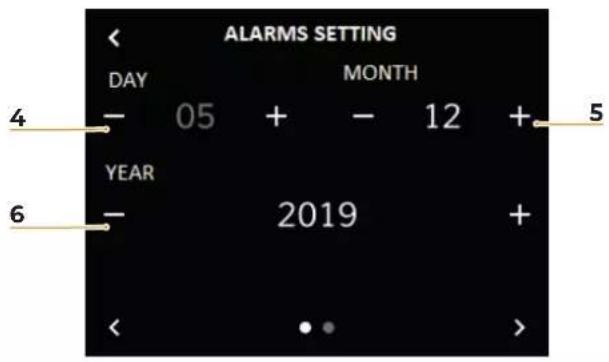
text_image
ALARMS SETTING DAY MONTH - 05 + - 12 + YEAR - 2019 + < . . >IT
7.8.5
ALLARMI
MANUTENZIONE
It enables or disables the maintenance alarm deadline and the data or the number of cycles after which the maintenance alarm is signalled.
1 Enabling/disabling of maintenance alarm
2 Setting of the number of cycles before alarm
3 Reset of cycle counter
4 Day setting
5 Month setting
6 Year setting
A To previous menu
B Decrease
C Increase
D To previous page
E To next page
FR
7.8.5
ALARMES
ENTRETIEN
TECNOLOGIA SMART WATER (OPTIONAL)
SMART WATER TECHNOLOGY (OPTIONAL)
To set the Smart Water technology parameters.
1 Current PH value
2 Current TDS value
3 Minimum PH
4 Maximum PH
5 Minimum TDS
6 Maximum TDS
A To previous menu
B Decrease
C Increase
FR
7.8.6
TECHNOLOGIE SMART WATER (EN OPTION)
It allows to test the single parts.
1 Parts list
2 Part to be tested
3 Part tested
During the test of the part selected, a countdown starts and the arrows (3) starts rotating on the display.
A To previous menu
B To previous page
C To next page
FR
7.8.7
DIAGNOSTIC
It allows to access:
- Date and time;
• Information; - CPU configuration;
- Password setting.
7.8.8
PROGRAMMATIONS
Permet d'accéder à:
- Date et heure;
- Informations;
- Configuration CPU;
- Programmer Mot de passe.
7.8.9
DATA E ORA
It allows to set date and time shown on the display:
1 Day
2 Month
3 Year
4 Hours
5 Minutes
A To previous menu
B Decrease
C Increase
7.8.9
DATE ET HEURE
text_image
INFORMATION 1 FIRMWARE v1.2.0 BOARD v2.4 OPTIONAL 1 v1.0 OPTIONAL 2 v1.0 2 UPGRADE 3 UPGRADE The following procedure will guide you in updating the machine. Insert the USB stick 4 CONTINUE 5 SELECT FILE FW_2.5.1 bin FW_2.5.8 bln 6 UPGRADE The update was successful 7 BACK TO THE MENUIT
7.8.10
INFORMAZIONI
It allows to show machine information and carry out software update.
1 It shows machine information.
2 Press to update software.
3 Insert the USB support containing the new software.
4 Press to continue.
5 Select the software file for update.
6 Confirmation message.
7 Press to go back to main menu.
A To previous menu
FR
7.8.10
INFORMATIONS
It allows to set machine control unit:
1 Type
2 Number of delivery groups
3 Level probe sensor
4 Pressure probe sensor
A To previous menu
B Decrease
C Increase
D To previous page
E To next page
FR
7.8.11
CONFIGURATION CPU
Permet de programmer la centrale de la machine:
It allows to enter a password for privilege management.
1 Press to enter password.
2 Enter the password (4 characters).
3 Confirmation message.
4 Press to go back to main menu.
A To previous menu
FR
7.8.12
GESTION
MOT DE PASSE
• Italian;
- English;
- French;
- German;
- Spanish.
A To previous menu
B Option scrolling
C Option scrolling
FR
7.8.13
LANGUE
text_image
DEMO MODE ENABLE ON 1IT
7.8.14
MODALITÀ DEMO
This mode allows to simulate the machine operation by keeping all of settings active.
Enabling or disabling the demo mode via the button (1).
A To previous menu
FR
7.8.14
MODALITÉ DÉMO
Switch the machine Bluetooth on by pressing the icon (1) and open the application (2) on the mobile device.
FR
Wait the connection of the machine to the mobile device.
The connection indicator (1) goes from red to green.
1 Connection indicator
2 Button of addition of a machine
3 Machine list
4 Machine visualization button
5 Recipe visualization button
Press the machine name to access the relating details.

INSPIRED BY YOUR PASSION.
FR
This page of Machine Details allows to show:
• Temperature and delivery time for groups 1, 2 and 3;
- Mains pressure;
- Boiler pressure;
- Steam temperature for two nozzles;
- Any active alarm.
FR
It allows to access:
- Real time charts of the instant flow;
- Recipe settings and machine transfer.
FR
The charts indicate the instant water flow over time for the various groups and can be created also some average values.
1 Optimal extraction;
2 Extraction with channeling.
The optimal extraction envisages that water pressure raises until it reaches the coffee capsules (the highest point of the curve) and starts to decrease during extraction.
The extraction with channeling (recess created in the coffee capsule) does not envisage the peak as water wets the capsule immediately and has a set of curves instead.
FR
The recipe page allows to set:
- Group temperature;
- Water doses;
- Pre-wetting.
The recipes can be created also offline on the mobile device, that is without connection with the machine.
Once having created the recipe, it can be transferred when it is in the proximity of the machine itself and make it active.
FR
The machine must be set to "O" power before any cleaning operations are performed.
- Avoid to clean the machine using water jets or standing it in water.
- Do not use solvents, chlorine-based products or abrasives.
9.1
BODY MACHINE CLEANING
Work area cleaning
- Remove the worktop, lifting it up from the front and sliding it out.
- Remove the water collection dish underneath.
- Clean everything with hot water and cleansers.
External plates cleaning
- To clean all the chromium-plated areas, use a soft, damp cloth.
9.2
CLEANING THE COFFEE-HOLDERS
Cleaning the coffee-holder once a week:
- Turn the screw placed in the centre of the coffee-holder.
- Slide the coffee-holder out and check that its holes are not obstructed but clean. If obstructed, clean as described.
FR

CLEANING WITH THE BLIND FILTER
The machine is pre-set for cleaning the delivery unit with a specific washing powder.
Carrying out a washing cycle at least once a day with special cleansers.
Once the filter-holder has been removed, repeat delivery operations a few times to eliminate any cleanser residues.
To carry out the washing procedure, proceed as follows:
1 Substitute the filter with the delivery unit blind filter.
2 Fill it with two spoonfuls of special cleanser powder and insert it into the unit filter-holder.
3 Press one of the coffee keys and halt it after 10 seconds.
4 Repeat the procedure several times.
5 Remove the filter-holder and carry our a few deliveries.
9.4
CLEANING FILTERS AND FILTER-HOLDERS
- Place two spoonfuls of special cleanser in half a litre of hot water.
- Immerse filter and filter-holder (without its handle) in it leaving them to soak for at least half an hour.
- Rinse abundantly with running water.
FR
9.3
NETTOYAGE GROUPE AVEC FILTRE AVEUGLE
To avoid scaling deposits in the boiler and in the heating exchangers, the softener must always be kept efficient. Therefore, the ionic resins must be regularly regenerated. Regeneration times are established according to the quantity of coffee delivered daily and the hardness of the water utilised. As an indication, regeneration times can be calculated on the basis diagram illustrated in figure. Regeneration procedures are as follows:
1 Turn the machine off and place a container large enough to contain at least 5 litres under tube E.
2 Turn levers C (in) and D (out) from left to right.
3 Take the cap off by unscrewing knob G.
4 Fill with 1 Kg normal kitchen salt.
5 Put the cap back on and reposition lever C moving it towards the left and allowing tube F to discharge the salty water until it has been eliminated and the water becomes fresh again (about half and hour).
6 Reposition lever D towards the left.
9.6
During maintenance / repairs, the parts used must be able to guarantee compliance with the safety and hygiene requirements envisaged for the device. Original replacement parts can offer this guarantee.
After the repair or replacement of any components of parts that come into contact with food or water, it is necessary to carry out the washing procedure as described in this manual or according to the manufacturer's instructions.
FR
text_image
Electrical circuit diagram with numbered components and labeled connections, likely for a power or control system layout.IT
EN
FR
12.1 SCHEMA ELETTRICO T3 VOL 230V 2 Gruppi
1 EVHW Steam / hot water solenoid valve
2 EVI-2 Group delivery solenoid valve
3 PM Pump motor
4 R Relay switch
5 EVL Level solenoid valve
6 MS Main switch
7 HE Heating element
8 LP Level probe
9 TE Safety thermostat
10 SPC Boiler pressure sensor
11 CRS Static relay connector
12 RS Static relay
13 RS1-2 Cup warmer heating element
14 VAP1-2 Steam solenoid valve
15 CE1-2 Group boiler
16 GR1-2 Delivery group
12.1 SCHÉMA ELECTRIQUE T3 VOL 230V 2 Gruppi
text_image
Electrical schematic diagram with numbered components and labeled connections, likely for a power or control system layout.IT
EN
FR
12.2 SCHEMA ELETTRICO T3 VOL 230V 3 Gruppi
1 EVHW Steam / hot water solenoid valve
2 EV1-2-3-4 Group delivery solenoid valve
3 PM Pump motor
4 R Relay switch
5 EVL Level solenoid valve
6 MS Main switch
7 HE Heating element
8 LP Level probe
9 TE Safety thermostat
10 SPC Boiler pressure sensor
11 CRS Static relay connector
12 RS Static relay
13 RS1-2 Cup warmer heating element
14 VAP1-2 Steam solenoid valve
15 CE1-2 Group boiler
16 GR1-2 Delivery group
12.2 SCHÉMA ELECTRIQUE T3 VOL 230V 3 Gruppi
12.3 WATER MAINS DIAGRAM
1 Manual tap
2 Pump
3 Digital pressure gauge
4 Discharge valve
5 Refill electrovalve
6 Heating elements boiler
7 Level probe
8 Steam electrovalve
9 Safety valve
10 Anti-vacuum valve
11 Digital pressure gauge
12 Hot water electrovalve
13 Flowmeter
14 Retain valve
15 Heating element
16 Delivery electrovalve
17 Drain
18 Ters
19 Hot water wand
20 Steam wand
12.3 SCHÉMA HYDRAULIQUE
1 Robinet manuel
2 Pompe
text_image
Exploded view diagram of a cylindrical device with numbered parts for identification| Elemento Element Élement | Q.tà Q.tà Q.tà | Numero Parte Part Number Numéro Partie | Descrizione Description Description | Materiale Material Matériau |
| 13 00000056 Dado / Nut / Écrou INOX 304 | ||||
| 2 | 1 | 11740001 | Tubo / Pipe / Tube | Teflon |
| 3 | 1 | 07300707 | Prigioniero / Prisoner / Prisonnier | OT57 |
| 41 05000656 | Copriresistenza cilindrico Cylindrical heating element cover Couverture de résistance cylindrique | NYLON | ||
| 5 | 1 | 05000037 | Ghiera filettata / Threaded ring nut / Bague filetée | NYLON |
| 61 | 09500015 | Termoprotettore 184°C / Thermoprotector 184°C Thermoprotecteur 184°C | Elettrico / Electrical / Electrique | |
| 7 | 1 | 02290034 | Guarnizione OR / OR Gasket / Joint OR | VITON |
| 8 | 1 | 14100100 | Resistenza 3000W / Heating element 3000W / Résistance 3000W | INOX 304 |
| 91 | 01000638 | Isolante caldaia Boiler insulation Isolation de la chaudière | Isolante alte prestazioni High performance insulation Isolation haute performance | |
| 10 | 1 | 98031202 | Caldaia / Boiler / Chaudiere | INOX 304 |
| 11 | 1 | 09000005 | Sonda livello / Level probe / Sonde de niveau | Ottone, inox, nylon Brass, inox, nylon Laiton, inox, nylon |