TX295659 - Electric toy for kids Merax - Free user manual and instructions
Find the device manual for free TX295659 Merax in PDF.



| Product type | Electric children's toy (ride-on car) |
| Brand | Merax |
| Model | TX295659 |
| Dimensions (L x W x H) | 1235 x 703 x 713 mm |
| Product weight | Approximately 22 kg |
| Power supply | Rechargeable battery 12V 7Ah with 12V 1000mA charger |
| Drive motor | 550-13000 rpm |
| Steering motor | 390-5000 rpm |
| Maximum speed | 3 to 7 km/h |
| Maximum load capacity | 100 kg |
| Recommended age | 3 years and up |
| Charging time | First charge: 4-6 h; subsequent charges: 8-12 h (max 20 h) |
| Estimated runtime | 1 to 2 hours depending on use |
| Parental remote control | Yes, with forward, reverse, brake, speed selection functions (2 AAA batteries not included) |
| Sound and light functions | Horn, music, Bluetooth, front headlights |
| Parent-child mode | Switch for pedal control or accelerator button on steering wheel |
| Number of seats | 2 (driver + passenger) |
| Maintenance and cleaning | Clean with a soft dry cloth; do not use water or abrasive products |
| Safety | Adult supervision required; do not use on roads, slopes, or dangerous surfaces; the toy has no brake |
| Spare parts and repairability | Contact the distributor for parts and repairs (motor, battery, gearbox) |
| Warranty | Not specified in the manual |
Frequently Asked Questions - TX295659 Merax
User questions about TX295659 Merax
0 question about this device. Answer the ones you know or ask your own.
Ask a new question about this device
Download the instructions for your Electric toy for kids in PDF format for free! Find your manual TX295659 - Merax and take your electronic device back in hand. On this page are published all the documents necessary for the use of your device. TX295659 by Merax.
USER MANUAL TX295659 Merax
natural_image
3D rendered model of a toy off-road vehicle with large tires and front suspension (no text or symbols on the vehicle itself)BEDIENUNGSANLEITUNG
mit Aufbauanleitung
text_image
Exploded view diagram of a vehicle's internal components with numbered parts for identification
WARNUNG!
text_image
Technical diagram of a tank assembly with numbered components and Chinese annotationsVorderansicht unten
text_image
fest. 7 7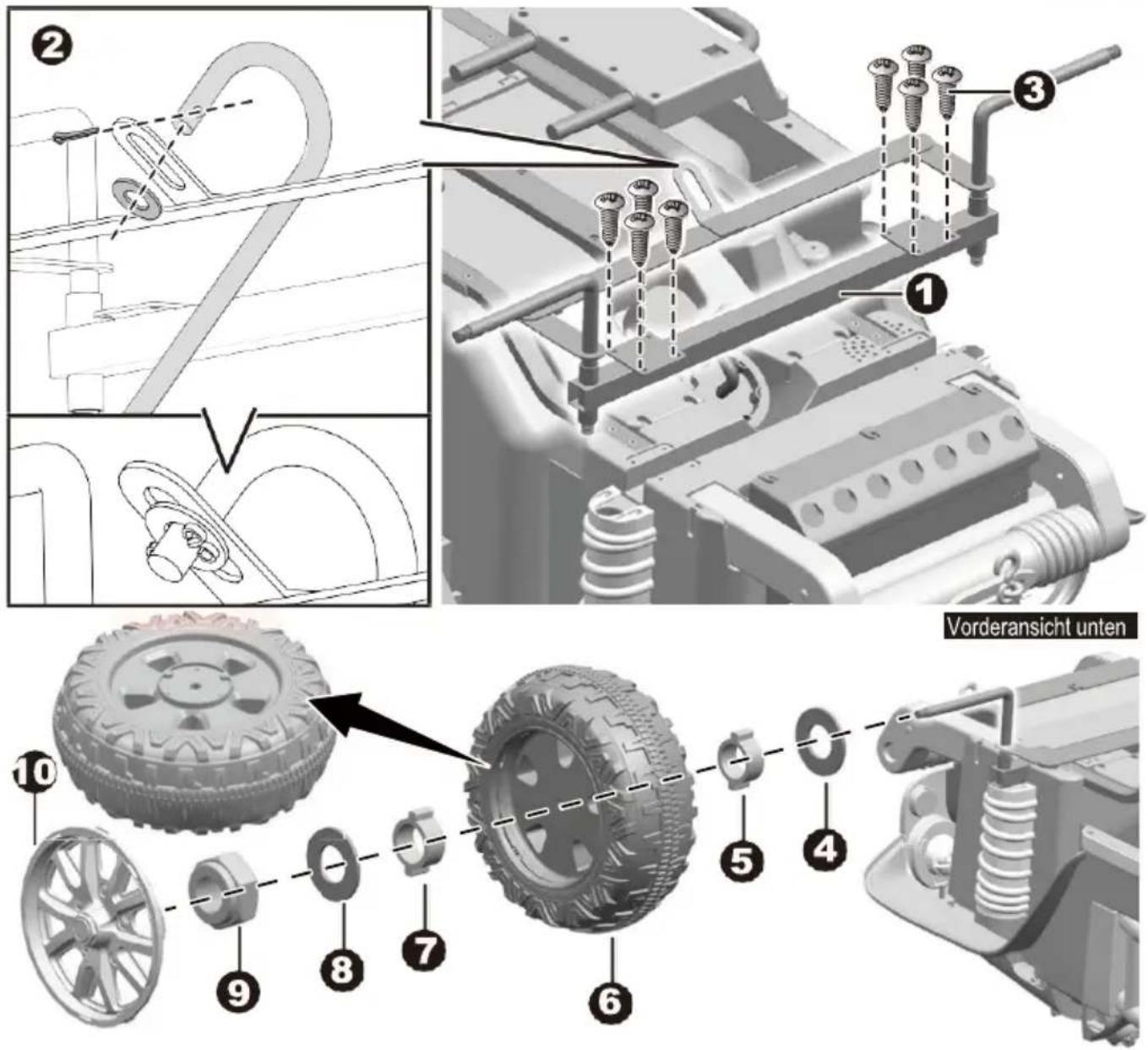
text_image
Technical diagram showing vehicle assembly with numbered parts and a close-up of the component detailtext_image
Technical diagram showing vehicle assembly components with numbered labels for parts 1 and 2natural_image
Interior view of a vehicle dashboard and steering wheel assembly (no visible text or symbols)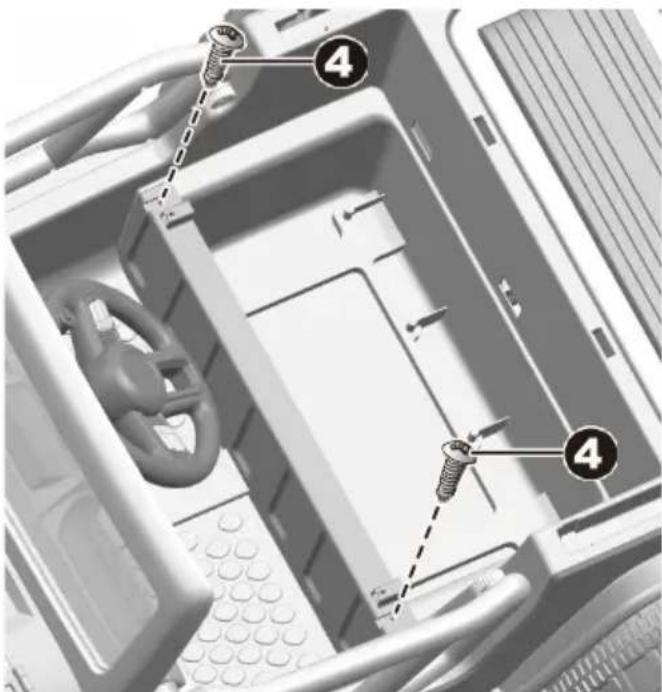
text_image
Diagram of a computer interior showing screw fasteners inserted into a driver compartment with numbered callouts.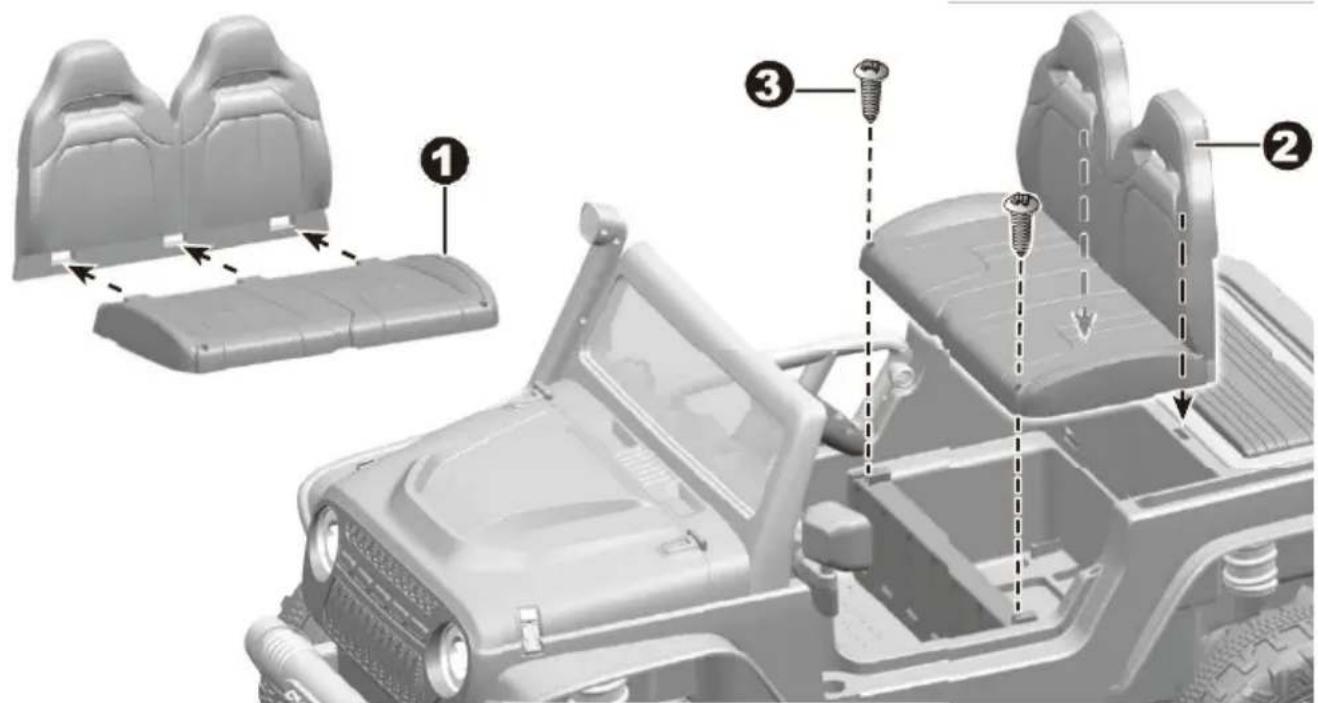
text_image
Diagram of a vehicle's internal components with numbered parts, showing assembly steps and mounting features.text_image
Diagram showing battery installation steps with screw and battery components labeled 4 and 5, mounted on a pipe branch.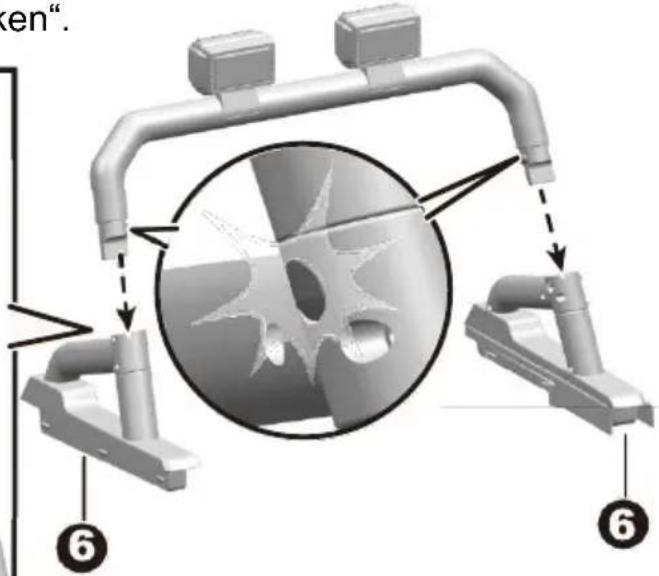
text_image
en". ⑥ ⑥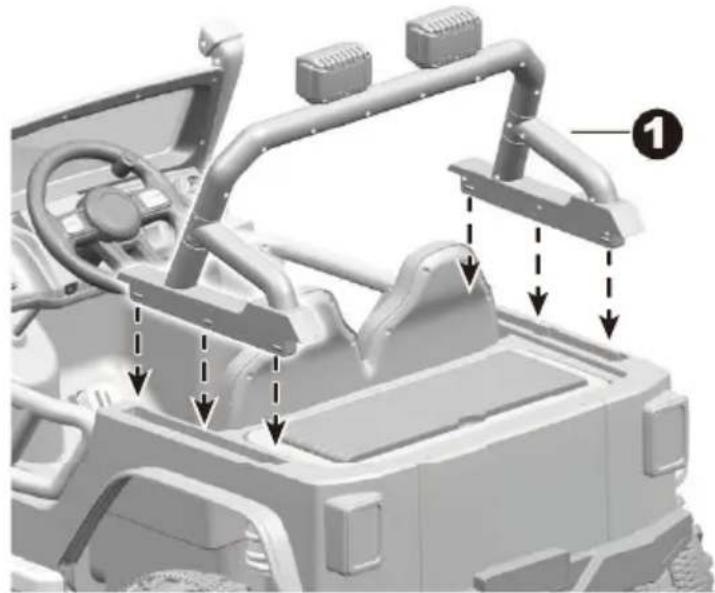
natural_image
3D rendering of a vehicle chassis with structural components and directional arrows indicating assembly or movement (no text or symbols present)text_image
Diagram of a device interior with numbered annotations indicating connection points or components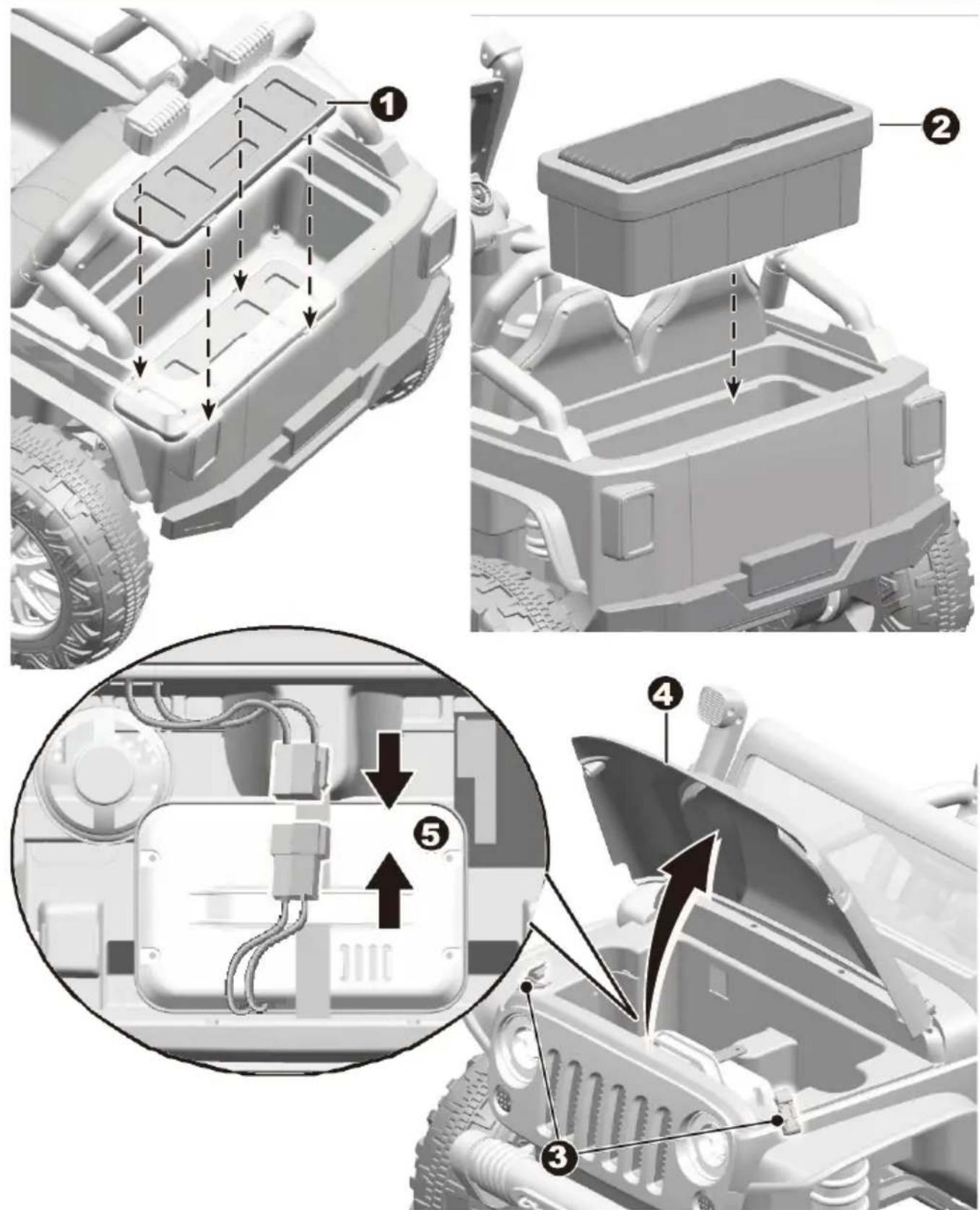
text_image
Technical diagram of a vehicle's internal components with numbered annotations indicating assembly stepstext_image
Diagram of a vehicle dashboard with numbered components for identification and assembly reference.text_image
Technical diagram showing vehicle assembly components with labeled parts A, B, C, D and directional arrows indicating movement or assembly.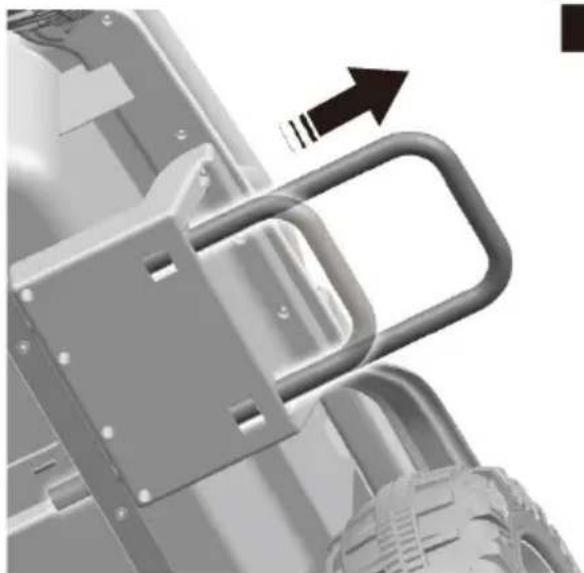
natural_image
Mechanical assembly diagram showing a bracket with an arrow indicating motion (no text or symbols present)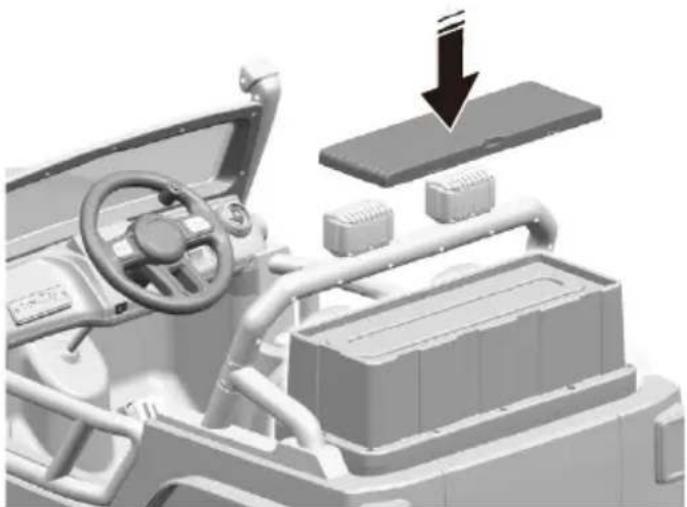
natural_image
3D rendering of a vehicle interior with dashboard, steering wheel, and battery pack (no text or symbols visible)natural_image
Black-and-white photo of a woman and child sitting together on a toy car outdoors (no visible text or symbols)
WARNUNG!
text_image
Diagram illustrating three steps of automotive electrical installation: plug-in, power outlet, and vehicle hood with labeled components.natural_image
3D rendered model of a off-road vehicle with large tires and front suspension (no text or symbols on the vehicle itself)OWNER'S MANUAL
with Assembly Instructions
EN
Read and understand this entire manual before using!
Please keep this manual for future reference as it contains important information. Before using for the first time, charge the battery for at least 4-6 hours, but no more than 10 hours.
On the purchase of your new Ride-On.
This ride-on car will provide your child with many miles of riding of enjoyment. To help assure you and your rider a safe ride, we ask you to please read this manual carefully, and keep it for future reference.
Follow the recommendations in this manual, they are designed to improve the safety and operation of your ride-on car and its rider.
Specification
| Battery | 12V7AH X1 |
| Charger | 12V1000mA |
| Motor | 550-13000 |
| Steering motor | 390-5000 |
Suitable age: 3+ Years
Charge time: 8\~12 hours (for the first time only 4-6 hours is needed)
Load capacity: 100kg
Size of car: 1235*703*713 MM
Speed: 3-7 km/h
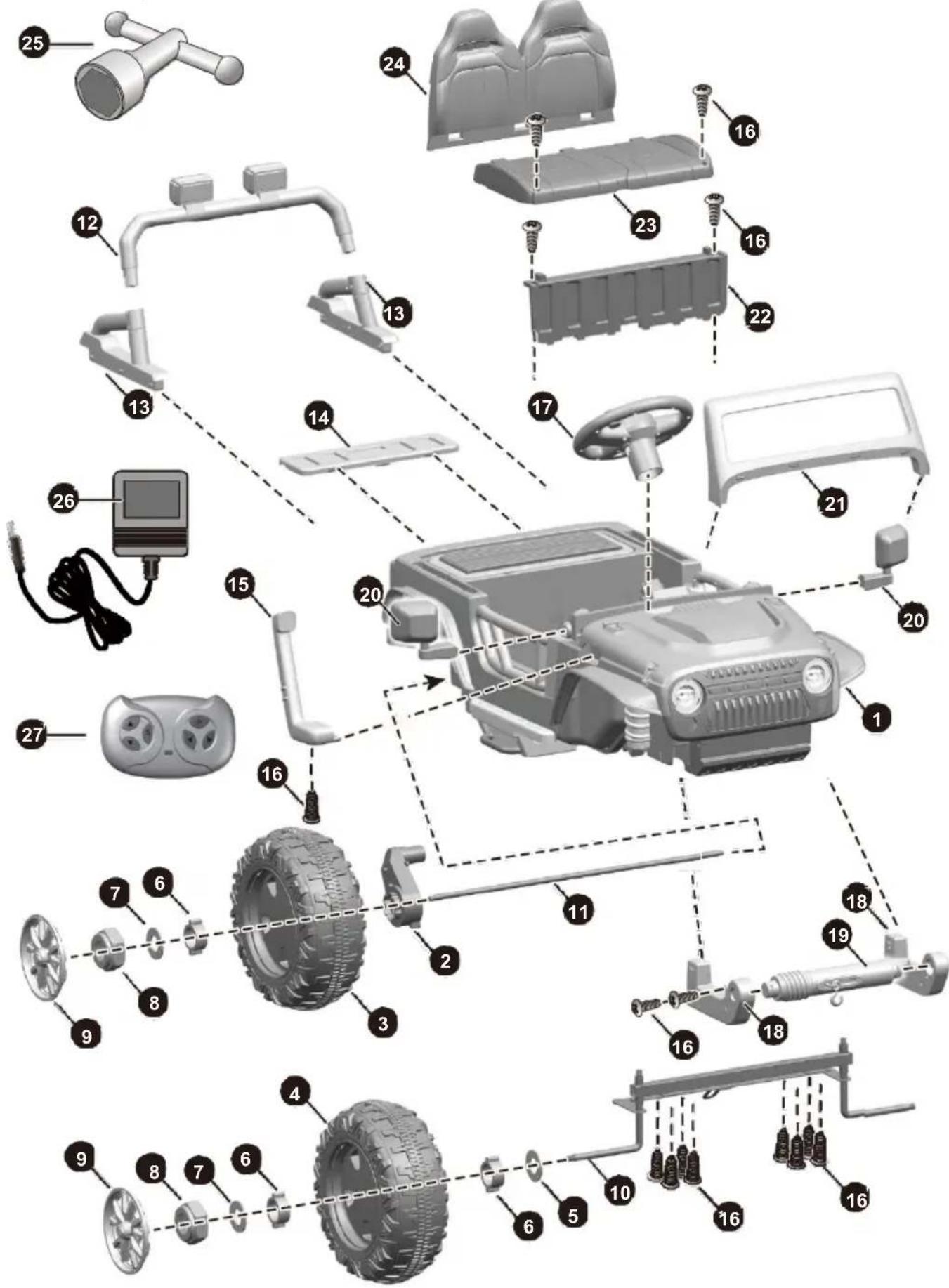
| NO. | PART NAME | Q’ty (pcs) | REMARKS |
| 1 | Vehicle body | 1 | |
| 2 | Gear box | 2 | |
| 3 | Driving wheel | 2 | |
| 4 | Normal wheel | 2 | |
| 5 | Ø12 washer | 2 | within the accessory bag |
| 6 | Bushing | 6 | |
| 7 | Ø12 washer | 4 | within the accessory bag |
| 8 | Lock nut | 4 | |
| 9 | Wheel cover | 4 | |
| 10 | Front axle | 1 | |
| 11 | Rear axle | 1 | |
| 12 | Light bar linkage | 1 | |
| 13 | Light bar support | 2 | |
| 14 | Rear trunk plate | 1 | |
| 15 | Chimney | 1 | |
| 16 | Ø4x16 screw | 17 | within the accessory bag |
| 17 | Steering wheel | 2 | |
| 18 | Front bumper support | 1 | Left and right |
| 19 | Front bumper linkage | 2 | |
| 20 | rearview mirror | 1 | Left and right |
| 21 | Windshield | 1 | |
| 22 | Seat board | 1 | |
| 23 | Seat | 1 | |
| 24 | Seat back | 1 | |
| 25 | Spanner | 1 | |
| 26 | Charger | 1 | |
| 27 | Remote controller | 1 |
Assembly tools required:

Screwdriver
HINT: Some parts shown are assembled on both sides of vehicle.
text_image
Exploded view diagram of a vehicle's internal components with numbered parts for identification
WARNING!
- CHOKING HAZARD - Small parts. Not suitable for children under 36 months. The product contains small parts, keep children away when assembling.
• ADULT ASSEMBLY REQUIRED.
• Always remove protective material and poly bags and dispose before assembly. - Protective equipment should be worn. Always wear shoes and sit in the seat when operating the vehicle.
- Only drive on level ground. For best power efficiency, long-term playing on the lawn is not recommended
- Never leave a child unattended.
- Keep your hands, hair, and clothes away from moving parts.

SAFETY
The following safety hazards may result in serious injury or death:
- Never leave child unattended. Direct adult supervision is required. Always keep child in view when child is in vehicle.
- To reduce the risk of injury, adult supervision is required. Never use in roadways, near motor vehicles, on or near steep inclines or steps, swimming pools or other bodies of water, always wear shoes, and never allow more than 2 riders.
- Never use in unsafe conditions such as snow, rain, loose dirt, mud, sand, or gravel, otherwise may result in an unexpected accident such as tipping over, and could damage the electrical system or battery.
- Not to be used in traffic.
- This toy should be used with caution since skill is required to avoid falls or collisions causing injury to the user or third parties.
- This toy is unsuitable for children under 36 months due to its maximum speed; Maximum user weight is 100kg.
• This toy has no brake.

BATTERY INFORMATION
• Non-rechargeable batteries are not to be recharged.
- Rechargeable batteries are to be removed from the toy before being charged.
- Rechargeable batteries are only to be charged under adult supervision.
- Different types of batteries or new and used batteries are not to be mixed.
- Batteries are to be inserted with the correct polarity.
- Exhausted batteries are to be removed from the toy.
- The supply terminals are not to be short-circuited.
text_image
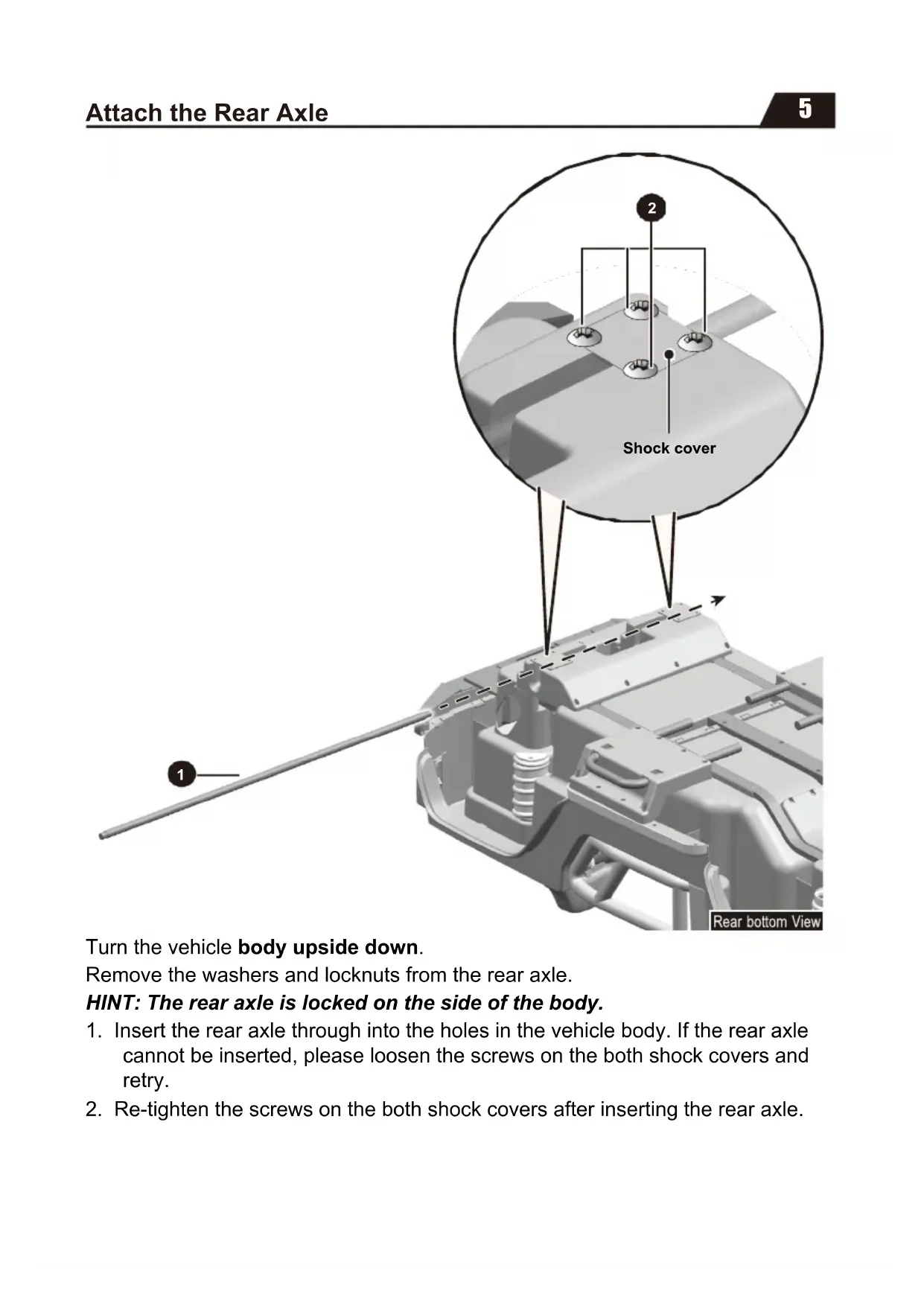
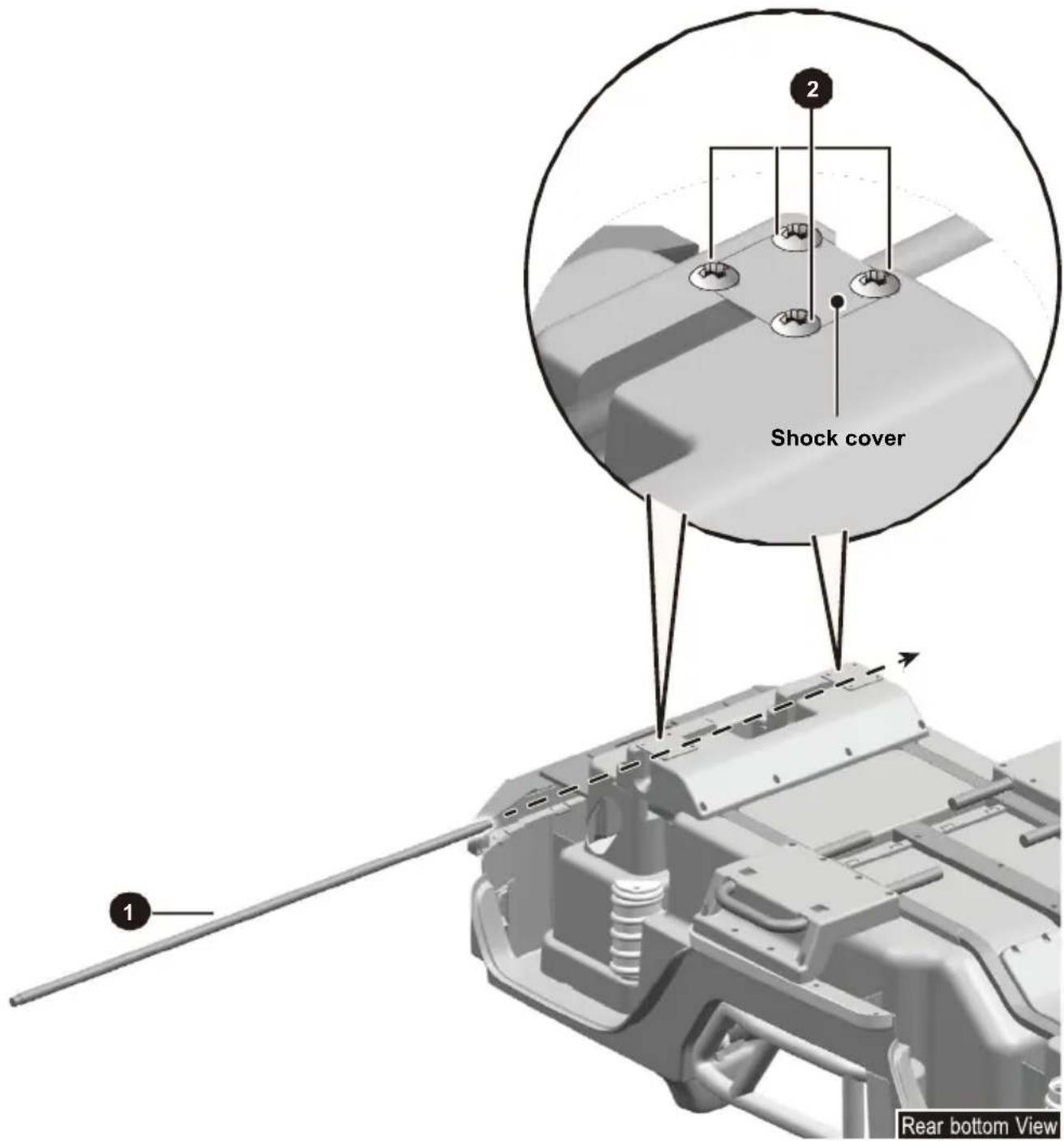
Shock cover 1 2 Rear bottom ViewTurn the vehicle body upside down.
Remove the washers and locknuts from the rear axle.
HINT: The rear axle is locked on the side of the body.
-
Insert the rear axle through into the holes in the vehicle body. If the rear axle cannot be inserted, please loosen the screws on the both shock covers and retry.
-
Re-tighten the screws on the both shock covers after inserting the rear axle.
text_image
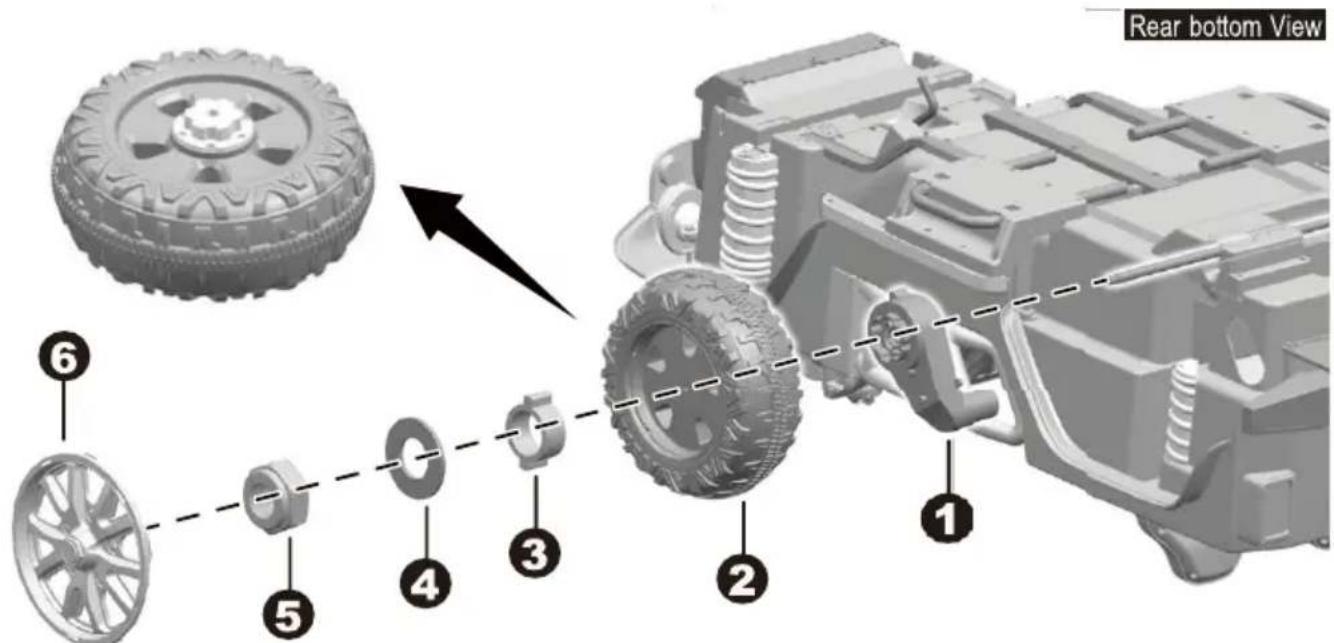
Rear bottom View 6 5 4 3 2 1 Rear bottom View- Slide a gear box onto the rear axle ("R" labeled gear box should be fit to the "R" side of vehicle body; "L" labeled gear box should be fit to "L" side of vehicle body), and keep the motor and the connector on the gear box pass through the larger hole on the vehicle body.
- Slide the rear wheel onto the rear axle. And keep the rear wheel match up with the gear box.
- Slide a bushing onto the rear axle, also keep it match up with the rear wheel.
- Slide the ∅12 washer onto the rear axle.
- Tighten a lock nut to the end of the rear axle with a spanner. Repeat for the other rear wheel.
- Fit the wheel covers to the rear wheels.
text_image
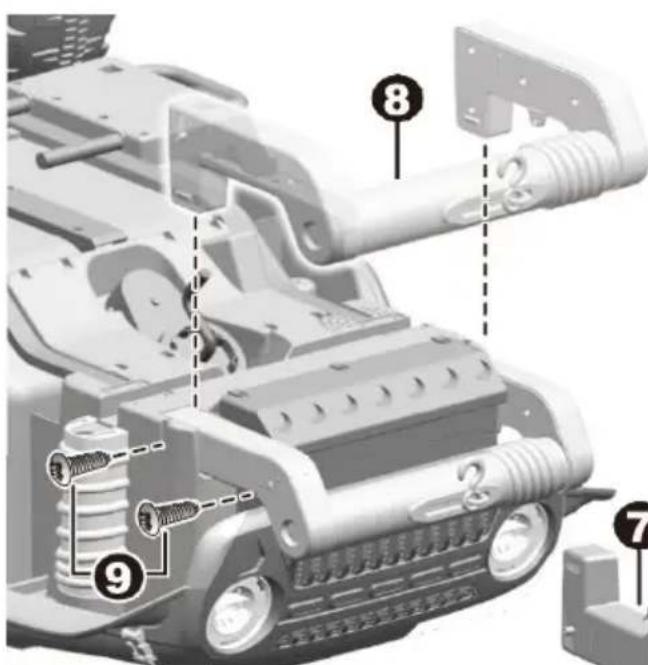
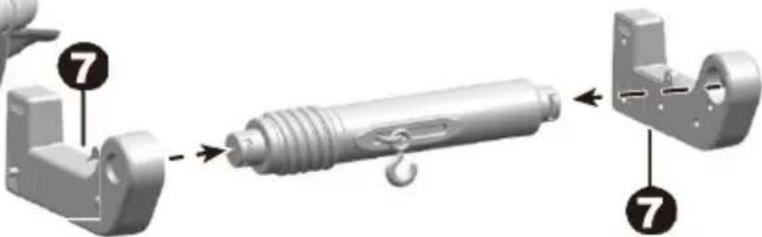
Technical diagram of a vehicle's internal components with numbered parts labeled 8, 9, and 7- Fit the front bumper supports to the front bumper linkage.
- Fit the front bumper assembly to the vehicle body.
- Insert two ∅4x16 screws and tighten with a screwdriver on each side.
Front bottom View
text_image
Technical diagram showing mechanical assembly steps with numbered annotations pointing to components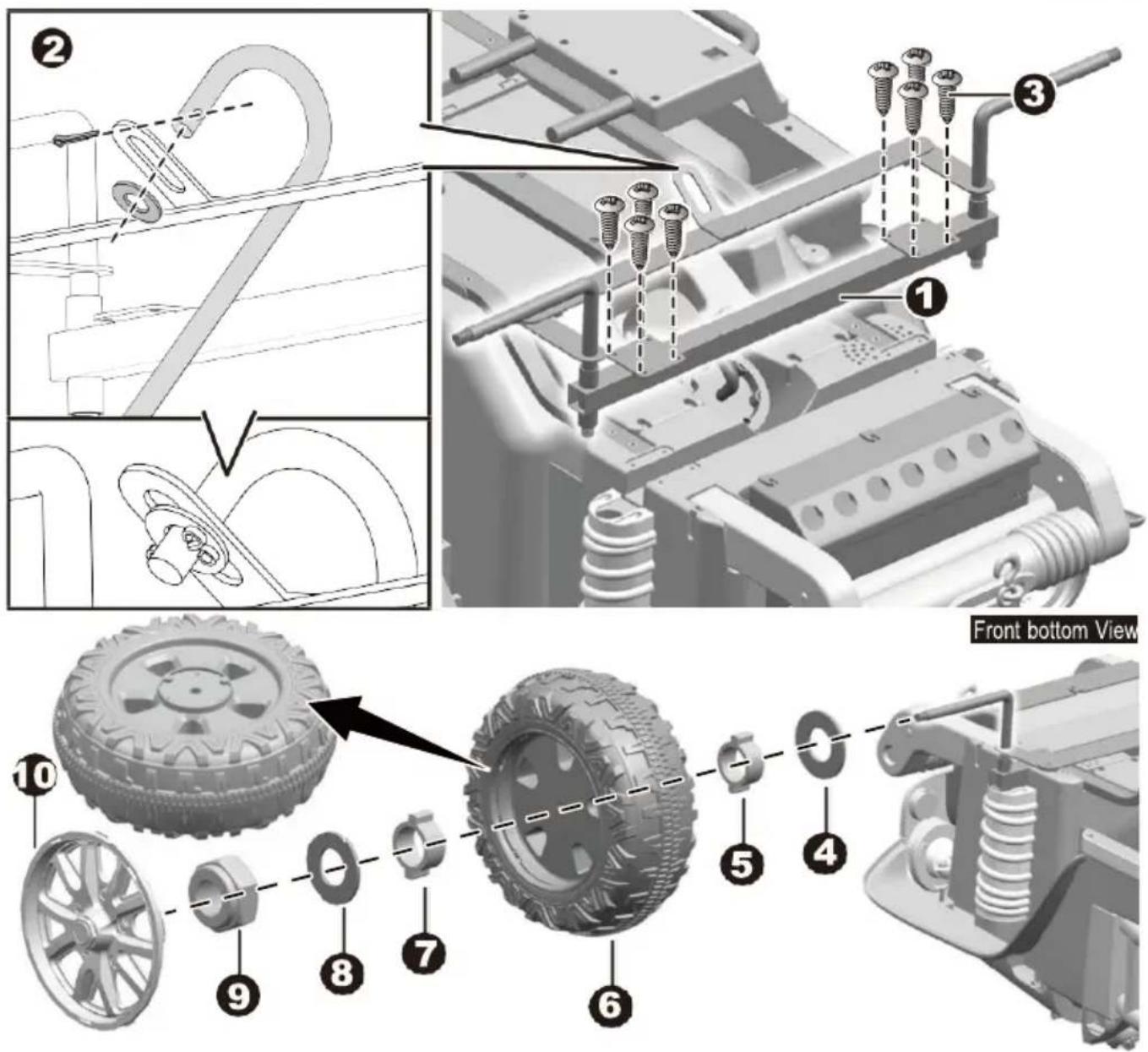
text_image
Technical diagram showing assembly steps of a vehicle tire assembly with numbered components and a front view label.- Fit the front axle to the vehicle body.
- Ensure that the bent end of the steering column passes through the hole on the front axle linkage. Slide a washer onto the steering column, insert a split pin (in the accessory bag) into the hole in the steering column, bend the ends of split pins back using a long nose pliers (not included).
- Insert eight ∅4x16 screws and tighten.
- Slide the ∅12 washer onto the front axle.
- Slide a bushing onto the front axle.
- Slide a front wheel onto the front axle.
- Slide a bushing onto the front axle.
- Slide the ∅12 washer onto the front axle.
- Tighten a lock nut to the end of the front axle with a spanner.
- Fit the wheel cover to the front wheel.
Repeat the procedure 4-10 to assemble the front wheel on the other side.
text_image
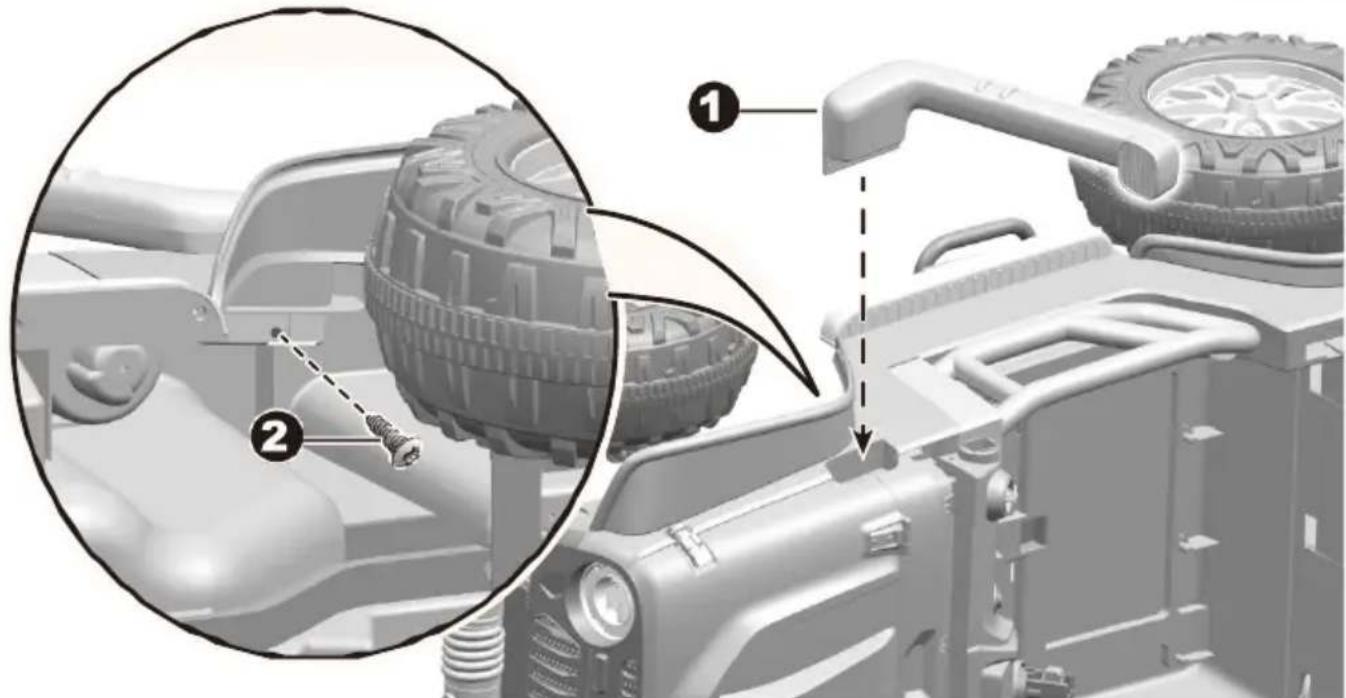
Technical diagram showing vehicle assembly with numbered components and a close-up of the engine componentTurn the vehicle body right side up.
- Fit the chimney to the hole on the right side of the vehicle body.
- Insert a ∅4x16 screw through the vehicle body and into the chimney, and tighten with a screwdriver.
Turn the vehicle body upright.
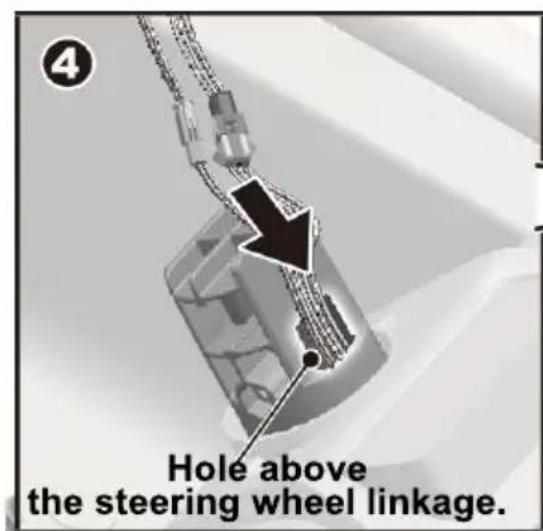
- Plug the both two connectors on the steering wheel into the two connectors from the hole in the vehicle body.
- Insert the plugged connectors into the hole above the steering wheel linkage.
- Insert the steering wheel to the steering wheel linkage, push until you hear it "click" into place.
text_image
Hole above the steering wheel linkage.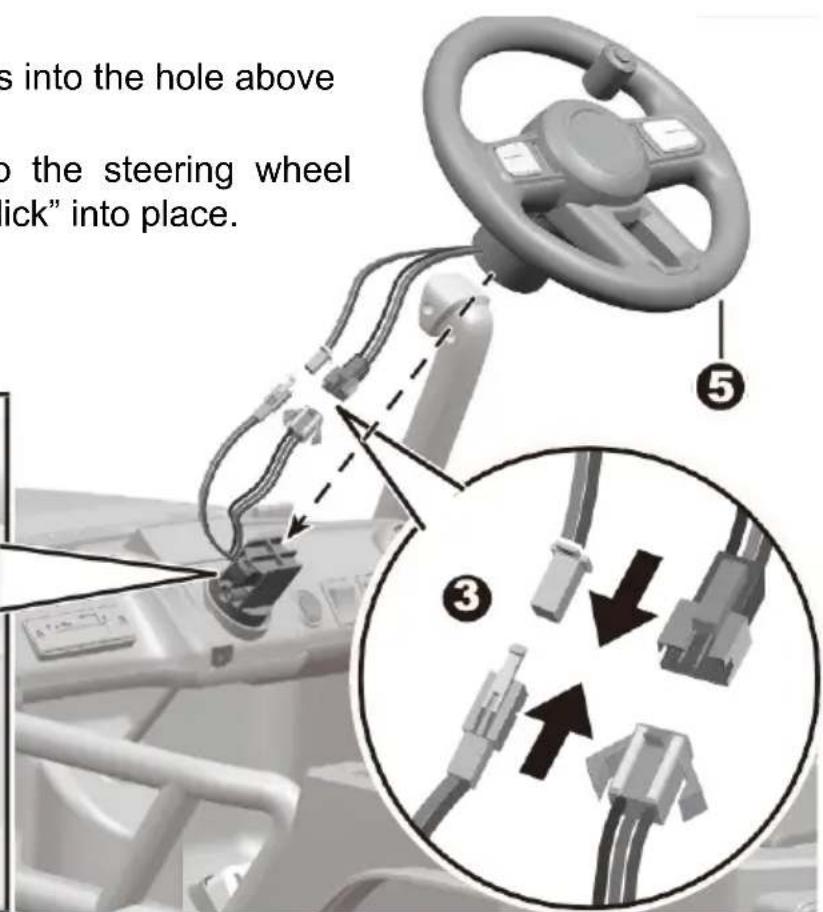
text_image
s into the hole above to the steering wheel "ick" into place. ⑤ ③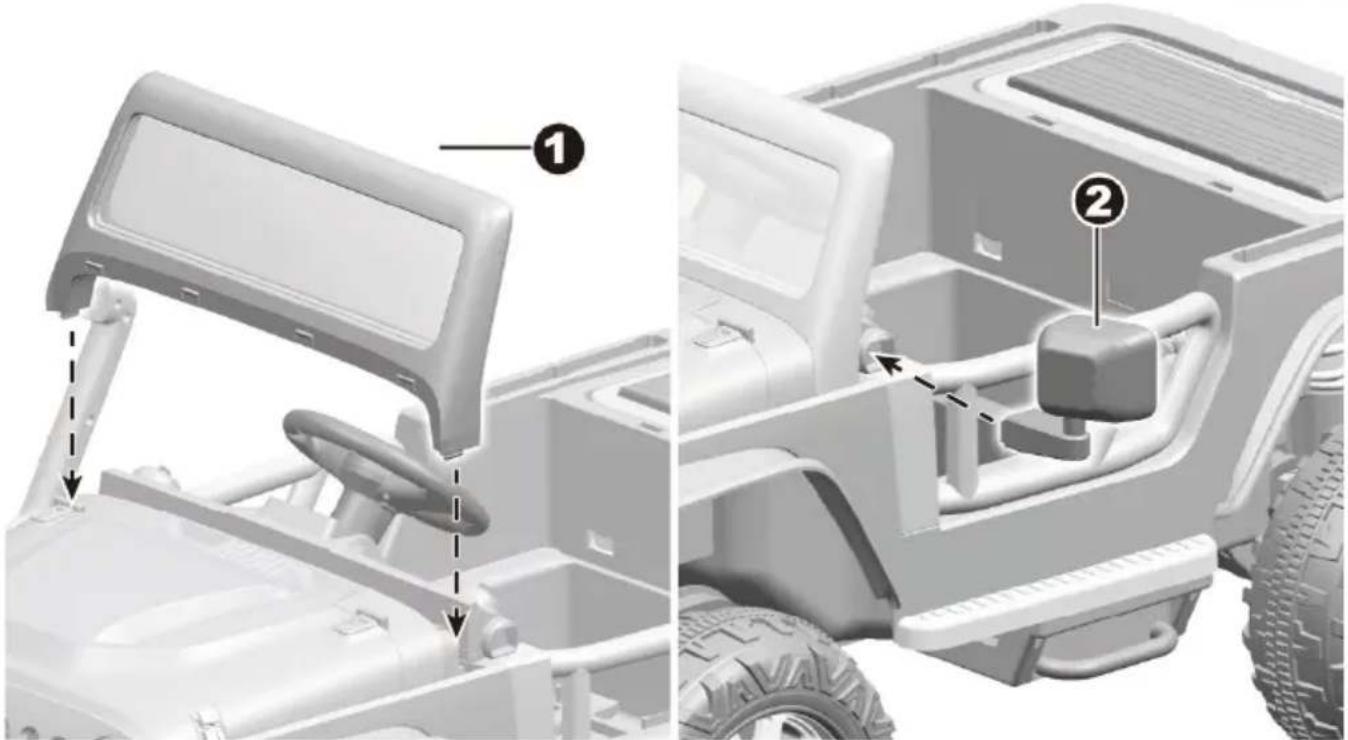
text_image
Technical diagram showing vehicle assembly components with numbered labels for parts 1 and 2Turn the vehicle body upright.
- Insert the tabs on the windshield into the holes in the vehicle body, push until you hear it "click" into place.
- Insert mirror to the hole on the side of the vehicle body, push until you hear it "click" into place. Repeat for the other mirror.
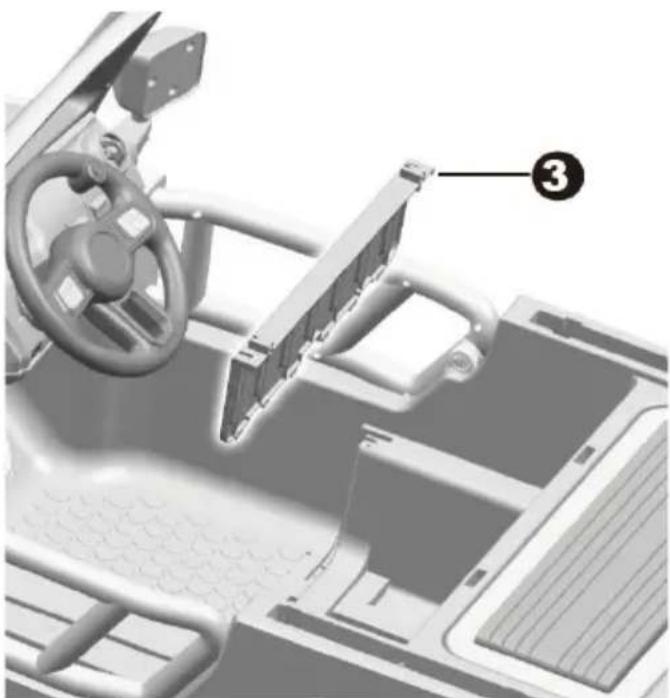
- Fit the seat board to the vehicle body.
- Insert two ∅4x16 screws and tighten.
natural_image
Interior view of a vehicle dashboard and steering wheel assembly (no visible text or symbols)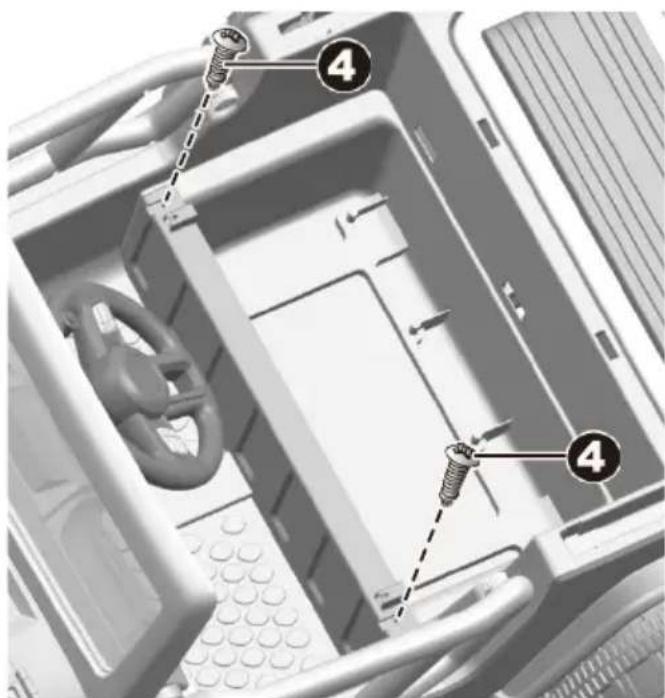
text_image
Diagram of a computer motherboard showing screw fasteners inserted into a drive bay with numbered callouts highlighting the components.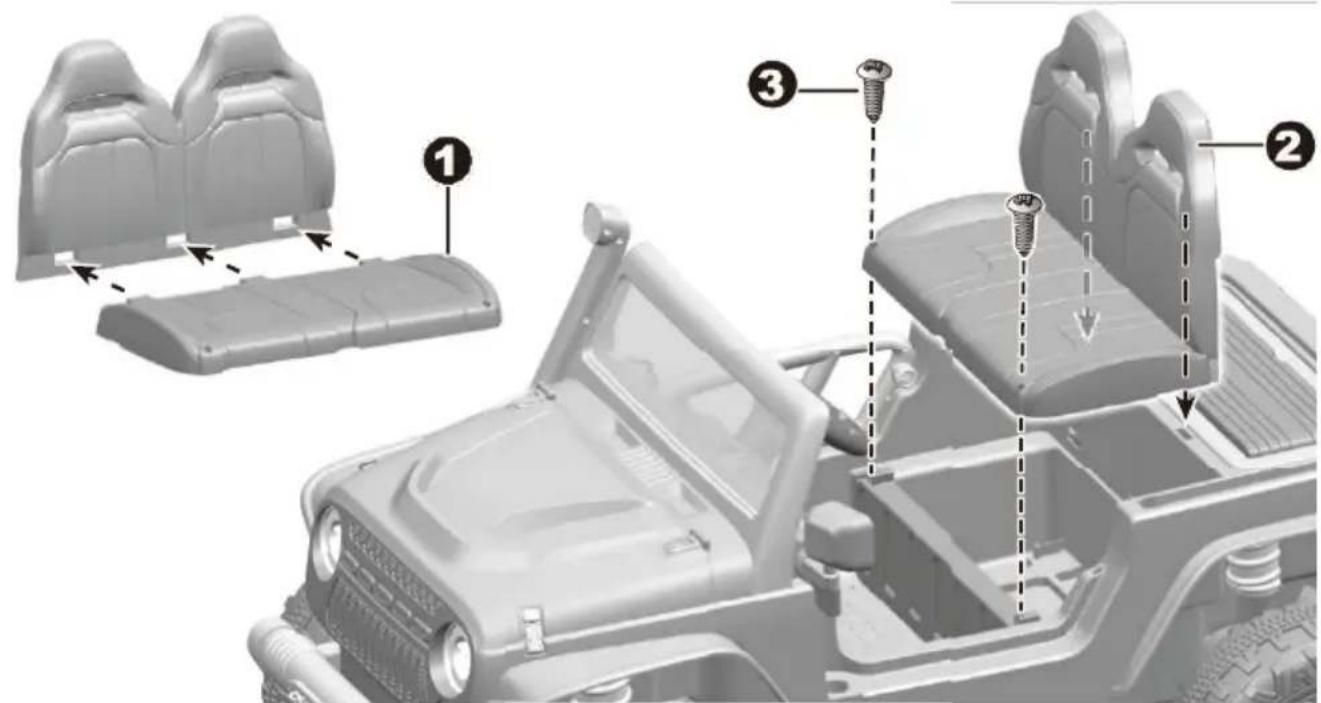
text_image
Diagram of a vehicle's internal components with numbered parts, showing seat arrangements and screw installation steps.- Fit the seat to the seat back.
- Fit the tabs on the seat back into holes in the vehicle body.
- Insert two ∅4x16 screws through the seat and into the holes on top of the seat board. Tighten them with a screwdriver.
- Use a screwdriver to unscrew the screws on the back of the light bar linkage
- Insert 2x1.5 AA batteries (Not Included) in their correct polarities. Refer to the battery information on page 4. And replace the battery cover.
- Fit the light bar supports to the light bar linkage. And ensure the locks inside the light bar linkage "click" into the holes on each light bar support.
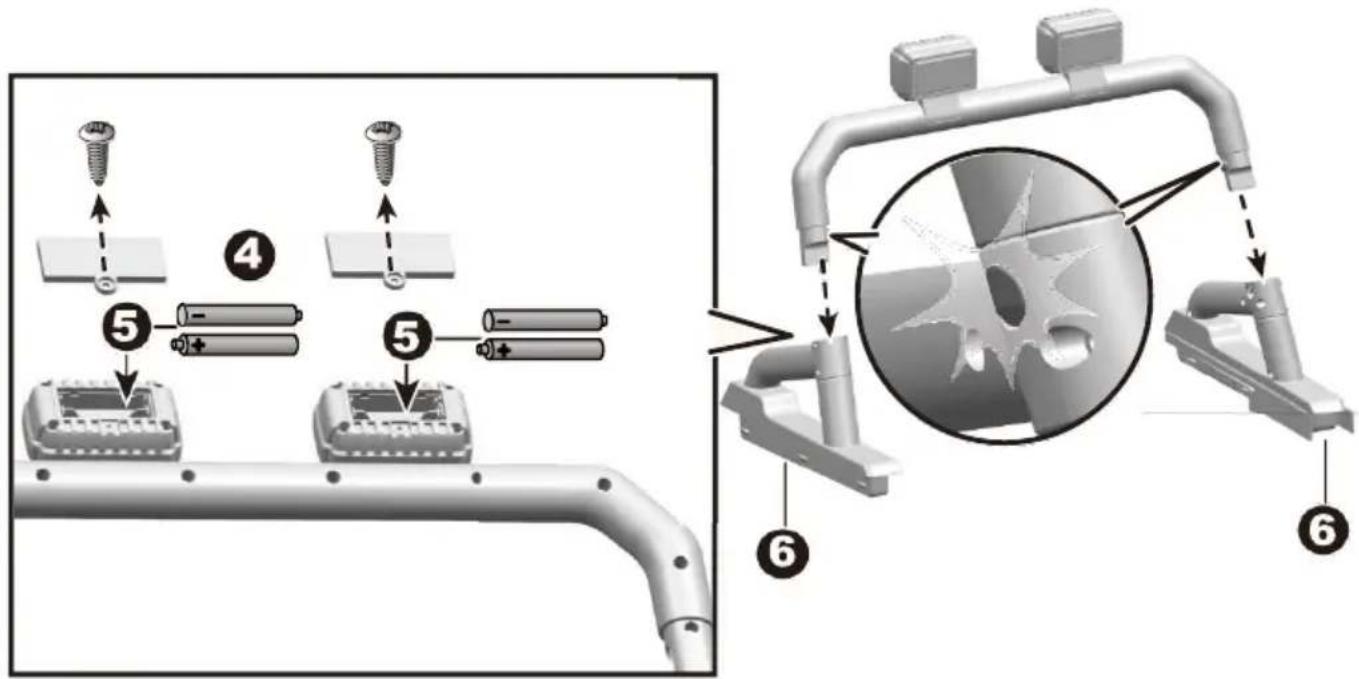
text_image
Technical diagram illustrating battery assembly steps with numbered components and a magnified view of the process.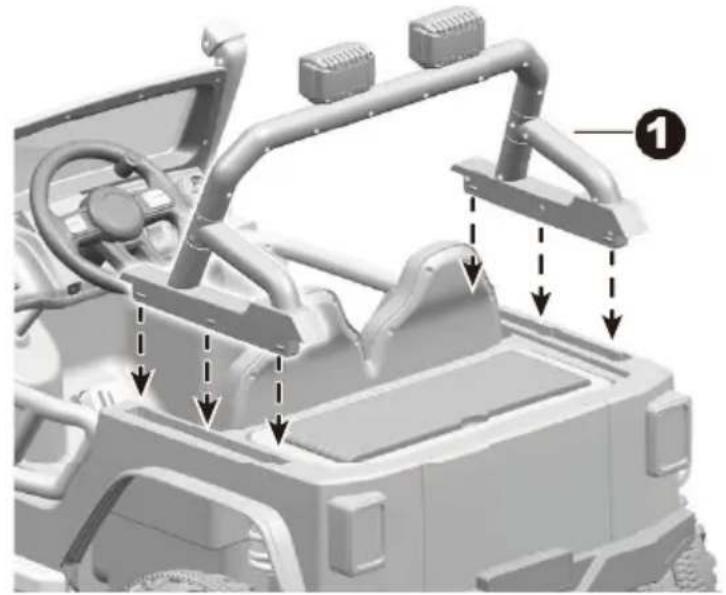
natural_image
3D rendering of a vehicle chassis frame with structural components and directional arrows indicating assembly or movement (no text or symbols present)- Fit the light bar assembly to the vehicle body. Push until you hear it "click" into.
- Remove the rear trunk box from the vehicle body.
- Plug the two connectors from the motors into the connectors from the vehicle body.
- Tip: The rear trunk box cover can also be placed under the rear trunk box.
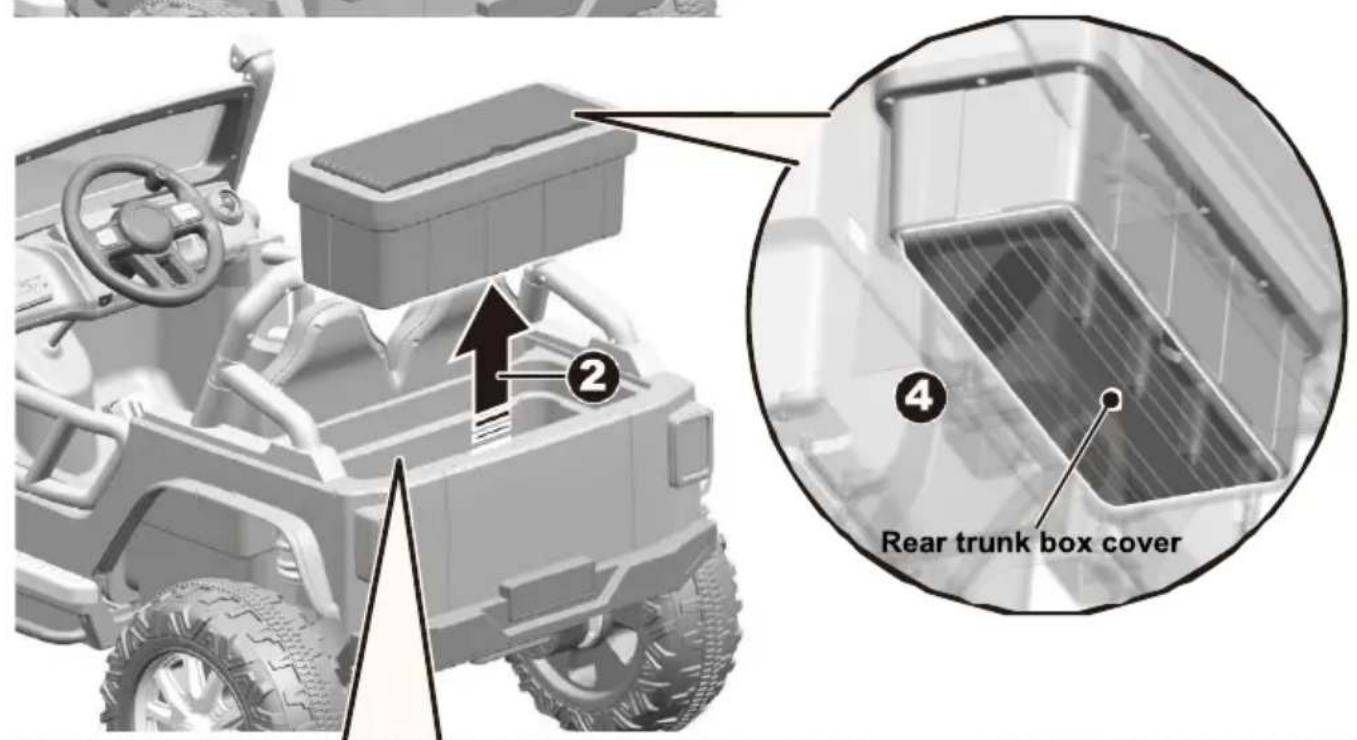
text_image
Rear trunk box cover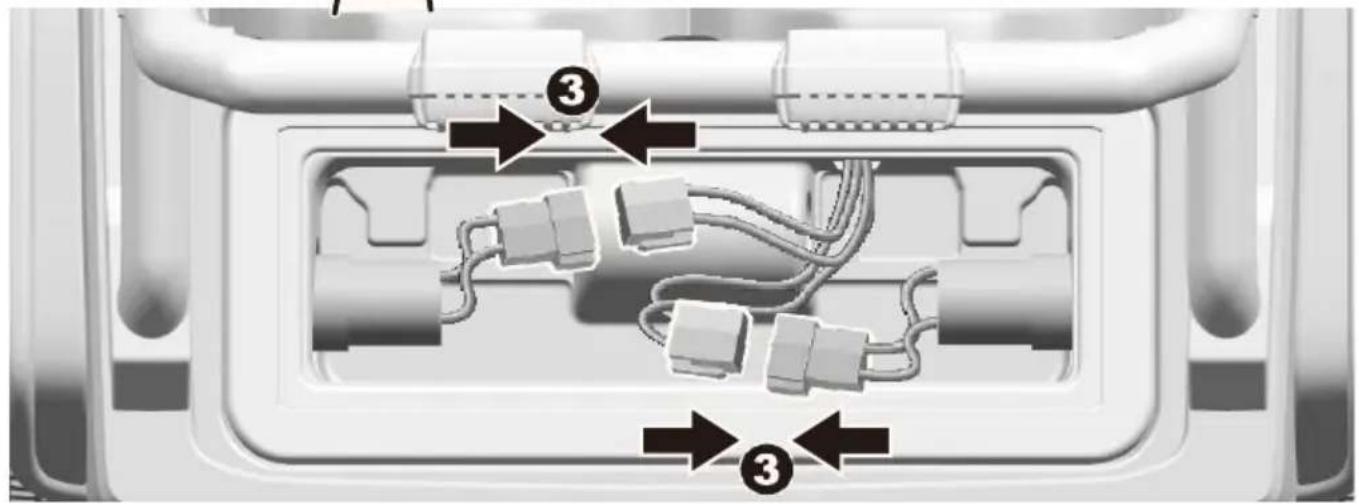
text_image
Diagram of a device internal structure with numbered annotations indicating connection points or components.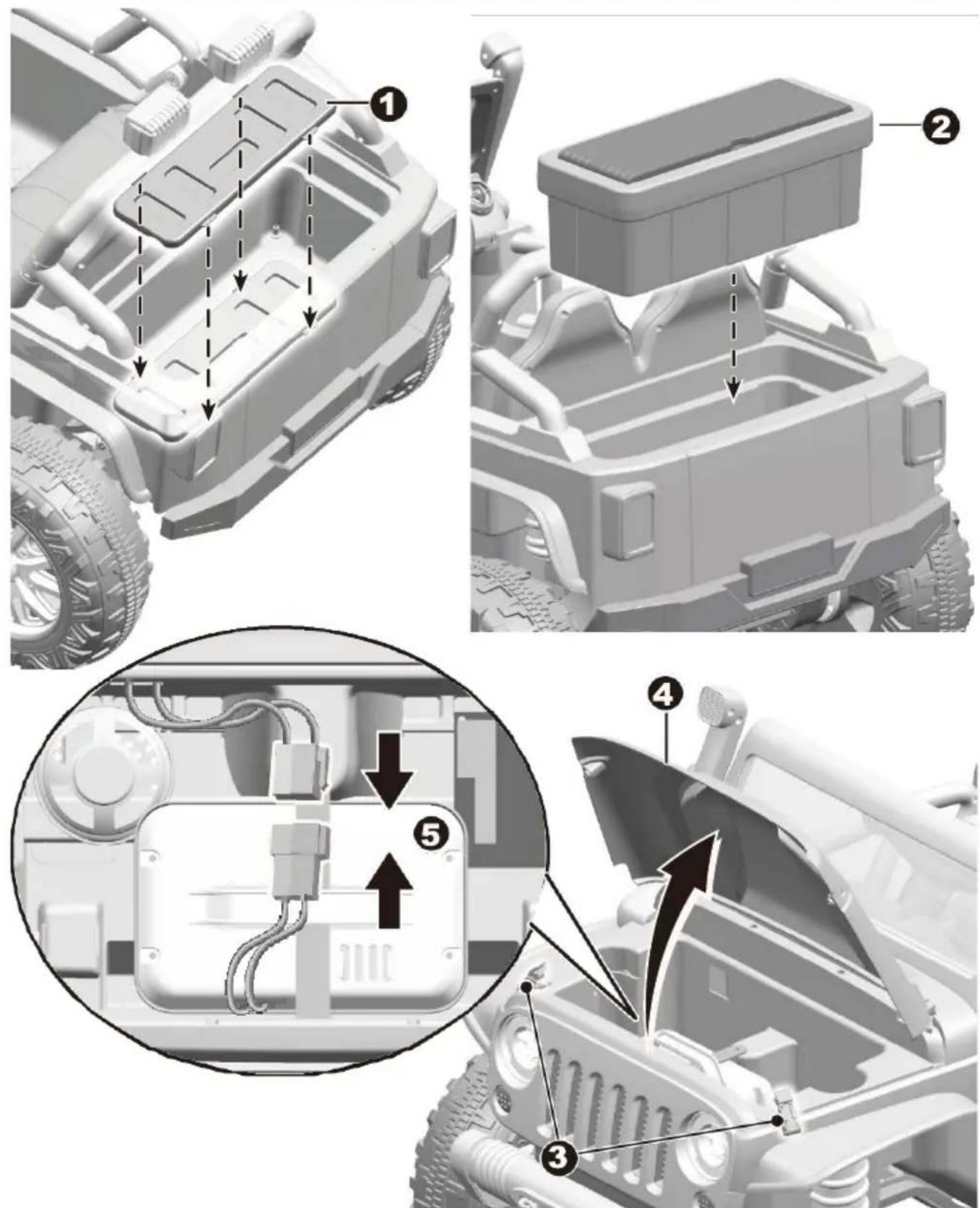
text_image
Technical diagram of a vehicle's internal components with numbered annotations indicating assembly steps- "Snap" the rear trunk plate into the slots in the rear trunk.
- Replace the rear trunk box.
3-4. Loosen the hood hooks on both sides of the hood. And open the hood. - Plug the red vehicle connector into the red battery connector as shown above.
text_image
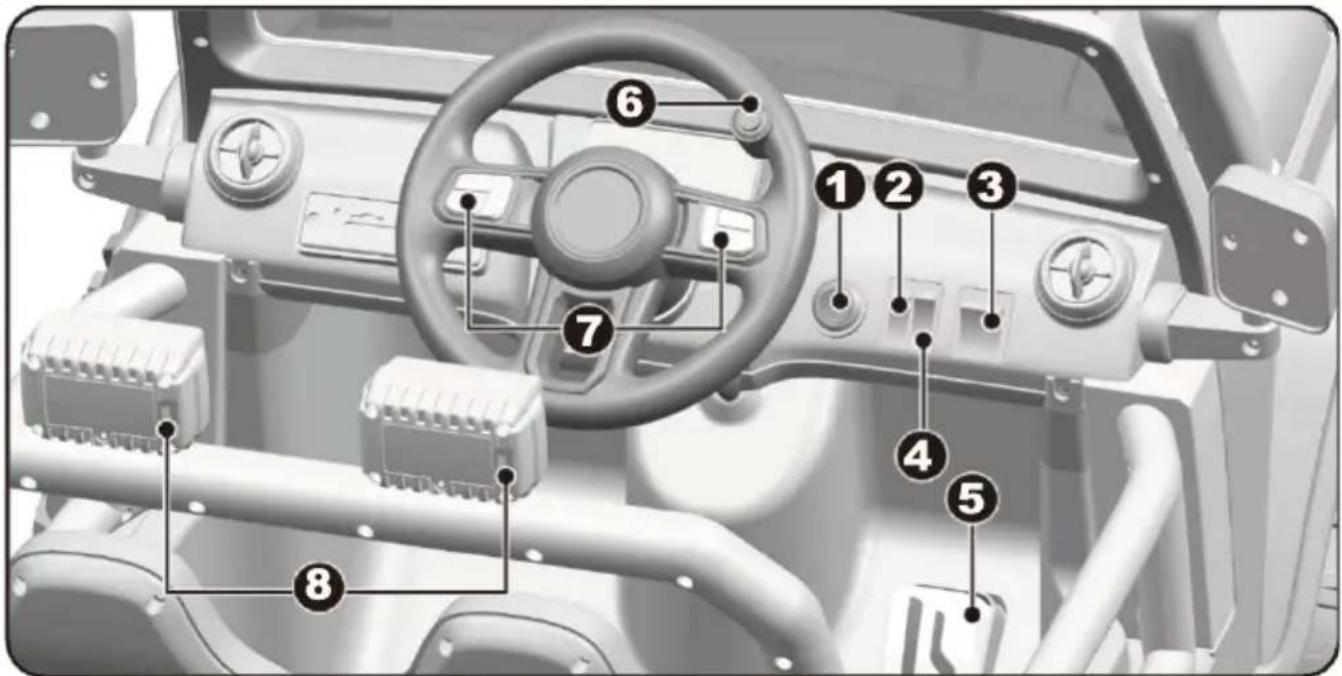
Diagram of a vehicle dashboard with numbered components for identification and assembly reference.- Power button: Turns the product on and off.
- Parent-kid switch:
- Switch to upper position, only allow the throttle pedal (No. 5) to control the movement of the product. The throttle button will not work.
- Switch to lower position, only allow the throttle button (No. 6) to control the movement of the product. The throttle pedal will not work.
HINT: The throttle button is only allowed to be operated by an adult.
- Forward/reverse switch: Changes the direction that vehicle moves from forward to reverse.
• To move the vehicle forward, shift the lever to upper position.
• To move the vehicle backward, shift the lever to lower position.
- High/Low speed switch: Operates the product to move forward in high or low speed.
HINT: The product is designed to operate in low speed only in reverse.
- Throttle pedal: Applies power (speed) to the product.
• To move the product, press the pedal down.
- To brake or slow down, release pressure from the pedal.
6. Throttle button: Applies power(speed) to the product.
- To move the product, press the button down.
- To brake or slow down, release pressure from the button.
7. Sound buttons: Press for sound or horn playing.
8. Searching light buttons: Turn the searching lights on and off.
HINT: The functions of the 4 buttons on the left side of the steering wheel, from left to right, are: mode switch (Music & Bluetooth), play next, volume -, volume +.

IMPORTANT
• Always stop vehicle when changing the speed or direction to avoid damage the gears and motor.
- HIGH SPEED: Make sure your child knows how to steer, how to start and stop the product and knows the rules for safe driving.

WARNING
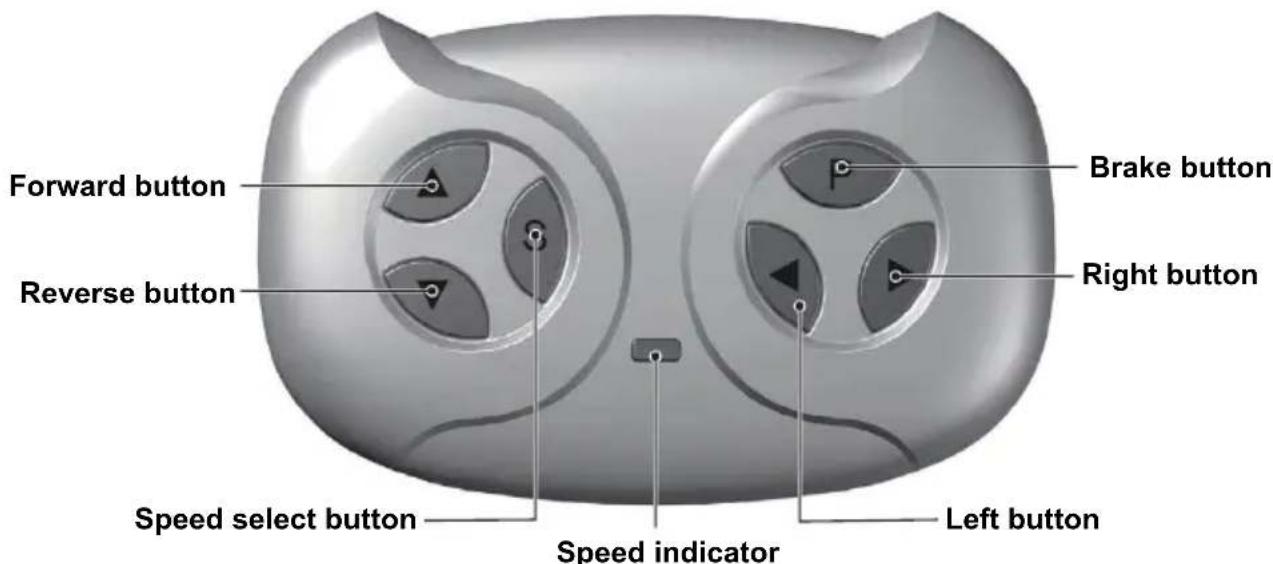
The remote control is only allowed to be operated by adults.
text_image
Forward button Reverse button Speed select button Speed indicator Left button Brake button Right buttonAttach the batteries of controller
Lift the battery compartment door on the back of the controller and insert two AAA(LR03) batteries.
Batteries not included. Refer to the Battery Information on the page 4.
1. Build connection
Long press the forward and reverse buttons for 3 seconds, and the speed indicator flashes. Then power on the vehicle, the speed indicator goes to long bright, means the connection successful. If the speed indicator shows no response, means the connection failed. Replace the batteries and retry.
2. Brake button
Press the button to stop the vehicle, press it again to release the brake.
3. Speed select button
The switch operates the vehicle to move in low, normal or high speed.
HINT: This switch won't work while your vehicle moves reverse.
NOTE:
- Leave the remote controller idling for about 10 seconds, it will shut down automatically.
- Rebuild connection when you replace the batteries of the remote controller.
text_image
Technical diagram showing vehicle assembly with labeled components A, B, C, D and directional arrows indicating motion or movement.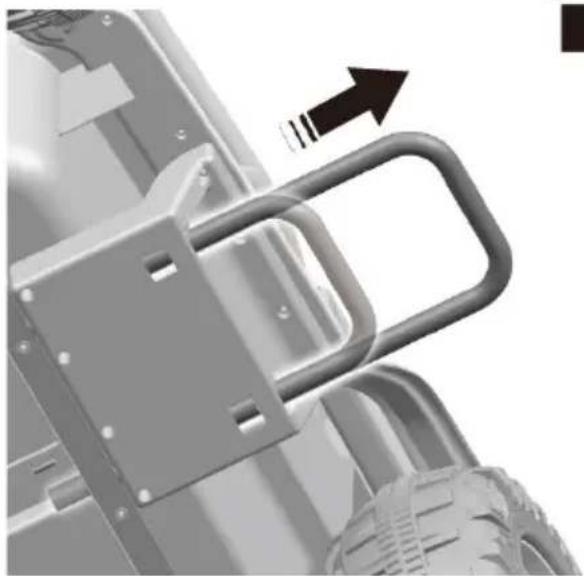
natural_image
Mechanical assembly diagram showing a bracket with mounting holes and a curved handle, no text or symbols present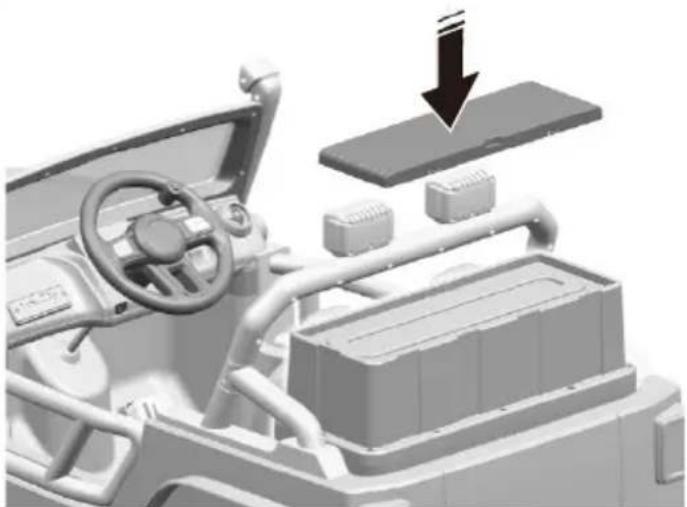
natural_image
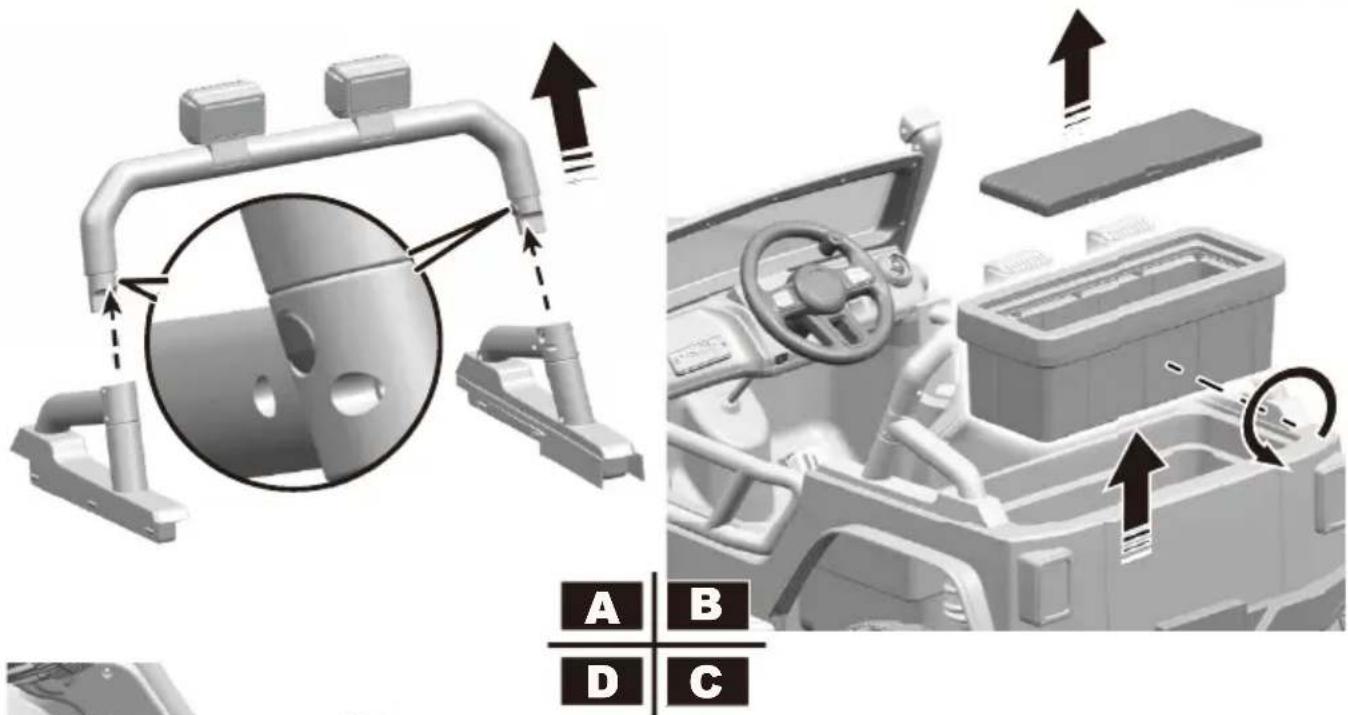
3D rendering of a vehicle interior with dashboard, steering wheel, and battery pack (no text or symbols visible)A. Press the locks inside the light bar linkage still remove the light bar linkage.
B. Remove the rear trunk cover and the rear trunk box.
C. Turn over the trunk box, replace the rear trunk box and cover.
D. Pull out the adult foot pedals on both side of the product.
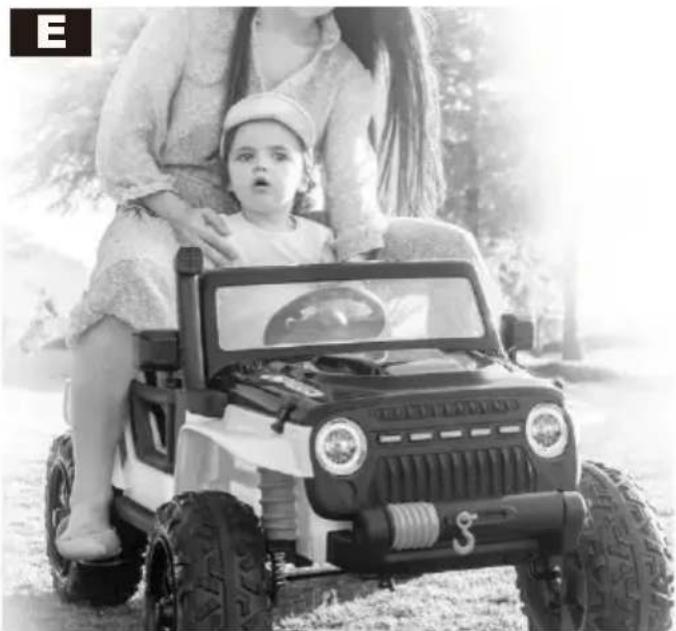
E. In adult mode, use the throttle button on the steering wheel to control (move/stop) the product.
natural_image
Black-and-white photo of a woman and child sitting together on a toy car outdoors, no visible text or symbols
WARNING!
- ONLY an adult is allowed charge and recharge the battery!
-
This product with Charging Protection: when charging, all functions will be cut off.
-
Turn off the product when charging.
- Before the first use, you should charge the battery for 4-6 hours. Do not recharge the battery for more than 10 hours to avoid overheating the charger.
- When the vehicle begins to run slowly, recharge the battery.
- After each use or once a month minimum recharge time as 8 to 12 hours, less than 20 hours at most.
- Use the only rechargeable battery and charger supplied with your vehicle. NEVER substitute the battery or the charger with another brand. Using another battery or charger may cause a fire or explosion.
- Do not use the battery or charger for any other product.
text_image
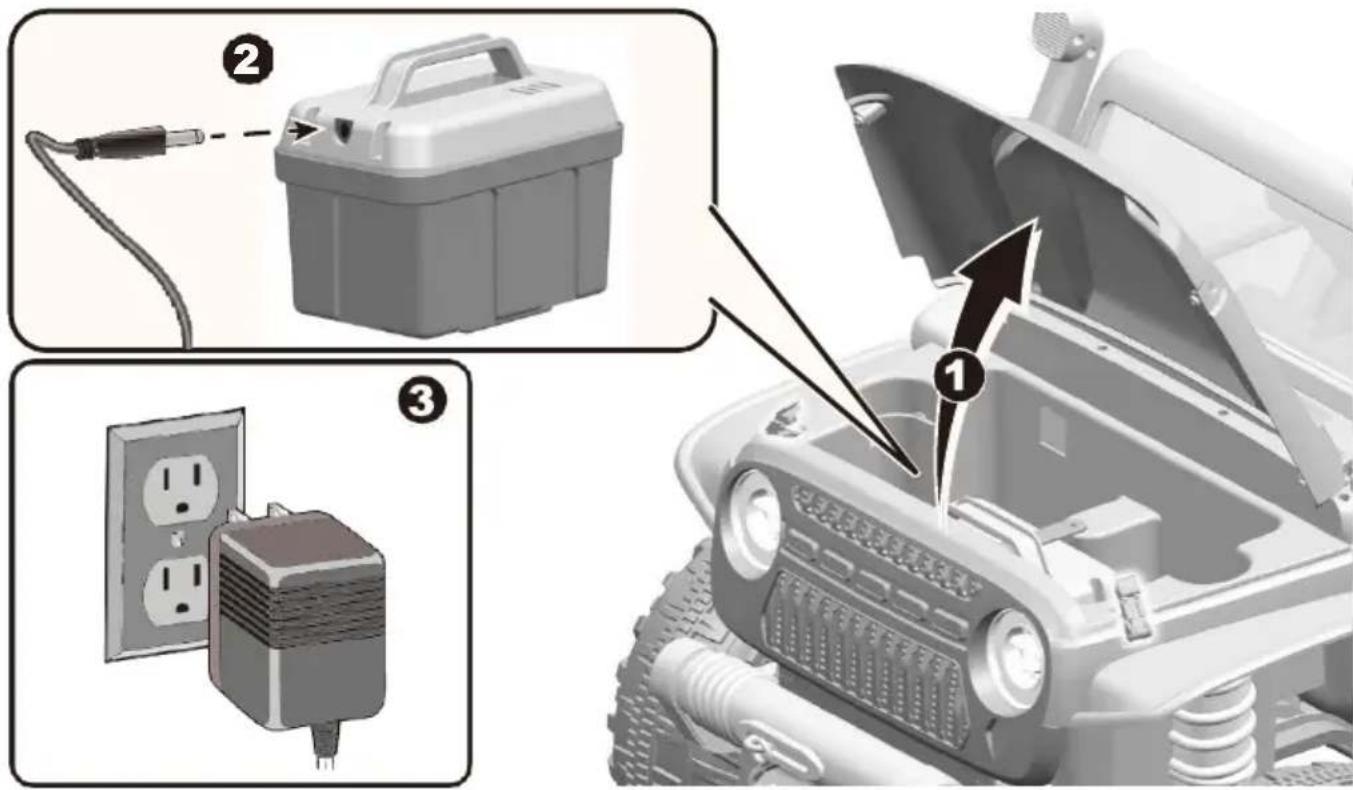
Diagram illustrating the installation of a vehicle power plug, showing components with numbered labels and an open hood.- Loosen the hood hooks on both sides of the hood, and open the hood.
- Plug the charger port into the input socket (the socket is on the right side of the battery box).
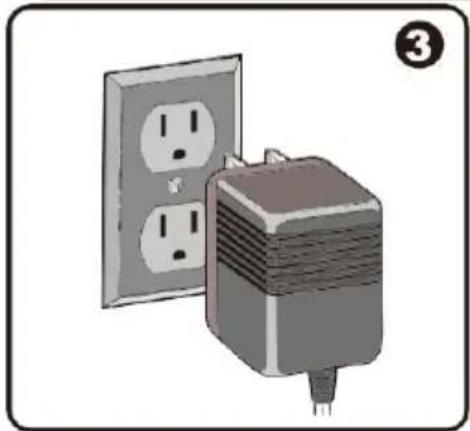
- Plug the charger plug into a wall outlet. The battery will begin charging.
| Problem | Possible Cause | Solution |
| Vehicle does not run | Battery low on power | Recharge battery. |
| Thermal fuse has tripped | Reset fuse, see | |
| Battery connector or wires ar loose | Check that the battery connectors are firmly plugged into each other. If wires are loose around the motor.Contact your distributor please. | |
| Battery is dead | Replace battery, contact your distributor please. | |
| Electrical system is damaged | Contact your distributor please. | |
| Motor is damaged | Contact your distributor please. | |
| Vehicle does not run very long | Battery is under charged | Check that the battery connectors are firmly plugged into each other when recharging |
| Battery is old | Replace battery, contact your distributor please. | |
| Vehicle runs sluggishly | Battery low on power | Recharge battery, contact your distributor please. |
| Battery is old | Replace battery, contact your distributor please. | |
| Vehicle is overload | Reduce weight on vehicle. | |
| Vehicle is being used in hars conditions | Avoid using vehicle in harsh conditions, see. | |
| Vehicle needs a push to go forward | Poor contact of wires or Connectors | Check that the battery connectors are firmly plugged into each other. If wires are loose around the motor, contact your distributor please. |
| "Dead Spot" on motor | A dead spot means the electric power is not being delivered to the terminal connection and the vehicle needs repair. Contact your distributor please. | |
| Difficult shifting from forward to reverse or vice-versa | Attempting to shift while the vehicle is motion | Completely stop the vehicle and shift, see |
| Loud grinding or clicking noises coming from motor or gear box | Motor or gears are damaged | Contact your distributor please. |
| Battery will not recharge | Battery connector or adapter connector is loose | Check that the battery connectors are firmly plugged into each other. |
| Charger not plugged in | Check that the battery charger is plugged into working wall outlet. | |
| Charger is not working | Contact your distributor please. | |
| Charger feels warm when recharging | This is normal and not a cause for concern |
Completely read through this manual and the troubleshooting guide table before calling. If you still need help resolving the problem, contact your distributor please.
- It is parents' responsibility to check main parts of the toy before using, must regularly examine for potential hazard, such as the battery, charge, cable or cord, plug, screws are fastening enclosure of other parts and that in the event of such damage, the toy must not be used until that damage had been properly removed.
• Make sure the plastic parts of the vehicle are not cracked or broken.
• Occasionally use a lightweight oil to lubricate moving parts such as wheels. - Park the vehicle indoors or cover it with a tarp to protect it from wet weather.
- Keep the vehicle away from sources of heat, such as stoves and heaters. Plastic parts may melt.
- Recharge the battery after each use. Only an adult can handle the battery. Recharge the battery at least once a month when the vehicle is not being used.
- Do not wash the vehicle with a hose. Do not wash the vehicle with soap and water. Do not drive the vehicle in rainy or snowy weather. Water will damage the motor, electric system and battery.
- Clean the vehicle with a soft, dry cloth. To restore shine to plastic parts, use a non-wax furniture polish. Do not use car wax. Do not use abrasive cleaners.
- Do not drive the vehicle in loose dirt, sand or fine gravel which could damage the moving parts, motors or the electric system.
- When not using, all the electrical source should be turn off. Turn off the power switch and disconnect the battery connection.
Battery Disposal
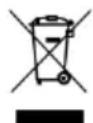

The battery will eventually lose the ability to hold a charge. Depending on the amount of use, and varying conditions, the battery should operate for one to three years.
Important! Recycle the dead battery responsibly. The battery contains lead acid (electrolyte) and must be disposed of properly and legally. It is illegal in most areas to incinerate lead acid batteries or dispose of them in landfills. Take it to a federal or state-approved lead acid battery recycler, such as local automotive battery retailer.
Do not throw the battery away with your regular household waste!
The battery features a thermal fuse with a rest fuse that will automatically trip and cut all power to the vehicle if the motor, electric system or battery is overloaded. The fuse will reset and power will be restored after the unit is turned OFF for 20 seconds and then turned ON again. If the thermal fuse trips repeatedly during normal use, the vehicle may need repair. Contact your distributor please.
To avoid losing power, follow these guidelines:
- Do not overload the vehicle.
- Do not tow anything behind the vehicle.
• Do not drive-up steep slopes. - Do not drive into fixed objects, which may cause the wheels to spin, causing the motor to overheat.
- Do not drive in very hot weather, components may overheat.
- Do not allow water or other liquids to come in contact with the battery or other electric components.
- Do not tamper with the electric system. Doing so may create a short, causing the fuse to trip.

RISK OF FIRE. Do not bypass. Replace only with a new fuse.
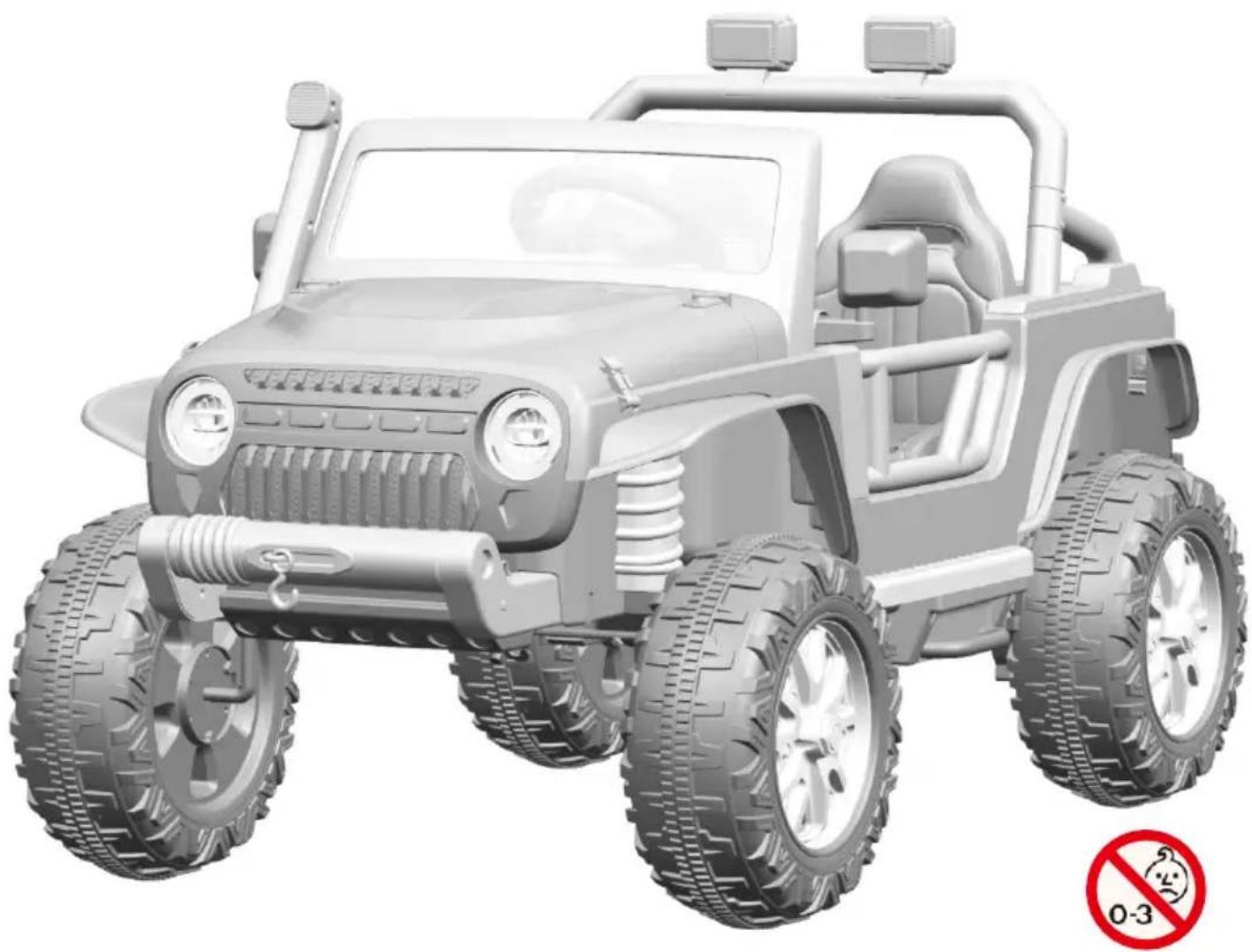
JEEP EN JOUET ÉLECTRIQUE
TX295659
natural_image
3D model of a toy off-road vehicle with large tires and front suspension (no text or symbols on the vehicle itself)LE MANUEL DU PROPRIÉTAIRE
text_image
Exploded view diagram of a vehicle's internal components with numbered parts for identification
ATTENTION!
text_image
Technical diagram showing mechanical assembly steps with numbered components and directional arrows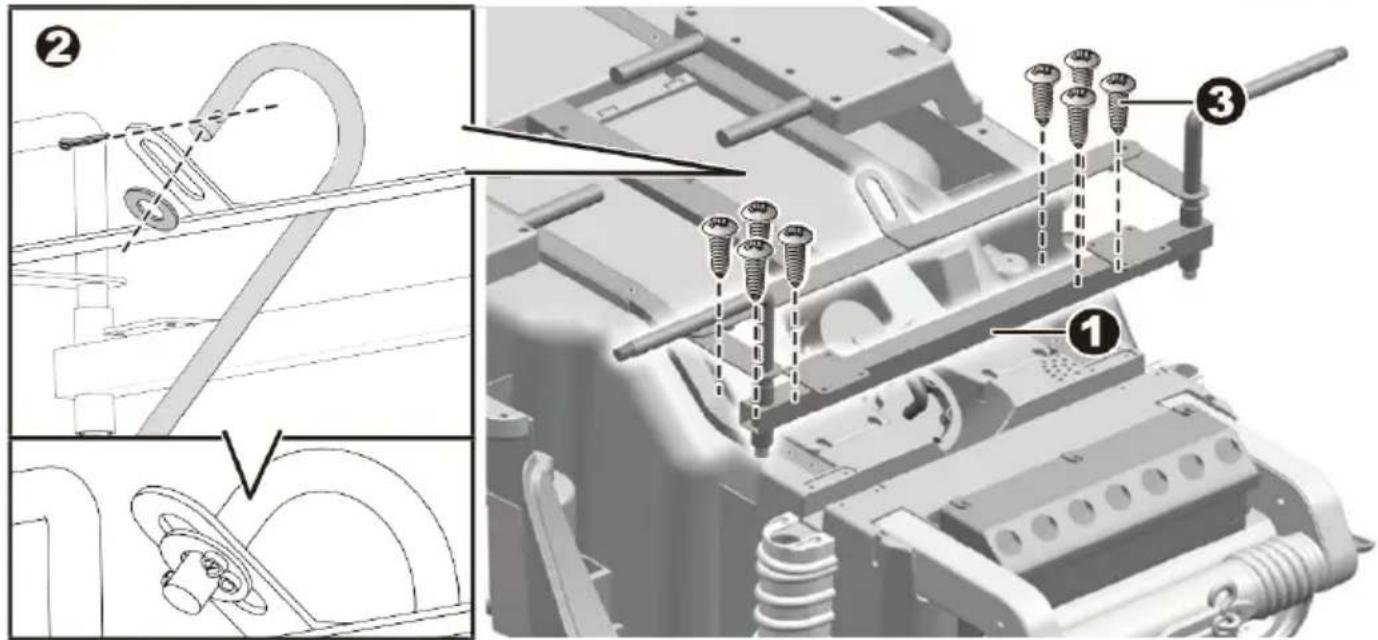
text_image
Technical diagram showing assembly steps of a mechanical component with numbered parts and labeled features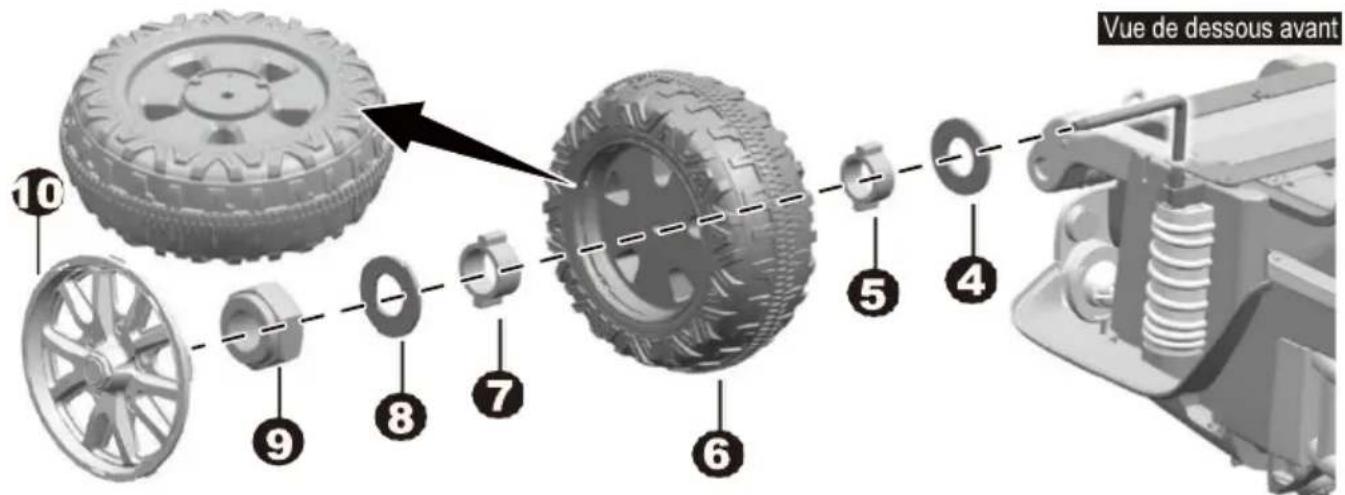
text_image
Technical diagram showing assembly steps of a vehicle's internal components, with numbered annotations indicating parts of the assembly.text_image
Technical diagram showing two views of a vehicle's front and side assembly, labeled with numbered components.text_image
Technical diagram showing a vehicle interior with labeled parts, including steering wheel, dashboard, and battery compartment.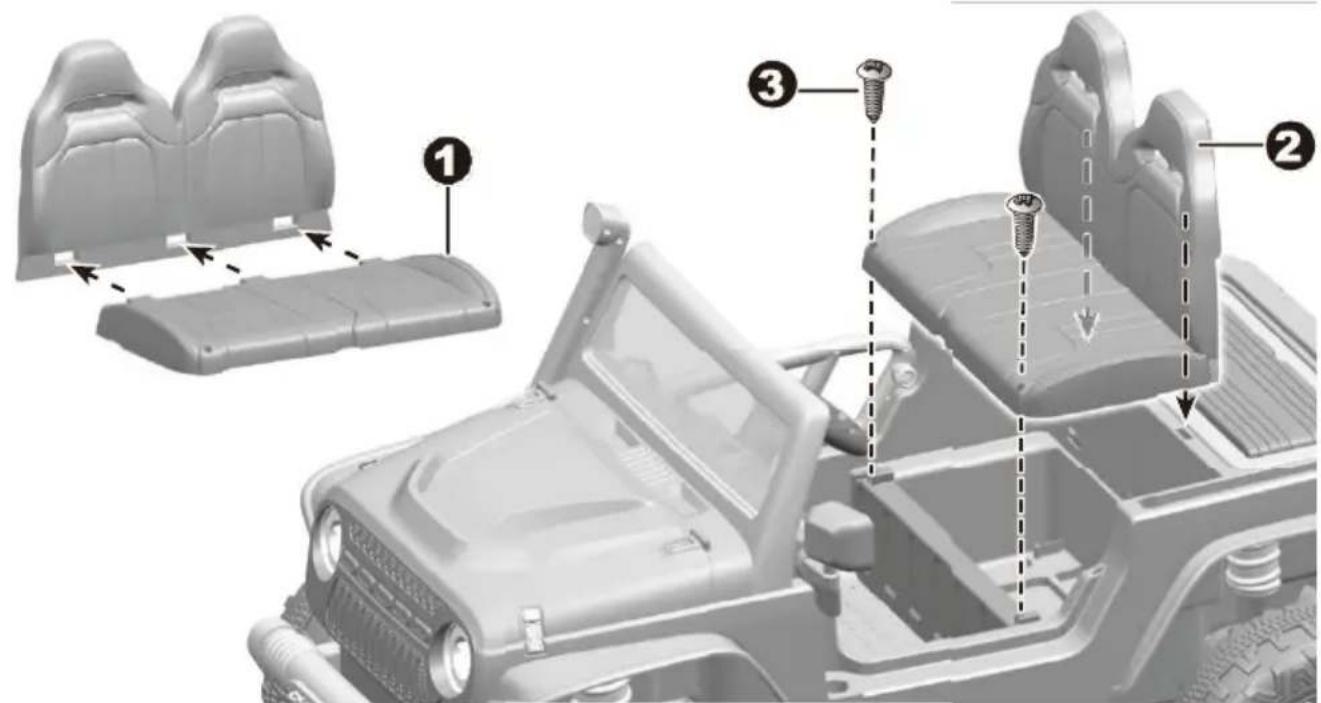
text_image
Diagram of a vehicle's internal components with numbered parts, showing assembly steps and mounting features.text_image
Technical diagram illustrating assembly steps of a mechanical component with labeled parts and a magnified view showing internal components.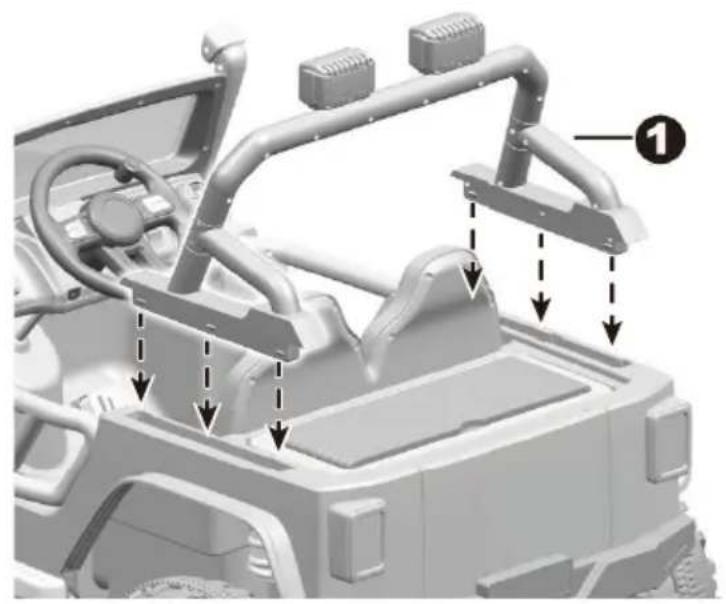
natural_image
3D rendering of a vehicle's internal components with arrows indicating assembly or movement (no text or symbols present)text_image
Diagram of a device interior showing cable routing and numbered connection points (③) for electrical or mechanical assembly.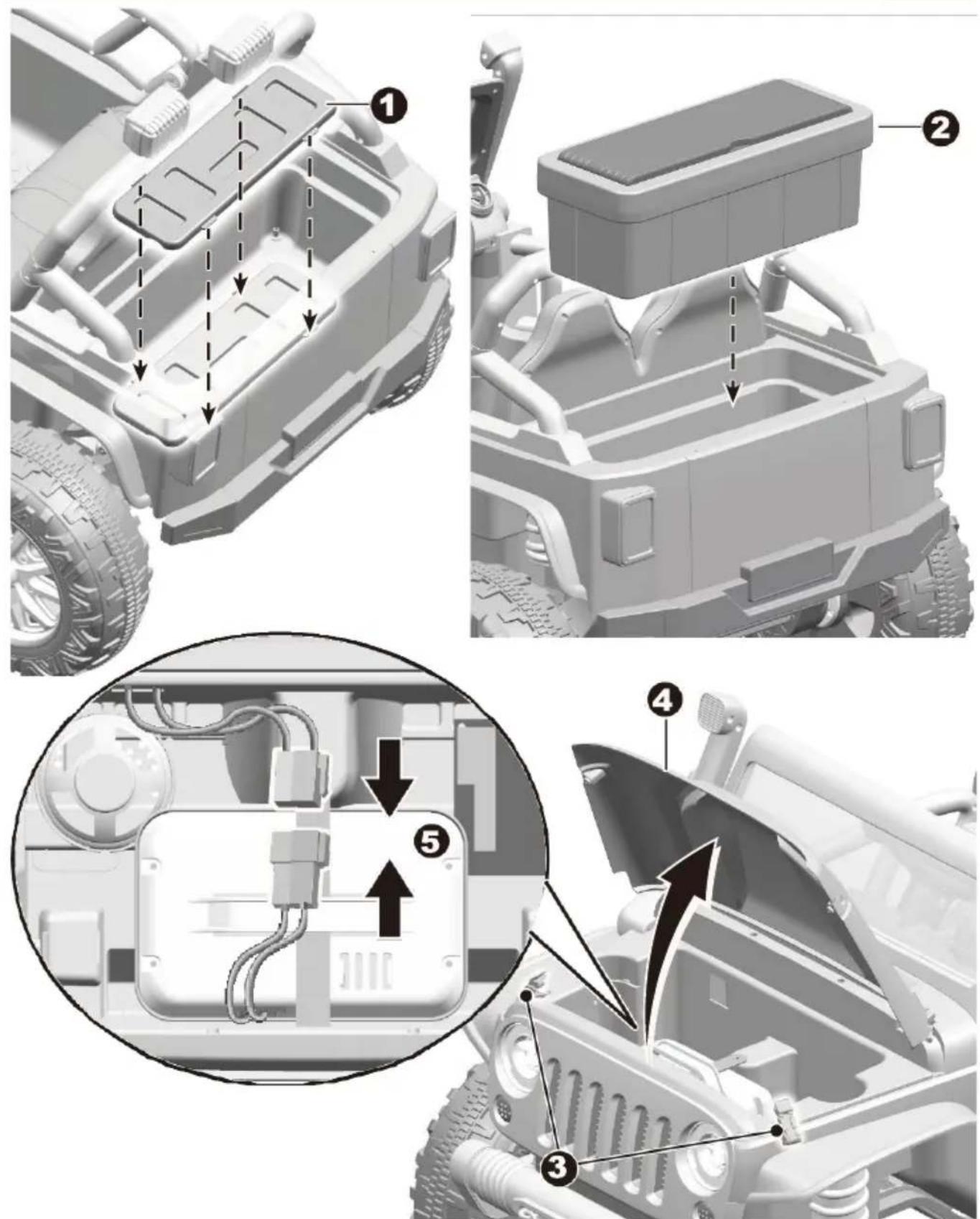
text_image
Technical diagram of a vehicle's internal components with numbered annotations indicating assembly stepstext_image
Diagram of a vehicle dashboard with numbered components for identification and assembly reference.text_image
Technical diagram showing vehicle component assembly with labeled parts A, B, C, D and directional arrows indicating motion or movement.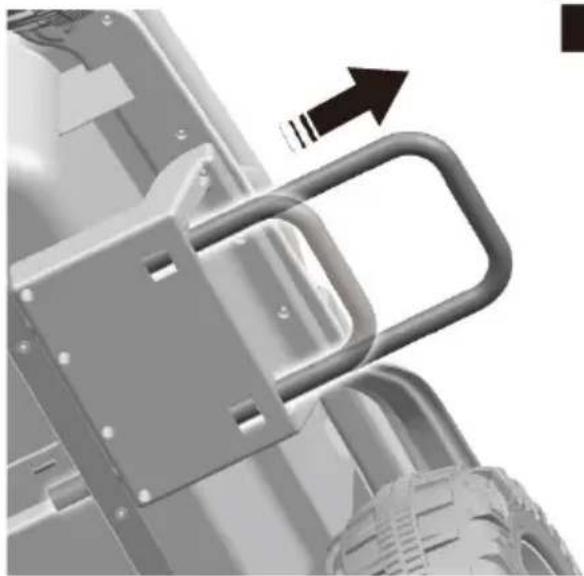
natural_image
Mechanical assembly diagram showing a bracket with mounting holes and a curved handle, no text or symbols present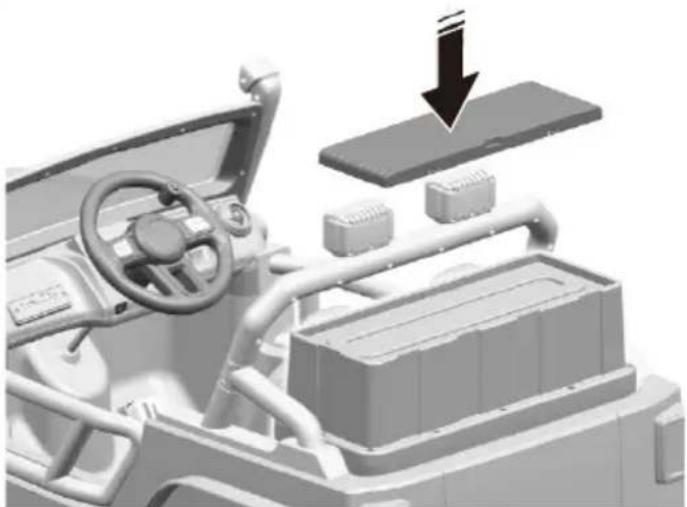
natural_image
3D rendering of a vehicle interior with dashboard, steering wheel, and battery pack (no text or symbols visible)natural_image
Black-and-white photo of a woman and child sitting together on a toy car outdoors, no visible text or symbols
ATTENTION!
natural_image
Illustration of a portable battery with a cable and plug, labeled with number 2 (no text or symbols on the device itself)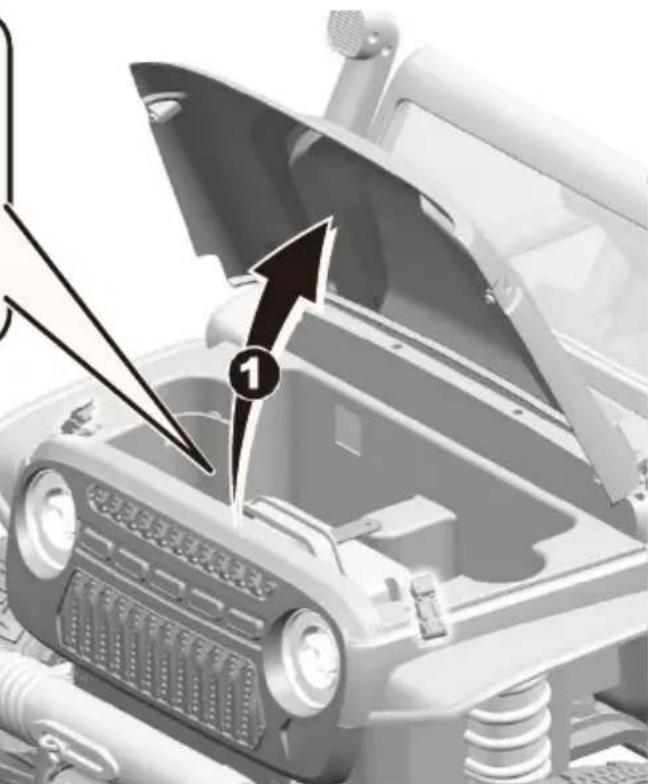
natural_image
Close-up of a car engine compartment with a numbered component and an arrow pointing to it (no visible text or symbols)