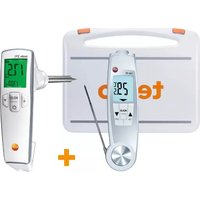
270 - Thermometer Testo - Free user manual and instructions
Find the device manual for free 270 Testo in PDF.


| Product type | Robust food thermometer with contact and infrared measurement |
| Brand | Testo |
| Model | 270 |
| Dimensions (probe open) | 281 x 48 x 21 mm |
| Dimensions (probe closed) | 178 x 48 x 21 mm |
| Weight (batteries included) | 197 g |
| Power supply | 2 AAA batteries |
| Battery life | Approx. 10 hours (normal use at 25 °C) |
| Measuring range (penetration probe) | -50 to +250 °C |
| Measuring range (infrared) | -30 to +250 °C |
| Accuracy (penetration probe) | ±0.5 °C (-30.0 to +99.9 °C) |
| Accuracy (infrared) | ±2.0 °C (-20.0 to -0.1 °C) / ±1.5 % of measuring range (+0.0 to +250.0 °C) |
| Display resolution | 0.1 °C/°F/°R |
| Response time (penetration probe) | t99 = 10 s (in non-stagnant liquid) |
| Sensor type (penetration probe) | NTC |
| Infrared optics | 10:1, aperture diameter 12 mm |
| Targeting laser | 2-point laser, class 2, < 1 mW / 650 nm |
| Protection rating | IP65 |
| Housing material | ABS/TPE/PC and die-cast zinc/stainless steel |
| Operating temperature | -20 to +50 °C |
| Storage temperature (without batteries) | -30 to +70 °C |
| Standard | EN 13485 (penetration measurement) |
| Maintenance and cleaning | Clean with neutral cleaning solutions or alcohol-based disinfectant; do not use corrosive solvents |
| Safety | Do not use on live parts; do not open except for described maintenance |
| Spare parts and repairability | AAA batteries; probe not user-replaceable; repair by Testo after-sales service |
| General information | Food use; measurement of liquid, pasty, semi-solid products; do not use in explosive areas or for medical diagnostics |
Frequently Asked Questions - 270 Testo
User questions about 270 Testo
0 question about this device. Answer the ones you know or ask your own.
Ask a new question about this device
Download the instructions for your Thermometer in PDF format for free! Find your manual 270 - Testo and take your electronic device back in hand. On this page are published all the documents necessary for the use of your device. 270 by Testo.
USER MANUAL 270 Testo
Please read this document through carefully and familiarize yourself with the operation of the product before putting it to use. Keep this document to hand so that you can refer to it when necessary.
enfr
2. Safety information

Avoid electrical hazards:
▶ Do not conduct measurements on or near live parts!

Adhere to the product safety/warranty requirements:
▶ Always operate the instrument properly and according to its intended purpose and within the parameters specified. Do not use force.
▶ Do not store with solvents (e.g. acetone).
▶ Only open the instrument if this is expressly described in the documentation for the purpose of maintenance or repair work.

Ensure correct disposal:
▶ Dispose of defective rechargeable batteries and spent batteries at the collection points provided.
▶ Send the instrument directly to us at the end of its life cycle. We will ensure that it is disposed of in an environmentally friendly manner.
3. Intended use
The testo 104-IR is a robust food thermometer.
The product is designed for the following tasks/areas:
- Food sector: production, food service, spot check measurement, incoming goods.
• Measuring liquids, pastes and semi-solid materials

The following product components are designed for continuous contact with foodstuffs in accordance with Regulation (EC) 1935/2004:
The immersion/penetration probe from the tip up to 2 cm before the probe handle or the plastic housing. If provided, information about penetration depths in the instruction manual or the mark(s) on the immersion/penetration probe should be observed.
The product should not be used in the following areas:
• Potentially explosive areas
- For diagnostic measurements in the medical sector
4. Technical data12
4. Technical data
| Feature Values | |
| Penetration probe | |
| Sensor type NTC | |
| Measuring range -50 to +250 °C / -58 to +482 °F | |
| Resolution 0.1 °C/°F/R | |
| Accuracy (±1 digit) ±1.0 °C / ±1.8 °F (-50,0 to-30,1°C / -58.0 to -22.1 °F) ±0.5 °C / ±0.9 °F (-30,0 to +99,9°C / -22.0 to +211.9 °F) ±1 % of the measuring range (+100.0 to +250.0 °C / +212.0 to +482.0 °F) | |
| Response time t99 10 s (measured in moving liquid) | |
| Measuring rate 0.5 s | |
| Infrared measurement | |
| Lens 10:1 + opening diameter of the sensor (12 mm / 0.47") | |
| Spectral range 8 to 14 μm | |
| Laser type 2-point laser | |
| Output / wavelength < 1 mW / 650nm | |
| Class / standard 2 / DIN EN 60825-1:2007 | |
| Measuring range -30 - +250 °C / -22 - +482 °F | |
| Resolution 0.1 °C/°F/R | |
| Accuracy (at 23°C, ±1 digit) ±2.5 °C / ±4.5 °F (-30.0 to -20.1 °C / -22.0 to -4.2 °F) ±2.0 °C / ±3.6 °F (-20.0 to -0.1 °C / -4.1 to 31.9 °F) ±1.5 °C / ±2.7 °F or ±1.5 % of the measuring value (0.0 to +250.0 °C / +32.0 to +482.0 °F) | |
| Measuring rate 0.5 s | |
| General | |
| Operating temperature -20 to +50 °C / -4 to +122 °F | |
| Transportation/batteries) storage temperature | |
| Power supply 2 x AAA batteries | |
| Battery life 10 h (typical at 25°C / 77°F) | |
| Housing ABS/TPE/PC and die-cast zinc/stainless steel | |
| Protection class IP65 | |
| Dimensions 281 x 48 x 21 mm / 11.06 x 1.89 x 0.83" (immersion/penetration probe folded out) 178 x 48 x 21 mm / 7.01 x 1.89 x 0.83" (immersion/penetration probe folded up) | |
| Weight 197g / 0.433lbs (incl. batteries) | |
| Standards EN 13485 | |
| EC Directive 2014/30/EC |
Information on standards
This product complies with the EN 13485 standard for penetration measurement.
Suitability: S, T (storage, transportation)
Environment: E (transportable thermometer)
Accuracy class: 0.5
Measuring range: -50...+250 °C
According to EN 13485, the measuring instrument should be checked and calibrated regularly under the terms of EN 13486 (recommended frequency: yearly).
Contact us for more information.
5. Product description
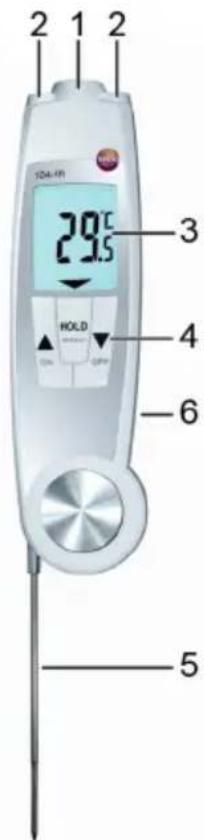
Infrared sensor
2 2-point laser
3 Display
4 Control keys:
· [ON]: switches the instrument on
- [OFF]: switches the instrument off (hold button down)
- [▲switches to IR measurement, carry out IR measurement (hold button down)
- [ ] switches to contact measurement
- [HOLD/MIN/MAX]: holds measuring value, displays minimum/maximum value
5 Fold-out immersion/penetration probe, folding out the probe switches the instrument on
6 Battery compartment (at the back)
6. Commissioning
Inserting batteries
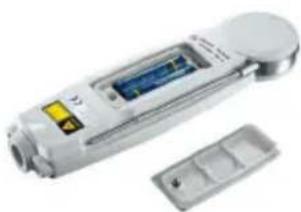
1 Use a slotted screwdriver to undo the screw on the battery compartment.
2 Open the battery compartment.
3 Insert batteries (2x type AAA). Observe the polarity!
4 Close the battery compartment.
5 Tighten the screw.
7. Operation
7.1 Switching on/off
Switching on via fold-out probe
▶ Fold out the probe.
- All display segments light up briefly. Contact measurement is enabled (lights up).
Switching on/off via control keys
▶ Switch the instrument on: press [ON].
- All display segments light up briefly. IR measurement is enabled (lights up).
▶ Switch off the instrument: press and hold down [OFF] until the display goes off.
The instrument switches off automatically if no key is pressed: for 10 minutes when the probe is folded out, or for 1 minute when the probe is folded up.
7.2 Changing the measuring mode
▶ Contact measurement —> IR measurement: press
▶ IR measurement —> contact measurement: press

7.3 Measuring
! Observe the information on IR measurement/contact measurement (see chapter below).
IR measurement
- Instrument is on, IR measurement is enabled.
1 Start measurement: press and hold down [▲]
2 Lock in on measurement object using the laser points: laser points mark the edges of the measuring range. - The current measuring value is displayed.
3 End measurement: release the key. - Hold lights up. The last measuring value and min./max. value are saved until the next measurement, or until the instrument is switched off.
▶ Switch between min., max. and recorded value: press [HOLD / MIN / MAX].
! The min./max. values can be reset:
- press [▲] or switch the instrument off.
▶ Restart measurement: press and hold down [ ]
Setting the emission level: - When IR measurement is enabled, press and hold down[▲] and [▼] at the same time ( lights up).
- Emission level is displayed.
- Use [] or [] to change the value and wait for 3 s.
Contact measurement
- Instrument is on, contact measurement is enabled (lights up).
1 Position the contact thermometer in the measurement object and initiate the measurement: press [ ]
2 End measurement: press [HOLD / MIN / MAX].
- Hold lights up. The last measuring value and min./max. value are saved until the next measurement, or until the instrument is switched off.
AutoHold function: if this function is enabled, the measurement is ended automatically as soon as the measuring value is stable, AutoHold lights up.
▶ Switch between min., max. and recorded value: press [HOLD / MIN / MAX].
The min./max. values can be reset:
- switch the instrument off, switch to IR measurement or, while the held measuring value is displayed (Hold lights up), press and hold down [HOLD / MIN / MAX] until Clr lights up.
▶ Restart measurement: press [ ].
8. Settings
- The instrument is switched off.
! If no button is pressed for 3 s in settings mode, the instrument switches to the next view.
1 Press and hold down [] and [] until AutoHold or Hold flashes.
2 Switch the AutoHold function on (AutoHold) or off (Hold): press [] or [].
- °C, °F or °R flashes.
3 Set measurement unit to degrees Celsius (°C), degrees Fahrenheit (°F) or degrees Réaumur (°R): press [ ] or [ ].
- flashes.
4 Switch the laser on (on) or off (oFF): press [ ] or [ ].
- The instrument switches to IR measurement.
9. Service and maintenance
9.1 Changing the batteries
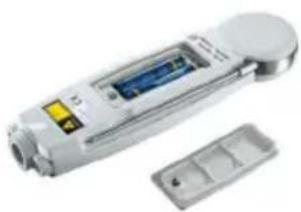
1 Use a slotted screwdriver to undo the screw on the battery compartment.
2 Open the battery compartment.
3 Insert batteries (2x type AAA). Observe the polarity!
4 Close the battery compartment.
5 Tighten the screw.
9.2 Cleaning the instrument
Only use weak, commercially available neutral/household cleaning agents (e.g. washing-up liquid) to clean the instrument. Do not use aggressive cleaning agents or solvent!
The housing and probe can be disinfected using an alcohol-based spray. In doing so, always follow the manufacturer's instructions.
▶ Clean the housing and probe under running water and rub dry with a towel.
▶ Clean the lens carefully with a cotton bud dipped in water or medical alcohol.
10. Questions and answers
| Question Possible causes Possible solution | ||
| lights up Low battery Change batteries. | ||
| IR measurement: Measuring values Keep to permissible--- lights up. outside measuring range measuring range. | ||
| Contact measurement: Valores de mediciónonde lights. outside permissible range Keep to measuringrange. | ||
| Instrument cannotBatteries dead. Change batteries.be switched on | ||
| Instrumentswitches itself off.Instrument switches offt automatically after 10 minin contact measurement modeand after 1 min after switchingon in IR measurement mode. |
If we have not been able to answer your question, please contact your local dealer or Testo Customer Service. For contact details, please visit www.testo.com/service-contact.
11. Information on infrared (IR) measurement
11.1 Measuring method
IR measurement is a visual measurement
▶ Keep lens clean.
▶ Do not carry out measurement with a foggy lens.
- Keep the measuring range (the range between the instrument and the measurement object) free of obstacles. There must be no particles of dust or dirt, no humidity (rain, steam) and no gases.
IR measurement is a surface measurement
If there is dirt, dust, frost, etc. on the surface, only the outermost layer is measured, i.e. the dirt.
For vacuum-packed food, do not measure at air pockets.
Where the values are critical, always measure separately with a contact thermometer. Particularly in the food sector: measure core temperature with a penetration/immersion thermometer.
Adjustment time
If the ambient temperature changes (change of location, e.g. measurement indoors/outdoors), the instrument must be allowed to equalise for 15 minutes for infrared measurement.
11.2 Emissivity
Materials have different emission levels. This means they emit various amounts of electromagnetic radiation. The emission level of the instrument has a default setting of 0.95. This is ideal for the measurement of food, non-metals (paper, ceramic, gypsum, wood, paints and varnishes) and plastics.
- Information on contact measurement18
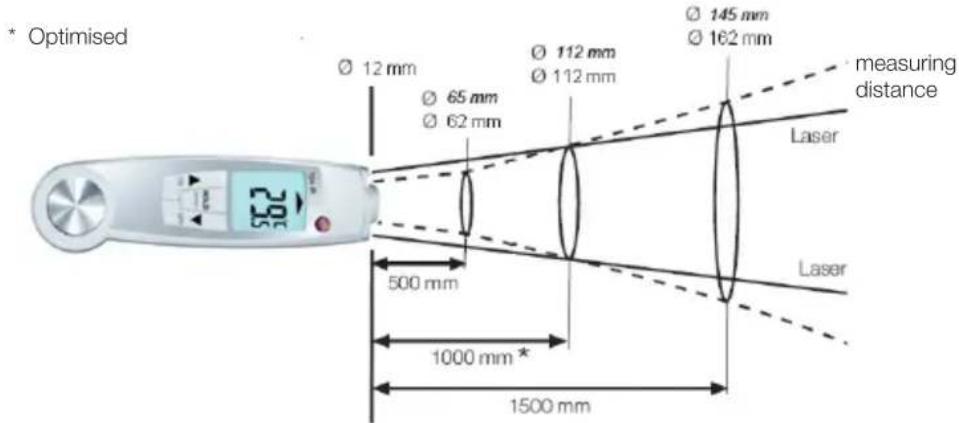
11.3 Measuring range, distance
Depending on the distance of the measuring instrument from the measurement object, a specific measuring range is recorded.
Measuring lens (ratio of distance : measuring range)
In italics = laser
Not in italics = measuring range
12. Information on contact measurement
▶ Observe the minimum penetration depth for immersion/penetration probes:
10x probe diameter
- Avoid using in aggressive acids or alkalis.
Omgeving: E (transporteerbare thermometer)
nauwkeurigheidsklasse: 0,5
Meetbereik: -50...+250 °C
Nanshan District, Shenzhen, People republic of China

- SAFETY INFORMATION
- AVOID ELECTRICAL HAZARDS
- ADHERE TO THE PRODUCT SAFETY/WARRANTY REQUIREMENTS
- ENSURE CORRECT DISPOSAL
- INTENDED USE
- TECHNICAL DATA12
- TECHNICAL DATA
- INFORMATION ON STANDARDS
- PRODUCT DESCRIPTION
- COMMISSIONING
- INSERTING BATTERIES
- OPERATION
- 7.1 SWITCHING ON/OFF
- SWITCHING ON VIA FOLD-OUT PROBE
- SWITCHING ON/OFF VIA CONTROL KEYS
- 7.2 CHANGING THE MEASURING MODE
- 7.3 MEASURING
- IR MEASUREMENT
- CONTACT MEASUREMENT
- SETTINGS
- SERVICE AND MAINTENANCE
- 9.1 CHANGING THE BATTERIES
- 9.2 CLEANING THE INSTRUMENT
- QUESTIONS AND ANSWERS
- INFORMATION ON INFRARED (IR) MEASUREMENT
- 11.1 MEASURING METHOD
- IR MEASUREMENT IS A VISUAL MEASUREMENT
- IR MEASUREMENT IS A SURFACE MEASUREMENT
- ADJUSTMENT TIME
- 11.2 EMISSIVITY
- 11.3 MEASURING RANGE, DISTANCE
- INFORMATION ON CONTACT MEASUREMENT
Brand : Testo
Model : 270
Category : Thermometer